WhatsApp Automation for Travel Agencies - 2026 Guide

Discuss with AI
Get instant insights and ask questions about this topic with AI assistants.
💡 Pro tip: All options include context about this blog post. Feel free to modify the prompt to ask more specific questions!
Travel agencies using WhatsApp automation can respond instantly to every lead (24/7), send booking confirmations and itineraries directly to travelers' phones, and handle common questions without hiring more staff. The result? More bookings, happier clients, and a team that focuses on high-value work instead of answering "What's your cancellation policy?" for the hundredth time.
Your customer just messaged you at 11 PM asking about a Bali package for next month. Without automation, that lead sits cold until tomorrow morning when your team gets in. With WhatsApp automation, they get instant answers, preliminary options, and captured contact details while the excitement is fresh.
Travel happens in real time. Flight delays, last-minute bookings, visa deadlines, and "I forgot my passport" panics don't wait for business hours. Your travelers are already on WhatsApp (it's where they chat with everyone). The question isn't whether to use it. The question is how to use it well.
Why WhatsApp Automation Works for Travel Agencies
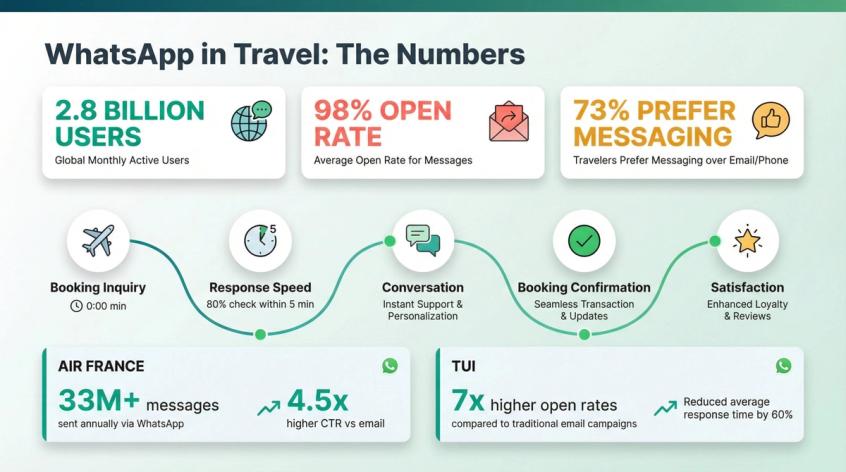
The numbers tell a clear story. WhatsApp has 2.8 billion users worldwide, spanning 180+ countries. Nearly 73% of consumers prefer messaging over phone calls when making travel reservations. Among Gen Z travelers, that number jumps to 90%.
But the real magic is in the engagement. WhatsApp messages get 98% open rates, compared to roughly 20% for email. When you send a booking confirmation or flight update via WhatsApp, people actually see it. Over 80% of users check WhatsApp notifications within 5 minutes.
Travel is high-emotion and time-sensitive. People are excited (honeymoon!) or anxious (will the visa come through?). They want reassurance fast. WhatsApp automation reduces latency and reduces mistakes by turning your agency into a concierge that's always available.
Air France reported exchanging 33+ million messages in a year through WhatsApp, with 4.5x higher click-through on newsletter messages versus email. TUI saw up to 7x higher open rates for WhatsApp messages compared to email in the Netherlands.
The pattern is clear: in travel, messaging isn't a side channel. It's the journey.
9 Essential WhatsApp Automations for Travel Agencies
Let me walk you through the workflows that pay for themselves fastest. Set these up in order.
How to Capture and Qualify Travel Leads on WhatsApp
Your goal: capture the minimum data needed to quote correctly, fast.
Where leads come from:
→ Click-to-WhatsApp ads on Facebook and Instagram
→ Website chat widget that hands off to WhatsApp
→ Instagram DM automation or comment-to-DM (then move to WhatsApp for documents and payments)
→ Google Business profile or QR code in your office
What to capture (minimum viable):
• Destination(s)
• Travel dates (or date range)
• Departure city
• Number of travelers (adults/children)
• Budget band
• Hotel preference (3/4/5 star)
• Trip type (honeymoon, family, group, business)
• Passport ready? (yes/no)
How the automation works:
Greet them and set expectations ("2 minutes to get you options"). Ask 6-8 questions using buttons instead of making them type essays. Auto-tag the lead based on destination, month, and budget. Assign to the right team (domestic vs international, visa vs packages).
If the lead is hot (travel under 14 days, or high budget), alert an agent immediately.
The 72-hour free entry point for Click-to-WhatsApp ads lets you have real conversations without being forced into template-only behavior right away. Use this window wisely.
How to Send Instant Travel Quotes on WhatsApp
Once qualification is complete, generate a quote in a repeatable format so every agent doesn't reinvent the wheel.
Send "here are 3 options" (good, better, best). Each option includes:
• Price (all-in, per person, total)
• Inclusions (flights, hotels, transfers, tours)
• Exclusions (what's NOT covered)
• Cancellation policy summary
• Next step (book now, customize, questions?)
Store the quote as a structured record (quote_id, package_id, price, expiry time, stage), not just chat text.
Pro tip: Quote automation should propose, not promise. Always include "price valid until ___", "subject to availability", and "final confirmation after payment and supplier confirmation".
How to Collect Payments Through WhatsApp Automation
Get commitment before your agent spends two hours on custom work.
- If quote accepted, send payment link (Stripe, Razorpay, etc.)
- Once paid, confirm receipt and send next steps plus document checklist
- If unpaid for 2 hours, send gentle reminder
- If unpaid for 24 hours: "should I hold or release availability?"
How to Automate Travel Document Collection on WhatsApp
Stop chasing passports and visa documents manually.
The workflow:
✓ Send numbered checklist
✓ Let users upload documents in chat (PDF/JPG)
✓ After each upload, confirm receipt and what's next
✓ If documents missing near deadline, escalate to human and send reminder
Important: WhatsApp's business messaging policy explicitly warns against asking users to share sensitive identifiers like full payment card numbers or personal ID numbers. Build your process so customers upload documents only when needed and through safe methods.
How to Send Booking Confirmations and Itineraries on WhatsApp
Reduce anxiety and reduce "please confirm" messages.
When booking is confirmed, send everything the traveler needs in one thread:
• Booking summary
• PNR/reservation code (if applicable)
• Hotel confirmation
• Voucher(s)
• Emergency contact information
Everything lives in their WhatsApp chat, accessible anytime.
How to Automate Pre-Trip Travel Reminders
Fewer no-shows, fewer airport panics.
Timed automations:
• T-7 days: Final payment reminder and document check
• T-48 hours: Check-in reminder, baggage rules, and pickup reconfirmation
• T-12 hours: Pickup driver details, meeting point, and "reply 1 to confirm"
Sending WhatsApp booking reminders reduces no-shows for agencies while ensuring travelers have the information they need.
How to Handle Travel Disruptions with WhatsApp Automation
Triage intent immediately:
• "delay" → Flight status workflow
• "cancel" → Cancellation policy and refund process
• "driver" → Driver details and tracking
• "hotel" → Hotel voucher and contact
• "refund" → Escalate to human
For delays, ask for PNR and last known status, then route to the right queue. Give instant "we're on it" message plus expected response time.
Escalate to human for anything involving refunds, cancellations, or medical emergencies.
How to Collect Travel Reviews on WhatsApp After Trips
Turn happy travelers into compounding growth.
Day after return:
- Send 2-question CSAT survey plus "what went wrong?"
- If positive, ask for Google review and referral
- If negative, open support ticket and schedule follow-up call
How to Send Travel Promotions That Don't Feel Like Spam
Segment by:
• Last destination
• Last travel month
• Budget band
• Family versus couple
Send small, relevant campaigns (not blasts). Use opt-out keywords ("reply STOP for deals") and honor it.
Marketing templates are the easiest way to trigger per-user limits and delivery failures. Providers documented limits like 2 marketing templates per 24 hours unless the user responds. Treat them like a sniper rifle, not a machine gun.
How WhatsApp Business Automation Works in 2026
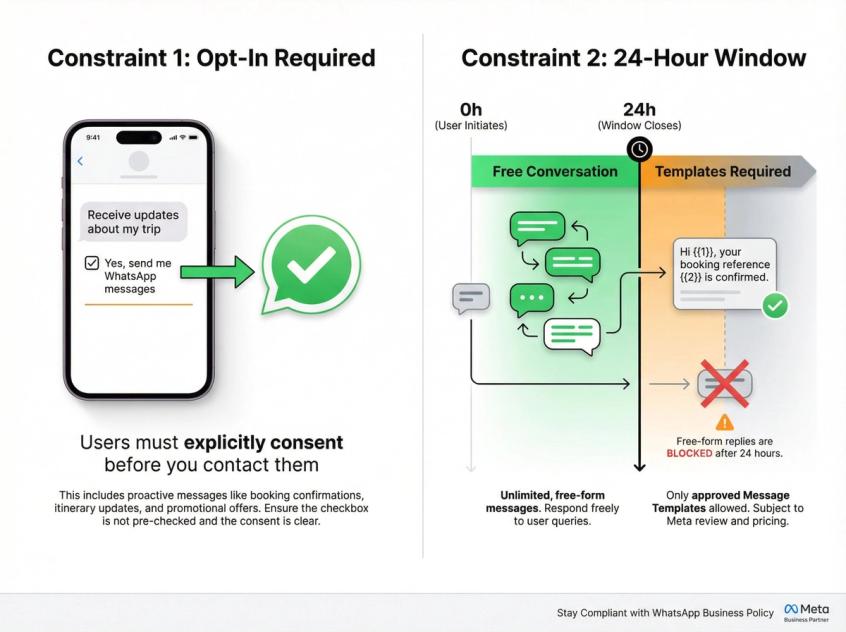
WhatsApp business messaging has two hard constraints that shape everything:
1. Opt-in is mandatory
You may only contact people if they gave you their number AND opted in to receive messages or calls.
2. Templates are required outside the 24-hour window
You can reply freely within a 24-hour customer service window after the last user message. Outside that window, you can only message using approved templates.
If you ignore these, your automation will fail in production, even if it "worked in testing".
WhatsApp Automation Pricing for Travel Agencies 2026
What changed (and why your old cost math is wrong):
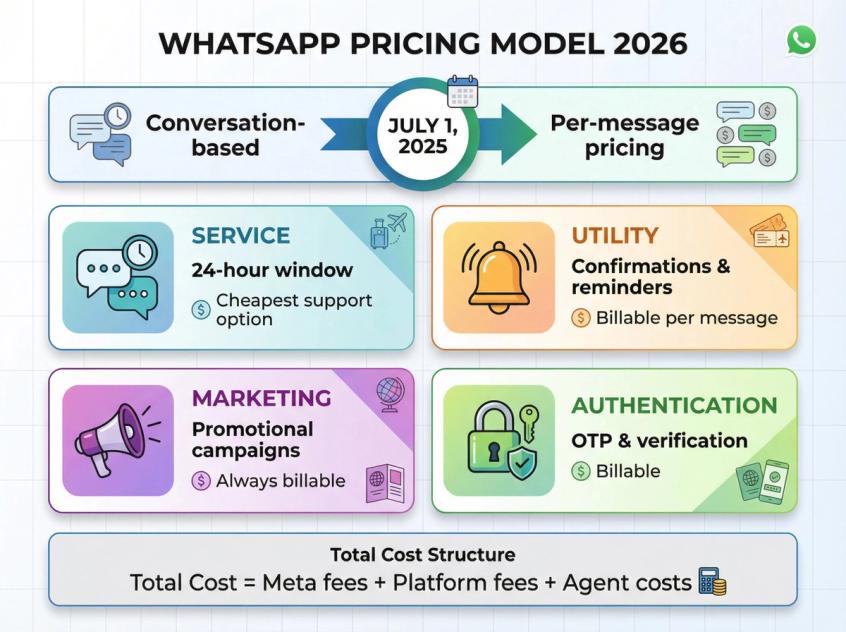
As of July 1, 2025, WhatsApp moved from conversation-based billing to per-template-message pricing (charged when delivered).
Today, the official pricing model is:
• Charged per delivered message, not per conversation
• Pricing depends on recipient's country code plus message category
• Categories: Marketing, Utility, Authentication, Service
Meta can update pricing on quarter boundaries (Jan 1, Apr 1, Jul 1, Oct 1), so treat any number as time-bound.
What's free versus paid (practically):
| Category | When It's Used | Cost Model |
|---|---|---|
| Service | User messages you, replies inside 24-hour window | Cheapest way to handle support |
| Utility | Confirmations, reminders, updates | Commonly used, billable |
| Marketing | Promotional campaigns | Billable even in service windows |
| Authentication | OTP, verification | Billable |
| Click-to-WhatsApp ads | Messages opened via ads | 72-hour free entry point |
The cost model (use this, not vibes):
Total monthly WhatsApp cost ≈ (Meta template fees) + (BSP/platform fees) + (agent seats/inbox costs)
The biggest cost lever isn't negotiating message rates. It's designing flows that keep support inside the 24-hour window, use free-form replies when allowed, and reserve templates for true outbound needs. Learn more about WhatsApp Business API pricing.
How to Avoid WhatsApp Business Restrictions and Bans
WhatsApp will happily let you build and then quietly block deliveries if you behave like spam. Bake these into your system from day one:
Opt-in and opt-out you can prove:
Record where opt-in came from (ad form, website checkbox, QR, inbound "hi"). Store timestamp, channel, and consent text shown.
Support opt-out: "stop", "unsubscribe", "no promos". Honor opt-out immediately (policy requires respecting requests to discontinue).
Always provide human escalation path:
WhatsApp explicitly requires prompt, clear escalation paths when you use automation in the customer service window (human handoff, phone, email).
Treat marketing like a privilege, not a right:
Send one strong, relevant offer. Ask a question that invites reply. Once the user replies, move to free-form conversation.
Never ask for sensitive financial info in chat:
Policy explicitly warns against requesting full payment card numbers or sensitive identifiers. Use payment links and secure portals.
Can Travel Agencies Use AI on WhatsApp? Rules and Best Practices
AI is massively useful in travel (FAQ, itinerary questions, triage). But WhatsApp tightened terms for AI providers.
The WhatsApp Business Solution Terms were last modified January 15, 2026, and they include restrictions aimed at AI providers making general-purpose AI the primary functionality on the platform.
What this means for a travel agency (plain English):
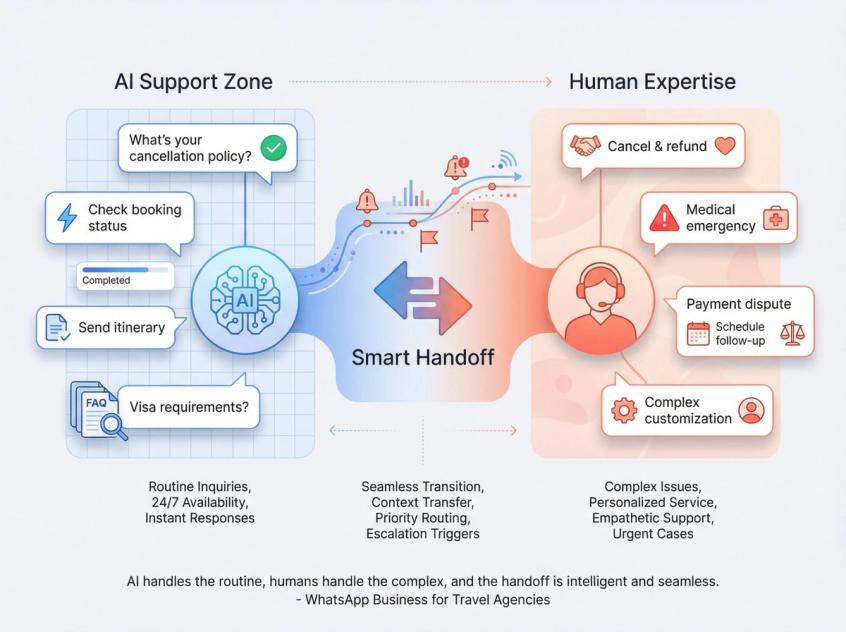
Use AI to support your travel business (answer travel FAQs, collect trip details, check booking status). Don't use WhatsApp as a distribution channel for a general-purpose chatbot product.
Make sure your vendor's data handling matches the "no training on my customer messages" expectation.
Best-practice AI design for travel:
Constrain AI to your knowledge sources (policies, packages, cancellation rules, visa checklists). Add tool/action calls (fetch booking status, create quote draft, generate itinerary PDF).
Keep a hard "handoff to human" rule for cancellations/refunds, medical emergencies, payment disputes, and anything the AI is uncertain about.
Ready-to-Use WhatsApp Automation Workflows for Travel
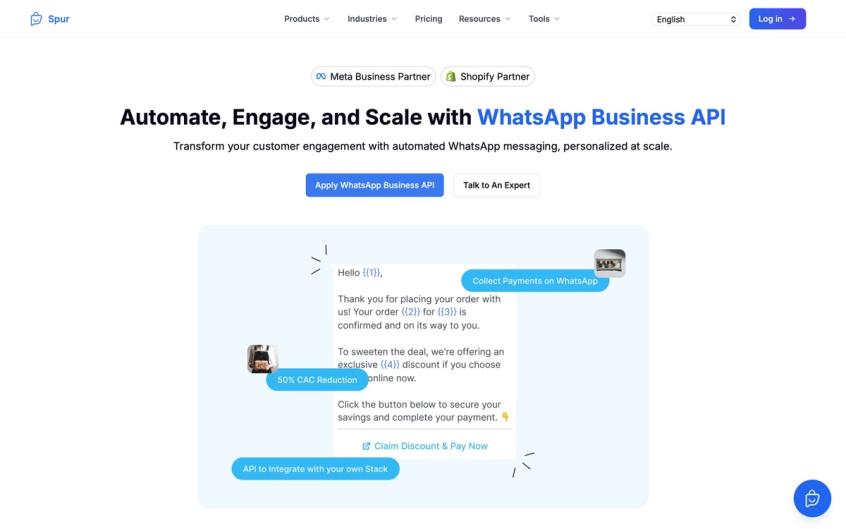
For travel agencies specifically, Spur's WhatsApp Business API provides these exact automation capabilities out of the box:
How to Convert WhatsApp Ad Clicks Into Qualified Travel Leads
Trigger: new chat from Click-to-WhatsApp ad
Logic:
- Message: "hey! quick 6 questions so I can send the right options. takes 60 seconds."
- Capture destination (buttons)
- Capture dates (ask range)
- Capture pax
- Capture budget band
- Capture departure city
- Capture trip type
- Tag lead and create CRM record
- Assign: if travel under 14 days, priority queue; else standard queue
- Notify agent with summary
How to Follow Up on Travel Quotes Without Being Pushy
Trigger: quote sent, no reply after 2 hours
Logic: send follow-up: "want me to hold option B for you? prices can change fast. reply 1 = hold, 2 = change dates, 3 = cheaper options."
Goal: get a reply (opens your ability to continue naturally).
How to Track Travel Document Collection in Real-Time
Trigger: booking confirmed
Logic:
- Send checklist
- Ask user to upload each doc one by one
- After each upload: confirm receipt plus what's next
- If missing T-7 days: reminder plus escalate to human
Guardrail: do not ask for forbidden sensitive identifiers.
How to Handle In-Trip Travel Emergencies on WhatsApp
Trigger: inbound message with keywords ("delay", "cancel", "driver", "hotel")
Logic:
- Classify issue
- Ask for booking ID/PNR
- Provide immediate reassurance plus ETA
- Route to correct team
- If no agent reply in 10 minutes, auto-escalate to on-call
WhatsApp Message Templates for Travel Agencies (Copy-Paste)
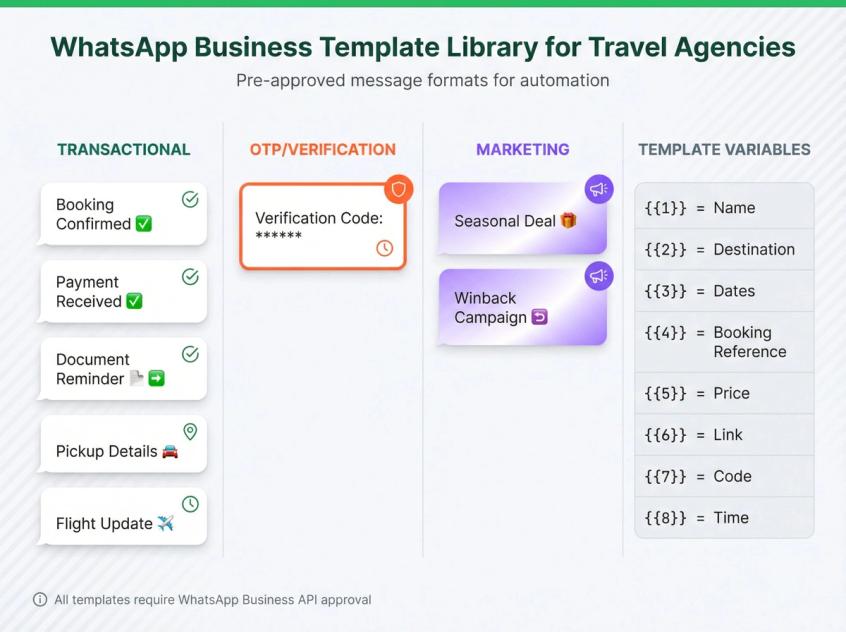
Below are templates written to be approval-friendly: specific, non-spammy, clear intent. You'll still need to submit templates for approval in your WhatsApp Manager/provider.
Transactional WhatsApp Templates for Travel Bookings
1. Booking Confirmation
hi {{1}}, your booking is confirmed ✅
trip: {{2}}
dates: {{3}}
travelers: {{4}}
total: {{5}}
reply 'itinerary' to get your full plan.
2. Payment Received
payment received ✅ for booking {{1}}. next step: please share passport copies for all travelers. reply 'docs' for the checklist.
3. Document Reminder
reminder: we still need {{1}} to proceed with your booking. please upload it here, or reply 'help' to talk to an agent.
4. Pickup Details
pickup confirmed ✅
date/time: {{1}}
driver: {{2}}
vehicle: {{3}}
meeting point: {{4}}
reply '1' to confirm you've seen this.
5. Flight Update
update for flight {{1}}: {{2}}. if you need help, reply 'agent'.
WhatsApp OTP and Verification Templates
6. OTP
your verification code is {{1}}. it expires in 5 minutes. do not share this code with anyone.
WhatsApp Marketing Templates for Travel Promotions
7. Seasonal Deal with Opt-Out
hi {{1}}, we have a limited-time deal for {{2}} in {{3}} (starting {{4}}). want details? reply 'yes'.
reply 'stop' to opt out of deals.
8. Winback
still planning your trip to {{1}}? I can share 3 updated options for your dates. reply 'send'.
How to Choose WhatsApp Automation Software for Travel
Most "WhatsApp automation" articles stop at "use a chatbot". That's not the hard part. The hard part is automation plus collaboration plus integrations plus compliance.
Your shortlist should be judged on:
1. Shared inbox and assignment rules
Travel is team-based. You need routing by destination, language, and stage.
2. Automation builder that can call external systems
Webhooks/HTTP actions so you can create/update CRM records, fetch booking status, generate itinerary PDF, and send payment links.
3. Template management and library
You want reuse and faster setup.
4. Multi-channel (optional but real)
Travel leads don't live only on WhatsApp. They come from Instagram DMs, website chat, etc.
5. Clear data stance for AI
Because of January 15, 2026 terms and training restrictions, you want a vendor that is explicit about what happens to message data.
WhatsApp Automation Tools: What Most Platforms Miss
Most tools in the messaging automation space offer similar features on the surface. What separates truly effective platforms is the depth of integration with travel-specific workflows, proper compliance handling, and real automation flexibility that goes beyond basic templates.
What most competitors miss: real "how to wire it" integration patterns, a cost model that matches post-July-2025 pricing, and travel-specific data model plus handoff rules plus disruption playbooks.
That's why this guide is heavy on workflows, not hype.
WhatsApp Automation Platform for Travel Agencies
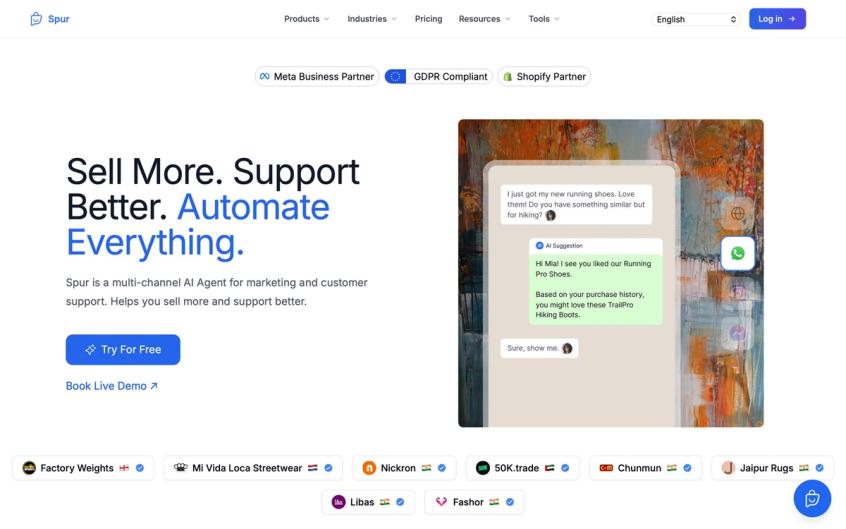
If you want one stack to automate WhatsApp plus Instagram plus website chat, run lead capture and campaigns, route to humans in a shared inbox, and add AI agents trained on your own knowledge, that's exactly the product direction we're positioned around.
Spur offers WhatsApp Business API with no-code automation builders, shared inbox for team collaboration, and AI agents you can train on your travel knowledge base. We're an official Meta Business Partner, which means we handle compliance, template approval, and account setup properly.
For travel agencies specifically, we've built features like:
• Click-to-WhatsApp ad capture with automatic lead qualification
• Broadcast messaging for targeted promotions (segment by past destination, budget, trip type)
• Drip campaigns for pre-trip reminders and post-trip follow-ups
• Integration with booking systems and CRMs
• Multi-agent inbox with smart routing and assignment rules
We publish travel/hospitality positioning and practical WhatsApp flows resources you can use during implementation.
Our AI agents are different from basic FAQ bots. They can take actions: fetch booking status, create quote drafts, update customer records, and more. You train them on your specific policies, packages, and cancellation rules. When they don't know something or detect a complex issue, they seamlessly hand off to your human team with full context.
We also handle the boring but critical stuff: template approval workflows, compliance monitoring, and keeping your account in good standing with WhatsApp's quality standards.
Use whichever platform you choose. The playbook above still applies. But if you want to see how Spur handles these exact travel workflows, book a demo and we'll walk you through it with your specific use cases.
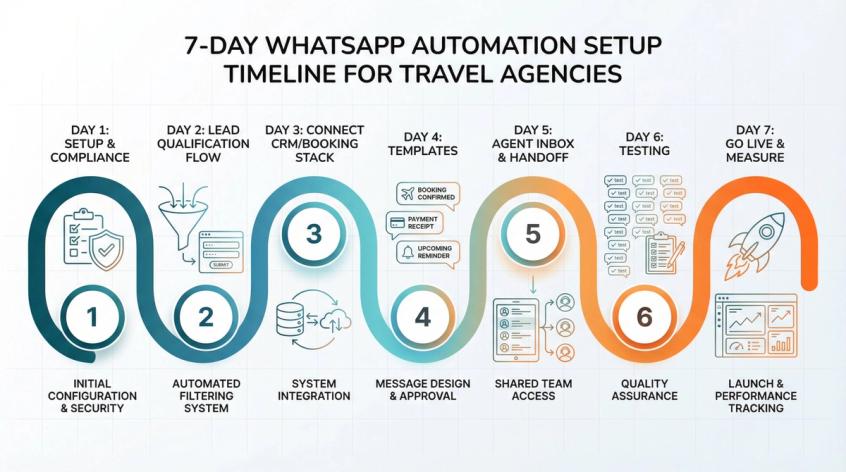
How to Launch WhatsApp Automation in 7 Days
How to Launch WhatsApp Automation in 7 Days
Day 1: Setup and Compliance
Define opt-in points (ads, website, QR). Define categories you'll message (updates vs promos). Write opt-out copy and train team.
Day 2: Build Lead Qualification Flow
Capture fields, routing, and tagging.
Day 3: Connect CRM/Booking Stack
Even if it's Google Sheets first, make it structured.
Day 4: Templates
Booking confirmation, payment, document reminder, pickup details.
Day 5: Agent Inbox and Handoff
Assignment rules plus escalation path (policy requires it).
Day 6: Testing
Run 50 test chats end-to-end. Log every failure reason and patch.
Day 7: Go Live and Measure
Track response time, quote rate, booking rate, CSAT.
WhatsApp Automation for Travel Agencies: FAQ
WhatsApp Automation for Travel Agencies: FAQ
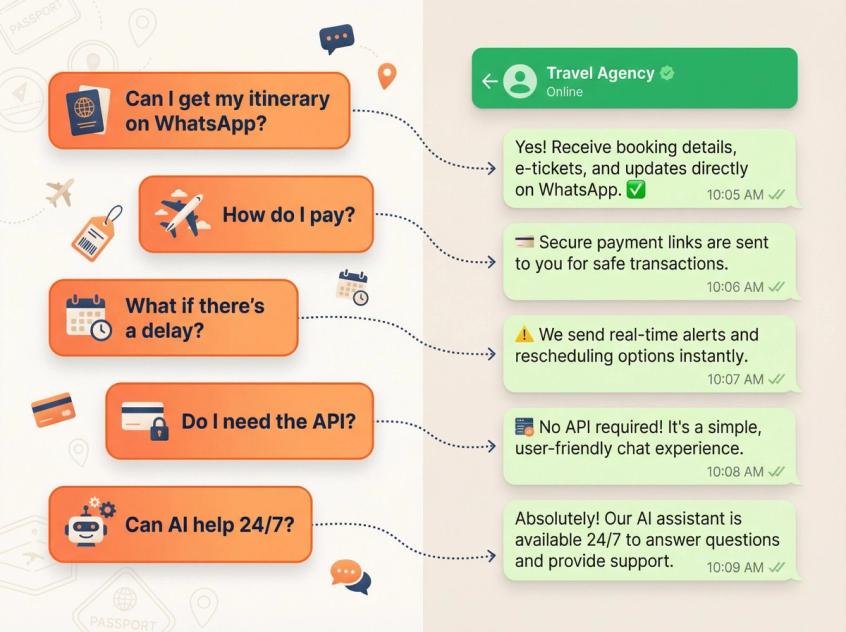
Can a travel agency send itineraries and vouchers on WhatsApp?
Yes. Travel companies commonly use WhatsApp for utility-style updates like boarding passes and flight info. Air France describes using utility messages for boarding passes and flight updates.
Do I need WhatsApp Business API, or is the free Business App enough?
If you have multiple agents, need integrations, want automation, or want reliable scaling, you'll end up on the WhatsApp Business API platform. The Business App is fine for very small volumes, but it's not built for workflow, attribution, and team routing.
How much does WhatsApp automation cost in 2026?
It's not one number. It's per-template message fees (market plus category) plus your provider/platform cost. Since July 1, 2025 it's per-template-message pricing, not conversation-based. Learn more about WhatsApp pricing.
Always re-check rate cards because Meta can update pricing quarterly.
Will WhatsApp block my marketing messages?
It can, especially if you spam or ignore opt-in. The fix is segmentation, fewer but better messages, and asking for a reply. Read our guide on WhatsApp marketing best practices.
Can I use AI on WhatsApp for travel support?
Yes, but do it in a constrained, business-use way (FAQ/triage/booking help), not as a general-purpose AI distribution channel. Ensure your setup respects the January 15, 2026 terms on AI and data usage.
What happens if a customer has an emergency during their trip?
Make it clear to clients that they can reach your 24/7 WhatsApp support in an emergency. Your automation can at least acknowledge and gather info while alerting a human agent to step in. Being available on WhatsApp during crises can significantly salvage a client's perception.
How to Handle Multiple Languages on WhatsApp for Travel
WhatsApp supports 40+ languages for messaging. An AI chatbot can be trained in multiple languages to assist travelers from different regions. This is a huge advantage over phone support.
Can I collect payments through WhatsApp?
You can send secure payment links via WhatsApp. In regions where available (like India), you can use features like WhatsApp Pay for UPI transactions. Automated reminders can follow up on pending payments. Learn about payment integrations.
What Happens When WhatsApp AI Doesn't Understand a Question?
Plan for this by defining rules: if the bot gets asked something outside its knowledge base or if the user types "agent" or "help", the conversation should transfer to a human agent seamlessly. Learn about chatbot best practices.
How to Measure WhatsApp Automation Success for Travel
Track three numbers weekly: median first response time, quote-to-booking conversion, and cost per booking (messaging plus platform plus labor). Explore customer service performance indicators.
5 Things Elite Travel Agencies Do With WhatsApp Automation
Most agencies never do these five things:
1. Treat chat like a funnel
Every message should either reduce uncertainty or move the customer one step forward.
2. Build a travel data model
Don't let your CRM be "random chat history". Store fields, stages, timestamps, and outcomes. Integrate WhatsApp with your CRM.
3. Design for disruptions
Your best marketing is how you behave when things go wrong.
4. Optimize for replies, not broadcasts
Replies keep you inside the window, unlock free-form conversation, and reduce template dependence.
5. Measure what matters
Median first response time, quote-to-booking conversion, cost per booking.
Why Travel Agencies Need WhatsApp Automation in 2026
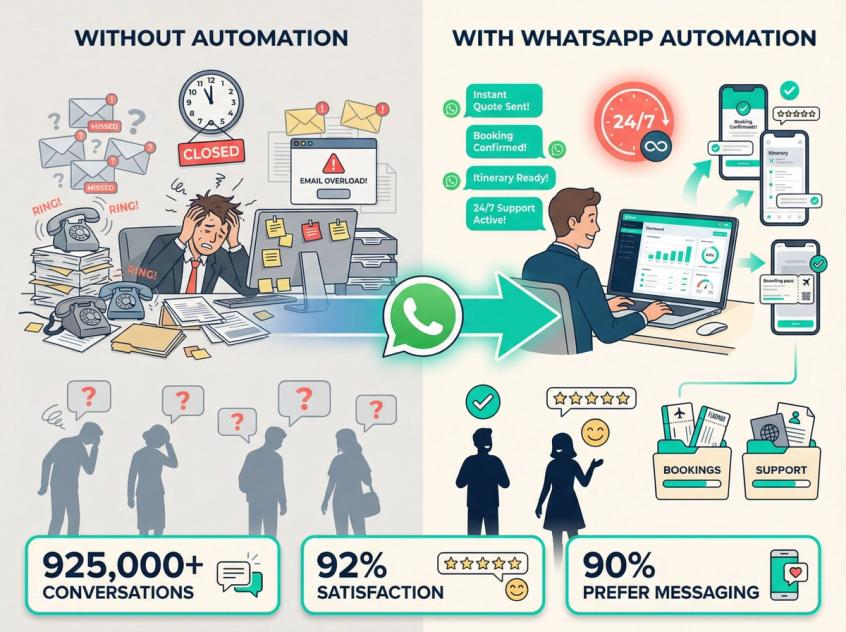
WhatsApp automation directly addresses the core challenges travel agencies face today. Travelers want immediacy, personalization, and convenience. They're overwhelmed by information, yet expect quick expert guidance. They're mobile-savvy and message-driven, not email-bound.
By embracing WhatsApp automation, your agency says: "We're here for you, wherever and whenever you need us."
The payoff is tremendous. You'll nurture more leads into bookings thanks to instant engagement. You'll save countless hours by automating customer service. You'll impress customers with proactive service.
Delta Airlines handled 925,000+ conversations via AI on messaging in one year with a 92% customer satisfaction score. While your agency may not be Delta, the principle holds: messaging plus automation equals scalable, high-quality service.
As we head into 2026 and beyond, adopting these tools is moving from competitive advantage to necessity. With 90% of young Americans preferring to message travel companies, the future of travel will be dominated by brands that adopt and scale messaging experiences for sales, marketing, and customer care.
The good news: you don't need a Fortune 500 IT budget to do it. Solutions like Spur make it accessible even to small and mid-sized agencies, with visual flow builders, template libraries, and integration options that cut down implementation time.
WhatsApp automation empowers travel agencies to deliver fast, personalized, round-the-clock service in the most frictionless way possible. It's like having a supercharged travel agent that can text every client at once, or a dozen extra hands answering questions, all for a fraction of the usual cost.
By following the strategies in this guide (from capturing leads, to smooth bookings, timely updates, instant support, and thoughtful follow-ups), you can elevate your customer experience to new heights.
The agencies that embrace these tools will win the hearts (and trips) of tomorrow's travelers. Those that don't risk being left on read.
Ready to turn those WhatsApp chats into bookings and loyal fans? Explore our WhatsApp automation platform for travel agencies and see how we can help you launch in days, not months.