Key takeaways
- Pick a Shopify chat app based on where customers message you. For website-only chat, start with Shopify Inbox or Tidio.
- If customers message you on WhatsApp and Instagram, use a multi-channel platform that puts every channel in one inbox, such as Spur.
- Shopify Inbox is Shopify's own free live chat app, with no monthly fee and no conversation limits.
- Test whether a chat app can take real store actions, like checking order status, or only answer questions.
- Compare total cost at your real volume, since apps charge per seat, per ticket or conversation, per contact or per AI use.
Ask an AI about this article
The right choice depends on where your customers actually talk to you: if it's just your website, start with Shopify Inbox or Tidio. If they're sliding into your Instagram DMs and hitting you up on WhatsApp, you need a multi-channel platform like Spur that unifies messaging channels with AI that actually takes actions.
Either way, chat can boost conversion rates by double digits and cut support load in half, but only if you implement it right.
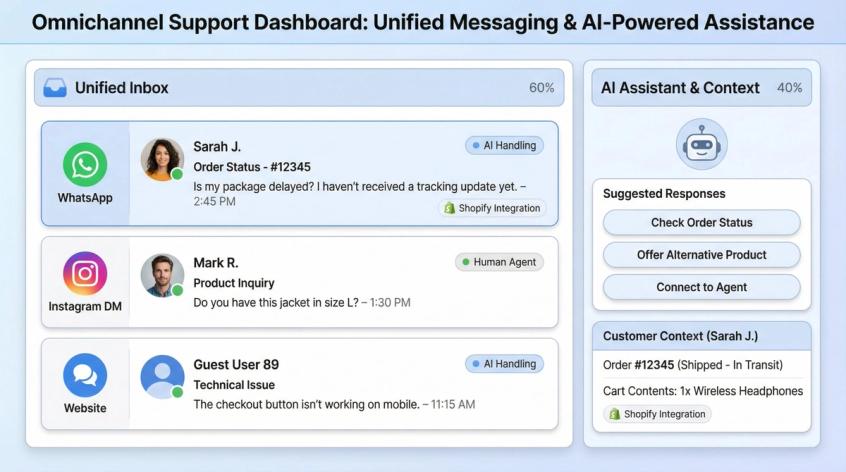
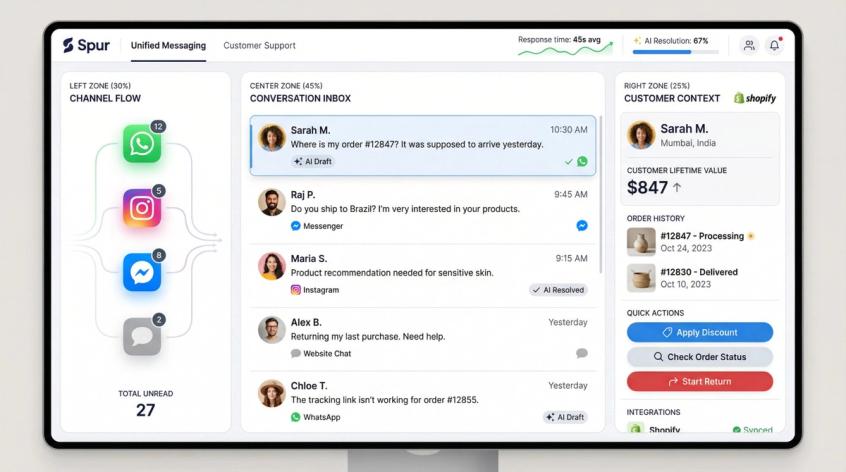
This is what a truly unified messaging platform looks like. Instead of juggling multiple apps and losing context, everything flows into one shared workspace where your team can respond across channels without switching tabs.
Why Shopify Stores Need Live Chat Apps
When you search "best Shopify chat apps," you're probably not thinking "I need another widget on my site." You're thinking about one of these real problems:
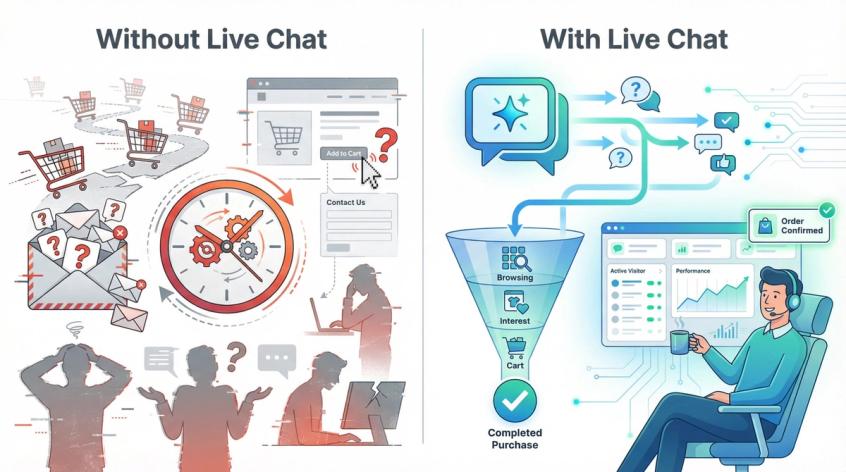
You're losing sales to unanswered questions.
Someone's hovering over the "Add to Cart" button, wondering if the dress comes in petite sizes, whether you ship to their country by Friday, or if those shoes run small. They don't want to wait 12 hours for an email response. They want an answer now, and if they don't get one, they're gone. Shopify's own data shows that 70% of chat conversations happen while customers are in the middle of making a purchase decision, right when quick answers turn browsers into buyers.
You're drowning in repetitive support questions.
Your inbox is full of "Where's my order?", "What's your return policy?", and "Do you take Afterpay?" for the hundredth time this week. These aren't complex issues. They're information retrieval problems that a well-configured chat system can handle instantly without touching your team.
Your customers expect real-time help.
Live chat isn't a nice-to-have anymore. It's table stakes. Modern shoppers are conditioned to see that chat icon and know help is one click away. The store that responds in seconds beats the one that doesn't respond until tomorrow, even if the product is identical.
Chat apps solve all three of these at once. Done right, they're conversion engines that also happen to reduce support load.
What to Look For in Shopify Chat Software
Not all chat solutions are created equal, and the feature lists can be overwhelming. What actually matters when evaluating Shopify chat apps:
Shopify Integration Features That Matter
The best chat apps plug directly into your Shopify backend data. This means seeing a customer's cart contents, order history, and browsing behavior right in the chat window.
Context is everything. If your agent or AI can immediately know what a shopper has looked at or purchased, the support becomes instantly more personal and useful. Integration also enables actions like issuing refunds, editing orders, or checking inventory directly from the chat interface. A basic chat widget without Shopify awareness will feel blind by comparison.
AI Chatbot Capabilities for Shopify
2026's standout apps come with built-in AI chatbots or assistants, but there's a massive quality gap. Some "AI chatbots" are glorified decision trees with scripted FAQs. More advanced ones use large language models to answer questions in natural language. The truly powerful ones, what we call "actionable AI," can actually do things: check order status, apply discount codes, update shipping addresses, or initiate returns. They don't just talk, they take actions.
Pay attention to whether the AI can train on your own knowledge base or past support tickets, so it speaks in your brand's voice and knows your specific policies. And make sure it can handle custom actions by connecting to your backend systems, not just spit out generic text.
User-Friendly vs Advanced Chat Tools
Consider your team's technical capacity. Some solutions are plug-and-play. You can be live in minutes with zero coding (Shopify Inbox can be enabled with a few clicks). Others offer powerful workflow builders and deep integrations but come with a learning curve.
If your team found tools like UChat overwhelming with their countless options, lean toward more user-friendly apps. If you need sophisticated automation and have bandwidth to customize, embrace the flexibility.
Multi-Channel Chat vs Website-Only Options
Think about where your customers actually reach out. Is it only on your website? Or do you also get DMs on Instagram, messages on Facebook Messenger, or inquiries via WhatsApp? Some chat apps are omnichannel, unifying multiple platforms into one inbox. Others focus purely on website live chat.
Deciding whether you need multi-channel coverage is critical. If most of your support happens in Instagram DMs because that's where your audience hangs out, a website-only chat widget won't solve your problem. Conversely, if you're purely website-focused, paying for unused channel integrations is wasteful. Match the tool to where your conversations actually happen.
Can Your Chat App Take Real Actions?
One question separates great chat apps from mediocre ones: Can the bot do real store actions, or does it only talk?
Actions that actually matter:
- Track order status without human intervention
- Start a return or exchange flow
- Edit address or cancel order (with appropriate guardrails)
- Recommend products using real inventory and variant data
- Trigger abandoned cart follow-ups in the right channel
Tools like Spur explicitly position around AI trained on your knowledge base plus "custom AI actions" that can execute these workflows. Tidio's Lyro plan references "native Shopify actions." Gorgias positions its AI agent plus ecommerce workflows. If a chatbot can only answer questions but can't do anything, it's just a fancy FAQ, still useful, but not transformative.
Shopify Chat App Pricing Models Explained
Get a handle on the pricing model. It varies wildly and can shock you as you scale. Some apps charge per agent/seat, others per conversation or ticket, others by contacts or AI usage. For example:
- Gorgias uses ticket-based pricing (you pay as volume grows, not just team size)
- Tidio has a modular model where chat, chatbot flows, and AI each have usage limits
- Spur doesn't limit by contacts. You pay for platform and AI credits, not per conversation
What seems cheap with 100 chats might be expensive at 1,000 chats. Look for pricing transparency and understand what drives costs. The best apps won't punish you for success. The more you use them, the more value you should get, not just higher bills.
Best Shopify Chat App Quick Picks
If you just want the fast answer:
| Your Goal | Recommended Tool |
|---|---|
| Simplest free starter (website chat only) | Shopify Inbox |
| WhatsApp + Instagram + website + AI in one stack | Spur Live Chat |
| Best all-around live chat + AI at SMB pricing | Tidio |
| Shopify-first helpdesk that scales with tickets | Gorgias |
| AI-first self-service portal + omnichannel | Richpanel |
| Pure live chat with sales focus | LiveChat |
| Enterprise workflows (and have the budget) | Zendesk |
| Premium product experience (price is no object) | Intercom |
| Low-friction AI widget (Built for Shopify) | Chatty AI Chatbot / Moose |
How to Choose a Shopify Chat App
What Do You Need Chat For?
Most stores mix these three use cases, but one is always dominant:
- Support deflection (reduce tickets by automating FAQs)
- Conversion assist (help shoppers decide + reduce checkout drop-off)
- Channel shift (move to WhatsApp/Instagram where customers respond)
If you don't pick the dominant one, you'll buy the wrong tool and blame the tool when it doesn't solve the problem you actually have.
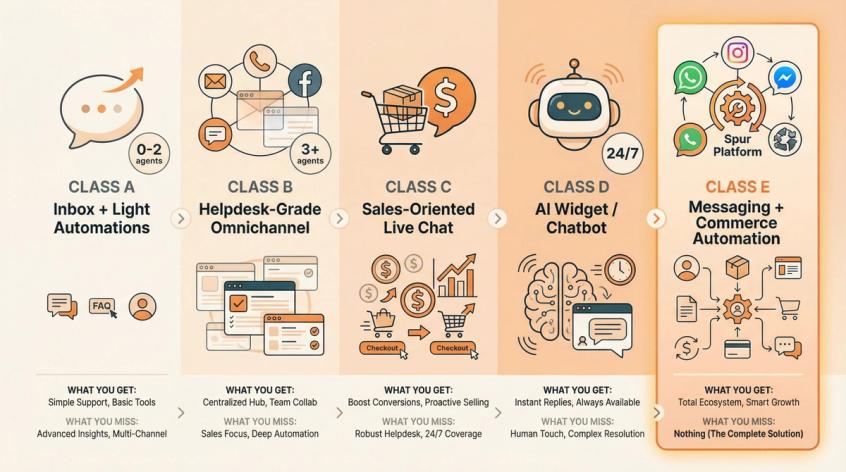
Types of Shopify Chat Apps
This matters more than individual brand names:
| Class | Best For | What You Get | What You Miss |
|---|---|---|---|
| Class A: Inbox + Light Automations | 0-2 agents, low ticket volume, early-stage stores | Free basic chat, simple setup, minimal features (Example: Shopify Inbox) | Advanced automation, custom workflows, deep analytics |
| Class B: Helpdesk-Grade Omnichannel | 3+ agents, lots of tickets, complex workflows, multi-store operations | Unified inbox for all channels, ticketing, team workflows, reporting (Examples: Gorgias, Richpanel, Zendesk, Intercom) | Simplicity (more setup, more training) |
| Class C: Sales-Oriented Live Chat | Live sales teams, high-consideration products, big average order value | Proactive engagement, cart context, sales-focused features (Example: LiveChat) | Deep helpdesk workflows, multi-channel breadth |
| Class D: AI Widget / Chatbot | 24/7 coverage, repetitive Q&A, low-complexity policies | Fast deploy, instant answers, minimal human involvement (Examples: Chatty, Moose) | Complex issue handling, nuanced judgment calls |
| Class E: Messaging + Commerce Automation | Markets where WhatsApp/Instagram are primary support surfaces | Multi-channel unified inbox, WhatsApp Business API, Instagram automation, AI + human handoff (Example: Spur) | If you only need website chat, this is more platform than necessary |
Calculate Total Chat App Costs
Most chat apps make money by charging for one of these variables:
- Seats (how many agents log in)
- Tickets/conversations (volume-based billing)
- AI usage (chats/resolutions/credits consumed)
- Channels (email, chat, social, phone, WhatsApp - each may cost extra)
Example: Gorgias starts at $10/month but uses ticket-based pricing with overages. If you have high volume, costs can jump quickly. Intercom adds per-resolution fees for its AI agent on top of seat costs. Spur doesn't charge per contact or conversation. You pay for the platform and AI credits, making it more predictable.
Always model the pricing at 3x your current volume. What you can afford at 500 chats/month might be painful at 1,500.
Test if Chat Apps Can Execute Actions
Can the bot do real store actions, or does it only answer questions?
The chatbots that drive ROI can:
- Pull order status and tracking without involving a human
- Initiate returns or exchanges with proper guardrails
- Edit shipping addresses or cancel orders (when appropriate)
- Recommend products based on real inventory and variants
- Trigger abandoned cart messages in the customer's preferred channel
If your chatbot can only say "Here's a link to our FAQ," it's not transformative. It's just slightly faster than Google.
Best Chat App by Store Size
This is the shortcut:
- New store / solo founder → Shopify Inbox or Tidio free tier (learn what customers ask, upgrade later)
- Growing D2C brand (2-8 agents) → Tidio, Gorgias, or Spur if WhatsApp/Instagram matter
- High-volume support ops → Gorgias or Richpanel (built for ticket workflows)
- Enterprise with complex requirements → Zendesk or Intercom (budget for it and pilot hard)
- WhatsApp-first markets → Spur + WhatsApp automation mindset
Top Shopify Chat Apps Reviewed
Shopify Inbox: Free Chat App Option
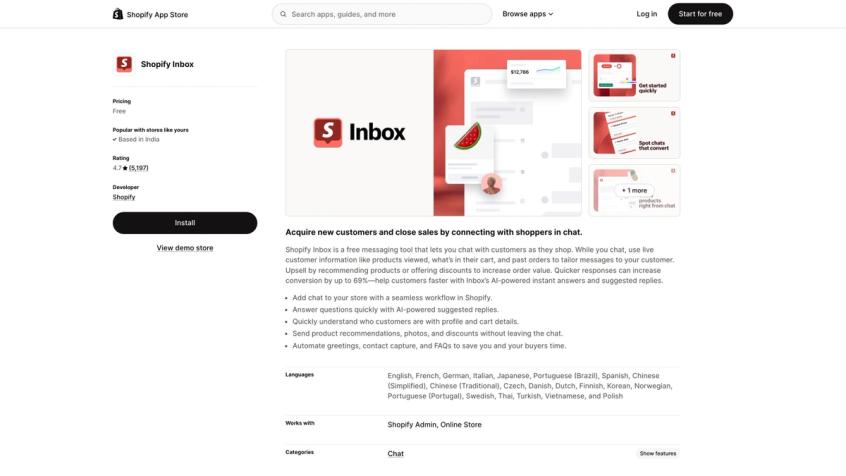
What it is: The official, completely free live chat app by Shopify. Zero monthly fee, zero conversation limits.
Key Capabilities:
- Native Shopify integration: Because it's built by Shopify, Inbox pulls cart contents, viewed products, and order history in real time. You can send product recommendations or discount codes directly in chat without switching tabs.
- Multi-channel hub: Handles on-site chat plus messages from the Shop app, and can tie into Instagram DMs or Facebook Messenger via Shopify's Facebook channel.
- Automated greetings and FAQs: Set greeting messages or quick replies for common questions, so customers get instant acknowledgment even when you're not live.
- Mobile app access: Respond on the go with the Shopify Inbox mobile app, convenient for solo founders who can't be at a desk all day.
Pricing: Completely free with any Shopify plan (Basic $29/mo, Shopify $79/mo, etc.). There's no hidden tier or usage cap.
Limitations: Inbox is basic by design. The AI features are minimal. Shopify has added AI FAQ suggestions (Shopify Magic), but you can't train it on your own data or extend it much. It also lacks advanced workflow integrations or a built-in knowledge base. Think of it as "live chat 101."
Ideal For: Brand-new and small stores that want a zero-cost, easy setup chat solution. It's the fastest way to add live chat to Shopify and works perfectly for handling basic customer inquiries. As you outgrow its functionality, you can upgrade to a more powerful app.
Spur: WhatsApp and Instagram Chat Platform
What makes it different: Most chat tools either do website chat well, or messaging channels well, or AI well. Spur is trying to be the unified conversational commerce layer: shared inbox + workflows + AI trained on your knowledge base, across all your channels.
We built Spur because we saw stores struggling with fragmented tools: one app for website chat, another for WhatsApp Business API, another for Instagram automation, and still manually handling DMs. That's painful, expensive, and slow. Our answer is a single platform where all conversations, website live chat, WhatsApp, Instagram, Facebook Messenger, flow into one shared inbox with AI assistance and human handoff when needed.
Key Capabilities:
AI Trained on Your Knowledge Base: Unlike simple Q&A bots, Spur's AI can be trained on your website content, FAQs, and past support tickets to answer in your brand's voice. It doesn't just answer questions. It takes actions. Our "actionable AI" can check order status by pulling data from Shopify, apply discount codes, update customer records, or trigger workflows based on conversation context.
Multi-Channel Shared Inbox: All messages from live chat, WhatsApp, Instagram, Facebook, and email funnel into one unified inbox. Your team sees the full conversation history regardless of channel, with context like cart contents and order history. When the AI handles a query and gets stuck, it seamlessly hands off to a human agent in the same thread. No context lost, no frustrated customers repeating themselves.
WhatsApp Business API + Broadcasts: Spur provides WhatsApp Business API access out-of-the-box, including the coveted blue tick verification. You can send bulk notifications (abandoned cart reminders, order updates, promotional broadcasts) and engage in 1:1 chats at scale. We also support Click-to-WhatsApp ads. Run a Facebook ad that opens WhatsApp chat, then our bot qualifies the lead automatically. This is crucial for markets where WhatsApp is the primary customer channel (India, Brazil, MENA, parts of Europe).
Instagram DM Automation: Set up auto-replies for Instagram comments, story mentions, and direct messages. For example, when someone comments "info" on your post, Spur automatically DMs them product details or a coupon. We're an official Meta Business Partner, so this uses approved methods that won't get your account flagged.
Deep Shopify Integration: Direct Shopify integration syncs order data, customer info, and product catalog. This powers automated WhatsApp abandoned cart messages (1 hour after abandonment, send a WhatsApp message with cart link, proven to recover sales), order confirmation and shipping alerts on WhatsApp or Messenger, and gives AI and agents instant access to Shopify data while chatting. You can even send WhatsApp broadcasts directly to Shopify customer segments (like "VIP customers" or "hasn't purchased in 90 days").
No-Code Visual Flow Builder: While our AI can handle freeform questions, you can also build custom flows via a visual editor for structured use cases like lead collection or guided troubleshooting. Create branching logic without writing code and deploy these flows on any channel: WhatsApp bot menu, Instagram quick replies, or web chat widget.
Pricing Transparency:
| Plan | Price (Annual) | Key Features |
|---|---|---|
| AI Start | $31/mo | 1 WhatsApp number, 1 AI bot with ~2,000 AI messages/month, Shopify integration, 2 seats |
| AI Accelerate | $127/mo | 2 agents with 12,000 messages, 5 seats, 50 flows, webhooks/HTTP actions, custom AI actions |
| AI Max | $399/mo | 3 agents with 40,000 AI credits, 10 seats, unlimited flows, dedicated account manager |
We don't charge per contact or per conversation. You get unlimited contacts and chats. You pay for platform access and AI credits.
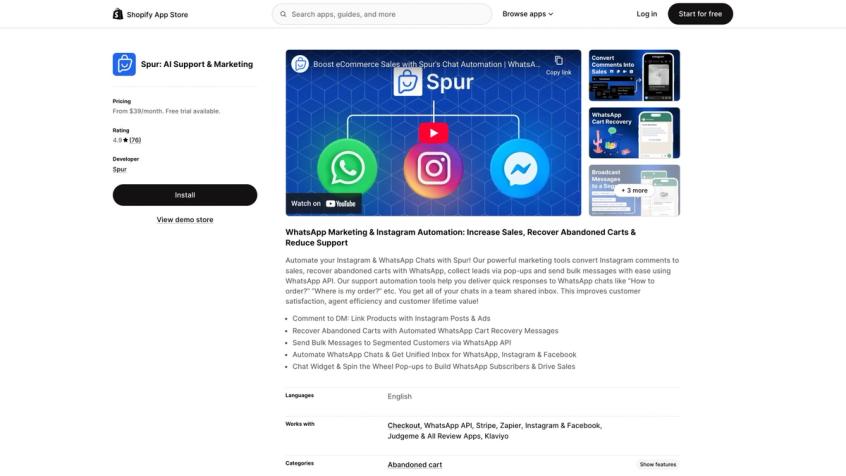
The Shopify App Store listing shows real merchant feedback: 4.9 stars across 78 reviews. That's social proof from brands actually using the platform, not marketing claims. WhatsApp message charges are billed through our wallet at published per-country rates. We publish these rates openly so there are no surprises. 7-day free trial available.
Watch-Outs: If you only want a "tiny chat bubble" and nothing else, Spur might be more platform than you need right now. If you're in a strict enterprise environment, do diligence on security, access controls, and data flows (we host in Frankfurt and support GDPR with data localization for WhatsApp).
Ideal For: DTC brands and businesses that engage customers on WhatsApp and Instagram as much as (or more than) on their website. If you're in regions where WhatsApp is a primary channel (India, LATAM, MENA) or you have a big Instagram following, Spur brings those into your CRM fold. Perfect for stores that want an all-in-one solution. Instead of using WhatsApp Business + Tidio on site + ManyChat for Instagram, you get one platform covering all. The AI assistance is ideal if you have a small support team and want to automate FAQs and routine queries across channels to save time. Also great for those who want the latest tech (AI, multi-channel) without technical implementation. It's no-code and turnkey.
Tidio: Live Chat with AI Chatbot
Best for: Small to mid-sized Shopify stores that want both a live human chat and automated chatbot capabilities in one tool without enterprise complexity.
Why it wins: Tidio is a very balanced pick. Enough automation and AI to reduce repetitive questions, without forcing you into enterprise pricing immediately. It's been one of Shopify's most popular chat apps for years because it combines live chat, chatbot automation, and even basic email marketing in one package.
Key Capabilities:
- Live Chat with Visual Chatbot Flows: Sleek, customizable live chat widget plus a drag-and-drop chatbot flow builder. Without coding, you can create flows to greet new visitors, offer help after X seconds on a page, or guide users through an FAQ. These chatbots can hand off to human agents seamlessly when needed.
- AI "Lyro" Agent: Tidio's AI-powered assistant uses a large language model (GPT-based) to answer customer questions in natural language. Lyro doesn't require manual scripting. It automates simple support tickets with AI. (Note: Lyro's knowledge is generally limited to common Q&A unless you integrate it with your content.)
- Multichannel Integrations: Tidio integrates with Facebook Messenger and Instagram, so you can chat with customers on those platforms from the Tidio dashboard. Also has email integration.
- Ecommerce Tools: Cart abandonment messages, product stock notifications, and discount offers via chat. Set a chatbot to ping customers with a coupon if they have items in cart but haven't checked out.
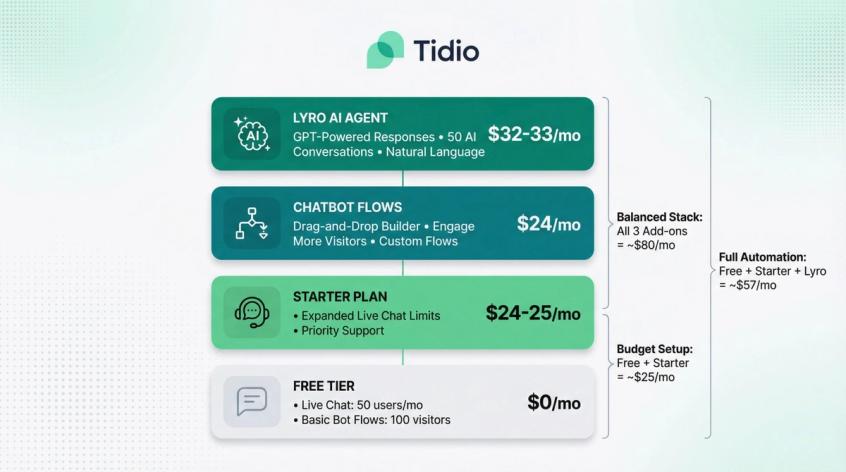
Pricing: Tidio's pricing is modular. Free plan includes live chat for up to 50 users per month and basic bot flows for up to 100 visitors. Paid plans:
| Plan Component | Price |
|---|---|
| Starter plan | ~$24-25/mo (expands live chat limits) |
| Chatbot Flows add-on | ~$24/mo to engage more visitors |
| Lyro AI Agent add-on | ~$32-33/mo for 50 AI conversations |
7-day free trial and free tier available.
Because of this modular approach, you can scale incrementally. Only pay for what you need. Heavy traffic stores might need multiple components, which can add up, but Tidio is often cited as cost-effective for the feature set.
Ideal For: Merchants who like to tinker with custom chatbot flows (for lead capture or guided selling) without coding. Great if you're on a budget. The free plan and modular upgrades mean you can tailor costs. If you need extremely deep AI or advanced ticketing, other tools might fit better.
Gorgias: Ecommerce Helpdesk for Shopify
Best for: Serious support teams and fast-scaling ecommerce brands with dedicated support staff (even just 2-3 agents) and multiple channels to manage.
Why it's strong: Gorgias isn't just a chat app. It's a full customer service helpdesk platform tailored to ecommerce. Support isn't email; support is a stream of commerce events. Gorgias treats support like ecommerce operations, not like generic ticketing. That's why hundreds of Shopify Plus and fast-growing stores use it.
Key Capabilities:
- Deep Shopify Integration: One of the deepest integrations on the market. Agents can see complete customer profiles, past orders, and even edit/refund/create orders right from the Gorgias dashboard. The chat widget connects to this backend, so when a customer asks "where's my order?" the agent (or AI autoresponder) can instantly pull that order and provide an update.
- Omnichannel Inbox: Live chat, email, Facebook comments, Instagram DMs, phone, and SMS all funnel into one inbox. Agents have a unified view. Conversations that start on chat and continue via email stay threaded.
- Automation & AI: Powerful rules engine for macros (canned responses) and auto-tagging/closing tickets. Gorgias rolled out GPT-powered features like "Auto-resolve" (AI drafts replies or resolves simple tickets) and AI summaries. These cost extra (AI add-on per resolution) but can further reduce workload.
- Collaboration & Analytics: Team features like assign tickets, internal notes, merge conversations. Robust analytics dashboards for response time, resolution time, CSAT, agent performance.
- App Integrations: Tons of integrations with loyalty programs, review apps, and CRM systems. Pull in data from Klaviyo or Yotpo, trigger actions like issue loyalty points or process returns, all while chatting with customer.
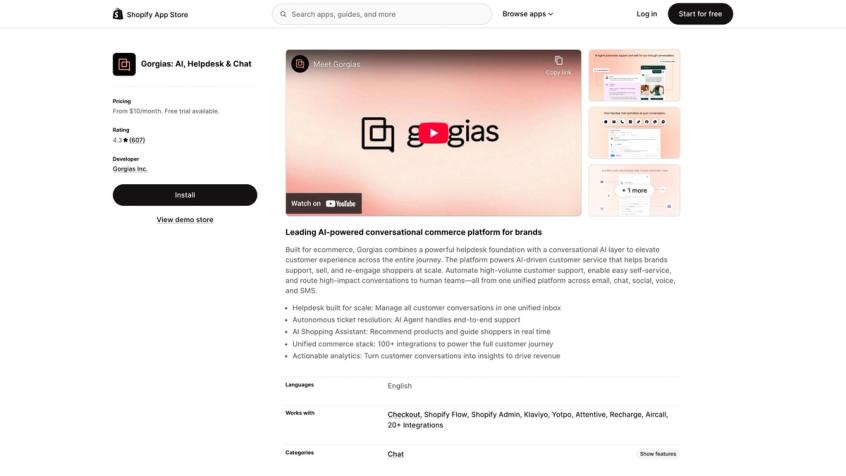
Pricing: Ticket-based pricing model. Plans start at $10/month for very small stores (up to 50 tickets/month). More realistic plans:
| Plan | Price (Monthly) | Tickets Included | Agent Seats |
|---|---|---|---|
| Basic | ~$60/mo (annually $50/mo) | 300 tickets | 3 seats |
| Pro | ~$360/mo (annually $300/mo) | 2,000 tickets | 10 seats |
AI features are add-ons: 60 AI-powered resolutions for $54/month on Basic.
The Gotcha: Ticket-based pricing means your cost grows with volume even if team size stays flat. If you have high ticket volume, run the math before committing. Gorgias may replace multiple tools (email helpdesk, chat app, social monitoring), so consider total cost of ownership.
Ideal For: If you have a dedicated support team and high order volume where every support efficiency saves real dollars. Especially ideal for Shopify Plus stores. If you're a tiny store that just needs simple live chat or an AI for FAQs, Gorgias is overkill. Choose Gorgias when you need a holistic, scalable helpdesk.
Richpanel: Self-Service Customer Portal
Best for: Teams that want to systematically deflect tickets via self-service and automation, not just react to customer questions.
Why it's different: Richpanel pushes the idea of a self-service portal + automation to reduce tickets before they hit your team. It's more "support ops" oriented than pure chat.
Key Capabilities:
- Self-Service Portal: Customers can track orders, edit orders, or initiate returns themselves without agent intervention. Richpanel emphasizes reducing support load by empowering customers.
- Multi-Channel Inbox: Email, chat, social media all in one unified inbox with full customer context.
- AI-First: Built around deflection. Uses AI and automation to handle common issues before escalating to humans.
Pricing:
| Plan | Price | Additional Users |
|---|---|---|
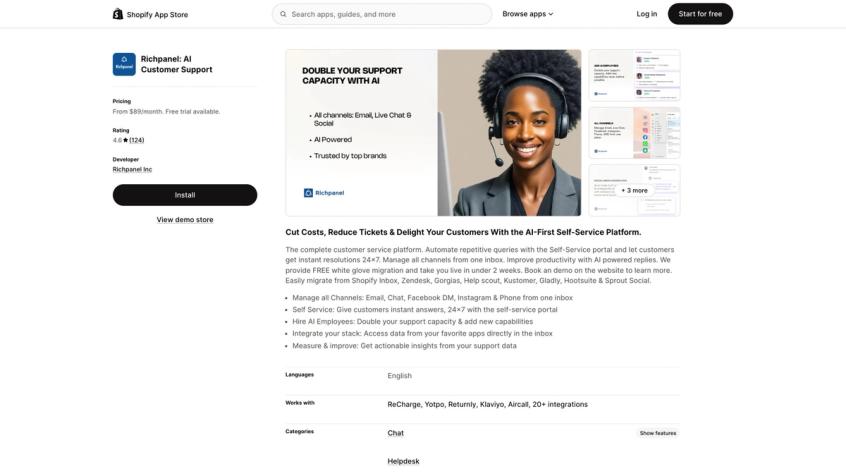
| Pro | $89/mo | + $89 per additional user |
| Pro Max | $119/mo | + $119 per additional user |
| Self Service | $119/mo | + order-volume charges |
Note the per-user and order-volume components. Estimate both team size and order scale.
Ideal For: Stores that want to build a real self-service layer with guided flows for returns, order status, policy questions. If reducing tickets systematically is a priority, Richpanel delivers.
LiveChat: Sales-Focused Chat Tool
Best for: Stores with a sales motion where live conversations close deals (high AOV, customization, complex products).
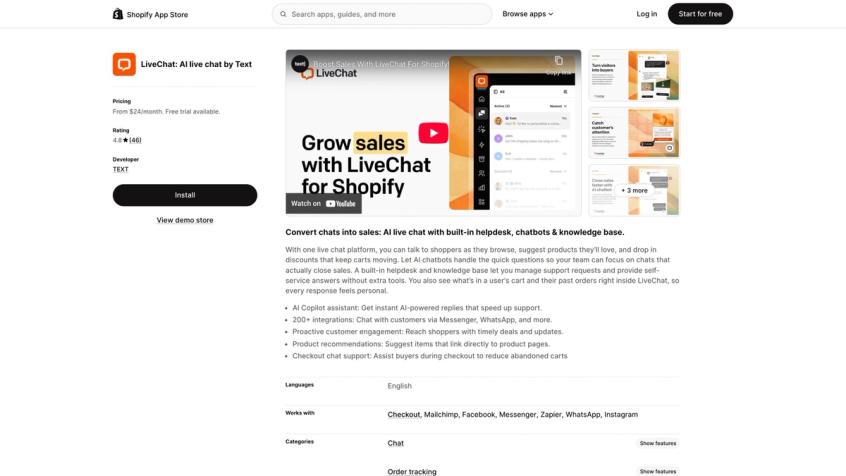
Why it's strong: LiveChat (by LiveChat Inc.) has been around for years and offers a polished live chat experience designed around proactive engagement and sales. The Shopify listing emphasizes cart/order context in the agent view.
Key Capabilities:
- Proactive Engagement: Trigger chat messages based on behavior. Greet users after time on page, offer help when cart value hits a threshold.
- Cart/Order Context: Agents see what customers are browsing and their order history during chat.
- Battle-Tested Platform: Used by many mid-to-large ecommerce sites, with a great agent app, canned responses, integrations, and analytics.
Pricing:
| Plan | Price |
|---|---|
| Starter | $24/mo (annual option) |
| Team | $49/mo |
| Business | $69/mo |
14-day free trial available. Rating: 4.8★ (46 reviews on Shopify App Store)
Watch-Out: The listing notes potential add-ons/additional monthly fees. Treat "base plan" as minimum, not final bill.
Ideal For: If you have a live sales team and conversations drive conversions. High-value products where live guidance closes deals.
Intercom: Premium Support Platform
Best for: Premium support orgs that want polished experiences + AI agent and can afford it.
Why it's here: Intercom is often the "best product experience" choice, but rarely the "best price." If support is strategic and you'll use the platform depth, it can be worth it.
Key Capabilities:
- Polished Product: Beautiful UI, sophisticated workflows, advanced messaging capabilities.
- AI Agent + Resolution Fees: AI can handle queries autonomously, but there's a per-resolution fee on top of seat costs.
- Premium Features: Advanced routing, rich in-chat experiences, extensive integrations.
Pricing:
| Plan | Price per Seat |
|---|---|
| Essential | $39/mo |
| Advanced | $99/mo |
| Expert | $139/mo |
AI Agent fee: $0.99 per resolution. 14-day free trial.
The Real Cost Model: You pay for seats AND AI outcomes. Can be worth it, just don't pretend it's a "chat widget."
Ideal For: Support is strategic, you need premium workflows + messaging, and you'll actually use the platform depth. Not for small businesses.
Zendesk: Enterprise Chat Solution
Best for: Large and rapidly growing businesses with 10+ support agents who need strict SLAs, complex workflows, and handle omnichannel support at scale.
Why it's here: Zendesk is the proverbial elephant in the customer support room. A global leader used by large organizations across industries. For Shopify merchants with large support teams or complex workflow needs, Zendesk's Suite provides live chat, AI chatbots, ticketing, phone support, and knowledge base all under one roof.
Key Capabilities:
- Robust Live Chat & Bot Tools: Rich chat widget with typing previews, rich media, automated routing. Answer Bot can suggest help articles. Advanced AI (Zendesk AI in 2025) leveraging OpenAI can resolve common tickets automatically.
- Enterprise Workflows: Complex routing rules, escalation policies, SLAs, skills-based routing. Built for mission-critical support operations.
- Integrations and Extensions: App Marketplace with hundreds of integrations. Shopify-Zendesk integration available to see orders. APIs for custom development.
- Analytics and CSAT: Very deep analytics, customer satisfaction surveys, agent performance tracking.
- Security & Scalability: Role-based access control, audit logs, encryption, compliance (GDPR, SOC 2). Can handle massive scale.
Pricing:
| Plan | Price per Agent (Annual) | Features |
|---|---|---|
| Suite Team | $55/mo | Basic messaging, help center, "Essential AI" |
| Suite Growth/Professional | $89-$115/mo | More features, advanced automation, reporting |
| Suite Enterprise | $169+/mo | Advanced roles, custom systems |
Advanced AI add-on may cost extra.
For reference: 5 agents on Suite Team = ~$275/mo, on Professional = ~$575/mo.
App Store Rating: 3.3★ (87 reviews) - This is a signal that integration experience may be rough for some stores. Don't assume; pilot it with real workflows.
Ideal For: When you're at 10+ support agents and need strict SLAs or you're omnichannel across chat, phone, email. Also good if support team handles multiple brands/stores. If you're a small business, Zendesk will feel too heavy, both in features and cost. Many Shopify merchants only consider Zendesk when they outgrow specialized e-commerce helpdesks like Gorgias. For a detailed comparison, see Spur vs Zendesk.
Best AI Chatbots Built for Shopify
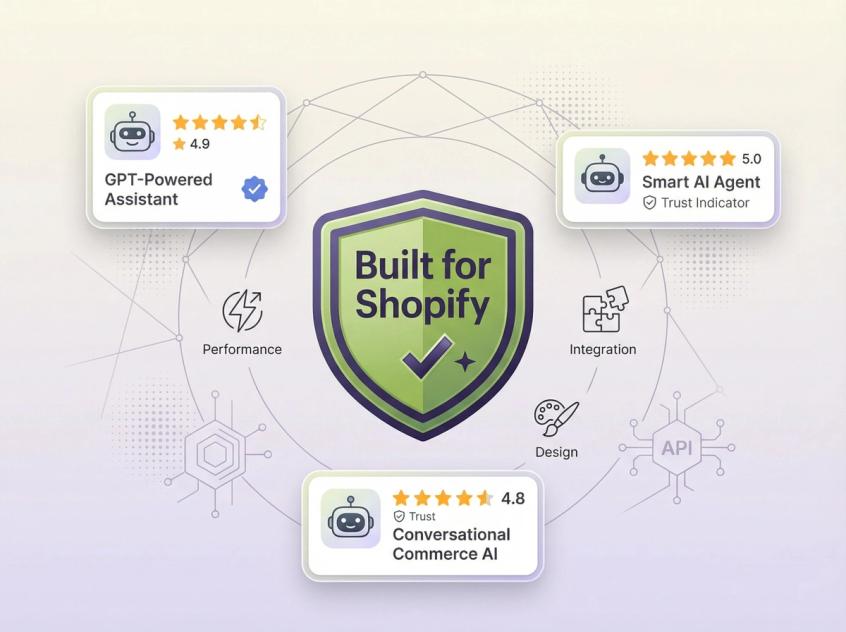
Shopify's "Built for Shopify" badge indicates apps that meet higher standards for performance, design, and integration. In the chat category, a few AI-first apps show strong review signals:
- Chatty AI Chatbot & Live Chat: 4.9★ with 1,735 reviews; free plan available
- Moose: AI Chatbot & Live Chat: 5.0★ with 464 reviews; free plan available
These apps capitalize on GPT-powered chatbot capabilities and earn the "Built for Shopify" badge for performance and integration. Chatty, for example, is essentially a 24/7 AI sales & support agent bundled with a traditional live chat system.
When these are a great idea:
- Your top questions are repetitive and policy-based
- You want 24/7 responses without staffing night shifts
- You're okay with "answering" more than "doing actions" (though Chatty does offer some order tracking and product recommendations)
When they're a bad idea:
- Your store has nuanced policies (medical, regulated, complex refunds)
- You need the bot to execute real workflows safely (processing returns, editing orders)
- You don't have monitoring in place (AI can confidently say the wrong thing)
Minimum Guardrails if You Go This Route:
- Hard "escalate to human" path that's always visible
- Bot refusal rules for edge cases (refund exceptions, legal/medical questions, pricing promises)
- Weekly review of chat transcripts for hallucinations or errors
- Clear disclaimers that it's AI (some jurisdictions require this)
WhatsApp Chat Apps for Shopify
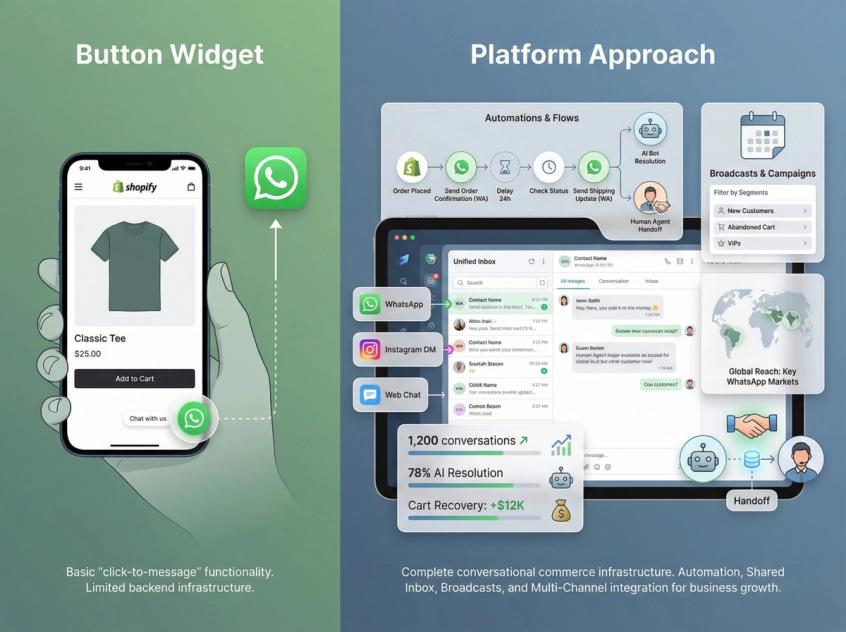
Some "chat apps" are really "WhatsApp entry points," not full helpdesks. If WhatsApp is a major channel for your store, you have two approaches:
Button Widgets:
- Apps like CK: Abandoned Cart on WhatsApp (cart recovery + order updates)
- Musbu - WhatsApp Chat Button (adds WhatsApp button to site)
- These provide a "click → message" path but don't offer deep automation or shared inbox
Platform Approaches:
- Tools like Spur or BiteSpeed treat WhatsApp as an actual support + automation channel with shared inbox, broadcasts, and handoffs
When this is the right move:
- Your customers prefer WhatsApp over email (common in India, Brazil, MENA, parts of EU)
- You want "click → message" as a conversion path
- You want cart recovery that feels personal, not spammy
If you want WhatsApp as more than just a button, actual automation, broadcast campaigns, integration with Instagram and web chat, you usually want a platform approach. Spur's Shopify integration explicitly frames order updates + cart recovery + support in WhatsApp workflows with unified inbox.
How to Implement Chat Apps for ROI
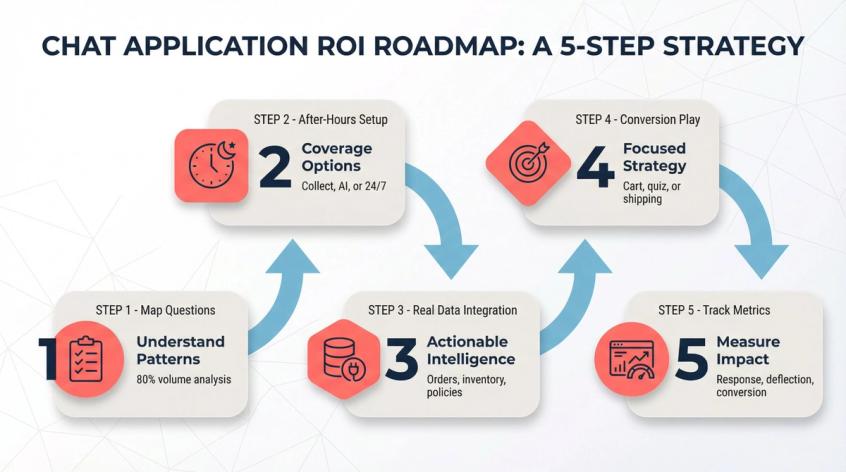
Installing a chat app is easy. Getting ROI from it requires thinking through a few things first.
Map Your Most Common Questions
Before installing anything, write down your top questions. 80% of volume is usually:
- Order status ("where is my order")
- Shipping time + fees
- Returns/exchanges process
- Size/fit questions
- Payment methods / COD availability
- Warranty or guarantee terms
- Discount codes / stacking rules
Why this matters: Chat apps don't create value by existing. They create value by turning these into instant, correct answers or safe automated workflows. If you don't know what questions to automate, you're just adding a widget.
Set Up After-Hours Chat Support
Your options:
- Collect + route (message capture, follow-up next day)
- AI deflect (answer questions, escalate when needed)
- True 24/7 (AI + on-call human for urgent issues)
Spur, for example, positions around 24/7 availability with an AI layer trained on your knowledge base for live chat. Tidio and Gorgias both emphasize AI responses/agents. Pick what matches your customer expectations and team capacity.
Integrate Chat with Real Store Data
A bot that "scrapes your site" is useful. A bot that can see:
- Order status and tracking
- Current inventory/variants
- Return policies specific to the product
- Real-time shipping cutoffs
...is massively more useful. This is why "native Shopify actions" / "custom AI actions" language matters in listings and pricing pages. Make sure your chat app can pull live data, not just regurgitate static FAQs.
Start with One Conversion Strategy
Choose one to start:
- Cart rescue: Trigger chat when cart is abandoned or checkout hesitates
- Product quiz: Guide shoppers to the right product/size
- Shipping confidence: Surface shipping promise and cutoff times proactively
LiveChat highlights proactive engagement + cart context; use that kind of feature deliberately, not randomly. Measure the results, then add another play.
Track Your Chat App Performance
Track weekly:
- First response time (human + AI separately)
- Resolution rate (and reopen rate)
- Deflection rate (AI solved without human)
- Conversion assisted (chat → purchase)
- CSAT (if you collect it)
Shopify itself positions chat as conversion-relevant, not just support. Your metrics should reflect both.
Chat App Message Templates
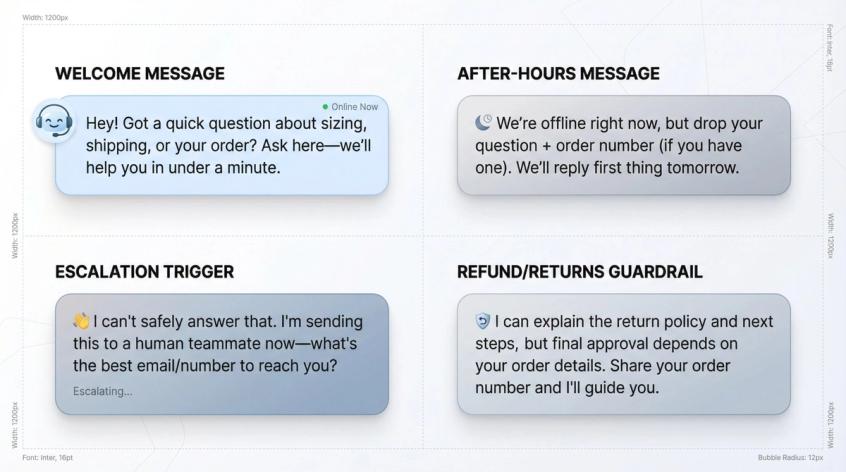
Welcome Message (Sales + Support)
"Hey! Got a quick question about sizing, shipping, or your order? Ask here—we'll help you in under a minute."
After-Hours Message
"We're offline right now, but drop your question + order number (if you have one). We'll reply first thing tomorrow."
Escalation Trigger (Bot to Human)
"I can't safely answer that. I'm sending this to a human teammate now—what's the best email/number to reach you?"
Refund/Returns Guardrail
"I can explain the return policy and next steps, but final approval depends on your order details. Share your order number and I'll guide you."
Shopify Chat Apps FAQ
Do Chat Apps Slow Down Shopify Stores?
It can, depending on the widget and how it loads. That's one reason Shopify's Built for Shopify program emphasizes performance standards. Best practice: load chat asynchronously and keep scripts minimal. Most modern chat apps (Tidio, Chatty, Spur, etc.) are optimized for performance, but always test your page speed after installation.
Should You Start with Free Chat Apps?
Yes, if you use the free period to learn your top questions and actual support volume. Shopify Inbox is free and works as baseline instrumentation. Many tools (Tidio, Chatty, Moose) offer free tiers. Use that to validate the tool fits before committing to paid plans.
Are AI Chat Apps Safe for Shopify?
Safe enough if you treat it like a junior agent:
- Give it correct knowledge (train on your actual policies, not generic data)
- Set refusal rules (what it should NOT answer or promise)
- Review transcripts regularly for hallucinations
- Escalate edge cases to humans
- Have a clear "talk to human" path
AI without monitoring is how you end up promising refunds you can't honor or giving wrong shipping dates. Tools like Spur and Tidio let you review AI conversations—use that feature.
Fastest Way to Get ROI from Chat Apps
- Automate order status + returns answers (instant deflection)
- Reduce response time on pre-purchase questions (boost conversion)
- Add one conversion play (cart rescue or product guidance)
Do these three things well and you'll see measurable impact within 2-4 weeks.
Multi-Language Chat App Support
Some apps (like Spur) support multiple languages natively (English, Spanish, Portuguese, French, Dutch, Indonesian). Others integrate with translation tools. If you serve multiple markets, verify language support before committing.
WhatsApp Chat Pricing for Shopify
WhatsApp charges per delivered message (since July 2025), not per 24-hour conversation. Rates vary by country and message category (Marketing, Authentication, Utility, Service). Spur publishes its per-message rate card for every country and bills messages through a prepaid wallet. Budget for these fees separately from your platform subscription.
Best Shopify Chat App by Business Size
- Starting out: Begin with Shopify Inbox (free, easy) or free plan of Tidio. Learn what customers ask, then upgrade as needs grow.
- Growing D2C brand (2-8 agents): Tidio if you want balanced live chat + AI; Gorgias if you're support-heavy and scaling tickets; Spur if WhatsApp/Instagram matter.
- Support ops / self-service focus: Richpanel if you want to systematically deflect tickets via portal + automation.
- Sales chat motion: LiveChat if chat is part of your sales process and closing deals.
- Enterprise needs: Zendesk or Intercom—pilot hard, model costs honestly, and make sure you'll use the depth.
- WhatsApp/Instagram-first: Spur if you want WhatsApp + Instagram + web chat + automation + AI in one place. This is especially crucial if your market prefers messaging channels over email.
Choosing the Right Shopify Chat App
Adding live chat or messaging to your Shopify store is one of the highest ROI moves you can make. It drives sales, improves support efficiency, and builds trust. But the "best" chat app for you isn't the one with the most features or the highest rating. It's the one that fits where your customers actually are and how your team actually works.
If your customers live in Instagram DMs and WhatsApp, a website-only chat widget won't solve your problem. You need multi-channel like Spur. If you're purely website traffic with simple FAQs, Shopify Inbox or Tidio is probably enough. If you're scaling support operations with a dedicated team, you need helpdesk-grade tools like Gorgias or Richpanel.
The key is to start the conversation with your customers. Pick a solution based on the framework above, implement it thoughtfully (use the playbook), and iterate based on real data. Your shoppers will thank you, often with their wallets.
Don't just install a chat widget and hope. Build your top 20 question map, decide what happens after hours, connect the bot to reality, pick one conversion play, and measure what matters. That's how you turn "we added chat" into "chat added 15% to our conversion rate."
Was this article useful?