
Key takeaways
- OpenAI has retired ChatGPT agent mode. Its replacement, ChatGPT Work, launched on July 9, 2026 as an agent for longer, multi-step tasks that end in a finished doc, sheet, deck or Site.
- There is no /agent command or Tools menu option any more. You pick Work from the Chat and Work switch, describe the outcome you want, and approve important actions.
- Web tasks moved to the cloud browser, which Work uses on its own when a task needs a website. It pauses for sign-in and asks before bookings or payments.
- The old 40 and 400 agent tasks a month are gone. Work shares a usage allowance with Codex that depends on how big the task is and which model runs it.
- ChatGPT Work helps you and your team inside ChatGPT. It does not answer your customers on WhatsApp, Instagram or your website, which still needs a platform like Spur.
Ask an AI about this article
ChatGPT agent mode no longer exists. OpenAI has retired it in favor of ChatGPT Work, which launched on July 9, 2026, and Work is now where you send multi-step tasks: research, analysis, web tasks and finished files. To use it, open ChatGPT, switch from Chat to Work, and describe the result you want. If you need AI that talks to your customers instead, Spur covers that side.
This guide covers what changed, how to turn Work on, how its usage limits work, and where it stops.
What happened to ChatGPT agent mode?

ChatGPT agent mode was switched off and folded into ChatGPT Work. OpenAI's ChatGPT agent help article now opens by saying the agent is no longer available, and it sends readers to Work for multi-step tasks and to the cloud browser for web tasks.
Agent mode arrived in July 2025, when OpenAI merged Operator and deep research into one agent inside ChatGPT. You started it from the Tools menu or by typing /agent, and it worked in a virtual browser while you watched.
A year later, OpenAI introduced ChatGPT Work as its replacement. Work is built on Codex technology, can stay with a project for hours, and is meant to hand back finished work rather than a chat reply. The same launch merged the Codex app into a new ChatGPT desktop app and started winding down the standalone Atlas browser.
So if you followed an older guide and cannot find "Agent mode" in the Tools menu, nothing is wrong with your account. The option is gone, and Work is the way in.
What is ChatGPT Work?

ChatGPT Work is an agent inside ChatGPT for longer, multi-step jobs that end in a deliverable. OpenAI's ChatGPT Work and Codex guide splits ChatGPT into three experiences: Chat for quick questions, Work for longer tasks and finished files, and Codex for software development.
Here is what Work can do today:
- Research and analysis. It gathers information from the web and your connected apps, then compares and summarizes it.
- Finished files. It creates documents, spreadsheets, presentations, reports and Sites, which are shareable web pages or small web apps.
- Connected apps. Plugins link it to tools like Slack, Microsoft Teams, Google Drive, SharePoint, email, calendars and CRMs. Type "@" and an app name to point it at one.
- Web tasks. A cloud browser lets it read pages, fill in forms and work on websites where you sign in.
- Desktop work. In the ChatGPT desktop app it can use local files, desktop apps and a built-in browser, with your permission.
- Repeat work. Scheduled tasks run a job once, on a schedule, when an event happens, or while it watches for changes.
The big shift from agent mode is the output. Agent mode was built around browsing and could draft slides as an extra. Work is built around the finished file, and browsing is one of several tools it reaches for.
Comparing assistants for this kind of work? Our Claude vs ChatGPT comparison shows where each one is stronger.
How to turn on ChatGPT Work, step by step

Turning on Work takes a few seconds: you select Work instead of Chat before you type. There is no /agent command and no Tools menu option to enable.
On the web or the mobile app
- Open ChatGPT on the web, or open the iOS or Android app.
- Select Work from the switch or dropdown at the top. Chat is the default.
- Start a new chat, or open a project so Work can use that project's files and instructions.
- Add any files and context it should use, then describe the task or the deliverable you want.
- Follow its progress, answer its questions and approve important actions when it asks.
- Review the result and ask for changes in the same chat.
In the ChatGPT desktop app
- Install or update the ChatGPT desktop app for Mac or Windows and sign in.
- Select ChatGPT from the menu, then select Work from the Chat and Work toggle.
- Start a new chat or open a project. You can also open a local folder for Work to use.
- Describe the outcome, then grant access only to the files and apps the task needs.
Cloud Work chats sync between web, mobile and desktop, so you can start a task on your phone and check it later on your laptop. Tasks that run locally on your computer stay on that computer.
Connect your apps before you start
Work is far more useful once it can see where your work lives. Connect plugins such as Gmail, Slack or Google Drive first, then mention them in your request. OpenAI's guide suggests describing the outcome you want and adding the files, constraints and review criteria Work should follow.
ChatGPT agent mode vs ChatGPT Work: what changed
Most of the agent mode habits still work, but the menus, limits and browsing setup are different. This table maps the old ChatGPT agent mode to its replacement, based on OpenAI's help articles.
| What | ChatGPT agent mode (retired) | ChatGPT Work |
|---|---|---|
| How you start it | Tools menu or /agent | Select Work instead of Chat |
| Main job | Browse websites and complete tasks | Finish multi-step work and deliverables |
| Web browsing | Virtual browser you watched | Cloud browser, picked automatically |
| Apps | Read-only connectors as data sources | Plugins that read and act in your apps |
| Output | Chat answers, draft slides and sheets | Docs, sheets, slides, reports and Sites |
| Usage | 40 tasks a month on Plus, 400 on Pro | Shared Work and Codex allowance |
| Repeat tasks | Daily, weekly or monthly schedules | Schedules, monitoring and app events |
| Local files | Uploaded files only | Uploads, plus local folders in the desktop app |
The usage line is the change most people notice. Agent mode counted tasks, with 40 a month on Plus and 400 on Pro. Work counts the effort a task takes, so one long job can use more than several short ones.
Want to see what to hand off to an agent first? These business process automation examples are a good shortlist.
ChatGPT Work availability and usage limits

On the web and in the mobile app, Work is for eligible paid plans. It rolled out first to Pro, Enterprise and Edu, then to Plus and Business. OpenAI's launch post says the ChatGPT desktop app offers Chat, Work and Codex on every plan, including Free.
A few parts need more than the base plan:
- Cloud browser. Available in Work on paid plans except Free and Go.
- Event-triggered tasks. Tasks that react to new Gmail messages, Slack messages or GitHub pull requests need Plus, Pro, Business, Enterprise or Edu.
- Enterprise and Edu. Admins control Work Cloud and Work Local for each role in workspace settings.
Usage no longer comes as a fixed number of messages. Work follows the same usage structure as Codex and draws from a shared allowance that also covers Codex. How fast it runs down depends on the model, the size of the task, the reasoning level and how much work gets done.
If you hit a limit, the notice shows your options: wait for the reset, add credits, or upgrade. OpenAI's Codex plan guide says eligible Plus and Pro users can buy credits without changing plans. If you are still deciding on a plan, our guide on whether ChatGPT Plus is worth it walks through the trade-offs.
ChatGPT Work handles your internal tasks. To let AI answer your customers on WhatsApp, Instagram and live chat, try Spur's AI agent.
How to use the cloud browser for web tasks
The cloud browser is how Work handles websites now. It is a browser on a separate computer in the cloud, and Work decides when to use it, so you never turn it on by hand.
A typical web task goes like this:
- Start a task in Work and name the website, the details and any limits, such as "under $150" or "free cancellation only".
- Approve access to each new website when Work asks. This is the default setting.
- When a site needs a login, enter your details in the secure sign-in form. OpenAI says the model cannot see the username and password you type there.
- Confirm any booking, payment or other hard-to-undo step when Work asks in the chat.
- Check the result and its sources before you rely on it.
You can change how much it asks under Settings > Cloud browser: always ask, auto approve with a safety check, or always allow. The cloud browser keeps its own cookies and logins, separate from the browser on your device.
Expect some sites to refuse. Websites can block automated browsers, and when that happens Work cannot finish the task there. Try another site or finish the last step yourself.
How to schedule recurring and event-triggered tasks
Scheduled tasks keep work moving when you are away. You can ask ChatGPT to do something once, repeat it on a schedule, react to an event in a connected app, or watch for a change and tell you when it happens.
To set one up, describe the job in Work, for example "Every Monday at 9am, check our three competitors' pricing pages and update this sheet." Then review the task under Scheduled, where you can edit, pause or delete it.
Event triggers are the newer option. A task can start when a new Gmail message arrives, when someone posts in a Slack channel, or when there is pull request activity in GitHub. For Slack, add @ChatGPT to each channel the task watches.
Plans cap how many tasks can be active. OpenAI lists 3 for Free and Go, 5 for Plus, 10 for Business and Edu, and 15 for Pro and Enterprise. Free tasks can run at most once a day, while paid plans can run hourly.
Best ways to use ChatGPT Work

Work pays off on tasks with several steps, several sources and a clear finished product. OpenAI's own advice is to start with a task you already know well, so you can judge the result.
Good first tasks:
- Competitor research. "Compare the pricing, plans and recent launches of these four competitors and turn it into a five-slide deck."
- Data analysis. Upload a sales export and ask for month-on-month growth, a chart by product and a short written summary in a spreadsheet.
- Weekly reporting. Pull updates from Slack and email every Friday and refresh a status doc for your team.
- Live dashboards. Build a Site that tracks a launch calendar or campaign results and share the link.
- Web errands. Request quotes, check availability or compare product stock across a few stores.
Write requests the way you would brief a new teammate. Say what the finished thing looks like, which files and apps to use, what to avoid, and how you will judge it. A vague prompt like "check my email and handle everything" is exactly what OpenAI warns against.
Always check the output. Work cites sources and shows its steps, but it can still misread a page or a number. Our look at how accurate ChatGPT is explains where errors tend to creep in.
Safety and privacy in ChatGPT Work

Work asks before it acts. OpenAI says it is designed to request confirmation before steps that are hard to reverse or create a financial, legal or account commitment, such as confirming a booking or paying.
A few habits keep it safe:
- Connect only the apps a task needs, and check app permissions now and then.
- Never paste passwords, security codes or card details into the chat. Use the secure sign-in form.
- Stop the task if it opens the wrong site or uses the wrong information. Websites can hide instructions meant to trick agents, known as prompt injection.
- Clear cloud browser cookies after sensitive tasks under Settings > Cloud browser.
On data, OpenAI does not train on Business, Enterprise or Edu data by default. On Plus and Pro, conversations can be used to improve models unless you turn off Improve the model for everyone in Settings > Data controls. Even when Work runs on your computer, messages and task context may be stored in the cloud. Our guide on whether ChatGPT saves your data covers retention and deletion in more detail.
What ChatGPT Work cannot do for your customers
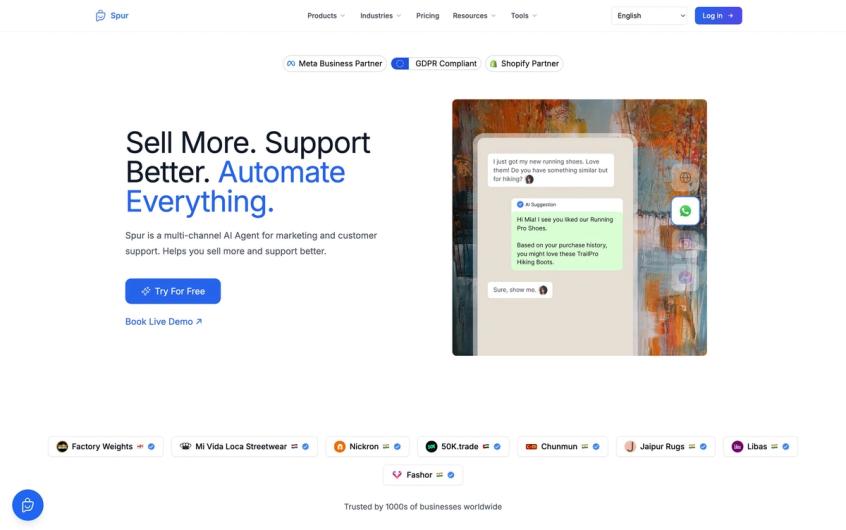
ChatGPT Work is an assistant for you and your team. It lives inside ChatGPT, so it does not sit on your WhatsApp number, your Instagram inbox or your website chat answering customers around the clock. For that you need a virtual agent deployed on the channels your customers already use.
That is the job Spur does. Spur is a multi-channel AI agent for marketing and customer support:
- Its AI agent answers customers on WhatsApp, Instagram, Facebook Messenger and live chat.
- It learns from your own help docs, policies and product pages, much like training ChatGPT on your own data, but in your customer channels.
- With the Shopify integration, it looks up a customer's order and shares its status and tracking link. Our guide to a Shopify AI chatbot trained on your store shows how that works.
- It hands a conversation to your team with the full chat history when a person needs to step in.
- Your team runs broadcasts, automations and a shared inbox from the same place.
Many teams use both. Work prepares the research, reports and decks, and Spur handles the customer service automation that runs every day. Spur also has an MCP server, so assistants such as Claude and ChatGPT can read your Spur broadcasts, templates and segments.
If you sell to customers in the EU, check the EU AI Act chatbot disclosure rules before any AI agent talks to them.
Bottom line: from agent mode to Work
ChatGPT agent mode is gone, and ChatGPT Work is the place to send anything that takes more than one step. Switch from Chat to Work, connect the apps your task needs, describe the finished result, and approve the important moves. Usage now depends on how much work a task takes, so save Work for jobs that are worth it.
Work makes you and your team faster inside ChatGPT. When the goal is answering customers on WhatsApp, Instagram and your website, Spur's AI agent is built for that job.
Frequently asked questions
No. OpenAI has retired it and replaced it with ChatGPT Work, which launched on July 9, 2026. The old agent help article now points to Work for multi-step tasks and to the cloud browser for web tasks.
Select Work instead of Chat. On the web and mobile, pick Work from the switch at the top. In the desktop app, select ChatGPT from the menu and then Work from the toggle. The old /agent command no longer works.
Partly. On the web and mobile, Work is for paid plans. OpenAI says the desktop app includes Chat, Work and Codex on every plan, including Free, but usage limits vary by plan and the cloud browser excludes Free and Go.
Work launched on GPT-5.6 in July 2026. It now offers newer models in its own model picker, separate from regular chats, and which ones you see depends on your plan and workspace settings.
Yes, through the cloud browser. When it reaches a sign-in page it pauses and asks you to enter your details in a secure form. OpenAI says the model cannot see that username and password, and the login stays saved until it expires or you clear it.
Work is for research, analysis and business deliverables such as docs, sheets, slides and Sites. Codex is for writing, testing and reviewing code. They share one usage allowance on plans that use shared allowances.
No. Work runs inside ChatGPT for you and your team. To answer customers on WhatsApp, Instagram, Messenger or live chat, use a platform built for those channels, such as Spur's AI agent.
Sources
Checked against the original source. Dates are when we last verified each one.
- ChatGPT is now a partner for your most ambitious work OpenAI. Published 9 July 2026. Retrieved 17 November 2026
- ChatGPT Work and Codex OpenAI Help Center. Retrieved 17 November 2026
- ChatGPT agent OpenAI Help Center. Retrieved 17 November 2026
- Using cloud browser in ChatGPT OpenAI Help Center. Retrieved 17 November 2026
- Scheduled tasks in ChatGPT OpenAI Help Center. Retrieved 17 November 2026
- Using Codex with your ChatGPT plan OpenAI Help Center. Retrieved 17 November 2026
- ChatGPT release notes OpenAI Help Center. Retrieved 17 November 2026
- OpenAI launches a general-purpose agent in ChatGPT TechCrunch. Published 17 July 2025. Retrieved 17 November 2026
Was this article useful?