Key takeaways
- A Shopify AI chatbot should do more than answer FAQs. It should read live order data, recommend in-stock products and hand off to a human when needed.
- There are three levels: FAQ bots that know your policies, catalog-aware bots, and AI agents that use live Shopify data and take actions.
- Before buying, test whether a chatbot can learn your store content, access live Shopify data, take actions, hand off to humans and work on WhatsApp and Instagram.
- Give the chatbot clean product data, policy data and live order data before launch. Bad data is the most common reason chatbot projects fail.
- Track AI resolution rate, handoff rate, wrong-answer rate and chat-to-purchase conversion, not the number of AI replies.
Ask an AI about this article
Every chatbot vendor will tell you their tool is "trained on your Shopify store." That phrase is doing a lot of heavy lifting, and it means three completely different things depending on which tool you're looking at.
We've spent years building Spur specifically for Shopify and ecommerce brands, so we see this from the inside. We also talk to merchants every week who bought a chatbot thinking they got a smart AI agent and discovered they got a fancy FAQ page. That gap costs real money: in missed orders, in support hours, in customers who gave up and went somewhere else. If you want to understand how chatbots for ecommerce actually generate revenue, versus just deflecting tickets, you'll want to read the full breakdown below.
So this guide isn't the usual vendor comparison with everyone earning a star rating. It's the comparison we wish existed when we were trying to figure out this space ourselves. We'll tell you exactly when Spur is the right choice, and we'll tell you exactly when it isn't.
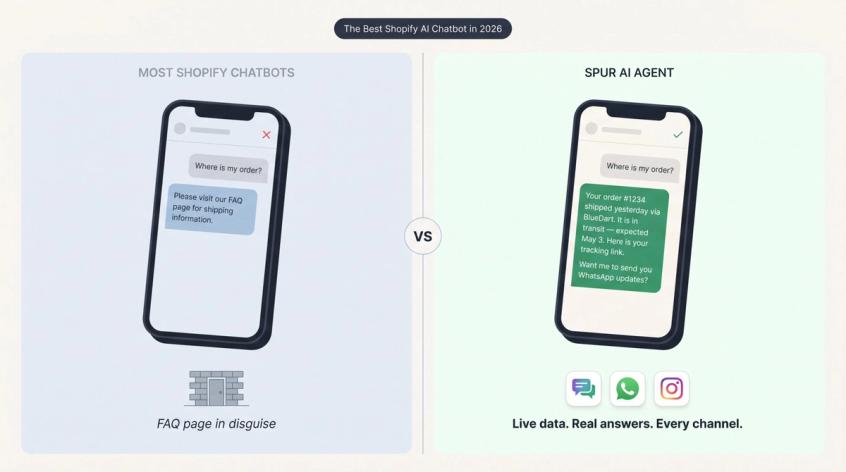
What "Trained on Your Shopify Store" Really Means
Before comparing tools, you need a framework. The phrase "trained on your store" is used to describe three very different capability levels. Most merchants buy at level 1 or 2 thinking they're getting level 3.
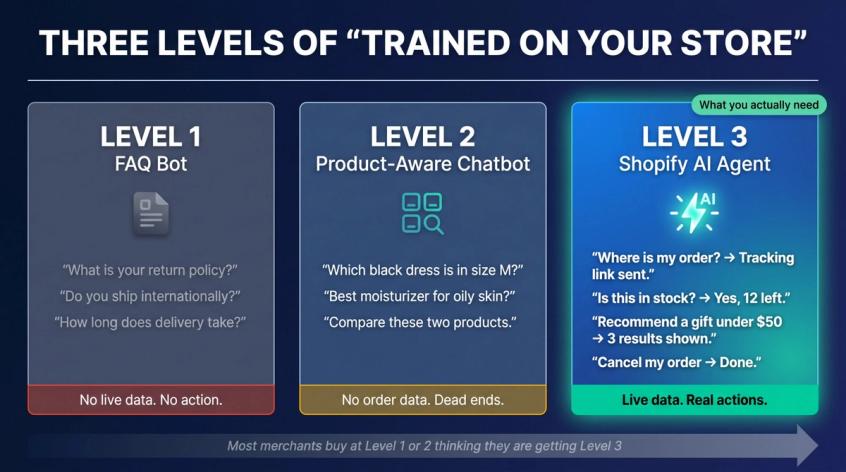
Level 1: FAQ Bots That Only Know Your Policies
This bot knows your return policy, shipping timelines, payment methods, and maybe a few product pages. It can answer:
- "What's your return policy?"
- "Do you ship internationally?"
- "How long does delivery take?"
That's genuinely useful. But it's not AI support. It's a digital brochure that can have a conversation. If you only need this level of automation, a basic chatbot for FAQ answering might be sufficient, but most Shopify merchants need far more.
Level 2: Product-Aware Chatbots That Know Your Catalog
This bot reads more of your store: product pages, collections, variants, size guides, policy docs, and uploaded files. It can answer:
- "Which black dress is available in size M?"
- "Which moisturizer is best for oily skin?"
- "Compare these two products."
Better. But still a major limitation: if it can't access live order data, it can't answer your most common support questions. "Where is my order?" becomes a dead end.
Level 3: Shopify AI Agents That Access Live Data and Take Action
This is what most stores actually need. The AI uses your knowledge base AND live Shopify data. It can answer or act on:
- "Where is my order?"
- "Is this item in stock right now?"
- "Can I return this product?"
- "Recommend a gift under $50 that ships this week."
- "Send me the tracking link."
- "I want to cancel my order."
The difference between Level 2 and Level 3 isn't just better answers. It's the difference between a chatbot and a useful ecommerce agent. Support automation experts consistently note that a real Shopify AI agent should sync with live store data like order history, tracking numbers, and inventory, not just follow rigid scripts.
When you're comparing tools, always ask: which level is this, really?
7 Things to Test Before You Buy Any Shopify AI Chatbot
Price comparison is the wrong starting point. The right starting point is capability. Before you demo any tool, here's a framework worth using.
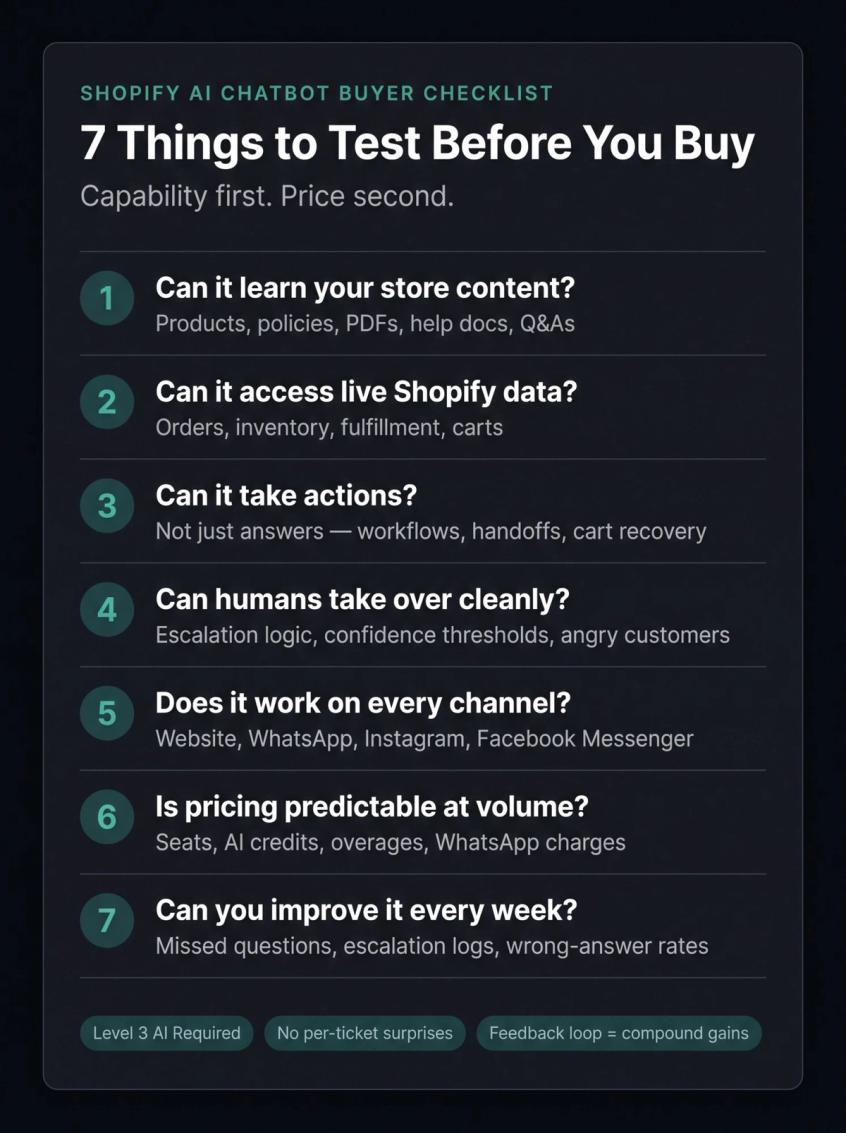
① Can it learn your actual store content?
Not just your FAQ page. It should learn from product pages, collections, policies, help center articles, PDFs, custom Q&As, and size guides. Spur's live chat trains on websites, help-center articles, PDFs, Notion pages, YouTube transcripts, and custom Q&As. That's the right benchmark.
② Can it access live Shopify data?
Static knowledge isn't enough for order support. The chatbot should connect to live Shopify data: orders, customers, products, inventory, fulfillment status, and carts. If it can't pull real order status, your support team is still answering "where is my order?" manually.
③ Can it take actions, not just answer questions?
Answering is table stakes. The stronger tools check order status, trigger workflows, collect leads, hand off to humans, recover carts, and call external systems. Spur's live chat platform supports actions like booking meetings, processing payments, checking inventory, and handling live data lookups. That's the kind of AI that actually reduces your support workload.
④ Can humans take over cleanly?
A good AI agent knows its limits. It should escalate when confidence is low, when the customer is angry, when a refund or payment edge case shows up, or when the customer simply asks for a human. Shopify's own docs note that AI-generated replies should be reviewed for accuracy before sending, which tells you something about the current state of even native AI. The mechanics of a clean chatbot-to-human handoff matter more than most merchants realize. Get this wrong and your support team ends up answering questions the AI already handled.
⑤ Does it work where your customers actually talk?
For Shopify stores, website chat is one surface. Your customers also ask questions on WhatsApp, Instagram DMs, and Facebook Messenger. A great website chatbot that doesn't work on WhatsApp is a partial solution. Check whether the platform covers the channels where your revenue actually comes from.
⑥ Is the pricing predictable at your real volume?
Watch for: per-seat charges, per-ticket charges, per-AI-resolution charges, message credits, AI credits, extra channel fees, WhatsApp conversation charges, and branding removal fees. Don't compare only the base plan. Compare what it costs at your actual monthly volume with all the add-ons you'd actually need.
⑦ Can you improve it every week?
The best chatbot today is worse than the best chatbot in three months, if you're feeding it better information and fixing bad answers. The tool should show you missed questions, escalation logs, wrong-answer rates, and revenue impact. Without that feedback loop, you're flying blind. Understanding how customer service automation compounds over time is key to choosing a platform you'll still be happy with in a year.
With those criteria in hand, here's how the top tools actually stack up.
Best Shopify AI Chatbot Apps in 2026 (Reviewed)
Spur: Best Shopify AI Chatbot for WhatsApp and Instagram
Best for: D2C brands and Shopify stores that want AI live chat, WhatsApp, Instagram, Facebook Messenger, cart recovery, broadcasts, and shared inbox in one platform.
We built Spur for exactly this problem. The core insight behind it: Shopify merchants were stitching together three or four tools to handle what should be one continuous customer conversation. A chatbot on the website. WhatsApp handled separately. Instagram DMs falling through the cracks. Cart recovery on yet another platform. None of these talked to each other, and the customer experience suffered for it.
Spur connects all of those in one place: AI live chat trained on your store, WhatsApp automation for order updates and cart recovery, Instagram DM automation for comments and story mentions, and a shared inbox where your team manages everything that needs a human touch.
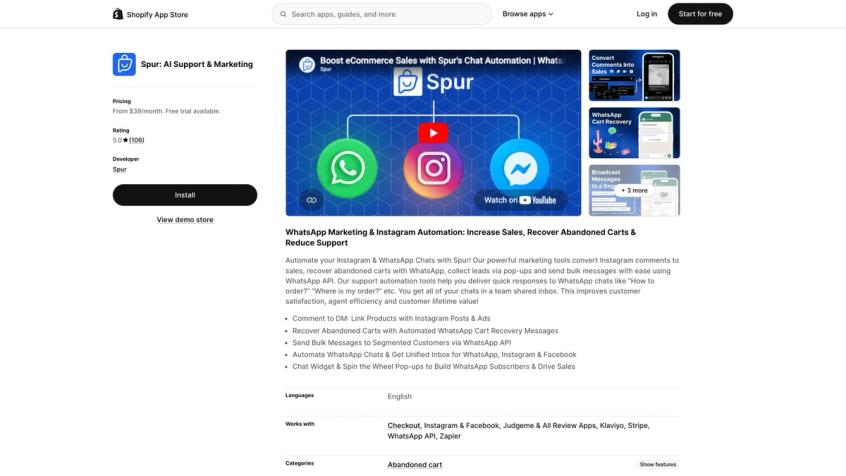
The Spur Shopify App Store listing describes cart recovery, bulk messaging, shared inbox, order updates, cross-sells, upsells, COD verification, discount automation, and product recommendations. The Shopify integration page adds abandoned cart recovery, product recommendations, customer support, order management, and marketing campaigns over WhatsApp.
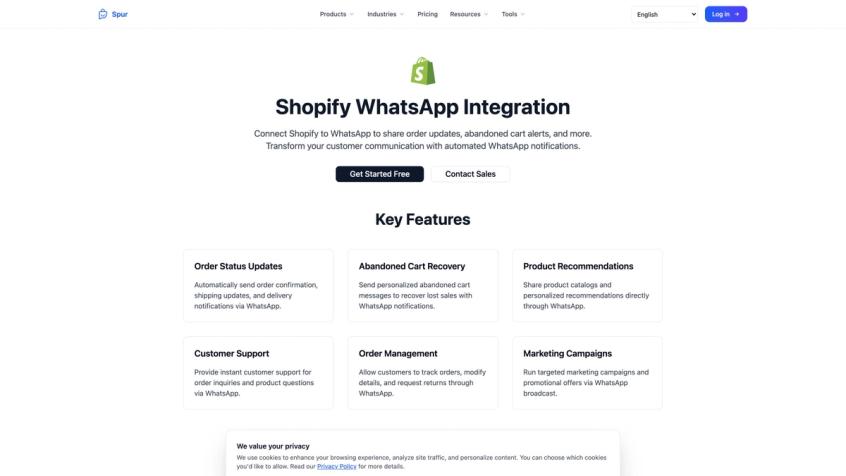
What separates Spur from a standard FAQ bot is actionability. Consider the difference:
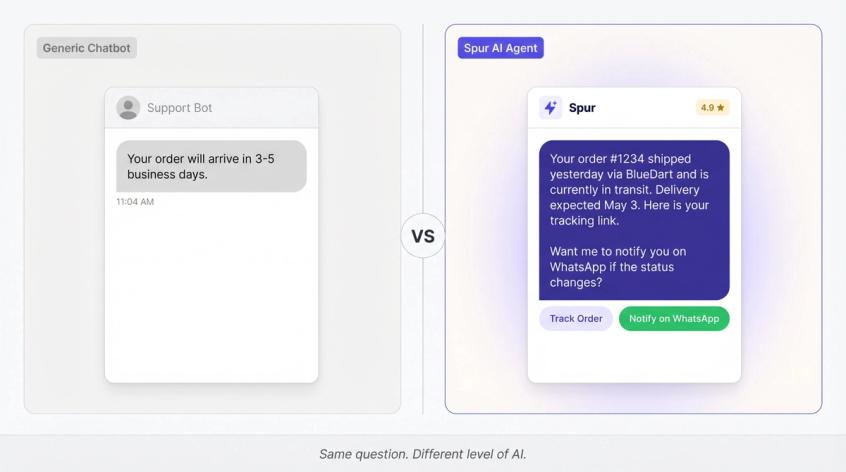
A typical Level 2 chatbot answers: "Your order will arrive in 3-5 business days."
Spur answers: "Your order #1234 shipped yesterday via BlueDart and is currently in transit. Delivery is expected May 3. Here's your tracking link. Want me to notify you on WhatsApp if the status changes?"
That second answer uses live data. It offers a next step. It builds trust instead of giving a canned response. Spur's AI training help doc explains that for Shopify stores, Spur connects directly to your store and crawls it without extra setup, which means the training process is faster than it is with most competitors.
Spur is rated 4.9/5 on the Shopify App Store across over 100 reviews. That rating reflects real merchants who've run real stores on it, not a marketing number.
Pricing snapshot:
| Plan | Shopify App Store | Spur Website (Annual) |
|---|---|---|
| AI Start | $39/month | $31/month |
| AI Accelerate | $159/month | $127/month |
| AI Max | $499/month | $399/month |
A 7-day free trial is available on both channels.
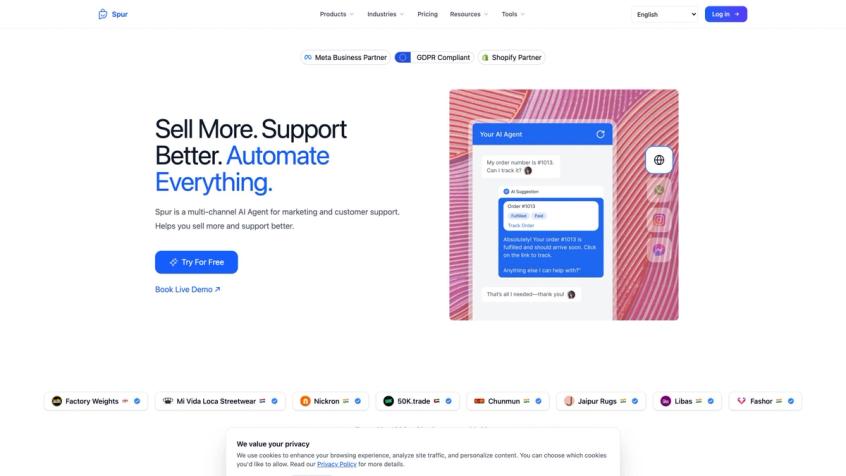
Here is what the listing looks like on the Shopify App Store, including pricing, integrations, and the feature set:
When Spur is not the best fit: If you need a heavy enterprise helpdesk built around strict SLA workflows, deep email ticketing, and complex support operations at scale, tools like Gorgias, Re:amaze, or BoldDesk might fit better. Also, if you're just getting started and want the simplest free option, Shopify Inbox is a fine starting point.
Ready to see it in action? Try Spur free for 7 days and test it against your real store.
Gorgias: Best for High-Volume Support Teams
Best for: Shopify brands with a real support team, lots of tickets, and the need for a mature ecommerce helpdesk.
Gorgias is one of the strongest picks when support volume is the main problem. It's a full ecommerce customer support platform: helpdesk, chat, email, SMS, social, voice, analytics, macros, automations, and AI. Gorgias's Shopify App Store listing shows support across email, chat, social, voice, and SMS, plus AI agent, shopping assistant, and 100+ integrations.
Gorgias's AI Agent handles training on policies, website content, Shopify data, and help-center articles. It handles product recommendations, upsells, discounts, order tracking, returns, and subscriptions.
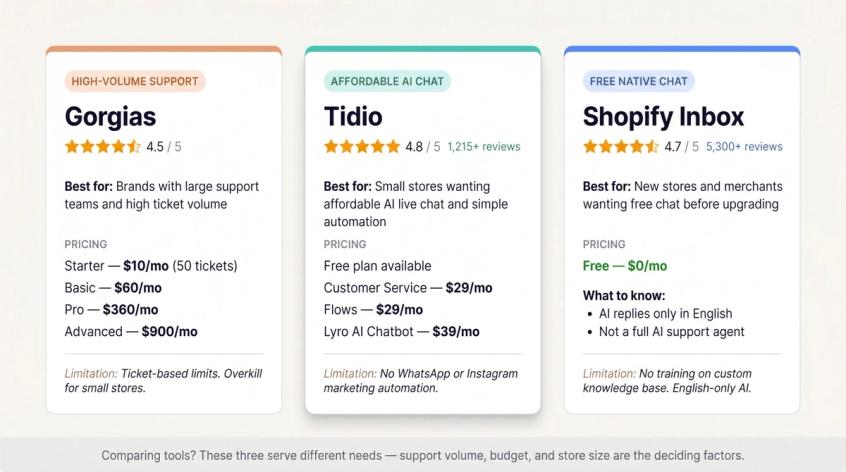
Pricing: Starter at $10/month (50 tickets), Basic at $60/month, Pro at $360/month, Advanced at $900/month. Ticket-based limits apply across all tiers.
Gorgias is overkill for a small store that just wants a chatbot. It's also not the natural pick if your growth engine is WhatsApp and Instagram marketing. Choose Gorgias for support operations. See how Spur stacks up against Gorgias if you're considering both, because the differences are significant for D2C brands.
Tidio: Best Affordable AI Live Chat for Small Stores
Best for: Stores that want live chat, AI answers, and simple automation without going enterprise.
Tidio is one of the most popular Shopify live chat tools. It has a 4.8 rating across 1,215+ reviews, a free plan, AI chatbot (Lyro), viewed products, carts, past orders, and product recommendations. Lyro's knowledge base supports website URLs, Q&A pairs, CSV/PDF files, and synced Shopify products.
Pricing: Free plan available. Customer Service at $29/month, Flows at $29/month, Lyro AI Chatbot at $39/month.
Tidio is genuinely simple and friendly. It's not the deepest helpdesk, and it's not the right choice if WhatsApp/Instagram automation and cart recovery are central to your growth. But for a small store that wants affordable, functional AI live chat, it's hard to beat. If you're already using Tidio and wondering whether to switch, explore the top Tidio alternatives to understand what you'd gain.
Shopify Inbox: Best Free Starting Point
Best for: New stores, very small teams, and merchants who want free chat before buying a dedicated AI chatbot.
Shopify Inbox is free, native, and decent for early stores. The Shopify Inbox listing shows a 4.7 rating across 5,300+ reviews, with live customer info (products viewed, cart, past orders), product recommendations, discounts, automated greetings, and AI-assisted replies.
One important nuance: Shopify's own documentation notes that AI-generated suggested replies are only available in English, require at least one prior conversation to learn from, and should be reviewed for accuracy before sending. That's honest, and it tells you Shopify Inbox is not a full AI support agent.
It's free. Start with it. When you're ready to upgrade, adding a full AI live chat to your Shopify store takes less time than most merchants expect.
Chatbase: Best for Flexible AI Agent Builders
Best for: Teams that want a general-purpose AI agent trained on business data, with Shopify actions and multiple deployment channels.
Chatbase is broader than a Shopify-specific tool. Chatbase's Shopify App Store listing covers product search, order tracking, personalized recommendations, and 24/7 multilingual support, with integrations including Instagram, Messenger, Salesforce, Slack, Stripe, and WhatsApp.
Chatbase's Shopify integration documentation says a connected store lets the agent help customers browse products, track orders, manage cart, and update account details.
Pricing: Free plan, Hobby at $40/month ($32/month billed annually), Standard at $150/month ($120/month annually), Pro at $500/month ($400/month annually).
The Shopify app launched in January 2026 and had very few reviews when we checked. Chatbase is a solid AI agent builder, but if you want a battle-tested Shopify-first platform with channel marketing, compare it carefully against Spur.
Re:amaze: Best Classic Ecommerce Helpdesk with Bots
Best for: Stores that want live chat, helpdesk, FAQ, bots, and Shopify order management in one support product.
Re:amaze is a mature ecommerce support platform. Re:amaze's Shopify listing shows 4.5 stars across 175 reviews, with multiple communication channels, workflows, chatbots, knowledge base, and strong cost-to-feature value. Re:amaze's Shopify integration covers live order data, dynamic variables in workflows, cancellations, refunds, and draft orders.
Re:amaze also has prebuilt bots including an Order Bot that works when the Shopify integration is active.
Pricing: Basic at $29/month per staff member, Pro at $49/month, Plus at $69/month, Enterprise Custom at $899/month. Extra AI agent resolutions cost $0.85 each.
Choose Re:amaze if you want ecommerce helpdesk depth. Choose Spur if your priority is AI support plus WhatsApp/Instagram customer engagement.
Other Shopify AI Chatbots Worth Considering
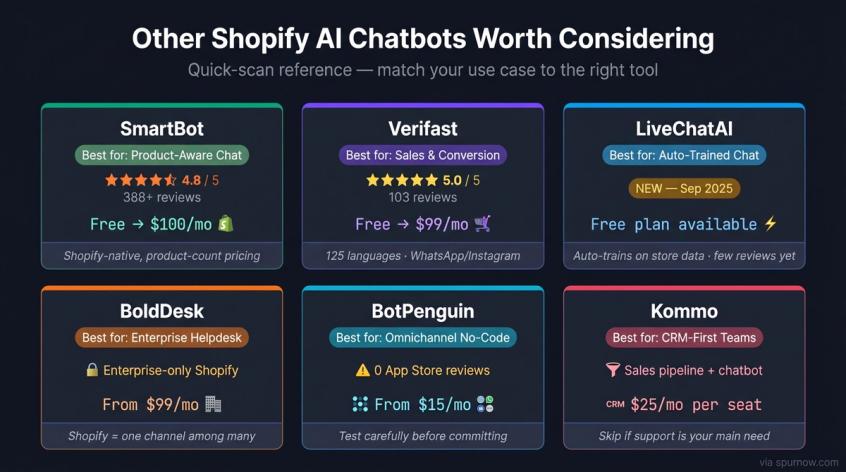
→ SmartBot (4.8/5, 388+ reviews) is a clean Shopify-native product chatbot with product-count-based pricing: free up to 50 products, $30/month up to 200, $100/month up to 1,500. Simple and effective if you just need product-aware chat.
→ Verifast (5.0/5, 103 reviews) is sales and conversion oriented, with product recommendations, cart recovery, 125 languages, and WhatsApp/Instagram support. Free up to 200 chats/month, $99/month for up to 1,000 chats.
→ LiveChatAI auto-trains on store data, supports WhatsApp handoff, and has a free plan. Very new to the Shopify App Store (launched September 2025, only a handful of reviews). Worth testing if you like the concept.
→ BoldDesk is an enterprise-style helpdesk where Shopify is one integration among many. AI Agent capabilities include knowledge base, FAQs, web pages, and multiple channels. Note that the Shopify integration is Enterprise-only for new customers. Pricing starts at $99/month for 5 agents annually. Use it if Shopify is one part of a larger multi-channel helpdesk operation.
→ BotPenguin offers a broad no-code omnichannel bot builder (WhatsApp, Instagram, web, Facebook, SMS, voice) with ecommerce features including Shopify product catalogs and abandoned cart. Pricing starts at $15/month. The Shopify app has been live since May 2024 but had zero App Store reviews when we checked. Test carefully before committing.
→ Kommo is CRM-first. If your Shopify chats are part of a sales pipeline and you need deal stages, lead management, and pipeline tracking alongside chatbot features, it's worth a look. Shopify usage charges run $25/month per seat. Skip it if your primary need is support automation.
What Shopify AI Chatbot Is Right for Your Store?
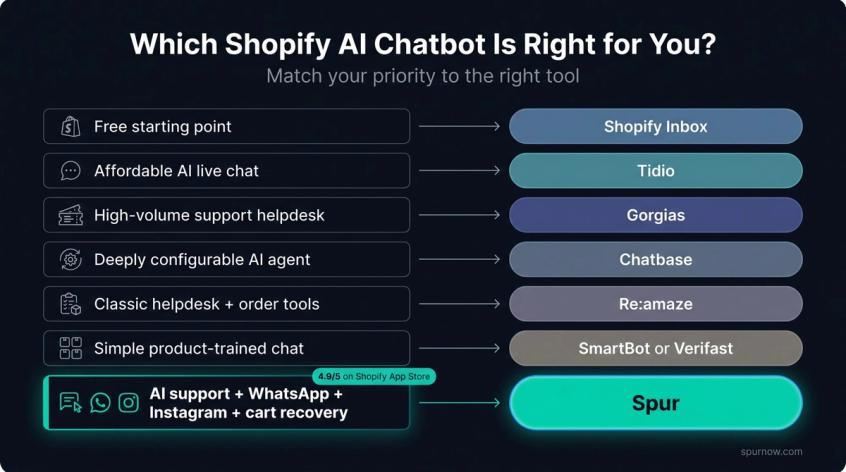
Here's the honest use-case map:
| Your Priority | Best Pick |
|---|---|
| Best free starting point | Shopify Inbox (free, native, good for early stores) |
| Affordable AI live chat for a small store | Tidio (simple, popular, works well out of the box) |
| Mature ecommerce helpdesk for a team | Gorgias (top pick for high-ticket-volume support) |
| Flexible AI agent you can configure deeply | Chatbase (but check its Shopify track record) |
| Classic helpdesk with bots + Shopify order tools | Re:amaze |
| Simple product-trained Shopify chat | SmartBot or Verifast |
| AI support + WhatsApp + Instagram + cart recovery + shared inbox, all in one | Spur |
That last combination is what we built it for, and it's the reason most Shopify merchants who need all of those things end up choosing us. It also helps to understand how to connect your Shopify store to Instagram so your automation can cover both channels from day one.
Why We Built Spur for Shopify Stores
We want to be transparent about something. We built Spur, so we obviously think it's worth using. But the reason we built it the way we did is worth explaining, because it's different from the reason most chatbot companies exist.
When we talked to Shopify merchants in the early days, the pattern was consistent. They'd have a chatbot on their website. A different tool for WhatsApp broadcasts. A manual process for Instagram DMs. Cart recovery happening in yet another platform. And the support team was still buried because none of it was actually connected to what the AI knew about the store.
The problem wasn't that they had too many tools. The problem was that each tool knew only a fragment of the customer's story. The WhatsApp automation didn't know what the website chatbot had already answered. The cart recovery flow didn't know which customers had active support tickets. The AI couldn't take action because it wasn't connected to live Shopify data.
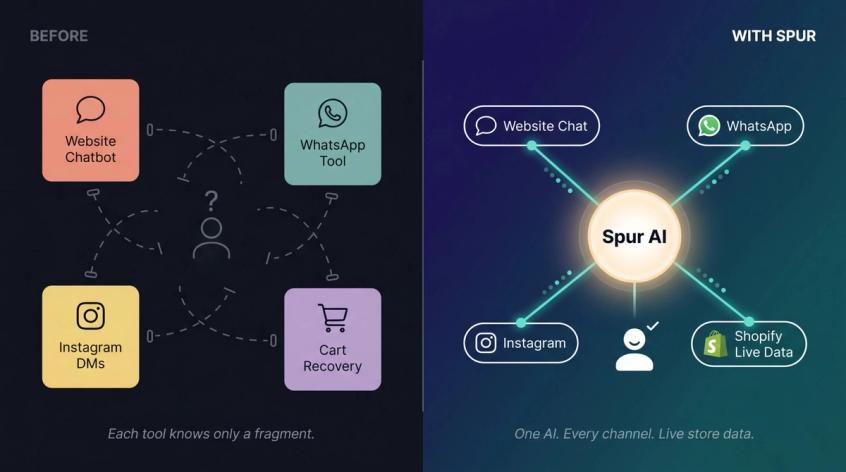
So we built Spur to solve that specifically: one AI trained on your actual knowledge base, deployed across your website, WhatsApp, Instagram, and Facebook Messenger, connected to live Shopify data for orders and inventory, with a shared inbox where your team picks up where the AI leaves off.
The "actionable AI" framing matters to us. We're not building Q&A bots. We're building agents that can check order status, recover abandoned carts on WhatsApp, qualify leads from Instagram comments, and hand off to your team with full conversation context when something genuinely needs a human. The difference between those two things is the difference between automation that reduces your workload and automation that just feels good on a slide deck.
Spur's Shopify integration handles order status updates, abandoned cart recovery, product recommendations, customer support, order management, and ecommerce marketing automation over WhatsApp. The live chat product trains on your knowledge base and deploys fast. And our WhatsApp Business API and Instagram automation work as part of the same system, not as bolt-ons.
Merchants on our platform have seen results like 88x ROI on WhatsApp broadcasts within 24 hours (Eves & Gray) and 73x ROI on targeted campaigns (Muffynn). Read the full case studies from our merchants to see exactly how those results were achieved. Those aren't typical outcomes, and you should pressure-test any vendor's numbers. But they reflect what's possible when the right store data is connected to the right automation.
We're rated 4.9/5 on the Shopify App Store with over 100 merchant reviews. The pricing starts at $31/month on annual billing, with a 7-day free trial so you can test it against your actual store before deciding.
If the use case matches what we described here, we'd be happy to show you how it works.
How Much Does a Shopify AI Chatbot Actually Cost?
A $39/month chatbot can be cheaper than a free chatbot if the free one forces your team to handle tasks that the paid one automates. A $10/month helpdesk can become expensive if ticket overages or AI resolution add-ons scale badly at volume. A $99/month tool can be completely worth it if it recovers enough carts to pay for itself.
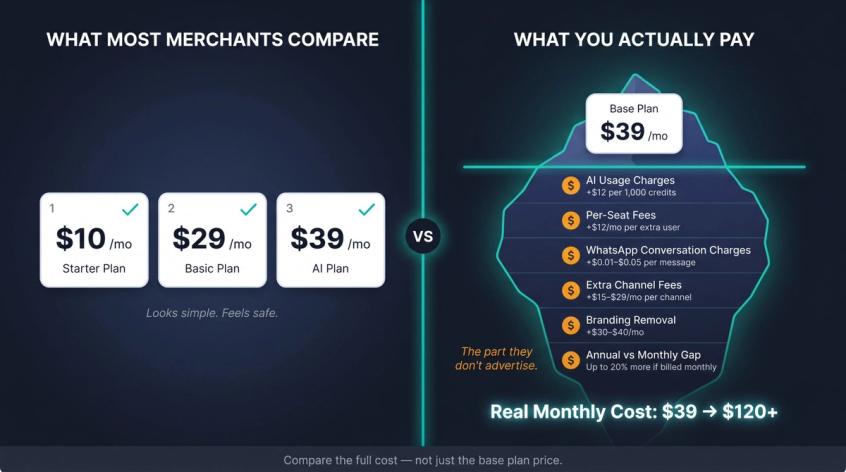
The comparison most merchants make is wrong. They look at base plan prices, ignore usage costs, and pick based on that. Three months later, the real bill looks very different.
Build the full cost picture:
Real monthly cost = base plan + AI usage charges + seat fees + extra channel fees + overages + WhatsApp conversation charges + time to implement + ongoing maintenance time
Value = support hours saved + cart recovery revenue + conversion lift + faster response time + fewer missed chats + better customer experience
The mistake is comparing only the input side (cost) without looking at the output side (value). That's like comparing cars by tire price.
A few specific things to watch:
- Per-AI-resolution pricing (Gorgias, Re:amaze) can get expensive fast if your resolution volume is high
- Per-seat pricing can surprise you when you add support staff
- WhatsApp conversation charges are billed separately by most platforms and vary by country and message category
- Branding removal fees (common on cheaper plans) can add $30-40/month
- Annual vs. monthly pricing often differs significantly, and most platforms advertise the annual price prominently
See how Spur's pricing is structured compared to the per-ticket models, because the difference at scale is significant. Build the full cost before signing anything.
What Data to Give Your Shopify AI Chatbot Before You Launch
The most common reason chatbot projects fail isn't the AI. It's the data. The AI can only be as good as what you put into it. Before your chatbot talks to a single customer, it needs a clean "store truth layer." Understanding how to train a chatbot on your website data is the single most important pre-launch step most merchants skip.
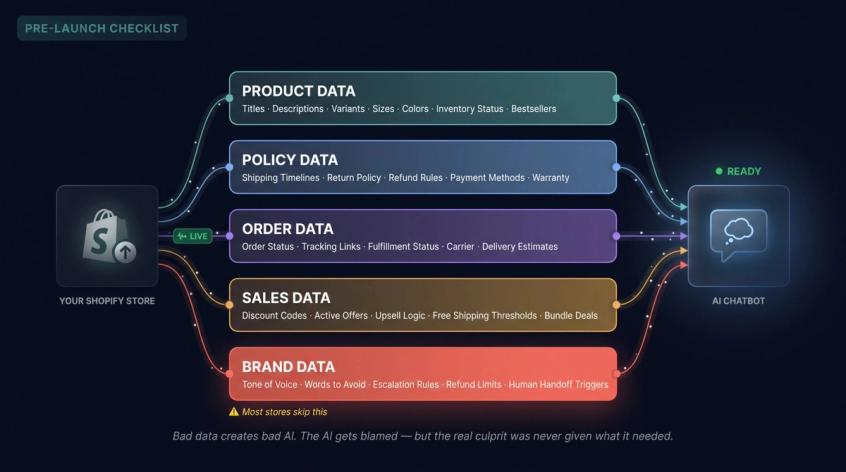
→ Product data
Product titles, descriptions, variants, sizes, colors, materials, compatibility, bundles, collections, price ranges, inventory status, bestsellers.
→ Policy data
Shipping timelines, international shipping rules, COD availability, payment methods, return policy, exchange policy, refund timelines, warranty, cancellation rules, damaged item process, custom order rules.
→ Order data
This comes from the live Shopify integration, not manual entry: order status, fulfillment status, tracking links, carrier, delivery estimates, cancellation and return eligibility, refund status.
→ Sales data
Discount codes and rules, active offers, upsell logic, free shipping thresholds, bundle offers, loyalty rules.
→ Brand data
Tone of voice instructions, words or phrases to avoid, when to escalate to a human, how to handle angry customers, refund approval limits, what an agent can't do on their own. Following solid chatbot best practices on voice and escalation rules here will save you significant remediation time later.
That last category is where most stores skip corners. If you don't tell the AI your brand's voice and limits, it'll make them up. And if it makes up a "sorry for the inconvenience, here's 20% off" response that you didn't authorize, that's a support problem you created.
Before launch, make sure every category above is covered. Bad data creates bad AI, and the AI gets blamed when the real culprit was never given what it needed.
How to Test Your Shopify AI Chatbot Before Going Live
Copy these questions and test every chatbot you're considering. Don't rely on demos. Test it against your actual store data.
Product discovery:
- "I need a gift under $50 for a 25-year-old. What should I buy?"
- "Which products are available in size M?"
- "Compare product A and product B."
- "Is this product vegan / cotton / waterproof / safe for sensitive skin?"
- "Which item will ship fastest right now?"
- "Do you have this in black?"
- "Recommend something for oily skin / winter wear / office use / travel."
- "Is this product in stock?"
Cart and conversion:
- "Do you have any discount codes right now?"
- "Why is my coupon not working?"
- "How much more do I need for free shipping?"
- "Can you help me complete checkout?"
Order support:
- "Where is my order?" (This is the most important test. If it can't answer this with live data, it's Level 2 at best.)
- "My tracking link is not working."
- "Can I change my delivery address?"
- "Can I cancel my order?"
- "I ordered the wrong size. What should I do?"
- "My order says delivered but I didn't receive it."
Returns and refunds:
- "How do I return this?"
- "Am I eligible for an exchange?"
- "When will I get my refund?"
- "I received a damaged product."
- "I want to talk to a human."
For each response, score on four things: Did it answer correctly? Did it use live store or order data where needed? Did it avoid making things up? Did it hand off to a human when appropriate?
If the bot fails badly on these questions, don't launch it yet. Fix the knowledge base first, then retest.
Shopify AI Chatbot Metrics That Actually Matter
Don't track "number of AI replies." That's a vanity metric. A bot could send 10,000 replies and all of them could be wrong.
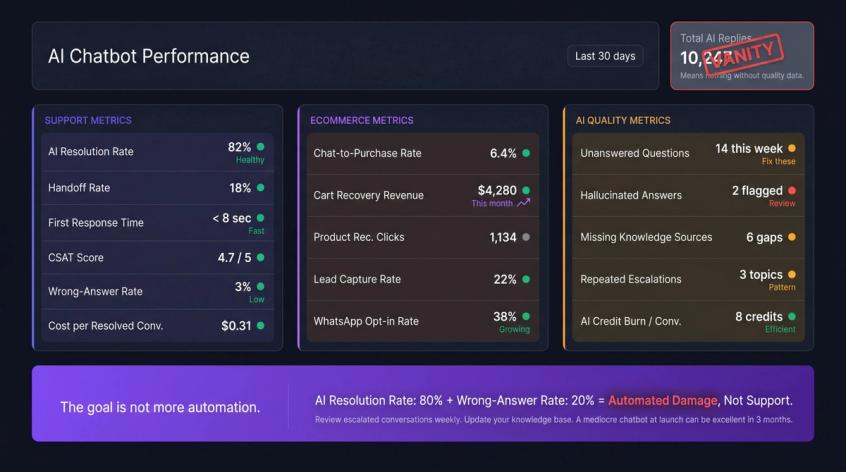
Support metrics to track:
- AI resolution rate (percentage of conversations fully resolved by AI)
- Handoff rate (how often AI escalates to humans, and why)
- First response time
- Customer satisfaction score (CSAT)
- Wrong-answer rate (track actively, not passively)
- Cost per resolved conversation
Ecommerce metrics to track:
- Chat-to-purchase conversion rate
- Cart recovery revenue from WhatsApp flows
- Product recommendation clicks and purchases
- Lead capture rate
- WhatsApp opt-in rate
AI quality metrics to track:
- Unanswered questions (the gaps in your knowledge base)
- Hallucinated answers (the AI making things up when it shouldn't)
- Top missing knowledge sources
- Repeated escalations on the same question types
- AI credit burn per resolved conversation
The goal is not more automation. The goal is fewer bad conversations and more useful outcomes. If your AI resolution rate is 80% but wrong-answer rate is 20%, you've automated damage, not support. The broader discipline of ecommerce customer retention starts with getting these quality metrics right. Customers who get wrong answers don't come back.
Set a review cadence. Read escalated conversations weekly. Update the knowledge base based on what the AI couldn't answer. A chatbot that was mediocre at launch can be excellent in three months if you feed it consistently.
Shopify AI Chatbot FAQ
A Shopify AI chatbot is software that automatically handles customer conversations on your Shopify store, using artificial intelligence to understand questions and generate responses. The best ones go beyond FAQs: they connect to live Shopify data for orders, products, and inventory, and they can take actions like sending tracking links, recovering abandoned carts, and qualifying leads. They're essentially a 24/7 support agent. For a deeper look at chatbot use cases across ecommerce, we've covered the full range of what modern AI chatbots can do for growing stores.
Some can. Shopify Inbox and basic chatbots typically only cover your website. Platforms like Spur cover website live chat, WhatsApp broadcasts and cart recovery, Instagram DMs (including comment-to-DM automation), and Facebook Messenger, all from a single shared inbox. If most of your customer conversations happen on WhatsApp or Instagram, this matters a lot.
The better platforms let you connect your Shopify store directly, which lets the AI read your product catalog, collections, and variants automatically. You also add other sources manually: policy pages, return and shipping policy URLs, help-center articles, PDFs, and custom Q&A pairs. Spur's training process automatically crawls your Shopify store without extra setup, then lets you add additional knowledge sources from the dashboard. Our guide on how to train your chatbot on your website data walks through the full process step by step.
For most Shopify-native platforms like Spur, Tidio, Shopify Inbox, and SmartBot, no. The setup is no-code: you install from the Shopify App Store, connect your store, add your knowledge sources through a dashboard, and deploy. Adding live chat to your Shopify store takes most merchants under 30 minutes with Spur. More configurable platforms like Chatbase or Botpress require more technical setup, which is part of why they appeal to different audiences.
It varies significantly. Shopify Inbox is free. Tidio starts at $29/month. Spur starts at $39/month on the Shopify App Store ($31/month with annual billing on the website). Gorgias starts at $10/month but charges per ticket, which can escalate quickly. The more important number is total cost at your actual volume: base plan plus AI usage, seats, extra channels, WhatsApp conversation charges, and any add-ons. That's the number to compare. See our full pricing breakdown to understand what each Spur tier includes.
Shopify Inbox is free, native, and works well for basic chat with AI-assisted reply suggestions. Its limitations: AI suggested replies are only available in English, require a previous conversation to learn from, and don't come from a trained knowledge base. A dedicated platform like Spur trains on your actual store content (products, policies, FAQs), connects to live order data, supports WhatsApp and Instagram, handles cart recovery, and gives your team a shared inbox with full conversation history. Start with Shopify Inbox if you're just beginning. Upgrade when you need more than what it offers.
Yes. Spur offers a 7-day free trial with access to the full platform. You can connect your Shopify store, train the AI on your knowledge base, and test it on real customer conversations before deciding. The trial is available through both the Shopify App Store and directly on the Spur website.
The right Shopify AI chatbot isn't the one with the best marketing. It's the one that knows your products, connects to your live order data, works on the channels your customers actually use, and hands off cleanly when it should. That's the bar. If a chatbot can't tell a customer where their order is right now, with a real tracking link, it's not doing the job.
For most Shopify stores that want AI support plus WhatsApp, Instagram, and cart recovery in one place, Spur is the strongest fit. Start the free trial. Test it against your real store. If it doesn't solve your actual problem, we'll be the first ones to tell you.
Sources
The pages this article links out to, in the order they appear.
- Spur Shopify App Store listing apps.shopify.com
- Shopify Inbox listing apps.shopify.com
Was this article useful?