Key takeaways
- Click to WhatsApp ads usually fail after the click. Results depend on an instant first reply, quick qualification, routing and follow-up, not only the ad.
- A full CTWA funnel has eight stages: ad promise, prefilled message, instant reply, qualification, routing, conversion, signal feedback to Meta, and follow-up.
- If you reply within 24 hours to a customer who messaged from a CTWA ad, a free entry point window opens. Since 28 September 2026 it can last up to 7 days.
- Budget for four costs: Meta ad spend, WhatsApp per-message charges, platform fees and team time.
- Measure cost per qualified lead, booking rate and purchase conversion rate, not just cost per click or cost per conversation.
Ask an AI about this article
Most teams running click to WhatsApp ads think they have an ad problem. The click-through is weak, the CPL is too high, the results don't justify the spend.
We see this constantly. And almost every time, the ad isn't the problem.
The problem is what happens after the click. Someone messages the business and gets "Hi, how can we help you?" The peak-intent moment dies right there. Or they answer three questions and then wait 45 minutes for a reply. Or they get a generic reply that has nothing to do with the ad they clicked.
A click to WhatsApp ad is not: ad → chat → hope someone buys.
It's: ad → intent-matched first message → instant qualification → useful reply → human or AI handoff → conversion event → follow-up → revenue attribution.
The ad only creates the opening. The money is made after the click. WhatsApp's official business guide describes the format as a Facebook or Instagram ad with a call-to-action that opens a WhatsApp chat with the business. That description sounds simple. But getting the conversion lift means building the system that runs after that chat opens.
We've helped hundreds of D2C brands, real estate teams, education businesses, and agencies build exactly this system on Spur. One of our clients, Eves & Gray, saw 88.75x ROI within 24 hours using WhatsApp automation triggered by ads like these. That's not typical, but it illustrates what a well-built post-click system can do.
This guide covers the full operating system: the 8-stage CTWA funnel, step-by-step setup in Meta Ads Manager, five ready-to-use flows by industry, the analytics that actually matter, the 15 most common ways campaigns fail, and a 30-day testing plan you can start tomorrow.
What Is a Click to WhatsApp Ad?
A click to WhatsApp ad is a Meta ad shown on Facebook or Instagram that sends the user straight into a WhatsApp conversation with your business. WhatsApp's official product page describes it as an ad format that drives lead generation, sales, marketing, and customer support conversations across placements including Facebook and Instagram feeds, stories, and marketplace.
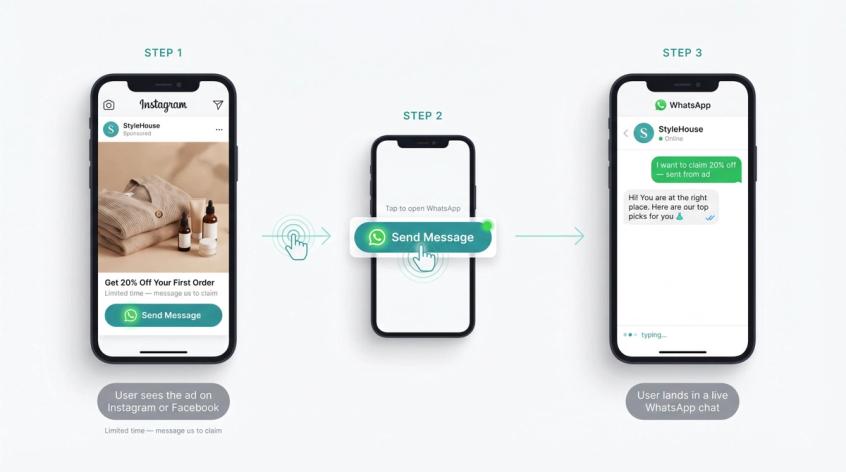
One important clarification for 2026: click to WhatsApp ads are not the same as ads inside WhatsApp itself. Meta announced ads in WhatsApp Status and promoted channels in the WhatsApp Updates tab in June 2025, while keeping personal chats ad-free. That announcement confirmed those are two separate formats. What we're covering here is the classic performance marketing setup: a Facebook or Instagram ad that opens a WhatsApp conversation with your business.
The format works across a wide range of use cases: product recommendations, lead qualification, appointment booking, product discovery, support, and retargeting. The WhatsApp Business API (also called the WhatsApp Business Platform) is the infrastructure that makes this possible at scale, handling automation, routing, multi-agent inboxes, and conversion tracking. And because it lands the user in an active conversation rather than a static page, the intent signal is much stronger than a form fill or a click to a landing page.
Why Click to WhatsApp Ads Convert Better Than Form Ads
Five reasons this format can outperform standard paid social when it's properly built.
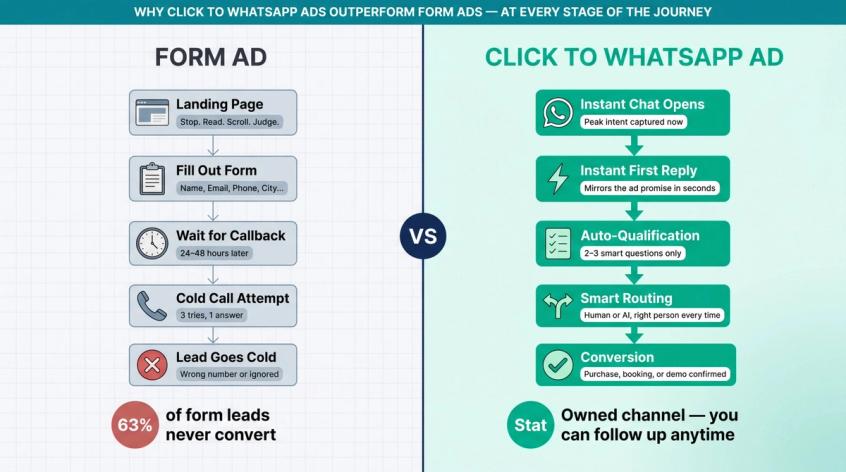
It removes landing page friction. A landing page asks the customer to stop, read, scroll, judge credibility, fill out a form, wait for a callback, and maybe convert. A WhatsApp ad lets them ask the thing already in their head: is this available in my size, what's the price, can I book a visit, do you deliver to my city. A chat answers that faster than any page.
It catches the user at peak intent. When someone clicks "Send Message," they're not passively browsing. They're raising their hand. That doesn't mean they're ready to buy. It means they're ready to engage. Your first job is to convert that moment of engagement into a clear next step.
It gives you a real contact channel. A form lead can be fake, mistyped, or ignored. A WhatsApp conversation gives you a live messaging thread with the ability to use WhatsApp as a lead capture channel for ongoing nurture. WhatsApp's business policy is clear that if a user has given opt-in, you can follow up with approved templates and genuinely useful post-purchase or lead-nurture messages. That's a channel you own, not just a one-time impression.
It lets you qualify inside the buying channel. You don't need every lead handled by a salesperson. You need every lead sorted. A good WhatsApp flow can qualify leads automatically inside the chat, tag the lead, and route only the serious ones to a human. WhatsApp Flows can also be used for structured lead capture, bookings, quotes, and task-based journeys right inside WhatsApp, without pushing users to an external form.
The signal feedback advantage: If you only optimize for "messages started," Meta will find people who like starting chats, not people who buy. Meta's Conversions API for business messaging exists so businesses can connect downstream data from chats, apps, CRMs, and stores back to Meta to measure and optimize for outcomes beyond conversations started. Sending conversion signals back to Meta is the difference between a campaign that gets cheap chats and one that compounds over time.
The 8-Stage Click to WhatsApp Conversion Funnel
A serious click to WhatsApp campaign has eight stages. Most teams build only the first.
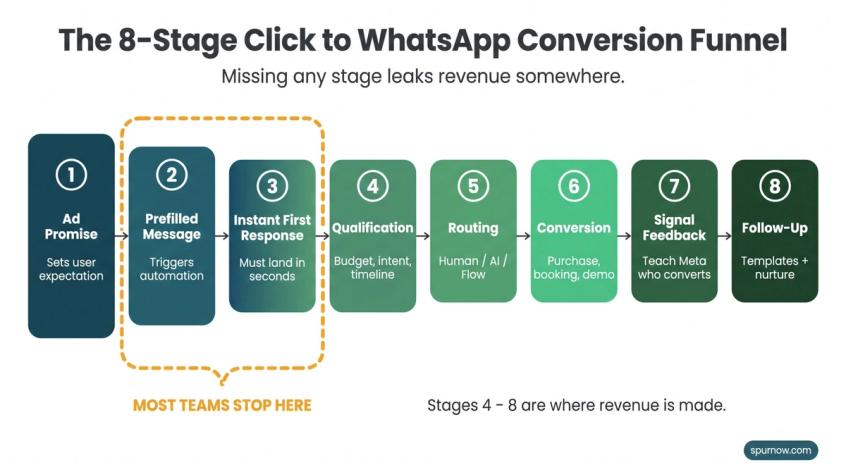
① Ad promise. What the user thinks they'll get by messaging you. This sets every expectation downstream.
② Prefilled message or welcome trigger. The first text or context that opens the WhatsApp conversation and tells your automation what to do next.
③ Instant first response. The bot, AI agent, or human reply that confirms the ad promise within seconds. If this takes minutes, the moment is gone.
④ Qualification. The smallest set of questions needed to sort and qualify automatically: budget, intent, timeline, use case. Knowing how chatbots can handle lead qualification is the key to designing this stage well.
⑤ Routing. Based on answers, use automation flows to send the user to a human, an AI agent, a product flow, a booking flow, a payment link, or a nurture path.
⑥ Conversion. The actual business outcome: purchase, booking, application, consultation, quote request, demo, or site visit.
⑦ Signal feedback. Send qualified lead, purchase, booking, or revenue data back to Meta where possible. This teaches the algorithm to find more users like the ones who converted.
⑧ Follow-up. Continue with compliant templates, useful reminders, and post-purchase messages using the contact channel you've earned.
Most teams build stage ① , maybe stage ③, and then wonder why the ROAS is flat. The funnel works as a complete system. Missing any stage leaks revenue somewhere.
How to Define Your CTWA Conversion Goal Before Spending
Don't start with ad creative. Start with the business outcome.
The temptation is to optimize for "messaging connections" or "conversations started" because those numbers look good in the dashboard. But those metrics aren't the finish line. Revenue, bookings, and qualified pipeline are.
Here's how to define the right goal by business type:
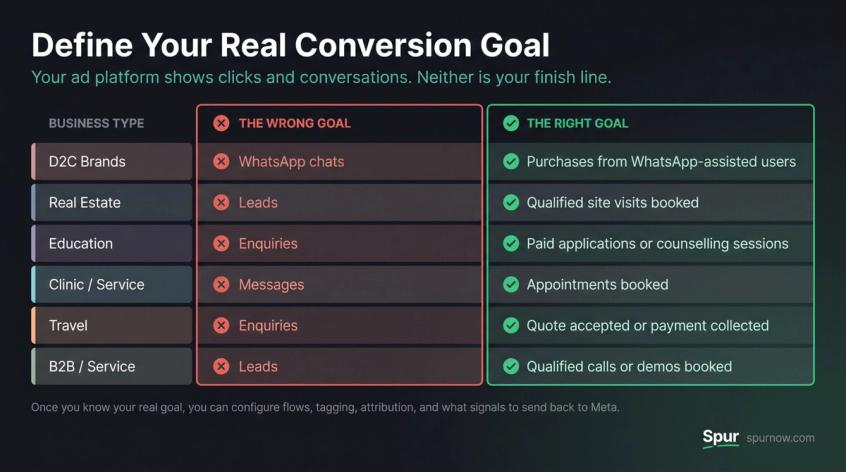
| Business type | The wrong goal | The right goal |
|---|---|---|
| D2C brands | WhatsApp chats | Purchases from WhatsApp-assisted users |
| Real estate | Leads | Qualified site visits booked |
| Education | Enquiries | Paid applications or counselling sessions |
| Clinic/service | Messages | Appointments booked |
| Travel | Enquiries | Quote accepted or payment collected |
| B2B/service | Leads | Qualified calls or demos booked |
The ad platform shows you clicks, connections, and conversations. Those are useful signals, not the finish line. Once you know your real goal, you can set up your flow, your tagging, and your attribution properly. And you'll know what to send back to Meta so the algorithm learns who's worth finding.
Click to WhatsApp Ads Cost: What You're Actually Paying For
Click to WhatsApp campaigns have four cost buckets. Most teams only count the first two.
1. Meta ad spend. The budget you put into the campaign itself. You control this through campaign budget, bidding strategy, targeting, and creative performance.
2. WhatsApp message charges. As of 2026, WhatsApp's official platform pricing page says businesses are charged on a per-message basis for each message delivered, with pricing depending on the recipient's market and message category. There are four categories: marketing, utility, authentication, and service. Don't budget based on old screenshots or old blog posts. The rate card changes. Understanding how WhatsApp conversation pricing works before scaling is worth your time.
3. Platform or BSP cost. If you use a tool like Spur, you'll pay for the platform in addition to WhatsApp message fees. Spur's AI Start plan includes WhatsApp automation and CTWA features, and higher tiers add more flows, AI credits, seats, webhooks, and custom AI actions.
4. Team cost. This is the cost most teams forget. If 500 people message your business and your team responds slowly, you paid for demand and then wasted it. Every unresolved chat is a paid acquisition that went nowhere.
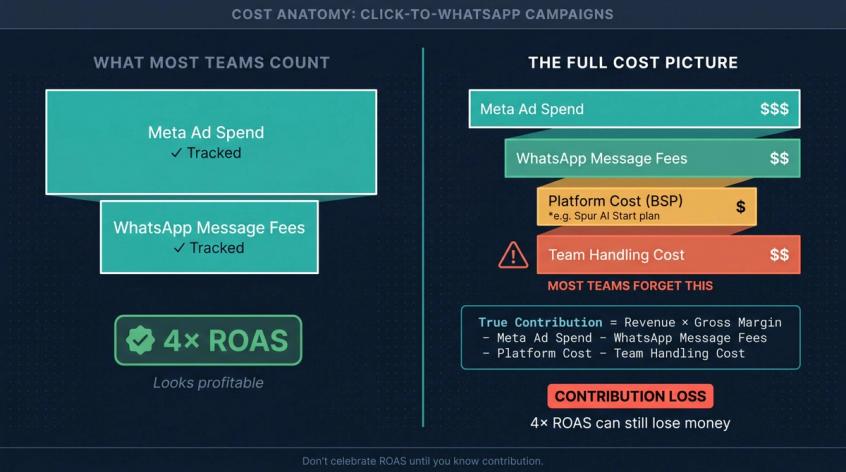
The real profitability formula:
True contribution =
Revenue × gross margin
- Meta ad spend
- WhatsApp message fees
- Platform cost
- Team handling cost
Don't celebrate ROAS until you know contribution. A campaign with 4x ROAS and high team handling costs can still lose money.
How to Use the 7-Day Free Entry Point in WhatsApp Ads
WhatsApp's official pricing page says that when a customer messages a business from a click to WhatsApp ad and the business replies within 24 hours, a free entry point window opens. Since 28 September 2026 it can stay open for up to 7 days (it was 72 hours), and nothing the business sends inside it is charged.
This is a real advantage. But there's a common misreading of it.
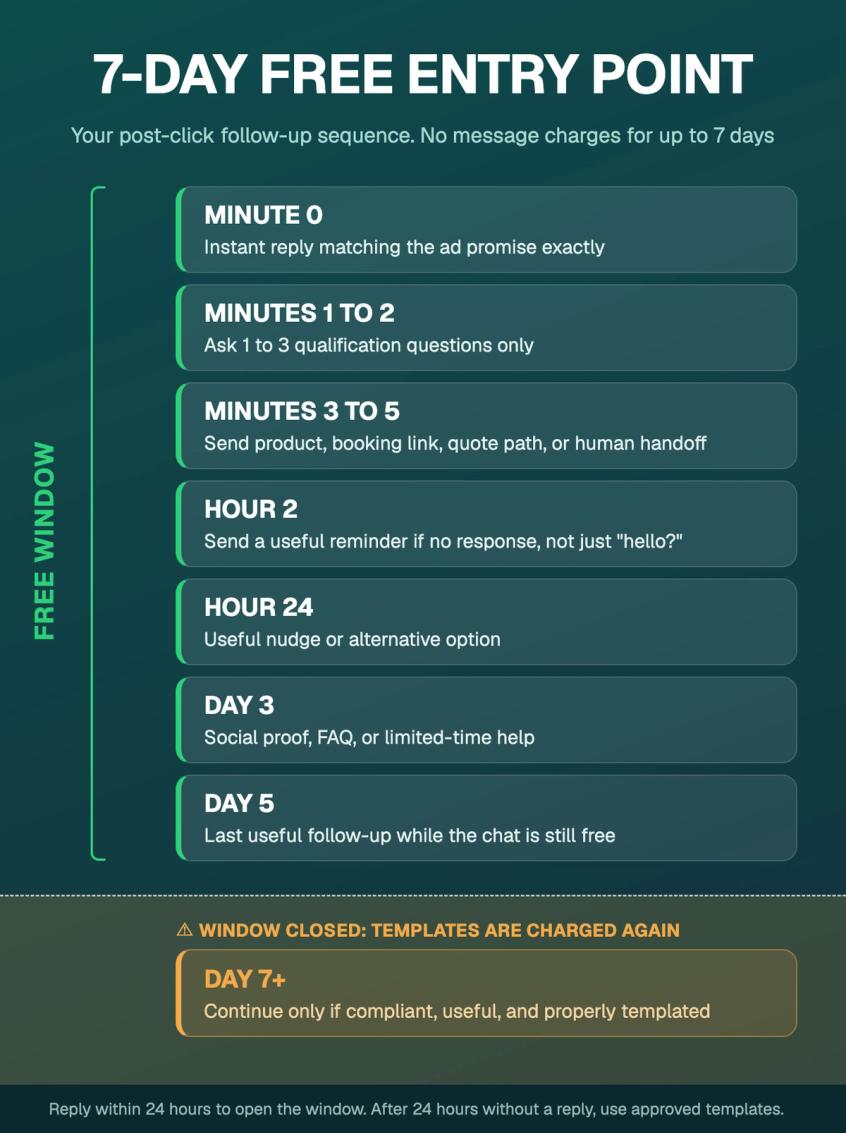
The free entry point window is a pricing rule, not a permission to spam. WhatsApp's business policy still requires businesses to respect opt-in, opt-out, user expectations, and template rules. Outside the 24-hour customer service window, businesses must use approved message templates to initiate messages.
The practical way to use the free entry point window:
→ Minute 0: instant reply matching the ad promise
→ Minutes 1-2: ask 1-3 qualification questions
→ Minutes 3-5: send the right product, booking link, quote path, or human handoff
→ Hour 2: reminder if no response (useful, not "hello?")
→ Hour 24: useful nudge or alternative option
→ Day 3: proof, FAQ, or limited-time help
→ Day 5: last useful follow-up while the chat is still free
→ Day 7+: continue only if compliant, useful, and properly templated
Build the flow so the free window works as a clean follow-up sequence, not random check-ins. The user still remembers why they clicked. Use that window well.
Running Instagram or Messenger ads as well? Chats from those ads now get a messaging window of up to 7 days on Instagram and Messenger, with different rules from WhatsApp.
How to Set Up Click to WhatsApp Ads in Meta Ads Manager
WhatsApp's official ad creation guide walks through the basic setup: choose a campaign objective, select messaging apps under conversions, then select WhatsApp. The Meta Ads Manager UI changes often, but the underlying logic is stable.
Step 1: Connect Your Meta and WhatsApp Assets
Before launching, these need to be connected in your Meta Business Manager:
- Meta Business Account
- Facebook Page
- Instagram account (if using Instagram placements)
- WhatsApp Business Account or WhatsApp Business Platform number
- Ad Account
- Pixel, Conversions API, or offline events (if you want to send conversion data back)
If you're using Spur, this connection step matters more than it might seem. Spur's help center on Meta business account setup notes that without a properly configured Meta connection, CTWA automations can fail and ad performance tracking will be incomplete.
Step 2: Choose the Right Campaign Objective
For beginners, starting with messages or engagement as the objective is normal. For teams with data, the better path is optimizing toward qualified leads, purchases, or downstream events.
The trap is staying on "message starts" too long. Meta will find users who are cheap to engage, not users who buy. As soon as you have enough signal to send reliable conversion events, move toward qualifying for the outcomes that actually matter to your business. Meta's business messaging Conversions API guidance is specifically about measuring outcomes beyond conversations started.
Step 3: Select WhatsApp as the Destination
Set the destination to messaging apps and choose WhatsApp. WhatsApp's setup guide describes this exact step. Then select your placements.
Common placements for CTWA campaigns:
- Facebook feed
- Instagram feed
- Instagram Stories and Reels
- Facebook Marketplace
- Facebook Stories
WhatsApp's ad overview confirms that CTWA ads appear across Facebook and Instagram placements including feed, stories, and marketplace. If you're considering how CTWA compares to other Meta ad types, the difference between Instagram lead ads and DM ads is worth understanding before you commit your budget.
Step 4: Set Budget and Schedule
WhatsApp's official ad setup guide recommends running the ad for at least seven days and generally works best with a broad audience of at least 2-10 million. That recommendation doesn't mean forcing a huge audience when your business is genuinely local or niche. It means not over-constraining the campaign before the algorithm has room to learn.
Step 5: Build the First-Reply Welcome Experience
This is where most campaigns break.
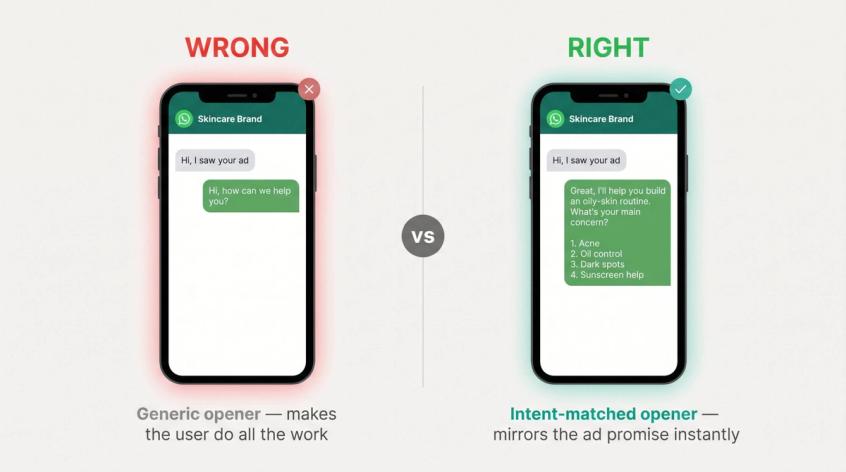
The wrong first reply: "Hi, how can we help you?"
That forces the user to do all the work. They've just clicked an ad that made a specific promise. Your first message should reflect exactly what that promise was.
If the ad said "Get a free skin routine for oily skin," the first reply should say:
Great, I'll help you build an oily-skin routine. What's your main concern?
1. Acne
2. Oil control
3. Dark spots
4. Sunscreen help
If the ad said "Book a site visit for 3 BHK apartments in Gurgaon," the first reply should say:
Sure, I'll help you check available 3 BHK options. What budget range are you looking at?
1. Under ₹2 Cr
2. ₹2-3 Cr
3. ₹3-5 Cr
4. Above ₹5 Cr
Don't make the user repeat the ad context. Mirror it. The setup creates the channel. Now let's look at what actually converts inside it.
How to Build a Post-Click WhatsApp Chat That Qualifies Leads
A good post-click chat has five parts. Getting this structure right is what separates campaigns that get conversations from campaigns that get customers.
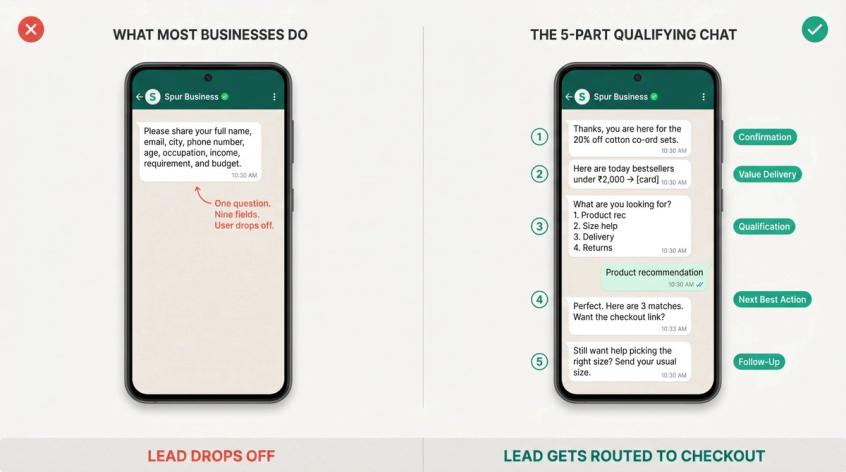
① Confirmation
Tell the user immediately that they're in the right place.
Thanks, you're here for the 20% off cotton co-ord sets.
One line. It confirms the ad promise, reduces drop-off, and starts building trust.
② Value Delivery
Give something immediately. Don't make them wait.
Here are today's bestsellers under ₹2,000.
Or: Yes, we have Saturday appointments available.
Or: The current Gurgaon 3 BHK options start around ₹2.1 Cr.
Quick, specific, directly useful.
③ Qualification
Ask only what is needed to route them correctly.
Bad:
Please share your full name, email, city, phone number, age, occupation, income, requirement, and budget.
Better for ecommerce:
What are you looking for?
1. Product recommendation
2. Size help
3. Delivery question
4. Return policy
Better for high-ticket sales:
What's your timeline?
1. Immediately
2. This month
3. 1-3 months
4. Just exploring
Every question should earn its place. If the answer doesn't change the next action, don't ask it.
④ Next Best Action
Move the user somewhere useful based on their answers:
→ Product card or catalogue
→ Checkout link
→ Booking slot
→ Your shared inbox for complex or high-ticket queries where a human needs to step in
→ Quote form
→ Payment link
→ Site visit calendar
→ AI-handled FAQ
⑤ Follow-Up
If the user drops, follow up with context, not "hello?"
Better: Still want help choosing the right size? Send your usual size and I'll suggest the best fit.
Or: Should I show you options under ₹2.5 Cr instead?
The follow-up should reference where they were in the journey. It shows you were paying attention. For structured nurture after the initial conversation, WhatsApp marketing and follow-up automation handles the sequencing and compliance automatically.
5 Click to WhatsApp Flows That Work by Industry
Flow 1: D2C Ecommerce — Product Recommendation Flow
Ad promise: "Message us to find your perfect shade in 60 seconds"
First reply:
Hey, I'll help you find your shade. What's your skin tone?
1. Fair
2. Medium
3. Wheatish
4. Deep
Follow-up questions:
What finish do you prefer?
1. Matte
2. Dewy
3. Natural
What's your budget?
1. Under ₹999
2. ₹999-₹1,999
3. ₹2,000+
Conversion action:
Based on this, these 3 shades should work best for you.
[Product 1] [Product 2] [Product 3]
Want me to send the checkout link?
Why it works: the customer isn't asked to browse a catalogue. They're guided. Spur's WhatsApp Business API features support ecommerce flows for product recommendations, abandoned checkout, order updates, and Shopify or WooCommerce integration, so this flow can connect directly to your store's inventory. For a deeper look at ecommerce automation on WhatsApp, including abandoned cart recovery and order update flows, we've covered the full picture separately.
Flow 2: Real Estate — Site Visit Booking Flow
Ad promise: "Book a site visit for ready-to-move 3 BHK apartments"
First reply:
Great, I'll help you check available 3 BHK homes. What location are you considering?
1. Gurgaon 2. Noida 3. Delhi 4. Other
Qualification:
What budget range should I show?
1. Under ₹1.5 Cr
2. ₹1.5-2.5 Cr
3. ₹2.5-4 Cr
4. ₹4 Cr+
When are you planning to buy?
1. This month 2. 1-3 months 3. 3-6 months 4. Just researching
Routing:
Thanks. You look like a good fit for our Gurgaon ready-to-move inventory. Want to book a site visit?
1. Today 2. Tomorrow 3. Weekend 4. Talk to advisor
Why it works: budget, location, and timeline separate real buyers from browsers. This is the logic behind pre-qualifying real estate leads. Collecting the right signals before a human steps in saves significant team time.
As a self-reported example: Engelife Construtora used WhatsApp Flows with click to WhatsApp ads to pre-qualify leads and reported a 26-point increase in lead qualification rate, 37% lower cost per qualified lead, and a 12-minute reduction in qualification time in an October–November 2025 test.
Flow 3: Education — Eligibility and Counselling Flow
Ad promise: "Message us to check eligibility for the 2026 data science program"
First reply:
Sure, I'll help you check eligibility. What's your current status?
1. Student 2. Working professional 3. Career switcher 4. Business owner
Follow-up:
How soon do you want to start?
1. Immediately 2. Next 30 days 3. Next 3 months 4. Just exploring
What do you want most?
1. Job switch 2. Upskilling 3. Certification 4. Freelancing/business use
Conversion action:
Based on this, the weekend cohort is likely better for you. Want to book a free counselling call?
Why it works: education businesses often see buyers who need confidence, not just a brochure. The flow gets the student to the right counsellor with context already collected, turning an enquiry into a booked call rather than a passive information request.
Flow 4: Appointment-Led Services
Ad promise: "Book a free consultation on WhatsApp"
First reply:
Happy to help. What do you need?
1. Pricing 2. Availability 3. Service details 4. Book appointment
Conversion action:
We have slots at 12:30 PM and 5:00 PM tomorrow. Which one should I reserve?
Why it works: the flow doesn't collect a lead. It books the appointment. The entire friction of scheduling is compressed into a few messages.
Flow 5: B2B — Demo Booking Flow
Ad promise: "See how AI can handle 70% of your customer queries"
First reply:
Great, I'll help you see if this fits your team. Where do most of your customer messages come from?
1. WhatsApp 2. Instagram 3. Website live chat 4. All of these
Qualification:
Roughly how many customer messages do you get per month?
1. Under 1,000 2. 1,000-10,000 3. 10,000-50,000 4. 50,000+
Conversion action:
Looks relevant. Want to book a 15-minute demo or see pricing first?
1. Book demo 2. See pricing 3. Talk on WhatsApp
Why it works: the chat qualifies company size, channel, and use case before a human enters. The sales team gets context, not a cold "hi." The flow is only as good as the creative that drives people into it.
How to Write WhatsApp Ad Creative That Drives Conversations
Your creative has one job: make messaging you feel like the obvious next step.
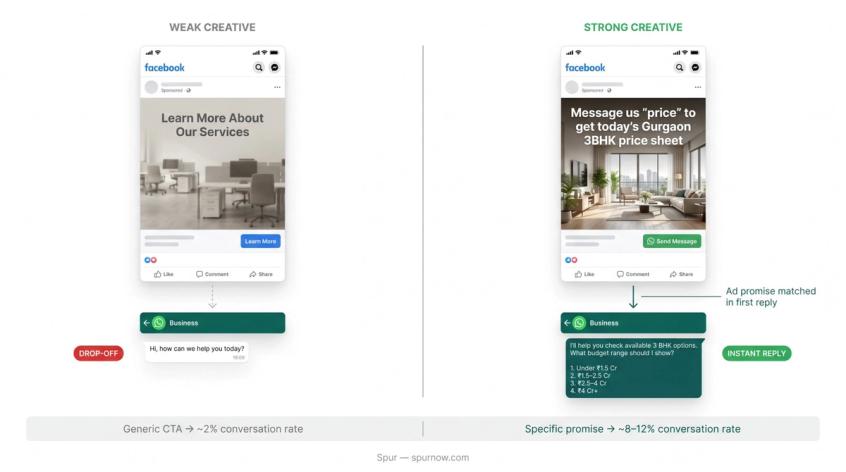
Bad ad copy:
Learn more about our services
Better:
Message us "price" to get today's Gurgaon 3 BHK price sheet
Bad:
Shop our new collection
Better:
Message us your size and we'll send 3 cotton dresses under ₹2,000
The strongest CTWA creative promises fall into clear categories:
| Promise type | Example |
|---|---|
| Recommendation | "Message us to find your perfect size" |
| Price access | "Get the price sheet on WhatsApp" |
| Availability | "Check today's appointment slots" |
| Consultation | "Get a free 5-minute recommendation" |
| Offer | "Message us for the private sale link" |
| Lead magnet | "Get the 2026 admission checklist" |
| Guided purchase | "Tell us your budget, we'll show the best options" |
| Support-led sale | "Ask anything before you buy" |
On prefilled messages: use them. A prefilled message reduces typing friction and gives your automation context. If the ad is about acne-safe sunscreen, the prefill should be "show me acne-safe sunscreen," not just "hi." A generic prefill gives your flow nothing to work with.
If you're running WhatsApp ads alongside other Meta ad types, Click-to-Instagram DM ads operate on a similar principle but route users into Instagram DM conversations instead. Running both channels in parallel can significantly expand your reach while keeping qualification consistent.
One practical note: if you're running CTWA on Spur and Meta doesn't pass the ad context correctly (it happens), Spur's help center recommends copying the welcome messages from Meta Ads Manager and setting them as keyword triggers inside the automation. This gives the flow a reliable fallback when ad metadata isn't passed through.
When to Use AI vs Humans in Your WhatsApp Ad Funnel
Not everything should be automated. Not everything should go to a human. Knowing when to use AI vs human agents is where most teams find significant hidden capacity.
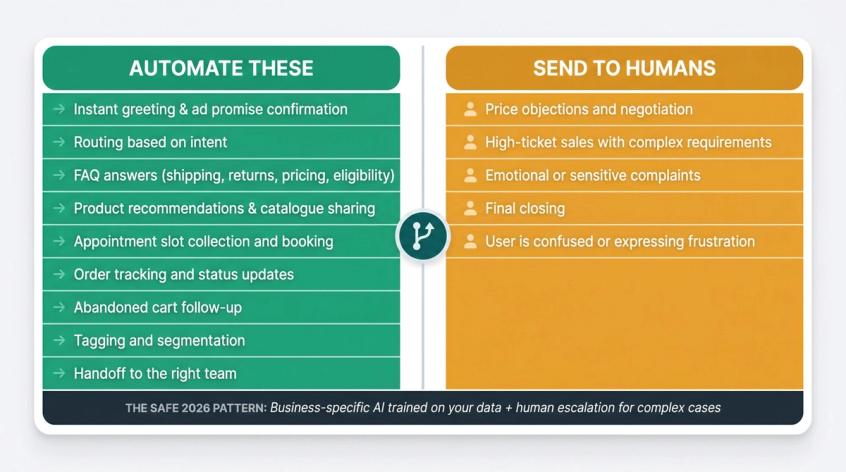
Automate these:
→ Instant greeting and ad promise confirmation
→ Routing based on intent
→ FAQ answers (shipping, returns, pricing, eligibility)
→ Product recommendations and catalogue sharing
→ Appointment slot collection and booking
→ Order tracking and status updates
→ Abandoned cart follow-up
→ Tagging and segmentation
→ Handoff to the right team
Send to humans:
- Price objections and negotiation
- High-ticket sales with complex requirements
- Emotional or sensitive complaints
- Final closing
- Cases where the user is confused or expressing frustration
WhatsApp's business policy requires that if a bot or AI agent responds within the 24-hour customer service window, the business must provide clear and direct escalation paths to a human. That's not just a compliance requirement. It's also good product design.
On AI agents specifically: Spur's AI agents are useful when trained on your actual business data: product catalogue, pricing rules, shipping policy, return policy, FAQs, eligibility criteria, booking process, order data. AI isn't useful when it becomes a vague general chatbot answering questions it wasn't built to answer.
An important context update for 2026: reporting in January 2026 clarified that Meta's updated policy targets broad-use AI assistants as a primary product on WhatsApp, while business-specific customer service workflows (support, bookings, order processing) can still operate. The safe pattern: build an AI agent trained on your content, for your customers, that routes to humans when needed.
Spur's AI live chat product is built around this model: AI agents trained on your knowledge base, with custom actions for booking meetings, checking inventory, and processing queries, plus a shared inbox for conversations that need a human touch.
WhatsApp Ad Analytics: Which Metrics Actually Matter
Don't measure only CPC or cost per message. Tracking WhatsApp campaign performance at the full-funnel level is what separates teams that optimize correctly from teams that celebrate cheap chats.
| Metric | Why it matters |
|---|---|
| Ad spend | Base acquisition cost |
| Impressions | Reach |
| CTR | Creative relevance |
| Cost per click | Traffic cost |
| Conversations started | True chat starts |
| First response rate | Whether your system replied |
| Median first response time | Speed to value |
| 3+ message conversations | Deeper engagement |
| Qualification rate | Percentage of chats that become useful leads |
| Cost per qualified lead | Real lead acquisition cost |
| Booking rate | For appointments, demos, site visits |
| Purchase rate | Ecommerce conversion |
| Revenue per conversation | Monetization quality |
| ROAS | Revenue efficiency |
| Gross contribution | Actual profit after all costs |
| Opt-in rate | Future nurture potential |
| Block/report rate | Quality and compliance health |
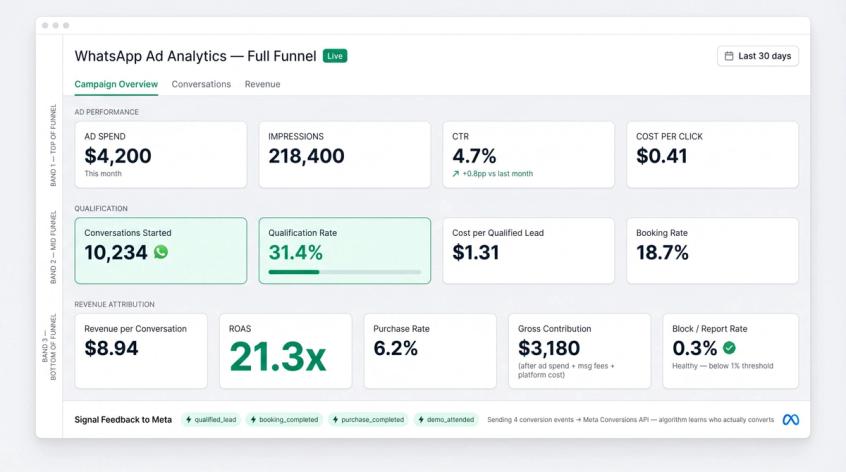
Key formulas:
Cost per conversation = Ad spend / Conversations started
Qualification rate = Qualified leads / Conversations started
Cost per qualified lead = Ad spend / Qualified leads
Booking rate = Bookings / Qualified leads
Purchase conversion rate = Purchases / Conversations started
ROAS = Revenue / Ad spend
Gross contribution = (Revenue × Gross margin) - Ad spend - Message fees - Platform cost - Handling cost
WhatsApp's ad overview notes that businesses can measure beyond the conversation using the Meta Pixel, Conversions API, and offline conversions. Spur's ad analytics product is built to track from ad click through WhatsApp conversation to purchase, with campaign spend, messaging actions, conversions, cost per action, and revenue attribution in one place.
What to send back to Meta: send events that represent real business value, not just activity.
→ For ecommerce: viewed product, added to cart, checkout link sent, purchase completed, repeat purchase
→ For real estate: qualified lead, site visit booked, site visit completed, deal won
→ For education: eligible lead, counselling booked, application submitted, fee paid
→ For B2B: qualified lead, demo booked, demo attended, customer won
Meta's Conversions API for business messaging was built specifically for this: connecting business data across chats, websites, apps, CRMs, and stores so teams can measure and improve downstream outcomes from click-to-message campaigns. Send the right events and the algorithm gets smarter over time.
Not sure what good numbers look like? These click to WhatsApp ads benchmarks come from Meta's own A/B tests, with a calculator to compare two of your campaigns.
How Spur Powers Your Click to WhatsApp Ad Campaigns
Spur is built for the full post-click system described in this guide: WhatsApp automation, Instagram automation, click-to-DM funnels, shared inbox, AI agents, broadcasts, ecommerce integrations, and ad analytics.
Here's what a practical Spur setup looks like for CTWA campaigns.
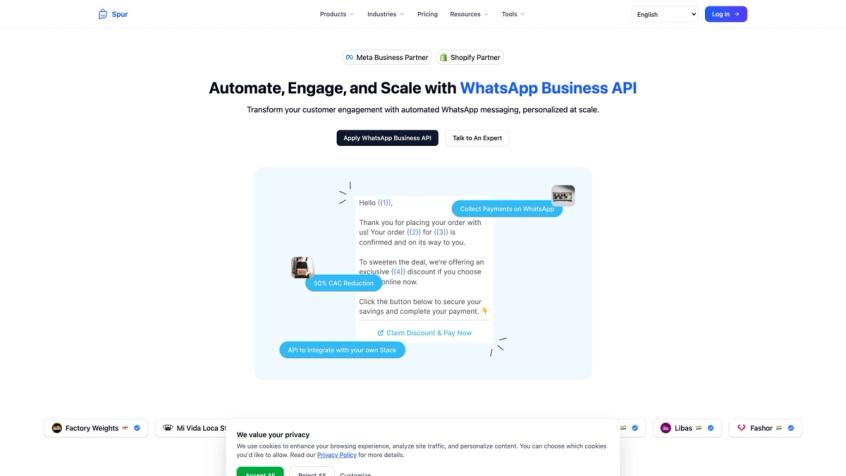
1. Connect Meta and WhatsApp
Connect your Meta business account, WhatsApp channel, Facebook Page, and Instagram account inside Spur. This connection is foundational. Spur's Meta business account setup guide explains that CTWA automations and Conversions API events depend on a properly configured Meta connection.
2. Build the Post-Click Automation
Use Spur's visual workflow builder to create the full post-click journey:
Trigger: ad welcome message or keyword
→ Confirm ad promise
→ Ask qualification question
→ Tag user by intent
→ Send product / booking / quote path
→ Route to human or AI agent
→ Follow up if no response
The workflow builder supports no-code drag-and-drop flows, triggers, conditions, delays, AI steps, HTTP requests, and multi-channel automation. No developers required.
3. Deploy an AI Agent for Instant Answers
Train the AI agent on your website content, product catalogue, policies, FAQs, and support documentation. Then let it handle product questions, order status, return policy, shipping questions, basic qualification, and booking routing without waiting for a human.
4. Route Qualified Users to the Shared Inbox
Spur's WhatsApp Business API product includes a shared inbox with multiple agents, multiple phone numbers, ticketing, assignment rules, and quick replies. Use it for high-ticket buyers, negotiations, complex product questions, and custom quote requests.
5. Track Ad Performance to Revenue
Spur's ad analytics tracks from ad click through WhatsApp conversation to purchase. You can see campaign spend, messaging actions, conversion events, cost per action, revenue attribution, and ROAS-style reporting in one dashboard.
6. Follow Up with Compliant Nurture Sequences
Once you have opt-in and segmentation set up, use Spur's template broadcasts and automation for abandoned checkout recovery on Shopify and WooCommerce, product reminders, order updates, shipping notifications, replenishment prompts, and appointment reminders.
The Eves & Gray result: One of our clients, Eves & Gray, achieved 88.75x ROI within 24 hours using WhatsApp carousel messages and Spur's DeliveryBoost feature. Their campaign saw approximately 99% message delivery. These are self-reported results, but they reflect what happens when every layer of the system works together: the ad, the automation, the follow-up, and the attribution.
Ready to run your first CTWA campaign on Spur? Start your free trial at use.spurnow.com. Setup takes less than a day, and you don't need to write any code.
The 15 Most Common Reasons Click to WhatsApp Campaigns Fail
Understanding these failure modes means you won't have to learn them from wasted ad spend.
Ad and creative problems:
- The ad promise and chat flow don't match. The ad says "get price list." The chat says "how can we help?" That breaks trust instantly and kills conversion.
- The first reply is too slow. If a user messages you and waits, the peak-intent moment disappears. Use automation for the first reply even if humans handle everything after.
- The offer is vague. "Contact us" is weak. "Message us for today's price sheet" is clear. Specific offers drive specific conversations.
- The follow-up is lazy. "Hello?" is not a sales follow-up. Send useful context, proof, alternatives, or the obvious next step.
Flow and routing problems:
- Optimizing for cheap chats instead of qualified leads. Cheap conversations aren't the same as qualified leads. Track cost per qualified lead and revenue per conversation.
- The flow asks too many questions. WhatsApp should feel easier than a form. If your first interaction asks seven questions, you've recreated a bad landing page experience.
- No routing logic. A buyer, a support user, a job seeker, a reseller, and a spammer all enter the same inbox. This destroys team productivity.
- Humans enter too late. Automation should not trap serious buyers in a loop. If someone is qualified, route them quickly.
- Humans enter too early. Your sales team shouldn't manually qualify every "hi." Let automation filter low-intent chats first.
Tracking and signal problems:
- No source tracking. If you can't see which campaign or ad created the customer, you can't scale intelligently.
- No conversion events sent back to Meta. If Meta only sees conversations, it optimizes for conversations. Send qualified lead, purchase, and booking events so the algorithm learns who actually converts.
- Templates written like ads. A WhatsApp template should feel like a useful reminder, not a billboard. The tone is different. Crafting effective WhatsApp templates is a skill worth developing separately from your ad copywriting.
Compliance and quality problems:
- Ignoring opt-outs. This hurts trust and can damage your WhatsApp account quality score.
- Nobody watches block/report rate. A rising block or report rate is a warning signal. Catch it early.
- Scaling before the funnel works. If 100 chats don't convert, 1,000 chats will just create a bigger, more expensive mess. Validate the funnel before you scale the spend.
30-Day Click to WhatsApp Testing Plan for New Campaigns
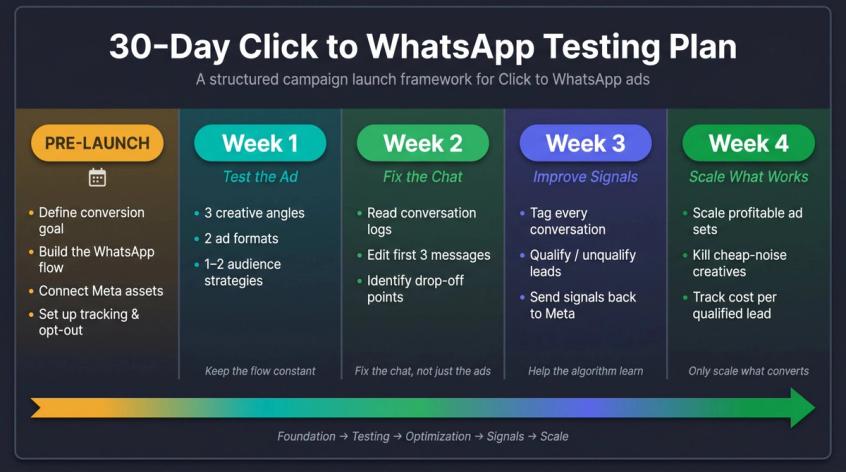
Before Day 1: Build the Foundation
Finish these before spending meaningful money:
- Define the conversion goal (purchases? bookings? qualified demos?)
- Define what a "qualified lead" means for your business
- Build the WhatsApp flow and test it internally
- Create human handoff rules (what triggers a human? who owns it?)
- Connect Meta assets (page, pixel, WhatsApp, Instagram)
- Set up tracking and event sending
- Prepare approved templates if needed for follow-up
- Create opt-out handling
- Brief the team on response expectations
Week 1: Launch Controlled Tests
Test three things at once, not 25:
- 3 creative angles (offer, recommendation, price access, or consultation)
- 2 ad formats (static image, video, or carousel)
- 1-2 audience strategies (broad, interest-based, or lookalike if you have data)
Keep the WhatsApp flow the same during this week. You're testing the ad, not the flow.
Week 2: Fix the Chat, Not Just the Ads
Review what's actually happening in conversations:
→ What are users actually typing?
→ Where do they drop out of the flow?
→ Which questions confuse them?
→ Which replies create buying intent?
→ How fast are agents responding?
→ How many chats become qualified leads?
→ What objections come up repeatedly?
Edit the flow based on what you find. Most of the lift in week 2 comes from changing the first three messages. A solid WhatsApp automation setup makes these edits fast. Change a message in the flow, save, and it's live.
Week 3: Improve Signal Quality
Start tagging every conversation: qualified/unqualified, high intent/low intent, booked/purchased/no response, wrong audience/support query/spam.
Send stronger conversion signals back to Meta. Watch the algorithm start to find better users.
Week 4: Scale Only What's Profitable
Scale the ad sets and creatives that produce:
- Lower cost per qualified lead
- Higher booking rate
- Higher revenue per conversation
- Lower block/report rate
- Better agent productivity
- Stronger contribution margin
Kill what only creates cheap noise.
WhatsApp Ad Compliance Checklist Before You Scale
WhatsApp isn't email. You can't upload contacts and message people just because you have their phone number.
WhatsApp Compliance Requirements
WhatsApp's business policy says businesses may only contact people if they've provided their mobile number and opted in to receive messages, and businesses must clearly honor opt-out requests.
Before scaling, verify:
- Business profile is accurate and not misleading
- Ad doesn't mislead about what the user is getting into
- User understands why they're messaging you
- Proper opt-in collected for any future outbound messages
- Approved templates used when required (outside the 24-hour customer service window)
- Opt-outs are honored immediately and automatically
- Prohibited categories are not advertised
- Automation includes a clear escalation path to a human
- Messages are useful, not spammy
WhatsApp's policy also notes that access can be limited or removed for policy violations, negative feedback, or poor quality signals. Block/report rate monitoring isn't optional at scale.
Spur operates as an official Meta Tech Partner, which means the platform has been reviewed and approved by Meta for these use cases. That's a meaningful check before trusting any BSP with your WhatsApp number.
Meta Ad Policy for Click to WhatsApp
If you advertise housing, employment, credit, or other sensitive categories, check Meta's special ad category requirements before launching. Special categories have targeting restrictions designed to prevent discriminatory advertising.
India DPDP Privacy Rules for WhatsApp Ads
If you operate in India, treat WhatsApp leads as personal data subject to DPDP rules. India's DPDP rules came into force in November 2025. Legal analysis from February 2026 notes that consent under India's DPDP framework must be free, specific, informed, unconditional, and limited to necessary data for a specified purpose.
Practical version: collect only what you need, explain why, store it carefully, and make opt-out easy.
Click to WhatsApp Ad Launch Checklist
[ ] The ad promise is specific and clear
[ ] The welcome message mirrors the ad exactly
[ ] The first reply is instant (automated)
[ ] The flow asks only the questions that change the next action
[ ] Qualified lead criteria are defined
[ ] Users are tagged by source, intent, and stage
[ ] Human handoff rules are clear and tested
[ ] Opt-out handling is ready and automated
[ ] Required templates are approved in WhatsApp Business Manager
[ ] Conversion events are defined and connected
[ ] Ad analytics are connected and tracking
[ ] CRM or ecommerce data is connected if needed
[ ] Follow-up sequence is planned within the free entry point window (up to 7 days)
[ ] Team response ownership is assigned
[ ] Block/report rate monitoring is set up
Run through this before you spend serious money.
The Complete Click to WhatsApp System That Converts
Click to WhatsApp ads work when you stop treating them as an ad format and start treating them as a conversation funnel.
The ad raises the hand. The WhatsApp flow turns that hand raise into a qualified conversation. The AI agent or shared inbox removes friction for the user and workload for the team. The analytics show what's actually making money. The signal feedback loop teaches Meta which users are worth finding again.
The complete winning system:
Specific ad promise
+ Instant contextual first reply
+ Short, purposeful qualification
+ Smart routing (AI + human)
+ Compliant follow-up sequence
+ Conversion event feedback to Meta
+ Full-funnel revenue attribution
If you build only the ad, you get chats. If you build the system, you get conversions.
Spur is purpose-built for every layer of this system: WhatsApp Business API automation, AI agents trained on your knowledge base, shared inbox for your sales team, broadcast and drip campaigns, Shopify and WooCommerce integration, and full-funnel ad analytics. Start your free trial today at use.spurnow.com and have your first CTWA automation live within hours.
Frequently Asked Questions About Click to WhatsApp Ads
Not for very small, fully manual operations. But yes if you want automation, multi-agent inboxes, approved templates, analytics, routing, integrations, and conversion tracking. The WhatsApp Business API (also called the WhatsApp Business Platform) is the practical route for any CTWA campaign that needs to scale beyond one person manually responding to messages.
There's no universal benchmark. A ₹50 lead can be terrible if none of them buy, and a ₹1,500 lead can be excellent if it becomes a ₹2 lakh sale. Judge performance by cost per qualified lead, booking rate, purchase rate, revenue per conversation, and contribution margin. Not raw CPL.
Start with messages if you have no data and no Conversions API connection. Move toward qualified leads, purchases, bookings, or downstream CRM events as soon as you can send reliable signals back to Meta. The algorithm gets meaningfully better when it knows who actually converts, not just who starts chats.
Yes, but pricing and permission rules apply separately. Once the customer messages and you reply, a free entry point window of up to 7 days opens for message pricing. But WhatsApp's policy still requires opt-in for outbound messages, and outside the 24-hour customer service window you must use approved templates. Don't confuse the free pricing window with unrestricted messaging permission.
Mirror the ad promise exactly. If the ad said "get the price sheet," the first reply should be about the price sheet. If the ad said "find your size," the first reply should start the size-finding process. The worst opening is a generic "Hi, how can we help you?" It forces the user to restart from zero and wastes the peak-intent moment you paid to create.
Use both, in combination. Buttons and quick-reply flows are best for structured qualification where you need clean data (budget range, location, timeline). Spur's AI agent capabilities handle flexible questions, product help, policy answers, and support queries where the user might phrase things in unpredictable ways. Humans handle the judgment-heavy closing and any emotionally sensitive situations.
Instantly. The first reply must be automated, even if humans handle everything after. The user clicked an ad, opened WhatsApp, and is waiting. Every minute of delay burns through the peak-intent moment you paid for. Set up automation so the first reply goes out in under 30 seconds, every time.
Yes, but be thoughtful about campaign goals. Support chats can have value, but if the campaign is acquisition-focused, your flow should quickly separate buyers from existing customers and route them to the right path. Support traffic mixed into a sales funnel creates confusion for the team and noisy data for your conversion optimization.
The problem is almost always in your post-click automation setup, not the ad. Check: does the first reply mirror the ad promise? Is the qualification flow asking too many questions? How fast is the first automated response? Are qualified leads being routed to humans quickly enough? Are conversion events being sent back to Meta? Review actual chat transcripts from week 2 of the testing plan. Find where users drop and fix those messages first. The click-through tells you the ad is working. Weak conversion tells you the post-click system needs work.
Sources
The pages this article links out to, in the order they appear.
- WhatsApp's official business guide business.whatsapp.com
- WhatsApp's official product page business.whatsapp.com
- That announcement about.fb.com
- WhatsApp's business policy business.whatsapp.com
- WhatsApp Flows business.whatsapp.com
- Meta's Conversions API for business messaging business.whatsapp.com
- WhatsApp's official platform pricing page business.whatsapp.com
- WhatsApp's official ad creation guide business.whatsapp.com
- Meta's special ad category requirements facebook.com
- Legal analysis from February 2026 dlapiperdataprotection.com
Was this article useful?