Key takeaways
Switch from RCS to SMS in minutes. Complete 2026 guide for Android and iPhone with troubleshooting tips and reliable messaging alternatives.
Ask an AI about this article
You're here because your messages aren't sending the way you expect. Maybe they're stuck on "sending," or you're tired of wondering whether your texts will go through as RCS or fall back to SMS. Or perhaps you just want the reliability of SMS without the complexity of Rich Communication Services.
Good news: switching from RCS to SMS is straightforward on both Android and iPhone. You can turn RCS off completely, enable automatic SMS fallback, or remotely deactivate it if you've switched devices. This guide walks you through every option, explains what changes after you switch, and helps you decide which approach makes sense for your situation.
Open your messaging app settings, find "RCS chats" (Android) or "RCS Messaging" (iPhone), and toggle it off. Your messages will immediately switch to SMS/MMS. If you want the best of both worlds, keep RCS on but enable automatic SMS fallback in Google Messages. For businesses needing reliable customer messaging, platforms like Spur handle WhatsApp Business API, Instagram automation, and live chat without RCS complications.
What's the Difference Between RCS and SMS?
Before you change anything, you need to know what RCS and SMS actually do.
SMS (Short Message Service) is the original text messaging protocol from the 1990s. It works over cellular networks, doesn't need internet, and reaches virtually every phone on the planet. The tradeoff? You're limited to 160 characters of plain text, and there's no encryption. But SMS is rock-solid reliable with just a basic cell signal. It's still the universal messaging standard because of this compatibility.
RCS (Rich Communication Services) is the newer upgrade designed to bring texting into the modern era. It uses your data connection (mobile data or Wi-Fi) to send high-resolution photos, typing indicators, read receipts, and group chats with more features. The catch? RCS only works if both you and the person you're texting have it enabled. If either person doesn't have RCS or loses their data connection, everything falls back to SMS or MMS anyway.
Your phone makes these decisions automatically:
① Check if RCS is enabled on your device
② Verify the recipient can receive RCS right now
③ Confirm you have a data connection
④ Send via RCS if all conditions pass, otherwise use SMS/MMS
Your phone makes these decisions automatically:
① Check if RCS is enabled on your device
② Verify the recipient can receive RCS right now
③ Confirm you have a data connection
④ Send via RCS if all conditions pass, otherwise use SMS/MMS
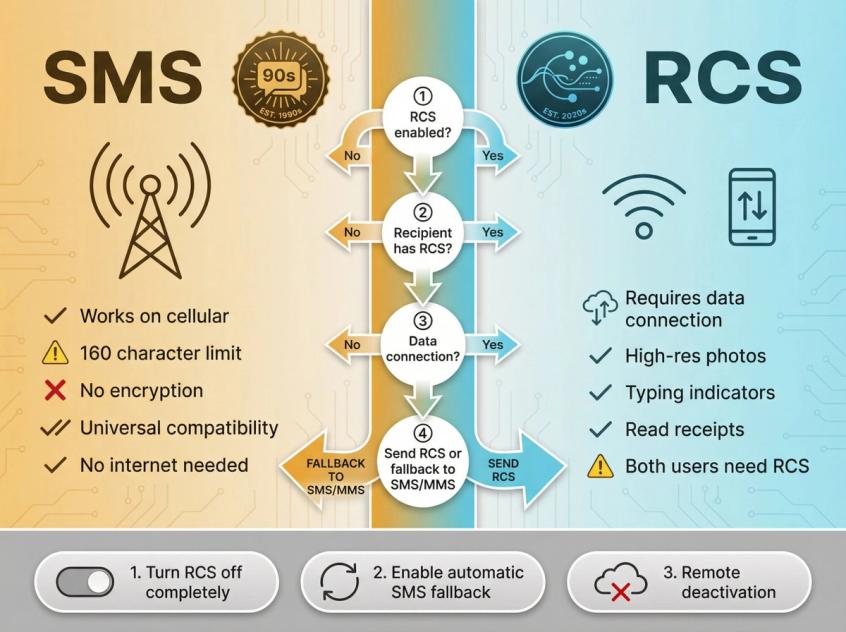
When people say they want to "change RCS to SMS," they usually mean one of three things:
→ Turn RCS off completely so all messages always go as SMS/MMS
→ Keep RCS on but enable automatic SMS fallback when RCS isn't available
→ Deactivate RCS registration remotely after switching or losing a phone
Why Would You Switch from RCS to SMS?
Universal Compatibility
SMS works with everyone. Period. No questions about whether the other person has RCS enabled, whether their carrier supports it, or which app they're using. This matters critically for:
• One-time passcodes and two-factor authentication
• Emergency alerts and important notifications
• Business communications where you can't afford delivery uncertainty
• Reaching people with older phones or in regions with limited RCS support
Reliability When Signal Is Weak
RCS requires a data connection. SMS works with basic cellular signal, even weak 2G in remote areas. If you're somewhere with spotty coverage or traveling internationally without reliable data, SMS is more dependable. RCS's dependency on data makes it less reliable in these scenarios.
Consistent Experience Without Confusion
With RCS enabled, your conversations can switch between RCS and SMS dynamically based on connectivity and recipient availability. This creates confusion about whether features like read receipts will work, whether your media will send in high quality, and how much data you're using. SMS provides a consistent experience without thinking about any of that.
Data and Battery Conservation
RCS uses your internet data for every message. If you have a limited data plan or you're roaming internationally, SMS uses your carrier's messaging service instead, avoiding data consumption entirely.
Avoiding Common RCS Problems
Users frequently report issues with RCS:
• Messages getting stuck on "sending"
• Delayed delivery when data is weak
• Inability to send texts with poor connection
• Group chat problems and unexpected removals
These glitches frustrate users who just want their messages to send reliably.
The bottom line? When reliability matters more than fancy features, SMS wins.
Business and Professional Requirements
For businesses, SMS remains the gold standard for universal reach. Not all customers have RCS enabled, so critical notifications and transactional messages still rely on SMS. Many businesses handle richer messaging through dedicated channels like WhatsApp Business API for customer service automation while keeping SMS for guaranteed delivery.
How to Turn Off RCS on Android (4 Methods)
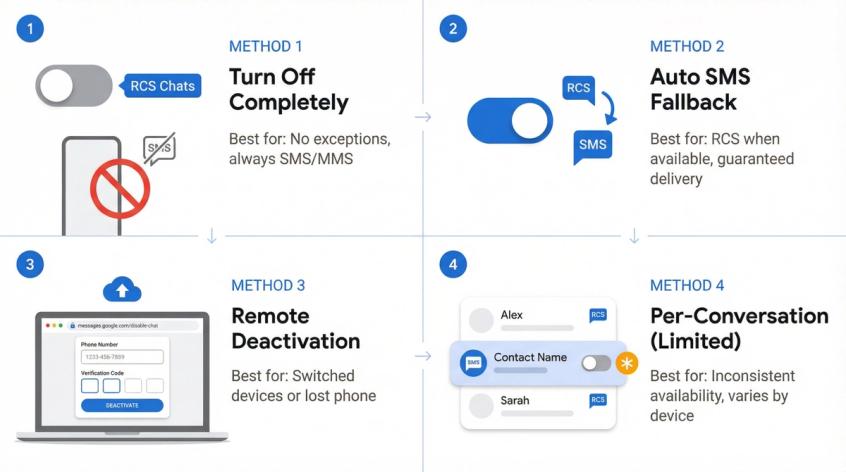
Method 1: Turn Off RCS Completely
Best for: You want everything to go out as SMS/MMS with no exceptions.
Steps:
① Open Google Messages
② Tap your profile icon (top right corner)
③ Select Messages settings
④ Tap RCS chats (on some devices, this appears as Chat features)
⑤ Turn RCS chats OFF
Google's official help documentation provides these exact steps and includes important warnings:
Critical warning: Don't toggle RCS on and off repeatedly. You can be removed from group chats. Turning it off removes all RCS features like read receipts and typing indicators.
How to confirm you're sending SMS:
In Google Messages, look at the send button. It will say:
• "Send by Wi-Fi or mobile data" (RCS)
• "Send by SMS" (SMS)
• "Send by MMS" (MMS)
Method 2: Keep RCS but Enable Auto SMS Fallback
Best for: You like RCS features when they work, but need guaranteed delivery.
This is the hybrid approach that gives you the best of both worlds.
Steps:
① Open Google Messages
② Tap your profile icon
③ Go to Messages settings
④ Select RCS chats
⑤ Tap Resend messages
⑥ Choose your preferred resend behavior
Data privacy note: Google warns that if you choose "SMS with a link" for media, your content may be accessible via a public link not controlled by Google. Consider this for sensitive images or videos.
Method 3: Remote Deactivation (For Device Switching)
When to use this:
• You switched to a new device and messages are going to your old phone
• You don't have access to the old device anymore
• Your phone was lost or stolen
• RCS registration seems stuck
Google's official web tool:
Visit messages.google.com/disable-chat
① Enter your phone number
② Receive a 6-digit verification code
③ Complete remote deactivation
30-day warning: If you don't turn RCS back on within 30 days, you'll be permanently removed from all RCS group chats.
Method 4: Force SMS for One Conversation (Limited)
Reality check: Google's documentation doesn't guarantee this toggle exists. It appears in some builds, disappears in others, and varies by device and carrier.
If available, you'll usually find it at:
→ Open the conversation
→ Tap the three-dot menu
→ Select Details
→ Look for "Only send SMS & MMS" (wording varies)
If you don't see this option, use Method 1 (turn off RCS) or Method 2 (enable fallback) instead. Community discussions confirm this inconsistency.
How to Turn Off RCS on Samsung Phones
Samsung devices might use either Google Messages (most common now) or Samsung Messages (still exists on some devices and regions).
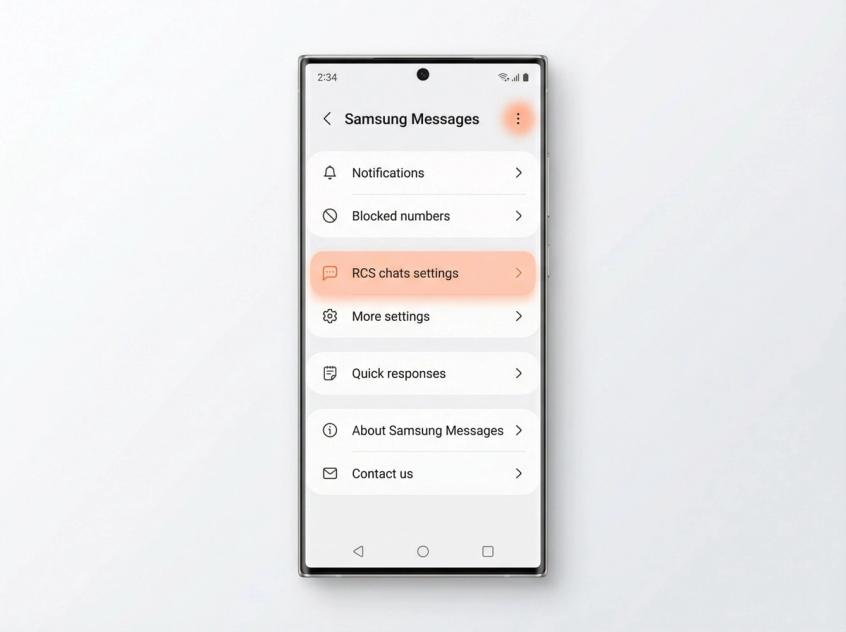
If You're Using Samsung Messages
Steps according to Google Help:
① Open Samsung Messages
② Tap the menu (three dots)
③ Go to Settings
④ Select RCS chats settings
⑤ Toggle RCS on or off
Google's documentation notes that if you don't see RCS settings in Samsung Messages, that's normal. RCS availability depends on your carrier. Switching to Google Messages can be the simplest route for consistent RCS management.
How to Disable RCS on iPhone (iOS 18+)
With iOS 18, Apple introduced RCS support for texting with Android users. RCS is available but optional.
Method 1: Turn Off RCS on iPhone
Official steps published September 30, 2025:
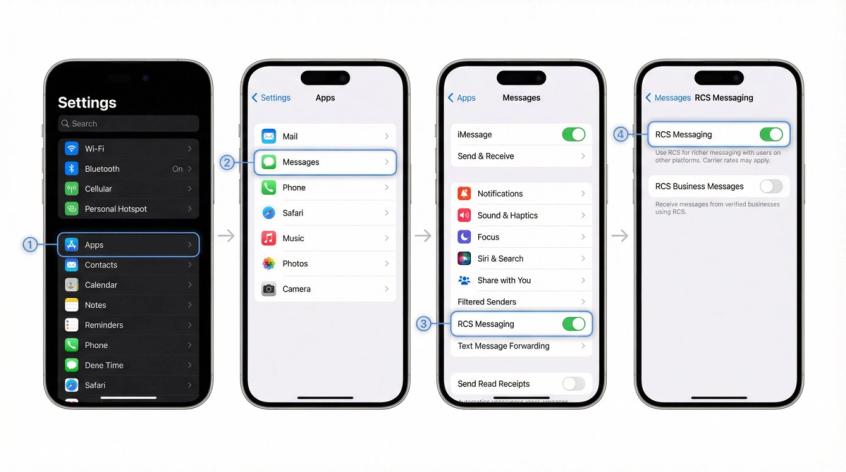
① Open Settings
② Tap Apps
③ Select Messages
④ Tap RCS Messaging
⑤ Turn it OFF
When RCS is off, your iPhone falls back to SMS/MMS for all green-bubble conversations (non-iMessage texts). Apple's support documentation provides these exact steps.
Method 2: Turn Off RCS Business Messages Only
When to use: You want to stop businesses from RCS-texting you, but keep RCS for personal conversations.
Steps:
① Settings → Apps → Messages → RCS Messaging
② Toggle RCS Business Messages OFF
This keeps RCS enabled for friends and family while blocking business RCS messages. Source: Apple Support
If RCS Doesn't Appear on Your iPhone
Apple states that if the RCS messaging setting doesn't appear, RCS may not be available due to your carrier or region. Check with your carrier about RCS support.
iOS 26 Note: Default App for Messaging
In iOS 26, you can choose which app handles SMS/MMS/RCS. This changes which app processes messages, not the underlying carrier service itself. Apple's documentation explains this option.
What Happens When You Switch from RCS to SMS?
Here's what you'll actually experience when you move from RCS to SMS:
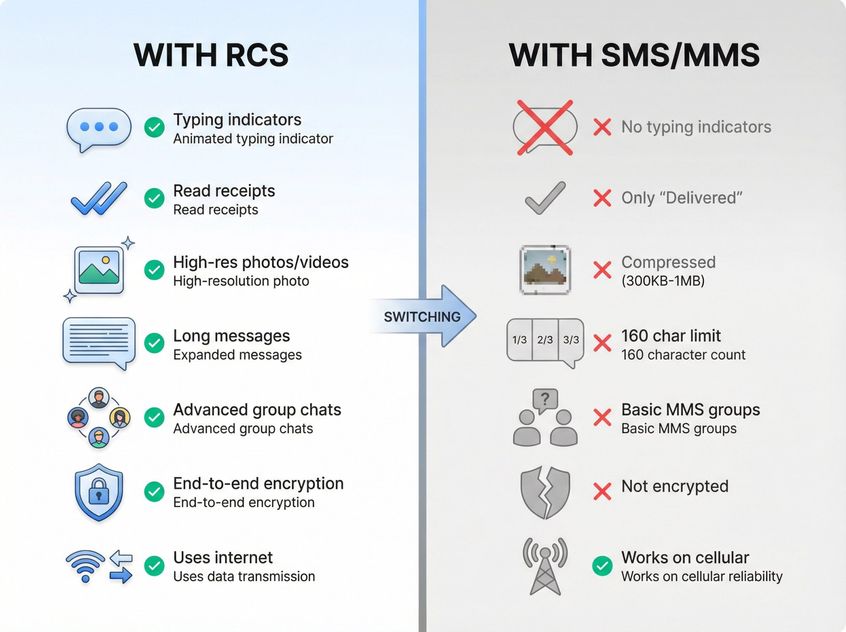
| Feature | With RCS | With SMS/MMS |
|---|---|---|
| Typing indicators | ✓ See "is typing..." | ✗ Not available |
| Read receipts | ✓ Know when read | ✗ Only "Delivered" status |
| Photo/video quality | ✓ High resolution | ✗ Heavy compression (300KB-1MB) |
| Message length | ✓ Very long single message | ✗ 160 char limit, splits into parts |
| Group chats | ✓ Advanced features | ✗ Basic MMS groups, may be removed |
| End-to-end encryption | ✓ (Android to Android) | ✗ Not encrypted |
| Internet requirement | ✓ Requires data/Wi-Fi | ✗ Works on basic cellular |
| Universal compatibility | ✗ Both sides need RCS | ✓ Works with any phone |
No More Typing Indicators or Read Receipts
You won't see "is typing..." bubbles or know when someone reads your message. SMS only shows "Sent" or "Delivered" status.
Media Messages Become MMS (With Limitations)
When you send photos or videos, they go as MMS instead of RCS. MMS has:
• File size limits (often 300 KB to 1 MB depending on carrier)
• Heavy compression causing quality loss
• Data requirements (won't send over Wi-Fi on many carriers)
Expect noticeably lower quality for images and videos.
Group Chats Become Basic
RCS group chats downgrade to MMS group texts, which means:
• Carrier-dependent limits on participant numbers
• Potential confusion with replies appearing in separate threads
• You might be removed from RCS group chats automatically
Group chat warning: Google warns that disabling RCS removes you from RCS group chats. If you re-enable within 30 days, you might rejoin. After 30 days, Google fully removes you from the group server.
For businesses handling team communication and customer support, modern customer communication platforms like WhatsApp offer better group messaging with shared inbox capabilities for multiple agents.
End-to-End Encryption Goes Away
Standard SMS/MMS aren't end-to-end encrypted. Your messages can potentially be intercepted and are readable by your carrier.
When you had RCS, at least Android-to-Android conversations using Google Messages were end-to-end encrypted. After switching to SMS, none of your texts have that privacy layer.
Avoid sending highly confidential information over SMS.
Character Limits Return
RCS: Very long messages appear as a single bubble
SMS: 160 character limit per message
Result: Longer texts split into multiple segments
Most modern apps automatically split and reassemble messages, but you might see "Part 1/2" and "Part 2/2" indicators.
Potential Cost Impact
Since RCS uses data (usually no per-message charge), switching to SMS/MMS might:
• Increase your phone bill if you're on pay-as-you-go or prepaid
• Use your SMS allotment if you have a monthly cap
• Trigger international SMS charges for cross-border texts
For most people with unlimited texting plans, this impact is negligible.
Loss of RCS-Specific Features
These features disappear:
• Google Maps location pin sharing with rich formatting
• Contact card sharing directly through Messages
• Emoji reactions (tapbacks)
• Video calls through RCS
• Audio notes via RCS
Basically, any special RCS capability is gone. You're back to baseline texting.
How to Fix Common RCS to SMS Problems
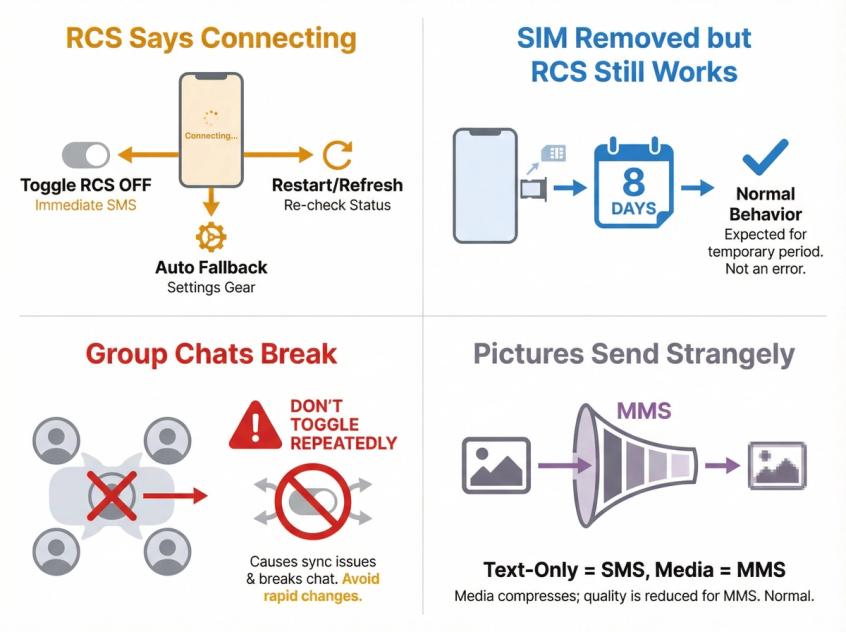
"My RCS Says Connecting..." or Messages Fail
Quick fixes:
• Toggle RCS off to send as SMS immediately
• Set your resend behavior to auto fallback
• Restart your phone and re-check RCS status
Carrier blocks: Google Messages can show "RCS chats are disabled by your carrier." Google's advice is to contact your carrier directly.
RCS Still Works After Removing SIM
Google notes that RCS chats can keep working for about 8 days after removing the SIM card. This is normal behavior.
Group Chats Break When You Toggle RCS
Google explicitly warns that turning RCS on and off isn't recommended. You can be removed from group chats. Don't treat RCS like a per-message switch unless you're okay with group chat side effects.
Pictures Still Send Strangely After Turning Off RCS
That's likely MMS, not SMS. SMS is text-only. Any media automatically triggers MMS or another channel.
Is RCS More Secure Than SMS? Privacy Facts
The security landscape varies significantly by platform and configuration. Here's what the major players actually say:
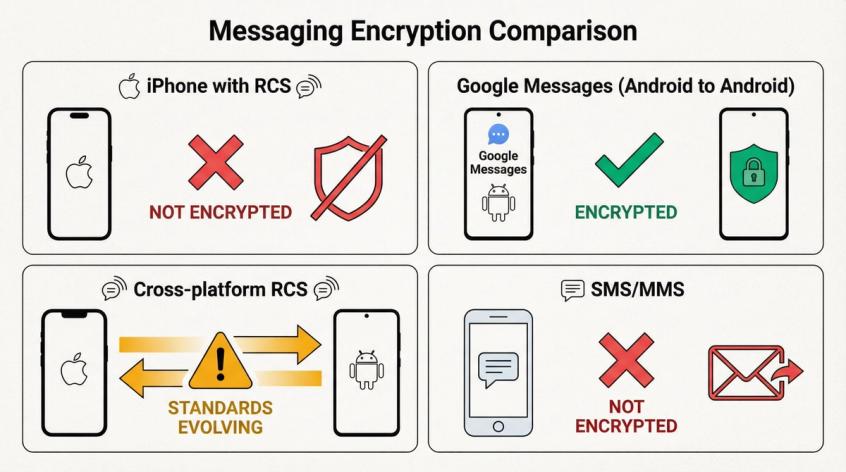
| Platform | Encryption Status | Source |
|---|---|---|
| RCS on iPhone | ✗ Not end-to-end encrypted | Apple Support (Jan 14, 2026) |
| RCS (Google Messages ↔ Google Messages) | ✓ End-to-end encrypted | Google Support |
| RCS (cross-platform) | ✗ Standards still evolving | Industry consensus |
| SMS/MMS | ✗ Not end-to-end encrypted | Universal standard |
Apple's Assessment of RCS Security
Apple states (published January 14, 2026) that:
• RCS messages aren't end-to-end encrypted on iPhone
• They're not protected from third parties reading them in transit
• RCS setup exchanges identifiers with your carrier and partners (IMEI, IMSI, IP address, phone number)
• Your IP address may be shared with other RCS users
This is unusually blunt disclosure from Apple about RCS privacy limitations.
Google Messages Can Be End-to-End Encrypted
Google states that:
• RCS chats between Google Messages users are end-to-end encrypted by default
• They're working to define cross-platform encryption standards
The Honest Summary
If you're switching to SMS for "security," be aware that SMS also isn't end-to-end encrypted. You're trading feature sets and reliability characteristics, not magically gaining privacy.
For businesses handling sensitive customer data, modern platforms like Spur's WhatsApp Business API provide end-to-end encryption with professional customer communication management features.
How IT Admins Can Disable RCS on Managed Devices
iOS Managed Devices: Disable RCS via Restriction
Apple's platform deployment guide (updated December 17, 2025) includes a device restriction:
• "Allow RCS messaging" (iOS 18.1) prevents use of RCS messaging when disallowed
Use cases:
→ Strict messaging policy control
→ Preventing data-based carrier messaging on corporate phones
→ Reducing attack surface or standardizing logging methods
Android Enterprise: Disable RCS via Managed Config
Google's Android Enterprise documentation states admins can push managed configuration restrictions:
• Set disable_rcs = true to remotely disable RCS in Google Messages
Managed configs apply to apps in work profiles or fully managed devices, not personal-only app installations.
Samsung Knox: RCS Can Break SMS Blocking Policies
Samsung's Knox documentation calls out a critical gotcha: Devices may use RCS instead of SMS by default. This can bypass SMS-only control expectations. Fix: Manage RCS settings (set "manage RCS messaging" false) so messages revert to SMS.
Translation for admins: If your compliance tooling assumes "blocking SMS equals blocking texting," RCS can punch a hole in your controls. You must either archive RCS traffic or disable it completely.
For enterprise teams managing customer communications at scale, business process automation platforms with multi-channel messaging provide better control and compliance than consumer messaging apps.
Better Business Messaging: Beyond RCS and SMS
If you're managing customer communications for a business, the RCS vs. SMS debate gets more complicated. Here's what you need to consider.
The RCS/SMS Challenge for Businesses
• SMS: Universal reach but limited features and no encryption
• RCS: Richer features but carrier/region variability and inconsistent delivery
• Reality: Neither is ideal for modern customer engagement
Meet Customers Where They Already Are
Most customers already live on messaging platforms. Instead of fighting with RCS configurations and SMS limitations, use channels your customers prefer:
WhatsApp reaches over 2 billion users globally. With Spur's WhatsApp Business API platform, you can:
• Send broadcasts to large customer lists
• Automate abandoned cart recovery
• Provide order updates with rich media
• Handle customer support with a shared inbox
• Run Click-to-WhatsApp ad campaigns
Your customers are already commenting on your posts and sending DMs. Spur's Instagram automation lets you:
• Auto-reply to comments and DMs instantly
• Convert story reactions into conversations
• Qualify leads automatically with comment-to-DM flows
• Send conversion signals back to Meta for better ad performance
Catch visitors at the exact moment they need help. Our live chat solution:
• Trains AI agents on your knowledge base
• Handles common queries automatically
• Routes complex issues to your team
• Collects contact details for lead generation
Why Spur Makes More Sense Than RCS for Business
We built Spur specifically because SMS and RCS create unnecessary complexity for businesses trying to communicate with customers. Here's what we do differently:
Actionable AI Agents (Not Just Q&A Bots)
Our AI doesn't just answer questions. It takes actions. Track orders, update records, book appointments, and handle transactions automatically. Unlike basic chatbots that only provide canned responses, our actionable AI connects to your systems and actually gets things done.
Train AI on Your Knowledge Base
You can train our AI agents on your specific business data, product catalogs, and policies. This means accurate, helpful responses that sound like your brand. Many platforms don't offer true knowledge base training. We do.
Unified Inbox Across All Channels
Stop switching between apps. Spur's shared inbox consolidates:
• WhatsApp messages
• Instagram DMs
• Facebook messages
• Website live chat
Your team sees everything in one place with full context and conversation history.
Simple Enough for Anyone, Powerful Enough for Scale
Unlike technical platforms built for developers, our visual automation builder is designed for marketing and support teams. Build sophisticated automation workflows without writing code.
Real Results
Our customers see measurable outcomes documented in our case studies:
• Eves & Gray achieved 88.75x ROI in 24 hours with WhatsApp broadcasts
• Muffynn generated 73x ROI on targeted campaigns
• Libas converted 64 orders from an Instagram Live with automated comment-to-DM flows
Getting Started with Spur
We offer a 7-day free trial so you can test everything:
• Connect your WhatsApp Business number
• Link your Instagram account
• Add our live chat widget to your website
• Set up AI agents trained on your knowledge
• Build automation flows with our visual builder
Plans start at just $12/month for small businesses. See full pricing or start your free trial now.
Your Quick Action Checklist
If you want SMS right now:
Turn off RCS in your messaging app settings following the steps above for your device.
If you want RCS when it works, SMS when it doesn't:
Set resend behavior in Google Messages to enable automatic fallback.
If you switched devices or lost your phone:
Use Google's RCS deactivation page to remotely turn off RCS.
If you're an IT admin managing corporate devices:
• iOS: Disable RCS with the "allow RCS messaging" restriction (source)
• Android: Set Google Messages managed config disable_rcs=true (source)
If you're running a business:
Consider whether WhatsApp, Instagram, or live chat provides more reliable customer messaging than RCS or SMS. Start a free trial with Spur to test all three channels.
The Bottom Line
As of 2026, RCS usage is growing. All major Android carriers support it, Apple joined with iOS 18, and adoption is accelerating. But it's still not universal, and SMS remains the critical fallback.
The good news? You're not locked into either choice. Toggle RCS on for rich features, or toggle it off for reliability. Experiment to find what works for your specific needs.
For personal messaging, the "right" choice depends on your priorities:
• Value reach and reliability above all else? SMS might serve you better.
• Love rich features and most of your contacts support RCS? Keep it on.
• Need guaranteed delivery for important messages? Turn RCS off or enable automatic SMS fallback.
For business messaging, the answer is clearer: use channels your customers already prefer. WhatsApp, Instagram, and live chat offer the reliability of SMS, the features of RCS, and the universal reach you need, all without carrier dependencies or configuration headaches.
What truly matters is that your message gets through to the right person at the right time. Whether that's via RCS, SMS, or a better channel altogether, you now have complete control over how your messages send.
Ready to simplify your business messaging? Try Spur free for 7 days.
RCS to SMS: Frequently Asked Questions
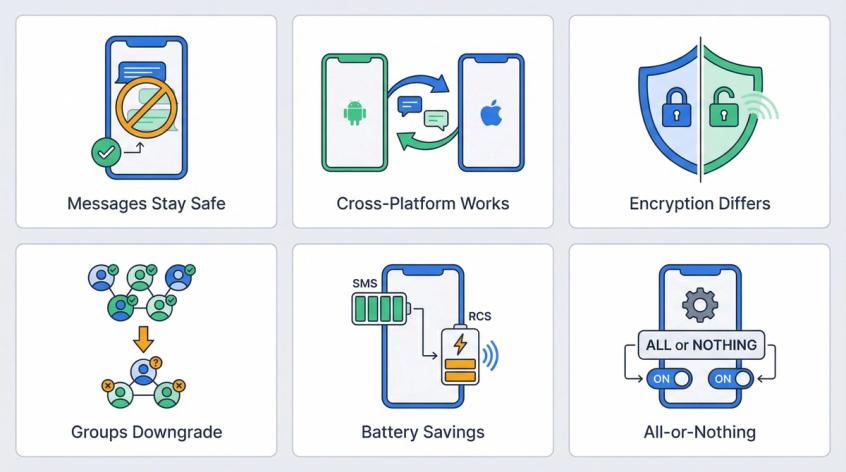
No. Disabling RCS only changes how new messages are sent. Your existing message history stays completely intact.
Yes, as SMS/MMS. You'll lose RCS features (typing indicators, high-quality media, read receipts), but your messages will still go through.
Because SMS/MMS are also green bubbles on iPhone. Green doesn't mean RCS. It just means "not iMessage." Apple confirms that both SMS and RCS appear as green bubbles.
Sometimes, on certain Android builds, you can force SMS per conversation, but it's inconsistent. For guaranteed SMS, either turn RCS off completely (Method 1) or use resend behavior (Method 2).
Apple's official stance (published January 14, 2026) is that RCS is an industry-standard carrier messaging protocol and is not end-to-end encrypted. This differs from iMessage, which Apple controls and encrypts.
Use Google's official deactivation tool at messages.google.com/disable-chat. Enter your phone number, verify with the code, and deactivate RCS remotely.
No, not in Google Messages. It's all-or-nothing. If RCS is on, the app tries to use it for any RCS-capable contact. If off, it doesn't use it for anyone.
On iPhone, the RCS toggle similarly affects all Android conversations, not individual contacts.
No. Your message history remains on your phone. Disabling RCS doesn't erase any texts, photos, or videos.
Possibly long-term, but not yet. The two will coexist for the foreseeable future.
RCS must overcome several challenges before replacing SMS:
• Full cross-platform interoperability
• Universal carrier adoption globally
• Standardized end-to-end encryption
SMS will remain the fallback for years to come.
RCS group chats downgrade to MMS group texts. You'll experience:
• More limitations on participant numbers
• Potential confusion with replies in separate threads
• Automatic removal from RCS group chats
Google warns that if you don't re-enable RCS within 30 days, you'll be permanently removed from all RCS group chats.
Yes, potentially. RCS uses data connections which consume more battery than the basic cellular radio SMS uses. The difference is usually minimal on modern phones, but it can add up if you're messaging heavily throughout the day.
Sources
The pages this article links out to, in the order they appear.
- Google's official help documentation support.google.com
- messages.google.com/disable-chat messages.google.com
- Google's documentation support.google.com
- Apple's support documentation support.apple.com
- Apple states support.apple.com
- Apple's platform deployment guide support.apple.com
- Google's Android Enterprise documentation support.google.com
- Samsung's Knox documentation docs.samsungknox.com
Was this article useful?