WhatsApp Link: How to Create, Share & Use One (Free)

Discuss with AI
Get instant insights and ask questions about this topic with AI assistants.
💡 Pro tip: All options include context about this blog post. Feel free to modify the prompt to ask more specific questions!
A WhatsApp link is a regular URL that opens a chat with your phone number when someone clicks it. No contact saving, no searching, no friction. The person clicks, WhatsApp opens, and they're already typing you a message.
If you sell anything, support anyone, or run any kind of business where speed-to-conversation matters, a WhatsApp link is one of the highest-ROI things you can set up in under a minute. And it costs nothing.
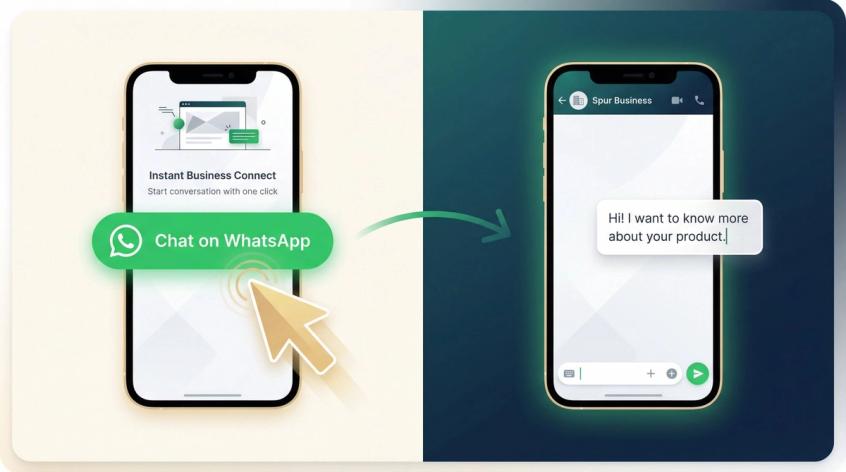
TL;DR: A WhatsApp link (https://wa.me/yournumber) lets anyone start a chat with you instantly. You can add a pre-filled message, generate a QR code, and share it anywhere. Create one free in 30 seconds with Spur's WhatsApp Link Generator. And when those inbound chats start piling up, Spur gives you the automation, shared inbox, and AI agents to actually convert them.
WhatsApp Link Format: Copy-Paste Templates
If you just want the link formats and don't need the explanation yet, here you go.
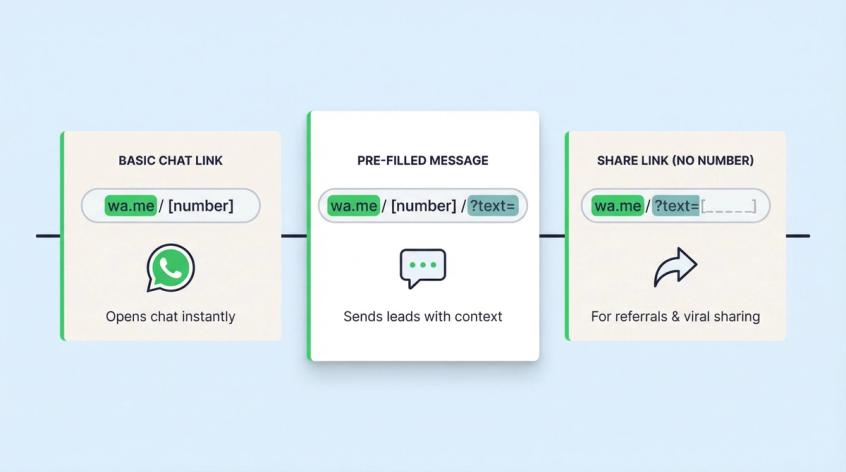
Basic WhatsApp Chat Link (wa.me Format)
This opens a chat with your number. The person clicks, WhatsApp opens, done.
https://wa.me/<countrycode><number>
Example:
https://wa.me/919876543210
Your phone number must be in international format: country code followed by the number, no + sign, no spaces, no brackets, no dashes. WhatsApp's click-to-chat documentation is explicit about this.
WhatsApp Link with Pre-Filled Message
This opens the chat and pre-types a message for the user. They just hit send.
https://wa.me/<countrycode><number>?text=<urlencoded-message>
Example (following WhatsApp's click-to-chat documentation):
https://wa.me/919876543210?text=Hi%21%20I%20want%20to%20know%20the%20price%20for%20%5BProduct%5D.
The message needs to be URL-encoded (more on that in a minute). But this single addition changes your link from "I get random Hi messages" to "I get leads with context."
This one is different. It doesn't open a chat with you. Instead, it lets the person pick any contact and forward a pre-written message. Great for referral campaigns and viral sharing.
https://wa.me/?text=<urlencoded-message>
WhatsApp's documentation describes this as an official click-to-chat variant for sharing a pre-filled message without specifying a phone number.
How Does a WhatsApp Link Work?
Before we get into the "how to create" part, it helps to understand what's happening under the hood. This takes 30 seconds and will save you from common mistakes later.
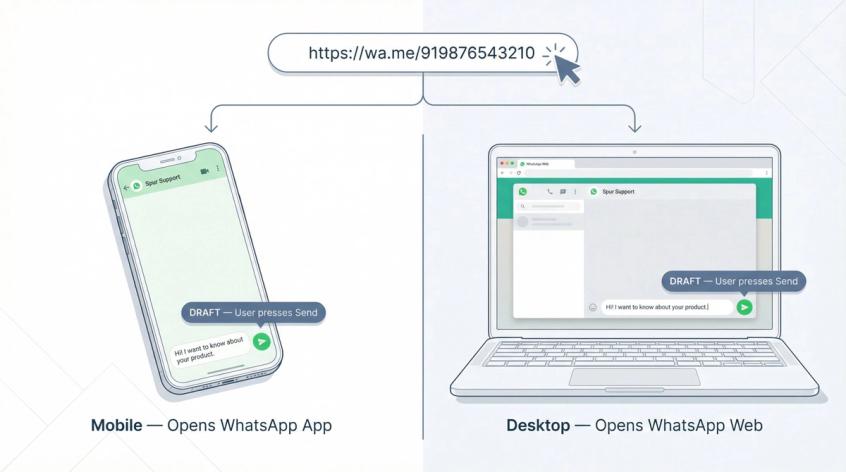
A WhatsApp link is just a normal HTTPS URL. When someone clicks it:
- On mobile (with WhatsApp installed), the phone treats it as a deep link and opens the WhatsApp app directly to a chat screen.
- On desktop, it typically opens WhatsApp Web or the desktop app.
Two things to understand here:
You're not sending a message. You're opening a draft chat. The person still has to press "send." This is actually a good thing from a compliance perspective (more on that later).
The only data you can reliably pass is what fits inside the URL itself: the phone number and an optional ?text= message. That's it. UTM parameters, custom tracking codes appended to the URL, extra query strings: none of that gets passed through to WhatsApp in any useful way. This is the root of most tracking confusion, and we'll cover what actually works for attribution in the tracking section below.
How to Create a WhatsApp Link (3 Methods)
Method 1: Create a WhatsApp Link Manually
This takes about 15 seconds if you know what you're doing.
Step 1: Write your number in international format
International format means country code + phone number, with no leading zeros and no symbols.
| What you have | What goes in the link |
|---|---|
| +91 98765 43210 | 919876543210 |
| +1 (555) 123-4567 | 15551234567 |
| +44 7911 123456 | 447911123456 |
WhatsApp's guidance explicitly says to omit extra characters like zeros, brackets, or dashes.
Step 2: Build the link
https://wa.me/919876543210
That's it. Paste this into any browser. If it opens WhatsApp and shows the right number, your link works.
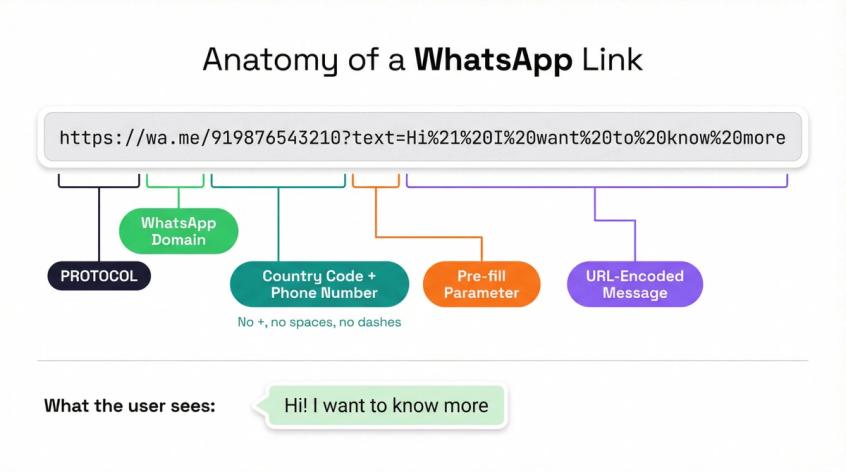
Method 2: Add a Pre-Filled Message to Your WhatsApp Link
This is where your link goes from "gets messages" to "gets qualified leads."
You add a message using the text query parameter:
https://wa.me/919876543210?text=<urlencoded-message>
The catch? URL encoding. URLs can't safely contain spaces, new lines, emojis, or special characters like &, ?, and #. Encoding converts those characters into a format the URL can handle.
Here's a quick reference:
| Character | Encoded form |
|---|---|
| Space | %20 |
| New line | %0A |
? | %3F |
& | %26 |
! | %21 |
The fastest way to encode your message (no tools needed): Open your browser's developer console and type:
encodeURIComponent("Hi! I want to buy the blue hoodie. Size M.")
Copy the output and paste it after text= in your link.
Or skip the manual work entirely and use Spur's WhatsApp Link Generator, which handles the encoding for you.
What Makes a Good Pre-Filled Message?
A bad pre-fill:
Hi
A good pre-fill:
Hi! I'm interested in [Product]. My budget is [X]. Can you share options?
The difference? The good one gives your team something to work with. Ask for one piece of info that helps you route the conversation: an order ID, a city, a budget range, a product name. That single detail is the difference between a generic chat and a qualified lead. For more detailed guidance, see our guide on how to craft a high-converting WhatsApp template.
Pro tip: If you're running multiple campaigns, change the pre-filled message slightly for each one. A message that starts with "Saw your Instagram post about..." tells your team exactly where the lead came from, without any tracking software.
Method 3: Use the WhatsApp Business App's Short Link Feature
If you use the WhatsApp Business app (the free one, not the API), there's a built-in link generator.
The exact path varies slightly by app version, but it's generally under:
Settings > Business Tools > Short Link (or "Direct Link")
From there, you can:
- Copy your short link
- Generate a QR code
- Customize the pre-filled message
This is convenient for quick sharing, but has real limitations for anyone doing marketing at scale. You can't create multiple links for different campaigns, there's no tracking, and if you have a team of more than one person, managing conversations through a single phone becomes painful fast. When you're ready to graduate beyond the free app, Spur's WhatsApp Business API gives you a full platform built for teams (with a shared inbox so multiple agents can handle conversations simultaneously).
Free WhatsApp Link Generator: Create Your Link in Seconds
If you want the simplest possible workflow (type your number, get a link, done), we built a set of free tools specifically for this.
WhatsApp Link Generator creates a properly formatted wa.me chat link. Enter your number, optionally add a pre-filled message, and the tool handles all the encoding. No signup required.
WhatsApp QR Code Generator turns your link into a scannable QR code. Perfect for packaging, in-store signage, event booths, business cards, and flyers. You can include a pre-filled message in the QR code too.
WhatsApp Share Link Generator creates the wa.me/?text=... format for viral sharing. Great for referral programs where you want customers to forward a pre-written message to their contacts.
You can find all of these (plus Instagram DM link generators, email link generators, and more) in our free tools directory.
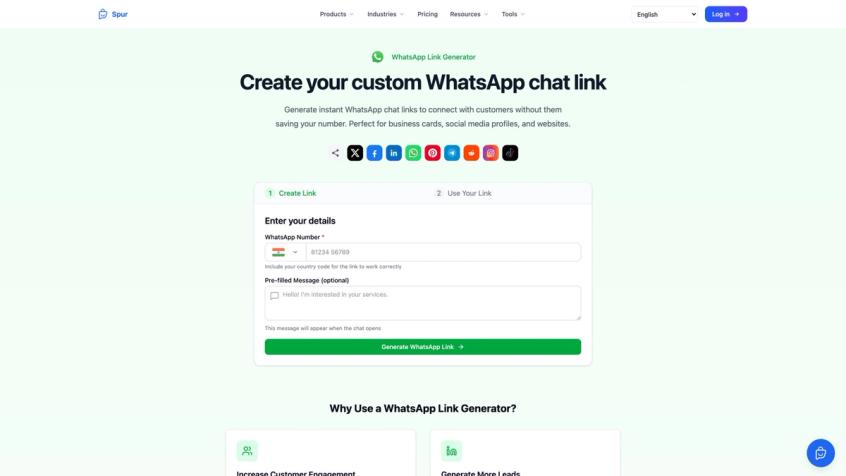
These tools are ideal when:
- You don't want to think about URL encoding
- You need a QR code fast for a poster or product insert
- You're creating multiple links for different campaigns and want consistency
Not every placement converts equally. Here's where WhatsApp links perform best, and why each one works.
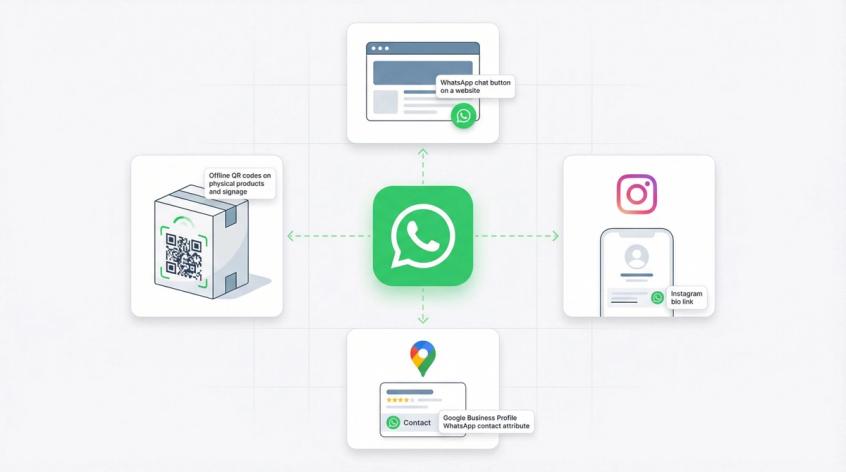
How to Add a "Chat on WhatsApp" Button to Your Website
A website visitor is already evaluating you. They've searched, they've clicked, they're reading. A WhatsApp link removes the "fill out this form and wait 2 business days" friction and turns that intent into a live conversation.
Simple HTML you can add anywhere (using the standard wa.me format from WhatsApp's documentation):
<a href="https://wa.me/919876543210?text=Hi%21%20I%20need%20help%20with%20%5BProduct%5D">
Chat on WhatsApp
</a>
For something more visible, consider a floating chat widget that stays on screen as visitors browse. We wrote a guide on chat widgets for websites that covers this approach in detail. Spur's Live Chat product is built exactly for this: an AI-powered widget that captures contact details and connects to your shared inbox.
How to Use Your WhatsApp Link in Your Instagram Bio
Your bio link is prime real estate. If you're a creator, D2C brand, or service business, a WhatsApp link in your bio turns passive followers into active conversations.
Use a pre-filled message that references the source:
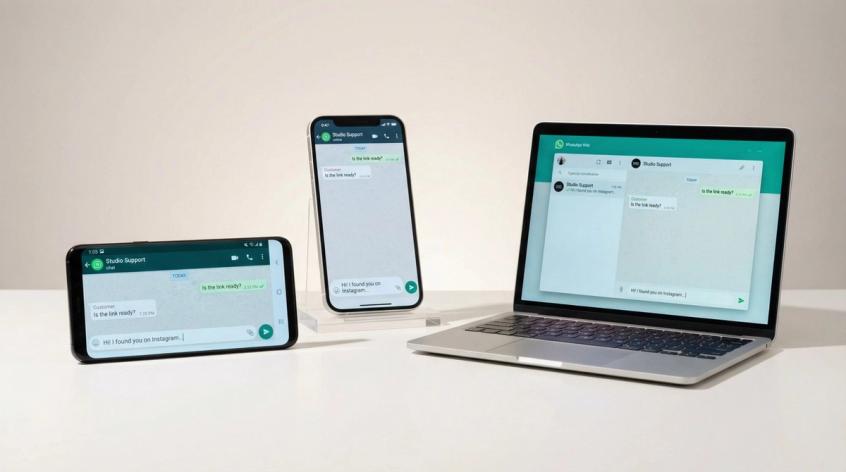
Hi! I found you on Instagram. I want to know about...
This does two things. It reduces the "what do I say?" hesitation for the person clicking, and it tells your team exactly where this lead came from. If you're running an Instagram-focused business, pairing your WhatsApp link with Instagram automation lets you capture leads from both your bio and your comments automatically (which is how high-volume creators handle the flood of inbound DMs). You can learn more about how to handle high-volume DMs on Instagram in our dedicated guide.
Adding Your WhatsApp Link to Google Business Profile
If you have a local business or service area, your Google Business Profile is probably generating views you're not converting. A WhatsApp link can change that.
Here's something most guides don't mention: Google's Business Profile API explicitly supports adding a WhatsApp URL as a contact attribute (using attributes/url_whatsapp, with a wa.me example). The documentation was last updated August 2025.
What this tells you: Google treats WhatsApp as a first-class contact channel, not just a random external link. If Google supports it natively, it's worth setting up.
Offline: WhatsApp QR Codes for Packaging, Flyers, and Signage
QR scanning is faster than typing a phone number, and it works in places where clickable links don't exist (physical products, printed materials, storefronts).
The attribution trick: create different QR codes for different placements.
- Store entrance QR code with message:
[STORE] Hi! I just visited your store... - Product insert QR code with message:
[PACKAGING] Hi! I bought [Product] and have a question. - Event booth QR code with message:
[EVENT_MAR26] Hi! We met at [Event Name].
Each QR code links to the same WhatsApp number but with a different pre-filled message. Your team sees the source tag right in the chat. No UTMs, no analytics setup, no extra software.
Generate these QR codes free with Spur's QR Code Generator.
How to Track WhatsApp Link Performance
Most WhatsApp link guides get this section wrong, so here's what actually works and what doesn't.
Why UTMs Don't Work with WhatsApp Links
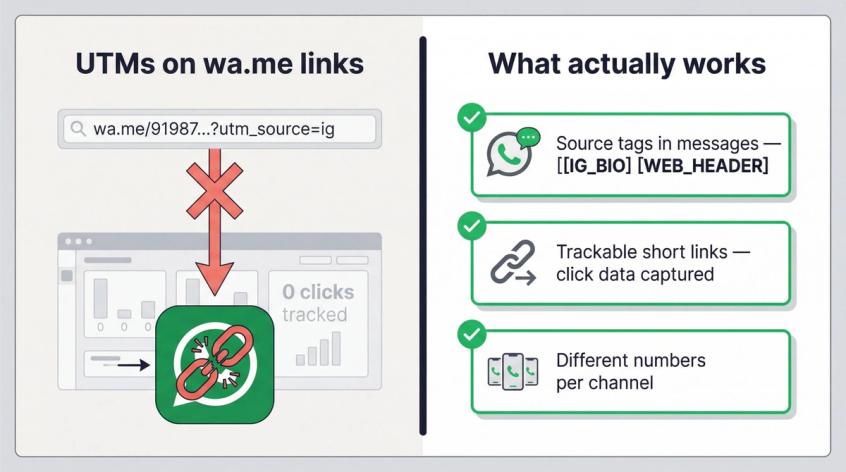
UTM parameters are designed for websites. They work because analytics tools like GA4 or the Meta Pixel can read the URL when someone lands on your page. But a wa.me link sends people into WhatsApp, not to your website. Your web analytics tool never sees the click.
Some articles suggest appending UTMs directly to wa.me links anyway. In practice, this doesn't give you reliable attribution because the data never reaches your analytics platform in a meaningful way. For a full breakdown of what actually works, read our guide on how to track WhatsApp messages for business.
What Actually Works for WhatsApp Link Tracking
Method A: Source Tags in the Pre-Filled Message
This is the simplest approach and it's surprisingly effective.
Create a different link for each channel, with a short tag at the start of the pre-filled message:
- Instagram bio link: message starts with
[IG_BIO] - Website header button: message starts with
[WEB_HEADER] - Flyer QR code: message starts with
[FLYER_MAR26]
Your team sees the source tag right inside the chat. No extra tools, no dashboards, no integrations. It just works. If you later want to go deeper on WhatsApp analytics, check out our guide on WhatsApp marketing automation for advanced tracking and ROI measurement strategies.
Method B: Trackable Short Link Redirects
Instead of linking directly to wa.me, link to a URL you control (your own domain or a link shortener) that redirects to WhatsApp.
What you get:
- Click counts per channel
- Device and location data (depending on provider)
- Better A/B testing
What you don't get: full conversation attribution, unless you also tag the pre-filled message or connect a CRM.
Worth knowing: The best tracking strategies combine Method A (source tags) with Method B (redirect links). You get click data from the redirect, and conversation context from the tag. No extra tools required beyond what you're likely already using.
For larger teams, you can use different WhatsApp numbers for different departments or campaigns, each with its own link. Sales gets one number, support gets another, returns gets a third. This approach is explained in detail in our guide on using WhatsApp Business with multiple numbers.
The challenge is managing all those conversations. This is exactly what a shared inbox solves. Spur's shared inbox brings WhatsApp, Instagram, Facebook, and live chat into one unified screen, with automation rules and human handoff built in.
WhatsApp Link Not Working? Here's the Fix
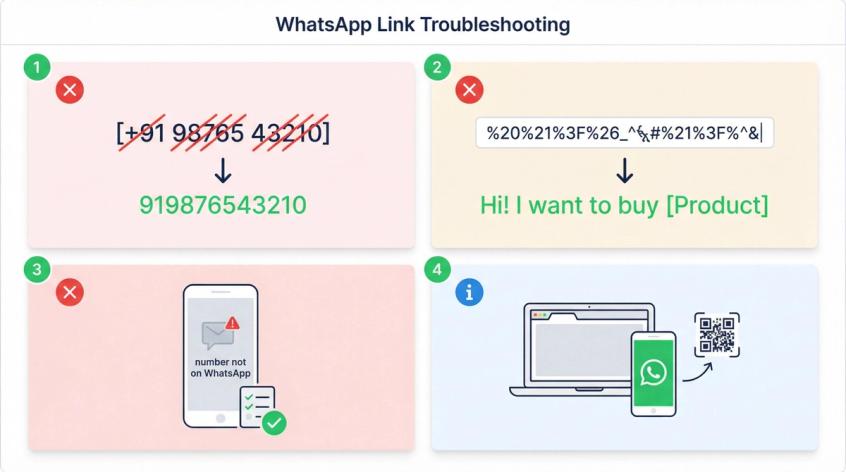
If your link isn't opening WhatsApp correctly, the issue is almost always one of these four things.
| Problem | What went wrong | Fix |
|---|---|---|
| Link doesn't open WhatsApp at all | You included +, spaces, brackets, or dashes in the number | Remove everything except digits. +91 98765 43210 becomes 919876543210 |
| Pre-filled message shows garbled text | The message isn't URL-encoded | Run it through encodeURIComponent() in your browser console, or use Spur's Link Generator |
| "Phone number shared via link is not on WhatsApp" | The number doesn't have an active WhatsApp account | Verify the number is registered on WhatsApp (personal or business) |
| Opens WhatsApp Web instead of the app | Happens on desktop or inside certain in-app browsers | For offline-to-mobile use cases, use a QR code instead |
WhatsApp's FAQ emphasizes removing extra characters from phone numbers as the most common fix. If you're also seeing delivery issues with your WhatsApp messages, our guide on how to fix WhatsApp message not delivered covers the most common causes in detail.
Link works but the preview shows no image? WhatsApp silently drops og:image files over 600 KB. The WhatsApp link preview image size rules, and every other WhatsApp image size, are in our guide.
High-Converting Pre-Filled Message Templates
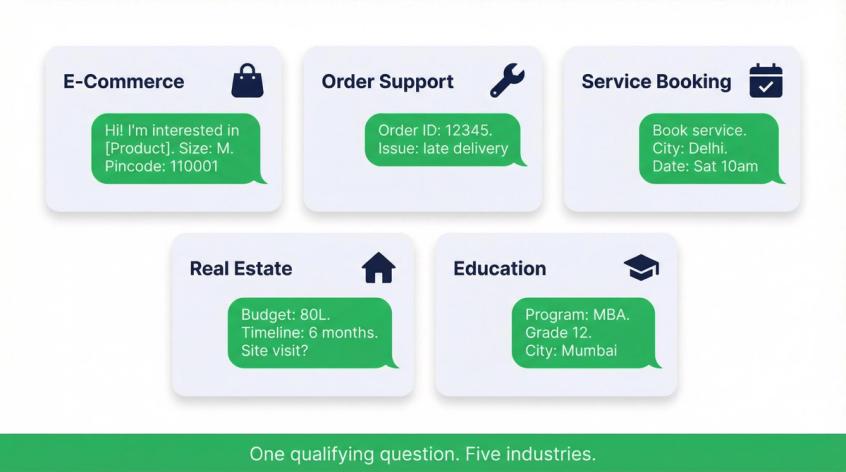
These are ready to copy and customize. Replace anything in [brackets] with your actual details.
E-Commerce: Product Inquiry Template
Hi! I'm interested in [Product Name]. Is it available in [Size/Color]? My pincode is [PIN].
For e-commerce businesses, WhatsApp has become one of the most effective sales channels available. Our WhatsApp for e-commerce guide covers nine use cases (from abandoned cart recovery to product catalogs) that you can use alongside these templates.
Order Support Template
Hi! I need help with my order. Order ID: [12345]. Issue: [late delivery/return/exchange].
Service Booking Template
Hi! I want to book [Service]. City: [City]. Preferred date/time: [Date + Time].
Real Estate Lead Capture Template
Hi! I'm interested in [Project Name]. Budget: [X]. Move-in timeline: [X]. Can we schedule a site visit?
Real estate teams dealing with high lead volumes can pair these WhatsApp links with an AI chatbot for real estate lead qualification. The chatbot handles initial qualification automatically, so your agents only talk to the most serious prospects.
Education Admissions Template
Hi! I'm interested in [Program]. Student grade: [X]. City: [City]. Please share fees + next steps.
Notice the pattern? Each template asks for one specific piece of information that helps you route or qualify the conversation. That's the whole trick. Don't ask for everything. Ask for the one thing that moves the conversation forward.
For referral and viral campaigns, use the share link format (https://wa.me/?text=...) so recipients can forward your message to their own contacts. WhatsApp's documentation describes this as an official way to create links with only a pre-filled message and no phone number.
WhatsApp Link Compliance: What You Need to Know
A WhatsApp link is one of the safest ways to start business conversations because the user initiates the chat. You're not cold-messaging anyone. But once you start operating at scale (especially on the WhatsApp Business API), the rules matter.
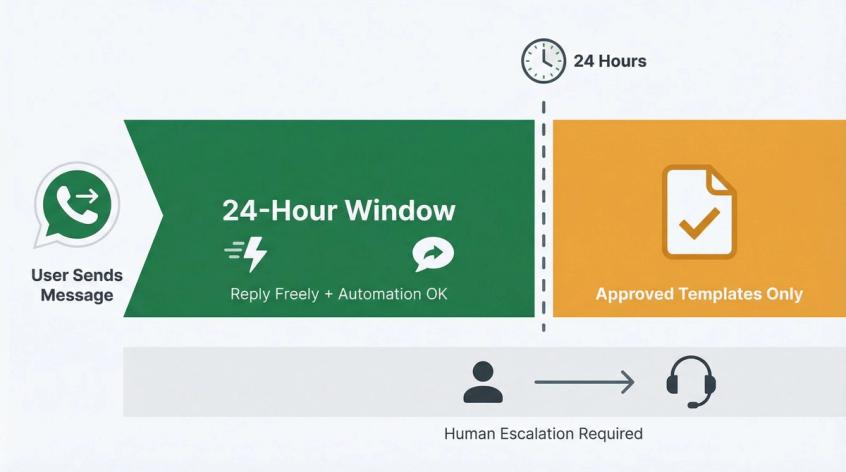
Here's what WhatsApp's Business Messaging Policy says:
- Within 24 hours of a user's last message, you can reply freely (including with automation). (WhatsApp Business Policy)
- Outside that 24-hour window, you can only send outbound messages using approved message templates. These templates go through a review process.
- Automation is allowed during the 24-hour window, but you must provide clear escalation paths so users can reach a human (phone, email, web support, or live agent).
WhatsApp's platform pricing page describes the 24-hour service window and notes that service messages during that window can be free (pricing varies by category and region). You can also read our breakdown of WhatsApp Business API pricing to understand exactly what each message type costs.
The human escalation requirement (where your automation must always provide a path to a real person) is one of the most commonly overlooked compliance points. Our guide on chatbot to human handoff explains how to design this transition properly. And if you're operating in the EU, our article on WhatsApp API GDPR compliance covers your data obligations in detail.
Practical takeaway: A WhatsApp link is a great way to get inbound chats. Once those chats start flowing, reply fast, route them to the right person, and keep the experience human when it needs to be.
How Spur Helps You Handle WhatsApp Conversations at Scale
Creating a WhatsApp link takes 30 seconds. Handling what happens after someone clicks it? That's where most businesses hit a wall.
You share your link on Instagram, your website, a flyer at an event. Leads start coming in. And suddenly your team is juggling WhatsApp conversations from a single phone, missing messages, losing track of who said what, and manually copy-pasting responses for the 50th time today.
This is the exact problem Spur was built to solve.
Start Free: WhatsApp Link and QR Code Generator
Our WhatsApp Link Generator and QR Code Generator are completely free. No signup, no strings attached. Use them to create and share your links today.
Scale with Spur's WhatsApp Business Platform
When your inbound volume outgrows a single phone, Spur's WhatsApp Business API gives you:
- A shared inbox where your entire team can handle WhatsApp, Instagram, Facebook, and website conversations from one screen
- AI agents trained on your knowledge base that handle repetitive questions automatically (not generic chatbot answers, but responses based on your actual product data, policies, and FAQs)
- Automation flows for abandoned cart recovery, order updates, drip campaigns, and lead qualification
- Broadcast messaging to reach thousands of contacts with personalized WhatsApp campaigns
And for your website, Spur's Live Chat adds an AI-powered chat widget that collects contact details, answers visitor questions, and hands off complex queries to your team.
WhatsApp links get people talking to you. Spur makes sure you can actually handle (and convert) those conversations at scale.
WhatsApp Link Pre-Publish Checklist
Before you put your WhatsApp link anywhere public, run through this quickly:
- Number format: Country code + digits only. No
+, no spaces, no brackets. - Test on Android: Does the link open WhatsApp and show the correct number?
- Test on iPhone: Same check. Some encoding issues only appear on iOS.
- Test on desktop: Does it open WhatsApp Web correctly?
- Pre-filled message works: Is the encoded text showing up properly in the chat draft?
- Multiple versions created: At least one for your website and one for social media, with different source tags.
- Fast reply plan: Someone on your team is ready to respond within minutes, not hours. Speed wins on WhatsApp. If volume grows, how to respond faster to customer messages covers practical approaches for scaling response speed.
- Human escalation path exists: If you're using any automation, there's a clear way for the user to reach a real person. WhatsApp's policy requires this for many business use cases.
Frequently Asked Questions
What Is a WhatsApp Link?
A WhatsApp link is a URL (using the wa.me format) that opens a WhatsApp chat when someone clicks it. The person doesn't need to save your phone number first. They click the link, WhatsApp opens on their device, and they can start typing. You can optionally include a pre-filled message so the conversation starts with context instead of just "Hi."
How Do I Create a WhatsApp Link for Free?
Three ways. First, manually: take your phone number in international format (like 919876543210), and put it after https://wa.me/. Second, use the WhatsApp Business app's built-in short link feature under Settings > Business Tools. Third, use a free generator like Spur's WhatsApp Link Generator that handles formatting and encoding for you.
How Do I Add a Pre-Filled Message to My WhatsApp Link?
Add ?text= followed by your URL-encoded message to the end of your wa.me link. The easiest way to encode your message is to use encodeURIComponent() in your browser's developer console, or use Spur's Link Generator which does it automatically.
Can I Track Clicks on My WhatsApp Link?
Not with traditional UTM parameters. Since wa.me links open WhatsApp instead of a webpage, your analytics tools never see the click. The most effective tracking methods are: (1) using source tags in your pre-filled messages like [IG_BIO] or [WEB_HEADER], (2) using a trackable redirect link, or (3) using different WhatsApp numbers for different channels. For a deeper dive, read our guide on how to track WhatsApp messages for business.
Why Is My WhatsApp Link Not Working?
The most common causes are: including +, spaces, or brackets in the phone number (remove them all); using a number that doesn't have an active WhatsApp account; or having a pre-filled message that isn't URL-encoded. Use WhatsApp's documentation to verify the correct format, or use Spur's Link Generator to avoid formatting issues entirely.
A regular WhatsApp link (wa.me/yournumber) opens a chat with a specific phone number. A WhatsApp share link (wa.me/?text=yourmessage) doesn't include a phone number. Instead, it lets the person choose any contact and send them a pre-written message. Share links are ideal for referral programs, promotions, and WhatsApp marketing campaigns. You can create both types free with Spur's tools.
Do WhatsApp Links Work on Desktop?
Yes. On desktop, clicking a wa.me link typically opens WhatsApp Web or the WhatsApp desktop app. The behavior depends on whether the user has WhatsApp installed locally and their browser settings. For offline-to-mobile scenarios (like printed materials), a QR code is often a better choice since most people scan QR codes with their phone camera, which goes directly to the mobile app.
Your number is visible in the URL (that's how the link works), so anyone who has the link can see it. This is the same number you'd put on a business card or website, so for businesses it's generally fine. If you want more control over who can message you, the WhatsApp Business API (available through Spur) lets you manage incoming conversations with automation rules, team routing, and AI agents, so you stay in control even at high volume.