Key takeaways
- An AI chatbot on WhatsApp lets a hotel answer booking inquiries 24/7, including after hours, and win more direct bookings instead of paying OTA commissions of about 15 to 30% per booking.
- Only a transactional agent connected to your booking engine, PMS or channel manager can take bookings. Without live inventory, a bot must never confirm that a room is available.
- A good booking flow asks only for dates, guests and rooms first, shows a few room options with price, inclusions and cancellation terms, then sends a secure payment link.
- Never ask guests for card numbers or government ID numbers in WhatsApp. WhatsApp's policy restricts it, so send a payment link from your gateway instead.
- Get opt-in before proactive messages, use approved templates outside the 24-hour service window, and let guests reach a person by typing words like "agent" or "front desk".
Ask an AI about this article
Why Hotels Are Moving Bookings to WhatsApp
Most hotels already receive booking inquiries on WhatsApp. The problem is those inquiries get answered manually during office hours, go unanswered at night, and compete for attention with dozens of other messages across different channels. Guests who don't hear back in 20 minutes often book somewhere else.
WhatsApp is where travelers already are. According to TechCrunch's coverage of Meta's Q1 2025 earnings call, WhatsApp surpassed 3 billion monthly active users, making it the most-used messaging platform in most of the world's major travel markets. When a hotel guest messages you asking about room availability, they're doing it from an app they open dozens of times a day. The response time expectation isn't "a few hours." It's minutes.
Hotel Tech Report's 2025 State of Hotel Guest Technology survey found that 70% of guests find chatbots helpful for simple inquiries, and 58% believe AI can improve their hotel stay. Even for something as mundane as asking for the Wi-Fi password, 39% of surveyed guests said they'd use a chatbot. That survey covered 402 recent hotel guests with a margin of error of ±4.9%, so these aren't fringe preferences. This is the mainstream expectation from guests already staying at your competitors.
Then there's the financial reason. OTA commissions sit around 15-30% of booking value depending on platform, property type, and market segment, according to Cloudbeds' 2026 OTA commission guide. SiteMinder's rate parity research puts average OTA fees at 15-25% and notes that direct channels can compete effectively through differentiated value (upgrades, flexible cancellation, loyalty recognition) rather than simply undercutting OTA prices. PhocusWire reported that Airbnb, Booking Holdings, Expedia, and Trip.com together spent over $20 billion on marketing in 2025. You're not going to out-market them.
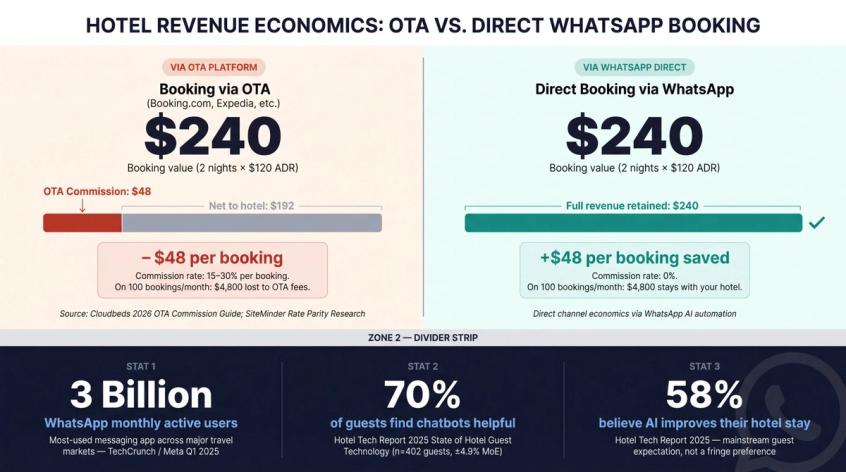
The smarter play is to use OTAs for discovery and visibility, then make your direct booking experience fast enough that guests who are already asking you questions actually complete the booking with you. WhatsApp is one of the best channels for closing that gap, and WhatsApp automation for hospitality and travel has matured significantly across industries, because the conversation is already happening there.
If you're looking for a detailed breakdown of how Spur approaches travel and hospitality WhatsApp automation, that page covers the specific hotel and travel use cases we've designed for. But not every hotel chatbot is built the same. The distinction matters enormously.
Three Types of Hotel AI Chatbots (And Why Only One Handles Bookings)
When someone says "hotel chatbot," they could mean three completely different things. Understanding which tier you're looking at changes everything about what you can expect from it.
| Level | What it does | Best for |
|---|---|---|
| FAQ assistant | Answers common questions: check-in time, parking, breakfast, cancellation policy, pet policy, amenities, Wi-Fi | Small hotels starting with automation |
| Booking inquiry assistant | Captures dates, guest count, preferences, contact details, then sends the lead to your reservations team or a booking link | Hotels that want faster lead capture without deep PMS integration |
| Transactional booking agent | Checks live availability, quotes rates, collects guest details, sends payment links, creates or updates reservations, sends confirmations | Hotels serious about direct booking conversion |
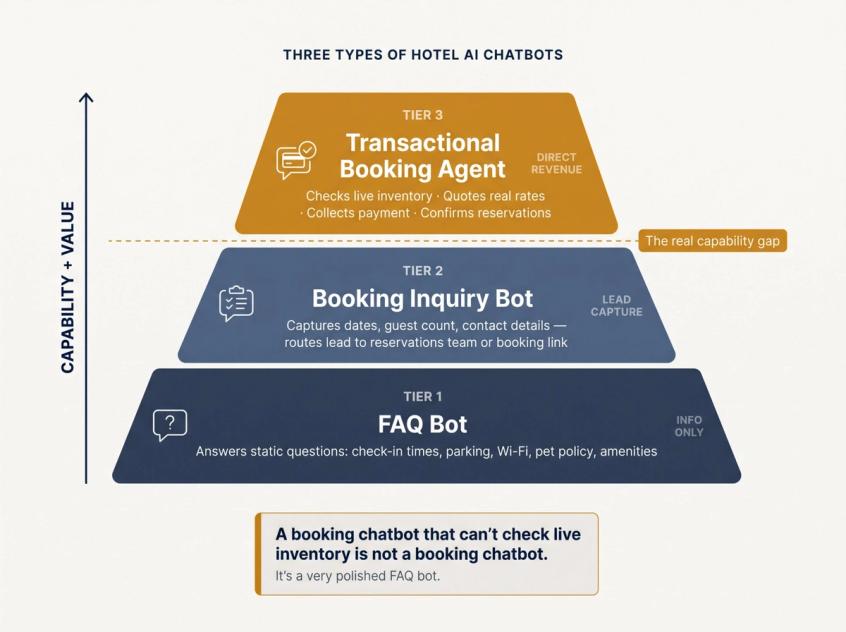
The FAQ assistant is easy to build and easy to get wrong. It answers "what time is check-in?" beautifully and does nothing else. A guest who asks "do you have a pool-view room for next weekend?" gets a generic answer and a link to your website. That's not a booking. If you want to understand the full range of chatbot use cases across different tiers, the distinctions go well beyond hotels.
The transactional booking agent is where the real value is, and also where accuracy matters most. Because a booking isn't a conversation. It's an inventory transaction: dates, room type, availability, rate plans, taxes, fees, guest identity, payment status, cancellation terms, and a confirmation number. The bot must not invent rates, promise unavailable rooms, or make policy exceptions it can't honor.
A hotel booking chatbot that can't check live inventory is not a booking chatbot. It's a very polished FAQ bot.
The distinction between the two (and knowing when AI handles the work versus when humans must take over) determines whether WhatsApp becomes a real booking channel or just another place guests send messages that go nowhere.
So what does a good transactional booking flow actually look like in practice? Here's the full picture.
How a WhatsApp Hotel Booking Flow Works
A well-designed WhatsApp booking conversation feels effortless to the guest. Behind the scenes, there's a structured sequence that makes that effortlessness possible.
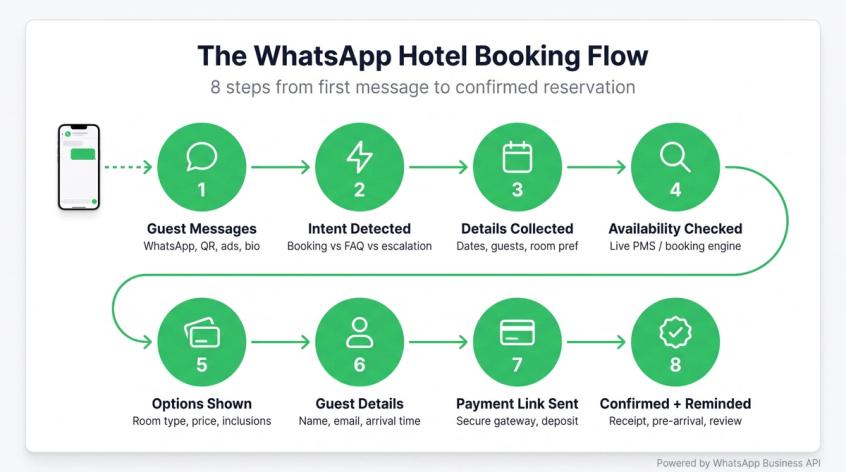
Step 1: The Guest Starts a Conversation
Guests can find your WhatsApp through multiple entry points:
→ A WhatsApp button on your hotel website
→ A "continue on WhatsApp" option from your website chat widget
→ Google Business Profile
→ Instagram bio and story links
→ QR codes at the property (lobby, rooms, restaurant, spa)
→ Email signatures
→ Booking confirmation pages
→ Post-OTA guest follow-up, where allowed
One entry point worth highlighting is click-to-WhatsApp ads. When a guest messages your hotel from one of those ads, WhatsApp's pricing policy gives you a window of up to 7 days where those conversations aren't charged. For hotels running packages, wedding venue campaigns, or seasonal deals, that free entry window means the entire quote conversation can happen while the guest is still warm from clicking your ad. To understand how WhatsApp conversation charges work by category: marketing, utility, and service. That breakdown covers exactly when you pay and when you don't.
Step 2: The Bot Identifies Intent
The bot's first job is to classify what the guest actually wants. "Do you have rooms available?" is a booking inquiry. "What time does the pool close?" is an amenities question. "I need to cancel my reservation" is a modification request that may need human involvement.
Common hotel intents to train for:
- New room booking (couples, families, groups)
- Event or banquet inquiry
- Modification or cancellation request
- Airport transfer
- Restaurant reservation
- Spa appointment
- Early check-in or late checkout request
- Payment or invoice question
- Complaint or escalation
- General FAQ
Getting intent detection right is what separates a helpful chatbot from an annoying one. A guest who says "hi, do you have 2 rooms for 12-14 June near the pool?" is making a specific room availability inquiry, not asking a general amenities question. The bot should recognize that and respond accordingly. For hotels focused on capturing booking inquiries and qualifying leads from WhatsApp, the intent detection step is where that qualification begins.
Step 3: Collecting Only the Details Needed to Quote a Room
The bot shouldn't open with a long form. It collects only what's needed to give a useful answer:
- Check-in and check-out dates
- Number of adults
- Number of children and ages, if relevant
- Number of rooms
- Room preference (view, accessibility, bed type)
- Special requests, optionally
The difference between a good flow and a bad one is stark. A good flow:
Guest: Do you have rooms this weekend?
AI: I'd love to help check availability. What dates are you looking at?
A bad flow:
AI: Please provide your full name, email, phone, country, preferred meal plan, ID type, estimated arrival time, purpose of visit, and any special requests.
The second approach has a predictable outcome. The guest leaves. Collect personal details after they've selected a room, not before.
Step 4: The Bot Checks Live Availability and Rates
This is the make-or-break step. If the bot is connected to your booking engine, PMS, CRS, or channel manager, it can pull real-time room availability and rate data. Hotel-specific chatbot tools often emphasize PMS synchronization for real-time availability and booking handling, and some claim connections with 250+ booking engines for real-time quotes.
If your bot isn't connected to live inventory, it must never confirm availability. It should say:
"I can check that for you. Let me confirm your dates with our reservations team and send you the latest options."
Or redirect to a booking engine link where guests can check themselves. The worst outcome is a bot that says "yes, that room is available" when it genuinely doesn't know. In those cases, a lead capture chatbot that collects the inquiry and routes it to your team is the honest and correct fallback.
Step 5: The Bot Shows Room Options Clearly
WhatsApp isn't a booking engine page, and guests aren't looking for a 2,000-word rate comparison. Keep the options short and scannable:
Available for 12-14 June, 2 Adults
Deluxe King: ₹8,500/night + taxes, includes breakfast, free cancellation until 48 hours before arrival
Premium Sea View: ₹11,200/night + taxes, includes breakfast + airport pickup, limited availability
Reply 1 for Deluxe King or 2 for Premium Sea View.
Show only what helps the guest decide: room type, price, inclusions, cancellation terms, availability note. Save the detailed rate rules for when they ask.
Step 6: The Bot Collects Guest Details
Once the guest selects a room, collect:
- Full name
- Mobile number (confirm if messaging from a different number)
- Email address
- Estimated arrival time, optionally
- Special requests
- Consent for WhatsApp booking updates and reminders
Keep payment completely separate from guest details collection. WhatsApp's Business Messaging Policy explicitly states that businesses shouldn't ask people to share full payment card numbers, financial account numbers, personal ID numbers, or other sensitive identifiers inside WhatsApp messages. Use a secure payment link instead.
Step 7: The Bot Sends a Payment or Booking Link
Depending on your hotel's setup, the bot can send:
- A payment link for the deposit
- A full payment link through your payment gateway
- A direct booking engine link with pre-filled dates
- A tentative reservation with a payment deadline
- A reservation team alert for manual confirmation
For most independent hotels, the cleanest flow is: bot quotes live availability, guest selects room, bot sends secure payment link, booking engine or PMS confirms, bot sends WhatsApp confirmation. This avoids the complexity of the bot "holding" inventory incorrectly.
Step 8: Confirmation, Reminders, and Post-Arrival Messages
After the booking is confirmed, WhatsApp continues to do useful work through automated booking confirmation flows and reminder sequences:
- Booking confirmation with all stay details
- Payment receipt
- Pre-arrival reminder with check-in instructions and directions
- Airport transfer options
- Upgrade offers for returning guests
- In-stay support (room service, housekeeping requests, pool hours)
- Checkout instructions
- Post-stay review request
These pre-arrival reminders, upsell offers, and post-stay review sequences work best when they're designed as proper campaign sequences, not one-off messages. WhatsApp's pricing structure distinguishes between message categories. Service messages (responding to guest-initiated inquiries within the 24-hour customer service window) aren't charged. Utility messages (triggered by a user action like a booking or payment) are charged at lower rates than marketing messages. Design your booking confirmations and check-in reminders as utility messages. Design seasonal promotions as marketing messages, with the correct opt-in and template approval.
This only works if the bot knows your hotel and follows WhatsApp's rules. Both matter.
What Questions Should Your Hotel Chatbot Answer?
A hotel chatbot trained on the questions guests actually ask (not what you think they ask) is worth far more than one trained on your website copy alone. Pull real chat logs from WhatsApp, Instagram, your website chat, email, and front desk notes before you train. Here's the full landscape.
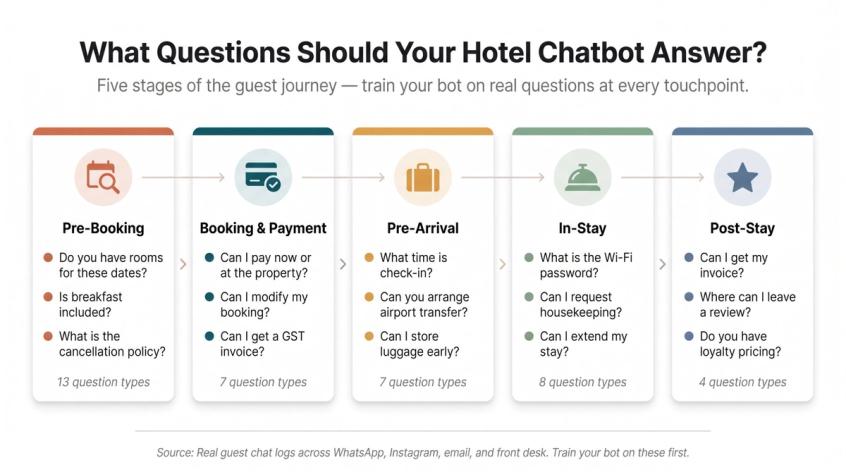
Pre-Booking Questions
- Do you have rooms available for these dates?
- What's the best rate?
- Is breakfast included?
- Do you allow pets?
- Is parking available and what does it cost?
- What is the cancellation policy?
- Do you have rooms for couples, families, or groups?
- Are sea-view, pool-view, mountain-view, balcony, smoking, or accessible rooms available?
- Can I check in early or check out late?
- Do you offer airport pickup?
- How far are you from [landmark]?
- Do you have wedding, banquet, conference, or corporate packages?
- What ID documents are required at check-in?
Booking and Payment Questions
- Can I pay now or pay at the property?
- Do you accept UPI, credit cards, or international cards?
- Can I get a GST invoice?
- Can I modify my booking?
- Can I cancel and get a refund?
- Can I add another room or upgrade?
- Can I split payment?
Pre-Arrival Questions
- What time is check-in?
- How do I reach the property?
- Can you arrange airport transfer?
- Can I request a baby cot, extra pillows, or a crib?
- Can you accommodate vegetarian, Jain, or halal meal requests?
- Can you decorate the room for a birthday or anniversary?
- Can I store luggage before check-in?
In-Stay Questions
- What is the Wi-Fi password?
- Can I order towels or toiletries?
- Can I book a spa appointment or dinner reservation?
- Can I request housekeeping?
- Can I report an issue?
- Can I extend my stay?
- What time does the pool, gym, or restaurant open?
- Can I speak to the front desk directly?
Post-Stay Questions
- Can I get my invoice?
- I left something behind. Can you help me recover it?
- Where can I leave a review?
- I'd like to book again. Do you have member or loyalty pricing?
Hotel Tech Report's 2025 data supports this: guests are especially comfortable using chatbots for simple service requests like Wi-Fi, routine information, and room-service-style tasks. If you want ready-to-deploy FAQ templates structured for real guest questions, those give you a starting point without writing every response from scratch. Train the bot on these questions first, with clear answers in plain language. Before you train the bot on any of this, though, there's a technical decision you need to make. That includes how to train your AI agent on your hotel's specific content.
WhatsApp Business App vs. WhatsApp Business API for Hotels
Small hotels often start with the free WhatsApp Business App. That's reasonable for manual, low-volume messaging. But if you want automation, multiple agents, integrations, templates, analytics, and AI, you need the WhatsApp Business Platform (the API).
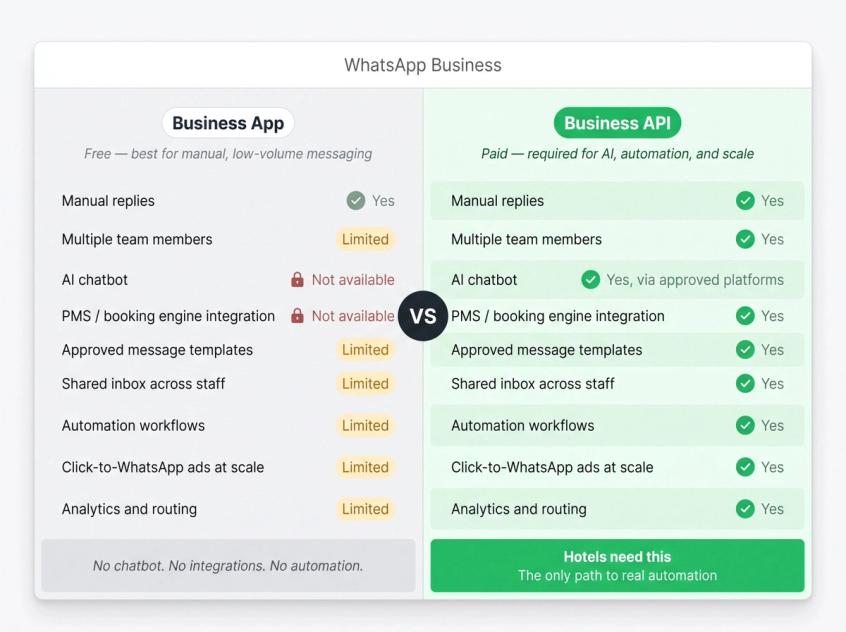
| Feature | WhatsApp Business App | WhatsApp Business API |
|---|---|---|
| Manual replies | Yes | Yes |
| Multiple team members | Limited | Yes |
| AI chatbot | No native support | Yes, through approved platforms |
| PMS/booking engine integration | No | Yes |
| Approved message templates | Limited | Yes |
| Shared inbox across staff | Limited | Yes |
| Automation workflows | Limited | Yes |
| Click-to-WhatsApp ads at scale | Limited | Yes |
| Analytics and routing | Limited | Yes |
For a guesthouse with a handful of rooms and low message volume, the app may be enough to start. For a hotel that wants to handle booking inquiries automatically, send confirmed templates, route conversations across reservations and front desk, and connect to your PMS or booking engine, the WhatsApp Business Platform (API) is the only path that gets you there. Once you've decided on the API, there are rules you need to understand before going live. That includes how the full WhatsApp messaging cost structure works across service, utility, and marketing conversations. A verified WhatsApp Business profile also strengthens your hotel's presence and credibility on the platform.
WhatsApp Rules Hotels Must Follow in 2026
WhatsApp Business is powerful, but it has real compliance requirements. Setting up a hotel chatbot incorrectly can get your number flagged, limit your messaging, or create a bad guest experience. Here's what matters.
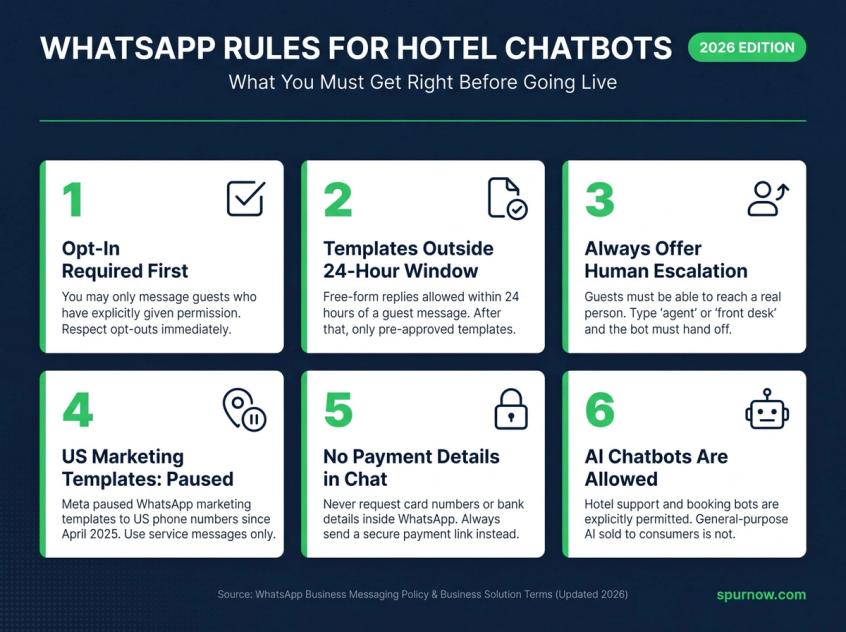
1. Opt-In Before Proactive Messaging
WhatsApp's Business Messaging Policy says you may contact people on WhatsApp only if they've given you their mobile number and you have their opt-in permission confirming they want to receive messages from you. You also need to respect opt-outs promptly.
For hotels, opt-in typically happens through:
- A booking form checkbox ("I agree to receive booking updates and guest support messages on WhatsApp")
- Your website WhatsApp widget
- A direct WhatsApp inquiry (the guest initiating contact)
- Loyalty or membership signup forms
- Event or banquet inquiry forms
- Front desk registration forms
For compliant WhatsApp marketing campaigns with proper opt-in consent, the opt-in language for marketing messages specifically should be explicit: "I agree to receive promotional offers and hotel news on WhatsApp. I can opt out anytime."
2. Use Approved Templates Outside the 24-Hour Window
WhatsApp gives businesses a 24-hour customer service window. Within that window, you can reply to guest messages in any format. Outside that window, you need pre-approved message templates. WhatsApp's policy is clear on this.
Simple rule for hotels:
- Guest messages you → you can reply freely within 24 hours
- You message the guest later → approved template required
- Booking confirmation, payment reminder, check-in instructions → utility templates
- Promotions and seasonal offers → marketing templates (with proper opt-in)
3. Always Provide a Human Escalation Path
WhatsApp's policy requires clear, direct escalation paths for guests who need to reach a person: in-chat human transfer, phone number, email, or in-store support. For hotels, this is non-negotiable regardless of how good the chatbot is.
Guests should be able to type "agent," "front desk," "human," "call me," or "manager" and get routed to a person immediately. Complex booking requests, VIP guests, complaints, payment disputes, and group bookings should never be trapped in automation.
4. US Marketing Templates: A Specific Restriction to Know
One documentation source updated April 14, 2026, notes that Meta paused WhatsApp marketing template messages to US-based phone numbers starting April 1, 2025. Service messages, utility messages, authentication messages, and 24-hour service-window responses remain allowed.
If your hotel markets to US guests, don't assume that promotional WhatsApp campaigns can reach US numbers under current rules. Use WhatsApp for service, booking support, confirmations, and guest-initiated conversations unless your provider has confirmed the current regional situation.
5. No Sensitive Payment Details in Chat
WhatsApp's Business Policy explicitly restricts asking guests to share full payment card numbers, financial account numbers, or government ID numbers inside WhatsApp messages. Always send a secure payment link from your payment gateway. Never collect card details through the chat interface.
6. AI Chatbots Are Allowed for Hotel Support, With the Right Framing
WhatsApp's Business Solution Terms, last updated March 6, 2026, restrict AI providers from building general-purpose AI assistants where AI is the primary product. But they explicitly allow businesses to use AI service providers for their own business operations.
In plain terms: a hotel-specific booking and support assistant is completely allowed. A "ChatGPT on WhatsApp" service sold to end consumers is what's restricted. Your hotel chatbot that handles room bookings, guest questions, and reservation support is clearly on the right side of this line. Spur is an officially approved Meta Business Partner, which means the platform operates within WhatsApp's authorized setup. With those rules in hand, here's where the actual setup gets interesting.
What Systems Does Your Hotel Chatbot Need to Connect To?
An AI chatbot that only answers from static text is an FAQ bot. A chatbot that can take actions (check dates, pull rates, create payment links, update reservations) becomes something closer to a 24/7 reservations agent. The difference is integrations.
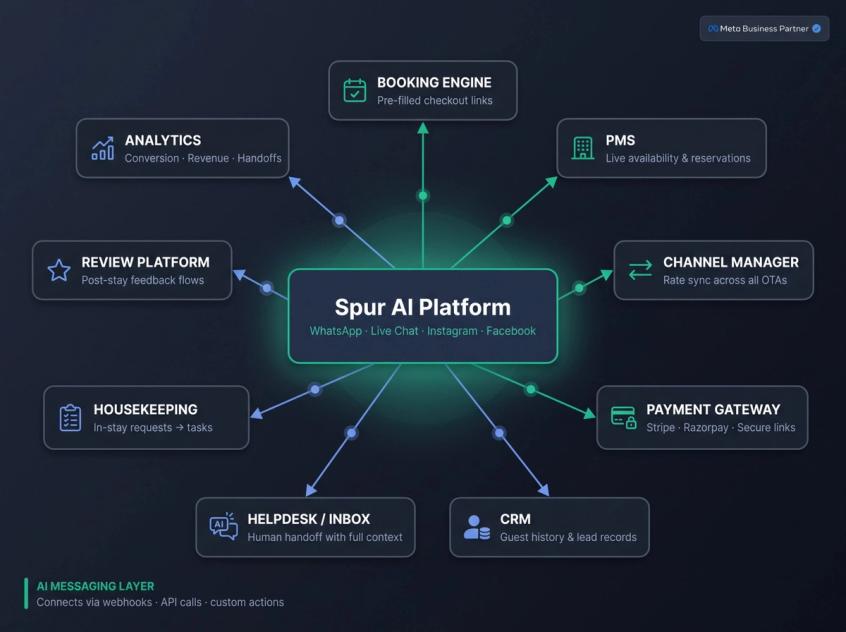
| System | Why it matters |
|---|---|
| Booking engine | Sends guests to a live checkout flow or generates pre-filled booking links |
| PMS (Property Management System) | Checks reservation status, stay dates, room availability, guest profile, and folio |
| CRS/Channel Manager | Checks live availability and rate plans across all inventory channels |
| Payment gateway | Creates secure payment links for deposits or full payment |
| CRM | Stores leads, guest preferences, repeat visits, and campaign history |
| Helpdesk/Shared inbox | Routes complex conversations to reservations or front desk with full context |
| Housekeeping/task system | Turns guest in-stay requests into operational tasks |
| Review/reputation tool | Triggers post-stay feedback flows automatically |
| Analytics | Measures conversion, revenue, handoffs, response time, and bot accuracy |
Hotel-native chatbot platforms often compete on PMS coverage depth. Some hotel-specific tools claim 250+ booking engine integrations. These are legitimate strengths for hotels with deeply embedded PMS workflows.
Spur's approach is different. Rather than being a hotel-specific PMS integration tool, Spur works as the AI messaging and automation layer on top of your guest-facing channels. Its WhatsApp Business API product handles no-code chatbots, lead qualification, agent handoff, shared inbox, broadcast campaigns, and click-to-WhatsApp ads. Its live chat product says AI actions can book meetings, process payments, check inventory, and handle live data searches when connected to the right backend through webhooks, API calls, or custom actions.
For payment gateway connections, Spur integrates with Razorpay for Indian hotel markets and Stripe for international payment processing. For CRM integration to store guest preferences and leads, Spur connects through webhooks so every WhatsApp inquiry creates a record in your CRM automatically. You can explore the full integration layer for Spur to see all supported connection points.
For hotels, this means Spur can sit on top of your guest-facing channels (WhatsApp, website live chat, Instagram DMs, and Facebook Messenger) while custom actions connect outward to your booking engine, PMS, CRM, and payment gateway. Which brings us to the platform itself.
How Spur Powers WhatsApp Bookings for Hotels
We built Spur as an AI messaging and automation platform for multi-channel guest communication. Hotels are a natural fit for exactly what we do.
What Spur Handles for Hotels
When you deploy Spur for your hotel, you get:
AI agents trained on your hotel's knowledge. You add your room pages, amenity descriptions, cancellation policies, meal plan options, local transport information, seasonal packages, spa menus, and any PDFs your guests typically ask about. The AI agent answers from your content, not from generic internet data. This is the difference between a chatbot that says "please check our website" and one that says "our check-in time is 2:00 PM, and early check-in before 10:00 AM is treated as an additional night."
No-code automation flows for hotel guest journeys. You can build booking inquiry flows, quote request flows, airport pickup flows, banquet and event inquiry flows, feedback flows, and post-stay review flows without writing a line of code. The visual flow builder lets your reservations manager set up the automation, not a developer.
WhatsApp Business API with a shared inbox for your whole team. Your reservations team, front desk, and management can all work from the same inbox. When the AI handles the first 70-80% of guest conversations automatically, your team is freed to focus on the cases that genuinely need a human: VIP guests, complaints, group bookings, and high-value upsells.
Seamless AI-to-human handoff. When a conversation hits a complexity the bot can't handle well (a guest who's upset, a payment dispute, a special accessibility request), the handoff to a human agent is immediate and context-preserving. The agent sees the full conversation history, so the guest never has to repeat themselves.
Click-to-WhatsApp ads on Facebook and Instagram. Run ads on Facebook or Instagram and route the conversation directly into WhatsApp. The free entry window (up to 7 days) from WhatsApp's pricing policy means the entire package inquiry or quote conversation can happen at no WhatsApp messaging cost while the guest is still actively interested.
Broadcast and campaign automation. Send pre-arrival reminders, upsell offers, post-stay review requests, and seasonal promotions to segmented guest lists. All message categories properly managed: utility messages for booking updates, marketing messages for promotions (with the right opt-in).
Multi-channel coverage from one platform. The same AI agent that answers on WhatsApp can answer on your website live chat, Instagram DMs, and Facebook Messenger. One inbox. One knowledge base. One place for your team to work.
Spur's Honest Positioning for Hotels
We're not a PMS. We're not your booking engine. We're the conversational layer that sits between your guests and your hotel systems: capturing, qualifying, automating, and routing guest conversations so fewer inquiries fall through the cracks.
We connect to your external systems through webhook triggers, HTTP request actions, and custom AI actions (available on AI Accelerate and AI Max plans). That means your chatbot can call your booking engine to check availability, your payment gateway to generate a link, or your CRM to log a lead, without building custom software.
Spur's travel and hospitality page walks through the specific use cases we've designed for: automated WhatsApp and Instagram flows for bookings, guest details collection, confirmations, reminders, and personalized guest communication.
Getting Started with Spur
Plans start at $31/month for the AI Start tier (with annual billing), which includes WhatsApp automation, AI agents, and a shared inbox. Every plan includes a 7-day free trial.
If you're a small hotel ready to automate your first WhatsApp booking flows, our WhatsApp Business API product page explains how the setup works.
Ready to try it? Start your 7-day free trial here.
A Practical 30-Day Rollout Plan for Hotels
You don't need to automate everything on day one. Trying to do so is actually one of the more common ways hotel chatbot deployments fail. A phased approach builds confidence, prevents errors, and lets you improve the bot based on real guest behavior before you hand over high-stakes bookings to it.
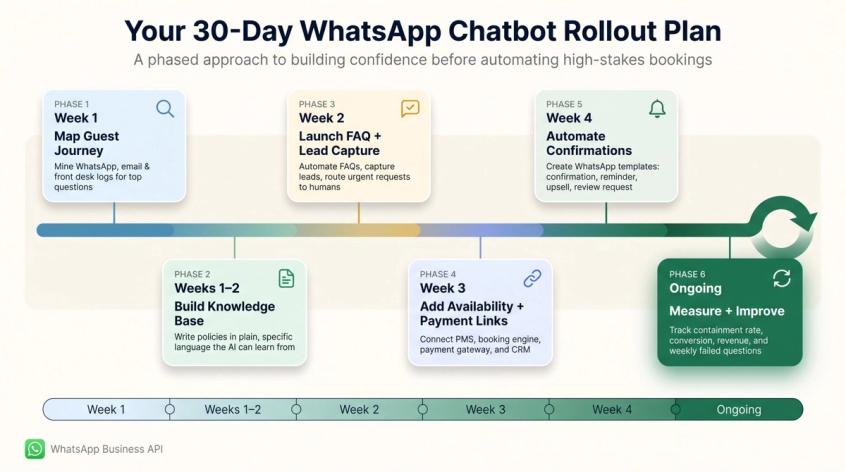
Phase 1 (Week 1): Map the Guest Journey
Start by pulling real messages. Check your WhatsApp inbox, Instagram DMs, email, website chat logs, and front desk notes. What questions come in most frequently? Which take the most time to answer? Which are the highest value (booking inquiries, package questions, wedding leads)?
Focus your first training on:
- Room availability
- Rates and packages
- Cancellation policy
- Check-in and checkout times
- Payment options
- Airport pickup
- Amenities, restaurant, and spa
- Group bookings
- Invoice requests
Phase 2 (Week 1-2): Build a Clean Knowledge Base
Write your policies in plain, specific language. The AI performs significantly better when the source material is clear. For a detailed guide on how to build a clean knowledge base your AI can learn from, including structuring room descriptions, rate policies, and FAQ content so the bot answers accurately, that guide covers the setup step by step.
Instead of: "Standard terms apply as per management discretion."
Write: "Standard check-in is 2:00 PM. Early check-in before 8:00 AM may require an additional night charge. Between 8:00 AM and 2:00 PM, early check-in is subject to room availability and front desk approval."
Include: room types and descriptions, what's included in each rate, taxes and fees, cancellation rules, ID requirements, child policy, pet policy, parking details, meal plans, restaurant and spa hours, local attractions, transport options, and event packages.
Phase 3 (Week 2): Launch FAQ + Lead Capture First
Start with safe, proven automation. Answer FAQs. Collect booking inquiries. Capture banquet and event leads. Route urgent requests to humans. Send booking engine links for interested guests. Using no-code automation tools means your reservations manager can set these flows up without developer help.
Don't let the bot create reservations until you trust its intent detection, escalation behavior, and data capture. Watch real conversations for a week before adding payment flows.
Phase 4 (Week 3): Add Live Availability and Payment Links
Once you're confident in the bot's behavior, connect:
- Booking engine link generation with pre-filled dates
- Live availability search via PMS or channel manager API
- Payment link creation through your payment gateway
- Lead creation in your CRM
- Alert notifications to your reservations team
At this point, the bot moves from "answering questions" to "driving bookings." WhatsApp automation flows for bookings and confirmations handle the confirmation and reminder sequences automatically once the payment is captured.
Phase 5 (Week 4): Automate Confirmations and Reminders
Create and get approved the WhatsApp templates you need for:
- Booking confirmation
- Payment received
- Pre-arrival reminder with check-in instructions
- Airport pickup reminder
- Upsell offer (carefully, and only with proper opt-in and template approval)
- Checkout reminder
- Post-stay review request
- Abandoned quote follow-up (the guest who asked about rooms but never booked)
Keep marketing and utility templates separate. A booking confirmation should never include promotional language.
Phase 6 (Ongoing): Measure and Improve Weekly
Track these metrics every week:
→ Number of WhatsApp booking inquiries received
→ Bot containment rate (% resolved without human handoff)
→ Handoff rate and which topics trigger handoffs most
→ Quote-to-booking conversion rate
→ Booking link clicks vs. completions
→ Direct booking revenue influenced by WhatsApp
→ Upsell revenue from WhatsApp
→ Top failed questions (what the bot couldn't answer)
→ Guest satisfaction scores
→ Staff time saved
Then use what you find to improve the knowledge base, refine escalation rules, and add flows. Before you get started, the ROI math will help you justify the investment to your management or owner.
The ROI Math: When Does a WhatsApp Hotel Chatbot Pay Off?
Don't evaluate a WhatsApp booking chatbot by looking at what each message costs. That's the wrong unit of measurement. The right question is: what does it cost to miss a booking, and what does it cost to give an OTA 15-25% of the booking value?
Start with four numbers:
① How many booking inquiries your hotel misses or answers late per month
② How many direct bookings the bot helps convert
③ How many OTA bookings shift to direct
④ How much staff time is saved on repetitive questions
A rough calculation example to illustrate the principle:
- Average daily rate: $120
- Average stay: 2 nights
- Direct WhatsApp bookings influenced per month: 40
- Booking value per booking: $120 × 2 = $240
- Total monthly booking value influenced: 40 × $240 = $9,600
- OTA commission avoided at 18%: $1,728/month
That's a hypothetical example, not an industry benchmark. But it illustrates why the economics can work even when you're converting a relatively small number of bookings. One OTA commission saved on a few bookings can easily exceed the monthly platform cost. To see how other businesses calculate ROI with Spur, the case studies show real numbers from real deployments across hospitality and other industries.
Use your own numbers with these formulas:
Monthly booking value = Direct bookings influenced × Average nights × ADR × Avoided commission rate
Staff savings = Repetitive conversations automated × Average handling time × Hourly cost
Upsell value = Upsell conversions × Average upsell value
Understanding the ROI also means understanding what can undermine it. These are the mistakes to avoid.
Common Mistakes Hotels Make With WhatsApp Booking Bots
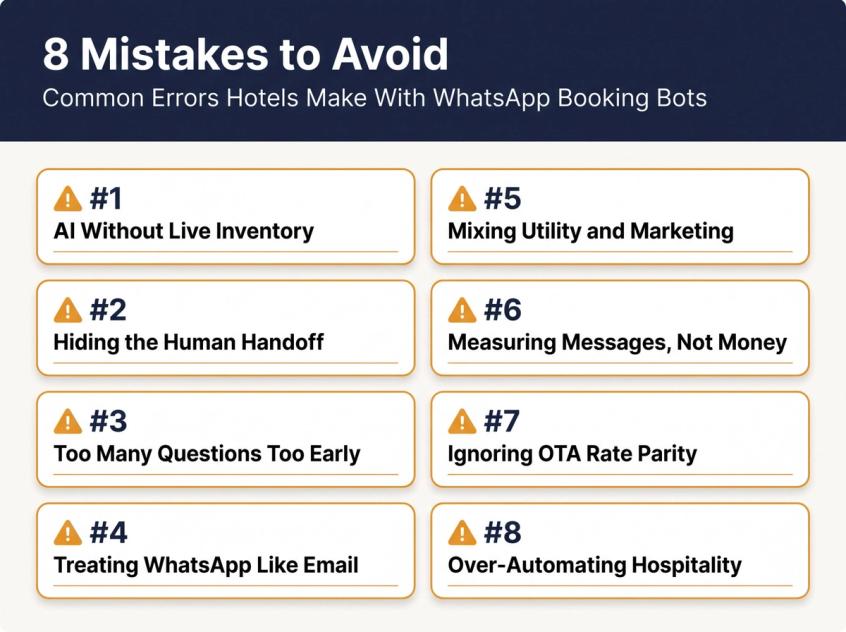
Mistake 1: Using AI Without Live Inventory
If the bot can't check availability, it shouldn't answer availability questions as if it can. Telling a guest "yes, we have rooms for that weekend" when the bot is guessing from static content is worse than not having a bot at all. Until you have live inventory connected, collect the inquiry and hand off to a human or send a booking link.
Mistake 2: Hiding the Human Handoff
Guests don't hate automation. They hate feeling trapped by it. Complex booking requests, angry guests, VIP guests, payment disputes, and group inquiries should reach a person quickly. Make it easy to type "agent" or "front desk" at any point. A clear chatbot-to-human handoff is not just good practice. It's required by WhatsApp's own policy.
Mistake 3: Asking Too Many Questions Too Early
Get check-in date, checkout date, and guest count first. Show room options. Collect name and email only after the guest has selected something. Personal details collected before the guest has seen a room feel like a form, not a conversation. Reviewing chatbot best practices before building your flows will save you from this mistake and several others.
Mistake 4: Treating WhatsApp Like an Email Marketing Channel
WhatsApp is more personal than email. The inbox is shared with messages from family and friends. Promotional messages that are too frequent, too generic, or sent without proper consent will damage your relationship with guests and may get your number blocked.
Mistake 5: Mixing Utility and Marketing Templates
A booking confirmation is a utility message. "Upgrade to our Valentine's package for just ₹3,000 more" is a marketing message. They require different opt-in consent, different template categories, and different approval processes. Mixing them can affect deliverability and compliance.
Mistake 6: Only Measuring Messages, Not Money
If you measure "messages automated" as your primary success metric, you'll undervalue the channel. Track booking links clicked, quotes sent, bookings confirmed via WhatsApp, revenue influenced, and upsells sold. Those are the numbers that justify the investment.
Mistake 7: Ignoring Rate Parity
SiteMinder's rate parity research notes that rate parity rules in OTA contracts can penalize properties that publicly undercut OTA prices. Differentiate your WhatsApp direct booking experience through upgrades, flexible cancellation, and added value. Don't simply advertise cheaper rates that violate your OTA agreements.
Mistake 8: Over-Automating the Human Parts of Hospitality
Guests don't want automation everywhere. They want speed and accuracy from automation and empathy and judgment from humans. Use the bot for fast answers, lead capture, and booking mechanics. Use your team for high-value selling, complaints, special occasions, and anything requiring genuine hospitality. The right guardrails prevent these mistakes from happening in the first place.
AI Guardrails Every Hotel Chatbot Needs
A hotel chatbot without guardrails is a liability. Here's what to build in from the start.
Booking Guardrails
The bot must never:
- Invent availability or rates it can't confirm from a live system
- Promise upgrades, early check-in, or late checkout unless inventory confirms it
- Waive cancellation fees without explicit staff approval
- Create a booking without explicit guest confirmation of all stay details
- Ask for or accept full card numbers in the chat
- Confirm dates ambiguously (always repeat in day/month/year format)
- Proceed to payment without a full booking summary confirmation
Escalation Guardrails
Automatically route to a human when:
- The guest expresses frustration or anger
- The guest mentions a refund, chargeback, legal issue, safety concern, injury, or discrimination
- The guest requests accessibility accommodations
- The guest asks about wedding, group, corporate, or long-stay pricing
- The guest is a VIP or high-value repeat guest
- The bot's confidence in the response is low
- A payment fails or the booking system returns conflicting data
Building automatic escalation triggers for high-stakes situations into your chatbot from day one prevents guest frustration and protects your hotel's reputation.
Brand and Tone Guardrails
- Use warm, straightforward language. No robotic "As an AI assistant, I..." phrasing.
- Keep replies short and scannable on WhatsApp.
- Match the tone to your hotel category (luxury is different from hostel is different from family resort).
- Never use excessive emojis in a professional booking context.
- Always offer a clear path to human support when the guest seems stuck or frustrated.
Hotel Chatbot Tech Architecture: What Connects to What
The simplest way to visualize the ideal setup:
Guest channels
WhatsApp, website live chat, Instagram DMs, Facebook Messenger
↓
AI messaging platform (where Spur fits)
AI agent, automation workflows, shared inbox, routing rules, message templates, analytics
↓
Hotel systems
Booking engine, PMS, CRS/channel manager, CRM, payment gateway, housekeeping tools, review platform
↓
Staff teams
Reservations, front desk, sales, housekeeping, management
Each layer does what it does best. The AI messaging platform handles the conversational surface, qualification, automation, and routing. The hotel systems own inventory, reservations, rates, payments, and guest records. Staff handle the exceptions, the VIPs, and the high-value conversations.
Spur's placement in the AI messaging layer is explicit. Its pricing tiers include webhook triggers, HTTP request actions, and custom AI actions for exactly this kind of cross-system communication. When your chatbot needs to check your booking engine for availability, that's a custom action calling an external API. When it needs to log a lead in your CRM, that's a webhook. The platform doesn't need to be your PMS. It needs to be able to talk to your PMS. WhatsApp commerce capabilities sit at the heart of this transactional layer: turning conversations directly into payments and reservations.
What Direct Bookings Via WhatsApp Actually Look Like
Since the full booking flow is easier to understand when you see it in practice, here's a production-ready example conversation:
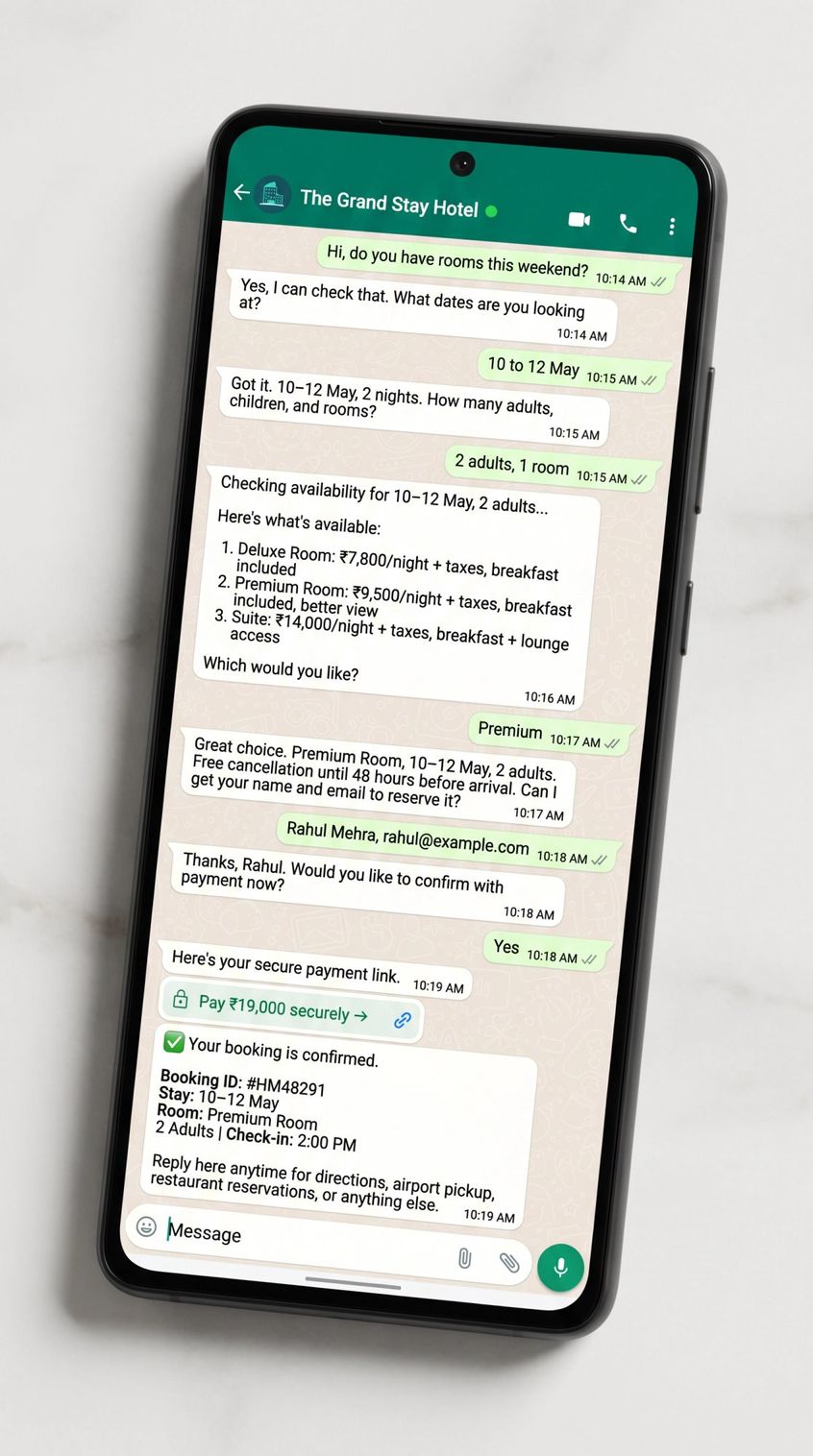
Guest: Hi, do you have rooms this weekend?
AI: Yes, I can check that. What dates are you looking at?
Guest: 10 to 12 May
AI: Got it. 10-12 May, 2 nights. How many adults, children, and rooms?
Guest: 2 adults, 1 room
AI: Checking availability for 10-12 May, 2 adults. Just a moment.
AI: Here's what's available:
Which would you like?
Guest: Premium
AI: Great choice. Premium Room, 10-12 May, 2 adults. Free cancellation until 48 hours before arrival. Can I get your name and email to reserve it?
Guest: Rahul Mehra, rahul@example.com
AI: Thanks, Rahul. Would you like to confirm with payment now?
Guest: Yes
AI: Here's your secure payment link. Once payment is complete, I'll send your booking confirmation here.
[After payment]
AI: Your booking is confirmed. Booking ID: #HM48291 | Stay: 10-12 May | Room: Premium Room | 2 Adults | Check-in: 2:00 PM. Reply here anytime for directions, airport pickup, restaurant reservations, or anything else you need.
- Deluxe Room: ₹7,800/night + taxes, breakfast included
- Premium Room: ₹9,500/night + taxes, breakfast included, better view
- Suite: ₹14,000/night + taxes, breakfast + lounge access
That's what a working transactional booking flow looks like on WhatsApp. Fast, clear, action-oriented, and the guest never had to leave the app they were already using.
WhatsApp Message Templates Every Hotel Should Have
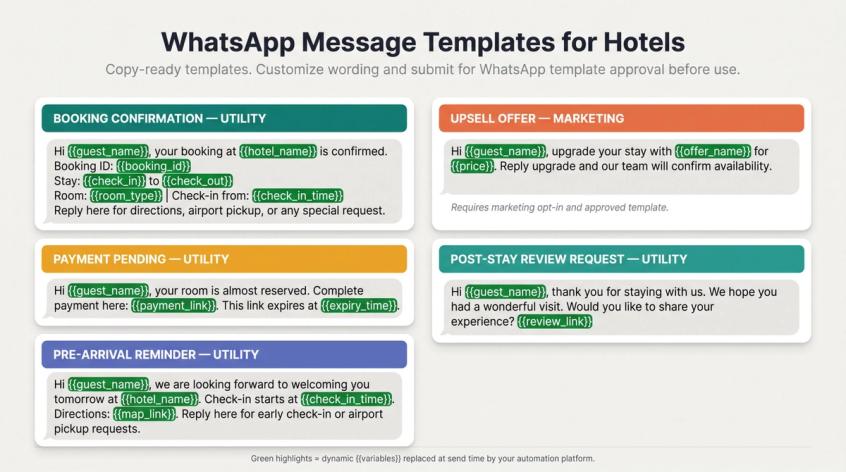
These are starting-point examples. Your final wording should reflect your brand voice and be reviewed for local regulations before submitting for WhatsApp template approval. For guidance on crafting templates that drive actual bookings, the structure and copywriting principles behind high-performing WhatsApp templates apply directly to hotel booking flows.
Booking confirmation (utility template):
Hi {{guest_name}}, your booking at {{hotel_name}} is confirmed.
Booking ID: {{booking_id}}
Stay: {{check_in}} to {{check_out}}
Room: {{room_type}} | Check-in from: {{check_in_time}}
Reply here for directions, airport pickup, or any special request.
Payment pending (utility):
Hi {{guest_name}}, your room is almost reserved. Complete payment here: {{payment_link}}. This link expires at {{expiry_time}}.
Pre-arrival reminder (utility):
Hi {{guest_name}}, we're looking forward to welcoming you tomorrow at {{hotel_name}}. Check-in starts at {{check_in_time}}. Directions: {{map_link}}. Reply here for early check-in or airport pickup requests.
Upsell offer (marketing, requires marketing opt-in and approved template):
Hi {{guest_name}}, upgrade your stay with {{offer_name}} for {{price}}. Reply "upgrade" and our team will confirm availability.
Post-stay review request (utility or marketing, check template approval):
Hi {{guest_name}}, thank you for staying with us. We hope you had a wonderful visit. Would you like to share your experience? {{review_link}}
Is a WhatsApp AI Chatbot Right for Your Hotel?
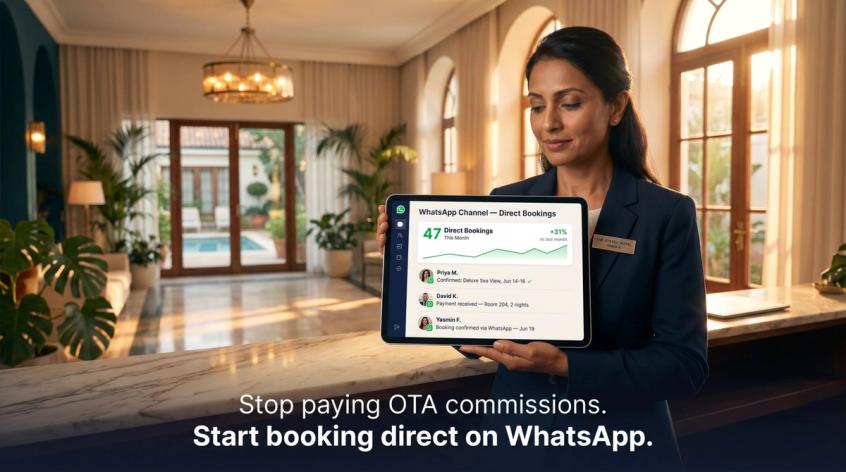
The best AI chatbot for a hotel isn't the one with the most human-sounding replies. It's the one that helps a guest take the next useful step: check availability, compare rooms, get a quote, pay securely, confirm a booking, ask for help before arrival, or upgrade their stay.
WhatsApp is a strong channel for exactly this because it's already where most travelers are having real conversations. The chatbot just needs to be connected to real hotel operations (inventory, rates, payments, staff handoff, templates, and analytics) to turn those conversations into direct bookings.
For hotels deploying this with Spur, the clean approach is to use Spur as the AI messaging and automation layer across WhatsApp, live chat, Instagram, and Facebook, then connect it to your booking engine, PMS, CRM, and payment systems through integrations or custom actions.
Start small: automate FAQs and booking lead capture. Then add live availability, payment links, confirmations, and reminders as your team gets comfortable with what the bot is doing. Done right, WhatsApp stops being just another place guests send messages. It becomes a direct booking engine with a human safety net built in.
Start your 7-day free trial with Spur and see what your hotel's WhatsApp channel can actually do.
Hotel WhatsApp Chatbot FAQs
Yes, if it's connected to the right systems. A chatbot with access to live availability data, booking engine links, and payment gateway integration can guide a guest through selecting a room, collecting their details, generating a secure payment link, and confirming the reservation automatically. Without those integrations, the bot should collect the inquiry and hand off to your reservations team rather than attempting to confirm availability it can't verify.
It's one of the strongest channels available for direct inquiry conversion, especially with guests who want quick answers before committing. WhatsApp works well for initial room inquiries, quote requests, package sales, pre-arrival support, and upsells. It's not a replacement for your booking engine. It's the conversational layer that helps guests reach the booking engine faster and with more confidence.
The free WhatsApp Business App works for small-volume, manual messaging. Hotels that want AI-powered responses, automation workflows, shared inbox for multiple staff members, approved message templates, system integrations, and detailed analytics need the WhatsApp Business Platform (API). The API is the only path to real scale.
Yes, in most markets, but only with explicit opt-in consent, pre-approved marketing message templates, and the correct template category. One important exception: documentation updated April 14, 2026, notes that Meta paused WhatsApp marketing template messages to US-based phone numbers starting April 1, 2025. If you're reaching US guests, use WhatsApp for service and booking support, not promotional campaigns, until the regional rules change.
It can help shift some bookings to direct channels, but it won't eliminate OTA dependence. Nor should it. OTAs are valuable for visibility and discovery, especially for new guests who don't know your hotel yet. The realistic goal is to capture more direct bookings from guests who are already asking you questions: guests who click your website, message you on WhatsApp, click your ads, or reach out through Instagram. That's where the chatbot earns its ROI.
It should never invent availability or rates it can't verify from a live system. It should never collect full card numbers or government ID numbers inside the chat. It should never hide or make it difficult to reach a human staff member. It should never send non-compliant promotional messages to guests who haven't opted in. And it should never make policy exceptions (waiving cancellation fees, promising upgrades) without explicit approval from your team. Our chatbot best practices guide covers the full list of guardrails a hotel bot needs from day one.
Cost has two components: the platform fee and WhatsApp message charges. Platform fees vary by provider. Spur's AI Start plan starts at $31/month (with annual billing) and includes WhatsApp automation, AI agents, and a shared inbox, with a 7-day free trial. On top of platform fees, WhatsApp's pricing charges per message by category: marketing at higher rates, and utility, authentication and service at lower rates, with the first 1,000 service messages a month per number free. See how WhatsApp conversation charges work by category and always verify current per-message rates for your country through your WhatsApp Business provider before launch.
Not necessarily. Independent hotels typically need speed, simplicity, and direct booking capture, plus a no-code platform they can manage without an IT team. Large chains often need deeper PMS and CRS integrations, brand-level reporting, multilingual routing, and enterprise governance. The right chatbot depends more on your operational complexity and tech stack than on your room count. A 40-room boutique property with well-trained WhatsApp AI can outperform a 200-room chain property with a poorly configured one. See our travel and hospitality solution overview to understand what a purpose-built setup looks like for hotels.
Sources
The pages this article links out to, in the order they appear.
- TechCrunch's coverage of Meta's Q1 2025 earnings call techcrunch.com
- Hotel Tech Report's 2025 State of Hotel Guest Technology survey hoteltechreport.com
- PhocusWire reported phocuswire.com
- WhatsApp's pricing policy business.whatsapp.com
- WhatsApp's Business Messaging Policy business.whatsapp.com
- WhatsApp's Business Solution Terms, last updated March 6, 2026 whatsapp.com
Was this article useful?