WhatsApp Drip Campaign Examples: 22 Proven Templates

Discuss with AI
Get instant insights and ask questions about this topic with AI assistants.
💡 Pro tip: All options include context about this blog post. Feel free to modify the prompt to ask more specific questions!
WhatsApp drip campaigns deliver 98% open rates (vs. email's 20%) and can automate your entire customer journey. From first inquiry to repeat purchase. This guide gives you 22 copy-paste message sequences with exact timing, compliance rules for 2026, and real case studies showing 35-73x ROI. Start converting more leads without lifting a finger.
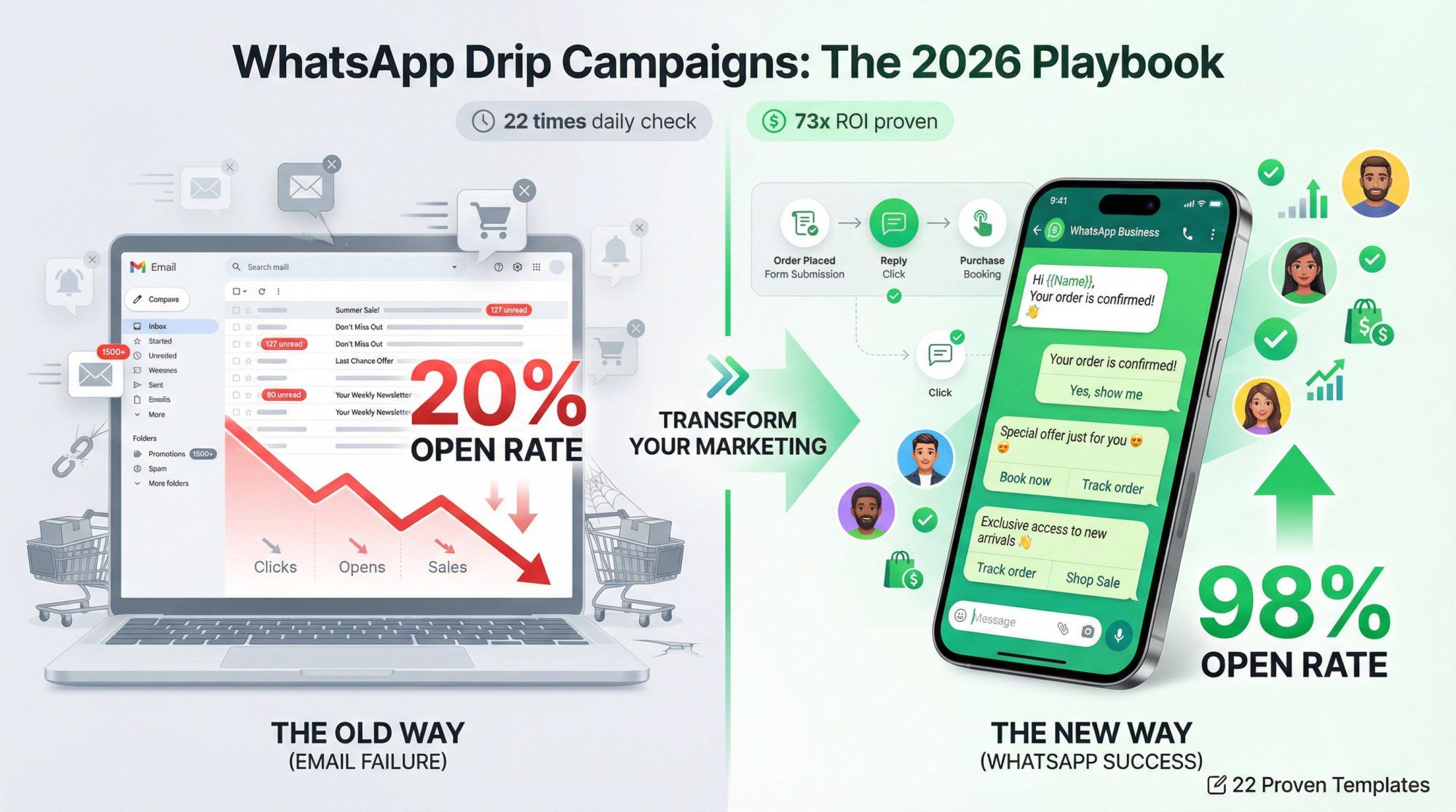
Your emails are getting ignored. With average open rates hovering around 20-30%, most of your carefully crafted nurture sequences never see the light of day.
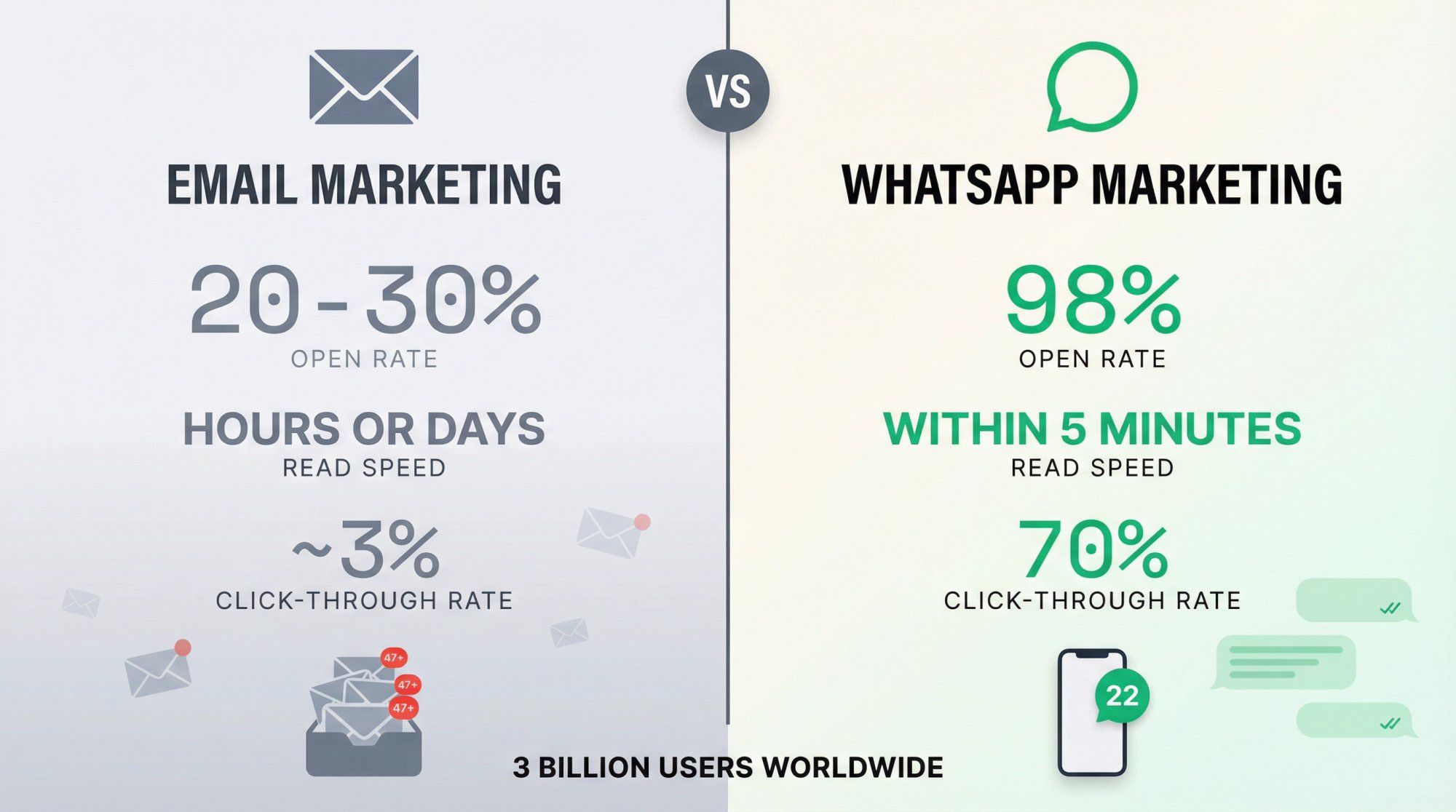
WhatsApp sits in your prospects' pockets with nearly 3 billion users worldwide, delivering a staggering 98% open rate. Messages get read within 5 minutes 80% of the time, and click-through rates hit 70%. Numbers that make email marketing look like shouting into the void.
That's where WhatsApp drip campaigns come in. These are automated sequences of messages that nurture leads, onboard customers, recover abandoned carts, and drive repeat purchases. All through a channel people actually check 22 times a day.
But 2026 is different. WhatsApp introduced new compliance rules, US marketing restrictions, and per-user delivery limits that most guides ignore. Send the wrong message type, and you won't just get poor results. You might not deliver at all.
In this comprehensive guide, we're giving you:
- 22 copy-paste WhatsApp drip sequences with exact message copy, timing, and buttons
- 2026 compliance breakdown so you never get blocked or flagged
- Real case studies showing 35-73x ROI across industries
- Step-by-step setup using platforms like Spur
- Best practices for deliverability, personalization, and conversion
Whether you're running e-commerce, SaaS, local services, or B2B, there's a WhatsApp marketing strategy here that will transform how you nurture and convert.
A WhatsApp drip campaign is an automated sequence of WhatsApp messages sent to a contact over time, triggered by specific events or scheduled at set intervals. Unlike one-off broadcast blasts, drip campaigns are methodical and progressive. Each message is designed to move the recipient one step further along the customer journey.
Think of it like this: instead of overwhelming someone with everything at once, you "drip" information bit by bit, building trust and removing objections at each stage.
Automated and Pre-Written
You create the entire message sequence in advance. The system sends each message automatically based on triggers (like cart abandonment) or time delays (like "3 days after signup"). No manual sending required.
Sequential and Timed
Messages follow a deliberate order, spaced over hours, days, or weeks. Message 1 might welcome someone. Message 2 (two days later) shares a customer story. Message 3 (a week later) offers a discount. Each builds on the last.
Personalized at Scale
Despite being automated, drip messages can include the user's name, purchase history, browsing behavior, or other data points. Making each message feel custom-tailored.
Goal-Oriented
Every message has a purpose: educate, build trust, address an objection, or push toward action. The sequence leads to a specific conversion event. Whether that's a purchase, booking, or reply.
While the concept is similar to email drip campaigns, WhatsApp changes the game:
| Factor | WhatsApp Drips | Email Drips |
|---|---|---|
| Open Rate | 98% | 20-30% |
| Read Speed | 80% within 5 minutes | Hours or days |
| Click-Through Rate | ~70% | ~3% |
| Channel Trust | Personal (friends & family app) | Professional/promotional |
| Rich Media | Images, videos, audio, PDFs, buttons | Limited in many clients |
| Two-Way Engagement | Natural conversation | Replies go to a separate inbox |
WhatsApp messages land directly in the user's chat list. Often alongside conversations with friends and family. This creates an inherent sense of intimacy and urgency that email can't match. When someone sees a WhatsApp notification, they check it. When they see an email subject line, they might get to it later.
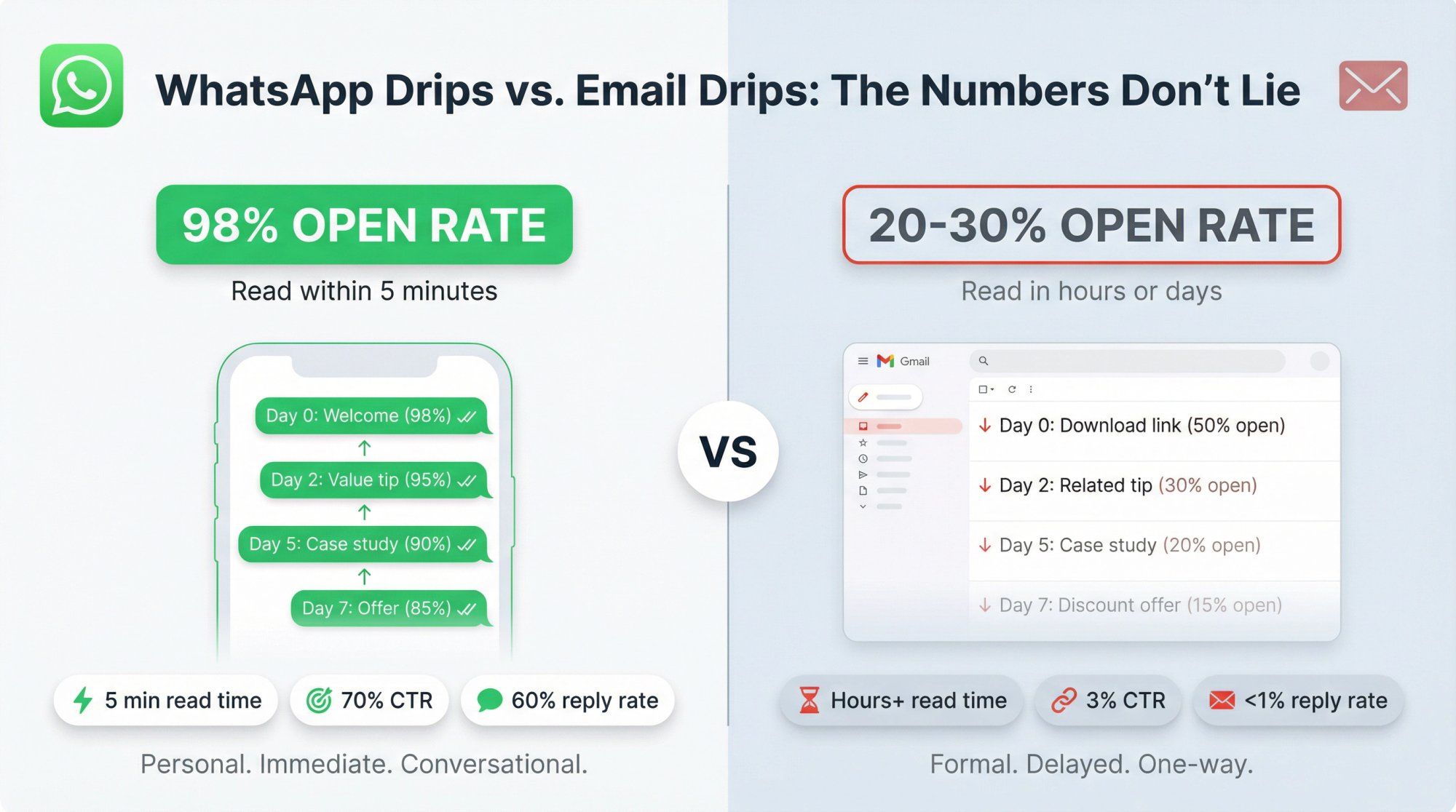
Someone signs up for a free guide on your website and opts into WhatsApp updates.
Email Drip Approach:
- Day 0: Email with download link (50% open rate)
- Day 2: Email with related tip (30% open rate)
- Day 5: Email with case study (20% open rate)
- Day 7: Email with discount offer (15% open rate)
WhatsApp Drip Approach:
- Instant: WhatsApp with download link + quick question (98% open rate, 60% reply rate)
- Day 2: WhatsApp with tip based on their reply (95% open rate)
- Day 5: WhatsApp with case study (90% open rate)
- Day 7: WhatsApp with offer + 1-tap booking button (85% open rate, 40% conversion)
The WhatsApp sequence doesn't just get better open rates. It creates a conversation. When someone replies to Message 1, you can tailor Message 2 based on their actual interests. That's the power of WhatsApp drips: automation that feels personal.
If you're already running email drips, you might wonder: is WhatsApp really worth the effort? The short answer: absolutely. Why WhatsApp drips outperform traditional channels across every metric that matters.
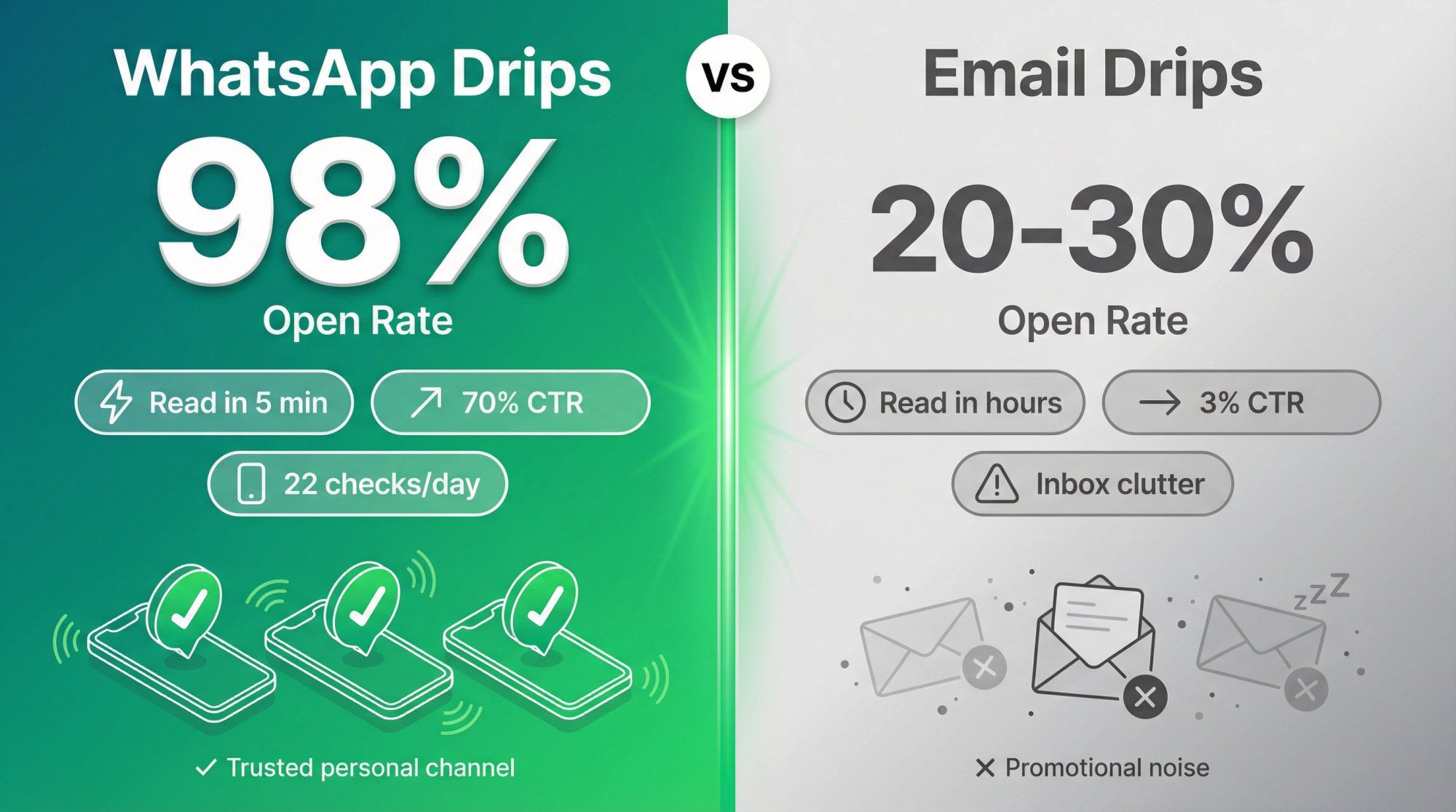
WhatsApp messages boast an open rate around 98%, compared to email's dismal 20-30%. People virtually always read their WhatsApp notifications. Often within minutes. This means your drip content actually gets seen, not buried in an overflowing inbox.
When someone checks WhatsApp (which they do ~22 times a day), they're present and engaged. Your message competes with conversations from friends and family, not 47 unread promotional emails.
Messages arrive as personal chats and get read within minutes, not hours or days. This speed is crucial for time-sensitive sequences like abandoned cart recovery. You can send a reminder 30 minutes after abandonment when the intent is still hot, not 24 hours later when they've moved on.
Click-through rates average 70% because users can tap buttons or links right in the chat. No logging into email, no hunting for a website bookmark. Just immediate action.
WhatsApp is where people talk to friends, family, and close contacts. When used respectfully (with opt-in and value-first messaging), this familiarity breeds trust. Your drip campaigns feel like a helpful conversation rather than corporate marketing.
As long as you provide genuine value and honor opt-outs, users are receptive. The psychological difference between "business email" and "WhatsApp message from a brand I care about" is night and day.
Unlike plain-text SMS or email, WhatsApp supports:
- Images and GIFs (product photos, infographics, visual guides)
- Videos (demos, testimonials, tutorials)
- Audio clips (voice notes, podcast snippets)
- PDFs and documents (brochures, guides, contracts)
- Interactive buttons (quick replies, call-to-action buttons, lists)
This richness lets you show, not just tell. A cart abandonment drip can include a photo of the product they left behind. An onboarding sequence can send a 90-second setup video. A real estate drip can attach a PDF brochure.
Interactive buttons are game-changers: instead of typing a reply, users tap "Book Demo" or "Show Pricing". Dramatically reducing friction and boosting engagement.
WhatsApp has users in almost every country. Whether your audience is in Asia, Europe, Africa, or the Americas, they're likely on WhatsApp. With the WhatsApp Business API, you can automate and scale these conversations to thousands or millions of contacts.
Businesses using WhatsApp marketing automation in India have seen 89% higher purchases per user compared to traditional channels. That's not a marginal improvement. It's a fundamental shift in how customers engage.
WhatsApp drip campaigns combine the efficiency of automation with the intimacy of personal messaging. You get:
- Higher visibility (98% open rate)
- Faster response (read in minutes)
- Better conversion (70% CTR)
- Richer storytelling (media + buttons)
- Global scalability (billions of users)
When done right, a WhatsApp drip quietly guides prospects from "just browsing" to "ready to buy". All in the background of their daily chat routine. No wonder businesses report 35-73x ROI (more on those case studies later).
Most guides fail you: they give you drip campaign ideas without explaining the rules that govern delivery in 2026. Send the wrong message type to the wrong audience, and you won't just see poor performance. Your messages won't deliver at all.
WhatsApp Business Platform policies have evolved significantly. What you need to know to stay compliant and maximize deliverability.
You can only message people who have explicitly opted in to receive WhatsApp messages from you. WhatsApp's Business Messaging Policy requires that you have both:
- The user's phone number
- Clear opt-in permission confirming they want to receive messages from your business
This isn't a suggestion. It's policy. If your drip doesn't have a clean opt-in story, fix that before you write a single message.
How to get opt-in:
- Checkbox on signup forms ("Send me updates via WhatsApp")
- Click-to-WhatsApp ads (when they message you, that's opt-in)
- QR codes or "text us" campaigns
- Website widgets ("Chat with us on WhatsApp")
- Inbound conversations (they reached out first)
What doesn't count as opt-in:
- Buying a contact list
- Scraping phone numbers from social media
- Adding someone because you "met once at a conference"
Pro tip: Log your opt-ins (timestamp, method, source). If someone ever reports you, proof of consent protects your account.
WhatsApp distinguishes between two messaging scenarios:
Within 24 Hours of Last User Message:
You can send free-form messages (anything you want, no template required). This is the "customer service window". The user initiated a conversation, and you can respond naturally.
Outside the 24-Hour Window:
You can only send pre-approved template messages. Templates are message formats you submit to WhatsApp for approval. They ensure your content isn't spammy and follows policy.
Why this matters for drips:
Most drip campaigns are proactive outreach (user didn't just message you). That means you'll rely on templates for your sequences. Plan accordingly. Get your templates approved in advance.
The exception: If someone replies to any message in your drip, the 24-hour window resets. This is why smart drip designers invite replies early. It unlocks flexible conversation.
WhatsApp charges businesses per message delivered, not per conversation. The cost varies by:
- Recipient country (India is cheaper than the US, for example)
- Message category (Marketing, Utility, Authentication, Service)
This shift from "per conversation" to "per message" means every extra drip message has a real marginal cost. More messages doesn't equal better results if they don't deliver or convert.
Cost optimization strategy:
Keep drips lean. Front-load value in the first 1-2 messages. Earn a reply so you can continue for free within the service window.
WhatsApp classifies all template messages into four categories:
Marketing
Promotional content. Offers, discounts, product launches. These are charged per message and subject to delivery limits (more on that below).
Utility
Account updates, order confirmations, appointment reminders. Non-promotional, user-triggered. Generally welcomed and reliable.
Authentication
One-time passwords, verification codes. Highly deliverable, but specific use case.
Service
Messages sent in response to user inquiries within the 24-hour window. These are not charged. You're having a conversation the user initiated.
Why this matters:
WhatsApp (and downstream platforms like Spur) will classify your templates. If you label something "Utility" but it's actually promotional, it may get reclassified. Affecting deliverability and cost.
Service messages (responses within the 24-hour window) are not charged. Neither are some utility messages sent in response to user actions.
Translation for drip strategy:
The smartest drip campaigns are designed to earn a reply early. Once the user replies, you're in a service conversation. You can message freely (and for free) for 24 hours. This is why reply-driven drips outperform broadcast-style drips in 2026.
When a user messages you from certain entry points (specifically Click-to-WhatsApp ads or Facebook Page call-to-action buttons), you get 72 hours of free messaging. During this window, all your messages (any category) are not charged.
Strategic implication:
If you're running Click-to-WhatsApp ads, front-load your highest-value sequence steps in the first 72 hours. Ask qualifying questions, share demos, send case studies. All without per-message costs.
This is a game-changer for lead generation drips.
Starting April 1, 2025, marketing template messages cannot be delivered to US phone numbers (+1).
If any part of your drip uses marketing templates and you have US users, those messages will not deliver. This isn't a throttle. It's a hard block.
Workarounds for US audiences:
- Drive inbound conversations via Click-to-WhatsApp ads, then nurture inside the service window (not via templates)
- Use utility templates only (transactional, account-related, non-promotional)
- Route to different channels (SMS, email, Instagram DMs) for promotional content
Platforms like Spur support multi-channel fallback. If a WhatsApp marketing message can't deliver, you can auto-route to Instagram DM or email instead.
Even outside the US, WhatsApp now throttles marketing template delivery based on user engagement. If a user repeatedly ignores your marketing messages, WhatsApp may limit how many additional marketing messages they receive from you.
What this means:
Sending 5 follow-up marketing messages to someone who never opens them won't just waste money. It'll reduce your total delivery over time. Quality beats quantity.
The fix:
Design drips that earn engagement. If someone doesn't reply or click after 2 messages, stop the marketing drip. Segment based on engagement signals.
Because of per-user limits and engagement-based throttling, the old email marketing playbook ("send more follow-ups!") backfires on WhatsApp.
The new approach:
Ask yourself: "How quickly can we earn one reply?"
A reply:
- Signals engagement (improves deliverability)
- Resets the 24-hour service window (free messaging)
- Opens a real conversation (better for support and sales)
The best WhatsApp drips in 2026 are reply-driven, not broadcast-driven.
Now that you understand what WhatsApp drips are and the rules governing them, the most effective use cases. For each, we'll cover when to use it, why it works, and a detailed example sequence.
When to Use:
As soon as someone expresses interest. Signs up on your site, clicks your ad, sends an inquiry, downloads a guide. But isn't ready to purchase yet. This drip keeps the conversation alive and builds trust until they're sales-ready.
Why It's Effective:
Most leads need multiple touchpoints before converting. Research shows potential buyers require an average of 5-7 follow-ups, and 80% of sales happen only after the fifth to twelfth contact.
A WhatsApp drip ensures those follow-ups happen consistently and promptly, without a sales rep manually tracking each lead. The personal nature of WhatsApp makes these touchpoints feel helpful, not pushy.
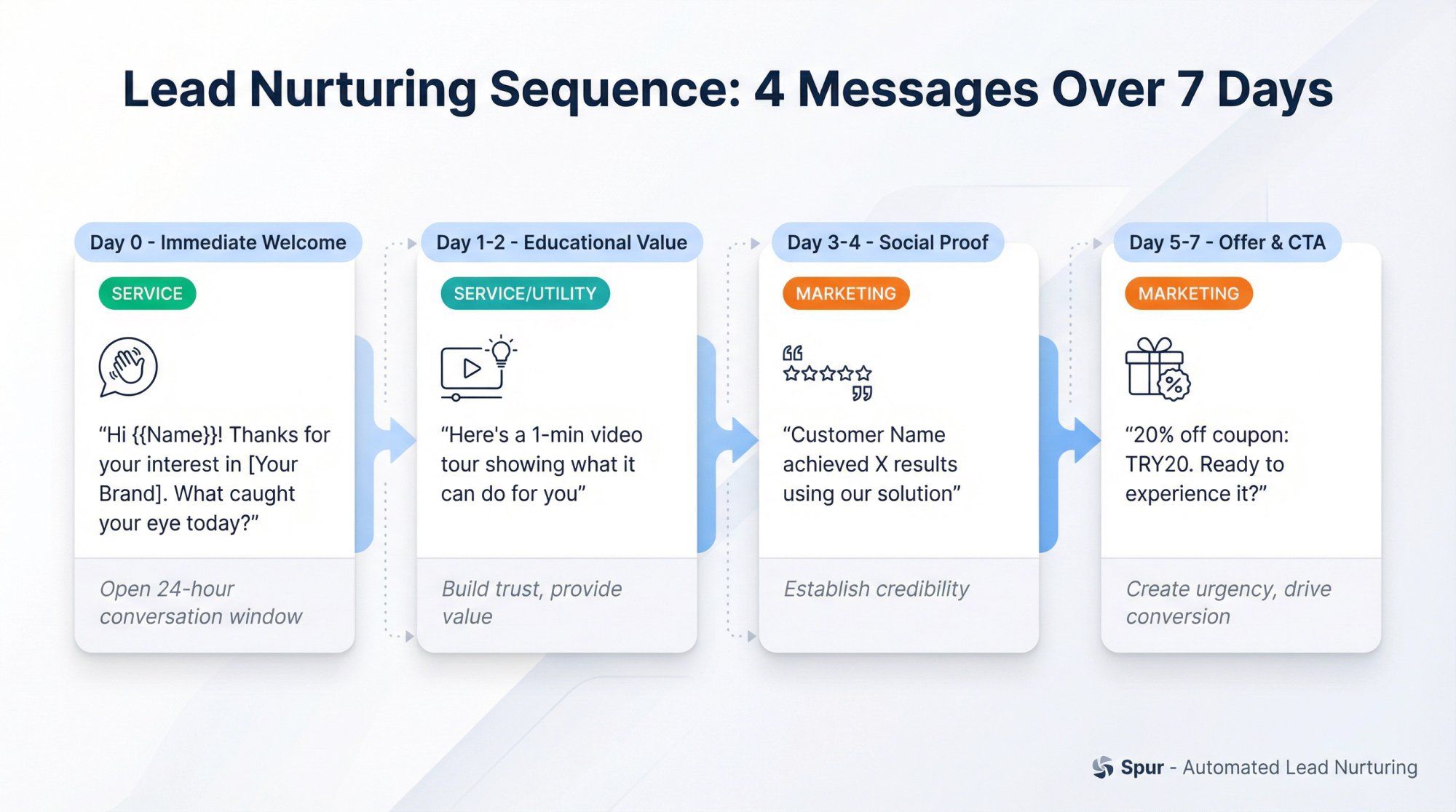
Example Drip Flow (Lead Nurture):
Message 1 – Immediate Welcome (0 minutes, Service)
"Hi {{Name}}! Thanks for your interest in [Your Brand]. I'm here to help you get to know us. What caught your eye today?"
Include a quick intro or simple question to invite engagement. This acknowledges their interest and opens the 24-hour conversation window.
Message 2 – Educational Value (Day 1-2, Service/Utility)
"By the way, many new users ask how our solution works. Here's a 1-min video tour that shows what it can do for you [Video Link]. Let me know your thoughts!"
This positions you as helpful, not salesy. Educational content builds trust.
Message 3 – Social Proof (Day 3-4, Marketing)
"Did you know [Customer Name] used [Your Product] and achieved [X results]? We love sharing wins from our customers. [One-liner case study with link]."
Testimonials and case studies build credibility.
Message 4 – Offer & CTA (Day 5-7, Marketing)
"Ready to experience [Your Product] firsthand? For this week, here's a 20% off coupon: TRY20. If you have any questions, just reply here. I'm happy to chat."
Create urgency with a time-limited offer and a clear call-to-action.
Stop Conditions:
- User purchases → stop drip, move to onboarding
- User books a call → stop drip, prepare for meeting
- User replies "STOP" → unsubscribe immediately
- No engagement after Message 4 → pause and re-segment
Success Metrics:
- Reply rate (target: 40-60% after Message 1)
- Qualified lead rate (collected budget/timeline info)
- Booked call rate (end goal)
Pro Tip:
Segment your leads for even more relevant drips. Separate sequences for different sources (ad vs. organic), product interests, or industries. A tailored message resonates better.
When to Use:
After a customer makes a purchase or signs up for your service. Use a drip to onboard them and ensure a great first experience. Critical for SaaS, subscriptions, online courses, or any product with a learning curve.
Why It's Effective:
A thoughtful onboarding drip boosts activation and reduces churn. Instead of leaving the customer to figure things out, you proactively guide them. This reduces support tickets, increases feature adoption, and sets the stage for upsells.
Example Drip Flow (Onboarding):
Message 1 – Thank You & Quick Start (Instant, Service)
"Hi {{Name}}, thanks for joining [Your Product]! Here's your welcome pack. To start, log in here: [App Link]. Need help? Just reply anytime."
Show immediate appreciation and provide the first clear action.
Message 2 – Getting Started Guide (Day 1, Service)
"Tip of the day: Check out our 2-minute setup guide [Link] to get the most out of [Your Product]. You'll learn how to [key action]. Happy exploring!"
Include a short video or infographic for visual help. Reduce the learning curve.
Message 3 – Best Practices (Day 3, Service)
"Did you know you can do [Feature X] with [Your Product]? Many users love this feature because [benefit]. Give it a try and let us know what you think!"
Highlight features new users often miss. Drive deeper engagement.
Message 4 – Check-In & Feedback (Day 5, Service)
"Just checking in. How are things going with [Product]? Any questions or feedback? We're here to help. Also, if you're loving it, here's how to add more [items/users/features]."
Invite feedback, offer assistance, and subtly cross-sell if appropriate.
Message 5 – Review/Referral Ask (Day 7-10, Marketing)
"Hope you're enjoying [Product] by now! If so, would you mind giving us a quick rating or review? It helps a lot. And as a thank-you, here's 10% off your next purchase."
Turn satisfied customers into advocates. Incentivize the ask.
Stop Conditions:
- User becomes highly active (using key features) → success, reduce frequency
- User opens a support ticket → pause drip, let support handle
- User churns or cancels → stop drip, move to win-back campaign
Success Metrics:
- Activation rate (% who complete key action)
- Feature adoption rate
- Support ticket volume (should decrease)
- Customer satisfaction score
Why This Works:
Onboarding drips ensure no customer falls through the cracks. An e-commerce store might send care tips for a purchased item. A SaaS app might send progressive tutorials. Personalize with the specific product or plan they bought. Make it feel tailor-made.
When to Use:
When a user adds items to cart or starts checkout but doesn't complete the purchase. This is the highest-ROI drip for e-commerce. You're recovering revenue that would otherwise be lost.
Why It's Effective:
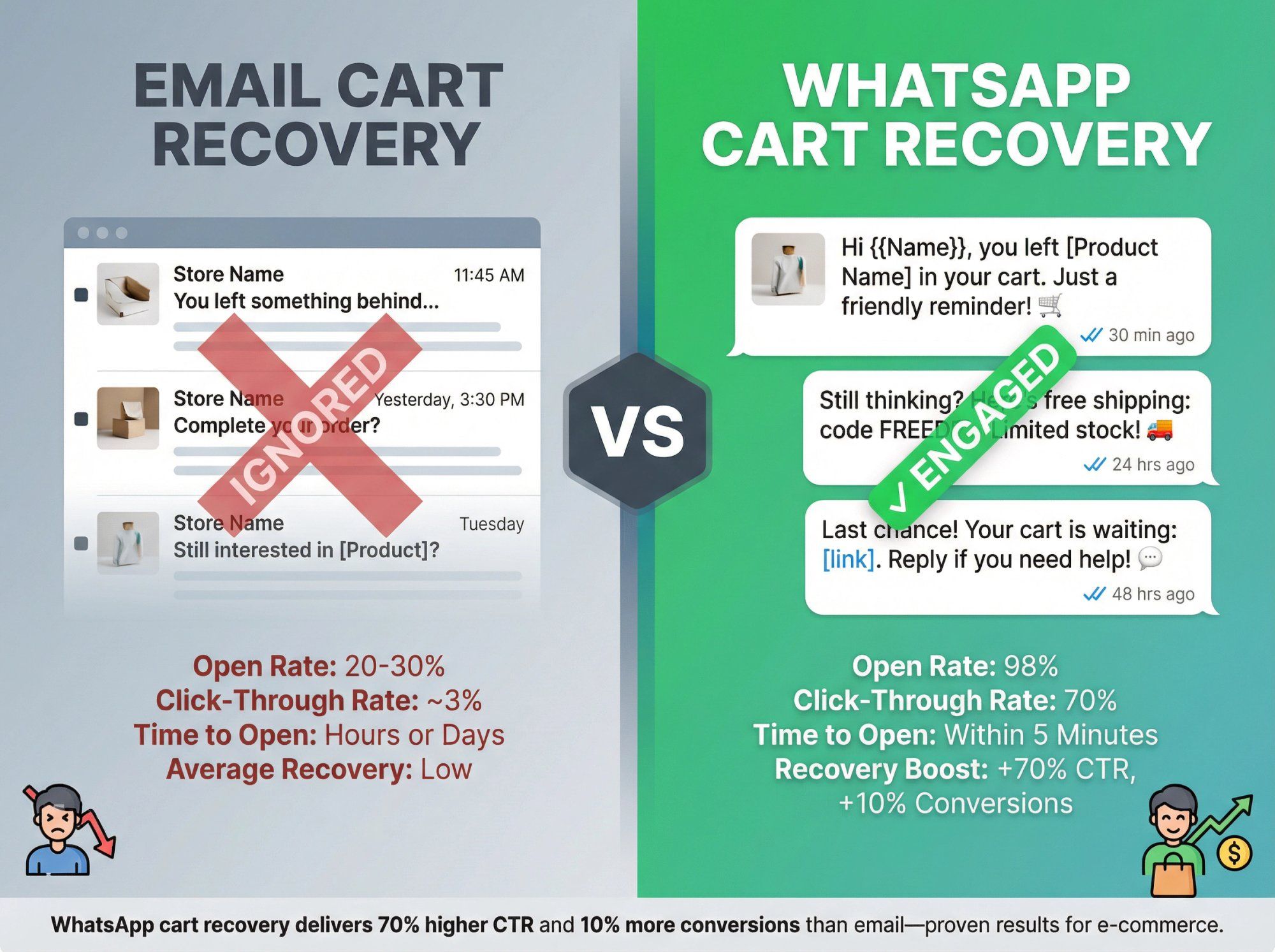
Cart abandonment WhatsApp messages have a sense of immediacy ("Hey, you left something behind!") and often get a response where emails do not. Because WhatsApp is real-time, you catch the customer while intent is still fresh.
You can include rich media (product images) as visual reminders. Companies using WhatsApp for abandoned carts have seen significant boosts. This channel often outperforms email for recovery rates.
Example Drip Flow (Abandoned Cart):
Message 1 – Cart Reminder (30-60 minutes after abandonment, Marketing/Utility)
"Hi {{Name}}, you left some items in your cart at [Store Name]. Just a friendly reminder in case you got busy.
Your item: [Product Name].
You can complete your order here: [Short Link].
Need help or have questions? I'm here to chat!"
Include the product name or image. Keep it helpful, not pushy.
Message 2 – Follow-Up & Incentive (24 hours later, Marketing)
"Still thinking about [Product]? It's popular and stock is limited. As a nudge, here's free shipping on your order. Use code FREEDEL at checkout. We'd hate for you to miss out!"
Add value (free shipping) and urgency (limited stock). Don't just repeat Message 1.
Message 3 – Last Chance (48-72 hours, Marketing)
"This is the last message, promise! Your cart is still waiting for you: [Link]. If you have any concerns, just reply and we'll help out. Otherwise, no worries. We're always here whenever you need us. Thank you!"
Polite final reminder. Signals this is the end of the sequence (reduces annoyance).
Stop Conditions:
- Purchase completed → stop drip, move to order confirmation/fulfillment sequence
- Cart cleared or expired → stop drip
- User taps "Stop" or replies STOP → unsubscribe
Success Metrics:
- Cart recovery rate (% of abandoned carts converted)
- Revenue recovered
- Click-through rate on cart link
Real Results:
An Indonesian e-commerce company replaced their email cart recovery drip with WhatsApp sequences and saw 70% higher click-through rates and 10% more conversions than email.
Pro Tip:
Use quick-reply buttons like "✅ Complete Purchase" or "🛒 View Cart" to make action effortless. The fewer taps required, the higher your conversion.
When to Use:
After a customer has made one purchase or been using your product for a while. Set up a drip to promote related products, upgrades, or premium features. Typically triggered post-purchase or after a usage milestone.
Why It's Effective:
WhatsApp's personal touch makes upsell offers feel like friendly recommendations rather than aggressive sales. Because you can target based on what the customer already bought or showed interest in, the suggestions are highly relevant.
Done right, this increases customer lifetime value and helps them discover more of your offerings.
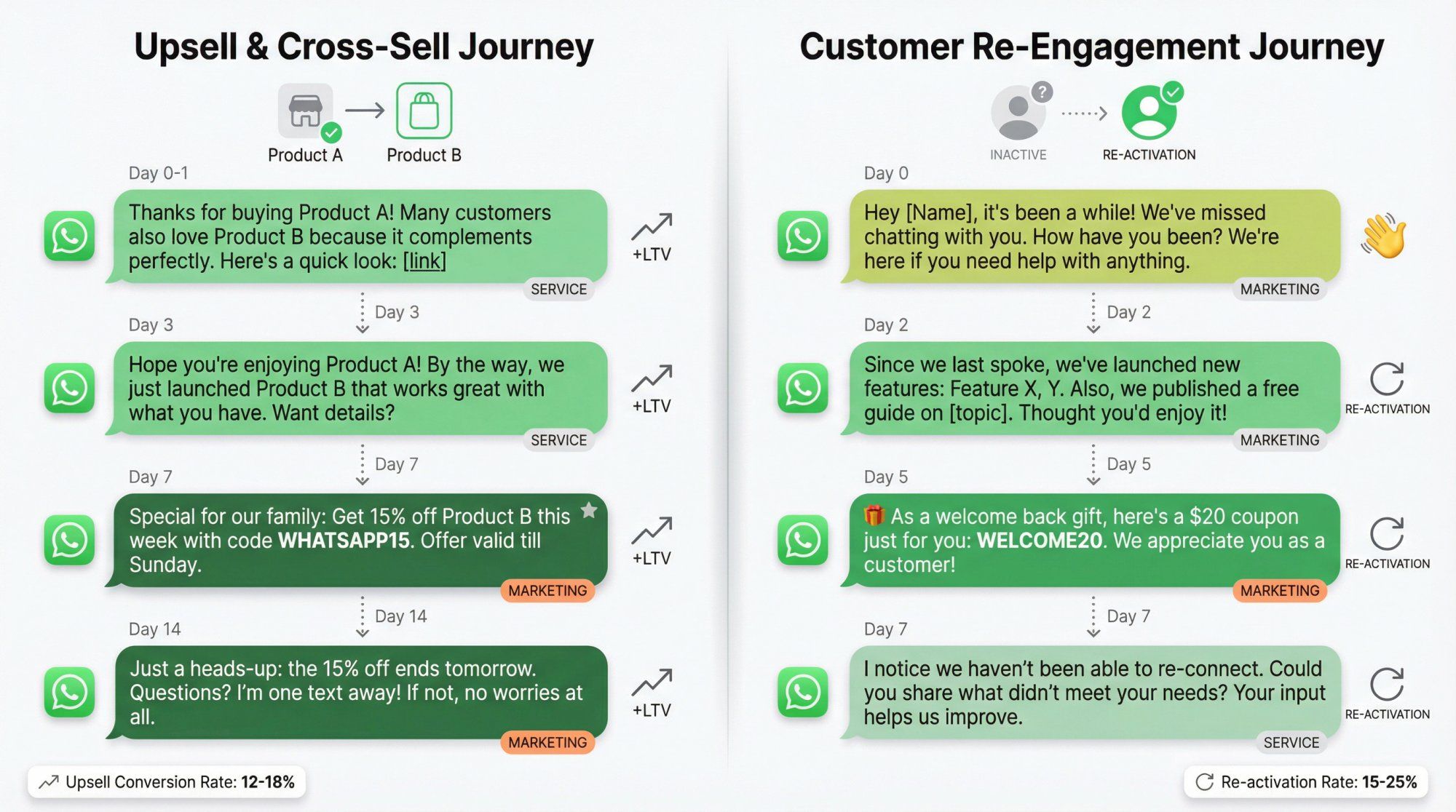
Example Drip Flow (Upsell/Cross-Sell):
Message 1 – Product Complement (Day 0-1 after purchase, Service)
"Hi {{Name}}, thanks again for buying [Product A]! One tip: many people who got [Product A] also love [Product B] because it [benefit]. Here's a quick look: [Image or Link]."
Low-pressure suggestion. Plant the seed for the next purchase.
Message 2 – Usage Follow-Up (Day 3, Service)
"Hope you're enjoying [Product A]! If you need extra [accessories/parts/service], we've got you covered. By the way, we just launched [Product B] that works great with what you have. Let me know if you'd like to see details."
Check on satisfaction, slip in an upsell mention naturally.
Message 3 – Special Offer (Day 7, Marketing)
"Special for our [Brand] family: Get 15% off [Product B] this week with code WHATSAPP15. It's the perfect add-on to [Product A] for even better results. Offer valid till Sunday."
Create urgency with a time-limited offer. Make it exclusive.
Message 4 – Social Proof (Day 10-14, Marketing)
"Many customers have upgraded to [Product B] to complement [Product A]. Jane from NY said, 'This combo has been a game-changer!' Just wanted to share in case you're curious. [Photo of combo in use]"
Use testimonials to reinforce the value. Visual proof helps.
Message 5 – Final Nudge (Day 14, Marketing)
"Just a heads-up, {{Name}}: the 15% off for [Product B] ends tomorrow. If you have any questions about it, I'm one text away! If not, no worries at all. Thanks for being a valued customer."
Polite last chance. Maintain goodwill even if they don't buy.
Stop Conditions:
- User purchases the upsell → stop drip, send confirmation
- User asks to pause upsells → honor request, stop drip
- User ignores all messages → stop after Message 5
Success Metrics:
- Upsell conversion rate
- Average order value (AOV) increase
- Customer lifetime value (LTV) growth
Why This Works:
A clothing retailer might suggest accessories after someone buys a dress. A tech store might promote an extended warranty after a gadget purchase. Cross-selling via WhatsApp feels like a personal shopping tip, not a corporate upsell email.
Key: Base recommendations on actual purchase history. Leverage CRM data to make suggestions truly relevant.
When to Use:
If a customer or lead has gone quiet. Hasn't made a purchase in a while, stopped responding, or became inactive in your app/service. This drip rekindles the relationship.
Why It's Effective:
A gentle nudge via WhatsApp can revive dormant relationships more effectively than a generic email blast. WhatsApp's immediacy means you might catch their attention where an email would sit unopened. The conversational tone lets you learn why they disengaged and possibly win them back.
Example Drip Flow (Re-Engagement):
Message 1 – "We Miss You" (Day 0, Marketing)
"Hey {{Name}}, it's been a while! We've missed chatting with you. How have you been? We hope you're doing well. We just wanted to reach out in case you had any questions or needed help with [Product]. We're here for you."
Warm, personal. Don't sell anything yet. Just reconnect.
Message 2 – New Updates/Value (Day 2, Marketing)
"Since we last spoke, we've launched some new features you might find useful: [Feature X, Y]. Also, we published a free guide on [relevant topic]. Thought you'd enjoy it! [Link]"
Share new value to re-spark interest. Show you've been improving.
Message 3 – Personalized Offer (Day 5, Marketing)
"As a little 'welcome back' gift, here's a $20 coupon just for you: WELCOME20. Use it for any item you love. We really appreciate you as a customer and would love to see you back!"
Exclusive incentive. Makes them feel valued.
Message 4 – Feedback Ask (Day 7, Service)
"I notice we haven't been able to re-connect. If you have a moment, could you share what didn't meet your needs or if there's anything we could do better? Your input helps us improve. And of course, you can reply STOP anytime to opt out."
Respectful, invites feedback. Easy opt-out shows you value their choice.
Stop Conditions:
- User re-engages (purchase, visit, reply) → move to appropriate active drip
- User replies STOP → unsubscribe immediately
- No response after Message 4 → archive, try again in 3-6 months or via different channel
Success Metrics:
- Re-activation rate (% who purchase or engage again)
- Feedback collected (qualitative insights)
- Opt-out rate (keep low by being respectful)
Why This Works:
Some businesses send a fun message like "It's been a while, just wanted to say hi!" or share content that addresses common reasons customers disengage. A SaaS app might send troubleshooting tips if usage dropped. A fashion brand might highlight new arrivals.
Incentives (special discounts or perks) work well here. People love feeling like they're getting a VIP offer to return.
When to Use:
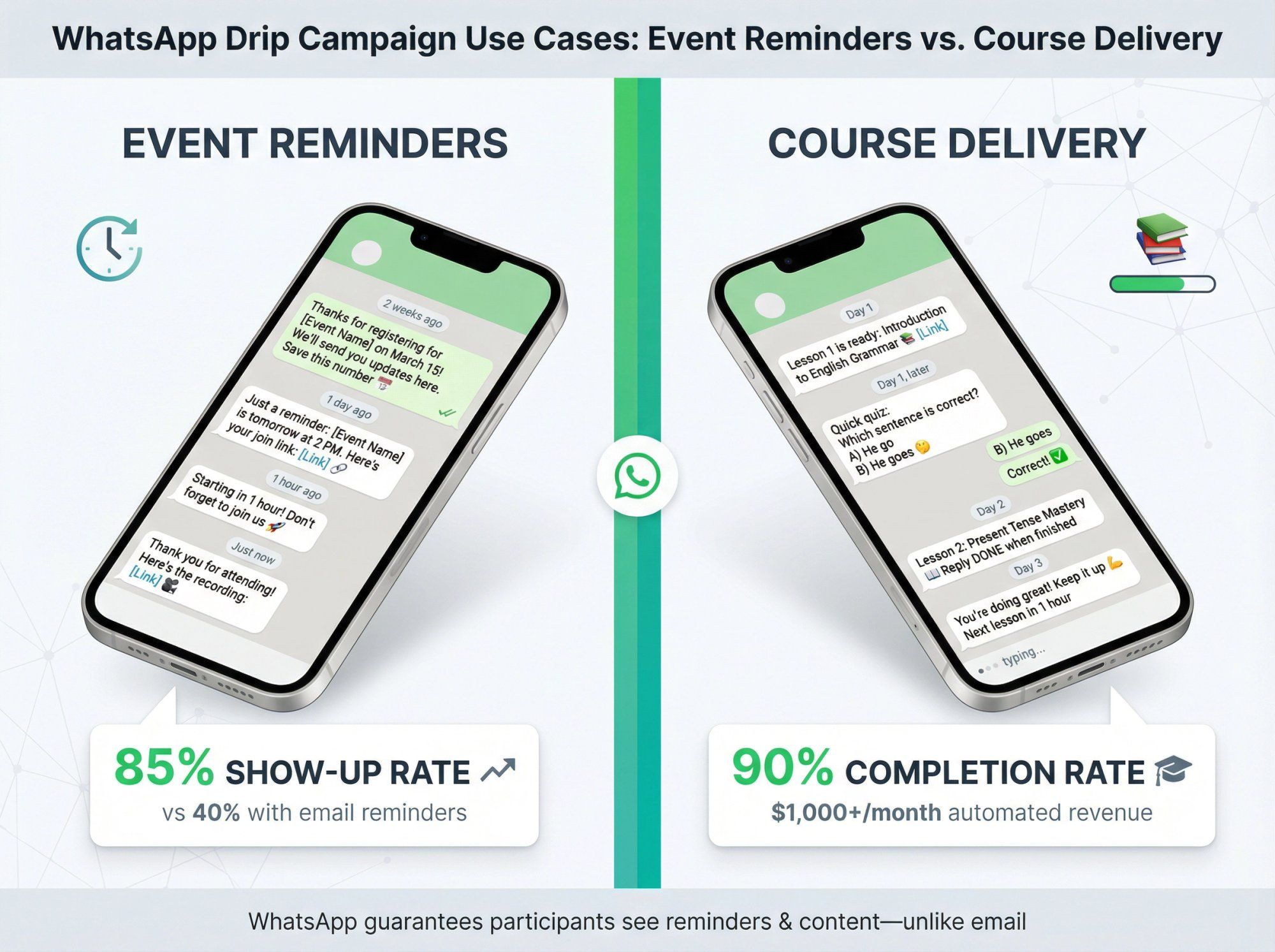
If you host events (webinars, workshops, conferences) or run courses/challenges, WhatsApp drips handle reminders and content delivery. For events: reminder sequence to boost attendance. For courses: lesson delivery over time.
Why It's Effective:
WhatsApp guarantees your participants see the reminders, so they actually attend the event or engage with content. For courses, delivering lessons via WhatsApp can increase completion rates since content comes to them in a channel they check frequently.
Example Drip Flow (Webinar/Event):
Message 1 – Registration Confirmation (Instant, Utility)
"Thanks for registering for [Event Name] on [Date]! We'll send you updates here. Save this number so you don't miss anything. Talk soon!"
Confirm registration, set expectations for future messages.
Message 2 – 1 Day Before Reminder (1 day before event, Utility)
"Just a reminder: [Event Name] is tomorrow at [Time]. We're excited to have you! Here's your join link: [Link]. See you there!"
Include event details. Could attach an image with agenda.
Message 3 – 1 Hour Before (1 hour before event, Utility)
"Starting in 1 hour! Don't forget to join us for [Event]. If you have any questions you'd like answered during the session, you can reply here now."
Last-minute reminder. Invite questions to boost engagement.
Message 4 – Follow-Up After Event (Post-event, Marketing)
"Thank you for attending [Event]! In case you missed anything, here's the recording: [Link]. We also have a special offer for attendees: [Offer Details]. Let us know what you thought of the event!"
Share recording, make an offer, gather feedback.
Stop Conditions:
- User attends → send post-event follow-up, then stop
- User doesn't attend but clicks recording link → re-engage differently
- User opts out → unsubscribe
Example Drip Flow (Educational Course):
Suppose you run a 30-day fitness challenge via WhatsApp. You could schedule daily drip messages with the workout of the day, diet tips, and motivational quotes.
Real Example:
A retired professor used WhatsApp to deliver a 30-day English learning course via 90 automated messages (3 per day). Result: 200+ new students educated each month, earning $1000+ monthly. All through automated lesson delivery on WhatsApp.
Success Metrics:
- Show-up rate (events)
- Completion rate (courses)
- Engagement with content (clicks, replies)
WhatsApp drip campaigns aren't just marketing. They're also a content delivery mechanism. Flexible, scalable, and incredibly effective.
These six use cases cover the majority of scenarios where WhatsApp drips excel. But we're just getting started. Next, we'll give you 22 copy-paste examples with exact message sequences, timing, and stop conditions. Ready to implement today.
Now for the good stuff. These are copy-paste ready message sequences organized by business type. Each example includes the trigger, complete message flow with timing, actual copy (replace the [placeholders]), stop conditions, and success metrics.
Think of this as your swipe file. Adapt these to your business and deploy.
Best For: Real estate, education, high-ticket services
Trigger: User messages you from a Click-to-WhatsApp ad
Why It Works: You have a 72-hour free entry window for charges, so you can do more early follow-up without paying per message.
Sequence:
- 0 min (Service)
"Hey [FirstName], thanks for reaching out. Quick one so I can help: what are you looking for?"
Buttons: "Price", "Availability", "Details", "Talk to a person" - If "Price" (Service)
"Got it. What's your budget range?"
Buttons: "Under $X", "$X–$Y", "$Y+" - +15 min if no reply (Service)
"Want me to recommend the best options in [City]? Just reply with your budget range." - +24 hours if still no reply (Template: Utility or Marketing)
"Still interested in [Product/Service]? Reply YES and I'll send options for your budget."
Stop Conditions:
- If user replies → route to the right flow and stop generic follow-up
- If user requests a human → handoff to inbox
- After 3 messages with no reply → pause
KPIs: Reply rate, qualified lead rate (budget captured), booked call rate
Best For: Agencies, clinics, coaching
Trigger: User asks for pricing/quote
Sequence:
- 0 min (Service)
"Happy to help. To share an accurate quote, what best describes you?"
Buttons: "Individual", "Business", "Not sure" - Then (Service)
"What's your main goal?"
Buttons: "Get more leads", "Improve support", "Reduce costs", "Other" - Then (Service)
"Last question: when do you want to start?"
Buttons: "This week", "This month", "Just exploring" - After answers (Service)
"Perfect. Based on that, I'd recommend [Option]. Want me to share pricing here or book a 10-min call?"
Buttons: "Pricing here", "Book call"
Stop Conditions:
- If "Pricing here" → send concise pricing summary and 1 CTA, then stop
- If "Book call" → share booking link and stop
- If they book → move to appointment drip
KPIs: Qualification completion rate, booking rate
Best For: Educational brands, D2C with content, SaaS
Trigger: User opts in for a guide
Sequence:
- 0 min (Template: Utility)
"Here's your guide: [Link]. Want a 2-min summary too?"
Buttons: "Yes", "No thanks" - If "Yes" (Service)
"Summary: [3 bullet points]. Which part do you want help with?"
Buttons: "Step 1", "Step 2", "Step 3" - +1 day (Template: Marketing or Utility)
"Quick check: did you try [Step 1]? Reply 1 if yes, 2 if not." - +3 days (Template: Marketing)
"If you want, I can suggest the fastest plan for your situation. Reply 'PLAN'."
Stop Conditions:
- If they reply "PLAN" → route to qualification flow
- If they buy → stop and move to onboarding
- After Message 4 with no engagement → stop
KPIs: Guide download completion, reply rate, conversion to sales call
Best For: Events, creators, B2B
Trigger: Registered for webinar
Sequence:
- Instant (Template: Utility)
"You're in, [FirstName]. Webinar starts [DateTime]. Want a reminder 30 min before?"
Buttons: "Yes", "No" - 1 day before (Template: Utility)
"Reminder: tomorrow at [Time]. Want the joining link now?"
Buttons: "Send link" - 30 min before (Template: Utility)
"Starting soon. Join here: [Link]." - Post-event (Template: Marketing)
"Want the recording + notes? Reply 'REPLAY'."
Stop Conditions:
- If they attend and ask questions → route to sales or support
- If they don't attend but request replay → send and nurture separately
KPIs: Show-up rate, replay request rate, post-event conversion
Best For: Home services, B2B, custom products
Trigger: Quote delivered
Sequence:
- Instant (Service)
"Just sent your quote. Want me to explain the options in 2 lines here?" - +6 hours (Template: Utility)
"Any questions on the quote? Reply with 1: price, 2: timeline, 3: what's included." - +2 days (Template: Marketing)
"If you want, I can hold a slot for [Date] and lock pricing. Reply 'HOLD'."
Stop Conditions:
- If they reply "HOLD" → route to booking and payment
- If they ghost after 3 messages → pause, try email or call
KPIs: Quote response rate, booking conversion rate
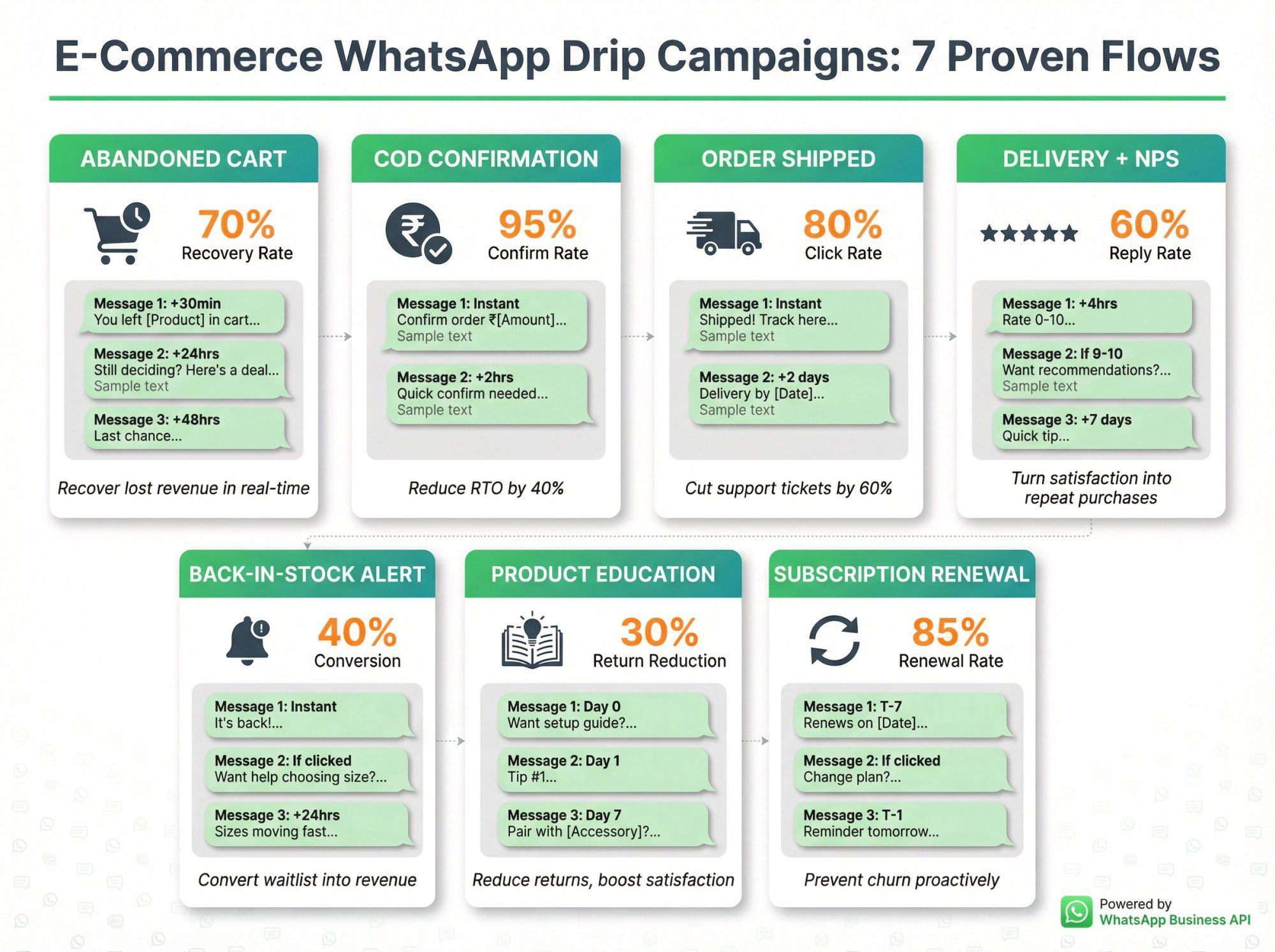
Best For: Shopify/WooCommerce stores
Trigger: Cart abandoned or checkout started
Why Most Fail: Brands send 4 promo nudges. Deliverability drops, costs rise, users get annoyed.
Better Approach: 1 helpful message + 1 choice + 1 optional incentive.
Sequence:
- +30–60 min (Template: Marketing or Utility)
"Hey [FirstName], you left [ProductName] in your cart. Want me to save it for you?"
Buttons: "Yes, save", "Not now" - If "Yes" (Service)
"Saved. Want help picking the right [size/color]?"
Buttons: "Yes", "No" - +24 hours if no purchase (Template: Marketing)
"Still deciding? Here are 2 customer favorites similar to [ProductName]. Want links?"
Buttons: "Show me", "Stop" - Optional: +48 hours (Template: Marketing, only for engaged users)
"Last thing: want a [small incentive] today? Reply 'DEAL'."
Stop Conditions:
- Purchase detected → stop the flow immediately
- User taps "Stop" or replies STOP → unsubscribe
- After Message 3 with no engagement → stop
KPIs: Cart recovery rate, revenue recovered, CTR
Best For: Indian D2C, COD-heavy markets
Trigger: COD order placed
Sequence:
- Instant (Template: Utility)
"Confirming your COD order [OrderID] for ₹[Amount]. Please confirm to ship."
Buttons: "Confirm", "Cancel" - If "Confirm" (Service)
"Done. Want delivery updates here on WhatsApp?"
Buttons: "Yes", "No" - If no response in 2 hours (Template: Utility)
"Quick confirm needed to ship [OrderID]. Tap Confirm or we'll hold it."
Stop Conditions:
- Confirm → proceed to fulfillment flows
- Cancel → cancel order and stop
- No response after 3 hours → mark order for manual review
KPIs: Confirmation rate, RTO reduction, delivery opt-in rate
Best For: Any e-commerce
Trigger: Shipment created
Sequence:
- Instant (Template: Utility)
"Good news: [OrderID] shipped. Track here: [TrackingLink]." - +2 days (Template: Utility)
"Delivery expected by [Date]. Need to change address or timing?"
Buttons: "Change address", "All good" - If "Change address" (Service)
"Tell me the new address here or tap: [FormLink]."
Stop Conditions:
- Delivered → move to delivery + feedback flow
- Address change requested → handle and update tracking
KPIs: Tracking link click rate, support ticket reduction, delivery success rate
Best For: E-commerce, subscription boxes
Trigger: Marked delivered
Sequence:
- +4 hours (Service)
"Did everything arrive OK? Reply with a number 0–10." - If 9–10 (Service)
"Love it. Want 1 recommendation that matches what you bought?"
Buttons: "Yes", "No" - If 0–8 (Service)
"Sorry about that. Tell me what went wrong and I'll fix it." - +7 days (Template: Marketing)
"Quick tip to get the best results from [Product]. Want it?"
Buttons: "Send tip"
Stop Conditions:
- If support issue → open ticket and stop marketing
- If high satisfaction and upsell accepted → send recommendation
KPIs: NPS score, upsell conversion rate from promoters, issue resolution rate
Best For: Fashion, limited-edition products
Trigger: Product restocked + user opted into waitlist
Sequence:
- Instant (Template: Marketing)
"It's back: [ProductName] is in stock again. Want the link?"
Buttons: "Send link", "Not now" - If "Send link" (Service)
"Here you go: [Link]. Want help choosing size?"
Buttons: "Yes", "No" - +24 hours if clicked but no buy (Template: Marketing)
"Sizes are moving. Want me to reserve [Size] for 1 hour?"
Buttons: "Reserve", "Stop"
Stop Conditions:
- Purchase → stop and celebrate
- User taps "Stop" → unsubscribe from waitlist notifications
KPIs: Conversion rate from waitlist, urgency effectiveness
Best For: Complex products (skincare, supplements, electronics)
Trigger: Purchase of a product with a learning curve
Sequence:
- Day 0 (Service)
"Want the 30-second setup/usage guide for [ProductName]?"
Buttons: "Yes", "No" - Day 1 (Service)
"Tip #1: [Practical tip]. Want Tip #2 tomorrow?"
Buttons: "Yes", "No" - Day 2 (Service)
"Tip #2: [Tip]. Reply with any questions." - Day 7 (Template: Marketing)
"Many people pair [ProductName] with [Accessory]. Want to see options?"
Buttons: "Show me", "Stop"
Stop Conditions:
- User becomes self-sufficient (no questions) → reduce frequency
- User opts out → stop education sequence
KPIs: Product satisfaction score, return rate, cross-sell conversion
Best For: SaaS, subscription boxes, memberships
Trigger: Renewal in 7 days
Sequence:
- T-7 (Template: Utility)
"Your [Plan] renews on [Date]. Want to keep it active?"
Buttons: "Yes", "Change plan", "Cancel" - If "Change plan" (Service)
"What do you want instead?"
Buttons: "Cheaper", "Bigger", "Pause" - T-1 (Template: Utility)
"Reminder: renewal tomorrow. Reply 'HELP' if you want options."
Stop Conditions:
- Confirm renewal → let it process
- Cancel → process cancellation
- Change plan → route to plan selection
KPIs: Renewal rate, plan change rate, cancellation rate
Best For: Salons, clinics, consultants
Trigger: User asks for availability
Sequence:
- Instant (Service)
"What day works best?"
Buttons: "Today", "Tomorrow", "This week" - Then (Service)
"Morning or evening?"
Buttons: "Morning", "Evening" - Then (Service)
"Cool. Pick a slot: [BookingLink]." - If no booking in 3 hours (Service)
"Want me to book it for you? Reply with the slot time."
Stop Conditions:
- Appointment booked → move to no-show prevention drip
- User ghosts → follow up once, then stop
KPIs: Booking completion rate, time to book
Best For: Any appointment-based business
Trigger: Appointment created
Sequence:
- Instant (Template: Utility)
"Booked: [DateTime]. Reply CONFIRM to lock it." - 24 hours before (Template: Utility)
"Reminder for tomorrow at [Time]. Need to reschedule?"
Buttons: "Reschedule", "All good" - 2 hours before (Template: Utility)
"See you soon. Address: [LocationLink]."
Stop Conditions:
- Appointment completed → send feedback request
- Rescheduled → update and restart reminder sequence
- No-show → follow up to reschedule or understand why
KPIs: Confirmation rate, no-show rate reduction, reschedule rate
Best For: Local services with quotes
Trigger: Quote given
Sequence:
- Same day (Service)
"Want me to break down the quote so it's easy to compare?" - Next day (Template: Utility)
"Still want to go ahead this week? Reply YES and I'll share slots." - +3 days (Template: Marketing)
"If you'd like, we can do [small bonus] if booked by [Date]. Reply BOOK."
Stop Conditions:
- Booking accepted → schedule and stop
- Declined → stop and mark lead as lost
- No response after 3 messages → archive
KPIs: Quote-to-booking rate, speed to decision
Best For: Loans, insurance, admissions
Trigger: User started application
Sequence:
- Instant (Service)
"To finish your application, I need 2 docs: [Doc1], [Doc2]. Want the upload link?"
Buttons: "Send link" - +6 hours (Service)
"Stuck? Reply with '1' for Doc1 help, '2' for Doc2 help." - +24 hours (Template: Utility)
"Reminder: submit docs to keep your application active."
Stop Conditions:
- Docs submitted → move to processing/approval sequence
- User abandons → pause application, send re-engagement later
KPIs: Document submission rate, completion time
Best For: SaaS, online courses, complex products
Trigger: First purchase or signup
Sequence:
- Instant (Service)
"Welcome, [FirstName]. What are you trying to achieve?"
Buttons: "Goal A", "Goal B", "Not sure" - Day 1 (Service)
"Based on that, do this first: [Step]. Want a 1-min walkthrough?"
Buttons: "Yes", "No" - Day 3 (Template: Marketing)
"Want to see how others got results with [Product]?"
Buttons: "Show me", "Stop"
Stop Conditions:
- User achieves first success milestone → celebrate and reduce frequency
- User opens support ticket → pause drip
- User churns → move to win-back campaign
KPIs: Activation rate, time to first value, feature adoption
Best For: Online courses, challenges
Trigger: User enrolls
Sequence:
- Day 0 (Template: Utility)
"Lesson 1 is ready: [Link]. Reply DONE when finished." - When DONE (Service)
"Nice. Want Lesson 2 tomorrow or today?"
Buttons: "Tomorrow", "Today" - Day 2 (Service)
"Quick question: where are you stuck?"
Buttons: "Topic A", "Topic B", "Topic C"
Why It Works: You use replies to control pacing and keep engagement high.
Stop Conditions:
- Course completed → send completion certificate
- User stops responding → send encouragement, then pause
KPIs: Lesson completion rate, course completion rate, engagement per lesson
Best For: SaaS free trials
Trigger: User starts trial
Sequence:
- Instant (Service)
"Want me to set this up with you in 3 minutes?"
Buttons: "Yes", "Later" - Day 1 (Service)
"Most people get value by doing [One action]. Want the steps?"
Buttons: "Send steps" - Day 3 (Template: Marketing)
"If you tell me your use case, I'll suggest the best automation template. Reply: SALES, SUPPORT, or MARKETING."
Stop Conditions:
- User converts to paid → celebrate and onboard
- Trial expires without conversion → send special offer
KPIs: Trial-to-paid conversion rate, activation rate, time to first success
Best For: E-commerce, subscriptions
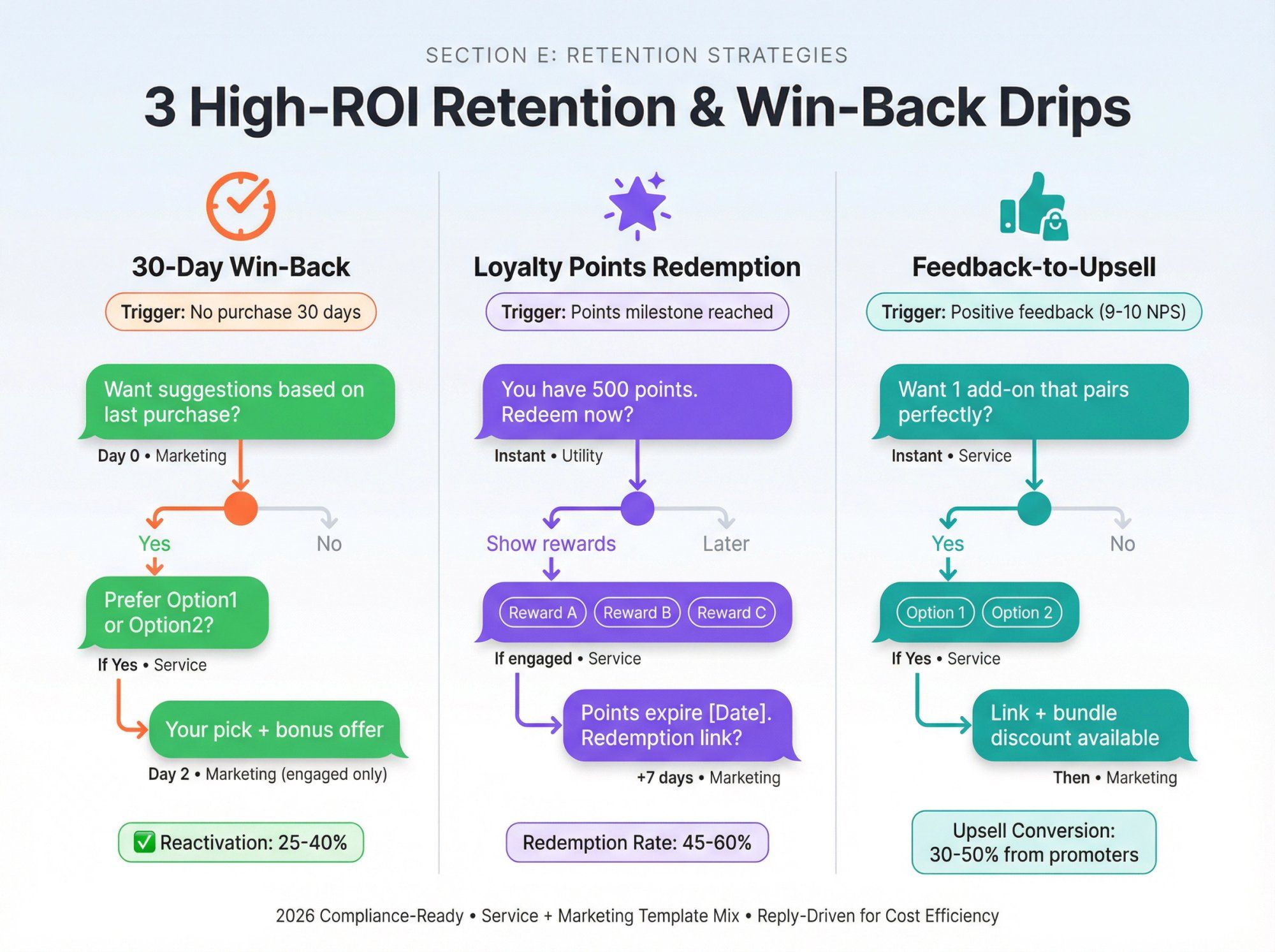
Trigger: No purchase for 30 days (or 60/90)
Sequence:
- Day 0 (Template: Marketing)
"Hey [FirstName], want me to suggest something based on what you last bought?"
Buttons: "Yes", "No" - If "Yes" (Service)
"Do you prefer [Option1] or [Option2]?"
Buttons: "Option1", "Option2" - Day 2 (Template: Marketing, engaged only)
"Here's your pick: [Link]. Want a small bonus if you order today?"
Buttons: "Send bonus", "Stop"
Stop Conditions:
- Purchase → move back to active customer drips
- Opt out → respect and stop
- No engagement → pause for 90 days
KPIs: Reactivation rate, revenue from win-back
Best For: Brands with loyalty programs
Trigger: Points updated or milestone reached
Sequence:
- Template: Utility
"You have [Points] points. Want to redeem now?"
Buttons: "Show rewards", "Later" - If "Show rewards" (Service)
"Pick a reward:"
Buttons: "Reward A", "Reward B", "Reward C" - +7 days (Template: Marketing)
"Reminder: your points expire on [Date]. Want a redemption link?"
Buttons: "Send link", "Stop"
Stop Conditions:
- Points redeemed → celebrate
- Points expired → send notification
KPIs: Redemption rate, points utilization
Best For: Post-purchase upsells
Trigger: Positive feedback captured
Sequence:
- Service
"Thanks for the feedback. Want 1 add-on that pairs perfectly with what you bought?"
Buttons: "Yes", "No" - If "Yes" (Service)
"Option 1: [Product], Option 2: [Product]. Which do you want?"
Buttons: "Option 1", "Option 2" - Then (Template: Marketing)
"Here's the link: [Link]. I can also apply a bundle discount if you reply 'BUNDLE'."
Stop Conditions:
- Purchase upsell → confirm and ship
- Declines → thank them and stop
KPIs: Upsell conversion rate from promoters
There you have it: 22 tactical WhatsApp drip campaigns ready to deploy. Each one is designed for 2026 compliance, cost efficiency, and maximum deliverability.
Pick one that matches your business, replace the placeholders, set up the sequence in your platform, and watch the automated conversions roll in.
You've seen what's possible. You have 22 tactical examples. Now the actual implementation. How to go from concept to live, converting drip campaigns.
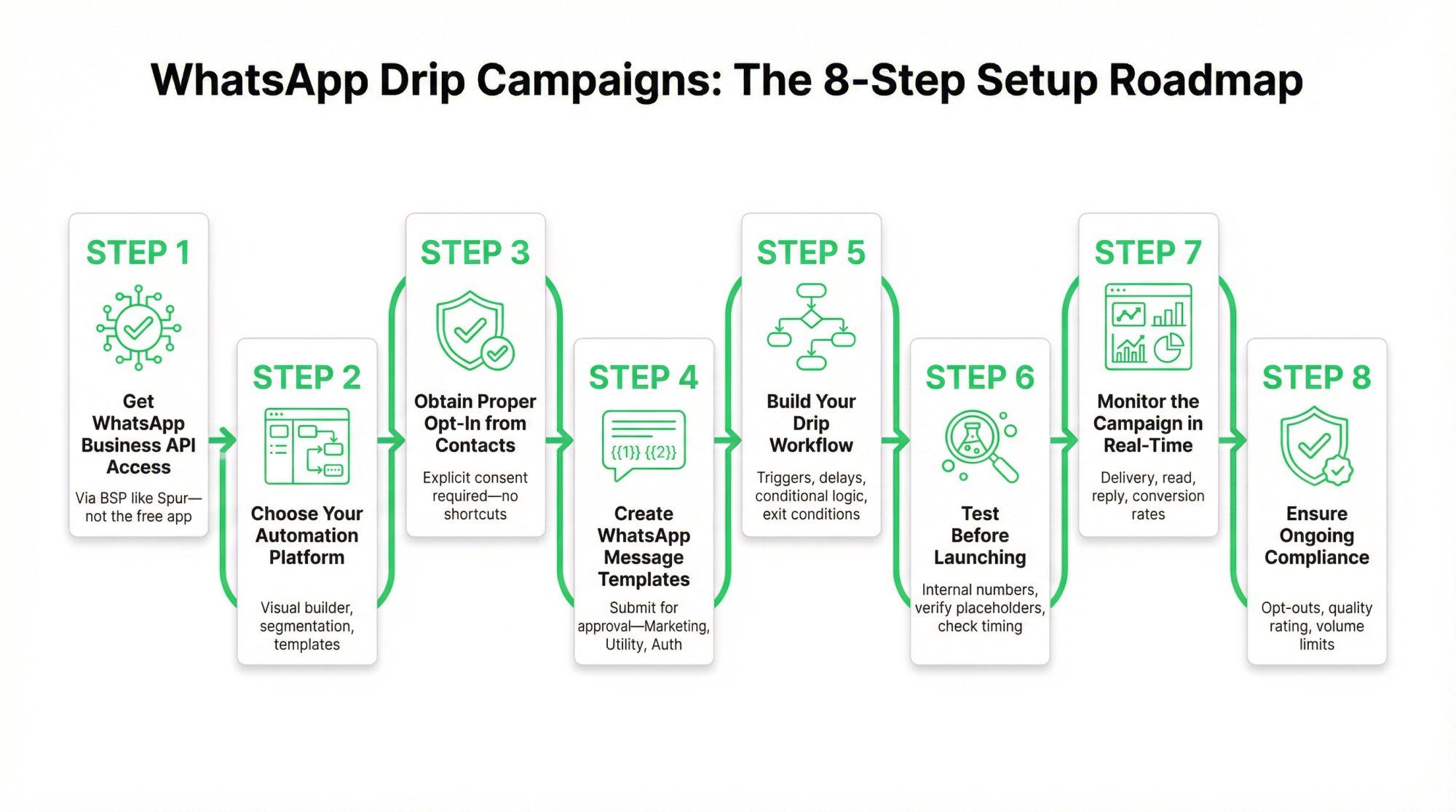
First, understand this: The standard WhatsApp consumer app or even the WhatsApp Business app (for small businesses) won't suffice for true drip automation.
Those apps don't allow scheduling, mass automation, or template messaging outside 24-hour windows. They're great for manual, one-on-one customer service. But not for drip campaigns at scale.
What you need:
The WhatsApp Business API (also called WhatsApp Business Platform). This is what enables:
- Sending templated messages to users who've opted in (outside 24-hour windows)
- Automation and scheduling at scale
- Integration with CRM, e-commerce platforms, and automation tools
- Multi-agent shared inbox capabilities
How to get it:
The API is provided through official Business Solution Providers (BSPs) like Spur, respond.io, Interakt, Zoko, and others. You sign up with a BSP, and they handle the API connection, give you a dashboard to manage campaigns, and provide the automation tools you need.
Note for small operations:
If you're under 256 contacts and mostly doing manual messaging, you might experiment with the free WhatsApp Business app's broadcast lists. But this isn't a true drip campaign setup. It's manual scheduling at best. For any serious marketing, go the API route.
Once you have API access (usually bundled with your BSP), you need a platform that supports drip campaign building. This is often the same tool that provides your API access.
Look for platforms that offer:
- Contact list management and segmentation (import CSVs, sync with CRM, tag users)
- Message scheduling and delays (send Message 2 three days after Message 1)
- Conditional logic and branching (if user clicks button A, send Flow X; if button B, send Flow Y)
- Template creation and approval interface (submit templates to WhatsApp, track approval status)
- Opt-out handling (automatically unsubscribe users who reply STOP)
- Integration capabilities (connect with Shopify, WooCommerce, Zapier, CRMs, etc.)
Example: Spur's Approach:
Spur provides a visual flow builder for WhatsApp automation, letting you drag-and-drop sequences, set time delays, add conditional branches, and see the entire drip journey visually. It also includes:
- Multi-channel support (WhatsApp, Instagram, Facebook, Live Chat)
- AI agent for handling common queries
- Shared inbox for team collaboration
- Pre-built templates for common drips (cart recovery, onboarding, etc.)
The visual builder makes it easy to construct complex drips without writing code.
This is non-negotiable: Before you add anyone to a WhatsApp drip, ensure you have their explicit consent to message them on WhatsApp.
WhatsApp policy and privacy laws require:
- The user's phone number
- Clear opt-in permission (they agreed to receive WhatsApp messages from you)
How to get opt-in:
- Website forms: Checkbox that says "Send me tips and offers via WhatsApp"
- Click-to-WhatsApp ads: When they message you from the ad, that's implicit opt-in (they reached out)
- QR codes or "text us" campaigns: User scans QR or messages a keyword; that's opt-in
- Website chat widgets: "Chat with us on WhatsApp" – when they initiate, it's opt-in
- Inbound conversations: If someone messages you first, you have consent to reply
What doesn't count:
- Buying a contact list
- Scraping numbers from the internet
- Adding someone you met once at a conference (without their explicit permission)
Best practice:
Log the opt-in method and timestamp. If anyone reports you, proof of consent protects your account. Also, clearly state what they're opting into: "Get product updates and special offers via WhatsApp."
For any message sent outside the 24-hour customer service window, you must use pre-approved message templates. This applies to almost all drip campaign messages (since drips are typically proactive outreach).
What are templates?
Templates are message formats you submit to WhatsApp for approval. They include:
- Fixed text with placeholders for personalization (e.g.,
Hello {{1}}, your order {{2}} has shipped.) - Optional buttons (call-to-action or quick reply buttons)
- Media (header image/video, if desired)
How to create templates:
Your automation platform (like Spur) will have a template creation interface. You:
- Write your message with placeholders:
{{1}}for name,{{2}}for product, etc. - Select the category: Marketing, Utility, or Authentication
- Add buttons if desired (up to 3)
- Submit for approval
Approval process:
WhatsApp reviews your template (usually within minutes to 24 hours). They check that it's not spammy, follows policy, and is categorized correctly. Once approved, you can use it in your drips.
Pro tips:
- Keep templates somewhat generic so they can be reused (e.g., a "welcome after purchase" template can work for any product)
- Plan for localization if you have multilingual audiences (templates are language-specific)
- Test your placeholders – make sure they populate correctly (nothing worse than "Hello , thanks for buying !")
For help with template issues, check out why your WhatsApp templates might be getting rejected.
This is where the magic happens. Designing the sequence itself.
Core configuration elements:
1) Audience/Trigger Selection
Who enters this drip? Options:
- Static list: Upload a CSV of contacts who opted in at a trade show
- Dynamic trigger: When a contact's status in CRM becomes "Lead," start the drip
- Event-based: When cart is abandoned, trigger drip; when order ships, trigger drip
- Integration-triggered: Shopify, WooCommerce, or Zapier can trigger drips based on user actions
2) Timing Delays
How long between each message? Common patterns:
- Cart recovery: 30 min → 24 hours → 48 hours
- Lead nurture: Day 0 → Day 2 → Day 5 → Day 7
- Onboarding: Instant → Day 1 → Day 3 → Day 7
Consider time of day and user's timezone. Sending at 3 AM is a bad idea. Many platforms let you specify "send only between 9 AM-8 PM local time" to be safe.
3) Personalization
Use merge tags to fill in user data:
{{FirstName}}{{ProductName}}{{OrderID}}{{City}}
The more relevant each message, the better the engagement.
4) Conditional Branches (If-Then Logic)
Advanced drip campaigns use branching:
- "If user clicks the link in Message 2, then stop the drip or send a different follow-up"
- "If user replies with keyword 'PRICE,' route to pricing flow"
- "If user purchases, unenroll from this drip and enroll in onboarding drip"
These make your drips smarter and prevent irrelevant messages.
5) Exit Conditions
Define what stops someone's drip:
- Purchase completed
- Booking made
- User replies "STOP"
- User requests human agent
- Delivery failed repeatedly
Exit conditions prevent annoying users with irrelevant follow-ups.
Example: Spur's Visual Workflow Builder
In Spur, you'd:
- Drag a "Trigger" block (e.g., "Cart Abandoned")
- Add a "Wait" block (30 minutes)
- Add a "Send Message" block (Template: Cart Reminder)
- Add a "Condition" block (If Purchased? Yes → Stop; No → Continue)
- Add another "Wait" block (24 hours)
- Add another "Send Message" block (Template: Cart Incentive)
- Add final "Stop" block
You can see the entire journey visually, making it easy to tweak timing or content.
Never launch a drip to your full list without testing.
Run a pilot:
- Test on internal numbers (your team) or a small group of 10-20 users
- Verify:
- Templates send correctly and placeholders populate with actual data
- Messages appear in the correct order with intended delays
- Opt-out works (send "STOP" from a test number and ensure it unsubscribes)
- Links and media load properly on different phone types
- Buttons trigger the right actions
Common issues to catch:
- Placeholder typos:
Hello {{FrstName}}→ no data fills in - Wrong template selected
- Timing bugs (messages send too fast or not at all)
- Broken links
Fix these before going live.
Once launched, keep an eye on it. Especially in the first few days.
Key metrics dashboard:
- Delivery rate: Are messages actually reaching users? (Watch for template rejections or rate limit hits)
- Read rate: What % of delivered messages are being read?
- Response rate: Are users replying or clicking buttons?
- Click rate: For links/buttons, track engagement
- Conversion rate: Ultimate goal—purchases, bookings, signups
Watch for red flags:
- High undelivered rate: Check if templates got flagged, or if you hit WhatsApp's rate limits
- Low read rate: Messages might be getting marked as spam; review content
- High opt-out rate: Content isn't valuable or frequency is too high
Respond to replies:
Remember, a drip can initiate conversation, but human touch may still be needed to close the deal. If someone replies with a question, have your team (or an AI agent like Spur's) ready to jump in.
Spur handles this with a shared inbox where team members can see all WhatsApp conversations, assign them, and respond. Ensuring no reply gets missed.
Compliance isn't a one-time checkbox. It's continuous.
Throughout your drip campaign:
- Only message opted-in numbers (we've said it before, but it bears repeating)
- Don't send prohibited content (spam, misinformation, adult content). Your templates pass initial review, but still be mindful.
- Include an opt-out method: While WhatsApp doesn't force an "unsubscribe link" like email, it's highly recommended to let users text "STOP" to unsubscribe and honor it instantly. Many businesses add a line: "Reply STOP to opt out."
- Stay within messaging volume tiers: WhatsApp API has tiered limits (when you start, you can message X new contacts per day; it increases over time based on quality). Your platform handles this automatically, but be aware.
- Monitor quality rating: WhatsApp tracks user engagement and reports/blocks. If your quality rating drops (yellow or red), adjust your approach. Slow down, improve content, or re-confirm opt-ins.
2026 Update:
WhatsApp now limits messages to unresponsive users. If someone consistently ignores you, WhatsApp may deliver fewer messages to them. This means quality matters more than quantity. Send relevant content to engaged users.
For more on compliance, check out whether WhatsApp API is GDPR compliant.
By following these 8 steps, you'll have a fully functional WhatsApp drip campaign. Technically sound, compliant, and optimized for results.
Next, the best practices that separate good drips from great ones.
Creating effective WhatsApp drip campaigns requires more than just scheduling messages. You need to earn engagement, stay compliant, and deliver genuine value. The proven strategies that separate high-performing campaigns from generic spam.
This isn't optional. It's the law. Every contact must actively consent to receive marketing messages from you on WhatsApp. A checkbox on your website, a form submission, or an opt-in via Click-to-WhatsApp ads all work.
What explicit opt-in looks like:
- Clear language: "I agree to receive promotional messages from [Your Brand] on WhatsApp"
- Separate from terms and conditions (not bundled)
- Documented timestamp and method
- Associated with the WhatsApp number they'll receive messages on
What doesn't count:
- Pre-checked boxes
- Email opt-ins (different channel = different consent)
- Assuming consent because someone bought from you
WhatsApp policy requires you to provide a clear way to opt out, and you must respect it immediately.
Every marketing message should include: "Reply STOP to opt out" (or similar). When someone opts out:
- Remove them from ALL active drips instantly
- Don't send one more marketing message
- Confirm their opt-out with a final service message
- Keep them opted out permanently (don't re-add them later)
A 2026-specific insight: WhatsApp rewards engagement. When a user replies to your message, you unlock the 24-hour customer service window. During which you can send free-form messages without templates or approval delays.
Design your drips to earn that first reply:
- Ask genuine questions ("Which use case sounds most relevant to you?")
- Offer instant value for replying ("Reply with your industry and I'll send you a custom template")
- Use interactive buttons (quick replies make responding easy)
- Keep your first message conversational, not salesy
Once they reply, you can have a real conversation. And that's where conversions happen.
"Hi [First Name]" is table stakes. Real personalization uses behavioral data and context.
Effective personalization includes:
- Purchase history ("Since you bought [Product], you might like...")
- Browsing behavior ("You viewed [Category]—here's 15% off")
- Engagement level ("You haven't opened our messages in a while—here's something special")
- Location or timezone (send messages when they're awake)
- Lifecycle stage (new customer vs. loyal repeat buyer)
Use custom variables to dynamically insert this data. Spur's automation builder lets you personalize based on Shopify customer tags, order history, and engagement metrics automatically.
Not everyone should get the same drip. Segmentation improves relevance, which improves engagement.
Segment by:
- Behavior: Abandoned cart vs. completed purchase vs. repeat customer
- Product interest: Which categories they browse or buy
- Engagement level: Highly engaged vs. dormant
- Demographics: B2B vs. B2C, age group, location
- Lifecycle stage: Lead vs. trial user vs. paying customer
Then create drips tailored to each segment. Someone who abandoned a cart needs a different message than someone who just made their third purchase.
If your drip is just "Buy now! 20% off! Last chance!" you'll get blocked. Every message should give the recipient something useful:
- Educational content: Tips, how-to guides, insights
- Exclusive offers: Discounts, early access, VIP perks
- Personalized recommendations: Products/services that fit their needs
- Status updates: Order tracking, appointment reminders (utility, not marketing)
- Entertainment: Engaging stories, behind-the-scenes content
Even your marketing messages should feel helpful, not intrusive. Frame offers around solving their problems, not pushing your products.
WhatsApp is an intimate channel. People expect conversational, human messages. Ditch the corporate speak.
Instead of this:
"Dear valued customer, we are pleased to inform you that your order has been successfully processed and is currently being prepared for shipment."
Write this:
"Great news! Your order is being packed right now and should ship within 24 hours. Tracking info coming soon 📦"
Use contractions, casual language, and emojis where appropriate (but don't overdo it). Read your message out loud. Would you actually say this to a friend?
WhatsApp is immediate, but that doesn't mean you should spam. Respect your audience's time and attention.
Timing best practices:
- Send during business hours in the recipient's timezone (9am-8pm local time)
- Avoid weekends unless your data shows strong engagement then
- Space messages out (don't send 3 in one day)
- Use delays that match the journey stage:
- Urgent: 30 minutes to 2 hours (cart recovery)
- Educational: 1-3 days (lead nurture)
- Re-engagement: 7-30 days (winback)
WhatsApp's 2025 policy update now limits messages to users who aren't responding. If someone ignores your first few messages, further messages may get blocked. This makes it even more important to earn engagement early.
Plain text works, but rich media performs better:
- Images: Product photos, infographics, before/after visuals
- Videos: Tutorials, testimonials, product demos (keep under 30 seconds for WhatsApp)
- Documents: PDFs, guides, eBooks
- Interactive buttons: Quick replies, call-to-action buttons
Visual content increases engagement and makes your messages more memorable. Spur supports all WhatsApp media types and lets you preview how messages will look before sending.
Every message should have a purpose and a next step. Don't leave people wondering what to do.
Weak CTA:
"Let us know if you have questions."
Strong CTA:
"Reply with your top challenge and I'll send you a custom solution in the next 5 minutes."
Even better (with button):
"Which sounds more useful?" [Button: "Pricing Info"] [Button: "See Demo"]
Make it obvious what you want them to do and why they should do it. Single, clear action beats multiple vague options.
Your first drip won't be perfect. The best marketers treat drips as living experiments:
Key metrics to track:
- Open rate: Are people seeing your messages? (Should be 90%+)
- Click-through rate: Are they engaging with links/buttons? (Target: 40-70%)
- Reply rate: Are they responding? (Higher = better deliverability)
- Conversion rate: Are they taking the desired action?
- Opt-out rate: Are people unsubscribing? (Should be <2%)
Run A/B tests on:
- Message copy and tone
- Send timing
- CTA wording
- Media vs. text-only
- Sequence length
Spur's analytics dashboard shows you these metrics in real-time, so you can identify what's working and double down.
Beyond just opt-in and opt-out, compliance means:
- Following WhatsApp's commerce policy: No prohibited content (weapons, drugs, adult content, etc.)
- Respecting rate limits: Don't blast thousands of messages instantly
- Using approved templates: Marketing messages outside the 24-hour window MUST use pre-approved templates
- Data privacy: Store opt-in records, handle customer data securely, comply with GDPR/CCPA where applicable
If you violate policies, WhatsApp can (and will) ban your number permanently. It's not worth the risk.
The cutting-edge approach: design your entire drip to maximize that first reply.
Why? Because once someone replies:
- You unlock the 24-hour customer service window (free-form messaging)
- WhatsApp's algorithm sees this as a "quality conversation" (better deliverability)
- You can send cheaper service messages instead of priced marketing templates
- You build an actual relationship (not just broadcast spam)
How to do it:
- Keep your first marketing drip SHORT (1-3 messages max)
- Make the final message impossible not to reply to ("Which of these 3 options fits you best? Just reply 1, 2, or 3.")
- Once they reply, branch into a personalized conversation flow
- Use the 24-hour window to qualify, educate, and convert
- Then set up utility-triggered drips (order updates, appointment reminders) to maintain the relationship
This strategy is especially powerful in the U.S., where marketing templates are restricted. By driving inbound replies, you sidestep the limitations entirely.
You need to navigate Meta's Business API approval process, build workflows in code or clunky tools, manage template approvals, track opt-ins across multiple channels, handle replies in real-time, maintain compliance, integrate with your e-commerce platform, and somehow do all this while running your actual business.
That's why we built Spur.
1. Visual Automation Builder (No Code Required)
Create sophisticated WhatsApp drip campaigns with a drag-and-drop interface. Set triggers, delays, conditions, and branches visually. See exactly how your automation flows before launching it.
Want to send a cart recovery sequence that branches based on cart value? Or a lead nurture drip that adapts based on user replies? Build it in minutes, not days.
2. Multi-Channel by Default
Your customers don't live on WhatsApp alone. They're on Instagram DMs, Facebook Messenger, and live chat too. Spur unifies all these channels into one platform with a shared inbox and cross-channel automation.
Start a conversation on Instagram, continue it on WhatsApp, close the sale via live chat. All tracked in one thread. Your drips can span channels seamlessly.
3. AI Agent That Handles Conversations
Spur's AI agent can respond to common questions, qualify leads, and even handle objections. Automatically. It learns from your knowledge base and past conversations to provide accurate, on-brand responses.
This means your drip campaigns can include "If they ask about pricing, AI responds with our packages" or "If they mention a specific product, AI shares relevant details". Without human intervention.
4. Deep Shopify Integration
If you're on Shopify, Spur syncs your entire catalog, customer data, and order history automatically. This powers hyper-personalized drips:
- Abandoned cart messages with the exact products and images
- Post-purchase upsells based on what they just bought
- Re-engagement campaigns targeting customers who haven't ordered in 30 days
- VIP campaigns for your highest-value customers
All without manual data entry or CSV uploads.
5. Compliance Built In
Spur handles the complex compliance stuff so you don't have to:
- Automatic opt-in tracking: We store consent records with timestamps and sources
- Template management: Submit, track, and manage WhatsApp template approvals from the dashboard
- Opt-out handling: When someone replies STOP, we instantly remove them from all active campaigns
- 24-hour window tracking: We know when you can send free-form messages vs. when you need a template
- Rate limiting: Built-in throttling prevents you from hitting WhatsApp's sending limits
You focus on strategy; we handle the technical guardrails.
6. Real-Time Analytics and Optimization
See exactly how your drips perform:
- Delivery rates, open rates, click-through rates
- Reply rates and conversation quality scores
- Revenue attribution (which drips drove which sales)
- A/B test results side-by-side
Identify bottlenecks, optimize underperforming messages, and double down on what works. All from one dashboard.
7. Meta Tech Partner Status
Spur is an official Meta Tech Partner, which means:
- Direct access to WhatsApp Business API (no middleman required)
- Priority support for technical issues
- Early access to new features
- Trusted, compliant infrastructure
We don't just build tools. We help businesses win:
- Eves & Gray (fashion brand): 88.75x ROI from abandoned cart recovery campaigns
- Muffynn (activewear): 73x ROI from WhatsApp + Instagram automation
- Libas (ethnic wear): Drove massive engagement with Instagram Live shopping integrated with WhatsApp follow-ups
These aren't lucky flukes. They're the result of systematically implementing the strategies in this guide using Spur's platform. See more case studies here.
Step 1: Start Your Free Trial
Sign up at spurnow.com and connect your WhatsApp Business Account (we'll guide you through the Business API approval if needed).
Step 2: Import Your Contacts
Connect your Shopify store, upload a CSV, or sync from your CRM. Spur automatically tags and segments your audience.
Step 3: Build Your First Drip
Use our templates (we have pre-built versions of all 22 examples in this guide) or create your own using the visual builder.
Step 4: Launch and Optimize
Hit publish, monitor performance in real-time, and iterate based on data. Our team is available via live chat if you need help.
Pricing That Scales with You
We offer plans from $12/month (annual) to $399/month for high-volume businesses. Every plan includes:
- WhatsApp Business API access
- Unlimited automation workflows
- Multi-channel inbox
- AI agent
- Shopify integration
- Analytics and reporting
No setup fees, no per-message charges beyond WhatsApp's standard rates, no hidden costs. See full pricing here.
No. Standard WhatsApp Business (the free app) doesn't support automation or drip campaigns. You must use the WhatsApp Business API, which requires approval from Meta and is typically accessed through a Business Solution Provider like Spur.
The API unlocks:
- Automated messaging and drip sequences
- Template message approvals
- Integration with your CRM/e-commerce platform
- Multi-agent team inbox
- Analytics and reporting
Good news: Spur handles the entire API approval process for you as part of onboarding. No technical expertise required.
WhatsApp charges per delivered message, with rates varying by country and message category. As of 2026:
- Marketing messages: ~$0.01-0.05 per message (varies by country)
- Utility messages: ~$0.005-0.02 per message (cheaper because they're transactional)
- Service messages: Free (sent within the 24-hour customer service window after a user replies)
- Authentication messages: Ultra-low cost for OTPs and verification
Example cost breakdown for a 4-message abandoned cart drip:
- Message 1 (30 min after abandonment): $0.03 (marketing)
- Message 2 (if they reply): Free (service message within 24 hours)
- Message 3 (24 hours later): $0.03 (marketing)
- Message 4 (48 hours later): $0.03 (marketing)
- Total per user: ~$0.09
Compare that to the average cart value of $50-150, and the ROI is obvious. Check out Spur's WhatsApp pricing calculator to estimate costs for your business.
Yes, but with restrictions. As of April 1, 2025, WhatsApp no longer approves new marketing templates for U.S. phone numbers (+1). This means you can't send outbound marketing drips to U.S. customers using traditional templates.
You CAN still reach U.S. customers via:
- Click-to-WhatsApp Ads: Drive inbound traffic from Facebook/Instagram ads (includes 72-hour free messaging window)
- Utility Templates: Order confirmations, shipping updates, appointment reminders (these are NOT blocked)
- Service Messages: Once a U.S. customer messages you first, you have 24 hours to respond freely
- Alternative Channels: Use Spur's multi-channel approach (Instagram DMs + WhatsApp) to reach U.S. audiences
Bottom line: You need to focus on inbound-driven strategies for U.S. customers rather than outbound marketing blasts.
Drip Campaign = Multi-message sequence triggered by specific user actions, sent over time with logic and personalization.
Example: When someone abandons a cart, they receive Message 1 after 30 minutes, Message 2 after 24 hours (if no purchase), and Message 3 after 48 hours (if still no purchase). Each message is personalized and builds on the previous one.
Broadcast = Single message (or identical messages) sent to many people at once, with no sequencing or triggers.
Example: Sending "20% off this weekend!" to your entire subscriber list on Friday.
Drips are strategic, automated, and relationship-building. Broadcasts are tactical, manual, and promotional. Both have their place, but drips drive higher long-term ROI. Learn more about sending bulk WhatsApp messages.
You need explicit, documented consent. Proven methods:
On Your Website:
- Add a WhatsApp opt-in checkbox at checkout: "Send me order updates and exclusive offers on WhatsApp"
- Pop-up offering a discount in exchange for WhatsApp subscription
- Dedicated landing page explaining the value of joining your WhatsApp list
Through Ads:
- Run Click-to-WhatsApp ads on Facebook/Instagram that open a chat (instant opt-in)
- Include WhatsApp as an option in lead gen forms
In-Person:
- QR codes at checkout or on receipts that link to WhatsApp opt-in
- Staff asking "Would you like order updates via WhatsApp?" and scanning your number
Via Other Channels:
- Email campaigns inviting subscribers to switch to WhatsApp for faster updates
- SMS campaigns with WhatsApp opt-in link
Pro tip: Frame opt-in around value, not promotion. "Get instant order updates on WhatsApp" performs better than "Join our WhatsApp marketing list."
Yes! WhatsApp supports rich media in both template messages and free-form messages:
- Images: JPG, PNG (max 5MB)
- Videos: MP4, 3GP (max 16MB, recommended <30 seconds)
- Documents: PDF, DOC, XLS (max 100MB)
- Audio: MP3, AAC (max 16MB)
- Interactive Buttons: Call-to-action buttons, quick reply buttons (up to 3 per message)
- List Messages: Interactive lists with up to 10 options
Rich media significantly improves engagement. Use product images in cart recovery, demo videos in lead nurture, and buttons for easy replies.
Spur's visual builder lets you add all these elements with drag-and-drop ease.
This is where automation platforms like Spur shine. You have options:
Option 1: Pause the Drip
When they reply, stop the automated sequence and flag the conversation for human follow-up. This prevents awkward overlaps (like continuing to send "Are you still interested?" after they just said "Yes, I'm ready to buy!").
Option 2: Branch the Drip
Based on their reply, send them down a different path. Example: If they reply "I need more info on pricing," branch into a pricing-focused sub-sequence instead of continuing the generic drip.
Option 3: Hybrid (Recommended)
Pause the drip, have AI or a human respond to their specific question, then resume or switch to a contextually appropriate drip.
Key rule: Never ignore replies. Drips are meant to start conversations, not replace them. When someone engages, prioritize that interaction over the automation.
It depends on the goal:
Short Drips (1-3 messages, 1-3 days):
- Abandoned cart recovery
- Event/webinar reminders
- Flash sales or limited-time offers
- Quote follow-ups
Medium Drips (4-7 messages, 1-2 weeks):
- Lead nurturing (cold to warm)
- Post-purchase onboarding
- Product education
- Trial user activation
Long Drips (8+ messages, 3-4 weeks):
- Complex B2B sales cycles
- Course delivery (daily lessons)
- Loyalty/VIP programs
- Long-term re-engagement
General rule: The higher the commitment or price point, the longer the nurture required. A $20 impulse buy might convert after 2 messages; a $2,000 service contract might need 10+ touchpoints.
Always include exit conditions. If they buy, opt out, or go cold, stop the drip.
In most cases, yes. Dramatically better. The data:
| Metric | ||
|---|---|---|
| Open Rate | 20-30% | 98% |
| Read Time | 5-10 minutes | <5 minutes |
| Click-Through Rate | ~3% | 70% |
| Response Rate | <1% | 40-60% (when designed for replies) |
| Deliverability | 70-85% (spam filters) | 95-98% (direct to phone) |
Why WhatsApp wins:
- It's personal and intimate (people check WhatsApp 22 times a day)
- No spam folder
- Mobile-first (perfect for on-the-go purchases)
- Rich media and interactivity feel native
- Conversation-based (not broadcast-based)
When email still makes sense:
- Long-form newsletters or content-heavy updates
- B2B audiences who prefer formal communication
- Non-urgent, informational content
- Legal/compliance communications
Best approach: Use both. Email for depth and documentation, WhatsApp for urgency and engagement. Spur integrates with email platforms so you can orchestrate multi-channel drips.
Track these KPIs based on your goal:
For Sales-Driven Drips:
- Conversion rate: % of drip recipients who complete the desired action (purchase, booking, etc.)
- Revenue per recipient: Total revenue ÷ number of people who entered the drip
- ROI: (Revenue - Cost) ÷ Cost × 100
- Time to conversion: How long from first message to purchase
For Engagement-Driven Drips:
- Reply rate: % of recipients who respond to at least one message
- Click-through rate: % who click links or buttons
- Conversation quality score: How meaningful are the interactions (tracked by AI sentiment analysis in Spur)
- Opt-out rate: % who unsubscribe (should be <2%)
For Awareness-Driven Drips:
- Read rate: % of delivered messages that are opened
- Forward/share rate: % who share your content with others
- Time spent engaging: How long do they interact with rich media (videos, documents)
Technical Health Metrics:
- Delivery rate: % of messages successfully delivered (should be >95%)
- Template approval rate: % of your templates approved by WhatsApp (track rejections)
- Block rate: % of recipients who block your number (should be <0.5%)
Spur's analytics dashboard tracks all of these automatically, with visual reports and A/B testing built in.
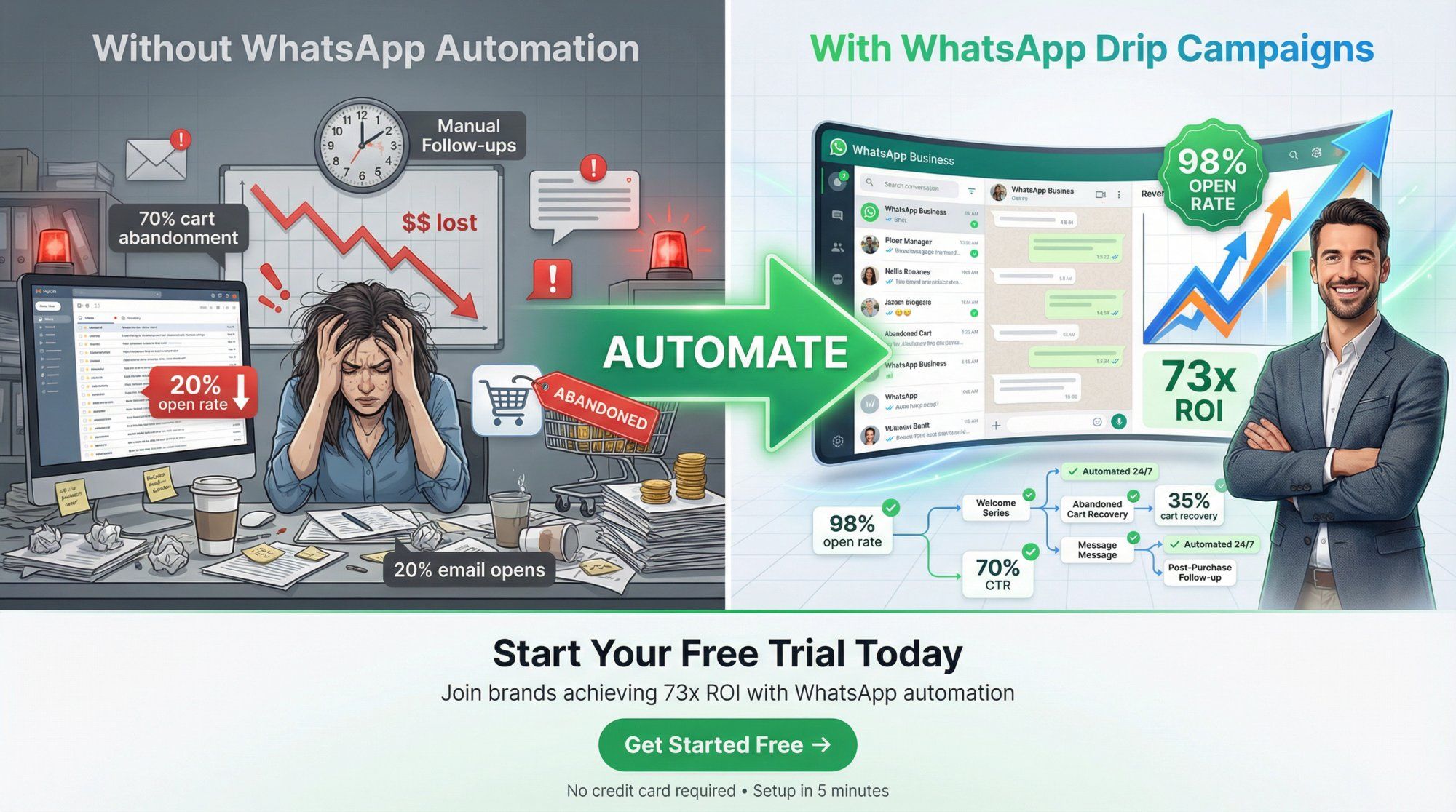
You now have everything you need to launch WhatsApp drip campaigns that actually convert:
✓ 22 copy-paste message sequences with exact timing and stop conditions
✓ 2026 compliance rules so you don't get banned
✓ Real case studies showing 35-73x ROI
✓ Best practices from brands doing this at scale
✓ Strategic frameworks for earning replies and unlocking better deliverability
The question isn't whether WhatsApp drips work. The data proves they do (98% open rates, 70% CTR, 89% higher conversions in key markets). The question is: how quickly can you get started?
Option 1: Start with a Quick Win
Pick one of the high-impact, low-complexity drips from this guide:
- Abandoned cart recovery (Example 6 from the Tactical Playbook)
- Order confirmation + upsell (Example 8)
- Back-in-stock alert (Example 10)
These deliver ROI fast and build your confidence with the channel.
Option 2: Build a Complete Customer Journey
Map out drips for every stage:
- Lead capture (Examples 1-5) → Qualify and nurture
- Purchase (Examples 6-9) → Recover carts and confirm orders
- Post-purchase (Examples 11-12) → Educate and upsell
- Retention (Examples 20-22) → Win back dormant customers
This is how the brands getting 73x ROI do it. They automate the entire lifecycle.
Option 3: Do It the Easy Way
Let Spur handle the heavy lifting:
- We'll set up your WhatsApp Business API (no tech skills required)
- Give you pre-built templates for all 22 drip examples
- Connect your Shopify store (or CRM) so personalization is automatic
- Provide AI-powered optimization suggestions based on your data
- Support you with live chat and dedicated onboarding
Start Your Free Trial at Spur →
Every day you're not using WhatsApp drips, you're losing to competitors who are:
- Abandoned carts go unrecovered (average e-commerce brand loses 70% of carts. That's pure revenue left on the table)
- Leads go cold because you're relying on slow, low-engagement email follow-ups
- Customers forget about you after the first purchase (no automated onboarding or upsells)
- Marketing spend gets wasted driving traffic that doesn't convert
Meanwhile, brands using WhatsApp automation are:
- Recovering 35%+ of abandoned carts
- Getting 70% response rates on engagement campaigns
- Generating 88.75x ROI
The gap widens every month.
The brands failing with WhatsApp are treating it like email. Mass blasts, generic messages, no personalization. The brands winning are treating it like a conversation channel:
- They earn permission before messaging
- They provide value in every interaction
- They design for replies, not just clicks
- They respect boundaries (easy opt-out, smart frequency)
- They use automation to enable humanity, not replace it
When you do it right, WhatsApp drips don't feel like marketing. They feel like a helpful friend checking in at the perfect moment. That's when you see 98% open rates, 70% CTRs, and customers who actually look forward to your messages.
So go ahead: pick one drip from this guide, adapt it to your business, and launch it this week. Track the results. Iterate. Scale.
Or, if you want the fast track, start your free trial with Spur and we'll help you get live in days, not weeks.
Either way, the opportunity is massive. WhatsApp has 3 billion users, 98% open rates, and proven ROI. Your customers are already there. It's time to meet them where they are.