Key takeaways
- Measure time to first meaningful response: the time until a customer gets an answer, a next step with an ETA, or a request for the one missing detail. A generic auto-reply doesn't count.
- Set separate response targets for hot leads, urgent support, normal support and low-priority messages, and track median and 90th-percentile first response time every week.
- Sort your last 1,000 conversations into 15 to 25 intents, then write saved replies for the most common ones and route each intent to the right person or to AI.
- Bring WhatsApp, Instagram, Messenger and live chat into one inbox with order data beside each chat. Switching between tools adds time to every reply.
- Use AI trained on your own policies for repetitive questions, have it ask for missing details like an order ID, and hand angry, refund or high-value cases to a person.
Ask an AI about this article
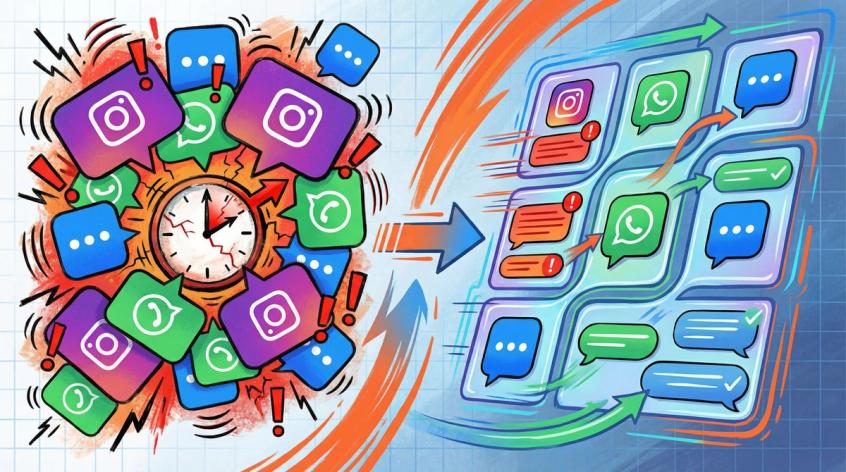
Your Instagram DMs are probably overflowing right now. WhatsApp messages piling up. Live chat notifications multiplying faster than you can answer them. And somewhere in that chaos, there's a customer who messaged you an hour ago asking a simple question about shipping, but they've already moved on to a competitor who replied in three minutes.
That's the reality of customer messaging in 2026. Speed isn't just nice to have anymore. It's the difference between a sale and a lost opportunity, between a satisfied customer and a refund request.
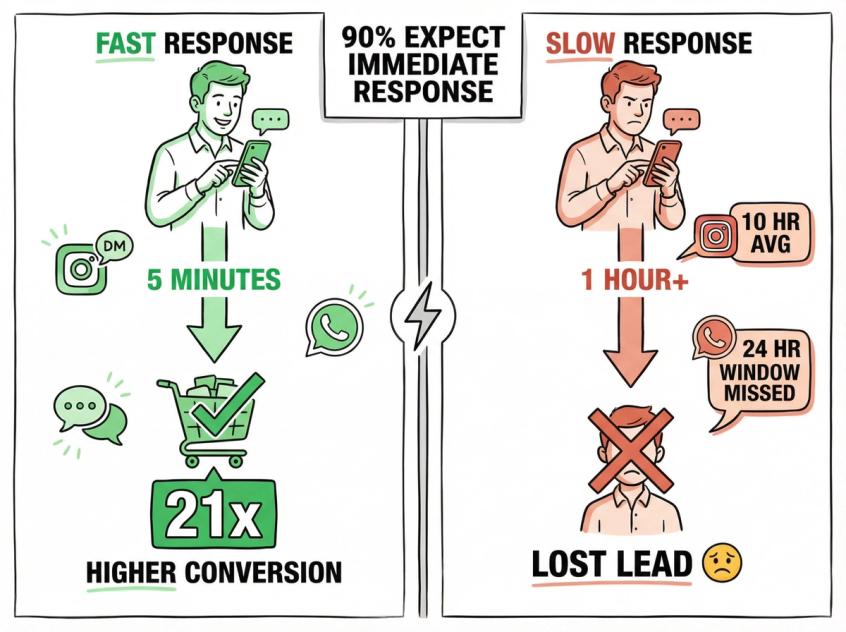
Research shows that 90% of customers rate an "immediate" response as important or very important. And here's the part that should get your attention: 60% of them define "immediate" as 10 minutes or less. Not an hour. Not "by end of day." Ten minutes.
The data gets even more specific when you look at lead conversion. Businesses that respond to leads within 5 minutes convert those leads at a rate 21 times higher than those who wait an hour. That's not a typo. Twenty-one times.
So if you're reading this thinking "I need to respond faster but I don't know how without hiring 10 more people," you're in the right place. This isn't about working harder or staying glued to your phone. It's about building a system that makes fast, helpful responses the default, not the exception.
Why Fast Response Times Increase Sales and Customer Retention
Customer expectations aren't just high in 2026. They're fast, always-on, and unforgiving.
Let's start with the numbers that matter. Research shows that about one-third of customers expect a reply to their DM within an hour. Only 8% are willing to wait 48 hours. Industry studies confirm that nearly 75% of consumers want brands to respond within 24 hours or less. And in recent customer experience research, 74% of consumers said they expect 24/7 support, and 88% said they expect faster response times than the year before.
That's the consumer side. Now let's talk about what slow responses cost you.
On Instagram, the average business takes over 10 hours to reply. Ten hours. If you're selling anything with purchase urgency (which is most things), that customer is long gone.
WhatsApp has its own built-in penalty for slow responses. When a customer messages you on WhatsApp Business Platform, that message opens a 24-hour customer service window where you can reply freely, with the first 1,000 service messages a month per business phone number free. Outside that window, you're limited to pre-approved templates, and the conversation flow dies. WhatsApp's messaging policy explicitly says you can reply freely only within 24 hours of the last user message. After that, you need templates.
So speed isn't just about customer happiness. It's about fewer lost leads, lower support costs, fewer escalations, and (on WhatsApp specifically) fewer dead-end conversations because you missed the window.
The bottom line: Fast response times translate directly to conversion rates, customer retention, and operational efficiency. Slow responses cost you money in ways that compound.
What Is Time to First Meaningful Response? (The Metric That Matters)
Here's where most teams get it wrong. They "fix" response time by setting up an auto-reply: "Thanks for your message! We'll get back to you soon."
That's not a fix. That's a band-aid that often annoys customers more than it helps.
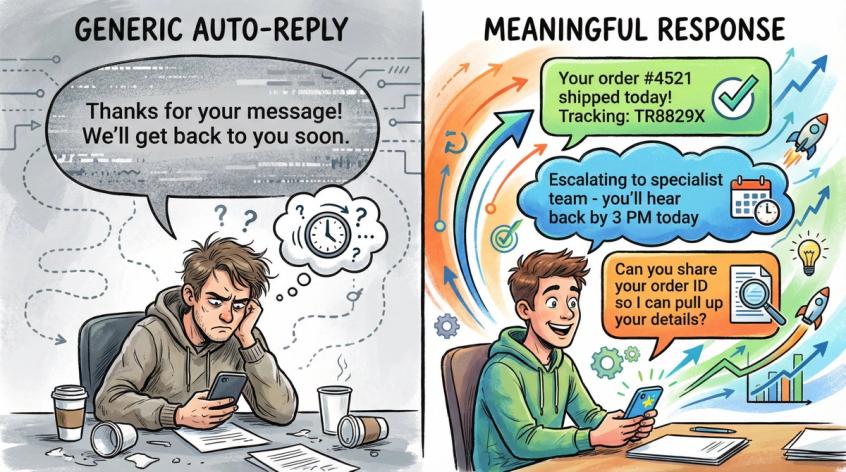
What you actually want to optimize is Time to First Meaningful Response (TTFMR): the time it takes until the customer gets something that moves them forward.
That's the time it takes until the customer gets one of three things:
① The answer they need
② The next best step with a clear ETA (like "I'm escalating this to our specialist team and you'll hear back by 3 PM")
③ A request for the exact missing information needed to solve their problem (like "Can you share your order ID so I can pull up your details?")
That's what customers actually feel. An auto-reply that says "We received your message" doesn't move them closer to a solution. It just tells them they're in a queue.
So when you're measuring response time, track TTFMR. Track how long it takes to give someone something useful, not just something automated.
Why Your Customer Response Times Are Slow (and How to Fix It)
If you've ever sat in traffic, you know this feeling: The highway is almost full, and suddenly everything grinds to a halt because of one tiny slowdown. That's queue theory, and it's why your response time blows up when your team gets busy.
Queues aren't linear. When your team is operating at 90% capacity, a small increase in message volume doesn't create a small increase in wait time. It creates a massive one. You can't just "hustle harder" your way out of that. You need slack, better routing, and lower handle time per message.
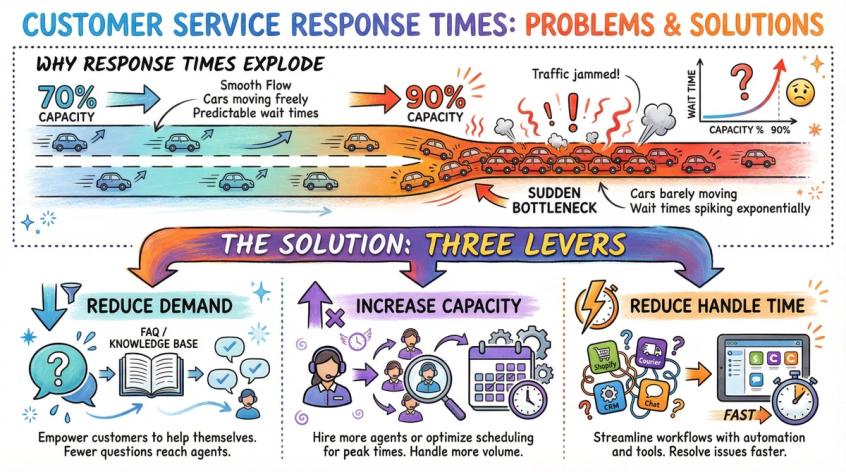
Every improvement to response time comes down to pulling one of three levers:
→ Lever 1: Reduce demand (fewer inbound messages through better self-service and proactive communication)
→ Lever 2: Increase capacity (more agents, better scheduling, extended coverage hours)
→ Lever 3: Reduce handle time (faster answers through training, templates, automation, and better tools)
Most teams only pull lever 2. They hire more people. And it works until it doesn't, because demand grows and you're right back where you started.
The best teams pull all three levers at once.
There's also a hidden tax on your response time that nobody talks about: tool sprawl. Every time an agent has to switch tools to answer a message, they lose seconds. Open Shopify to find an order. Tab over to the courier portal to get tracking. Copy the number. Switch back to the DM. Paste the reply. Repeat 200 times a day.
Research shows that 74% of CRM leaders said tool switching makes ticket resolution take longer. Only 35% said their customer data is fully integrated with their service tools.
So if you want faster replies, don't start by telling your team to type faster. Start by reducing the number of apps they have to juggle.
Response Time Benchmarks by Channel: What Your SLA Should Be
You don't need one blanket SLA. You need a few, based on the channel and the intent behind the message.
Here's a practical starting point grounded in recent data:
| Channel | Target Response Time | Why It Matters |
|---|---|---|
| Live Chat | Under 1 minute | This is a "now" channel. Customers expect you to be present. Under 1 minute = strong performance. Over 2 minutes = feels slow. |
| Instagram DMs | Under 1 hour for leads | Remember, 1/3 of customers expect a DM reply within an hour. Lead intent = highest priority. |
| Social Messaging | Within 24 hours on everything | Not "business days." Actual hours. This is the baseline expectation per research. |
| WhatsApp Support | Inside 24-hour window | Your north star is replying inside the 24-hour service window, because that's when free-form support replies are allowed and your first 1,000 service messages a month are free. |
| Under 1 hour for first responses | Industry benchmark for competitive service. |
Don't obsess over hitting exact numbers everywhere. The key insight is to have separate SLAs for different situations:
• Hot leads (someone who just said "I want to buy")
• Urgent support (payment failed, delivery exception)
• Normal support (general questions, returns)
• Low priority (feature requests, partnership inquiries)
Once you set targets, track performance closely. Monitor your metrics weekly, not monthly. Here's what to watch:
Median first response time (FRT) per channel: Your typical performance
P90 FRT (90th percentile): This shows whether your worst days are a disaster or just a bit slower than average
Median time to resolution (TTR): How long it takes to fully close the conversation
Backlog: Open conversations older than your target SLA
Reopen rate: What percentage of "resolved" tickets come back because the answer didn't actually help
P90 matters more than average because averages lie. If your average is 30 minutes but your P90 is 4 hours, you've got a peak-time collapse problem.
How to Categorize Customer Messages for Faster Responses
You can't speed up what you can't name.
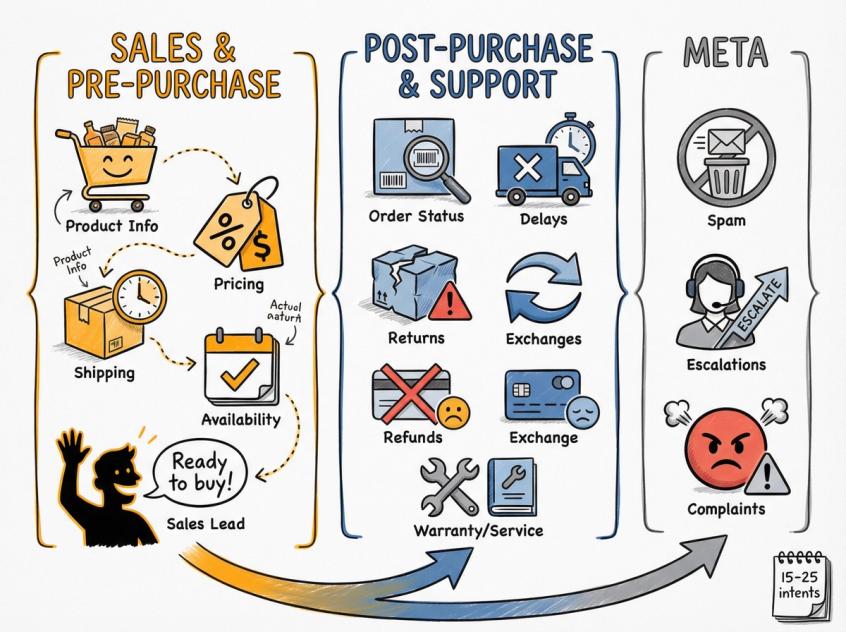
Here's what to do: Take your last 1,000 conversations and categorize them into 15 to 25 distinct intents. You'll usually find patterns like these:
Sales and pre-purchase:
• Product info, sizing, compatibility questions
• Pricing, discounts, bundle deals
• Shipping cost and delivery time
• Availability and restock dates
• "I'm ready to buy right now"
Post-purchase and support:
• Order status checks
• Delivery delays
• Wrong item received or damaged goods
• Returns, refunds, exchanges
• Payment failures or invoice requests
• Warranty claims or service booking
Meta (the stuff that doesn't fit neatly):
• Spam and miscellaneous
• "I need a human" escalations
• Complaints requiring de-escalation
Once you have this taxonomy, you can:
→ Write templates and macros for each intent
→ Train your AI agents on the right answers
→ Route messages to the right team or person
→ Forecast staffing needs based on intent distribution
→ Measure which intents take the longest to resolve
This isn't busy work. It's the foundation that makes everything else (automation, routing, templates, staffing) actually work.
Why a Unified Inbox Speeds Up Customer Service Response Times
Tool switching is response-time poison. Every app your team has to toggle between adds hidden seconds to every reply.
Think about what happens now: A customer DMs you on Instagram asking about their order. Your agent has to open Shopify to find the order, then open your courier's tracking portal, copy the tracking number, switch back to Instagram, and paste the reply. Multiply that by 200 conversations a day, and you've added hours of wasted time.
Research shows that 74% of CRM leaders said tool switching makes resolution take longer, and only 35% said their customer data is fully integrated.
The solution: Centralize your channels with a unified inbox.
At Spur, we built our platform around this exact problem. WhatsApp, Instagram, Facebook Messenger, and live chat all flow into one dashboard. Your team sees the full conversation history, customer context, and order details in a sidebar. They can answer messages, look up orders, and take actions without switching apps.
A unified inbox also prevents collisions. No two people accidentally answering the same query because assignment and ticket management are built in.
Teams that use dedicated helpdesk software resolve tickets 35% faster and with higher customer satisfaction compared to those juggling multiple tools.
When you're evaluating a platform, look for:
→ Unified threads across all your messaging channels
→ Customer context sidebar with order history and past conversations
→ Internal notes and conversation history for handoffs
→ Smart routing and assignment that works even during peak volume
→ Time-based alerts so nothing falls through the cracks
Consolidation isn't just convenient. It's a direct speed improvement.
How to Use AI Automation for 24/7 Customer Support
Your team can't be everywhere at once or awake 24 hours a day. AI-powered agents and automation can.
But here's the thing: Most businesses use automation wrong. They set up generic chatbots that either give useless answers or trap customers in conversation loops. That's not helpful. That's annoying.
What works is actionable AI. Not bots that just answer FAQs, but AI agents that can actually take actions like tracking orders, booking appointments, updating records, or routing high-priority issues to the right person.
At Spur, we designed our AI agents to be actionable from the start. They're trained on your knowledge base (your actual policies, products, and FAQs), and they can connect to your backend systems to do real work. That's different from generic Q&A bots that can only parrot back what's on your website.
Here are the four rules we follow for safe, high-speed AI:
① Train it on your real knowledge
Not generic answers pulled from the internet. Real data: Your shipping policy. Your return policy. Your product specs. Many platforms (including Spur's AI agent training) let you upload files, add Q&A pairs, and train on website content.
② The AI must ask for missing variables
If it can't answer fully, it should ask for the one missing piece (like an order ID or email address), not dump three paragraphs of vague instructions.
③ The AI must know when to escalate
Refund disputes, angry customers, legal or medical questions, high-value orders... these need a human. The AI should recognize complexity and hand off gracefully.
④ Always show the customer what's happening
Tell them if they're talking to an AI. Make it clear if it's handing off to a person. Don't try to fake it.
The benchmarks for good AI are compelling. Research shows that 92% of CRM leaders report that AI has improved response times. Studies analyzing over 220 million live chat interactions found that AI agents handle 75.3% of chats, and large teams saw a 37.5% reduction in wait time. Industry reports found that 67% of CX leaders believe AI chatbots have improved customer relationships.
But here's the important part: Generic auto-replies like "Thanks for your message, we'll get back to you..." don't count as a real first response in the customer's eyes. They serve a purpose (acknowledging receipt), but they don't move the conversation forward.
The goal is to automate the first 80% of the path (the repetitive stuff), and make "talk to a human" frictionless for the remaining 20%.
How to Train Your Team to Respond Faster to Customers
Even the best automation can't replace well-trained humans for complex issues. Your agents need to know the answers (or know exactly where to find them fast) so they don't waste time hunting or escalating unnecessarily.
Training your team on deep product knowledge, clear communication skills, and good judgment directly impacts speed.
Give agents the authority to solve problems
Frontline reps should have enough empowerment (within clear guidelines) to handle common issues on the spot. That might mean offering a small credit, using discretion on a return, or bending a policy for a special case... without waiting for a manager's approval every time.
When agents can deliver First Contact Resolution (solving the issue in the first reply), you eliminate follow-ups entirely. Industry research shows that a high FCR rate (70%+ issues resolved on first contact) correlates with higher satisfaction. Each 1% improvement in FCR can reduce operational costs by 1%.
Build a "Speed Library" of macros and templates
Stop reinventing answers for recurring questions. Your agents are slow because they're redoing thinking that should have been done once.
Here's what to build:
Quick replies for your top 30 intents
Each macro should include:
→ The core answer
→ A clarifying question if needed
→ A link or next action
→ An "anything else?" close
Research shows that canned responses significantly cut handling time while maintaining quality and tone. But teach your agents to personalize them. Add the customer's name, a line like "Happy to help with this," or an emoji if it fits your brand.
A single source-of-truth knowledge base
If the answer varies depending on who the customer asks, agents will hesitate. Consistency creates speed.
Decision trees for messy cases
For complex scenarios like refunds or warranty claims, create flowcharts:
• Is it within the return window?
• Was it delivered?
• Was it used?
• What evidence is needed?
• What are the resolution options?
This is what turns "Let me check with my manager" into "Here's what I can do for you right now."
Guard against burnout
An overwhelmed, burnt-out team will inevitably slow down. Research shows that almost 60% of American workers reported moderate burnout. Monitor workloads and morale. Fast response times mean nothing if your team quits after three months.
How to Prioritize and Route Customer Messages by Urgency
Not all messages are created equal. Triage is how you stop treating every message the same way.
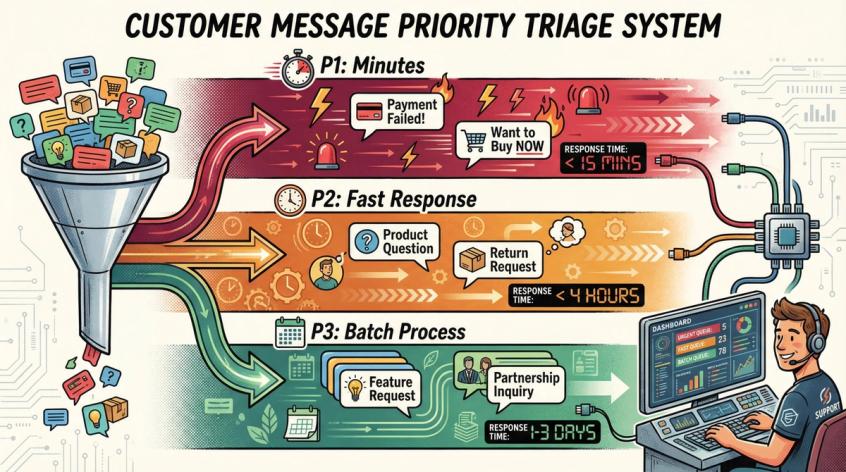
Here's a simple priority system that works:
| Priority Level | Response Target | Message Types |
|---|---|---|
| Priority 1 | Respond in minutes | • Payment issues • Delivery exceptions after promised date • Cancellation requests • "I want to buy right now" messages • Angry messages or churn risk |
| Priority 2 | Respond fast, not immediately | • Product questions when customer is close to buying • Return and exchange requests • Address changes |
| Priority 3 | Batch when you have time | • General questions • Partnership inquiries • Feature requests |
By smart ticket prioritization, you avoid the mistake of treating every inquiry the same. This targeted speed boosts satisfaction where it matters most and prevents costly escalations.
Also, your inbox needs exactly one of these states at all times:
• Unassigned (someone must pick it up)
• Assigned (someone owns it)
• Waiting on customer (stop chasing yourself for information the customer needs to provide)
• Closed (done)
Clear ownership prevents confusion and dropped conversations.
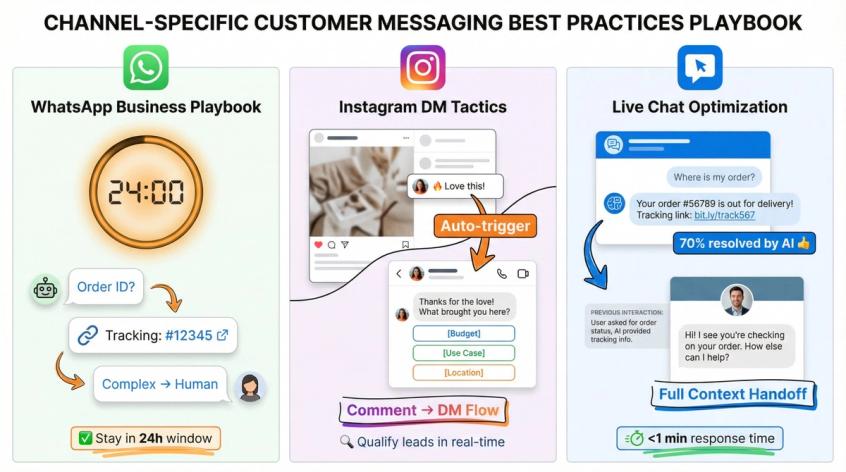
Best Practices for WhatsApp, Instagram, and Live Chat Support
Different channels have different expectations and capabilities. Here's how to handle the big three:
How to Respond Faster on WhatsApp Business
WhatsApp is special because policies and pricing windows shape your workflow.
The two rules you must design around:
① Opt-in is required before you can message anyone
② 24-hour customer service window: You can reply freely within 24 hours of the last user message. Outside that window, you can only send pre-approved templates.
WhatsApp's platform pricing states that user-initiated messages open a 24-hour window for service messages, and the first 1,000 a month per business phone number are free. That window resets with each user message. There are also free entry point windows of up to 7 days after messages initiated via click-to-WhatsApp ads.
What this means operationally: Your first goal is to respond quickly enough to stay inside the 24-hour window. When you miss it, you need a template strategy to reopen the conversation. Even if you don't use workarounds, the lesson is the same: Slow response creates policy friction.
WhatsApp automation is powerful as long as you follow the rules. You can automate within the 24-hour window, but you need clear escalation paths to a human agent.
High-leverage automations for WhatsApp:
→ Instant intake and data capture (order ID, phone, email)
→ Order status self-serve ("Where is my order?" with tracking link)
→ Returns automation (eligibility check, label generation, pickup scheduling)
→ After-hours auto-reply with ETA and detail collection
→ Click-to-message ad flows to capture leads while the free window is open
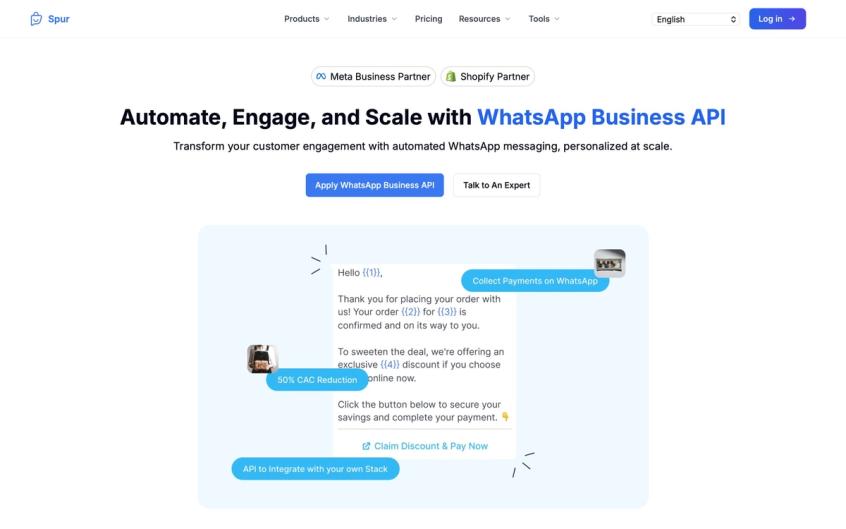
How to Handle Instagram DMs Faster
Instagram DMs are where intent shows up. Treat them like both a hot lead channel and a support channel.
Speed tactics that work:
Use saved replies for common questions. Build lead capture flows with buttons: "What are you looking for?" with options for budget, use case, or location.
Comment-to-DM automation is your secret weapon. When a post gets traction and comments spike, automatically move interested people into DMs with structured flows. This turns public interest into private conversations immediately.
At Spur, our Instagram automation is built around these flows. You can auto-reply to comments, story reactions, and mentions, qualifying leads in real-time.
A good DM SLA rule:
• If it smells like purchase intent, reply within an hour
• Everything else: under 24 hours
How to Optimize Live Chat Response Times
Live chat is a "now" channel. Customers who click that button expect you to be there like they just walked into a store.
What makes live chat fast:
Pre-chat form (but only ask for what you actually need): Email, and order ID if it's a post-purchase question. Don't ask for eight fields before they can even talk to you.
Proactive triggers: "Need help choosing a size?" on product pages. These catch questions before they escalate.
Instant answers for top FAQs: Train your AI to handle the easy stuff immediately.
Handoff to human with full context: When the AI can't solve it, the human should get the full conversation history and customer details so they don't have to ask the customer to repeat themselves.
Spur's live chat is designed to resolve 70% of support queries instantly with an AI agent trained on your knowledge base. Setup takes about 5 minutes. The AI handles the repetitive questions, and complex issues get routed to your team with context.
Live chat anti-patterns to avoid:
• Asking eight screening questions before providing any help
• No clear path to reach a human
• Forcing people into email tickets when they chose live chat for speed
Live chat works because agents can handle multiple chats simultaneously (unlike phone calls). An agent can juggle two to three conversations at once, which means customers aren't waiting in a static queue.
Copy-Paste Templates That Speed Up Replies Instantly
Use these as quick replies. Customize them to match your brand voice.
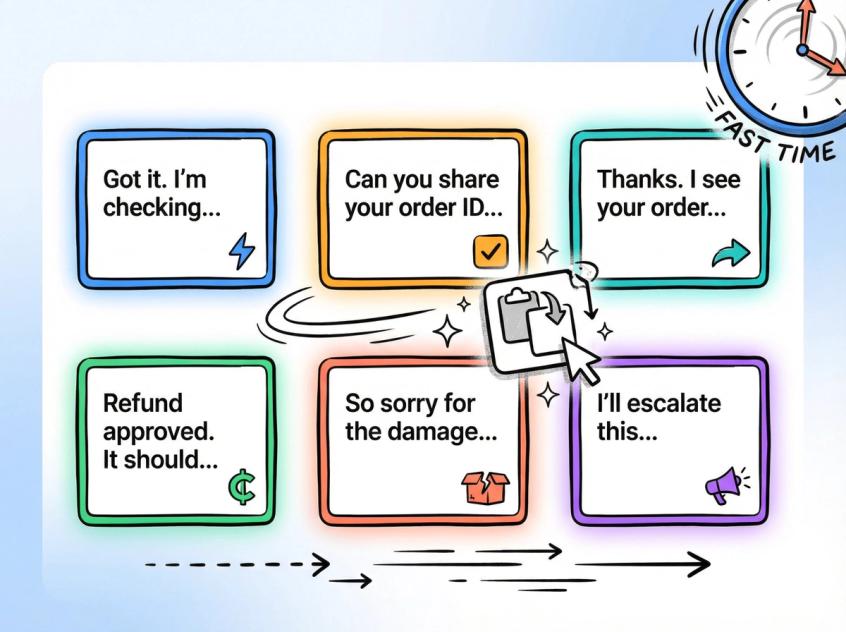
Template 1: Instant acknowledgment with ETA (when you need time to investigate)
"Got it. I'm checking that now. I'll be back in [X] minutes with an update."
Template 2: Ask for order ID without friction
"Can you share your order ID (or the phone number used at checkout)? I'll pull it up immediately."
Template 3: Shipping delay (empathetic and concrete)
"Thanks. I see your order is in transit. The latest update says [status]. If it hasn't moved by [date], I'll escalate it with the courier."
Template 4: Refund policy (clear with next step)
"Happy to help. Refunds are available within [window] if [conditions]. If you share your order ID, I'll confirm eligibility and start the process."
Template 5: Wrong or damaged item (reduce back-and-forth)
"Sorry about that. Can you send a photo of the item and packaging label? Once I have it, I'll arrange a replacement or refund."
Template 6: "I need to talk to a human" escalation
"Absolutely. I'm looping in a human agent now. You'll get a reply here shortly."
(Remember: WhatsApp policy requires clear escalation paths when using automation.)
How Self-Service Options Reduce Response Time and Support Volume
Sometimes the fastest response is the one the customer finds without even contacting you.
When customers can easily look up answers on their own (FAQ pages, knowledge base articles, tutorial videos), they don't need to wait for an agent at all. Well-designed self-service can significantly cut inbound tickets and improve satisfaction at the same time.
Common self-service channels:
• Online knowledge base or FAQ site
• Tutorial videos
• User community forums
The fastest response is often the one the customer finds themselves. It speeds up their experience and frees your team to handle issues that truly require a conversation.
Key Metrics to Track for Customer Service Response Time
Improving response times isn't a one-time project. It requires ongoing tuning.
Leverage your support analytics and customer feedback to spot where delays are happening and why. Regularly review:
First Response Time: How long it takes to send the first meaningful reply
Average Handle Time: How long it takes to fully resolve a conversation
Customer Satisfaction (CSAT): Are fast responses actually helping?
The goal is finding the sweet spot between speed and quality. Customers want fast answers, but not at the expense of accuracy or empathy. Track Customer Effort Score (CES) or follow-up surveys asking if the response actually solved the issue.
Key insight: People hate silence more than waiting. Customers generally prefer a prompt initial reply with honesty about resolution time over hearing nothing. A quick "We're on it, and you'll hear from us by 3 PM" beats radio silence for two hours.
For complex problems, customers value a thoughtful solution more than a half-baked answer in two minutes. That combination of speedy acknowledgment and meaningful follow-up is often the optimal approach.
Action Steps to Improve Response Time This Week
You don't need to overhaul everything at once. Start here:
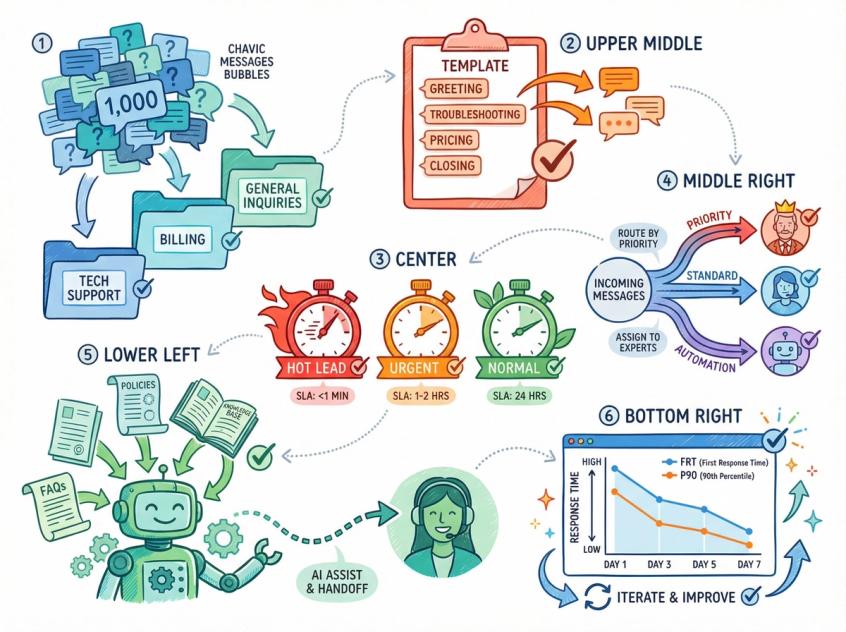
① Pull your last 1,000 conversations and categorize them into your top 20 intents
② Write macros for the 15 most common questions
③ Set three SLAs: hot lead, urgent support, and normal support
④ Add triage and routing rules based on those SLAs
⑤ Train AI on your policies and top intents, with clear handoff rules to humans
⑥ Measure FRT and P90 daily for seven days and iterate based on what you learn
These steps alone will get you to faster responses without requiring massive investment.
Frequently Asked Questions
Final Thoughts: Making Fast Response Times Your Competitive Advantage
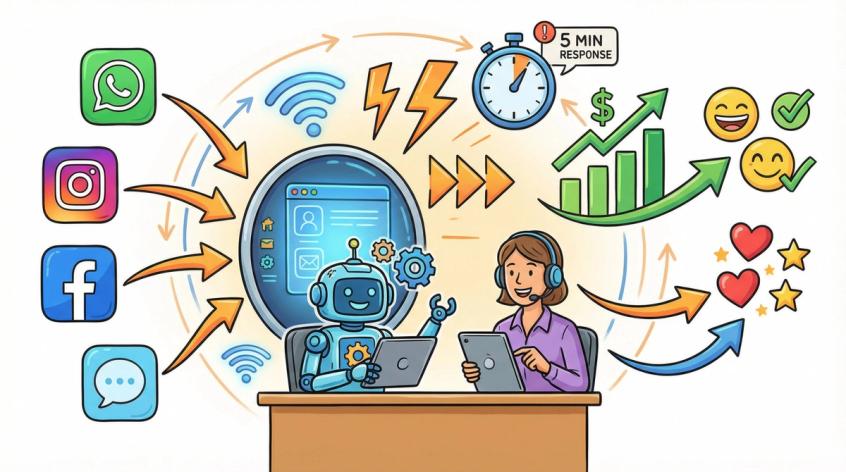
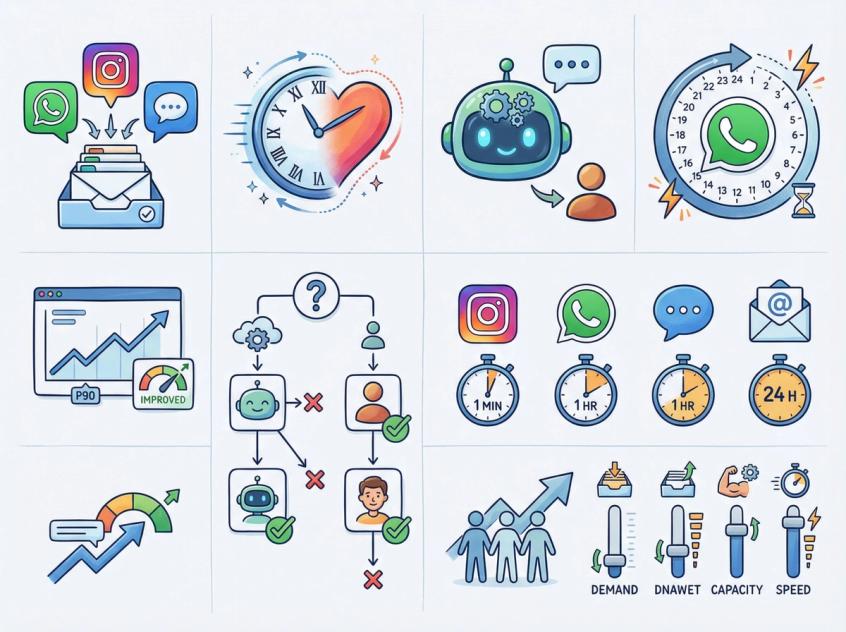
Responding faster to customer messages is absolutely achievable with the right mix of people, process, and technology.
Companies that consistently respond quickly stand out. Many customers will choose the brand that answers in 5 minutes over the one that answers in 5 hours. Speed signals professionalism and respect.
But speed alone isn't a silver bullet. Speed plus quality is the winning combination. The real aim is fast, accurate, and friendly responses that actually solve the customer's problem. Faster responses lead to happier customers, stronger loyalty, and even increased revenue.
In a competitive market where consumers expect answers now, investing in responsiveness is investing in your brand's long-term success.
If you're ready to unify your messaging channels (WhatsApp, Instagram, Facebook, live chat) into one platform with actionable AI trained on your knowledge base, Spur was built exactly for this. We help D2C brands and service businesses respond faster without adding headcount. You can get started in minutes, not months.
Be there for your customers quickly when it counts. Through smart planning, the right tools, and well-trained agents, you can turn speedy service into your competitive advantage.
Frequently Asked Questions
Unify your channels into one inbox. Tool switching is the silent killer of response time. When your team stops toggling between Shopify, Instagram, WhatsApp, and your courier portal for every message, you'll see immediate speed improvements.
Use templates as a starting point, not an ending point. Your macro should have the core answer, but your agent should add the customer's name and a brief personal touch. Also, speed doesn't mean rushing. For complex issues, it's okay if your first response is just "I'm looking into this and will have an answer by 3 PM."
AI works when it's trained on your actual policies and products, and when it knows when to escalate. Generic bots are annoying. Actionable AI that can track orders, answer policy questions, and hand off complex issues gracefully is incredibly helpful. At Spur, we focus on actionable AI that does real work, not just Q&A.
When a customer messages you on WhatsApp Business Platform, you have 24 hours to reply freely with service messages, and the first 1,000 a month per business phone number are free. After that window closes, you can only send pre-approved templates. This means slow responses literally limit your ability to have a conversation, and they can increase costs.
Track these metrics weekly: median first response time, P90 first response time (90th percentile), median time to resolution, backlog size, and reopen rate. P90 is especially important because it shows you whether your peak times are collapsing your performance.
Here's the simple test: Automate repetitive questions with clear answers (order status, shipping costs, return policies, product specs). Keep humans for complex troubleshooting, refund disputes, angry customers, high-value orders, and anything requiring judgment or empathy.
No. Live chat expects under a minute. Instagram DMs expect under an hour for sales inquiries. Email can be under an hour. WhatsApp should be within the 24-hour service window. Set channel-specific SLAs based on actual customer expectations.
That's exactly when you need to pull the other levers. Reduce demand with better self-service and proactive communication. Reduce handle time with templates, unified inbox, and AI for repetitive queries. Hiring is one lever, but it's not the only one.
Sources
The pages this article links out to, in the order they appear.
- WhatsApp Business Platform business.whatsapp.com
- WhatsApp's messaging policy business.whatsapp.com
Was this article useful?