DeepSeek API Guide: Complete Tutorial for AI Automation

Discuss with AI
Get instant insights and ask questions about this topic with AI assistants.
💡 Pro tip: All options include context about this blog post. Feel free to modify the prompt to ask more specific questions!
TL;DR: DeepSeek's API offers GPT-4 level performance at 10-30x lower cost, making it perfect for high-volume customer support automation. At Spur, we've seen how affordable AI can transform WhatsApp, Instagram, and live chat support. This guide shows you exactly how DeepSeek works, what it costs, and whether it's right for your business.
DeepSeek went from unknown to market disruptor in under a year. The Chinese AI company released models that matched GPT-4 performance while costing a fraction of the price. This triggered government investigations, bans, and emergency price cuts from OpenAI and Google.
If you're researching the DeepSeek API, you probably want to understand how to actually use it for customer support automation, chatbots, or AI agents. You need clear answers about pricing, capabilities, security concerns, and whether it makes sense for your business.
We built Spur to help businesses automate customer conversations across WhatsApp, Instagram, Facebook Messenger, and live chat. At our scale, LLM costs matter enormously. We've studied DeepSeek thoroughly because the cost savings could be transformative for our customers running thousands of support conversations daily.
This guide gives you everything you need to make an informed decision about DeepSeek's API.
DeepSeek is a Chinese AI company spun out of the quant hedge fund High-Flyer, based in Hangzhou. The company focuses on building cost-efficient, high-performance language models and aggressively open-sources many of them.
The key facts:
Their Models
• V3 / V3.1 / V3.2-Exp: Large general-purpose models matching or approaching GPT-4o and Claude Sonnet on benchmarks
• R1: Reasoning-focused model with explicit chain-of-thought, released open-source under MIT license in January 2025
• All major models available on Hugging Face under permissive licenses for self-hosting
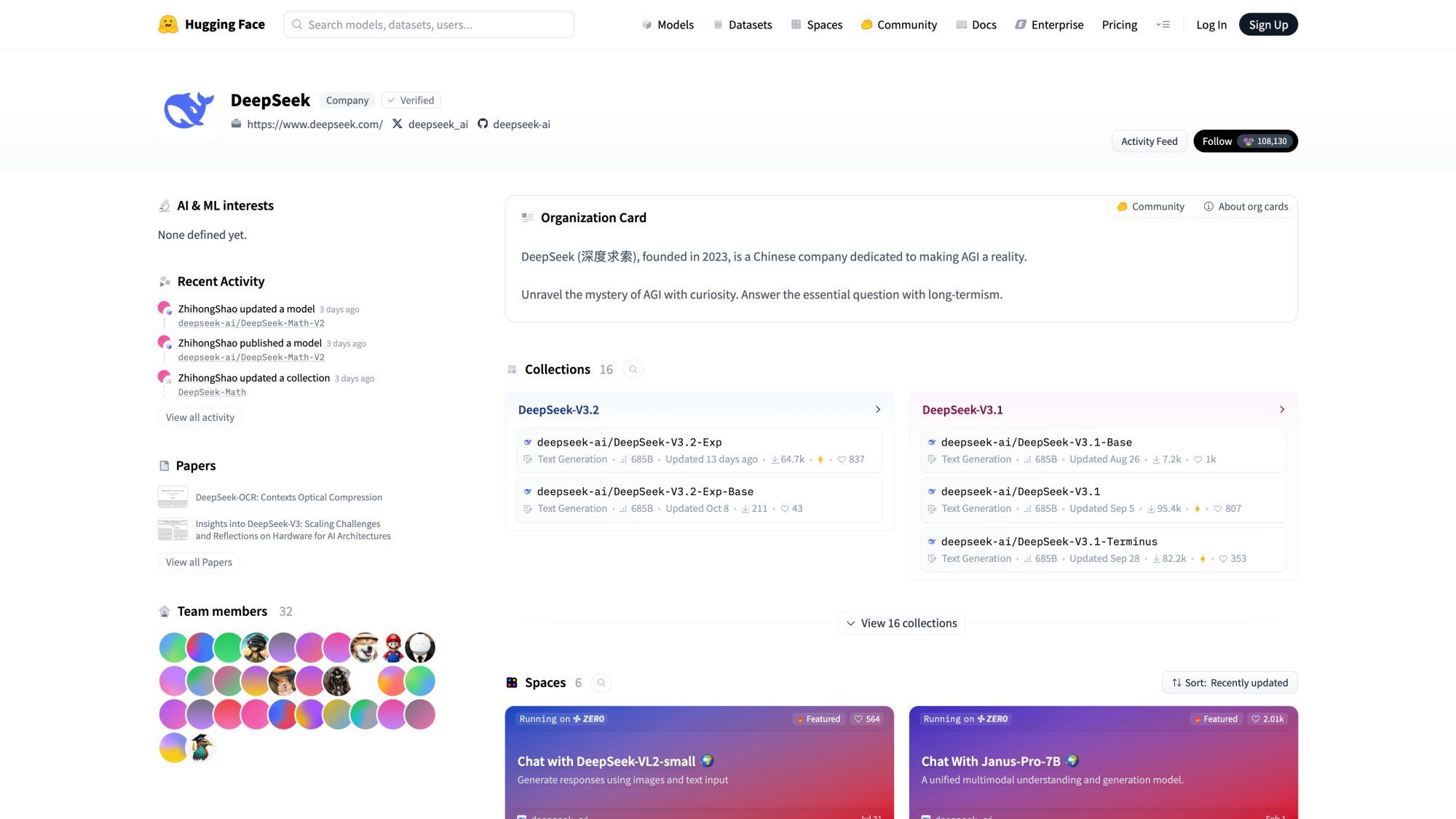
The HuggingFace repository shows DeepSeek's commitment to open source, with all major models available for download and self-hosting under MIT and Apache 2.0 licenses.
Cost Structure
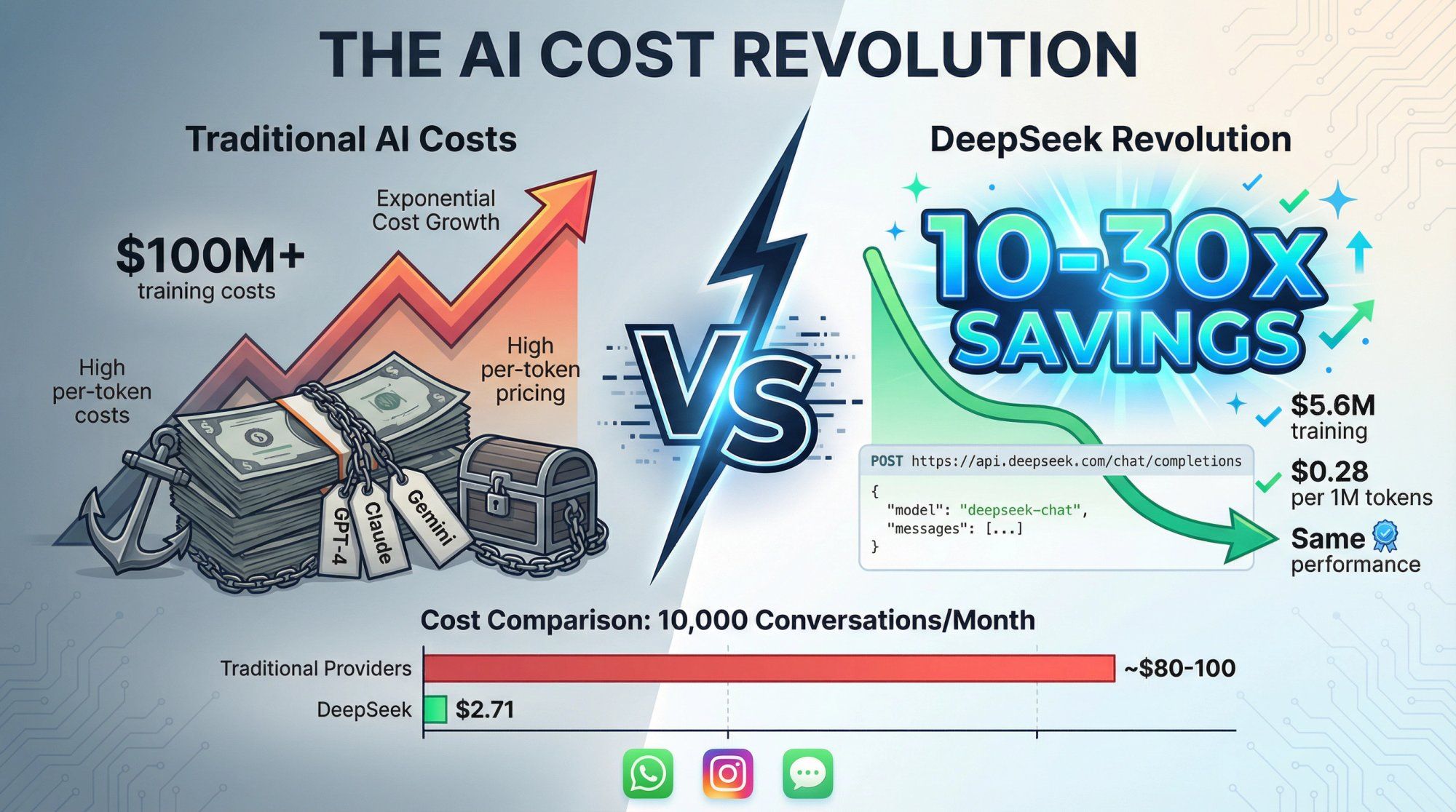
DeepSeek claims V3 training cost approximately $5.6M versus over $100M for GPT-4. Token prices are typically 10-30x cheaper than OpenAI, Anthropic, or Google. External researchers debate the actual training costs, but the inference pricing is undeniably aggressive.
Availability
You can access DeepSeek models through:
→ DeepSeek's own API (what this guide covers)
→ Azure AI Foundry and GitHub (R1 via Microsoft)
→ NVIDIA NIM images for on-premises deployment
For businesses running AI agents for customer support across messaging channels, DeepSeek is compelling. It can dramatically lower LLM costs per conversation.
At Spur, we help businesses automate WhatsApp, Instagram, Facebook, and live chat support. The cost difference between DeepSeek and traditional providers could mean the difference between AI being viable or prohibitively expensive at scale.
DeepSeek comes with significant geopolitical, privacy, and security considerations that your legal and compliance teams need to review carefully.
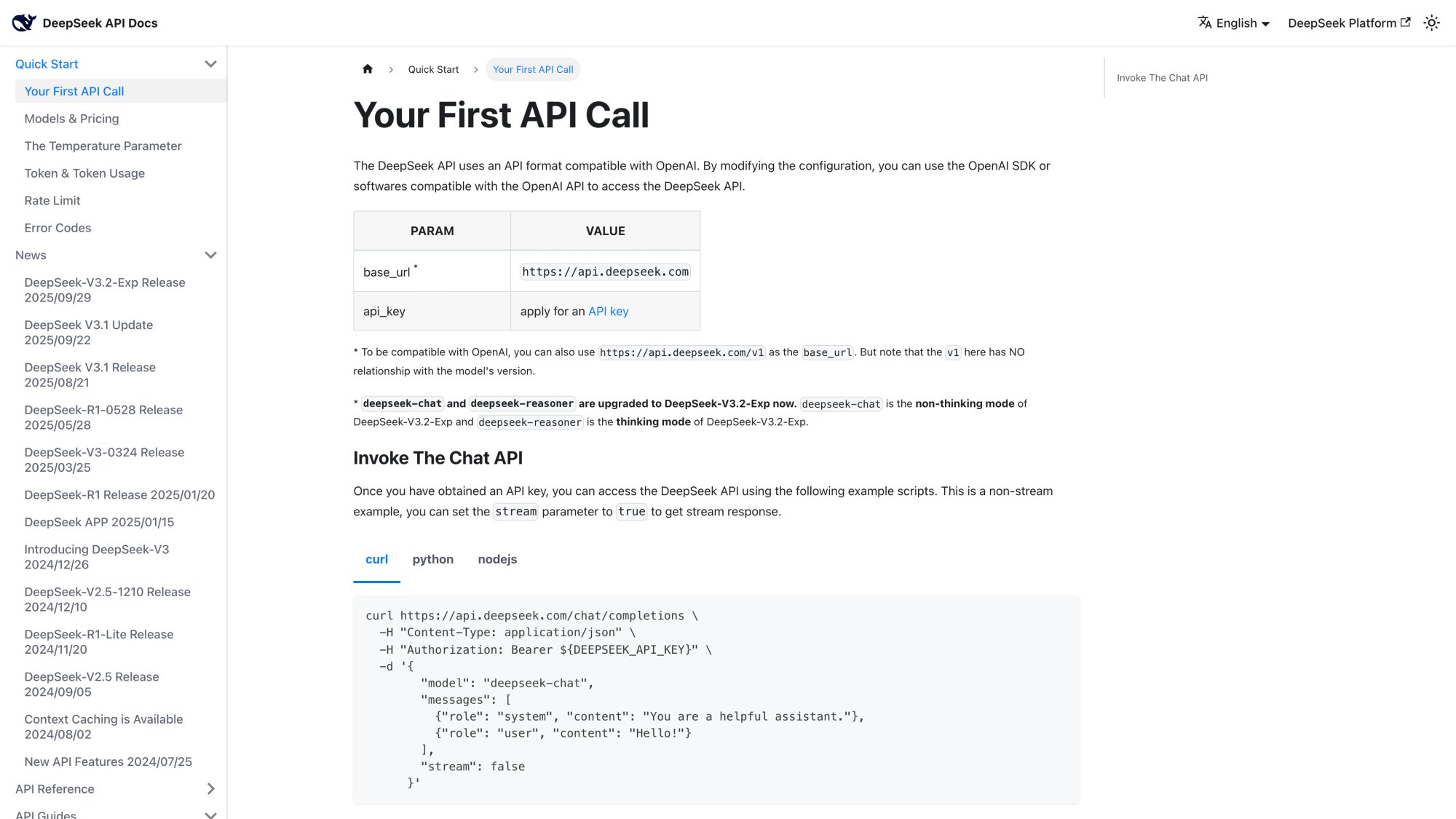
DeepSeek runs an OpenAI-compatible HTTP API using the same chat completions format you already know. The screenshot above shows the official API documentation where you'll find complete guides for authentication, endpoints, and model selection.
Base URL
https://api.deepseek.com
For maximum OpenAI compatibility:
https://api.deepseek.com/v1
(The /v1 path is not related to model versions, it's just for compatibility.)
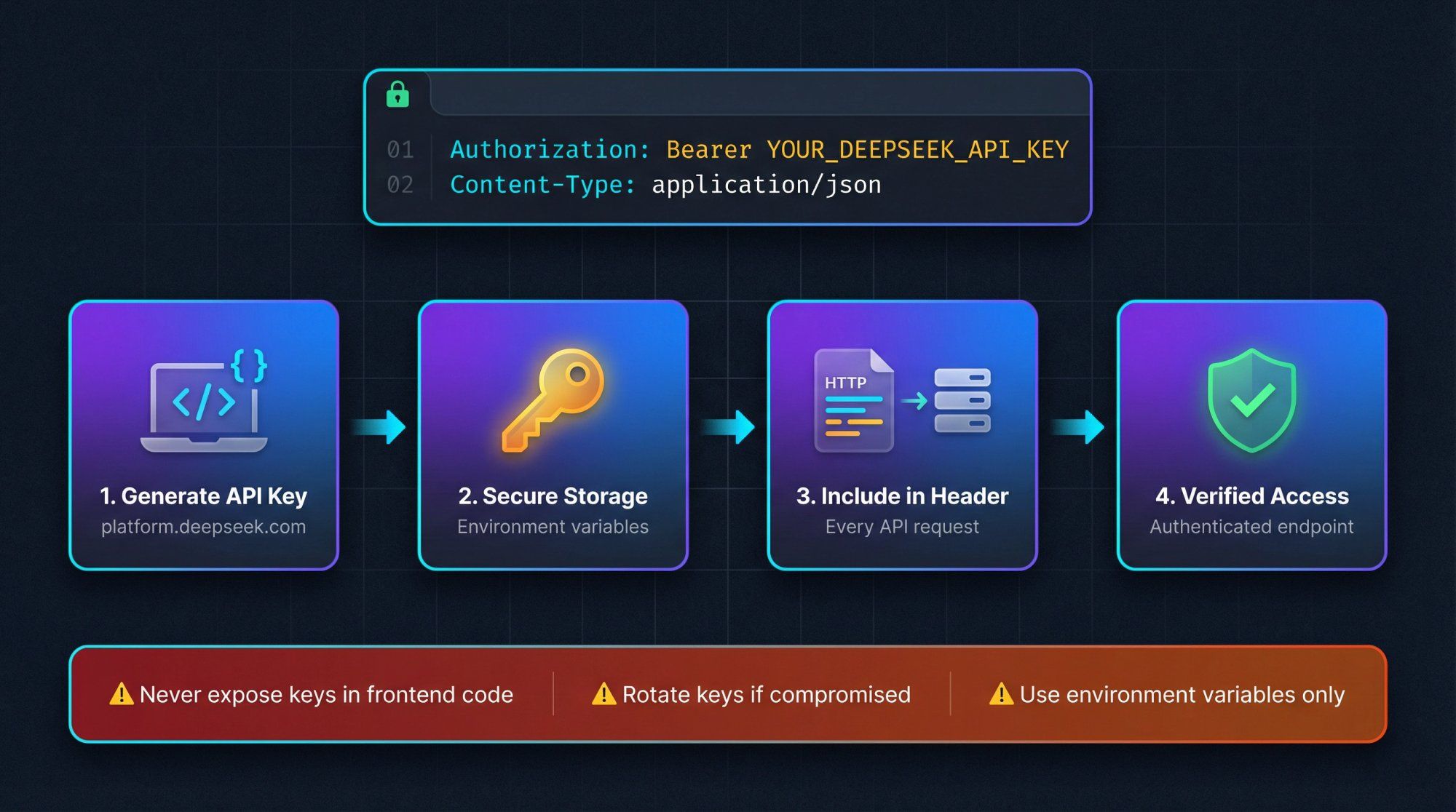
Authentication
Authorization: Bearer YOUR_DEEPSEEK_API_KEY Content-Type: application/json
Primary Endpoint
POST /chat/completions
OpenAI SDK Compatibility
DeepSeek explicitly supports the official OpenAI SDKs by letting you set a custom base URL. This means if you're already using OpenAI, switching to DeepSeek is mostly just changing the base URL and model name.
Python Example
import os from openai import OpenAI client = OpenAI( api_key=os.environ["DEEPSEEK_API_KEY"], base_url="https://api.deepseek.com", ) response = client.chat.completions.create( model="deepseek-chat", messages=[ {"role": "system", "content": "You are a helpful support assistant."}, {"role": "user", "content": "Hi, I need help with my order."}, ], stream=False, ) print(response.choices[0].message.content)
Node.js Example
import OpenAI from "openai"; const client = new OpenAI({ apiKey: process.env.DEEPSEEK_API_KEY, baseURL: "https://api.deepseek.com", }); async function replyToCustomer(message: string) { const completion = await client.chat.completions.create({ model: "deepseek-chat", messages: [ { role: "system", content: "You are a concise WhatsApp support bot." }, { role: "user", content: message }, ], }); return completion.choices[0].message.content; }
If you're already calling OpenAI from your backend, switching to DeepSeek requires minimal code changes.
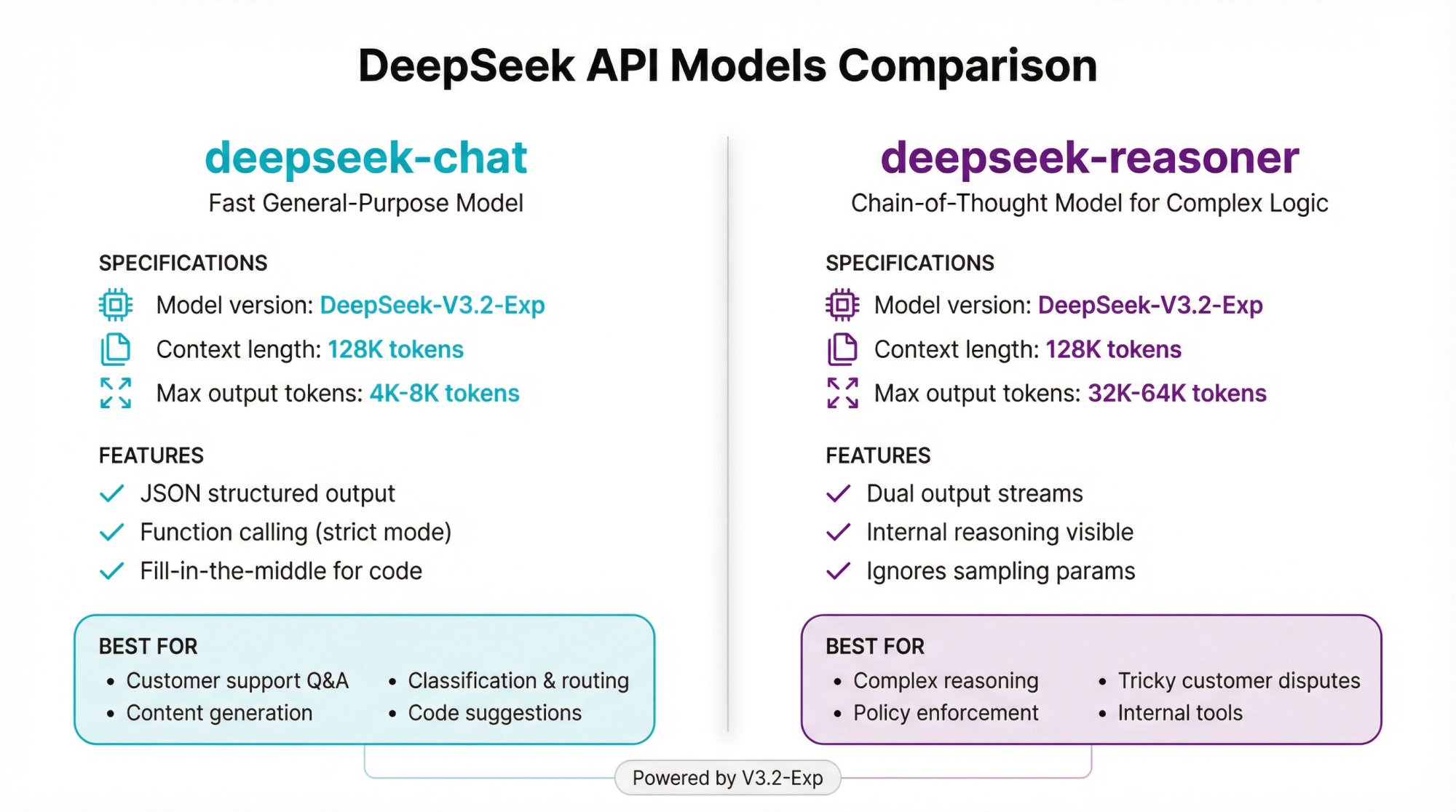
As of late 2025, DeepSeek has simplified its API to two public model names, both backed by the latest V3.2-Exp engine.
| Specification | Details |
|---|---|
| Model version | DeepSeek-V3.2-Exp (under the hood) |
| Context length | 128K tokens |
| Max output tokens | 4K default (up to 8K) |
Features
• JSON-style structured output
• Function calling with strict JSON Schema mode (via /beta base URL)
• Chat prefix completion (beta)
• Fill-in-the-middle for code
Best For
→ Customer support Q&A
→ Content and marketing copy
→ Long ticket summaries
→ Classification, routing, and tagging
→ Code suggestions without explicit reasoning
At Spur, this is the model we'd use for most customer support automation. It handles the common use cases: answering FAQs, routing tickets, extracting customer intent, and generating responses based on knowledge bases.
| Specification | Details |
|---|---|
| Model name | deepseek-reasoner |
| Conceptual basis | DeepSeek's thinking mode, R1-style chain-of-thought powered by V3.2-Exp |
| Max output tokens | 32K default (up to 64K) |
Key Behaviors
The reasoner produces two parallel streams:
• reasoning_content: Internal chain-of-thought text
• content: Final answer for end users
You must strip reasoning_content before including the assistant's message back in your conversation history for the next call. Otherwise you'll get a 400 error.
The model ignores standard sampling parameters like temperature and top_p.
Example Usage
response = client.chat.completions.create( model="deepseek-reasoner", messages=[{"role": "user", "content": "9.11 and 9.8 – which is larger?"}], ) chain_of_thought = response.choices[0].message.reasoning_content final_answer = response.choices[0].message.content
Best For
• Complex reasoning questions requiring step-by-step thinking
• Policy enforcement and compliance reviews
• Tricky customer situations (refunds, disputes)
• Internal tools where you want visibility into reasoning
Less Ideal For
• Tool-heavy workflows (lacks native function calling)
• Latency-sensitive chat where chain-of-thought isn't needed

For most customer support scenarios, deepseep-chat is the better choice. Use the reasoner selectively for complex edge cases. 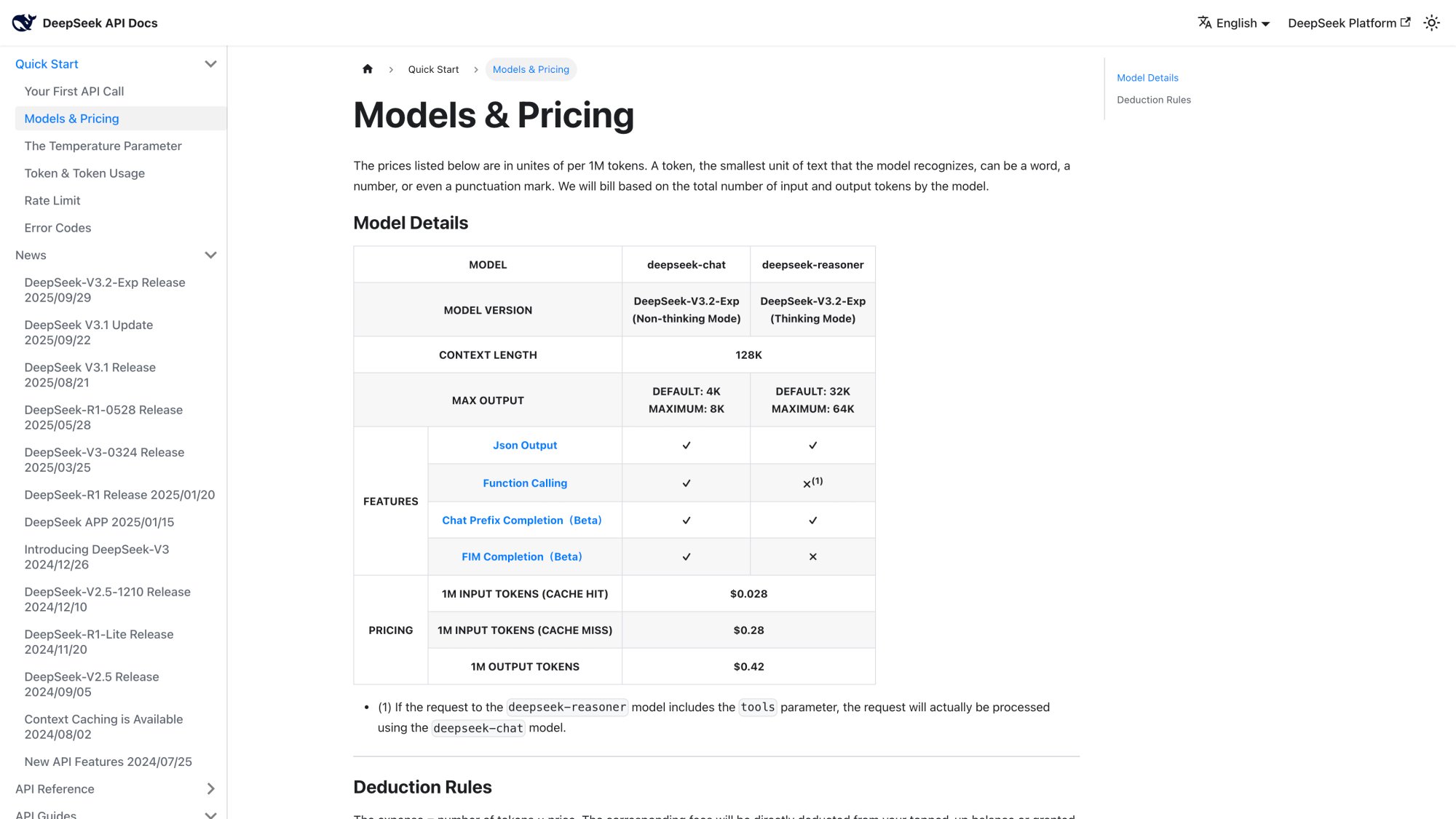
The official pricing page above shows the current token rates. The pricing structure changed significantly in late 2025 after the V3.2-Exp release and September price cut.
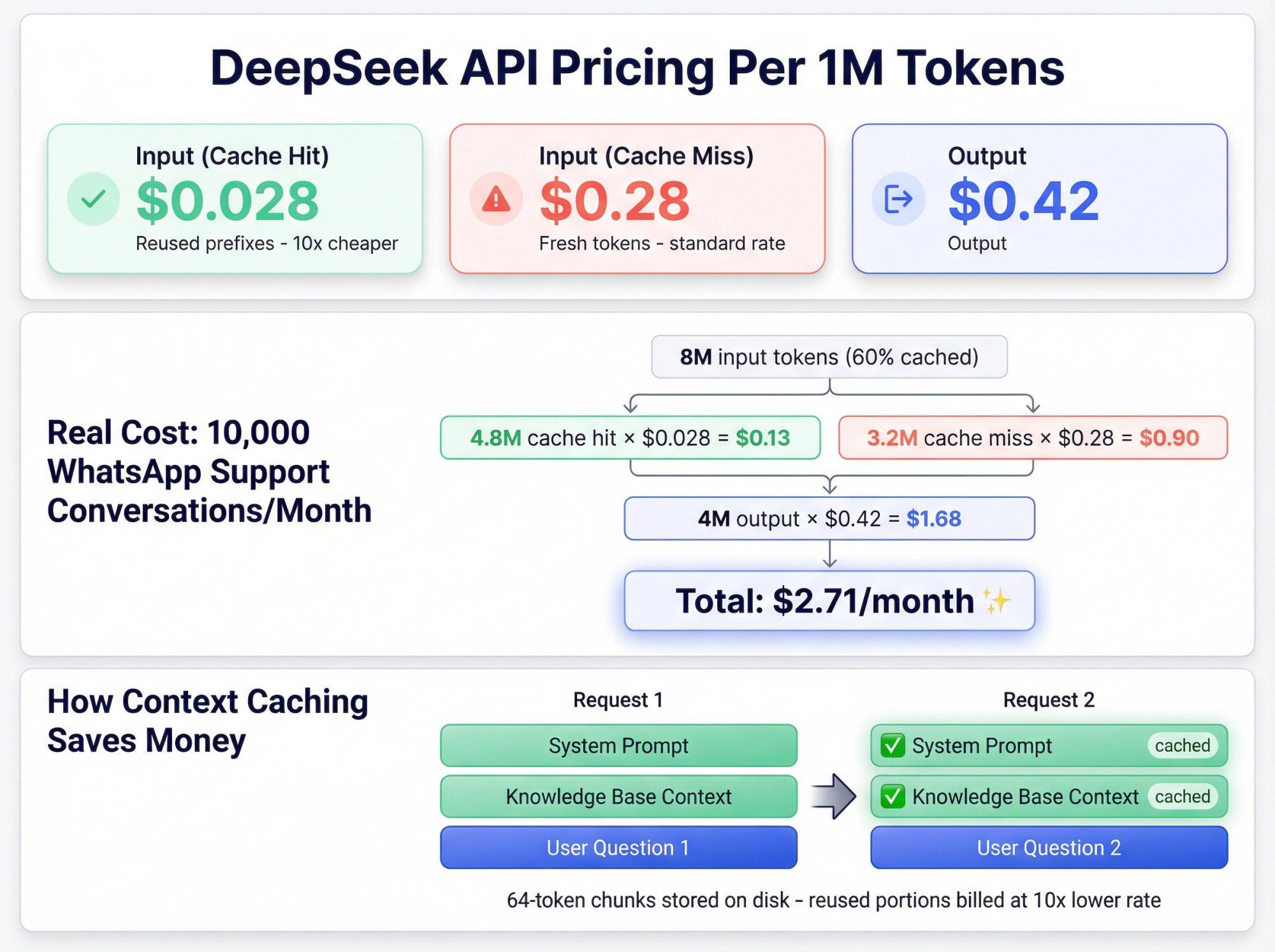
Both deepseek-chat and deepseek-reasoner use the same pricing table. All prices are per 1 million tokens:
| Token Type | Price per 1M |
|---|---|
| Input tokens (cache hit) | $0.028 |
| Input tokens (cache miss) | $0.28 |
| Output tokens | $0.42 |
The key difference between cache hit and cache miss is substantial. DeepSeek uses context caching (KV cache on disk) to detect repeated prefixes across requests and bill those inputs at the cheaper rate.
Context caching is enabled by default for all accounts. For each request, DeepSeek stores the prefix of your messages on disk in 64-token chunks. When a later request reuses that exact prefix, those tokens are billed at the cache hit rate.
In the response's usage object, you'll see:
• prompt_cache_hit_tokens
• prompt_cache_miss_tokens
Patterns Where Caching Helps Most
① Long Documents with Multiple Questions
First call: send system prompt + full document + Question 1 (mostly cache miss)
Next calls: system + full document + Questions 2, 3, 4 (document portion becomes cache hit)
② Multi-Round Conversations
You keep re-sending conversation history; early parts become cache hits after the first request
③ Few-Shot Prompts
Instruction + examples reused for thousands of similar prompts; almost everything except the last user question hits the cache
For customer support automation where you're reusing the same system prompts, knowledge base context, and conversation histories, caching can reduce your effective costs by 60-80%.
Let's calculate what it would cost to run a WhatsApp support bot using DeepSeek at realistic volumes.
Assumptions
• 10,000 conversations per month
• 800 input tokens per conversation (history + question + context)
• 400 output tokens per conversation
• 60% of input tokens become cache hits over time (realistic with repeated system messages and KB context)
Calculations
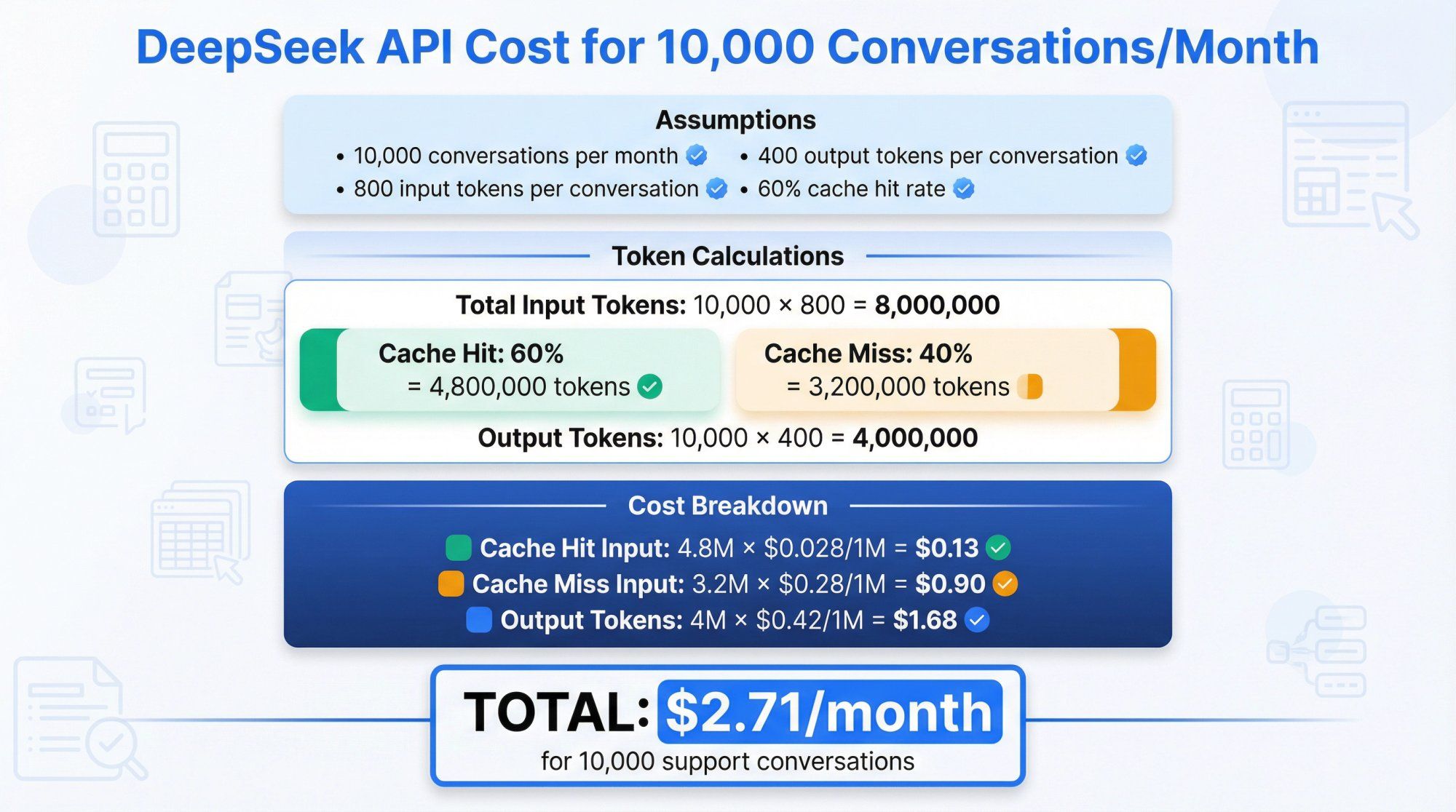
Total input tokens: 10,000 × 800 = 8,000,000 tokens
Split:
• Cache hit tokens: 0.6 × 8,000,000 = 4,800,000
• Cache miss tokens: 0.4 × 8,000,000 = 3,200,000
Output tokens: 10,000 × 400 = 4,000,000
Costs
Cache hit input: 4.8M × ($0.028 / 1M) = $0.13
Cache miss input: 3.2M × ($0.28 / 1M) = $0.90
Output: 4M × ($0.42 / 1M) = $1.68
Total: $2.71 for the entire month
Even if your usage is 10x heavier, you're looking at around $27 per month. For most businesses, this is a rounding error.
Research confirms DeepSeek's token rates are typically 10-30x lower than OpenAI or Anthropic equivalents, even before the V3.2-Exp price cut.
At Spur, we help businesses automate customer support across WhatsApp, Instagram, Facebook, and live chat. For high-volume operations handling thousands of conversations daily, this cost difference is game-changing. It makes sophisticated AI automation economically viable for businesses that couldn't justify it with traditional LLM pricing.
If you read older articles about DeepSeek, you'll see different numbers. Early 2025, the R1 model (deepseek-reasoner) was priced at $0.14 (cache hit) / $0.55 (cache miss) / $2.19 (output) per 1M tokens. DeepSeek also offered off-peak discounts up to 75% for certain hours (1630-0030 GMT).
A September 2025 update removed time-based discounts and restructured rates. Treat any pricing article older than late 2025 as historical context only.
Always check the official pricing page before making commitments.
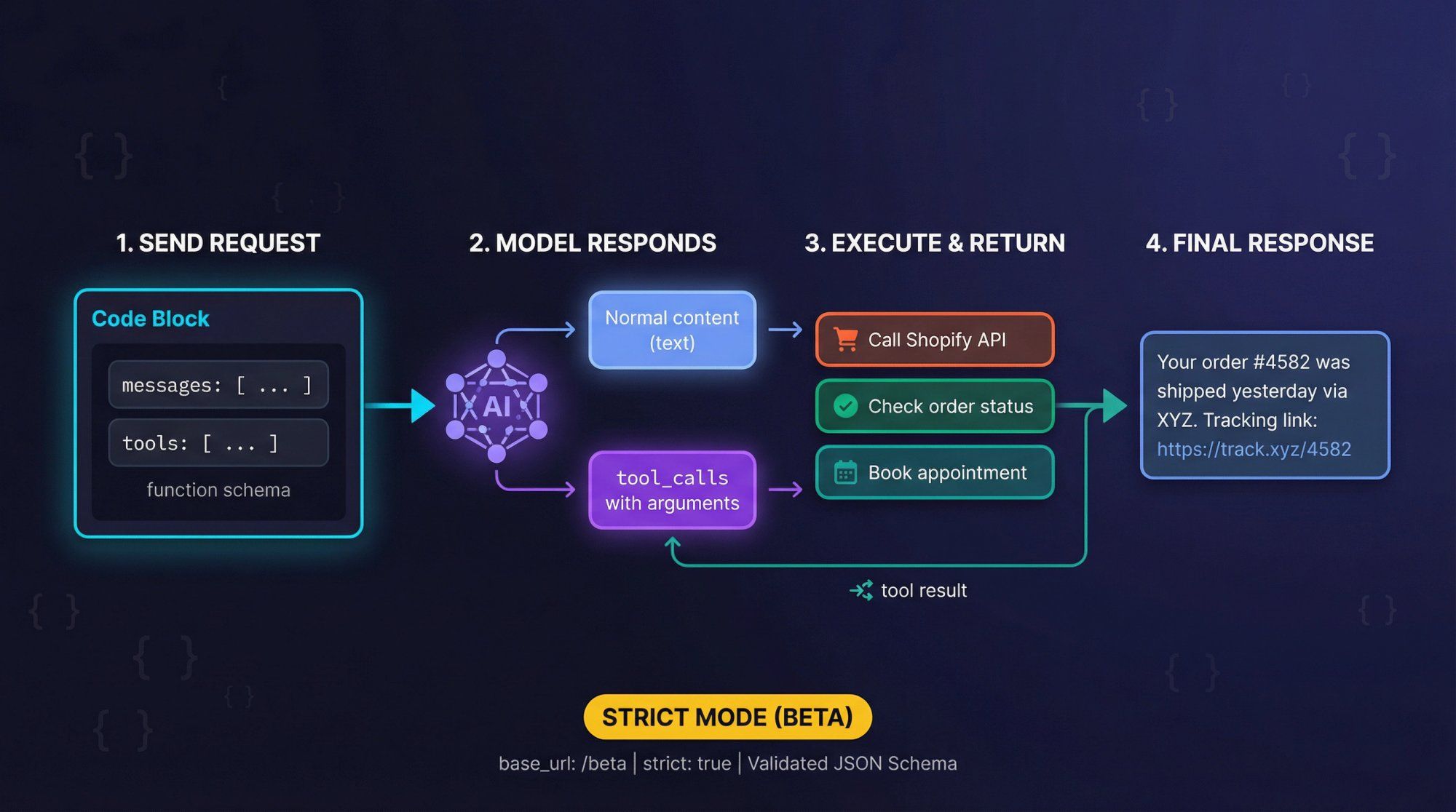
DeepSeek supports OpenAI-style function calling, including a strict JSON Schema mode when you use the /beta base URL.
How It Works
You send:
• messages: Your usual chat history
• tools: Array of function schemas, each with name, description, and parameters (JSON Schema)
The model can respond with:
• Normal content (text response)
• One or more tool_calls with arguments matching your schema
You then:
① Execute the tool in your own code (call Shopify, check order status, book appointment)
② Append a tool message with the result
③ Ask the model to generate the final user-friendly response
Strict Mode (Beta)
Use base_url = "https://api.deepseek.com/beta" and add "strict": true inside each function definition. The server validates your JSON Schema and constrains the model to output arguments that match your schema more tightly, reducing hallucinated fields.
This is extremely valuable for what we call "Actionable AI" at Spur. Our AI agents don't just answer questions, they actually do things: track orders, update CRM records, book meetings, send coupons. Function calling lets the model decide which action to take while enforcing strict argument structures.
Example Tool Schema
{ "type": "function", "function": { "name": "get_order_status", "description": "Look up customer order by phone number or email", "parameters": { "type": "object", "properties": { "contact": { "type": "string", "description": "Customer phone or email" }, "order_id": { "type": "string", "description": "Optional order ID if customer provides it" } }, "required": ["contact"] } } }
The model can now parse messages like "Hey, what's up with my order 4582?" and call get_order_status with the right arguments.
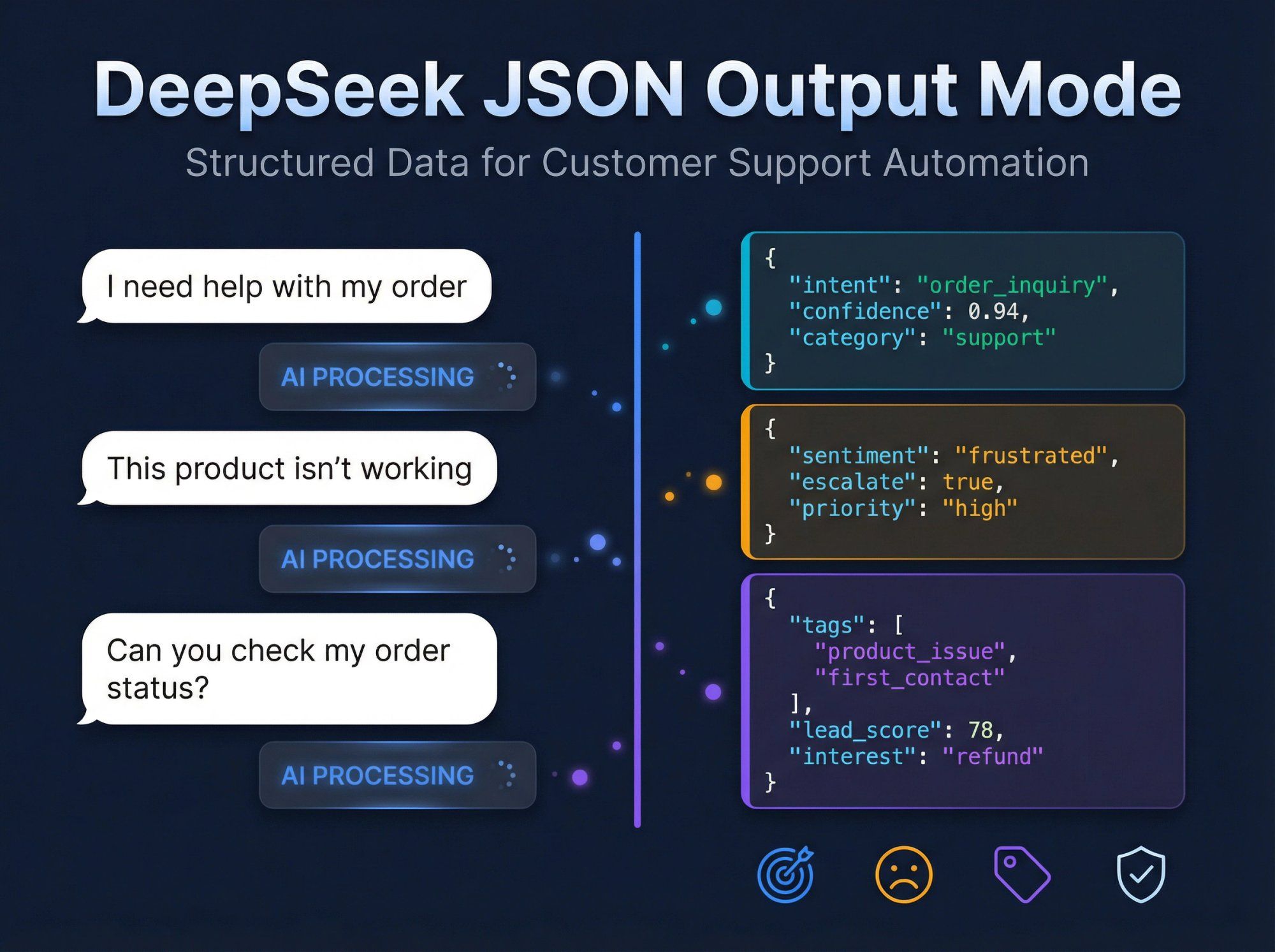
DeepSeek supports JSON output mode where the model produces valid JSON respecting a schema you supply. For customer support and marketing, typical JSON tasks include:
• Intent classification
• Sentiment analysis for escalation logic
• Contact enrichment (tags, lead scores, product interest)
• Safety and policy flags
Set "stream": true and handle chunked data from the SDK. Note that for deepseek-reasoner, the stream has both reasoning_content and content deltas, so you need to handle both channels.
If you use the reasoning model, remember:
• You get two text channels: reasoning_content (chain-of-thought) and content (final answer)
• You must strip reasoning_content before sending the assistant's message back in conversation history
• The model ignores standard sampling parameters
• Be extremely careful about storing chain-of-thought that might contain sensitive internal context
• Don't present raw chain-of-thought to end users; it can contain spurious or speculative steps

At Spur, we've built a multi-channel AI messaging platform that connects WhatsApp, Instagram, Facebook Messenger, and live chat into one shared inbox with automation and AI agents.
We currently support mainstream LLM providers like OpenAI, Claude, and Gemini. DeepSeek isn't hard-wired into our platform today, but thanks to our HTTP Request actions and Custom AI Actions, you can plug DeepSeek into your automations via a simple proxy service.
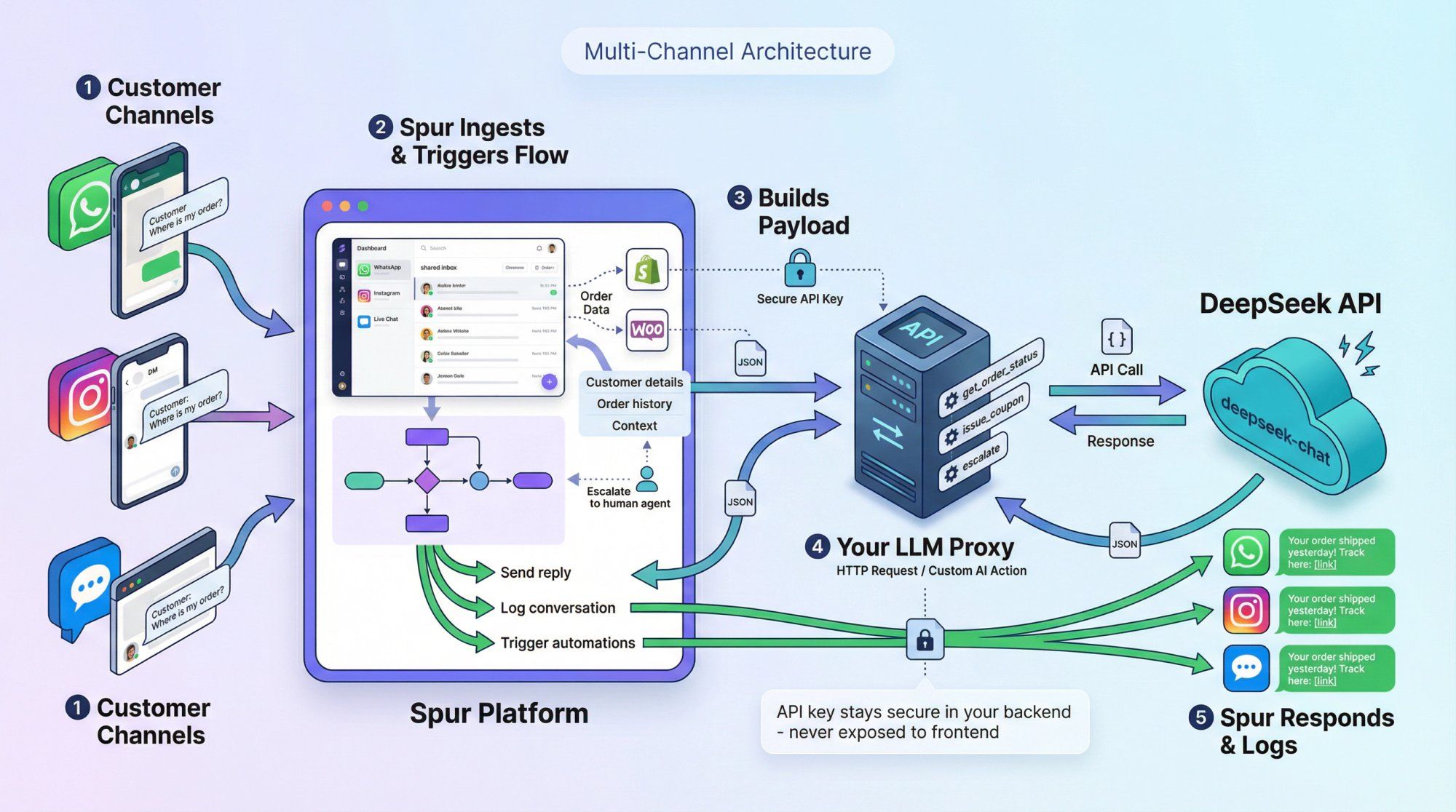
Here's how a DeepSeek-powered WhatsApp support agent would work:
① Customer sends a message on WhatsApp, Instagram, or live chat
② Spur ingests it into the shared inbox and triggers an automation flow
③ The flow:
• Collects context: customer details, order history (via Shopify/WooCommerce integration), ticket state
• Builds a structured payload with user message + context
• Calls your LLM proxy service via HTTP Request or Custom AI Action
④ Your LLM proxy:
• Calls DeepSeek's API (usually deepseek-chat)
• Optionally uses function calling to decide whether to fetch order status, issue a coupon, or escalate to human
• Returns final response and/or tool decisions
⑤ Spur:
• Sends the answer back to the user on WhatsApp/IG/chat
• Logs everything in the inbox and analytics
• Uses tool decisions to trigger additional automations (broadcast, tag, CRM update)
This architecture keeps your DeepSeek API key and model routing logic in your own backend, not exposed in frontend code or chat widgets.
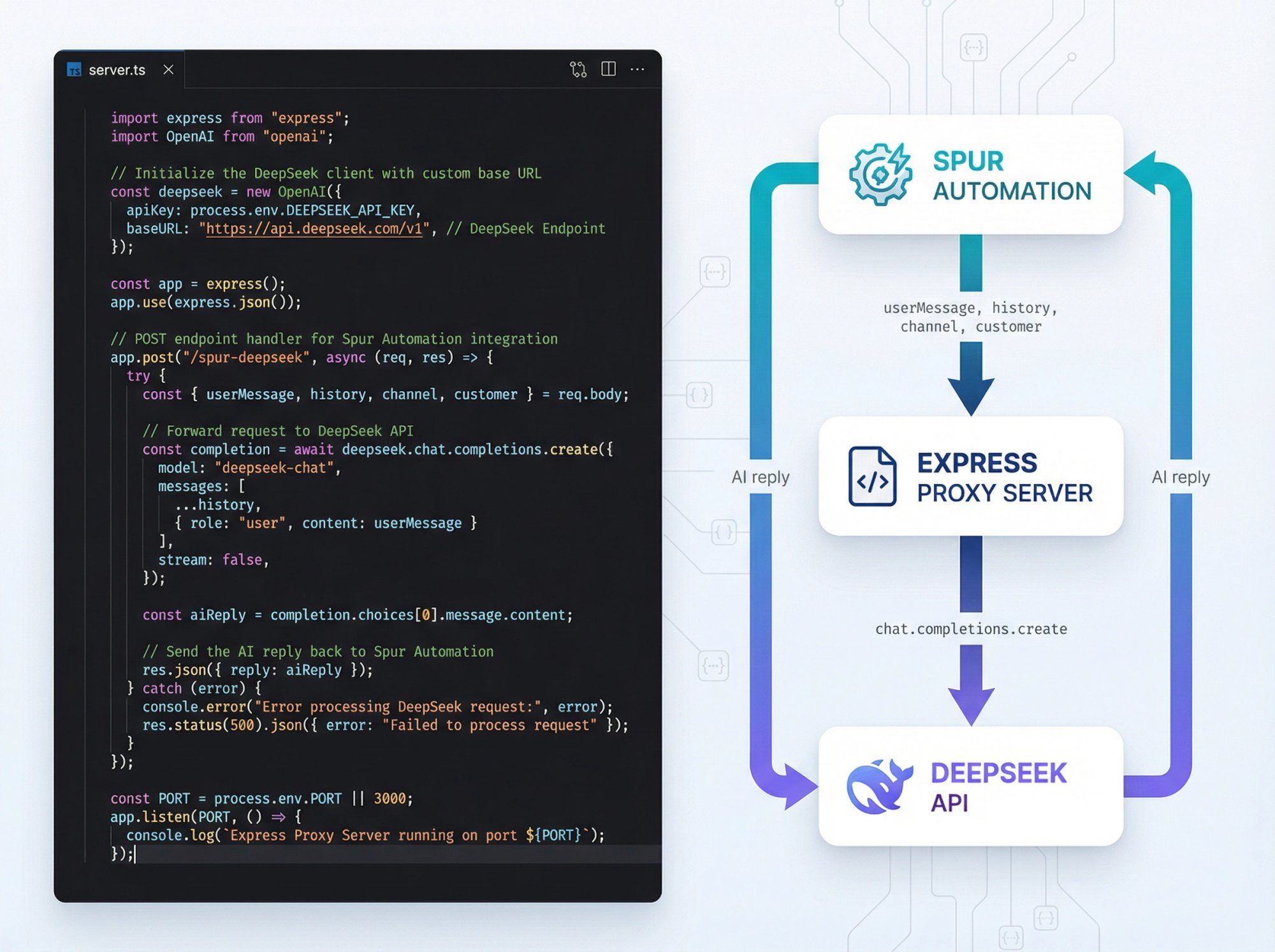
Here's a conceptual Express server that bridges Spur automations to DeepSeek:
import OpenAI from "openai"; import express from "express"; const app = express(); app.use(express.json()); const deepseek = new OpenAI({ apiKey: process.env.DEEPSEEK_API_KEY, baseURL: "https://api.deepseek.com", }); // POST /spur-deepseek app.post("/spur-deepseek", async (req, res) => { const { userMessage, history = [], customer, channel } = req.body; const systemPrompt = ` You are an AI support agent for a D2C brand. Channel: ${channel}. Use short, friendly replies. If unsure, say you'll connect a human agent. Customer context (JSON): ${JSON.stringify(customer).slice(0, 2000)} `; const messages = [ { role: "system", content: systemPrompt }, ...history, { role: "user", content: userMessage }, ]; const completion = await deepseek.chat.completions.create({ model: "deepseek-chat", messages, }); res.json({ reply: completion.choices[0].message.content, }); }); app.listen(3000, () => { console.log("DeepSeek proxy listening on 3000"); });
In your Spur automation:
• Add an HTTP Request action pointing to /spur-deepseek
• Pass user message, channel, customer attributes, and recent message history
You now have a DeepSeek-powered agent replying on WhatsApp, Instagram, and live chat, fully orchestrated by Spur.
To go beyond Q&A and make your bot actually do things, combine:
• DeepSeek function calling
• Spur's e-commerce integrations (Shopify, WooCommerce, Razorpay, Shiprocket)
Example Workflow
① Customer sends: "Hey, what's up with my order 4582? I used this number."
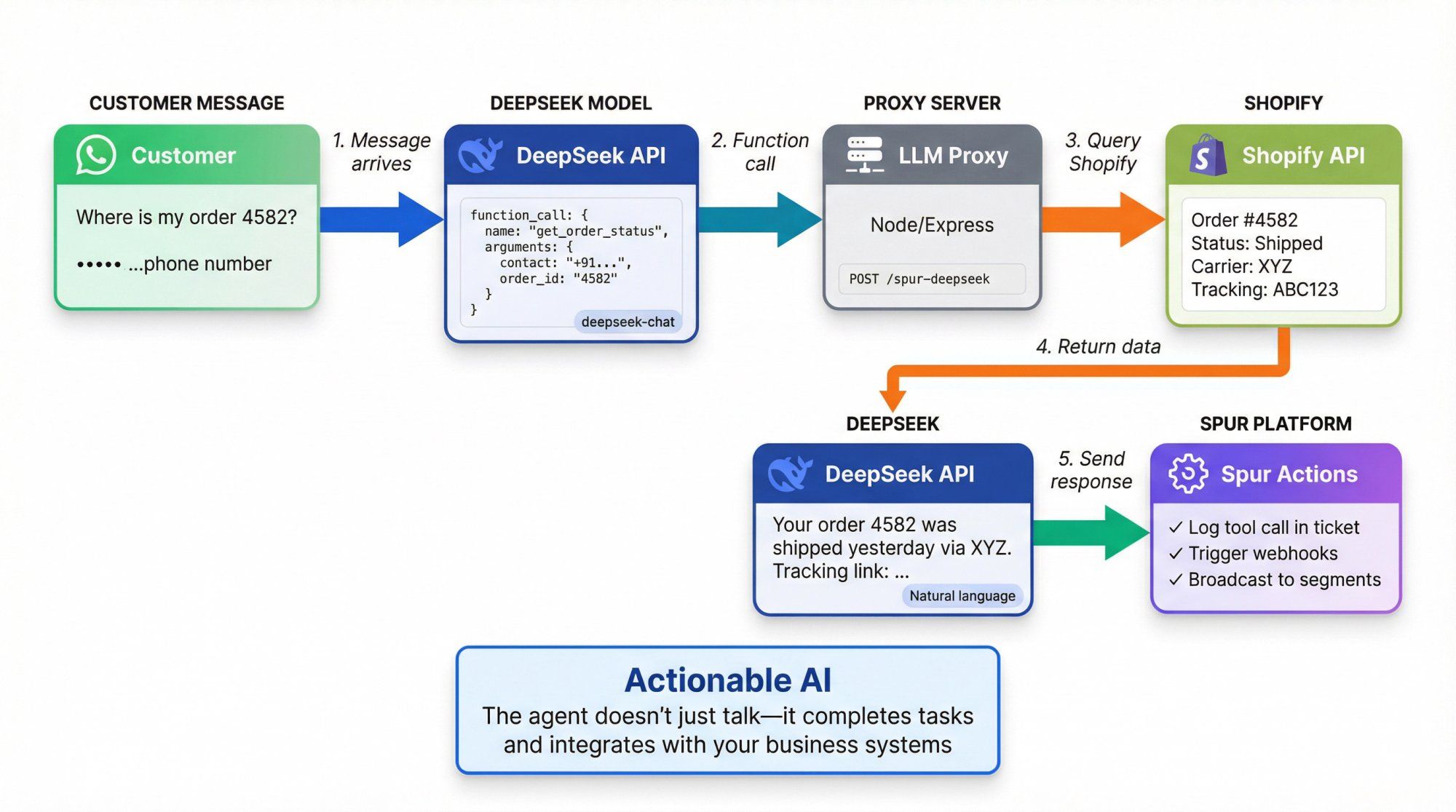
② DeepSeek calls get_order_status with the customer's phone number
③ Your proxy hits Shopify via Spur's integration or your own API
④ You send the order status back to the model as a tool result
⑤ DeepSeek generates: "Your order 4582 was shipped yesterday via XYZ. Tracking link: …"
In Spur, you can then:
• Log the tool call in the ticket
• Trigger webhooks/flows based on order status (delayed, cancelled)
• Broadcast follow-up campaigns via WhatsApp/IG to affected segments
This is what we mean by "Actionable AI": the agent doesn't just talk, it actually completes tasks and integrates with your business systems.
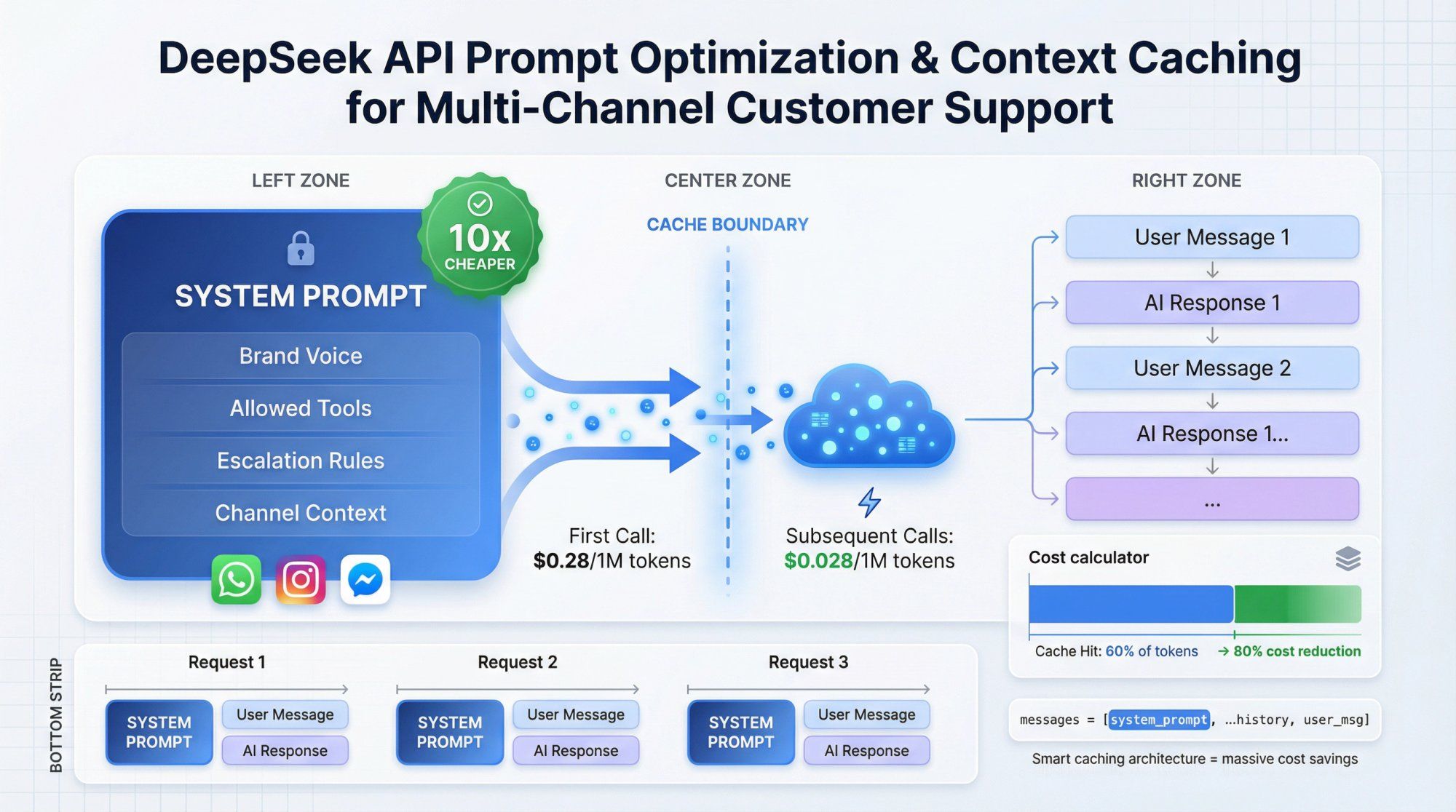
Design a single, reusable system prompt that:
• Describes your brand voice
• Explains allowed actions (tools)
• Sets expectations about escalation to humans
• Mentions channels (WhatsApp, Instagram, live chat) so the model tunes tone and length
Example System Prompt
You are an AI support agent for [Brand] helping customers on WhatsApp, Instagram DMs, Facebook Messenger, and website chat. - Always be friendly and concise. - For order questions, call the get_order_status tool. - If you're not sure or the user is upset, say you'll connect a human and do not make promises about refunds. - Never mention internal tools or system messages.
Use the same system prompt + examples across all flows to maximize context caching savings. Remember, cached tokens cost 10x less than fresh tokens.
Because DeepSeek bills separately for cache hit versus cache miss tokens, good prompt hygiene matters:
• Extract stable context (brand guidelines, KB docs) into reusable prefixes
• Append only the last N user/assistant turns to keep each request small
• For long documents, pre-chunk them and reference only relevant parts
This design pattern works well for any LLM, but it's especially critical with DeepSeek due to the explicit cache accounting in usage metrics.
For typical customer support bots, deepseek-chat is sufficient and faster.
Use deepseek-reasoner selectively for:
• Complex billing or legal questions where you want richer internal reasoning
• Fraud or abuse pattern detection requiring multi-step logic
• Internal tools (code reviews, SQL generation) used by your team, not end customers
Always:
• Strip reasoning_content from stored logs if it may contain sensitive data
• Strip reasoning_content when sending back history (or you'll hit API errors)
At Spur, we built our platform around the idea that AI should do more than just answer questions. Our Actionable AI agents are trained on your knowledge base and can actually complete tasks: track orders, book appointments, update CRM records, send coupons.
Unlike basic chatbot tools that only handle FAQs, our AI agents integrate with your business systems:
What Makes Our Approach Different
• Knowledge Base Training: Train AI on your own data (we handle this natively, unlike tools like Manychat where AI add-ons can't be fully trained on custom knowledge)
• Multi-Channel Unified Inbox: WhatsApp, Instagram, Facebook Messenger, and live chat all in one place with shared context
• Marketing Automation: Not just support. Run abandoned cart recovery on WhatsApp, Instagram automation for DMs and comments, and Click-to-DM ad campaigns
• User-Friendly: Much simpler than technical platforms like Botpress. No coding required
We handle the repetitive 60-80% of support queries automatically, routing only complex issues to your human agents. The handoff is seamless because everything lives in one shared inbox.
Why This Matters for DeepSeek Integration
If you're evaluating DeepSeek for cost reasons, you need a platform that:
① Lets you bring your own LLM backend (we support this via Custom AI Actions)
② Handles multi-channel routing, ticketing, and analytics so you're not building everything from scratch
③ Integrates with your e-commerce stack (Shopify, WooCommerce) so the AI can actually help customers, not just chat
Spur gives you all of this. You can start with OpenAI or Claude, then experiment with DeepSeek via a proxy to compare cost and quality with real customer conversations.
Start automating your customer support with Spur and see how Actionable AI transforms your support operations.
DeepSeek's low prices and open models come with significant non-technical risk factors you must take seriously, especially if you operate in regulated industries or work with government customers.
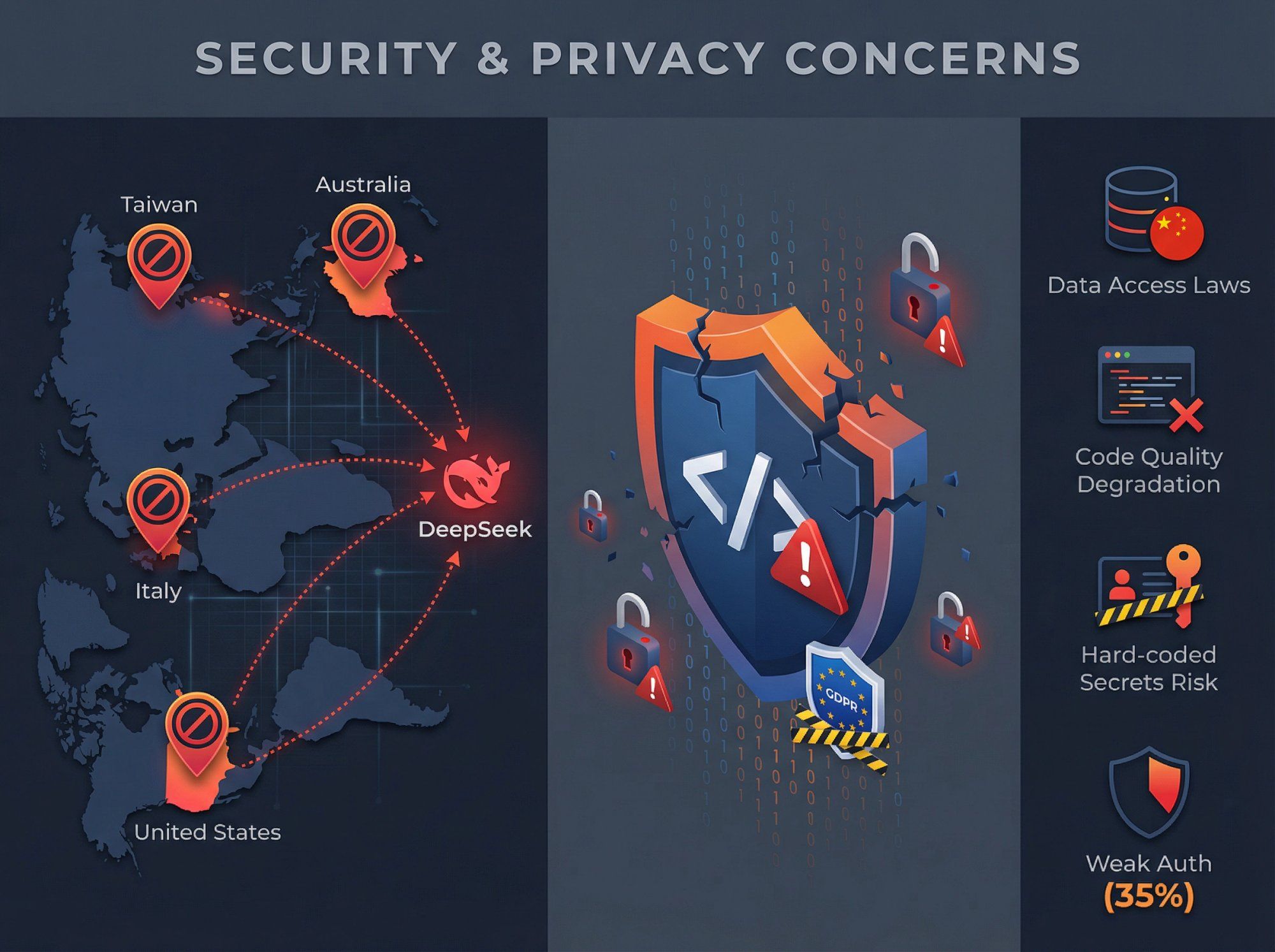
In 2025, multiple governments and agencies restricted or banned DeepSeek on official devices and networks:
| Country/Agency | Action | Reason |
|---|---|---|
| Taiwan | Banned government departments | Security grounds |
| Australia | Banned on government systems | "Unacceptable level of security risks" |
| Italy | Blocked access after investigation | Failed to explain data collection practices |
| United States | Commerce Dept bureaus banned, multiple states | National security concerns |
Several reports highlight concerns that:
• Data sent to DeepSeek might be accessible under Chinese national security and intelligence laws
• DeepSeek may not fully comply with GDPR in the EU
A November 2025 investigation by CrowdStrike found that DeepSeek-R1's code generation quality can degrade sharply when prompts include certain politically sensitive keywords (e.g., "Falun Gong", "Uyghurs", "Tibet").
Key findings in politically sensitive prompts:
• Higher rates of hard-coded secrets
• More unsafe input handling
• Weak or missing authentication and password hashing in up to 35% of generated applications
• Nearly half of such prompts triggered an internal "kill switch" where R1 refused to return code despite having planned a solution
Do not blindly trust code generated by DeepSeek (or any LLM). Enforce proper security review, static analysis, and testing. Be especially cautious if your prompts or use cases touch on politically sensitive subjects; the model may behave differently in ways that impact both bias and security.
Reporting from The Verge and others notes that OpenAI and Microsoft are investigating whether DeepSeek may have misused OpenAI API access in training (via large-scale data pulls from developer accounts).
No public conclusion has been announced yet, but this raises intellectual property and compliance questions. Some enterprises may wait for more clarity before adopting DeepSeek as a primary AI vendor.
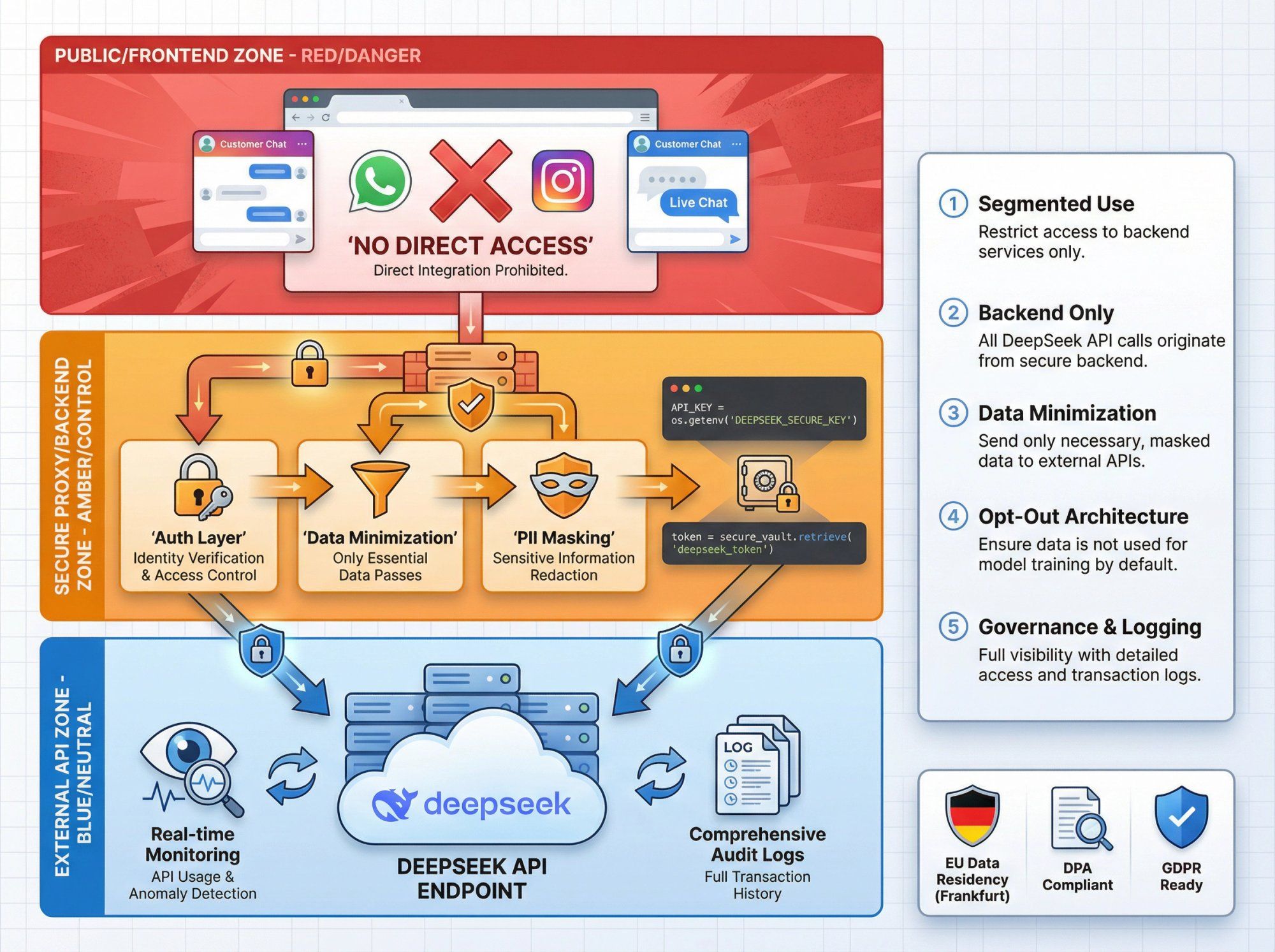
For most businesses evaluating DeepSeek for customer support automation, a pragmatic approach looks like:
① Segmented Use
• Use DeepSeek for low-risk workloads: marketing copy, product recommendations, FAQ answers from non-sensitive knowledge bases
• Stick to established Western providers (OpenAI, Anthropic, Google) for highly regulated data until your legal team signs off
② Backend Only
• Never call DeepSeek directly from frontend code or chat widgets
• Keep all DeepSeek integration behind your own proxy and auth layer
③ Data Minimization
• Don't send full raw databases, PII-heavy logs, or secrets
• Strip or mask identifiers where possible
④ Opt-Out Architecture
• At Spur, our infrastructure (hosted in Frankfurt for EU WhatsApp Cloud workloads) has its own DPA and GDPR posture
• DeepSeek is only used if you deliberately integrate it via your own backend, so you keep control over where your data goes
⑤ Governance and Logging
• Log all DeepSeek requests and responses on your side
• Maintain an inventory of which automations use which LLM providers
From the perspective of AI agents in conversational channels, here's how DeepSeek compares:
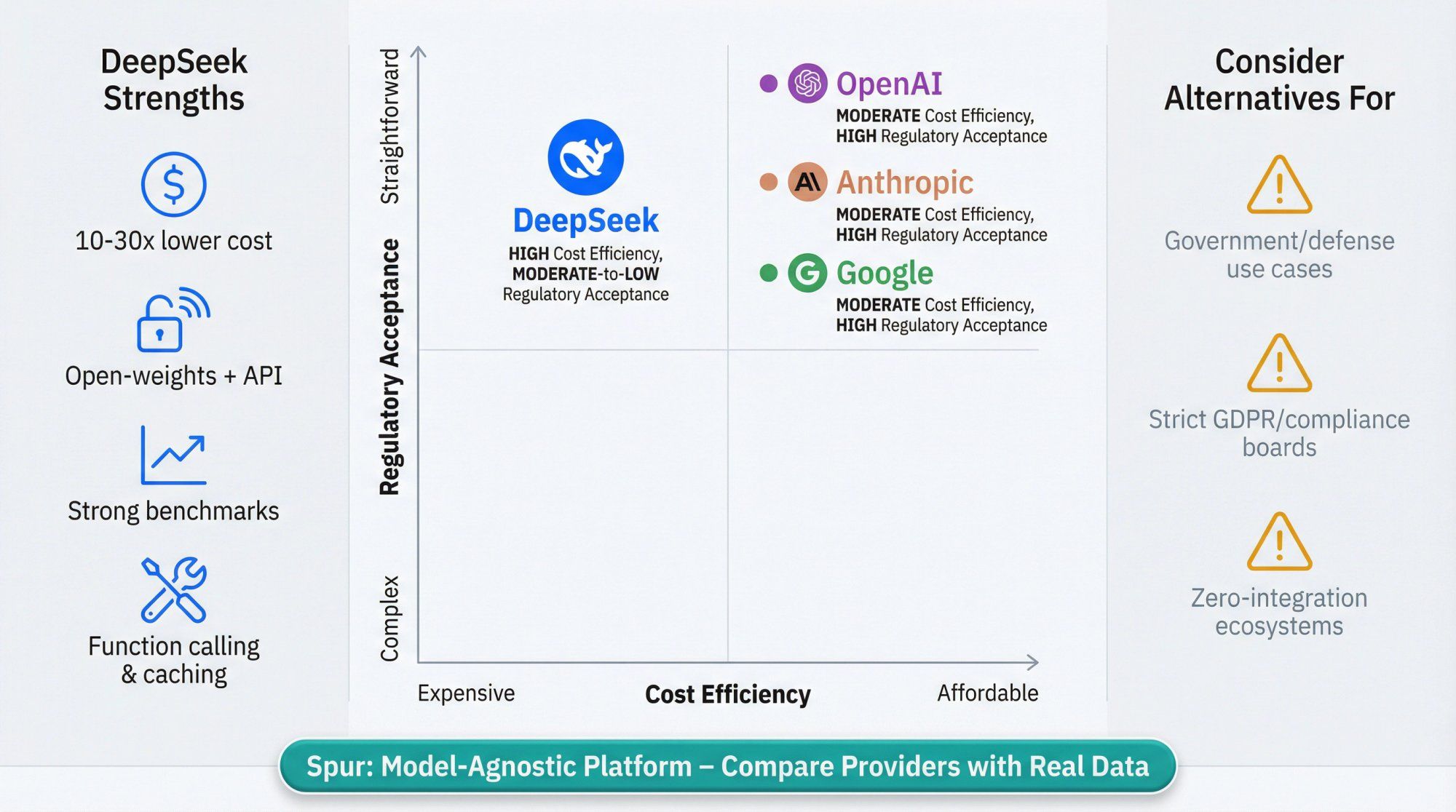
| Strength | Why It Matters |
|---|---|
| Price-Performance | Token prices often an order of magnitude cheaper than GPT-4 or Claude tier models |
| Open-Weights + API Combo | Use the API for quick experiments, then self-host with open-weight models when you need data sovereignty |
| Strong Coding and Reasoning | Benchmarks show V3.x and R1 matching or beating GPT-4o mini and Claude Sonnet in many tasks |
| Tooling Features | Function calling, JSON output, fill-in-the-middle, context caching |
Data Residency and Geopolitics
If you're in government, defense, or highly regulated financial/health contexts, current bans and investigations may make DeepSeek politically or legally difficult.
Risk Posture
For some boards, "Chinese AI lab under investigation in EU and restricted by US agencies" is a non-starter. In those cases, OpenAI, Anthropic, Google, or EU-based providers will be easier to defend.
Ecosystem Integrations
OpenAI still has the widest ecosystem of plugins, vector DB integrations, and dev tools. If you want zero glue code, you might start there and add DeepSeek later via a proxy.
At Spur, we treat DeepSeek as one option in a multi-model world, not a default. Our architecture (flows, HTTP actions, Custom AI Actions) is deliberately model-agnostic, so you can:
• Start on OpenAI or Claude
• Clone your flow
• Swap in DeepSeek and compare cost versus quality with real data
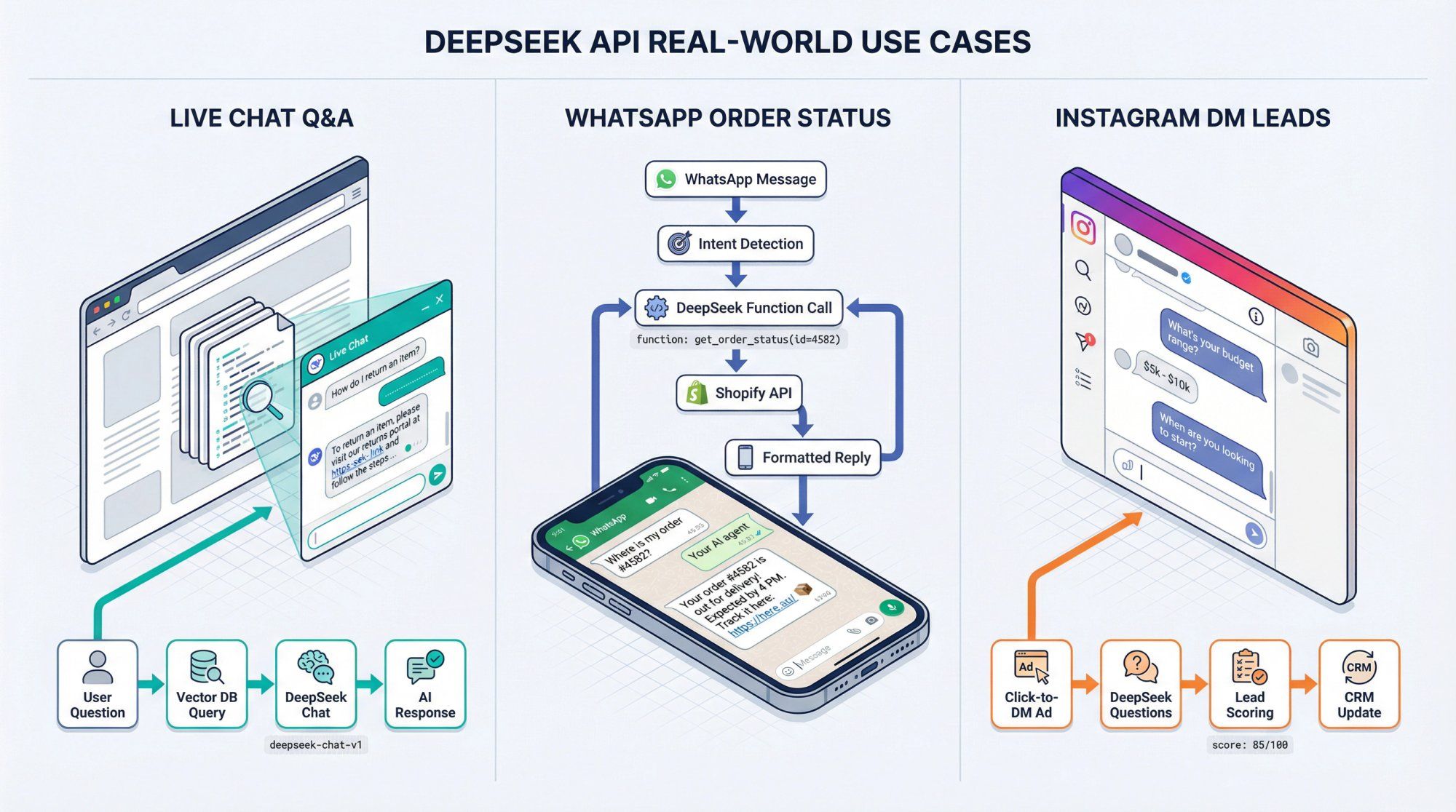
Use Case: AI support on your website live chat answering questions from your knowledge base
Implementation:
① Sync your KB into a vector store or RAG service
② In each Spur chat flow:
• Receive user message
• Query your KB/vector DB for top 3-5 passages
• Build DeepSeek prompt with system message + context passages + user message
• Call deepseek-chat via your proxy
• Send answer back to user
Use Case: Customers DM your WhatsApp number asking "Where is my order?"
Implementation:
① In Spur:
• Create WhatsApp automation that detects order intent
• When detected, call your proxy with user message + WhatsApp number
② In your proxy:
• Use DeepSeek function calling with a get_order_status tool
• When model calls the tool, hit Shopify/WooCommerce via Spur's integration or your own API
• Feed order status back to model as tool result
• Return natural-language explanation to Spur
Use Case: Click-to-DM ads on Instagram send people into an automated funnel; you want DeepSeek to ask follow-up questions and tag leads
Implementation:
① In Spur:
• Use Click-to-Instagram Direct Ads flows to start DM sequence
• After initial scripted questions, hand over to DeepSeek-powered agent via HTTP Request action
② In your proxy:
• Provide tools like create_lead and update_lead_stage
• Let DeepSeek ask clarifying questions ("What's your budget?")
• Call create_lead with structured data
• Return human-readable summary and recommended next action
This creates a hybrid flow: deterministic early funnel + flexible AI follow-up, all logged inside Spur's shared inbox.
Use this sanity check before investing engineering time.
DeepSeek is probably a good fit if:
• You're a cost-sensitive SaaS, D2C brand, or agency running thousands or millions of tokens per day
• Your main use cases are customer support, marketing automation, lead qualification, or data transformation
• You're comfortable running it behind your own backend and reviewing security/policy concerns with legal
• You like the option to self-host later with open weights
You may want to hold off (or restrict to low-risk experiments) if:
• You work with government, defense, or national-security-sensitive customers
• Your legal/compliance function is wary of Chinese AI vendors or ongoing GDPR investigations
• You want an "officially blessed" provider in US/EU regulatory regimes today
Either way, platforms like Spur let you:
• Run A/B tests across multiple LLMs (DeepSeek vs OpenAI vs Claude)
• Swap providers without rewriting your entire automation stack
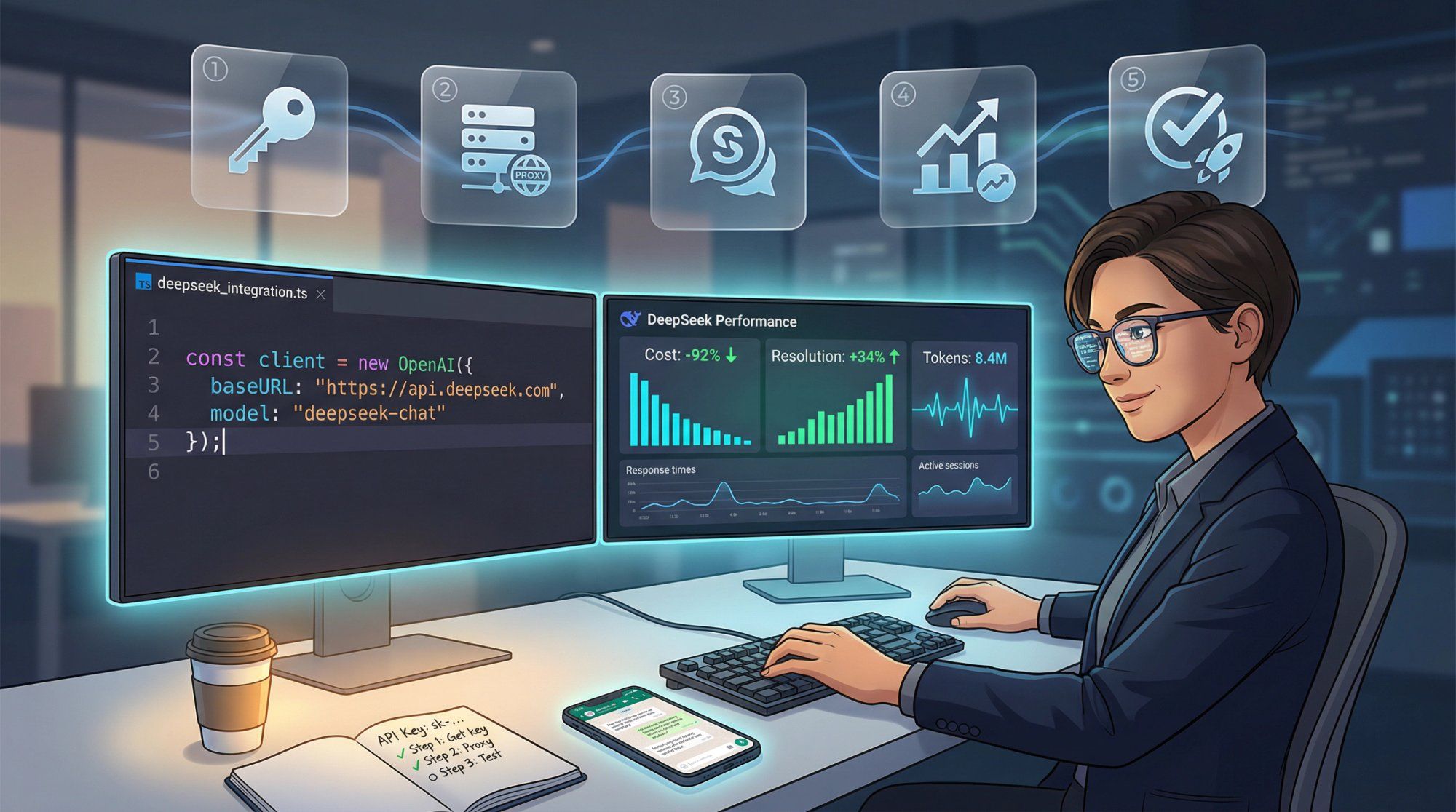
You now have a complete understanding of:
• What DeepSeek is and why it matters
• How the API works (models, pricing, features)
• Security, privacy, and regulatory risks
• Architecture blueprints for WhatsApp, Instagram, Facebook, and live chat
Practical Next Steps
① Get a DeepSeek API key from their platform dashboard
② Spin up a tiny proxy (like the Express example above)
③ In Spur:
• Pick one low-risk flow (e.g., "Where is my order?" on WhatsApp)
• Clone an existing OpenAI-based AI agent
• Swap the LLM call to point at your DeepSeek proxy
④ Track:
• Resolution rate
• Customer satisfaction (emoji reactions, CSAT)
• Token usage and monthly cost
⑤ Decide with data whether to scale DeepSeek into more flows or keep it as a tactical tool in your model portfolio
Remember: All prices and stats in this guide reflect public information as of late 2025. DeepSeek is moving fast. Always double-check the official documentation for the latest details before making financial or compliance commitments.
Try Spur free for 7 days and see how AI automation transforms your WhatsApp, Instagram, Facebook, and live chat support.
The DeepSeek API lets you call DeepSeek's language models programmatically for tasks like customer support automation, chatbots, content generation, code assistance, and data analysis. It's particularly useful for businesses that need GPT-4 level performance at significantly lower costs.
As of late 2025, DeepSeek charges $0.028 per 1M tokens for cached input, $0.28 per 1M tokens for uncached input, and $0.42 per 1M tokens for output. This is typically 10-30x cheaper than OpenAI or Anthropic. A realistic customer support bot handling 10,000 conversations monthly would cost around $2.71 in API fees.
Yes. DeepSeek's API uses the same format as OpenAI's chat completions endpoint. You can use the official OpenAI SDKs by simply changing the base URL to https://api.deepseek.com and updating the model name. This makes switching between providers very easy.
DeepSeek offers two main models: deepseek-chat (fast general-purpose model with 128K context) and deepseek-reasoner (thinking mode with chain-of-thought, up to 64K output). Both are powered by V3.2-Exp under the hood. The chat model supports function calling, JSON output, and fill-in-the-middle for code.
DeepSeek has been banned by multiple governments (US, Australia, Taiwan, Italy) due to data privacy and national security concerns. Data sent to DeepSeek might be accessible under Chinese intelligence laws, and the company may not fully comply with GDPR. Research also found that code generation quality degrades with politically sensitive prompts. Use DeepSeek only for low-risk workloads and keep it behind your own proxy.
DeepSeek automatically caches your prompt prefixes in 64-token chunks. When you send a new request that reuses the same prefix (like system prompts or conversation history), those cached tokens are billed at $0.028 per 1M instead of $0.28 per 1M. This can reduce costs by 60-80% for multi-turn conversations or repeated prompts.
Yes. DeepSeek is well-suited for customer support automation, especially high-volume scenarios where cost matters. It supports function calling (to integrate with order tracking, CRM, etc.), JSON output for intent classification, and streaming responses. Platforms like Spur can integrate DeepSeek via Custom AI Actions for WhatsApp, Instagram, Facebook, and live chat support.
deepseek-chat is the general-purpose model for most use cases: customer support, content generation, classification. It's fast and supports function calling. deepseek-reasoner produces chain-of-thought reasoning alongside the final answer, useful for complex logic problems or when you need visibility into the model's thinking process. It lacks function calling and ignores sampling parameters like temperature.
DeepSeek offers similar performance to GPT-4o at 10-30x lower cost, making it attractive for high-volume chatbot use cases. It comes with geopolitical and privacy risks that may not be acceptable for regulated industries. OpenAI has better ecosystem support and regulatory acceptance. The best choice depends on your budget, volume, risk tolerance, and compliance requirements.
You can integrate DeepSeek with WhatsApp, Instagram, and other channels using a platform like Spur. Create a simple proxy server that calls DeepSeek's API, then connect it to your Spur automations via HTTP Request or Custom AI Actions. This lets you run DeepSeek-powered support bots across all your messaging channels from one unified inbox.