WhatsApp Max Price: How to Set It and What It Costs

Discuss with AI
Get instant insights and ask questions about this topic with AI assistants.
💡 Pro tip: All options include context about this blog post. Feel free to modify the prompt to ask more specific questions!
WhatsApp max price lets you set a ceiling on what you pay for each marketing message delivery, and Meta charges you that amount or less. You set it per template as a bid_amount, priced per 1,000 deliveries, and Meta's delivery system decides how many of your messages get through at the price you named. It is optional today. Under Meta's current plan it becomes mandatory in eligible markets from Q2 2027.
That single change turns WhatsApp marketing from a fixed price list into something with the controls of a Meta ads bid cap, which is a bigger shift than the WhatsApp service message pricing change most brands are focused on right now.
Two dates matter. Limited Beta has been running since 15 May 2026. Open Beta is scheduled for October 2026, which means any partner can switch it on for the clients it has integrated. If you send marketing templates on the WhatsApp Business API, this can reach you within weeks, though only if your provider has built the Marketing Messages API integration and your market is eligible.
Spur works with 600+ D2C brands on WhatsApp, and the questions we keep getting are the practical ones. What number do I actually put in the field. Does it work on my existing templates. What breaks. This guide answers those from Meta's own documentation.
Checked against Meta's max-price documentation on 8 September 2026.
What WhatsApp max price actually does
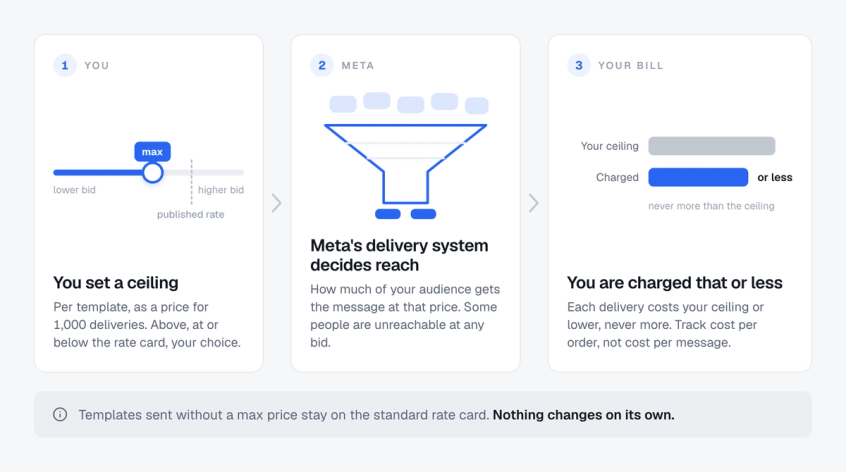
Today, a marketing template costs a published rate. You send it, you pay that rate for each delivered message, and the only variable is the recipient's country.
Max price replaces that with a ceiling you choose. Meta charges your ceiling or lower for each delivery, never more. In exchange, Meta's delivery system gets to decide how much of your audience it reaches at that price.
Meta is explicit that this changes nothing about standard billing. Messages sent without a max price still use the rate card exactly as before. Nothing about your current setup breaks on its own.
The interesting part is that you can set your ceiling above, at, or below the published rate, and each choice does something different.
| Where you set it | What happens | Use it for |
|---|---|---|
| Same as the published rate | Delivery stays comparable to your campaigns today, and you may pay less than the rate on some deliveries | Always-on sends, regular promotions |
| Below the published rate | You reach a broader spread of customer cohorts for less money, trading some delivery performance for cost | Prospecting, cost-sensitive sends, top of funnel |
| Above the published rate | Meta suggests a higher ceiling for the moments engagement matters most, such as holidays and peak sales periods | Festival sales, launches, peak periods |
Read that middle row again, because it is the counterintuitive one. Setting your ceiling below the rate card does not just mean fewer messages get through. Meta describes it as reaching a wider spread of customer groups at a lower cost. You are buying cheaper, less contested attention rather than simply buying less of it.
One honest limit before you get excited about the top row. Bidding higher does not buy you everyone. Some people cannot be reached at any price: accounts that are inactive, people who have already hit WhatsApp's limits on how many marketing messages they can receive in a period, and cases where there is simply no delivery slot available. Meta also says what you are actually charged can come in below your ceiling depending on factors like user engagement and supply health, so the ceiling is a cap, not the price. How reach responds as you raise that cap is something Meta has not published a curve for. Measure it on your own campaigns rather than assuming one.
Most brands still have no idea what a WhatsApp conversation costs them. Start with the fundamentals of WhatsApp Business API pricing before you start bidding.
The word Meta buried in the API
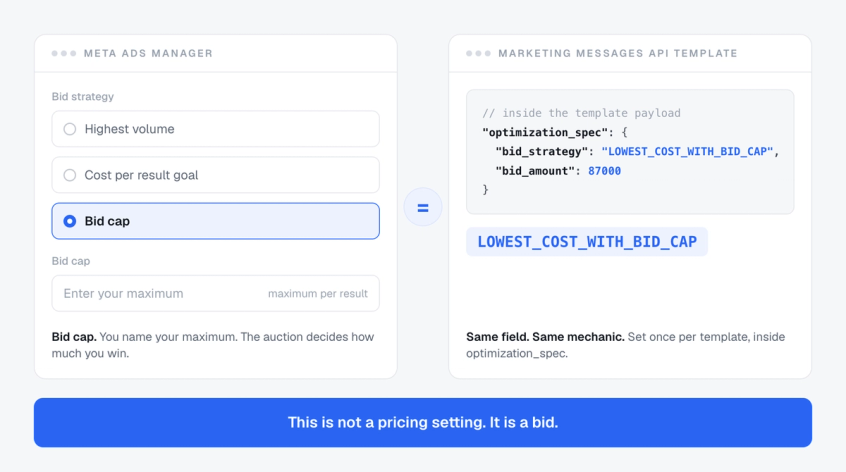
Here is the detail that tells you where this is going. When you create a template with a max price, you pass an object called optimization_spec, and inside it sits a field called bid_strategy. Its value is LOWEST_COST_WITH_BID_CAP.
A naming note first, because this will trip you up in older guides. That object used to be called bid_spec. Meta renamed it to optimization_spec on 18 June 2026 for creating, reading and updating templates, and stopped accepting bid_spec there after 31 July 2026. The two fields inside it, bid_amount and bid_strategy, did not change. Only the wrapper did. One wrinkle: the send call still uses a bid_spec object, holding only the per_message_bid_multiplier. So a tutorial that puts bid_spec on the template will now fail, while one that puts it on the send call is still correct.
Anyone who has run Meta ads recognises that immediately. It is bid cap language, lifted straight from the ads auction.
So the honest description of max price is not a cost control setting. It is a bid. Meta has not published a full picture of how delivery is decided when businesses set different ceilings, but the controls are bidding controls: you name the most you will pay, and the delivery system decides how far that goes.
That changes how you plan. A bid does not have a single right answer the way a fixed price does. Meta's own guidance is to bid above the rate card when engagement matters most, during holidays and peak sales periods, which tells you the number that works in September may not be the right one for Diwali or Black Friday. So this becomes something you tune through the year, not something you set once and forget.
It also explains why Meta built a reach estimation tool alongside it. Bids need forecasting.
How the numbers work
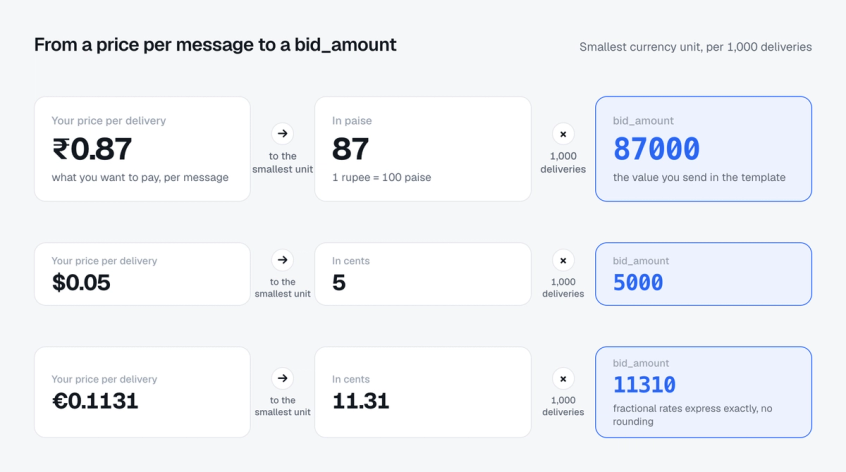
This is where most coverage stops and where the practical confusion starts. The bid_amount field is not your per-message price. It is two conversions away from it.
The bid_amount is your maximum price for 1,000 deliveries, written in the smallest unit of whichever currency your WhatsApp Business Account bills in. Paise for rupees. Cents for dollars and euros. Pence for pounds. Your WhatsApp Business Account, often shortened to WABA, is the Meta-side account your numbers and templates live under, and its billing currency is fixed when it is set up.
The conversion is two steps. Take your desired per-delivery price, convert it to the smallest currency unit, then multiply by 1,000.
Meta's own example: to set 0.87 rupees per delivery, convert to 87 paise, multiply by 1,000, and set bid_amount to 87000. For $0.05 per delivery, that is 5 cents, so bid_amount is 5000.
Applied to the current rate card, if you wanted to bid exactly at the published marketing rate in each market. Two labels matter here. The recipient's market sets the rate you pay, and your WABA's billing currency sets which currency card and smallest unit you convert with. Treat the European rows as arithmetic examples: Meta does not currently apply delivery optimisations to messages sent to or from the EEA or the UK, so read the geographic notes further down before planning around them.
| Market | Marketing rate | Smallest unit | bid_amount |
|---|---|---|---|
| India | ₹0.8631 | 86.31 paise | 86310 |
| Germany | €0.1131 | 11.31 cents | 11310 |
| Italy | €0.0658 | 6.58 cents | 6580 |
| Spain | €0.0585 | 5.85 cents | 5850 |
| United Kingdom | £0.0458 | 4.58 pence | 4580 |
| Brazil | $0.0625 | 6.25 cents | 6250 |
There is a hidden benefit in that per-1,000 framing. Because you are pricing a thousand deliveries at once, you get three extra decimal places of precision on the per-message price. You can bid the equivalent of a thousandth of a paise. Fractional rates like 0.1131 euro express perfectly as 11310, with no rounding.
Get the order of magnitude wrong here and you will either bid a thousand times too little and deliver nothing, or a thousand times too much. Check the zeroes.
Once max price is on, Meta's delivered and read webhooks include a cost object with the estimated charge for that message. Use it. The ceiling is what you are willing to pay, not what you are billed, and the invoice is the final word.
Setting your first max price
Step 1: Pick the campaign, not the account. Max price is set per template, so choose one campaign type to start with. An always-on flow with steady volume gives you cleaner signal than a one-off blast.
Step 2: Create a new template. You cannot add a max price to a template you already have. More on why below.
Step 3: Convert your target price. Smallest currency unit, times 1,000. Sanity-check it against the table above before you send.
Step 4: Run Meta's four-arm test rather than guessing a number. Meta's published recommendation is to split a similar audience over a similar time window into four groups of around 10,000 send requests each: no max price, max price at the rate card, max price at 1.5 times the rate card (1.2 times for India and Saudi Arabia), and max price at 0.9 times the rate card. The no-max-price arm is your standard-pricing baseline. Parity is a test condition, not a safe default.
Step 5: Ramp slowly. Meta explicitly recommends increasing volume gradually on a new max-price template rather than going straight to full scale, because the delivery system needs volume to optimise against. This mirrors normal template pacing practice.
Step 6: Measure cost per outcome, not cost per message. A lower ceiling that reaches worse cohorts can raise your true cost per order while lowering your cost per message. Only outcome data tells you which happened.
Step 7: Then move the bid. Once you have read all four arms, test one direction at a time from the winner.
Bidding on messages you are not measuring is just spending faster. Spur ties WhatsApp message cost to Shopify revenue per conversation, so you can see what a delivery is actually worth before you set a ceiling on it. Start free with Spur.
The reach estimation tool
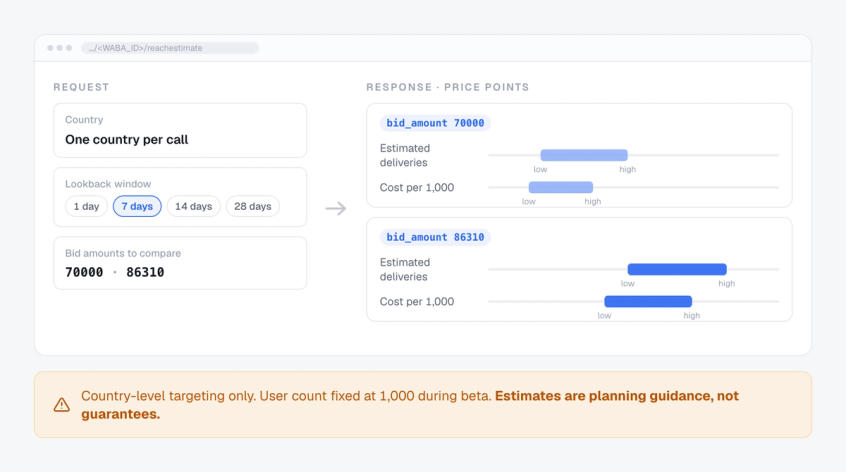
The second feature ships alongside max price and answers the obvious question: what do I actually get at this price?
You call a reachestimate endpoint on your WhatsApp Business Account, pass a country and a lookback window, and get back a set of price points with expected outcomes at each.
The lookback options are last 1, 7, 14 or 28 days. For each bid amount, the response gives you a delivery range, a low and high estimate, plus a cost range per 1,000 deliveries.
Two limitations worth knowing before you plan around it. Targeting is country-level only, so there is no segment or cohort targeting in the estimate. And the targeted user count is fixed at 1,000 during the beta, so you are reading rates and ratios rather than absolute forecasts for your real list.
Meta also states plainly that the estimates come from past data, exist for planning only, and guarantee nothing about future delivery, cost or performance. Use them to see the shape of the trade-off between price and reach, not as a quote.
Three traps in the documentation
These are the details that will cost your team a day if nobody reads the fine print.
You cannot add a max price to a template you already have. As Meta's documentation stands on 8 September 2026, if a template was created without optimization_spec, you cannot bolt it on later. You have to build a new template with the bid included from the start. You can change the bid afterwards, but only on templates that were created with one. For a brand with a big library of approved templates, this is the real cost of moving, and it is the single most important line in Meta's documentation.
The Cloud API will not take it. Send a max-price template to the standard Cloud API messages endpoint and it comes back refused with error 131061. These templates only work through the Marketing Messages API endpoint. So if your provider has not built that integration, max price is not available to you, no matter what your Meta account is entitled to.
Template-level bids beat per-message multipliers. There is a per_message_bid_multiplier that scales a template's bid up or down for individual sends. It looks like a shortcut, and Meta warns against leaning on it. Their example: a template bid of 50,000 with a 2.0 multiplier applied to every message can perform differently from a template bid of 100,000, even though the effective ceiling is identical. The delivery system optimises against the template-level number, so that is where the real signal lives. Meta also flags that the multiplier may change during beta.
There is a fourth, smaller one. During the beta, direct integrators and Solution Partners have to sign a separate testing agreement, and sends fail with error 100 until they have. If you buy through a provider you do not sign anything yourself, but your provider must have signed and must have allowlisted your business.
Delivery problems are rarely about price alone. Here is how to diagnose WhatsApp messages not being delivered before you assume your bid is the issue.
Where this actually stands right now
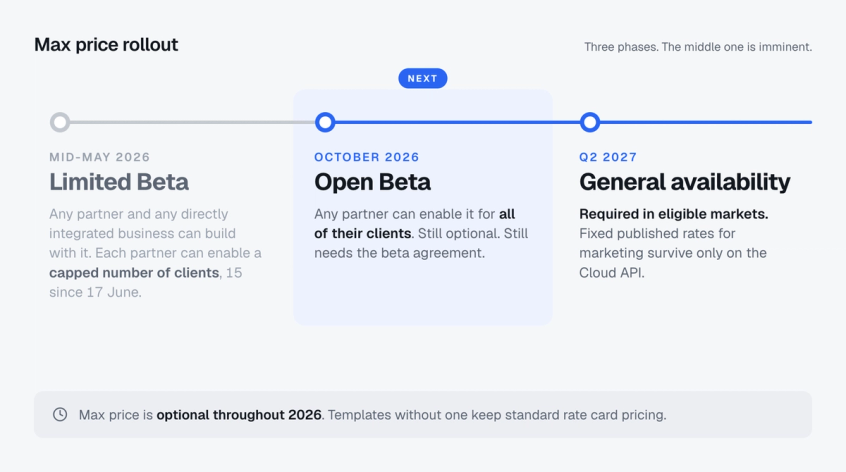
Three phases, and the middle one is imminent.
| Phase | When | What it means |
|---|---|---|
| Limited Beta | 15 May 2026 | Any partner and any directly integrated business can build with it. Each partner can enable it for a limited number of clients only |
| Open Beta | October 2026 | Any partner can enable it for all of their clients, subject to integration and market eligibility |
| General availability | Q2 2027 | Meta's current plan: max price becomes required in eligible markets. Fixed published rates survive only on the Cloud API |
One correction worth making, because it is repeated elsewhere. The Limited Beta was never restricted to hand-picked partners. Meta's wording is that any partner and any directly integrated business can integrate and use it, with a cap on how many clients each partner can switch on. The gate is client count, not an invite list.
There is also an enrolment step almost no coverage mentions. To use max price during the Limited Beta, the direct integrator or Solution Partner signs a separate beta agreement. If you buy WhatsApp through a provider, which most brands do, you do not sign anything, but that provider has to add your business to an allowlist before you can touch the feature. Meta raised the cap on that allowlist from 5 businesses per provider to 15 on 17 June 2026, and its documentation still shows 15. So the question is not only whether your provider supports max price. It is whether you are one of the businesses they have enabled.
The Q2 2027 date is the one to plan around. Under Meta's current plan, once max price is required in eligible markets, fixed published rates for marketing messages survive only on the Cloud API. Put that next to the fact that the Cloud API refuses max-price templates, and you get a fork in the road. One path has bidding and no fixed rates. The other has fixed rates and no bidding. Meta has already built the switch for that split: since April 2026, a business on the Marketing Messages API can turn marketing off on the Cloud API completely, after which the Cloud API rejects marketing templates outright with error 131063. Which path you end up on depends on your API and your market's eligibility, not on your volume.
What this means for how you send
The strategic consequence is that message volume stops being the only lever.
Under fixed rates, cost per delivered message is predictable, and growth is mostly a question of list size and send volume. Under a ceiling, the price you pay and the reach you get can both move with the cap you set, and Meta names user engagement and supply health among the factors that decide what you are actually charged. Bigger sends never guaranteed more revenue, and better engagement is not a guaranteed discount, but both now feed a system that is watching them.
Four things get more valuable.
Segmentation stops being tidiness and starts being a cost decision. If reach and cost respond to your ceiling differently for different groups of customers, and Meta's own framing of below-rate bids reaching a wider spread of cohorts suggests they do, then knowing which segments are cheap to reach is worth real money. That is the argument for proper WhatsApp marketing automation instead of one big broadcast to everybody.
Utility stops being a cost category and becomes a bidding exemption. Max price applies to marketing. Correctly classified order confirmation templates and other utility traffic stay on standard per-message pricing, with utility volume tiers and any in-window exemptions unaffected. Every transactional message you have miscategorised as marketing is now exposed to a bidding system it never needed to enter.
High-intent flows justify high bids. Abandoned cart recovery has a knowable value per message. Those are the campaigns where bidding above rate card is defensible, and where you should look first.
Inbound gets cheaper by comparison. A customer who messages you first costs nothing to receive, and when a customer messages you from a Click to WhatsApp ad and you reply within 24 hours, a 72-hour window opens in which message delivery is free. The ad spend is separate, and the click alone opens nothing: the customer has to message. As outbound marketing moves to a bid, that entry point becomes the most underpriced route to a conversation on the platform.
You also cannot bid intelligently without outcome data. If you do not know what a delivered message is worth, every ceiling you set is a guess. Our guide to tracking WhatsApp messages for business covers the attribution side.
What Meta has not said
Worth being straight about the gaps, because several are material.
Meta says max price will be required in eligible geographies at general availability, but it has not published the list of markets that means. What it has published is the current geographic availability of Marketing Messages API features, and that is worth reading alongside the European rows in the table above. Messages sent from business numbers in, or to users in, the EEA, the UK, Japan, South Korea, Nigeria and South Africa do not receive delivery optimisations. Marketing messages to US recipients are blocked across Meta's business messaging APIs. Messages to Russia and Belarus are excluded from optimisation features, and Meta names max price among them. Nigeria and South Africa joined the restricted group in May 2026, Venezuela went onto the sanctioned list, and Belarus was folded in alongside Russia, so the list moves. Treat any confident claim about exactly where max price will be required at GA as unconfirmed until Meta publishes that list.
Meta has not published how delivery is decided between businesses with different ceilings, or how per-user marketing template limits interact with a high bid. What it does say is that your actual charge can land below your ceiling based on factors like user engagement and supply health. And Meta notes the per-message multiplier may change during beta, so anything built on it today is built on sand.
Ask your provider three questions.
- Is my account onboarded to the Marketing Messages API? That is the prerequisite Meta names for max price.
- Have you signed Meta's beta agreement, and will you support optimization_spec when Open Beta starts?
- Have you added my business to your allowlist?
If any answer is no, October changes nothing for you, and it is better to know that now than in Q2 2027. Our comparison of the best WhatsApp API provider in India covers what else to weigh up when you choose one.
On Spur, the first of those three is already handled. MM Lite is what Meta used to call the Marketing Messages API before it renamed the product in November 2025, and you can switch it on yourself from Settings and then WhatsApp in the dashboard. Any account onboarded after 11 September 2025 is already running on it. Your existing numbers and approved templates carry over, and the messaging rates do not change. That on its own does not give you max price, which still needs the provider-side agreement and allowlisting above, but it does mean you are not starting on the wrong API. The MM Lite upgrade guide walks through the toggle.
The bottom line on WhatsApp max price
WhatsApp max price looks like a pricing setting and behaves like a bid. It is optional through 2026, it is scheduled to open to every provider's clients in October, and under Meta's current plan it becomes mandatory for marketing on the Marketing Messages API in eligible markets from Q2 2027.
The brands that will do well are not the ones that bid hardest. They are the ones that know what a conversation is worth, keep transactional traffic properly classified out of the bidding system entirely, and get their outcome measurement working before the bidding starts.
Start with Meta's four-arm test, ramp slowly, and measure cost per order rather than cost per message. If you want message cost, conversation outcomes and revenue in a single view before you start setting ceilings, try Spur free.
Frequently asked questions
What is WhatsApp max price?
Max price is a feature on the Marketing Messages API for WhatsApp that lets a business set the most it will pay for each marketing message delivered. Meta charges that amount or less. You set it on a template using an object called optimization_spec, which holds a bid_amount. That object was called bid_spec until Meta renamed it in June 2026. The send call still uses bid_spec, but only for the per-message multiplier.
When does WhatsApp max price become mandatory?
Q2 2027, in eligible markets, under Meta's current plan. It is optional throughout 2026. Limited Beta began on 15 May 2026 and Open Beta is scheduled for October 2026. After general availability, fixed published rates for marketing messages apply only on the Cloud API.
How do I calculate the bid_amount value?
Take your target price per delivery, convert it to the smallest unit of your WABA currency, then multiply by 1,000. To bid 0.87 rupees per delivery, that is 87 paise times 1,000, so bid_amount is 87000. To bid $0.05, that is 5 cents times 1,000, so 5000.
Can I add a max price to my existing WhatsApp templates?
No, as Meta's documentation stands on 8 September 2026. If a template was created without optimization_spec, you cannot add it afterwards. You have to create a new template with the bid included. You can change the bid later on templates that already have one.
Does max price work on the Cloud API?
No. Sending a max-price template to the Cloud API messages endpoint returns error 131061. These templates have to go through the Marketing Messages API endpoint, so your provider needs that integration built.
What happens if I set my max price below the published rate?
Meta describes this as reaching a broader range of customer cohorts at lower cost, trading some delivery performance for cost efficiency. It is not simply fewer deliveries, though Meta has not published how reach responds to the ceiling, so test it. It suits prospecting and cost-sensitive campaigns.
Does max price apply to utility and authentication messages?
No. Max price applies to marketing messages on the Marketing Messages API. Utility and authentication templates continue on standard per-message rate card pricing, including their volume tiers and any free-window exemptions, which is another reason to keep transactional templates correctly categorised.
What is the reach estimation tool?
A companion feature that returns estimated delivery volumes and cost ranges at different max-price levels before you send. Targeting is country-level, the lookback window can be 1, 7, 14 or 28 days, and the user count is fixed at 1,000 during beta. Meta states the estimates are for planning only and guarantee nothing.
Do I have to sign Meta's beta agreement myself?
Only if you integrate with Meta directly or you are a Solution Partner. If you buy WhatsApp through a provider, the provider signs the agreement and adds your business to its allowlist. Sends fail with error 100 until that agreement is in place.