How to Add WhatsApp to Shopify (2026 Setup Guide)

Discuss with AI
Get instant insights and ask questions about this topic with AI assistants.
💡 Pro tip: All options include context about this blog post. Feel free to modify the prompt to ask more specific questions!
TL;DR: There are four ways to add WhatsApp to Shopify: a simple chat button, Meta's official order-update app, a full automation platform, or custom API development. For most growing stores, the real play is: install Spur from the Shopify App Store → connect WhatsApp Business API → connect Shopify → enable abandoned cart recovery, order updates, and AI support automation. The setup takes a few hours. The revenue impact starts within days.
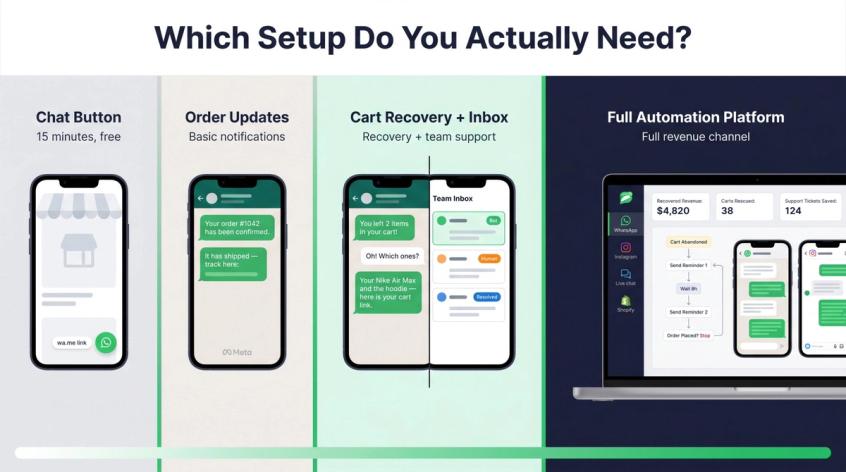
Adding WhatsApp to Shopify sounds simple until you realize it can mean four completely different things.
It might mean adding a "chat with us" button that opens WhatsApp on the customer's phone. Or it might mean sending automated order confirmations via WhatsApp. Or it might mean building an entire cart-recovery, AI-support, and broadcast-marketing system connected to your Shopify data.
Most guides treat all of these the same. They don't explain which setup you actually need, and they skip the compliance rules that will get your account flagged if you ignore them.
This guide covers everything: the four options, step-by-step setup for both a basic button and a full automation system, the WhatsApp rules Shopify merchants need to understand in 2026, ready-to-use message templates, the automations worth building first, and a 30-day rollout plan. For a broader look at how WhatsApp drives ecommerce growth, we cover that separately.
Pricing, app ratings, and WhatsApp rules in this guide were checked on 30 April 2026. WhatsApp and app pricing changes often, so verify final costs inside your WhatsApp provider, Meta business account, or Shopify app listing before you go live.
WhatsApp Shopify Integration: 4 Options Compared
Before touching any settings, get clear on which setup you actually need. Picking the wrong level wastes time and leaves you with a system that can't do what you want.
Most merchants searching "how to add WhatsApp to Shopify" aren't really trying to "add WhatsApp in the abstract." They want a specific outcome.
| Real Goal | What You Actually Need |
|---|---|
| Customers should be able to message us | WhatsApp chat button or live chat widget |
| Customers keep asking where their order is | Shopify order lookup + WhatsApp support automation |
| We lose too many carts | Abandoned cart WhatsApp sequences |
| We want to send offers | WhatsApp Business API, opt-in, approved templates, segmentation |
| We need support automation | AI agent trained on your store + handoff to humans |
| We run COD orders | COD confirmation automation |
| We run WhatsApp ads | Click-to-WhatsApp ads + post-click automation |
| We sell through Instagram too | WhatsApp + Instagram shared inbox and automation |
Here are the four approaches, from simplest to most powerful.
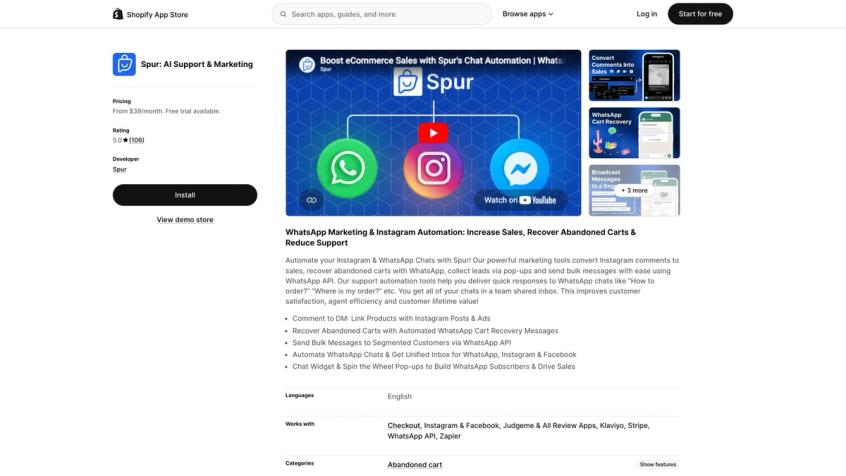
The real-world proof is in the Shopify App Store listing: Spur holds a 5.0 rating from 106 reviews, starts at $39/month with a 7-day free trial, and integrates with Checkout, Instagram, Facebook, Klaviyo, Stripe, and WhatsApp API out of the box.
Option 1: Add a Free WhatsApp Chat Button
You create a wa.me link with your phone number and add it to your Shopify store. Customers click it and land in a pre-filled WhatsApp conversation with you. It takes about 15 minutes. No monthly cost. No API setup.
The limit: it's manual chat only. No automation, no abandoned cart recovery, no broadcast campaigns, no order lookup, no team inbox, no analytics. You're opening a door for customers to reach you, but your store can't reach them.
Use this only if you have very low message volume and one person handling all support.
Option 2: Use Meta's Official WhatsApp App for Shopify
Meta has an official WhatsApp app on the Shopify App Store. As of April 2026, it's free to install with possible external charges. It lets customers opt in to receive order updates on WhatsApp using pre-written templates.
Good for: official order update opt-in, basic checkout notifications, a lightweight install with no third-party tools.
Not good for: abandoned cart recovery, marketing broadcasts, shared team inbox, AI support, Shopify order lookup inside support chats, or Instagram and WhatsApp together. Think of it as order-update infrastructure, not a commerce platform.
Option 3: Full WhatsApp Automation Platform for Shopify
This is the right path for most growing stores.
A proper WhatsApp automation app connects Shopify events (orders, cart activity, fulfillments, returns) to WhatsApp Business API and adds automation flows, a shared inbox, AI support, broadcasts, and analytics on top.
Spur's Shopify integration covers abandoned cart recovery, order updates, product recommendations, customer support, order management, and marketing campaigns. The Shopify App Store listing shows it rated 5.0 from 106 reviews as of April 2026, with a 7-day free trial. It also brings Instagram and Facebook automation into the same platform, so you're not managing separate tools for each channel.
This is what most Shopify brands actually need when they say "I want to add WhatsApp." If you're evaluating the full landscape of WhatsApp marketing automation for your store, it's worth understanding how it fits into your broader stack before committing.
Option 4: Build Custom on WhatsApp Business API
The most flexible option, but also the most work.
WhatsApp's Business Platform is an API layer built for large-scale messaging, backend integrations, and custom automation. You get maximum control: you own the webhook logic, the inbox, the template management, the compliance handling, the billing.
Choose this only if you have in-house engineers, genuinely unusual flow requirements that no app can handle, and the time to maintain templates, errors, and compliance yourself. For most Shopify brands, a good app is faster and cheaper.
WhatsApp Rules Every Shopify Merchant Must Know (2026)
WhatsApp is not email. You can't upload your customer list and start messaging people because they bought from your store. The rules are stricter, and the consequences for ignoring them range from blocked templates to account suspension.
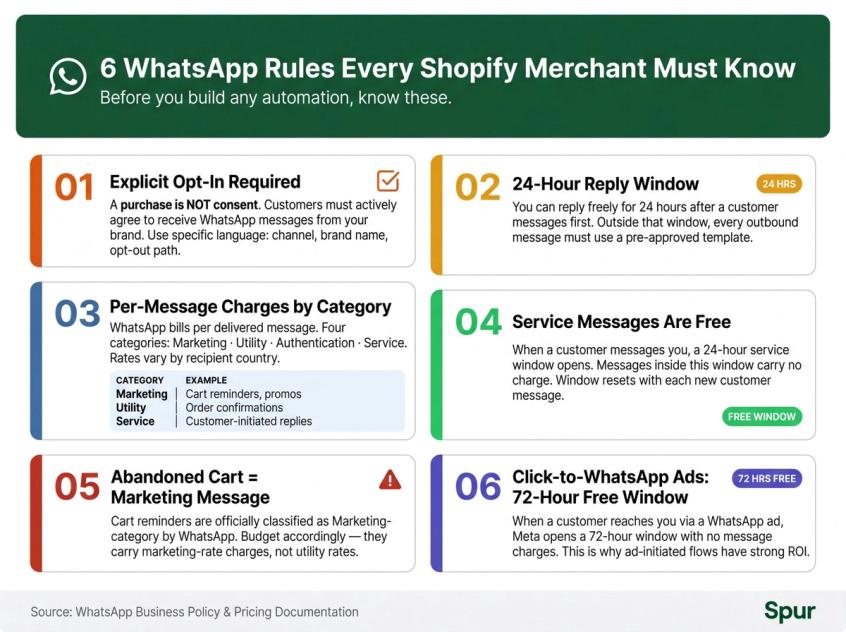
Here are the six rules that matter most for Shopify automation.
1. You need explicit opt-in before messaging customers
WhatsApp's business messaging policy is clear: businesses may only contact people on WhatsApp if they gave you their phone number and opted in to receive messages from you specifically on WhatsApp. A purchase doesn't count as WhatsApp consent.
This means your opt-in language matters. "Subscribe to marketing" is not enough. Something like "I agree to receive order updates, cart reminders, and offers on WhatsApp from [brand]. I can reply STOP to opt out." is the standard.
2. Outside the 24-hour window, you need approved templates
When a customer messages you first, you can reply freely for 24 hours. Outside that window, you can only initiate a conversation using pre-approved message templates.
This affects almost every automated flow you'll build: abandoned cart reminders, back-in-stock alerts, promotional broadcasts, and order updates all require templates submitted and approved through your WhatsApp provider.
3. WhatsApp charges per delivered message by category
WhatsApp pricing is based on message category (marketing, utility, authentication, service) and the recipient's country. Your total monthly cost is:
Platform subscription
+ WhatsApp/Meta message charges
+ AI credits (if applicable)
+ Add-ons (extra users, extra numbers, etc.)
Understanding this before you launch prevents billing surprises. We cover how WhatsApp Business API pricing works in detail separately.
4. Service messages are free inside the customer service window
According to WhatsApp's pricing page, there's no charge for service messages, and no charge for utility messages sent in response to a user message. When a customer contacts you, a 24-hour service window opens, and it resets with each new customer message.
This makes inbound support automation cost-efficient. If customers message you about their orders, those responses don't carry a per-message fee.
5. Abandoned cart reminders are a marketing message
This one surprises people. WhatsApp's pricing documentation explicitly lists abandoned cart reminders under marketing message examples, alongside offers, promotions, product suggestions, and cart reminders.
So when you're budgeting for cart recovery campaigns, treat those messages as marketing-category charges.
6. Click-to-WhatsApp ads open a 72-hour free entry point window
When a customer reaches you through a WhatsApp ad or a Facebook page call-to-action button, Meta opens a 72-hour free entry point window where all messages are not charged. This is why click-to-WhatsApp ads can deliver strong ROI: the customer initiates, and you get extra time to qualify, support, and convert them.
A note on AI and WhatsApp
WhatsApp's Business Solution Terms (last updated March 2026) restrict using WhatsApp as a general-purpose AI service and restrict using customer WhatsApp data to train general AI models. For a Shopify store, the practical interpretation is: use AI for your store's specific support (order tracking, returns, product questions), give customers a path to a human, and check your provider's data handling terms.
WhatsApp's own business content describes AI chatbots as useful for handling predictable customer support questions and freeing agents for harder cases, which is exactly how Spur's AI agents are designed to be used.
WhatsApp Shopify Setup Checklist: What You Need First
Before installing anything, work through this checklist. Having everything ready upfront saves you from stopping partway through setup.
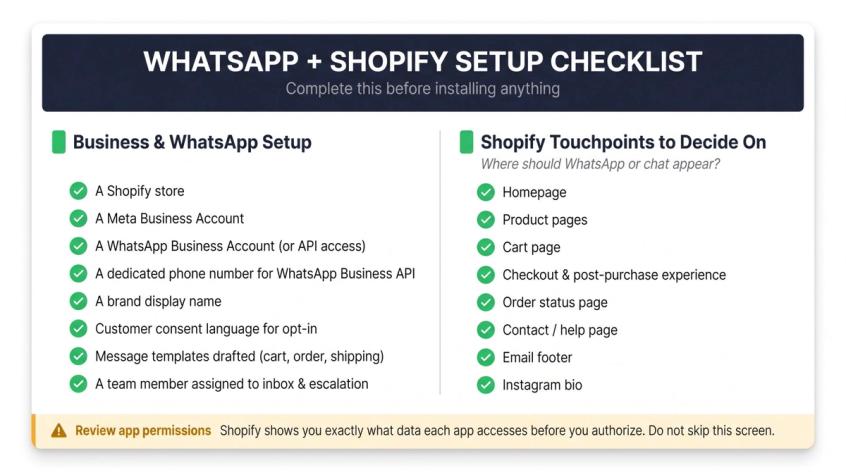
Business and WhatsApp setup:
- A Shopify store
- A Meta Business Account
- A WhatsApp Business Account (or WhatsApp Business API access through a provider like Spur)
- A phone number dedicated to WhatsApp Business API (not the same number you currently use for the regular WhatsApp app unless you confirm the migration path with your provider)
- A display name for your brand
- Customer consent language for WhatsApp opt-in
- At least a few message templates drafted (abandoned cart, order confirmation, shipping update)
- A team member assigned to own inbox and escalation
Shopify touchpoints to decide on:
Where do you want WhatsApp or chat to appear? Common placements:
- Homepage
- Product pages
- Cart page
- Checkout and post-purchase experience
- Order status page
- Contact/help page
- Email footer
- Instagram bio
A quick note on permissions:
When you install any WhatsApp or automation app through Shopify, Shopify's app install flow shows you the exact data the app will access before you authorize. WhatsApp automation apps typically need access to orders, customers, checkouts, and marketing events. Don't skip that screen. Review what you're granting.
How to Add a WhatsApp Button to Shopify (Free Method)
If your only goal is to give customers a way to message you on WhatsApp, this takes about 15 minutes and costs nothing.
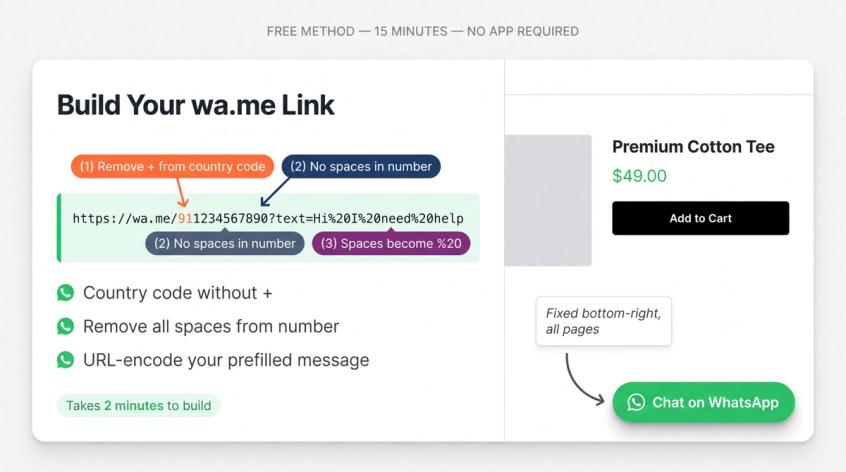
Step 1: Create Your wa.me WhatsApp Link
Use the wa.me format. Or use Spur's free WhatsApp link generator to create it without any manual formatting:
https://wa.me/<countrycode><number>?text=<prefilled-message>
Example for an Indian number:
https://wa.me/911234567890?text=Hi%20I%20need%20help%20with%20my%20order
Important formatting rules:
- Remove the
+from the phone number - Remove spaces
- Include the country code
- URL-encode the prefilled message (spaces become
%20)
Step 2: Add the WhatsApp Button to Your Shopify Theme
For a floating button on every page:
<style>
.whatsapp-chat-button {
position: fixed;
right: 18px;
bottom: 18px;
z-index: 9999;
padding: 12px 16px;
border-radius: 999px;
background: #25d366;
color: #fff;
font-weight: 600;
text-decoration: none;
box-shadow: 0 8px 24px rgba(0,0,0,.18);
}
</style>
<a
href="https://wa.me/911234567890?text=Hi%20I%20want%20to%20ask%20about%20a%20product"
target="_blank"
rel="noopener"
class="whatsapp-chat-button"
>
Chat on WhatsApp
</a>
In your Shopify admin:
- Go to Online Store
- Open Themes
- Duplicate your live theme first
- Click Edit Code
- Open
theme.liquid - Paste the code just before
</body> - Save and preview
If editing code makes you uncomfortable, use a custom liquid block or a theme section instead.
Step 3: Test Your WhatsApp Button on Mobile and Desktop
Check it on:
- Homepage, product page, cart page
- Mobile Safari and Chrome
- Desktop browser
- Both logged-in customer and guest visitor
When this is enough: use this setup if you get low chat volume, your team is tiny, you don't need automation, and you don't need Shopify order data inside conversations.
When you need more: the moment you want abandoned cart recovery, order updates, broadcasts, AI support, or a shared team inbox, you need a proper automation app. That's where the setup below comes in.
How to Add WhatsApp to Shopify with Full Automation
This is the setup that turns WhatsApp from a chat icon into a revenue and support channel. We're walking through this using Spur, which gives you WhatsApp Business API, Shopify integration, AI agents, live chat, Instagram automation, and a shared inbox in one place.
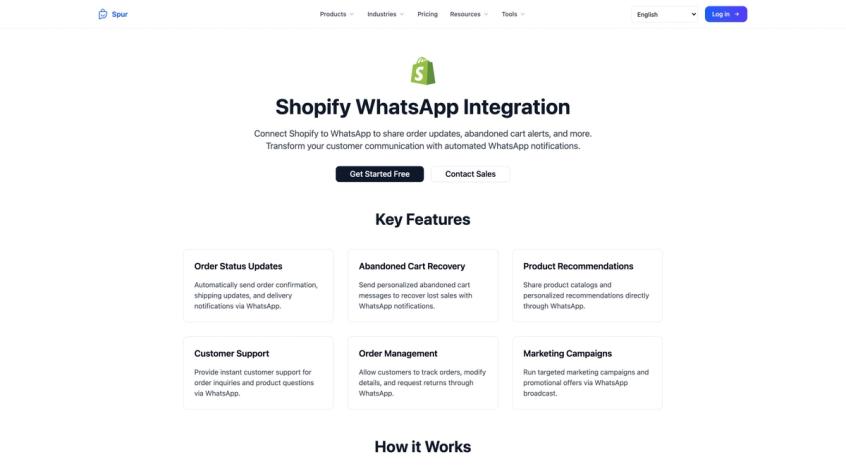
Spur's Shopify integration page shows exactly what the connection unlocks: order status updates, abandoned cart recovery, product recommendations, customer support automation, order management, and marketing campaigns — all running through WhatsApp.
Step 1: Install Spur from the Shopify App Store
Install Spur: AI Support & Marketing from the Shopify App Store. Review the permissions before you authorize, and take advantage of the 7-day free trial.
As of April 2026, the listing shows:
- Rating: 5.0 out of 5 from 106 reviews
- Starting price: $39/month via Shopify App Store (or $31/month on the website annual plan)
- 7-day free trial
- Integrations: Instagram, Facebook, Judge.me, Klaviyo, Stripe, WhatsApp API, Zapier
Merchants use it for AI chatbots, live chat, social media automation, cart recovery, COD verification, discounts, FAQs, shipping alerts, and order updates.
Step 2: Connect Your Shopify Store to WhatsApp
Once installed, connect your Shopify store inside Spur. This lets Spur read the events it needs to trigger automations:
- Customer created
- Cart/checkout activity
- Order created and paid
- Fulfillment created
- Order cancelled
- Refund and return events
- Customer tags and segments
- Product data
- Discount links
Spur's Shopify integration page walks through the setup: install the app, configure workflows, start engaging customers through automated WhatsApp messages. For a deeper look at how Shopify segment triggers power your flows, we cover that in a dedicated guide.
Step 3: Connect WhatsApp Business API to Shopify
Connect your WhatsApp channel inside Spur. You'll need:
- Meta Business access
- A WhatsApp Business Account
- A dedicated phone number
- Your brand's display name
- Business verification (depending on scale)
- Message template approvals
One thing to know: don't use the same phone number for the regular WhatsApp app and for WhatsApp Business API. If you're migrating a number, confirm the migration path with Spur's team first.
Your shared inbox is where human agents handle conversations that automation can't resolve. Configure:
- Team members and roles
- Assignment rules
- Tags and priority labels
- Saved replies
- Business hours
- Escalation rules
- Handoff message
- Internal notes
This step matters more than most people realize. Automation without a working handoff creates frustrated customers. WhatsApp's business messaging policy actually requires that automated paths include clear escalation routes, such as in-chat human transfer, phone, email, or a support form.
Step 5: Create Your WhatsApp Message Templates
For any message you initiate (outside a customer-started conversation), you need pre-approved templates. Learning how to craft high-converting WhatsApp templates before you submit saves revision cycles. Here are the core ones to create first.
Abandoned Cart Template
Hi {{1}}, you left {{2}} in your cart.
Complete your order here: {{3}}
Reply if you have any questions.
Category: Marketing | Variables: customer name, product/cart summary, cart link
Order Confirmation Template
Hi {{1}}, your order {{2}} has been confirmed.
We'll notify you when it ships. Track your order here: {{3}}
Category: Utility | Variables: name, order number, order status link
Shipping Update Template
Your order {{1}} has shipped.
Tracking link: {{2}}
Reply here if you need help.
Category: Utility
COD Confirmation Template
Hi {{1}}, please confirm your cash on delivery order {{2}} for {{3}}.
Reply 1 to confirm or 2 to cancel.
Category: Utility (or Marketing depending on wording)
Back-in-Stock Template
{{1}} is back in stock.
Shop it here: {{2}}
Limited stock available.
Category: Marketing
Review Request Template
Hi {{1}}, thanks for shopping with us.
How was your experience with {{2}}? Leave a quick review here: {{3}}
Category: Utility or Marketing
Keep templates clean and specific to one message type. Don't sneak promotional content into utility templates. That's exactly why WhatsApp templates get rejected. For reference examples of WhatsApp order confirmation templates that pass approval, we've compiled a library of formats that work.
Product images in templates get cropped to the message bubble. Export them at 12:7, and use the WhatsApp image size guide for catalog and carousel sizes too.
Step 6: Build a WhatsApp Abandoned Cart Recovery Flow
Abandoned cart recovery is usually the first automation that shows a direct revenue impact, so build it first. Understanding how to solve cart abandonment at the root helps you sequence the right messages.
A strong WhatsApp cart recovery sequence runs in three waves:
| Timing | Goal | Example |
|---|---|---|
| 30-60 minutes after abandonment | Remind and offer help | "You left this in your cart. Need help choosing the right size?" |
| 8-12 hours later | Reduce friction | "Still thinking it over? Your cart is saved here." |
| 20-24 hours later | Add incentive only if needed | "Last reminder, use this discount if you'd like to complete your order." |
One important principle: don't discount too early. If your first message always includes a coupon, customers learn to abandon carts intentionally to get one. Start with a reminder and an offer to help. Add the discount only for high-value or hesitant customer segments.
Spur's WhatsApp marketing page covers Shopify-native cart detection, multi-step reminder sequences, product images, cart links, discount generation, and conversational support in the flow.
Step 7: Automate WhatsApp Order Update Notifications
Order updates on WhatsApp cut down "where is my order?" support tickets dramatically. If you're building out automated order processing end-to-end, the WhatsApp notification layer is what your customers actually see. Set up triggers for:
- Order confirmed
- Payment received
- COD confirmation needed
- Order packed
- Order shipped
- Out for delivery
- Delivery failed
- Delivered
- Return initiated
- Refund processed
WhatsApp's Business Platform documentation lists order confirmations, shipment updates, reminders, and alerts as standard notification use cases.
Keep these messages clean. Don't add "your order shipped, also check out our new collection" to a utility message. That turns a transactional notification into a marketing message, which changes the pricing category and can erode customer trust.
Step 8: Train Your AI Support Agent on Store Data
Your AI agent should know your store specifically, not give generic ecommerce answers.
Train it on:
- Product pages and size guides
- Shipping, return, refund, and COD policies
- FAQs and help center content
- Order tracking instructions
- Discount rules
- Your store's tone
- Escalation rules
Spur's live chat page explains that its AI live chat can be trained on your knowledge base using websites, help docs, PDFs, Notion, YouTube, and custom Q&A, with human handoff built in. For a step-by-step process on training your AI on store-specific data, that guide walks through every knowledge source type.
Beyond training, define when the AI should stop and hand off. Understanding chatbot-to-human handoff best practices prevents customer frustration at the critical moment. Clear triggers:
- Customer expresses anger or frustration
- Refund disputes or payment failures
- High-value orders
- Legal, safety, or medical questions
- Customer explicitly asks for a human ("agent", "manager", "call me")
- Order cancellation requests
- Repeated incorrect answers from the AI
Step 9: Connect Shopify Actions to Your AI Agent
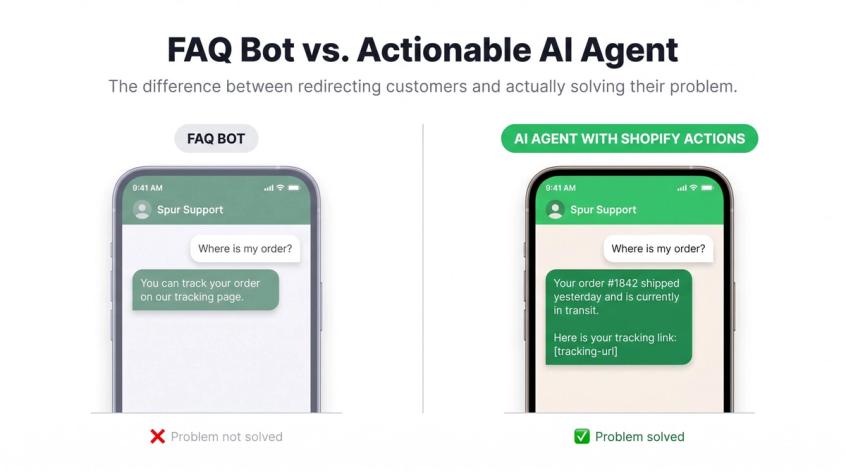
This is where AI support becomes genuinely useful rather than just a fancy FAQ bot.
Spur's AI agents are built to be "actionable": they connect to Shopify, CRMs, and custom webhooks and take real actions, not just answer questions.
The difference matters:
An FAQ bot says: "You can track your order on our tracking page."
An actionable AI agent says: "Your order #1842 shipped yesterday and is currently in transit. Here's your tracking link: [link]"
The second one actually solves the problem.
Valuable actions to connect:
- Fetch order status and tracking link
- Resend invoice
- Create discount code
- Check product availability
- Recommend product
- Tag customer
- Create support ticket
- Update customer note
- Verify COD order
- Initiate return workflow
Step 10: How to Collect WhatsApp Opt-In Consent
You can't message customers on WhatsApp without their explicit consent. The best opt-in points for a Shopify store:
- Checkout page (most important)
- Account sign-up
- Newsletter and popup forms
- Cart page
- Post-purchase page
- Back-in-stock notification form
- Click-to-WhatsApp ad flows
Shopify's guidance says merchants should send promotional content only to customers who agreed to receive it, and that customers can subscribe through checkout opt-in, newsletter signup, or customer account sign-in. In March 2026, Shopify added marketing consent collection to the customer sign-in page, using the same regional checkbox settings as checkout.
For WhatsApp, make the consent wording channel-specific:
Good: "Send me order updates and offers on WhatsApp. I can opt out anytime."
Better: "I agree to receive order updates, cart reminders, and offers on WhatsApp from [brand]. Reply STOP to opt out."
Bad: "Subscribe to marketing."
Store consent with:
- Customer tag
- Marketing consent status
- Opt-in source
- Opt-in date
- Phone number
- Channel: WhatsApp
- Opt-out status
Step 11: How to Handle WhatsApp Opt-Outs Correctly
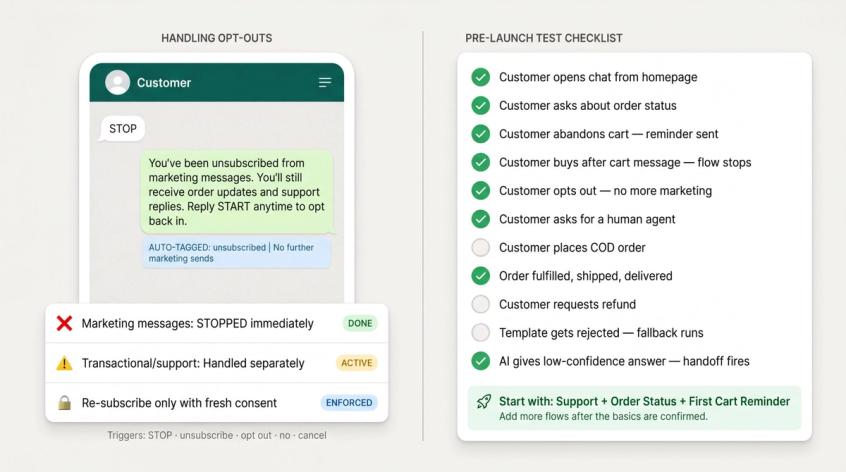
Every automation needs proper opt-out handling. When a customer sends "STOP", "unsubscribe", "opt out", "no", or "cancel":
- Immediately stop marketing messages
- Tag them as unsubscribed
- Keep separate handling for transactional/support if legally appropriate
- Never re-subscribe them without fresh consent
- Make opt-out status visible to all human agents
WhatsApp's policy explicitly requires businesses to respect opt-out requests.
Step 12: How to Test Your WhatsApp Flows Before Launch
Don't go live on all automations at once. Test every flow with real Shopify events:
- Customer opens chat from homepage, product page
- Customer asks about order status
- Customer abandons cart and receives first reminder
- Customer completes order after receiving cart message (stop condition works)
- Customer opts out and no more marketing messages arrive
- Customer asks for a human
- Customer places COD order
- Order gets fulfilled, shipped, and delivered
- Customer requests refund
- Template gets rejected (what happens?)
- AI gives a low-confidence answer (does it hand off?)
Start with support + order status + first cart reminder. Add more automations after you've confirmed the basics work.
Best WhatsApp Automations to Build First for Shopify
Once your setup is live, these are the flows that deliver the most value fastest. Build them in this order.
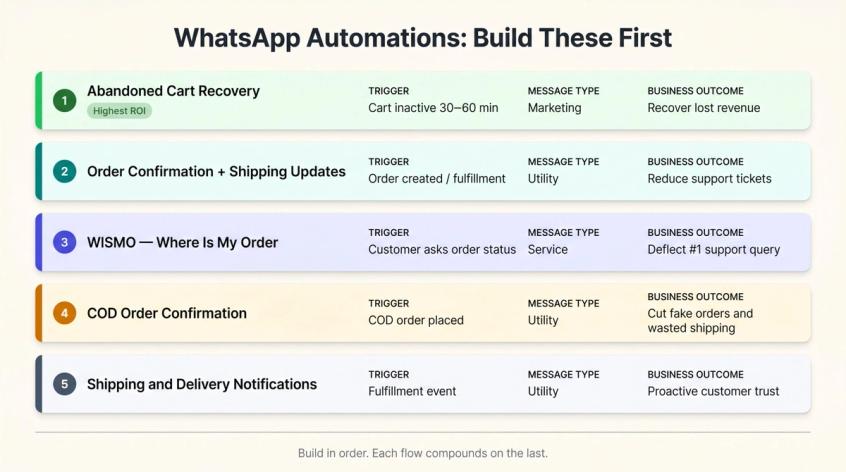
1. WhatsApp Abandoned Cart Recovery
This is usually the highest-return flow because cart abandonment isn't usually a "no." It's a "got distracted" or "had a question" or "wasn't sure." WhatsApp lets you address that uncertainty directly, in the channel customers actually open.
A three-step sequence (30 min / 8-12 hours / 20-24 hours) with a help-first approach (not discount-first) is what we've seen work across Shopify stores. Spur's WhatsApp marketing tools handle Shopify-native cart detection, multi-step sequences, discount generation, and real-time conversational support within the flow.
Good first message:
Hi {{first_name}}, you left {{product_name}} in your cart.
Complete your order here: {{cart_link}}
Reply if you have a question. We can help.
Segment your sequences: first-time buyers, high cart value, COD customers, and customers who started chatting but didn't buy deserve different approaches. See WhatsApp drip campaign examples for sequence structures that convert across different customer segments.
2. WhatsApp Order Confirmation and Shipping Updates
Trigger these on: order created, payment captured, fulfillment created, tracking number added.
Customers don't want to check email for basic order questions. WhatsApp is easier, and proactive updates reduce inbound support volume.
Hi {{first_name}}, your order {{order_number}} is confirmed.
We'll send shipping updates here. Track your order anytime: {{order_status_link}}
3. Where Is My Order Automation (WISMO) on WhatsApp
WISMO queries are the most common repetitive support question in ecommerce. Automating them is one of the fastest ways to reduce support load.
When a customer asks "where is my order," "track order," or "order status," the AI agent asks for the order number or email if needed, fetches the order from Shopify, and replies with the current status and tracking link:
Your order {{order_number}} is currently {{fulfillment_status}}.
Tracking link: {{tracking_url}}
Estimated delivery: {{estimated_date}}
4. WhatsApp COD Order Confirmation
If your store accepts cash on delivery, WhatsApp confirmation reduces fake orders and wasted shipping costs. Send immediately after a COD order is placed:
Hi {{first_name}}, please confirm your COD order {{order_number}} for {{amount}}.
Reply 1 to confirm.
Reply 2 to cancel.
Confirmed: tag and process. Cancelled: notify team and cancel. No response: one reminder, then manual review.
5. WhatsApp Shipping and Delivery Notifications
These run on fulfillment triggers. Keep them utility-focused: status, tracking link, offer to help. No promotional add-ons.
Beyond the core five, these automations are worth building next:
- Back-in-stock alerts: customers who requested an alert already showed purchase intent. The timing is perfect when the product comes back. This is one of the most effective WhatsApp retention marketing flows because intent is already established.
- Review requests: 2-5 days after delivery. WhatsApp gets read faster than email, which means more reviews.
- Winback campaigns: customers inactive for 60-90 days, with opt-in, who haven't unsubscribed. These are core ecommerce customer retention plays. A simple "we saved something for you" message often works better than a heavy discount.
- Click-to-WhatsApp ad qualification: when a customer clicks your WhatsApp ad, route them into a structured conversation immediately. Meta allows a 72-hour free entry point window for ad-originated conversations. Spur's Click-to-WhatsApp Ads tools connect the ad click directly to a qualification flow.
Abandoned Cart vs. Abandoned Checkout: What's the Difference?
Shopify uses specific terminology here, and getting it wrong means missing cart recovery opportunities.
An abandoned checkout means the customer reached the checkout step, provided contact information, and didn't complete the order after about 10 minutes. Shopify's help documentation describes this as the point where email recovery is available.
An abandoned cart can happen earlier: a product was added to the cart, but checkout was never started, no contact information was captured yet. Understanding the range of cart abandonment solutions available helps you cover both stages.
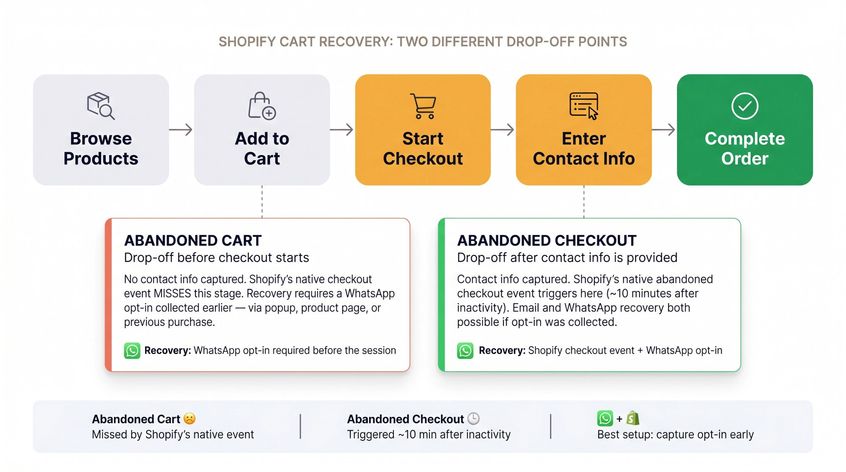
Why this matters for WhatsApp: if you only rely on Shopify's native abandoned checkout event, you'll miss early-stage cart activity. If you can capture a WhatsApp opt-in earlier in the session (through a popup, on the product page, or through a previous purchase), you can trigger cart recovery flows before the customer even reaches checkout.
Shopify's pixels and customer events system supports app pixels and custom pixels for marketing automations. Shopify notes that app pixels are preferred because they're built for security and automatic updates.
Best setup:
- Use Shopify checkout data where available
- Use app pixel events for earlier cart behavior
- Collect WhatsApp opt-in before sending any marketing recovery
- Stop cart flows instantly when an order is completed
How Much Does Adding WhatsApp to Shopify Actually Cost?
There are four cost layers. Understanding all four before you start prevents surprises. For a complete breakdown of how WhatsApp Business API pricing works, including how conversation charges stack up by country, that guide has the full rate analysis.
Spur's pricing page shows the full plan breakdown — AI Acquire, AI Start (the most popular tier), AI Accelerate, AI Max, and Custom — each with a 7-day free trial and clear feature lists. Verify current pricing directly on the page since rates are updated periodically.
Layer 1: WhatsApp App Subscription Cost
| App | Starting Price | Best For |
|---|---|---|
| Meta's Official WhatsApp App | Free to install (external charges may apply) | Basic official order updates |
| Spur | From $39/month (Shopify App Store) or $31/month (website annual plan) | WhatsApp + Instagram + live chat + AI + cart recovery + shared inbox |
Spur has two price contexts: the Shopify App Store listing shows $39/month with a 7-day trial; the website's annual plan comes out to $31/month billed annually. Confirm which applies before you commit. More details at Spur's pricing page.
Layer 2: WhatsApp Per-Message Charges from Meta
WhatsApp charges per delivered message based on the recipient's country and message category (marketing, utility, authentication, service).
Your cost formula:
WhatsApp message cost =
delivered marketing messages × marketing rate
+ delivered utility messages × utility rate
+ delivered authentication messages × authentication rate
+ any other applicable charges
Service messages are currently listed as no charge. Some utility responses are also no charge. Use Spur's WhatsApp pricing calculator to model your monthly costs before large campaigns, and verify the active rate card for your country inside Spur.
Layer 3: AI Agent Credit Costs
If you use AI agents, you'll pay for usage. Spur's plans include a set number of AI credits, and extra credits are available at $12 per 1,000. The right plan depends on your message volume and how much support you're automating.
Layer 4: Extra Features and Add-On Pricing
Spur's pricing page lists common add-ons: extra AI agent ($7/month), extra live chat channel ($7/month), remove branding ($39/month), extra WhatsApp channel ($29/month), extra users ($12/month).
A realistic sample calculation for a mid-size Indian Shopify store on the AI Start plan:
| Cost component | Amount |
|---|---|
| Platform (AI Start, annual) | $31/month |
| Monthly broadcast to 2,000 Indian contacts | ~$20.60 (2,000 × $0.0103) |
| Total | ~$51.60/month |
This scales with your broadcast volume and country mix. WhatsApp's per-message rates change periodically, so confirm your current rate table inside Spur before large sends.
Why Spur Is the Best WhatsApp App for Shopify Automation
Most WhatsApp tools for Shopify do one thing well. Spur does all of it in one place, which matters more than it sounds when you're managing customer conversations across multiple channels. You can see results from Shopify stores using Spur across fashion, jewelry, and D2C brands.
Here's what the full setup gives you:
WhatsApp Business API with broadcasts, drip campaigns, abandoned cart recovery, order updates, and a shared inbox for your team. Spur's WhatsApp Business API page covers DeliveryBoost for message deliverability, segmentation, and multi-number team setups.
AI agents that actually do things. Most chatbot tools answer FAQ questions. Spur's AI agents are trained on your specific knowledge base (websites, help docs, PDFs, Notion, custom Q&A) and can take actions: fetch Shopify order status, generate discount codes, create support tickets, check product availability, initiate returns. That's the difference between an FAQ bot and an actual support agent.
Website live chat that uses the same AI and shared inbox as WhatsApp. Spur's live chat embeds on your Shopify store, captures contact details, and routes conversations to AI or humans depending on the query. Training it takes a few hours if your help docs are organized.
Instagram and Facebook automation in the same platform. A customer who comments on your Instagram post can be routed into a WhatsApp flow. A customer who messages you on Facebook lands in the same inbox as your WhatsApp conversations. Spur's Instagram automation and WhatsApp marketing tools cover the full D2C automation playbook: cart recovery, product recommendations, broadcasts, winback sequences.
Shopify integration that connects order events to automation triggers. Install it from the Shopify App Store, connect your Shopify store, and your automation flows have access to order data, customer tags, fulfillment status, and discount generation. Spur's ecommerce automation capabilities are built specifically for D2C brands that sell online.
The result is a single system where: customer visits your store → asks a question → AI answers using your knowledge base → human takes over if needed → abandoned cart triggers a WhatsApp reminder → order confirmation and shipping updates go out automatically → repeat campaigns bring customers back.
Ecommerce conversations don't stay in one channel anymore. A customer might comment on Instagram, message you through live chat, abandon a cart on Shopify, and then ask about order status on WhatsApp. A shared system keeps all of that from becoming chaos.
Try Spur free for 7 days. No setup fees.
Common WhatsApp Shopify Mistakes to Avoid
These are the ones we see most often, and all of them are avoidable.
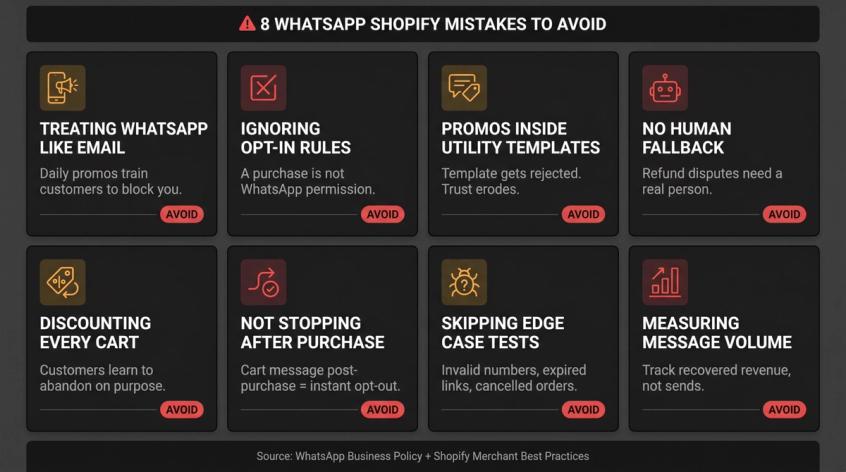
Using WhatsApp like email. Email can handle longer campaigns and lower-urgency messages. WhatsApp is a conversational channel. Keep messages short, useful, timely, and easy to opt out of. Sending daily promos trains customers to block you.
Ignoring opt-in. Purchasing from your store is not permission to send WhatsApp marketing. Get explicit, WhatsApp-specific consent at checkout, sign-up, or a dedicated opt-in form.
Sending promos inside utility templates. "Your order shipped, also check out our new arrivals" in a shipping update is a good way to get your template rejected. Utility messages should contain only transactional content.
No human fallback. AI without handoff is a customer service liability. Refund disputes, failed deliveries, returns, complaints, and high-value orders all need a human path. Building proper chatbot-to-human handoff into your automation prevents the most damaging customer service failures. WhatsApp's policy requires clear escalation routes in automated flows.
Discounting every abandoned cart. The first message in a cart recovery sequence should offer help, not a coupon. Customers learn quickly that abandoning carts gets them discounts. Save incentives for high-value segments and repeat abandoners.
Not stopping flows after a purchase. If a customer receives "complete your cart" after they already bought, they'll unsubscribe immediately. Every cart recovery flow needs a purchase stop condition.
Not testing edge cases. Invalid phone numbers, cancelled orders, edited orders, expired cart links, failed templates, customers who opt out mid-sequence. All of these need to be tested before launch.
Measuring message volume instead of outcomes. Message count is not a metric. Track: recovered revenue, support tickets avoided, conversion rate from WhatsApp, opt-out rate, cost per recovered order. For a broader view of how to increase conversion rates for ecommerce, WhatsApp is one piece of a larger optimization picture.
30-Day WhatsApp Shopify Rollout Plan
Don't try to build everything in week one. This timeline gets you to a mature, revenue-driving setup without burning out your team on configuration.
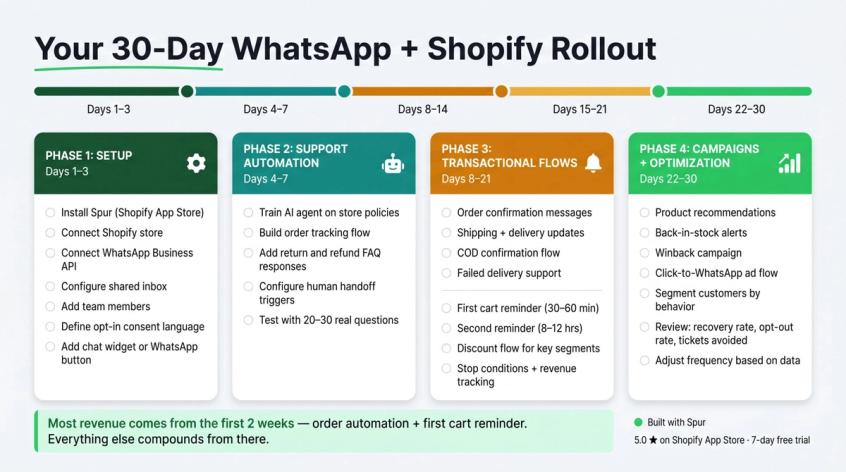
Days 1-3: Setup
- Install Spur from the Shopify App Store
- Connect Shopify store
- Connect WhatsApp Business API
- Configure shared inbox
- Add team members
- Define opt-in consent language
- Add chat widget or WhatsApp button
Days 4-7: Support Automation
- Train AI agent on store policies (shipping, returns, refunds, COD)
- Build order tracking flow
- Add return and refund FAQ responses
- Configure human handoff triggers
- Test with 20-30 real customer questions
Days 8-14: Transactional Flows
- Order confirmation messages
- Shipping updates
- Delivery notifications
- COD confirmation flow
- Failed delivery support
Days 15-21: Cart Recovery
- First cart reminder (30-60 minute delay)
- Second reminder (8-12 hours)
- Optional discount flow for selected segments
- Stop conditions for completed purchases
- Set up revenue tracking
For multi-step WhatsApp sequence structures that work, the drip campaign examples guide covers timing and message variations by segment.
Days 22-30: Campaigns and Optimization
- Product recommendations
- Back-in-stock alerts
- Winback campaign
- Click-to-WhatsApp ad qualification flow
- Segment customers by behavior
- Review metrics: recovery rate, opt-out rate, support tickets avoided
- Adjust frequency based on data
By day 30, you'll have a working system. Most of the value comes from the first two weeks (order automation + first cart reminder). The rest compounds from there.
Frequently Asked Questions About WhatsApp for Shopify
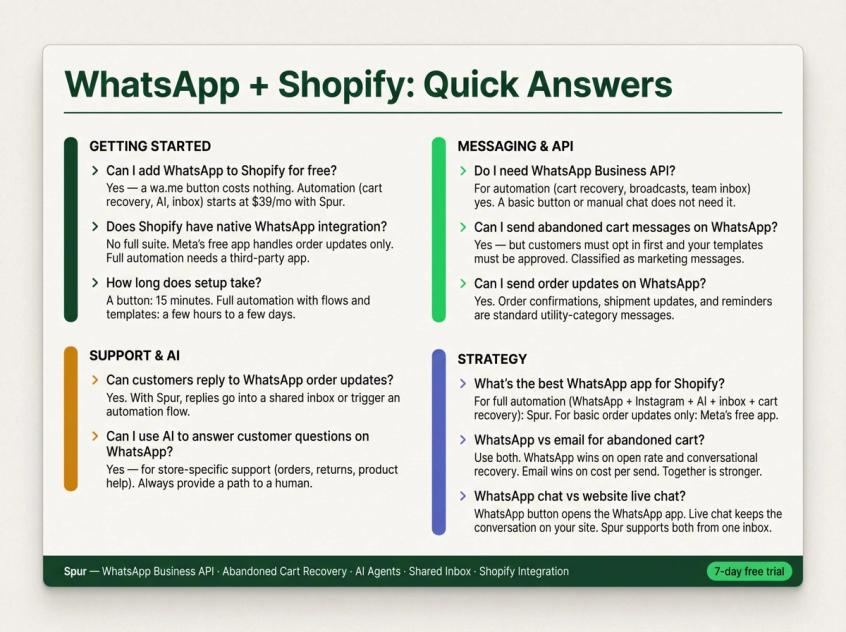
Can I Add WhatsApp to Shopify for Free?
Yes, if you only want a simple click-to-chat button. You can add a wa.me link to your theme or use a free button app at no cost.
Free usually means manual, though. For automation, abandoned cart recovery, shared inbox, message templates, AI support, and Shopify order lookup, you'll pay for an app subscription plus WhatsApp message charges from Meta. Spur starts at $39/month on the Shopify App Store with a 7-day free trial.
Does Shopify Have Native WhatsApp Integration?
Shopify doesn't include a full WhatsApp automation suite by default. You can install apps from the Shopify App Store, including Meta's official WhatsApp app for basic order updates. Broader automation (cart recovery, AI support, marketing broadcasts, shared inbox) requires a third-party app like Spur or a custom WhatsApp API setup.
Do I Need WhatsApp Business API for Shopify Automation?
For serious automation, yes. A regular WhatsApp link or the free WhatsApp Business app is enough for manual chat. For automated abandoned cart messages, templates, team inbox, broadcasts, and Shopify event-based messages, you need WhatsApp Business API through a provider. This is what Spur's WhatsApp Business API setup handles for you.
Can I Send Abandoned Cart Messages on WhatsApp?
Yes, provided the customer opted in and your templates are approved. WhatsApp's pricing documentation classifies abandoned cart reminders as marketing messages, so budget accordingly. A platform like Spur handles template creation, Shopify cart detection, and the full multi-step sequence.
Can I Send Order Updates on WhatsApp?
Yes. WhatsApp's Business Platform lists order confirmations, shipment updates, reminders, and alerts as standard notification use cases. Keep them utility-category clean (no promos mixed in) and they're both inexpensive and high-value for customer experience.
Can Customers Reply to WhatsApp Order Updates?
Yes, with a proper setup. With a full WhatsApp Business API platform like Spur, replies go into your shared inbox or trigger an automation flow. Basic notification setups may handle replies differently. Test your setup before launch to see where replies land.
Can I Use AI to Answer Customer Questions on WhatsApp?
Yes, for business-specific support (order questions, returns, product help). WhatsApp's 2026 Business Solution Terms include restrictions around using WhatsApp as a general AI service, so keep your AI scoped to your store's specific use cases and always provide a path to a human. Spur's AI agents are trained on your knowledge base and designed exactly for this use case.
What's the Difference Between WhatsApp Chat and WhatsApp Live Chat?
A WhatsApp chat button sends the customer into the WhatsApp app. Website live chat keeps the conversation on your website, usually with AI and human support, and may show WhatsApp as a contact option alongside it. Spur supports both: live chat for on-site conversations and WhatsApp for follow-ups, cart recovery, and messaging campaigns. Both can use the same shared inbox and AI agent. If you're also exploring how to add live chat to your Shopify store, that guide covers the setup from scratch.
What's the Best WhatsApp App for Shopify?
It depends on what you need:
- Basic order updates: Meta's official WhatsApp app (free, simple)
- Full automation (WhatsApp + Instagram + live chat + AI + cart recovery + shared inbox): Spur
- Custom engineering with full API control: direct WhatsApp Business Platform development
How Long Does WhatsApp Shopify Setup Take?
A simple WhatsApp button takes 15 minutes. A full automation setup takes longer, typically a few hours to a few days depending on how many flows you're building, because you need WhatsApp Business API setup, template approvals, Shopify event mapping, AI training, inbox configuration, and testing. The 30-day rollout plan above shows how we'd sequence it.
Should I Use WhatsApp or Email for Abandoned Cart Recovery?
Use both, but use them differently. Email works for longer content, lower urgency, and broad outreach at very low cost. WhatsApp works better for high-intent, timely, conversational recovery, especially when the customer might have a question before buying, or when they're less likely to open email.
Don't send the same message on both channels at the same time. Coordinate timing and vary the content. WhatsApp reminders tend to outperform email on open rate, but email has no opt-in/message cost per send. Both working together is stronger than either alone. For a broader view of ecommerce marketing automation strategies that combine channels effectively, that guide covers multi-channel orchestration.