Claude API Guide: Build AI Agents & Chatbots (2025)

Discuss with AI
Get instant insights and ask questions about this topic with AI assistants.
💡 Pro tip: All options include context about this blog post. Feel free to modify the prompt to ask more specific questions!
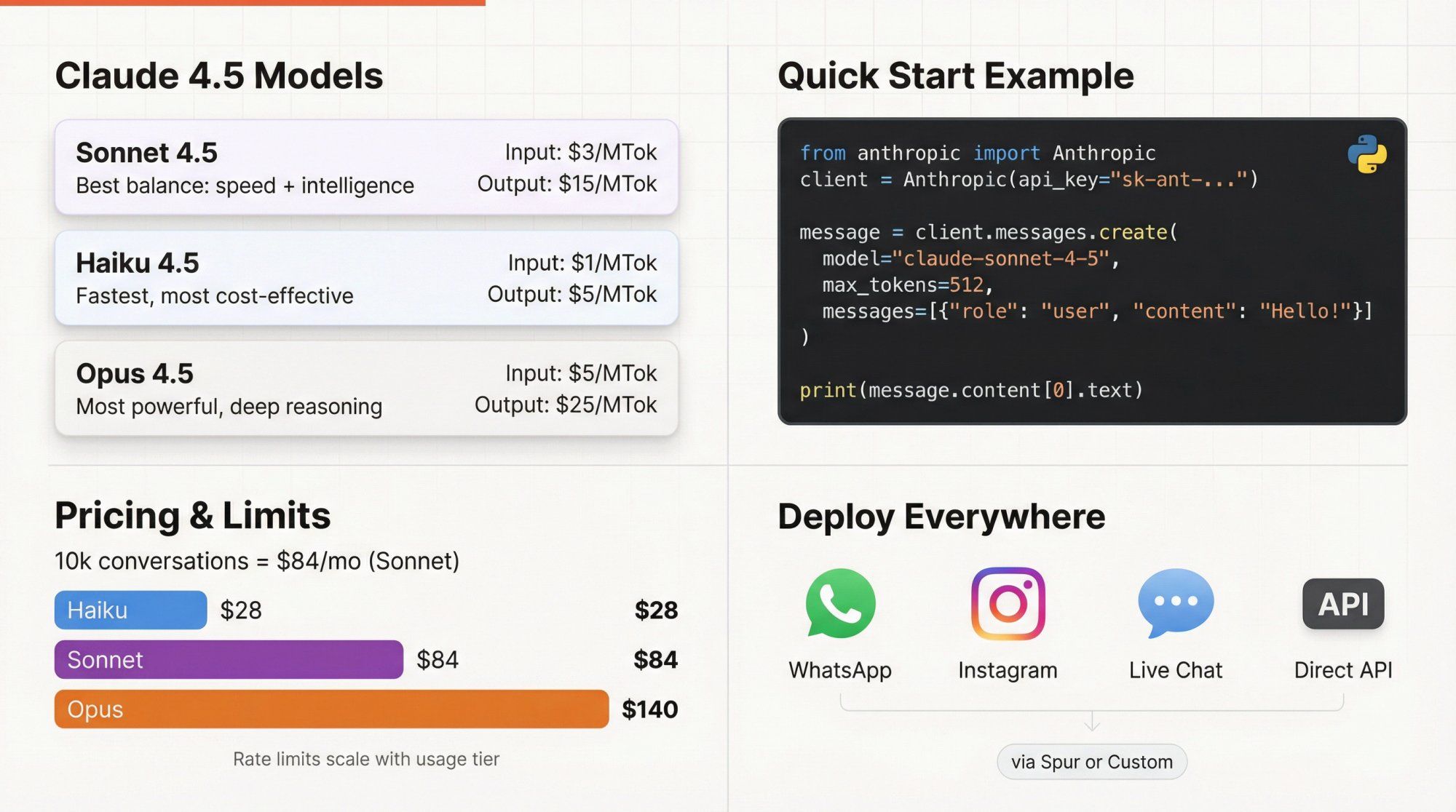
TL;DR: Building production-ready AI agents with the Claude API? This guide walks you through everything from picking the right Claude 4.5 model (Sonnet vs Haiku vs Opus) to real code examples, pricing breakdowns, and patterns for deploying AI on WhatsApp, Instagram, and Live Chat. If you want to skip the technical complexity and deploy AI agents on messaging channels instantly, Spur lets you train Claude-powered chatbots on your website data and connect them to your customer channels in minutes. No code required.
If you searched "Claude API guide," you're probably trying to do one of three things:
- Wire Claude into a real product (chatbot, agent, or internal tool)
- Understand how the latest Claude models work so you can choose the right one
- Get a grip on pricing, quotas, and production gotchas before you ship
This guide is written for exactly that person.
It's not a marketing brochure. It's a practical, deep, and current (late 2025) walkthrough of the Claude 4.5 API, with concrete patterns for building AI agents and customer support bots that actually survive production traffic.
We'll cover:
- What the Claude API actually is from first principles
- How to choose between Sonnet 4.5, Haiku 4.5, and Opus 4.5
- Real API examples in cURL, Python, and TypeScript
- Tools, structured outputs, files, web search, extended thinking, and the Agent SDK
- Honest talk about cost, rate limits, and data retention
- Patterns for using Claude in WhatsApp, Instagram, and Live Chat support flows
You should be able to go from "I have an idea" to "this is running in prod and I know what it costs" by the time you finish.
Most people searching this phrase are trying to:
- Call Claude from code without babysitting docs for every parameter
- Choose a model that gives the best quality-to-cost ratio
- Wire tools and data (databases, APIs, RAG) so Claude can act, not just chat
- Control failure modes: hallucinations, rate limits, unexpected bills
- Ship something concrete: support bot, sales assistant, coding helper, analytics agent
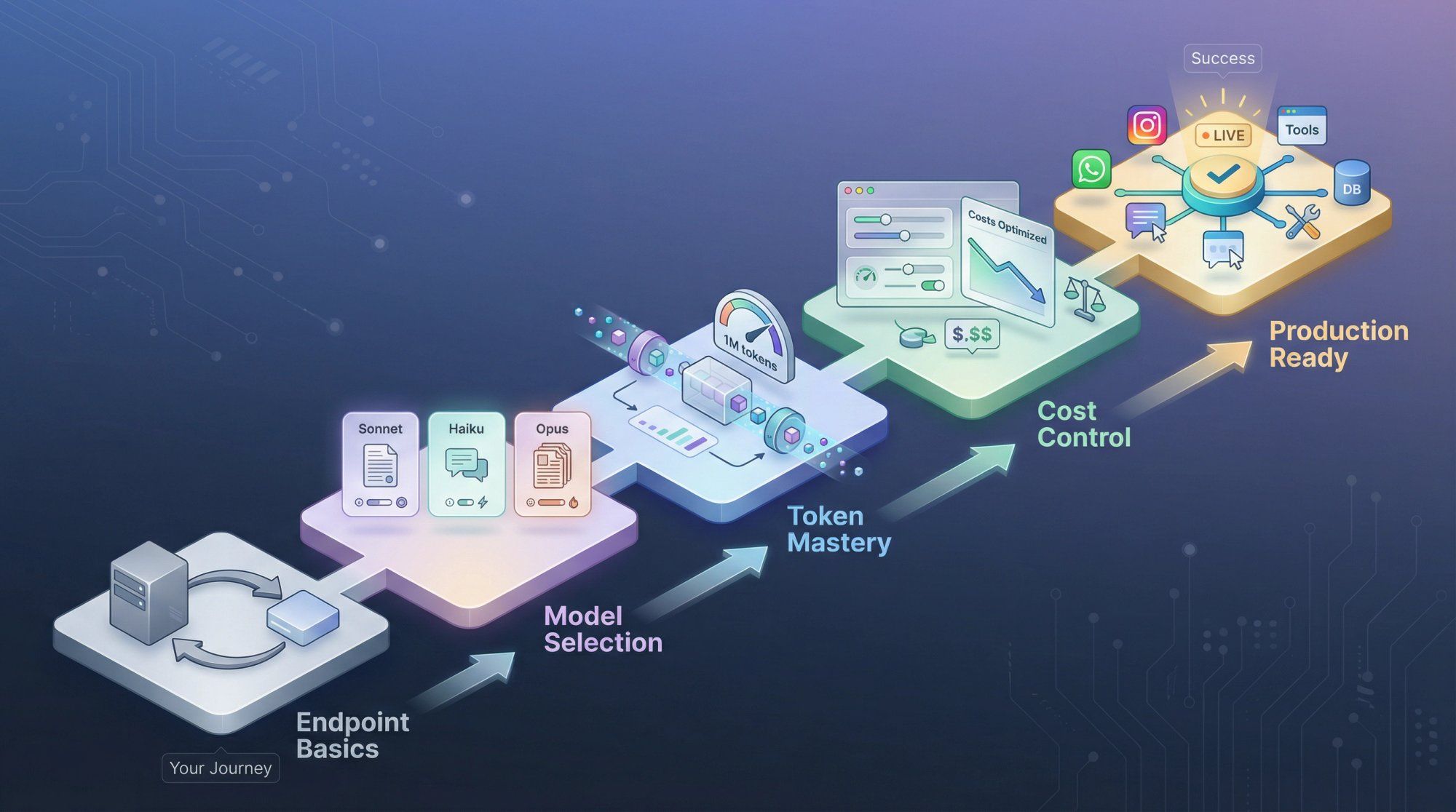
Success isn't just "I can hit the endpoint." Success is:
- You know which model to use and why
- You can reliably call Claude from your stack
- You have a mental model of tokens, context, cost, safety, and limits
- You can plug Claude into your product or messaging channels without reinventing everything
Everything in this guide is organized around that outcome.
Forget hype for a second.
At the simplest level, the Claude API is:
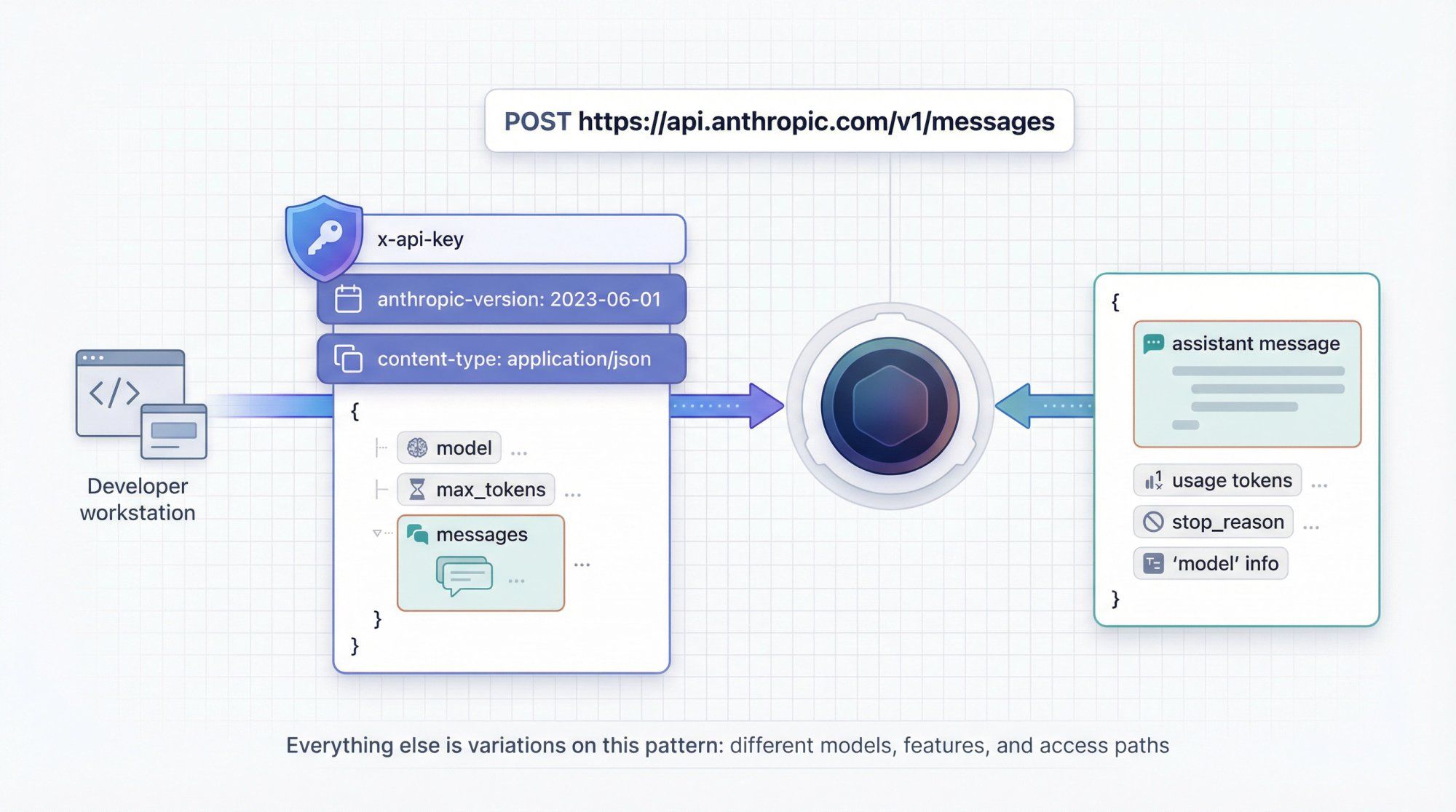
A remote function you call over HTTPS. Input: a list of "messages" (system + user + assistant) + settings. Output: another "message" with Claude's reply, plus metadata.
You hit:
POST https://api.anthropic.com/v1/messages
You pass three required headers:
x-api-key: your secret keyanthropic-version: currently2023-06-01for the v1 Messages APIcontent-type: application/json
And a JSON body like:
{ "model": "claude-sonnet-4-5", "max_tokens": 256, "messages": [ { "role": "user", "content": "Explain tokens like I'm 12." } ] }
Claude replies with structured JSON describing the assistant's message, tool calls (if any), usage, and so on.
Everything else in the API is variations on this idea:
- Different models (Sonnet, Haiku, Opus)
- Different features (tools, web search, files, extended thinking, memory)
- Different access paths (direct Anthropic API vs Bedrock vs Vertex vs Foundry)
You pay Anthropic in tokens.
Roughly:
- 1 token is about 3 to 4 characters of English text
- 1 million tokens (1 MTok) is about 750k words, give or take
Two critical ideas:
1. Input tokens Every character you send in the request counts: system prompt, conversation history, tool definitions, retrieved docs, images, etc.
2. Output tokens Every token Claude generates in the reply.
The context window is the maximum number of tokens Claude can consider in one request (input plus internal overhead). For Claude 4.5:
- All current models support 200k tokens of context
- Sonnet 4.5 can go up to 1M tokens using a beta header, with special pricing for long context
So when you build agents or support bots, you're juggling three constraints:
- Quality: bigger prompts and more context usually help
- Latency: bigger prompts are slower
- Cost: more tokens means higher bill
The Messages API treats a conversation as an array of turns:
system: instructions that define Claude's job and boundariesuser: what the human (or calling system) saysassistant: what Claude has previously replied with
Example:
"messages": [ { "role": "system", "content": "You are an AI support agent for a D2C fashion brand. Always ask for order ID before checking status." }, { "role": "user", "content": "Where's my order?" } ]
The API itself is stateless.
If you want multi-turn chat, you must resend the whole conversation history each time, or at least the important parts. This is why token counting and context windows are such a big deal.
Anthropic's own docs in late 2025 say:
"If you're unsure which model to use, we recommend starting with Claude Sonnet 4.5. It offers the best balance of intelligence, speed, and cost for most use cases."
Here's the current high-level lineup.
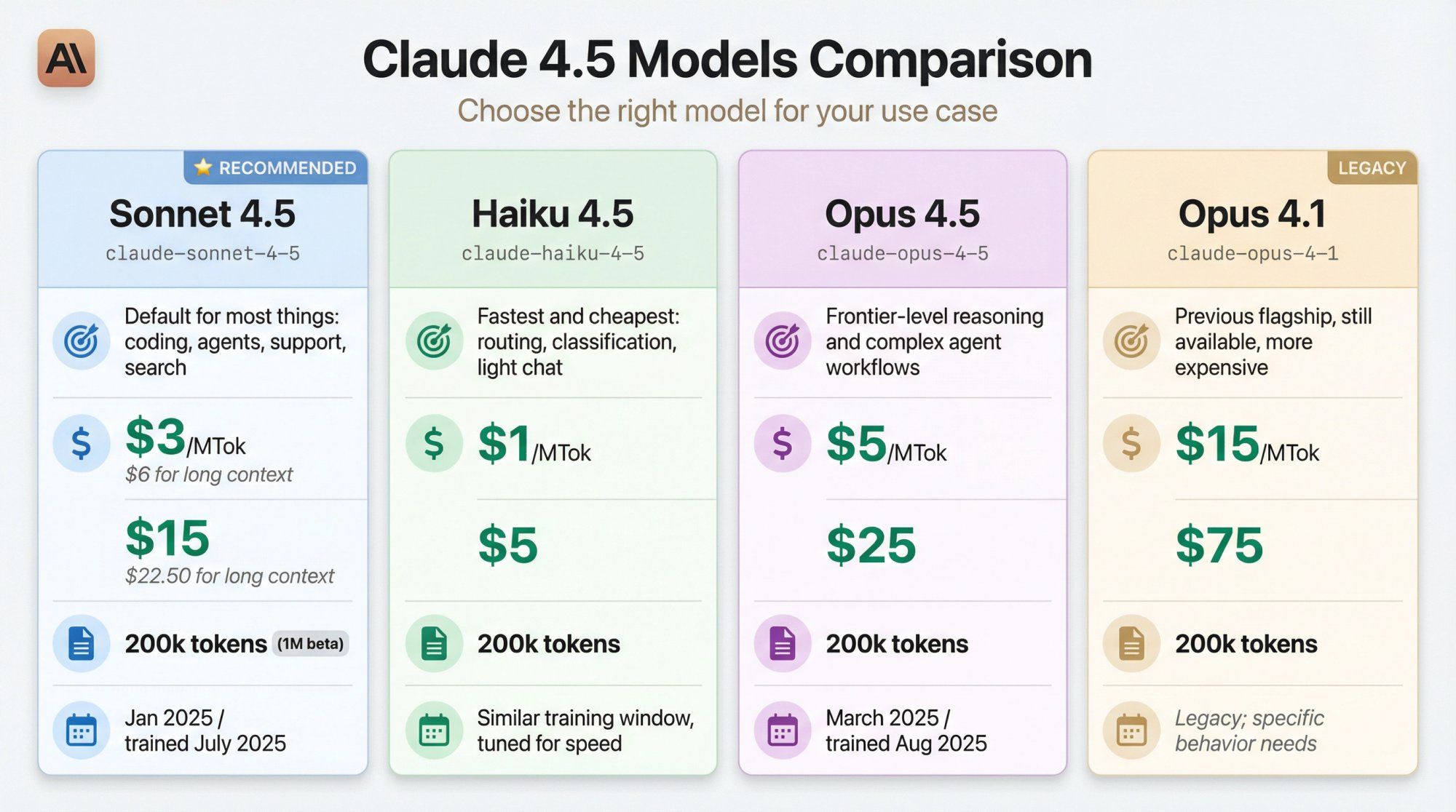
All numbers are from Anthropic's official model overview and pricing pages as of late 2025.
| Model | What it's best at | API alias | Input price (per MTok) | Output price (per MTok) | Context window | Knowledge & training |
|---|---|---|---|---|---|---|
| Sonnet 4.5 | Default for most things: coding, agents, support, search | claude-sonnet-4-5 | $3 for 200k tokens or less; $6 for long context | $15 for 200k or less; $22.50 for long context | 200k (1M beta) | Reliable knowledge to Jan 2025; trained on data to July 2025 |
| Haiku 4.5 | Fastest and cheapest: routing, classification, light chat | claude-haiku-4-5 | $1 | $5 | 200k | Similar training window, tuned for speed |
| Opus 4.5 | Frontier-level reasoning and complex agent workflows | claude-opus-4-5 | $5 | $25 | 200k | Reliable knowledge to March 2025; trained on data to Aug 2025 |
| Opus 4.1 | Previous flagship, still available, more expensive | claude-opus-4-1 | $15 | $75 | 200k | Legacy; used where specific behavior is needed |
A few subtleties:
Aliases vs snapshots
claude-sonnet-4-5 is an alias. It always points to the latest snapshot (currently claude-sonnet-4-5-20250929). For production, Anthropic recommends pinning the exact snapshot so behavior doesn't change under your feet.
Extended thinking All these models support "extended thinking", where Claude spends more internal tokens on reasoning before answering. This improves performance on hard tasks but increases cost.
Vision & multimodal All current Claude 4.5 models accept text and images as input and output text. Vision support is first-class and integrated into the Messages API.
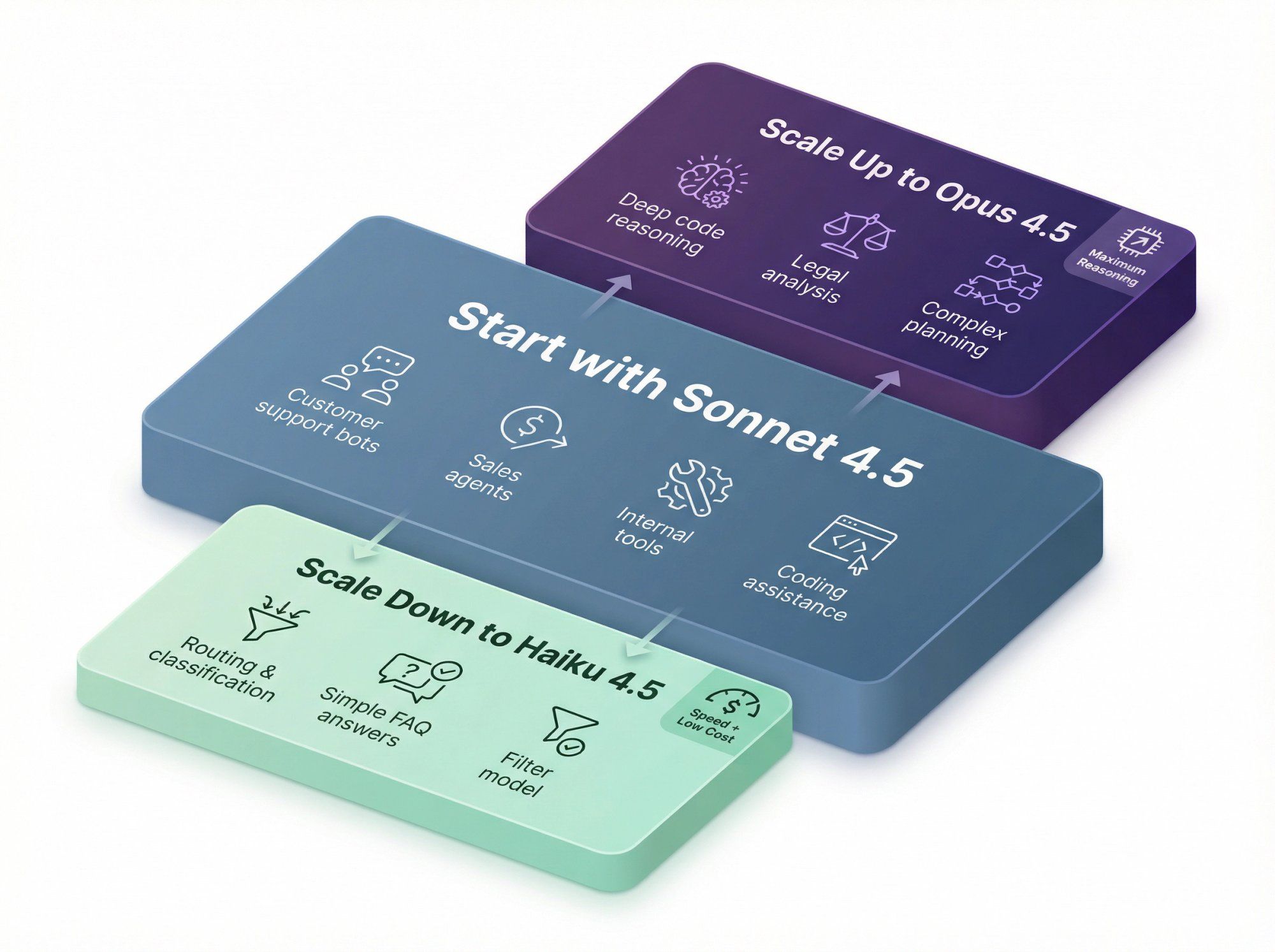
You can think of it like this:
Start with Sonnet 4.5
- Customer support bots
- Sales and lead-qualification agents
- Internal tools and dashboards
- Non-critical coding assistance
Use Haiku 4.5 when
- You need speed plus low cost
- You're doing routing, classification, extraction, or simple FAQ style answers
- You want a "filter model" in front of heavier models
Use Opus 4.5 when
- The task is genuinely hard (deep code reasoning, legal analysis, complex planning)
- You're okay paying significantly more per token for better reasoning
When comparing these models to alternatives like ChatGPT and Gemini, each has unique strengths. Learn more in our detailed Claude vs ChatGPT comparison or explore how Gemini stacks up.
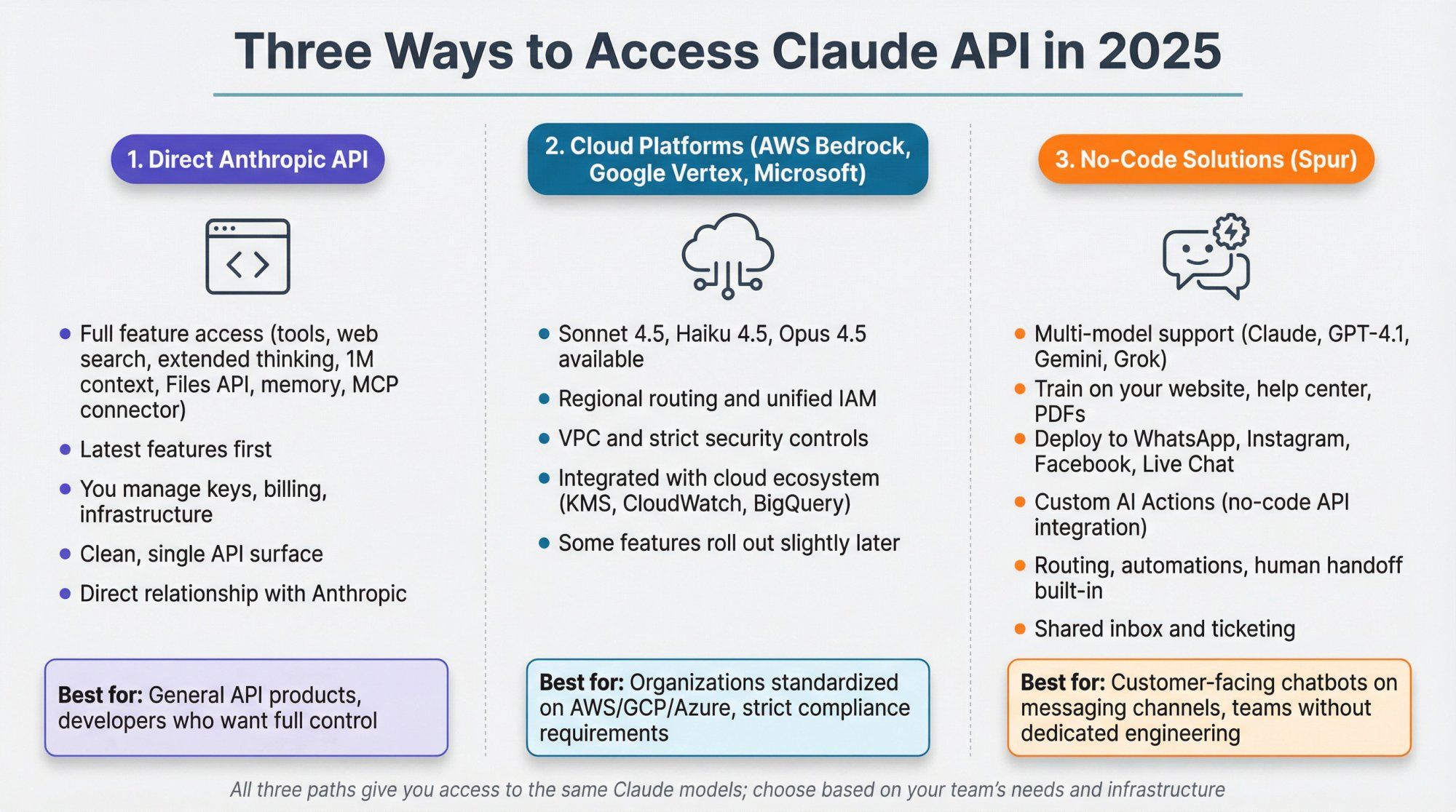
There are three main ways to use Claude models in 2025:
Full access to all features: tools, web search, extended thinking, 1M context, Files API, memory, MCP connector, and more. You manage your own key, billing, and infra.
AWS Bedrock, Google Vertex AI, and Microsoft Foundry expose Claude models as first-class endpoints, including Sonnet 4.5, Haiku 4.5, and Opus 4.5, with regional routing and unified IAM.
Great if your org is already standardized on those stacks or needs very strict VPC and IAM controls. Some features roll out slightly later than on Anthropic's own API.
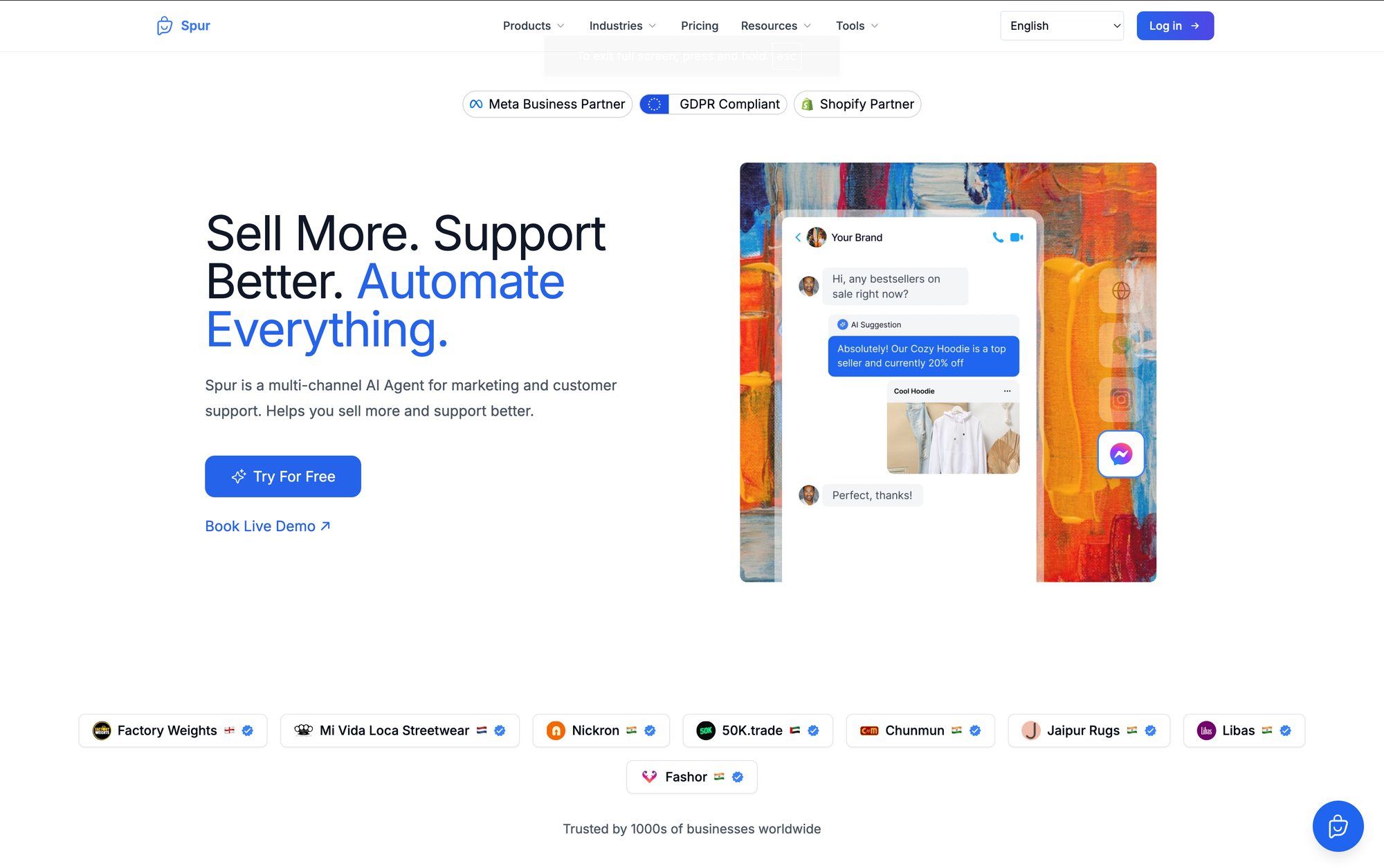
Platforms such as Spur sit one layer up: you plug Claude (and other models like GPT-4.1, Gemini, Grok) into WhatsApp, Instagram, Facebook, and Live Chat, then add routing, automations, and human handoff.
Spur in particular lets you:
- Train agents on your website, help center, and PDFs
- Attach those agents to WhatsApp, Instagram, Messenger, and site chat widgets
- Wire in "Custom AI Actions" that call your CRM, e-commerce platform, or internal APIs without custom code
If you're building:
- A general API product → use the direct Anthropic API
- An internal platform on your cloud of choice → consider Bedrock or Vertex
- Customer-facing chatbots on messaging channels → using Claude through Spur often gets you live faster than building all the glue yourself
High level:
- Sign up at Anthropic / Claude Console
- Add a payment method and buy some credits (there's typically a small minimum, for example $5)
- Create a workspace if you want separate projects or teams
Inside the Console:
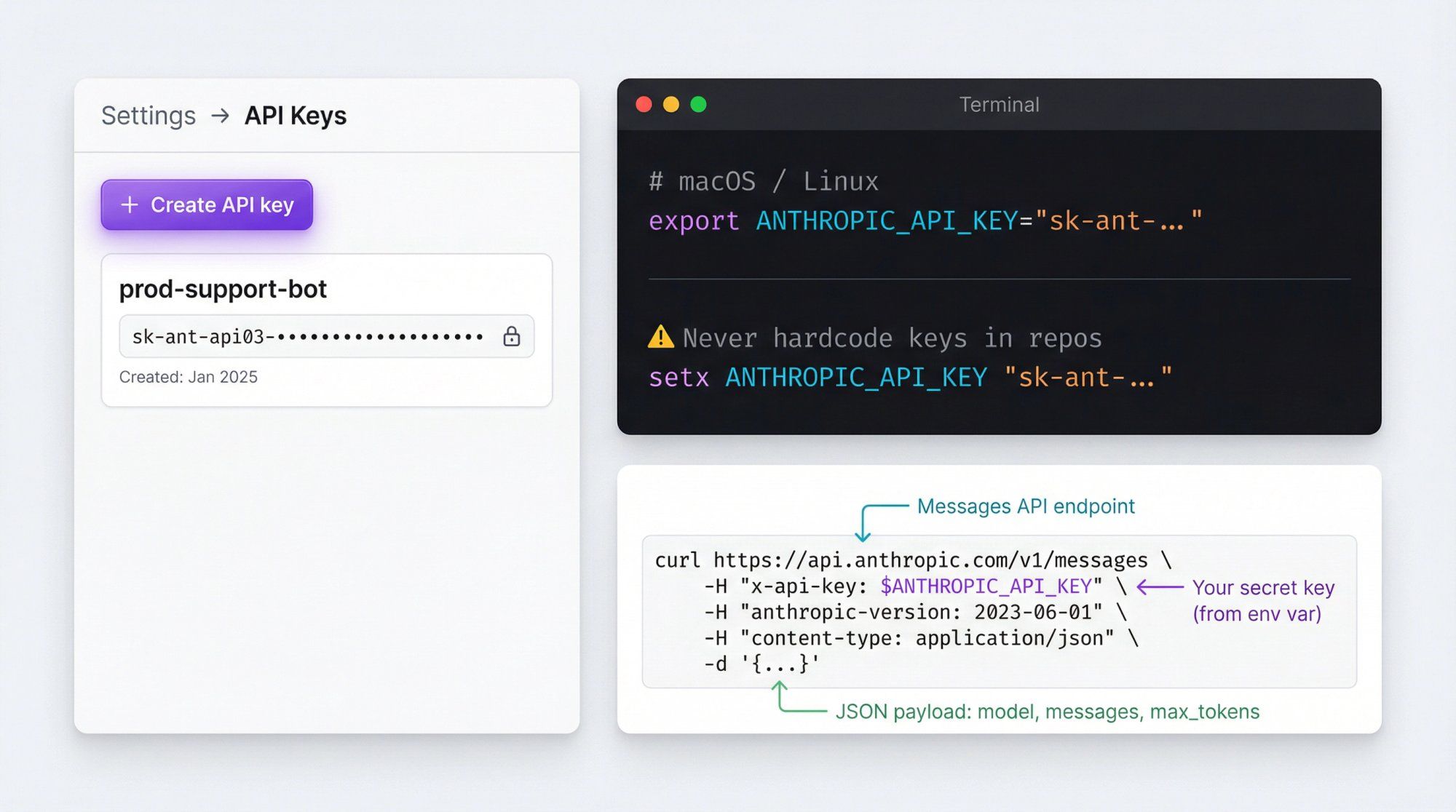
- Go to Settings → API Keys
- Click Create API key
- Give it a human name (for example
prod-support-bot) - Copy it once; you cannot see it again later
Then, in your environment:
# macOS / Linux export ANTHROPIC_API_KEY="sk-ant-..." # Windows (PowerShell) setx ANTHROPIC_API_KEY "sk-ant-..."
Never hardcode keys in front-end code or public repos. Treat this like a database password or Stripe secret.
curl https://api.anthropic.com/v1/messages \ -H "x-api-key: $ANTHROPIC_API_KEY" \ -H "anthropic-version: 2023-06-01" \ -H "content-type: application/json" \ -d '{ "model": "claude-sonnet-4-5", "max_tokens": 256, "messages": [ { "role": "user", "content": "Give me two creative ways a fashion brand can use WhatsApp broadcasts." } ] }'
If everything is configured correctly, you get back JSON with:
id,model,role,contentusage(input / output tokens)stop_reason(end_turn,max_tokens,tool_use, etc.)
Install the SDK:
pip install anthropic
Basic usage:
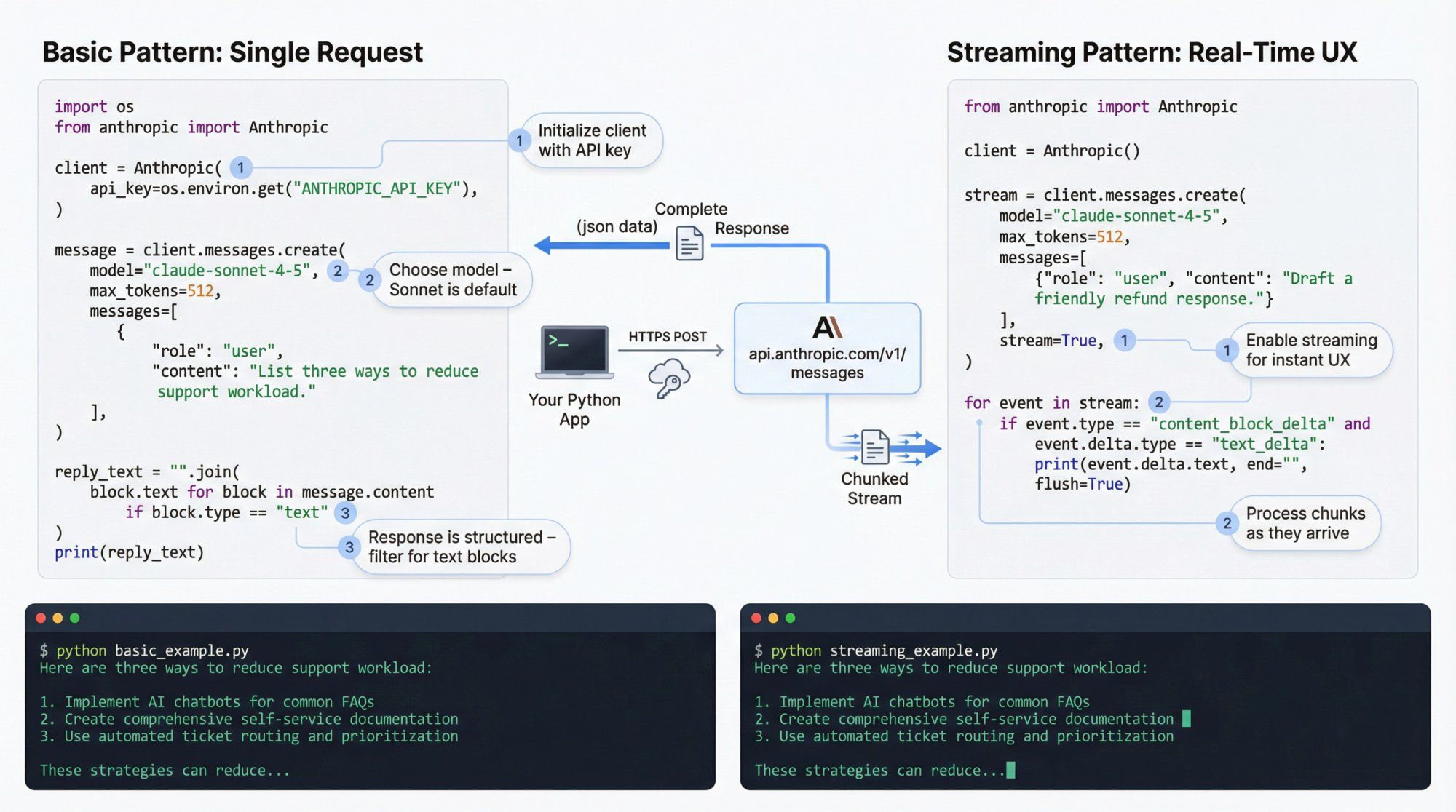
import os from anthropic import Anthropic client = Anthropic( api_key=os.environ.get("ANTHROPIC_API_KEY"), ) message = client.messages.create( model="claude-sonnet-4-5", max_tokens=512, messages=[ { "role": "user", "content": "List three ways to reduce support workload for a Shopify store." } ], ) # message.content is a list of content blocks; most replies start with one text block reply_text = "".join( block.text for block in message.content if block.type == "text" ) print(reply_text)
A few notes:
- The Python SDK sets
anthropic-versionfor you by default, so you usually don't have to manage headers message.contentis structured: you can receive text, tool calls, and other block types
Streaming is essential for UX in chat apps.
from anthropic import Anthropic client = Anthropic() stream = client.messages.create( model="claude-sonnet-4-5", max_tokens=512, messages=[ {"role": "user", "content": "Draft a friendly response to a customer asking for a refund."} ], stream=True, ) for event in stream: if event.type == "content_block_delta" and event.delta.type == "text_delta": print(event.delta.text, end="", flush=True)
You can push these chunks to a WebSocket, SSE endpoint, or directly to something like Spur's Live Chat widget if you're building a custom integration.
Install the SDK:
npm install @anthropic-ai/sdk
Then:
import Anthropic from "@anthropic-ai/sdk"; const client = new Anthropic({ apiKey: process.env.ANTHROPIC_API_KEY, }); async function main() { const msg = await client.messages.create({ model: "claude-sonnet-4-5", max_tokens: 512, messages: [ { role: "user", content: "Summarize our product: a WhatsApp + Instagram automation platform for D2C brands.", }, ], }); const textBlocks = msg.content .filter((b) => b.type === "text") .map((b: any) => b.text); console.log(textBlocks.join("")); } main();
For streaming, the TypeScript SDK gives you an async iterator over events, similar to the Python client.
A lot of people treat the Messages API as "just send a prompt." That works for toy demos but falls apart in production.
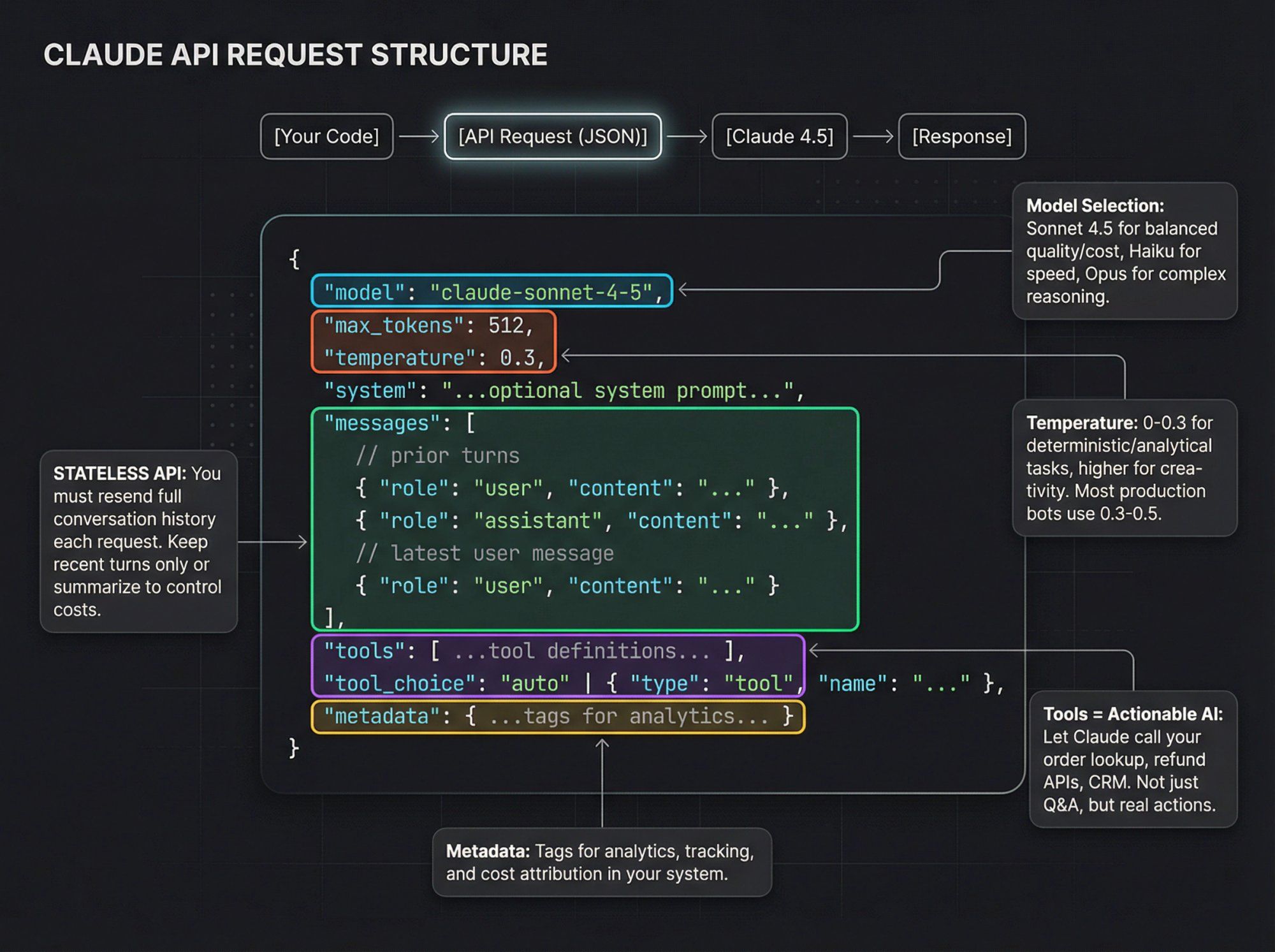
Think of each request as:
{ model: "claude-sonnet-4-5", max_tokens: 512, temperature: 0.3, system: "...optional system prompt...", messages: [ // prior turns { role: "user", content: "..." }, { role: "assistant", content: "..." }, // latest user message { role: "user", content: "..." } ], tools: [ ...tool definitions... ], tool_choice: "auto" | { type: "tool", name: "..." }, metadata: { ...tags for analytics... } }
Key parameters you should care about:
max_tokens: hard cap on output lengthtemperature: lower (0 to 0.3) for analytic or deterministic tasks, higher for creativitytop_p,top_k: advanced sampling controls; most teams stick with defaultssystem: define role, tone, constraints, and (for Spur-style agents) channel-specific behavior ("If user is on WhatsApp, keep replies under 1000 characters.")metadata: useful for analytics in your own system or when using Anthropic's usage and cost APIs
Remember: the Claude API is stateless. You decide how much history to carry forward. In practice:
- Keep recent turns only
- Or summarize older history into a shorter system message
- Or rely on memory and Skills for long-lived context (more on that later)
A basic chatbot answers questions. An agent can:
- Look up orders
- Trigger refunds
- Generate discount codes
- Query a database
- Call internal APIs
Claude supports this with tool use and structured outputs.
You give Claude:
- A list of tools, each with:
namedescription- JSON Schema describing expected parameters
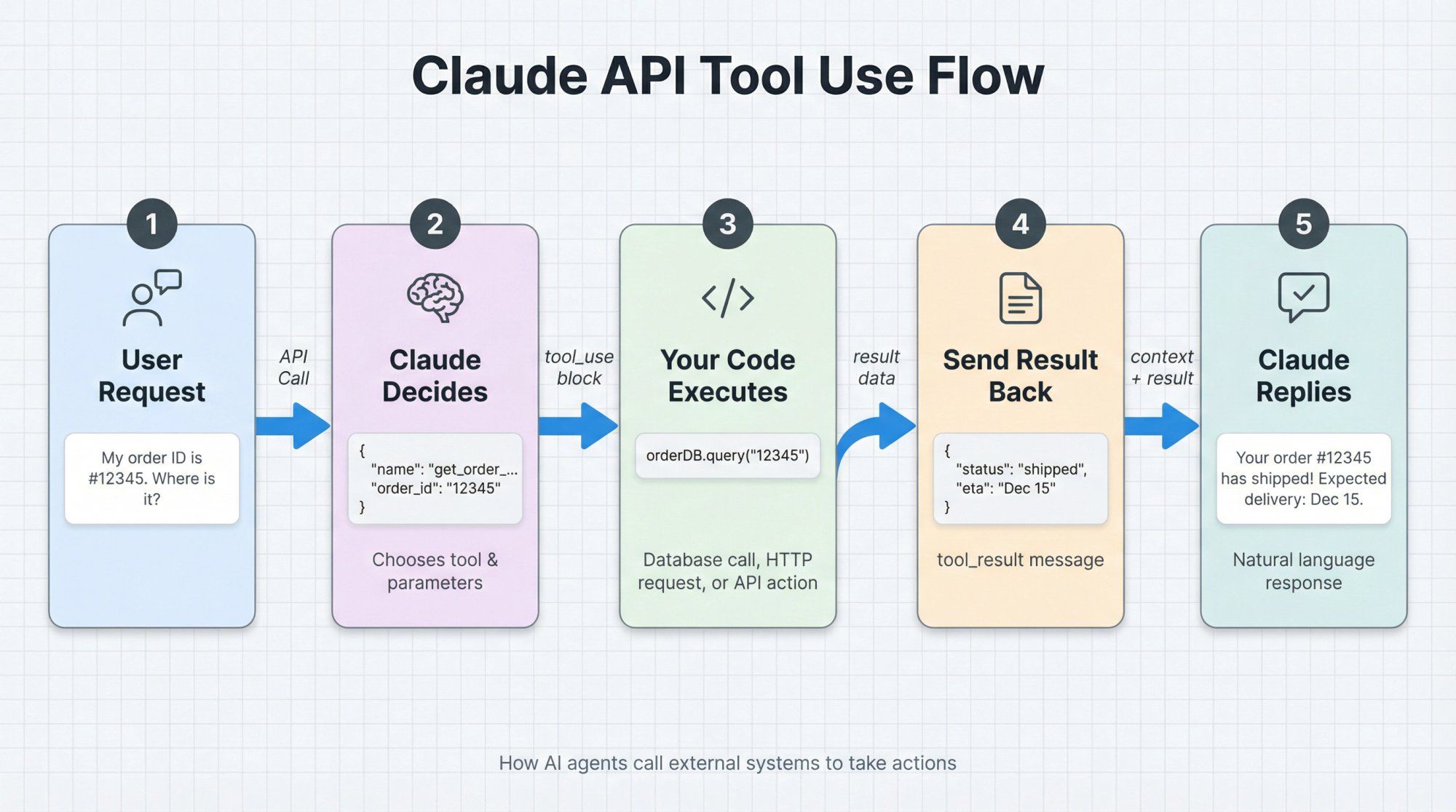
Claude can then:
- Decide when and which tools to call
- Emit
tool_useblocks as part of its response - Your code executes the actual action (database call, HTTP request, Spur "Custom AI Action", etc.)
- You send back the result as a
tool_resultmessage - Claude uses that to craft the final reply
Imagine a support bot that can fetch an order from your backend:
const tools = [ { name: "get_order_status", description: "Look up an order by ID and return its current status.", input_schema: { type: "object", properties: { order_id: { type: "string", description: "The order ID that the customer provides." } }, required: ["order_id"] } } ];
Call Claude:
const msg = await client.messages.create({ model: "claude-sonnet-4-5", max_tokens: 256, tools, tool_choice: "auto", messages: [ { role: "user", content: "My order ID is #12345. Where is it?" } ] });
Claude might return a content block like:
{ "type": "tool_use", "id": "toolu_01...", "name": "get_order_status", "input": { "order_id": "12345" } }
Your server:
- Reads the tool call
- Calls your own
getOrderStatus("12345") - Sends a follow-up request to Claude with a
tool_resultmessage containing the status
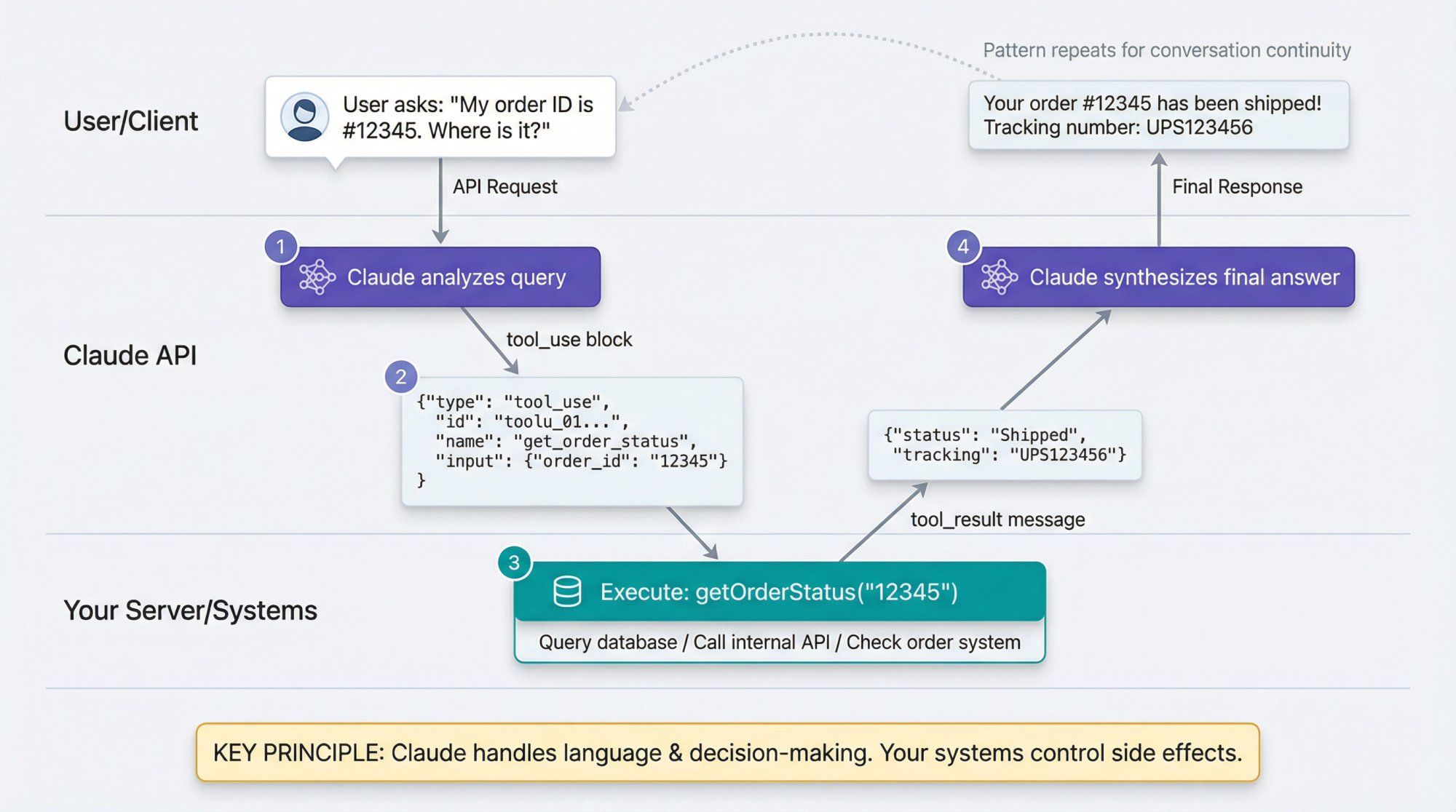
This pattern is how you build Actionable AI: Claude handles language and decision-making; your systems stay in control of side effects.
For teams using Spur, the "Custom AI Actions" feature is essentially a no-code way to wire these tools into the messaging flows without writing the boilerplate yourself.
Claude also supports strict JSON outputs for Sonnet 4.5 and Opus 4.1. You give it a JSON Schema and ask it to return data that matches that schema exactly.
Use this when you want:
- Lead qualification forms
- Product extraction from text
- Routing decisions
- Classification with confidence scores
Even with structured outputs, you should still validate the JSON in your code. Models are very good at following schemas now, but not infallible.
Anthropic has gone hard on features that make large-scale agents and support systems more practical. Here are the ones you should at least understand conceptually.
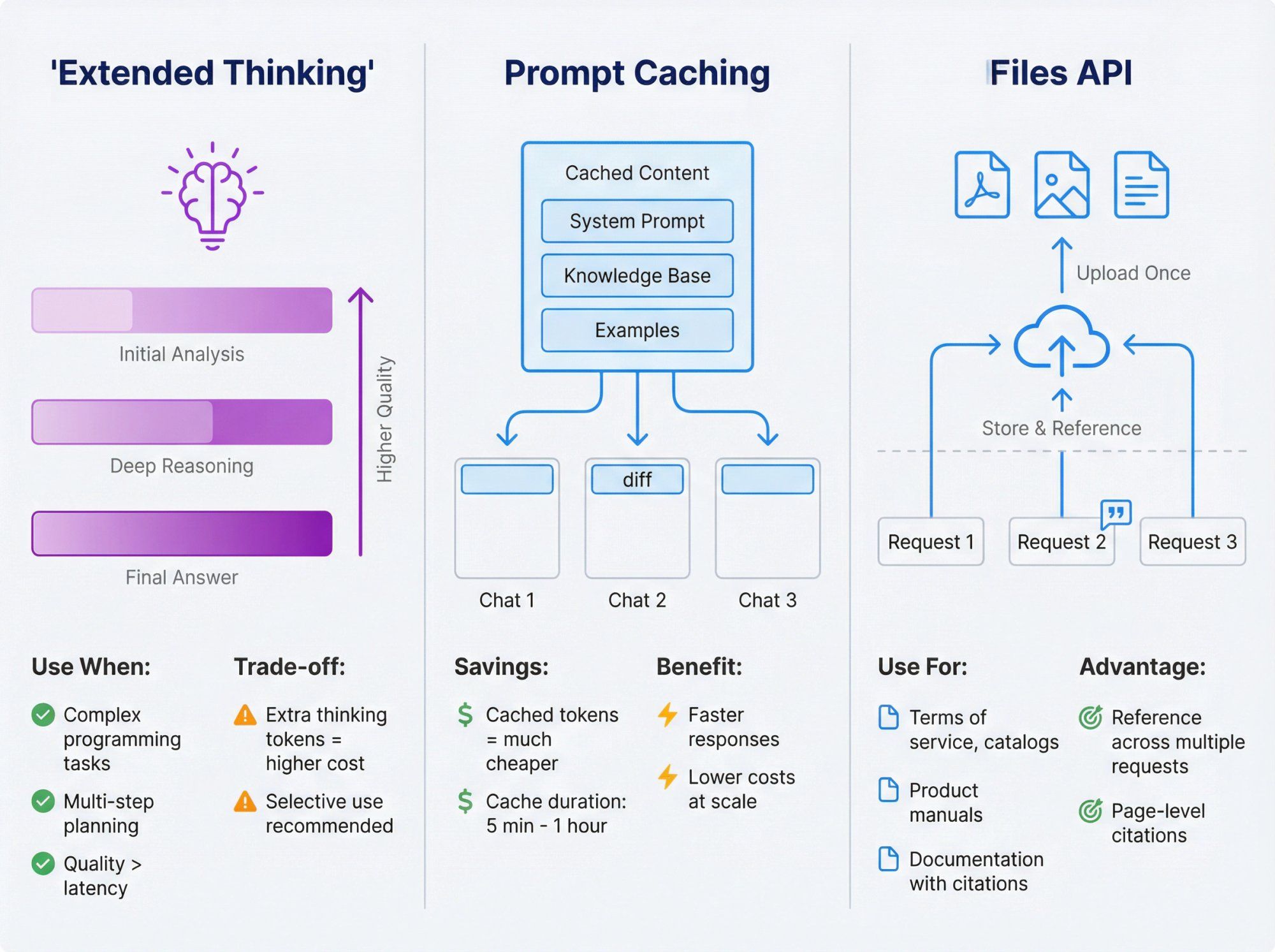
Extended thinking lets Claude "think out loud" with a separate internal reasoning channel before giving you the final answer.
Use it when:
- You're solving complex programming tasks
- You're doing multi-step planning or analysis
- You care more about quality than raw latency
You pay for the extra thinking tokens, so turn it on selectively (for example, only on high-value tickets or hard debugging sessions).
Prompt caching lets Claude reuse big, stable parts of your prompt (long instructions, docs, or examples) without re-billing tokens every time.
- Cached prompt writes and reads have separate pricing that's much cheaper than normal tokens
- You can cache for 5 minutes or 1 hour depending on the feature
For a support bot, you might cache:
- Main system prompt
- Knowledge base snapshot
- Important examples
Then each new chat only sends the diff, saving cost and speed.
The Files API lets you upload PDFs, images, and text files once, then reference them across multiple requests.
Patterns:
- Upload your terms of service, pricing tables, catalogs
- Upload product manuals for complex devices
- Have Claude answer questions with citations back to specific pages or sections
For Spur-style use cases (support, sales, e-commerce), this is essentially another way of doing RAG but managed by Anthropic instead of your own vector DB.
Claude can:
- Search the web: pay $10 per 1,000 searches on top of normal token costs
- Fetch specific pages or PDFs: via the Web Fetch tool (beta), returning content plus citations
Use search and fetch when:
- You need fresh info (for example airline policies that change weekly)
- You're summarizing or analyzing pages you don't want to crawl yourself
For customer-facing flows, keep a hard line between:
- Things you want grounded in your own authoritative data (RAG, Files API, Spur knowledge base)
- Things that can lean on general web knowledge
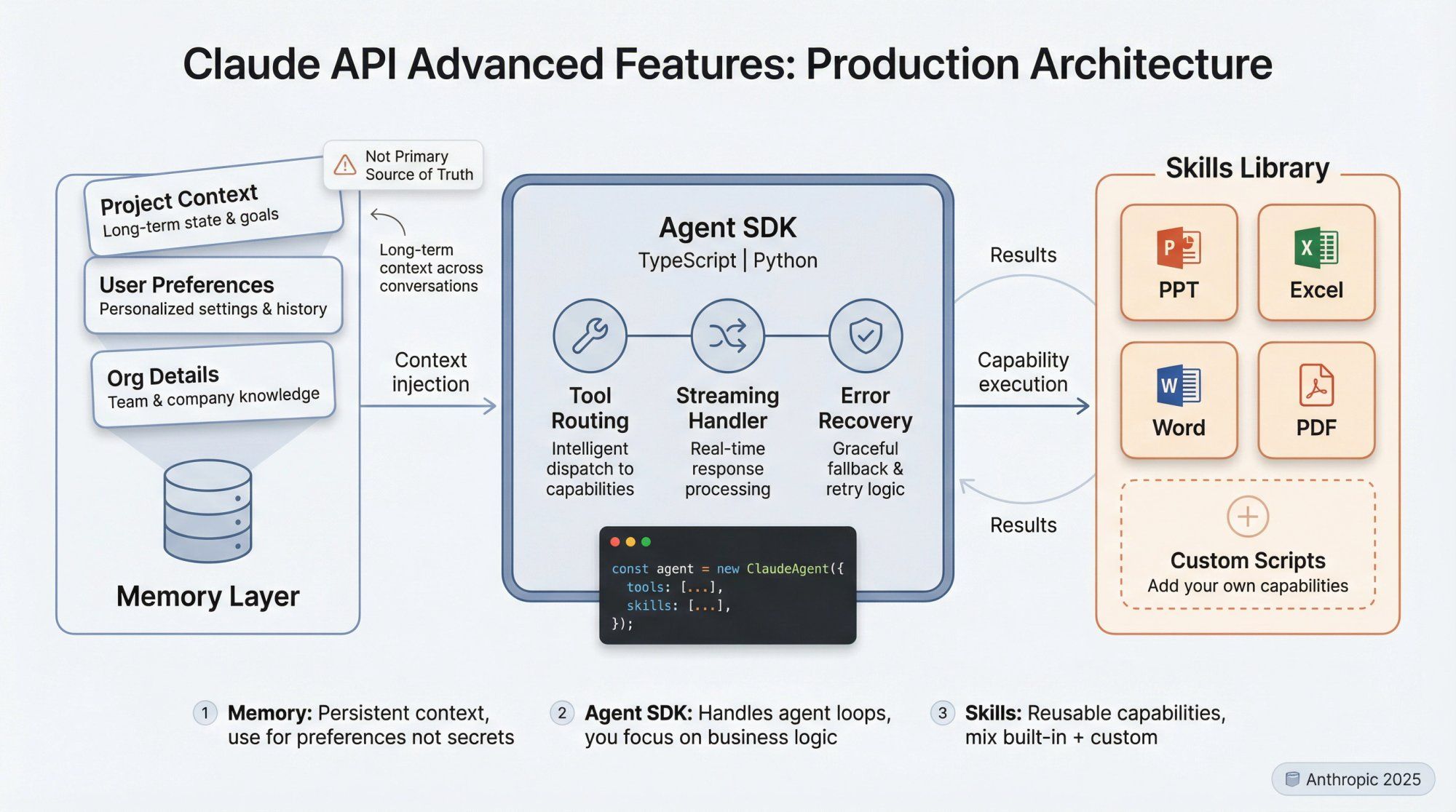
Claude can store long-term memory across conversations:
- Project context
- User preferences
- Organizational details
In production, use memory carefully:
- Treat it like a database you don't fully control
- Avoid writing secrets or highly sensitive info
- Use it to refine tone, preferences, and recurring patterns, not primary source of truth
Anthropic now ships an Agent SDK (TypeScript and Python) and a higher-level concept called Skills: reusable capabilities like "work with PowerPoint / Excel / Word / PDF" or your own custom scripts.
Instead of hand-rolling your own agent loop, you can:
- Define a set of tools and Skills
- Let the SDK handle tool routing, streaming, and error handling
- Focus on your business logic and UI
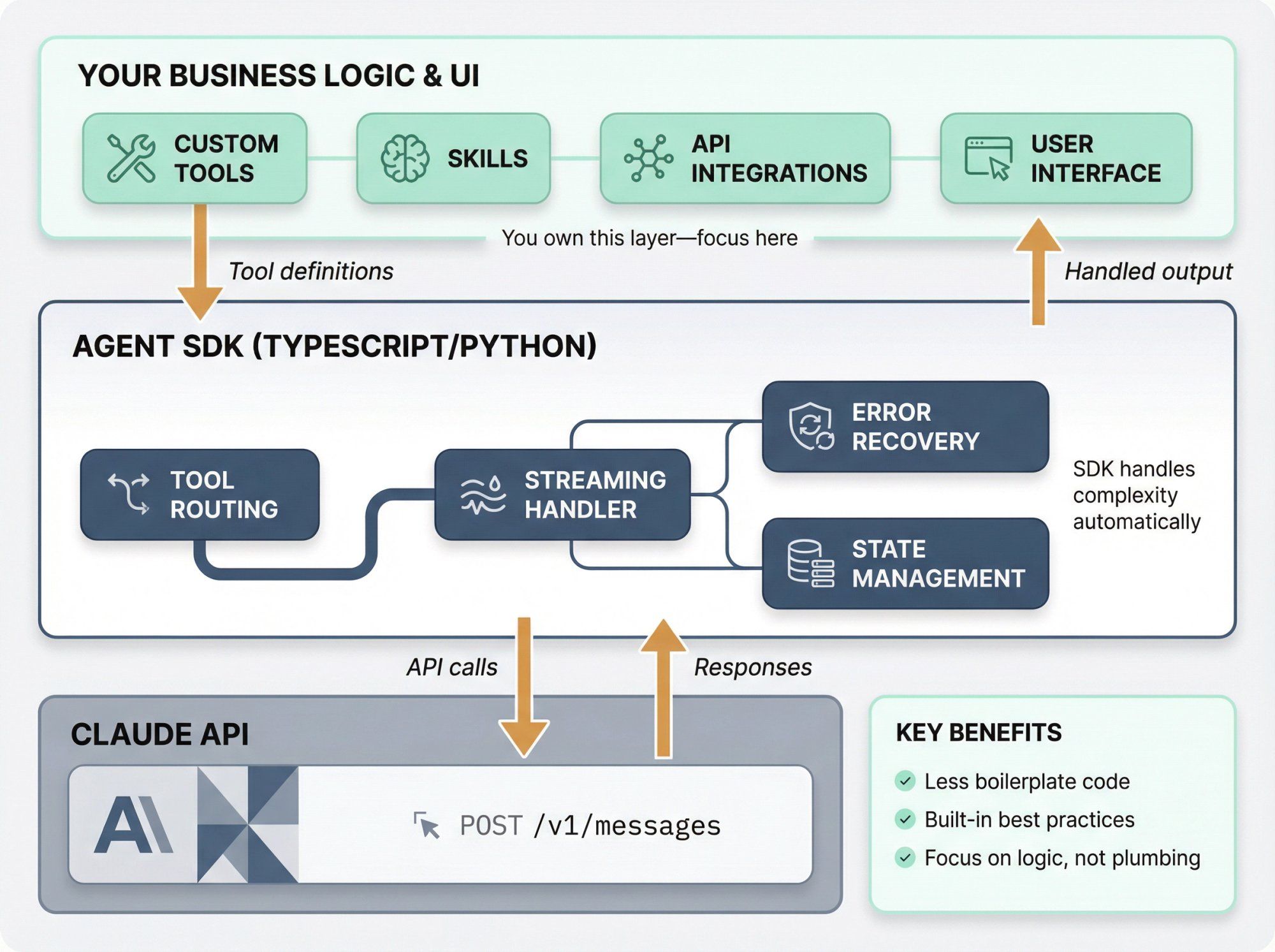
If you're building an internal tool or SaaS product, the Agent SDK is worth exploring. If you're mostly focused on messaging and support (WhatsApp, Instagram), a platform like Spur covers most of what the Agent SDK is doing under the hood for conversational use cases.
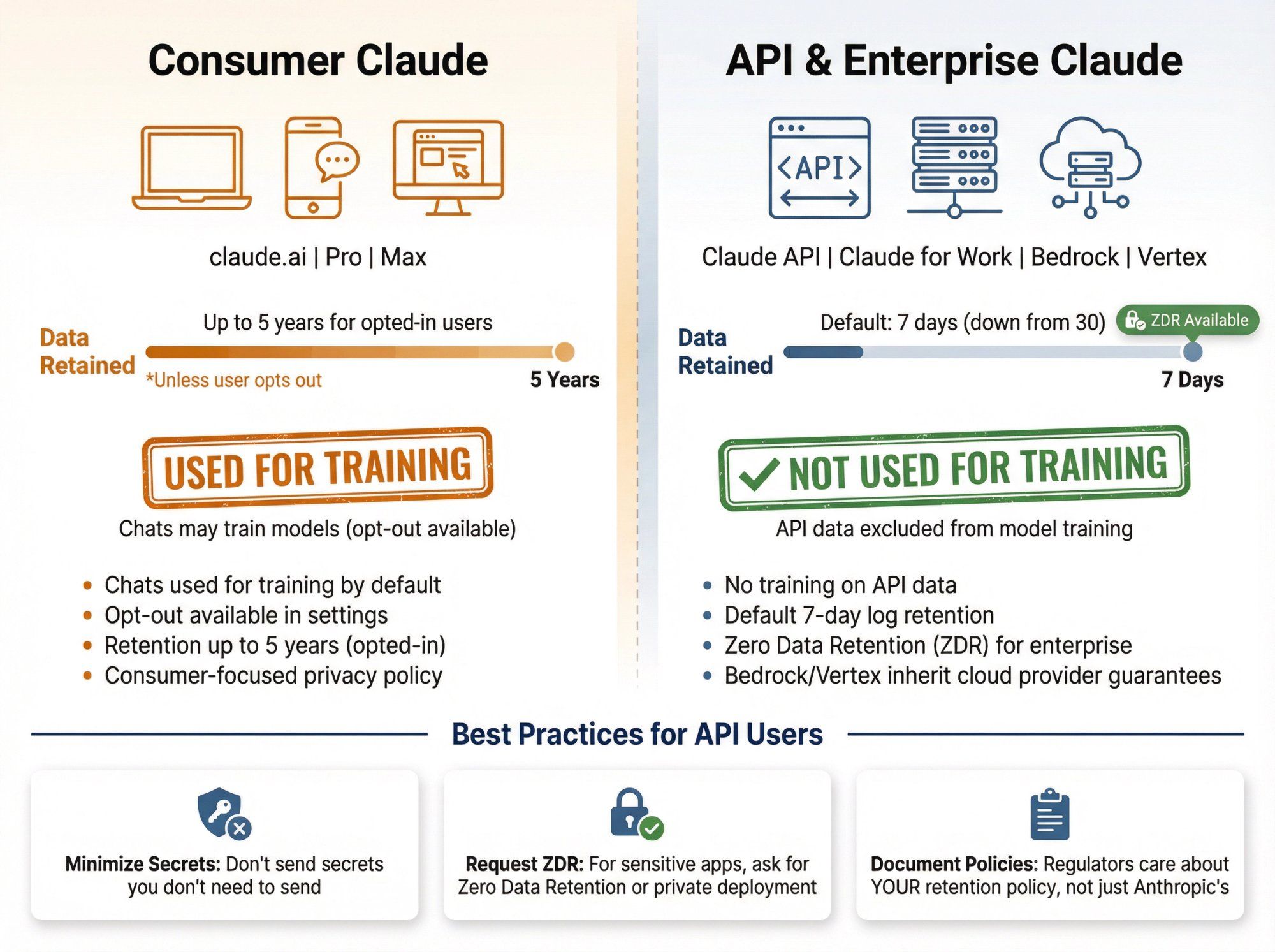
Privacy is where a lot of people have blind spots.
There's a big difference between:
- Consumer Claude (claude.ai web app, desktop, mobile, Pro/Max plans)
- API and enterprise use (Claude API, Claude for Work, Claude Gov, Bedrock / Vertex integrations)
Recent policy changes (mid to late 2025) mean:
- For consumer products, Anthropic now uses user chats for training unless you opt out, with retention extended up to five years for opted-in users
- For API usage, multiple sources and Anthropic documentation state:
- API data is not used to train generative models
- Default retention for API logs is now 7 days, down from 30, with options for Zero Data Retention for enterprise customers
So if you're:
- Building on the Claude API, your traffic is not fed back into training by default, and logs expire quickly
- Using Claude via AWS Bedrock or Vertex AI, you also inherit those providers' strong guarantees that customer data is not used for training shared models
Best practices:
- Don't send secrets you don't need to send
- For very sensitive applications, ask Anthropic (or your cloud) for ZDR / private deployment details
- Document your own retention and incident processes; regulators will care about your policy, not just Anthropic's
As of late 2025, official API pricing is:
Sonnet 4.5
- Input: $3 / MTok for prompts of 200k tokens or less, $6 / MTok for long context
- Output: $15 / MTok for 200k or less, $22.50 / MTok for long context
Haiku 4.5
- Input: $1 / MTok
- Output: $5 / MTok
Opus 4.5
- Input: $5 / MTok
- Output: $25 / MTok
Batch processing is 50 percent cheaper than standard API calls for large offline workloads.
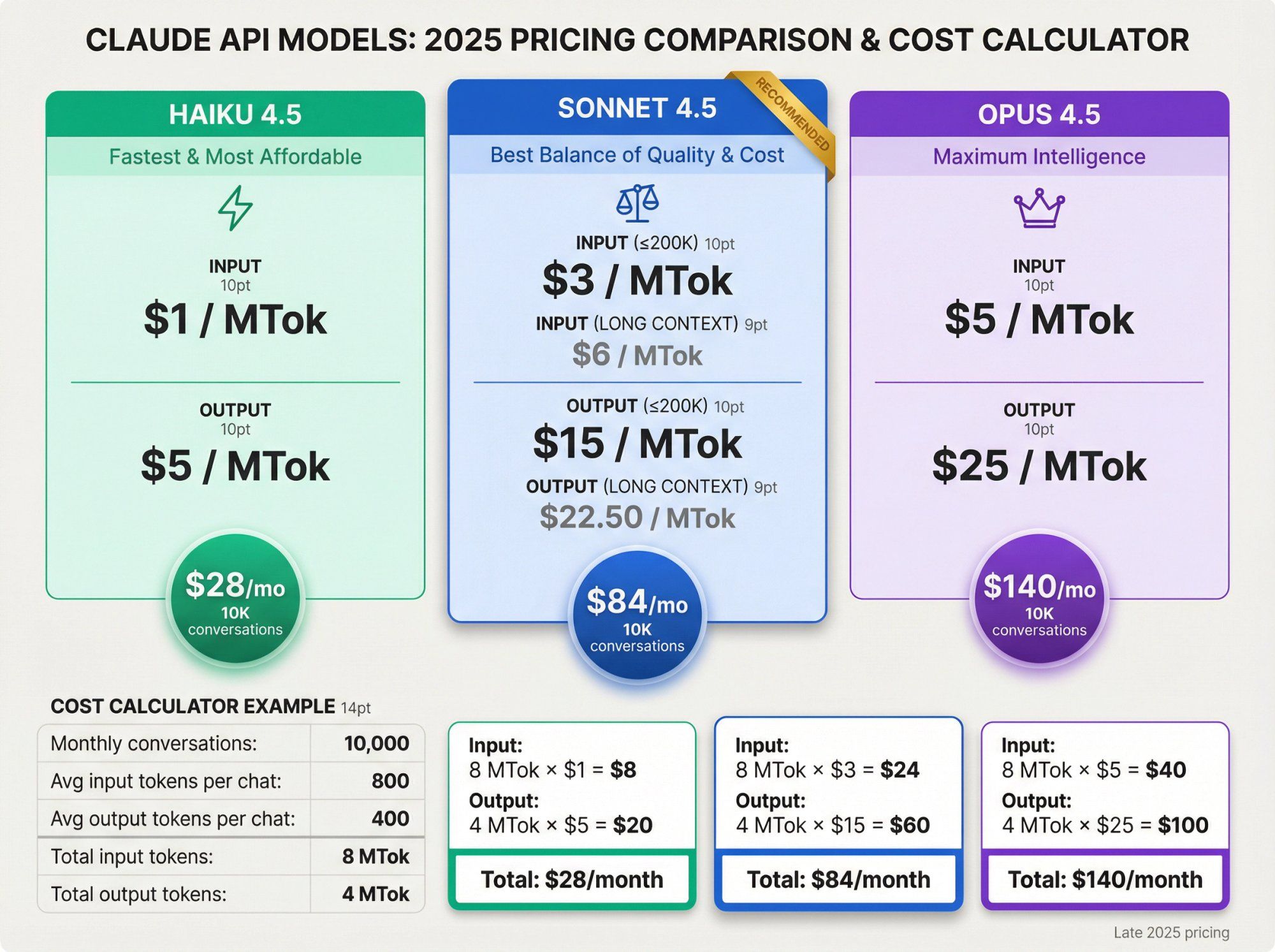
Imagine:
- 10,000 conversations per month
- Each conversation averages:
- 800 input tokens (system prompt + knowledge + history)
- 400 output tokens
Totals:
- Input tokens: 10,000 × 800 = 8,000,000 tokens = 8 MTok
- Output tokens: 10,000 × 400 = 4,000,000 tokens = 4 MTok
On Sonnet 4.5 (regular context):
- Input cost: 8 MTok × $3 = $24
- Output cost: 4 MTok × $15 = $60
- Total: $84 / month
Same workload on Haiku 4.5:
- Input: 8 MTok × $1 = $8
- Output: 4 MTok × $5 = $20
- Total: $28 / month
Same workload on Opus 4.5:
- Input: 8 MTok × $5 = $40
- Output: 4 MTok × $25 = $100
- Total: $140 / month
So moving from Haiku to Sonnet roughly triples your cost for a 10k-conversation support bot, but may significantly improve quality. Moving to Opus almost doubles Sonnet's cost again.
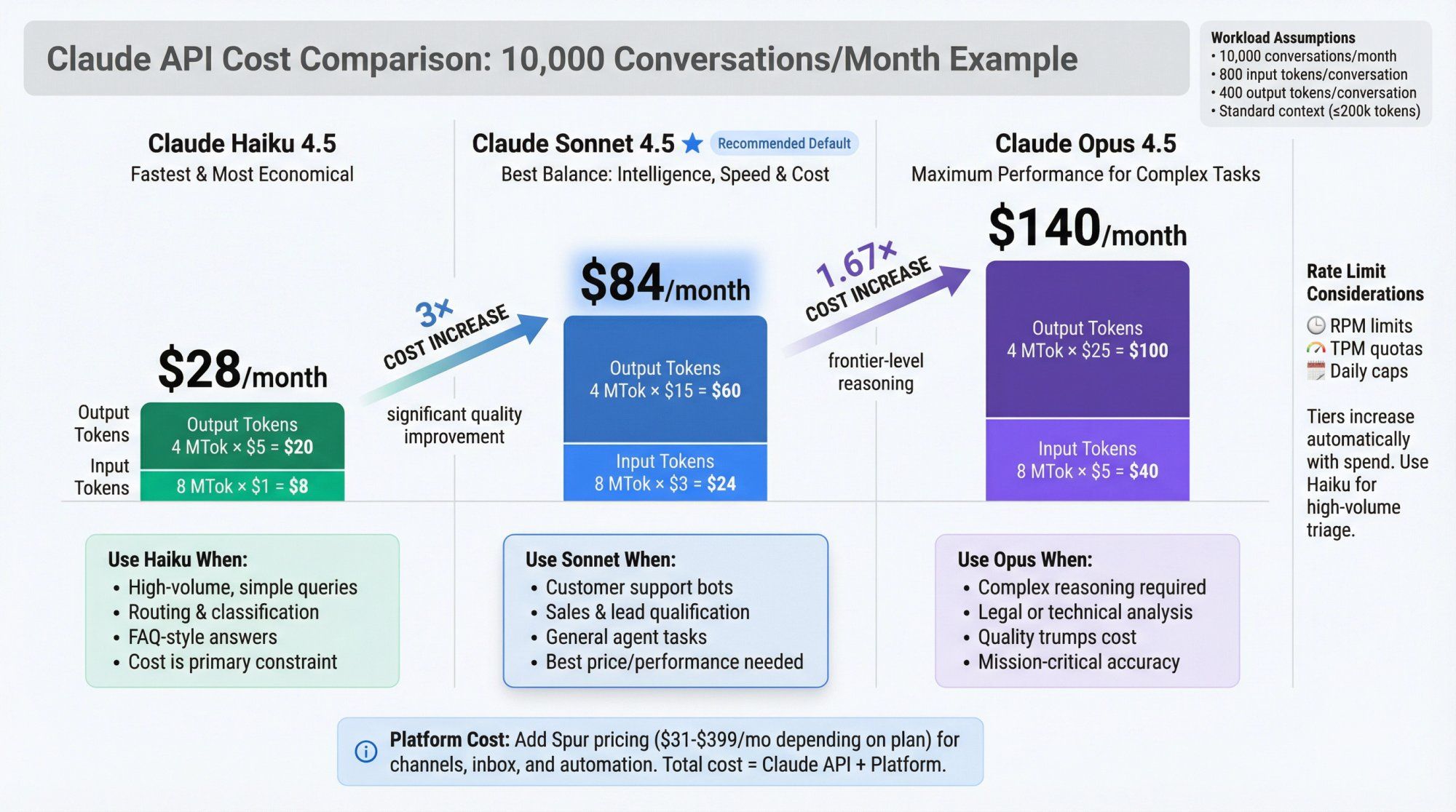
If you pair this with Spur's own AI plans (which bundle credits for LLM calls and orchestration of WhatsApp / Instagram / Live Chat), you can compare:
- LLM cost (Anthropic)
- Platform cost (Spur, including channels, inbox, flows)
Anthropic uses usage tiers that determine:
- Requests per minute (RPM)
- Tokens per minute (TPM)
- Daily token quotas
Tiers increase automatically as you spend more. You can see your current tier and limits in the Console.
Key ideas:
- Rate limits are per organization, not per key
- Long context and extended thinking burn through quotas faster
- Prompt caching helps multiply effective throughput, since cached tokens may not count towards certain limits
If you're building something high-volume (for example a real estate lead-qualifier bot on Instagram ads), design with these in mind:
- Use Haiku for cheap, high-volume triage
- Use Sonnet or Opus only when needed
- Turn off extended thinking for simple flows
- Consider batch processing for non-interactive workloads
- Add your own throttling so client bugs don't hammer the API
Let's connect all this to the world where real customer conversations happen.
A robust multi-channel support setup using Claude typically looks like:
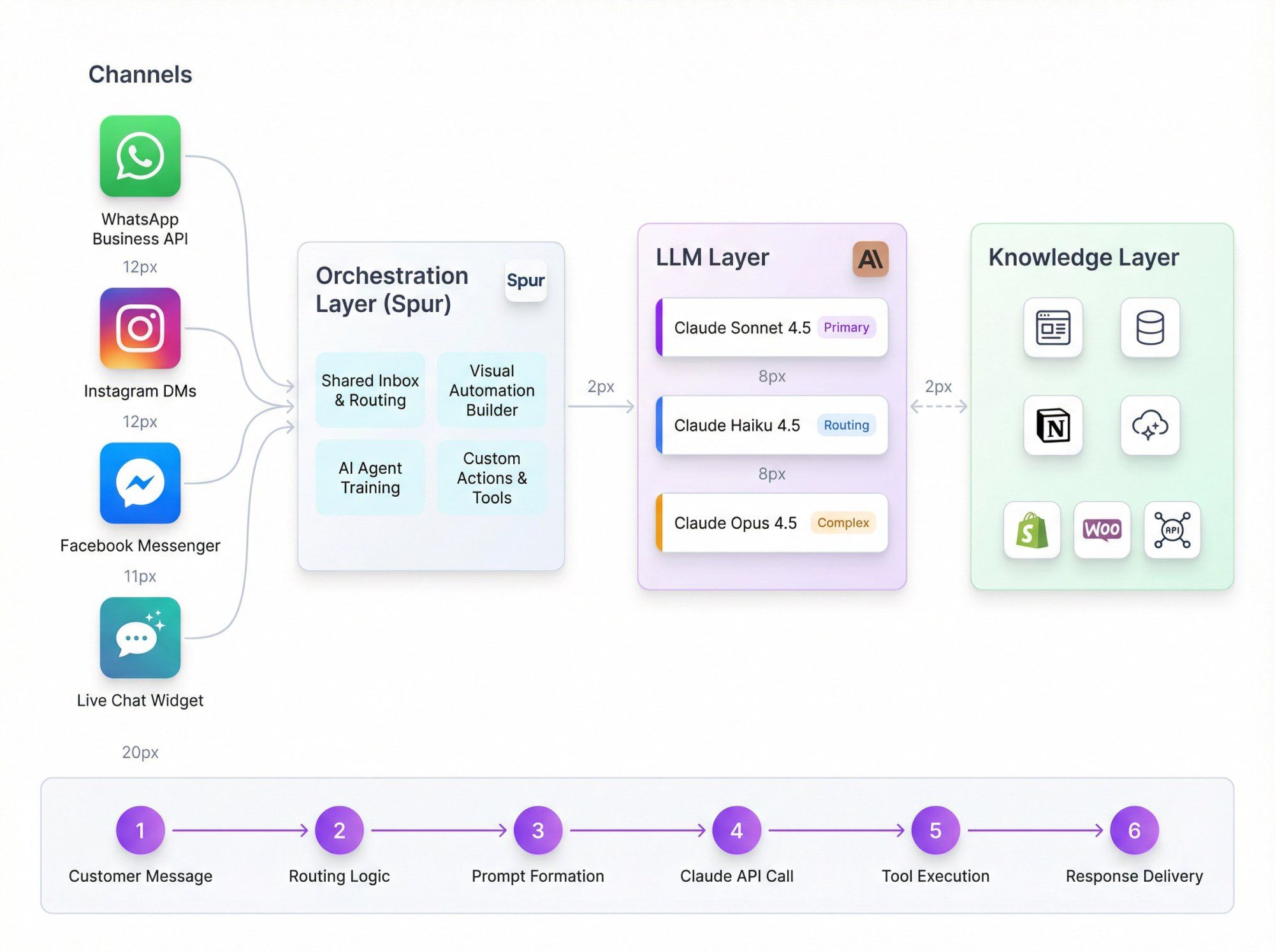
- WhatsApp Business API
- Instagram DMs and comments
- Facebook Messenger
- Website Live Chat widget
Spur provides:
- Shared inbox and routing
- Visual automation builder
- AI Agents trained on your docs and website
- Custom AI Actions that call your backend for things like order status, refund eligibility, appointment slots
- Sonnet 4.5 as primary for support conversations
- Haiku 4.5 for classification, routing, and pre-filtering
- Opus 4.5 for complex queries or internal analysis
- Your website, help center, Notion / Confluence
- E-commerce backend (Shopify, WooCommerce, custom)
- Spur's AI processing that cleans and optimizes content for QA bots
- Customer sends a message on WhatsApp
- Spur receives it and applies automations:
- Is this a simple status check we can answer via tools?
- Is it an FAQ that Claude can answer from the knowledge base?
- Does it need a human agent?
- Spur formats a prompt for Claude:
- System: role, brand voice, allowed actions, escalation rules
- User: the last message and minimal necessary history
- Tools: "get_order_status", "create_ticket", "issue_coupon", etc.
- Spur calls Claude via API with the right model and settings
- Claude:
- Calls tools (which map to Spur AI Actions and integrations)
- Produces a draft answer
- Spur sends that answer back to the customer or routes to an agent for approval
You can swap Claude models as needed, or even run Claude + GPT + Gemini side by side and measure which model performs better on your own support transcripts. Spur's multi-model setup is designed for exactly this kind of experimentation.
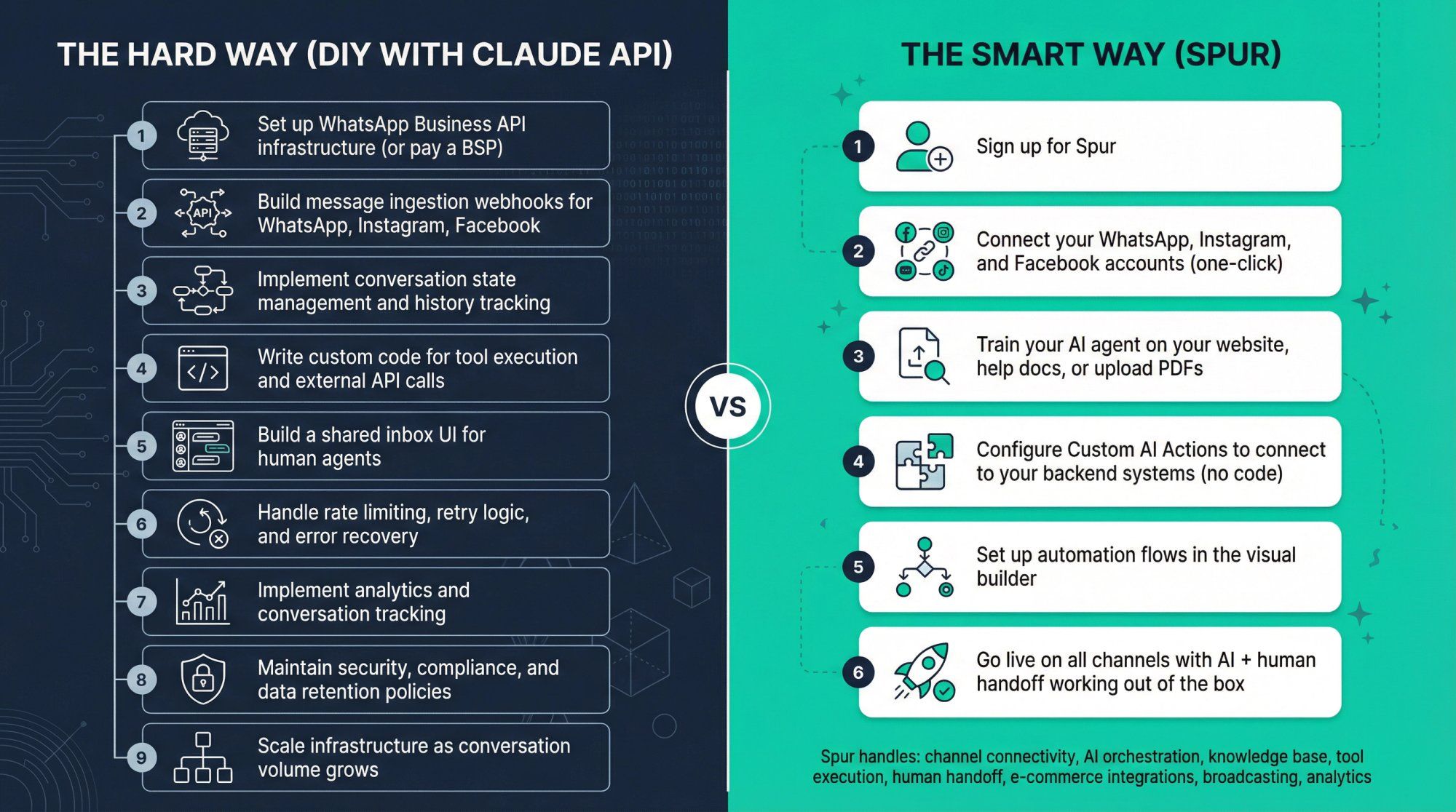
If you're reading this guide because you want to deploy AI agents on WhatsApp, Instagram, or Live Chat, here's what building from scratch typically involves:
The hard way (DIY with Claude API):
- Set up WhatsApp Business API infrastructure (or pay a BSP)
- Build message ingestion webhooks for WhatsApp, Instagram, Facebook
- Implement conversation state management and history tracking
- Write custom code for tool execution and external API calls
- Build a shared inbox UI for human agents
- Handle rate limiting, retry logic, and error recovery
- Implement analytics and conversation tracking
- Maintain security, compliance, and data retention policies
- Scale infrastructure as conversation volume grows
The smart way (Spur):
- Sign up for Spur
- Connect your WhatsApp, Instagram, and Facebook accounts (one-click)
- Train your AI agent on your website, help docs, or upload PDFs
- Configure Custom AI Actions to connect to your backend systems (no code)
- Set up automation flows in the visual builder
- Go live on all channels with AI + human handoff working out of the box
Spur handles:
- Channel connectivity: WhatsApp Business API, Instagram automation, Facebook Messenger, Live Chat widget
- AI orchestration: Automatically routes to Claude (or GPT, Gemini, Grok) based on your preferences
- Knowledge base: Train agents on your website data without managing RAG infrastructure
- Tool execution: Custom AI Actions let Claude call your Shopify store, CRM, or custom APIs without writing integration code
- Human handoff: Shared inbox with ticketing, so complex queries go to real agents seamlessly
- E-commerce integrations: Native support for Shopify, WooCommerce, Stripe, Razorpay, and more
- Broadcasting: Send WhatsApp campaigns, drip sequences, and abandoned cart recovery
- Analytics: Track AI performance, conversation metrics, and ROI
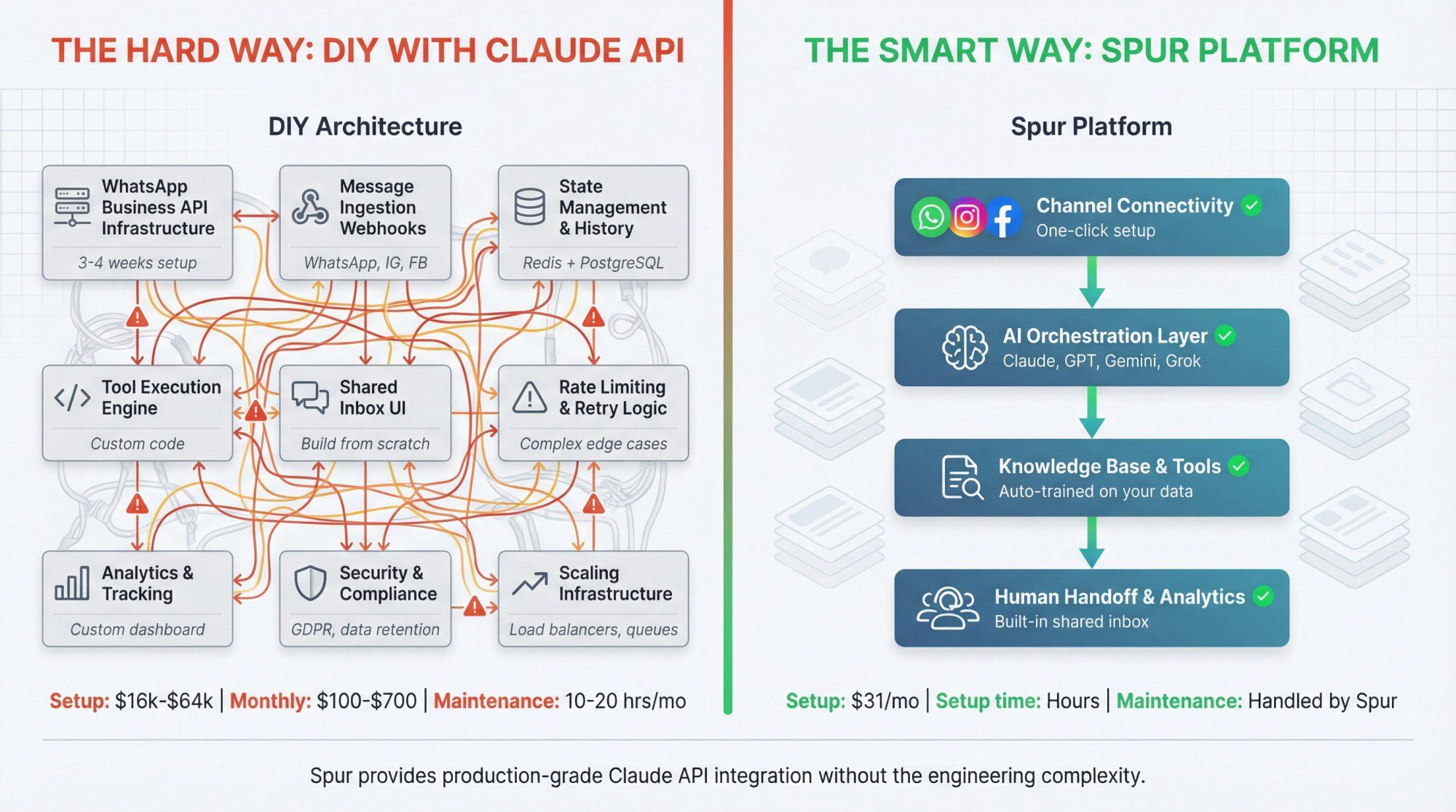
Why this matters:
If you're a D2C brand, real estate business, or service company, you probably don't have an engineering team to build and maintain all this infrastructure. Spur gives you production-grade Claude API integration wrapped in a platform designed specifically for conversational commerce and support.
Real-world example:
A Shopify fashion brand using Spur:
- Connects their Shopify store via the Shopify integration
- Trains a Claude-powered agent on their sizing guides, return policies, and FAQs
- Configures a Custom AI Action to check order status via Shopify API
- Deploys the agent on WhatsApp, Instagram DMs, and their website chat widget
- Agent handles 70% of support queries automatically (order tracking, sizing, returns)
- Complex issues (damaged products, custom requests) escalate to human agents in the shared inbox
- Total setup time: a few hours, not weeks
Cost comparison:
Building this yourself:
- Developer time: 4 to 8 weeks at $100 to $200/hr = $16,000 to $64,000
- WhatsApp BSP fees: $50 to $200/month
- Infrastructure hosting: $50 to $500/month
- Ongoing maintenance: 10 to 20 hrs/month
Using Spur:
- AI Start plan: $31/month (annual billing)
- Includes WhatsApp automation, Instagram, Live Chat, 2,000 AI credits, and Shopify integration
- Plus your Claude API costs (which you'd pay either way)
- Setup time: hours, not weeks
- Maintenance: handled by Spur
Get started with Spur and deploy your first AI agent in minutes.
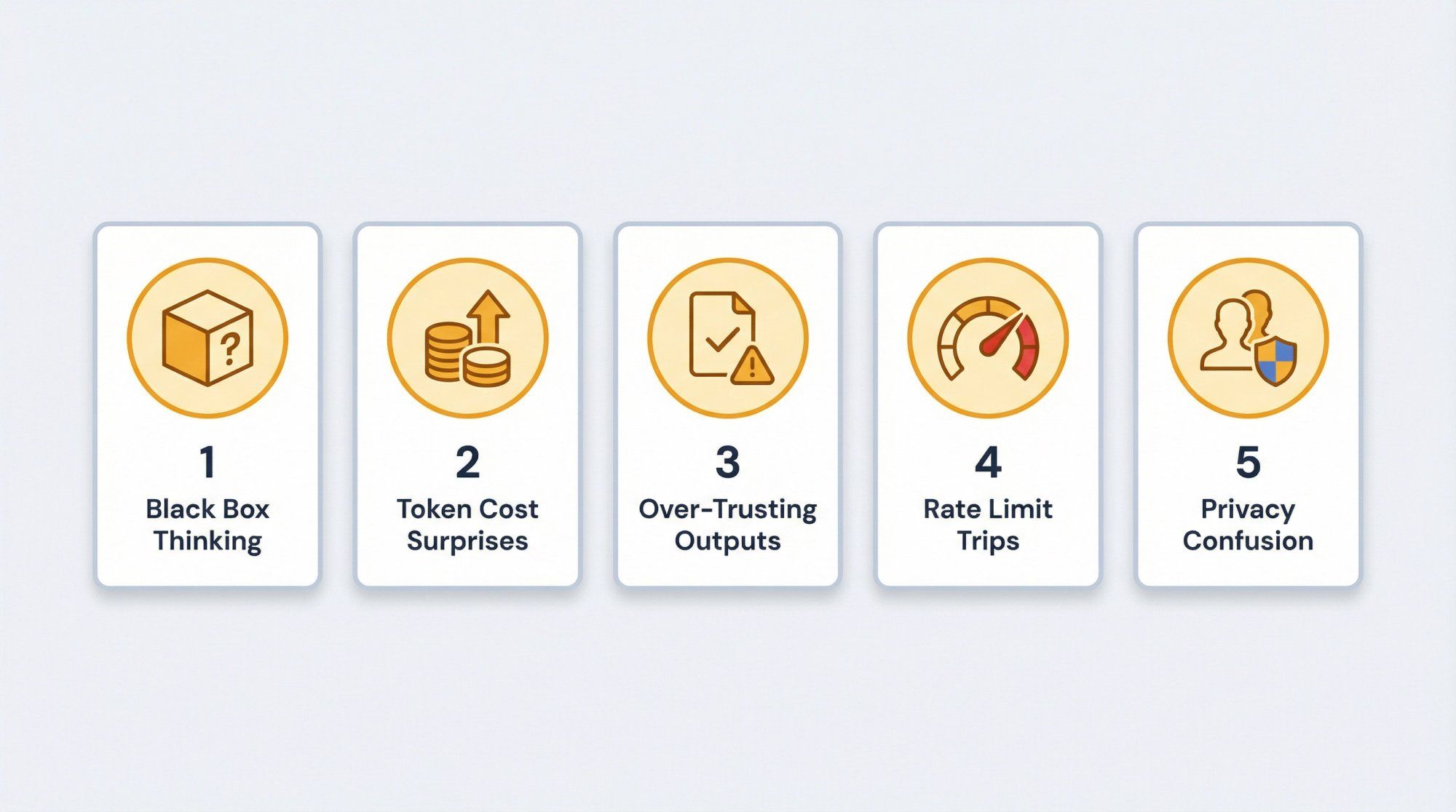
If you just send "please manage my WhatsApp support," it will hallucinate structure that doesn't exist. Fix this by:
- Writing clear system prompts
- Defining explicit tools and letting Claude delegate to them
- Keeping prompts grounded with citations or Files API
Long prompts + long histories + extended thinking + Opus = surprise bills.
Mitigations:
- Log tokens per request and per user
- Use Haiku for cheap pre-processing
- Use prompt caching for large, shared context
- Summarize history aggressively
Structured outputs are very good now, but still not perfect.
- Always schema-validate on your side
- Treat invalid JSON as a recoverable error: ask Claude to repair or retry
- Add basic guardrails for extreme values (for example discounts greater than 50 percent)
If you roll out a new marketing campaign that dumps 50k clicks into a Click-to-WhatsApp funnel in 10 minutes, you can trip limits.
- Stagger high-volume flows
- Use queues and worker pools
- Pre-qualify with Haiku, then call Sonnet only on serious leads
Remember:
- Consumer apps (claude.ai) can use chats for training unless users opt out, with long retention
- API and enterprise products have different retention and training rules, usually much stricter in your favor
If you're building on Spur + Claude, you're squarely in the API camp.
Q: Does the Claude API train on my data?
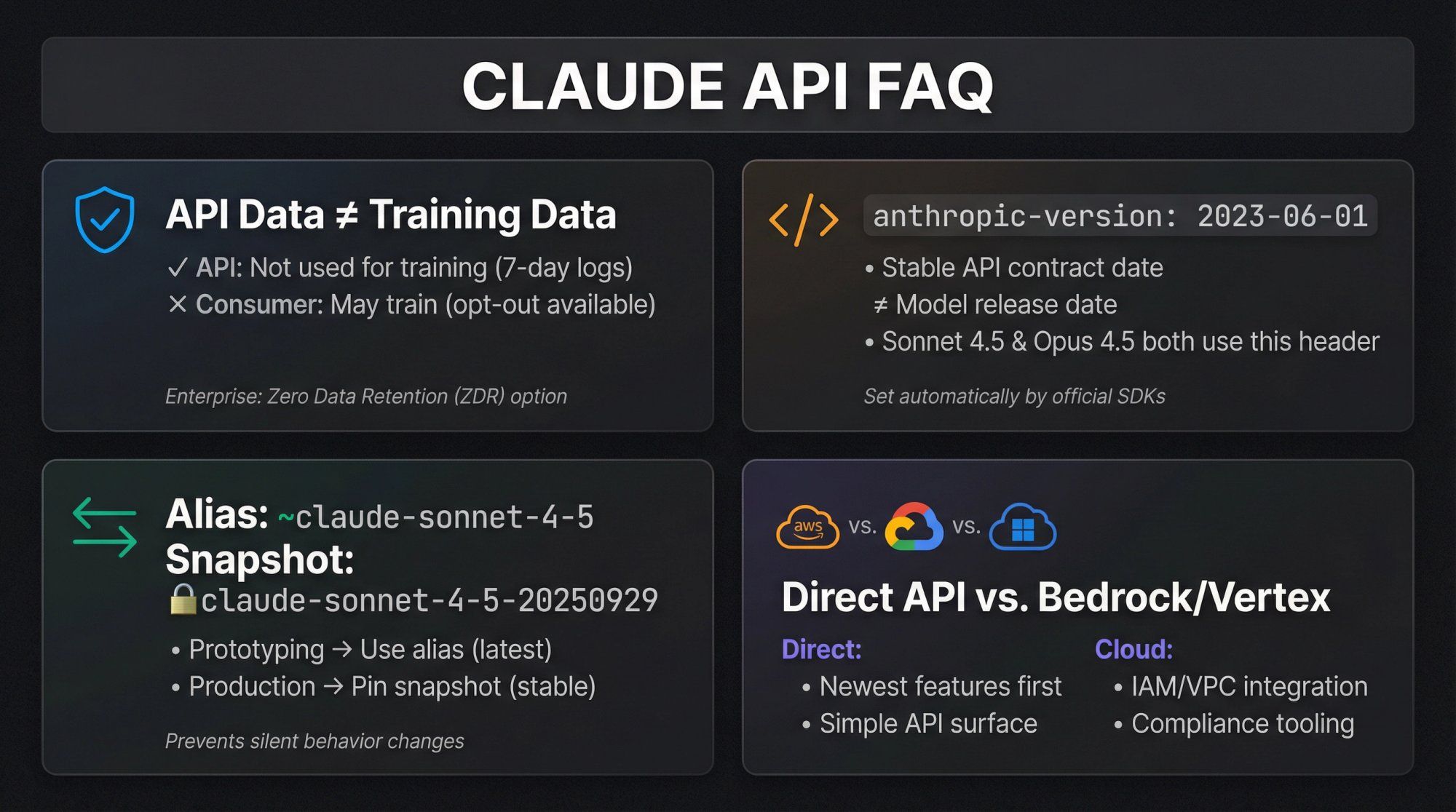
For standard API usage, Anthropic states that API data is not used to train generative models, and logs have short retention windows (7 days default), with zero-data-retention options for enterprise. Consumer products are different and may use chats for training unless users opt out.
Q: Why is anthropic-version still 2023-06-01? Is that old?
Anthropic treats anthropic-version as a stable API contract date, not the model version. New models like Sonnet 4.5 and Opus 4.5 are exposed under that same API version. Their own SDKs still set this header by default.
Q: Should I use the alias claude-sonnet-4-5 or the snapshot claude-sonnet-4-5-20250929?
- Use aliases while experimenting and prototyping
- Use snapshots in production so your app doesn't silently change behavior when Anthropic rolls out a new snapshot
Q: When should I pick Claude via AWS / GCP instead of direct API?
Pick Bedrock / Vertex / Foundry when:
- Your security team wants everything inside AWS / GCP IAM and VPC
- You're already deeply tied into those ecosystems (KMS, CloudWatch, BigQuery, etc.)
Pick direct Anthropic API when:
- You want the newest features first
- You want a single, clean API surface
- You don't need cloud-specific features
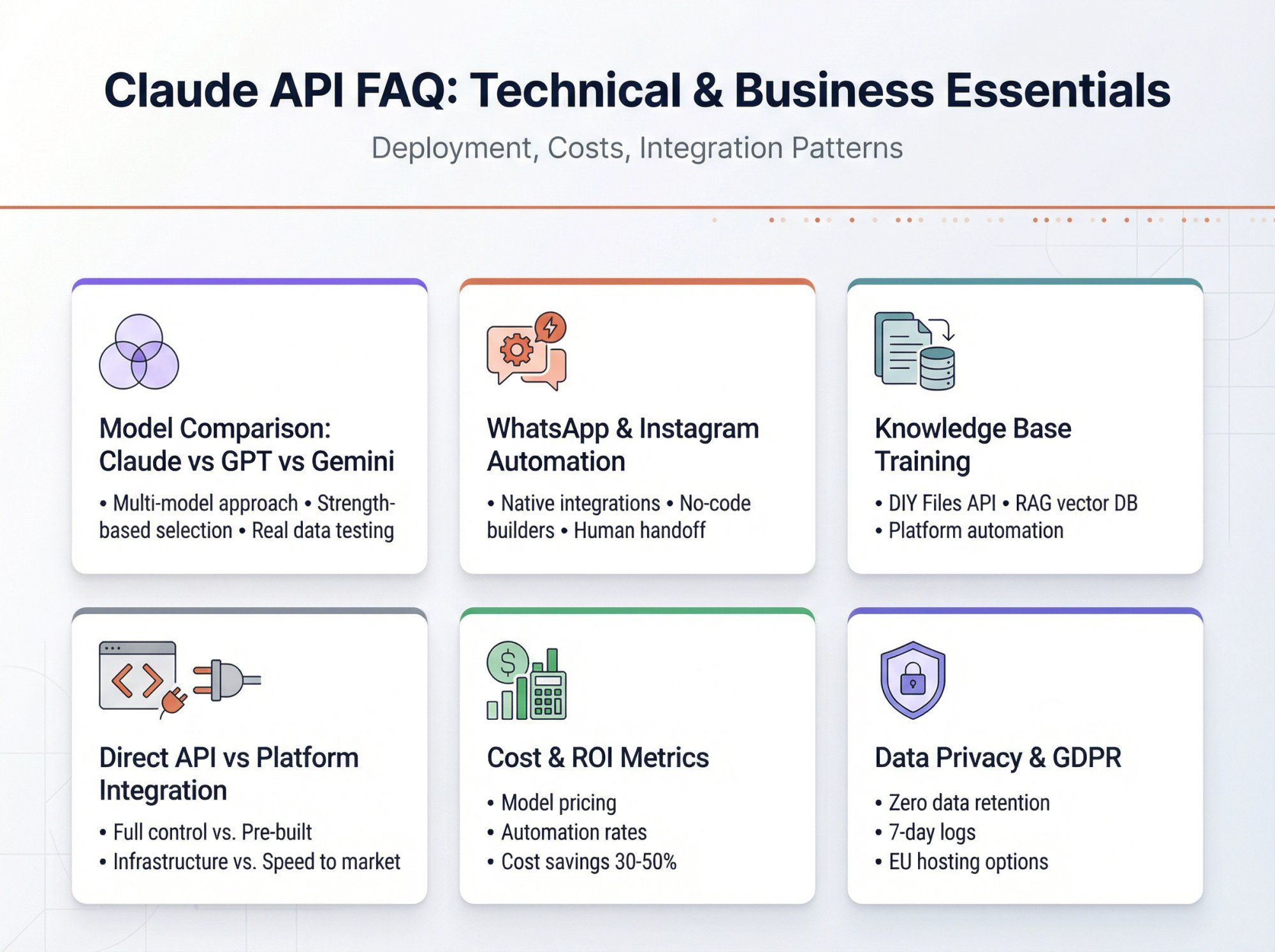
Q: How does this compare to GPT-4.x, o-series, or Gemini?
Short version:
- Claude 4.5 models are extremely strong on reasoning, coding, and long-context
- GPT and Gemini are very competitive with their own strengths
- The smart move for serious teams is usually multi-model, picking the right engine for each job
Spur already reflects this reality: it supports Claude alongside ChatGPT, Gemini, Grok, and others, and lets you test models on your real support and sales data, not synthetic benchmarks.
Q: Can I use Claude for WhatsApp and Instagram automation?
Absolutely. The Claude API is perfect for conversational AI on messaging channels. Building the WhatsApp Business API integration, Instagram connectivity, and automation flows from scratch is complex, though.
Spur solves this by providing:
- Native WhatsApp Business API integration
- Instagram automation (DMs, comments, story reactions)
- Facebook Messenger support
- Live Chat widget for websites
- Claude-powered AI agents trained on your data
- No-code automation builder
- Human handoff and shared inbox
You get all the power of Claude API without building the messaging infrastructure yourself.
Q: How do I train Claude on my company's knowledge base?
Three approaches:
- DIY with Files API: Upload PDFs and documents using Anthropic's Files API, then reference them in prompts
- RAG (Retrieval Augmented Generation): Build a vector database, embed your docs, retrieve relevant chunks, and inject them into prompts
- Use Spur: Point Spur at your website, help center, or upload PDFs. Spur automatically processes, chunks, and optimizes the content for Claude to use in conversations. No vector DB setup required.
For most teams, option 3 is the fastest path to production.
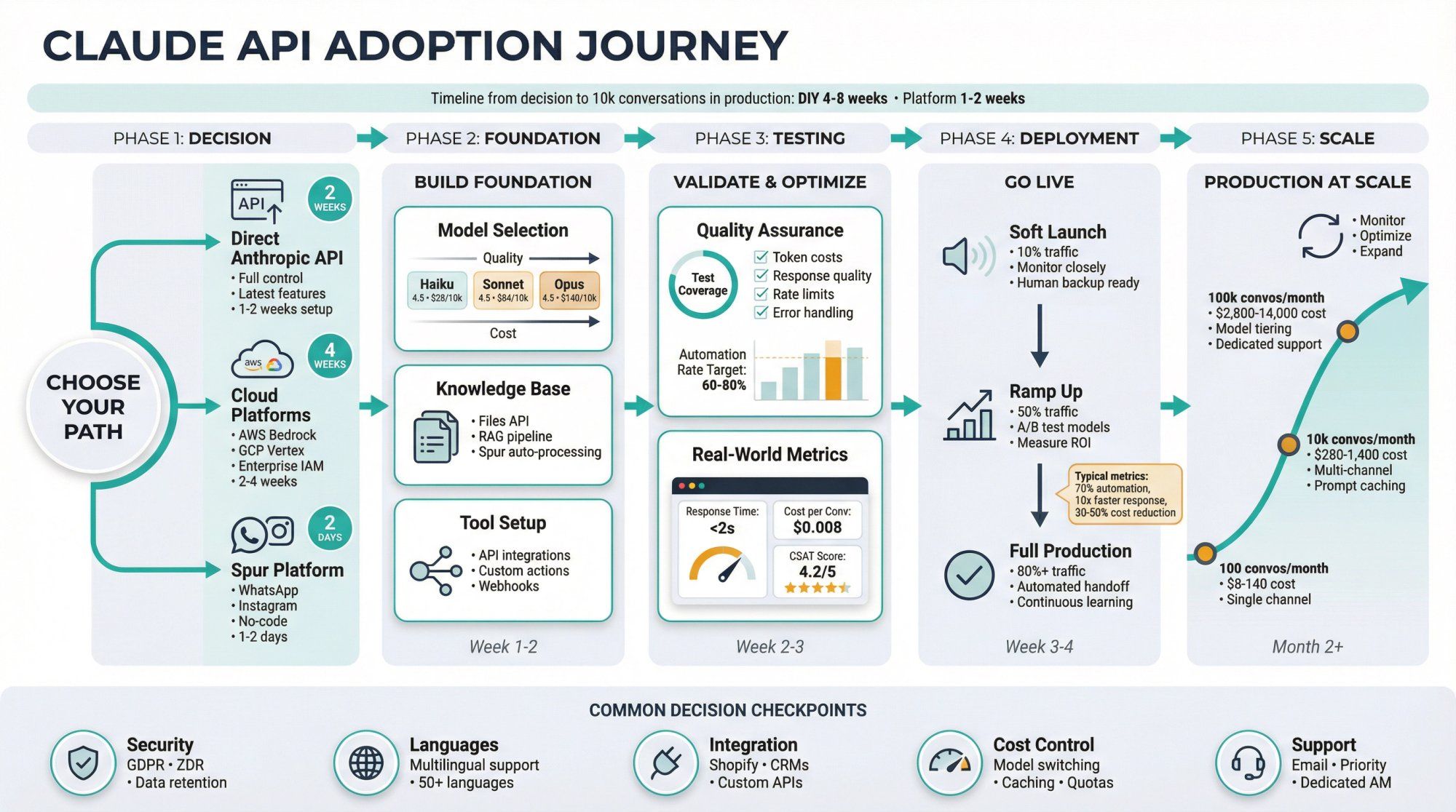
Q: What's the difference between Claude API and using Claude through Spur?
Direct Claude API:
- Full control and flexibility
- You build all infrastructure (message ingestion, state management, tools, UI)
- Best for custom applications where you need complete control
Claude through Spur:
- Pre-built messaging channel integrations (WhatsApp, Instagram, Live Chat)
- No-code automation and tool configuration
- Shared inbox for human agents
- Knowledge base management included
- Best for customer support, sales, and conversational commerce use cases
Think of Spur as a production-ready platform that uses Claude API under the hood, wrapped with everything needed for customer-facing messaging channels.
Q: Can I build a chatbot without coding?
With raw Claude API? No, you need development skills.
With Spur? Yes. Spur's visual automation builder, knowledge base upload, and Custom AI Actions let you build sophisticated AI agents without writing code. You can:
- Upload your knowledge base (website, PDFs, docs)
- Configure conversation flows in a visual builder
- Set up Custom AI Actions that call your backend APIs (point-and-click configuration)
- Deploy to WhatsApp, Instagram, and Live Chat
For technical teams, Spur also exposes APIs and webhooks for custom integrations.
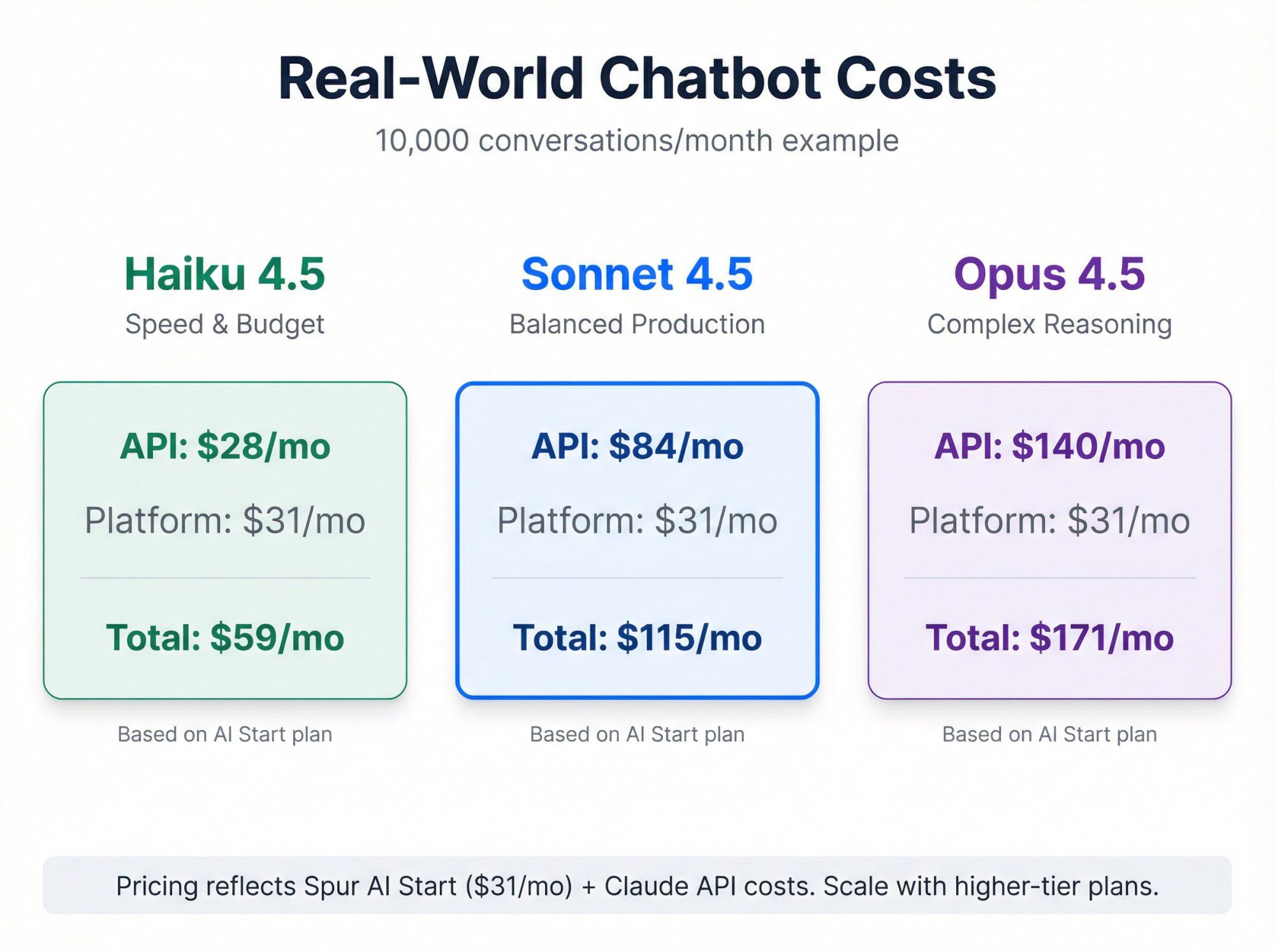
Q: How much does it cost to run a Claude-powered support bot?
Two cost components:
- Claude API costs (covered earlier in this guide):
- Sonnet 4.5: about $84/month for 10k conversations
- Haiku 4.5: about $28/month for 10k conversations
- Opus 4.5: about $140/month for 10k conversations
- Platform costs (if using Spur):
- AI Start: $31/month (includes WhatsApp, Instagram, Live Chat, 2,000 AI credits)
- AI Accelerate: $127/month (more AI credits, webhooks, Custom AI Actions)
- AI Max: $399/month (high volume, dedicated account manager)
Total cost for a 10k conversation/month support bot on Spur + Sonnet 4.5: approximately $115 to $200/month depending on plan and AI credit usage.
Q: What industries benefit most from Claude-powered chatbots?
Claude excels in:
- E-commerce / D2C: Order tracking, returns, product recommendations, abandoned cart recovery
- Real estate: Lead qualification, property info, appointment scheduling
- Healthcare: Appointment scheduling, FAQs, patient support (with proper compliance)
- SaaS / Tech: Technical support, onboarding, feature explanations
- Education: Course info, enrollment support, student queries
- Travel & Hospitality: Booking support, itinerary changes, local recommendations
Spur specifically optimizes for D2C brands, real estate, travel, education, and service businesses with pre-built automation templates and e-commerce integrations.
Q: How do I measure ROI on AI chatbots?
Key metrics to track:
- Automation rate: % of conversations resolved without human intervention
- Response time: Average time to first response (AI is instant)
- Resolution time: Time from first message to issue resolved
- Customer satisfaction: CSAT scores for AI-handled vs human-handled tickets
- Cost savings: Human agent hours saved × average agent cost
- Revenue impact: Conversions from AI-assisted sales conversations
Spur provides built-in analytics for all these metrics. Many Spur customers see:
- 60 to 80% automation rate (70% on average)
- 10x faster response times
- 30 to 50% reduction in support costs
- Improved customer satisfaction due to instant responses
Q: Can Claude handle multiple languages?
Yes, Claude 4.5 models support dozens of languages with strong performance. For WhatsApp and Instagram automation across multiple markets, you can:
- Let Claude auto-detect language and respond accordingly
- Configure language-specific flows in Spur's automation builder
- Upload knowledge base content in multiple languages
Spur itself supports English, Spanish, Portuguese, French, Dutch, and Indonesian in its UI and templates.
Q: What about data privacy and GDPR compliance?
Claude API:
- Enterprise customers can request Zero Data Retention
- Default log retention is 7 days
- Data not used for training
- Supports GDPR compliance when configured properly
Spur + Claude:
- Spur hosts servers in Frankfurt, Germany (EU)
- Sets data_localization_region to Europe for WhatsApp Cloud API
- Provides Data Processing Agreement (DPA) with Standard Contractual Clauses
- Sub-processors: AWS (Frankfurt), Google, Cloudflare
For regulated industries, review Spur's GDPR documentation and Anthropic's enterprise agreements.
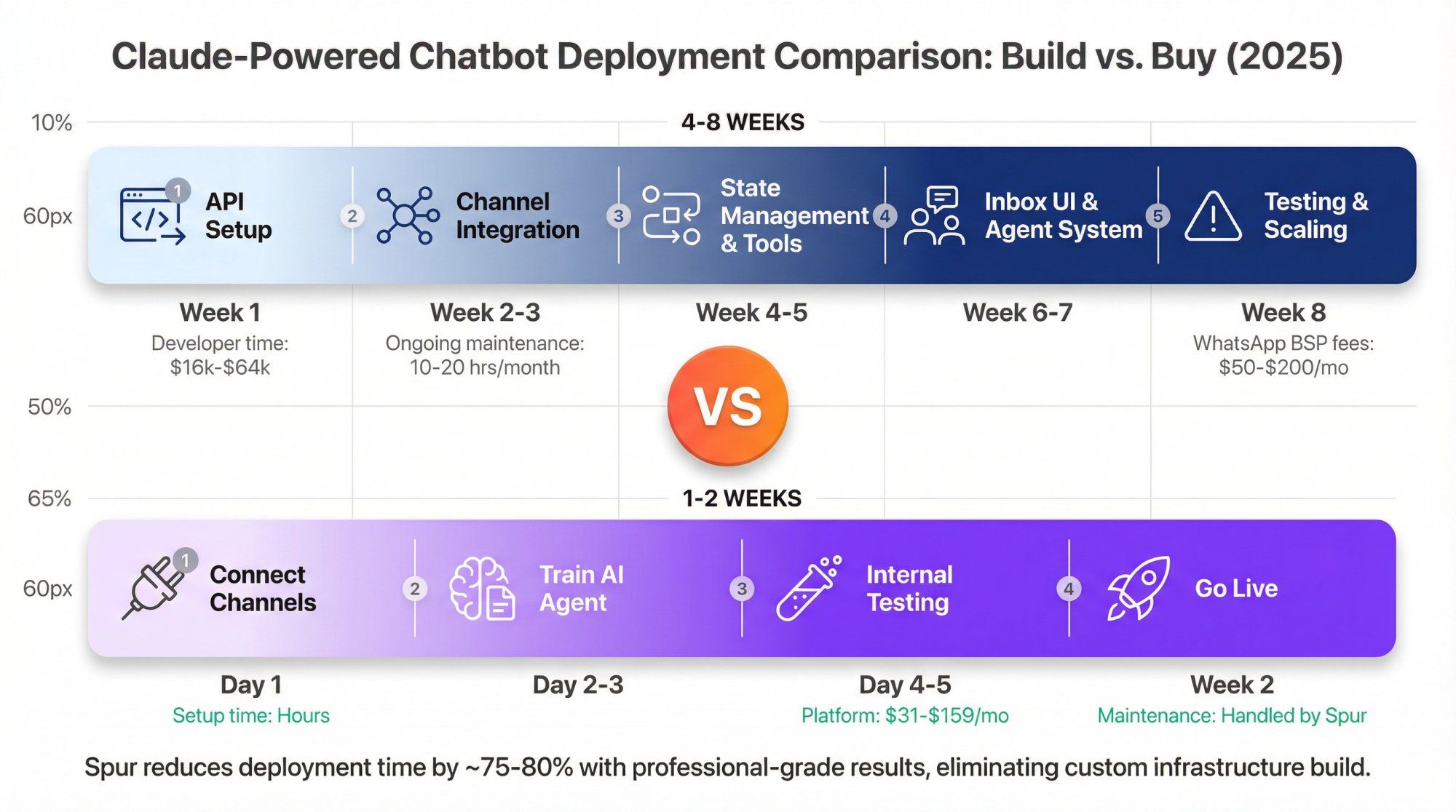
Q: How quickly can I deploy a Claude-powered chatbot?
Building from scratch:
- 4 to 8 weeks of development
- Additional 2 to 4 weeks for testing and refinement
- Ongoing maintenance required
Using Spur:
- Day 1: Sign up, connect channels, upload knowledge base
- Day 2 to 3: Configure automation flows and Custom AI Actions
- Day 4 to 5: Test with internal team
- Week 2: Go live with AI + human handoff
Most Spur customers are live with a production AI agent within 1 to 2 weeks.
Q: What's the learning curve for Claude API?
If you're a developer:
- Basic API calls: 30 minutes to first "hello world"
- Tool use and structured outputs: 2 to 4 hours
- Production-ready agent with error handling: 1 to 2 days
- Full multi-channel support platform: 4 to 8 weeks
If you're not technical:
- Using raw Claude API: Not feasible without engineering help
- Using Spur: 2 to 4 hours to deploy your first agent (no coding required)
Q: Can Claude integrate with my existing tools (CRM, e-commerce, helpdesk)?
Yes, through:
- Custom AI Actions in Spur: No-code configuration to connect Claude to any REST API
- Pre-built integrations: Spur offers native integrations with:
- Shopify
- WooCommerce
- Stripe
- Razorpay
- Shiprocket
- Custom e-commerce platforms
- Webhooks: Send conversation events to your existing systems
- API access: Spur provides APIs for custom integrations
Q: What happens when Claude can't answer a question?
Best practice fallback pattern:
- Try to clarify: Claude asks follow-up questions
- Search knowledge base: Look for related information
- Escalate to human: Hand off to a real agent in the shared inbox
Spur implements this automatically:
- AI handles FAQs and simple queries
- Unclear or complex issues route to human agents
- Agents see full conversation history
- Seamless handoff preserves context
Typical automation rates: 60 to 80% handled by AI, 20 to 40% escalated to humans.
Q: How do I prevent Claude from giving wrong information?
Four strategies:
- Ground responses in knowledge base: Use Files API or Spur's knowledge base to provide authoritative sources
- Require citations: Configure Claude to cite sources for factual claims
- Use structured outputs: For data-driven responses (order status, pricing), use tools that query actual systems
- Human review: For high-stakes conversations, enable human approval before sending AI responses
Spur's Custom AI Actions ensure critical data (order status, inventory, pricing) always comes from your real systems, not Claude's general knowledge.
Q: Can I A/B test different Claude models or prompts?
With raw Claude API: You'd need to build this yourself.
With Spur: You can run multiple AI agents with different models (Claude Sonnet vs Haiku vs GPT-4 vs Gemini) and compare:
- Resolution rates
- Customer satisfaction
- Cost per conversation
- Escalation rates
Spur lets you test models on your actual customer conversations, not synthetic benchmarks.
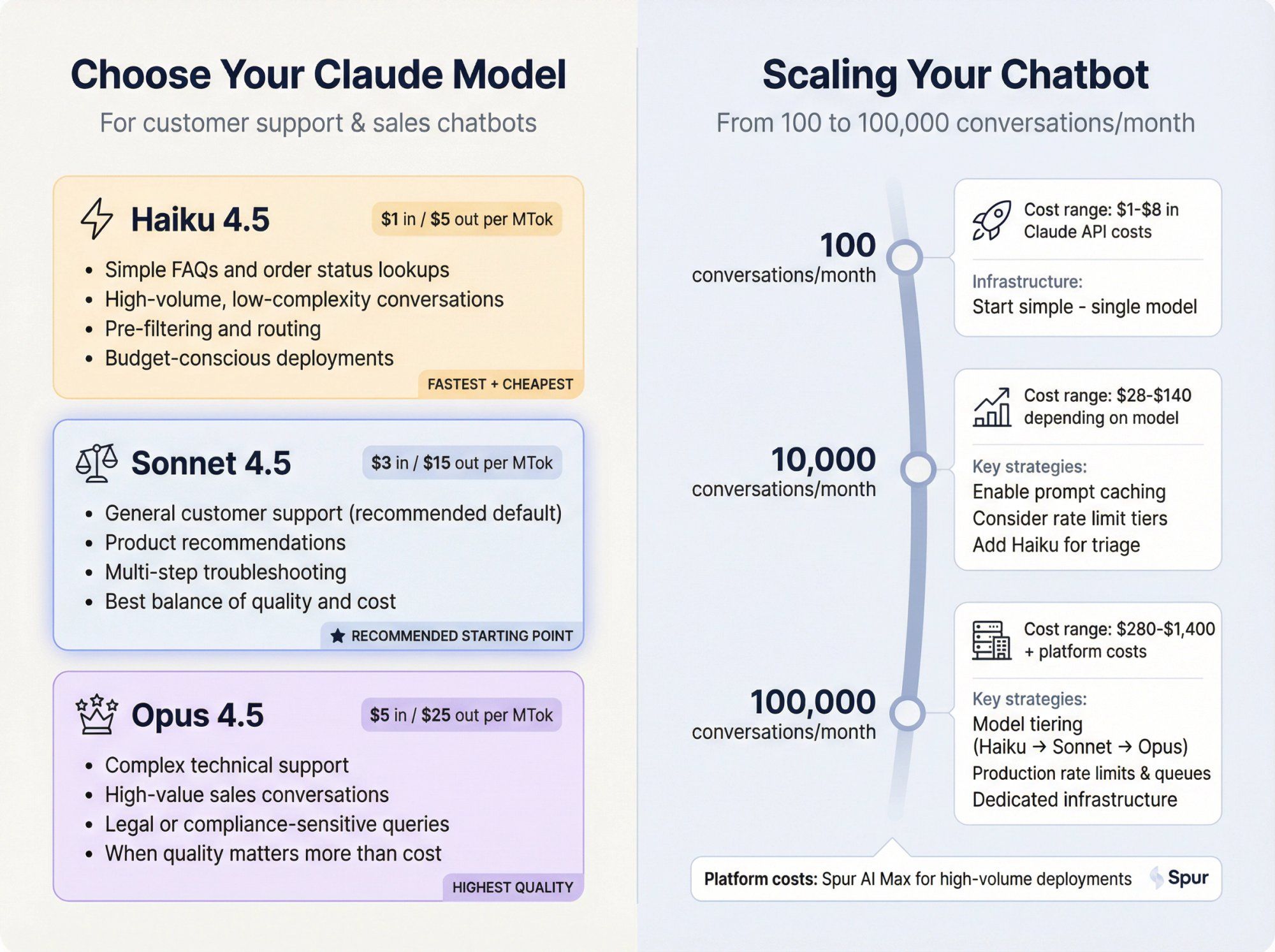
Q: What's the difference between Claude Sonnet, Haiku, and Opus for chatbots?
For customer support and sales chatbots:
Use Haiku 4.5 for:
- Simple FAQs and order status lookups
- High-volume, low-complexity conversations
- Pre-filtering and routing
- Budget-conscious deployments
Use Sonnet 4.5 for:
- General customer support (recommended default)
- Product recommendations
- Multi-step troubleshooting
- Best balance of quality and cost
Use Opus 4.5 for:
- Complex technical support
- High-value sales conversations
- Legal or compliance-sensitive queries
- When quality matters more than cost
Most Spur customers start with Sonnet 4.5 and adjust based on their specific needs.
Q: How do I scale a Claude chatbot from 100 to 100,000 conversations?
Technical considerations:
- Rate limits: Move to higher Anthropic usage tiers as volume grows
- Prompt caching: Cache shared context to reduce token costs at scale
- Model tiering: Use Haiku for triage, Sonnet for complex queries
- Infrastructure: Spur handles scaling automatically, or you build queue systems if DIY
Cost scaling:
- 100 conversations/month: about $1 to $8 in Claude API costs
- 10,000 conversations/month: about $28 to $140 depending on model
- 100,000 conversations/month: about $280 to $1,400 + platform costs
Spur's AI Max plan is designed for high-volume deployments with dedicated account management.
If you want to go deeper directly with Anthropic:
- Developer docs (official): Messages API, tools, structured outputs, Files, extended thinking, etc.
- Models overview: Current Claude 4.5 model lineup and pricing details
- Anthropic Academy: "Build with Claude" courses and cookbook
If you want to see how Claude fits into real customer support and marketing workflows:
- How to train a chatbot on your website data (Spur) – Step-by-step walkthrough of grounding your agent in your own content
- AI Live Chat product page (Spur) – How AI support agents plug into your site, WhatsApp, and Instagram
- Claude vs ChatGPT: The Ultimate 2025 AI Comparison (Spur) – Broader comparison when you're choosing models
Ready to deploy your first Claude-powered AI agent?
Get started with Spur and have your AI chatbot live on WhatsApp, Instagram, and Live Chat within days, not months.
All the model names, prices, and features in this guide are based on Anthropic's documentation and pricing pages as of late 2025. Anthropic moves fast: new snapshots, features, and promos will keep appearing.
Before you hard-code anything important (model IDs, prices, limits):
- Double-check the Models overview and Pricing pages
- Monitor your own usage and bills
- Treat this guide as a strong starting point, not frozen law
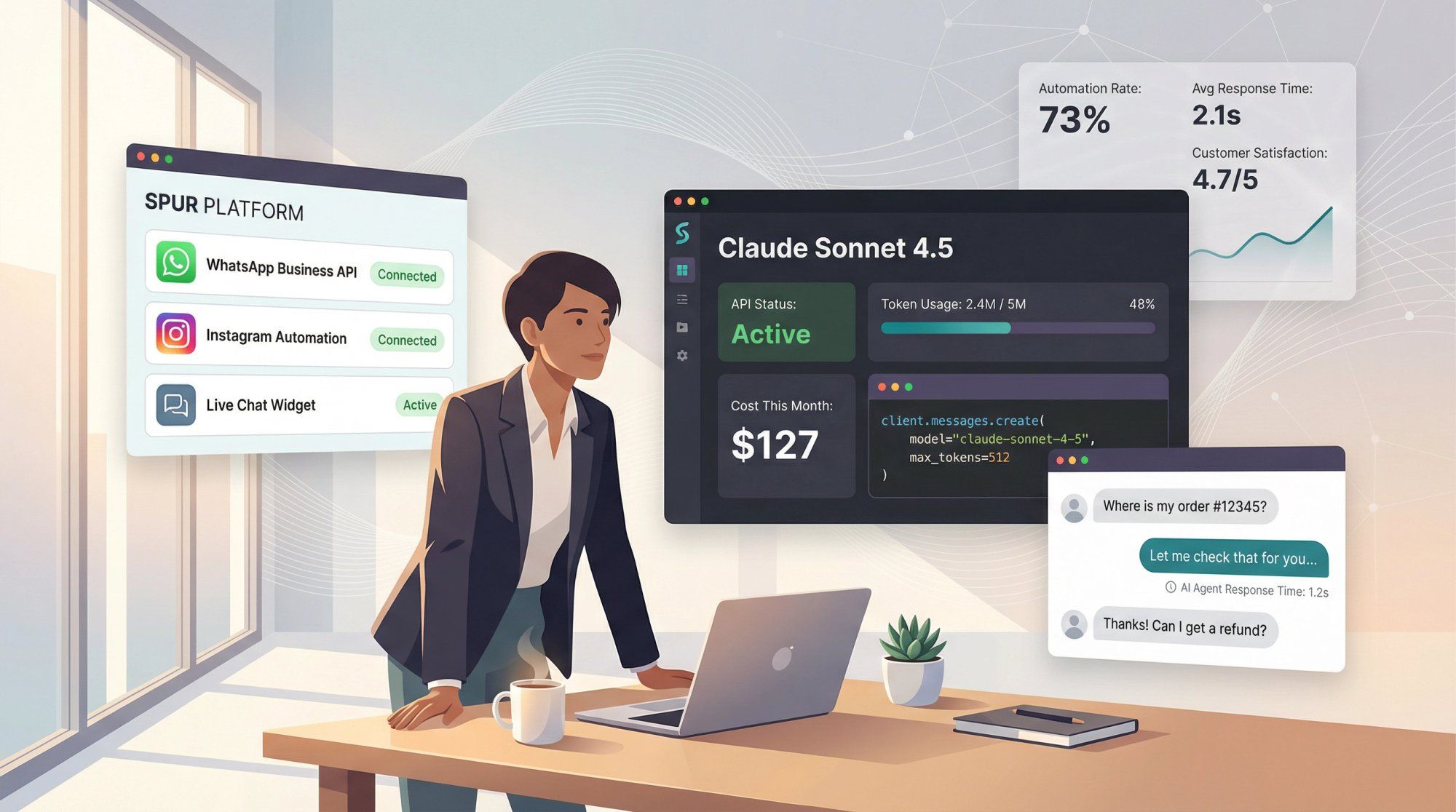
If you pair this understanding of the Claude API with a platform like Spur for WhatsApp, Instagram, Facebook, and Live Chat automation, you have everything you need to build AI agents that are not just impressive demos, but reliable, cost-controlled, and actually helpful for your customers.