Key takeaways
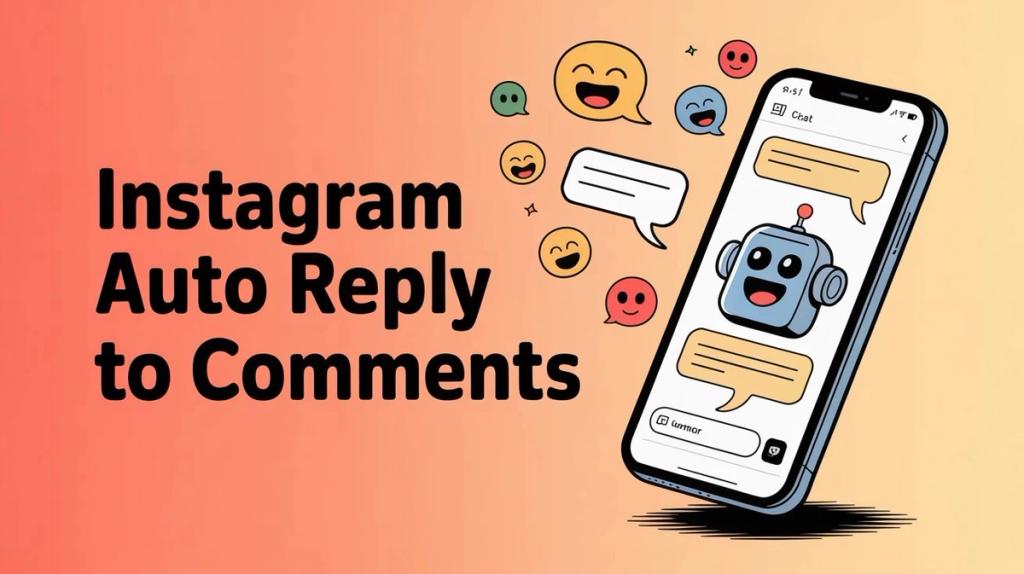
Turn Instagram auto reply to comments into a lead generation engine. Move inquiries to DMs instantly and capture sales when interest peaks.
Ask an AI about this article
Setting up Spur's Instagram auto-reply system converts your comment section into a lead generation engine. With comment-to-DM automation, you can respond to inquiries instantly, move conversations private, and capture sales when interest peaks. This guide shows you how to do it safely and effectively.
Your Instagram comments are full of potential customers asking "Price?", "Link?", or "How do I buy this?" If you're taking hours to respond, you're watching sales walk away. People expect instant responses, and the brands that deliver them are converting comments into real revenue.
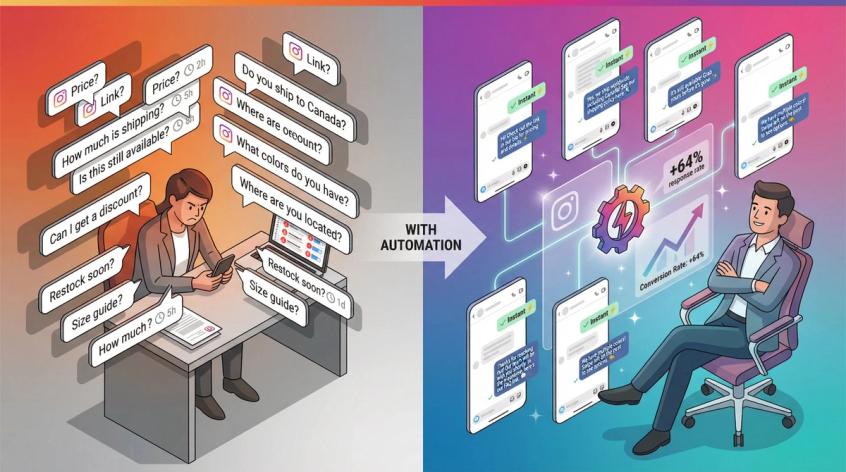
Instagram comment automation solves this by responding to comments automatically, either publicly or through direct messages. Done correctly, it boosts engagement, captures leads when interest is highest, and frees your team from answering the same questions 50 times a day. Done incorrectly, it can make you look spammy or even risk account restrictions.
This guide walks you through everything you need to know about Instagram auto-reply to comments in 2026, from understanding what's actually allowed to setting up conversion-focused automation that respects both Instagram's rules and your audience's intelligence.
Why Instagram Comment Auto-Reply Matters for Sales
Your comment section isn't just social proof. It's a conversion opportunity waiting to be optimized.
When someone comments on your post asking about pricing or availability, they're raising their hand. They've moved beyond passive scrolling to active engagement. The brands that respond instantly are the ones that close the sale.
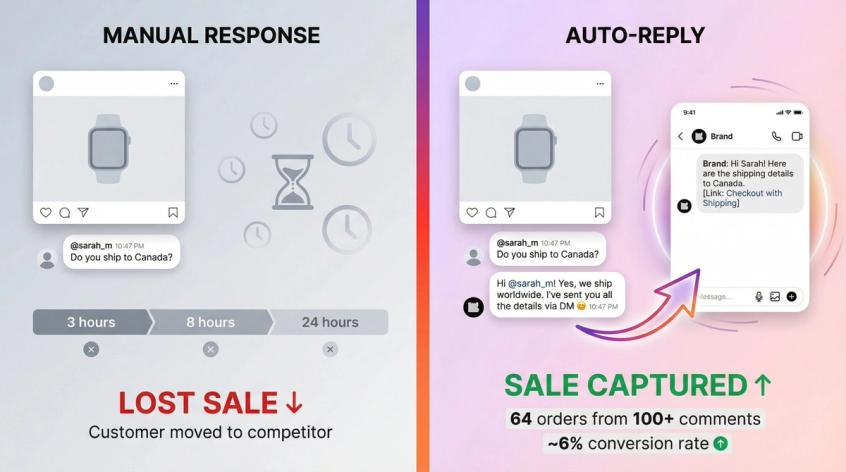
Research shows that customers expect an instant response when they contact a brand. On Instagram, that window is even smaller. Someone comments at 10 PM asking if you ship to their country, and if they don't get an answer quickly, they're moving on to your competitor who will.
Automated customer service solves three critical problems at once:
• Nobody waits. Whether someone comments at 3 AM or during your lunch break, they get an immediate response.
• Boost your reach. Instagram's algorithm loves posts with active comment sections. When you reply quickly, you're doubling the comment count and signaling that your content creates conversations.
• Capture leads when intent is hottest. The moment someone comments "LINK" on your product post is exactly when you want to move them into a private conversation with your checkout link.
Fashion brand Libas used Instagram auto-reply during a live sale. Every person who commented got an instant DM with product links and a discount code. They converted 64 orders from just over 100 commenters, roughly a 6% conversion rate. That's the power of meeting people exactly when they're ready to buy.
The time savings alone make this worthwhile. If your team is copying and pasting the same responses about shipping, pricing, or availability dozens of times daily, automation handles that repetitive work. Your team can focus on complex questions and meaningful interactions while the simple stuff runs on autopilot.
What Instagram Allows for Comment Automation
Instagram automation has rules, and knowing them keeps your account safe while maximizing results.
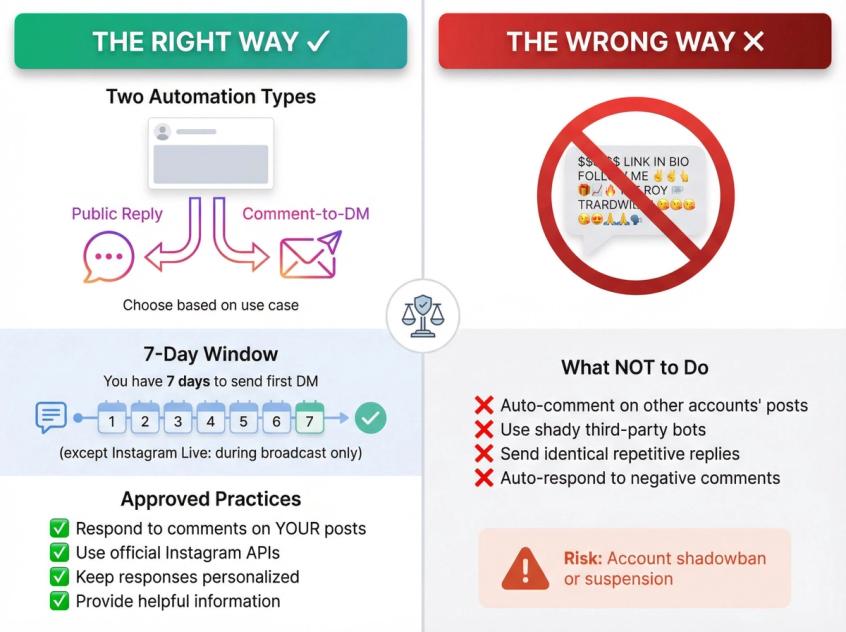
The first thing to understand is what we're actually talking about. "Auto-reply to comments" can mean two different things. You can reply publicly (a comment under their comment), or you can trigger a direct message when someone comments. The second option, often called comment-to-DM or private replies, is usually more valuable because it moves high-intent people into a private conversation where you can share links, qualify leads, and close sales.
According to Meta's official API documentation, here's what's actually allowed in 2026. You can send one private message to someone who commented on your Instagram content, and you have 7 days to send it (except for Instagram Live, where you can only send messages during the actual broadcast). After that first message, follow-up messages are only possible if the person replies to you, and then you must send them within a limited window.
This is crucial for your automation design. You don't get unlimited shots. That first DM needs to deliver real value and ideally include a question that encourages a reply, opening the door for continued conversation.
The right way to automate is responding to comments on your own posts with relevant, helpful information. Use official Instagram APIs or approved partner tools like Spur. Keep responses personalized and treat automation as a way to enhance engagement, not replace your human presence.
The wrong way is automating activity outside your own content:
→ Never auto-comment on other accounts' posts with promotional messages. That's spam and a fast track to getting shadowbanned.
→ Don't use shady third-party bots that require your Instagram password or promise thousands of follows. They violate Instagram's terms and put your account at serious risk.
→ Avoid sending identical, repetitive replies that could annoy users.
→ Never respond to negative comments with cheerful automated pitches. That's tone-deaf and makes things worse.
Instagram's systems are sophisticated at detecting inauthentic behavior. Accounts blasting identical comments or DMs at inhuman speeds trigger spam flags. Only automate what a real business would legitimately do. Auto-replying to your customers asking questions is good. Automating spammy outreach is bad.
A simple gut-check before setting up any automation: would this automated action annoy you if you were the user? If yes, don't do it. If it adds value by providing a quick answer or useful information, you're in safe territory.
How to Set Up Instagram Auto Reply (Step by Step)
Implementing comment automation is straightforward with the right approach. You don't need to be a developer.
Switch to Instagram Business Account
Instagram's automation features only work for professional accounts. If you're still using a personal profile, you'll need to convert it. This is free and unlocks tools like analytics, messaging API access, and comment management features. In your Instagram app settings, go to Account and select "Switch to Professional Account." Follow the prompts to choose Business or Creator. This step isn't optional for automation.
Choose Your Comment Automation Tool
Instagram doesn't provide built-in auto-replies for comments on posts. The native app has features for auto-replying to direct messages, but for comment automation you need one of two paths:
| Approach | What It Does | Best For | Limitations |
|---|---|---|---|
| Meta Business Suite (Free) | Comment-to-Message feature sends preset DM when someone uses specific keyword | Simple campaigns, single keyword triggers | Usually one keyword per automation, desktop-only interface |
| Dedicated Platform like Spur | Visual flow builder, multiple triggers, AI integration, backend system connections | Businesses where Instagram is a core channel | Paid service (though many have free tiers), setup time required |
The basic option is Meta Business Suite's Comment-to-Message feature. It's free and can auto-send a DM when someone comments with a specific keyword. If someone comments "INFO" or uses a certain hashtag, they immediately get a preset DM. This works for simple campaigns but it's limited.
The advanced option is using a dedicated Instagram automation platform like Spur. These tools use Instagram's official API to monitor comments and send replies or DMs on your behalf. Spur provides a visual flow builder where you create automation rules without coding. You can set multiple keyword triggers, different responses for different posts, and integrate with AI and your backend systems for smarter replies. This approach gives you power and customization. The downside is cost (paid services, though many have free tiers) and some setup time. If Instagram is a core channel for your business, the investment pays off in conversion lift.
Connect Your Instagram Account to the Tool
If you're using Meta Business Suite, your account links when you access the platform. If you're using an external tool like Spur, you'll authorize it to access your Instagram account. This typically means logging in through Facebook (since Instagram's API is managed through Facebook's system) and granting permissions like reading comments, sending messages, and managing replies.
This is a one-time secure OAuth authentication. The tool sets up webhooks in the background so it gets notified whenever your posts receive new comments. Once connected, the platform monitors all incoming comments and executes your reply rules in real time.
Set Up Your Comment Triggers and Keywords
This is where strategy matters. The right rules make your automation effective without creating awkward situations.
① Keyword Triggers (Most popular approach)
You specify certain words or phrases, and when a comment contains that text, it triggers a response. If a comment contains "price" or "cost", reply or DM with pricing information. If it contains "shipping", share shipping details. If someone comments exactly "YES" in response to a prompt, send your lead magnet via DM. Think about the FAQs you get regularly. Those are perfect candidates for keyword automation.
Include common variants and synonyms so you don't miss people who phrase things differently. Instead of just triggering on "price", also include "cost", "rate", and "how much". Regular updates to your keyword lists keep your automation catching all relevant questions.
② Post-Specific Rules (Great for campaigns)
Sometimes you only want automation on a particular post. Use this for contests ("Comment ENTER to join" on that specific giveaway post) or product launch Q&As. Set rules that apply to one post rather than globally. You can have different workflows for different campaigns running simultaneously.
③ Handling Negative Comments (Requires careful planning)
One strategy is not auto-replying to complaints at all, letting a human address them. Another is auto-responding with a sympathetic acknowledgment that moves the conversation private. Trigger on words like "not happy", "disappointed", or "problem", and reply with something like "We're sorry to hear that. We'll DM you right away to make this right." This shows your public audience that you care without going back-and-forth in comments. Your team can then continue in DMs to resolve the issue.
Write Effective Auto-Reply Messages
The wording of your auto-replies determines whether people feel helped or feel like they got a canned bot message.
Sound human and friendly. Write like you'd speak in a casual customer service conversation. Use contractions, simple language, and a warm tone. Maybe include an emoji if that fits your brand. Avoid sounding too formal or robotic.
Be helpful first, promotional second. Address the user's question directly before plugging anything. "Great question! We do ship worldwide. I'll DM you the shipping rates and a discount code." The helpful part comes first. The promotion comes second. This keeps it from feeling like an ad.
Keep public replies short and move details to DM. Limit your comment reply to one or two sentences max. "Hi @username, thanks for asking! I've sent you all the details via DM 😊" works perfectly. Then put the bulk of information in a direct message. This keeps the comment thread tidy while ensuring the person gets their answer privately.
Personalize when possible. Many tools let you insert the commenter's username or name dynamically. Seeing "Hi @alex" in the message makes it feel less copy-paste. It shows the response is meant for them. Creating a couple of variations that rotate randomly prevents every comment from getting identical phrasing, reducing the bot-like vibe.
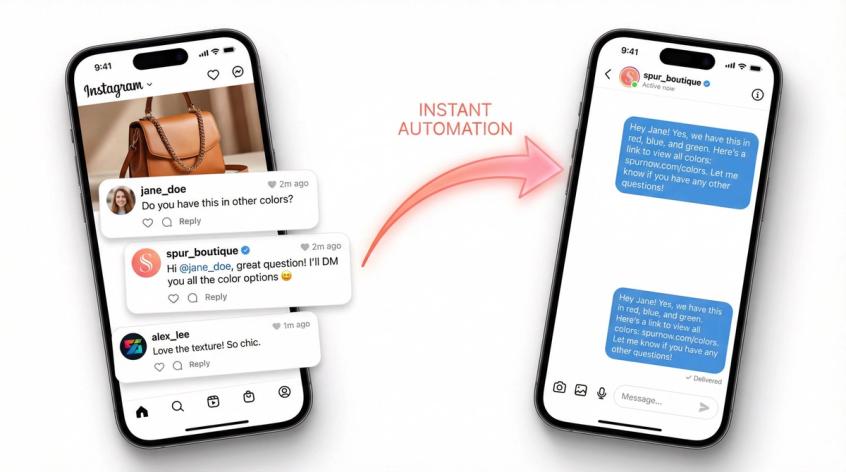
Here's what a good interaction looks like:
User comments: "Do you have this in other colors?"
Public auto-reply: "Hi @jane_doe, great question! I'll DM you all the color options 😃."
DM sent immediately: "Hey Jane! Yes, we have this in red, blue, and green. Here's a link to view all colors: [link]. Let me know if you have any other questions!"
The public reply is brief and friendly. The DM delivers the detailed answer with a link. This two-step approach is often the most effective strategy.
Test Your Automation Before Launch
Before activating your automation for real followers, test thoroughly. Use a test account or have a colleague try commenting on your posts with various keywords. See if the correct auto-replies and DMs fire. Try words that should trigger and words that shouldn't. Verify nothing triggers when it isn't supposed to.
Review the responses for tone and correctness. Do the messages make sense for the comment context? Do personalization placeholders work? Click every link to confirm they work. Test edge cases like a comment that says "This is priceless" when you have a trigger for "price". Your bot shouldn't respond to that since the user isn't asking for pricing.
Spend an hour simulating various scenarios. Only when you're consistently seeing correct behavior should you activate for your full audience.
Monitor Comments After Activation
When you first turn on your comment auto-reply system, pay extra attention in the initial days. Watch for whether the right replies happen at the right times. If you see an odd reply go out, investigate what triggered it and adjust your rules. Sometimes users might use a keyword in an unintended way. If someone comments "I love the price of this!" your "price" trigger might fire a pricing info DM that isn't needed. Catch these cases and refine your keywords.
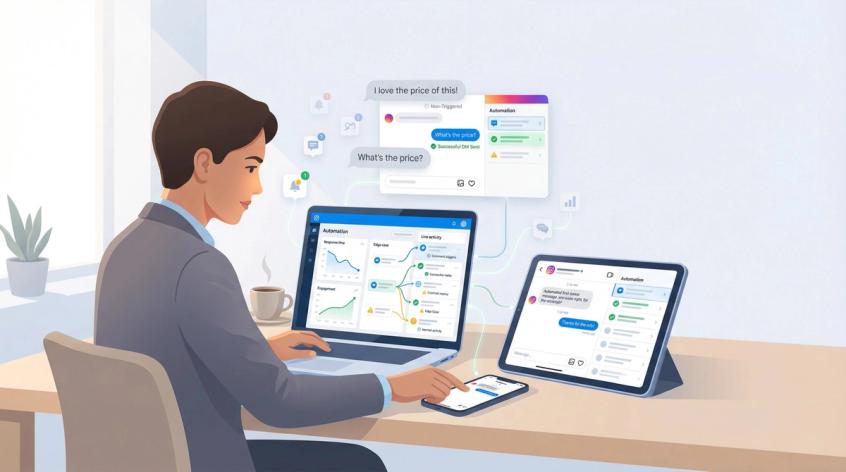
Monitor user reactions. Are people responding positively with "Thanks for the info!"? Or do you see confused responses? User feedback tells you if your messages hit the mark. If multiple people seem puzzled by an auto-reply, rewrite it for clarity.
Keep an eye daily for the first week or two. You'll likely fine-tune your automation rules a few times as you handle edge cases.
Balance Automation with Personal Responses
Remember that automation assists your engagement rather than replacing it entirely. The best strategy is bot plus human teamwork.
Continue to personally scan your comments regularly. Your bot might handle the first response, but you should still see what people are saying. Jump in with a personal reply if something needs a deeper answer or just to surprise a user with extra help.
Handle complex or sensitive issues manually. If someone is upset or asks something unusual that the bot can't handle, have a human agent follow up. Set your tool to assign such comments to a team member, or simply respond manually from your account to take over.
Look for opportunities to delight. If a user left a super enthusiastic comment, you might DM them personally with a thank-you or a small coupon, outside of the automated sequence. These unpredictable human moments turn fans into brand advocates.
Think of automation as handling the immediate first layer response, like triage. Your team does the second layer of follow-up where needed. This gives you scalability and that genuine brand touch.
Instagram Auto Reply Best Practices
To truly master Instagram auto-replies, keep these additional strategies in mind.
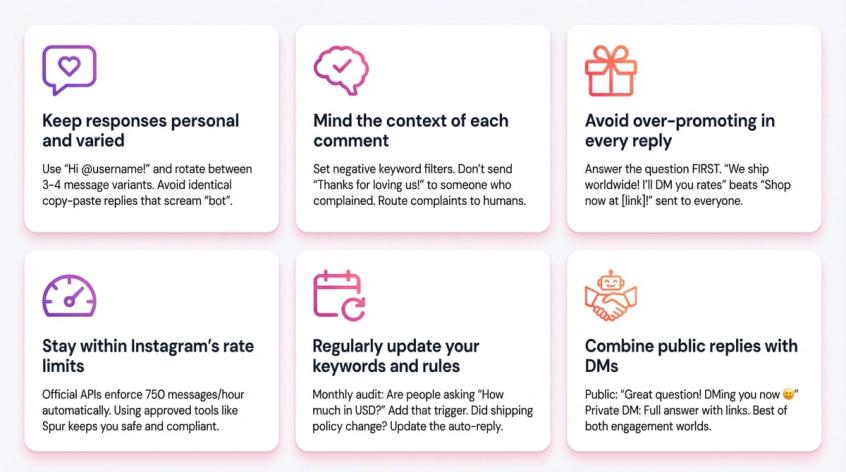
Keep responses personal and varied. Even though a bot is replying, it should sound like your brand voice. Use warm, conversational language and include the person's name or handle. If your tool allows multiple response versions, write a few alternatives that mean the same thing. Rotating between "Thanks for your comment!" and "Appreciate you reaching out!" prevents the appearance of identical copy-paste replies.
Mind the context of each comment. Not all comments should get the same cheerful response. Set up negative keyword filters so complaints get a different reply or none at all until a human handles it. It's better to have no auto-reply than an inappropriate one in certain cases. If someone expresses frustration and immediately gets what looks like a generic promo message, it can make them angrier. Craft a special acknowledgment for negative keywords, or turn off automation for those and let your team address them.
Avoid over-promoting in every reply. If every auto-comment is "Buy now! Visit our site!" people tune it out or get annoyed. Your replies should first address the user's comment. It's fine to include a call-to-action or link, but it should feel natural. Lead with value, not just a sales pitch. Answering a question and then saying "You can find more details here: [link]" is helpful. A generic "Shop our products at [link]!" to someone who didn't ask feels spammy.
Stay within Instagram's rate limits. Official API partners automatically enforce rate limits so you physically can't exceed them. The Instagram API allows up to 100 comment replies per second during Live videos and roughly 750 messages per hour for normal messaging. Those numbers are more than enough for most brands. Keep your automation activity proportional to your usual engagement to avoid looking suspicious. Using approved tools like Spur means these limits are handled for you.
Regularly update your keywords and rules. Pay attention to the kinds of comments you're getting over time. You might discover people frequently ask "How much is it in USD?" which you didn't account for in your "price" trigger. Update your rule to catch currency mentions too. If you start getting spam comments with new phrasing, add those to your block list. Refresh your automation rules as your business offers change. If you discontinued free shipping, update that auto-reply about shipping costs. Treat the system as living and audit it each month.
Combine public comment replies with DMs for best results. One of the most powerful tactics is a hybrid approach. Post a short public reply to acknowledge the comment, and simultaneously send a direct message with more information. This gives you public engagement (so other users see you responded) and private conversation to actually drive action. It keeps sensitive details out of public view. Instagram's policies allow businesses to DM users who have commented on their post, since the comment is considered an initiation of contact.
How to Track Instagram Auto Reply Performance
After implementing auto-replies, track how it's performing with metrics that matter.
Response time is the first indicator. Check your Instagram Insights or automation tool's analytics for average response time to comments. If you've gone from 3-4 hours to near-instant replies, that's a significant improvement. Faster responses typically lead to higher customer satisfaction. Monitor how quickly people move to DMs. If your auto-reply invites a DM and users engage promptly, your timing is effective.
Engagement rate and volume shows the broader impact. Look at your posts' comment counts before versus after automation. Are you seeing more total comments per post on average? Often when people know they'll get a prompt reply, they're more likely to comment or ask questions. Your own replies count toward comment count, boosting engagement metrics. Track your engagement rate (comments plus likes divided by followers) to see if it's improving.
DM conversions and clicks matter most for ROI. If you use comment triggers to send DMs with links, measure the outcomes:
• How many people click the link in the DM?
• How many use the promo code you sent?
• How many ultimately purchase or complete the desired action?
Use UTM parameters on URLs to track traffic from those DMs in Google Analytics. Your conversion rate from comment to DM to action is a key indicator. If 100 people comment "INFO", 100 DMs sent, 50 clicked the link, and 10 purchased, you have a 10% conversion from that automation flow.
Team workload reduction is an internal metric worth tracking. If you had someone spending 3 hours daily responding to repetitive Instagram comments and now it's 30 minutes of oversight, quantify that. Your automation might be handling 50 inquiries a day that would otherwise tie up a team member. Those are saved hours for more valuable work. Get feedback from your team about whether they feel less strained and able to focus on tougher issues.
Customer feedback provides qualitative insight. Pay attention to comments like "Wow, thanks for the quick response!" or "Appreciate how fast you guys are on here." These indicate your automation creates the perception of attentiveness. On the flip side, if you hear complaints like "I got a weird message from you" or "Was that a bot?", take that as a cue to tweak your approach. Maybe your message was too stiff. You can even solicit feedback in a subtle way, like a follow-up DM asking if they found the information helpful.
How Spur's Instagram Automation Works
You now understand how to set up and benefit from auto-replies to comments. The final piece is having the right tool to execute this strategy seamlessly.
Spur is an official Meta Business Partner focused on Instagram and WhatsApp messaging automation. It combines the comment-to-DM capabilities we've discussed with advanced AI and a unified inbox for all your conversations. You can manage Instagram comments, DMs, Facebook messages, WhatsApp chats, and web live chat all in one place.
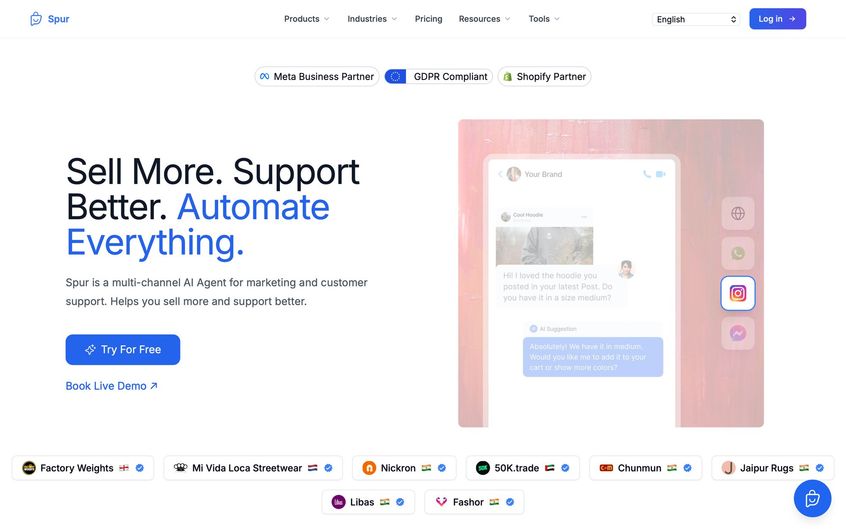
Here's what makes Spur particularly effective for Instagram comment automation:
Actionable AI agents go beyond basic bots. Unlike simple chatbots that only return pre-written text, Spur's AI agents are trained on your actual knowledge base and data. They don't just answer FAQs. They can perform actions. If someone comments asking "Where's my order?", Spur's AI could DM them with real order tracking information by integrating with Shopify or your CRM. This ensures that even automated responses give accurate, personalized answers instead of generic ones.
Visual flow builder for comment-to-DM provides a no-code, drag-and-drop interface to set up your comment triggers and DM flows. You can easily create rules like "trigger on DEAL comment, send DM with coupon" without writing code. The platform handles the API calls behind the scenes. You can iterate on your automation logic quickly with a visual overview rather than manual configuration each time.
E-commerce integrations are built-in. Spur integrates natively with Shopify, WooCommerce, Stripe, Razorpay, and more. Your auto-DMs can include things like product recommendations, cart recovery prompts, or order status updates effortlessly. If someone comments "I want this!" on a product post, your auto-DM could include a direct checkout link for that product. Brands have used this during live sales on Instagram, where viewers comment "BUY" and get an immediate DM with a checkout link, generating sales on the spot.
Compliance and safety are built into the platform. Because Spur uses the official Instagram API and is a vetted Meta partner, you don't have to worry about violating Instagram rules. Everything operates within allowed limits and policies. Your account security is protected. You're never giving out your password, just a Facebook authorization token. You won't get in trouble for automations you run through Spur. You get peace of mind that you can scale engagement without risking an account ban.
Unified inbox with human handoff completes the picture. We emphasized blending human touch with automation. Spur's shared inbox means the moment someone needs a human, your team can jump in from the same dashboard with full context of the bot's conversation so far. You can assign conversations, add internal notes, and ensure no comment or DM falls through the cracks. The result is smooth bot-to-human handoff whenever necessary, keeping customers happy.
Spur takes the heavy lifting out of Instagram comment automation and adds intelligent capability. It's designed to drive real business outcomes through conversational automation that feels personalized. You can sign up for a free trial of Spur and see how its Instagram automation works firsthand.
Start Converting Instagram Comments to Sales
Instagram auto-reply to comments isn't just about saving time or boosting engagement metrics. It's about capturing revenue that would otherwise walk away.
Every comment asking about price, availability, or shipping is a potential sale. The brands that respond instantly while interest is highest are the ones converting comments into customers. The brands that wait hours or days are watching those same people buy from faster competitors.
With the right automation setup using tools like Spur, you can respond to every inquiry immediately, move high-intent commenters into private conversations, and convert engagement into actual business results. All while staying within Instagram's rules and maintaining the authentic, helpful presence that builds trust with your audience.
The setup takes a few hours. The results compound over months and years as you capture leads and sales that would have otherwise slipped through the cracks.
Start with one simple automation. Pick your most common question and set up a keyword trigger with a helpful DM. Test it, refine it, and watch the conversations start flowing. Then build from there.
Your Instagram comments are already full of potential customers. The only question is whether you'll be there to meet them when they raise their hand.
Instagram Auto Reply FAQ
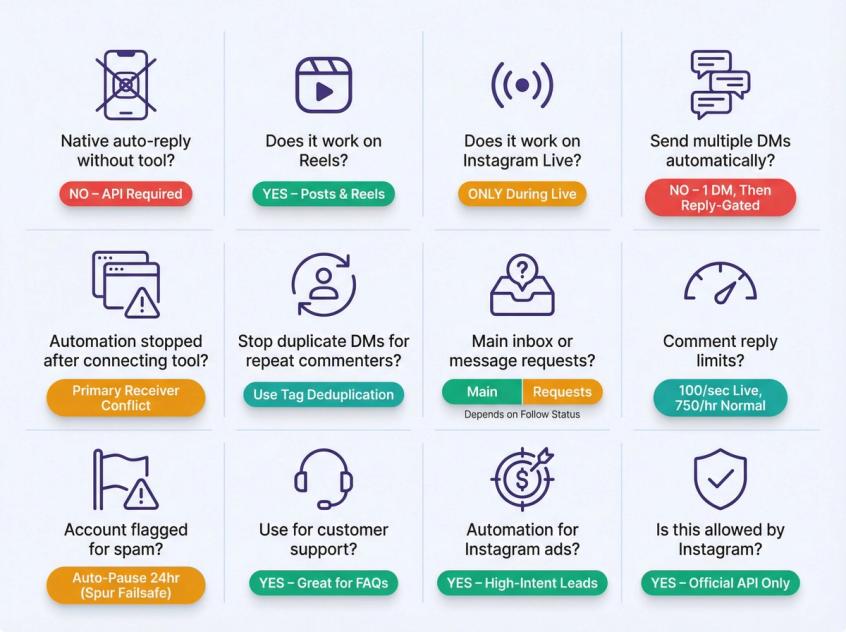
Instagram doesn't offer built-in comment-to-DM automation. The native app has features for auto-replying to direct messages and adding FAQs, but for comment automation you need an API-based solution. Native tools help you respond faster manually, but they don't reliably replace comment-to-DM automation at scale.
Yes. Meta's Private Replies documentation explicitly includes posts and Reels. The automation works the same way across both content types.
Yes, but with a limitation. You can only send private replies during the actual live broadcast. Once the live ends, you can't send private replies for comments made during that live. Plan your automation accordingly for live events.
Not unless they respond to your first message. Meta's documentation indicates follow-up messages are only possible if the recipient replies, and then you must send them within the allowed messaging window. This is why your first DM needs to be valuable and ideally include a question that encourages a reply.
This is usually a Primary Receiver or conversation routing conflict. Meta allows only one Primary Receiver, and when multiple apps are connected to your Instagram messaging, they can block each other from sending or managing DMs. Check your connected apps and designate one system as the primary handler.
Use tag-based deduplication logic. Spur's help guide walks through a clean setup. Essentially, if a user has a tag indicating they already got the message, skip them. Otherwise, send the DM and add the tag. This prevents multiple DMs even if they comment repeatedly.
It depends on whether they follow you. If they follow your account, the private reply appears in their main inbox. If they don't follow you, it can appear in their message requests folder. This is why many brands include a note in the public comment like "Sent! Check your message requests if you don't see it."
Using official API partners, limits are enforced automatically. The Instagram API allows up to 100 comment replies per second during Live videos and roughly 750 messages per hour for normal messaging. These are generous limits for most businesses. As long as you're using approved tools, you're unlikely to hit these caps unless you truly go viral overnight.
Spur has a failsafe that automatically pauses comment automations for 24 hours if your account gets flagged, giving you time to recover. Prevention is better though. Use keyword triggers instead of "reply to every comment", keep messages short and relevant, avoid identical repetitive wording, and don't blast the same link thousands of times in minutes.
Absolutely. If people frequently comment asking "Where's my order?" or "How do I return this?", you can set up keyword triggers that DM them with instructions or request their order details. This moves support conversations private where you can handle them properly while showing everyone else that you're responsive.
Yes, and it's particularly effective. Ads created through Meta's Ads Manager work well with comment automation because they're campaign-linked and detectable. When someone comments on your ad asking for more information, you can instantly DM them, capturing that high-intent lead.
Sources
The pages this article links out to, in the order they appear.
- Meta's official API documentation postman.com
- Meta Business Suite's Comment-to-Message feature facebook.com
Was this article useful?