How to Fix WhatsApp Messages Not Delivered? Guide (2026)

Discuss with AI
Get instant insights and ask questions about this topic with AI assistants.
💡 Pro tip: All options include context about this blog post. Feel free to modify the prompt to ask more specific questions!
WhatsApp messages fail for predictable reasons (offline recipients, blocks, API limits, or policy violations). This guide shows you exactly which error code maps to which fix, plus how to prevent delivery failures before they tank your campaigns. If you're stuck on single tick or getting 131049/131047 errors, you'll have answers in 5 minutes.
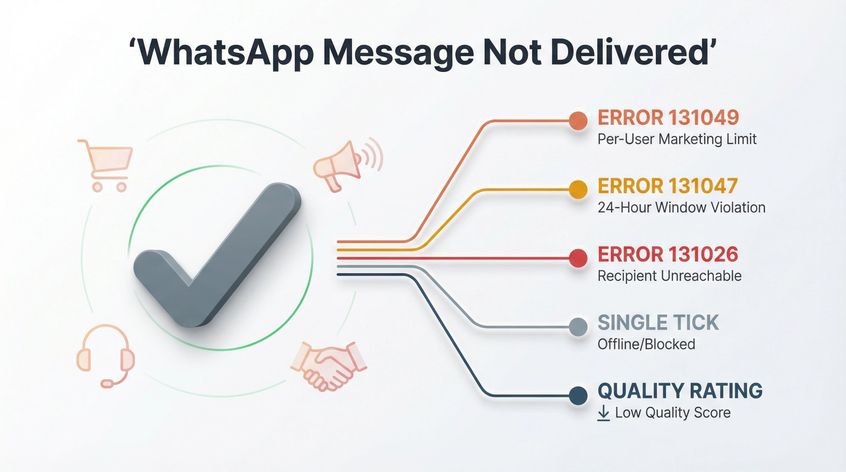
When your WhatsApp message sits on a single gray tick, you're not just facing a technical glitch. You're losing sales conversations, customer support threads, and marketing reach. For businesses using WhatsApp Business API platforms, delivery failures mean zero ROI on campaigns that took hours to plan.
The challenge? WhatsApp's delivery system has evolved into a complex rulebook. What worked in 2023 breaks in 2026. Meta's messaging policies now include per-user frequency caps, portfolio-wide sending limits, and regional blocks that can silently kill your broadcasts.
This guide cuts through the confusion. We'll diagnose why messages fail, decode the error codes that actually matter, and show you fixes that work right now.
How to Diagnose WhatsApp Delivery Issues in 60 Seconds
Before diving into solutions, identify your scenario:
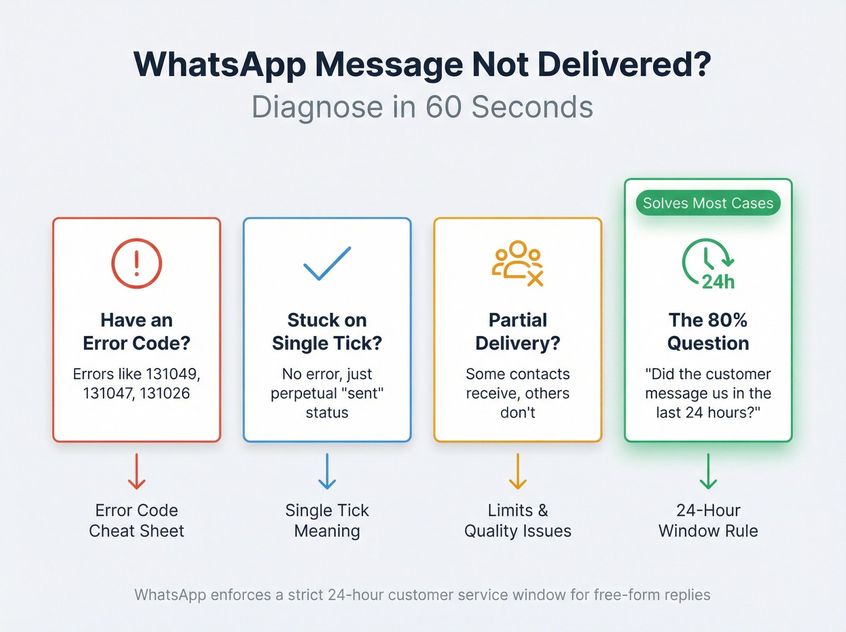
Do you have an error code?
If your platform shows errors like 131049, 131047, or 131026, jump to the Error Code Cheat Sheet section below.
Stuck on "sent" with single tick?
No error, just perpetual single tick? See What Single Gray Tick Means.
Some contacts receive, others don't?
Partial delivery during broadcasts points to messaging limits or quality rating issues.
One question that solves 80% of cases:
"Did the customer message us in the last 24 hours?"
WhatsApp enforces a strict 24-hour customer service window. Inside that window, you can reply freely. Outside it, you must use approved templates. Sending free-form messages after 24 hours triggers error 131047, and the customer never receives it.
How WhatsApp Message Delivery Works
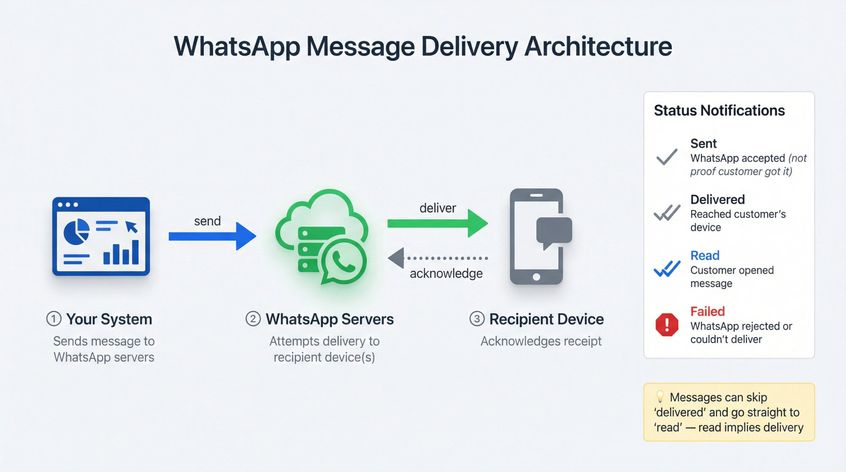
WhatsApp uses a store-and-forward architecture:
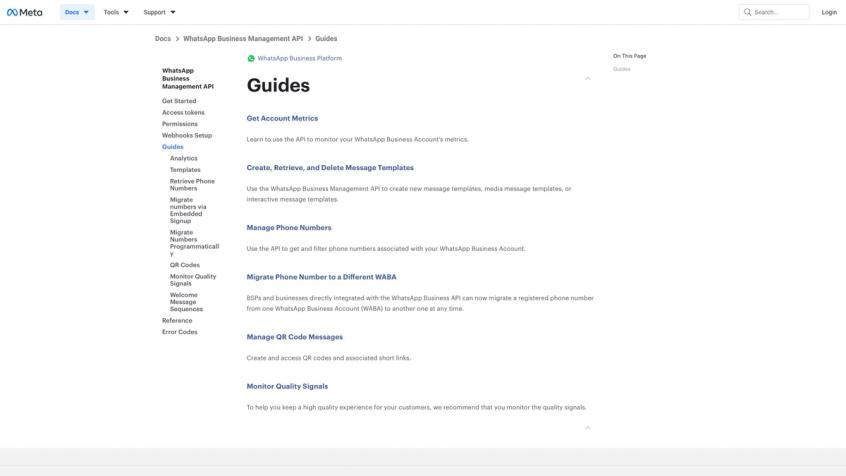
For developers building on WhatsApp's Business Management API, Meta's official documentation provides the technical foundation for understanding delivery mechanisms, error handling, and best practices.
① Your system sends a message to WhatsApp's servers
② WhatsApp attempts delivery to the recipient's device(s)
③ The recipient's device acknowledges receipt
For businesses using WhatsApp automation platforms, WhatsApp reports delivery through status notifications:
• Sent → WhatsApp accepted your message (not proof the customer got it)
• Delivered → Message reached the customer's device
• Read → Customer opened the message
• Failed → WhatsApp rejected it or couldn't deliver
Critical detail most people miss: You might never receive a "delivered" event if the message goes straight to "read." WhatsApp can skip the delivered status because "read" implies delivery.
In multi-device setups, a message can show both delivered and failed (one device got it, another didn't). Only treat it as true failure if you never get delivered or read.
What Does One Gray Tick Mean on WhatsApp?
In consumer WhatsApp, one gray tick (✓) means "sent from you, not delivered to them."
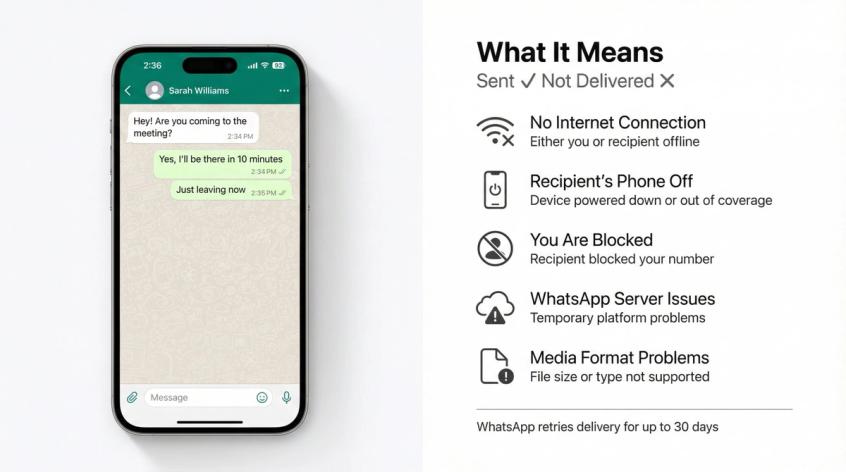
Common causes according to troubleshooting best practices:
→ No internet on either side
→ Recipient's phone is off or out of coverage
→ You're blocked by the recipient
→ WhatsApp server issues
→ File format or size problems (for media messages)
What to Do When Messages Stay on Single Tick
Wait strategically, not forever
WhatsApp keeps trying for up to 30 days for offline customers, but if it's time-sensitive, waiting 30 days defeats the purpose.
Use TTL properly for urgent messages
Template messages have a "time to live" concept. Different template types allow different TTL ranges. Don't let "flash sale ends in 2 hours" deliver tomorrow.
Assume blocking is possible
WhatsApp generally doesn't give you a clean "you are blocked" flag for business messaging. The symptom is perpetual non-delivery. If someone consistently shows single tick across multiple message attempts, suppress them from future marketing and try another channel like Instagram DMs or live chat.
5 Reasons WhatsApp Messages Don't Deliver (And How to Fix Each)
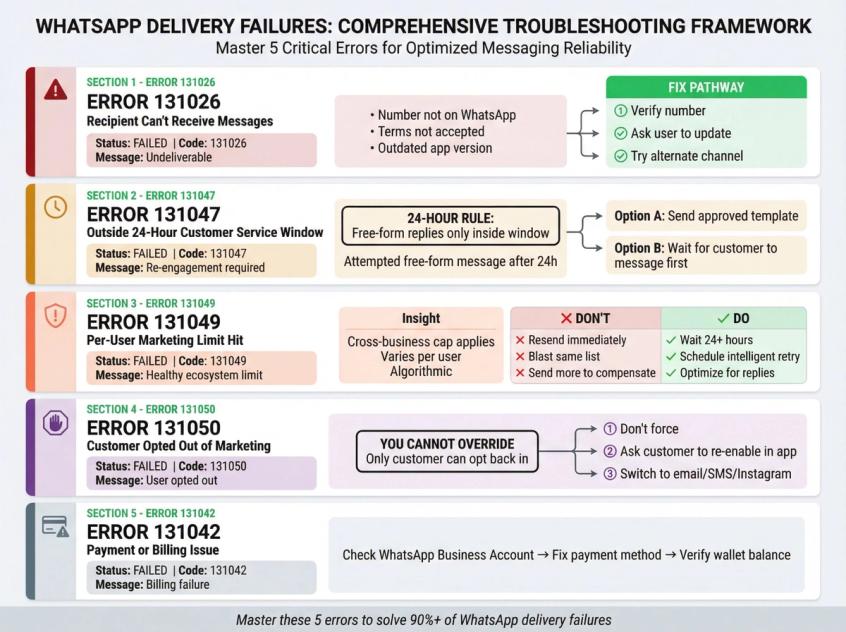
Error 131026: Recipient Can't Receive Messages
Error 131026 means the message is undeliverable due to recipient-side issues. You cannot force delivery. Your only option is to verify the number is real, active, and updated.
What it looks like:
Status shows "failed" with error code 131026 ("message undeliverable")
Why it happens:
Meta bundles multiple recipient-side causes under 131026:
• Number isn't registered on WhatsApp
• Recipient hasn't accepted WhatsApp's latest terms
• Recipient's app is too outdated
• Authentication template issues in some cases
How to fix error 131026:
You can't force delivery. Your only options:
① Verify the number is real and active on WhatsApp
② Ask the user to open WhatsApp, accept any terms prompts, and update their app
③ If you can't reach them on WhatsApp, use email, SMS, or Instagram DMs to guide them
Error 131047: Outside 24-Hour Customer Service Window
WhatsApp's official Business Policy page defines the rules every business must follow. The 24-hour customer service window is one of the platform's core guardrails for preventing spam and protecting user experience.
The rule (non-negotiable):
You can reply without templates only within 24 hours of the customer's last message. Outside that window, you must use approved templates.
What it looks like:
Status shows "failed" with error 131047 (re-engagement message/outside allowed window)
How to fix error 131047:
• Send an approved template (utility, marketing, or authentication as appropriate)
• Or get the customer to message you first, resetting the 24-hour clock
Modern WhatsApp automation platforms can automatically select the right template type based on conversation state, preventing this error before it happens.
Error 131049: Per-User Marketing Limit Hit
This is the one that catches teams off guard because it feels random.
What it looks like:
Error 131049 with a message like "not delivered to maintain healthy ecosystem engagement"
What it really is:
WhatsApp introduced per-user marketing limits that apply across all businesses, not just yours. Meta doesn't disclose the exact cap because it's algorithmic and varies per person.
If a user already received marketing templates from other businesses today, your message might get blocked even if you've never messaged them before.
How to fix error 131049:
| Don't Do This | Do This Instead |
|---|---|
| Resend immediately | Wait at least 24 hours before retry |
| Blast the same list again | Schedule intelligent retries |
| Send more to "make up" for failures | Optimize messages for replies to stay in conversation |
| Ignore the errors | Track failures and retry strategically |
Meta's developer docs advise: wait at least 24 hours before resending.
How smart automation handles this:
Intelligent WhatsApp platforms detect frequency capping errors and auto-retry in the next 24-hour window. This has lifted broadcast delivery rates from ~50% to 80-85% in many customer accounts.
Additional tactics that reduce 131049 errors:
• Use buttons and quick replies to encourage responses (keeps you in active conversation)
• Send fewer, higher-value broadcasts with better targeting
• Avoid sending at peak times when users are likely maxed out from other businesses
Error 131050: Customer Opted Out of Marketing
What it looks like:
Error 131050, meaning the recipient stopped receiving marketing messages from your business.
The hard truth: Even if your platform has a toggle, you cannot override a customer's WhatsApp marketing opt-out. Only the customer can opt back in on their end.
How to fix error 131050:
• Don't try to brute force (you'll hurt quality rating and possibly trigger restrictions)
• Ask the customer to opt back in:
① Open the chat with your business
② Open business info
③ Toggle "offers and announcements" back on
• If they won't opt back in, switch channels (email, SMS, or Instagram DM)
Why Your Business Account Can't Send Messages
This is where teams waste time blaming "deliverability" when the real problem is account-level.
WhatsApp Messaging Limits By Tier
WhatsApp sets messaging limits on how many unique users you can start a new conversation with in a rolling window.
Typical tiers according to WhatsApp documentation:
| Tier | Unique Recipients Per Day |
|---|---|
| Tier 1 | 250 |
| Tier 2 | 2,000 |
| Tier 3 | 10,000 |
| Tier 4 | 100,000 |
| Unlimited | Highly trusted verified accounts |
Major 2025 change (October 7, 2025):
Messaging limits shifted from per-phone-number to portfolio-wide. All numbers in a business portfolio now share the same limit. If one number burns through the limit, other numbers in the same portfolio get throttled too.
Also changed: Meta's documentation explicitly notes that if quality rating drops, messaging limit will not be downgraded under the new system (but you still can't send if quality is too low).
How to increase your tier limit:
→ Check your current messaging limit in WhatsApp Manager (Account Tools > Phone Numbers)
→ Pace campaigns to stay within limits
→ Increase tiers through business verification or sustained high-quality messaging
→ WhatsApp verification services can help you get the blue tick that often unlocks higher limits
How WhatsApp Quality Rating Affects Delivery
WhatsApp restricts businesses that get negative feedback (blocks, reports, low engagement).
Quality shows as:
• High → Full sending privileges
• Medium → Warning state
• Low → Restrictions kick in
How to improve quality rating:
• Tighten opt-in processes (only message people who explicitly want to hear from you)
• Reduce frequency and avoid spammy sends
• Add clear opt-out instructions
• Personalize and segment (don't blast everyone with everything)
• Monitor delivery analytics in your WhatsApp automation dashboard to catch quality drops early
Delivery benchmarks from leading platforms:
| Delivery Rate | Status |
|---|---|
| 85%+ | Good ✓ |
| 70-84% | Average |
| <70% | Poor (investigate immediately) |
If you're below 70%, common causes include inactive numbers, poor quality rating, or template approval issues.
Error 131042: Payment or Billing Issue
If billing fails, messages stop. Error 131042 typically indicates payment-related issues.
Action: Fix payment method, wallet balance, or billing status in your WhatsApp Business Account.
WhatsApp Server Outages
Sometimes it's just down. Check Meta's status page during delivery issues to rule out system-wide problems.
WhatsApp Error Codes and What They Mean
These are the codes you'll see in real business scenarios:
| Error Code | Meaning | Action |
|---|---|---|
| 131026 | Message undeliverable (customer side) | Verify number, ask them to update app/accept terms, suppress if persistent |
| 131047 | Re-engagement outside 24h window | Send approved template or get customer to message first |
| 131049 | Per-user marketing limit hit | Don't resend immediately; retry after 24h; optimize for replies |
| 131050 | User opted out of marketing | User must opt back in; you can't override |
| 131042 | Payment/billing issue | Fix payment method or wallet in WhatsApp Business Account |
| Template paused/disabled | Low quality template blocked | Improve template quality or create new one |
How to Improve WhatsApp Delivery Rates Long-Term
Think of WhatsApp deliverability like email reputation. Meta optimizes for user happiness, not sender convenience.
This is where Spur's platform shines. Instead of manually checking each error code, the platform's automation layer handles diagnostics in real-time, giving you instant visibility into what's failing and why.
1. How to Clean Your WhatsApp Contact List
This alone can add 10-30 percentage points of delivery.
Do this:
• Remove numbers that repeatedly hit 131026 errors (not on WhatsApp/unreachable)
• Don't blast cold lists you scraped
• Validate country code and E.164 formatting before importing
• Use contact validation features to automatically flag invalid numbers
2. How to Design WhatsApp Messages That Get Replies
Replies keep you inside the 24-hour window where conversation is "warm." Follow-ups don't need to start fresh marketing attempts.
Use:
→ Buttons and quick replies
→ "Reply with 1/2/3" style prompts
→ Interactive elements that encourage engagement
Modern automation builders make it easy to add buttons and quick replies without coding.
3. How Often Should You Send WhatsApp Marketing Messages?
WhatsApp's per-user marketing caps are real and cross-brand.
Best practices:
• Combine promos (don't send 3 separate broadcasts when 1 comprehensive message works)
• Schedule sends at varied times (avoid always hitting the same hour)
• Send to high-intent segments first
• Use segmentation features to target engaged customers who are more likely to respond
4. How to Add Opt-Out Instructions to WhatsApp Messages
Hard truth: If people feel trapped, they block you. Blocks wreck quality rating faster than anything else.
WhatsApp policy explicitly requires respecting opt-outs.
Implementation:
Include clear opt-out instructions in marketing messages. It's better for someone to quietly unsubscribe than to block or report you.
5. WhatsApp Metrics You Should Monitor Daily
Watch these metrics continuously:
| Metric | Where to Find It | Action Threshold |
|---|---|---|
| Quality Rating | WhatsApp Manager | If it drops from High to Medium, investigate immediately |
| Messaging Limit | WhatsApp Manager > Phone Numbers | If you're using >80% consistently, request upgrade |
| Delivery Rate | Broadcast analytics dashboard | If <70%, pause and diagnose |
| Template Quality | WhatsApp Manager > Message Templates | If any template goes to Low quality, pause usage |
Since October 7, 2025, limits are portfolio-wide, so teams must coordinate across all numbers in the portfolio.
How to Diagnose WhatsApp Delivery Failures Fast
The broadcast analytics interface gives you a breakdown of exactly where messages are failing. You can see which error codes are most common, which customer segments are affected, and whether the issue is systemic or isolated to specific campaigns.
Modern WhatsApp automation platforms surface non-delivery reasons inside the shared inbox and broadcast analytics, which matters because WhatsApp's raw "failed" status isn't enough for operators.
Leading platforms record and display common non-delivery reasons:
• Per-user marketing limits (131049)
• Message undeliverable (131026)
• Payment failures (131042)
• Template quality issues
• Opt-out status (131050)
Instead of guessing why a message failed, you see the exact error code and suggested fix right in the interface.
2. How to Use Broadcast Analytics to Diagnose Issues
Advanced broadcast analytics break down:
→ Sent/delivered/opened/clicked rates
→ Contacts not on WhatsApp
→ Quality rating impact
→ Template performance
Delivery benchmarks from industry data:
| Delivery Rate | Status |
|---|---|
| 85%+ | Good |
| 70-84% | Average |
| <70% | Poor |
If you're in the poor range, your analytics should highlight whether it's due to:
• Inactive numbers (clean your list)
• Poor quality rating (reduce frequency, improve targeting)
• Template approval issues (review templates)
3. What WhatsApp Opt-In Status Really Means
Smart platforms show opt-in status in the shared inbox, but also warn: toggling it in your dashboard doesn't override WhatsApp's opt-out.
If the user opted out in WhatsApp, marketing messages will still fail (131050) until they opt back in on their device.
4. How Auto-Retry Handles WhatsApp Frequency Caps
This is where automation really shines.
When platforms detect a message failed due to per-user marketing caps (131049), they can automatically:
① Tag that contact for retry
② Wait 24+ hours (when the user's cap likely resets)
③ Retry the message automatically
Customer results from advanced platforms: Delivery rates improved from ~50% to 80-85% with this feature enabled.
Manual approach: You'd need to export failed contacts, wait a day, then resend. Automated approach: Your platform handles it while you focus on strategy.
WhatsApp Delivery FAQ
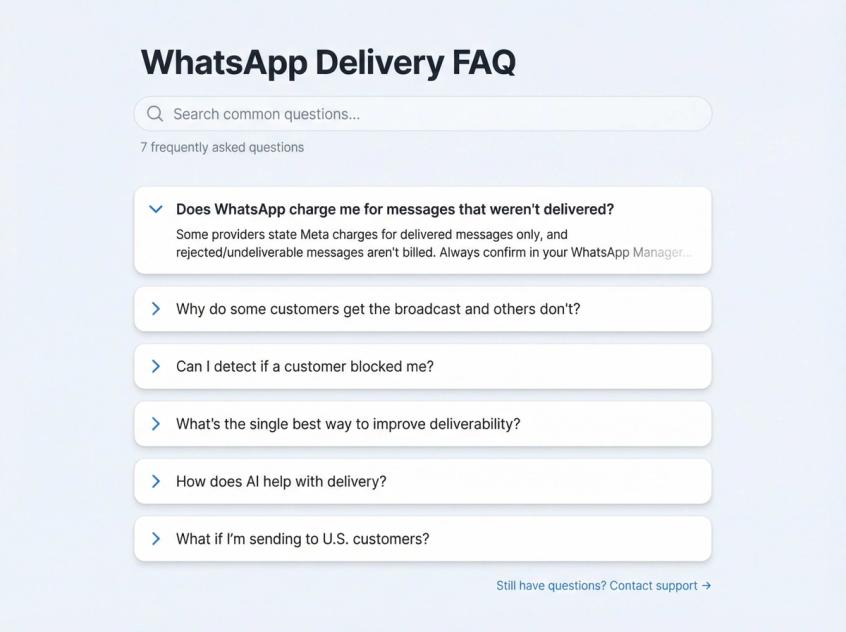
"Does WhatsApp charge me for messages that weren't delivered?"
Some providers state Meta charges for delivered messages only, and rejected/undelivered messages aren't billed.
Always confirm in your WhatsApp Manager billing view, as pricing models change.
"Why do some customers get the broadcast and others don't?"
Usually one of:
• Per-user marketing caps vary by user based on what they received from all businesses
• Invalid or non-WhatsApp numbers (131026)
• User opted out (131050)
• You hit messaging limits mid-campaign
"Can I detect if a customer blocked me?"
You usually can't get a clean "blocked" signal. The symptom is repeated non-delivery with no engagement.
Treat it as an outcome, not a bug: stop messaging them on WhatsApp and try another channel.
"What's the single best way to improve deliverability?"
Priority order:
① Tighten opt-in and list hygiene
② Reduce frequency
③ Increase engagement (replies and interactions)
④ Watch quality rating and limits continuously
"How does AI help with delivery?"
While AI doesn't directly affect delivery rates, AI agents for customer support help maintain engagement, which indirectly improves deliverability.
Here's how:
Engagement drives quality rating
When customers interact with your messages (replies, clicks, positive engagement), your quality rating stays high. AI agents trained on your knowledge base can:
• Answer customer questions instantly (encouraging replies)
• Route complex issues to humans smoothly (reducing frustration and blocks)
• Handle repetitive queries so humans focus on high-value conversations
Better targeting through conversation history
AI tracks conversation context, so you can segment based on actual customer needs rather than guessing. Send marketing only to engaged users who are likely to respond positively.
Multi-channel fallback
If a WhatsApp message fails, automation can route to Instagram DM, live chat, or email. Your message still reaches the customer through their preferred active channel.
"What if I'm sending to U.S. customers?"
Critical: As of April 1, 2025, WhatsApp completely blocks all marketing template messages to U.S. numbers (+1). This is Meta's temporary policy to "maintain ecosystem health."
What still works for U.S. numbers:
• Service (transactional) templates
• Authentication (OTP) templates
• Messages within the 24-hour customer service window
What doesn't work:
• Any marketing category template to +1 numbers
Solution:
Use multi-channel approaches:
• Route U.S. marketing to SMS, email, or Instagram DMs
• Use WhatsApp for transactional messages only (order confirmations, shipping updates, support)
• Advanced platforms can detect U.S. numbers and automatically send similar content via Instagram DM instead
The Bottom Line
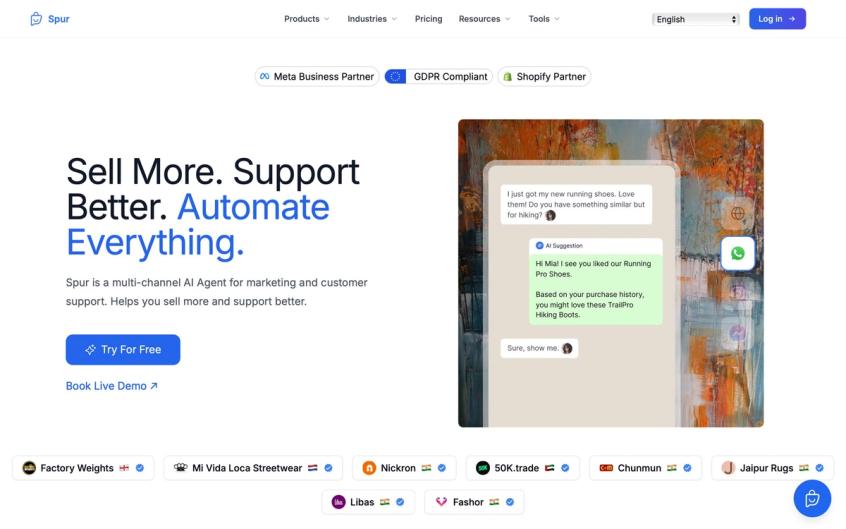
Spur's platform combines WhatsApp automation with Instagram DM and Live Chat, giving you a unified view of all customer conversations while automatically managing delivery issues across every channel.
The platform offers transparent pricing that scales with your business needs, from starter plans for small teams to enterprise solutions for high-volume messaging operations.
WhatsApp delivery isn't magic. It's a system with clear rules, predictable failure modes, and proven fixes.
For personal users: Most issues come down to connectivity, number validity, or being blocked. These are usually temporary or avoidable with basic troubleshooting.
For businesses: You must be strategic. Use templates correctly, target engaged audiences, monitor sender reputation, and adapt to policy changes immediately.
The good news? With the right platform, you don't have to manually track error codes, retry failed messages, or guess at fixes.
Modern WhatsApp automation platforms handle the complexity:
✓ Automatic error detection and categorization
✓ Intelligent retry for frequency-capped messages
✓ Real-time quality and limit monitoring
✓ Multi-channel fallback when WhatsApp fails
✓ Template compliance and approval workflow
✓ Broadcast analytics that show exactly what went wrong
Message not delivered = communication not received. By understanding these causes and using the right tools, you'll turn more single ticks into double checks (and eventually blue reads).
Want to stop guessing why messages fail? Try a WhatsApp automation platform and see delivery analytics, auto-retry, and multi-channel backup in action.
Frequently Asked Questions
Q: How long does WhatsApp keep trying to deliver a message?
A: WhatsApp will retry delivery for up to 30 days for offline recipients. But if you're sending time-sensitive messages (like flash sale alerts), use template TTL (time-to-live) settings to control how long WhatsApp should keep attempting delivery.
Q: What's the difference between "sent" and "delivered" status?
A: "Sent" (single tick) means WhatsApp's servers accepted your message. "Delivered" (double tick) means it reached the recipient's device. Only "delivered" or "read" confirms the customer actually got your message.
Q: Can I appeal if my template gets paused for low quality?
A: No direct appeal process exists. If a template is paused (3 hours first time, 6 hours second time), you must wait out the pause period. After the third pause, the template is permanently disabled. Instead of trying to revive a flagged template, create a new one with better content and targeting.
Q: Why did my delivery rate suddenly drop from 90% to 50%?
A: Most commonly, this is due to WhatsApp's per-user marketing frequency caps (error 131049). The cap applies across all businesses, so if more businesses are messaging WhatsApp users, individual delivery rates drop. Solution: Set up intelligent retry logic that waits 24 hours and resends to failed contacts.
Q: What happens if I exceed my messaging tier limit?
A: Messages beyond your tier limit will fail immediately. For example, if your limit is 1,000 unique conversations per day and you try to send to 1,200 people, the last 200 will get rejected. You won't be charged for rejected messages, but they won't deliver.
Q: How do I increase my messaging tier limit?
A: Two main paths: (1) Get your business verified with the WhatsApp blue tick, which often grants higher default limits, or (2) Maintain high-quality messaging and consistently use a large portion of your current limit. WhatsApp auto-upgrades accounts that demonstrate sustained quality and demand.
Q: Can I use multiple phone numbers to get around tier limits?
A: Not anymore. As of October 7, 2025, messaging limits are portfolio-wide. All phone numbers under the same business portfolio share the same limit. If you burn through the limit on one number, all numbers in the portfolio get restricted.
Q: What if a customer says they never got my message but it shows "delivered"?
A: "Delivered" means the message reached their device, but they may have: (1) deleted the chat without reading, (2) archived it immediately, (3) not noticed the notification, or (4) multiple devices where one received it but they didn't see it. You can't force them to read it, but you can follow up with a different message type or channel.
Q: How do I handle customers who are offline for weeks?
A: Don't keep retrying the same message indefinitely. If a contact is offline for 7+ days, consider: (1) trying an alternative channel like email or SMS, (2) waiting until they come back online naturally, or (3) removing them from urgent campaigns and adding them to a "re-engagement" segment for later.
Q: What's the best way to ask customers to opt back in after they've opted out?
A: You can't message them on WhatsApp if they've opted out. Use an alternative channel (email, SMS, or in-app notification) to explain the value of opting back in and provide instructions: Open WhatsApp chat → Business info → Toggle "offers and announcements" on. Don't be pushy; respect their choice.
Q: Does sending at specific times improve delivery rates?
A: Not directly, but timing affects engagement. If users engage more (reply, click buttons), your quality rating improves, which indirectly helps future deliverability. Also, avoid peak times when users might already be hitting frequency caps from other businesses. Spreading sends throughout the day can help.
Q: Can I test if a number is on WhatsApp before sending?
A: There's no official API to check if a number is on WhatsApp. You can use wa.me links (https://wa.me/[country][number]) in a browser; if the number isn't on WhatsApp, it'll show an error. For bulk validation, some third-party tools exist, but use them carefully to avoid violating WhatsApp's terms.
Q: What should I do if WhatsApp permanently disables my template?
A: Create a new template with improved content. Review what might have caused the issue (spammy language, poor targeting, policy violations, low engagement) and fix those problems in the new template. Get it approved before any campaign. Consider A/B testing template variations to see which performs better before scaling up.
Q: How can modern platforms help me avoid these delivery issues?
A: Advanced WhatsApp automation platforms provide several tools to prevent delivery failures:
• Automatic error detection showing exactly which contacts failed and why
• Intelligent auto-retry for frequency-capped messages (131049)
• Template compliance checks before you send
• Quality rating monitoring with alerts when metrics drop
• Multi-channel routing (if WhatsApp fails, automatically try Instagram DM or email)
• Contact validation to remove invalid numbers before campaigns
• Broadcast analytics that diagnose list health, quality issues, and template problems
• AI agents that maintain engagement and improve quality ratings
Explore WhatsApp automation solutions to see how automated delivery optimization works.