Guide to Instagram Broadcast Channels For Business (2026)

Discuss with AI
Get instant insights and ask questions about this topic with AI assistants.
💡 Pro tip: All options include context about this blog post. Feel free to modify the prompt to ask more specific questions!
Instagram broadcast channels let you message followers directly in their inbox without fighting the feed algorithm. It's like a VIP newsletter inside Instagram, except it's more interactive, drives real engagement, and when paired with smart Instagram DM automation, it becomes a serious revenue channel. This guide shows you exactly how to set one up, what to post, and how to turn attention into actual business outcomes.
Most businesses we talk to are tired of shouting into the feed and hoping the algorithm cooperates. You post great content, maybe it gets seen, maybe it doesn't. The reach keeps dropping, and getting people to actually do something feels like pushing a boulder uphill.
Instagram broadcast channels solve a different problem: they give you a direct line to people who've already raised their hand and said "yes, I want to hear from you." No algorithm lottery. No praying for engagement. Just you, your message, and followers who opted in.
Most guides won't tell you this: a broadcast channel alone isn't a business strategy. It's a distribution tool. The magic happens when you use it to start conversations, then automate those conversations to drive real outcomes: bookings, purchases, support resolution, qualified leads.
That's what this guide is about. Not just "how to create a channel" (that takes 30 seconds), but how to build a system that turns Instagram attention into revenue without sounding spammy or burning out your team.
Let's start with the basics. An Instagram broadcast channel is a one-to-many messaging thread that lives inside Instagram DMs. It's public by design, which means followers can discover and join it. (About Facebook)
It works like this:
- You (the admin) post updates. Text, photos, videos, voice notes, polls. Whatever makes sense for your message. (About Facebook)
- Members receive those updates in their inbox, right alongside their DMs from friends and customers.
- Members can react, vote in polls, and reply (if you enable replies). Instagram has also added prompts, which let you ask questions and get responses for up to 24 hours. (About Facebook)
It's basically a newsletter, except it lives where people already spend time managing conversations, not in an email inbox they ignore.
Why automated capture failed: Instagram broadcast channels are only accessible in the mobile app when logged into a professional account. Automated browsers cannot authenticate to Instagram to access this interface.
1) It bypasses the feed algorithm entirely.
Feed posts compete with everything: friends, Reels, ads, other brands. Channels show up in the inbox, which is a fundamentally different attention context. Meta reported that over 1.5 billion messages are exchanged in broadcast channels every month, making it one of the most popular direct engagement formats on the platform. (About Facebook)
2) It's opt-in, so attention quality is higher.
People don't accidentally join a broadcast channel the way they accidentally scroll past a Reel. Joining is a micro-commitment. That changes behavior. Members are more likely to engage because they chose to be there.
3) It's lightweight to run.
You don't need a video production team or a content calendar built six months in advance. A quick text update, a voice note from the founder, a poll about your next product. All of these work. (About Facebook)
But if you treat it like a spam cannon, people will mute it. Instagram lets members control notifications and mute channels without leaving. (About Facebook) So the strategy isn't "post more." It's "post value, participation, and occasional conversion."
This used to be confusing. Early in the rollout, it was creator-only. Then it expanded to some business accounts. Now, according to Instagram's help center, the baseline is simple: "If you have a professional account, you can create a channel." (Instagram Help Center)
Professional account means business or creator account. That's it.
Reality is messier, though.
Even with that baseline, availability can still depend on:
- Whether the feature has fully rolled out to your region or account type. (Sendible)
- Whether your account is in good standing and compliant with Instagram's policies. (Sendible)
If you see older articles claiming it's only for creators or that businesses are "sometimes" eligible, that's outdated. The rollout has expanded significantly. (Sprout Social)
Don't trust articles. Check your own account:
- Open Instagram
- Go to your inbox (messages)
- Tap the compose icon (new message)
- Look for "Create Channel" or "Create Broadcast Channel"
If it's there, you're good. If it's not, you either don't have a professional account yet, or the feature hasn't rolled out to you.
Instagram's help center lays out the process, and it's refreshingly simple. (Instagram Help Center)
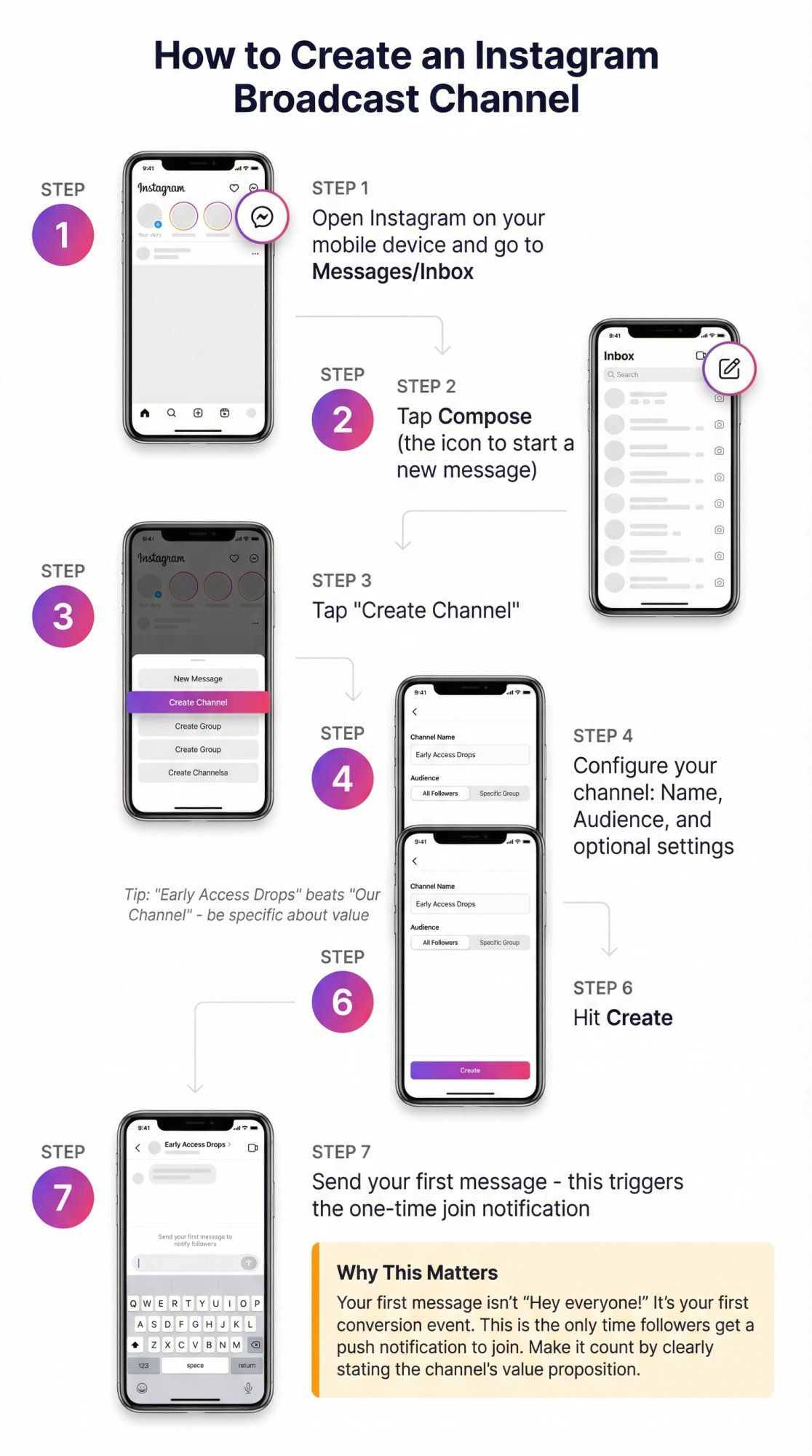
The flow:
- Open Instagram on your mobile device.
- Go to Messages / Inbox.
- Tap Compose (the icon to start a new message).
- Tap "Create Channel."
- Configure your channel:
- Name: Be clear. "Early Access Drops" beats "Our Channel."
- Audience: You can set this to specific follower groups or keep it open.
- Optional settings: Whether to show the channel on your profile, set an end date, etc. Options may vary. (Instagram Help Center)
- Hit Create.
- Send your first message. This is critical. Your first message triggers the one-time join notification to followers. (About Facebook)
That last step matters more than people realize. Your first message isn't "Hey everyone!" It's your first conversion event. Make it count.
Once you create the channel and send your first message, followers receive a one-time notification inviting them to join. (About Facebook)
After they join, they can control notifications:
- All messages (full blast)
- Some messages (Instagram decides what's important)
- None (they stay in the channel but notifications are off)
- Mute or leave entirely (About Facebook)
Business takeaway: You don't get unlimited reach to members just because they joined. If your messages aren't valuable, they'll mute you. And once they mute, you're functionally invisible.
Instagram describes channel content as including text, photo/video updates, voice notes, and polls. (About Facebook)
Voice notes are underrated. They feel personal, they're fast to record, and they work great for behind-the-scenes or founder updates.
When channels first launched, they were truly one-way. You posted, members reacted or voted in polls, and that was it.
Meta changed that with two big updates: (About Facebook)
Replies: Members can now reply to your messages, and their replies nest under each post (similar to comment threads). You can enable or disable replies in your channel settings.
Prompts: You can post a prompt asking for text or photo responses. Members can respond for up to 24 hours, and others can like those responses.
These features turn channels from "broadcast only" into structured feedback loops. You can ask questions, collect opinions, source UGC, run quick research sprints, all inside the inbox.
A few things to know before you enable replies:
- Channels are NOT end-to-end encrypted. Don't share sensitive info like order numbers or payment details in the channel. (Instagram Help Center)
- You can delete and report replies, just like comments on a post. (About Facebook)
- You can appoint moderators. Up to 4 moderators who can send and remove messages in the channel. (Instagram Help Center)
If you plan to enable replies and you don't have time to babysit the channel, assign moderators first. Or just keep replies off until you're ready.
Before we get into tactics, you need a promise. A channel with no clear value proposition just becomes noise.
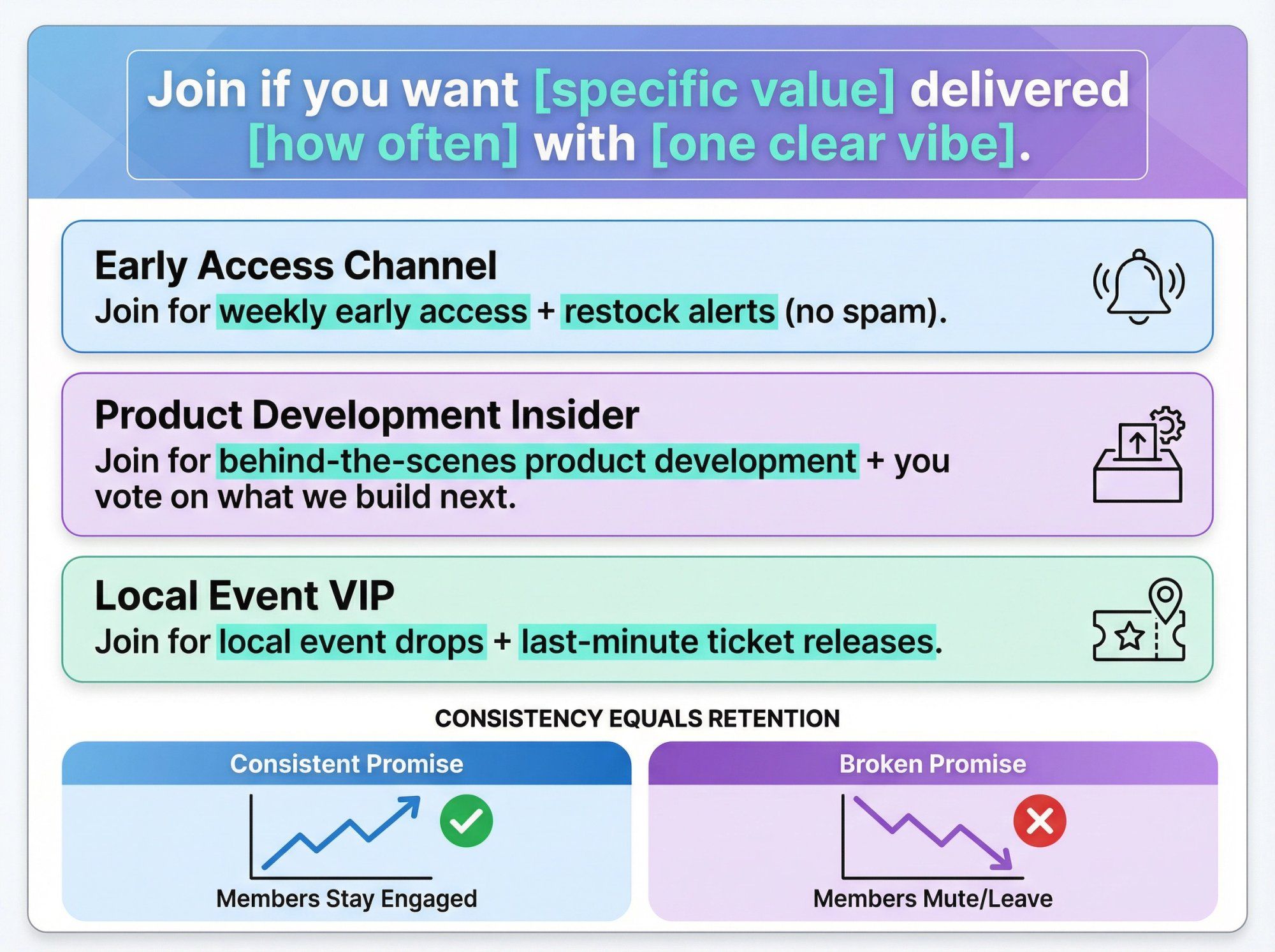
Use this simple formula:
"Join if you want [specific value] delivered [how often] with [one clear vibe]."
Examples:
- "Join for weekly early access + restock alerts (no spam)."
- "Join for behind-the-scenes product development + you vote on what we build next."
- "Join for local event drops + last-minute ticket releases."
Then enforce that promise with consistency. If you say "no spam," don't post daily discount codes. If you promise behind-the-scenes, actually show your process.
People stay when the channel delivers what it said it would. They mute when it doesn't.
The best channels mix three types of messages in a rhythm that keeps attention without burning it out:
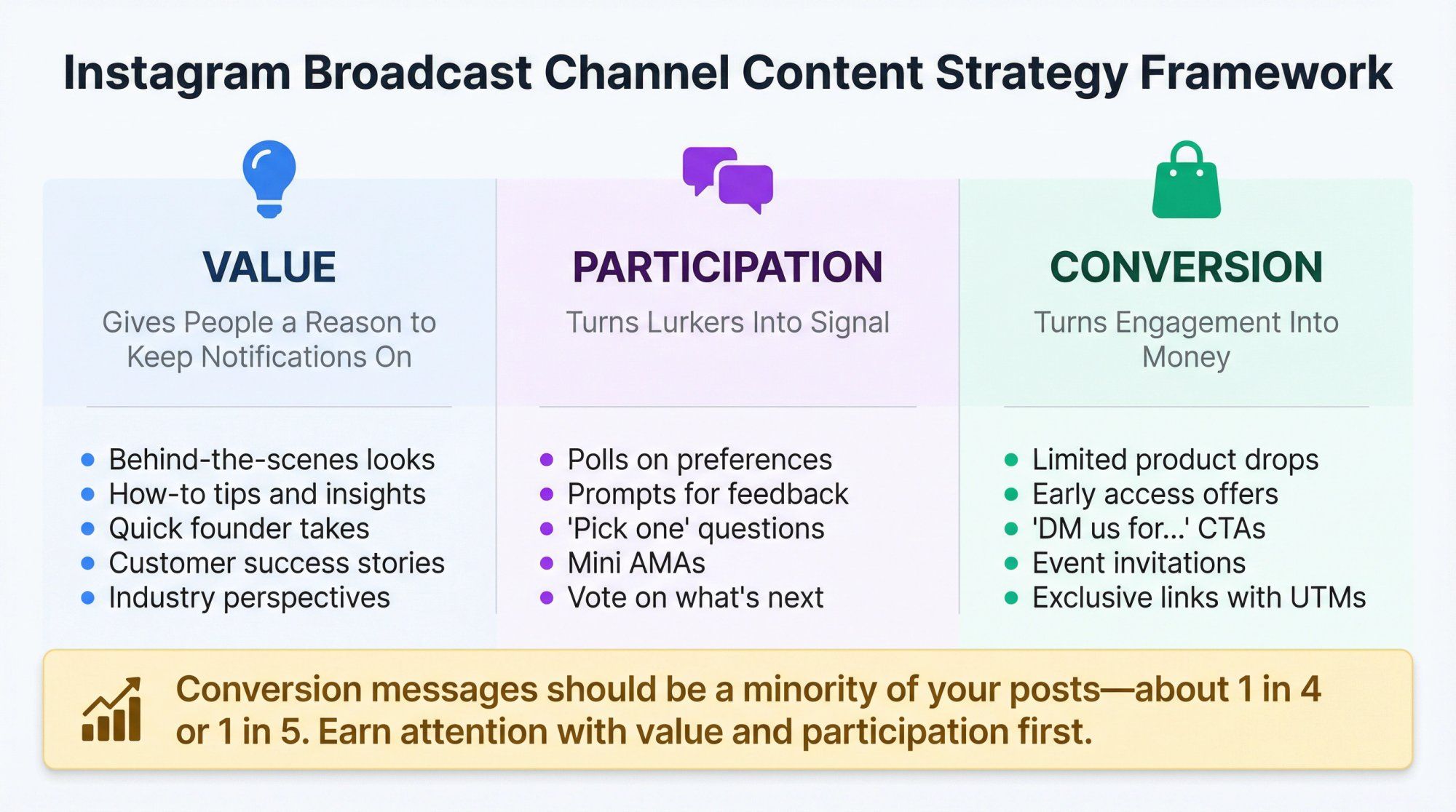
- Behind-the-scenes looks at your process, your team, your decisions
- How-to tips related to your product or industry
- Quick founder takes or opinions
- Customer success stories or testimonials
Instagram's help center explicitly calls out announcements, behind-the-scenes, event details, and upcoming info as channel-appropriate content. (Instagram Help Center)
- Polls ("Which colorway should we restock?")
- Prompts ("Show us how you use this product" or "What's the #1 thing you wish we offered?")
- "Pick one" questions
- Mini AMAs
Instagram's recent updates make polls and prompts first-class features, with insights tracking poll votes and engagement. (About Facebook) Use them to surface what your audience actually cares about.
- Limited product drops with early access for channel members
- "DM us for..." calls to action (we'll explain why this matters in a minute)
- Links with UTMs so you can track traffic and revenue
- Invites to live events, webinars, or appointment bookings
Conversion messages should be a minority of your posts. Maybe 1 in 4 or 1 in 5. If every message is selling, people tune out. But if you earn attention with value and participation, conversion becomes natural.
These are plays that work across D2C, services, and local businesses. Steal them.
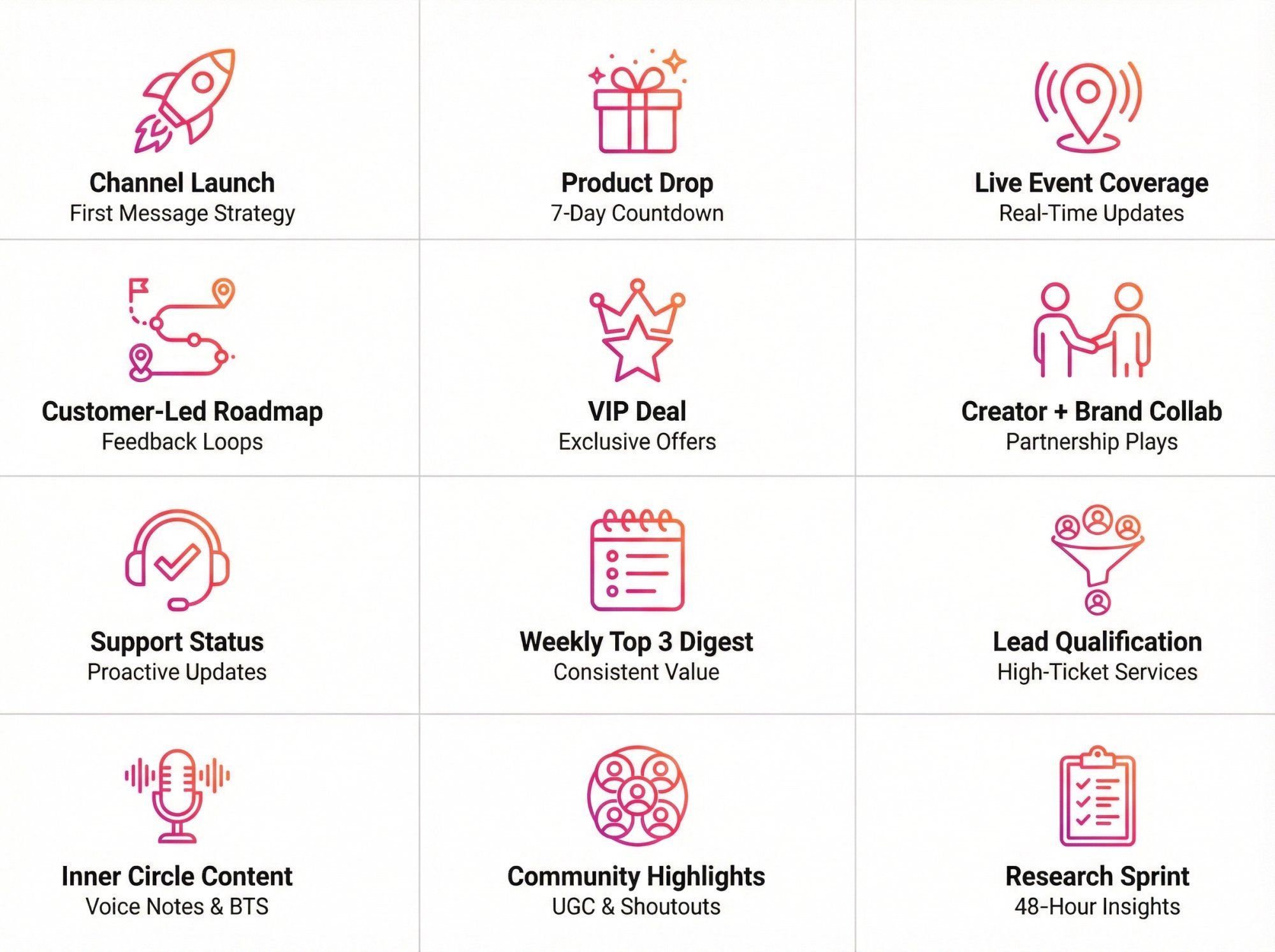
Goal: Maximize join rate and set expectations immediately.
Template:
- "Welcome to [Channel Name]. This channel is for [specific benefit]."
- "Posting frequency: [X times per week]."
- "Our rule: If it's not useful, we won't post it."
- "Quick poll: What do you want more of? (A / B / C)"
That poll serves two purposes: it gets early engagement (poll votes are a core metric in Instagram's insights), and it shows you what your audience actually wants. (About Facebook)
Goal: Build anticipation without spamming.
- Day -7: "We're dropping [product] next week. Here's the story behind it [30-second video or voice note]."
- Day -5 (poll): "Pick the colorway you'd actually buy: A / B / C."
- Day -3 (BTS): Photo or video of packaging, production, or the team working.
- Day -1: "Tomorrow: Early access link drops in this channel first."
- Drop day: Link + "DM us 'HELP' if you want personalized recommendations."
- Day +1 (prompt): "What should we improve next? Reply with one sentence."
This uses all the channel features (value, polls, prompts, and conversion) in a structured sequence. If you're in e-commerce, combine this with proven cart abandonment solutions to maximize recovery.
Goal: Give members the "I'm there" energy even if they're not physically there.
Template:
- "Doors open in 30 minutes. Here's what the line looks like [photo]."
- "New stock just landed [photo of product]."
- "Poll: Should we restock this color next month?"
Instagram explicitly positions channels for quick, event-style updates. (Instagram Help Center) This is one of the best uses.
Goal: Get product feedback without running surveys that nobody fills out.
Prompt ideas (24-hour response window):
- "What's the #1 thing you wish [product category] did better? Reply with one sentence."
- "Send a photo of your current setup and what annoys you about it."
Prompts let people respond with text or photos for up to 24 hours. (About Facebook) Use this for fast, qualitative research. For ongoing community engagement, check out these community building strategies.
Goal: Make offers feel earned, not desperate.
Template:
- "Channel-only deal: 12-hour code [CODE]."
- "This is for members because you help us build better products."
- "Poll tomorrow: What should we offer next month?"
Notice the framing. It's not "we need to move inventory." It's "you're in the inner circle, here's something exclusive."
Even in 2024, it was still common for creator accounts to have broader access to features than brand accounts. (Sprout Social) If that's your situation, partner with a creator who already has an active channel.
The play:
- Run the product drop or launch story through their channel.
- Drive members to DM your brand account for fulfillment or questions.
- Split the revenue or pay a flat fee.
Goal: Reduce inbound support chaos by being proactive.
Template:
- "Status update: [What's happening]."
- "What it affects: [X]."
- "What we're doing about it: [Y]."
- "Need help? DM us 'ORDER' and we'll handle it."
Remember: channels aren't end-to-end encrypted, so don't ask for order numbers in the channel. (Instagram Help Center) Move those conversations to DMs. Learn more about customer service automation for efficient support workflows.
Goal: Consistent value with low effort.
Template (every Friday):
- "What dropped this week [link]."
- "What's coming next week."
- "One thing we learned this week [poll]."
This is dead simple, repeatable, and keeps the channel alive without requiring daily posts.
Goal: Drive qualified DMs, not "How much does this cost?" spam.
Template:
- "We just opened 5 slots for [service]."
- "If you want one, DM us 'SLOT' and answer 3 quick questions."
Then your automation handles the qualification in DMs. The channel creates demand; the DMs filter for quality. This is a proven lead generation technique for high-ticket offers.
Voice notes feel personal and are explicitly supported by Instagram. (About Facebook)
Template:
- "Quick voice note: Here's what we're changing next month and why [2-minute recording]."
Founders and CEOs especially should use this. It humanizes the brand without requiring a video shoot.
Goal: Make members feel seen.
Template:
- "Member spotlight: [Name/handle] did [thing]. Here's their story."
- "Want to be featured next week? Reply with a photo."
If replies are enabled, this becomes a mini-community thread. (About Facebook) For more ideas, explore community engagement strategy examples.
Goal: Make fast decisions with real input.
Structure:
- Day 1, Morning: Poll 1 (preference question).
- Day 1, Evening: Prompt (why do you feel that way?).
- Day 2, Morning: Poll 2 (tradeoff question).
- Day 2, Evening: "We're choosing X because [your reasoning based on their input]."
Close the loop. Show people their input mattered. That's how you keep them engaged long-term.
Instagram now provides channel insights, including:
- Total interactions
- Story shares
- Poll votes (About Facebook)
That's great for understanding health. But businesses need one more layer: attribution.
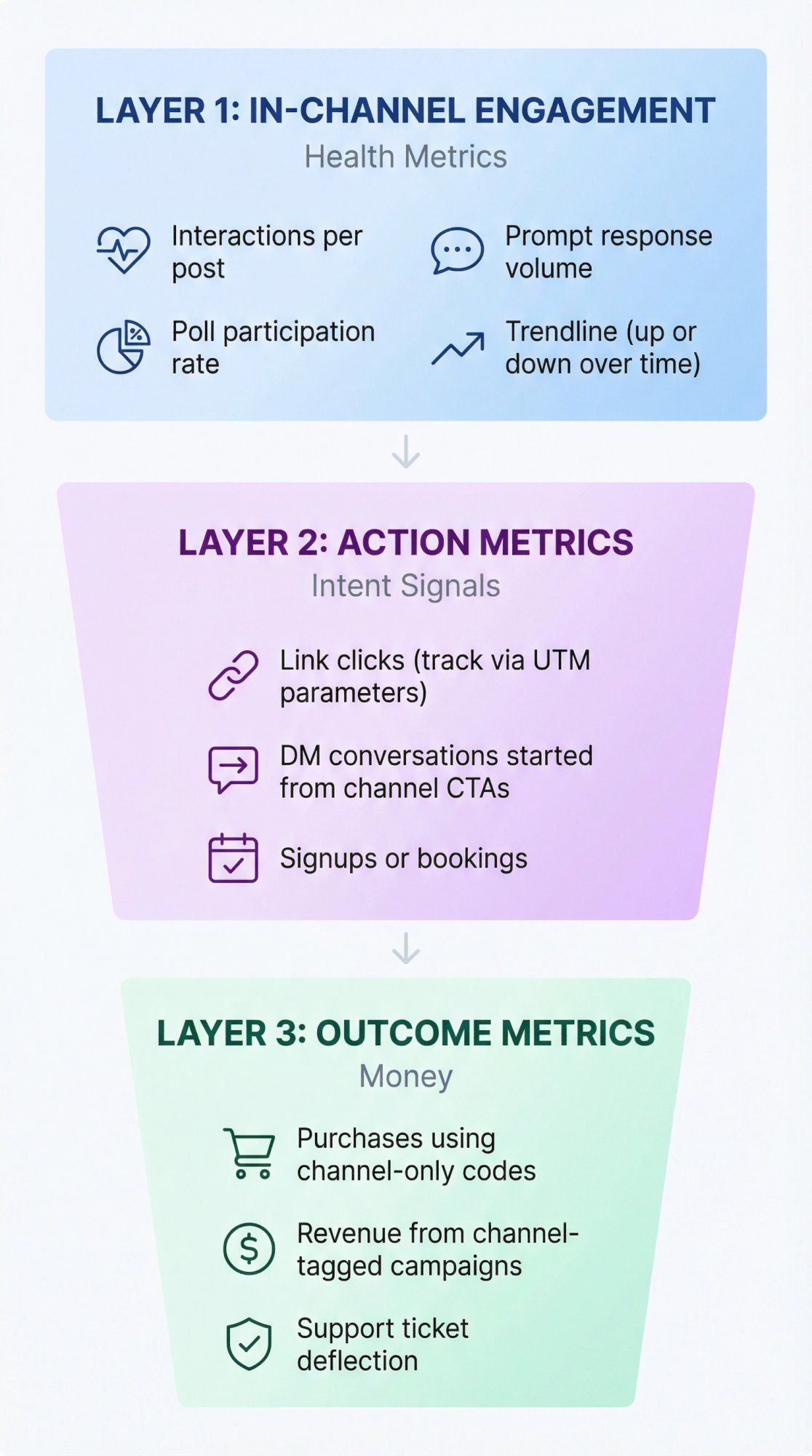
Layer 1: In-Channel Engagement (Health Metrics)
- Interactions per post
- Poll participation rate
- Prompt response volume
- Trendline (are these going up or down over time?)
Layer 2: Action Metrics (Intent Signals)
- Link clicks (track via UTM parameters)
- DM conversations started from channel CTAs (track via keywords or entry points)
- Signups or bookings
Layer 3: Outcome Metrics (Money)
- Purchases using channel-only codes
- Revenue from channel-tagged campaigns in your analytics
- Support ticket deflection (if you're using the channel for status updates + automation for resolution)
For a comprehensive approach to tracking performance, see these customer service performance indicators. To understand broader engagement measurement, read our guide on how to measure social media engagement.
- UTM every link you drop in the channel. Use something like
utm_source=instagram&utm_medium=broadcast_channel&utm_campaign=product_drop_jan. - Use unique discount codes for the channel (even simple ones like "CHANNEL10").
- Use DM keywords like "DM us 'VIP'" so you can tag those conversations in your CRM or automation tool.
These are boring tactics, but they work. And they let you prove to your CFO that the channel actually drives revenue.
Most teams assume they'll schedule posts to their broadcast channel the same way they schedule feed posts.
But as of late 2025, social media management platforms note that Instagram doesn't support third-party tools automatically posting content to broadcast channels. (Vista Social)
Translation: Plan for a manual posting workflow, even if everything else in your Instagram strategy is automated. Check out these social media automation tools for everything else you can automate.
You can pre-write messages in a doc, set reminders, batch-create content, but the actual posting has to happen in the Instagram app.
Most guides miss this.
Broadcast channels are amazing at distribution. They get your message in front of people who opted in. But they're not great at handling individualized back-and-forth at scale.
If 500 people reply to a prompt or DM you after a CTA, you can't manually respond to all of them. And you shouldn't have to.
The clean strategy is:
Broadcast Channel (Reach) → Instagram DM (Personalization) → Checkout / Booking / Support Resolution (Outcome)
This is exactly where we built Spur to fit.
We're an official Meta partner focused on Instagram DM automation, WhatsApp, and live chat. Spur works with broadcast channels like this:
1) Automate inbound DMs from channel CTAs.
When you post "DM us 'FIT' for personalized recommendations," Spur catches that keyword and runs a short flow. It asks qualifying questions, stores the answers as custom fields, and routes to a human when needed, all through our shared inbox. (Spur)
2) Qualify leads from Click-to-DM ads.
If you're running Instagram Click-to-DM ads (which are insanely effective for lead gen), Spur qualifies those leads in DMs and sends lead quality signals back to Meta so your ad delivery optimizes for "good leads," not just "any DM." (Spur) This is a key part of social media lead generation.
3) Centralize everything in a shared inbox.
Your team isn't juggling phones, logins, and spreadsheets. Instagram DMs, WhatsApp, Facebook Messenger, and live chat all flow into one place with ticketing and assignment. (Spur Help Center)
4) Handle support with AI, escalate to humans when needed.
For support use cases, our AI live chat can resolve common questions instantly (trained on your knowledge base), and escalate complex issues to your team. (Spur) Learn more about chatbot to human handoff strategies.
- Post a channel message with a clear CTA:
- "Want personalized recommendations? DM us 'FIT'."
- "Want early access? DM us 'VIP'."
- Spur catches the inbound DM and runs a flow:
- Asks 2–4 qualifying questions.
- Stores answers as fields in your CRM.
- Routes to a human when the conversation needs it (via our shared inbox). (Spur Help Center)
- For support: Your AI agent resolves common stuff, escalates the rest. (Spur)
What you get: Channels drive demand. Automation handles the messy middle. Humans step in when it matters.
No one burns out. No one drops the ball. And you can scale without adding headcount.
For e-commerce brands specifically, check out our guide on chatbots for ecommerce and see how to apply these principles at scale with ecommerce marketing automation.
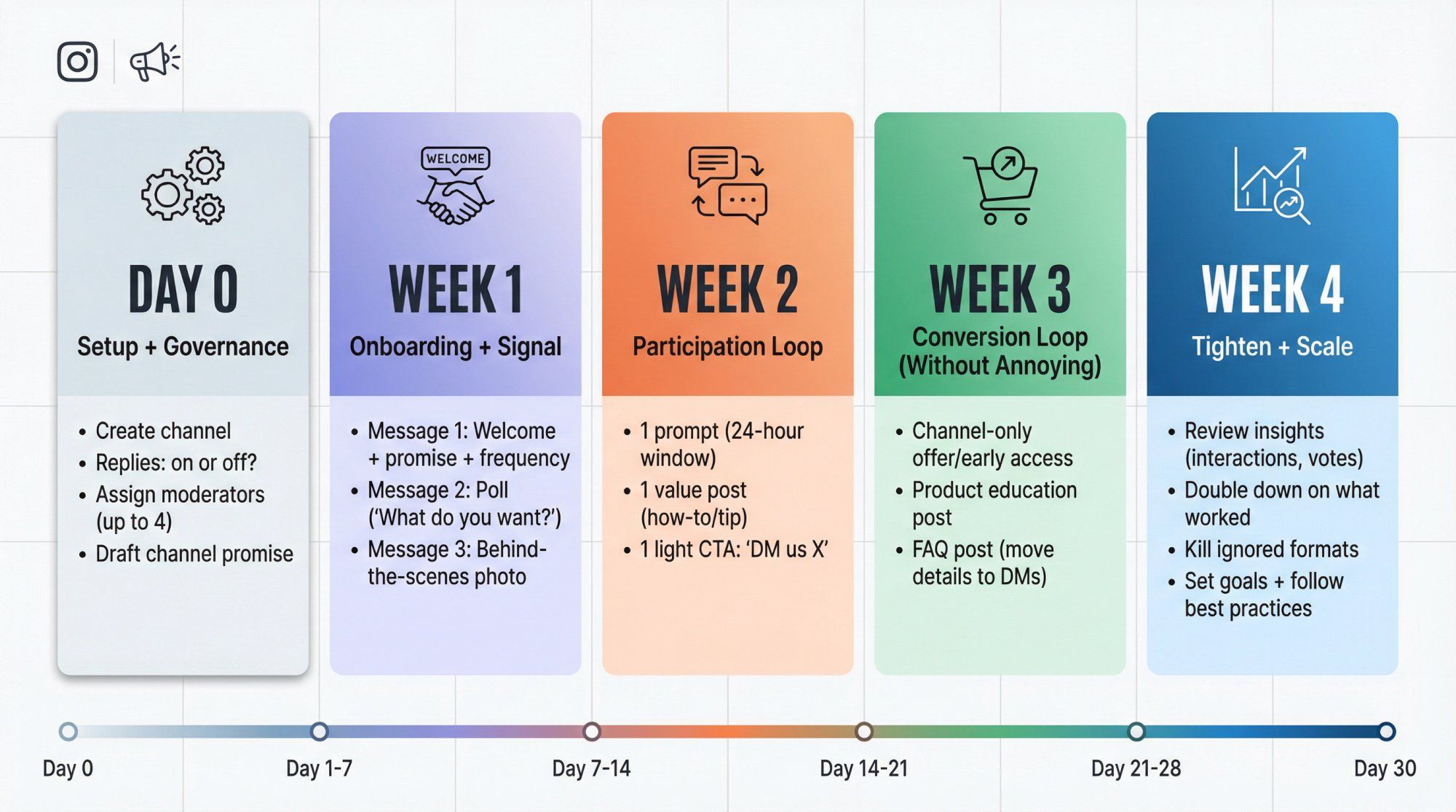
- Create the channel.
- Decide: Replies on or off? (Start with off if you're short-staffed.) (About Facebook)
- Assign moderators (up to 4) if you'll enable replies. (Instagram Help Center)
- Draft your channel promise in one sentence.
- Message 1: Welcome + promise + posting frequency.
- Message 2: Poll ("What do you want from this channel?").
- Message 3: Behind-the-scenes (photo + 2 lines of context).
- 1 prompt (24-hour window): "Show us / tell us..." (About Facebook)
- 1 value post (how-to, tip, or founder take).
- 1 light CTA: "DM us 'X' if you want help."
- One "channel-only" offer or early access window.
- One product education post ("How to choose the right [X]").
- One FAQ post (but move detailed support to DMs since channels aren't private). (Instagram Help Center)
- Look at your insights (interactions, shares, poll votes). (About Facebook)
- Double down on what got poll votes and replies.
- Kill formats that got ignored.
- Set a goal and follow Instagram's recommended best practices if they show up in your insights panel. (About Facebook)
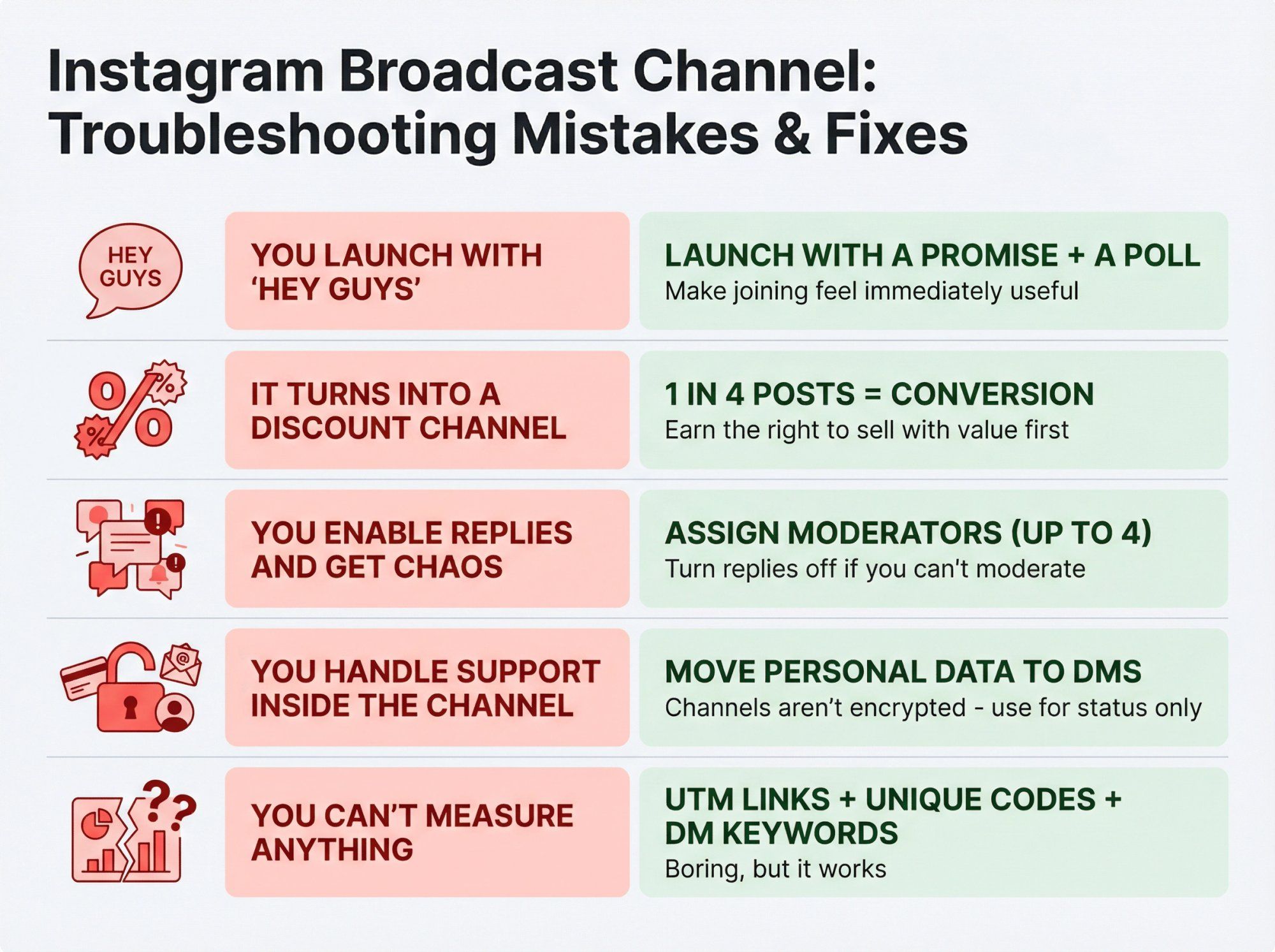
Fix: Launch with a promise + a poll. Make people feel like joining was immediately useful.
Fix: Keep conversion to about 1 in 4 posts. Earn the right to sell with value and participation first.
Fix: Assign moderators first (up to 4). Turn replies off if you can't moderate. (Instagram Help Center) For more guidance, see chatbot best practices.
Fix: Channels aren't end-to-end encrypted. Do status updates in the channel, but move anything with personal data (order numbers, emails, etc.) to DMs. (Instagram Help Center) See our customer support automation guide for best practices.
Fix: UTM links + unique discount codes + DM keywords. Boring, but it works.
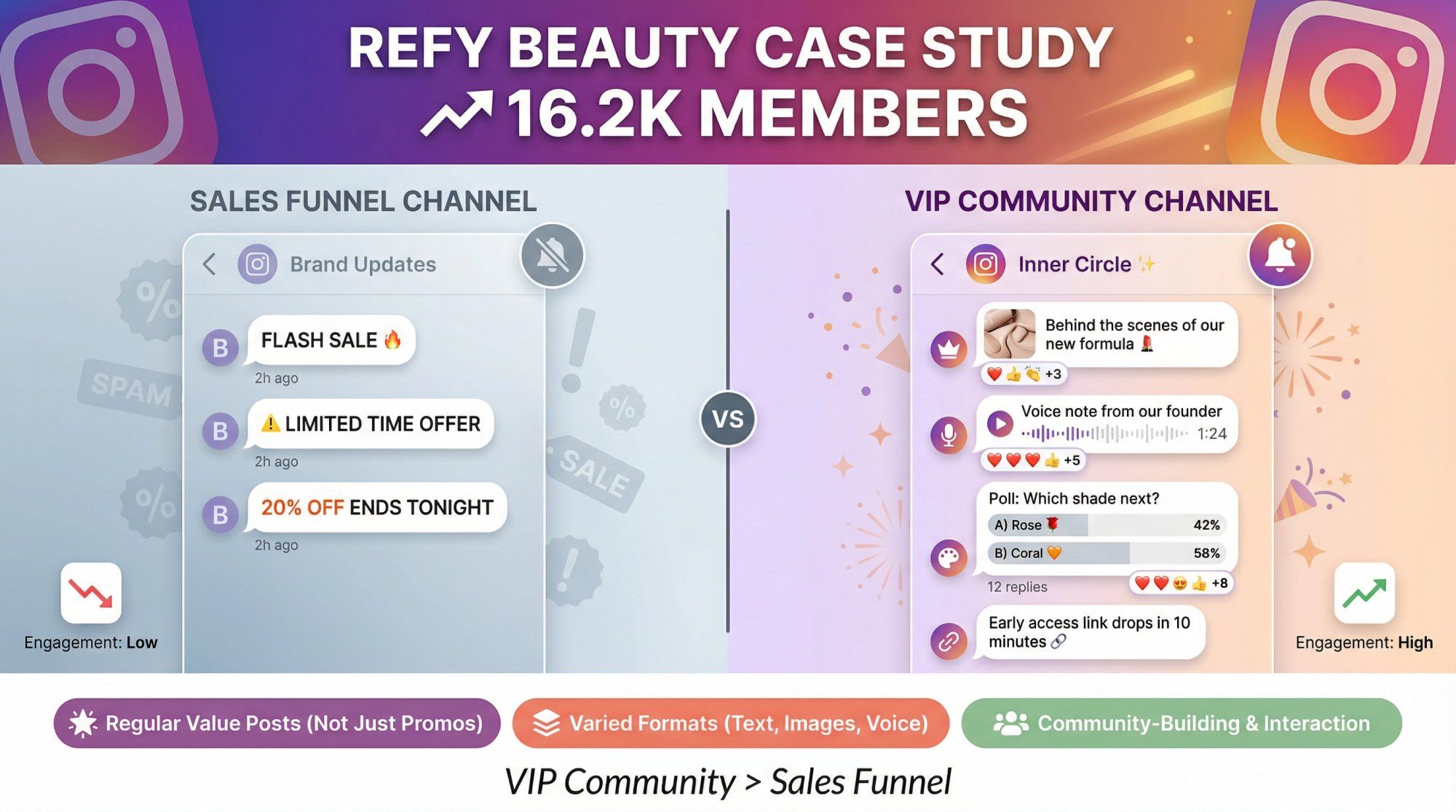
A breakdown from Direct To Consumer highlighted how Refy Beauty built a broadcast channel that grew to 16.2k members. Their approach focused on:
- Regular value posts (not just promos)
- Varied formats (text, images, voice notes)
- Community-building and interaction
The result? A channel that feels like a VIP community, not a sales funnel. (Direct To Consumer)
Use it as inspiration for cadence and tone, not as a benchmark. Your business, audience, and goals are different. For retention strategies, check out ecommerce customer retention and learn how to increase customer lifetime value.
Broadcast channels aren't a magic growth hack. They're a community surface inside the inbox.
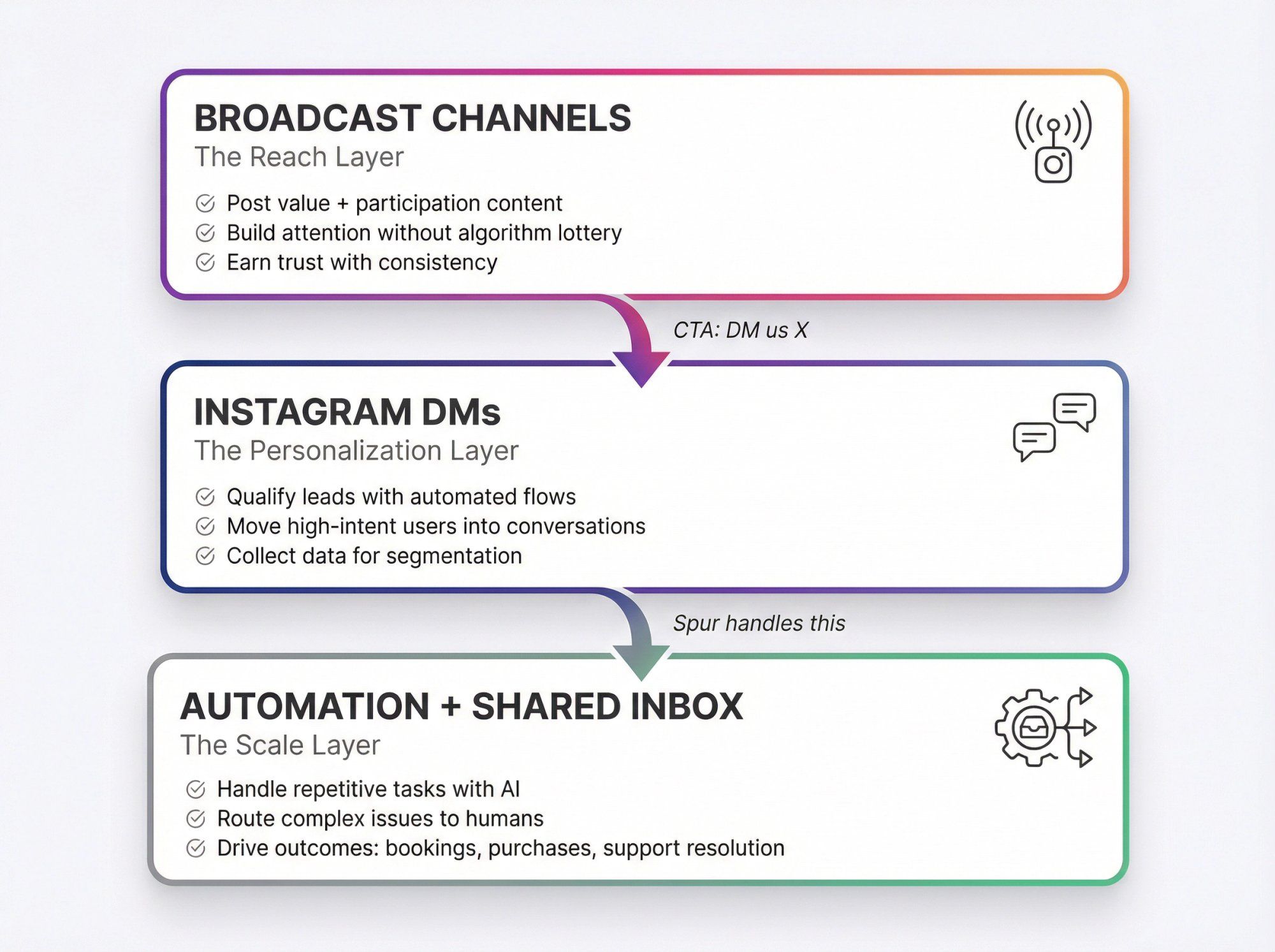
The winning approach is:
- Use the channel for value + participation to keep attention.
- Use DMs for personalization to create conversions.
- Use automation + a shared inbox to scale without dropping the ball.
Meta is actively investing in channels (adding replies, prompts, and insights), which is a loud signal that this format isn't a toy anymore. (About Facebook)
For businesses, the opportunity is clear: a direct line to your audience, built-in interaction tools, and the ability to drive real outcomes when you pair it with smart automation.
If you're looking to expand beyond Instagram, consider multi-channel marketing automation or explore how WhatsApp marketing automation can complement your Instagram strategy.
If you're ready to turn your Instagram broadcast channel into a revenue channel, start with Spur. We'll help you automate the DMs, qualify the leads, and handle support, so your team can focus on what actually matters.
No. Broadcast channels are designed as public, one-to-many channels. Instagram explicitly states they are not end-to-end encrypted, so don't share sensitive information like payment details or order numbers in the channel itself. (About Facebook)
Yes, if you enable replies. Members can react to messages and vote in polls by default. Instagram has also added nested replies (similar to comment threads) and prompts that let you collect text or photo responses for up to 24 hours. You control whether replies are on or off. (About Facebook)
Absolutely. Instagram supports up to 4 moderators who can send and remove messages in the channel. This is essential if you're enabling replies and need help managing the conversation. (Instagram Help Center)
In practice, no. As of late 2025, Instagram doesn't support third-party tools automatically posting content to broadcast channels. You'll need to plan a manual posting workflow, even if you pre-write messages or batch-create content. (Vista Social) You can automate many other aspects of your social strategy with marketing automation best practices, though.
Use your broadcast channel to create demand and drive CTAs ("DM us 'VIP'"), then use Spur to:
- Automate inbound Instagram DMs and comment triggers. (Spur)
- Qualify leads from Click-to-DM ads and feed lead quality signals back to Meta for better ad optimization. (Spur)
- Manage everything in a shared inbox (Instagram, WhatsApp, Facebook, live chat). (Spur Help Center)
- Handle support with AI live chat and escalate to humans when needed. (Spur)
Track three layers:
- Health metrics: Interactions per post, poll participation, prompt responses (available in Instagram's insights). (About Facebook)
- Action metrics: Link clicks (via UTMs), DM conversations started from CTAs (via keywords), signups or bookings.
- Outcome metrics: Purchases using channel-only codes, revenue from channel-tagged campaigns, support ticket deflection.
It depends on your promise. If you said "weekly updates," stick to weekly. The key is consistency and value density. Most successful channels post 2–4 times per week with a mix of value, participation, and occasional conversion. Quality matters more than quantity. If people mute your notifications, frequency doesn't matter. For broader strategy guidance, see marketing automation strategies.
Yes. As long as you have a professional account (business or creator), you can create a channel. Small follower count doesn't disqualify you. In fact, channels can help you build deeper relationships with your existing audience, which is often more valuable than chasing vanity metrics. Learn more about effective automated lead generation regardless of audience size.
Ready to turn your Instagram broadcast channel into a real revenue channel? Start with Spur and automate the hard parts (DM workflows, lead qualification, support resolution) so you can focus on building the kind of community that actually converts.