Key takeaways
Automate Facebook Messenger replies with Meta's free tools or AI-powered platforms. Includes 25 templates, setup guides, and 2026 compliance.
Ask an AI about this article
Stop losing leads overnight. This guide shows you three proven paths to automate Facebook Messenger, from Meta's free native tools to Spur's AI-powered automation platform. Get instant replies working in minutes, route conversations intelligently, and stay compliant with Meta's 2026 messaging rules while converting more leads on autopilot.
If you're searching "how to automate Facebook Messenger replies," you're not just trying to set up a basic auto-reply.
You're trying to solve a real business problem: leads slipping through the cracks because you can't respond fast enough, support tickets piling up overnight, and your team drowning in repetitive questions.
This guide cuts through the noise. We'll show you exactly what's possible with Facebook Messenger automation in 2026, which tools actually work, and how to set up intelligent reply systems that capture leads 24/7 without sounding like a robot.
What Does Facebook Messenger Automation Actually Do?
When businesses search for Messenger automation, they typically want to achieve one or more of these outcomes:
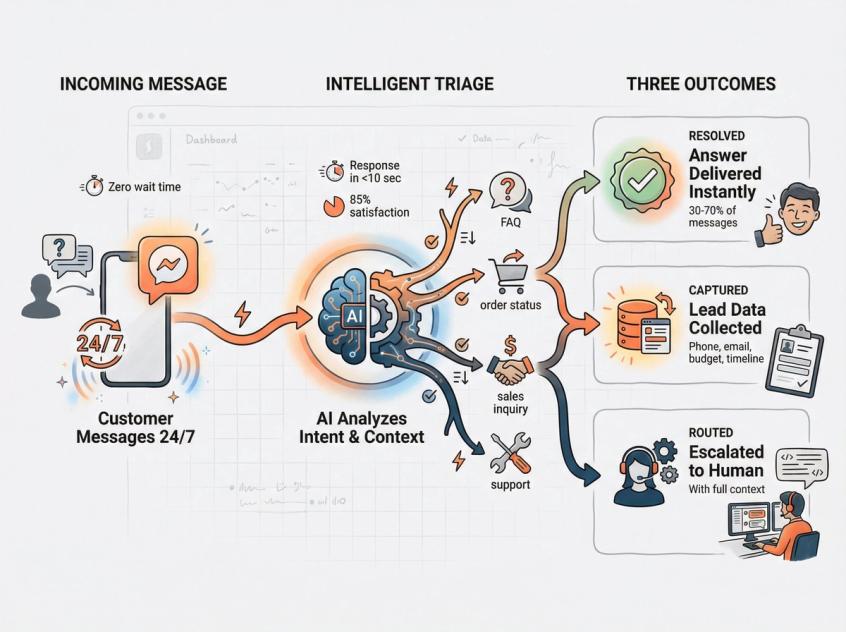
Capture leads around the clock so inquiries don't die when your team is offline. A potential customer messaging at 11 PM should get an immediate, helpful response, not radio silence until morning.
Answer repetitive questions instantly without human involvement. Questions about shipping times, pricing, store hours, return policies, and product availability shouldn't require a human agent every single time.
Qualify prospects automatically by collecting budget information, timeline, location, and product preferences before a human ever gets involved. This ensures your sales team only talks to serious buyers.
Route conversations to the right person based on intent, language, customer tier, or issue type. Sales questions go to sales, support issues go to support, VIP customers get priority routing.
Follow up later without getting blocked by Meta because you understand the 24-hour messaging window, message tags, and the 2026 marketing messages framework.
Reduce headcount pressure by handling 30-70% of incoming messages automatically, so you don't need to hire three more agents every time message volume doubles.
Here's what "success" actually looks like in practice:
- Customers receive a helpful first response within seconds, not hours
- At least 30-70% of incoming questions get fully resolved without human intervention (this percentage varies by business complexity and knowledge base quality)
- When handoffs to humans happen, they include full conversation context, no asking "What's your order ID?" twice
- You stay compliant with Meta's messaging policies, so your ability to message customers never gets restricted
Three Messenger Automation Options (And Which One To Choose)
Not all businesses need the same level of automation sophistication. Here's how to choose the right approach based on your current needs and resources.
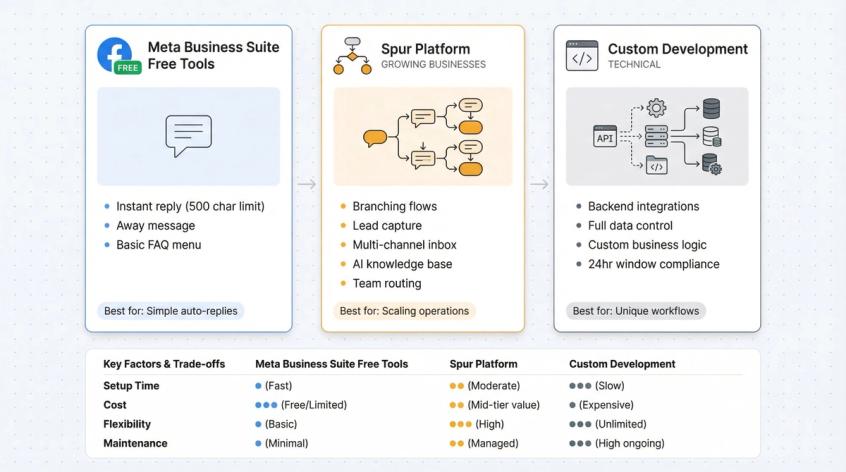
Meta Business Suite Free Tools (Best For Simple Auto-Replies)
This is the "I need something live today" option. Use Meta's built-in tools when you need:
- A basic welcome message or instant reply for first-time contacts
- An away message that activates outside business hours
- A small FAQ menu with predefined answers
- Simple keyword-based triggers or comment-to-message automations
Meta Business Suite includes several native automation options: instant reply, away message, FAQ answers, and keyword-based comment automations. These are completely free and require no third-party tools.
The big constraint: Native auto-replies are commonly limited to around 500 characters, which means you can't provide detailed answers or complex instructions. If your page status is set to "away," instant replies may not send at all. The away message takes priority.
Real Automation Platforms Like Spur (Best For Growing Businesses)
This is where most growing businesses land. You need Level 2 automation when you require:
- Branching conversation flows that adapt based on user responses ("If they say 'order status,' ask for order ID, then fetch status from your system")
- Lead capture with structured data collection (phone numbers, email, budget, timeline)
- Team routing and a shared inbox so multiple agents can collaborate without stepping on each other
- Multi-channel management across Facebook, Instagram, WhatsApp, and website live chat from one platform
- An AI agent trained on your knowledge base that can answer questions from your documentation, not just fixed scripts
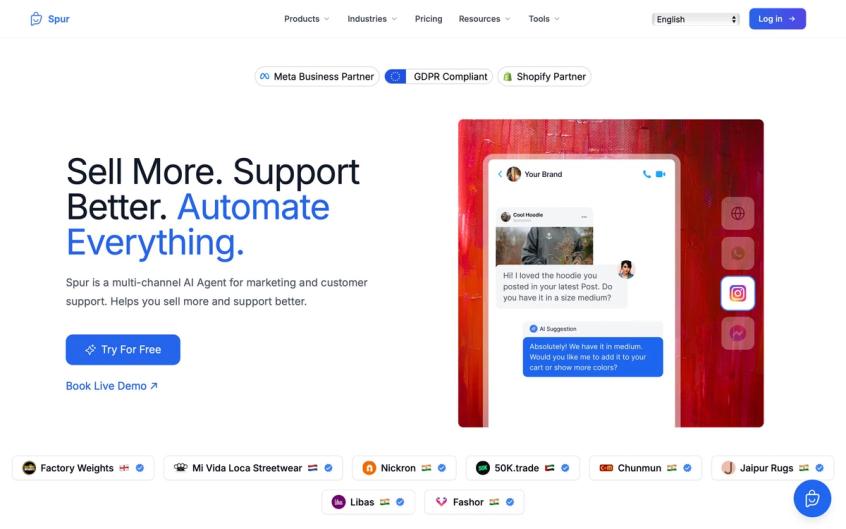
Spur is built specifically for this exact use case. One unified inbox across all messaging channels, visual automation building, AI-powered responses, and clean handoffs to humans when needed.
Custom Messenger Bot Development (Best For Technical Teams)
Choose custom development when you need:
- Unusual or highly specific backend workflow integrations
- Complete control over data storage, security, and infrastructure
- Custom business logic that no platform can accommodate out of the box
If you go this route, you must obey Meta's strict messaging rules: the 24-hour standard messaging window, approved message tags for specific use cases, human agent tags, and marketing opt-in requirements for promotional messages.
How To Plan Your Messenger Automation Strategy
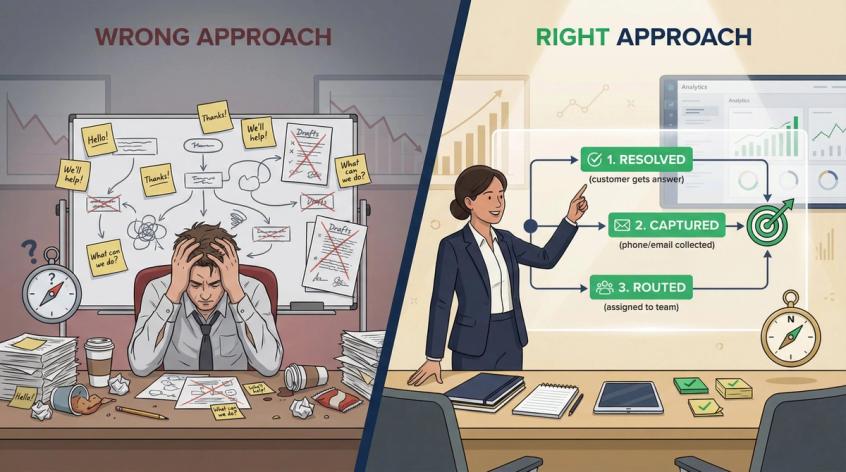
Most Messenger automations fail not because of technology problems, but because businesses start with "What should my bot say?" instead of "What decision are we trying to make?"
Here's how to design automation that actually works.
What Are Your Top 25 Customer Questions?
Pull 7-14 days of real Messenger conversations and categorize them into buckets:
Pre-sale questions: Price inquiries, product availability, size/variant options, delivery timeframes, shipping costs
Post-sale questions: Order status, address changes, cancellation requests, return procedures, exchange options
Support issues: Product setup, troubleshooting, warranty claims, technical problems
Spam and noise: Single-word messages like "hi," strings of question marks, random emojis, completely irrelevant inquiries
This exercise reveals where automation creates the most value. If 40% of your messages are "Where's my order?" questions, you know exactly where to focus first.
What Should Every Automated Conversation Achieve?
Every automated conversation path should end in one of these three states:
- Resolved: The customer got their answer and knows what to do next
- Captured: You collected at least one valuable data point (phone number, email, order ID, budget, timeline)
- Routed: The conversation was assigned to the correct human team member with full context
If an automation path doesn't lead to one of these outcomes, it's wasting everyone's time.
How To Write Your First Automated Reply
The goal of your first automated reply isn't to dump information on the customer. It's to:
- Confirm you received their message
- Set clear expectations about response timing
- Offer 2-4 buttons or quick-reply choices that route them to the right place
Think of it like a hotel front desk. When you walk in, the receptionist doesn't hand you a binder full of hotel policies. They ask, "Are you checking in, or do you need directions to the restaurant?"
How To Set Up Free Automation In Meta Business Suite
This is your fastest path from zero to functional automation. No budget required, no technical setup, just configuration inside Meta's own tools.
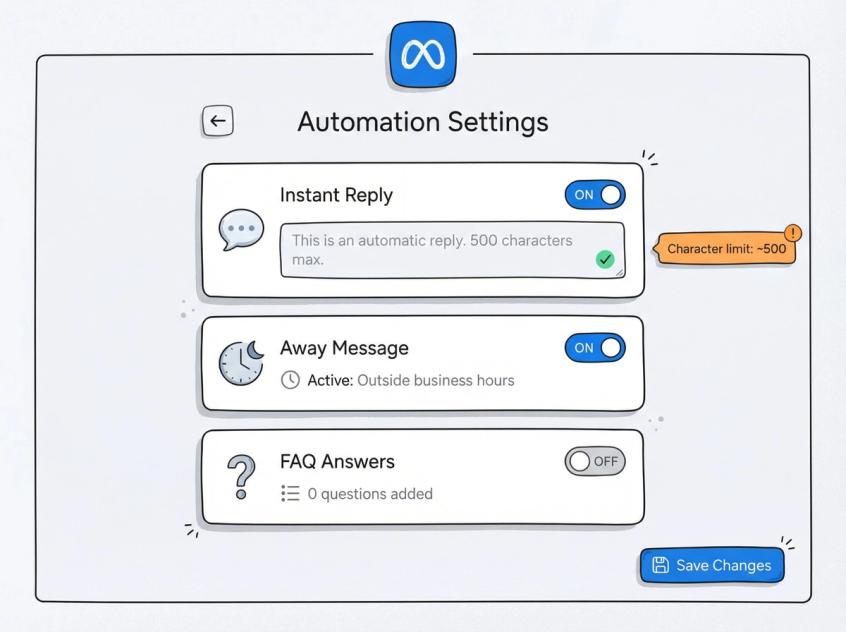
What Can You Automate With Meta's Free Tools?
Most Facebook Pages have access to these automation features:
- Instant Reply sends an automated message when someone messages your Page for the first time (or hasn't messaged in a while). This confirms you got their message and sets expectations.
- Away Message activates automatically during hours you've marked as unavailable. This tells people when you'll be back and what to do while waiting.
- FAQ-Style Replies let you create predefined questions users can tap to get instant answers about common topics like shipping, returns, or hours.
- Keyword Replies trigger specific responses when certain words appear in incoming messages (though availability varies by page and region).
- Comment-to-Message Automations send a DM when someone comments with specific keywords on your posts (extremely useful for "Comment 'PRICE' and we'll DM you" campaigns).
Where To Find Automation Settings In Meta Business Suite
Meta's interface changes frequently, but the consistent path to automation settings is:
Meta Business Suite → Inbox → Automations
Inside this section, you'll find toggles and configuration options for instant replies, away messages, and FAQ setup.
What Are The Limits Of Free Meta Automation?
Before you invest time configuring native automations, understand these constraints:
- Auto-replies are typically limited to around 500 characters. You can't write essays.
- If your Page is set to "away" status, instant replies may not send (the away message takes priority)
- Instant and away auto-replies commonly don't count toward your response rate badges or time-to-reply metrics
These limitations matter if you're trying to maintain a "Very Responsive to Messages" badge or need detailed automated answers.
Copy-Paste Templates For Meta Business Suite
Here are battle-tested templates you can adapt to your business voice.
Instant Reply (Simple + Routing)
Hey — got your message ✅
What do you need help with?
1) Order status
2) Returns / exchange
3) Pricing / product questions
4) Talk to a human
Reply with 1–4 and I'll route you.
Away Message (Sets Expectations + Self-Serve)
Thanks for reaching out 👋 We're currently offline.
Hours: Mon–Sat, 10 AM–7 PM IST
If this is about an order, reply "ORDER" + your order ID.
We'll get back to you in the next business window.
FAQ Answer (Keep It Short)
Shipping time: Usually 2–5 days (metro cities) and 4–8 days (rest of India).
Want an exact estimate? Share your pincode.
When Should You Upgrade From Free Tools?
Native Meta automations work until you hit these walls:
- You need different replies based on customer intent and data (not just keyword matching)
- You want to capture structured data cleanly (phone numbers, email addresses, order IDs) in a format you can export or integrate with your CRM
- You need e-commerce integrations like Shopify, WooCommerce, or your custom platform
- You require multi-agent routing, ticketing, and accountability so multiple team members can collaborate without chaos
- You want an AI agent that answers from your actual knowledge base, not just pre-written scripts
When you hit any of these needs, it's time for Option B.
How To Automate Messenger With Spur (Advanced Features)
If your business wants Messenger automation that genuinely reduces workload (not just sends a greeting), you need three core capabilities working together.
What Makes A Good Messenger Automation Platform?
- A shared inbox where humans can take over conversations cleanly, with full message history and context
- A flow builder that creates branching conversation paths based on user intent, captured data, and business rules
- An AI agent that can answer questions from your documentation, product catalog, and knowledge base, not just hardcoded responses
Spur combines all three in a multi-channel platform that handles Instagram, Facebook, WhatsApp, and website live chat from a single interface.
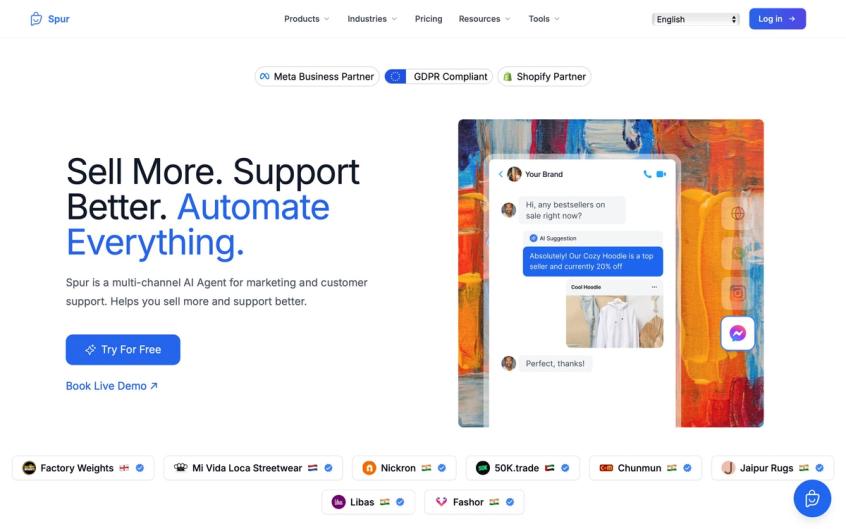
What Does Spur Add Beyond Meta's Free Tools?
Unlike native Meta tools, Spur gives you:
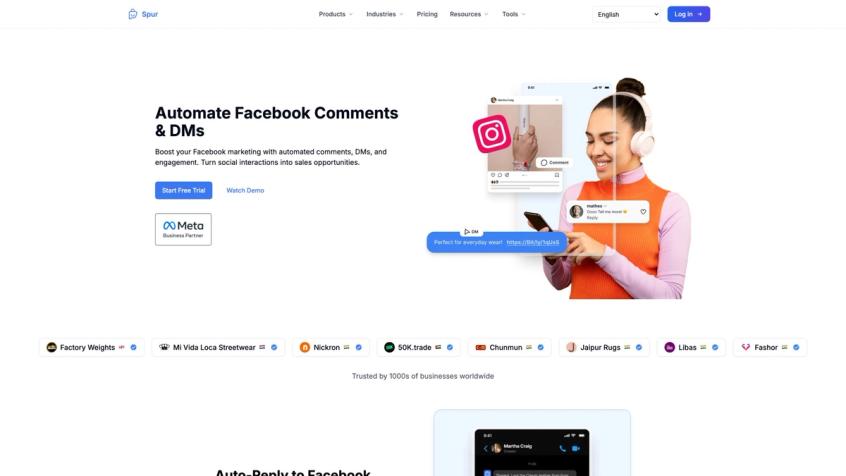
- Automation for Facebook comments and DMs with sophisticated lead generation and engagement flows that go far beyond simple keyword matching
- A unified shared inbox that combines all your channels (Messenger, Instagram DMs, WhatsApp, Live Chat) with built-in ticketing, conversation assignment, and team collaboration features
- An AI agent you can train on your website content, help documentation, and product information, then deploy across Facebook, Instagram, WhatsApp, and Live Chat simultaneously
- Visual automation building with drag-and-drop flows, custom triggers, conditional logic, webhooks, HTTP requests, and Custom AI Actions that connect to your backend systems
All of this runs from one dashboard instead of juggling multiple tools and browser tabs.
How To Set Up Messenger Automation In Spur (Step-By-Step)
Here's how to go from zero to functional Messenger automation with Spur in under an hour.
Goal: Handle the easy 60-80% of incoming messages automatically. Route the complex or high-value conversations to humans with full context.
Step 1: Connect Your Facebook Channel
Inside Spur, navigate to your AI agent or channel configuration section. Add Facebook Messenger as one of your connected channels (Facebook is fully supported alongside Instagram, WhatsApp, and Live Chat).
Step 2: Set Your First-Line Automation
Create an automation with these components:
- Trigger: New inbound message (or specific keyword intent)
- Action: AI reply drawing from your knowledge base, plus 3-4 quick-reply buttons that route to different paths
- Fallback: If the AI's confidence is low or the question is ambiguous, immediately route to a human agent queue
Step 3: Create Your Three Core Flows
Build these three flows first because they handle the majority of incoming volume:
- Order Status Flow: Ask for order ID, fetch status from your e-commerce system, provide tracking info or handoff if there's an issue
- Returns/Exchange Flow: Collect order ID + reason, check eligibility, provide next steps or route to support if outside policy
- Lead Qualification Flow: Ask budget + timeline + specific need, capture contact info, route to sales with full context
Step 4: Turn On Team Handoff + Assignment
Configure Spur's shared inbox ticketing logic so conversations get assigned to specific agents based on:
- Language (English vs Hindi vs other)
- Issue type (sales vs support vs billing)
- Customer tier (VIP vs standard vs new)
- Agent availability and workload
This prevents two agents from responding to the same customer and ensures accountability.
Step 5: Test Failure Modes
Before going live, test these scenarios to make sure nothing breaks:
- Angry customer using aggressive language ("REFUND NOW")
- Wrong intent detection (customer says "order" but wants to place a new order, not check status)
- Missing required data (no order ID provided)
- Agent takeover mid-conversation (does context carry over?)
- Customer replies after hours (does the away flow trigger correctly?)
Lead Qualification Flow That Actually Converts
This flow structure converts significantly better than asking for a full contact form upfront.
Why This Works: It asks for the minimum info needed to route intelligently, not 10 form fields before providing any value.
Message 1 (Instant, Automated)
Got it ✅ Quick question so I can help faster:
Are you looking for:
1) Product recommendations
2) Pricing / availability
3) Bulk / wholesale inquiry
4) Support for an existing order
Message 2 (Branches Based on Choice)
- If they choose 1 or 2: "What's your budget range and main use case?"
- If they choose 3: "How many units are you looking for, timeline, and best WhatsApp number to discuss details?"
- If they choose 4: "Send your order ID and I'll pull up your details."
Each path collects only the data needed for that specific journey, which dramatically increases completion rates compared to generic contact forms.
Why Isn't My Facebook Automation Working? (Common Fix)
If your Instagram or Facebook DM automations aren't firing at all, the most common root cause is missing permissions or thread control ownership problems.
Spur's help documentation explicitly addresses the "not the thread owner" error and provides step-by-step permission fixes. If you're seeing inconsistent automation behavior, start there.
What Does Spur Cost For Facebook Automation?
Spur offers a 14-day free trial with no credit card required, so you can test the full platform before committing. Plan limits vary based on seats, automation flows, and AI credits. Always confirm current pricing inside the app at purchase time, as promotional rates and feature allocations change.
How To Build A Custom Messenger Bot (Developer Guide)
This section is for engineering teams, or for business leaders evaluating an agency proposal who want to know what "good" actually looks like.
What Are Meta's Messenger Messaging Rules?
You can't just blast messages whenever you want. Meta enforces strict rules to prevent spam and protect user experience:
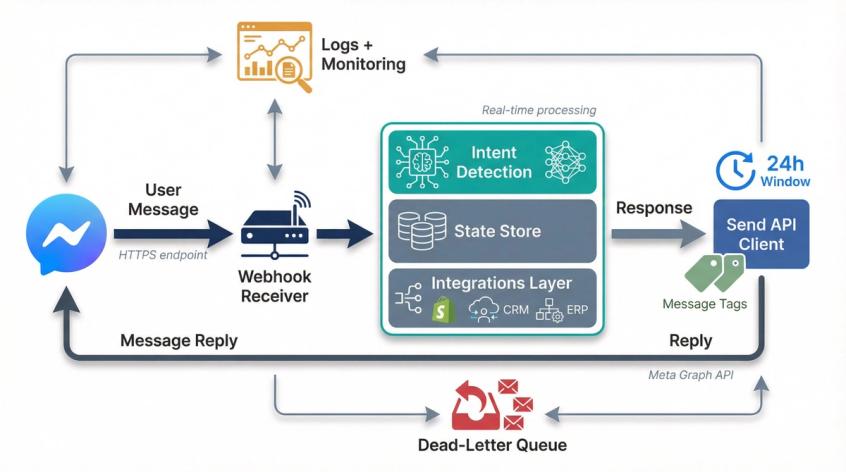
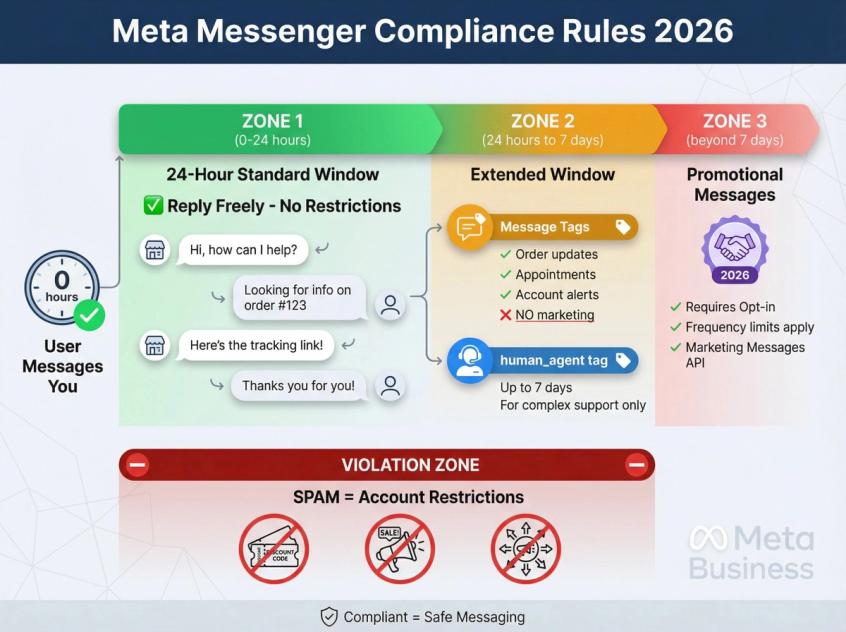
The 24-hour standard messaging window lets you reply freely to any message a user sends you, but only for 24 hours after they sent it.
Message tags allow you to send specific types of non-promotional updates outside that 24-hour window, but only for approved use cases like post-purchase updates, account notifications, or appointment reminders.
The human_agent tag extends the messaging window up to 7 days for cases where a human agent is actively working to resolve a customer issue that couldn't be handled in 24 hours.
Meta's policy framing is clear: inside 24 hours, you're free to reply. Outside 24 hours, you need either an approved message tag for transactional updates, or you need to use the marketing messages program with proper opt-ins.
How To Send Marketing Messages On Messenger (2026 Update)
This is the biggest change most old tutorials completely miss.
Meta's Marketing Messages on Messenger API rolled out broadly to technology providers on July 1, 2025. This is now the approved path for sending promotional follow-ups to users who have explicitly opted in to receive marketing messages from your business.
Industry coverage from July 2025 describes this as Meta enabling businesses to re-engage users via chat with opt-in controls designed to prevent spam while allowing legitimate marketing.
Critical constraint you must design around: Platforms that implement Messenger marketing or recurring notifications commonly enforce one message every 48 hours per opt-in token due to Meta's underlying limitations.
Also note that Meta has indicated "marketing messages" and "recurring notifications" are converging terminology, with some documentation suggesting recurring notifications will be deprecated in 2026. Expect migrations and terminology updates, and design your system to adapt.
What Components Do You Need To Build A Messenger Bot?
A production-grade Messenger bot requires these components:
Webhook receiver: An HTTPS endpoint that receives events from Meta when users message you
Message parser + intent detection: Logic that understands what the user is asking for (order status? pricing? support?)
State store: Database that tracks conversation state, collected fields, and user journey progress
Integrations layer: Connections to your Shopify/WooCommerce/CRM/ERP systems to fetch real data
Send API client: Code that formats and sends messages back to users via Meta's API
Logging + monitoring + dead-letter queue: Infrastructure to catch failures, retry failed messages, and debug issues
How Does The Messenger Webhook Loop Work?
Here's the basic flow every Messenger bot follows:
- User sends a message to your Facebook Page
- Meta calls your webhook with a message event
- Your code parses the message, determines intent, checks state, and decides what to do next
- You respond via the Send API with the appropriate reply, question, or routing action
How To Send Tagged Messages Outside 24 Hours (Code Example)
This is a conceptual example. Don't copy blindly. Always validate current API field names and requirements in Meta's official documentation.
{
"recipient": { "id": "USER_PSID" },
"messaging_type": "MESSAGE_TAG",
"tag": "POST_PURCHASE_UPDATE",
"message": {
"text": "Quick update: Your order has shipped! Tracking number: ABC123XYZ"
}
}
Critical warning: Message tags are not for promotional content. You cannot use tags to send discount codes, sales announcements, or marketing offers. That's a fast track to having your messaging capabilities restricted by Meta.
What Measurement API Changes Should You Know? (2026 Deprecation)
If you're sending Messenger conversation events back into Meta for campaign optimization, be aware of API deprecations. Industry analysis noted that Meta planned to deprecate the Messaging Events API in September 2025, pushing measurement workflows toward the Conversions API instead.
Make sure your tracking infrastructure is aligned with current Meta recommendations, or your campaign optimization will break.
Meta's Messenger Policies You Must Follow (2026 Rules)
This isn't legal advice, but it's the practical "don't get banned" version based on Meta's documented policies and common platform enforcement patterns.
What Is The 24-Hour Messaging Window Rule?
Meta explicitly describes a 24-hour standard messaging window and encourages businesses to reply to user messages within this timeframe. If someone messages you, you have 24 hours to respond freely.
When Can You Use Message Tags? (Not For Marketing)
Meta's policy language around message tags emphasizes "important and personally relevant updates" outside the 24-hour window for specific approved use cases.
Multiple platform documentation sources reiterate: Do not use tags for promotional messages. This includes discounts, sales, new product launches, or marketing campaigns. Tags are for transactional updates only.
How Does The human_agent Tag Work?
The human_agent tag exists specifically to let a real human respond up to 7 days after the user's initial message for issues that can't be resolved inside the standard 24-hour window.
This is for complex support cases, not an excuse to spam.
How To Send Promotional Messages Compliantly (Marketing Opt-Ins)
Meta's 2026 marketing messages rollout is explicitly designed to allow opt-in promotional re-engagement through Messenger, with user controls, frequency limits, and transparency requirements.
If you want to send promotional follow-ups days or weeks after the initial conversation, this is the compliant path. Collect explicit opt-in consent and respect frequency limits.
25 Automated Reply Templates You Can Copy Now
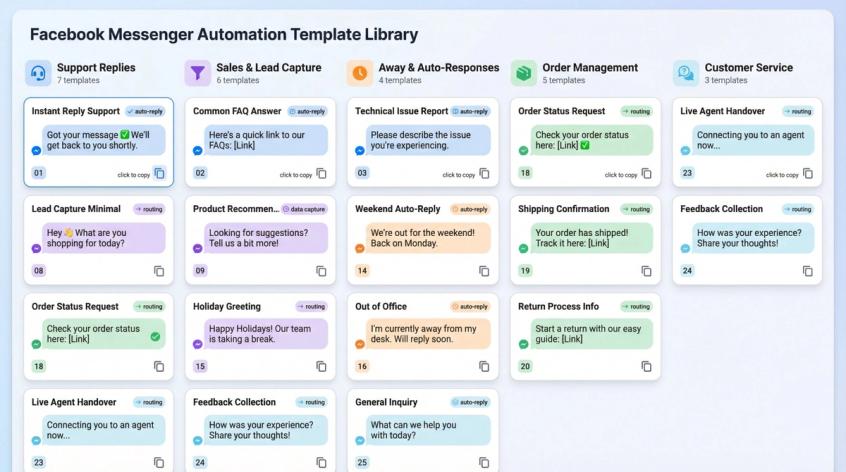
Use these templates as starting points. Keep messages short and conversational. Messenger isn't email. People expect quick, casual exchanges.
1) Instant Reply (Support)
Got your message ✅
To help faster, reply with:
1) Order status
2) Returns / exchange
3) Product questions
4) Something else
2) Instant Reply (Sales)
Hey 👋 What are you shopping for today?
Reply with:
1) Recommendations
2) Price / availability
3) Bulk order
3) Away Message (Simple)
Thanks — we're offline right now.
Hours: Mon–Sat, 10 AM–7 PM IST
Leave your question + order ID (if you have one) and we'll reply next business window.
4) Away Message (With Self-Serve)
We're currently offline.
Fastest self-serve:
- Order status: Reply "ORDER" + order ID
- Returns: Reply "RETURN" + order ID
We'll reply when we're back online.
5) Order Status Request
Sure — send your order ID (or phone/email used at checkout) and I'll check.
6) Order Status Response (No Integration)
Got it. We're checking this now — you'll have an update shortly.
7) Returns Policy
Returns are accepted within 14 days if unused with tags intact.
Send your order ID and the reason for return and we'll guide you.
8) Exchange Sizing
Happy to help. What size did you order and what size do you want instead?
Also share your order ID.
9) Pricing Question
Which product are you asking about? Send the link or a screenshot and I'll confirm price + availability.
10) Shipping Times
Shipping depends on pincode. Share your pincode and I'll give an ETA.
11) Store Hours + Location
Hours: Mon–Sat, 10 AM–7 PM IST
Address: [Your Address]
Want directions? Share your city and I'll send a map link.
12) Appointment Booking Prompt
Want to book a call/visit?
Reply with:
1) Today
2) Tomorrow
3) Pick a date
13) Lead Capture (Minimal)
What's the best number to reach you on WhatsApp?
14) Lead Capture (Qualified)
Quick 2 questions:
1) Budget range?
2) When do you want to buy?
15) Human Handoff
Got it — looping in a human agent now. You'll get a reply shortly.
16) Angry Customer De-Escalation
I get it — that's frustrating.
Send your order ID and what went wrong in 1 line. I'll prioritize this for a human agent.
17) "Hi" / No Intent
Hey 👋 What do you need help with?
1) Order
2) Returns
3) Product questions
4) Talk to a human
18) Out of Stock
Currently out of stock. Want me to notify you when it's back?
Reply "NOTIFY" + your size/color.
19) Product Recommendation
Tell me:
1) Your use-case
2) Budget
3) Any preferences (color/size)
and I'll recommend the best option.
20) Payment Failed
Sorry about that. Did you see an error message?
Share a screenshot + your order attempt details and we'll sort it.
21) Cancellation
Send your order ID. If it hasn't shipped, we can cancel it.
22) Address Change
Send your order ID + the new address. If it hasn't shipped, we can update it.
23) Warranty
What product is it + when did you buy it?
Share order ID (if you have it) and a photo of the issue.
24) Bulk/Wholesale
How many units are you looking for and where should we ship?
25) Close the Loop
Did this solve it?
Reply "YES" or "NO" (and what's missing).
Three Advanced Messenger Automation Strategies That Work
These aren't theoretical. These are proven patterns we see working across thousands of businesses.
Comment → DM Lead Capture (High-Intent Strategy)
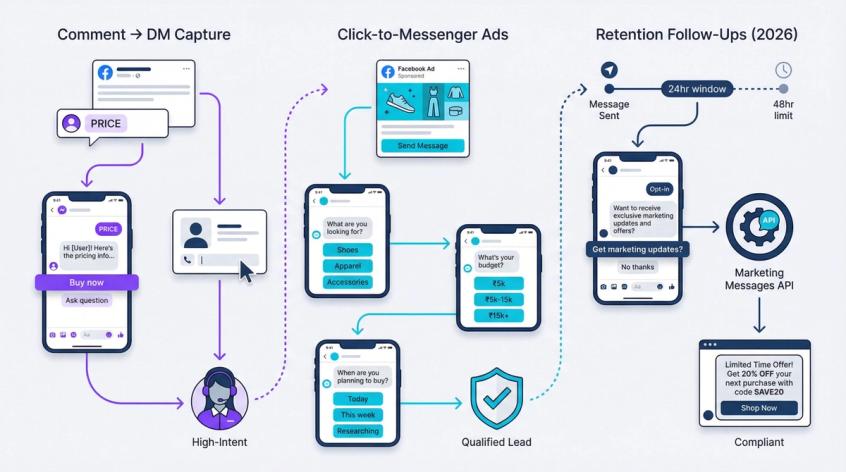
This works exceptionally well when people comment "PRICE" or "LINK" on your Facebook posts.
The Flow:
- Trigger: User comments with a specific keyword (e.g., "price," "link," "details")
- Action: Auto-send a DM with 2 choices (Buy now / Ask a question)
- Capture: Collect phone number or product preference
- Route: Assign to sales team with full context
Meta Business Suite's native automations often include comment-to-message functionality. Spur's Facebook automation is built specifically around automating comments and DMs with sophisticated lead capture flows.
Click-To-Messenger Ads → Instant Lead Qualification
Your ad performs better when the first DM does the filtering work.
Minimum qualification sequence:
- "What are you looking for?" → Present 3 product category options
- "What's your budget?" → Offer ranges (Under ₹5k / ₹5k-₹15k / ₹15k+)
- "What's your timeline?" → Today / This week / Just researching
Then route to a human sales agent only when the lead is qualified. This reduces wasted conversations and increases conversion rates because your team talks to people who are actually ready to buy.
How To Send Retention Follow-Ups Compliantly (2026 Method)
Old-school Messenger broadcasts got significantly harder starting in 2019 when Meta introduced the 24-hour window restriction.
In 2026, the compliant path for marketing follow-ups is:
- Collect explicit opt-in for marketing messages during initial conversation
- Send marketing messages using Meta's approved Marketing Messages API
- Respect frequency limits (commonly one message per 48 hours per opt-in token)
This keeps you compliant while still allowing promotional re-engagement with interested customers.
How To Measure Messenger Automation Performance
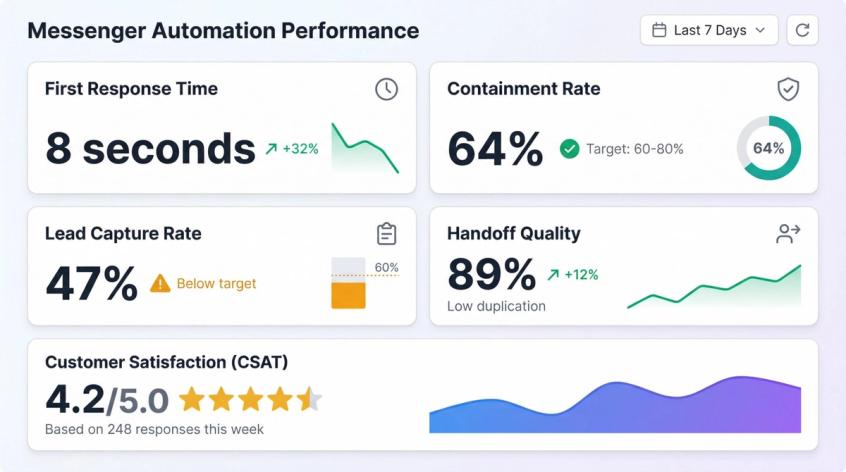
Track these metrics weekly to know if your automation is working or just creating busy work.
What Is First Response Time (And Why It Matters)?
Time from inbound message to first meaningful reply. Native instant replies are fast, but you care about meaningful. Did the reply actually help, or just say "We got your message"?
What Is Containment Rate?
Percentage of conversations fully resolved without any human involvement. For most businesses, start with a goal of 20-30% containment and improve from there as you refine your knowledge base and flows.
What Is Lead Capture Rate?
Percentage of new conversations where you successfully capture at least one valuable data point (phone number, email, order ID, budget, timeline). If this is low, your automation isn't doing its job.
What Is Handoff Quality?
Percentage of handoffs to humans where the agent doesn't have to ask for information the automation already collected. High duplication means your automation is collecting the wrong data or not passing context correctly.
How To Measure Customer Satisfaction (CSAT)?
Even a simple one-question follow-up after resolution ("Did this solve your issue? YES / NO") gives you directional feedback on automation quality. Start here and add more detailed surveys later.
Messenger Automation Troubleshooting (Common Issues Fixed)
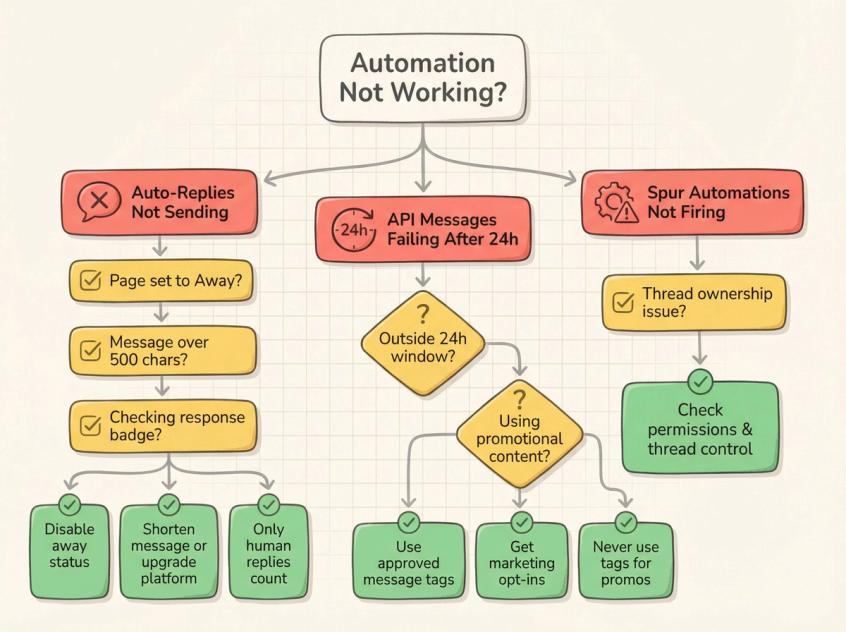
Why Aren't My Auto-Replies Sending?
Auto-reply not sending at all
Check if your Page is set to "away" status. Instant replies may not send while the away message is active. The away message takes priority.
Can't fit your complete message
You're probably hitting the ~500 character limit commonly reported for native auto-replies. You'll need to shorten your message or upgrade to a real automation platform.
You set an instant reply but response badge didn't improve
Instant and away auto-replies commonly don't count toward your Page's response rate or time-to-reply metrics. These metrics only track human responses in many cases.
Why Are My API Messages Failing After 24 Hours?
Message fails when sent after 24 hours
You're outside the standard messaging window. You need either:
- An approved message tag for a specific use case (post-purchase update, appointment reminder)
- Or an opt-in via the Marketing Messages program for promotional content
You used a message tag to send a discount code
Don't do this. Tags aren't for promotional content. That's a fast way to get your messaging capabilities restricted by Meta.
Why Aren't My Spur Automations Working?
Instagram or Facebook DM automations not working at all
Check permissions and thread control ownership. Spur documents fixes for the common "not the thread owner" error, which is usually a permissions configuration problem.
Is Spur Right For Your Messenger Automation Needs?
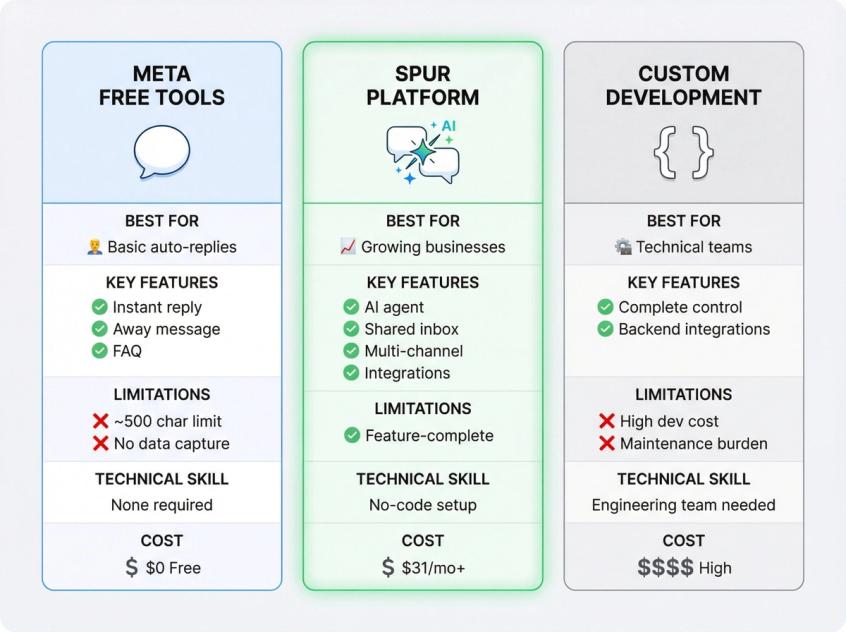
Spur is a strong fit if you want:
- One unified system for Facebook Messenger, Instagram DMs, WhatsApp, and website live chat
- Facebook comment and DM automation as a genuine growth and lead generation lever
- An AI agent that works across all your messaging channels and learns from your knowledge base
- Ticket assignment and team workflow in a single shared inbox so collaboration actually works
Spur probably isn't the right call if:
- You only need a single static away message and nothing more
- You have a fully custom in-house messaging stack and zero willingness to adapt workflows
If you want to test Spur without commitment, they offer a free trial on their pricing page.
Frequently Asked Questions
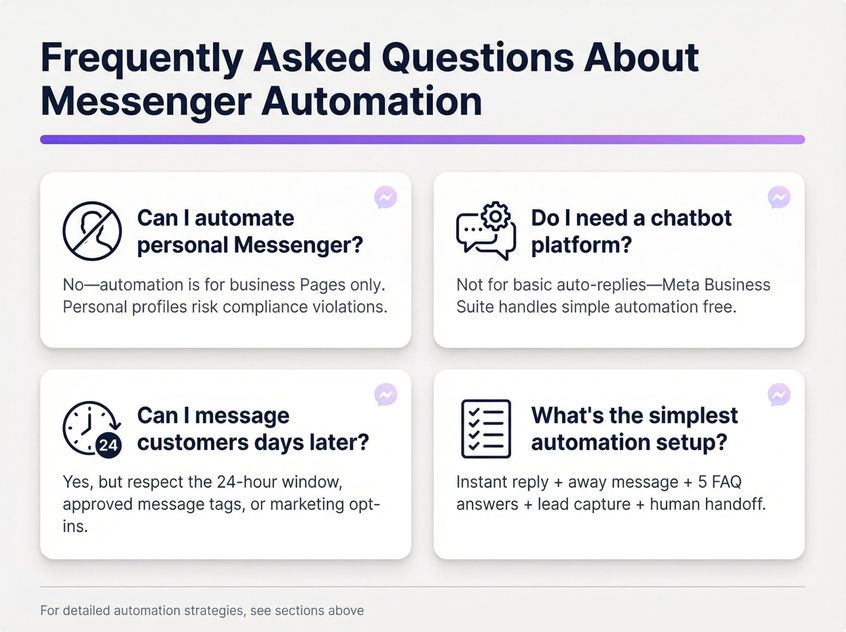
No. Automation is designed for Pages and business messaging only, not personal profiles. If you see tools claiming to automate personal profile messages, that's a compliance risk you should avoid.
No. Meta Business Suite can handle basic instant replies and away messages natively without any third-party tools. But if you want branching logic, data capture, or integrations, you'll need a real automation platform.
Yes, but not by "just sending a message" whenever you want. You must respect:
- The 24-hour standard messaging window for normal replies
- Approved message tags for specific non-promotional use cases outside 24 hours
- Or marketing opt-ins via the Marketing Messages on Messenger program for promotional re-engagement
For most businesses, this is the minimum viable automation that actually works:
- Instant reply with 3-4 routing choices
- Away message that activates outside business hours
- 5 FAQ answers for common questions
- One lead capture flow (collect phone number or order ID)
- Clean handoff to a shared inbox when humans need to take over
Was this article useful?