How To Track WhatsApp Messages For Business (2026)

Discuss with AI
Get instant insights and ask questions about this topic with AI assistants.
💡 Pro tip: All options include context about this blog post. Feel free to modify the prompt to ask more specific questions!
You can't improve what you don't measure. WhatsApp message tracking turns guesswork into data: see which campaigns convert, where customers drop off, and how fast your team responds. Start with basic delivery stats, level up to API analytics, or use platforms like Spur for complete tracking with actionable AI agents that don't just monitor conversations but actually close deals and solve tickets.
When you're running a business on WhatsApp, the difference between success and chaos often comes down to one thing: knowing what's actually happening with your messages.
Are customers reading your broadcasts? Is your support team drowning in repetitive questions? Which campaigns drive purchases and which ones get ignored? Without tracking, you're basically throwing messages into the void and hoping something sticks.
That's a problem because WhatsApp isn't just another messaging channel anymore. With 98% open rates (and 88% of messages read within 5 minutes), plus 175 million people messaging businesses daily, WhatsApp has become the primary way customers want to communicate. Over 50 million businesses use it now. Email's 20% open rate looks pathetic in comparison.
This guide breaks down exactly how to track WhatsApp messages at every level, from simple metrics to advanced analytics that connect messages directly to revenue. You'll learn what to measure, which tools actually work, and how to turn data into better results.
Let's be practical about what tracking actually gives you.
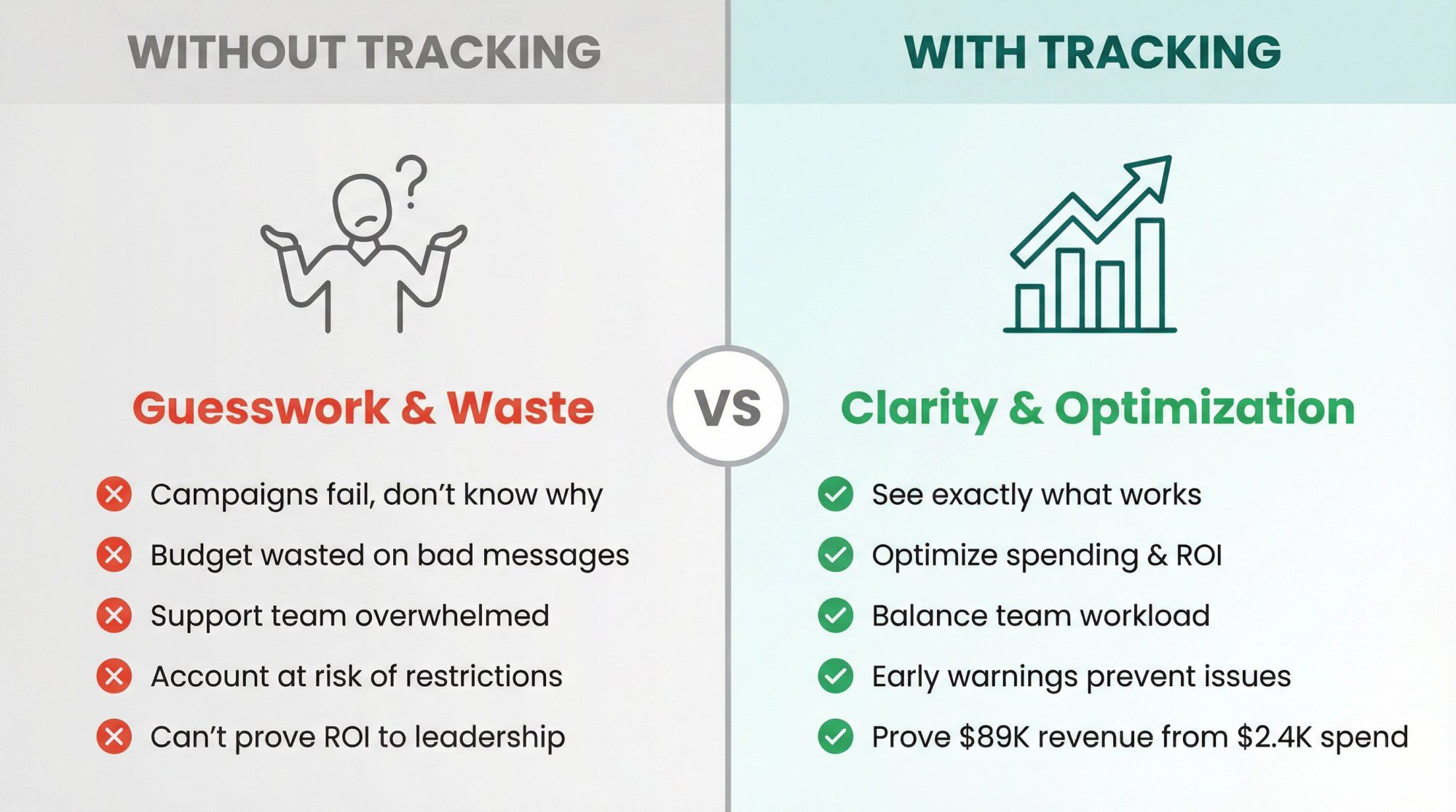
Measure real engagement. When you see 98% read rates, you know messages are getting through. But what happens next? Tracking shows you if people click links, reply, or ghost you. If a campaign has great delivery but zero responses, that's a content problem. If delivery is weak, you've got a technical or targeting issue. You can't fix what you can't see.
Stop wasting money on bad campaigns. WhatsApp Business API charges per conversation in most cases. If you're broadcasting to 10,000 people but only 200 engage, you just paid for 9,800 duds. Tracking shows you which templates, timing, and audiences actually work so you can stop burning budget on messages nobody wants.
Keep your support team sane. Without tracking first response time, resolution time, and ticket volume per agent, you don't know who's overloaded and who's coasting. You also can't spot patterns like "response time spikes every Thursday afternoon" or "Agent Sarah closes tickets 40% faster than everyone else." Those insights let you staff properly and replicate what works.
Critical insight: Meta monitors your account's quality signals. If too many people block you, ignore your templates, or report spam, WhatsApp can restrict your sending. Tracking template read rates and block rates gives you early warning so you can fix issues before they kill your account.
Prove ROI to the boss. "WhatsApp feels like it's working" doesn't cut it in budget reviews. "We spent $2,400 on WhatsApp last quarter and generated $89,000 in tracked revenue with a 37x ROI" gets you more budget. Tracking connects messages to outcomes so you can show real numbers.
In practical terms: if you're not tracking, you're guessing. If you're guessing, you're probably leaving money on the table.
Think of tracking WhatsApp messages like climbing a ladder. Each level gives you more visibility and control.
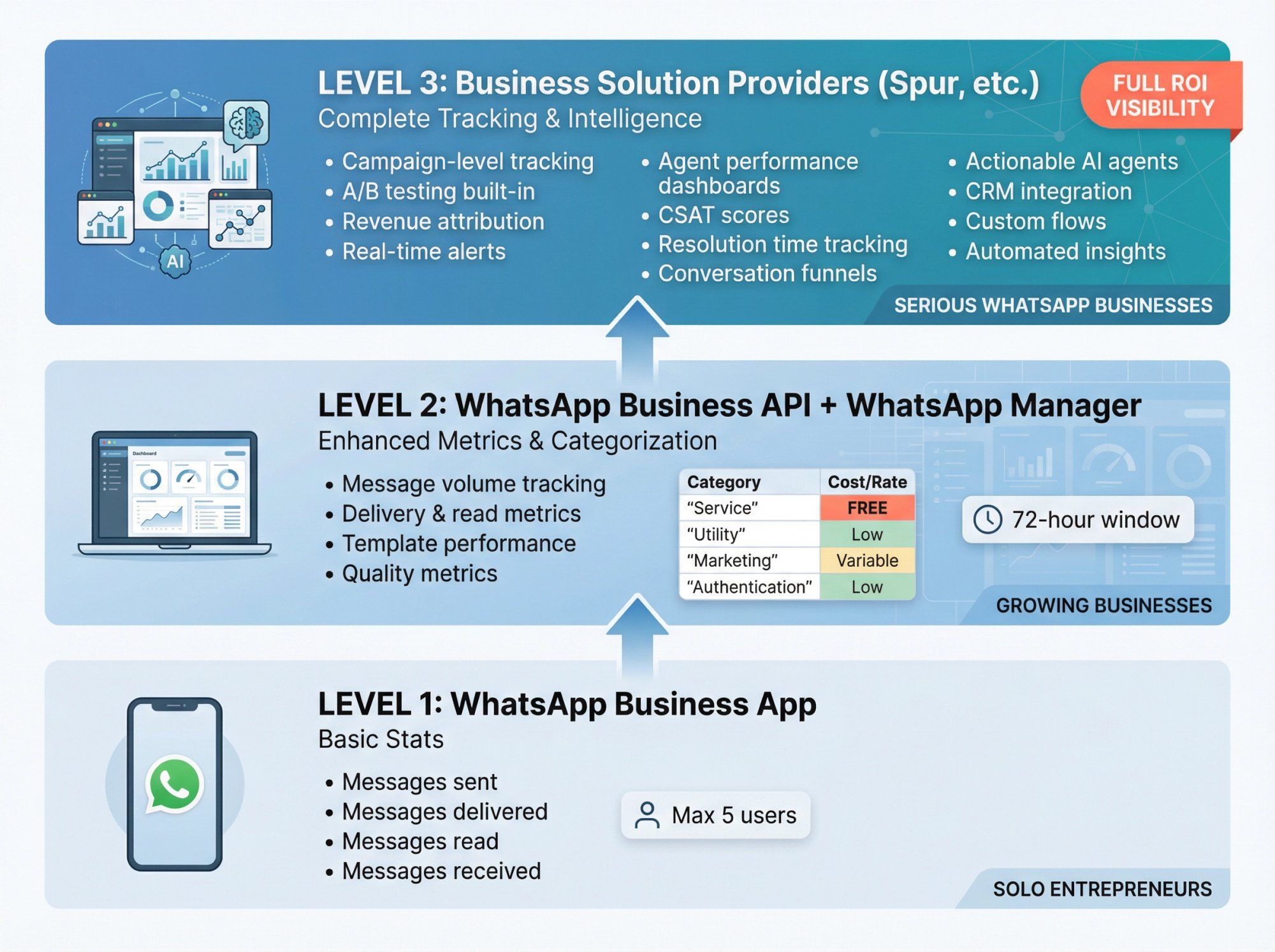
The free WhatsApp Business App has built-in statistics that show:
→ Messages sent
→ Messages delivered
→ Messages read
→ Messages received
You access this by opening the app, tapping the menu (⋮), going to Business Tools, then Statistics.
This works for small teams (the app caps at 5 users total). You can quickly check if messages are getting through and if customers are replying. It's better than nothing, but barely.
What you can't do: Track campaigns separately, see trends over time, measure agent performance, or connect messages to sales. The scope is very limited for anything beyond basic pulse checks.
Who this works for: Solo entrepreneurs or tiny teams who send fewer than 100 messages a week and don't need deep analytics.
When you upgrade to the WhatsApp Business API, Meta provides a dashboard called WhatsApp Manager inside Facebook Business Manager. This unlocks:
Message volume tracking: Total messages sent and received over any time period you select.
Delivery and read metrics: How many messages actually got delivered and opened out of everything you sent.
Conversation categorization: WhatsApp splits conversations into four types:
| Category | Description | Typical Cost |
|---|---|---|
| Service | Customer-initiated support chats | FREE |
| Utility | Order updates, shipping notifications | Low |
| Authentication | One-time passcodes | Low |
| Marketing | Promotional messages you initiate | Variable by region |
The dashboard shows conversation counts by type, free vs paid conversations, and total charges. This helps you predict your WhatsApp bill before it arrives.
Template performance: See read rates for individual message templates. Meta shows you what percentage of people opened each template within 72 hours. Low read rates signal that your content is boring or you're messaging the wrong people.
Quality metrics: WhatsApp tracks how often users block your number or report spam. If quality drops too far, Meta may suspend your sending.
What you still can't do natively: Connect messages to revenue, track agent performance, build custom funnels (like "clicked ad → replied → purchased"), or set up automated alerts when metrics go sideways.
Who this works for: Growing businesses that need better visibility than the basic app but don't mind manually connecting the dots between WhatsApp and business outcomes.
This is where things get serious. Platforms like Spur plug into the WhatsApp API and add layers of analytics, automation, and intelligence that WhatsApp Manager doesn't provide.
You get everything from Level 2, plus:
→ Campaign-level tracking: See performance for every broadcast, drip sequence, or automated flow separately. Compare Template A vs Template B head-to-head with A/B testing.
→ Agent performance dashboards: Track first response time, resolution time, tickets closed per agent, and CSAT scores. Find out who's crushing it and who needs coaching.
→ Revenue attribution: Connect WhatsApp messages to actual purchases. Did someone buy within 24 hours of getting a cart recovery message? That revenue gets attributed to WhatsApp, so you can calculate real ROI.
→ Conversation flows and funnels: Build visual flows showing how customers move from first contact to conversion. See exactly where people drop off.
→ Real-time alerts: Get notified instantly when delivery rates tank, response times spike, or a campaign performs unusually well (or poorly).
→ Integration with CRM and ecommerce: Log every WhatsApp conversation in your CRM automatically. Track the complete history of every interaction in one place so sales reps can see full context.
→ Actionable AI agents: This is where Spur specifically pulls ahead. Instead of just tracking conversations, you can deploy AI agents trained on your knowledge base to actually handle common queries, track orders, book appointments, and update records. The AI doesn't just chat, it takes action. Unlike simpler chatbots (which can't train AI on your data) or technical platforms (which require coding skills), Spur combines smart automation with user-friendly setup.
Who this works for: Any business serious about WhatsApp. Whether you're running marketing campaigns, customer support, or sales conversations, a dedicated platform turns WhatsApp into a trackable, optimizable revenue channel instead of a black box.
Tracking everything is overwhelming. Focus on metrics that drive decisions.
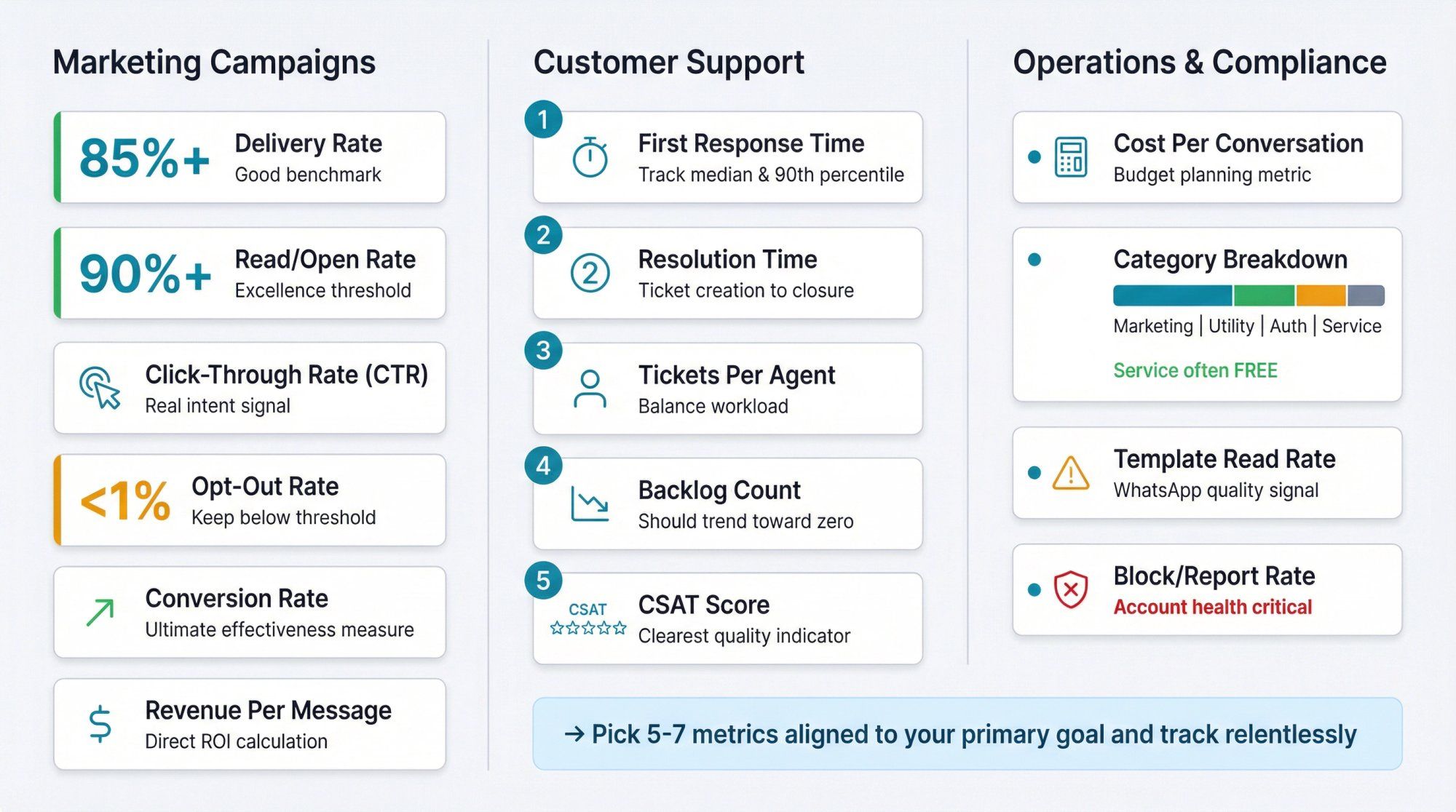
→ Delivery rate: Percentage of sent messages that reached customers. Good is 85%+. If it's lower, you've got bad phone numbers, blocked users, or technical issues. Learn how to increase WhatsApp broadcast delivery.
→ Read/open rate: Percentage of delivered messages that got opened. Excellence is 90%+. Lower rates mean your content isn't compelling or you're messaging at the wrong time.
→ Click-through rate (CTR): When you include links, what percentage of people click? This shows real intent, not just passive reading.
→ Opt-out rate: How many people block you or ask to stop receiving messages? Keep this under 1%. If it spikes, your content is annoying people.
→ Conversion rate: Percentage of message recipients who complete the desired action (purchase, signup, booking). This is the ultimate measure of campaign effectiveness.
→ Revenue per message: Total revenue generated divided by messages sent. Helps you calculate ROI directly.
① First response time: How long until a customer gets their first reply? Faster is always better. Track median and 90th percentile to spot outliers.
② Resolution time: Average time from ticket creation to closure. Shows overall efficiency.
③ Tickets per agent: Volume each agent handles. Helps balance workload.
④ Backlog count: Unanswered conversations waiting for replies. Should trend toward zero.
⑤ CSAT score: Customer satisfaction ratings after conversations close. The clearest indicator of support quality. Learn more about customer service performance indicators.
• Cost per conversation: What you're actually paying per customer interaction. Helps budget planning. Use our WhatsApp pricing calculator to estimate costs.
• Conversation category breakdown: How much are you spending on marketing vs service vs utility? Service conversations are often free, so shifting more volume there can save money.
• Template read rate: WhatsApp-specific quality metric. If it drops below WhatsApp's threshold, your account faces restrictions.
• Block/report rate: How often users block your number or flag you as spam. Critical for maintaining account health.
Pick 5-7 metrics that align with your primary goal (sales, support, engagement, etc.) and track those relentlessly. You can always add more later.
Let's get tactical. Here's how to set up tracking at each level.
Step 1: Open WhatsApp Business on your phone.
Step 2: Tap the three dots (⋮) in the top right corner.
Step 3: Select "Business Tools," then "Statistics."
Step 4: Review your numbers weekly. Check if messages sent roughly equals messages delivered (good sign) and if messages received is a decent percentage of sent (shows engagement).
Step 5: Accept that you'll need to move up a level if you want more insight.
Step 1: Log into Facebook Business Manager.
Step 2: Navigate to WhatsApp Manager in the left sidebar.
Step 3: Click "Insights" or "Analytics" (exact name varies).
Step 4: Set your date range and review:
• Message volume
• Conversation counts by category
• Template read rates
• Quality rating
Step 5: Export data if you need to analyze it elsewhere or create custom reports.
Step 6: Check this dashboard weekly at minimum. Set calendar reminders.
① Connect your account: Link your WhatsApp Business API account to Spur.
② Navigate to analytics: Open the analytics dashboard inside Spur.
③ Set up specific tracking:
• Campaign tags for broadcasts
• Agent assignments for support tickets
• UTM parameters for links in messages
• Conversion tracking events (purchase, signup, etc.)
④ Configure integrations: Connect your CRM and ecommerce platform so WhatsApp data flows into your existing systems.
⑤ Create custom dashboards: Build views for different teams (marketing vs support vs leadership) with your priority metrics. Most platforms let you customize what each team sees.
⑥ Set up automated reports: Configure email summaries that arrive daily or weekly.
⑦ Configure alerts: Set thresholds for critical metrics (delivery rate below 80%, response time over 10 minutes, etc.).
The key difference at this level is that tracking becomes automated and integrated instead of manual and isolated.
Basic metrics are fine, but the real value comes from attribution. Can you prove that WhatsApp messages lead to sales?
When you send WhatsApp messages with links, add UTM parameters so Google Analytics (or your analytics tool) can track traffic sources:
https://yoursite.com/sale?utm_source=whatsapp&utm_medium=message&utm_campaign=spring_sale
Now you can see exactly how much traffic and revenue came from WhatsApp vs other channels.
When someone starts a WhatsApp conversation, tag them with how they got there:
• Website live chat widget
• QR code
• Phone number in bio
• Referral
Later, you can analyze which entry points produce the best customers.
Meta recommends creating an attribution table that connects:
| Component | What To Track |
|---|---|
| Message IDs | Unique identifier for each sent message |
| Phone numbers | Customer contact information |
| Read timestamps | When messages were opened |
| Conversion events | Actions taken (purchase, signup, etc.) |
| Revenue values | Dollar amounts attributed to each conversion |
This lets you answer questions like "What's the average time from WhatsApp message to purchase?" or "Which template has the highest conversion rate 48 hours post-send?"
If you're running Click-to-WhatsApp ads, you can send conversion events back to Meta's system so your ad campaigns optimize for real outcomes (purchases, leads) instead of just clicks. Spur includes this functionality built-in with its Meta Conversions API integration.
This closes the loop: Meta sends you customers via ads, WhatsApp converts them, you report conversions back, and Meta sends you better customers next time.
Most customers don't convert from a single WhatsApp message. They might:
① See an Instagram ad
② Click to WhatsApp
③ Get an automated welcome message
④ Ask a question
⑤ Get a follow-up broadcast three days later
⑥ Click the link and purchase
Sophisticated tracking shows the full journey and attributes value across touchpoints. Platforms with CRM integration make this much easier than trying to piece it together manually.
If you're using WhatsApp for customer service, agent metrics matter as much as campaign metrics.
First response time tells you how quickly customers get initial replies. Track this by agent to identify who's fast and who's slow. Also track by time of day to find coverage gaps.
Resolution time shows how long it takes to fully solve issues. Low resolution time with high CSAT means efficient agents. High resolution time might mean complex issues or inefficient processes.
Ticket volume per agent reveals workload distribution. If one agent handles 200 tickets a week while another does 50, something's off. Either workload balancing or productivity.
Conversation outcome tracking lets you categorize how chats end: resolved, escalated, abandoned, converted to sale, etc. This shows whether WhatsApp support is just answering questions or actively driving business outcomes.
Customer satisfaction (CSAT) gives you the truth. Ask customers to rate the conversation after it closes. Track CSAT by agent and by issue type to see what's working.
Most importantly, share these metrics with your team. When agents can see their own performance, they naturally improve. Gamification (leaderboards, goals, rewards) amplifies this effect.
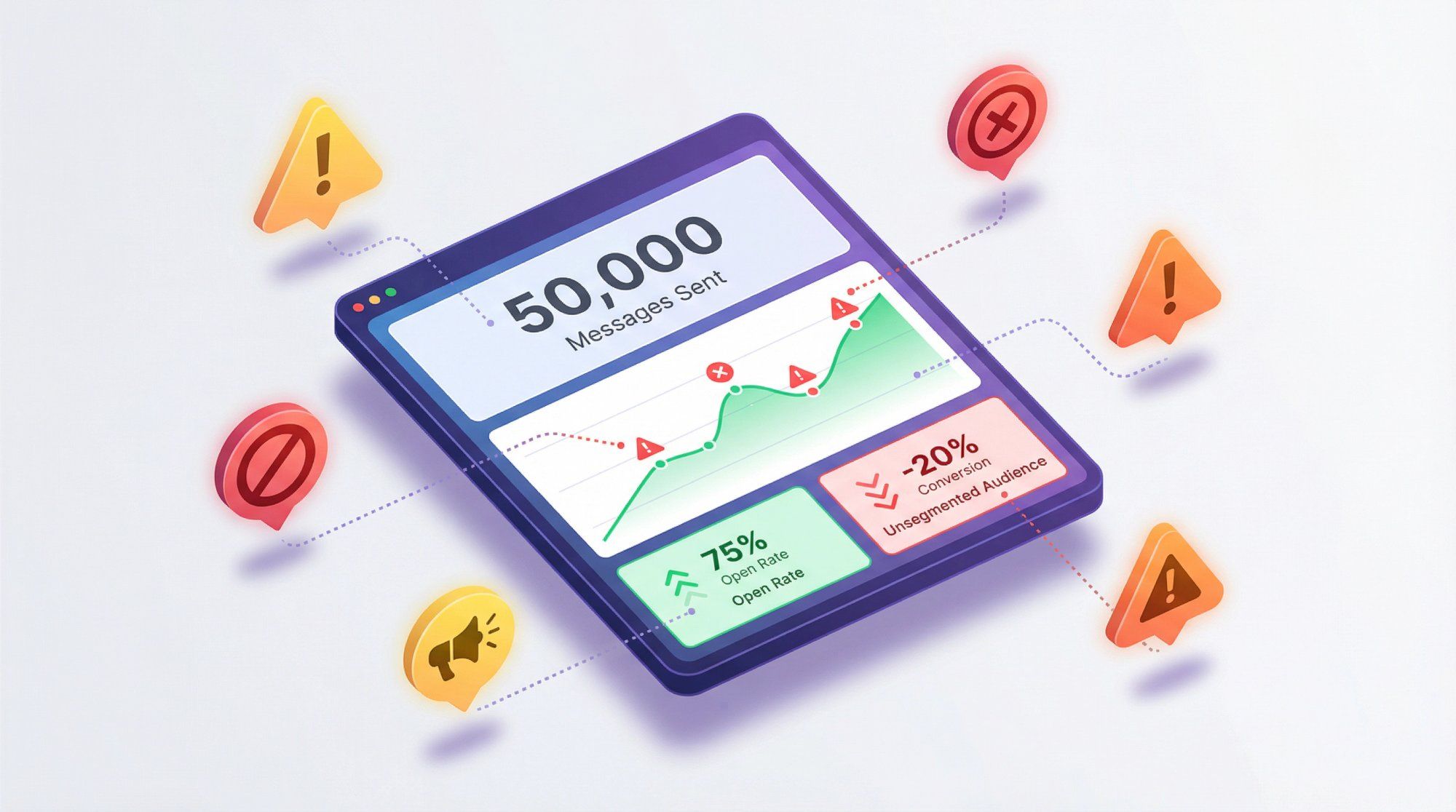
Mistake 1: Tracking vanity metrics instead of outcomes.
Lots of businesses obsess over total messages sent but ignore conversion rates. "We sent 50,000 WhatsApp messages last month!" sounds impressive until you realize only 12 people bought anything.
Fix: Always connect metrics to business outcomes. Track revenue per message, cost per lead, or support cost saved via automation, not just volume.
Mistake 2: Not segmenting data.
Looking at aggregate numbers hides problems. Your overall delivery rate might be 90%, but Template A has 98% delivery while Template B sits at 65%. You'd never know without segmentation.
Key insight: Break down every metric by campaign, template, customer segment, time period, and agent. Patterns emerge.
Mistake 3: Ignoring read receipts being disabled.
Some users turn off read receipts, so you'll never see when they open messages. This is a known limitation. If you rely solely on read rates, your data is incomplete.
Fix: Use click-through rates and reply rates as engagement proxies. Those don't depend on read receipts.
Mistake 4: Setting up tracking after launching campaigns.
If you decide to measure ROI after you've already sent 10,000 messages, you've lost that data forever.
Fix: Plan tracking before the first message goes out. Set up UTM parameters, conversion events, and attribution models from day one.
Mistake 5: Tracking too many things and getting overwhelmed.
Some businesses try to track 40 different metrics and end up tracking nothing effectively.
Solution: Start with 5-7 core metrics aligned to your primary goal. Add more only when you've mastered the basics and genuinely need deeper insight.
Mistake 6: Not acting on the data.
Tracking is pointless if you never change anything based on what you learn.
Fix: Build a weekly review habit. Look at your metrics, identify one thing to test or improve, and actually do it. Rinse and repeat.
If you're researching tracking solutions, here's how Spur specifically helps without the sales pitch.
→ Unified analytics across channels: Track WhatsApp, Instagram DMs, Facebook Messenger, and website live chat from one dashboard. See which channels drive the most valuable conversations.
→ Pre-built templates and automations: Instead of building tracking from scratch, you get ready-made workflows for common scenarios: abandoned cart recovery, order status updates, lead qualification, appointment booking. All pre-instrumented with tracking.
→ Actionable AI agents trained on your knowledge base: Unlike basic chatbots, Spur's AI agents can pull real-time order information, update customer records, and complete transactions. This means fewer human touches required and better tracking of automation performance.
→ Cost prediction: Spur's analytics break down message volume by type (utility, marketing, etc.) and estimate costs before your bill arrives. Use our WhatsApp pricing calculator to estimate what you'll pay. Helpful when WhatsApp charges per conversation.
→ Click-to-WhatsApp ad analytics: Track not just ad spend and clicks, but actual conversation quality: how many replied, how many conversations lasted 3+ messages, lead generation outcomes, and conversion events.
→ Agent performance dashboards: See response times, resolution rates, and ticket volume per agent without manual reporting.
→ Integration with Shopify, WooCommerce, and CRMs: WhatsApp conversations automatically sync to your ecommerce platform and CRM so all customer data lives in one place.
You can start with a free trial to test the tracking capabilities before committing.
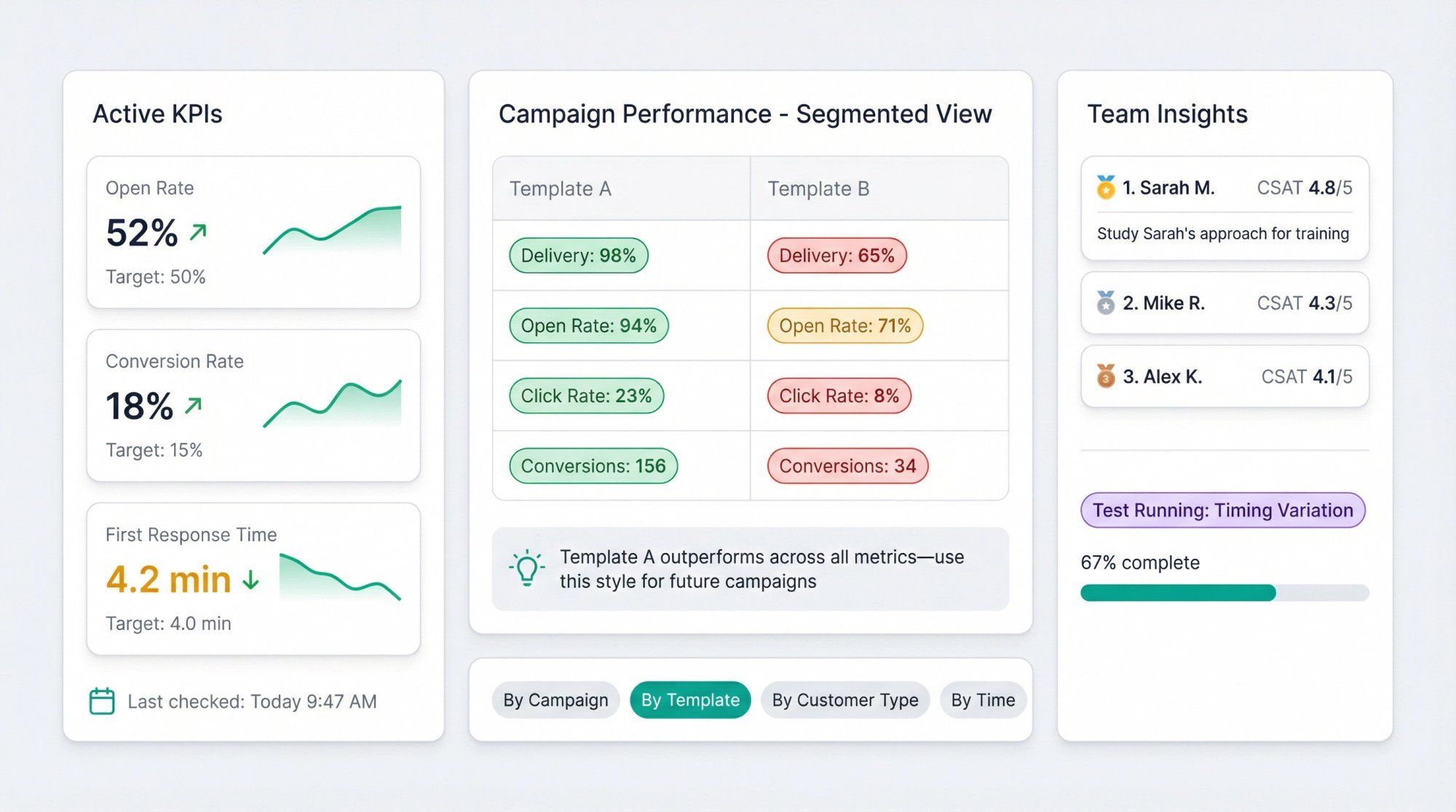
Define clear KPIs upfront. Before you send a single message, know what success looks like. Is it 50% open rate? 15% conversion rate? Under 5-minute first response time? Write down specific targets.
Check your dashboard regularly. Weekly minimum. Daily is better. Consistent monitoring helps you catch issues early (like delivery rates dropping) before they become disasters.
The golden rule of tracking: Segment everything. Break metrics down by campaign, customer type, template, time of day, and agent. Aggregate data is useful, but segmented data reveals actionable patterns.
Close the feedback loop. Use insights to actually improve. If Template A outperforms Template B, use more of Template A's style. If Agent Sarah's CSAT is highest, study what she does differently and train others.
A/B test constantly. Try two message variations and compare read rates, clicks, and conversions. Testing lets you continuously improve instead of guessing what works.
Watch WhatsApp's quality signals. Monitor template read rates and block rates carefully. If quality drops, WhatsApp restricts your account. Proactive tracking lets you fix problems before penalties hit.
Integrate with existing systems. Don't let WhatsApp data sit in isolation. Connect it to your CRM so sales reps see WhatsApp context. Sync with analytics so you can compare channel performance.
Respect privacy. Handle customer data responsibly. Aggregate where possible, purge sensitive details, and comply with GDPR and other regulations. Inform customers that you track interactions for service improvement.
Can I track WhatsApp messages without using the Business API?
The free WhatsApp Business App gives you basic stats (messages sent, delivered, read, received), but that's it. For detailed tracking, campaign analytics, or agent performance metrics, you need the Business API.
How accurate are WhatsApp read rates?
Users can disable read receipts, which means you won't know when they open messages even if they do. This is a known limitation. Use click-through rates and replies as backup engagement signals.
Do I need a separate platform for WhatsApp tracking or is WhatsApp Manager enough?
WhatsApp Manager is fine for basic visibility (message volume, conversation types, template read rates). If you need campaign-level tracking, revenue attribution, agent analytics, or automation, a platform like Spur saves enormous time and provides way more insight.
What's the difference between conversation-based pricing and per-message pricing?
WhatsApp recently shifted to per-message pricing for marketing, utility, and authentication templates. Service conversations (customer-initiated) are typically free. Understanding this affects how you track costs. Check WhatsApp's official FAQ for current pricing details as Meta updates models regularly.
How do I track ROI from WhatsApp marketing campaigns?
Connect WhatsApp messages to revenue using UTM parameters in links, conversion tracking events, and attribution models. Platforms with ecommerce integrations (like Spur with Shopify/WooCommerce) make this automatic. Calculate ROI as (Revenue from WhatsApp minus WhatsApp costs) divided by WhatsApp costs.
Can I export WhatsApp tracking data for custom analysis?
Yes. WhatsApp Manager lets you export basic data. Most business solution provider platforms have APIs and export features. If you're technical, you can also pull data directly from the WhatsApp Business API and store it in your own database.
What metrics indicate my WhatsApp account is at risk of restrictions?
Watch template read rates (Meta wants these high), block rates (keep under 1%), and spam reports (should be near zero). If quality rating drops, WhatsApp may limit your messaging or suspend templates.
How often should I check WhatsApp analytics?
At minimum, weekly. Daily is better if WhatsApp is a primary channel. For active campaigns or high-volume support, check multiple times per day. Set up automated alerts so you don't have to manually monitor 24/7.
WhatsApp message tracking transforms guesswork into strategy.
When you can see what's working (campaigns that convert, agents who crush tickets, messages that get read), you do more of it. When you spot what's failing (templates with terrible read rates, broadcasts that spike opt-outs, support queries that drag on forever), you fix it.
Start with whatever tracking you can access today. If you're on the Business App, check the built-in stats weekly. If you've upgraded to the API, dive into WhatsApp Manager's insights. If you're ready to connect WhatsApp directly to business outcomes, explore platforms like Spur that turn conversations into trackable, optimizable revenue.
The businesses winning with WhatsApp aren't just messaging more. They're measuring better, learning faster, and optimizing constantly.
You can do the same. Start tracking today.