Is Gemini API Free? (2025)

Discuss with AI
Get instant insights and ask questions about this topic with AI assistants.
💡 Pro tip: All options include context about this blog post. Feel free to modify the prompt to ask more specific questions!
Yes, Gemini API has a free tier, but it comes with tight rate limits, your data can train Google's models, and it's banned for EU users. For real production use (especially if you're building AI agents for customer support across WhatsApp, Instagram, or live chat), you'll quickly need paid tiers or a platform like Spur that handles the complexity for you.
If you're asking "Is Gemini API free?" you're probably not just curious about pricing tables.
You're really asking:
• Can I ship a side project without putting a credit card on file?
• How far can my startup get before costs kick in?
• Is the free tier safe for customer data, or do I need enterprise mode from day one?
• Should I use Gemini directly, or plug into it through a platform?
This guide answers those questions using only the latest Gemini 2.5 and 3.0 information as of late 2025.
Here's the honest one-liner:
Gemini API has a recurring free tier for several 2.5 models, but it's heavily rate-limited, your data can be used to improve Google's models, and it cannot be used to serve users in the EU/EEA/UK/Switzerland. For serious or EU production use, you're on paid Gemini from day one. (Google AI for Developers)
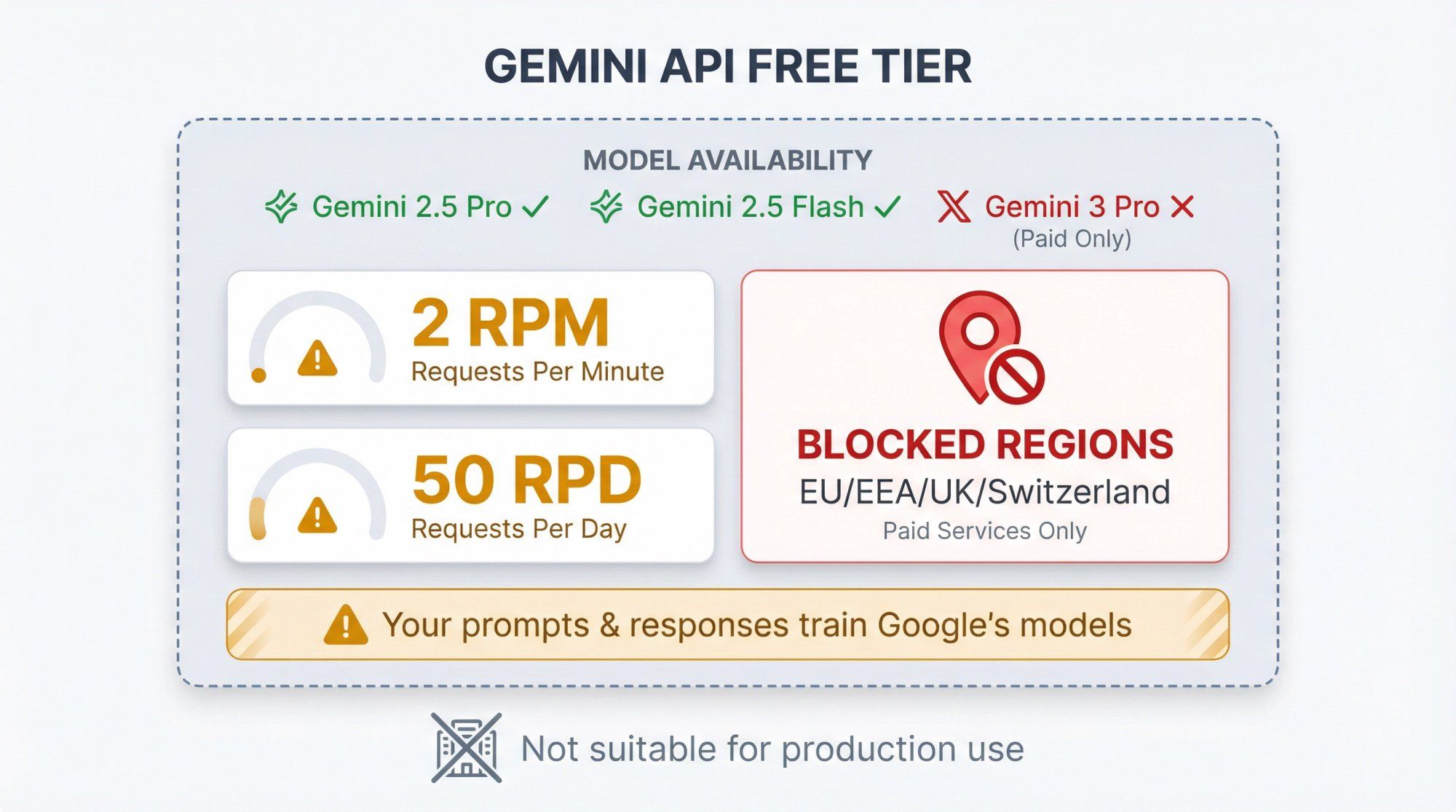
Yes, there is a Free Tier for the Gemini API
Free input and output tokens on some models (Gemini 2.5 Pro, 2.5 Flash, 2.5 Flash-Lite, 2.0 Flash, 2.0 Flash-Lite, plus some audio and embeddings).(Google AI for Developers)
Strict per-project rate limits like 2 requests per minute and 50 requests per day on Gemini 2.5 Pro, and up to 1,000 requests per day on Flash-Lite.(Google AI for Developers)
No, the whole thing is not "free forever"
Once you upgrade a project out of the Free Tier to paid tiers, all API calls are billed at published token prices.
Gemini 3 Pro has no free API quota. You can try it for free inside Google AI Studio's chat UI, but its API pricing starts at $2.00 per million input tokens and $12.00 per million output tokens in preview.(Google AI for Developers)
Where you deploy matters
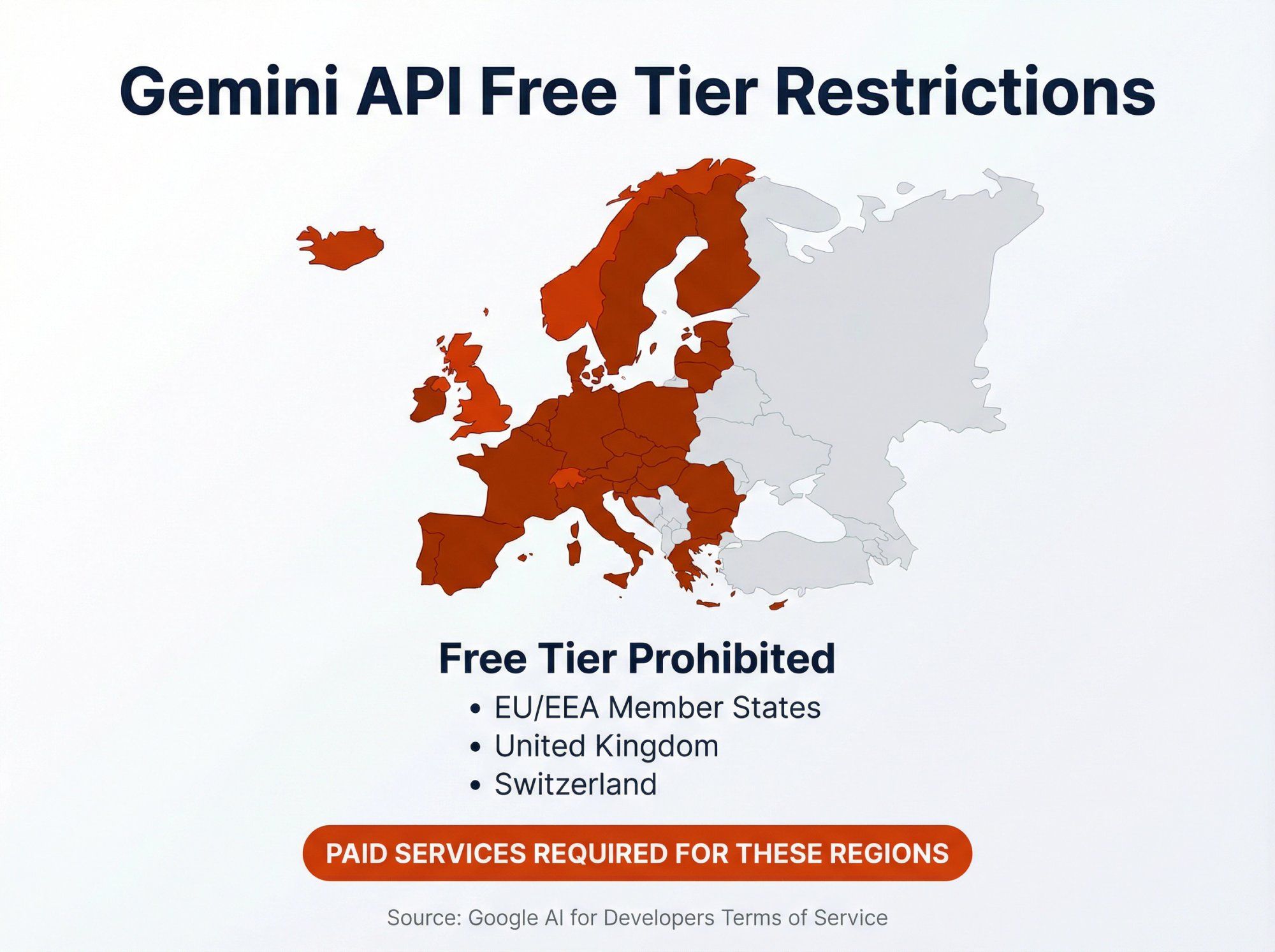
Google's Gemini API terms say that if your app serves people in the EEA, Switzerland, or UK, you must use Paid Services only (so no free tier at all for those users).(Google AI for Developers)
Data rules flip between free and paid
On the free tier, prompts and responses can be used (with human review) to improve Google's products.
On paid tiers, prompts and responses are not used to improve Google's models and are processed under Google's data processing addendum.(Google AI for Developers)
So the right question isn't "Is Gemini API free?" but "What exactly is free, and is that enough for what I'm building?"
Let's break that down.
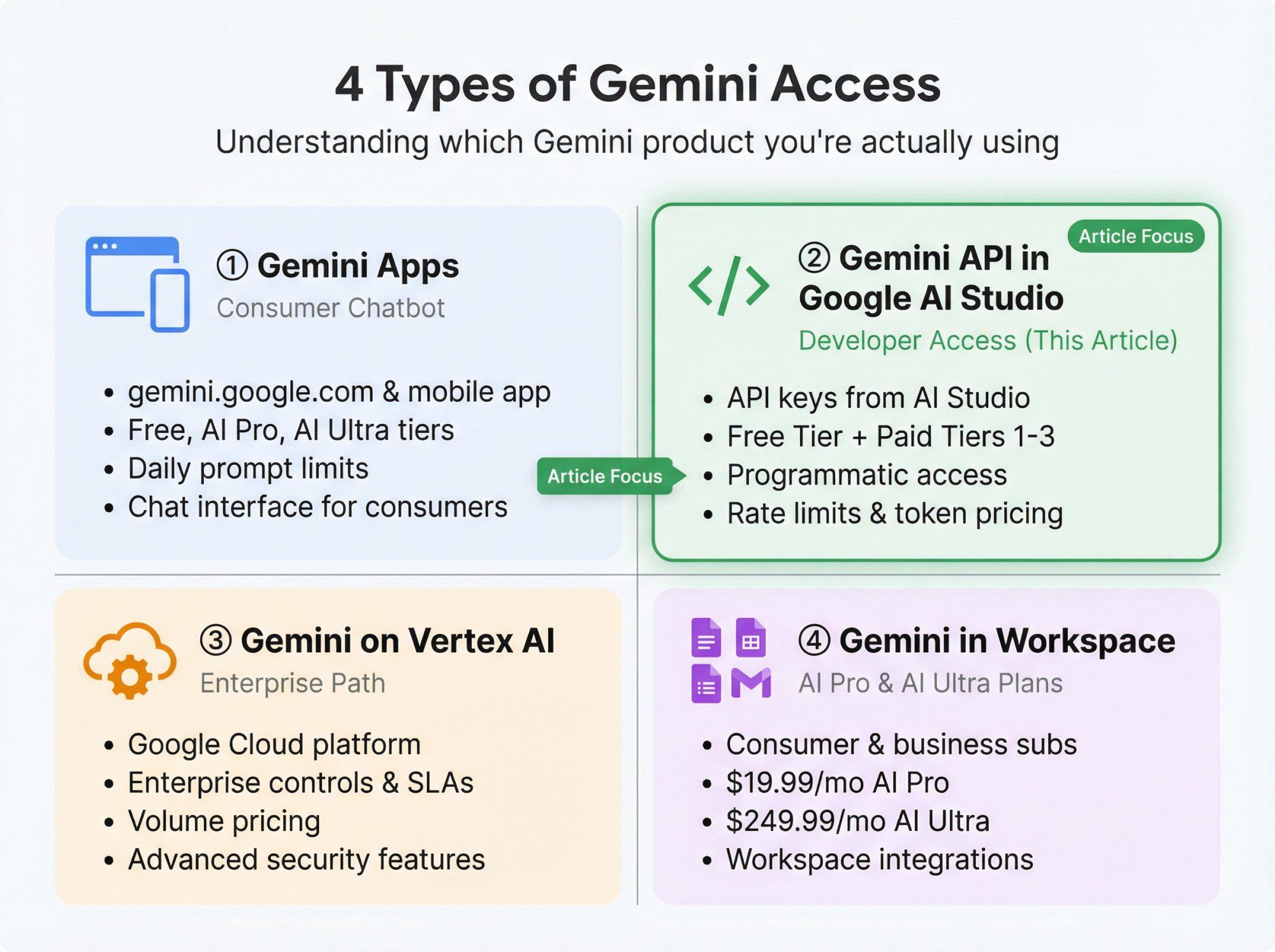
People get confused because "Gemini" is used for at least four different things:
① Gemini Apps (the chatbot in your browser or phone)
What you get at gemini.google.com or in the Gemini mobile app. Has its own free, AI Pro, and AI Ultra usage limits around daily prompts, images, videos, etc.(Google One)
This is not the same thing as the developer API, although both use the same underlying models. If you're curious about how different AI models compare, check out our guides on Gemini vs ChatGPT, Claude vs ChatGPT, and Grok vs ChatGPT.
② Gemini API in Google AI Studio (what this article is about)
Programmatic access for developers using API keys from Google AI Studio. Has a Free Tier and Paid tiers (Tier 1, 2, 3) with different rate limits.(Google AI for Developers)
③ Gemini on Vertex AI (enterprise path)
Same models, but accessed through Google Cloud Vertex AI with enterprise controls, SLAs, and volume pricing.(Google Cloud Documentation)
④ Gemini in Workspace / Google AI plans (AI Pro, AI Ultra)
Consumer and small business subscriptions that unlock more usage in Gemini Apps and Workspace (Docs, Sheets, Gmail) for a flat monthly fee, like $19.99 for AI Pro and $249.99 for AI Ultra in the US.(blog.google)
This article focuses on Gemini API via Google AI Studio since that's what you'd connect to a chatbot, automation tool, or platform like Spur.
For comparison with OpenAI's pricing structure, see our OpenAI ChatGPT API pricing calculator.
Think of Gemini API pricing as a simple three-layer cake:
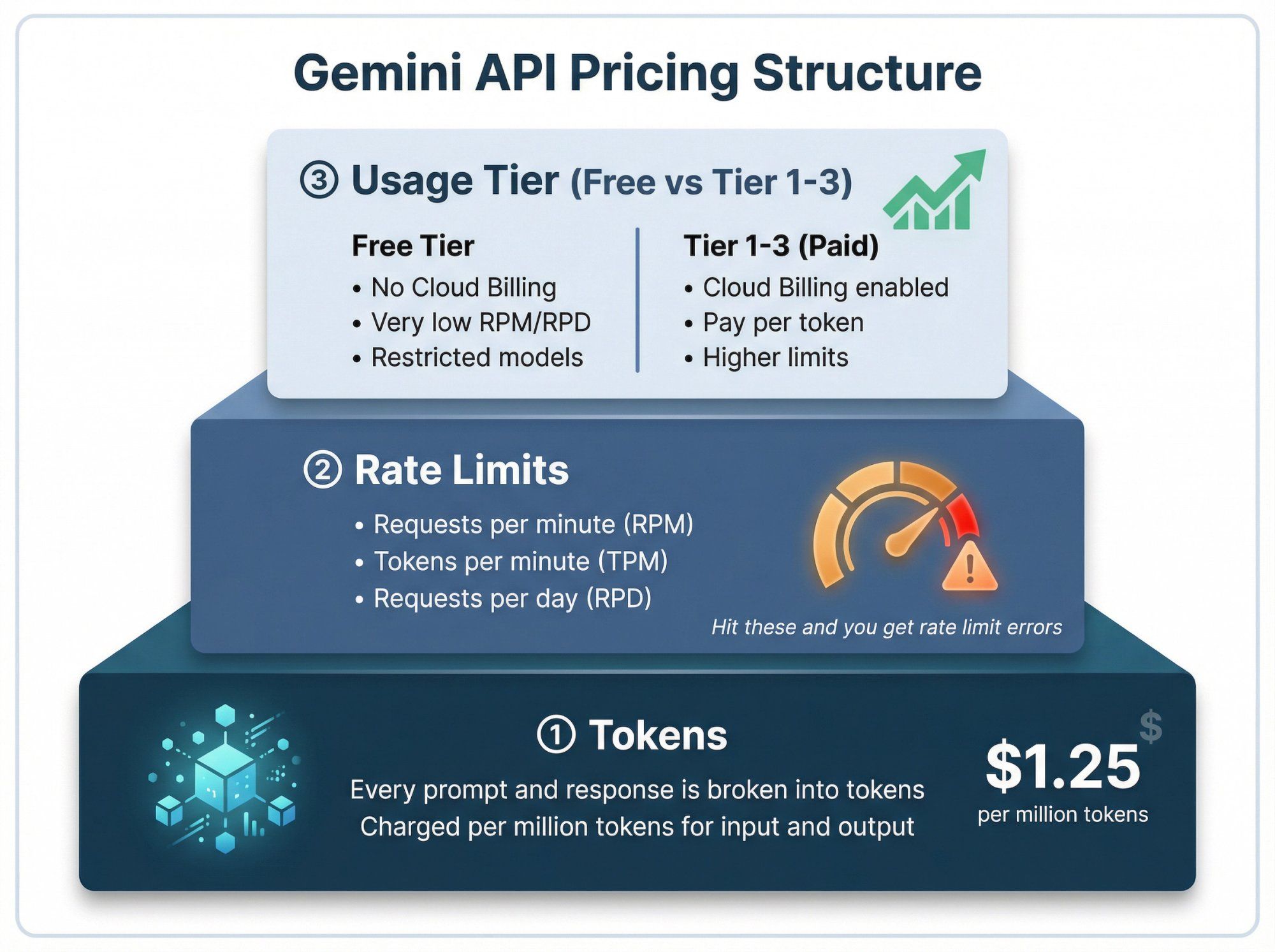
① Tokens
Every prompt and response is broken into tiny pieces called tokens (roughly 3-4 characters of English, but you can treat "1 token" as "a piece of text, image, audio, or video budget").
You're charged per million tokens of input and output for paid usage.(Google AI for Developers)
② Rate limits
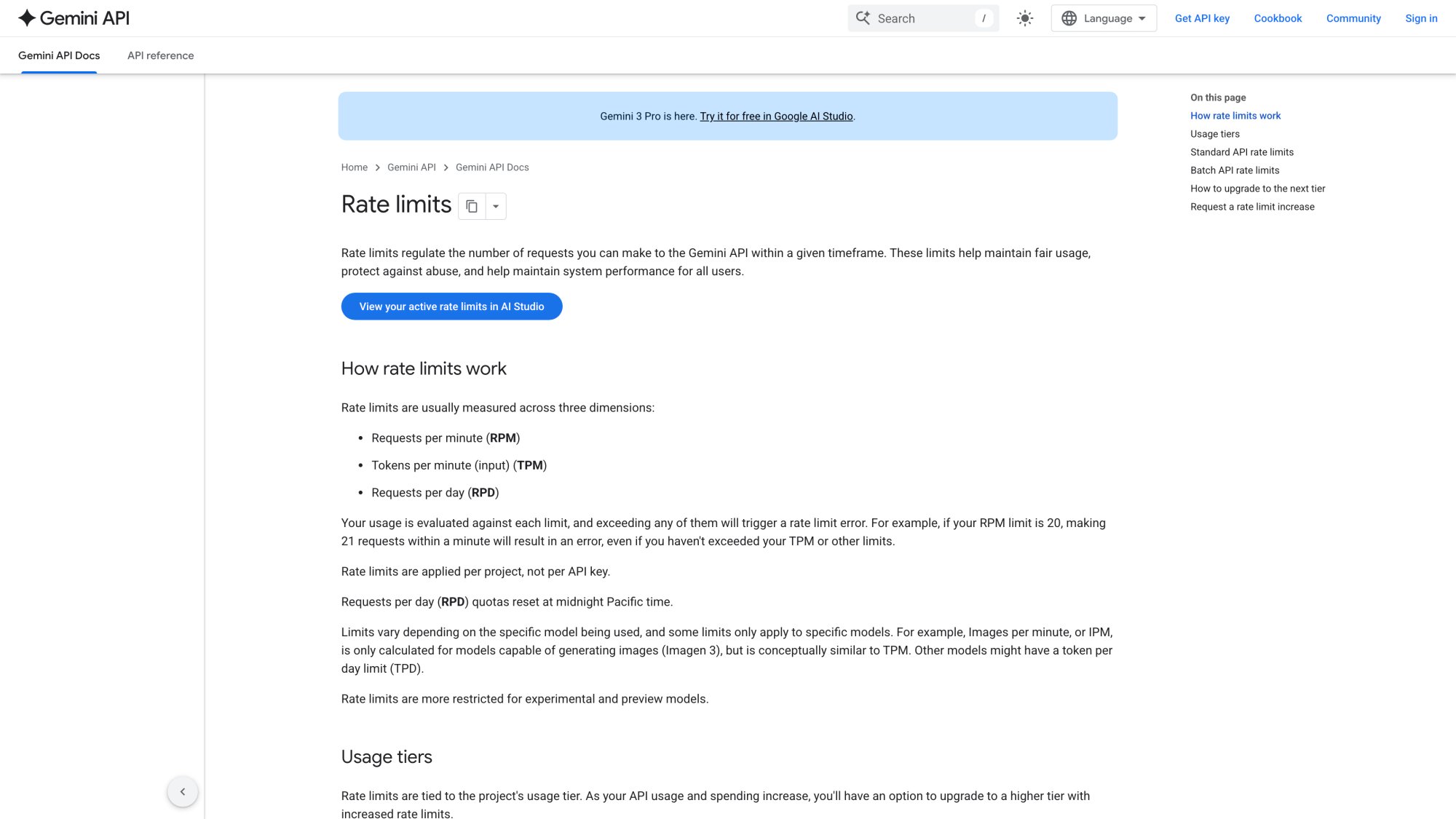
Even if something is free per token, you can't call it infinitely often. Google caps usage by:
• Requests per minute (RPM)
• Tokens per minute (TPM)
• Requests per day (RPD)(Google AI for Developers)
Hit any of these and you get rate limit errors, even on the Free Tier.
Google publishes comprehensive rate limit tables in their official documentation:
③ Usage tier (Free vs Tier 1-3)
Free Tier: no Cloud Billing, very low RPM/RPD, restricted to certain models.
Tier 1-3 (Paid): Cloud Billing enabled, you pay per token, and your limits grow with your historical spend on the wider Google Cloud account.(Google AI for Developers)
So when you ask "Is Gemini API free?" you have to check both:
• Is the token price zero on my chosen model?
• Am I still under the rate limits for the Free Tier?
Let's focus on the models that matter in late 2025.
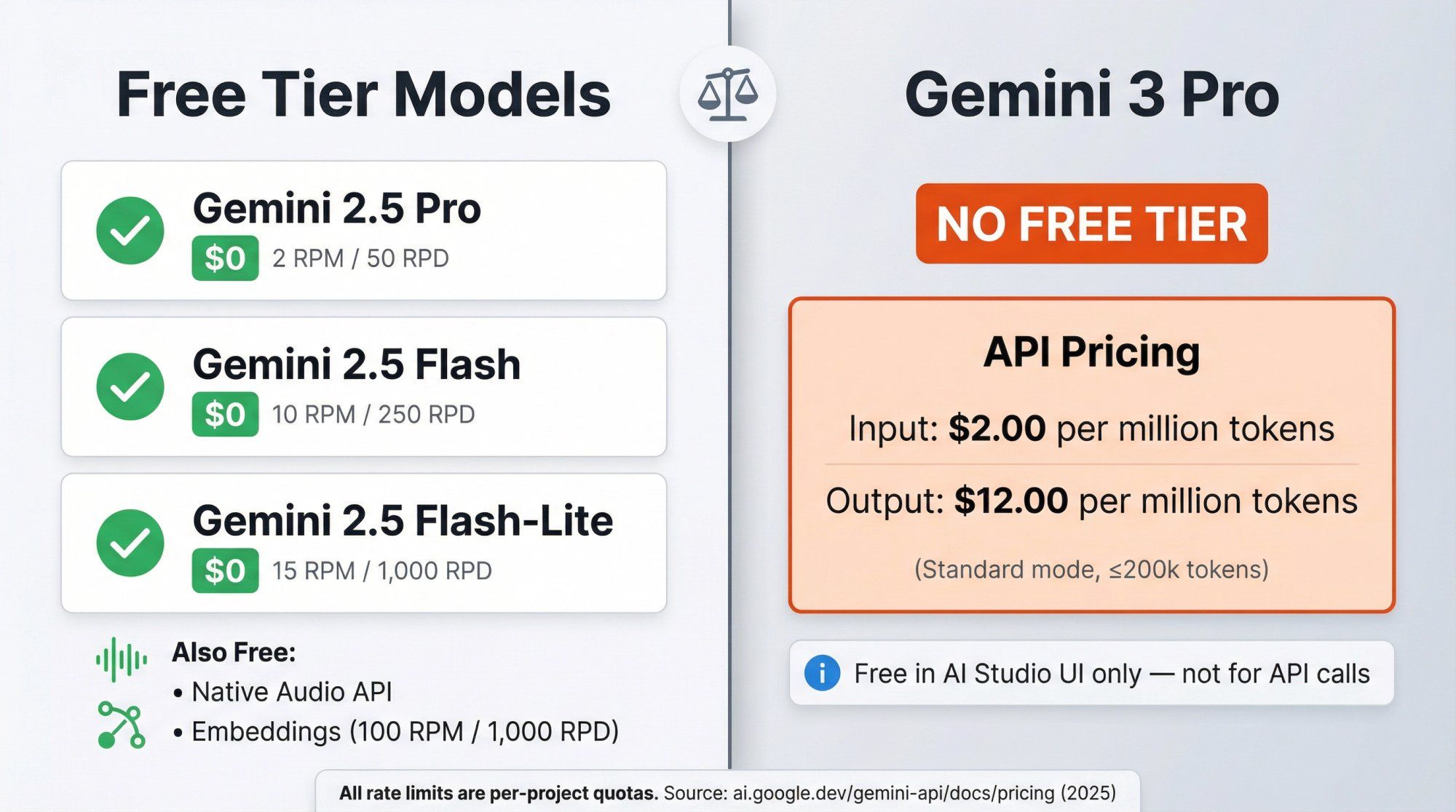
From the official Gemini API pricing and rate limits pages, here's the simplified view for the main 2.5 and 2.0 models on the Free Tier.(Google AI for Developers)
Important: These are per-project limits. If you have two projects, they each get their own quota.
| Model (API name) | Role in practice | Free Tier RPM | Free Tier RPD |
|---|---|---|---|
Gemini 2.5 Pro (gemini-2.5-pro) | Flagship reasoning and coding model | 2 | 50 |
Gemini 2.5 Flash (gemini-2.5-flash) | Fast workhorse model with reasoning support | 10 | 250 |
Gemini 2.5 Flash-Lite (gemini-2.5-flash-lite) | Small, cheap, high throughput model | 15 | 1,000 |
Gemini 2.0 Flash (gemini-2.0-flash) | Previous balanced multimodal model | 15 | 200 |
Gemini 2.0 Flash-Lite (gemini-2.0-flash-lite) | Older lightweight model | 30 | 200 |
All of these have free input and output tokens on the Standard Free Tier. You pay zero per token until you move that project to paid tiers.(Google AI for Developers)
In plain English:
You can send at most 2.5 Pro: 50 requests per day per project on the free API.
You can send at most 2.5 Flash-Lite: 1,000 requests per day per project on the free API.
These are enough for prototyping, tiny internal apps, and light evaluation, but not for anything close to high-traffic production.
Examples of other free units on the API:
Gemini 2.5 Flash Native Audio (Live API): free tokens for text and audio on the Free Tier with its own RPM/TPM limits.(Google AI for Developers)
Gemini Embeddings: free tier of 100 RPM and 1,000 RPD for embedding calls, great for small-scale RAG experiments.(Google AI for Developers)
For most early projects, the big constraint is RPD (requests per day) rather than tokens. You'll hit your daily limit long before you cross "a million tokens" in most small tests.
For developers, this is where things change:
Gemini 3 Pro Preview (gemini-3-pro-preview)
No Free Tier pricing for text tokens in the API pricing table.
Standard API pricing starts at $2.00 per million input tokens and $12.00 per million output tokens for prompts up to 200k tokens.(Google AI for Developers)
Higher prices for very large prompts above 200k tokens.
You'll see "Try it for free in Google AI Studio" marketing, which is true for interactive use inside AI Studio, but that's not a standing free quota for API calls in your app.
So if your plan is "I'll build my product on Gemini 3 Pro and never pay," that doesn't match how the developer API is priced.
Once you outgrow the Free Tier and upgrade a project to Tier 1 or higher:
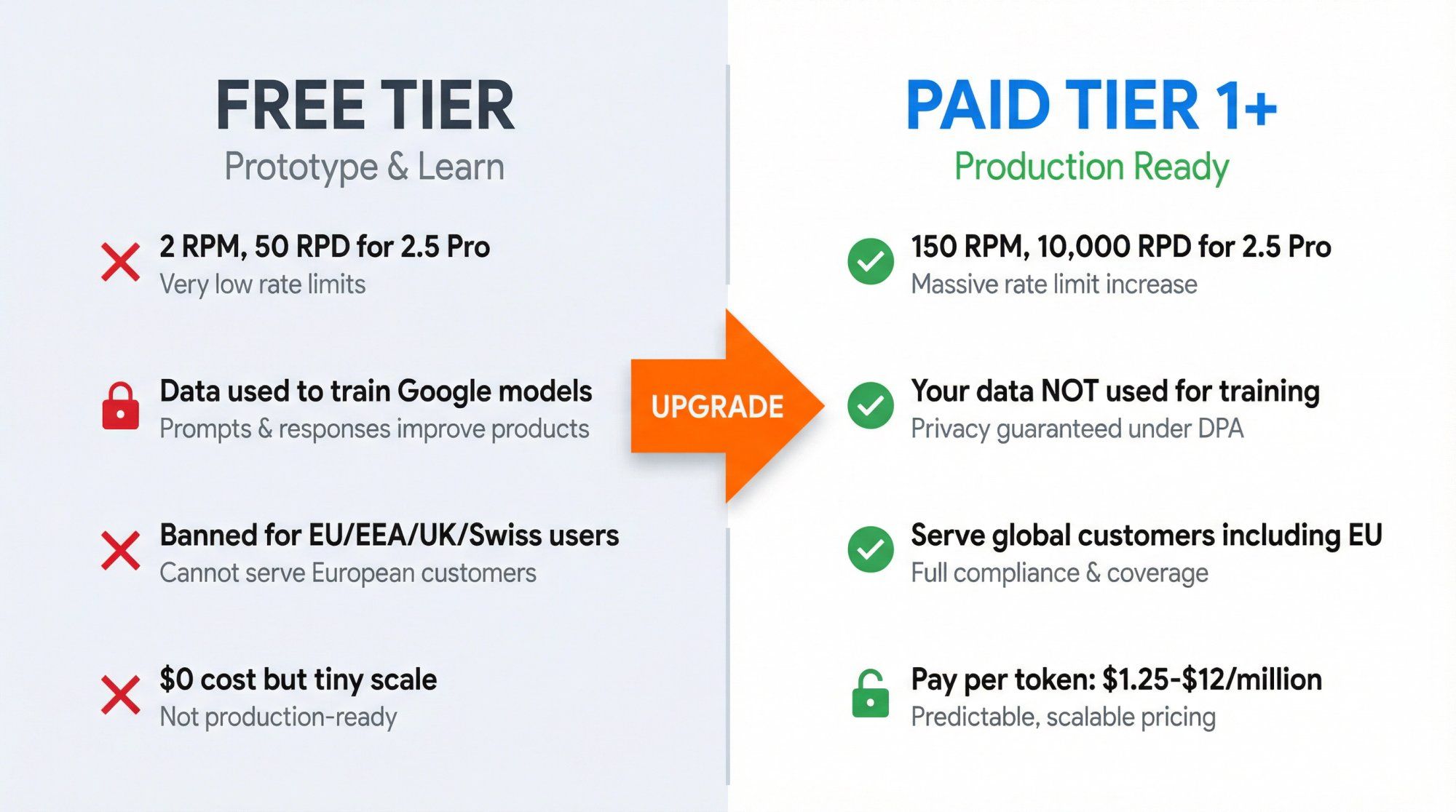
① API calls become billable
The pricing table gives token prices for each model:
| Model | Input Pricing | Output Pricing | Notes |
|---|---|---|---|
| Gemini 2.5 Pro | $1.25 per million tokens (≤ 200k prompt), then $2.50 above | $10.00 per million tokens (≤ 200k), then $15.00 above | Includes "thinking tokens" in output |
| Gemini 2.5 Flash | $0.30 per million (text/image/video), $1.00 per million (audio) | $2.50 per million tokens | Fast workhorse |
| Gemini 2.5 Flash-Lite | $0.10 per million (text/image/video) | $0.40 per million tokens | Cheapest option |
| Gemini 2.0 Flash | $0.10 per million (text/image/video) | $0.40 per million tokens | Previous generation |
| Gemini 3 Pro Preview | $2.00 per million (≤ 200k) then $4.00 | $12.00 per million (≤ 200k) then $18.00 | Premium pricing |
② Rate limits jump a lot
Examples for Tier 1:
→ 2.5 Pro: 150 RPM and 10,000 RPD
→ 2.5 Flash-Lite: 4,000 RPM and effectively unlimited RPD (no published cap)
→ 3 Pro Preview: 50 RPM and 1,000 RPD
③ Data usage rules change in your favor
On Paid Services, Google does not use your prompts or responses to improve their models. They're processed under a data processing addendum with logging mainly for abuse detection and compliance.(Google AI for Developers)
④ Higher tiers unlock even more throughput
Tier 2 and Tier 3 are tied to cumulative Google Cloud spend (for example, more than $250 for Tier 2). They raise RPM, RPD, and batch capacities across models so you can run very high traffic applications.(Google AI for Developers)
In practice, the jump from Free Tier to Tier 1 is the moment you go from "toy / prototype" into "production traffic with real SLA expectations".
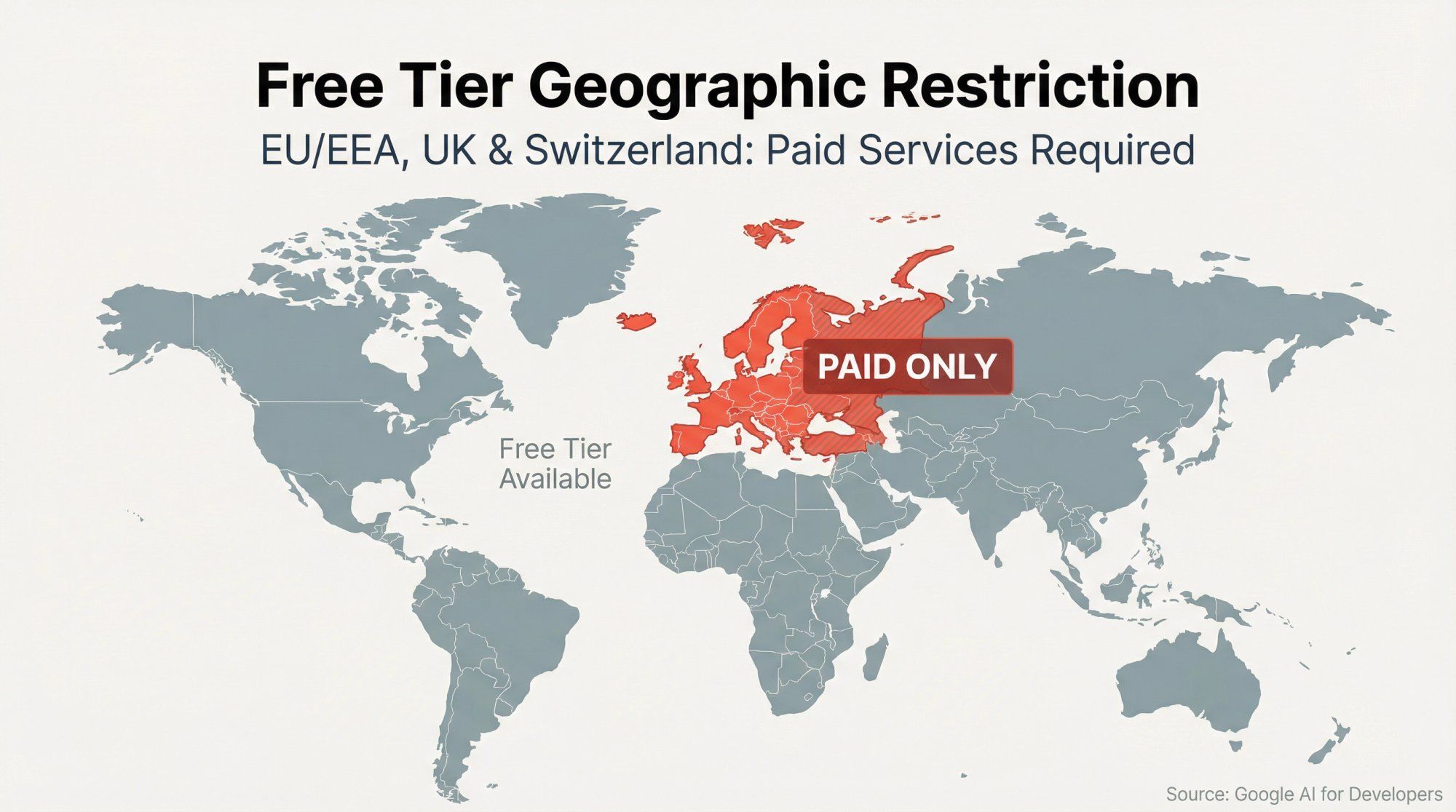
There's a subtle but very important line in the Gemini API Additional Terms:
For the European Economic Area, Switzerland, and the United Kingdom, you may only make API clients available to users using Paid Services.(Google AI for Developers)
Translated:
If your customer is in the EU/EEA, UK, or Switzerland, your app must use the Paid data handling mode.
That means you need billing enabled, and their prompts and outputs can't be handled as "Unpaid Services" that Google can use for training.
This matters for two reasons:
Compliance
If you're operating in or serving those regions, you can't just "stay on free tier until we find product market fit." For businesses concerned about data compliance, learn more about GDPR and how WhatsApp API handles GDPR compliance.
Architecture
If you're a global app, you either route EU/UK/CH users to a paid Gemini project and keep the free one for non-EU users, or decide that all users get the paid privacy model and treat everything as paid, then manage cost centrally.
If you're using a platform like Spur, this is exactly the sort of complexity we abstract away for you. We manage which model, region, and data mode is used under the hood, while you just define what your AI agent should do for each channel.
To get useful intuition, let's do real numbers.
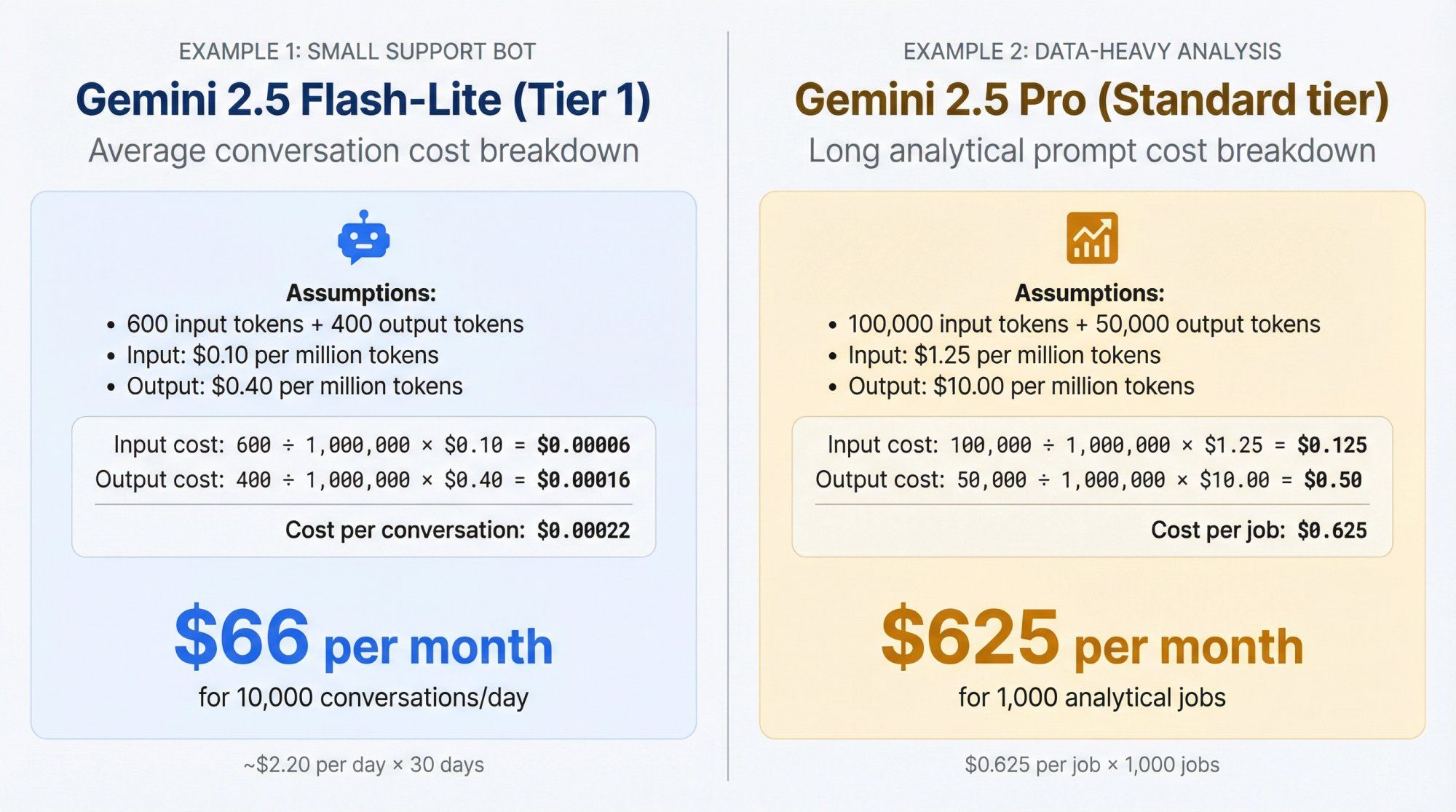
Assumptions:
You choose Gemini 2.5 Flash-Lite on Tier 1.
Average conversation:
• 600 input tokens (user messages + system prompt + context)
• 400 output tokens
Pricing:
• Input: $0.10 per million tokens
• Output: $0.40 per million tokens
Cost per conversation:
① Input cost: 600 tokens ÷ 1,000,000 × $0.10 = $0.00006
② Output cost: 400 tokens ÷ 1,000,000 × $0.40 = $0.00016
③ Total cost per conversation: $0.00006 + $0.00016 = $0.00022
Now scale that:
• 10,000 conversations per day: 10,000 × 0.00022 = $2.20 per day
• Roughly 30 days: 30 × $2.20 = $66 per month
So a pretty active support bot on 2.5 Flash-Lite at Tier 1 might cost around $50-70 per month in pure Gemini API spend, plus whatever you pay for the surrounding platform, orchestration, and channels.
Say you're running long analytical prompts:
• 100,000 input tokens per job
• 50,000 output tokens per job
• Model: Gemini 2.5 Pro, Standard tier, short context (≤ 200k tokens)
From pricing:
• Input: $1.25 per million tokens
• Output: $10.00 per million tokens
Cost per job:
① Input cost per job: 100,000 ÷ 1,000,000 × $1.25 = $0.125
② Output cost per job: 50,000 ÷ 1,000,000 × $10.00 = $0.50
③ Total per job: $0.125 + $0.50 = $0.625
Even if you ran 1,000 such jobs per month, that's about $625, which is modest for heavy analytics, but you won't be doing this on the Free Tier (50 requests per day cap).
Something else that trips people up:
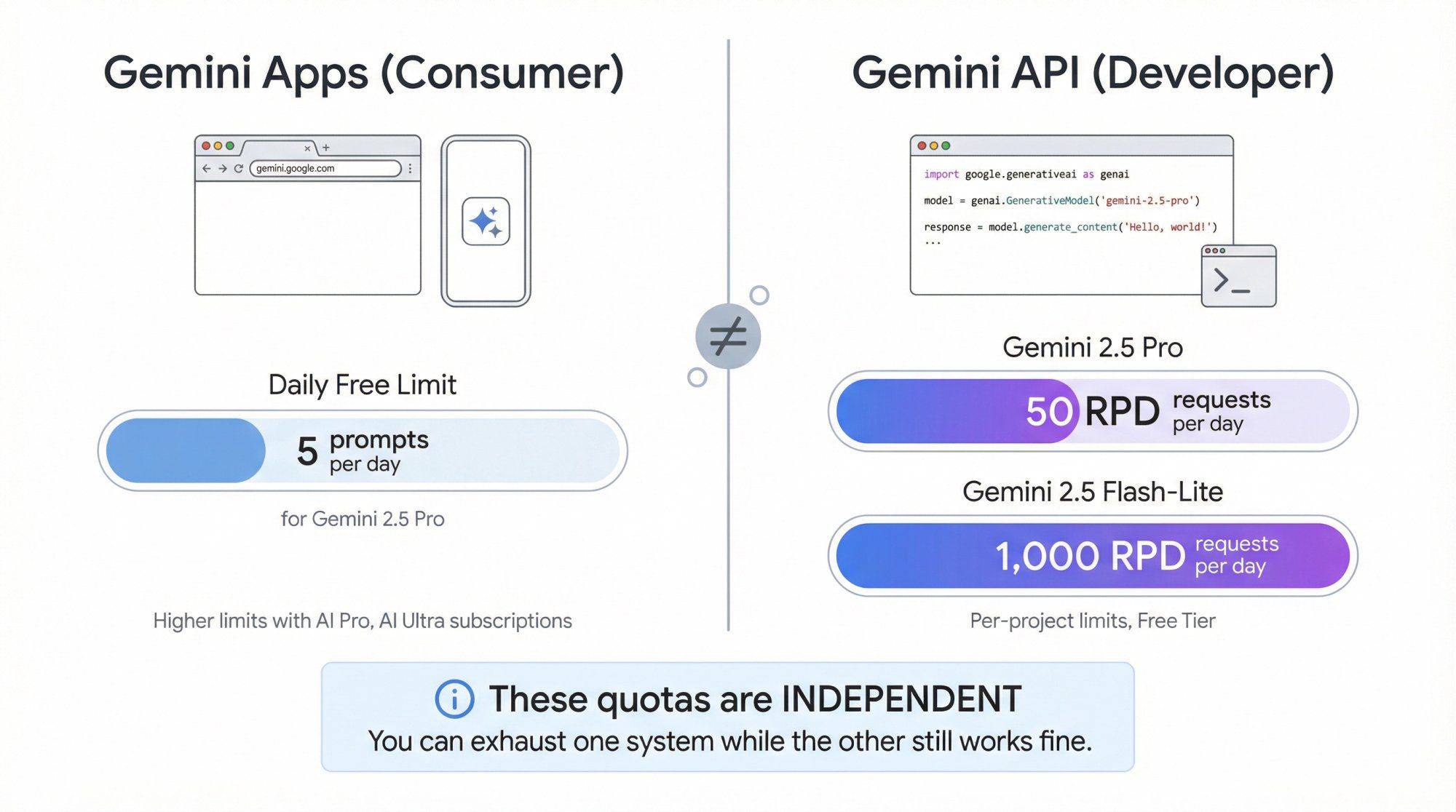
Gemini Apps Free plan (the regular chatbot)
As of late 2025, Google officially documents limits like 5 prompts per day for free Gemini 2.5 Pro usage, higher limits for AI Pro, and even higher for AI Ultra.
Gemini API Free Tier
Has its own independent limits (for example 50 RPD for 2.5 Pro, 1,000 RPD for Flash-Lite) and is project-scoped.
These two systems are related but not coupled:
You can hit your limit on Gemini Apps and still have API Free Tier quota left.
You can exhaust your API Free Tier while the consumer chat app still works fine.
So if you're writing documentation or making decisions for your team, never mix "my free Gemini in the browser seems fine" with "our API-backed chatbot will be fine too". They're governed by different quota systems.
There are four big questions to ask.
When you're evaluating the free tier for production use, you'll be working with Google AI Studio.
Legally, yes in many regions. The terms treat Unpaid Services as valid services, not "personal use only." You're allowed to build API clients that real users interact with.
But:
• You can't use Unpaid Services to serve EEA/UK/Swiss users
• You have very low RPD and RPM allowances
• Your prompts and outputs can be used to improve Google's models, with human review in some cases
For serious customer-facing workloads (support bots, sales workflows, lead qualification, etc) these constraints are usually unacceptable.
On the Free Tier:
Google's own docs say that content you submit and the responses can be used to "provide, improve, and develop" Google products.
Human reviewers may read, annotate, and process that data, with steps taken to disconnect it from your account or project ID.
On Paid Services:
Google says prompts and outputs are not used to improve their products.
They're logged for a limited time for abuse detection and legal compliance, then handled under enterprise-style data terms.
For internal experiments and prototypes, many teams are comfortable with the free mode. For anything involving customer PII, contracts, financial information, or regulated sectors, you very quickly want the paid data handling model.
Learn more about data protection agreements.
The Free Tier has tight rate limits that can spike error rates as soon as a few users hammer it, and comes with no strong uptime commitments or support channel.
Paid and enterprise usage via Vertex AI gets higher limits, access to Batch and context caching, and optional support contracts, which you need if your business depends on these APIs.
As discussed already, if anyone in these regions is using your app, you need Paid Services for them. That alone disqualifies a "Free Tier only" architecture for any product that has even a small European footprint.
This is where Spur's context matters.
You have two high level options:
① Use Gemini API directly
You manage:
• API keys and quotas
• Prompt design, safety filters, and fallbacks
• Logic for connecting Gemini to WhatsApp, Instagram, Facebook, and web chat
• Logging, analytics, re-training, and human handoff
② Use an AI messaging platform like Spur that integrates Gemini
Spur already:
• Supports OpenAI, Claude, Gemini, and Grok in one place
• Trains AI agents on your knowledge base and connects them to WhatsApp, Instagram, Facebook Messenger, and web live chat with a shared inbox and automation builder
• Handles WhatsApp conversation pricing, channel limits, and agent workflows for you
A useful rule of thumb:
If you're a developer building a single custom app and you want complete control of every call, direct Gemini API access might make sense.
If you're a business that mainly wants AI support agents for customers, abandoned cart flows on WhatsApp, or comment-to-DM funnels on Instagram, then it's usually more efficient to let a platform like Spur handle the Gemini integration and give you one interface to manage automation, multi-channel messaging, and humans in the loop.
You still benefit from Gemini's strengths (research, long context, multimodal) without having to babysit tokens and tiers.
Here's what we handle so you don't have to:
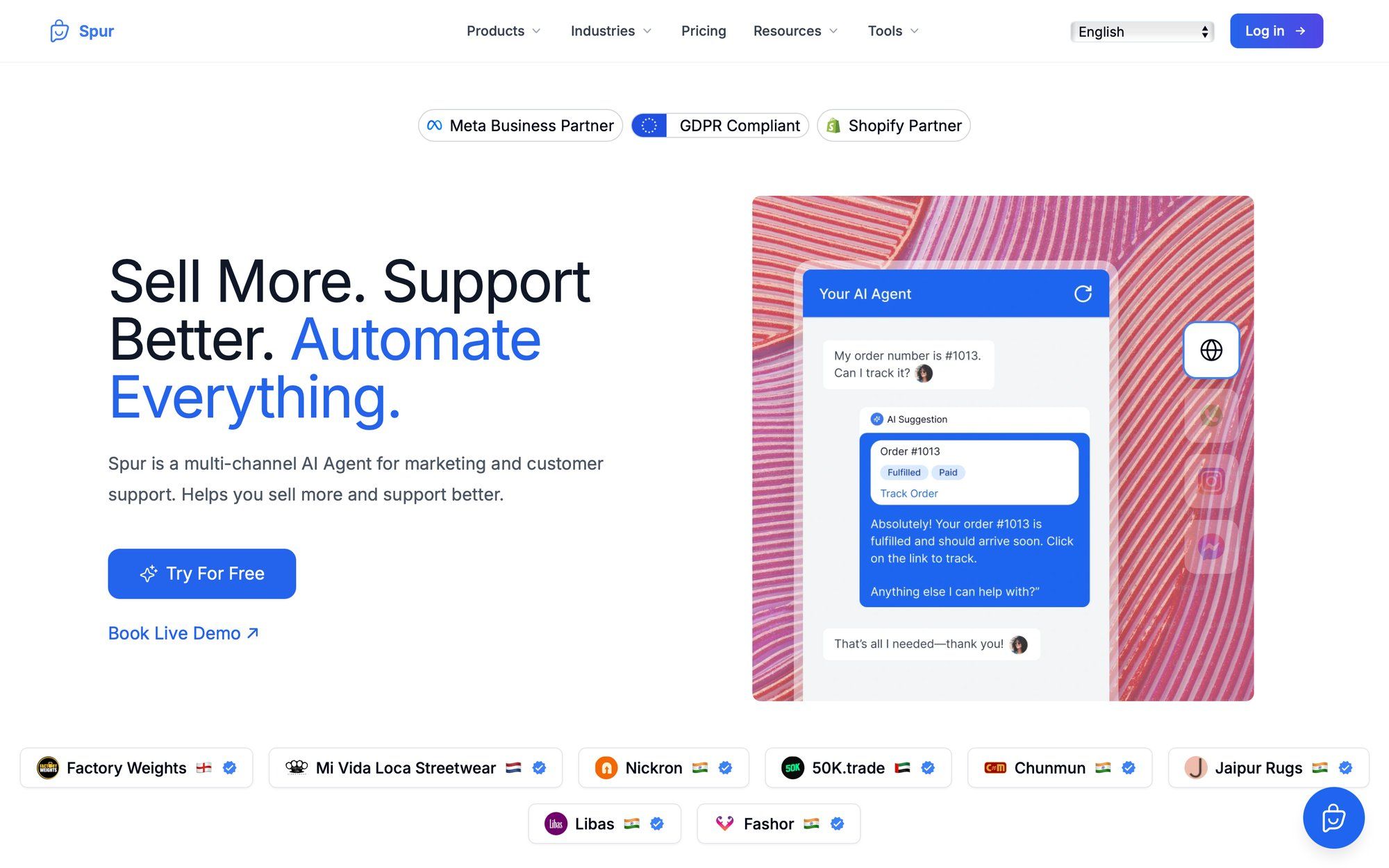
No manual API management
We integrate multiple LLMs (OpenAI, Claude, Gemini, Grok) behind one automation layer. You don't touch API keys, rate limits, or tier upgrades.
Actionable AI agents, not just Q&A bots
Our AI doesn't just answer questions. It can track orders, update your CRM, recover abandoned carts, book appointments, and trigger custom workflows.
You plug in your Shopify / WooCommerce / Stripe / Razorpay, and we wire AI actions like "track order", "update record", "recover cart".
Train on your own knowledge base
Unlike generic chatbot builders, Spur lets you train AI agents on your actual product docs, FAQs, and help content.
Your AI sounds like you, not a generic assistant.
Multi-channel unified inbox
Handle WhatsApp, Instagram DMs, Facebook Messenger, and website live chat from one shared inbox.
AI handles the repetitive stuff, humans jump in for complex issues, and it's all tracked in one place.
Simple pricing with generous trials
You can start with our free trials and then pick a plan where the "per-token mental math" is already baked into simple monthly pricing.
We handle WhatsApp conversation charges through our wallet system, so you don't pay Meta directly.
Get started with Spur and see how much simpler it is than managing Gemini API quotas yourself.
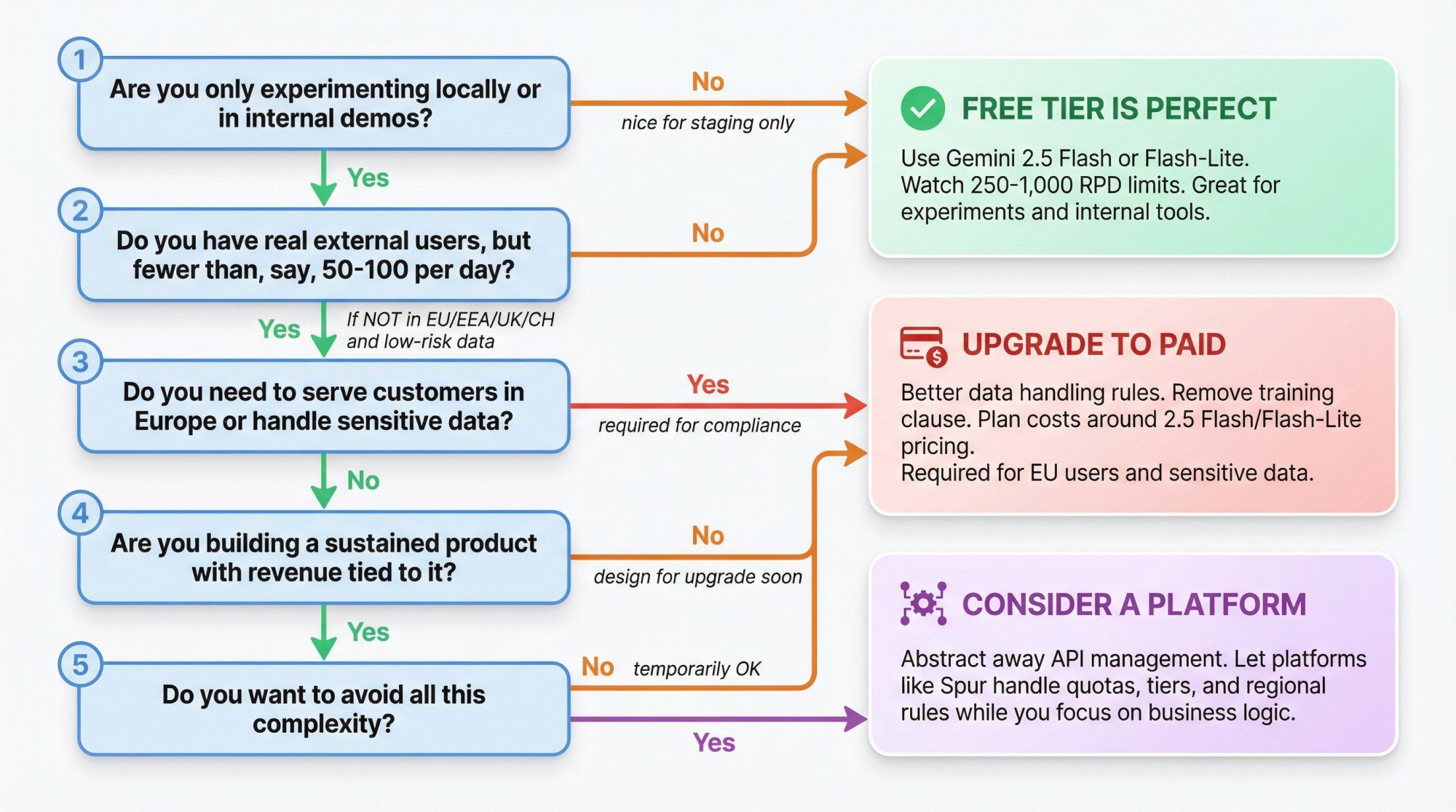
Here's a simple decision tree:
① Are you only experimenting locally or in internal demos?
Yes: Free Tier is perfect. Use Gemini 2.5 Flash or 2.5 Flash-Lite for most experiments. Keep an eye on 250 or 1,000 RPD limits per project.
No: go to step 2.
② Do you have real external users, but fewer than, say, 50-100 per day?
If they're not in the EU/EEA/UK/CH, and the use is low risk (no sensitive data), you might squeeze through on Free Tier temporarily.
Design your app assuming you'll hit rate limits and need to upgrade soon.
③ Do you need to serve customers in Europe or handle sensitive data?
You basically jump straight to Paid.
Get the better data handling rules and remove the "Unpaid Services" training clause from your risk register.
④ Are you building a sustained product with revenue tied to it?
Treat Free Tier tokens as "nice to have" for staging and early tests.
Plan your cost model around paid pricing for at least 2.5 Flash or Flash-Lite, and possibly Pro or 3 Pro for heavy reasoning.
⑤ Do you want to avoid all this complexity?
Consider a platform like Spur that abstracts away the API management entirely.
You get Gemini's capabilities without worrying about quotas, tiers, or regional data rules.
Yes. Creating an API key in Google AI Studio puts you on the Free Tier with free tokens and strict per-project rate limits for several 2.5 and 2.0 models.
No. The API pricing for Gemini 3 Pro Preview starts at $2.00 per million input tokens and $12.00 per million output tokens in Standard mode. You can experiment with 3 Pro for free in the AI Studio UI, but there's no standing free API quota for it.
Yes in many regions, but:
• You must not use Unpaid Services to serve users in the EEA, UK, or Switzerland
• Your prompts and outputs can be used to improve Google's models
For anything serious, most teams move to Paid tiers.
Google's official docs describe "Free Tier" as one usage tier and "Tier 1, 2, 3" as paid tiers. Upgrading a project from Free to a paid tier means that project is now billed at the per-token prices. You should not plan on additional free API usage once a project is upgraded, aside from specific "N calls free" items like some Search grounding quotas.
Those plans affect Gemini Apps (the chat UI and Workspace integrations), not the developer API. Paying for AI Pro/Ultra is separate from your Gemini API token billing, although in practice teams often use both.
Direct Gemini API:
You manage: API keys, quotas, prompt engineering, channel integrations (WhatsApp, Instagram, etc.), logging, human handoff.
Good for: Developers who want full control and are building a single custom app.
Spur with Gemini:
We manage: Model integration, rate limits, multi-channel setup (WhatsApp, Instagram, Facebook, Live Chat), shared inbox, automation flows.
You manage: What your AI agent should say and do for your business.
Good for: Businesses that want AI agents for support and sales without the operational complexity.
Using our Example 1 above: a support bot handling 10,000 conversations per day on Gemini 2.5 Flash-Lite (Tier 1) would cost around $50-70 per month in pure API costs, plus platform fees.
With Spur, that's all bundled into our simple monthly plans, so you don't have to do the math.
Yes. You upgrade your project in Google AI Studio by enabling Cloud Billing. Once you do, that project moves to paid tiers and all subsequent API calls are billed at the published token prices.
On the Free Tier, Google can use your prompts and responses to improve their products (with human review in some cases). On Paid tiers, they don't use your data for model training and handle it under a data processing addendum.
Yes, if you're willing to manage the integration. Gemini 2.5 models are strong for reasoning, long context, and multimodal understanding.
But most businesses find it easier to use a platform like Spur that handles the Gemini integration and also gives you WhatsApp, Instagram, Facebook, and live chat automation in one place.
Technically yes, if:
• You stay under the Free Tier rate limits (like 50 requests per day for 2.5 Pro)
• You don't serve EU/EEA/UK/Swiss users
• You're comfortable with Google using your data to train models
But for any real production use, you'll quickly hit those limits and need to upgrade to paid tiers.
For most use cases, Gemini 2.5 Flash or 2.5 Flash-Lite on Tier 1 offers the best balance of speed, cost, and quality. Use 2.5 Pro if you need deeper reasoning. Avoid 3 Pro unless you have a specific need for its capabilities, since it's much more expensive.
If you don't want to choose, Spur handles model selection for you based on your use case.
Yes, Gemini API is genuinely free to start for 2.0 and 2.5 models with meaningful but limited quotas.
No, it's not a free ride:
• 3 Pro costs money on the API
• Free Tier is too small for serious public production
• Data from Unpaid Services can be used to improve Google's products
• EU/EEA/UK/CH users require paid mode from day one
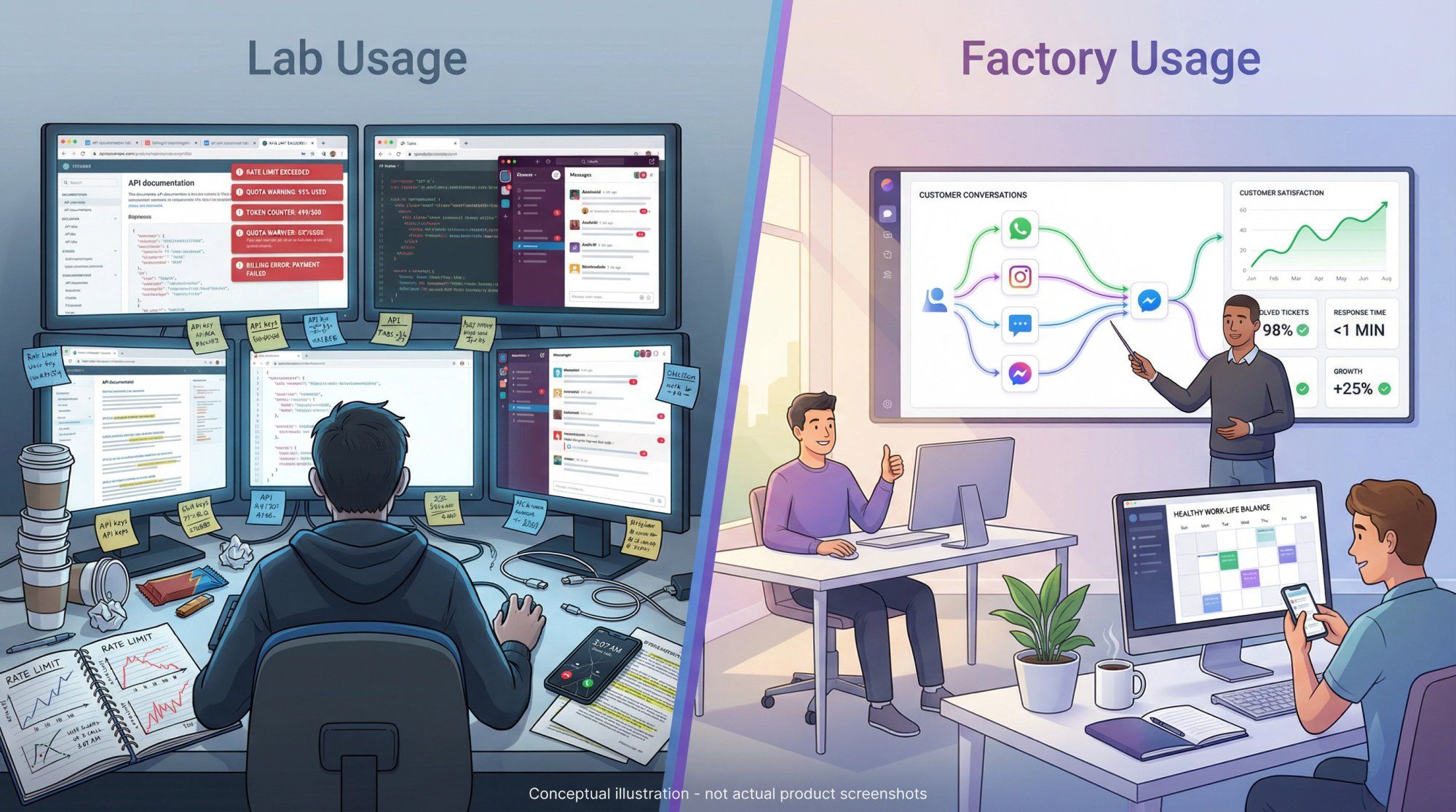
Treat the Free Tier as "lab usage": perfect for learning, prototyping, and proof-of-concepts.
Treat Paid tiers and platforms like Spur as "factory usage": where you put the things that make or save real money.
All prices and limits in this article are based on Google's official documentation and public announcements as of late 2025. Gemini's pricing and quotas change frequently, so always double-check the current Gemini Developer API pricing and rate limits pages before committing to a cost model.
If you're thinking:
"I just want a smart AI agent on WhatsApp, Instagram, Facebook, and my website that can answer questions, look up orders, and follow playbooks. I don't want to manage LLM tokens or EU data flags."
That's exactly what Spur is built for.
What you get with Spur:
→ Actionable AI agents trained on your knowledge base (not just generic Q&A)
→ Multi-channel support: WhatsApp Business API, Instagram automation, Facebook Messenger, and website live chat
→ Unified inbox: One place for all customer conversations with seamless AI-to-human handoff
→ E-commerce integrations: Shopify, WooCommerce, Stripe, Razorpay for automated cart recovery and order updates
→ Simple pricing: No per-token math, just clear monthly plans with generous free trials
You can still care about Gemini API capabilities, but you don't have to implement all the plumbing yourself.
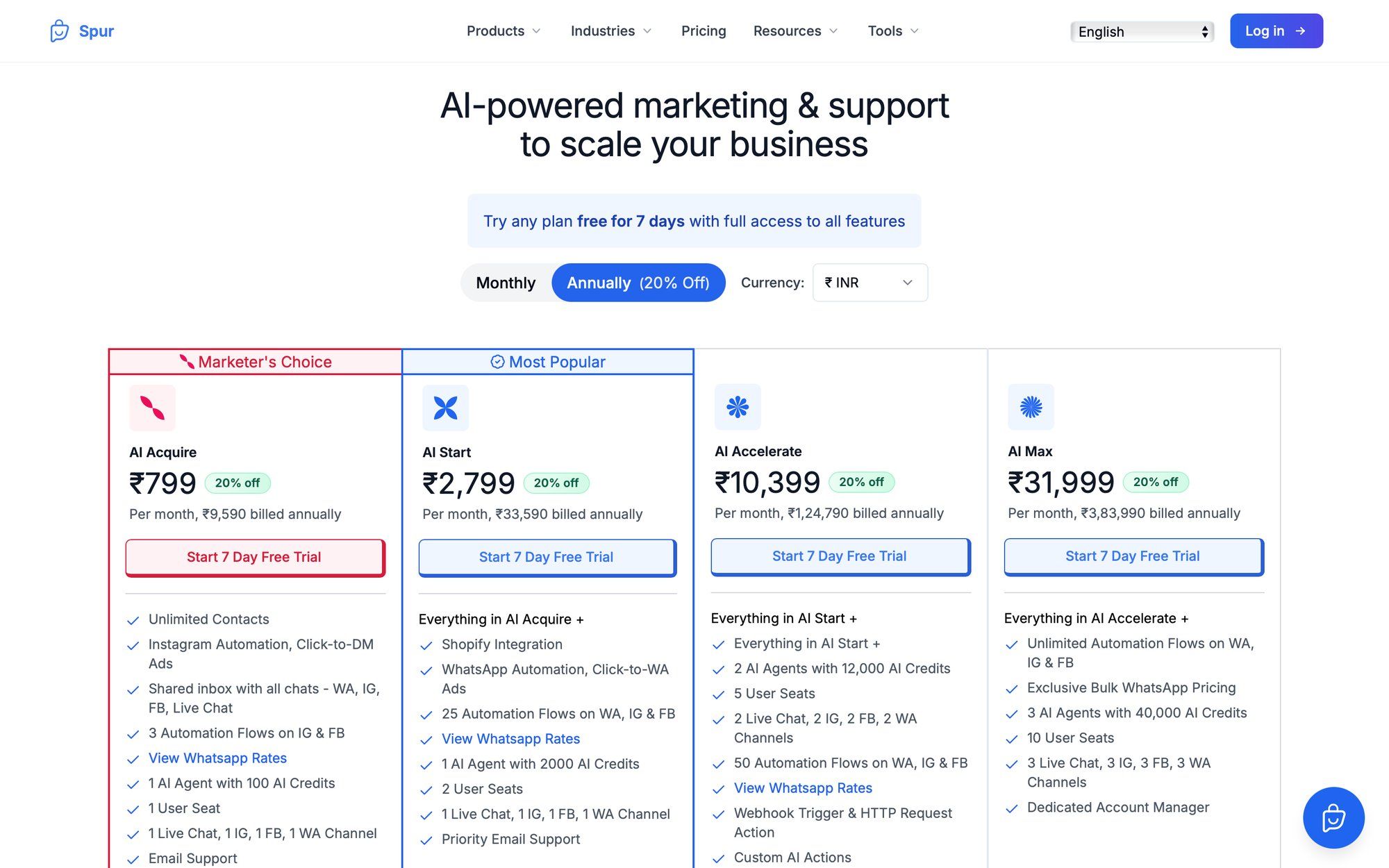
Start your free trial with Spur and see how much easier it is than managing API quotas yourself.