WhatsApp Shared Inbox for Teams: Complete Guide (2026)

Discuss with AI
Get instant insights and ask questions about this topic with AI assistants.
💡 Pro tip: All options include context about this blog post. Feel free to modify the prompt to ask more specific questions!
TL;DR: A WhatsApp shared inbox lets your whole team manage one number together, with assignments, collision detection, AI automation, customer context, and full conversation history. The free WhatsApp Business app tops out at four linked devices with no real team workflows. If more than one person on your team handles customer messages, try Spur free for 7 days: our inbox connects WhatsApp, Instagram, Facebook, and live chat in one place.
Your team is on WhatsApp, but the inbox still belongs to one phone. Messages get missed because nobody knew who was supposed to reply. Two agents answered the same customer with different information. Leads from last month's campaign are still sitting "open" with no owner. You're not running support badly on purpose. You just don't have the right infrastructure yet.
That's what a WhatsApp shared inbox fixes. Not just "letting more people reply," but turning customer conversations into a system your whole team can operate, measure, and improve.
This guide covers everything your team needs to know: what a WhatsApp shared inbox is, how it works, when you need one, which features actually matter, how to set it up, the WhatsApp rules that affect your workflow in 2026, and how Spur's shared inbox fits into all of this.
A WhatsApp shared inbox is a team workspace where multiple agents can read, assign, reply to, tag, resolve, and track WhatsApp conversations from one business number. It replaces "whoever sees it first, replies" with something that actually scales.
Think of the contrast like this:
One phone number. One stream. Limited visibility. No ownership. That's the WhatsApp Business app.
One WhatsApp number. Multiple teammates. Clear ownership. Customer context, automation, and analytics. That's a shared inbox.
A good shared inbox answers four questions instantly for any conversation:
- Who owns this conversation?
- What does this customer need?
- What's already happened?
- What should happen next?
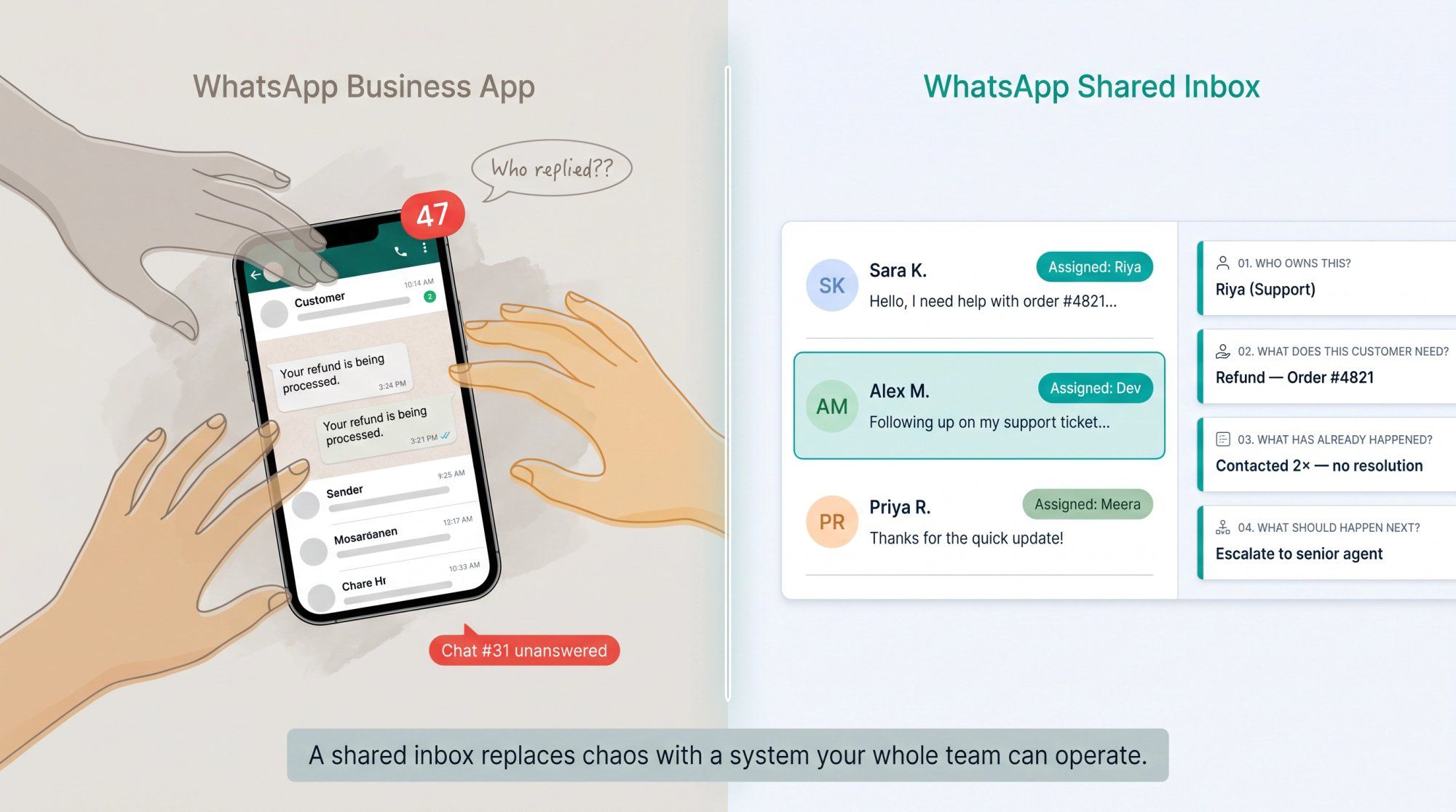
Without those four answers, teams end up asking customers to repeat themselves, sending duplicate replies, missing urgent messages, and having managers chase agents for status updates. With them, the whole operation moves differently.
Our shared inbox at Spur covers WhatsApp, Instagram DMs, Facebook Messenger, and website live chat in one team workspace. With assignment routing, internal notes, saved replies, collision detection, customer context, ticketing, and analytics.
The free WhatsApp Business app is a good starting point. You can create a product catalog, set greeting messages, add labels, write away messages, and link devices. It works well when one or two people handle a manageable number of chats.
But it has a hard ceiling. WhatsApp's official help documentation confirms the Business app supports one phone and up to four linked devices at the same time. That sounds like team access. It's not built for team operations.
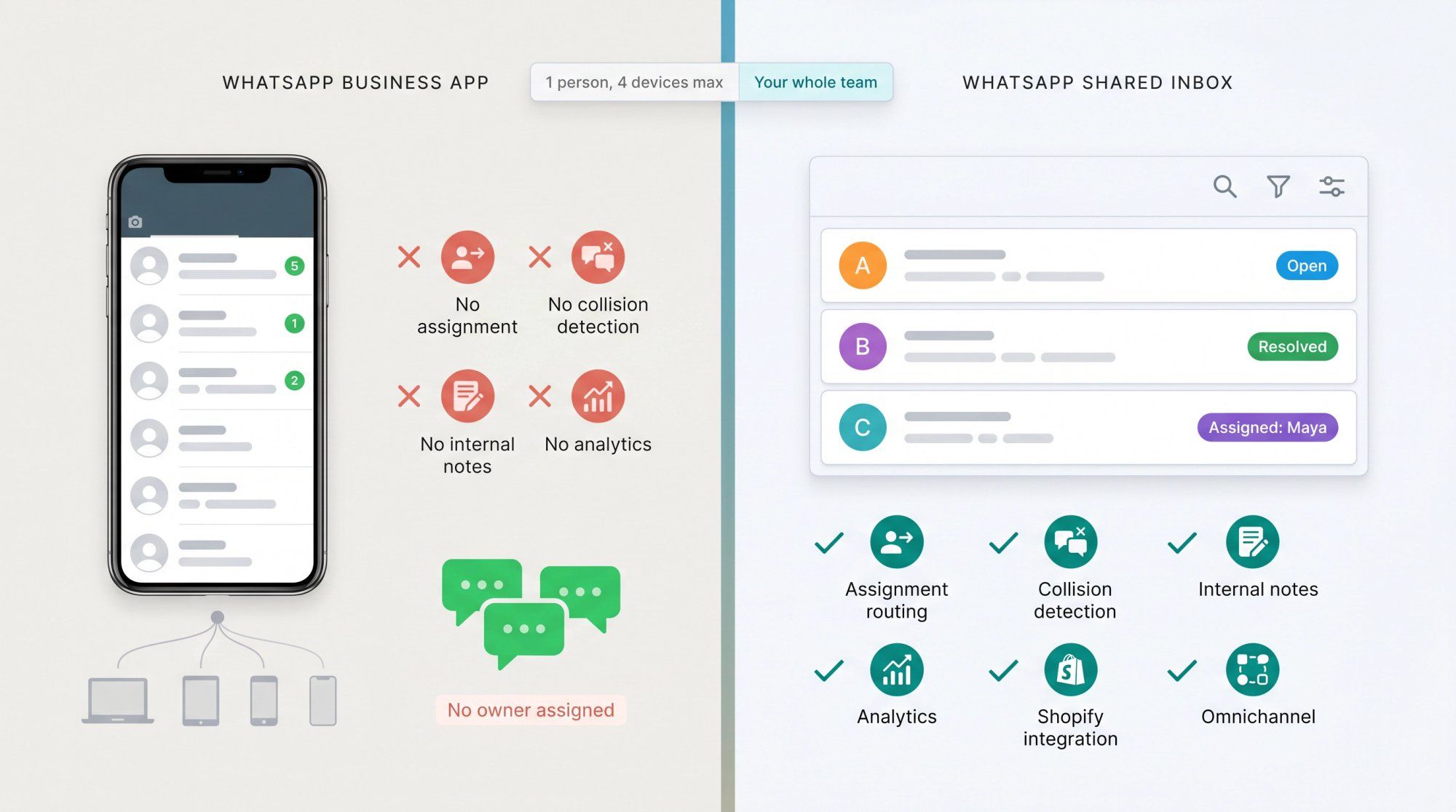
Here's what you can and can't do once you need real teamwork:
| What you need | WhatsApp Business app | WhatsApp shared inbox |
|---|---|---|
| Multiple people can reply | Limited, via linked devices | Yes, built for teams |
| Assign chats to teammates | Manual, no system | Yes, with routing rules |
| See who owns a chat | No | Yes |
| Collision detection (avoid double replies) | No | Yes |
| Internal notes between teammates | No | Yes |
| Track open vs. resolved conversations | Basic labels only | Yes, with ticket statuses |
| Measure response and resolution time | No reporting | Yes |
| Automate routing or replies | No | Yes |
| Connect to Shopify or CRM data | Not natively | Yes, depending on platform |
| Handle WhatsApp + Instagram + live chat together | No | Yes, with omnichannel platforms like Spur |
The core difference: the WhatsApp Business app helps a solo operator reply. A WhatsApp shared inbox helps a team operate.
Once you need ownership, routing, analytics, integrations, or automation, linked devices aren't enough. If your team is also handling conversations across multiple channels at once, see our guide on how to manage multiple WhatsApp Business accounts and how teams organize around them.
Under the hood, a proper team inbox runs on the WhatsApp Business Platform, not the consumer app. The WhatsApp Business Platform is an API-based system designed for business messaging. It's what makes team-level features possible. Spur's WhatsApp Business API integration is built on this platform, giving your team access to routing, automation, templates, and integrations from day one.
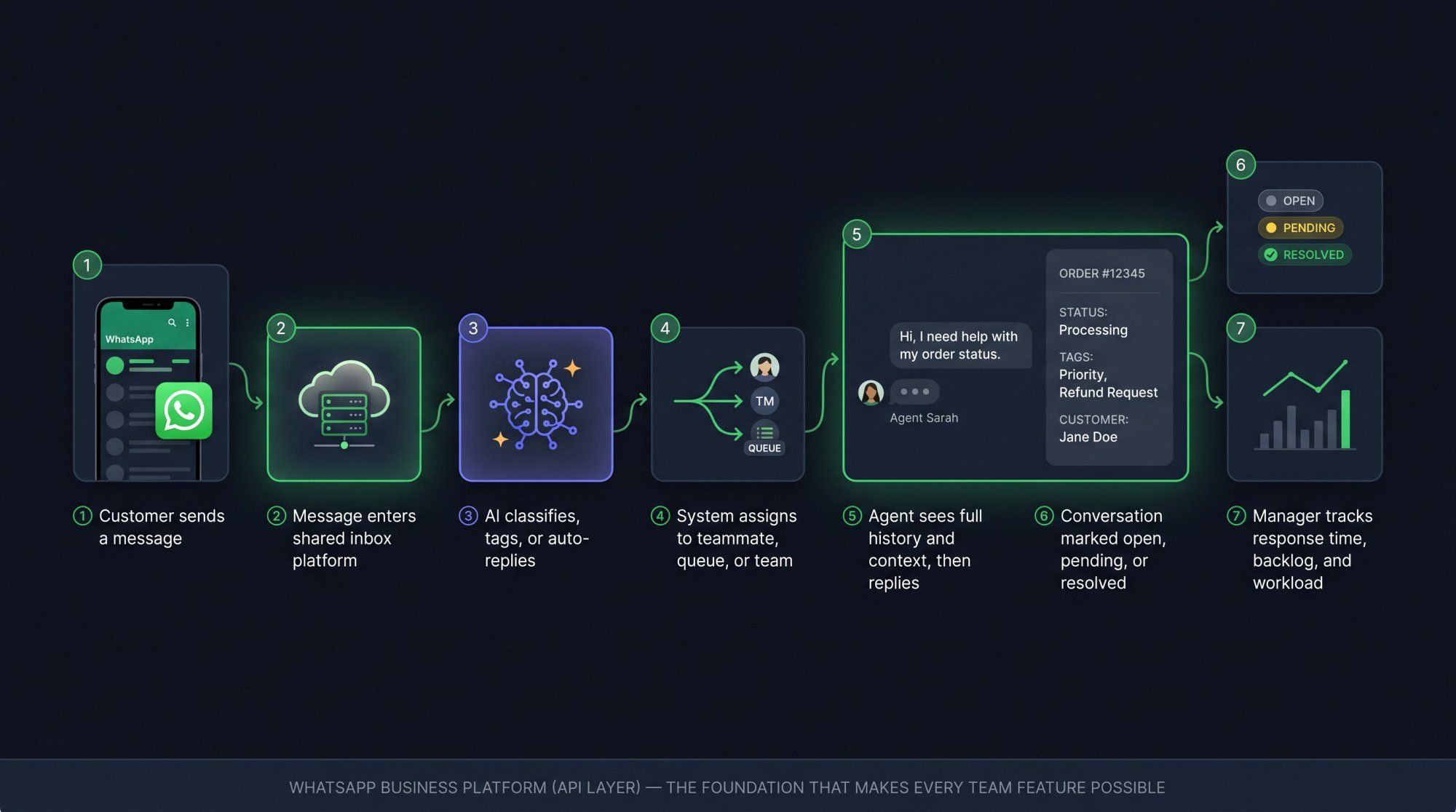
The message flow looks like this:
① A customer sends a message to your WhatsApp business number.
② The message enters your shared inbox platform.
③ Automation or AI may classify it, tag it, or reply.
④ The system assigns it to a teammate, queue, or team.
⑤ The agent sees the full conversation history and customer context, then replies.
⑥ The conversation is marked open, pending, or resolved.
⑦ Managers can track response time, backlog, agent workload, and open conversations.
The API layer is what turns WhatsApp from "a phone app" into "a business channel your systems can actually work with." That's the foundation every team feature is built on.
One important 2026 update worth knowing: WhatsApp has moved from conversation-based pricing to per-message pricing. Businesses are charged per delivered message, based on message category (marketing, utility, authentication, service) and the recipient's country or region. Meta's official pricing page also confirms there's no charge for service messages and no charge for utility messages sent in response to users. For a detailed breakdown of how this affects your costs, see our WhatsApp Business API pricing guide. If your team has been planning around old "conversation bundle" costs, check the updated rate card.
Not all shared inboxes are the same. Some are just a prettier chat interface. Others are real operating tools for customer conversations. The difference shows up fast once a team starts using them.
Team assignment is the most basic requirement. Every conversation needs a clear owner. Assignment can happen manually, automatically, or through rules: route new leads to sales, return requests to support, VIP customers to senior agents, after-hours chats to a queue. Our shared inbox includes custom routing rules and round-robin assignment across teams.
Collision detection means teammates can see when someone else is already typing or handling a conversation. This prevents the worst shared inbox failure: two agents giving contradictory answers to the same customer at the same time. One says "yes, we'll refund this." The other says "sorry, this isn't refundable." Now you have a bigger problem than the original ticket.
Internal notes let agents leave context visible only to the team, not to the customer. "Customer is upset, third delivery issue, offer a priority replacement if they ask again." Without notes, teams use WhatsApp groups or Slack for this, which fragments the context and creates real risk of someone missing critical information.
Tags and statuses help organize the work. Some useful examples:
→ Tags: new lead, high intent, refund request, payment issue, shipping delay, VIP, bulk order
→ Statuses: open, pending, waiting for customer, waiting for internal team, resolved
Start with a small set (10 to 15 tags maximum on day one) and add more only when the volume genuinely demands it.
WhatsApp has two rules that every team member needs to understand.
The 24-hour customer service window: when a customer messages you, a 24-hour window opens. Within that window, you can send free-form replies. After the window closes, you generally need approved template messages to continue the conversation. Your inbox should show agents whether the window is open or closed, because otherwise they'll get failed sends and have no idea why.
The opt-in requirement: WhatsApp's business policy says you can only contact a customer if they've given their phone number and opted in to receive messages from your business. You also have to respect opt-out requests. Spur's documentation on WhatsApp opt-in and opt-out behavior explains that when a customer opts out, the opt-out is enforced on WhatsApp's side. Manually changing their status in the inbox won't override WhatsApp's block. That's actually a feature, not a bug. Your system should protect you from accidentally messaging someone who said no. For a broader look at compliance requirements, see our guide on WhatsApp API GDPR compliance.
The best agent isn't the fastest typist. It's the one who already knows what the customer needs before they start typing.
For ecommerce support, that means order number, order status, payment status, shipping status, return status, and purchase history, all visible inside the conversation, not in a separate tab. For sales, that means lead source, campaign, budget, location, product interest, and lead stage. Our shared inbox surfaces this context directly in the chat view, pulling in data from Shopify, WooCommerce, and custom systems.
Search should let your team find conversations by customer name, phone number, message text, tag, status, assigned agent, or channel. Spur's help center notes that inbox search includes Shopify order ID. That matters significantly for ecommerce teams who spend time hunting for order details across multiple tools.
A lot of tools now say "AI." That doesn't mean much without specifics.
An AI-ready inbox needs clean knowledge sources, customer context the AI can actually see, the ability to take actions (not just answer questions), guardrails for when not to answer, and clear human handoff.
Our AI agents let you train on your own knowledge base (your product catalog, return policy, shipping terms, pricing, booking process) and deploy them on WhatsApp, Instagram, Facebook Messenger, and live chat. The AI can check order status, collect lead details, book appointments, and hand off to a human when it hits a situation it shouldn't handle alone. We also let you train AI agents on your own website data. That's something generic bot platforms don't support natively.
WhatsApp's own policy requires that when you use automation in the customer service window, you provide prompt and clear escalation paths: in-chat human transfer, phone, email, or a support form. That's the right philosophy anyway. Automate the repetitive questions, not the relationship.
Our pricing page shows AI agent-to-live-chat escalation as a core capability across plans.
Your customers don't think in channels. A customer might discover you on Instagram, ask a question on WhatsApp, and later start a live chat on your website. If each of those lives in a separate tool, your team sees four disconnected conversations instead of one customer journey.
Our shared inbox unifies WhatsApp, Instagram DMs and comments, Facebook Messenger, and website live chat in one team workspace. No channel-switching, no context loss. For teams managing high volumes of Instagram messages specifically, see our guide on handling high-volume DMs on Instagram.
For ecommerce specifically, key integrations include Shopify, WooCommerce, shipping tools like Shiprocket, returns tools like Return Prime, and custom ecommerce platforms. The WhatsApp Business API page covers abandoned checkout recovery, order updates, shipping updates, and upsell/cross-sell flows built directly into the workflow. For a deeper look at how these ecommerce workflows play out, see our guide to WhatsApp for ecommerce.
If you can't see what's happening, you can't improve it. Track first response time, average resolution time, open backlog, agent workload, automation success rate, human escalation rate, and reopened conversations. For sales teams, also track lead-to-meeting and meeting-to-sale conversion. For ecommerce, track revenue recovered and repeat purchase behavior from WhatsApp conversations. Spur's analytics dashboard surfaces all of these metrics in one place so you can act on the data, not just collect it.
Role-based permissions matter as the team grows. Not every agent should be able to edit templates, configure automations, access billing, or export customer data. Our shared inbox supports role-based access controls so you can give people exactly what they need without opening up everything.
Here's the practical setup process, roughly in order.
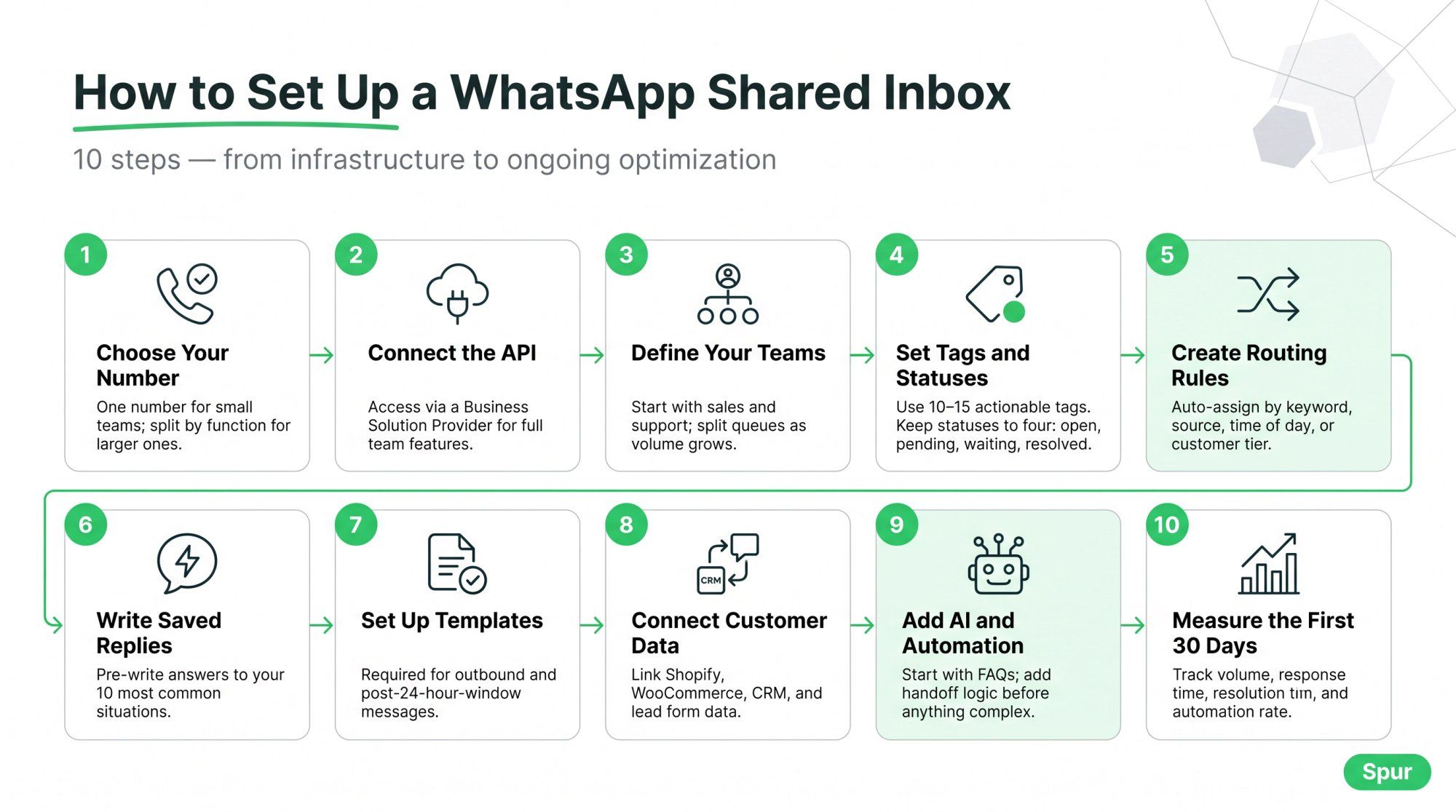
Step 1: Decide on your WhatsApp number. One number is simpler for most small teams. Larger teams sometimes use separate numbers for sales, support, and regional teams. You can add multiple phone numbers per team with separate routing. That's useful when the sales team and support team should work out of distinct queues.
Step 2: Connect the WhatsApp Business Platform. A proper team inbox requires access through a Business Solution Provider (BSP). This gives you API-based messaging, approved templates, automation, team inbox access, routing, integrations, and reporting. WhatsApp describes the Business Platform as the API layer for lead generation, customer care, and commerce use cases. It's the infrastructure that makes team features possible. Spur is a verified BSP, so connecting through us gives you the full platform in one setup.
Step 3: Define your teams. Don't dump every chat into one queue forever. Start with two: sales and support. Split further only when volume demands it. Common additions include returns, shipping, billing, VIP, and partnerships.
Step 4: Set up tags and statuses. Start small (10 to 15 tags maximum). Make every tag actionable: "refund requested," "shipping delayed," "high intent lead," "payment issue," "bulk order." Avoid vague tags like "important" or "check." For statuses, keep it simple: open, pending, waiting for customer, resolved.
Step 5: Create routing rules. This is where the inbox starts saving real time. Route messages containing "refund" to support, route leads from click-to-WhatsApp ads to sales, auto-assign after-hours chats to a morning queue, escalate VIP customers to senior agents. Spur's help center documentation shows inbox views including "your inbox," "unassigned," "AI agents," "teams," and "all" with channel filters. So routing rules connect directly to what each agent sees.
Step 6: Write saved replies. Saved replies aren't lazy, they're quality control. Write them for your most common situations: greeting, asking for an order number, your return policy, store hours, pricing, booking a demo, handoff to human. Make them sound like a person, not a government form.
"Dear customer, we acknowledge your query and will revert at the earliest" is not a saved reply. It's a trust destroyer.
Step 7: Set up WhatsApp templates. Templates are required for outbound messages and for conversations outside the 24-hour window. Create templates for order confirmation, shipping updates, delivery failure, abandoned cart, appointment reminders, and lead follow-up. WhatsApp classifies templates into categories (marketing, utility, authentication, service) and pricing depends on category and country. Our no-code workflow builder makes it easy to set up template-based flows without writing code, and our broadcast tools let you send outbound campaigns to opted-in contacts at scale.
Step 8: Connect your customer data. For ecommerce: Shopify, WooCommerce, shipping, returns, and payment tools. For sales: CRM, lead forms, ad campaigns, and calendar booking. The customer context panel in our shared inbox surfaces order history, shipping status, custom fields, preferences, tags, and segments directly in the conversation view.
Step 9: Add AI and automation (carefully). Start with the boring questions: store hours, return policy, order status, COD availability, lead qualification. The best first AI workflow is simple: customer asks a common question, AI answers from the knowledge base, and if the AI isn't confident, it routes to a human. Our platform lets you train AI agents on your own knowledge sources and deploy them across channels with no-code flows.
Step 10: Measure the first 30 days. Track incoming chat volume, first response time, median resolution time, open conversations at end of day, automation success rate, human escalation rate, and agent workload. Then improve the system weekly. The first 30 days tell you which routing rules are wrong, which saved replies are missing, and which automations need work.
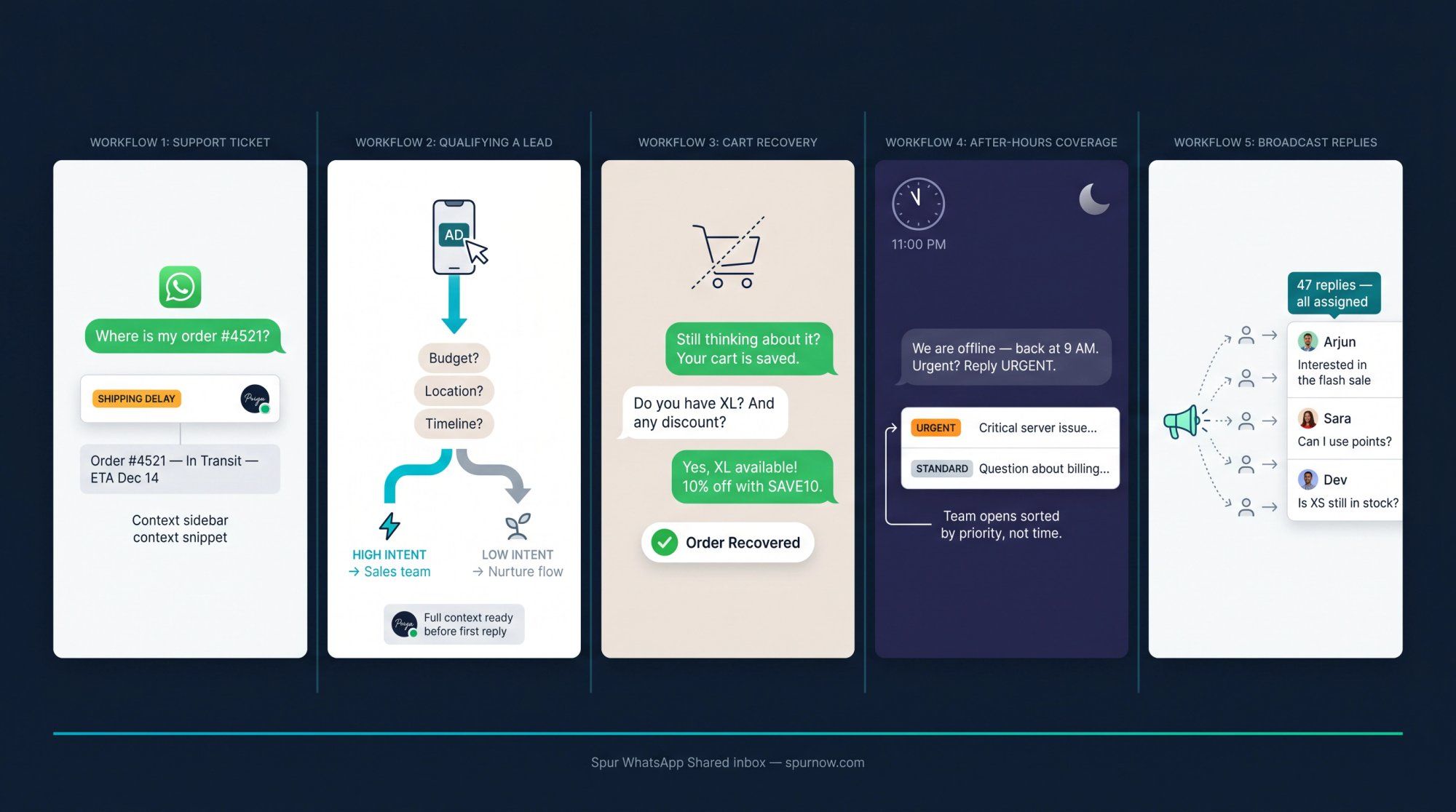
Customer messages on WhatsApp → AI asks for the order number (or detects it from the profile) → inbox shows order and shipping context → conversation tagged "shipping delay" or "refund request" → agent takes ownership → resolves or escalates → conversation closes with a clear outcome note.
The customer never had to repeat their order number. That's the whole point.
Lead enters from a click-to-WhatsApp ad, website button, or Instagram link. Automation asks qualifying questions: budget, location, timeline, product interest. The lead is tagged by intent level. High-intent leads get assigned to the sales team within minutes. Low-intent leads enter a nurture flow. The sales rep sees the ad source, qualification answers, and contact details before they type a single word.
Speed matters most when intent is fresh. Leads that don't hear back in the first 10 minutes rarely convert. See our guide to WhatsApp lead generation for more on building these qualification flows.
A shopper abandons checkout. A WhatsApp template is sent (if the customer has opted in and rules allow). The customer replies with a question: size, discount, delivery time. The reply opens in the shared inbox. AI handles the basic objection. The agent steps in for size help, payment issues, or discount decisions. The order gets recovered.
Our WhatsApp Business API page highlights abandoned checkout recovery as one of the core ecommerce flows. It's one of the highest-ROI workflows a Shopify or WooCommerce team can run. For a full breakdown of cart recovery tactics, see our cart abandonment solutions guide.
A customer messages at 11 PM. An auto-reply sets expectations honestly. AI answers simple questions from the knowledge base. Urgent messages (angry customer, payment failure) get tagged for morning priority. When the team starts work, they open the queue sorted by priority, not by time.
The customer got an immediate response, and the team didn't pretend to be online when they weren't.
Your team sends a campaign template to a segment of customers: a product drop, a flash sale, a restock alert. Customers start replying. Those replies land in the shared inbox, not in a flood on a single phone. Conversations get assigned by team or by what the customer said. Agents close sales, answer objections, and move the conversation forward.
The campaign isn't "done" when the message goes out. It's done when the conversations are resolved. Our broadcast tools are built for exactly this: campaigns that flow directly into your team's shared inbox so no reply goes unanswered.
WhatsApp isn't just another chat widget. It has rules around opt-in, templates, pricing, automation, escalation, and data. Teams that understand these avoid expensive mistakes. Teams that don't often find out the hard way.
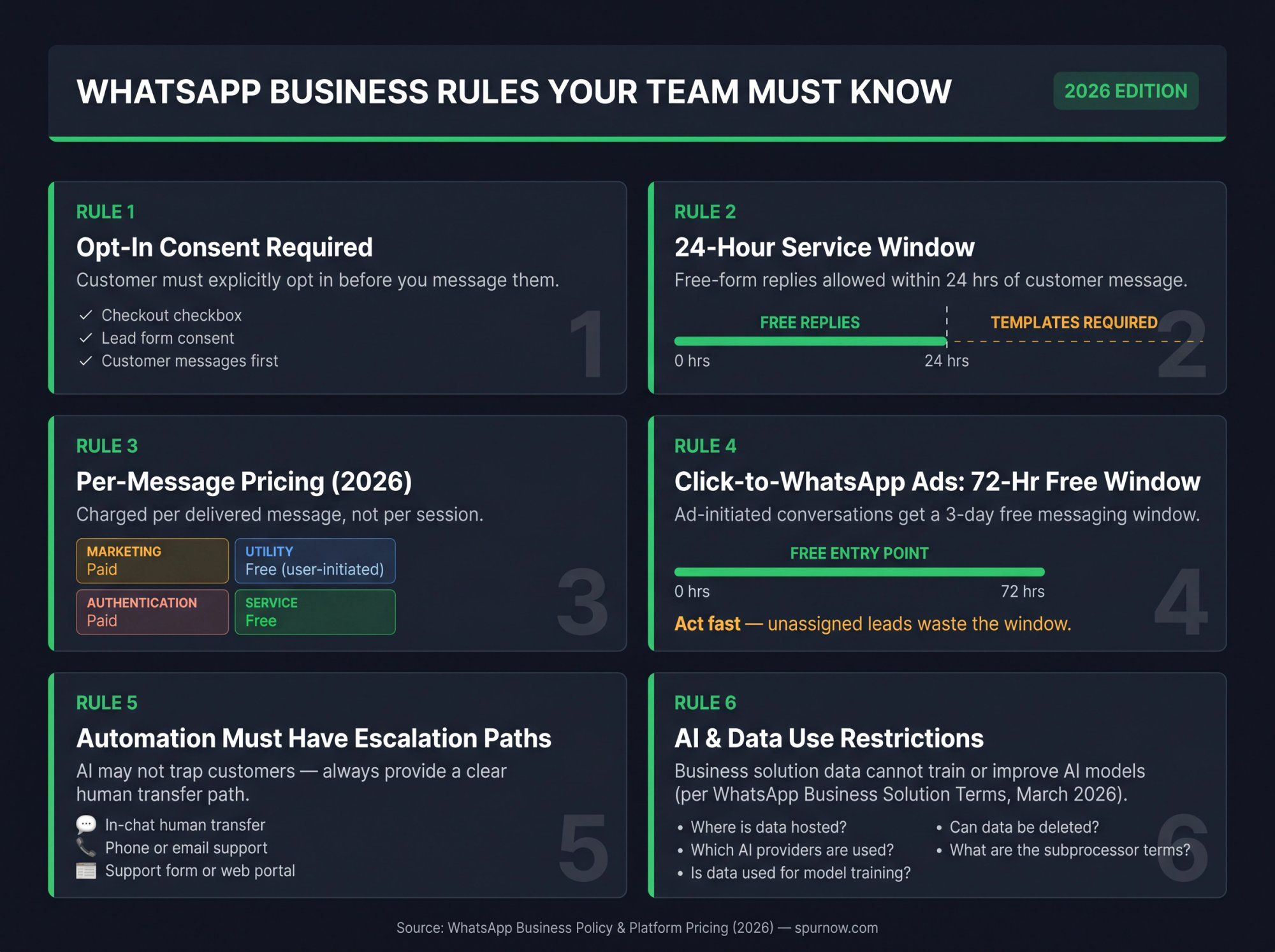
WhatsApp's business policy is clear: you can only contact a customer on WhatsApp if they've given their mobile number and explicitly opted in to receive messages from your business. You also have to respect opt-out requests.
Good opt-in examples:
• A checkout checkbox for order updates
• A lead form with clear WhatsApp consent
• A website form that states WhatsApp communication
• The simplest case: the customer initiates the conversation by messaging you first
Don't buy phone lists and start messaging. That's a fast way to destroy deliverability, get your number flagged, and lose customer trust.
When a customer messages you, the 24-hour customer service window opens. Within that window, you can send free-form replies. Outside it, approved templates are required. Your inbox should show agents the window status clearly so they know whether a normal reply will go through or whether they need a template.
As of 2026, WhatsApp Business Platform pricing is per delivered message, not per conversation session. The price depends on message category (marketing, utility, authentication, service) and the recipient's country or region. Service messages are free. Utility messages sent in response to a user are also free. Marketing messages have a cost that varies by country.
If your team has been planning budgets around old "conversation bundle" assumptions, check the current rate card. Our WhatsApp Business API pricing guide breaks down how the per-message model affects different campaign types and team sizes. The per-message model changes the math for high-volume campaigns.
When a customer messages you through a click-to-WhatsApp ad or a Facebook Page call-to-action, a free entry point opens for three days, and messages in that window are not charged. For sales teams running paid traffic, this means your shared inbox needs to be ready for fast follow-up the moment an ad campaign is live. A 72-hour free window is worthless if leads sit unassigned for two days.
WhatsApp's policy allows automation during the customer service window, but businesses must provide prompt, clear, and direct escalation paths: in-chat human transfer, phone, email, web support, or a support form. Your AI agent should never trap customers. If a customer asks for a person, they get a clear path to a person. See our guide to building a clear customer service escalation process for practical frameworks on how to structure this within your team.
WhatsApp's Business Solution Terms (last modified March 2026) state that third-party service providers must process business solution data only on behalf of the business for the services requested. Business solution data cannot be used to train or improve AI models, except for fine-tuning for that specific business's exclusive use.
Before choosing any WhatsApp inbox provider, ask:
• Where is customer data hosted?
• Which AI providers are used?
• Is customer data used for model training?
• Can data be deleted?
• What are the subprocessor terms?
For a detailed look at WhatsApp API data compliance, see our guide on WhatsApp API GDPR compliance.
Our data processing agreement, effective April 2026, lists AWS Frankfurt, Google, and Cloudflare as subprocessors, describes deletion and recovery windows, and covers breach notification obligations. Our GDPR page states our servers are hosted in Frankfurt and that we set WhatsApp Cloud API data localization to Europe at number setup. Our privacy policy, also effective April 2026, describes the categories of information we collect, third-party providers, international data transfers, and your rights under applicable data protection law. Teams with active compliance requirements should verify the latest details during procurement.
We built Spur because most businesses don't want "just a WhatsApp inbox." They want a customer engagement system that covers WhatsApp, Instagram, Facebook Messenger, and live chat in one place. With AI that actually does something useful, automation that doesn't require a developer, and ecommerce integrations that work out of the box.
Spur is a verified Meta Business Partner, GDPR compliant, and a Shopify Partner — the partner credentials you want from the tool that handles your customer conversations. Here's what our shared inbox specifically gives your team when you move past generic solutions:
Omnichannel from day one. One team workspace for WhatsApp, Instagram DMs and comments, Facebook Messenger, and website live chat. Your customers don't switch channels. Your team's view of them shouldn't either.
AI agents trained on your knowledge base. Not a generic FAQ bot. Our AI agents know your return policy, your product catalog, your pricing, your booking process. They answer the questions your team answers 50 times a day, and hand off to a human the moment they hit something they shouldn't handle alone. We train AI on your own data. That's something tools like Manychat don't support natively.
No-code automation builder. Our visual workflow builder lets you create flows for abandoned cart recovery, lead qualification, post-purchase updates, and routing rules without writing a single line of code. Connect to Shopify, WooCommerce, Stripe, Razorpay, Shiprocket, and more.
Team inbox built for real operations. Assignment routing, round-robin distribution, internal notes, collision detection, saved replies, ticket statuses, custom views, SLA management, agent analytics, and a customer context panel with order history and custom fields. All in one place.
Broadcasts and drip campaigns. Run marketing campaigns directly from the same tool your support team uses. When customers reply to a broadcast, those conversations land in the shared inbox automatically, with the campaign context already attached.
Built for D2C, Shopify, real estate, education, and service businesses. Our workflows are designed around the actual use cases teams in these industries face, not generic enterprise helpdesk templates. See real results from businesses like yours across fashion, jewelry, real estate, D2C, and more.
Spur is probably less ideal if your primary need is a complex enterprise email helpdesk with deep SLA workflows across email, phone, and internal IT systems. But for businesses where WhatsApp and Instagram drive significant customer conversations, we cover the full stack.
Start your 7-day free trial (no credit card required to get started).
There are two separate cost layers, and a lot of teams forget about the second one when comparing options.
Layer 1: Platform subscription. This is what you pay the software provider. It covers seats, channels, AI credits, automation flows, integrations, reporting, and support tier. Prices vary significantly across tools.
Layer 2: WhatsApp messaging charges. This is separate from the software subscription. Meta's pricing page confirms WhatsApp Business Platform charges are per delivered message, based on message category and country. Some providers add markup, wallet fees, or separate handling charges. Always check the actual rate card before large campaigns. Our WhatsApp Business API pricing guide explains exactly how these charges are structured and what to compare across providers.
| Platform | Pricing (2026 snapshot) | Best fit |
|---|---|---|
| WhatsApp Business app | Free; 1 phone + up to 4 linked devices | Solo owner or very small team |
| Spur | $12/mo, $31/mo, $127/mo, $399/mo (annual); shared inbox across all plans; higher plans add seats, AI credits, flows, channels, webhooks, custom AI actions | Teams wanting WhatsApp + Instagram + live chat + AI + ecommerce automations |
| respond.io | $79/mo, $159/mo, $279/mo (annual); WhatsApp fees not included | Broader omnichannel messaging teams |
| Zoko | $49.99/mo to $499.99/mo; some AI and flow features are add-ons | Shopify + WhatsApp commerce teams |
| Interakt | ₹2,499/mo and ₹3,499/mo + taxes (India-priced) | India-focused WhatsApp/Instagram teams |
| WATI | Plan tiers with user limits and add-on user costs | WhatsApp-first support + marketing teams |
Spur's 7-day free trial includes shared inbox access from day one. The AI Acquire plan at $12/month gives one seat and inbox access across WhatsApp, Instagram, Facebook, and live chat. The AI Start plan at $31/month adds WhatsApp automation, Shopify integration, click-to-WhatsApp ads, two seats, and 2,000 AI credits. Higher plans scale seats, flows, webhooks, custom AI actions, and support.
When comparing options, don't stop at the sticker price. Also compare: seats included, extra user cost, whether WhatsApp fees are included or separate, channels included vs. add-on, AI credits included or add-on, automation limits, ecommerce integrations, analytics depth, data/security posture, and whether the inbox is actually easy for your agents to use day to day.
Cheap software gets expensive when your team hates working in it.
Pricing changes over time. Verify the latest plan details on each provider's pricing page before committing.
Before you sign up for anything, run through these. Spur's shared inbox is designed to answer yes to every item below, but use this checklist to evaluate any platform you're considering.
→ Can you assign conversations to specific agents?
→ Can you assign by team?
→ Does it support round-robin assignment?
→ Can agents see who currently owns a chat?
→ Is there collision detection to prevent double replies?
→ Can you leave internal notes visible only to the team?
→ Can you mention or tag teammates in notes?
→ Can closed conversations be reopened?
→ Does the inbox show the 24-hour customer service window status?
→ Can agents send approved templates directly from the inbox?
→ Does it handle opt-in and opt-out management clearly?
→ Does it surface failed template message errors?
→ Does it support click-to-WhatsApp ad tracking and follow-up?
→ Can you train the AI on your own knowledge base?
→ Can the AI hand off to a human agent when needed?
→ Can you build no-code automation flows?
→ Can the system trigger workflows based on tags or customer fields?
→ Can the AI take actions (not just answer FAQs) like checking order status or creating a ticket?
→ Can it connect to external systems through webhooks or HTTP requests?
→ Does it connect to Shopify or WooCommerce?
→ Can it show order status inside the inbox conversation view?
→ Can it connect to your CRM?
→ Can it connect to shipping and returns tools?
→ Can you see first response time and resolution time by agent?
→ Can you track agent workload and open backlog?
→ Can you filter reports by tag, team, and channel?
→ Where is customer data hosted?
→ Who are the subprocessors?
→ Is there a data processing agreement?
→ Does the tool support role-based access controls?
→ Is customer data used to train AI models?
→ What happens to data and credits after you cancel?
→ How many user seats are included in the base plan?
→ What's the cost per additional user?
→ Are WhatsApp messaging charges included or separate?
→ Are AI credits included or add-on?
→ What happens if you exceed the AI credits?
See Spur's full pricing and plan details to compare against your requirements.
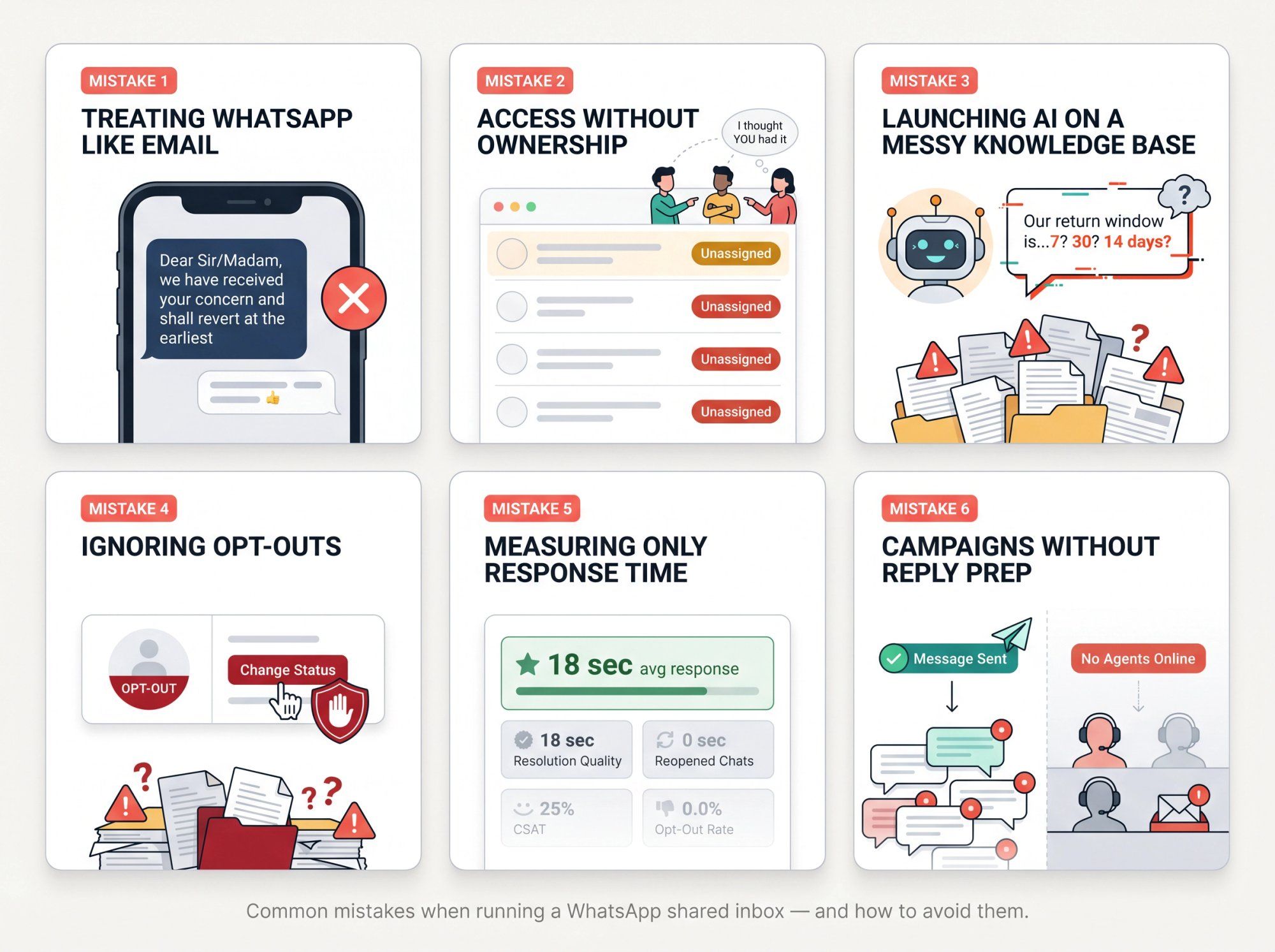
WhatsApp is faster, more personal, and more conversational than email. Customers expect shorter, clearer, more direct replies. Nobody wants to read "Dear Sir/Madam, we have received your concern and shall revert at the earliest" on WhatsApp.
Write the way a helpful person actually talks: "On it, can you send your order number?" That's a reply. The formal version is noise.
Access without ownership creates chaos. The rule is simple: many people can see the inbox, but every active conversation needs one owner. Unassigned conversations should be temporary. Set a rule that every new chat gets an owner within 15 minutes during working hours. Without ownership, things fall through the gap and everyone assumes someone else handled it.
AI is only as good as the information you feed it. Before deploying any AI agent, make sure:
• Your refund policy is current
• Your shipping policy is accurate
• Your product FAQs are correct
• Your escalation rules are clear
Launching AI on messy source material doesn't save time. It creates confident wrong answers at scale, which is worse than no AI at all. Our guide on how to train your AI on your website data walks through how to prepare a clean knowledge base before your first AI deployment.
If a customer opts out of marketing messages, the right response is to respect it, not work around it. Spur's documentation on opt-in and opt-out behavior notes that WhatsApp-side marketing opt-outs are enforced by WhatsApp itself. Manually changing a customer's status in the inbox won't override the block. Marketing template messages will fail. That's the system working correctly. Don't fight it.
Fast bad support is still bad support. Response time matters, but it's not the whole story. Also track:
• Resolution quality
• Reopened conversations (the real indicator of unresolved issues)
• Escalation rate
• Customer satisfaction
• Revenue recovered from conversations
• Opt-out rate
A team that replies in 30 seconds and resolves nothing is not a high-performing support team. For a practical framework on what to track, see our guide to responding faster to customer messages. Speed plus quality is the combination that actually moves the needle.
A broadcast campaign isn't finished when the message goes out. It starts when customers reply. Before sending any large campaign, make sure:
• Agents are online
• Saved replies are ready for the most likely responses
• Tags are set up for quick classification
• Inventory or discount logic is settled
• The team knows what they're empowered to offer
Sending a campaign your team isn't ready to follow up on wastes the campaign entirely.
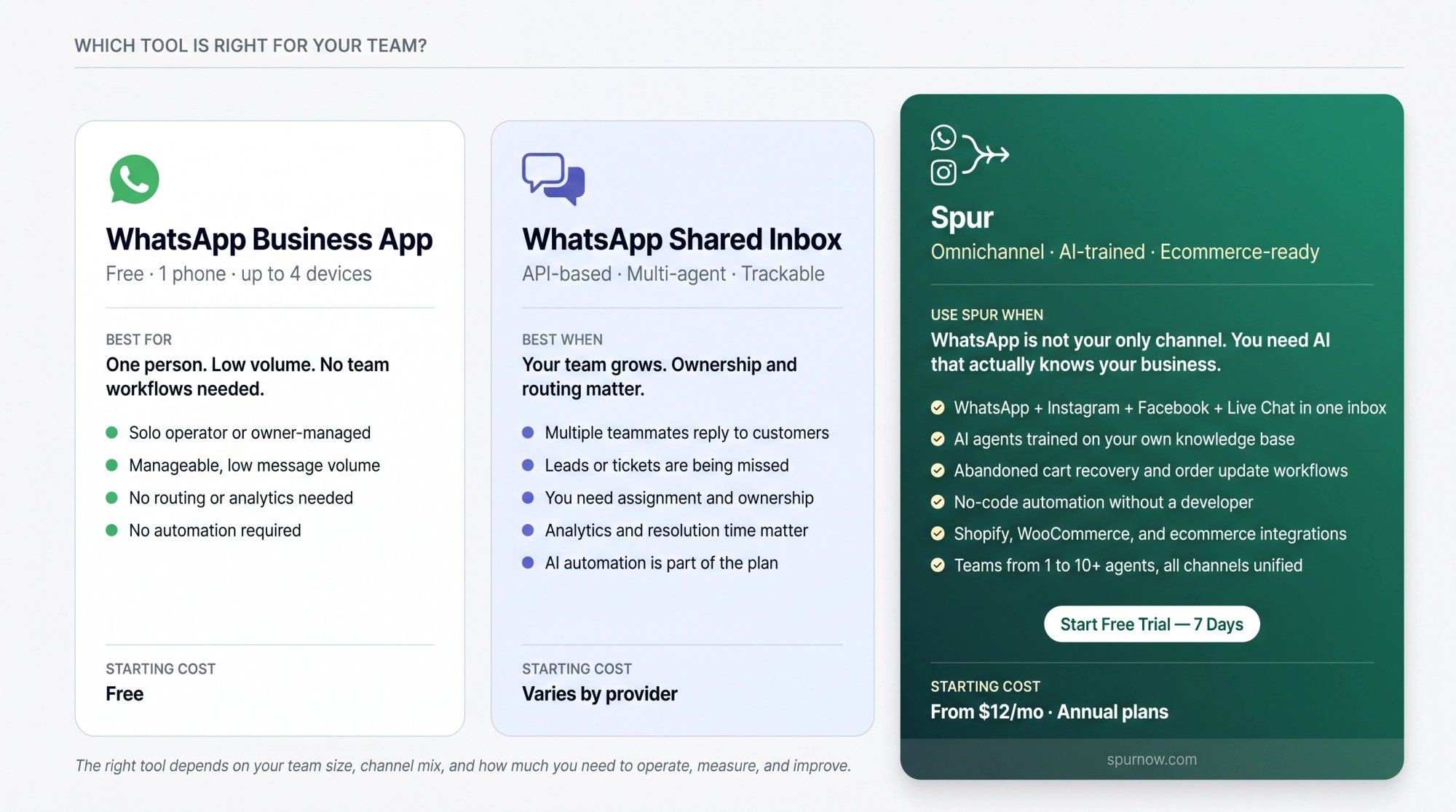
Use the free WhatsApp Business app if you have one person handling chats, low message volume, and no need for routing, analytics, or automation. It's the right tool for that situation.
Use a WhatsApp shared inbox once any of these are true: more than one teammate replies to customers, leads or support requests are getting missed, you need assignment and ownership, you want templates and 24-hour window handling, you need customer context inside conversations, or you want AI to handle repetitive questions and hand off to humans.
Use Spur when WhatsApp matters but it's not your only channel. When Instagram DMs, Facebook comments, and website live chat should all land in the same team workspace. When you want AI agents trained on your own knowledge, not generic bots. When you need ecommerce workflows like abandoned cart recovery, order updates, and shipping automation built into the same inbox your support team uses every day.
The shift from a WhatsApp Business app to a real shared inbox isn't just a software upgrade. It's the moment your customer messaging becomes something you can actually operate, measure, and improve. That's worth getting right.
Start your free trial with Spur and have your first WhatsApp shared inbox live in under a day.
A WhatsApp shared inbox is a team workspace where multiple agents can manage customer conversations from one WhatsApp Business number. It includes assignment routing, internal notes, tags, ticket statuses, saved replies, customer context, automation, and analytics. Basically, it turns WhatsApp from a personal chat app into a business operating tool.
Yes, but there are different levels. The free WhatsApp Business app supports one phone and up to four linked devices, which is fine for a very small team. A proper shared inbox like Spur's is the step up when you need assignment, ownership, analytics, automation, and integrations across a larger team.
For a real team inbox with routing, automation, templates, integrations, and reporting, yes. The WhatsApp Business Platform is an API-based system that turns WhatsApp into a programmable business channel. It's what makes team-level features possible. Spur's WhatsApp Business API handles the full setup so you get all of these capabilities without dealing with the technical complexity yourself.
Not freely. When a customer messages you, a 24-hour customer service window opens. Within that window, you can send normal replies. After it closes, you generally need approved template messages to continue the conversation. For proactive outreach, customers also need to have opted in to receive messages from your business.
Meta's official pricing page confirms there's no charge for service messages and no charge for utility messages sent in response to a user. Marketing messages have per-message costs that vary by country. Pricing can change, so check the current rate card before planning high-volume campaigns.
A shared inbox is where humans manage conversations. A chatbot or AI agent automates parts of the conversation. The best setup uses both: AI handles common questions like order status, store hours, and return policy, while humans handle anything complex, sensitive, or high-value. Our platform is built for exactly this combination, with clean chatbot-to-human handoff built into every workflow.
Collision detection shows your agents when a colleague is already viewing, typing in, or handling a specific customer conversation. It prevents two agents from sending conflicting replies to the same customer at the same time. Sounds rare until it happens and creates a worse problem than the original ticket.
Our shared inbox supports WhatsApp, Instagram DMs and comments, Facebook Messenger, and website live chat. All in one team workspace.
Yes. Our WhatsApp Business API page covers abandoned checkout recovery, order updates, shipping updates, upsell and cross-sell flows, and integrations with Shopify, WooCommerce, and custom ecommerce platforms.
As of April 2026, our pricing page shows annual plans starting at $12/month (1 seat), $31/month (2 seats, WhatsApp automation, Shopify integration), $127/month (5 seats, custom AI actions, webhooks), and $399/month (10 seats, unlimited flows, dedicated account manager). All plans include shared inbox access across channels. WhatsApp messaging charges from Meta are separate. A 7-day free trial is available with no credit card required.