Key takeaways
Learn how Gemini AI works: MoE architecture, multimodal processing, thinking models, and real deployment for customer support automation with Spur.
Ask an AI about this article
Want to skip the deep dive and deploy AI that actually handles customer support, lead qualification, and order management across WhatsApp, Instagram, and your website?
Start with Spur's AI agents → trained on your knowledge base, wired to your systems, and ready to work in minutes.
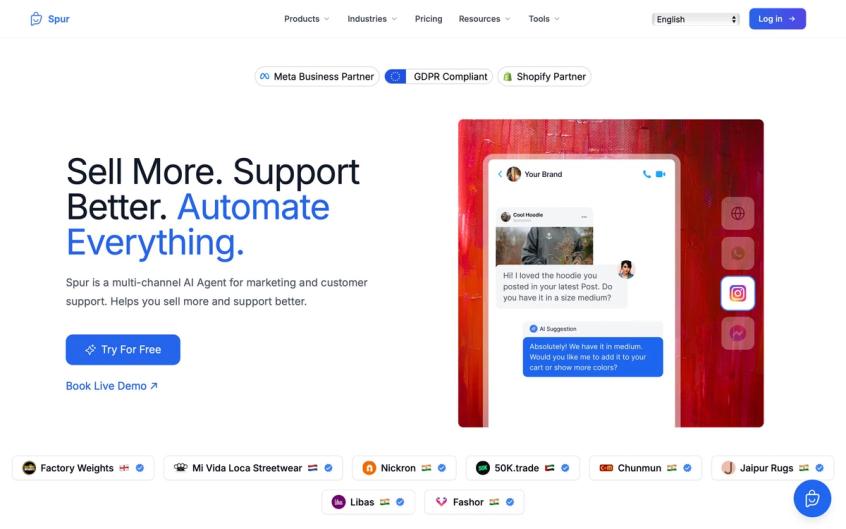
Spur's platform brings Gemini AI to your customer conversations across WhatsApp, Instagram, Facebook, and live chat - with one unified knowledge base and full human oversight.
If you only want the one paragraph answer:
Gemini is a family of multimodal AI models from Google that all share the same core brain: a giant transformer network with Mixture of Experts (MoE) layers, trained on text, code, images, audio, video and structured data. Newer generations like Gemini 2.5 and Gemini 3 add three transformative capabilities on top of that foundation: very long context windows (up to 1 million tokens), an internal "thinking" phase where the model reasons step by step before answering, and native tool use and agent capabilities so it can call APIs, browse, search and execute workflows, not just chat.
Everything else is basically details about how this brain is trained, how it is served at scale, and how products like the Gemini app, Vertex AI, Firebase, and platforms like Spur plug into it.
This guide is about those details. We're going to walk through exactly how Gemini processes information, makes decisions, and transforms from a language model into an actionable AI agent that can actually help your business.
What is Gemini AI? (2025 Model Lineup Explained)
Think of Gemini not as one model, but as a family of AI systems designed for different use cases and performance requirements.
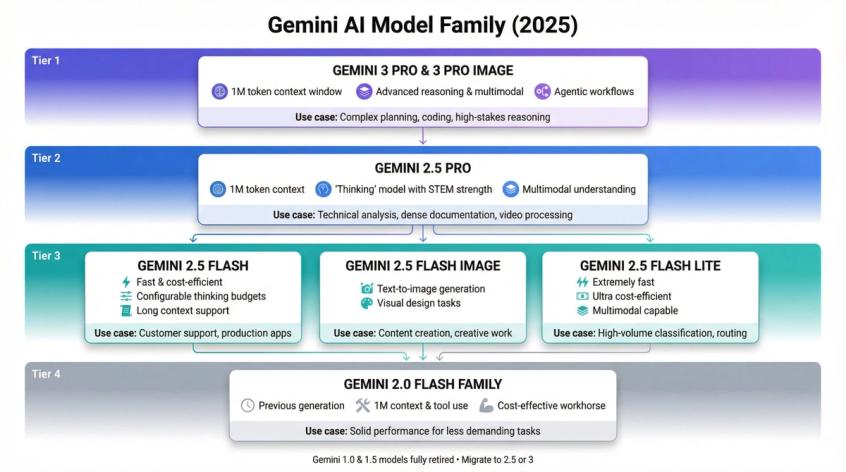
The current lineup includes:
Gemini 3 Pro and Gemini 3 Pro Image are Google's newest, most capable reasoning and multimodal models. Currently in preview on Vertex AI and powering the consumer Gemini app, they feature a 1 million token context window and are optimized for complex "agentic" workflows where the AI needs to plan, execute, and adapt across multiple steps.
Gemini 2.5 Pro represents a "thinking" model with exceptionally strong code and STEM reasoning capabilities. With long context support (up to 1M tokens) and heavy duty multimodal understanding, it can process everything from dense technical documentation to hours of video content in a single request.
Gemini 2.5 Flash / Flash Image / Flash Lite offer lighter and more affordable options that trade some raw computational power for dramatically improved latency and cost efficiency. Despite being "flash" models, they're still multimodal, support long context windows, and come with configurable thinking budgets that let you tune the speed-accuracy tradeoff.
Gemini 2.0 Flash family represents the previous generation of fast, multimodal models. These still appear in many APIs as reliable, cost-effective "workhorse" options for production systems that need solid performance without bleeding-edge capabilities.
It's worth noting that older Gemini 1.0 and 1.5 models have been fully retired in environments like Firebase AI Logic. Requests to those model names now return errors, and Google explicitly directs developers to migrate to Gemini 2.5 or 3.
You'll encounter Gemini in three major contexts:
The Gemini app / Google AI Pro serves consumer and prosumer users who want direct access to AI capabilities without coding.
Google Workspace integrates Gemini across Docs, Sheets, Gmail, Slides, and Meet, bringing AI assistance directly into daily productivity tools. For developers and businesses building custom applications, Vertex AI, Google AI Studio, and Firebase AI Logic provide API access to programmatically leverage these models.
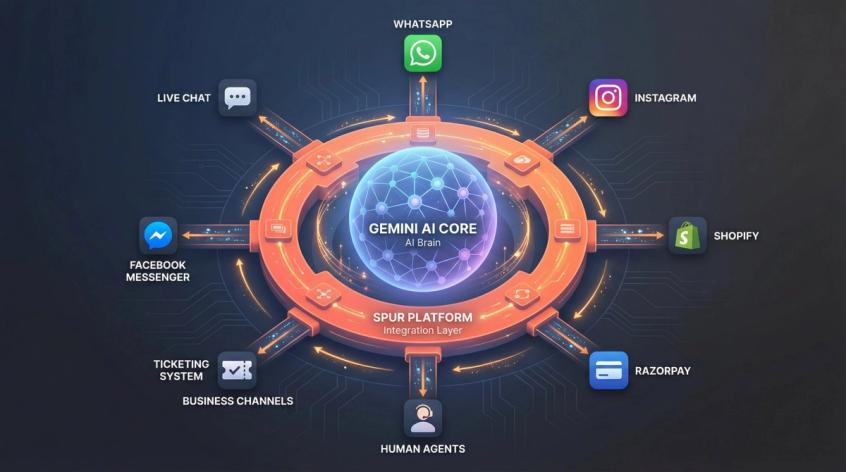
Platforms like Spur sit on top of that infrastructure. We use models such as Gemini and GPT as reasoning engines, then handle the complex real-world integration work: WhatsApp Business API connections, Instagram DM automation, Shopify order lookups, Razorpay payment processing, ticketing systems, and the crucial handoff between AI and human agents when conversations require that personal touch.
How Does Gemini AI Work? (Technical Breakdown)
Strip away the branding, the UI polish, and the marketing messages. At its core, Gemini is doing something conceptually simple but scaled to an almost incomprehensible level.
Step 1: Turn inputs into tokens
Turn every input – whether text, pixels, sounds, or code – into numeric vectors called tokens. This tokenization process is how the model converts human-readable information into mathematical representations it can process.
Step 2: Feed tokens into the transformer
Feed those tokens into a massive transformer network. Inside this network, each token repeatedly "looks at" other tokens through a mechanism called self attention. Think of it like each word in a sentence checking with every other word to understand context and meaning.
Step 3: Predict the next token
Use that network to repeatedly predict the next token. The model essentially asks itself "given everything I've seen so far, what comes next?" billions of times per second.
Step 4: Chain predictions into outputs
Chain those predictions into coherent outputs – words, images, audio, or structured tool calls – that humans can actually use and understand.
All large language models work roughly this way. What makes Gemini special is how it executes this process at production scale:
Native multimodality from the ground up
Unlike older systems that bolted vision and audio understanding onto text-only models as an afterthought, Gemini's core architecture was trained jointly on text, code, images, audio and video from day one. This unified training creates much richer cross-modal understanding.
Mixture of Experts (MoE) architecture
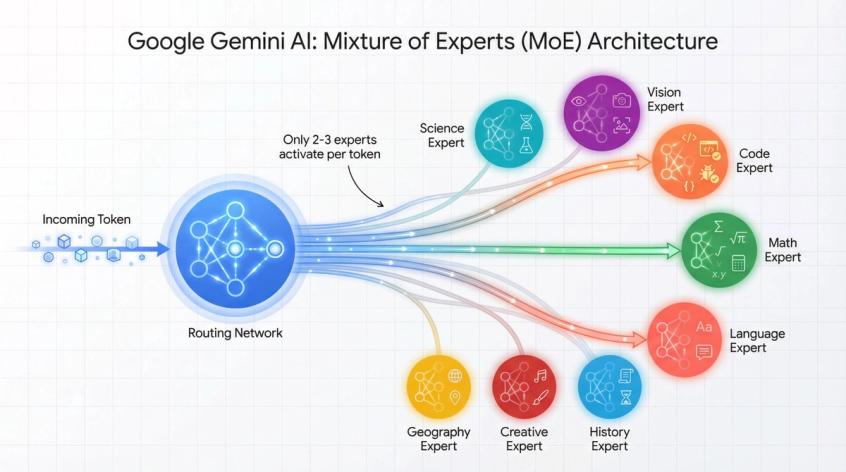
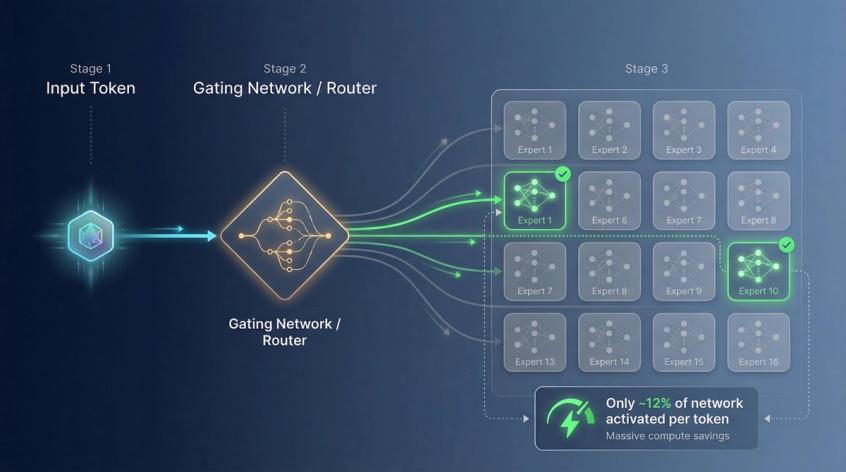
Instead of activating the entire massive network for every single token, MoE routes each token to only a specialized subset of the network. This means Gemini can be absolutely enormous in total parameter count while remaining economically viable to run in production.
Built-in "thinking" phase
Newer versions like 2.5 and 3 implement an internal "thinking" phase that generates lots of hidden reasoning tokens before you ever see the final answer. This is fundamentally different from just asking the model to "think step by step" in your prompt – it's built into the architecture itself.
If you imagine a brain, Gemini functions as a massive cluster of specialized "mini experts" that decide who should think about which part of your input, then synthesize their collective opinions into a single coherent response. Some experts become exceptionally good at code, others at mathematical reasoning, others at visual pattern recognition. You never see this specialization directly, but you absolutely feel it in practice when the model handles wildly different domains with surprising competence.
What is Mixture of Experts in Gemini?
Here's the fundamental tension in AI model design: if you trained a single, dense model with trillions of parameters, you'd create something incredibly powerful but ridiculously expensive and slow to run. Every single token would need to pass through every single parameter. The compute costs would be astronomical.
Mixture of Experts (MoE) is the architectural innovation Gemini uses to elegantly dodge that tradeoff.
The network is split into a large number of expert sub-networks. Each expert is a smaller neural network that learns to handle different patterns and types of information exceptionally well.
A gating network or router examines each incoming token and selects only a few experts to activate for that specific token. For example, it might choose 2 experts out of 16 available ones.
Most of the network stays completely idle for that token. You only pay computational cost for the active experts, but you still benefit from the total knowledge and capability stored across the entire ensemble of experts.
Google's technical documentation for Gemini 1.5 explicitly describes it as a "highly compute efficient multimodal Mixture of Experts model," and Gemini 2.5 builds directly on that 1.5 architecture, extending the MoE approach with even longer context windows and more sophisticated thinking capabilities.
The intuition here is powerful:
Imagine you're running a large customer support center. You absolutely do not want every question to pass through every single specialist on your team. That would be insanely inefficient.
Instead, a smart routing system looks at each incoming question and says "this is a billing issue about a failed payment, route it to Billing Expert 4 who specializes in payment gateway errors, and Legal Expert 2 who knows our refund policies."
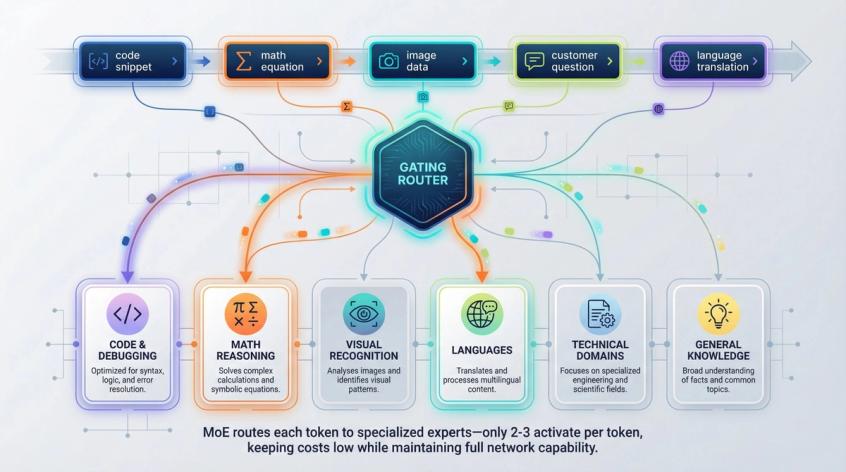
MoE gives Gemini that kind of intelligent routing at the token level. Some experts naturally become extremely good at:
• Code syntax and debugging
• Mathematical reasoning and proofs
• Visual pattern recognition and image understanding
• Specific human languages or technical domains
This specialization happens organically during training as the routing network learns which experts handle which patterns most effectively.
For businesses using Gemini through platforms like Spur, this architecture explains why a single AI agent can handle such wildly different customer service scenarios. When someone asks "where's my order?", different experts activate than when they upload a screenshot of a damaged product or ask for personalized product recommendations based on their purchase history.
Can Gemini Process Images, Audio, and Video?
Gemini is natively multimodal. That phrase gets thrown around so casually that it's easy to gloss over what it actually means and why it matters tremendously for real-world applications.
Most older AI systems handled multimodality through a kludge:
The old way:
They'd use a separate vision model to analyze images and generate text descriptions of what they "saw." Then they'd feed those text descriptions into a language model. Finally, they'd hope the language model could make sense of what were often lossy, incomplete translations of visual information into words.
This approach works for simple cases but breaks down fast when you need true cross-modal understanding.
Gemini does something fundamentally different:
During pre-training, the same core model is exposed to text, code, images, audio, and video simultaneously. It learns to map all these different modalities into a shared representation space where it can reason across them fluidly.
During inference when you actually use the model, you can send mixed inputs in a single request. A long text prompt, plus multiple screenshots, plus a PDF contract, plus an audio recording – all at once. The transformer's attention mechanism operates across all of that simultaneously.
Concretely, here's what happens:
Text gets broken into tokens using standard tokenization, usually at the subword level.
Images or PDF pages get transformed into tokens through vision encoders that capture visual patterns and spatial relationships.
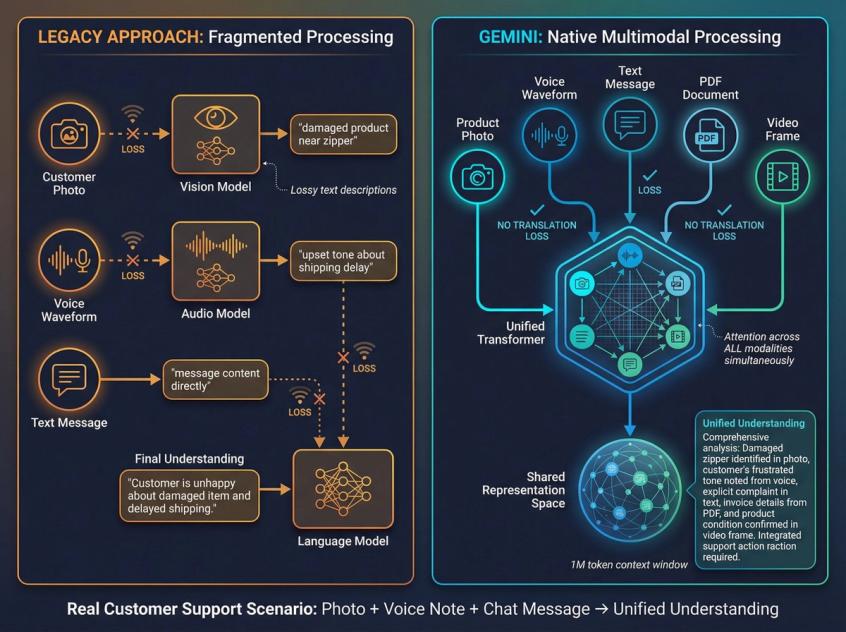
Audio gets converted into spectrogram-like tokens through audio encoders that preserve temporal and frequency information.
All those heterogeneous tokens get packed into one long sequence, up to the context limit (which can be a million tokens for newer models).
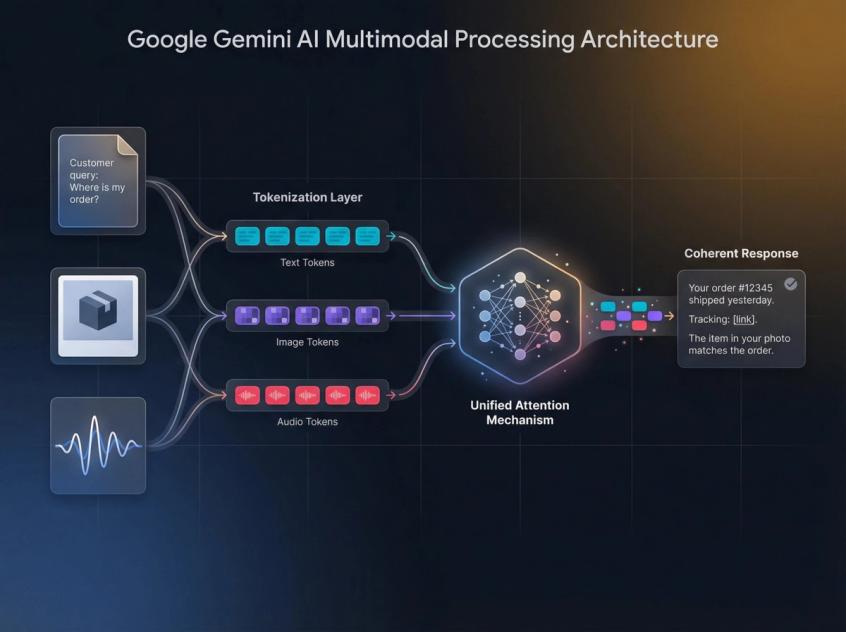
The same attention layers process everything together, letting the model discover relationships between text concepts, visual elements, audio cues, and code patterns in ways that isolated models simply cannot.
This architecture is why Gemini 2.X models can do things like:
• Watch hours of video content and answer detailed, structured questions about specific scenes, speaker statements, and visual elements at precise timestamps
• Read a multi-page PDF contract, understand embedded financial charts and legal diagrams, then cross-reference specific clauses with data from a CSV file to identify inconsistencies or risks
• Analyze screenshots of mobile apps, dashboards, or social media posts and provide detailed feedback about design issues, usability problems, or content strategy
For customer communication platforms like Spur, this multimodal capability is absolutely critical. Your customers rarely send pure text messages. Real conversations look like:
• Product photos showing damage or fit issues that need visual assessment
• Screenshots of error messages from checkout flows that require technical troubleshooting
• PDFs of invoices or receipts with questions about specific line items
• Voice notes on WhatsApp asking complex questions where tone and urgency matter
Gemini's native multimodality means a single AI agent can understand all of that in one coherent pass, maintaining context across modalities instead of treating each input type as a separate, disconnected problem.
When we deploy Gemini-powered AI agents through Spur, this translates into dramatically better customer experiences. The AI doesn't say "I can't read that image" or "please describe what you're seeing." It just processes the visual information alongside the text conversation and responds appropriately.
How Long is Gemini's Context Window?
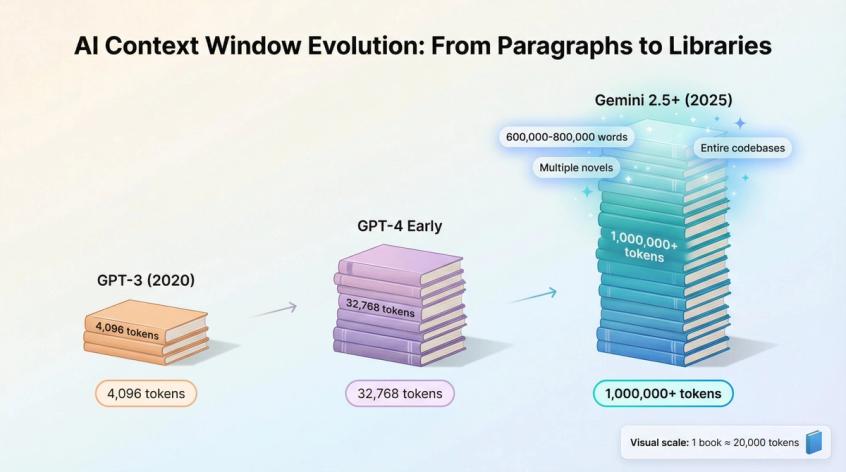
Every large language model has a context window – essentially its short-term memory for a single request or conversation. Historically, this was measured in thousands of tokens. GPT-3 had 4,096 tokens. Even early GPT-4 versions maxed out at 8,192 or 32,768 tokens.
Newer Gemini models have absolutely shattered those limitations:
Gemini 2.0 Flash: 1,048,576 token context window – just over 1 million tokens
Gemini 2.5 Pro and 2.5 Flash: Long context inputs exceeding 1M tokens, with configurations tested in Google's research going up to 2M tokens
Gemini 3 Pro: Maintains that 1M token context window even with its advanced reasoning and multimodal capabilities
To put this in perspective: 1 million tokens translates to roughly 600,000 to 800,000 words. That's multiple thick books, or thousands of back-and-forth chat messages, or entire codebases with full documentation.
Earlier research on the Gemini 1.5 family demonstrated near-perfect recall of specific facts embedded deep inside million-token "haystacks" of text, video, or audio content. The model could accurately retrieve a single sentence buried in the equivalent of several novels worth of text.
This capability fundamentally changes what you can do with AI in production:
Feed an entire codebase into one model call – all the source files, documentation, configuration, and even git history – then ask very specific questions about architecture decisions, bug locations, or refactoring opportunities without any chunking or complex retrieval logic.
Provide a complete knowledge base about your products, policies, and procedures. When a customer asks an edge-case question that requires understanding how three different policies interact, the AI can actually see and reason about all of them simultaneously.
Maintain extensive conversation history. Instead of the AI forgetting what was discussed 20 messages ago, it can reference the entire customer relationship in context.
From a technical perspective, long context is just more room in the model's working memory. The transformer still performs the same fundamental attention operation – each token looking at all other tokens – but across far more tokens simultaneously.
Behind the scenes, Google heavily optimizes this with techniques like:
• Chunked attention that processes the enormous sequence in manageable pieces while maintaining the illusion of full attention
• Smart caching that avoids recomputing attention for static portions of the context that don't change between requests
• Efficient TPU kernels specifically tuned for the massive matrix operations required by attention at this scale
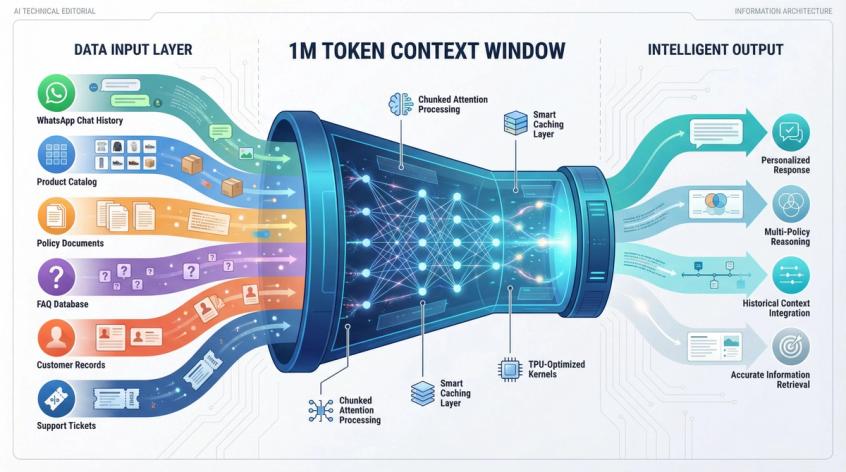
For Spur customers deploying AI agents, long context unlocks powerful workflow patterns:
Paste months of WhatsApp chat history with a customer into a single analysis request and have Gemini extract pain points, purchase preferences, communication patterns, and satisfaction signals without building complex database queries or analytics pipelines.
Feed the complete FAQ, all policy documents, and entire product catalog into the context when handling support conversations. The AI doesn't need to guess which three FAQ entries might be relevant – it sees them all and picks the right information based on the actual question.
Let the model see a complete support thread that spans WhatsApp, Instagram DMs, email, and live chat. Instead of fragmented context where each channel is isolated, the AI understands the full customer journey and can provide coherent, context-aware responses.
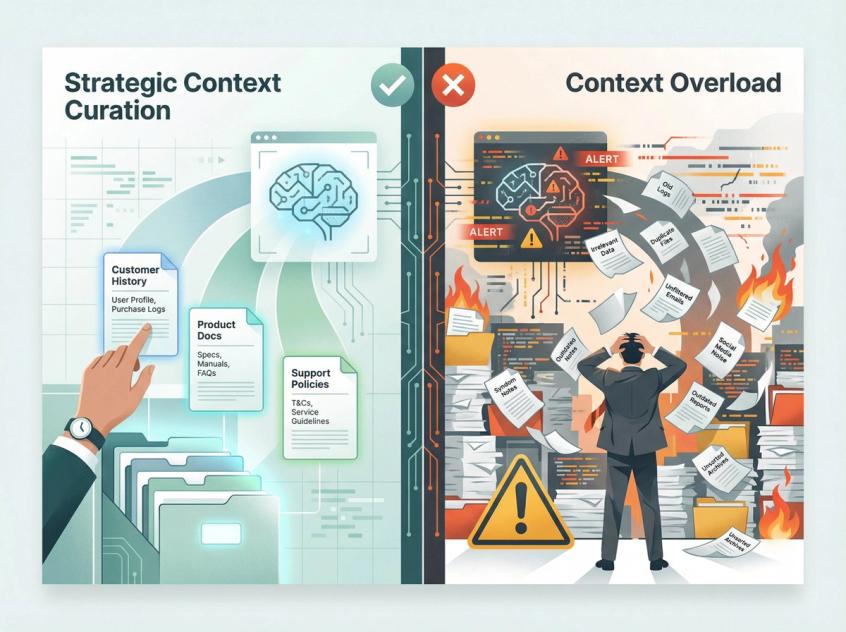
Now, a critical caveat: you should not blindly dump everything into the context window just because you can. Good prompt engineering, smart retrieval, and thoughtful information architecture still matter enormously. But long context gives you the flexibility to include genuinely relevant information without artificial constraints forcing you to over-optimize for brevity.
What Are Gemini "Thinking" Models?
When you use Gemini 2.5 Pro, 2.5 Flash, or 3 Pro, there's now an internal two-phase process that fundamentally changes how the model approaches complex problems:
Phase 1: Hidden thinking – the model generates "reasoning tokens" that you normally don't see at all
Phase 2: Visible answer – it produces the actual user-facing response you receive
Google's documentation explicitly describes this as the Gemini thinking capability. It's not just a prompt engineering trick or a UI feature – it's baked into the model architecture itself.
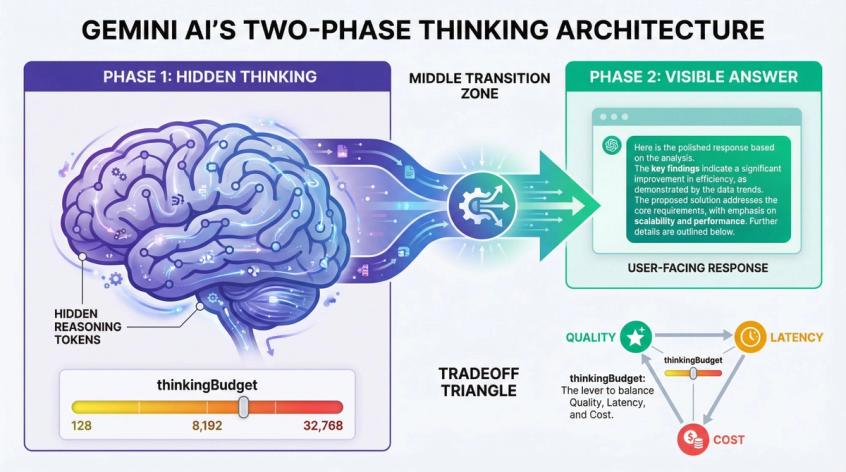
The key mechanism is a thinkingBudget parameter you can configure when calling Gemini 2.5 models. This controls how much internal reasoning the model is allowed to perform.
• A higher budget allocates more tokens for step-by-step analysis
• Typically produces better reasoning quality
• But increases both latency and cost
Firebase's technical documentation shows that you can set thinking budgets ranging from 128 to 32,768 tokens for Gemini 2.5 Pro, with dynamic thinking as the default mode where the model adjusts its reasoning depth based on problem complexity.
Gemini 3 Pro simplifies this somewhat with a thinkingLevel parameter that offers "low" and "high" settings instead of raw token budgets. This makes the tradeoff more intuitive for developers while still supporting the granular thinkingBudget control for advanced use cases.
Here's the crucial economic reality: you are billed for these internal reasoning tokens as part of the output token count. If your prompts encourage extremely deep reasoning combined with a large thinking budget, your cost per API call can increase substantially even when the visible answer the user sees is quite short.
Why did Google build this into the architecture?
Historically, developers tried to force better reasoning by adding phrases like "let's think step by step" or "show your work" to prompts. This approach is fragile, inconsistent across problems, and hard to control systematically.
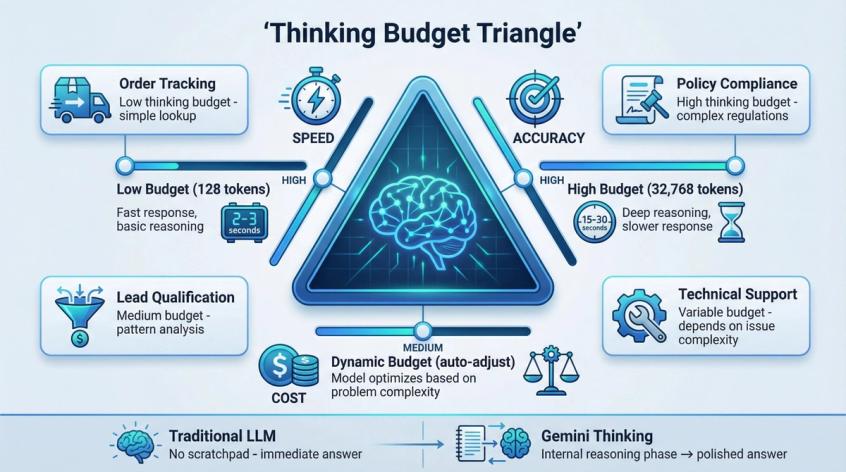
Now the model itself manages its reasoning process. Given your budget constraints and the inherent complexity of the problem, it dynamically decides how much internal deliberation to perform. You get much finer control over the fundamental tradeoff between speed, accuracy, and cost.
Think of it this way:
A traditional LLM call is like asking someone to "Answer immediately, no notes, no scratchpad, just speak."
A Gemini thinking call is like saying "Here's a scratchpad with room for 8,000 tokens of notes. Work through this carefully on your scratchpad, then give me a clean, polished final answer."
For Spur customers running AI agents that handle real business outcomes, thinking models are transformative for specific scenarios:
Complex order issues where the agent needs to cross-check inventory systems, payment status, shipping logistics, and customer service policies before recommending a resolution. Rushing to an answer could mean suggesting an out-of-stock replacement or violating a return policy. Better to let the model think through the constraints.
Policy-heavy industries like finance, healthcare, insurance, or legal services where the AI must reason carefully through regulations, compliance requirements, and edge cases before providing guidance. A wrong answer isn't just unhelpful – it could be legally problematic.
Sophisticated lead qualification on channels like Instagram and WhatsApp, where you want the AI to analyze conversation patterns, budget signals, urgency indicators, and product fit before routing to sales or nurturing through automation. High-value leads deserve thoughtful assessment, not reflexive pattern matching.
When we configure Gemini for Spur's AI agents, we typically use:
Low thinking budgets or Flash Lite for high-volume, straightforward tasks like order tracking, FAQ responses, and basic qualification where speed matters more than nuance.
Medium thinking budgets with Flash or Flash Image for mainstream customer support that needs solid reasoning about policies, product fit, and multi-step troubleshooting.
High thinking budgets with Pro models for complex cases involving refunds, escalations, technical diagnostics, or high-stakes business decisions where getting it right is worth the extra latency and cost.
Can Gemini Call Functions and Use Tools?
Gemini 2.0, 2.5, and 3 are explicitly marketed as agentic models with native tool use capabilities built into their core architecture. [^5] This represents a fundamental shift from language models that just generate text to AI systems that can actually interact with the real world.
At the technical level, here's how it works:
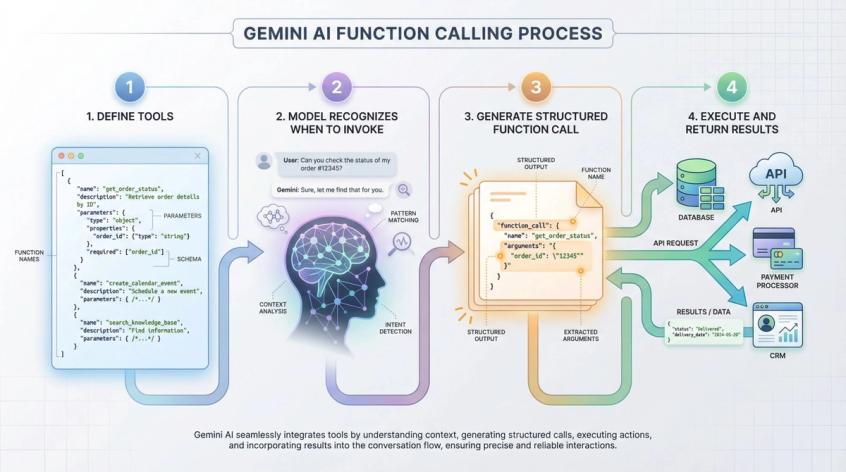
Step 1: Define tools
You define functions or tools when making API calls. Each tool has a name, description, and structured schema defining its parameters. Examples might include get_order_status, create_calendar_event, search_knowledge_base, query_database, or send_payment_link.
Step 2: Model recognizes when to invoke
The model is specifically trained to recognize when it should invoke these tools based on the conversation context and with what arguments based on the information it has gathered.
Step 3: Generate structured function call
Instead of generating plain text, Gemini produces a structured function call with the tool name and argument values in JSON format.
Step 4: Execute and return results
Your application code receives this function call, executes it against your actual systems (databases, APIs, payment processors, CRM platforms, etc.), then passes the result back to the model so it can continue the conversation with fresh, authoritative information.
On Google's first-party products, this powers capabilities like:
• Gemini in Workspace calling Gmail, Drive, Calendar, Maps, and other Google services through predefined tools
• Gemini's Deep Research feature that autonomously fans out dozens of web searches, reads and synthesizes sources, then compiles comprehensive research reports without human intervention
• The upcoming Gemini 3 Deep Think mode and Gemini Agents platform, where the system can plan and execute multi-step workflows like "plan my three-city business trip, book flights with my preferred airline, select hotels within budget near the meeting locations, and schedule all the meetings in my calendar"
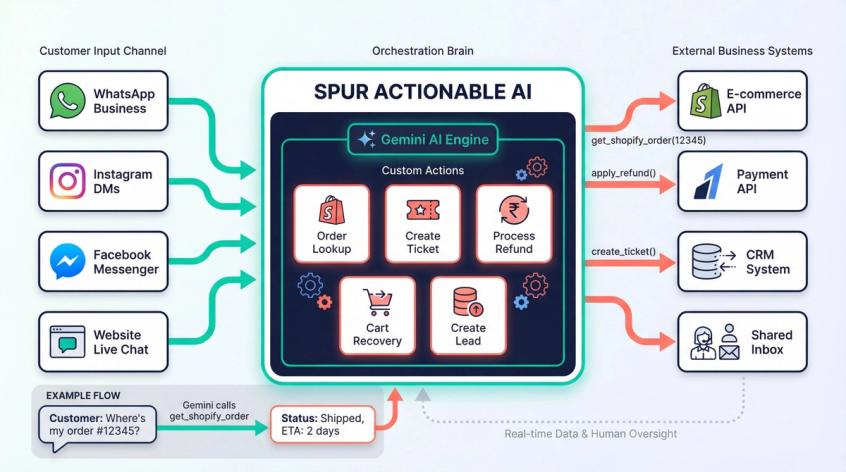
On the Spur platform, this exact same tool-calling mechanism is what we call Actionable AI – and it's the core of how we turn AI from a conversational toy into a revenue-generating, cost-saving business asset:
We define tools as Custom Actions in our visual automation builder. An action might be:
• "Look up Shopify order by order number"
• "Create support ticket in shared inbox"
• "Apply Razorpay refund"
• "Start abandoned cart recovery sequence"
• "Create qualified lead in CRM"
When a customer asks "where's my order #12345?" on WhatsApp, Gemini doesn't just say "let me check that." It recognizes it should call the get_shopify_order tool with order_number="12345", we execute that against the Shopify API, and the model receives back real order status, tracking info, and delivery estimates to share with the customer.
We orchestrate these tool calls across WhatsApp Business API, Instagram DMs, Facebook Messenger, and website live chat, maintaining context and state across channels, then logging everything in our shared inbox for human oversight and analytics. [^19]
Here's the critical insight: Gemini by itself knows absolutely nothing about your business. It has no idea what order #12345 is, it can't move money, it can't create tickets, it can't trigger automations in your marketing stack.
The transformation happens when you:
• Train it on your knowledge base – your product docs, FAQs, policies, support content, and any other information that helps it understand your business context
• Wire it to your systems through tools – giving it structured, permission-controlled ways to read data and take actions across your actual business infrastructure
• Deploy it on the channels your customers use – WhatsApp, Instagram, Messenger, live chat – not just some demo interface, but real production channels where actual revenue and customer satisfaction are on the line
• Wrap it with human oversight – a shared inbox where agents can monitor AI conversations, step in when needed, and provide the empathy and judgment that AI still lacks
Gemini provides an exceptionally capable reasoning brain. Spur provides the sensory inputs (customer messages across channels), the actuators (integrations with Shopify, WooCommerce, Stripe, Razorpay, Shiprocket, and your other business systems), and the control systems (automation flows, approval workflows, human escalation).
When customers tell us they "deployed AI and it worked immediately," this integration is why. The AI agent learned from their actual documentation, gained controlled access to their actual data, and started having real conversations with real customers that resolved real problems and drove real revenue.
How to Deploy Gemini for Your Business with Spur
At Spur, we've built our entire platform around a simple premise: the best AI models in the world are useless if they can't talk to your customers where they actually are, access the information they actually need, and take the actions that actually matter for your business.
Here's how we make Gemini operational for businesses like yours:
How to Train AI Agents on Your Knowledge Base
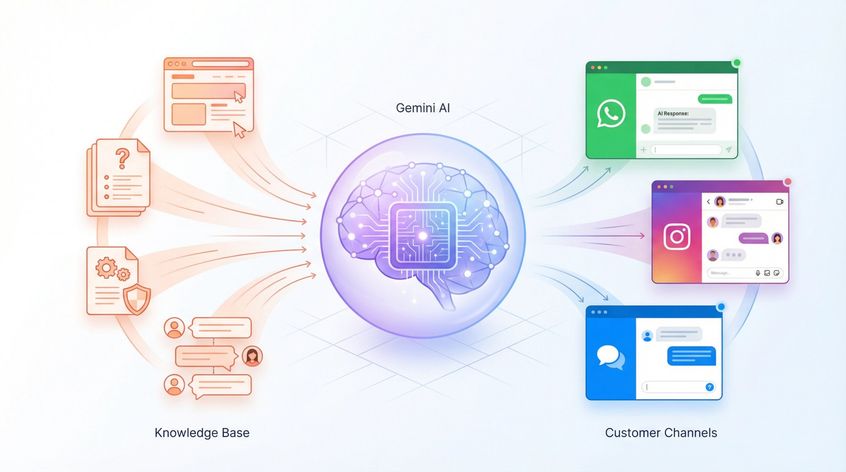
When you set up an AI agent in Spur, you connect it to your knowledge sources. This might be:
• Your entire website – we crawl and process it automatically
• Product documentation, help center articles, and FAQ pages
• Policy documents, shipping information, and return procedures
• Historical support conversations that show how your team handles common issues
The AI agent (powered by models like Gemini, GPT-4, Claude, or others depending on what works best for your use case) learns from this content. It doesn't just memorize facts – it learns the patterns of how your business operates, what matters to your customers, and how to communicate in your brand voice.
Best Channels for AI Customer Support
Once trained, your AI agent becomes available across every channel that matters:
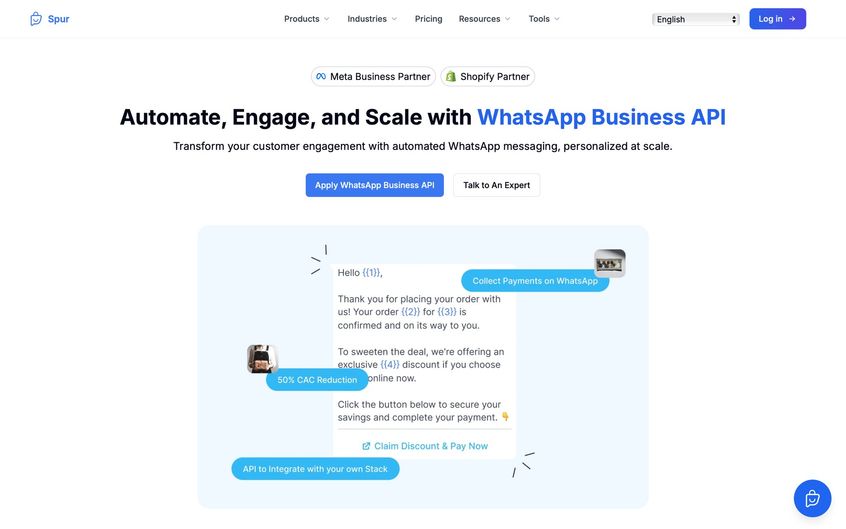
WhatsApp Business API – the most important channel for D2C brands in many markets. Customers can message you, get instant AI-powered responses for order tracking, product questions, support issues, and even complete purchases through conversational commerce flows.
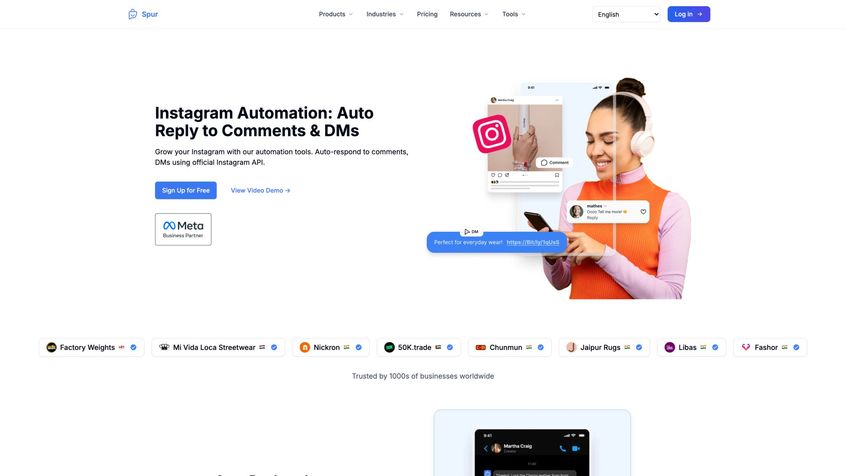
Instagram DMs – critical for brands building audiences on social. Comment-to-DM automation captures leads from posts and stories, AI qualifies them, and your sales team only sees the high-intent prospects.
Facebook Messenger – still huge for certain demographics and geographies. Same AI, same knowledge base, different channel.
Website Live Chat – embedded on your site with our widget. Visitors get immediate, intelligent assistance without waiting for a human agent to be available.
The beautiful thing is that it's the same AI agent across all these channels. Knowledge and context are unified. If a customer starts a conversation on Instagram, continues it via WhatsApp, and finishes on your website, the AI maintains full context throughout.
AI Integration with E-commerce and CRM Systems
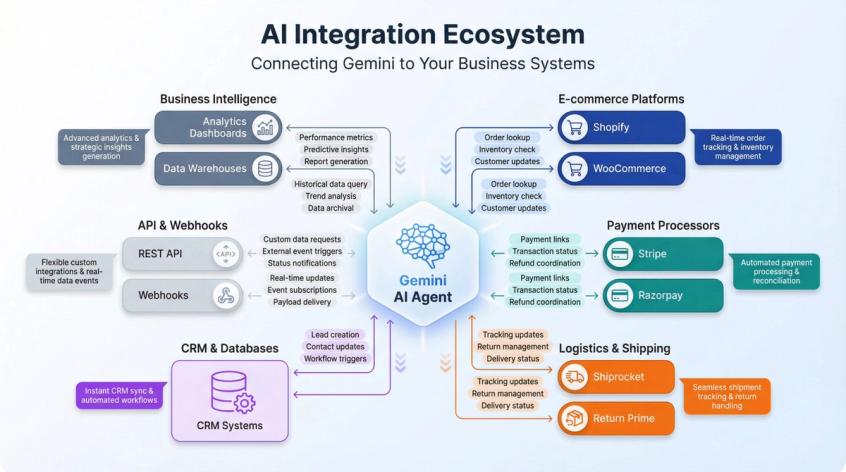
Knowledge is only half the equation. For AI to be truly useful, it needs to do things, not just talk.
Spur connects your AI agents to the systems you actually use:
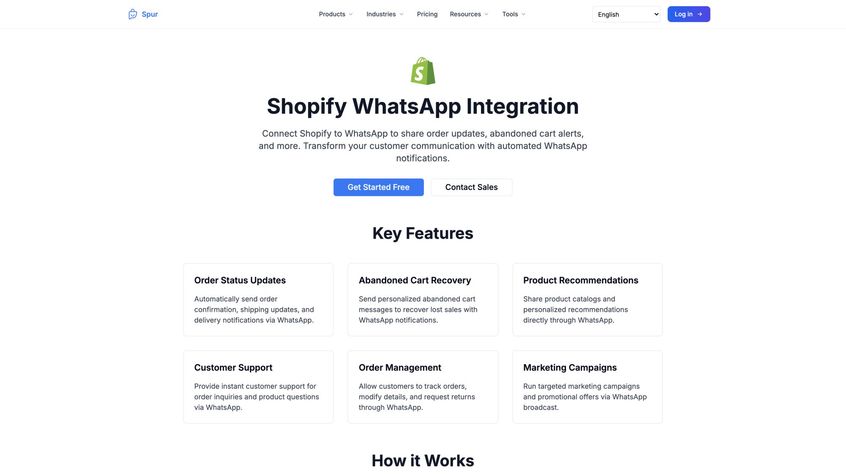
E-commerce platforms like Shopify and WooCommerce – so the AI can look up orders, check inventory, process returns, and update customer information.
Payment processors like Stripe and Razorpay – enabling the AI to generate payment links, check transaction status, and coordinate refunds with approval.
Logistics tools like Shiprocket and Return Prime – for real-time shipping updates and return management.
Your CRM and databases – through webhooks, API integrations, or custom connections, so the AI can create leads, update contact records, and trigger downstream workflows.
When a customer asks "where's my order?" the AI doesn't just say "let me check" – it actually queries your Shopify store, retrieves the real order, sees the tracking status from your logistics provider, and gives an accurate answer with a tracking link. All in seconds.
AI and Human Agent Collaboration Best Practices
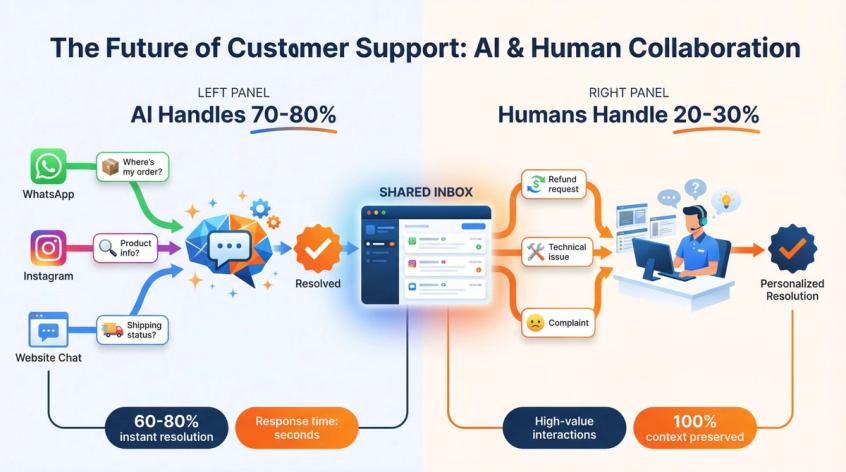
Here's what we've learned from thousands of businesses: AI should handle the repetitive 70-80% of conversations, and humans should focus on the complex, high-value 20-30% that require empathy, judgment, and creative problem solving.
That's why every Spur deployment includes a shared inbox where:
• Your team can see every AI conversation in real-time
• AI agents automatically escalate complex issues or requests that need human judgment
• Human agents can step into any conversation seamlessly – the customer might not even realize they switched from AI to human
• Your team can review AI performance, correct mistakes, and those corrections feed back into improved training
This isn't AI replacing humans. It's AI amplifying your team's effectiveness so they can focus on what humans do best.
ROI and Business Results from AI Automation
When customers deploy Gemini-powered AI agents through Spur, they typically see:
60-80% of support queries resolved instantly without any human involvement, dramatically reducing support workload and improving response times.
Massive increases in conversion on channels like Instagram and WhatsApp because leads get immediate, personalized responses instead of waiting hours or days.
Recovered revenue from abandoned carts through automated WhatsApp flows that reach customers with personalized offers at exactly the right moment.
Huge reductions in response time – from hours or days to seconds – which transforms customer satisfaction and reduces churn.
Better data and insights because every conversation is logged, analyzed, and available for reporting. You can see exactly what customers ask about, what problems come up most often, and where your AI needs more training.
Want to see how this works for your specific business? Start a free trial with Spur and deploy your first Gemini-powered AI agent in minutes, not months.
Which Gemini Model Should I Use?
Google's model lineup can feel overwhelming. From an operational perspective in 2025, here's how to think about the current family:
Generally Available (Stable) Models
Gemini 2.5 Pro is the high-capability thinking model with 1M token context. Use it for complex reasoning tasks, heavy code analysis, long document review, and dataset exploration. It's powerful but more expensive and slower than Flash models.
Gemini 2.5 Flash hits the sweet spot for most production applications. Fast, capable, with controllable thinking budgets, it delivers solid reasoning at a fraction of the cost and latency of Pro. This is typically the default choice for customer-facing applications.
Gemini 2.5 Flash Image provides text-to-image generation and conversational editing capabilities at the same cost profile as Flash. It's designed for creative work, content generation, and visual design tasks.
Gemini 2.5 Flash Lite is extremely fast and extremely cheap while still maintaining multimodal capabilities. Designed for massive scale and simpler tasks, pricing runs around $0.10 per 1M input tokens and $0.40 per 1M output tokens. Use this for high-volume classification, routing, and simple responses where speed and cost matter more than nuanced reasoning.
Gemini 2.0 Flash / Flash Lite represent the previous generation. Still available as lower-cost options with 1M context and tool use, they're solid workhorse models for less demanding tasks.
Preview Models
Gemini 3 Pro is the "reasoning first" flagship frontier model with 1M context and integrated grounding. It's designed for dense agent workflows, advanced coding, and high-stakes reasoning where you need the absolute best performance.
Gemini 3 Pro Image offers high-fidelity image generation with significantly better text rendering and multi-image editing capabilities than previous generations.
How Spur Chooses Models
At Spur, we typically configure AI agents with:
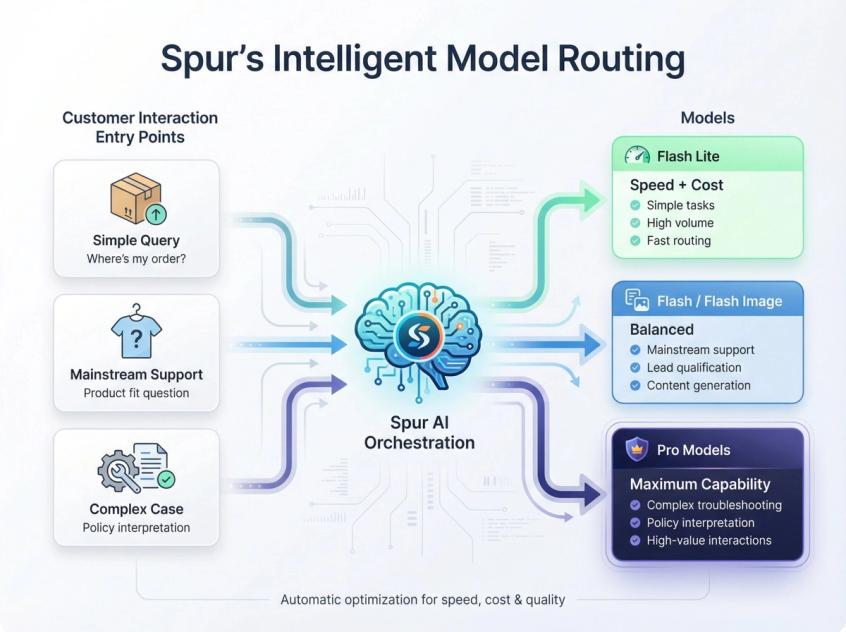
Flash Lite or 2.0 Flash Lite for simple, high-volume tasks like order status checks, basic product questions, and initial conversation routing. Speed and cost efficiency are priorities.
Flash or Flash Image for mainstream customer support automation, marketing flows, lead qualification, and content generation. These models provide excellent reasoning quality while staying affordable at scale.
Pro models for complex edge cases, technical troubleshooting, policy interpretation, and high-value interactions where getting it exactly right justifies higher costs.
The beauty of our platform is that you don't need to worry about these technical decisions. We handle model selection, configuration, fallback logic, and cost optimization behind the scenes so you can focus on outcomes: faster responses, higher conversion, better customer satisfaction.
How is Gemini Trained and Deployed?
Training Data and Knowledge
Google doesn't publish the complete training recipe, but technical reports and documentation reveal key details:
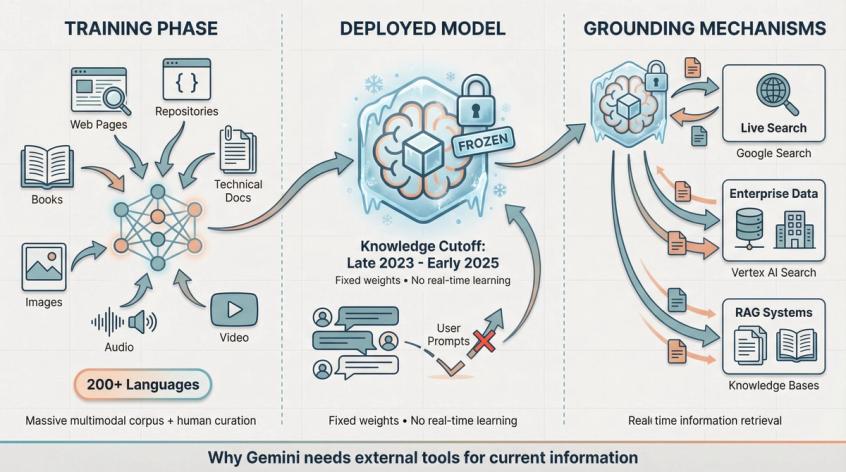
Gemini models are trained on an enormous mixture of web pages, code repositories, books, technical documentation, images, audio, and video, including both publicly available content and licensed proprietary datasets with human curation.
Gemini 2.X models significantly expand this with training data covering over 200 languages and dramatically richer multimodal corpora, plus extensive post-training for safety, helpfulness, and reducing harmful outputs.
Knowledge cutoffs for Gemini 2.5 and 2.0 models generally fall around late 2023 to early 2025, depending on the specific variant. [^1] This means the model's "frozen" knowledge – what it knows without any external tools or search – reflects information available up to that date.
A critical point many people misunderstand:
Gemini is not constantly learning every time you chat with it. Your individual prompts and conversations don't update the model weights in real-time.
Google may use conversation data to improve future model versions, depending on your privacy settings and enterprise agreements, but the specific model you're hitting in production has fixed knowledge from its training cutoff.
For fresh information beyond that cutoff, Gemini uses grounding – live search results, access to enterprise data sources through integrations, or retrieval-augmented generation (RAG) pulling from your own knowledge bases. [^20]
Hardware and Infrastructure
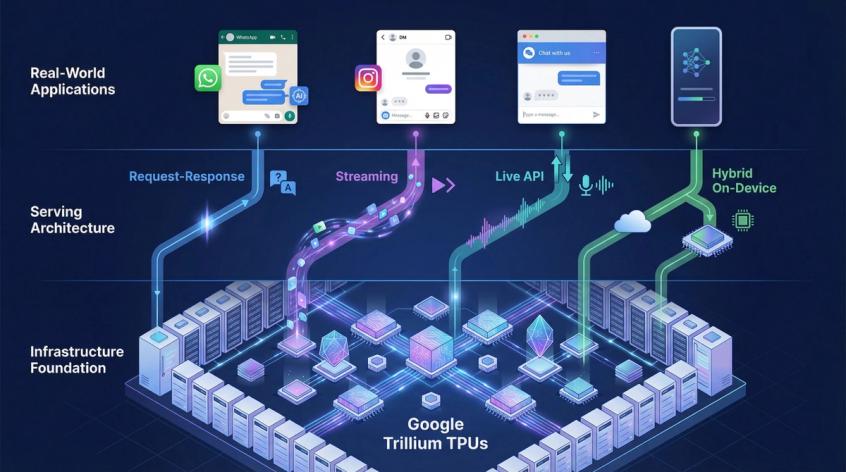
Gemini models are trained and served on Google's custom TPUs (Tensor Processing Units):
The Gemini 2.0 launch explicitly noted that these models were trained and deployed entirely on Google's Trillium TPUs, their sixth-generation accelerator chips designed specifically for transformer workloads. These same chips are available to enterprise customers through Google Cloud.
Gemini 3 continues leveraging this stack, combined with Google's internal orchestration layers for distributed training and massive-scale inference.
Why this infrastructure matters for end users isn't the chip architecture itself, but what it enables:
• Massive context windows that actually work in production without insane latency or timeouts
• Native multimodality at scale without compromising speed or reliability
• Thinking models that can perform internal reasoning without every request becoming unacceptably slow
Serving Modes
Gemini supports several serving configurations depending on your use case:
Standard request-response – the traditional one prompt in, one complete answer out pattern.
Streaming – token-by-token output so users see the answer appearing in real-time, improving perceived responsiveness.
Live API – bidirectional streaming with audio and other modalities, enabling voice assistants and interactive applications.
Hybrid on-device – smaller models like Gemini Nano run locally on devices like Pixel phones for low-latency tasks, with cloud models handling more demanding workloads.
For Spur's AI agents, we primarily use:
Streaming text for chat-like experiences in WhatsApp, Instagram, and live chat widgets where users expect to see responses appearing naturally.
Server-side tools and RAG to connect the model to your knowledge bases, business systems, and third-party APIs in real-time.
Voice and Live API experiences are emerging but most businesses are still operating in the "text chat with structured actions" paradigm, which is what we've optimized for.
What Changed in Gemini 2024-2025?
The Gemini landscape has evolved rapidly. If you're reading older articles or documentation, here are the critical updates:
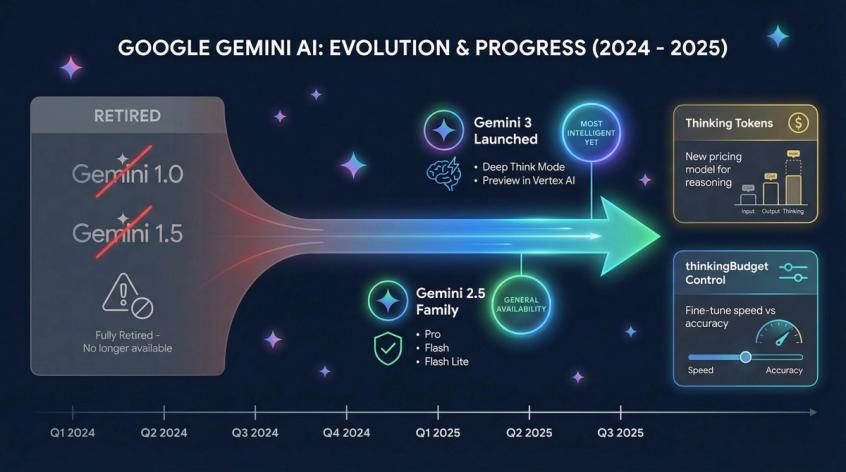
Gemini 3 Launched (November 2025)
Google's "most intelligent model yet," Gemini 3 brings state-of-the-art performance on reasoning and coding benchmarks. The Deep Think mode specifically competes with other reasoning-focused models like o1.
Gemini 3 Pro is already available in the consumer Gemini app and as a preview model in Vertex AI.
Gemini 1.0 and 1.5 Fully Retired
Firebase AI Logic documentation explicitly states that all Gemini 1.0 and 1.5 models are retired. Attempting to use these model names returns errors. Developers must migrate to Gemini 2.5 or newer.
Gemini 2.5 Family Reached General Availability
In mid-2025, Gemini 2.5 Pro, Flash, and Flash Lite became generally available for production use. These models introduced the mainstream thinkingBudget mechanism and made long context windows accessible for everyday applications.
Pricing Now Includes "Thinking Tokens"
Cost breakdowns in 2025 explicitly separate input costs, output costs, and thinking token costs. Heavy use of Deep Think mode or large thinking budgets can substantially increase your per-request costs even when the visible answer is short.
For Spur customers, we optimize these costs automatically by routing simple queries to fast, cheap models and reserving expensive thinking time for complex problems that genuinely need it.
Free Tier Restrictions
Explosive demand for Gemini 3 Pro has forced Google to implement caps on free access in several products, pushing serious users toward paid plans like Google AI Pro.
If you're reading this article significantly later, always verify current information by checking:
• The official Gemini product pages for consumer and enterprise offerings
• Vertex AI model documentation for the latest available models and features
• Firebase AI Logic model support pages for mobile and web developers
Google is iterating incredibly fast. The exact "best" model and pricing will continue evolving.
Practical Use Cases for Gemini AI
Use Long Context for "One-Shot Understanding" Problems
Gemini's 1M token context window excels at scenarios where you need to understand large, complex information sets without chunking:
Example use cases:
"Read these 300 pages of policy documentation and identify the top 10 clauses most likely to confuse customers or cause service failures."
"Here are three months of exported customer chat logs. Find patterns in what causes churn, what drives repeat purchases, and what support issues frustrate people most."
"Here's our entire codebase plus six months of error logs. Explain why this intermittent bug happens and suggest a comprehensive fix."
Instead of building complex retrieval systems, you can often include the entire relevant corpus and let Gemini process it in one pass. You still need clear instructions and good prompt engineering, but you don't need to chunk, embed, and retrieve as a prerequisite.
For Spur customers, this translates directly into:
Training AI agents on complete websites, full FAQ databases, entire policy manuals, and comprehensive product catalogs. The AI can reference any of that information naturally during support conversations without pre-selecting which documents might be relevant.
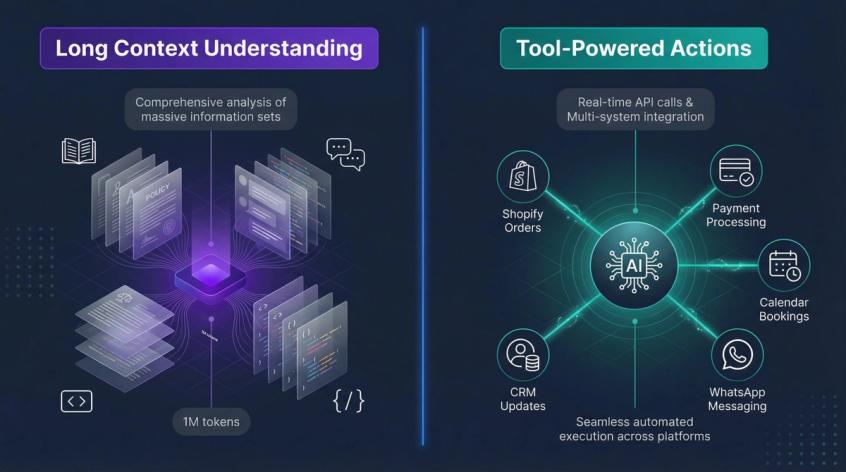
Combine Thinking Models with Tools for High-Stakes Actions
When the AI is going to touch real business systems – processing refunds, making bookings, qualifying high-value B2B leads, or updating customer records – you want:
Higher thinking budget or higher thinking level so the model takes time to reason through the decision carefully instead of reflexively pattern-matching.
Comprehensive tools that enable the model to gather information but restrict what it can actually execute. For example, "create draft refund request for approval" instead of "immediately process refund."
Clear guardrails and confirmation steps for actions that can't be undone or have significant financial or customer experience implications.
Gemini's thinking capabilities paired with Spur's Custom Actions framework is natural for this:
Gemini performs the reasoning – analyzing the customer's situation, checking relevant policies, considering edge cases, and determining the appropriate action.
Spur enforces the constraints – channel-specific rules, data access permissions, approval workflows, and integration limits across WhatsApp, Instagram, Messenger, and live chat.
Human agents review and approve high-impact decisions through the shared inbox, maintaining oversight without bottlenecking routine operations.
Leverage Multimodality for Rich Customer Interactions
Don't limit AI interactions to text when your customers are naturally multimodal:
Encourage customers to send photos of damaged products instead of describing them. The AI can assess the damage visually and recommend appropriate resolutions.
Accept screenshots of error messages during troubleshooting. The AI can read the actual error, identify the issue, and provide specific fixes.
Process voice notes on WhatsApp where customers find it easier to explain complex problems verbally rather than typing.
Handle PDF invoices and receipts when customers have questions about charges, line items, or payment history.
Spur's AI agents handle all of these input types seamlessly. The customer experience improves because people can communicate naturally instead of being forced into text-only interactions.
Making Gemini Work for Your Business
If you've read this far, you're clearly interested in more than surface-level AI hype. You want to understand how the technology actually works and, more importantly, how to make it work for your business.
Here's the actionable summary:
Gemini's Mixture of Experts architecture gives you frontier-level reasoning that scales economically. You get the power of an enormous model without paying full compute costs for every token.
The multimodal, long-context design makes Gemini especially powerful for customer support and operations. It handles screenshots, PDFs, voice notes, and long conversation histories that other models struggle with.
Thinking models and native tool use transform Gemini from "chatbot that talks" to "agent that actually does things." It can reason through complex problems and take real actions in your business systems.
But Gemini by itself is just a powerful reasoning engine. To turn that into business results, you need:
• Deployment on the channels your customers use – WhatsApp, Instagram, Facebook, live chat – not just some demo interface
• Integration with your actual systems – Shopify, WooCommerce, Stripe, Razorpay, your CRM, your inventory management, your support ticketing
• Training on your specific knowledge – your products, policies, procedures, and the patterns of how your business operates
• Human collaboration workflows – AI handles routine tasks, humans handle complex cases, and the handoff is seamless
That's exactly what Spur provides. We've built the platform specifically to make Gemini (and other frontier models) operationally useful for businesses like yours:
Your AI agents learn from your website, documentation, and past conversations. They deploy across WhatsApp Business API, Instagram DMs, Facebook Messenger, and website live chat. They connect to your e-commerce platform, payment processors, and business tools through pre-built integrations. They handle thousands of conversations, qualify leads, recover abandoned carts, resolve support issues, and generate revenue while your team sleeps. When complex cases arise, they escalate to your human agents in the shared inbox with full context.
Want to see how this works for your specific business?
Start a free trial with Spur and deploy your first Gemini-powered AI agent. You'll be handling real customer conversations on WhatsApp and Instagram within minutes, not months.
For more insights on implementing chatbot best practices and understanding how to train AI on your own data, explore our comprehensive guides.
All technical details, pricing examples, and model specifications in this article are based on 2025 sources. AI moves fast – always verify current information from Google's official documentation before making architectural or budgetary decisions.
Gemini AI FAQs
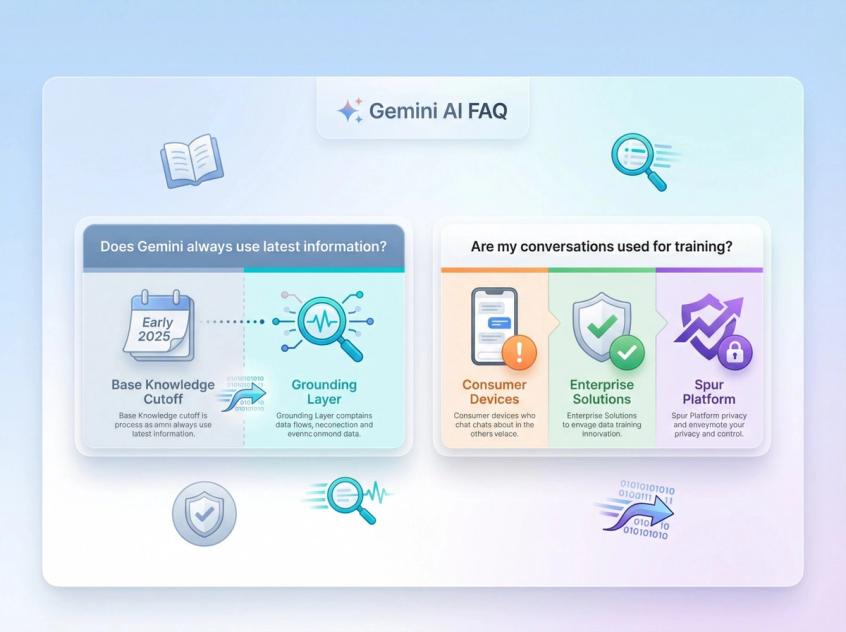
Not automatically. The base model has a fixed knowledge cutoff – for Gemini 2.5 that's generally early 2025 depending on the variant.
For fresh information beyond that cutoff, Gemini uses grounding through:
• Google Search for general web information
• Google Maps for location-based queries
• Vertex AI Search for enterprise knowledge bases
• Your own tools and integrations when you deploy it through platforms like Spur
The model often feels current because grounding works well, but the accuracy of live data depends on search result quality, how recently information was published, and safety filters.
It depends on which product you're using and what agreements you have:
Consumer Gemini app – Google may use your activity to improve models unless you explicitly opt out in your privacy settings.
Enterprise products like Vertex AI – have much stricter guarantees that customer data isn't used for general model training, but you should read the specific data governance documentation and your contract carefully.
When you use Gemini through Spur, your customer conversation data is protected by our data processing agreements. We don't send your data to train Google's public models. Check our specific DPA and privacy documentation for your region and plan.
No, not automatically.
Long context gives Gemini access to more information, but that doesn't guarantee the model will pay attention to the right parts or synthesize them well.
In practice, you get the best results by combining:
Long context for genuinely relevant slices of information – not just dumping everything you can fit.
Clear instructions that guide the model's attention to what matters most.
Good information architecture where even if you provide 100 pages, they're organized logically with clear structure.
Sometimes retrieval systems that surface the most relevant chunks first, then use context for deeper understanding rather than initial discovery.
Think of long context like a huge whiteboard. Having more space helps, but you still need to organize information clearly and explain what you want done with it.
For raw reasoning capability and benchmark performance, Gemini 3 Pro generally outperforms Gemini 2.5 Pro on complex tasks.
But Gemini 2.5 has practical advantages in late 2025:
It's fully generally available in more cloud products with predictable quotas and no preview limitations. Pricing, rate limits, and tooling are battle-tested and stable. Many enterprises can't deploy preview models to production due to internal policies.
Most teams using Spur run:
Gemini 2.5 Flash or Flash Lite as their default engines for high-volume customer interactions.
Gemini 2.5 Pro for deeper analysis, complex troubleshooting, and nuanced reasoning.
Gemini 3 Pro selectively for experimental features or highest-value reasoning tasks where preview status is acceptable.
We handle the routing logic, so customers get the right model for each specific task without manual configuration.
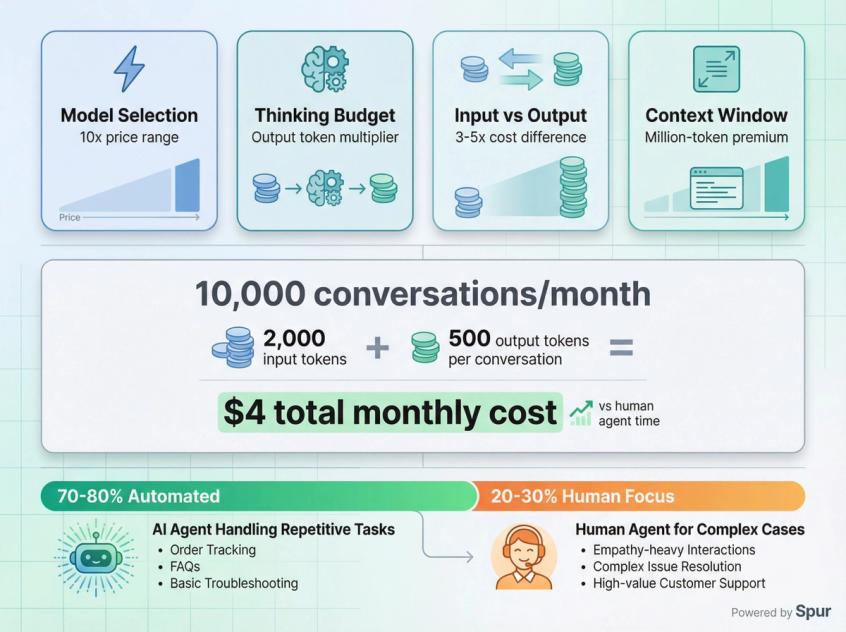
Costs vary dramatically based on:
Which model – Flash Lite is roughly 10x cheaper than Pro models.
How much thinking you enable – higher thinking budgets substantially increase output token costs.
Input vs output – output tokens are typically 3-5x more expensive than input tokens.
Context size – million-token contexts cost more than 10,000-token contexts, even for the same model.
Example rough costs for Gemini 2.5 Flash (pricing changes over time):
• Input tokens: ~$0.10 per 1M tokens
• Output tokens: ~$0.40 per 1M tokens
• A typical customer support conversation might use 2,000 input tokens and generate 500 output tokens, costing roughly $0.0004 per conversation
At scale, if you handle 10,000 conversations per month, that's about $4 in AI costs, which is absurdly cheaper than human agent time.
Spur includes AI credits in all plans and provides transparent usage analytics so you can track costs and optimize which models handle which conversations.
No, and that's not the goal.
The right mental model is AI amplification, not replacement:
Gemini handles the repetitive 70-80% of conversations – order tracking, basic product questions, policy clarifications, simple troubleshooting. These are tasks where the AI can be as good or better than humans because the answers are straightforward and documented.
Humans focus on the complex 20-30% – empathy-heavy situations, creative problem-solving, policy exceptions, upset customers who need personal attention, and edge cases not covered in documentation.
Spur's shared inbox makes this collaboration seamless. The AI resolves what it can confidently handle. Complex or sensitive issues get escalated to your team with full context. Customers get fast answers when AI can help, and thoughtful human support when they need it.
The outcome is better customer experience at lower cost, not fewer people on your team (though you can handle much higher volume without growing headcount).
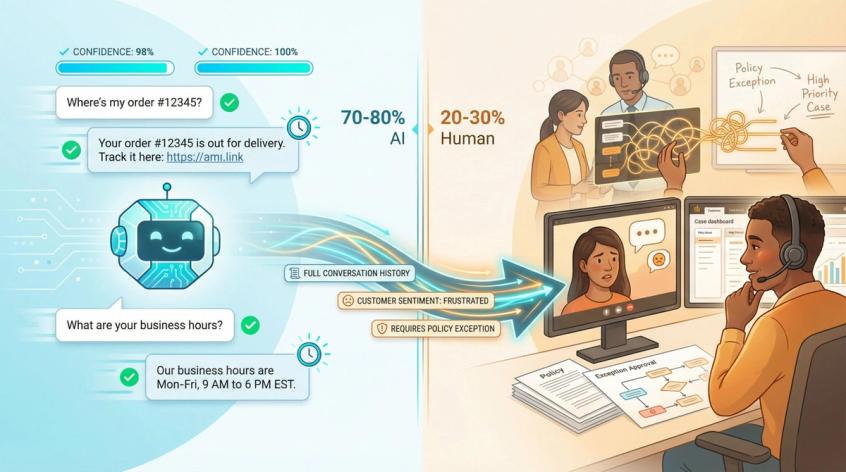
In Spur's implementation, we build several safety layers:
Confidence thresholds – if the AI isn't confident in its answer, it escalates to a human instead of guessing.
Knowledge base integration – the AI grounds answers in your actual documentation, reducing hallucination.
Human oversight – your team can monitor conversations in real-time and step in when needed.
Feedback loops – when the AI makes mistakes or gets corrected by human agents, those corrections improve future performance.
No AI is perfect, but the combination of good training data, confidence-aware routing, and human collaboration makes the error rate remarkably low for most business use cases.
Was this article useful?