Key takeaways
- Since 28 September 2026, chats that start from a Click to Messenger or Click to Direct ad get a messaging window of up to 7 days instead of 24 hours.
- The 7 days count from the customer's first message after tapping the ad, not from the ad click or your reply.
- Inside the window you can send any message, including automated and promotional ones, with no templates.
- Every other entry point, such as an organic DM, story reply or m.me link, still gets the 24-hour window.
- The new window is separate from the Human Agent tag, which only allows manual support replies for 7 days.
Ask an AI about this article
Since 28 September 2026, a conversation that starts from a Click to Messenger or Click to Direct ad gets a 7-day messaging window instead of the usual 24 hours. Inside it you can send any message, including promotional ones. Teams that run Instagram and Messenger ads with Spur can use the extra days to follow up with ad leads before the conversation goes quiet.
Meta's Messenger Platform and Instagram Messaging API policy now says the standard messaging window "may last up to 7 days" from the first message a person sends after clicking the ad. Every other way a conversation can start, such as a DM from your profile, a story reply or an m.me link, still gets 24 hours.
What changed in Meta's 24-hour messaging window?
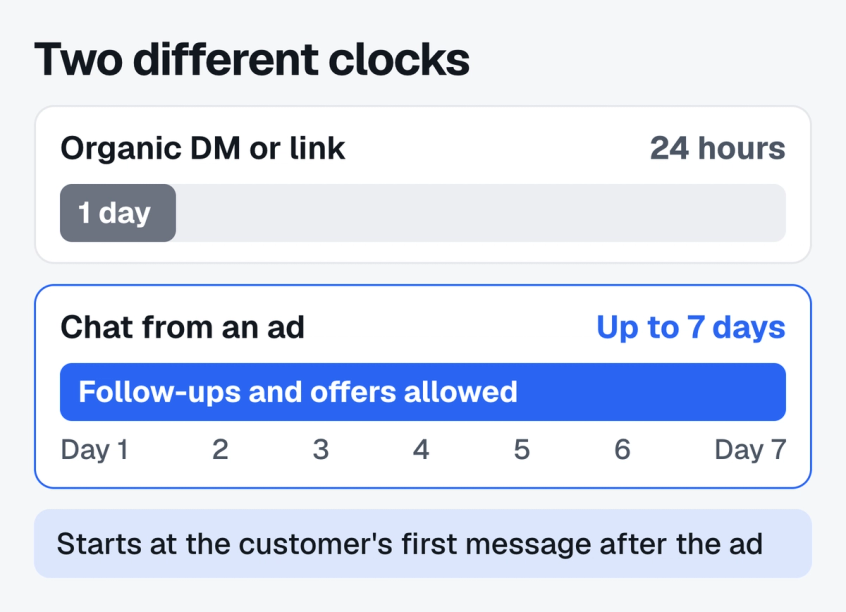
On 28 September 2026, Meta extended the standard messaging window for ad-started chats on Instagram and Messenger from 24 hours to up to 7 days. The Messenger Platform changelog entry for 28 September 2026 covers both the Messenger Platform and the Instagram Messaging API, and the same wording now appears in the Instagram Platform overview.
Three details in Meta's wording decide how you can use it:
- It starts with the customer's message, not the ad click. The 7 days count from the first message the person sends after tapping the ad. Someone who taps the ad and never writes opens no window at all.
- It only applies to two ad types. Click to Messenger ads (Facebook ads that open Messenger) and Click to Direct ads (Instagram ads that open a DM) qualify. Meta groups these with Click to WhatsApp ads under the name click to message ads. Organic DMs, comments, story replies and links keep the 24 hour window.
- It is "up to" 7 days, not a guarantee. Meta does not say when a window would be shorter, so plan your important messages for the first few days rather than day 7.
Before this change, every Instagram and Messenger conversation ran on the same 24 hour clock, which is why most Instagram DM automation rules guides still say you only get one day to reply.
What opens the standard messaging window
The standard messaging window is the period in which a business can send any message to a person on Instagram or Messenger. Meta's policy lists the actions that open it:
- The person sends a message to your Page or Instagram account.
- The person taps a call-to-action button such as Get Started.
- The person clicks a Click to Messenger or Click to Direct ad and then sends their first message. This is the only action that gets up to 7 days.
- The person starts a chat through a plugin such as Send to Messenger or the Checkbox plugin.
- The person clicks an m.me or ig.me link with a ref parameter on an existing thread.
- The person reacts to one of your messages.
Running ads into DMs already? Here is how to tell whether they pay off: measure Instagram DM ROI.
How does the 7-day messaging window work?
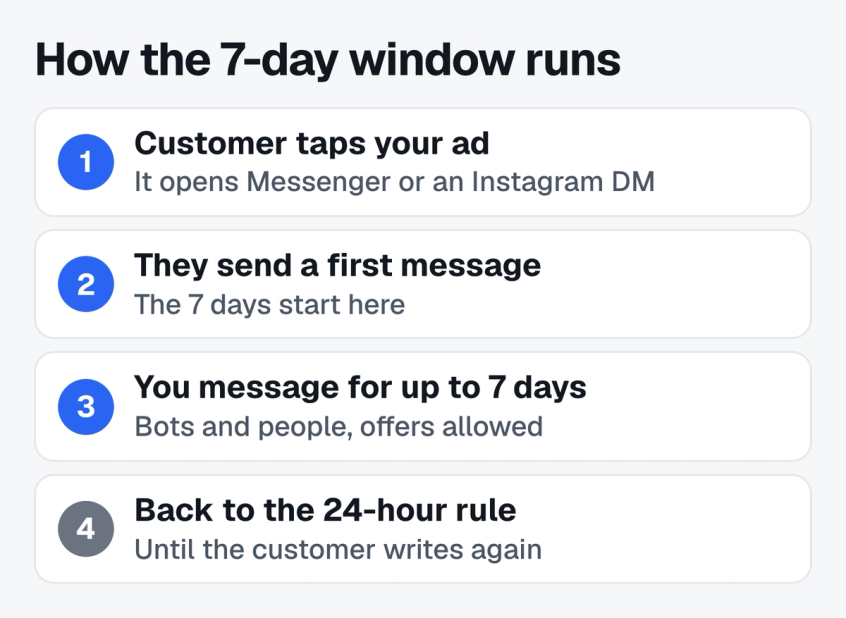
The 7-day messaging window is the standard messaging window with a longer clock. Nothing new has to be switched on, and you send messages with the same API calls as before.
- A person taps your ad. The ad uses Messenger or Instagram Direct as its message destination.
- They send their first message. This is the moment the clock starts. Meta tags the message with a
referralobject that carriessource: ADS, thead_idand the ad title, as shown in the Instagram webhook examples and the Messenger referral webhook reference. - You can message them for up to 7 days. Replies, follow-ups, product cards and offers are all allowed. Meta's policy states that messages inside the standard window "may contain promotional content".
- After the window closes, the normal rules return. A new message from the customer opens a fresh 24 hour window. Without one, sending fails with error
10and subcode2018278, "This message is sent outside of allowed window", listed in Meta's Messenger common error codes.
Meta does not say whether a second message from the customer during the week moves the 7-day end date. Treat the end date as fixed from that first message.
Is the 7-day window the same as the Human Agent tag?
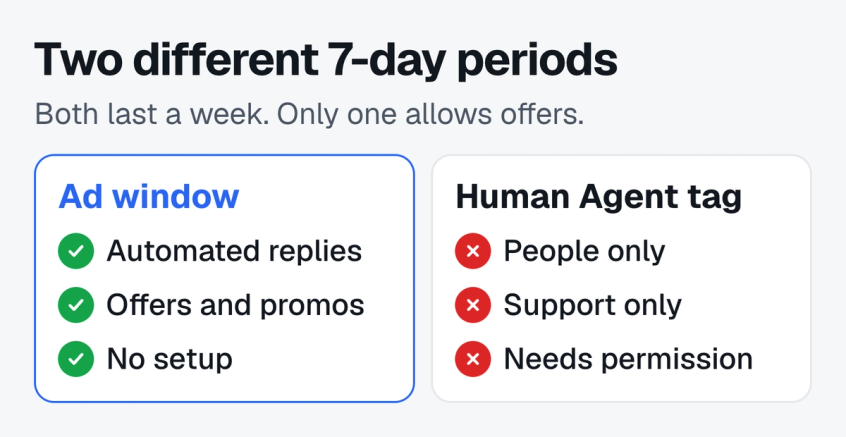
Instagram and Messenger now have two different 7-day periods, and they are easy to confuse. The new one comes from the ad. The older one is the Human Agent tag.
| Detail | Ad window | Human Agent tag |
|---|---|---|
| Opens from | First message after the ad | Any customer message |
| Lasts | Up to 7 days | 7 days |
| Who sends | Bots and people | People only |
| Offers | Allowed | Not allowed |
| Setup | None | Extra permission and tag |
The Instagram Platform overview describes the Human Agent tag as a way to answer "when the business is closed for the weekend, or if the issue requires more than 24 hours to resolve". It was never meant for sales follow-ups or automated messages, and using it requires the Human Agent permission plus the HUMAN_AGENT tag on every message.
Mixing bots and people in the same inbox? Get the chatbot to human handoff right first.
How is it different from WhatsApp's 7-day window?
Meta made a similar change to WhatsApp on the same day, but the two rules do different things. On WhatsApp, the free entry point window is about price: messages sent to someone who came from a Click to WhatsApp ad are free for up to 7 days.
You can still only send free-form text for 24 hours after their last message. After that, every message has to be an approved template.
On Instagram and Messenger the change is about permission. For up to 7 days you can send normal messages, with no templates and no approval step.
| Detail | Instagram and Messenger | |
|---|---|---|
| Ads | Click to Direct, Click to Messenger | Click to WhatsApp |
| 7 days of | Sending any message | Free pricing |
| Free text after 24 hours | Yes | No, templates only |
| Starts when | Customer sends first message | You reply within 24 hours |
If you also run Click to WhatsApp ads, your follow-up plan for WhatsApp needs templates for days 2 to 7. On Instagram and Messenger it does not.
How should you use the extra days?
The 7-day messaging window is most useful for buyers who need more than a day to decide: higher priced products, bookings, admissions and anything with a quote. A plan that respects the customer looks like this:
- Reply in minutes, not days. The window starts with the customer's message whether or not you have answered. Meta's policy still says "responding to people's messages as soon as possible is highly encouraged", and a lead who waits hours usually buys elsewhere. Here is how to reply to Instagram DMs faster.
- Ask what they need on day 1. Use the first exchange to learn size, budget, date or the question that stopped them from buying. Your follow-ups depend on it.
- Send one useful follow-up on day 2 or 3. A size guide, a short product video, a review from a similar customer or an answer to a common objection. Leave out any "just checking in" message.
- Make the offer before day 6. If you plan a discount or a limited stock note, send it while there is still time for the customer to reply and open a fresh window.
- Hand warm leads to a person. When a lead asks about delivery, sizing or custom orders, a human reply usually closes faster than another automated message.
- Stop when the window ends. After 7 days, wait for the customer to write again. Do not use the Human Agent tag to push offers, since that breaks Meta's policy for the tag.
Fewer, better messages work better than a daily sequence. People can block or mute a business at any time, and Meta's policy says so in the same section that introduces the longer window.
What can you send after the window closes?
When the 7-day messaging window ends and the customer has not written again, Meta's policy points to these routes for messaging outside the standard window:
- Human Agent tag: manual support replies only, within 7 days of the customer's last message. Available on Instagram and Messenger.
- Utility messages: template messages for transactional updates such as order and booking changes.
- Marketing messages: paid messages to people who opted in to receive them.
- Sponsored messages: paid ads delivered into an existing Messenger conversation and marked "Sponsored". Not available on Instagram.
- One-time notification: a single follow-up the person asked for, such as a back-in-stock alert. Not available on Instagram.
Instagram has fewer routes than Messenger, so on Instagram the ad window is often your best chance to follow up without paying. If you want a way to reach people later, ask in the chat whether they would like updates on WhatsApp or email. Messenger marketing offers more routes, but most of them are paid. While the window is open, you can also automate Facebook Messenger replies so no ad lead waits.
How to automate Click to Direct ad replies with Spur
On Spur, an Instagram automation can start from the Click To DM Ad Received trigger. It runs when someone messages you from any of your Click to Direct ads, or only from the ads you pick, and you can add keywords to narrow it further.
From there the flow can answer the first question, ask qualifying questions and hand the chat to your team in the shared inbox. Instagram lead ads vs DM ads explains when a DM ad is the better choice.
Spur does not yet show how many days are left in each conversation's window, so keep scheduled follow-ups inside the first 7 days.
Want your Click to Direct ad replies to answer themselves? Set up Instagram automation on Spur.
Bottom line
The 7-day messaging window gives Instagram and Messenger ad leads a week of normal conversation instead of a day. It starts with the customer's first message after tapping a Click to Messenger or Click to Direct ad, it allows promotional messages, and it needs no setup. Every other chat still runs on 24 hours. Reply fast, use one or two well-timed follow-ups, make your offer before the week is out, and leave the Human Agent tag for support.
Frequently asked questions
It is the standard messaging window, extended to up to 7 days for conversations that start from a Click to Direct or Click to Messenger ad.
It starts when the customer sends their first message after clicking the ad, not when they click. During it, a business can send any message, including promotional ones, without waiting for the customer to write again.
Businesses can reply to any Instagram or Messenger message for 24 hours. Since 28 September 2026, chats that start with a message sent after clicking a Click to Direct or Click to Messenger ad are the exception: their window may last up to 7 days.
No. It only applies when a person sends their first message after clicking a Click to Direct or Click to Messenger ad. DMs from your profile, story replies, comments and ig.me or m.me links still get 24 hours.
They are Meta ads whose button opens a chat instead of a website. Click to Messenger ads open a Messenger conversation with your Facebook Page, and Click to Direct ads open an Instagram DM with your account.
Yes. Meta's policy says messages sent within the standard messaging window may contain promotional content, and the 7-day ad window is the standard window with a longer duration.
Meta does not say that it does. The 7 days count from the customer's first message after the ad. Any later message from the customer still opens a fresh 24-hour window, so you can always reply to a new message.
Meta rejects the message with error code 10, subcode 2018278, "This message is sent outside of allowed window". You can message them again once they write to you, which opens a new 24 hour window.
No. Meta applies it to qualifying conversations automatically. You keep using the same Send API, and the ad origin arrives in the referral object of the customer's first message.
Sources
Checked against the original source. Dates are when we last verified each one.
- Messenger Platform changelog Meta for Developers. Published 28 September 2026. Retrieved 7 October 2026
- Messenger Platform and IG Messaging API policy Meta for Developers. Published 28 September 2026. Retrieved 7 October 2026
- Instagram Platform overview Meta for Developers. Retrieved 7 October 2026
- Instagram webhook notification examples Meta for Developers. Retrieved 7 October 2026
- messaging_referrals webhook event reference Meta for Developers. Retrieved 7 October 2026
- Messenger Platform common error codes Meta for Developers. Retrieved 7 October 2026
Was this article useful?