Key takeaways
- Since 28 September 2026, the WhatsApp free entry point window lasts up to 7 days instead of 72 hours.
- It opens only when a customer messages you from a Click to WhatsApp ad on mobile and you reply within 24 hours.
- Inside the window Meta charges nothing for marketing, utility, authentication or service messages. Meta Business Agent replies are still charged.
- After 24 hours without a customer message you can only send templates, and marketing templates still count toward Meta's per-user limit.
- On Spur it is already live: Meta applies the window automatically, so there is nothing to set up.
Ask an AI about this article
On 28 September 2026, Meta extended the WhatsApp free entry point window (FEP window) from 72 hours to up to 7 days. When someone messages you from a Click to WhatsApp ad and you reply within 24 hours, Meta stops charging for the messages you send that person for up to 7 days. If you run those ads with Spur, the change already applies and there is nothing to switch on.
The only exception inside the window is replies from Meta's own AI agent, which are still charged.
What Meta changed on 28 September 2026
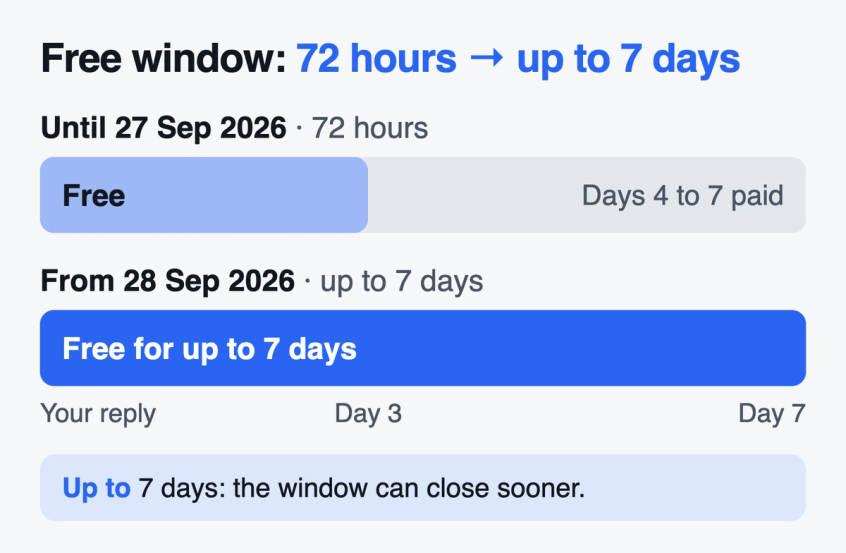
The free entry point window for chats that start from a Click to WhatsApp ad may now stay open for up to 7 days instead of 72 hours. Meta records the change in its WhatsApp changelog entry for 28 September 2026, and the WhatsApp pricing documentation now says "up to 7 days".
The same changelog entry confirms that the 24 hour customer service window, which opens every time a customer messages you, has not changed.
In practice, a follow up on day 4, 5 or 6 used to be a paid message. It can now be free, as long as the window is still open.
Running ads that open a chat? Our Click to WhatsApp ads conversion guide covers the ad setup end to end.
How the free entry point window works
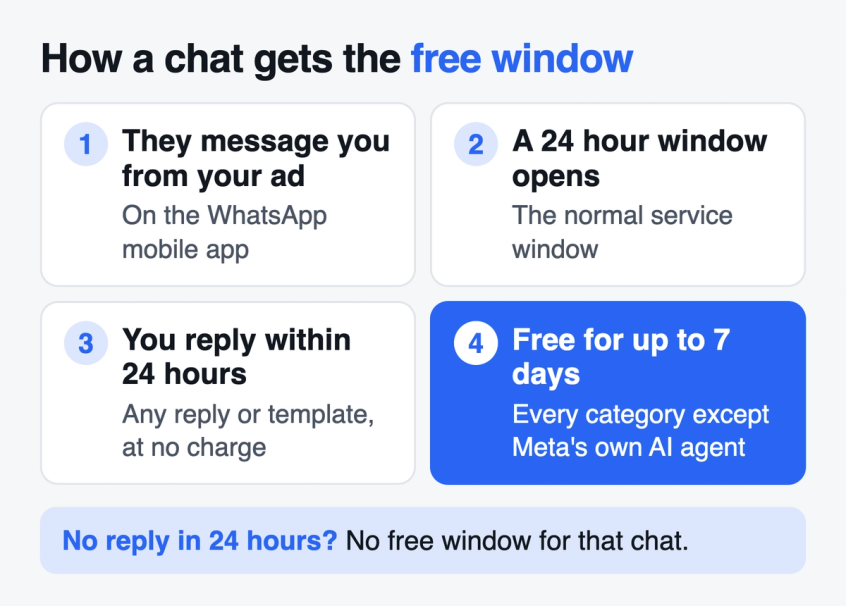
The free entry point window opens with your first reply, not with the customer's message. Meta's pricing documentation describes four steps:
- A customer messages you from your Click to WhatsApp ad, using the WhatsApp app on Android or iOS.
- Their message opens the normal 24 hour customer service window.
- You reply within those 24 hours. The reply can be a normal text reply or any template, and Meta does not charge for it.
- Your reply opens the free entry point window, starting from the moment you sent it. It can stay open for up to 7 days.
While the window is open, Meta does not charge for marketing, utility, authentication or service messages. In Meta's own example, a product carousel, a reply from a support agent and an order confirmation all cost nothing.
If you do not reply within the first 24 hours, that chat never gets a free window. Every message you send it later is billed at the normal rate.
Wondering what those chats cost to get in the first place? See our Click to WhatsApp ads benchmarks for cost per conversation data.
What the free entry point window does not cover
The longer window changes what you pay. It does not change what you are allowed to send, and it does not apply to every chat.
Normal text replies still need the 24 hour window. Meta only lets you send a normal reply (anything that is not a template) while a customer service window is open. That window closes 24 hours after the customer's last message.
So if a customer goes quiet on day 1 and you want to follow up on day 4, you must send an approved template. It is free while the free entry point window is open, but it has to be a template.
Marketing templates still face Meta's per-user limit. WhatsApp caps how many marketing templates each person receives from all businesses, and Meta's per-user marketing limit rules do not exempt the free window.
A marketing template sent after the first 24 hours can fail with error 131049, free or not. WhatsApp also does not deliver marketing templates to US phone numbers at all.
Only Click to WhatsApp ads qualify. Meta's pricing documentation names ads that click to WhatsApp as the entry point. Chats that start from your website chat button, a QR code, a wa.me link or an email are priced normally.
Only mobile counts. The customer has to message you from the WhatsApp app on Android or iOS. Meta says its desktop and web apps are not supported.
Seven days is the maximum, not a promise. Meta says the window "may remain open for up to 7 days" and does not publish what can close it sooner. Put your most important follow ups early rather than on day 7.
Meta Business Agent replies are still charged. If you use Meta's own AI agent, Meta charges for its messages by tokens, even inside the window. Replies written by your team, or by a third party AI agent, are service messages, and those are free inside the window.
Templates are the only way to reach a quiet customer after 24 hours. Here is why WhatsApp templates get rejected and how to get them approved the first time.
Why the free entry point window matters more after 1 October
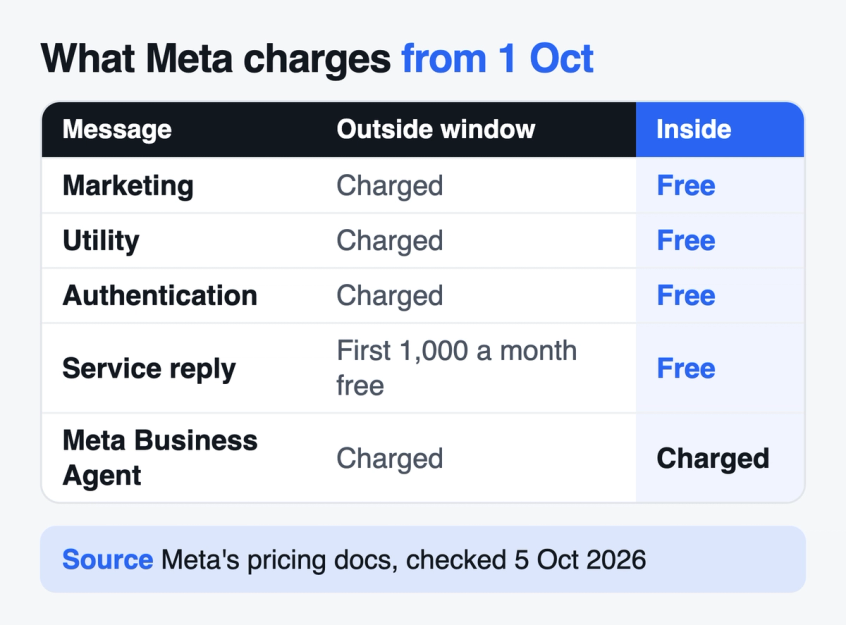
Three days after this change, Meta's 1 October 2026 pricing update made more messages paid. That makes the free entry point window worth more than it was a week earlier:
- Normal replies are charged again. Each business phone number gets 1,000 free service messages a month. From the 1,001st, every normal reply is charged.
- Utility templates sent during a chat are charged. Order confirmations and shipping updates sent within 24 hours of a customer's message used to be free. They are now charged at the utility rate.
Inside an open free entry point window, both kinds of message are free. Meta also says that utility and authentication messages sent in the window do not count toward your volume tiers.
For a store that gets new customers mainly from Click to WhatsApp ads, this means the questions, follow ups and order confirmation in a new customer's first days can cost nothing in Meta fees, as long as someone replies within 24 hours.
The full list of what changed on 1 October, with fixes for each, is in our post on new WhatsApp charges from October 1.
How to use the extra days
Three days was enough to answer a question. Seven days is enough for a short follow up sequence, and that is where most of the savings come from.
Reply within 24 hours, every time. The free window only exists if you answer in time, so a slow inbox loses it. An AI agent that replies to ad chats around the clock makes sure the first reply always goes out.
Plan two or three follow ups for days 2 to 6. A customer who asked about a product and went quiet can get a reminder about that product on day 2 and an offer on day 5, both as templates. While the window is open, Meta charges nothing for them. Under the 72 hour rule, anything after day 3 was paid. Our WhatsApp drip campaign examples have template wording you can adapt.
Send order updates inside the window. If the customer buys on day 5, the WhatsApp order confirmation template and shipping updates are free while the window is still open. After it closes, they are paid utility messages.
Do not turn free into frequent. People who get messages they did not expect block and report businesses, which hurts your quality rating and how many people you can message. Marketing templates that hit the per-user limit are not delivered at all. Our guide to WhatsApp per-user marketing limits explains how those limits affect delivery.
Tell Meta which chats became sales. If your ad optimises for purchases, send each purchase back to Meta through the Conversions API so Meta can show the ad to more people likely to buy. Here is how Conversions API events improve ad targeting.
How to check whether a message was free
This part is for developers. Meta's status webhook, which your messaging platform receives as each message is sent and delivered, shows whether a message was free:
- pricing.type is set to free_entry_point when Meta did not charge because the window was open.
- conversation.expiration_timestamp shows when the current window closes. From Graph API version 24.0, Meta only includes the conversation object for messages sent inside an open free entry point window.
Both fields are listed in Meta's status webhook reference.
Bottom line
Meta's free entry point window now lasts up to 7 days instead of 72 hours. It applies to chats that start from a Click to WhatsApp ad on mobile, once you reply within 24 hours. Inside it, Meta charges nothing except for Meta Business Agent replies. The 24 hour rule for normal replies and the per-user limit for marketing templates still apply.
Since the 1 October pricing update, a fast first reply plus a few useful follow ups inside the free entry point window is the cheapest way to turn ad chats into customers. For the full cost picture, see our WhatsApp Business API pricing guide.
To use the window in Spur:
- Start an automation with the Click To WhatsApp Ad trigger, for all ads or specific ones, so every ad chat gets an instant first reply.
- Let the AI agent answer product questions, so no ad chat misses the free window because nobody replied in time.
- Add delays and approved templates to the same automation for the follow ups on days 2 to 6.
- Use the Send Meta Conversion API Event action to report purchases back to Meta.
Want every ad chat answered in time to get the free window? Start with Spur and set up your first Click to WhatsApp automation.
Frequently asked questions
It is a period in which Meta does not charge for the messages a business sends to a customer. It opens when a customer messages you from a Click to WhatsApp ad on mobile and you reply within 24 hours. It lasts up to 7 days from your reply.
On 28 September 2026. Meta's WhatsApp changelog for that date records the change, and its pricing documentation now says the window may remain open for up to 7 days.
No. Meta applies it automatically to chats that qualify. You only need to reply within 24 hours of the customer's message from the ad.
Yes, it is already live. Meta applies the free entry point window on its side, so chats from your Click to WhatsApp ads get up to 7 days once you reply, with nothing to set up. To make sure every ad chat gets a reply within 24 hours, start a Spur automation with the Click To WhatsApp Ad trigger.
No. Normal replies (anything that is not a template) still need an open 24 hour customer service window, which restarts each time the customer messages you. After 24 hours without a message from the customer, you can only send approved templates. Those templates are free while the free entry point window is open.
No. Meta's pricing documentation names Click to WhatsApp ads as the entry point. Chats from a website button, QR code or wa.me link are priced normally.
Replies from your team or from a third party AI agent count as service messages, and those are free inside the window. Messages from Meta's own Meta Business Agent are still charged by tokens.
Yes. Meta says the window may remain open for up to 7 days but does not publish what closes it sooner. Send your most important follow ups early instead of counting on day 7.
No. Meta only counts charged messages toward the utility and authentication volume tiers, so messages sent inside a free entry point window do not count.
Sources
Checked against the original source. Dates are when we last verified each one.
- Pricing on the WhatsApp Business Platform Meta for Developers. Retrieved 5 October 2026
- WhatsApp changelog Meta for Developers. Retrieved 5 October 2026
- Per-user marketing template message limits Meta for Developers. Retrieved 5 October 2026
- Status messages webhook reference Meta for Developers. Retrieved 5 October 2026
Was this article useful?