Instagram DM Automation Rules: Full Guide (2026)

Discuss with AI
Get instant insights and ask questions about this topic with AI assistants.
💡 Pro tip: All options include context about this blog post. Feel free to modify the prompt to ask more specific questions!
Instagram allows DM automation through official APIs, but only when you follow strict rules. The 24-hour messaging window is your primary boundary. After that, you need special tags (like Human Agent for manual support). Never use unofficial tools that ask for your password. Always get user permission first (via comments, DMs, or ads). Stay under 200 messages/hour. Keep messages relevant to what users asked for. We built Spur as an official Meta partner specifically to handle these rules automatically, so you can automate safely without the guesswork.
Managing customer messages on Instagram can feel overwhelming. Hundreds of DMs pile up, important questions get buried under repetitive requests, and you're spending hours each day just answering the same things over and over.
It's exhausting, and it's not scalable. That's where Instagram DM automation comes in. When done right, you can instantly respond to FAQs, qualify leads while they're hot, and route complex issues to your team. But there's a catch: Instagram has strict rules about automation, and breaking them can get your account flagged or banned.
This guide breaks down every Instagram DM automation rule you need to know in 2026. We'll cover the 24-hour messaging window, when you can (and can't) send automated messages, rate limits, and how to stay compliant while scaling your customer conversations.
Instagram DMs are personal. People use them to chat with friends, coordinate plans, and have private conversations. When businesses started flooding DMs with spam, Instagram had to draw some boundaries.
Meta's messaging policies exist to protect users from unwanted messages. They're designed to ensure that any automated message feels helpful and relevant, not intrusive or spammy. Break these rules, and you're not just annoying your audience. You're risking your account's ability to message anyone at all.
The good news? When you follow the rules, Instagram actually encourages automation. They provide official APIs, partner with automation platforms, and give businesses tools to scale conversations.
You just need to understand the boundaries.
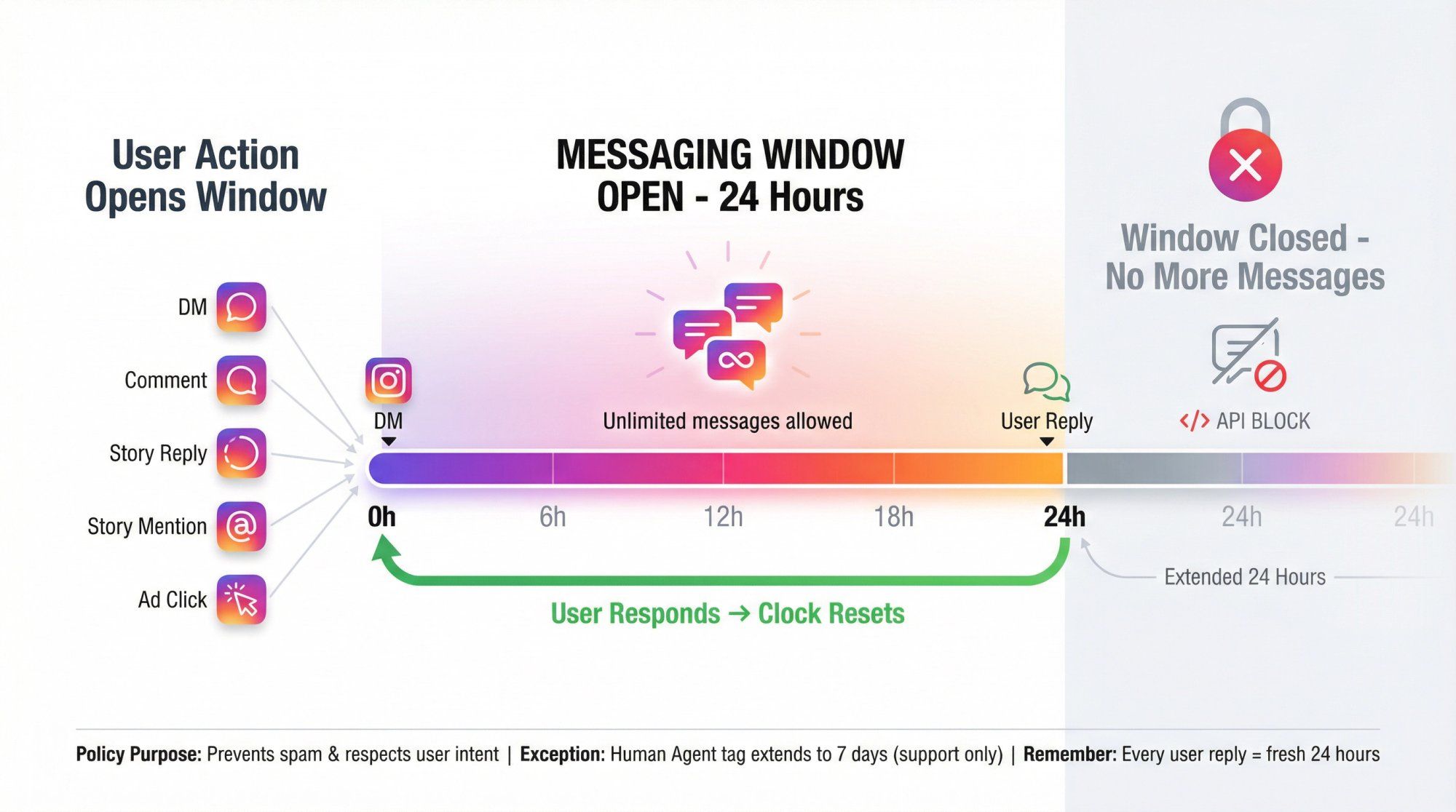
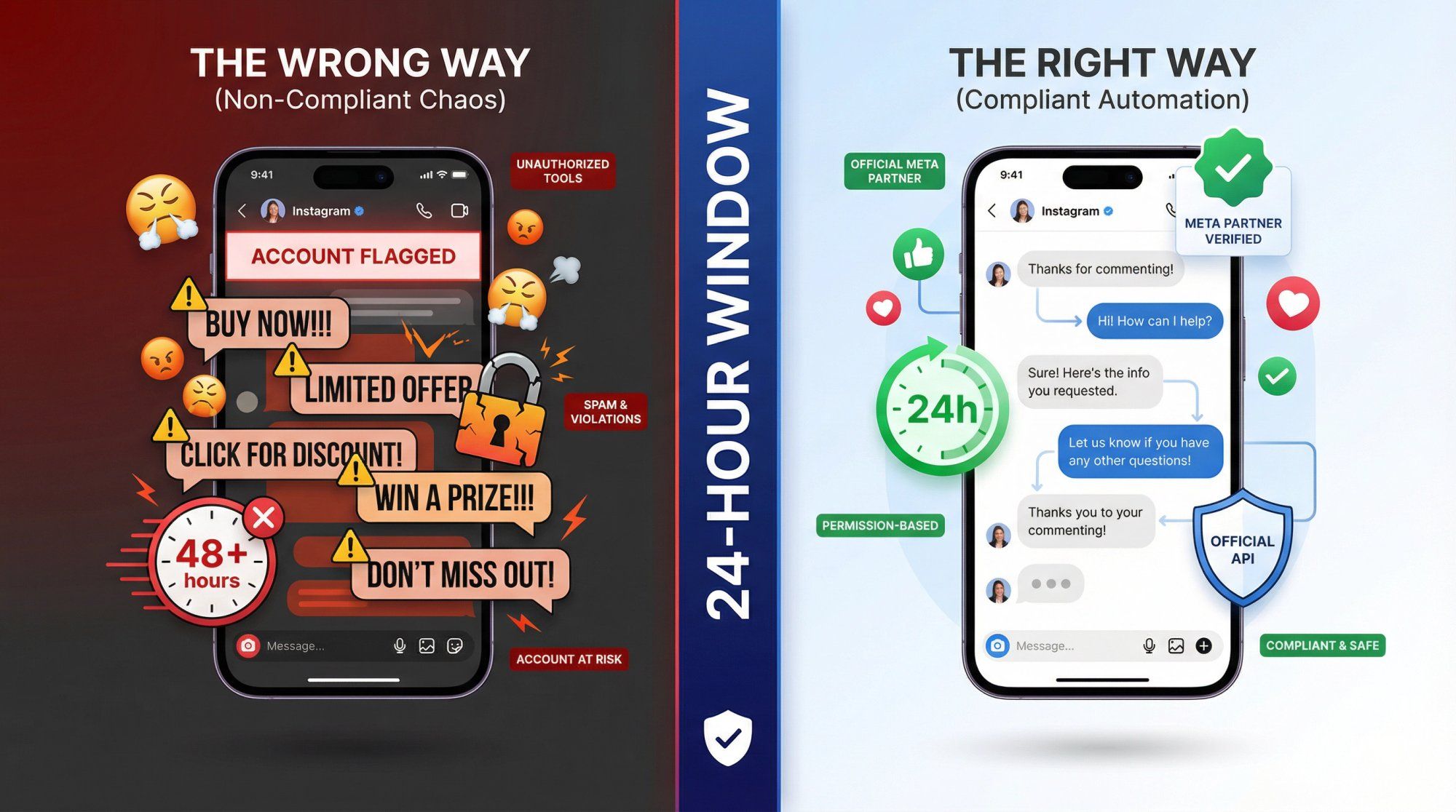
This is the foundation of automated Instagram messaging. When a user interacts with your business, Instagram opens a 24-hour window where you can message them freely. This includes promotional content, follow-ups, questions, whatever you need.
Here's what opens that window:
• They send you a DM
• They comment on your post or Reel
• They reply to your Story
• They mention you in their Story
• They click a Click-to-DM ad
Once opened, you have 24 hours from their last interaction. Within that window, you can send unlimited messages according to Meta's platform policies. You can ask qualifying questions, share product links, send order confirmations, whatever serves the conversation.
Every time the user responds, the 24-hour clock resets. So if they reply on hour 23, you get another full 24 hours. This keeps active conversations flowing naturally.
But here's what happens when 24 hours pass with no user action: The window closes. You can't send normal DMs anymore. The Instagram Graph API will block your attempts. This policy prevents businesses from sending endless follow-up messages to people who've stopped engaging.
Think about it from the user's perspective. They commented on your post yesterday, got the info they wanted, and moved on. If you could keep messaging them indefinitely, that would feel like spam. The 24-hour window keeps automation respectful.
Your automation strategy should be designed around this window:
→ Respond fast. The sooner you reply, the more time you have for follow-ups.
→ Get a response. Every user reply extends your window. That's why effective automation asks questions, not just dumps information.
→ Finish the job quickly. Qualify leads, answer questions, or route to a human within 24 hours.
→ Never assume you can follow up later. If the window closes and the user hasn't responded, you need a different approach.
We designed Spur's Instagram automation to track these windows automatically. You don't have to manually calculate when 24 hours expire. The system handles it, so your messages always go out at the right time.
So what happens when the 24-hour window closes? You're not completely locked out, but your options become very limited.
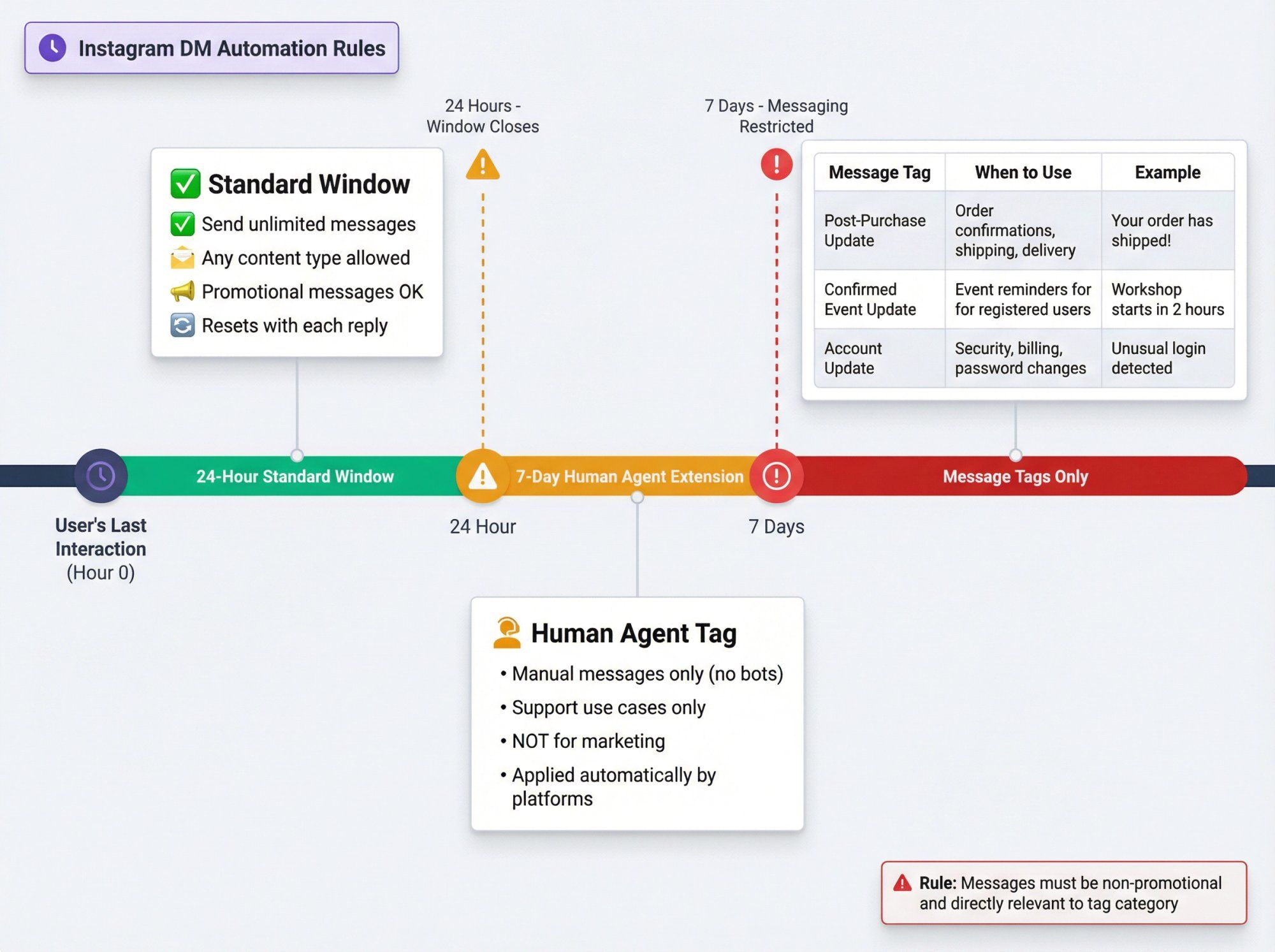
Instagram provides a 7-day window for human support agents using the Human Agent tag. This means a real person from your team can follow up with a user up to 7 days after their last message.
Critical details about this extension:
① It's for humans only. Automated bots can't use the Human Agent tag. It must be applied manually by a live agent.
② It's for support, not marketing. You can use this window to resolve complex issues, provide updates, or continue a support conversation. You can't use it for promotional messages or automated sequences.
③ Most platforms handle it automatically. When a human agent in your shared inbox sends a message outside the 24-hour window, platforms like Spur automatically apply the Human Agent tag.
This extension exists for situations where customer issues take longer than 24 hours to resolve. Maybe you need to check inventory, consult with your team, or wait for a supplier. The 7-day window keeps that conversation alive.
Outside both windows (24 hours and 7 days), Instagram allows very specific types of messages using message tags. These are predefined categories that Meta approves:
| Message Tag | When to Use | Example |
|---|---|---|
| Post-Purchase Update | Order confirmations, shipping notifications, delivery updates | "Your order has shipped! Track it here..." |
| Confirmed Event Update | Reminders for events the user registered for | "Your workshop starts in 2 hours" |
| Account Update | Password changes, billing issues, security alerts | "We detected unusual login activity" |
The catch? These messages must be strictly non-promotional and directly relevant to the tag category according to Meta's messaging policies. You can't sneak marketing into a shipping notification. Users will report it, and Instagram's systems will detect it.
Also worth noting: these tags are primarily documented for Facebook Messenger. Instagram's API has more limited tag support, with Human Agent being the most reliable. Always check your automation platform's documentation for what's actually supported.
Instagram offers one more option: one-time notifications. During your 24-hour window, you can ask the user for permission to send a specific follow-up message later.
For example, if something is out of stock, you might say: "Want me to notify you when this is back in stock?" If they opt in, you get a single opportunity to message them about that specific topic, even weeks later.
This works because it's explicit consent for a specific purpose. The user knows exactly what they're signing up for. Use this for back-in-stock alerts, event reminders, or appointment confirmations.
The golden rule for messaging after 24 hours: Only send messages users genuinely need or explicitly requested. Never try to disguise marketing as utility. Instagram's algorithms monitor user behavior (reports, blocks, ignores), and pattern abuse will get you restricted.
Instagram automation is permission-based. You can't just send automated DMs to random people. The user must take an action that signals interest in talking to you.
| ✓ Valid Permission | ✗ Invalid (Will Get You Flagged) |
|---|---|
| They comment on your content | Someone follows you |
| They DM you first | Someone likes your post |
| They reply to your Story or mention you | Someone comments on another account |
| They click a Click-to-DM ad | Scraping usernames and mass DMing |
Cold outreach is explicitly prohibited. You can't scrape a list of usernames and mass DM them. You can't message all your competitor's followers. Instagram's systems won't deliver these messages, and attempts to do it will get flagged.
One spam report can trigger an account review. Multiple reports can get you restricted or banned. It's just not worth it.
Instead of cold outreach, create opportunities for people to engage:
• Post engaging content that encourages comments
• Run contests where people comment to enter
• Use captions like "Comment MENU and I'll DM you our full catalog"
• Run Click-to-Instagram DM ads that start conversations
• Encourage Story replies with questions or polls
When you give people a reason to initiate, they do it willingly. That's the foundation of compliant automation.
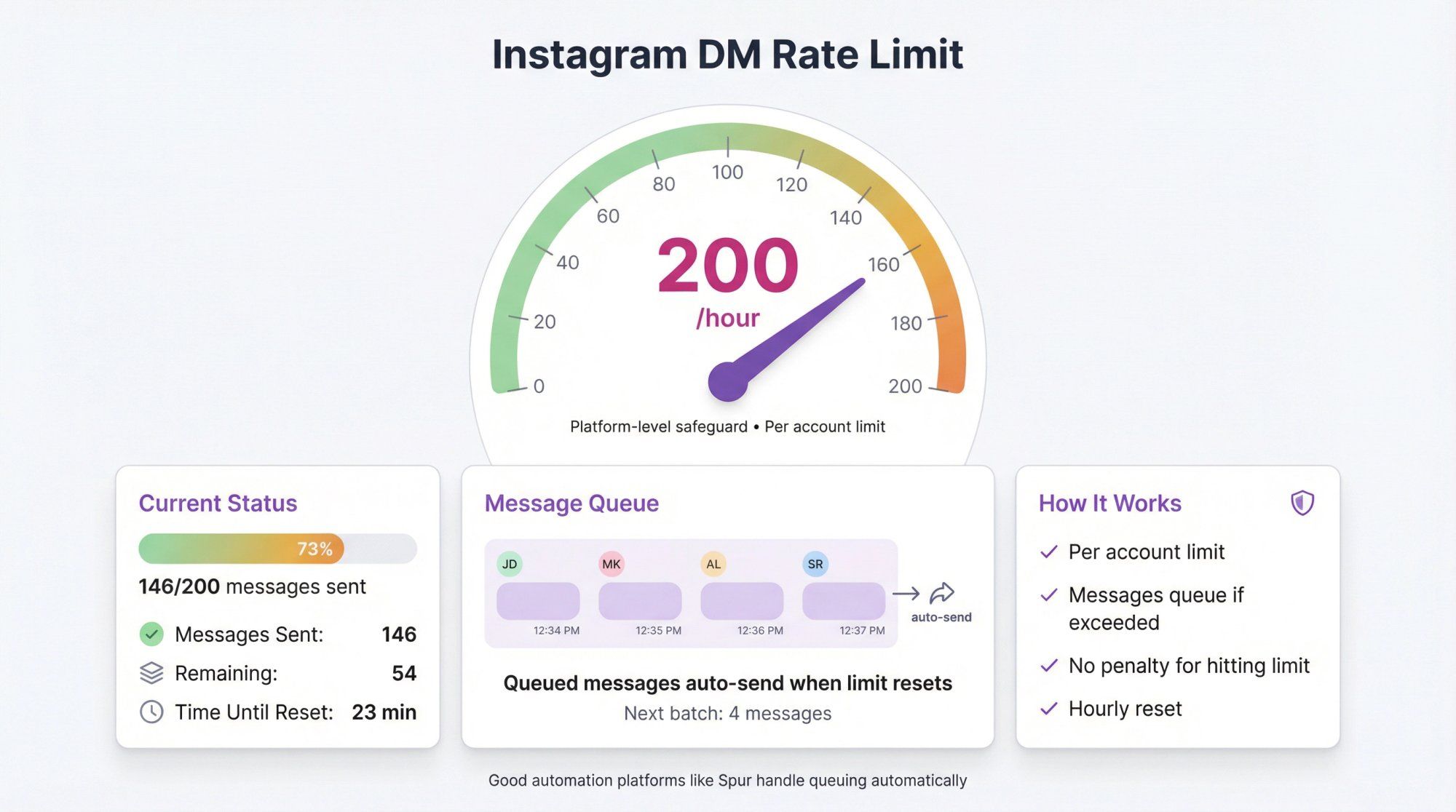
Instagram caps how many DMs you can send via automation. The current guideline is about 200 messages per hour per Instagram account.
This is a platform-level safeguard to prevent spam bursts. Even if you're using an official tool, you can't blast thousands of messages at once.
Here's how it works:
→ 200 messages per hour is the typical limit for automated DMs through the official API
→ It's per account, not per tool
→ If you exceed it, additional messages get queued or delayed
→ There's no penalty for hitting the limit (your messages just wait)
For most businesses, 200 messages per hour is plenty. That's more than 3 DMs per minute. You'd only hit this limit during viral moments (like a contest going viral or a popular Instagram Live session where hundreds of people comment at once).
Good automation platforms handle this automatically. If 300 people trigger your automation in an hour, the platform will send the first 200 immediately and queue the rest. Once the hour resets, the queue clears.
What you shouldn't do:
• Try to bypass the limit with multiple accounts (Instagram will detect this)
• Use unauthorized tools that claim "unlimited DMs" (they're using methods that violate Instagram's terms)
• Panic when you hit the limit (it's expected, and your messages will still send)
At Spur, our system automatically manages rate limits. You never have to worry about messages failing or delays breaking your flows. The queueing happens behind the scenes.
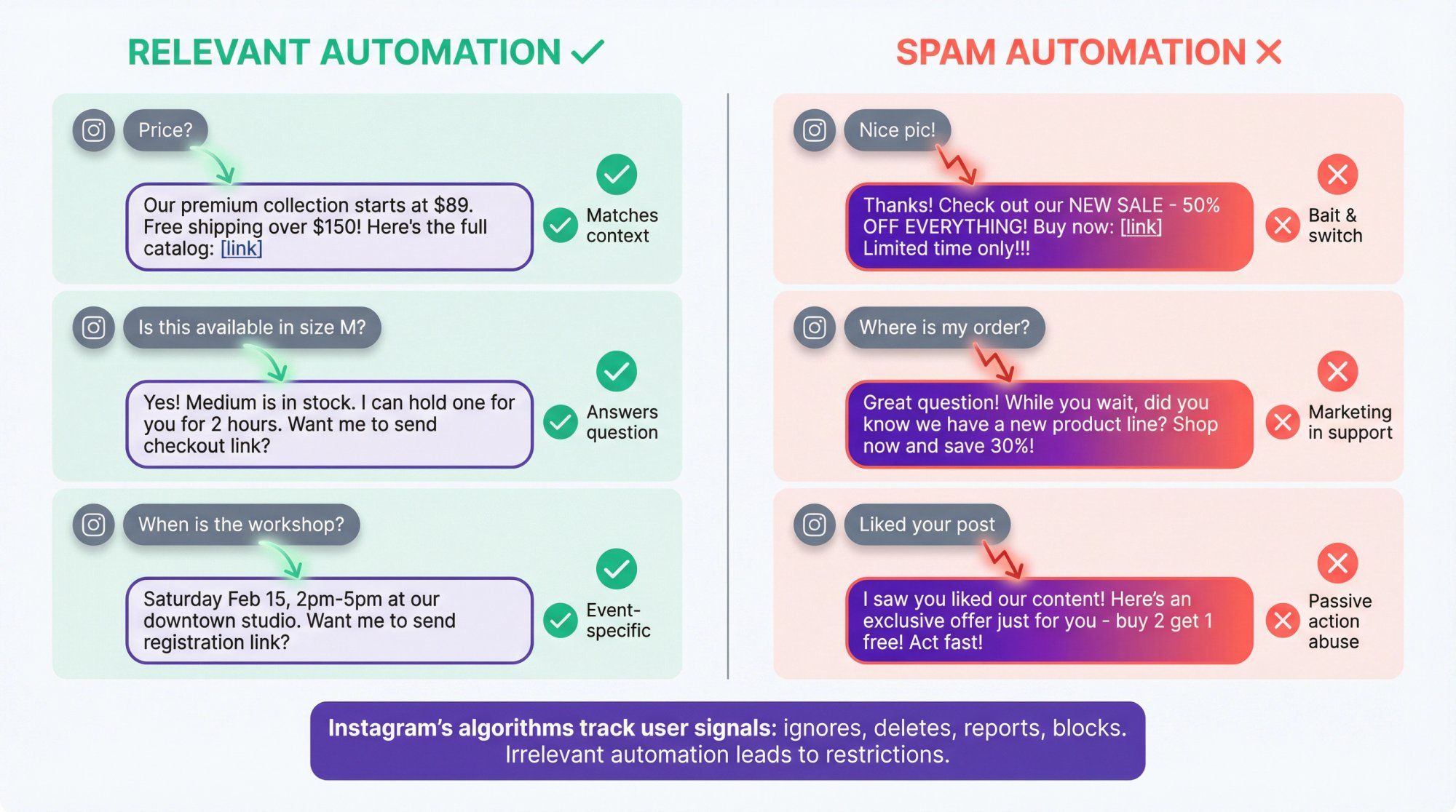
Even when you're within the 24-hour window and messaging someone who engaged with you, you need to send content that's actually relevant to their interaction.
This isn't just good practice. It's implied in Instagram's policies and critical for avoiding spam reports.
Match the user's context:
• If they commented "Price?" on a product post, send pricing info
• If they replied to a Story about an event, send event details
• If they asked about availability, tell them about availability
Don't bait-and-switch:
- User comments "Nice pic!" and you send a sales pitch? That's spam.
- User asks a support question and you send marketing? That feels scammy.
- User triggers automation for one thing and gets bombarded with unrelated offers? That's annoying.
Passive actions don't count:
A user liking your post is not permission to DM them. A user following you is not an invitation for automated messages. These actions don't open the 24-hour window, and DMing based on them violates the rules.
Keep it conversational:
Don't send walls of text. Don't blast multiple messages in a row. Automation should feel like a helpful conversation, not a marketing barrage.
Ask one question, wait for a response. Provide value, then see if they need more.
Instagram's algorithms track user feedback signals. If people consistently ignore your DMs, delete them, or especially if they report/block, that tells Instagram your messages aren't wanted. Enough negative signals can lead to restrictions.
One more critical point: don't send the same message to the same person multiple times. If someone triggers your automation three times (by commenting on three different posts), make sure you're not auto-replying with identical DMs each time.
Quality platforms use contact tagging to prevent this. The system marks that a user already received a specific message and won't send it again. This keeps you from looking desperate and prevents Instagram from flagging repetitive behavior.
At Spur, we build this protection into every automation flow. Once a user gets a message, the system tracks it. No accidental spam, no duplicate sends.
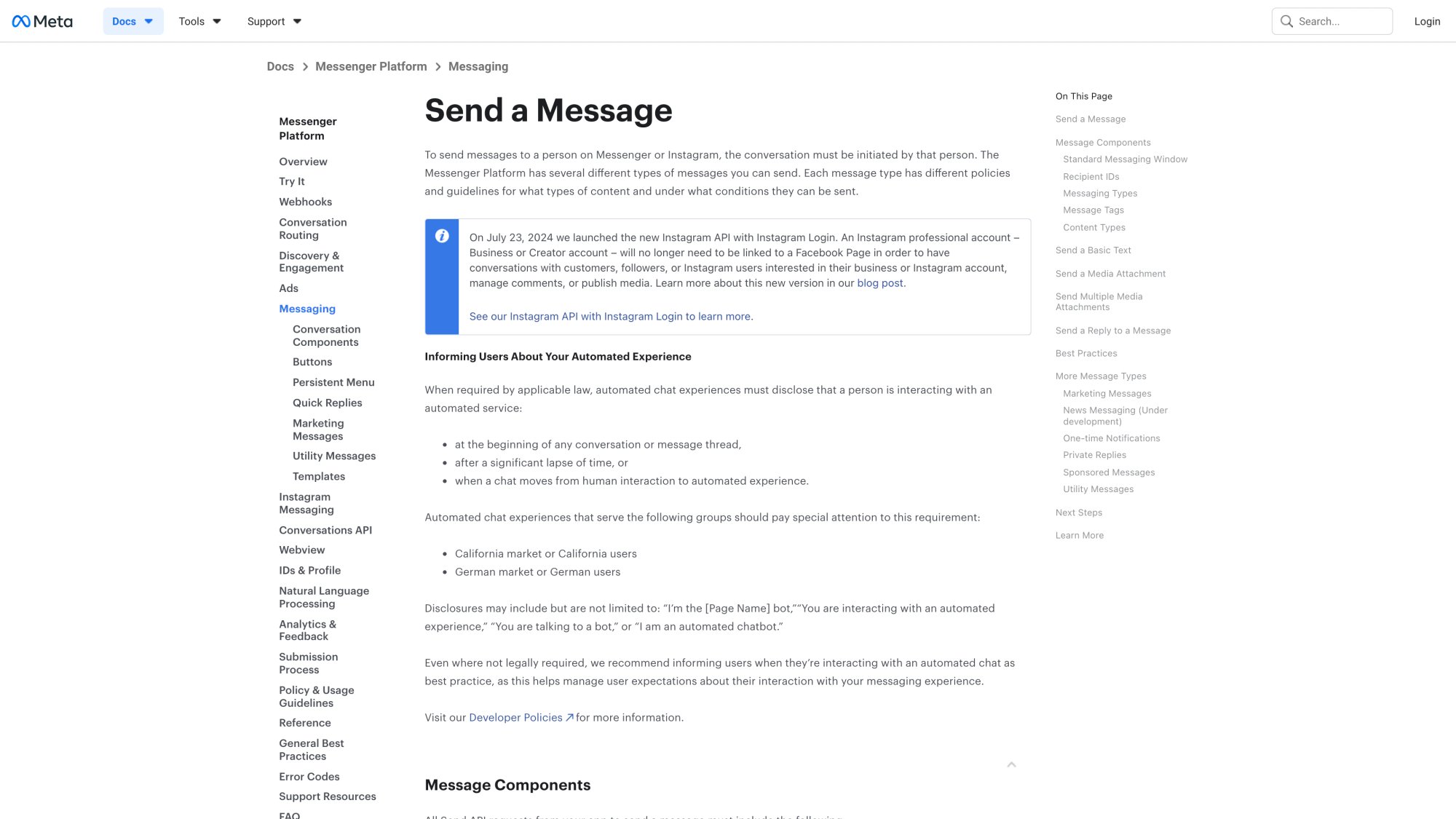
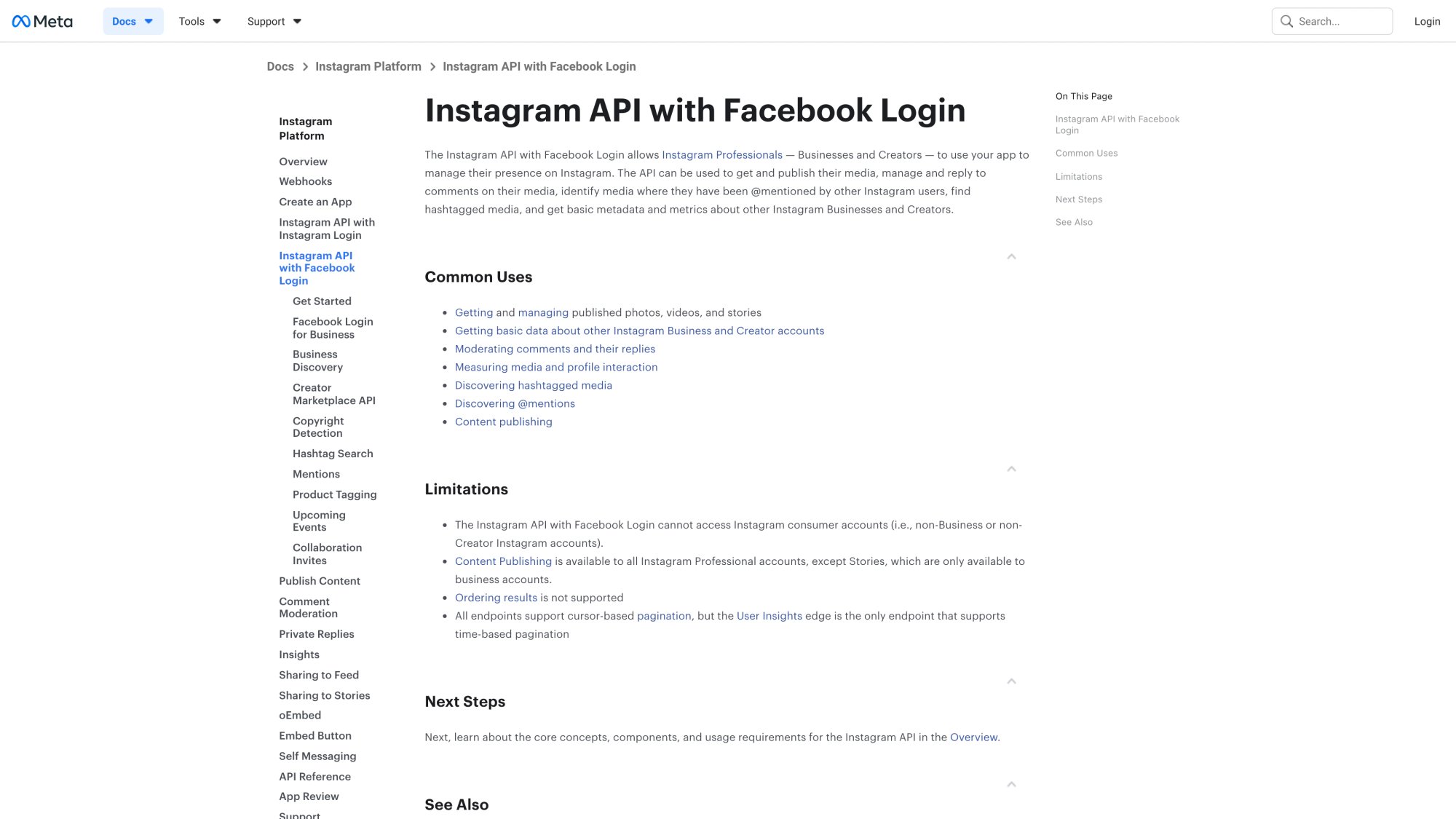
Instagram allows DM automation, but only through the official Instagram Graph API or approved partner apps. If you use unauthorized methods, you're violating Instagram's terms and putting your account at serious risk.
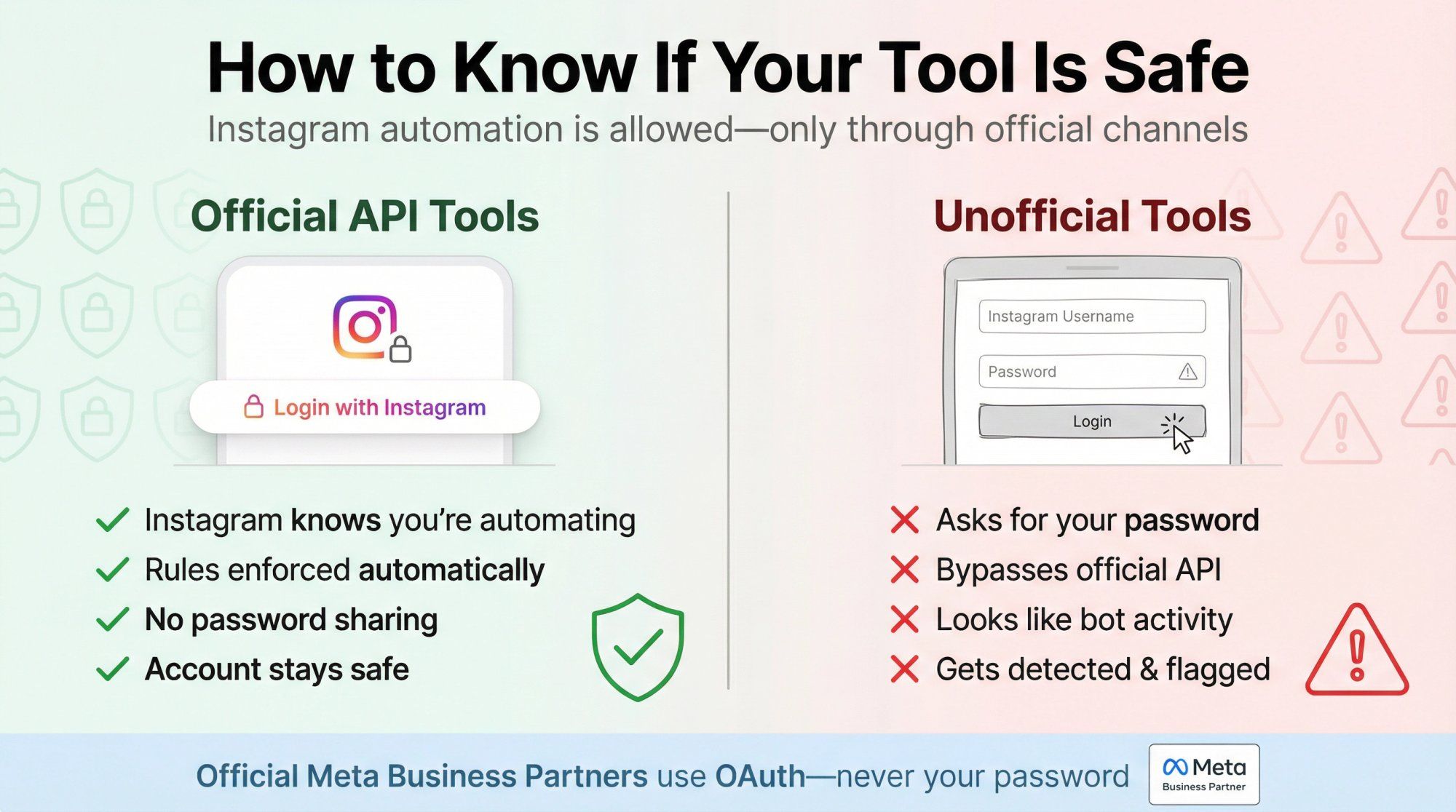
Official, authorized platforms connect to Instagram through OAuth (the "Login with Facebook/Instagram" flow). They never ask for your password. Instead, you authenticate through Instagram's own system and grant permissions.
These platforms are often Meta Business Partners that use the official Instagram Messaging API. They use the official API, which means:
✓ Instagram knows you're automating and allows it
✓ The platform enforces messaging rules automatically
✓ You can't accidentally violate policies
✓ Your account stays safe
When you connect these tools, you'll see Instagram's own login screen. You grant specific permissions. The tool never sees your password. That's how you know it's legitimate.
Browser-based automation hacks or Chrome extensions that ask for your Instagram username and password are against Instagram's terms. These tools typically:
✗ Log in as you and automate browser actions
✗ Bypass Instagram's official API
✗ Make your account look like it's being controlled by a bot
✗ Get detected by Instagram's security systems
Instagram explicitly prohibits giving third parties access to your account credentials. Even if a tool "works today," it's inherently fragile and high-risk.
Other red flags:
• Services promising to "DM 1000+ people at once"
• Tools that claim to bypass Instagram's limits
• Anything that asks you to "verify your account" with your password
• "Growth services" that automate follows, likes, and DMs
One policy change from Instagram can flag your account overnight. People have lost business accounts with thousands of followers because they used a cheap, unauthorized DM bot.
The extra cost of using official tools is nothing compared to losing your Instagram presence entirely.
We built Spur as an official Instagram Business Partner. That means:
→ We went through Meta's rigorous app review process
→ We use only the approved Graph API
→ We enforce all messaging rules automatically
→ Your account is protected because we're operating within Instagram's framework
You don't have to worry about accidentally breaking rules or getting flagged. The system won't let you send messages outside allowed windows, exceed rate limits, or violate any other policies. Compliance is built in.
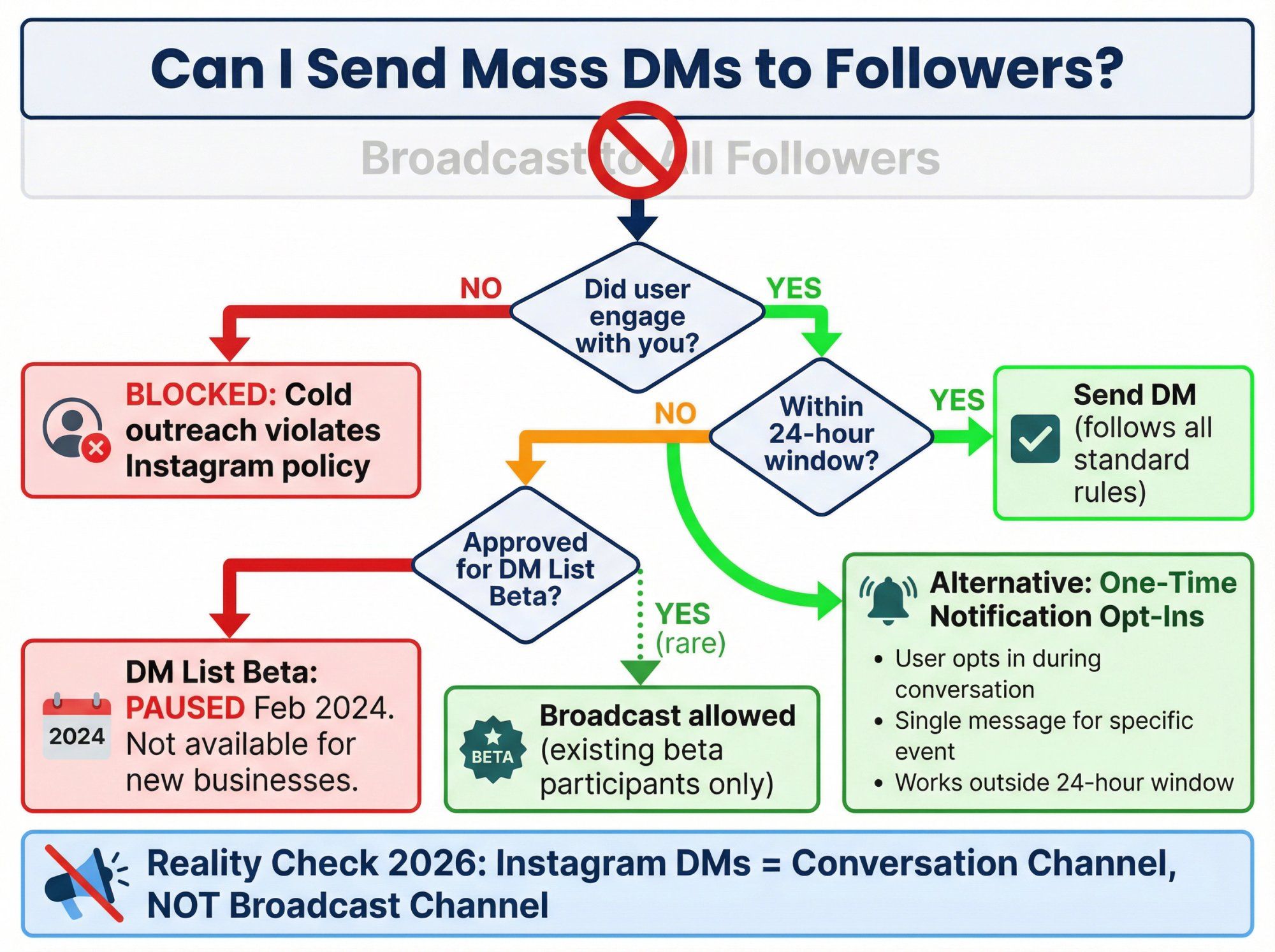
A lot of businesses want to send broadcast messages to many followers at once, like an email newsletter but via Instagram DMs. The short answer: Instagram doesn't freely allow this.
Every automated DM must follow the rules above. That means the user must have initiated contact within the 24-hour window (or you're using special tags for specific purposes).
In late 2022 and 2023, Meta tested an Instagram DM list feature where users could opt in to receive broadcast messages from a business. Think of it like a subscription list for DMs.
But in February 2024, Meta paused new access to this feature. Only businesses that were already approved in the beta can use it now. For most brands, this isn't an option.
Meta may bring it back or expand it in the future, but as of January 2026, it's not broadly available.
The closest thing to a broadcast is gathering one-time notification opt-ins. During a conversation, you can ask users to opt in for a specific notification (like "Notify me when the sale starts").
If 500 people opt in, you can send that notification to all 500, even outside the 24-hour window. It's not a general broadcast, but it works for specific, time-sensitive announcements.
Instead of trying to blast DMs to everyone, focus on:
• Creating content that encourages comments (which opens 24-hour windows)
• Running campaigns that get people to engage
• Using Click-to-DM ads to start conversations at scale
• Capturing email/phone during DM conversations for off-platform follow-up
Instagram DMs work best as a conversation channel, not a broadcast channel. When you treat them that way, you stay compliant and build better relationships.
Instagram's policies emphasize that automation should never trap users in a bot with no way out. You must provide an easy path to a human agent.
This isn't just a rule. It's good customer experience:
• Some questions are too complex for automation
• Some users hate bots and want human help immediately
• Edge cases will always exist
• Frustrated users who can't reach a human will report or block you
At minimum, your automation should:
① Recognize phrases like "human," "agent," or "talk to someone"
② Offer a menu option to reach a person
③ Route the conversation to a live team member in a shared inbox
④ Provide business hours and response time expectations
Even if you use AI agents to handle most conversations, you need this safety valve. At Spur, our shared inbox makes handoff seamless. When a user asks for help, the conversation routes to your team with full context. No copying, no lost history, no friction.
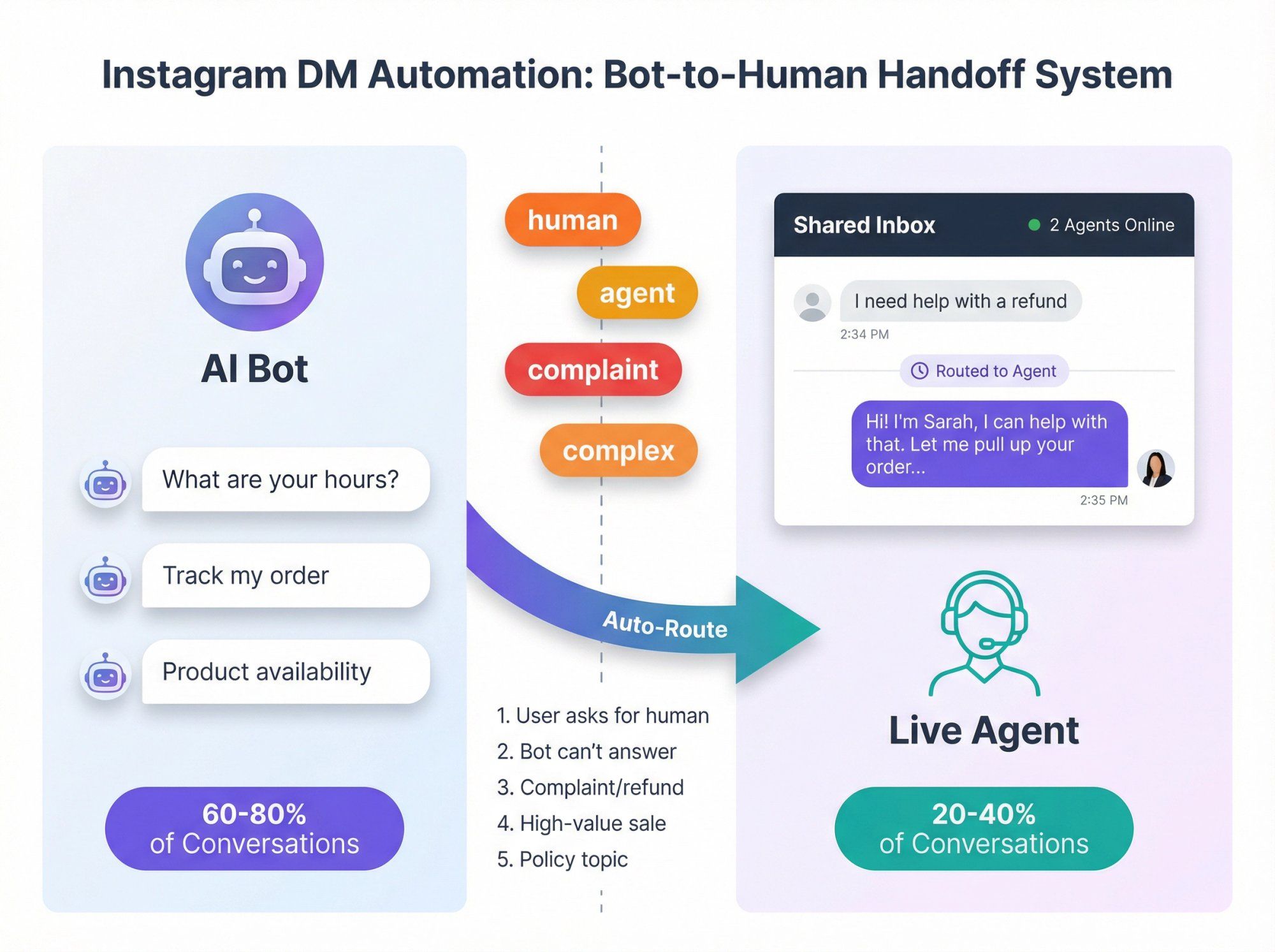
Smart automation hands off in these situations:
| Situation | Why Hand Off |
|---|---|
| The user explicitly asks for a human | Respect their preference immediately |
| The bot can't answer the question | Avoid frustrating dead ends |
| Complaint or refund request | Requires empathy and judgment |
| High-value sales opportunity | Personalization increases conversion |
| Policy-sensitive topics | Legal, medical, financial need human oversight |
Automation handles the easy 60-80% of conversations. Humans handle the rest. That's the sweet spot for customer support automation.
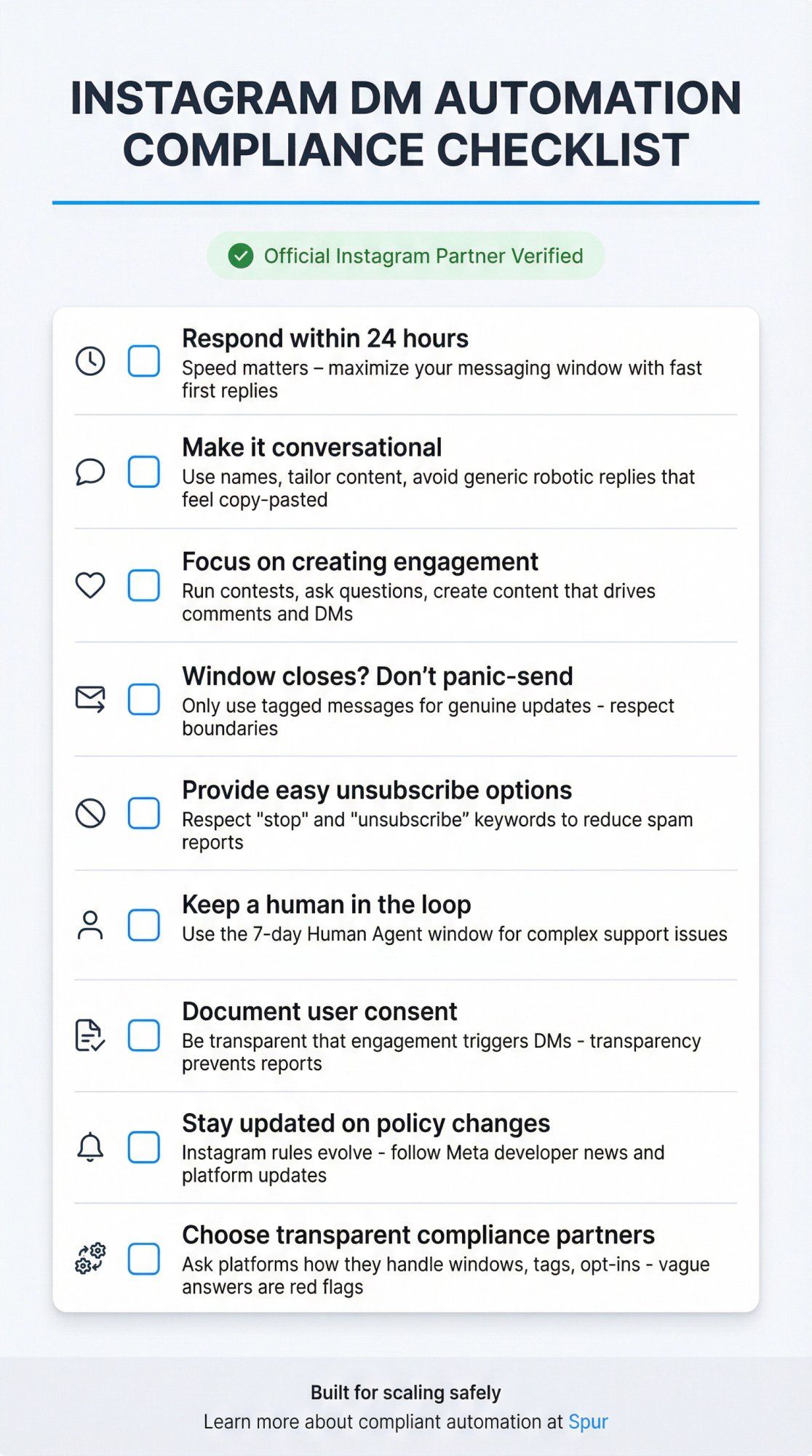
We've covered the rules. Now let's talk about how successful brands actually use automation without risking their accounts:
Respond within 24 hours. The faster you reply to comments or DMs, the more time you have to finish the conversation within the window. Speed matters.
Make it conversational. Use the user's name. Tailor content to what they asked. Don't send generic, robotic replies that feel copy-pasted. Learn about chatbot best practices.
Focus on creating engagement. Instead of trying to message people who haven't engaged, create content that makes them want to comment or DM you. Run contests, ask questions, offer value.
If the 24-hour window closes, don't panic-send. Consider whether it truly warrants a tagged message (like an order update). If not, let it go or wait for them to re-engage.
Provide an easy unsubscribe option. While Instagram doesn't have a built-in unsubscribe like SMS, you can respect keywords like "stop" or "unsubscribe." If users know they can opt out, they're less likely to report you.
Keep a human in the loop. Use the Human Agent 7-day window when you need to follow up on complex issues. Real support builds trust.
Document user consent. Make it clear that commenting or engaging will trigger a DM. Don't hide it. Transparency prevents spam reports.
Stay updated on policy changes. Instagram's rules can evolve. What's true in early 2026 might change later in the year. Follow official Meta developer news and your automation platform's updates.
Choose partners who are transparent about compliance. Ask your automation platform how they handle the 24-hour rule, message tags, and opt-ins. If they can't explain it clearly, that's a red flag.
Managing all these rules manually would be a nightmare. That's why we built Spur to handle compliance automatically.
Here's what makes us different:
Official Instagram Partnership: We're an approved Meta Business Partner, which means we use the official APIs and passed Meta's app review. Your account is protected because we operate within Instagram's framework.
Automatic Rule Enforcement: Our platform won't let you send messages outside allowed windows, exceed rate limits, or violate policies. The system handles 24-hour window tracking, message tags, and Human Agent escalation automatically.
AI Agents Trained on Your Knowledge Base: Unlike basic chatbots, our AI agents can be trained on your website data, product catalog, and FAQs. They provide accurate, helpful answers and can take actions like tracking orders or booking appointments. Learn more about training chatbots on your own data.
Shared Inbox with Human Handoff: When automation can't handle something, the conversation seamlessly routes to your team. Full context, no copying information, no friction. Discover our chatbot-to-human handoff capabilities.
Multi-Channel Support: We don't just do Instagram. Spur unifies WhatsApp, Instagram, Facebook Messenger, and live chat into one platform.
Manage all customer conversations in one place with our omnichannel marketing automation approach.
Built for Real Businesses: We work with D2C brands, real estate agencies, travel companies, and service businesses. Our platform handles the complexity so you can focus on customers, not compliance. Check out our case studies to see real results.
If you're serious about Instagram DM automation, you need a partner who understands the rules and builds around them. That's Spur.
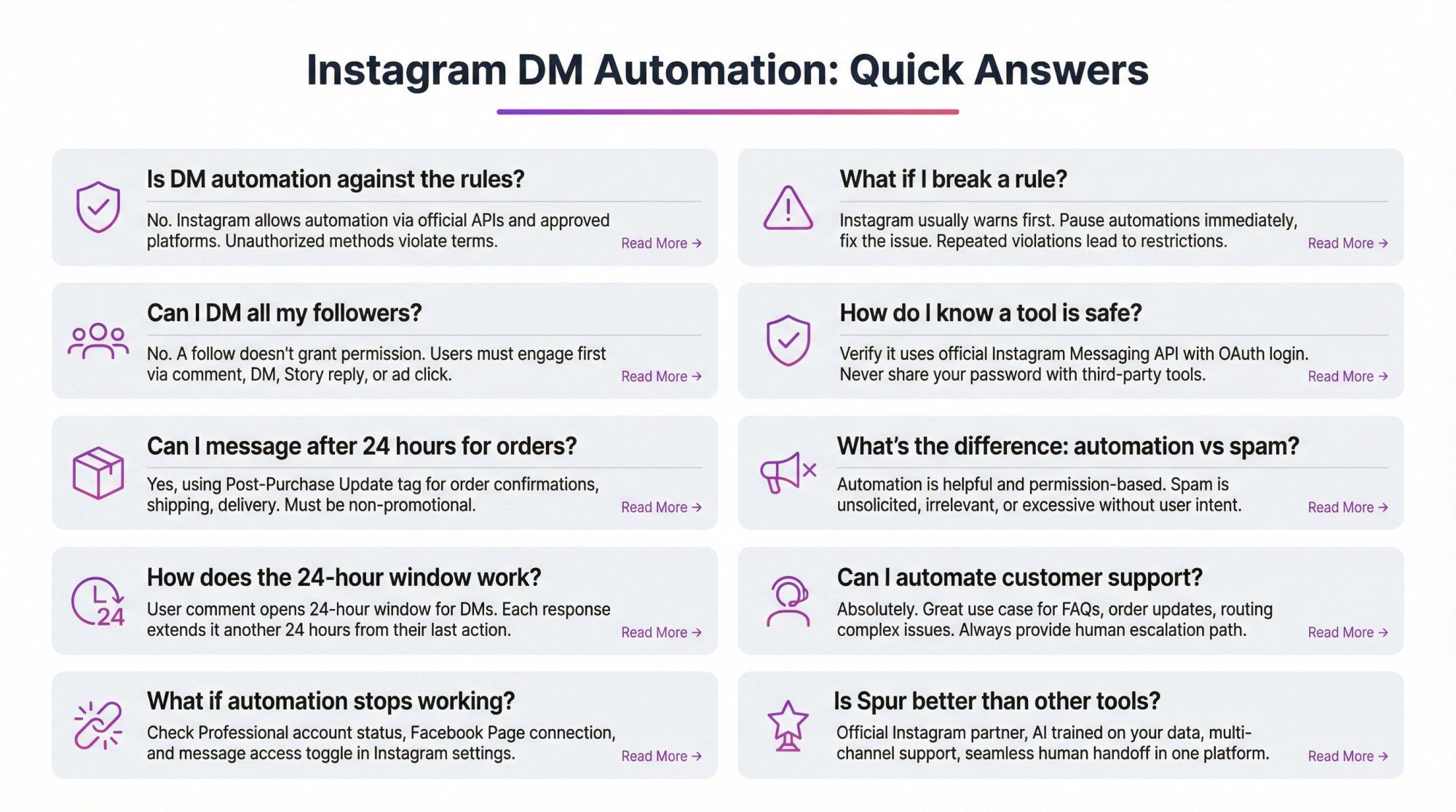
No. Instagram explicitly allows DM automation through official APIs and approved partner platforms. What's against the rules is using unauthorized methods (like bots that log in with your password) or violating messaging policies (like cold outreach or spam).
Instagram usually gives you a warning first. You might see a notification that you've violated a messaging policy or that someone reported spam. If this happens, pause your automations immediately, identify the issue, and fix it. Ignoring warnings and continuing the behavior can lead to temporary or permanent restrictions.
No. A follow alone doesn't give you permission to DM someone. The user must engage with you first (comment, DM, Story reply, or ad click). Automatically messaging all your followers would be considered spam.
Check if it uses the official Instagram Messaging API. Safe tools use OAuth login (you authenticate through Instagram's own system) and never ask for your password. They should also clearly explain how they handle the 24-hour rule and other policies. Read more about choosing the right chatbot platform.
Yes, if you're sending a legitimate post-purchase update (order confirmation, shipping notification, delivery update). These fall under the Post-Purchase Update message tag, which is allowed outside the 24-hour window. But the message must be strictly about the order, not promotional. Learn more about automated order processing.
Automation is helpful, relevant, and permission-based. Spam is unsolicited, irrelevant, or excessive. The key difference is user intent. If someone asked for information and you provide it, that's automation. If you're messaging people who never engaged with you or sending content they didn't request, that's spam.
When someone comments on your post, that action opens a 24-hour messaging window. You can send them a DM (called an auto private reply) immediately. If they respond to that DM, the window extends another 24 hours from their response. The goal is to turn the initial comment into an ongoing conversation. Learn about Instagram auto-comment features.
Absolutely. In fact, support is one of the best use cases for automation. You can instantly answer FAQs, provide order status updates, and route complex issues to your team. Just make sure you always offer a path to a human agent for questions the bot can't handle. Explore our customer service automation capabilities.
First, check if your Instagram account is still set to Professional and connected to your Facebook Page. Then verify the "Allow access to messages" toggle in Instagram settings (Settings → Messages and story replies → Message controls → Connected tools). If those are fine, confirm you're not trying to message outside the 24-hour window without proper tags. Most "broken" automation is actually a permissions or window issue.
We're biased, but here's why businesses choose Spur: We're an official Instagram partner (fully compliant), we train AI agents on your actual knowledge base (not just generic responses), we handle multiple channels in one platform (Instagram, WhatsApp, Facebook, live chat), and we make human handoff seamless with our shared inbox. Plus, we're simpler to use than technical tools while being more powerful than basic chatbots. See how we compare to other platforms.
Instagram DM automation is powerful when you play by the rules. The 24-hour messaging window, permission-based engagement, official API tools, and relevant content are the foundation of compliant automation.
Break the rules, and you risk your account. Follow them, and you can scale personal conversations with thousands of customers while Instagram's systems support you.
At Spur, we've built our entire platform around these rules. You don't have to worry about compliance, rate limits, or policy changes. The system handles it automatically, so you can focus on what matters: building better customer relationships.
Ready to automate Instagram DMs the right way? Try Spur free for 7 days and see how easy compliant automation can be.