Key takeaways
Set up an autoresponder for FB Messenger with our guide. Learn proven strategies for automation, customer engagement, and lead capture that deliver results.
Ask an AI about this article
At its core, an autoresponder for FB Messenger is your 24/7 digital receptionist. It’s a tool that automatically sends personalized, pre-written messages to anyone who contacts your Facebook Business Page. Think of it as an always-on assistant, making sure no customer is ever left waiting, even when you’re away from your desk.
This isn't just a convenience; it’s a crucial part of modern customer service. Instant acknowledgment helps manage expectations and, more importantly, captures a lead's interest when it's at its peak.
Why a Messenger Autoresponder Is a Game Changer
In business today, speed wins. When a potential customer messages you on Facebook, they're not just browsing—they're showing genuine interest. Every minute you make them wait is an opportunity for that interest to fade or for a competitor to swoop in. An autoresponder closes that gap instantly.
But this goes way beyond a simple "We'll get back to you" message. A smart autoresponder becomes your front-line sales and support agent—one that never takes a break. It can handle common questions, direct users to specific product pages, and even qualify leads before a human ever has to step in.
The Power of Being Present
Think about it from your own experience. How often have you messaged a business, only to be met with silence for hours? It’s frustrating. Now, picture clicking an ad and immediately getting a helpful message with more info and a clear next step. That’s the kind of seamless experience that builds trust and turns browsers into buyers.
The numbers don't lie. Every day, over 375,000 people interact with Messenger bots. This isn't a fad; it's how customers prefer to communicate. With the average person opening the Messenger app around 184 times per month, you have a constant stream of opportunities to connect.
The immediate impact of implementing a Messenger autoresponder can't be overstated. It affects everything from customer satisfaction to your bottom line.
Instant Impact of a Messenger Autoresponder
This table breaks down the immediate benefits you can expect to see across different parts of your business once you switch on your autoresponder.
Business Area Impact of Automation Key Metric Improved Customer Support Instantly answers FAQs, reducing ticket volume. First Response Time Sales & Lead Gen Captures lead details and qualifies prospects 24/7. Lead Conversion Rate Marketing Delivers targeted info based on user queries. Engagement Rate Brand Reputation Creates a reliable, always-available brand image. Customer Satisfaction (CSAT)
As you can see, the value extends far beyond just saving a few minutes. It strategically improves key performance indicators that are vital for growth.
Key Takeaway: An autoresponder isn't a shortcut; it's a tool for meeting modern customer expectations head-on. Responding instantly shows you value their time, which is the cornerstone of any strong business relationship.
Alright, let's lay the groundwork for a truly effective autoresponder. Before you even think about writing the first message, you need a plan. A powerful autoresponder for FB messenger isn't just a fancy "we'll get back to you" note; it's a strategic tool built with a clear purpose.
Honestly, without a specific goal, your bot is more likely to annoy people than help them. So, what does a win look like for your business?
Maybe you're just trying to cut down on the time it takes to answer the same questions over and over. Or perhaps the main goal is to warm up potential leads and hand them off to your sales team. You could even be trying to steer users straight to a specific product they're asking about. Nailing down this single, primary objective is absolutely the most important thing you'll do.
It also helps to see the bigger picture of how your Messenger bot fits into your overall marketing automation strategies. Understanding this context helps you build something that works seamlessly with everything else you're doing.
This handy visual shows you exactly where to get started within your Facebook settings.
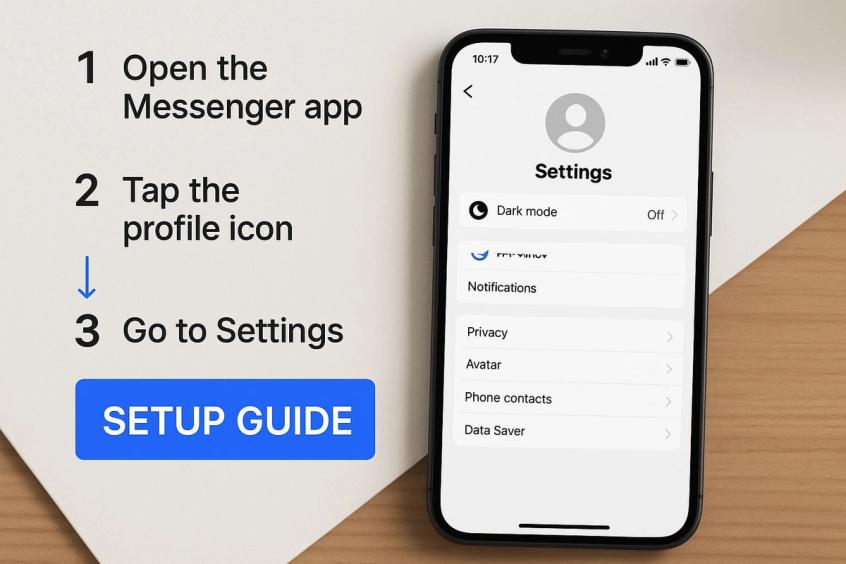
Sometimes, seeing the menu laid out like this makes finding what you need inside Facebook's sprawling interface a whole lot easier.
Map Out Your Customer Conversations
Now for the fun part. Grab a coffee and spend some time digging through your old Messenger conversations. Your goal is to identify the top 5-10 questions that pop up constantly. This is the raw material for your automation.
My Advice: I always tell people to think of this like creating a simple flowchart. If a customer asks, "Do you ship to Canada?", what's the perfect response? And what's the next logical question they might ask? Sketching this out is your blueprint for building helpful, not clunky, automation.
You’ll want to have a plan for the usual suspects, including:
- Questions about pricing and stock
- Queries on your business hours or address
- "Where's my order?" shipping updates
- Clarification on your return policy
This upfront thinking is what separates a generic, unhelpful bot from one that genuinely makes your customers' lives easier and frees up your time. Planning ensures your autoresponder is a valuable asset from the moment you turn it on.
Crafting Automated Responses That Feel Human
Here's the secret to a great autoresponder for FB messenger: make it sound less like a machine and more like a real, helpful person. Automation is fantastic for efficiency, but your messages should still build a genuine connection. The whole point is to make customers feel heard and valued, not just shuffled off to a robot.
It all boils down to your tone. You'll want to write your automated messages in a conversational, friendly style that feels like your brand. If your brand is playful, an emoji or two can work wonders. If you're more on the formal side, you can still be warm and professional. And always, always use the customer's first name. That simple touch of personalization is one of the most powerful things you can do.
Getting this right is critical, especially when you consider the sheer scale of Facebook. People send over 100 billion messages every day across Meta's apps. Engagement rates for Messenger marketing can be 10 to 80 times higher than other channels, so a personal touch really helps you cut through the noise. You can dig deeper into the impact of Messenger marketing at SocialMediaCurve.com.
A thoughtfully crafted autoresponder can do more than just say hello; it can guide conversations, suggest products, and even help close sales.
Writing a Welcoming First Impression
Think of your welcome message as your digital handshake. It needs to be warm, confirm you got their message, and tell them exactly what to expect next. No guesswork.
Here are a couple of real-world examples:
- For an e-commerce store: "Hi {{user_first_name}}! Thanks for reaching out. We've got your message, and a real person from our team will get back to you within 2 hours. While you wait, have you seen our new arrivals? [link]"
- For a local service provider: "Hey {{user_first_name}}, thanks for messaging us! We're with another client at the moment but will reply here shortly. If you're looking to book an appointment, you can check our availability right now: [booking link]"
See how that works? You’re providing instant value and a clear next step.
Pro Tip: I always recommend including a call-to-action (CTA). Pointing users to a helpful resource or your booking page keeps them engaged and moving through your funnel, even before a human has to jump in.
Smart Sequences for Common Questions
A simple welcome is a great start, but the real magic happens when you build out sequences to solve common problems on the spot. I’d suggest starting by listing your top 3-5 most frequently asked questions. Things like, "Where is my order?" or "What are your hours?" are perfect candidates.
Once you have your list, you can create a quick conversational flow in a platform like Spur to handle them automatically.
Let's walk through a typical shipping query:
- Initial Auto-Reply: "Hi {{user_first_name}}, I see you're asking about an order. I can help with that! Can you please provide your order number?"
- User Provides Number: This is where Spur’s AI can connect directly to your Shopify or WooCommerce store to pull the data.
- Automated Resolution: "Great, I found it! Order #12345 is currently out for delivery and should arrive today. You can track it live here: [tracking link]. Is there anything else I can help with?"
Just like that, you've solved a common problem instantly, without any manual effort. The customer is happy, and your team is free to focus on more complex issues. It’s a win-win.
Connect Your Autoresponder to Ad Campaigns for Maximum Impact
An autoresponder working in isolation is handy, but its real magic is unleashed when you tie it directly into your advertising campaigns. This is how you stop treating ad viewers as passive onlookers and start turning them into active, engaged leads. You're creating a seamless path right from their ad click straight into a conversation in their Messenger inbox.
The key to this entire strategy is using Facebook's "Click-to-Messenger" ad format.
Think about it from the user's perspective. They see your ad for a new pair of sneakers and their interest is piqued. They click. Instead of being dumped on a generic landing page where they might lose interest, your autoresponder for FB messenger instantly pops up with a friendly greeting, maybe showing them different colors or offering a "first-time buyer" discount.
This approach builds a powerful, interactive sales funnel. You're not just broadcasting an ad; you're starting a one-on-one conversation the moment their curiosity is at its peak.
How to Build a Smart Ad Funnel
Everything starts inside your Facebook Ads Manager. When you're setting up a new campaign, you'll want to choose "Engagement" as your objective. Then, for the conversion location, simply select "Messenger." This tells Facebook you want the ad's call-to-action to open a chat.
From there, you get to design the initial automated message that people receive right after they click. This first touchpoint is your golden opportunity to make a great impression.
You could design a conversation flow that does things like:
- Asks a few quick questions to help recommend the perfect product.
- Presents an exclusive, limited-time discount code to drive an immediate purchase.
- Shares a short, helpful video tutorial showing your product in action.
Of course, your autoresponder is a crucial piece of your broader digital marketing efforts, especially if social media is a big part of your strategy. The goal is to make the ad experience feel personal and genuinely helpful, not just another piece of marketing noise. If you're looking for more ideas on what to say, our guide on setting up a Facebook auto reply for Messenger is packed with tips.
A Powerful Combination: Globally, over 3 billion people use messaging apps. It's no surprise that ads connected to a chatbot have been shown to double response rates compared to standard, static ads. They create a smoother, more engaging experience that can even triple conversion rates when you add dynamic retargeting to the mix.
This integration is also a goldmine for retargeting. You can create audiences of users who have interacted with your bot and send them highly personalized follow-ups. Did someone start a conversation but not finish? You can re-engage them. Did they look at a specific product? You can send them a reminder, dramatically improving your return on investment.
How to Maintain and Optimize Your Autoresponder
Your autoresponder for FB messenger isn't a slow cooker; you can't just set it and forget it. Its real power unfolds over time, but only if you're willing to give it some regular attention. Think of it less like a piece of software and more like a new team member who needs ongoing training to stay sharp.
The best way to start is by making a habit of reviewing your conversation logs. Dive in and look for the sticking points—what questions are going unanswered? Where are people getting confused or dropping off? These moments aren't failures. They're valuable, real-world feedback showing you precisely where to refine your flows or build out new, more helpful automated replies.
A/B Test Your Message Copy
Once you spot an area for improvement, it's time to start experimenting. Guessing what might work better isn't a strategy; you need data to back up your decisions. This is where A/B testing becomes your best friend for truly optimizing your autoresponder's performance.
Try testing different versions of key interactions:
- Welcome Message: Pit a warm, conversational greeting against a more straightforward, professional one.
- Calls-to-Action (CTAs): Does "Shop Now" outperform "Explore the Collection"? Test your button text to find out.
- Question Phrasing: A simple tweak from "What's your order number?" to "Could you share your order number?" can feel less demanding and improve responses.
You'd be surprised how tiny changes in wording can lead to big jumps in engagement and conversion rates. Keep a close eye on your metrics, see what your audience actually responds to, and then lean into what's proven to work.
One of the biggest mistakes you can make is trapping a user in an endless automation loop. Always, always provide a clear and easy escape hatch to a live person. A simple button like "Talk to a Human" can be the difference between a happy customer and a frustrated one.
In the end, smart optimization is all about paying attention to your data and listening to your customers. It's this continuous process of refinement that allows you to successfully automate customer service while keeping that essential human touch that builds real brand loyalty.
Your Top Questions, Answered
Jumping into automated messaging can feel like a big step, and it's totally normal to have questions. You might be wondering if Facebook's own tools are enough, or how you can possibly keep your brand's unique voice from getting lost in automation. Let's tackle some of the most common questions we hear about setting up a great autoresponder for FB messenger.
Is Facebook's Built-In Auto-Reply Good Enough?
Honestly, for some very basic needs, yes. Facebook’s native auto-reply is a decent tool for sending a quick, "We got your message!" reply or an "away" message when your team is off the clock. It’s simple and it works for that.
But that's where its usefulness ends. The moment you want to do anything more meaningful—like answer questions based on keywords, guide someone through a sales conversation, or integrate with your CRM—you'll hit a wall. For that kind of sophisticated, helpful interaction, you really need a dedicated platform like Spur. This is how you build a conversational flow that actually solves problems and feels interactive.
My Takeaway: Facebook's tool acknowledges messages. A platform like Spur actually handles them.
How Can I Make My Autoresponder Not Sound Like a Robot?
This is a big one, and the answer is surprisingly simple: write like a human. Think about how you'd text a friend or a new customer. Use a friendly, conversational tone. If it fits your brand, a well-placed emoji can go a long way in making the chat feel more natural.
A small trick with a big impact is personalizing the message with the user's name. Also, keep your messages short and to the point—people scan on Messenger. Most importantly, always give them an out. Make sure there’s a clear, easy-to-find “escape hatch”—like a "Talk to a Human" button—if the conversation gets complicated or they just need a person.
What Numbers Should I Watch to See If It's Working?
To know if your autoresponder is actually doing its job, you'll want to keep an eye on a handful of key metrics. Don't get overwhelmed; just focus on these:
- Open Rates: This is the baseline. Are people even opening your first message?
- Click-Through Rates (CTR): Are they engaging with your buttons and links? This tells you if your message is compelling.
- Goal Completion Rates: If your goal is to get sign-ups or reduce support tickets, is that number moving in the right direction?
- Human Takeover Rate: How often does a real person have to jump in? A high rate here is a red flag that your automated responses might be confusing or not helpful enough.
Ready to see what a smart autoresponder for FB messenger can really do for your customer chats?
Give Spur a try with a free 7-day trial and experience the difference for yourself. No credit card needed to get started.
Sources
The pages this article links out to, in the order they appear.
- marketing automation strategies maitland.agency
- the impact of Messenger marketing at SocialMediaCurve.com socialmediacurve.com
- broader digital marketing efforts motimatic.com
Was this article useful?