Key takeaways
Track WhatsApp message volume by category and country with cost breakdowns. Plus quick links to Meta Business Manager settings. no more hunting through menus
Ask an AI about this article
Two quick updates to help you track WhatsApp usage and access Meta settings faster.
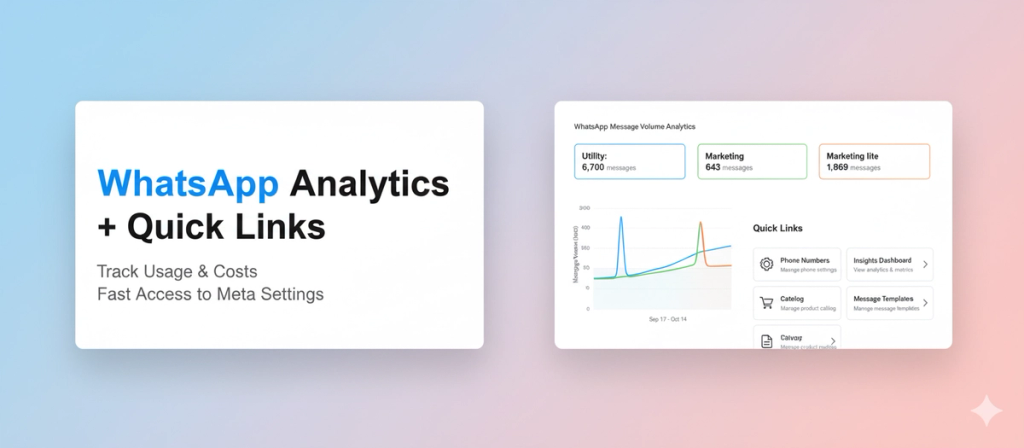
WhatsApp Message Volume Analytics
See exactly how many messages you're sending across Utility, Marketing, and Marketing Lite categories over time.
Track your message volume with a graph showing daily trends, country-wise breakdowns showing costs per country, and total spending for any date range. Spot broadcast spikes, understand which message types you're using most, and predict your WhatsApp bill before it arrives.
Where to find it:
Settings > Plans & Usage > WhatsApp Wallet Balance
Read the full guide on that here.
Quick Links in WhatsApp Settings
Stop hunting through Meta Business Manager. We added quick access buttons to the most-used WhatsApp settings right inside Spur.
From Settings > WhatsApp > View Channel, click any of these shortcuts to jump straight to the relevant sections within Meta Business Manager:
- Phone Numbers - Manage phone settings
- Insights Dashboard - View analytics and metrics
- Catalog - Manage your product catalog
- Message Templates - Create or edit templates
- Payment Settings - Manage billing and payments
One click from Spur and you're exactly where you need to be in Meta Business Manager.
How to Use
Analytics: Settings > Plans & Usage > WhatsApp Wallet Balance > Select channel and date range > View Analytics
Quick Links: Settings > WhatsApp > Quick Links section > Click any link
Read the full guide for detailed screenshots and use cases.
Was this article useful?