

D2C home and fashion · WhatsApp automation · India
Debaans gets 23% of its review requests turned into 270 reviews on WhatsApp
Review requests by email rarely clear single digits. The bamboo linen brand asks for a rating a day after the parcel is delivered, in the same WhatsApp thread that carried the order and shipping updates, and 1,147 requests came back as 270 reviews. Ratings become Judge.me reviews on the store, or a CSV export, with nobody chasing.
7-day free trial.
Debaans
Bamboo home linen and clothing, India
23%
Requests that became reviews
In 30 days
- Reviews collected
- 270
- Review requests sent
- 1,147
Overview
Debaans, an Indian bamboo linen and clothing brand, collects product reviews on WhatsApp. A Spur workflow starts when Shopify marks an order delivered, waits a day, and sends a template asking for a rating with three reply buttons. Happy ratings are asked for a photo and a line of text, published to Judge.me and thanked with a discount code. Low ratings open a support ticket instead. In 30 days the flow sent 1,147 requests and collected 270 reviews, a 23% review rate.
Ask an AI about this story
- Challenge
- Review requests by email arrive days after the excitement of unboxing has passed, in an inbox nobody checks. A young brand needs reviews on its product pages, and it needs them without a person chasing every order.
- Solution
- One Spur workflow on the Shopify delivery event. It waits a day, asks for a rating on WhatsApp with three buttons, and does the follow-up itself: happy customers are asked for a photo and a line and published to Judge.me, unhappy ones get a ticket.
- Results
- 1,147 review requests went out in 30 days, each one after the parcel arrived
- 270 of them came back as reviews, a 23% review rate
- Every review reached Judge.me or a CSV export without anyone copying it across
Reviews are asked for in the wrong place, at the wrong time
Debaans had the orders and the happy customers. What it did not have was a way to ask for a review that people would actually answer.
Debaans makes bedsheets, towels and everyday clothing from bamboo fabric, and sells them on its own Shopify store. For a fabric most shoppers have never slept on, a product page without reviews asks them to take the brand at its word. Reviews are the proof.
The usual way to get them is an email a few days after delivery. Review requests by email rarely clear single digits, and the ones that are opened arrive after the moment has passed. The customer has already put the sheets on the bed and moved on. Writing a review means finding the email, following a link, logging in, and typing. Most people do not.
The brand was already talking to every customer on WhatsApp. Order confirmations, shipping updates and the delivery notice all went out there, and customers replied there when something was wrong. The review request was the one message still going to email.
The question was whether the same thread could carry the ask, and whether a rating tapped on a phone could become a review on the store without someone copying it across by hand.
Why a day after delivery
The parcel has been opened and the product tried, but not so long ago that the customer has stopped thinking about it. Asking on the day of delivery gets ratings of the courier. Asking a week later gets silence.
What they built
One workflow, started by the delivery event Shopify already sends. It is Spur's review collection template, switched on and left to run.
-
Start from the delivery, not the order
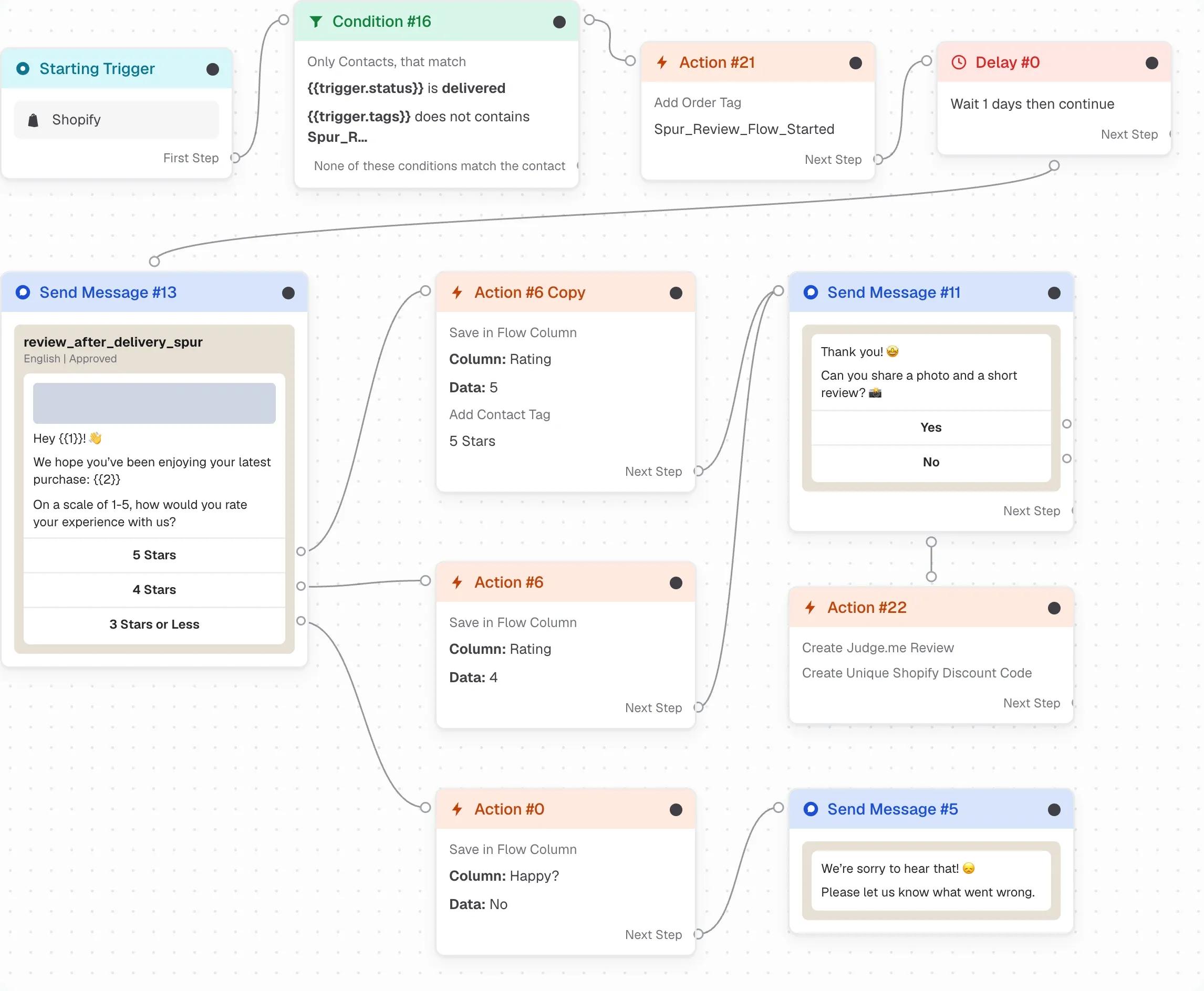
Shopify fulfilment eventThe trigger is the Shopify fulfilment event, filtered to the status "delivered". The template also checks that the order has not been through the flow before, so a customer with a split shipment is asked once.
- Trigger
- Shopify · Fulfillment Event Created
- Condition
- Status is "delivered", and the order has not been asked before
-
Wait a day, then ask for a rating
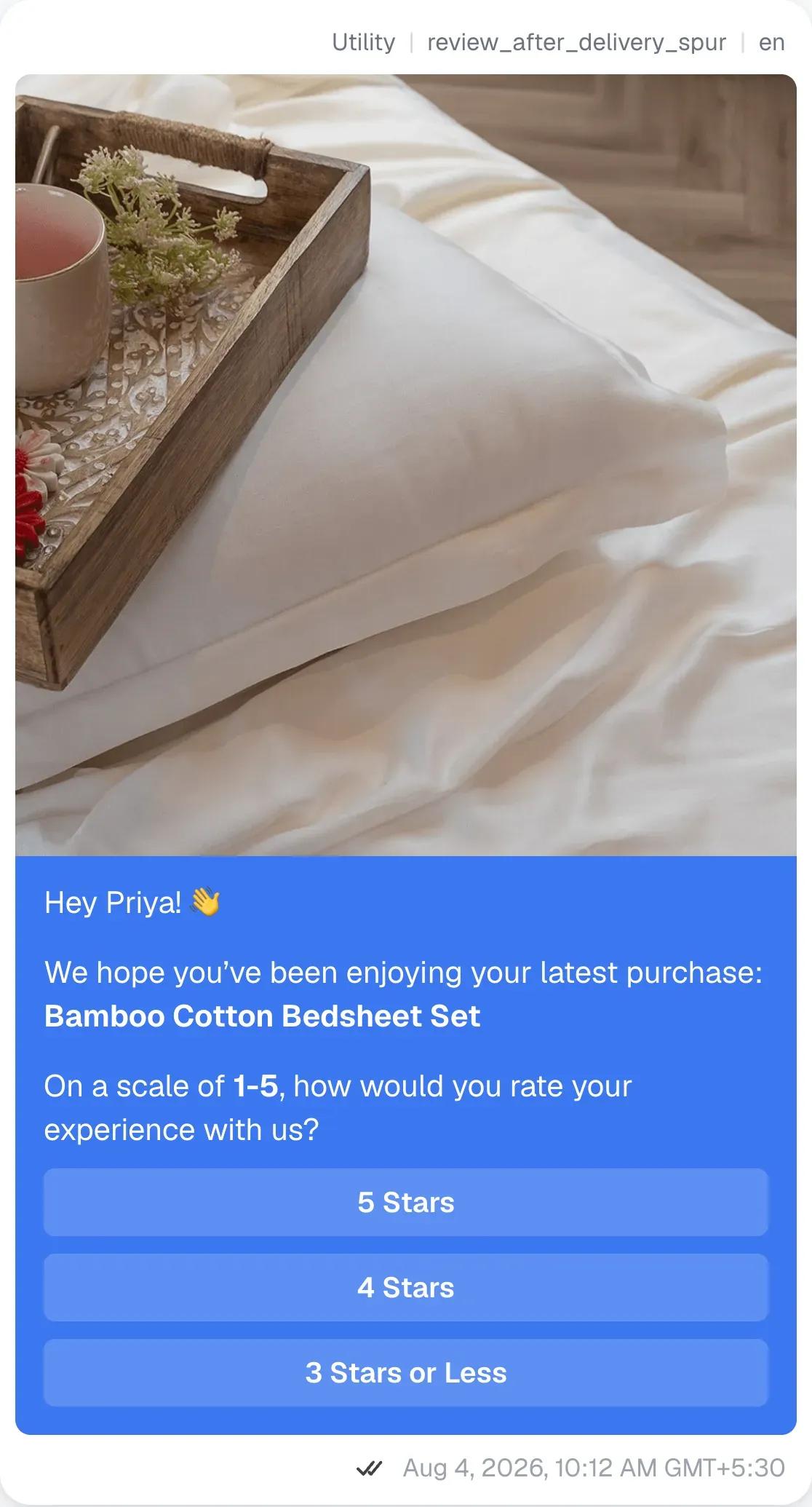
1 day delayAfter a one day delay, the customer gets an approved utility template. It names the product they bought, and asks one question with three reply buttons: 5 Stars, 4 Stars, or 3 Stars or Less. Nothing to type, nothing to open.
- Category
- Utility
- Header
- Product image
- Question
- "On a scale of 1-5, how would you rate your experience with us?"
- Buttons
- 5 Stars · 4 Stars · 3 Stars or Less
Utility templates are for messages a customer expects after buying. A rating request about their own order qualifies, and utility messages are priced below marketing ones.
-
Follow the answer
Instant, on the tapA 5 or 4 star tap saves the rating to the contact and asks whether the customer would share a photo and a short review. Yes leads to a photo upload and a line of text. No leads to a one line review instead. Either way the flow waits for the reply, so the conversation stays a conversation.
- On 5 or 4 Stars
- Save the rating, ask for a photo and a short review
- On 3 Stars or Less
- Apologise, ask what went wrong, create a ticket
Swipe sideways to read the diagram. With a keyboard, focus it and use the arrow keys.
The workflow in Spur, end to end. The button the customer taps decides which branch they go down. -
Publish the review and say thank you
Instant, on the replyOnce the customer has written their line, the flow creates the review in Judge.me with the rating, the text and the photo. Then it creates a unique Shopify discount code for that customer and sends it in a thank you message with a button back to the store.
- Publish
- Create Judge.me review from the saved rating, text and photo
- Reward
- Create a unique Shopify discount code and send it
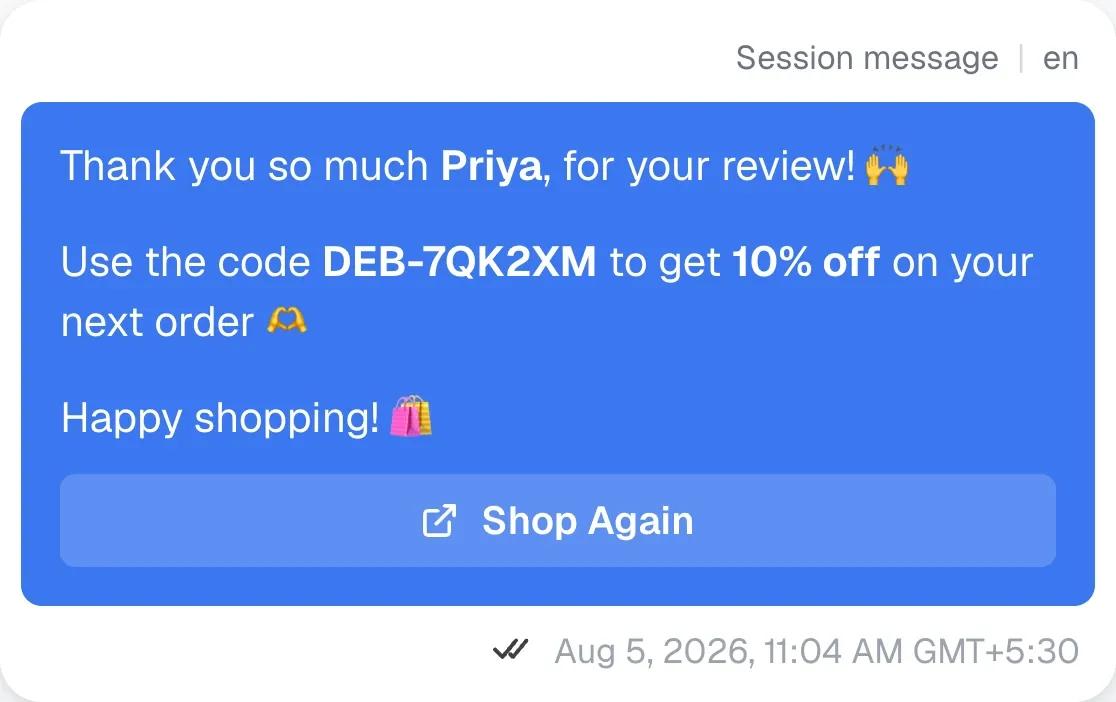
The thank you, with the discount code the flow generates. The name and code are examples. -
Keep unhappy customers out of the reviews and in the inbox
Instant, on the tapA tap on 3 Stars or Less does not go anywhere near Judge.me. The customer gets an apology and a question about what went wrong, and a ticket is opened for the team in the Spur inbox. The rating is still saved on the contact, so the brand knows who was unhappy and why.
A customer who has just been asked what went wrong, and answered, rarely goes on to leave a one star review in public.
What it returned
Thirty days of the flow running on its own, as Debaans reported it.
In the 30 days reported, the workflow sent 1,147 review requests and 270 of them came back as reviews. That is a 23% review rate on a message that costs a fraction of a rupee to send and asks nothing of the team.
Each of those reviews landed on the product page through Judge.me, or in a CSV export, with the rating, the customer’s line and their photo already attached. Nobody copied anything across.
Review collection, 30 day snapshot
| Metric | Reported |
|---|---|
| Review requests sent | 1,147 |
| Reviews collected | 270 |
| Review rate As published | 23% |
| Where the reviews went | Judge.me on Shopify, or CSV export |
| Effort from the team | None after switching the flow on |
As published by Spur with Debaans on 10 August 2026. Spur published the review rate as 23%. Dividing 270 by 1,147 gives 23.5%.
From request to review
- Review requests sent 1,147
One per delivered order
- Reviews collected 270
23% of requests
Two stages, because those are the two numbers Debaans reported for the 30 days. Between them sit a rating tap, a photo and a line of text, each asked for only after the previous answer.
Why it worked
Three things carried this result, and none of them are specific to bedsheets.
The ask arrives where the customer already is
The order confirmation, the shipping update and the delivery notice all came through the same WhatsApp thread. The review request is the next message in it, not a new email from a sender the customer has to recognise. There is no spam folder and no promotions tab to fall into.
One tap is a lower bar than one paragraph
The first thing asked of the customer is a tap on 5 Stars, 4 Stars or 3 Stars or Less. Only after they have answered does the flow ask for a photo and a line, and by then they have already said yes once. Each step is small enough to do on the bus.
Nearly one in four requests became a review
Low ratings never reach the review app; they open a ticket and a conversation instead. What does reach it is a customer who tapped a happy answer and then chose to write. That is why the rate holds, and why the reviews that land are the kind a product page needs.
How to run this on your own store
The whole setup is a template in Spur. What follows is what to check before you switch it on.
-
Start the flow from the delivery event
Use the Shopify fulfilment event with a delivered status, not the order or the shipment. Asking before the parcel has arrived produces ratings of the courier.
-
Give it a day
A day after delivery is long enough to have tried the product and short enough to still care.
-
Ask with buttons, not a text box
Three rating buttons is the whole first ask. Save the photo and the written line for the customers who have already tapped a happy answer.
-
Route low ratings to your inbox
Send three stars or less to a ticket with an apology and a question, and keep them out of the review app. That protects the store rating and surfaces problems early.
-
Connect your reviews app and set the thank you
Spur creates the review in Judge.me directly. Pair it with a unique discount code so the thank you is worth something, and the next order comes back through WhatsApp too.
Questions people ask about this flow
No. Spur has a Judge.me action that creates the review directly, which is what Debaans uses. Without it, the flow still saves the rating, the text and the photo on the contact, and you can export them as a CSV to any reviews app that imports one.
On the day of delivery the customer has seen the box, not the product, and ratings tend to be about the courier. A day later they have tried it. The delay is a single step in the flow and you can change it.
The template is a utility template, because it is about the customer’s own order and asks about their experience of it. In India a utility message costs a fraction of a marketing one. Meta reviews the template text before approving the category, so keep it about the order rather than the next sale.
They never reach the reviews app. A tap on 3 Stars or Less sends an apology, asks what went wrong, and opens a ticket in the Spur inbox for a person to handle. The rating is saved on the contact so you can see who was unhappy.
Each code is created by Shopify for that one customer at the moment the review is saved, so it is unique and only exists for people who reviewed. The amount is a setting in the action.
The flow is a template in Spur, so most of the work is connecting Shopify and Judge.me and picking your WhatsApp number. The review template has to be approved by Meta, which usually takes minutes and can take up to a day.
Was this page useful?
More customer stories
Other brands running the same channels, with the numbers they reported.



Turn delivered orders into reviews
Spur connects to your Shopify store and your reviews app, asks on WhatsApp after delivery, and publishes the answer. The flow Debaans runs is a template you can switch on today.
14-day free trial
- Meta Business Partner
- Shopify Partner

- 14-day free trial
- Connects to Shopify in minutes
- WhatsApp billed per delivered message
- Meta Business Partner
- Shopify Partner