

Services · Shared WhatsApp inbox · UAE
FamilyCare and Home Care reply to families in a median 22.7 minutes
Families hiring domestic help in Dubai write in on three different WhatsApp numbers, often with CVs, voice notes and contracts. Five teammates answer all three from one shared Spur inbox, and 97.8% of conversations with a human reply got it within a day.
7-day free trial.
FamilyCare and Home Care
Domestic staffing centres, Dubai
22.7 min
Median first human reply
1 June to 26 August 2026
- Answered within 24 hours
- 97.8%
- Inbox messages exchanged
- 36,098
- Active conversations
- 3,742
Overview
FamilyCare and Home Care are sister domestic staffing centres in Dubai. Hiring a maid or nanny through them is a long WhatsApp conversation: candidate profiles, CVs, voice notes, household requirements, interviews, pricing and contract steps, in Arabic or English. Spur Inbox puts all three of their WhatsApp numbers in one shared view, so any of five teammates can pick up a colleague’s thread with the history and files intact, and route an enquiry to the sister centre when it has the better candidate. Between 1 June and 26 August 2026 that was 36,098 messages across 3,742 active conversations, including 886 voice notes, 1,059 images and 1,459 documents, with a 22.7 minute median first human reply and 97.8% of human replied conversations answered within 24 hours.
Ask an AI about this story
- Challenge
- Three WhatsApp numbers, five people and two centres meant a hire could start on one phone and stall on another. Files, voice notes and half finished negotiations lived wherever the last reply happened, and a colleague picking up cold had to ask the family to repeat themselves.
- Solution
- One Spur inbox with all three numbers in it. Every conversation, with its documents and voice notes, is visible to the whole team. Threads are assigned and handed over without losing history, and an enquiry that suits the sister centre is routed there in a click.
- Results
- 36,098 messages handled across 3,742 active conversations in twelve weeks
- 886 voice notes, 1,059 images and 1,459 documents kept in the thread they belong to
- A 22.7 minute median first human reply, and 97.8% of conversations answered within a day
Swipe sideways to read the diagram. With a keyboard, focus it and use the arrow keys.
Hiring domestic help is a conversation, and it was spread across three phones
Every enquiry the centres receive turns into a long thread with files in it. The thread used to belong to whichever phone it started on.
FamilyCare and Home Care help families in Dubai hire domestic staff legally. A family starts by looking at candidate profiles online, and everything after that happens in conversation: is this candidate available, can we see her CV, what are your household requirements, when can we interview, what does the visa cost, here is the contract. Most of it happens on WhatsApp, in Arabic or English, with voice notes and documents going back and forth.
The two centres run three WhatsApp numbers between them and five people answer. Before Spur, that meant three phones. A conversation lived on the device where it started. If the teammate who began it was off shift, a colleague either waited or picked up the phone and scrolled. If the better candidate was at the sister centre, the family was asked to message a different number and start again.
The volume made this worse, not better. Over twelve weeks the centres exchanged 36,098 messages across 3,742 active conversations. Among them were 886 voice notes, 1,059 images and 1,459 documents, the CVs, passports and contracts a hire runs on. Losing track of any one of those in a handover costs the family a repeat and the centre a day.
What the centres needed was not automation. It was one place where every thread, on every number, with every file, was visible to every teammate, and where handing a conversation to a colleague or to the other centre did not mean losing it.
Why not a chatbot
The enquiries here are high value and personal, and most of the messages are files and voice notes from families. The centres kept people on the front line and used Spur to make five people work like one team, rather than to replace them.
What they set up
Three numbers in, one inbox out, and a team that can pass a thread without dropping it.
-
Connect all three numbers to one workspace
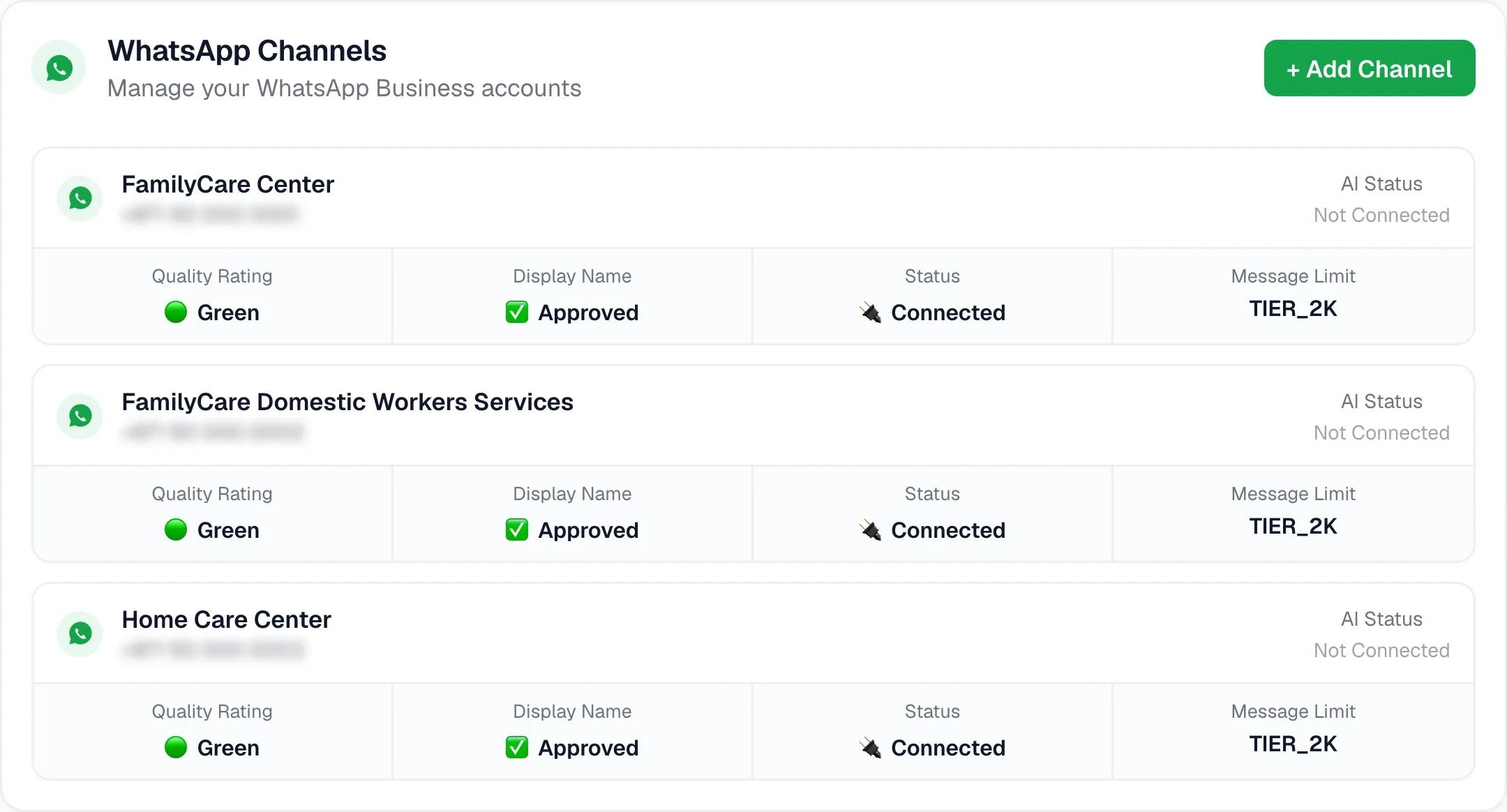
WhatsApp Business APIEach centre’s WhatsApp numbers were connected to Spur through the WhatsApp Business API, so messages to any of the three arrive in the same inbox. The number a family wrote to stays visible on the conversation, and replies go out from that same number.
- Channels
- Three WhatsApp Business numbers
- Inbox
- One shared view across both centres
- Reply from
- The number the family wrote to
Swipe sideways to read the diagram. With a keyboard, focus it and use the arrow keys.
The three numbers, as connected in Spur. Every one of them lands in the same shared inbox. -
Give every teammate the whole thread
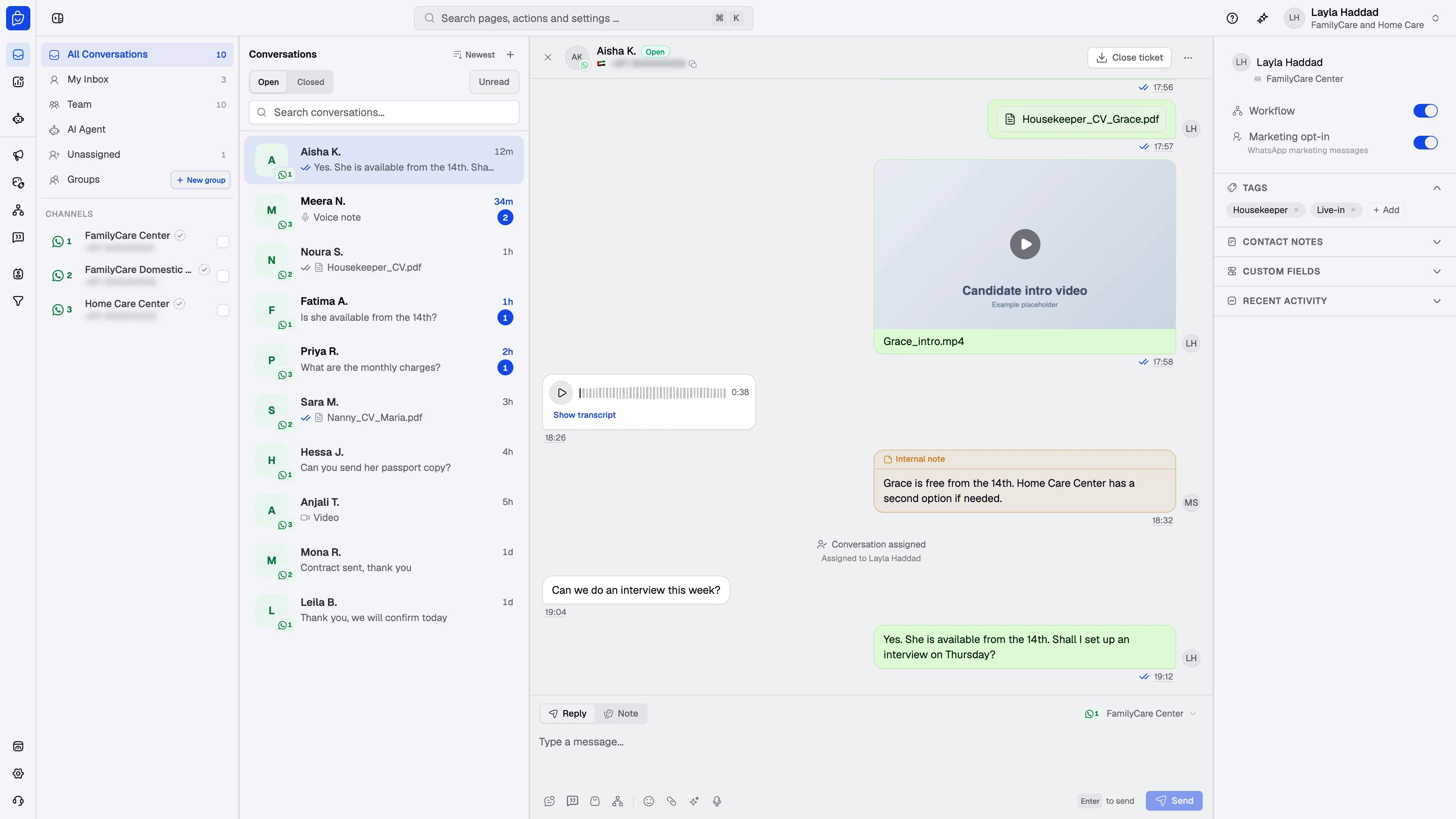
Shared inboxAny of the five teammates can open any conversation and see everything that has happened in it: every message, every voice note, every CV and contract that was sent, and who on the team said what. Picking up a colleague’s thread means reading, not asking the family to repeat.
- Visible to all
- Messages, files, voice notes, internal notes
- Languages
- Arabic and English, answered by whoever is on
Inbox · Shared thread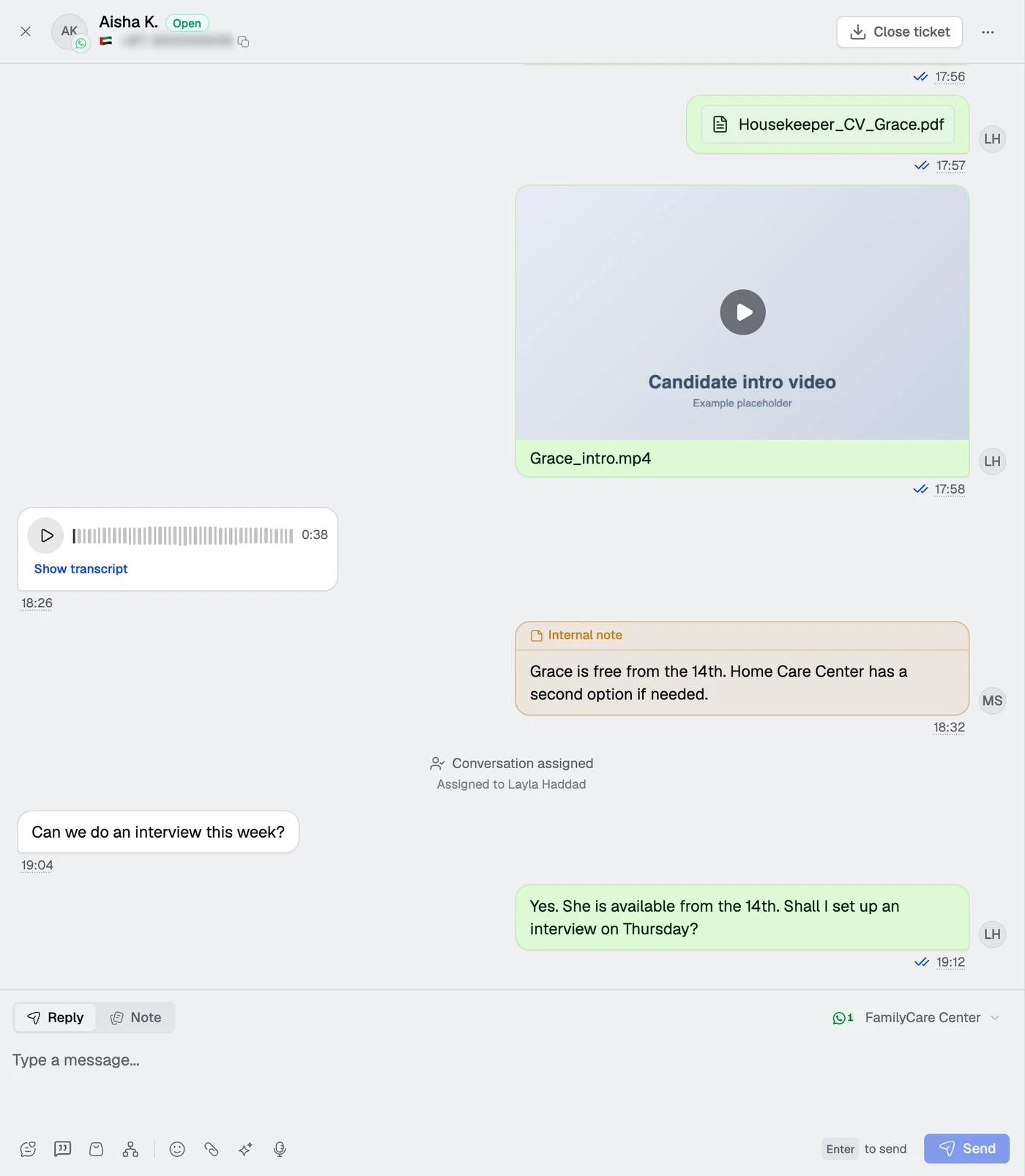
The whole conversation in one thread: files, voice notes and a colleague’s internal note, visible to whoever picks it up. Names and files are examples. -
Assign, hand over and route
Per conversationConversations are assigned to a teammate so ownership is clear, and reassigned with one click when a shift ends or a specialist is needed. When an enquiry would be better served by the sister centre’s candidates, it is routed there with the full history, so the family never has to start over on a new number.
- Assignment
- One owner per conversation, reassignable
- Routing
- To the sister centre, history intact
- Status
- Open, pending, closed, so nothing waits unseen
Inbox · Assignment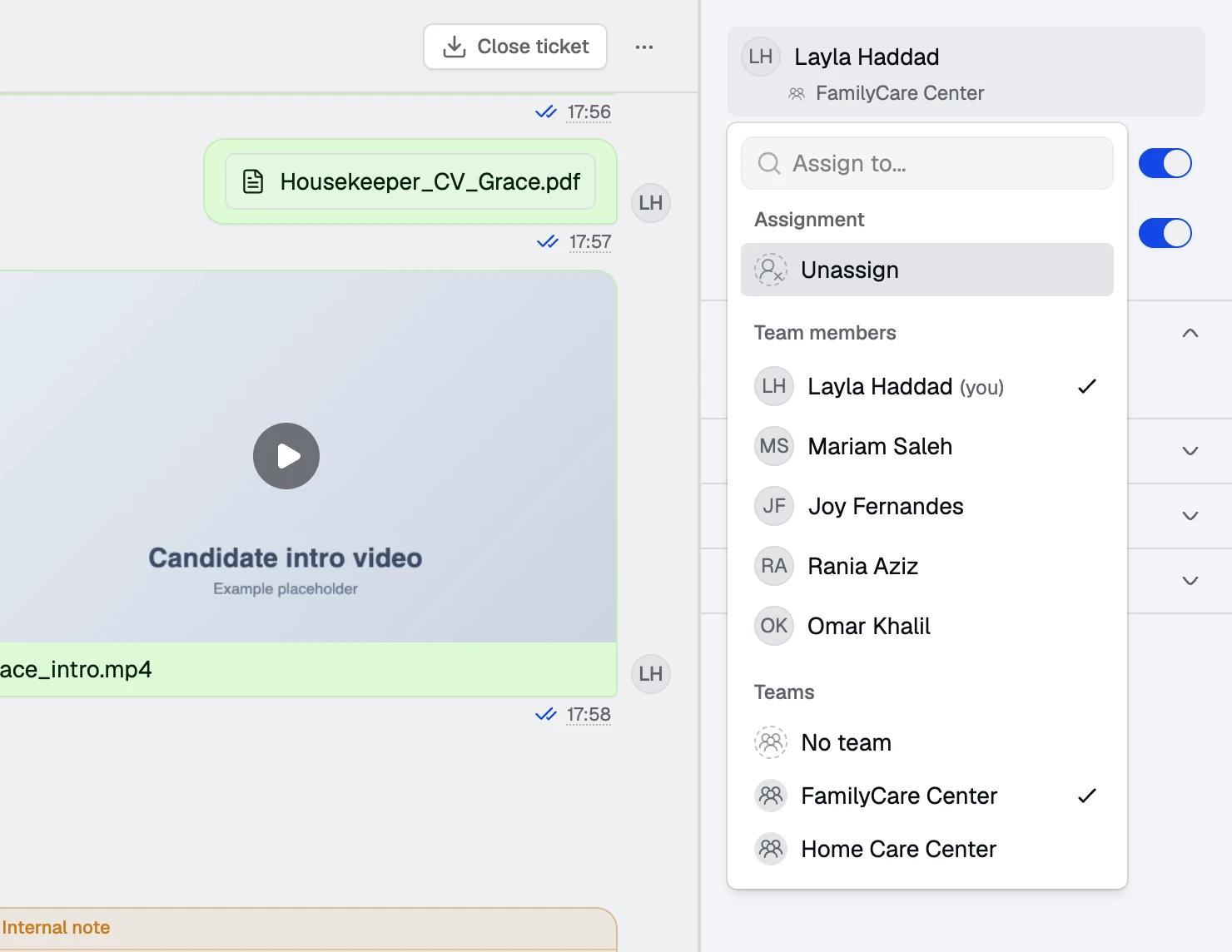
Assigning a conversation to a teammate or a team, from the panel beside the chat. Names are examples. -
Measure the replies
Inbox analyticsWith every conversation in one place, response time became something the centres could see rather than guess. Spur records the time to the first human reply on every conversation, and the two figures below are calculated from those times for this window.
- First reply
- Median of the recorded times, from a family’s message to a human answer
- Within 24 hours
- Share of human replied conversations answered inside a day
Both measures are elapsed time, including nights and weekends, on conversations that received a human reply.
Twelve weeks in numbers
The snapshot covers 1 June to 26 August 2026, as the centres reported it.
In twelve weeks the two centres exchanged 36,098 messages across 3,742 active conversations in Spur Inbox, close to ten messages per conversation. That is the shape of a hire done in chat: a first enquiry, a profile, a CV, questions, a voice note or two, an interview time, a price, a contract.
The median first human reply was 22.7 minutes, measured as elapsed time, and 97.8% of the conversations that got a human reply got it within 24 hours. For a team of five covering three numbers and two centres, those are the numbers a family experiences as being looked after.
Inbox snapshot, 1 June to 26 August 2026
| Metric | Reported |
|---|---|
| Inbox messages exchanged | 36,098 |
| Active conversations | 3,742 |
| Messages per conversation 36,098 ÷ 3,742 | 9.6 |
| Median first human reply | 22.7 minutes |
| Answered within 24 hours Of conversations with a human reply | 97.8% |
| WhatsApp numbers | 3 |
| Teammates | 5 |
Counts as published by Spur with FamilyCare and Home Care on 1 September 2026. Reply metrics cover conversations that received a human reply, as elapsed time. Messages per conversation is calculated from the two counts above it.
What travelled in the threads
| Metric | Count |
|---|---|
| Documents CVs, passports, contracts | 1,459 |
| Images | 1,059 |
| Voice notes | 886 |
| Videos | 198 |
| Rich media in total | 3,602 |
Every one of these stays attached to its conversation, visible to whoever picks the thread up next.
Why it worked
Three things carried this result, and none of them are specific to staffing.
One thread per family, whoever answers
The family has one conversation. The centre used to have three phones. Putting the numbers in one inbox means the conversation the family experiences and the one the team sees are finally the same thing, and a handover is a read rather than a re-ask.
The files are where the conversation is
A hire runs on paperwork and on voice. Over the 87 days the threads carried 3,602 rich media messages. Because they sit in the conversation rather than on a phone’s camera roll, the teammate closing a contract can see the CV that opened the enquiry, and the sister centre receives the whole file with the routed thread.
Fast first replies, all day and all week
When every open conversation is visible to everyone, the one nobody has answered stands out. Assignment makes the owner clear, and reassignment at the end of a shift means a thread does not wait for one person to come back. The reply times are what that looks like from the family’s side.
How to run this for your own team
For any business where the sale is a conversation with files in it.
-
Put every number in one inbox
Connect each WhatsApp Business number to the same Spur workspace. Replies still go out from the number the customer wrote to, so nothing changes for them.
-
Assign every conversation
One owner per thread, visible to all. Reassign at shift change rather than letting a conversation wait for one person.
-
Keep files in the thread
Ask for CVs, IDs and contracts in the conversation, not by email or on a personal phone. Whoever picks the thread up next has them.
-
Route between teams, not between numbers
When a colleague or a sister branch is the better fit, move the conversation to them with its history. Never ask the customer to message a different number.
-
Watch two numbers
Median time to first human reply, and the share answered within a day. Spur’s inbox analytics records the first reply time on every conversation, so both can be read off it, and both move when the team changes how it works.
Questions people ask about this setup
FamilyCare and Home Care are sister centres with a shared team, and Spur lets teammates work across their connected numbers in one view. Conversations can be routed between them with the history intact. Whether that suits you depends on your own data arrangements; Spur can also keep each business in its own workspace.
Yes. Each conversation is tied to the WhatsApp number the customer wrote to, and every reply goes out from that number, whichever teammate sends it.
They arrive in the conversation like any other message and stay there. Anyone with access to the thread can play the voice note or open the document, and they travel with the conversation when it is reassigned or routed.
No. It is elapsed time, including nights and weekends, on conversations that received a human reply. A business hours measurement would be shorter.
No. The centres kept people on every conversation and used Spur for the shared inbox, assignment and routing. An AI agent can be added later for first replies or common questions if the volume calls for it.
Connecting a WhatsApp Business number to Spur takes minutes once the number is verified with Meta. Inviting the team and agreeing who owns what is the part worth spending an afternoon on.
Was this page useful?
More customer stories
Other brands running the same channels, with the numbers they reported.



Give your team one inbox for every number
Spur connects your WhatsApp numbers, keeps every file in its thread, and lets five people work like one team. FamilyCare and Home Care reply to families in a median 22.7 minutes.
7-day free trial
- Meta Business Partner
- Shopify Partner

- 7-day free trial
- Connects to Shopify in minutes
- WhatsApp billed per delivered message
- Meta Business Partner
- Shopify Partner