Key takeaways
TikTok automation tools that help creators and brands post consistently, respond to 1,000+ DMs, and convert comments into leads automatically.
Ask an AI about this article
TikTok automation tools help you post consistently, respond to DMs instantly, and scale engagement without burning out. Using smart chatbots, scheduling, and analytics automation (while avoiding risky growth bots), you can turn TikTok's 1.58 billion users into real leads and sales. Spur's AI agents make this simple by handling TikTok DMs across your channels with actionable AI that actually books appointments and updates orders.
What Is TikTok Automation and Why Does It Matter?
Your TikTok account doesn't sleep, but you do. That's the problem.
With over 1.58 billion monthly active users globally and people spending nearly an hour per day scrolling through videos, TikTok offers massive opportunities for creators and brands. But keeping up with posting, responding to DMs, moderating comments, and tracking trends can feel like a full-time job.
TikTok automation uses software tools and AI to handle the repetitive, time-consuming parts of managing your account. You're not replacing human creativity (you still need to make great content). You're just delegating the grunt work to automation technology that never gets tired.
4 Essential Tasks You Can Automate on TikTok
| Category | What It Does | Key Benefit |
|---|---|---|
| Content Scheduling | Plan videos ahead and auto-post at optimal times | Consistency without manual effort |
| Automated Messaging | AI-powered chatbots respond to DMs instantly | Never miss a lead or customer question |
| Engagement Automation | Auto-like, follow, or comment based on your parameters | Strategic audience growth (use carefully) |
| Analytics & Tracking | Automatically track performance and surface trending content | Data-driven decisions without manual analysis |
Content Scheduling & Posting lets you plan your videos ahead of time and auto-post them when your audience is most active. Consistency is crucial for TikTok's algorithm, and automation ensures you're posting even when you're sleeping or busy.
Automated Messaging (Chatbots) means AI-powered responses that handle Direct Messages and FAQs instantly. This is where things get interesting for businesses that get tons of inquiries. A TikTok chatbot can handle common questions, capture leads, and guide sales conversations without human delay.
Engagement Automation involves software that can auto-like, follow, or comment on other content according to your parameters. Be careful here (we'll cover the risks and safe approaches later).
Analytics & Trend Tracking tools automatically track your performance and surface trending sounds or hashtags so you don't have to manually crunch numbers or scroll endlessly.
Why Are Top Creators Automating Their TikTok Strategy?
Automation isn't about being lazy. It's about being strategic with your time.
How Consistent Posting Boosts TikTok Algorithm Performance
TikTok rewards regular posting. Automation ensures you stick to a content schedule without burnout. Your feed stays active during weekends, holidays, or when you're tied up with other work. The algorithm notices.
How Much Time Can TikTok Automation Save You?
Think about the hours spent manually uploading videos, replying to the same questions repeatedly ("What are your prices?" for the 100th time), or moderating spam comments.
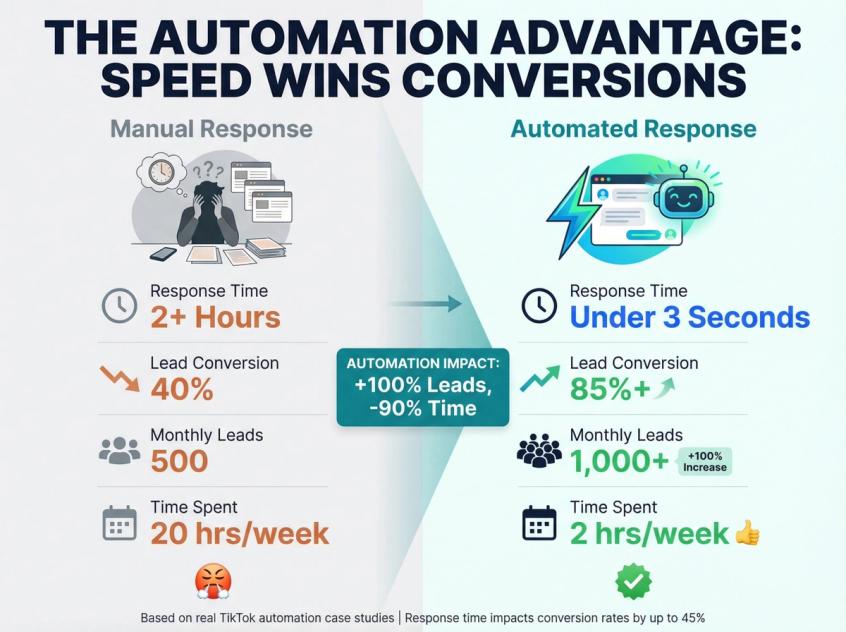
One TikTok creator noted that after setting up an AI DM bot, their lead volume doubled to 1,000+ per month with zero extra effort. The tedious tasks get offloaded. You reclaim time for creativity and strategy.
Why Fast Response Times Matter for TikTok Sales
When a video goes viral and floods your inbox, quick responses can convert casual viewers into followers or customers.
Automated TikTok chatbots can reply within seconds. For brands using TikTok DM automation, instant replies have led to significant boosts in DM-to-sale conversions. An unanswered comment or a DM replied 2+ hours late can mean substantially lower conversion rates.
You simply can't match that speed manually.
How Automation Improves TikTok User Experience
Paradoxically, good automation improves the user experience. Quick chatbot replies mean fans get what they need faster. Scheduled posts ensure your audience always has fresh content. Filtering out spam comments automatically keeps your page a positive space.
When done thoughtfully, automation serves your community by being responsive and reliable.
How to Schedule TikTok Posts: Never Miss Your Optimal Posting Time
One of the simplest yet most powerful automations is scheduling your content in advance. Rather than manually posting videos at all hours, you can use scheduling tools to plan and auto-publish your TikToks at optimal times.
This is Later's scheduling interface--one of the leading tools for planning TikTok content. You can see your entire week of posts at a glance, drag content around the calendar, and set exact publishing times. Later and Buffer (similar interface) both support TikTok scheduling alongside Instagram, Facebook, and other platforms.
Using TikTok's Built-In Scheduling Feature
If you have a TikTok Business Account, you get access to TikTok's native scheduling feature. You can upload videos and set them to go live at a future date and time, all from the desktop interface or TikTok's Ads Manager.
For basic needs, this native scheduler works great. Upload a week's worth of videos and TikTok will automatically post them according to your schedule.
Best TikTok Scheduling Tools for Multi-Platform Management
| Tool | Best For | Key Feature |
|---|---|---|
| Later | Visual planners managing multiple platforms | Drag-and-drop visual planner with auto-publishing |
| Buffer | Small teams wanting simplicity | Clean interface with basic analytics tracking |
| Sprout Social | Brands needing enterprise features | Comment management integration with TikTok |
| Hopper HQ | Creators with tons of content | Bulk upload up to 50 videos at once |
Later is particularly popular because it supports auto-publishing to TikTok, Instagram, Pinterest, and more. You can manage your whole social media content plan in one place and even schedule Instagram Stories from the same dashboard.
Buffer offers straightforward scheduling with a clean interface. It provides basic analytics (likes, views, follower counts) so you can track performance over time. Their free plan allows limited scheduled posts, which is a good starting point.
How to Cross-Post TikTok Videos to Instagram and YouTube
Here's a clever use of scheduling tools: repurpose content across platforms. You have a killer TikTok video? Automatically schedule it to repost as an Instagram Reel or YouTube Short via an integrated tool.
Some apps like Planoly or Veed help by reformatting or trimming videos to suit each platform. With a few clicks, your TikTok hits can be distributed elsewhere.
(Pro tip: Tweak the captions or use platform-specific hashtags when cross-posting. Small edits keep content feeling native to each app.)
How to Maintain Posting Consistency Without Burnout
The biggest benefit? Consistency.
Instead of scrambling to post in real-time (and likely missing the optimal window if you get busy), you can batch your content creation and let the scheduler handle the rest.
Many successful TikTokers plan content for the week on Sunday, schedule all posts, and then spend the week focusing on engagement and making the next batch. This creates a reliable rhythm that TikTok's algorithm loves.
And you can still do spontaneous posts whenever you want. The scheduled posts simply ensure there are no long gaps in your activity.
Implementation is straightforward:
→ Pick a scheduler (even TikTok's own)
→ Connect your TikTok account
→ Add your video files, captions, and desired post times
→ Most tools have a calendar view where you can drag-and-drop videos to different slots
→ Research when your audience is most active (many tools suggest optimal times)
→ Monitor posts when they go live to respond to early comments
Note: TikTok Business Accounts are required for using most third-party scheduling APIs. If you're currently on a Personal/Creator account, consider switching to Business to unlock this capability.
TikTok Chatbots: How to Handle 1,000+ DMs Without Going Crazy
TikTok isn't just a broadcasting platform anymore. It's a two-way communication channel where users can DM businesses, ask questions about products, seek support, or respond to CTAs in your videos.
If you're managing a popular account (or running TikTok ads that invite messages), your TikTok inbox can get flooded. Manually handling every message becomes impossible.
This is where TikTok chatbots become essential.
What TikTok Chatbots Can Actually Do for Your Business
A TikTok chatbot is an automated messaging assistant that interacts with users via TikTok's Direct Message interface. Powered by AI or predefined rules, the bot connects through the official TikTok Business Messaging API to send and receive messages on your behalf.
If you have a TikTok Business account, you can integrate with approved chatbot platforms to enable automated responses and conversational flows.
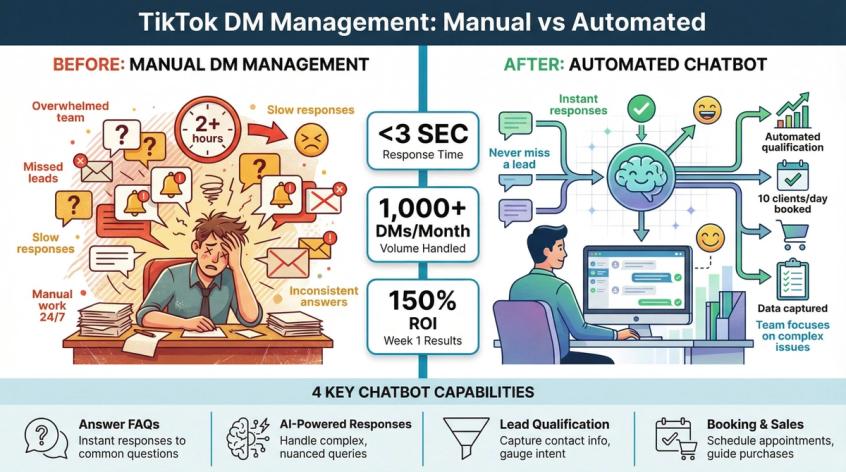
4 Ways TikTok Chatbots Drive Real Business Results
Answer FAQs Automatically
A chatbot can instantly respond to repetitive questions about pricing, hours, shipping, product availability, and more. Instead of someone waiting hours for a reply (or never getting one), they get info immediately through automated customer service.
Your team isn't stuck answering the same questions on loop. The bot does it.
AI-Powered Responses for Complex Queries
More advanced bots leverage AI (like GPT-based models) to understand and answer nuanced questions, not just basic FAQs. For example, if a user asks, "How does your product compare to [competitor]?" an AI chatbot connected to your knowledge base could generate a helpful, context-aware answer.
AI bots can also handle tasks like checking order status or providing personalized recommendations by pulling data from your systems.
Spur's AI agents excel here. Unlike basic Q&A bots, our actionable AI can actually track orders, book appointments, and update records. It's trained on your knowledge base and can deploy across TikTok, WhatsApp, Instagram, and live chat from one unified inbox.
Lead Qualification and Data Collection
Chatbots can ask users questions to gauge their needs and qualify them as leads. For instance, a real estate agent's bot might ask "Are you looking to buy or rent?" or "What's your budget?" and then funnel high-intent prospects to a human agent.
During these interactions, the bot can capture contact info like email or phone number. Many platforms allow the bot to save these details and sync them to your CRM or email marketing tools automatically.
Appointment Booking and Sales
For service businesses (salons, clinics, coaches, etc.), a TikTok bot can even handle appointment scheduling. It could present available time slots, book a meeting, or direct the user to a booking page.
For e-commerce, a bot can act as a personal shopper: showcasing products, recommending items based on user input, and guiding them to purchase links with abandoned cart recovery.
TikTok Chatbot ROI: Real Numbers from Real Businesses
Quick automation in TikTok DMs can directly boost your bottom line.
Scenario: You run a TikTok ad for a product, and hundreds of users message "How much is it?" or "Is it in stock?"
If you rely on manual replies, many will lose interest by the time you respond. A chatbot, however, can reply in under 3 seconds to each inquiry, providing the details and even a link to buy.
Businesses using instant chatbot replies in TikTok DMs have seen significant increases in conversions from DMs to sales. Another creator's account went viral, and the AI chatbot saved them from drowning in DMs. They managed to book 10 new clients in one day on autopilot, with 150% ROI in week one thanks to the bot handling the influx.
Why Spur's TikTok Chatbot Beats Basic Q&A Bots
This is Spur's actual platform interface. Notice how TikTok messages flow into the same inbox as other channels--you're not switching between tools all day. The AI agent handles common questions instantly, and your team jumps in for complex issues with full conversation context.
Here's where we come in. While other platforms offer basic chatbot functionality, Spur provides actionable AI agents that go beyond simple Q&A.
What makes Spur different:
• Knowledge base training – Train your AI on your own data (unlike tools that have limited AI training)
• Multi-channel unified inbox – Manage TikTok DMs alongside WhatsApp, Instagram, Facebook, and Live Chat from one place
• Actionable AI – Not just answering questions, but actually taking actions like tracking orders, updating records, or booking appointments
• User-friendly setup – Much simpler than technical tools like Botpress
You can deploy our AI agent across TikTok DMs, Instagram comments, WhatsApp conversations, and your website live chat. Everything flows into one shared inbox where your team can see full context and jump in when needed.
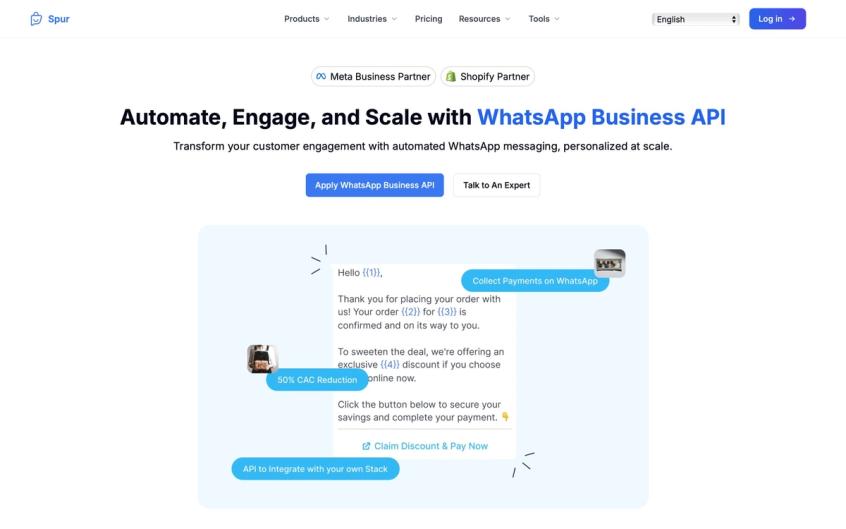
Here's an example of Spur's WhatsApp automation product--the same AI agent and unified inbox approach works across all channels including TikTok. You train the AI once on your knowledge base, then deploy it everywhere. When a customer messages you on TikTok, WhatsApp, or Instagram, the same intelligent responses and automated actions apply.
For TikTok specifically, Spur's platform can:
→ Auto-reply to common DM questions with AI-generated responses
→ Qualify leads by asking follow-up questions
→ Capture contact information and sync to your CRM
→ Route complex inquiries to human agents with full conversation history
→ Trigger automated flows based on user behavior
How to Set Up a TikTok Chatbot in 5 Steps
① Get a TikTok Business Account
You need a TikTok Business Account first. Only business profiles can integrate with messaging APIs. If you're using a personal/creator account, switch to Business in TikTok's settings (it's free, just a choice in account type).
② Choose Your Chatbot Platform
Select a platform that supports TikTok. Spur offers comprehensive multi-channel automation with TikTok, WhatsApp, Instagram, Facebook, and live chat support.
③ Connect Your Account
Connect your TikTok Business account (authorizing the app to access your TikTok messages).
④ Create Automation Rules
Build automation rules or AI training. You might set a simple rule: when message contains "price" or "cost", respond with price info. Or build a guided flow: greet the user, present options, and branch accordingly using no-code automation tools.
⑤ Test Thoroughly
Run through the conversation as a user would to fine-tune responses.
6 Best Practices for TikTok Chatbot Success
✓ Clearly identify that the user is chatting with an automated assistant (at least initially). Transparency helps set expectations.
✓ Use a friendly, on-brand tone. The bot should reflect your brand voice so the experience is seamless.
✓ Leverage quick replies and prompts. TikTok's interface allows suggested buttons the user can tap. Make it easy for them to interact.
✓ Program fallback options. If the bot gets confused or the question is too complex, have it escalate with a chatbot-to-human handoff: "Let me get a human to help with that!" and alert your team.
✓ Take advantage of rich media if possible. Some bots can send images, product cards, or links in DMs.
✓ Stay within TikTok's messaging policy: Don't spam users who haven't initiated a conversation. Use the bot to respond and converse, not to cold-message people.
When properly implemented, a TikTok chatbot feels like a concierge for your followers. Always available, helpful, and fast (just like Spur's AI agents).
TikTok Engagement Automation: Growth Hacks or Account Killers?
Beyond content and DMs, what about automating the way you engage on TikTok? There's a category of TikTok automation aimed at growing your audience by automating interactions: bots that like posts, follow accounts, and even comment for you.
These tools exist. But they come with serious risks.
What TikTok Engagement Bots Actually Do
A TikTok bot of this kind is usually software that logs into your account and performs actions continuously. You set parameters like:
→ Which accounts or hashtags to target
→ How many people to follow or unfollow per day
→ Generic comment text to drop on videos
→ How many videos to like
The bot then mimics human behavior (ideally at a slow, realistic pace) to interact with content. For example, you could tell a bot to auto-follow 50 users per day who follow a competitor in your niche, and auto-like 5 of each user's recent videos.
The idea? Those users will notice you and many will check out your profile, perhaps follow back or engage with your content.
TikTok Growth Services: What Actually Works?
There's a mix of DIY software and managed services in this space:
Self-Service Bots: Tools like FuelTok, TikTool, or open-source scripts allow you to set up your own automation. Some even provide "phone farming" solutions running TikTok on many virtual devices.
Growth Services (Managed): Companies like TokUpgrade, TokSocial, Jeffery assign an account manager who engages with users on your behalf. They claim "real followers, not fake", operating within TikTok's terms by having humans do the work naturally. These are subscription-based (often $15-$50 per week).
Buying Engagement (Boost Services): Services like UseViral, SocialViral, SidesMedia let you pay to receive a certain number of followers, likes, or views. They have large networks of accounts that will follow you or like your content to inflate your numbers.
The upside? Instant social proof. A new account can appear popular overnight.
The downside? Those followers aren't genuinely interested, so they likely won't engage beyond boosting vanity metrics. Long-term effectiveness depends entirely on the quality of your content afterward.
TikTok's Official Stance: What Gets You Banned
TikTok officially forbids artificial boosting of engagement or spammy behavior. Using unauthorized bots or buying followers is against TikTok's Community Guidelines.
If TikTok detects bot-like patterns (your account following and unfollowing hundreds of people in an hour), it can shadowban or even suspend your account for violating terms. There was a period in 2023-2024 where many accounts got mass-banned for using automation tools aggressively.
The risk is real.
How to Use Engagement Bots Safely (If You Must)
The safer growth services mitigate risk by throttling actions to human-like levels and focusing on real user targets. They often advertise themselves as "organic growth" to distance from pure bots.
If you use them, you should:
• Choose reputable services/tools: Avoid sketchy "free TikTok bot" programs from unknown sources. They might steal your account credentials or get you banned quickly.
• Moderate the settings: Don't go from 0 to 100. Set a bot to follow maybe 20-30 people per day, not 500. The goal is to appear human.
• Avoid canned generic comments: Nothing screams "bot" more than the same "Cool video!" comment pasted everywhere.
• Monitor results and feedback: Keep an eye on your analytics. If you see a big spike in followers but very low engagement, that's a sign the audience isn't truly connecting.
• Quality content is irreplaceable: Without strong appeal, no amount of automation is going to make your content popular.
My Recommendation: Focus on Permissible Automation First
For brands and serious creators, a conservative approach is best. Leverage permissible automation (scheduling, chatbots, analytics) heavily, but use growth bots sparingly if at all.
If you do experiment with them, treat it like a growth hack with measured risk: start small, evaluate the real impact, and always prioritize genuine engagement over raw numbers.
Building a smaller but real fanbase is more valuable than a big hollow one.
That's exactly what Spur's community engagement approach focuses on.
How to Automate TikTok Comment Management at Scale
TikTok comment sections can be a wild place. On a viral video, you might get thousands of comments ranging from questions and praise to spam and trolling.
Keeping your comments section positive and engaging not only helps with community vibes but also pleases the TikTok algorithm (which rewards videos with lots of interaction).
How to Set Up Auto-Replies to TikTok Comments
While TikTok doesn't allow you to auto-comment on others' posts in bulk (that'd be spammy), you can automate replies to comments on your own posts in certain ways.
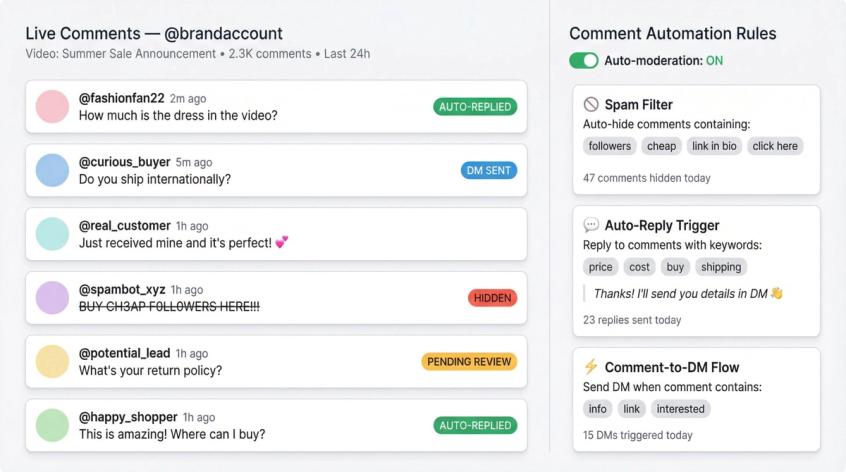
For example, if someone comments "How can I buy this?" on your TikTok, you could set up a workflow via a chatbot platform: the bot detects that keyword and replies publicly "Hi! I'll send you the details in a DM."
Then it can DM the user with the purchase link or more info. This technique keeps the public comment section clean (no long cluttered threads needed) while still addressing the user's request promptly in private.
It's essentially a "Comment to DM" funnel: you encourage the commenter to move into DM for detailed help. Instagram automation works similarly with comment-to-DM flows.
Chatbot platforms enable these triggers, which are extremely useful during campaigns. For instance, "Comment 'INFO' for a free ebook" and the bot DMs everyone who does so with the download link. It's automated lead capture right from comments.
How to Filter Spam and Offensive Comments Automatically
TikTok provides native comment filtering options that you should definitely activate. You can input a list of banned keywords (profanity, spam phrases, etc.) and TikTok will automatically hide comments containing them.
At minimum, use the filters to block obvious spam or offensive content. This way, your comment section remains welcoming and on-topic without you manually deleting comments each day.
Some third-party tools (like Sprout Social, Hootsuite, NapoleonCat) extend comment moderation capabilities:
→ They unify your comments from multiple platforms into one inbox view
→ They allow setting up automation rules like "if comment contains [keyword], auto-hide or auto-reply with [message]"
(Be cautious with auto-replies though. The context of a comment matters. Auto-hiding is safer for clearly bad stuff.)
When Manual Engagement Beats Automation
Importantly, there are times when you should personally handle comments. Automation is great for routine stuff, but if someone leaves a serious complaint, a refund request, or any negative comment that could escalate, do not leave it to a canned response.
The same goes for high-stakes opportunities: maybe a big influencer commented on your video. You (or a team member) should reply personally and thoughtfully, not a generic "Thanks!" bot response.
By combining smart filtering and strategic auto-replies, you can drastically cut down the noise in your TikTok comments. This not only protects your brand image but also boosts your video performance.
A well-tended comment section invites more interaction. People are more likely to comment if they see comments get answered or if the space isn't full of spam.
And remember, comments fuel TikTok's algorithm: the more active your comment section, the more likely your video hits the For You Page.
TikTok Analytics Automation: Track What Matters Without Manual Work
Successful TikTok marketing isn't just about posting and engaging. It's about learning from the data.
Which of your videos are doing best? What times are yielding the highest views? Are you growing steadily or plateauing?
Keeping on top of these insights can be labor-intensive if done manually (imagine logging metrics daily in a spreadsheet). Thankfully, you can automate much of the analytics tracking and even get alerts on trends so you stay agile.
How to Use TikTok's Built-In Analytics Dashboard
If you switch to a Pro/Business account, TikTok provides a robust built-in analytics dashboard (accessible via the app's Creator Tools or Business Suite). Here you can see your views, follower growth, demographics, traffic sources, average watch time, and more, broken down by video and over time.
While this isn't "automated" in the sense of push notifications, it's an essential tool to use regularly.
Best TikTok Analytics Tools for Automated Reporting
Platforms like Metricool, Sprout Social, Buffer, Rival IQ, SocialBlade can automate the reporting process:
Scheduled Reports
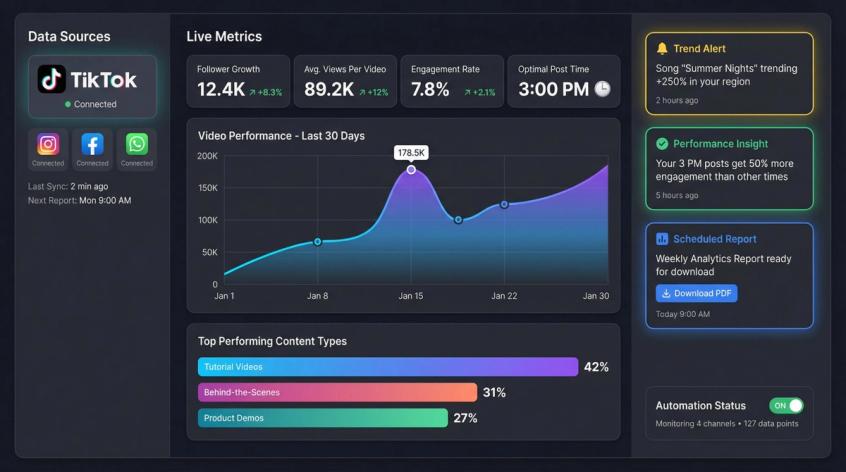
You can set up weekly or monthly email reports that contain your key TikTok metrics. For example, Metricool can email you every Monday with last week's follower gain, top-performing video stats, and engagement rate.
This means you don't have to remember to look. The insights come to you.
Dashboard Monitoring
Many tools have live dashboards where they'll highlight if something noteworthy happens (e.g., "Your video X is performing 50% above average – consider making similar content!").
Competitor Tracking
Some analytics platforms allow you to monitor competitors or benchmarks. They can alert you if a competitor's video goes viral or if they suddenly gain many followers, which might indicate a trend or campaign you should be aware of.
For instance, competitive analytics tools provide insights on TikTok performance, useful for spotting what's working in your niche.
Trend Alerts
For creators, there are apps like TrendTok, TikTok Creative Center (Trend Discovery), or TikBuddy that automate trend-spotting. Instead of manually scrolling the For You Page for hours, these tools list trending songs, hashtags, and challenges by analyzing TikTok data.
The TikTok Creative Center (available on web) is an official hub showing trending content and sounds by region and category. You can use it to quickly identify rising trends each day.
Third-party trend apps sometimes even send push notifications like "The song XYZ is trending in the past 24h in your country – check it out." With such alerts, you can jump on relevant trends early.
How to Use Analytics Data to Improve Your Automation
Automation can create a virtuous cycle with analytics. For instance:
• You scheduled posts at various times (the analytics report reveals 3 PM posts perform best). You then adjust your scheduler to favor that slot.
• Your chatbot logs show 50% of users keep asking a question the bot couldn't answer confidently. That's a cue to improve your bot's knowledge base or even create content (like a TikTok video or a FAQ page) answering that question.
• Trend alerts show a lot of inquiries about a new product category (you forward this intel to your product team or decide to make content addressing it).
Keep an Eye on the Right Metrics
It's easy to drown in data, so automation should be set up around your key performance indicators (KPIs). For a creator, that might be follower growth, average views per video, and engagement rate. For a business, it could be click-throughs, conversion rates from TikTok traffic, or number of leads captured via TikTok.
Ensure your automated reports highlight what success means for you.
In summary: Let the robots crunch the numbers and surface the insights. This spares you from manual analytics drudgery and helps you react faster. The TikTok landscape changes quickly. With automation alerting you to important shifts and results, you'll always be ahead of the curve.
10 Best Practices for Safe TikTok Automation in 2025
We've covered various facets of TikTok automation. Now you need to know how to implement automation effectively without running into trouble.
TikTok automation is powerful, but only if used smartly.
Always Keep Humans in the Loop
Automation isn't "set and forget" entirely. You need to supervise and fine-tune it.
For example, if your chatbot is answering questions, periodically review the conversations. Are users getting frustrated at any point? Did the bot misinterpret something? Tweak the flows or jump in personally when needed.
Similarly, use automation to handle 80% of easy interactions, but have a plan for the 20% that need personal attention. A hybrid approach (bot + human) often works best.
Why Transparency Builds Trust with TikTok Audiences
If a user is initiating a complex conversation, it can help to let them know they're chatting with an assistant. Most people are fine with bots for quick info as long as it's accurate.
Problems arise if the bot pretends to be human and then gives a nonsense answer. Many brands introduce their chatbot with a line like "Hi! I'm AutoBot, here to help with quick questions. Ask away! (If you need a human, just type 'agent'.)". This sets expectations and builds trust.
Start Small and Scale Your Automation Strategy
Don't automate everything at once. Begin with one aspect (say, scheduling posts or automating welcome DMs) and see how it goes. Measure the impact. Then layer on the next automation.
This way if something goes wrong, you can pinpoint the cause. Also, incremental automation helps your loyal audience adjust. For instance, if overnight all your comment replies become bot-generic, frequent commenters might notice a sudden change in tone.
It's better to gradually introduce these efficiencies.
How to Stay Updated on TikTok's Automation Policies
TikTok, like all social platforms, continuously updates its rules and detection algorithms. A tactic that was fine in 2024 might be penalized in 2025.
For example, TikTok has been ramping up its AI content and spam detection systems. Stay informed by reading TikTok's official announcements or news from credible social media publications.
If TikTok explicitly bans a certain automation method, discontinue it immediately. Ignorance is not bliss here. It could cost you your account.
Why Real Engagement Beats Fake Followers Every Time
This mantra applies to content and followers. It's better to have 10k real engaged followers than 100k hollow ones.
Don't get lured by automation that promises huge numbers without substance. If something feels too "black hat" (e.g., a tool that promises 1 million views by running 100 fake devices), it's not worth the risk to your credibility and account safety.
Focus on automation that enhances genuine engagement (like Spur's approach to customer engagement).
Test, Measure, and Optimize Your TikTok Automation
Treat your use of automation as an ongoing experiment. A/B test where possible.
Example: Use your analytics to see if auto-posting at a certain time yields better results than manual posting at random times. Or test two versions of a chatbot greeting to see which gets more responses.
Because automation often allows consistency, you can gather cleaner data on what works. Keep iterating.
Use TikTok's Native Features Before Third-Party Tools
Before using an outside solution, see if TikTok's native tools cover it. For instance, TikTok now has built-in welcome messages, quick replies, and Q&A for business accounts.
Use those. They're easy to set up in the app and are 100% compliant. Similarly, TikTok's own scheduler or analytics are directly in the platform. By mastering these, you reduce dependency on third parties and ensure you're within allowed parameters.
Business Account vs Personal Account for TikTok Automation
As mentioned, switching to a Business Account unlocks a lot of automation (API access for chatbots, the ability to run ads, native scheduling, etc.).
However, Business accounts come with trade-offs: you cannot use mainstream music in your videos (only TikTok's royalty-free Commercial Music Library), and you lose features like Creator Fund, TikTok's Series, and the ability for fans to send Gifts.
This is crucial: if your content relies heavily on trending sounds, a Business account could hurt your creativity/virality because you're barred from using those trending songs.
Many creators stick to personal accounts and forgo the advanced messaging API. On the other hand, brands typically should use Business accounts for credibility and access to commerce features (like TikTok Shopping, ads, and official chat API).
Evaluate your needs. You might start as personal to build an audience with trending audio, then switch to Business when you're ready to scale automation.
How to Secure Your TikTok Account When Using Automation Tools
If using third-party apps, ensure they are reputable and secure. Authorize through TikTok's official OAuth where possible (meaning you don't directly give them your password).
Be wary of any tool that requires your password outright. Use strong, unique passwords and enable 2-factor authentication on your TikTok.
Integrate TikTok into Your Multi-Channel Marketing Strategy
TikTok shouldn't exist in a silo. Many automations can connect TikTok to your other marketing channels.
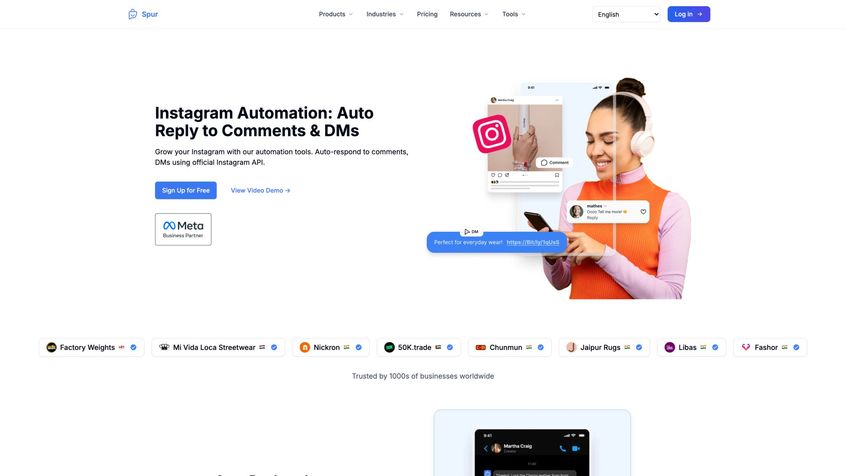
For instance, Spur's Instagram automation works just like TikTok automation--comment-to-DM flows, AI responses, abandoned cart recovery. The platform lets you manage all social DMs (TikTok, Instagram, Facebook) plus WhatsApp and live chat from one inbox. When you set up automation rules or train your AI chatbot, those capabilities apply across every connected channel.
For example, you might integrate a TikTok chatbot with your CRM or email list so whenever someone provides their email in a TikTok chat, it auto-adds to your mailing list.
Or use Zapier/Make (automation tools) to send you a Slack alert each time a TikTok video of yours hits 100K views.
Think about how TikTok fits in your omnichannel customer journey. Often, automation is the glue that connects TikTok to Instagram DMs, to WhatsApp, to email, and so forth.
This is where Spur really shines. Our unified inbox approach means you can see TikTok messages alongside your other messaging apps in one dashboard. When someone starts a conversation on TikTok, you can seamlessly continue it on WhatsApp or live chat without losing context.
By following these best practices, you'll ensure that your TikTok automation serves your goals and doesn't inadvertently cause issues. Automation should amplify your efforts, not replace them entirely.
Conclusion: Work Smarter, Create Better, and Grow Faster
TikTok automation isn't about cheating the system. It's about optimizing your workflow and engagement in a hyper-fast social media environment.
The platform has matured, and so have the tools and techniques to manage it. By leveraging automation intelligently, you essentially give yourself a "team" of digital assistants: one posts your videos on schedule, another answers common customer questions instantly, another gathers your analytics, and yet another seeks out interested users in the crowd.
Imagine the alternative: manually logging in every few hours to post content, staying up late to reply to global followers, copying data into spreadsheets. You'd burn out quickly and likely still miss opportunities.
Automation prevents that fate, allowing solo creators to handle popularity and small brands to punch above their weight in customer service and marketing responsiveness.
A Few Parting Thoughts
Keep Content King
Even with top-notch automation, the TikToks themselves need to shine. Use the time automation saves you to create higher-quality, trend-aware, thumb-stopping videos. Automation + great content = an unbeatable combo.
Stay Updated and Evolve
The TikTok landscape in 2025 will change by 2026. New automation features will emerge. Continue learning and be ready to adapt your strategy. TikTok Messaging Ads are now a thing, showing how quickly new opportunities arise.
Those who automated early with chatbots were prepared to capitalize on it.
Holistic Approach
Use automation to deliver a better customer experience. When a user discovers you on TikTok and gets instant info through your bot, then perhaps is guided to your website or WhatsApp for deeper engagement, it feels seamless.
That's not just automation, that's customer journey orchestration. Aim for that kind of smooth interaction flow.
Compliance and Ethics
Respect your audience and the platform. Don't spam, don't mislead. Automation still requires ethical use. When in doubt, put yourself in the follower's shoes and ask, "Would this automated behavior annoy me or would it add value?"
Let that guide you.
Ready to Automate Your TikTok Strategy?
At the end of the day, automation is a means to an end. The end being a thriving TikTok presence with engaged fans and growing business results.
The real star is still you and your creativity. By taking the heavy lifting out of your hands, TikTok automation frees you to focus on what you do best: making content that entertains, inspires, or informs the world.
So go ahead:
✓ Schedule those posts
✓ Launch that chatbot (we recommend Spur's AI agents for actionable intelligence)
✓ Filter those comments
✓ Track those trends
Work smarter on TikTok, and you'll find you can achieve more than you ever thought possible, without sacrificing your sanity.
Want to see how Spur can help you automate TikTok DMs alongside WhatsApp, Instagram, Facebook, and live chat? Check out our pricing or explore our integrations to see how we connect with your favorite e-commerce platforms.
Frequently Asked Questions
TikTok allows certain forms of automation (like scheduling posts via official APIs, using chatbots through the Business Messaging API, and native features like welcome messages). However, TikTok strictly prohibits artificial engagement boosting (buying followers, using unauthorized bots to mass-follow/like, etc.). Always stick to approved automation methods and third-party tools that integrate officially with TikTok's API.
For most advanced automation features (chatbots, third-party scheduling tools, messaging API access), yes. A TikTok Business Account is required. The trade-off is that Business accounts cannot use mainstream music (only royalty-free Commercial Music Library) and lose access to features like Creator Fund and Gifts. Personal/Creator accounts have limited automation options but can use trending sounds freely.
Yes. Brands using TikTok DM automation have seen significant improvements. Instant chatbot replies have led to substantial boosts in DM-to-sale conversions, and delayed responses (2+ hours late) can reduce conversion rates significantly. The key is using AI that can actually qualify leads, answer questions, and guide purchasing decisions with actionable automation (not just basic FAQ bots).
Basic chatbots follow predefined rules or answer simple FAQs. Actionable AI agents (like Spur's solution) can take actual actions: tracking orders, updating records, booking appointments, or syncing data to your CRM. They're trained on your knowledge base and can handle complex, contextual conversations. This makes them far more valuable for businesses that need to convert TikTok traffic into real leads and sales.
Technically yes, but with extreme caution. TikTok officially prohibits artificial engagement. If you choose to use growth bots or services, use reputable ones that throttle actions to human-like levels (20-30 follows per day, not 500). Better yet, focus on permissible automation (scheduling, chatbots, analytics) and let your content naturally drive engagement. Building a smaller, real fanbase is more valuable than a large, hollow one.
For scheduling: Start with TikTok's native scheduler (free with Business Account) or Buffer (simple interface, free plan available). For chatbots: Tools with visual flow builders are user-friendly. For comprehensive multi-channel automation including TikTok DMs, WhatsApp, Instagram, and live chat: Spur offers an intuitive platform with actionable AI agents and knowledge base training. For analytics: TikTok's built-in analytics plus Metricool for automated reports.
Stick to official automation methods. Use tools that integrate via TikTok's official API. Avoid unauthorized third-party bots that mass-follow, mass-like, or spam comments. If using growth services, choose reputable ones that operate at human-like speeds. Monitor TikTok's policy updates and discontinue any tactic TikTok explicitly bans. Most importantly, prioritize quality content and genuine engagement over artificial metrics.
Absolutely. Spur provides a unified multi-channel inbox where you can manage TikTok DMs alongside WhatsApp, Instagram, Facebook Messenger, and live chat. Our AI agents are trained on your knowledge base and can deploy across all these channels, providing consistent, actionable responses. Unlike competitors that focus only on one channel, Spur gives you true omnichannel customer engagement with marketing automation capabilities like abandoned cart recovery, drip campaigns, and e-commerce automation.
Was this article useful?