Key takeaways
Most chat tools double in price by month three. We tested 8 and found which ones stay affordable after you add agents, AI, and WhatsApp.
Ask an AI about this article
TL;DR: Most "cheap" live chat tools become expensive the moment you add a second agent, WhatsApp, or AI. We tested 8 options so you don't have to. If you want AI support, WhatsApp, Instagram, and live chat in one platform starting at $12/month, Spur is where we'd start, and the 7-day free trial is there to prove it.
Most small businesses don't need a $500-a-month enterprise chat platform. They need a live chat tool that catches the visitor who would've bounced, answers the question that would've gone to voicemail, and gets the team to respond before the customer emails a competitor.
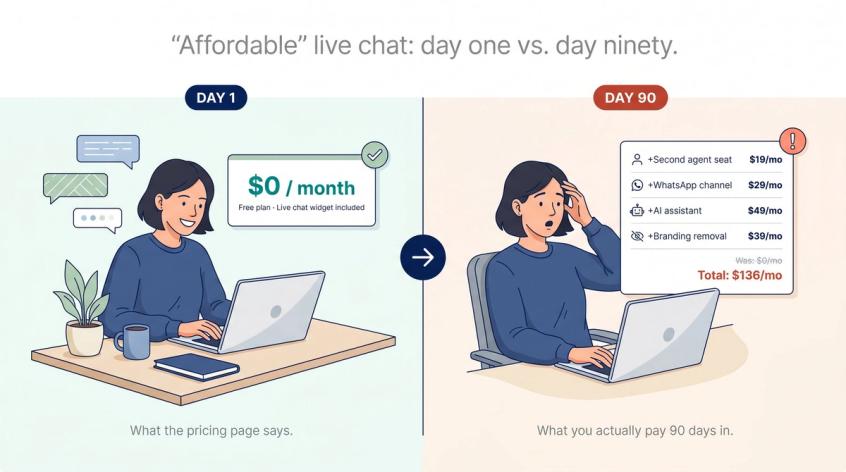
The problem is that "affordable" is a trap word. Every tool in this space has a low number on its pricing page. Almost none of them stay at that number once you actually use them.
We evaluated eight live chat tools through the lens of a small business in 2026: a team of one to ten, budget-conscious, already juggling too many tools, skeptical of anything that sounds like a pitch. The goal was not to find the cheapest widget. It was to find the tools that are still affordable ninety days after you've added the second agent, the WhatsApp line, the AI assistant, and the Shopify connection.
That is a harder test. Here is what we found.
Best Affordable Live Chat Tools for Small Business
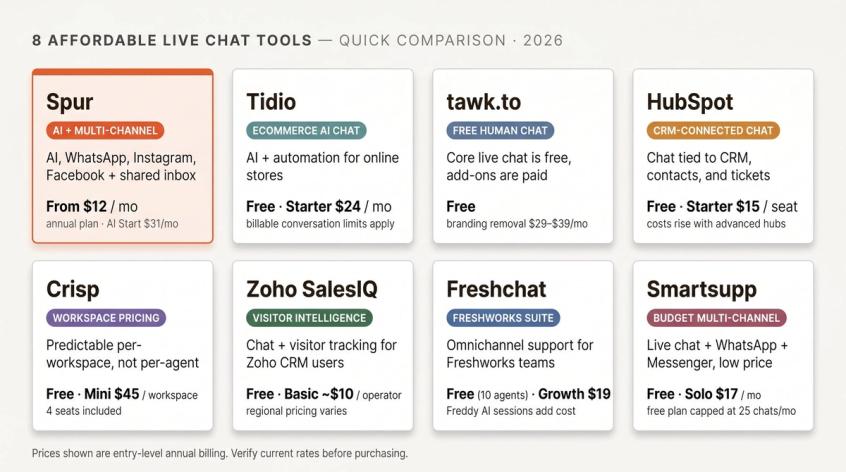
| Tool | Best for | Starting point | Main watch-out |
|---|---|---|---|
| Spur | Small businesses wanting website live chat, AI, WhatsApp, Instagram, Facebook Messenger, shared inbox, and automation in one platform | Website annual plans from $12/month; practical plan AI Start at $31/month annually | If all you need is a free website widget, tawk.to or HubSpot may be sufficient |
| Tidio | Ecommerce teams that want AI chat and automation | Free plan; Starter $24.17/month annually; Growth from $49.17/month annually | Conversation limits matter; calculate billable conversations before choosing |
| tawk.to | Businesses that want the lowest-cost human live chat | Core live chat is free | Branding removal, AI, video/voice, and hired agents are paid add-ons |
| HubSpot Live Chat | CRM-first teams that want chat, forms, tickets, and contacts in one system | Free tools available; Service Hub Starter from $15/seat/month | Costs rise when you add advanced hubs and automation |
| Crisp | Teams that want predictable workspace pricing instead of per-agent billing | Free plan; Mini $45/month per workspace (4 seats) | Omnichannel, automation, and larger AI allowances sit in higher tiers |
| Zoho SalesIQ | Zoho CRM users and sales teams that want visitor tracking plus chat | Free plan with 3 operator licenses; paid plans per operator | Regional pricing varies; verify in Zoho checkout |
| Freshchat | Teams already using Freshworks or needing an omnichannel support inbox | Free plan for up to 10 agents; Growth $19/agent/month annually | Freddy AI Agent and Copilot can add meaningful cost |
| Smartsupp | Very small teams that want live chat, WhatsApp, Messenger, email, and basic automation cheaply | Free plan; Solo $17/month annually; Plus $25/month annually | Free plan caps at 25 conversations per month; VAT and add-ons may apply |
What "Affordable" Live Chat Actually Costs in 2026
The cheapest live chat app is not always the most affordable one.
The bill that matters is not the one you pay on day one. It's the bill you pay on day ninety. After you've added the second agent, the WhatsApp line, the AI assistant, the chat history upgrade, and the ability to remove the vendor's branding from your widget, that bill is often two to four times the sticker price.
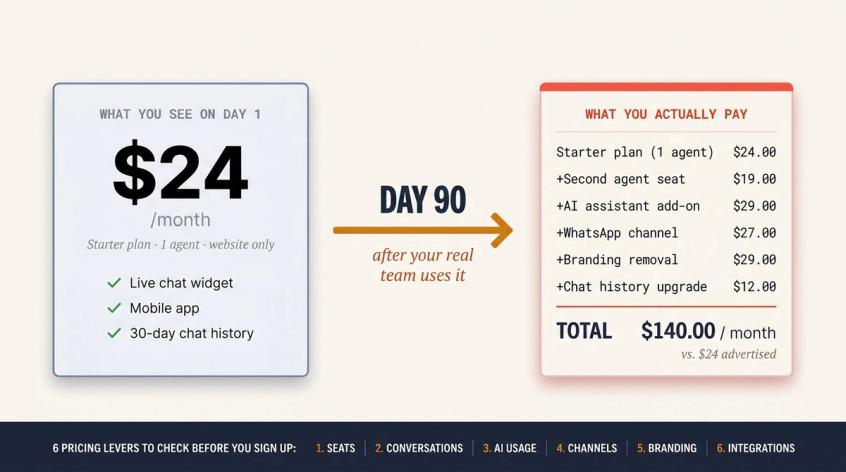
A useful test before signing up for anything: could you run this tool for three months with your real team, real traffic, real support questions, and real sales channels without being surprised by the bill?
To answer that honestly, check six pricing levers for any tool you evaluate:
- Seats or agents: Does the price increase per person you add?
- Conversations or visitors: Is there a monthly cap on chat sessions, billable conversations, or unique visitors the bot can engage?
- AI usage: Is AI included in the plan, credit-based, session-based, or a paid add-on?
- Channels: Are WhatsApp, Instagram, Facebook Messenger, and email included in the plan or paid separately?
- Branding: Does the free or entry-level plan show the vendor's logo on your chat widget to your site? What does removal cost?
- Business integrations: Does the tool connect to your Shopify store, CRM, helpdesk, payment processor, or order management system?
This is why a free widget, a $45-per-workspace plan, and a $31-per-month multichannel AI plan can all be "affordable" depending on the business. The right answer depends on which levers matter most for how you actually operate.
How We Tested These 8 Live Chat Tools
We evaluated each tool against five small-business realities:
- Speed to launch: Can a non-technical founder or ops person set this up in an afternoon?
- Real total cost: What does the bill look like after adding agents, AI, channels, and realistic chat volume?
- Human handoff quality: Can a bot or widget hand over to a real person cleanly, with context intact?
- Lead capture: Can it collect a name, phone number, email, or intent and keep the conversation going?
- Channel fit: Does it match how small businesses actually communicate with customers: website chat, WhatsApp, Instagram, Facebook Messenger, email, or CRM?
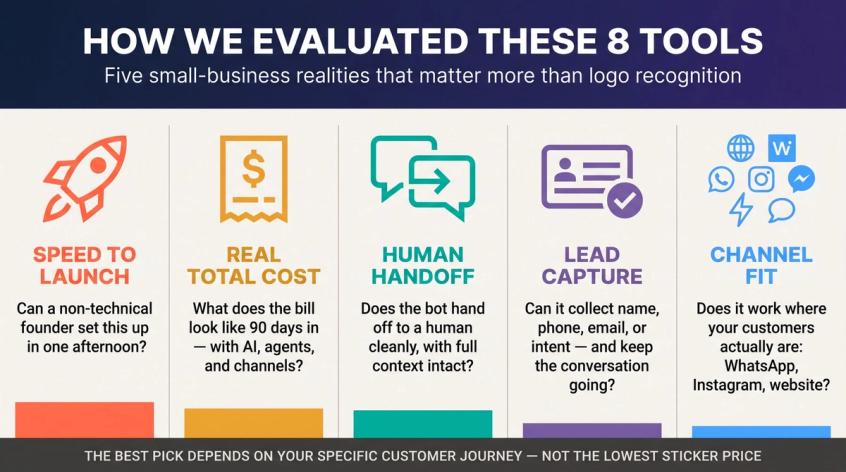
The best pick depends less on which logo looks nicest and more on your specific customer journey. A D2C brand that sells through WhatsApp and Instagram has fundamentally different requirements from a B2B service business that only needs a free CRM-connected widget on one website.
1. Spur: Best Affordable Live Chat for AI and Multi-Channel
Best for: Small businesses that want live chat to work as a sales and support engine, not just a floating chat bubble.
Here is what Spur's live chat product page looks like today — the hero communicates the platform's core promise directly: AI that resolves 70% of support queries instantly, with trust signals from Meta, Shopify, and GDPR compliance visible above the fold.
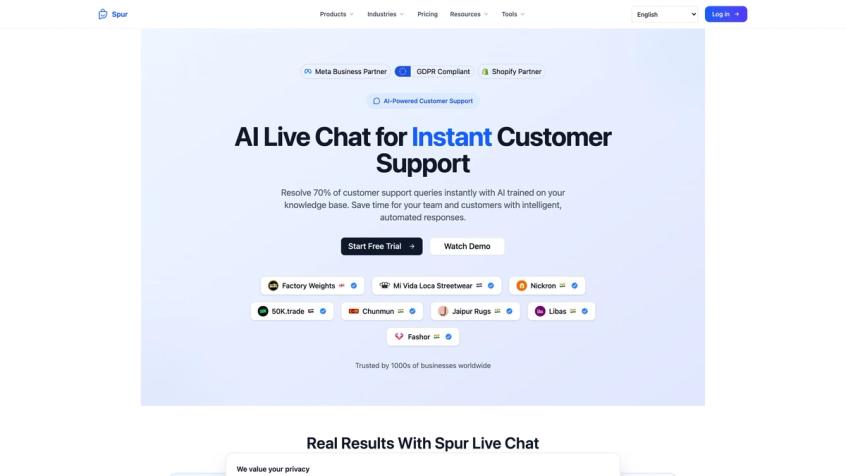
We built Spur specifically for this problem. Most live chat tools answer a website visitor's question and stop there. The conversation is over the moment the person closes the tab. Meanwhile, your customers are on WhatsApp asking the same question, or on Instagram sending a DM, or checking back three days later on a different channel. You're expected to track all of it manually across separate tools.
Spur brings your website live chat, WhatsApp, Instagram, and Facebook Messenger into a single shared inbox, with a single AI agent that can be trained on your knowledge base and deployed across all of them simultaneously.
What Spur's Live Chat Actually Includes
The Spur live chat widget runs an AI agent on your website that's trained on your knowledge base: your FAQs, help docs, PDFs, Notion pages, YouTube videos, or custom Q&A. When a visitor asks a question, the agent answers from your actual business information, not generic responses. (Spur)
The part that separates Spur from most chatbot tools is what we call AI Actions. The AI agent is not limited to answering from a static FAQ. When configured, it can connect to external systems: booking a meeting, checking inventory, processing a payment, or fetching live order data. That's the difference between a bot that says "please contact support" and one that actually resolves the issue. (Spur)
When the question is too complex for the AI, the conversation routes to a human agent. Our guide on chatbot to human handoff explains exactly how that transition works with full context preserved in the shared inbox.
The same AI agent and shared inbox also works across WhatsApp, Instagram, Facebook Messenger, and website chat simultaneously. (Spur) If a customer starts a conversation on your website and continues it later on WhatsApp, your team sees both in the same place.
If you run an online store and want to see how we handle ecommerce-specific messaging, like post-purchase flows and WhatsApp marketing, we cover that in a dedicated ecommerce live chat guide.
How Much Does Spur Cost?
Spur's pricing includes a 7-day free trial and annual plans with a 20% discount. (Spur)
The AI Acquire plan starts at $12/month on an annual plan. It includes one AI agent, 100 AI credits (the units the AI uses per reply), one seat, three automation flows, and one channel each for live chat, Instagram, Facebook, and WhatsApp.
The AI Start plan at $31/month annually is the more practical starting point for most small businesses. It adds two seats, 2,000 AI credits, 25 automation flows, and priority email support.
If you buy through the Shopify App Store, the monthly rates are higher: AI Start is $39/month, AI Accelerate is $159/month, and AI Max is $499/month, with a 7-day free trial. The Shopify listing currently holds a 5.0 rating across 106 reviews. (Shopify App Store)
For businesses comparing the cost of assembling separate tools: a website chat widget ($20/month), a WhatsApp automation tool ($30/month), an Instagram DM tool ($20/month), and a chatbot builder ($30/month). The $31 AI Start plan often represents meaningful savings, not a compromise.
Why Spur Stands Out From Other Live Chat Tools
Spur is most valuable when your customer journey crosses more than one channel. Here is what that looks like in practice:
A visitor lands on your website and asks about pricing or availability. The AI agent answers using your knowledge base. If the person wants to move forward, the widget collects their contact details. Lead capture through your live chat widget is one of the clearest ways to turn passive visitors into warm leads. If the issue requires a human, an agent takes over in the shared inbox. If the customer messages on WhatsApp two days later, the same team sees the conversation continue.
That end-to-end flow is where Spur is built to work. It fits businesses in coaching, education, real estate, travel, local services, and D2C, where the support conversation often turns into a sales conversation and the customer expects continuity.
Spur is especially worth considering if you want:
- An AI live chat agent trained on your actual business knowledge
- Human handoff with full context preserved
- WhatsApp, Instagram, Facebook Messenger, and website chat in one platform
- Lead capture through the chat widget (name, phone, email, intent)
- Automation flows for follow-ups and broadcasts
- AI Actions that connect to backend systems rather than just answering static FAQs
When Spur Isn't the Right Choice
Spur is not the absolute cheapest option if all you need is a free human chat widget on a single website. For that use case, tawk.to or HubSpot's free chat are sufficient starting points.
Spur makes the clearest case when live chat is part of a multichannel strategy. When your customers are reaching you on WhatsApp and Instagram, when you want AI plus automation plus a shared inbox, and when buying separate tools for each channel would cost more than the bundled alternative, that's when it really pulls ahead.
Verdict: Start a free trial with Spur if you want affordable live chat that can grow into AI support, lead capture, multi-channel automation, and human handoff, without adding a new tool for every channel.
2. Tidio: Best AI Live Chat for Ecommerce on a Budget
Best for: Ecommerce businesses that want a polished website chat experience with AI and automation.
Tidio is one of the most recognizable affordable live chat tools for small businesses, particularly ecommerce stores. It combines live chat, helpdesk-style customer service tools, AI, and chatbot automation.
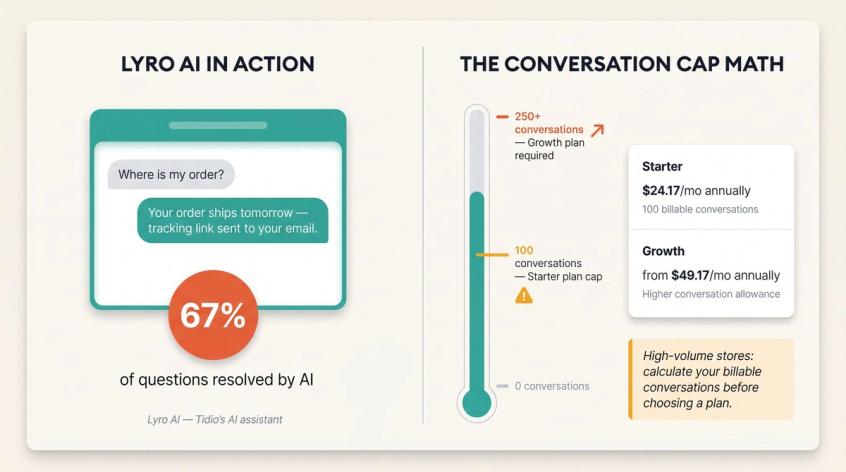
Tidio's current pricing shows a free plan, Starter at $24.17/month annually with 100 billable conversations (the number of chats that count toward your monthly limit), and Growth from $49.17/month annually with higher conversation allowances. Paid plans support up to 10 seats, which can be attractive for small teams.
Tidio's AI assistant, Lyro, is positioned as a customer-service AI that Tidio claims can resolve up to 67% of customer questions.
Where Tidio Works Best
Tidio is strongest for businesses that want a modern website chat tool with AI and automation but don't need deep WhatsApp or Instagram marketing automation as their core workflow.
Good fit for: Shopify and ecommerce stores, teams that want live chat plus AI answers, businesses that prefer conversation-based pricing over strict per-seat billing. If you're specifically researching ecommerce chatbots, our dedicated guide walks through what to look for in that context.
Tidio Pricing Traps to Know Before You Buy
Tidio's affordability depends heavily on conversation volume. A low-traffic business may find Starter or Growth reasonable. A high-volume store should calculate billable conversations before committing.
Also, Tidio is a strong website and ecommerce chat product. If your main growth channels are WhatsApp broadcasts, Instagram DMs, and multichannel automation, compare it closely with Spur before choosing. The total cost and channel coverage are different. You can also explore Tidio alternatives worth comparing if you want to see more options in the ecommerce chat space.
Verdict: Choose Tidio if your main need is ecommerce website chat with AI and automation, and your expected conversation volume fits the plan.
3. tawk.to: The Free Live Chat Software for Small Businesses
Best for: Small businesses that want free human live chat and can accept branding or pay only for specific add-ons.
tawk.to is the benchmark for free live chat. Its core live chat software is free, with desktop and mobile apps, and the company states it does not charge to use the software.
The business model is transparent: tawk.to makes money through optional add-ons. Branding removal is $39/month or $348/year ($29/month on annual billing). Video and voice is $49/month or $348/year. Hired agents start from $1/hour if you need additional staffing.
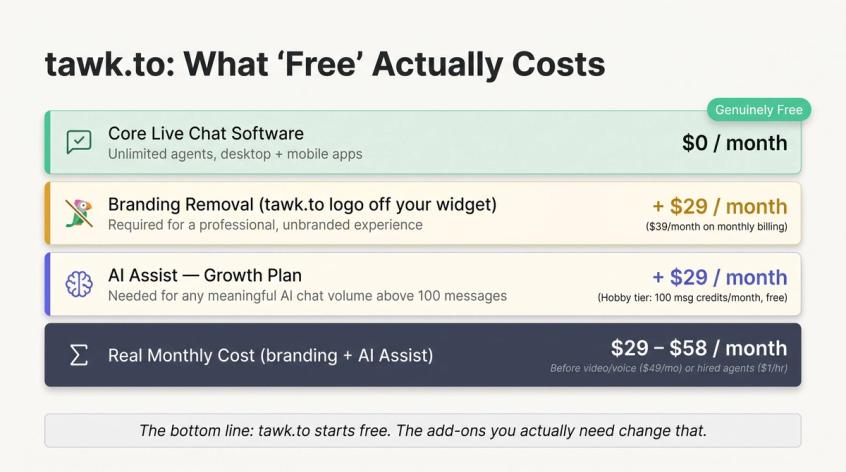
tawk.to's AI Assist has a free Hobby tier with 100 monthly message credits and one AI chat agent. Paid AI Assist plans run from Growth at $29/month up to Enterprise at $399/month, with progressively higher message credits and crawled-page limits.
Where tawk.to Works Best
tawk.to is excellent when your requirement is simple: we need a live chat widget on our website, and we don't want another SaaS bill. Good fit for local businesses, solo founders, small service companies, and early-stage teams that mainly need human chat, not complex automation. If you're setting up basic support tooling for the first time, it's worth reviewing small business support setup to understand what you'll likely need as you grow.
tawk.to Limitations to Know Before Signing Up
The comparison changes when you add AI, branding removal, and video. A business that wants free chat plus branding removal plus AI Assist is no longer comparing a $0 product. It may be a $29 to $68 monthly stack depending on which add-ons you choose.
tawk.to is also primarily a live chat and support layer. It doesn't offer the same WhatsApp, Instagram, ecommerce automation, and AI-agent depth as Spur.
Verdict: Choose tawk.to if your top priority is free live chat with no monthly commitment. Upgrade only when you know exactly which add-ons you need.
4. HubSpot Live Chat: Free CRM-Connected Chat
Best for: Small businesses that want live chat connected to CRM, contact records, forms, and tickets.
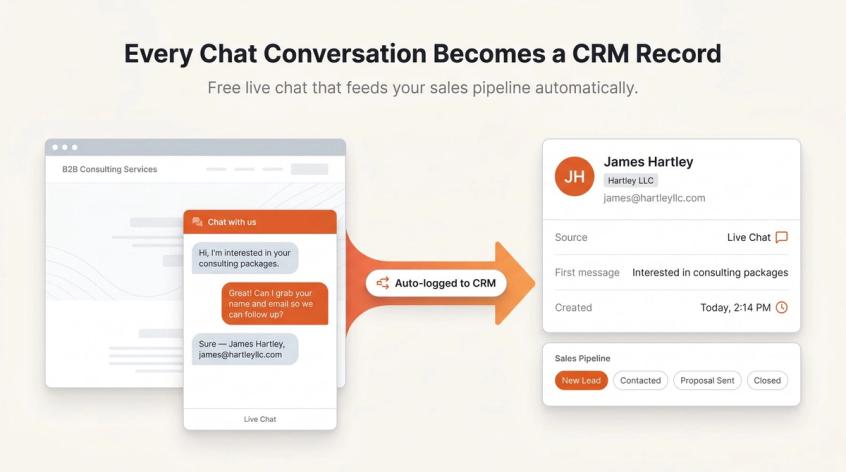
HubSpot's free live chat is attractive because it's not just a widget. It connects directly to HubSpot CRM, so conversations get logged into contact records that your sales or support team can use later. HubSpot's documentation states that the free live chat can log details into the CRM without heavy developer involvement.
HubSpot's Service Hub pricing shows a Free tier with contact management, ticketing, and team email. Service Hub Starter is shown from $15/seat/month. HubSpot also offers broader Starter Customer Platform pricing starting from $9/seat/month annually or $15/seat/month monthly, though promotional rates can change, so verify the checkout page.
Where HubSpot Live Chat Works Best
HubSpot is best when live chat is one part of a CRM-led workflow. Good fit for: B2B service businesses, agencies, consultants, SaaS startups, and teams that want contact records, forms, emails, tickets, and chat in one system. For teams that want to build automated lead generation through chat as part of a CRM workflow, the CRM integration capability is the standout benefit.
HubSpot Live Chat Limitations for Small Teams
HubSpot's free tools are generous, but the broader platform becomes expensive as you add advanced automation, reporting, AI, and hub-level features. Also, HubSpot is not the strongest choice if your main requirement is WhatsApp and Instagram messaging automation. It's CRM-centric by design. If you need a Zoho CRM integration for live chat as an alternative CRM path, Spur connects directly to Zoho CRM as well.
Verdict: Choose HubSpot if your live chat should feed a sales pipeline and CRM. It is one of the best free options for CRM-first small teams.
5. Crisp: Predictable Workspace Pricing for Team Live Chat
Best for: Teams that want one shared inbox and predictable pricing regardless of headcount.
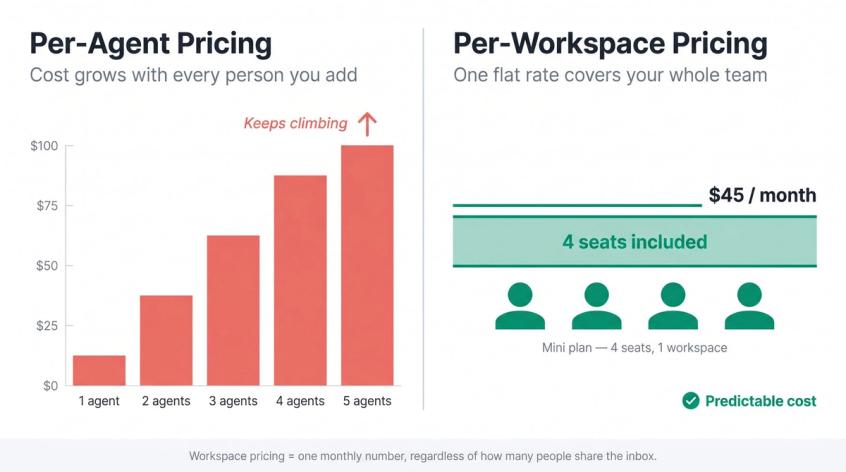
Crisp is different from most live chat tools because its paid plans are priced per workspace rather than per user. That can be attractive for small teams where multiple people handle chats.
Crisp's current pricing: Free plan, Mini at $45/month per workspace with four seats, Essentials at $95/month per workspace with 10 seats, and Plus at $295/month per workspace with 20+ seats. Mini includes 90 automated conversations and $5 in AI credits. Essentials adds 450 automated conversations, $25 of AI credits, omnichannel inbox, workflow automation, AI chatbot, knowledge base, analytics, and routing. Additional agents are $10/month on Essentials and above.
Where Crisp Works Best
Crisp is strong when several people need access to live chat and the business wants predictable pricing. Good fit for: startups with shared support inboxes, SaaS teams, small ecommerce teams that dislike per-agent pricing from the first paid plan.
Crisp Pricing Tiers to Evaluate Before Choosing
Crisp's Mini plan is affordable for a four-person team, but omnichannel inbox, workflow automation, AI chatbot, routing, knowledge base, and analytics all sit in Essentials at $95/month. Evaluate that tier, not just the $45 plan, if those features matter to you. If workspace pricing doesn't fit after evaluating all the tiers, we've put together a guide to Crisp alternatives for small teams that may fit better.
Verdict: Choose Crisp if you want a clean shared inbox with predictable team pricing, especially for a four-to-ten-person team.
6. Zoho SalesIQ: Live Chat for Zoho Users and Visitor Tracking
Best for: Businesses already using Zoho, or teams that want live chat plus website visitor intelligence.
Zoho SalesIQ combines live chat, visitor tracking, sales engagement, and chatbot features. It's especially relevant for businesses already running Zoho CRM, Zoho Desk, or other Zoho products.
Zoho's pricing page confirms a free plan with three operator licenses. The free plan includes 100 chat sessions per month; the Basic plan includes 1,000; Professional and Enterprise include unlimited sessions. Channels available include website, mobile app, email signature, Telegram, Instagram, Facebook, and WhatsApp depending on plan and configuration.
A pricing summary from early 2026 lists paid plans at approximately Basic $10/operator/month, Professional $17/operator/month, and Enterprise $25/operator/month, though regional pricing can vary significantly, so verify the actual numbers in Zoho's checkout.
Where Zoho SalesIQ Works Best
Good fit for: Zoho CRM users, B2B sales teams, and businesses that care about identifying high-intent website visitors before the chat begins. If you already use Zoho CRM, Spur's Zoho CRM integration means you don't have to choose between your CRM and a more powerful multichannel chat platform. You can have both connected.
Zoho SalesIQ Considerations for Non-Zoho Teams
Zoho is powerful but can feel more system-like than plug-and-play for teams that don't already use Zoho. Also, because pricing pages can differ by region, always verify your actual plan price and limits before purchasing. Teams wanting deeper sales and support automation beyond what Zoho SalesIQ offers should look at dedicated automation platforms.
Verdict: Choose Zoho SalesIQ if Zoho is already your operating system and you want live chat tied to sales intelligence.
7. Freshchat: Live Chat for Freshworks Teams and Omnichannel Support
Best for: Teams that want live chat as part of a broader customer-support suite.
Freshchat, from Freshworks, is a strong option for teams that want website live chat, email, social channels, WhatsApp, and support workflows in one place.
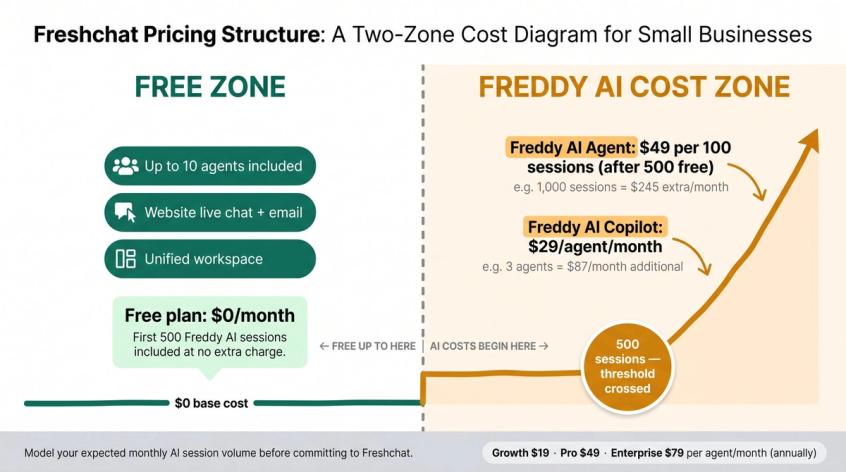
Freshchat's pricing shows a Free plan for up to 10 agents with website live chat, email, and a unified workspace. Paid plans: Growth at $19/agent/month annually, Pro at $49/agent/month annually, and Enterprise at $79/agent/month annually.
The AI pricing deserves specific attention. Freddy AI Agent includes the first 500 sessions at no extra charge, then costs $49 per 100 sessions after that. Freddy AI Copilot is $29/agent/month annually. If you want AI-powered support at any real volume, model those costs before committing.
Where Freshchat Works Best
Good fit for: teams already using Freshdesk or Freshworks, businesses with multiple support channels, small support teams expecting to grow, and teams that want a free multi-agent plan to start.
Freshchat AI Costs to Model Before Committing
AI can become a meaningful cost. If you mainly want Instagram automation and WhatsApp support without the Freshworks stack, compare Freshchat with Spur before deciding. We've also compiled a list of Freshchat alternatives if you want a broader view of comparable platforms.
Verdict: Choose Freshchat if you want affordable live chat inside a Freshworks support stack.
8. Smartsupp: Cheapest Multi-Channel Chat for Very Small Teams
Best for: One-to-three-person teams that want live chat plus Messenger, WhatsApp, and email at a low price.
Smartsupp is one of the more affordable options for small businesses that want multi-channel chat without overbuilding.
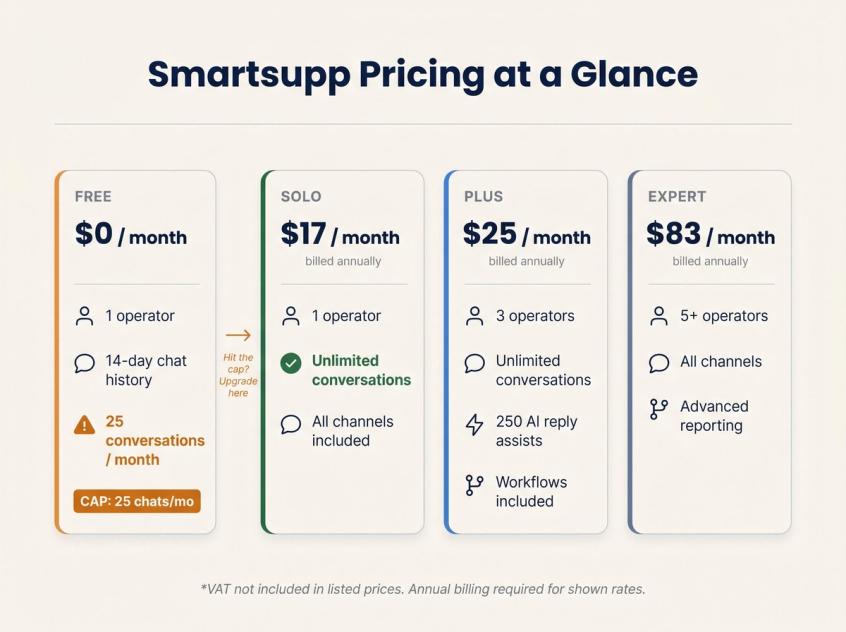
Smartsupp's pricing: Free (1 operator, 25 conversations/month, 14-day history), Solo at $17/month annually for one operator with unlimited conversations, Plus at $25/month annually for three operators, more channels, workflows, and 250 AI reply assists. Expert runs $83/month annually for five or more operators, and Ultimate is $280/month annually for custom needs. Smartsupp notes that VAT is not included in listed prices.
Where Smartsupp Works Best
Good fit for: solo founders, small ecommerce shops, local service businesses, and teams that want a practical low-cost multi-channel setup before moving to larger support systems. If you're just starting out and want to understand what comes next, our guide on automating your support before your team grows covers the natural progression.
Smartsupp Limitations for Growing Teams
The free plan's 25-conversation-per-month cap is low for any business seeing meaningful traffic. Most active small businesses will move to Solo or Plus quickly. AI and advanced automation are also more limited compared to specialized AI-agent platforms.
Verdict: Choose Smartsupp if you want simple, affordable multi-channel chat for a very small team.
Which Affordable Live Chat Tool Is Right for You?
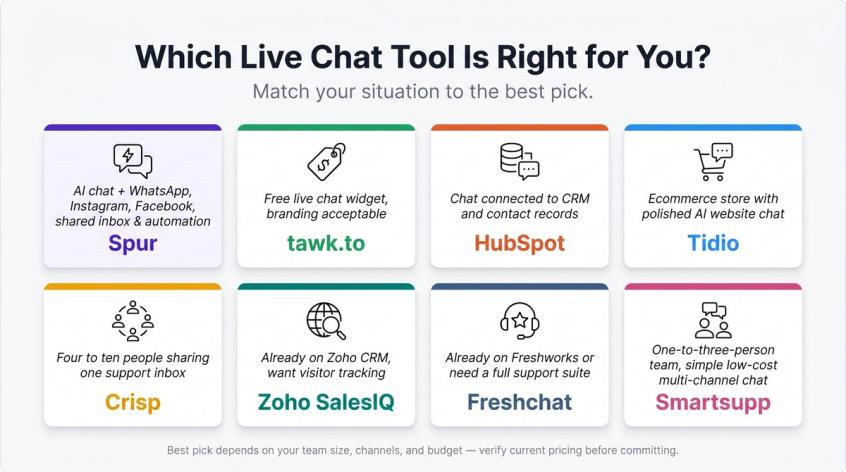
| Your situation | Best pick |
|---|---|
| You want AI live chat plus WhatsApp, Instagram, Facebook Messenger, shared inbox, and multi-channel automation in one platform | Spur |
| You want a free human live chat widget and can accept branding | tawk.to |
| You want chat connected to CRM and contact records | HubSpot |
| You run an ecommerce store and want a polished website AI chat tool | Tidio |
| You have four to ten people sharing one support inbox | Crisp |
| You already use Zoho CRM and want visitor tracking | Zoho SalesIQ |
| You already use Freshworks or need a full support-suite path | Freshchat |
| You are a one-to-three-person team that wants simple low-cost multi-channel chat | Smartsupp |
Hidden Costs of "Cheap" Live Chat Software to Watch For
Most small businesses compare live chat tools by the first number on the pricing page. That is a mistake.
The real cost shows up when your business starts using the tool properly. Here are the five traps to know before you commit.
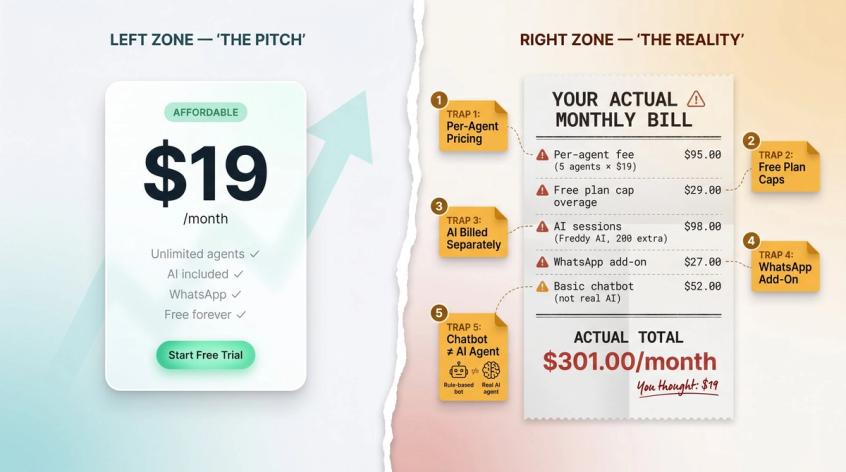
Trap 1: Per-Agent Pricing Gets Expensive Fast
A $19 or $25 plan sounds cheap until five people need access. Per-agent pricing is reasonable for structured support teams, but it surprises small businesses where sales, support, and the founder all need to monitor chat.
Workspace pricing, like Crisp's Mini and Essentials plans, can be better for multi-user teams. Multichannel bundled pricing, like Spur's AI Start at $31/month, can be better when your team also needs WhatsApp, Instagram, AI, and automation included without per-channel add-on fees.
Trap 2: Free Plan Limits That Will Catch You Off-Guard
Smartsupp's free plan includes 25 conversations per month and 14-day history. tawk.to's core software is free, but branding removal is a paid add-on. Tidio's free and starter tiers have conversation and visitor-flow limits. Free plans are useful for testing and genuinely low-volume businesses. They're not always the most economical option for a growing team. Before locking in, review chatbot best practices for growing businesses to understand what you'll actually need at scale.
Trap 3: AI Is Priced Differently by Every Vendor
AI pricing models in this space vary widely:
- Spur uses AI credits included per plan
- Tidio uses billable conversations and Lyro conversation limits
- tawk.to uses AI Assist message credits purchased separately
- Freshchat prices Freddy AI Agent sessions at $49 per 100 sessions after the first 500
- Crisp includes AI credits and automated-conversation allowances by plan tier
Before buying, test the AI with your top 50 real customer questions. AI that answers 20 generic FAQs but fails on order status, refund policies, or appointment booking may not reduce your team's workload enough to justify the cost.
Trap 4: WhatsApp and Instagram Aren't Included by Default
Many live chat tools are strong on your website but weaker (or expensive) on social and messaging channels.
If customers regularly contact you through WhatsApp Business API or Instagram, don't assume you can add those channels later for a small fee. Check channel support before buying. This is one of the core reasons Spur is on this list: our live chat is part of a broader WhatsApp, Instagram, Facebook, and AI automation platform, not a standalone widget where WhatsApp is a $27/month add-on. (Spur)
Trap 5: "Chatbot" Doesn't Always Mean a Real AI Agent
Some chatbots are simple rule-based flows that send pre-written responses. Some AI bots answer only from a static help center and fail on anything outside it. More advanced AI agents can hand off to humans with context, call external systems, and actually complete actions.
The difference for a small business is enormous. A bot that responds "Please contact our support team" to every question is a cost. An AI agent that resolves a delivery question, captures a lead at 2 a.m., or books a demo from a website conversation is something worth paying for.
We've broken down the difference between a rule-based chatbot and a real AI agent in detail if you want to understand exactly what you're evaluating.
Spur's AI Actions are built for the second scenario: connecting to backend systems for real tasks, not just retrieving static FAQ answers. (Spur)
How to Test Any Live Chat Tool Before Buying
Before committing to a paid plan, run this two-day test.
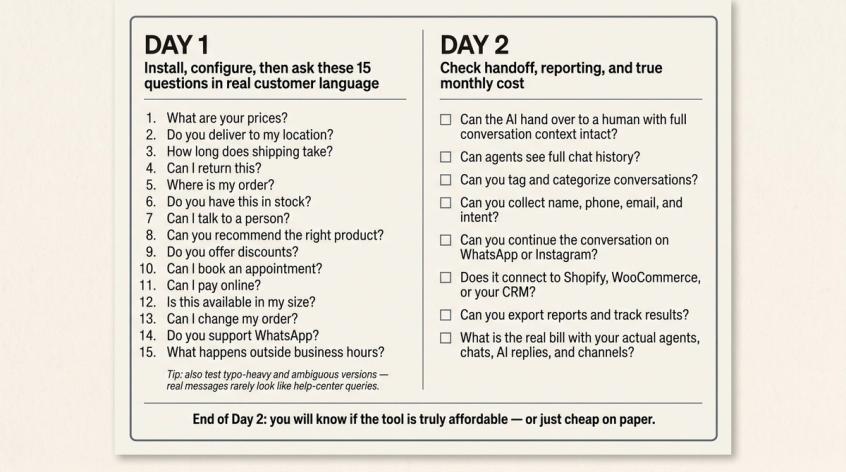
Day 1: Install and Test With Real Customer Questions
Set up the widget on a test page. Configure your business hours, offline message, lead-capture form, and basic routing rules. Then test these 15 questions, using the actual messy language your customers use, not perfect help-center queries:
- What are your prices?
- Do you deliver to my location?
- How long does shipping take?
- Can I return this?
- Where is my order?
- Do you have this in stock?
- Can I talk to a person?
- Can you recommend the right product?
- Do you offer discounts?
- Can I book an appointment?
- Can I pay online?
- Is this available in my size?
- Can I change my order?
- Do you support WhatsApp?
- What happens outside business hours?
If the tool has AI, add typo-heavy and ambiguous versions of the same questions. Real customer messages rarely look like help-center articles.
Day 2: Check Handoff, Reporting, and True Monthly Cost
Now test the operational side:
- Can the AI or bot hand over to a human with full conversation context?
- Can agents see chat history?
- Can you tag and categorize conversations?
- Can you collect name, phone, email, and intent?
- Can you continue the conversation on WhatsApp or Instagram?
- Can you connect to your ecommerce store integrations: Shopify, WooCommerce, or your CRM?
- Can you export reports and review our results across client deployments?
- What does the bill become with your actual number of agents, chats, AI replies, and channels?
At the end of Day 2, you'll know whether the tool is just cheap on paper or actually affordable in practice.
Other Affordable Live Chat Tools We Reviewed
These tools have genuine merit, but they weren't the strongest fit for this specific combination of affordable, small-business, and practical use. If you want to see how Spur stacks up against the broader landscape, our comparison of live chat and messaging platforms covers a wider set of options side by side.
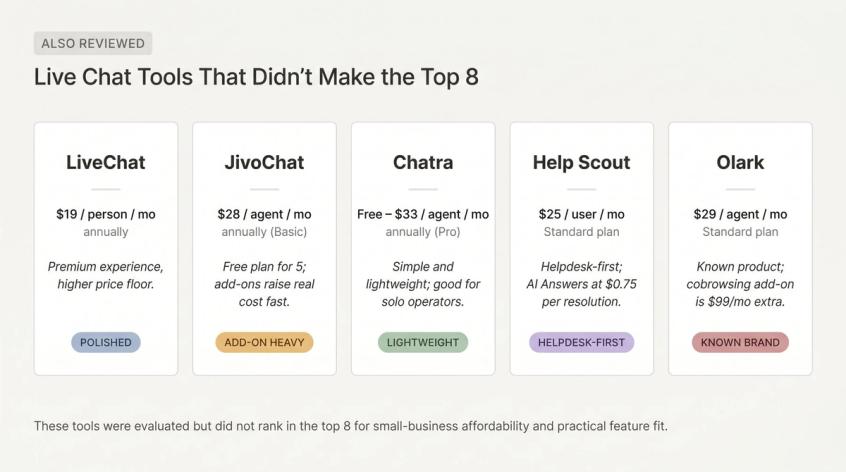
LiveChat
LiveChat is polished and mature. Starter is $19/person/month annually with one user, 100 tracked visitors, and 60-day chat history. Team is $49/person/month annually, and the ChatBot add-on starts at $52/month annually. Choose it if you value a premium live chat experience and price is not your primary constraint.
JivoChat
JivoChat has a free plan for up to five agents, with paid plans at $28/agent/month annually for Basic and $42/agent/month annually for Professional. WhatsApp is a $27/month add-on, and AI Agent is $69/agent/month additionally. A solid omnichannel option, though add-ons change the real cost quickly.
Chatra
Chatra is simple and small-business friendly: free for one agent, Essential at $25/agent/month annually, and Pro at $33/agent/month annually. The free plan is limited to five simultaneous chats; paid plans add unlimited chats, email helpdesk, Facebook Messenger, Instagram, bots, and integrations. Worth considering if you want a straightforward live chat tool without a large platform attached.
Help Scout
Help Scout is excellent if your real need is dedicated customer support automation rather than just live chat. Free plan for five users; Standard is $25/user/month and includes live chat, Instagram, Messenger, knowledge base, workflows, and an AI Inbox assistant; Plus is $45/user/month and adds WhatsApp messaging. AI Answers is priced at $0.75 per resolution. A strong helpdesk but not the lowest-cost pure live chat option.
Olark
Olark's Standard plan is $29/agent/month with a 14-day trial. Visitor cobrowsing is a $99/month add-on, and Pro is custom-priced. A known live chat product, but the value-for-cost ratio in this specific category is not as strong as the shortlisted tools.
Final Recommendation: The Best Affordable Live Chat for 2026
Spur's pricing page shows the full plan structure — AI Acquire, AI Start, AI Accelerate, and AI Max — with the 7-day free trial available on every tier. The "Most Popular" badge sits on AI Start, the practical starting point for most small businesses that want AI support, multiple channels, and team seats in one platform.
The best affordable live chat tool is the one that's still affordable three months in.
That test eliminates most tools faster than any pricing page. The tools that pass it are the ones that include AI, channels, and team seats in a plan you can actually budget for. Not the ones that look cheap in January and surprise you in April.
Here is the fast version: choose tawk.to if you need the lowest-cost widget right now. Choose HubSpot if chat should feed a CRM. Choose Tidio if you want polished ecommerce AI chat. Choose Crisp if you want predictable team pricing. Choose Zoho SalesIQ if you already use Zoho. Choose Freshchat if you are building a Freshworks support stack. Choose Smartsupp if you are a tiny team that wants simple multi-channel chat at a low price.
Choose Spur if you want live chat that does not stop at your website.
The real opportunity for most small businesses is not just answering a website message. It's turning that message into a WhatsApp conversation, an Instagram lead, a booked appointment, or a support ticket that a human can resolve with full context, all without managing three separate tools, three separate inboxes, and three separate monthly bills.
That's where Spur stands apart: AI live chat, human handoff, WhatsApp, Instagram automation, Facebook Messenger, shared inbox, automation, and lead capture in one platform starting at $12/month.
If your business only needs a free chat bubble on one website, start with tawk.to or HubSpot. They're genuinely good at that. If you want live chat to become the front door of your entire customer engagement strategy, start a free 7-day trial with Spur.
Frequently Asked Questions
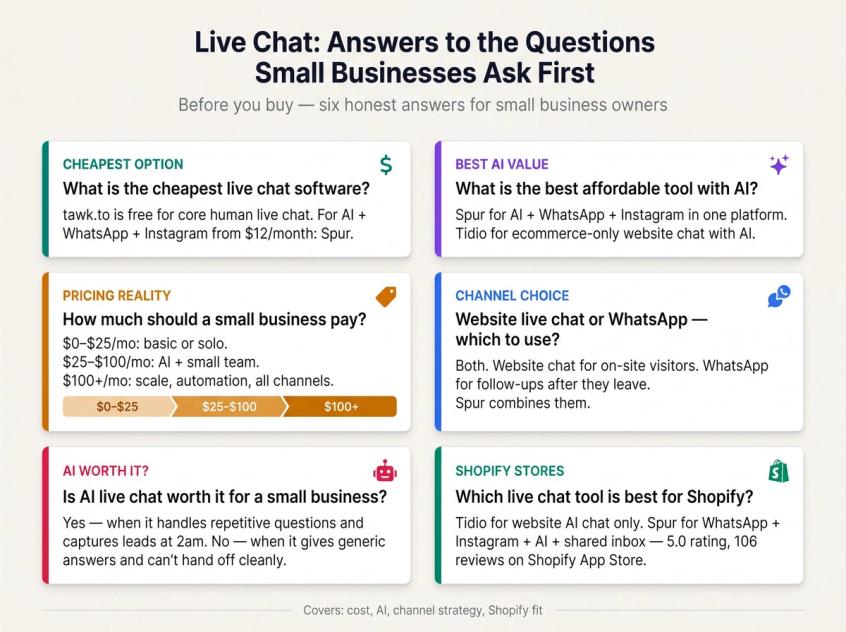
For core human live chat with no monthly fee, tawk.to is the benchmark. The main live chat software is free; branding removal, AI Assist, video/voice, and hired agents are paid add-ons.
For CRM-connected free chat, HubSpot is one of the best free options. For a very small team that wants multi-channel chat beyond free, Smartsupp Solo at $17/month annually is one of the lowest-cost paid options. If you want AI live chat plus WhatsApp, Instagram, and automation starting at $12/month, Spur is worth comparing.
If you want AI live chat plus WhatsApp, Instagram, Facebook Messenger, human handoff, and automation in one platform, Spur is the strongest fit. Our AI agents are trained on your business knowledge base and can perform real actions, not just retrieve FAQ answers. (Spur)
If you mainly want an ecommerce website chat AI, Tidio is a strong option. For a practical look at real use cases for AI live chat before you commit, our use-cases guide is a good starting point.
A very small business can start at $0 with tawk.to, HubSpot, Freshchat, Smartsupp, or Crisp's free plan. Realistic paid ranges:
- $0–$25/month: basic live chat, solo use, or limited conversation volume
- $25–$100/month: small-team live chat, AI starter plans, or multi-channel support
- $100+/month: larger teams, advanced automation, AI at scale, WhatsApp/social channels, reporting
The right budget depends on whether chat is a support cost or a revenue channel. If it actively converts leads and reduces support workload, spending $31/month on a platform that does all of it is not expensive. It's efficient.
For most small businesses, the honest answer is both.
Website live chat is best when the visitor is on your site and needs an immediate answer. WhatsApp Business API is better when the conversation should continue after the person closes the browser tab, for follow-ups, order updates, or nurturing a decision.
If customers commonly contact you on WhatsApp or ask follow-up questions after leaving your website, choose a tool that supports both without separate tools. Spur is built specifically for that combined workflow.
AI live chat is worth it when it reduces repetitive work, answers questions outside business hours, or captures leads that would otherwise be missed. It is not worth it when the AI gives generic answers, fails on your actual customer questions, or can't hand off to a human cleanly.
Before paying for AI, test it with real questions, including messy customer wording, refund questions, order questions, and product-specific questions. The bar is simple: does the AI answer those questions well enough that your team doesn't have to? Our chatbot best practices guide gives you a practical framework for running exactly that evaluation.
For Shopify stores that want website chat plus AI support, Tidio is a strong option.
For Shopify stores that also need WhatsApp automation, Instagram automation, a shared inbox, and AI agents across multiple channels, Spur is a better strategic fit. Our Shopify integration connects your store data directly into Spur, and our Shopify App Store listing includes live chat, WhatsApp, Instagram, Facebook, AI support, and ecommerce messaging features, with a 5.0 rating across 106 reviews at the time of writing. (Shopify App Store)
If you're ready to get started, our guide on how to add live chat to your Shopify store walks through the setup step by step.
Sources
The pages this article links out to, in the order they appear.
- Shopify App Store apps.shopify.com
Was this article useful?