Key takeaways
How does live chat work? A visitor types, AI replies from your business knowledge base, and a real person steps in when judgment matters. Both, in one flow.
Ask an AI about this article
TL;DR: Live chat is the real-time messaging system behind that bubble on a website. A visitor types, an AI replies instantly using your business knowledge, and a human steps in when the situation calls for judgment. Modern live chat isn't just support; it's a sales engine, a lead generator, and the front desk your online business never had. Spur combines AI agents trained on your knowledge base with seamless human handoff, across your website, WhatsApp, Instagram, and Facebook, all in one place.
How Website Live Chat Actually Works: The Core Concept
Before any of the technical stuff, picture this.
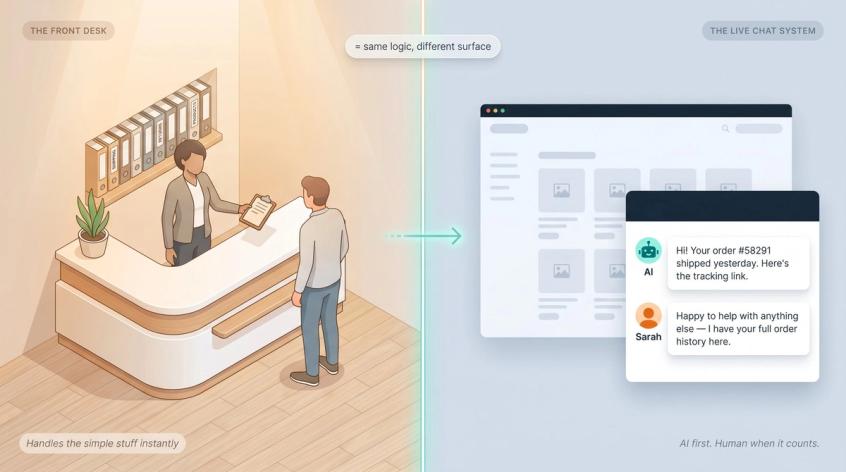
You walk into a store. The front desk person asks what you need. If it's simple ("where's the fitting room?"), they answer immediately. If it's complex ("I need to exchange something I bought three weeks ago with a gift receipt"), they either handle it themselves or call in the right specialist. If it's urgent, they drop everything and escalate.
That's live chat on a website. The "front desk person" is often an AI agent handling the simple part, with a human waiting for the complicated part.
The flow looks like this:
Visitor on your website
↓
Live chat widget appears
↓
Visitor sends a message
↓
AI agent checks your knowledge base
↓
AI answers, collects details, or takes an action
↓
If needed: chat handed to a human with full context
↓
Conversation stored, reviewed, and improved
A basic live chat tool gives you the chat box.
A modern AI + human live chat system gives you the whole front desk. Trained, staffed, and running 24/7.
What Is Live Chat on a Website?
Live chat is a real-time messaging tool embedded in your website. Instead of asking customers to call, email, or fill in a contact form, it lets them ask questions while they're already browsing, at the moment they actually have a question.
It usually appears as a floating button in the bottom corner of a page. The visitor clicks it, a window opens, they type, and something replies.
That little bubble is the front end of a much bigger system. Most people underestimate it.
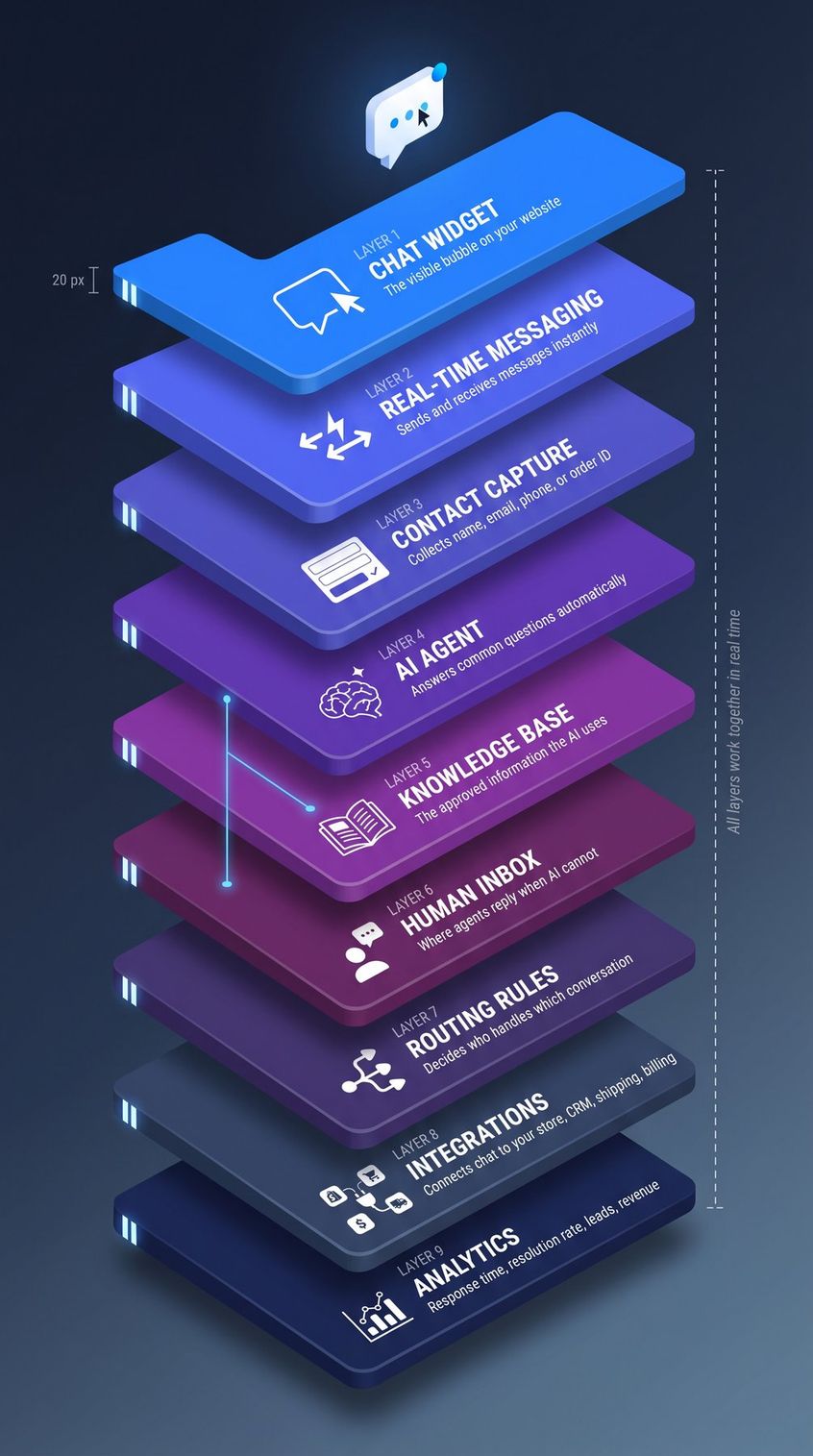
| Layer | What It Does |
|---|---|
| Chat widget | The visible bubble on your website |
| Real-time messaging | Sends and receives messages instantly |
| Contact capture | Collects name, email, phone, or order ID |
| AI agent | Answers common questions automatically |
| Knowledge base | The approved information the AI uses |
| Human inbox | Where agents reply when AI can't |
| Routing rules | Decides who handles which conversation |
| Integrations | Connects chat to your store, CRM, shipping, billing |
| Analytics | Shows response time, resolution rate, leads, revenue |
So when you ask "how does live chat work?", the honest answer is: it depends on which layer you're asking about.
And there's one question people always ask first, so it's worth answering directly.
Are Live Chats Real People or AI Bots?
Sometimes yes, sometimes no, and sometimes both.
Modern live chat typically starts with an AI agent. That's software that reads your question, searches your business's knowledge base, and writes a response in natural language. If the AI handles your question well, you might never interact with a human. If you ask something complex, emotional, or just say "I want to speak to a person," the chat moves to a human agent who can see everything that's already happened.
Understanding how AI and human agents compare is helpful here: customers don't mind AI, as long as they know it's AI and can escalate when they need to. Research found that 72% of customers say it's important to know whether they're communicating with AI. Good live chat systems disclose this upfront. If you're talking to a business using live chat ethically, you'll see something like "I'm the AI assistant" in the first message, and you'll always have the option to reach a human.
What customers do mind is getting trapped in a loop with a bot that can't help them.
According to Gartner's August 2025 research, self-service and live chat are expected to surpass traditional support channels as the most valuable customer service options by 2027. That shift is already happening.
How Live Chat Works Step by Step (7 Steps)
Here's what actually happens when a visitor sends a message. Not the marketing version. The real one.
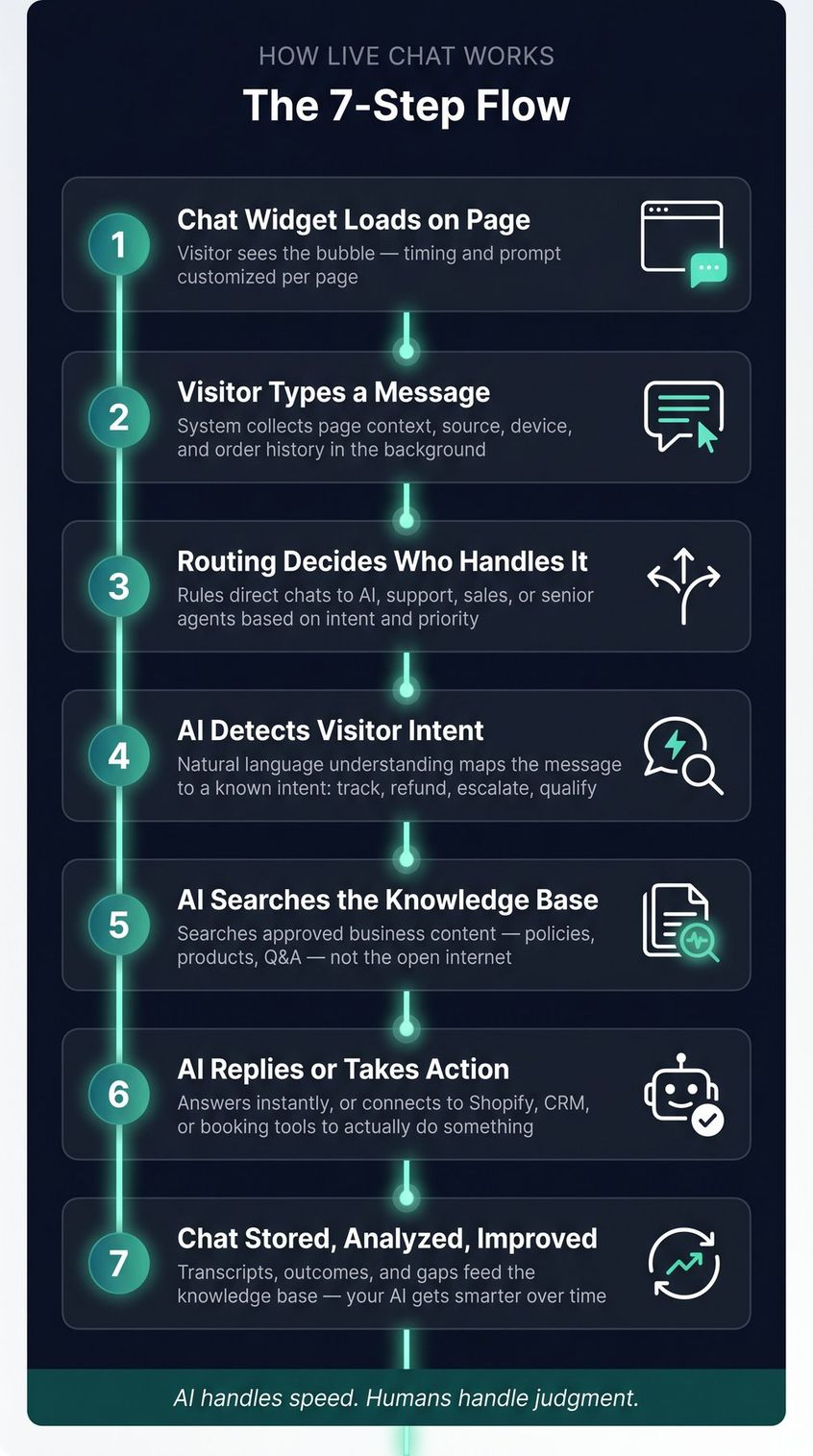
Step 1: The Chat Widget Loads on Your Page
The visitor lands on your website. Maybe it's your pricing page, your product page, or your checkout.
A small bubble or chat window appears. You decide exactly when and where it shows up, what the opening message says, what quick questions appear, and whether the visitor needs to enter their email before they can start a conversation.
Good live chat lets you customize this per page. A checkout page prompt should sound different from a pricing page prompt. Understanding how chat widgets work on websites (and how to configure them for each page type) is where the conversion lift actually comes from.
| Page | Generic Prompt | Better Prompt |
|---|---|---|
| Product page | "How can we help?" | "Need help with size, delivery, or availability?" |
| Checkout | "Chat with us" | "Stuck at checkout? We can help." |
| Pricing page | "Ask a question" | "Want help choosing the right plan?" |
| Help center | "Hello" | "Describe your issue and we'll find the fastest answer." |
Spur's live chat setup guide shows how to install the widget by placing a small script before the closing </body> tag of your website, or through a native Shopify/WooCommerce integration with no code at all.
Step 2: The Visitor Types a Message
They type their question, or click one of your preset quick-reply buttons like "Track my order" or "Talk to sales."
At the same time, the system is already collecting context in the background:
- Which page they're on
- Where they came from (Google search? Instagram ad?)
- Their browser and device
- Whether they're a logged-in customer (and if so, their order history)
- What UTM campaign brought them in
This context helps the AI understand the question before even reading it. A visitor on your shipping page asking "where is my order?" is different from a visitor on your homepage asking the same thing.
The rule on pre-chat forms: Ask for the minimum you need to help. Don't ask for name, email, phone, company, city, budget, and issue type before they can even type. How live chat lead collection works, and why keeping those pre-chat forms short, directly improves conversion. One or two fields max. Spur's live chat settings specifically note that keeping pre-chat forms short improves conversion.
Step 3: Routing Decides Who Handles the Chat
Once the message is sent, the system figures out who or what should handle it.
Simple routing:
All messages → support inbox
More advanced routing:
Pricing page + mention of "demo" → sales team
Order question → support team
Angry sentiment detected → senior agent
After business hours → AI handles, human follows up
VIP customer → priority queue
This routing layer is what prevents live chat from becoming chaos at scale. Without it, one team gets everything and humans become the bottleneck for questions an AI could've answered in 3 seconds. Having a structured escalation process built into your routing rules is what keeps support quality consistent at volume.
Step 4: AI Detects the Visitor's Intent
The AI reads the message and identifies what the visitor is actually trying to do.
| Visitor Message | Likely Intent |
|---|---|
| "Where is my order?" | Order tracking |
| "Do you ship to Dubai?" | Shipping policy |
| "Is this available in medium?" | Inventory check |
| "I want a refund" | Return/refund support |
| "What plan should I choose?" | Sales qualification |
| "Agent please" | Human handoff |
| "This is my third complaint" | Escalation/frustration |
Intent detection matters because the right response to "where's my order?" is different from the right response to "what's your return policy?" One might need an order lookup. The other just needs a clear policy explanation.
Step 5: AI Searches Your Knowledge Base for Answers
This is the part that demystifies AI live chat.
A good AI agent doesn't randomly answer from the internet. It answers from your approved business knowledge: your policies, your help articles, your product information, your Q&A database.
Technically, when you ask a question, the system:
- Searches your knowledge sources for the most relevant content
- Finds the best matching sections
- The AI writes a response using that content
- If it's uncertain, it asks a follow-up or escalates to a human
Spur's AI training documentation covers this: you can train the AI on your website pages, help articles, PDFs, internal documents, and custom Q&A pairs. For a full walkthrough, our guide to training your chatbot on your website data walks through the process step by step.
The distinction that matters:
Your knowledge base is what the AI knows. Your behavior rules are how the AI behaves: its tone, its limits, when it should escalate, what it should never say.
Both matter. An AI with great knowledge but bad behavior rules will still frustrate customers.
Step 6: AI Replies Instantly or Takes Action
If the question is simple and the answer exists in the knowledge base, the AI responds immediately.
What a good AI reply looks like:
Customer: "What's your return policy?"
AI: "You can request a return within 7 days of delivery. Items must be unused and in original packaging. Want me to help start a return?"
What a bad AI reply looks like:
AI: "Our return policy is customer-friendly and designed to ensure satisfaction."
The first gives specific, useful information and offers a next step. The second sounds like a brochure. Your AI should answer like a trained support rep: specific, grounded in your actual policy, and action-oriented.
Modern AI live chat goes much further than that.
Basic chatbots can only answer questions. A modern AI agent with integrations can take actions:
- "Your order #58291 was shipped yesterday. Here's the tracking link."
- "I found the next available slot on Friday at 4 PM. Should I book it?"
- "I can see your payment failed. Want me to send a new payment link?"
Spur calls this "actionable AI." It's the difference between a bot that reads policies aloud and an agent that actually does something useful: checking order status, updating records, applying discounts, or creating tickets, all by connecting to your Shopify integration, CRM, or other systems through approved integrations.
Step 7: Chat Is Stored, Analyzed, and Improved
After every conversation, the transcript, outcome, and key metrics are saved.
This creates a feedback loop that most businesses underuse. Your customers are telling you exactly what's missing from your website:
- If 100 people ask "do you ship internationally?", that information isn't visible enough
- If 50 people ask "how do I return this?", your post-purchase flow needs work
- If the AI keeps getting the same question wrong, that's a knowledge base gap to fix
Analyzing your chat data for product insights is one of the most underrated parts of a live chat strategy. Live chat data is some of the most honest product feedback you'll ever get.
Old Chatbots vs. AI Live Chat: What's the Difference?
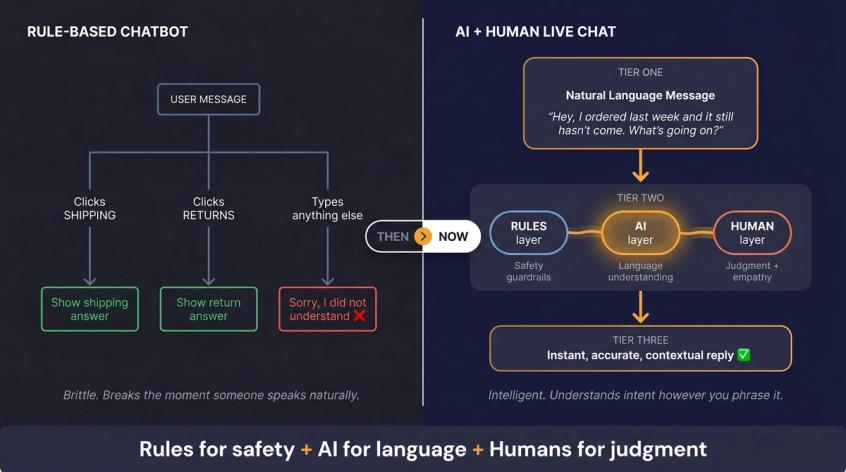
Before AI-powered chat, businesses used rule-based chatbots. They worked like this:
If user clicks "shipping" → show shipping answer
If user clicks "returns" → show return answer
If user types something else → say "sorry, I didn't understand"
Rule-based bots are predictable, but brittle. They break the moment someone types a question naturally instead of clicking the right menu option.
AI live chat is different. It can understand natural language:
"Hey, I ordered last week and it still hasn't come. What's going on?"
No menu required. The AI infers the intent from how the person actually speaks.
But AI also has its own risks. It can misunderstand, over-answer, or confidently give wrong information if its knowledge base is bad. So the best setup isn't "rule bot vs. AI bot." It's:
Rules for safety + AI for language + humans for judgment.
| System Type | Best For | Weakness |
|---|---|---|
| Human-only live chat | Complex issues, empathy, negotiation | Expensive, slow after hours, limited scale |
| Rule-based chatbot | Simple menus, predictable flows | Brittle, frustrating for natural questions |
| AI-only chatbot | Instant answers at scale | Risky without handoff and guardrails |
| AI + human live chat | Speed + judgment | Needs good setup and ongoing tuning |
IBM's guidance on AI in customer service makes the same point: AI handles speed and data; humans bring empathy and critical thinking. The strongest experiences combine both. Our breakdown of how AI and human agents compare goes deeper on when each is the right tool for the job.
What Is a Chatbot Knowledge Base and How Does It Work?
The most common reason AI live chat fails isn't the AI.
It's the knowledge base.
Bad knowledge base leads to bad AI answers. Good knowledge base means useful AI answers that actually sound like your brand.
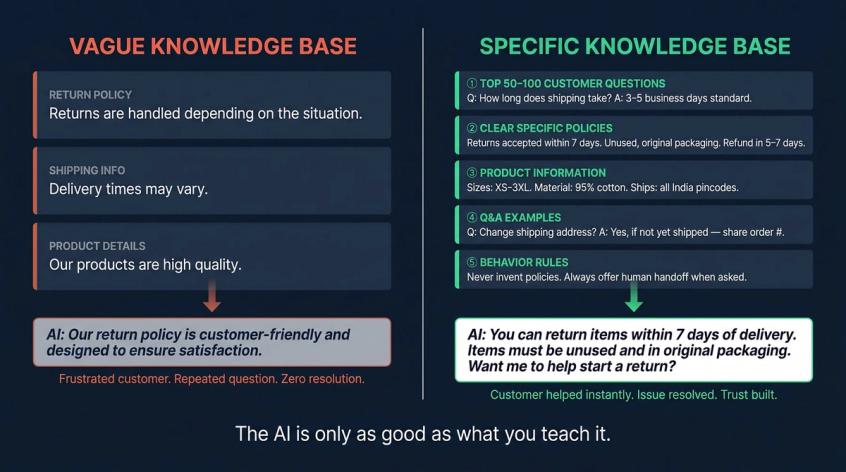
Before you launch AI live chat, you need to prepare these five things.
① Your top customer questions. Collect the 50 to 100 questions your team answers most often. Shipping time, return process, size guide, payment options, warranty, demo booking. Use actual conversations, not guesses. Building your chatbot's FAQ knowledge base is a useful starting point for structuring these Q&A pairs.
② Clear, specific policies. Not this:
"Returns are handled depending on the situation."
But this:
"Customers can return items within 7 days of delivery. Items must be unused, undamaged, and in original packaging. Prepaid orders are refunded to the original payment method within 5-7 business days after inspection."
AI needs specifics. Vague policies produce vague answers.
③ Product information. Variants, size charts, materials, care instructions, compatibility, stock rules, shipping restrictions. For e-commerce, this is often the most critical part of the knowledge base.
④ Q&A examples. AI performs better when it has worked examples:
Q: Can I change my shipping address after ordering?
A: If your order hasn't shipped yet, we can update the address.
Please share your order number and the new address. If it's
already shipped, address changes may not be possible.
⑤ Your behavior rules. This is separate from your knowledge. Tell the AI how to behave: answer only from approved knowledge, ask a follow-up if needed, never invent policies, always hand off when the customer asks for a person. Chatbot best practices for accurate, on-brand AI responses cover exactly how to structure these rules.
Spur's AI agent training supports training from websites, help docs, PDFs, internal content, and Q&A pairs. You control what the AI knows, and that control is what makes it trustworthy.
Even the best knowledge base can't prevent the moment that makes or breaks live chat trust: the handoff.
What Is Human Handoff in Live Chat? (And Why It Matters)
This is the section that separates good live chat setups from frustrating ones.
Understanding the mechanics of a proper chatbot-to-human handoff is critical, because when it goes wrong, it goes very wrong.
Bad handoff:
AI: "An agent will join shortly."
Human: "Hi, how can I help you today?"
Customer: [has to explain everything again, already frustrated]
Good handoff:
AI: "I'm bringing in a support teammate. They'll see your order number, the issue summary, and everything we've already discussed. You won't need to repeat anything."
Then the human receives:
Customer: Priya Sharma
Issue: Order #7182, product arrived damaged
AI already checked: Order status, return policy
Customer sentiment: Frustrated, wants replacement today
Recommended next reply: Apologize, confirm damage photo,
offer replacement or refund per the damaged-item policy.
That is the difference. The human has full context before they say a single word.
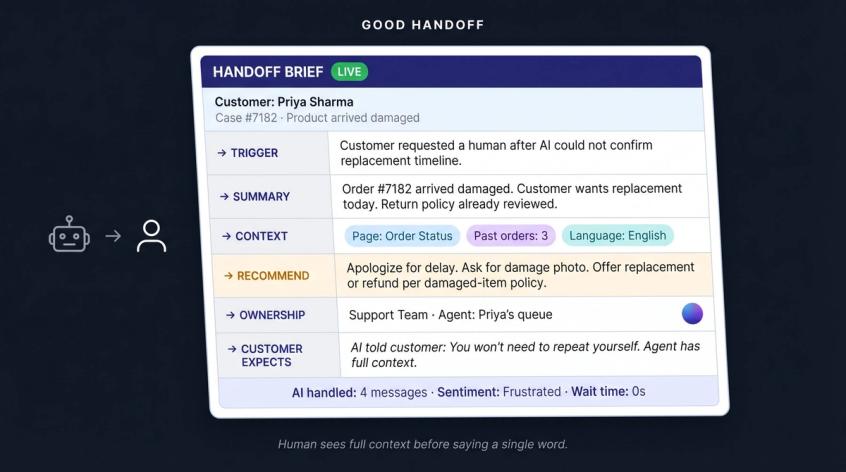
A proper handoff has six parts:
→ Trigger: what caused the handoff? (Customer asked for human, AI wasn't confident, refund request, negative sentiment, etc.)
→ Summary: what happened so far? Brief, specific.
→ Context: the data that matters (order ID, product, page the customer was on, past purchases, their language preference).
→ Recommendation: what should the agent do first?
→ Ownership: which team or agent is responsible now?
→ Customer expectation: what did the AI tell the customer to expect?
Spur's live chat product handles this by transferring the full conversation history to the human agent, along with a summary and recommended responses. The customer never has to repeat themselves.
The handoff is where trust is built or destroyed. And it's also where live chat stops being just a support tool.
How to Use Live Chat for Both Support and Sales
Most businesses add live chat for support. But the widget can do much more.
Support use cases (what live chat is usually used for):
- Order tracking and delivery updates
- Return requests
- Refund processing
- Damaged or missing items
- Account access issues
- Product troubleshooting
- Warranty and subscription questions
What you measure: first response time, resolution time, AI resolution rate, handoff rate, customer satisfaction, tickets avoided.
For a comprehensive list, our guide to the full range of chatbot use cases for customer support covers everything from retail to SaaS.
Sales use cases (what the widget can also do):
- Product recommendations for undecided visitors
- Plan comparison on your pricing page
- Demo booking
- Price clarification before checkout
- Lead qualification: "are you buying for yourself, a team, or a company?"
- Abandoned checkout recovery
- Objection handling for high-ticket purchases
What you measure: leads captured, chat-to-purchase conversion, revenue influenced, demo bookings.
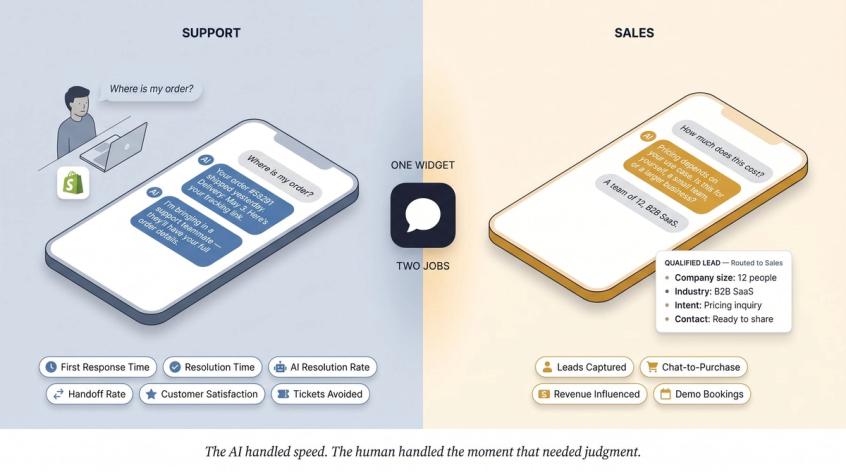
A quick ecommerce example.
A customer lands on your product page and asks "where is my order?" The AI asks for their order number. You're connected to Shopify, so the AI looks up the order and responds: "Your order #58291 shipped yesterday. Expected delivery is May 3. Here's the tracking link."
Then the customer replies: "That was supposed to arrive yesterday. I'm annoyed." The AI responds: "I'm sorry about the delay. I'm bringing in a support teammate who can check if we can escalate this with the carrier. They'll see your order details."
The human joins with full context, handles it immediately. If you're running live chat for e-commerce teams, this kind of instant order lookup is where the ROI compounds fastest. The AI handled speed; the human handled the moment that needed judgment.
A lead generation example.
A visitor lands on your pricing page and asks "how much does this cost?" A weak live chat says "please contact sales." A good AI + human setup says: "Pricing depends on your use case. Is this for yourself, a small team, or a larger business?" It collects their answers, qualifies the lead, and routes it to sales.
The salesperson sees company size, the problem the visitor is trying to solve, their timeline, and their contact details, all before saying hello. That's how live chat becomes a lead generation engine. And how chatbots qualify leads automatically before a human ever gets involved.
This is where Spur's approach gets interesting.
How Spur Handles AI + Human Live Chat in One Place
We built Spur around a specific belief: live chat should be more than a website bubble.
The core of what we do: AI agent for customer support, trained on your business knowledge, deployed across live chat, WhatsApp, Instagram, and Facebook, with human handoff into a shared inbox.
Here's how it works in practice.
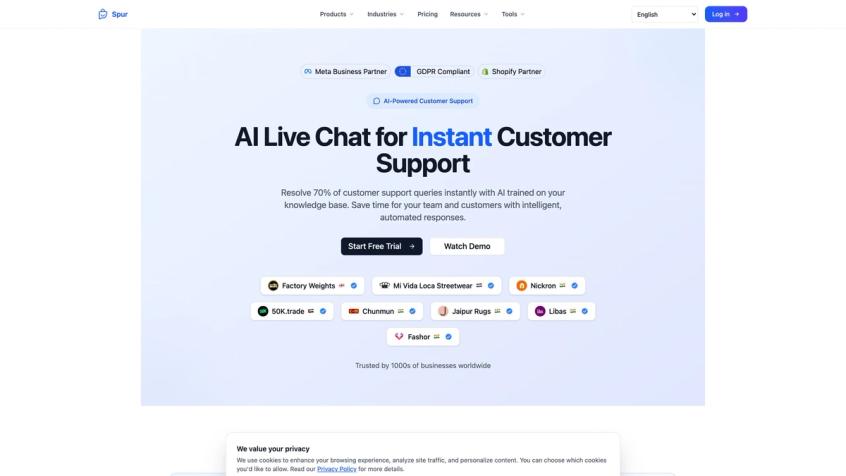
Spur's live chat product page — AI-powered customer support trained on your knowledge base, trusted by 1,000+ businesses worldwide.
AI Trained on Your Knowledge, Not Generic AI
When a customer messages your Spur live chat, the AI isn't pulling answers from the internet. It's answering from the knowledge you've provided: your website, your help docs, your PDFs, your Q&A pairs. If you update your return policy, you update the knowledge base, and the AI immediately starts answering with the new policy.
We also support custom behavior rules. You decide what the AI should say, what it should avoid, what tone it uses, and when it should immediately escalate to a human.
What Is Actionable AI? Beyond Just Answering Questions
Most chatbots answer questions. Spur's AI agents can take actions:
- Check order status through your Shopify integration
- Book meetings or appointments
- Update CRM records
- Apply discounts
- Create support tickets
- Send payment links
- Qualify leads and pass them to sales with full context
This connects via integrations: Shopify, WooCommerce, Razorpay, Stripe, Shiprocket, webhooks, and HTTP requests for custom backends. The AI doesn't "magically" access your store. It uses approved, controlled integrations, which means it can only do what you've given it permission to do.
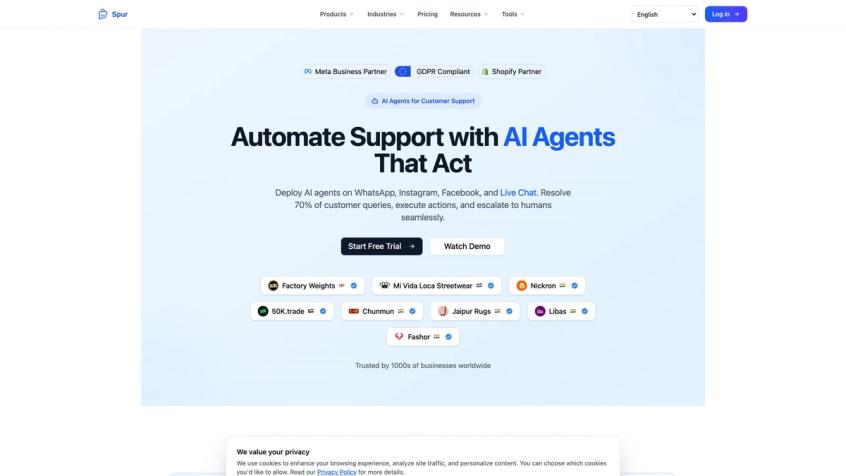
Spur's AI Agents page — deploy AI agents that resolve 70% of queries, execute real actions, and escalate to humans seamlessly across every channel.
How the Shared Inbox Unifies All Your Channels
What makes Spur especially useful for D2C and multi-channel businesses: live chat conversations don't live in a silo. They flow into the same inbox as your WhatsApp, Instagram DMs, and Facebook Messenger conversations.
A customer might ask a product question on your website, then want shipping updates on WhatsApp, then follow up on Instagram. Your team sees the full picture in one place. No switching tools. No missing context.
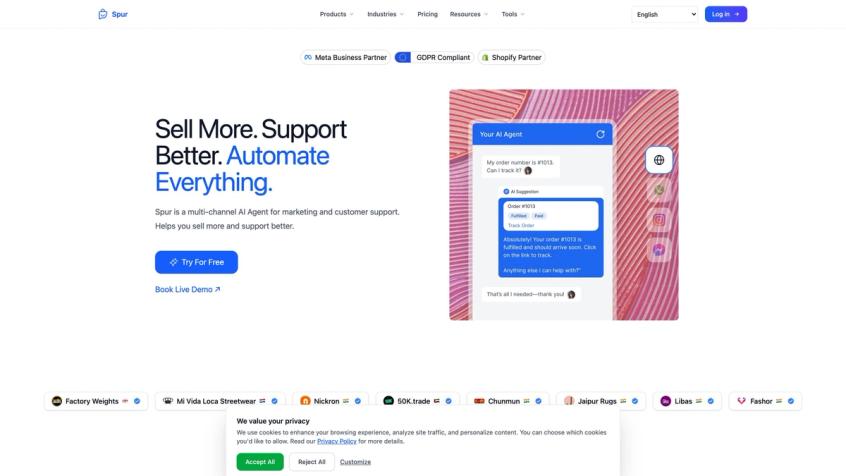
Spur's homepage demo shows actionable AI in practice — the AI agent looks up a real order status ("Order #1013, Fulfilled, Paid") and responds with a tracking link, without any human involvement.
How to Set Up Live Chat with Spur (Step by Step)
Getting started is straightforward:
① Create a live chat channel in Spur
② Customize the widget appearance (colors, position, welcome message)
③ Add quick question buttons for your most common inquiries
④ Set up lead collection if needed (one or two fields max)
⑤ Copy the embed script and add it before </body> on your website (or use the Shopify integration)
⑥ Test that messages appear in your Spur inbox
⑦ Train your AI agent on your knowledge sources
The whole setup, from connecting the channel to seeing the first conversation in your inbox, can happen in a day.
How Much Does Spur Live Chat Cost?
Spur's pricing starts at $31/month when billed annually (the AI Start plan), which includes 1 AI agent with 2,000 AI credits, 2 seats, 25 automation flows, and 1 live chat channel. Extra live chat channels are $7/month, extra AI credits cost $12 per 1,000, and there's a 7-day free trial to start.
Before you pick any live chat tool, here's what to look for.
What to Look for in a Live Chat Tool (Buyer's Guide)
Live chat tools look similar at a glance. The differences show up in the details.
The question isn't just "does it have AI?" The real question is whether that AI is actually trained on your business, integrated with your systems, and capable of handing off to a human without making the customer repeat themselves.
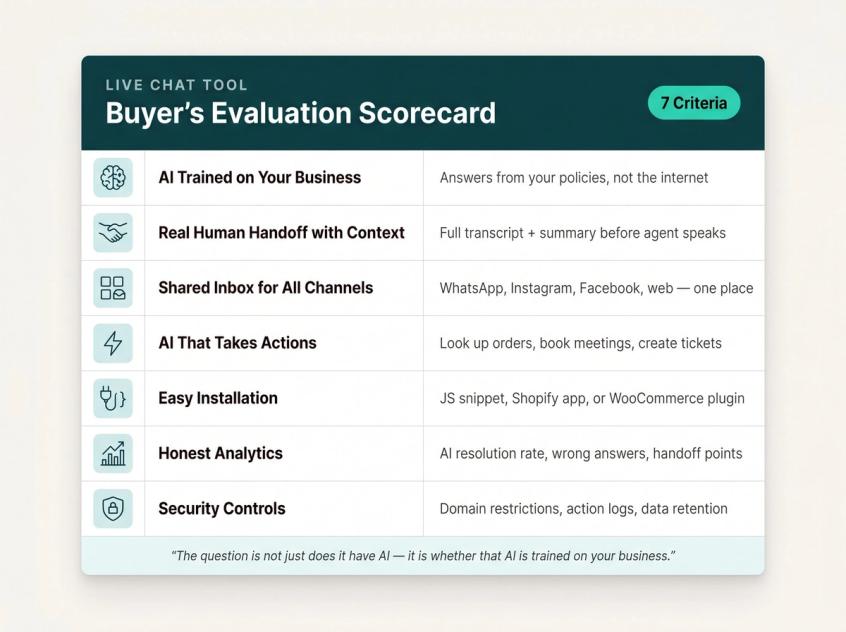
AI trained on your knowledge, not generic AI. The AI should answer from your policies, your products, your help docs, not from the internet. Tools that offer "AI" but don't let you train it on your own content are giving you a generic assistant, not a business-specific one.
Real human handoff with context. The human agent should receive the full transcript, a summary, the customer's details, and a recommended next step, before saying a word. If the tool just routes the conversation with no context, the customer will need to repeat everything.
A shared inbox for all your channels. If you're also using WhatsApp, Instagram, or Facebook Messenger, your live chat shouldn't live in a separate tool. A shared inbox means your team has one place to manage everything.
AI agents that can take custom actions. Can the AI actually do things (look up orders, book meetings, create tickets) or can it only answer text questions? The more your AI can act, the less your team needs to manually process.
Easy installation. You should be able to add the widget without a big engineering project. A JavaScript snippet, a Shopify integration, or a WooCommerce plugin should cover most use cases.
Honest analytics. Can you see which questions the AI gets wrong? Which pages generate the most chats? What's the AI resolution rate? Where do handoffs happen? These metrics are how you improve over time.
Security controls. Can you restrict which domains the widget runs on? Is there a data retention policy? Are AI actions logged? Can you limit what the AI is allowed to do? OWASP's 2025 security guidance for LLM applications flags risks like prompt injection and excessive agency as real concerns once AI connects to your systems. Treat these seriously.
Live Chat Pricing Compared: What You Actually Pay
Live chat pricing is messier than it looks. Vendors package it in completely different ways: per seat, per AI message, per conversation, per channel. Don't compare only the monthly sticker price.
Compare: what's included in the base plan, how many seats, how many AI credits, what it costs to add another channel, what happens when you run out of AI credits, whether integrations are bundled or charged separately.
| Vendor | Public Pricing Pattern | What to Notice |
|---|---|---|
| Spur | $31/mo annually (AI Start): 1 AI agent, 2,000 credits, 2 seats, 1 live chat channel | Good when you want website live chat + AI + WhatsApp/Instagram/Facebook in one stack |
| LiveChatAI | $39/mo monthly: message credits, 1 chatbot, 1 seat | AI-live-chat-first; compare credits and seats carefully |
| Kommo | $15/user/mo, 6-month billing; AI agent is a paid add-on | More CRM/sales-pipeline oriented; compare AI and messaging costs separately |
| BoldDesk | AI agent add-on: $20 per 1,000 credits; AI Copilot: $20/agent/month | More helpdesk/ticketing; AI may be packaged separately from core features |
| BotPenguin | No-code chatbot/live chat across multiple channels; add-ons for human agents | Compare bot messages, human seats, channels, and training storage |
Prices from public pages, April 2026. Always confirm on the vendor's pricing page before buying.
The cheapest live chat tool isn't always the cheapest operating model. A tool that saves your team 80 hours a month costs more on paper but less in reality.
Common Live Chat Mistakes That Kill Conversions
A few patterns show up again and again with teams that are new to live chat.
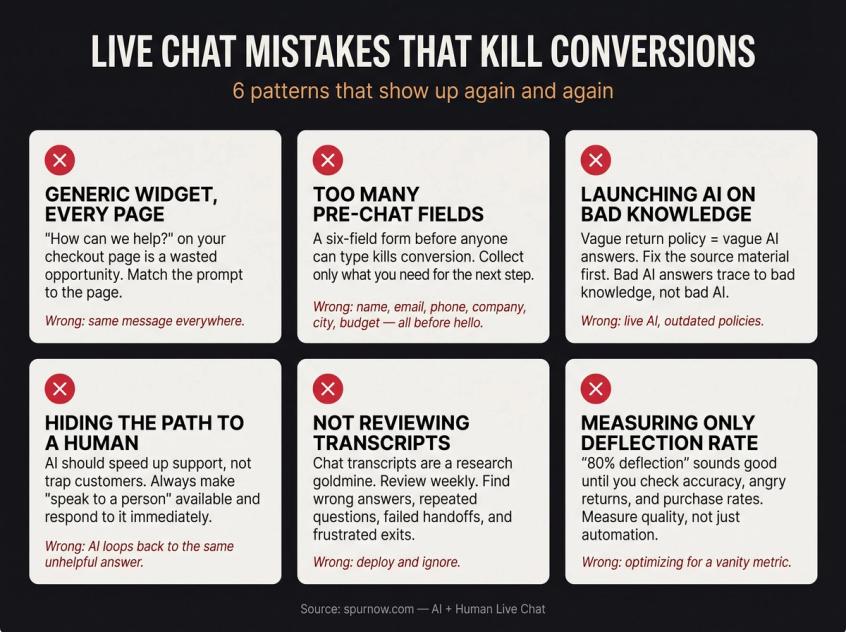
Using a generic widget on every page. "How can we help?" on your checkout page is a wasted opportunity. Match the prompt to the page. Checkout visitors have specific, immediate concerns.
Asking for too much before the first message. A six-field pre-chat form before anyone can type a question kills conversion. Collect what you need for the next step, not everything at once.
Launching AI before cleaning your policies. If your return policy is vague, your AI will be vague. If your shipping page is outdated, your AI will be outdated. Fix the source material first. Bad AI answers almost always trace back to bad knowledge, not bad AI. Our chatbot best practices cover how to structure your knowledge base to prevent these issues before launch.
Hiding the path to a human. AI should make support faster, not trap customers. Always make "speak to a person" available, respond to it immediately, and never let the AI loop back to the same unhelpful answer when a customer has already asked for help.
Not reviewing transcripts. Your chat transcripts are a research goldmine. Review them weekly. Look for wrong AI answers, repeated questions, failed handoffs, moments where customers got frustrated and left. Each one is a thing to fix.
Measuring only AI deflection. "The AI deflected 80% of chats" sounds good until you check whether those deflections were accurate, whether customers came back angry, whether they bought. Measure quality, not just automation rate.
What Good Live Chat Looks Like in Practice
Old live chat connected visitors to humans.
Modern live chat connects visitors to an AI + human system, where the AI handles the first mile and humans handle the moments that actually require judgment.
Here's what that looks like for a growing D2C business with Spur:
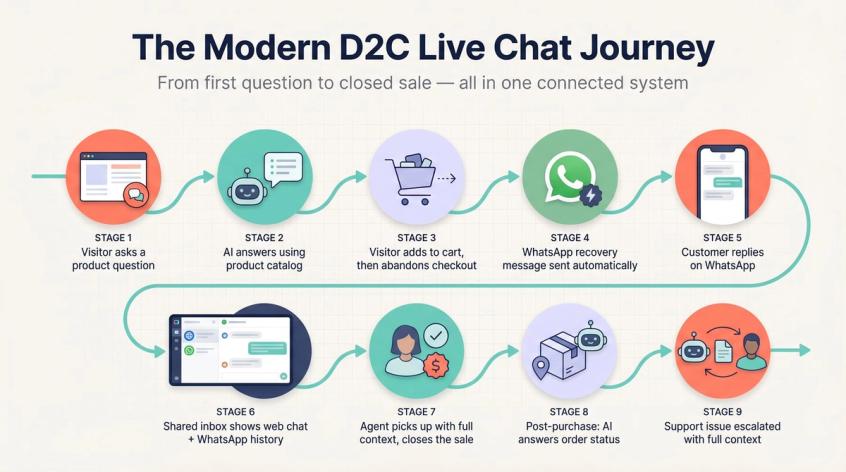
Visitor asks a product question on website
↓
AI answers using your product catalog
↓
Visitor adds to cart, then abandons checkout
↓
WhatsApp recovery message sent automatically
↓
Customer replies on WhatsApp
↓
Shared inbox shows web chat + WhatsApp history
↓
Agent picks up with full context, closes the sale
↓
Post-purchase: AI answers order status questions
↓
Support issue escalated to human with full context
That WhatsApp recovery message sent automatically? That's not a separate tool. It's the same conversation system following the customer wherever they went. See how businesses are using this across their customer journey in Spur's customer case studies.
The website chat isn't a standalone tool. It's the first touch in a customer conversation system that follows the person wherever they go.
That's where live chat stops being a widget and becomes something genuinely useful, both for your customers and for your team.
If you want to see how this works in practice, Spur offers a 7-day free trial. No engineering required to get started.
Frequently Asked Questions
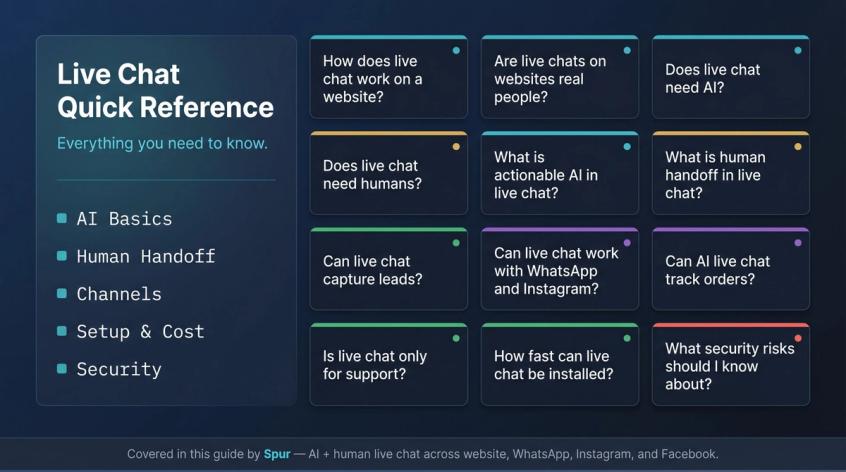
A chat widget is added to your website through a small JavaScript script or a platform integration. When a visitor opens the chat and sends a message, it goes to your live chat platform. The platform routes it to an AI agent, a human agent, or both depending on your setup. The full conversation is stored in an inbox so your team can reply, review, and follow up, and so the AI gets smarter over time.
Sometimes yes, sometimes no, and often both. Most modern live chat starts with an AI agent that understands natural language and answers from your business knowledge base. If the question is too complex, or the customer asks for a person, the conversation moves to a human agent. Understanding the difference between AI agents and human agents helps set the right expectations. Good systems always disclose when you're talking to AI, and always give you an easy path to a real person.
Not technically. Traditional live chat can be entirely human-staffed. But AI makes 24/7 coverage affordable, handles repetitive questions instantly, qualifies leads automatically, and frees your human team for conversations that actually need them. Automating support with AI is what makes it possible to scale without scaling headcount. Most businesses that try human-only eventually add AI to manage volume.
Yes, if you care about customer trust. AI can handle most repetitive questions well, but humans are still essential for judgment calls, emotional situations, sales negotiations, refund exceptions, and anything where the stakes are high. The goal isn't to eliminate humans. It's to focus them where they matter most.
Actionable AI is when the AI can take actions, not just answer questions. Instead of saying "here's our return policy," it can say "I've submitted a return request for your order. You'll get a confirmation email shortly." It connects to your systems (Shopify, CRM, booking tools, payment platforms) through approved integrations and does useful work on behalf of the customer. Spur's AI agents work this way.
Human handoff is when a conversation moves from the AI to a person. A proper handoff includes the full chat history, the customer's contact details, a summary of the issue, and a recommended next action, so the human agent doesn't start from scratch. The customer shouldn't have to repeat themselves. Our full guide on the chatbot-to-human handoff process covers what a proper handoff looks like in practice. Spur's live chat transfers full context on handoff.
Yes. The chat widget can collect name, email, phone number, company size, budget, or product interest, before or during the conversation. It can also qualify the lead by asking structured questions and route qualified leads to your sales team with full context. Spur's live chat settings include pre-chat lead collection as a built-in option. See how live chat works as a lead generation engine for a broader look at the strategy.
Yes, depending on the platform. Spur supports AI agents across live chat, WhatsApp, Instagram, and Facebook, with all conversations flowing into a shared inbox. So a customer who messages you on your website, then follows up on WhatsApp, is recognized as the same person.
Yes, if connected to your store or order management system. The AI needs approved access through integrations. Spur connects to Shopify and WooCommerce and custom backends via webhooks and HTTP requests, so the AI can look up real-time order status and reply with a tracking link, not a generic "check your email."
No. Live chat is also useful for sales, lead generation, product recommendations, demo booking, abandoned checkout recovery, and pre-purchase Q&A. The range of use cases live chat covers goes well beyond support. Many businesses use it as their primary lead capture tool on high-intent pages like pricing and product pages.
A basic widget can be live within an hour if you're using an embed script or a platform integration. Spur's setup guide covers the full flow: create the channel, customize the widget, copy the script, paste it on your site, and test it. For Shopify, adding live chat to your Shopify store is a direct integration. No manual code needed.
It depends on the vendor, the number of seats, AI credits, and channels included. As of April 2026, Spur publicly lists AI Start at $31/month billed annually with 1 live chat channel included. Prices vary significantly across tools, so compare what's actually included in each plan, not just the headline number.
Once AI connects to your systems, it becomes an application with real permissions, not just a text generator. OWASP's 2025 LLM security guidance flags prompt injection, excessive agency, and sensitive data disclosure as risks to design against. Practically: limit what actions the AI can take without human approval, restrict which domains the widget runs on, log all AI actions, and never store sensitive information in the AI's system prompt.
Sources
The pages this article links out to, in the order they appear.
Was this article useful?