WhatsApp Business API: Complete Guide for 2026

Discuss with AI
Get instant insights and ask questions about this topic with AI assistants.
💡 Pro tip: All options include context about this blog post. Feel free to modify the prompt to ask more specific questions!
Most guides about WhatsApp Business API are already outdated. They're still explaining a conversation-based pricing model that Meta changed, referencing an On-Premises API that was sunset in October 2025, and ignoring the identity changes that will affect how your CRM tracks customers through 2026 and beyond. If you're evaluating WhatsApp API for your business, working from stale information means your cost model is wrong, your setup approach is wrong, and your compliance posture may be incomplete.
This guide covers everything that actually matters in 2026: how pricing works today, what changed and why, how to set up the API properly, how to build automation that performs, how to write templates that get approved, how to stay compliant, and how to choose a provider that fits your real needs. We've helped hundreds of D2C brands, e-commerce teams, and service businesses build WhatsApp into a core part of their revenue and support systems, and we built Spur specifically to make this work for teams that don't want to hire a developer for every step.
By the end of this guide, you'll know what WhatsApp Business API costs in 2026, how to set it up, and what a winning WhatsApp system actually looks like in practice.
TL;DR: WhatsApp Business API lets you automate customer support, run compliant marketing broadcasts, build e-commerce flows, and connect WhatsApp to your entire business stack. Pricing in 2026 is per delivered message (service messages are free, utility messages sent in response to customers may also be free). The old On-Premises API is gone; Cloud API is the only path forward. Platforms like Spur handle the full stack so you don't have to build it all yourself.
What Is the WhatsApp Business API and How Does It Work?
The WhatsApp Business API is the scalable, programmable version of WhatsApp for businesses. Meta also calls it the WhatsApp Business Platform. It's not the same as the free WhatsApp Business App you can download on your phone.
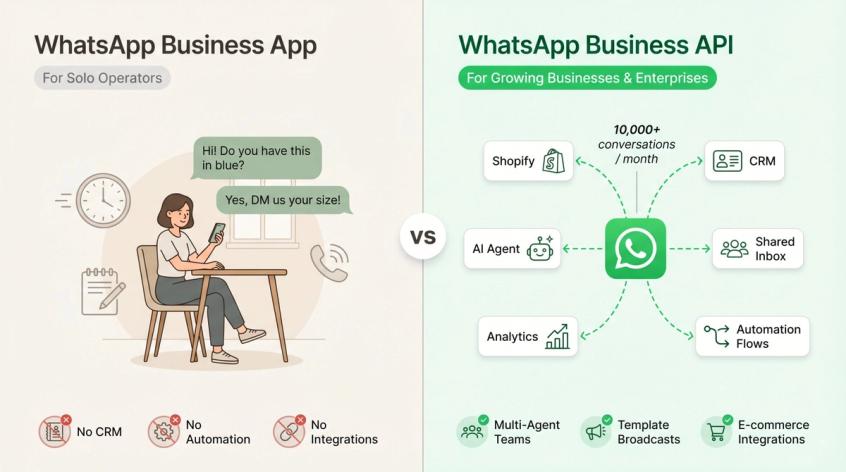
The distinction matters. The WhatsApp Business App is a free mobile application built for very small businesses. You install it on a phone, reply to customers manually, set up a few automated greetings, and that's roughly the ceiling. It's useful if you handle a handful of conversations a day and don't need anything connected to your e-commerce store, CRM, or support system.
The WhatsApp Business API is a completely different product. It's a set of APIs and tools that let businesses connect WhatsApp to their actual systems: shared inboxes, CRMs, Shopify or WooCommerce stores, marketing tools, support automation platforms, AI agents, reporting dashboards, and internal workflows. According to WhatsApp's Business Platform overview, the platform is built for enterprises and growing businesses that need automated message sequences, CRM and marketing tool integrations, and the ability to connect multiple agents or bots at scale.
WhatsApp Business App vs WhatsApp Business API: What's the Difference?
| Feature | WhatsApp Business App | WhatsApp Business API |
|---|---|---|
| Best for | Very small businesses | Growing SMBs, D2C brands, enterprises, agencies |
| Interface | Mobile/desktop app | API, shared inbox, CRM, automation platform |
| Automation | Basic (greetings, away messages) | Advanced flows, bots, AI agents |
| Multi-agent support | Very limited | Built for teams and routing |
| Broadcasts | Limited, manual | Template-based campaigns to opted-in contacts |
| CRM/e-commerce integrations | Limited | Core use case |
| Message templates | Not central | Fundamental to how the system works |
| Cost model | Free (no message charges) | Per-message charges apply |
| Developer or provider needed | No | Usually yes |
The comparison from WhatsApp's official documentation puts it clearly: the Business App is for small businesses, while the Business Platform is for medium and enterprise companies that need scale, automation, and integrations.
Who Needs the WhatsApp Business API?
You probably need the WhatsApp Business API if at least one of these is true:
- Your team handles more WhatsApp conversations than one person can manage manually
- You want multiple support or sales agents working inside one shared inbox
- You run an e-commerce store and want to send order confirmations, shipping updates, abandoned cart reminders, return flows, or COD confirmations on WhatsApp
- You run Click-to-WhatsApp ads and want to qualify those leads automatically inside the chat
- You want to send approved WhatsApp broadcasts to consented customers
- You need WhatsApp connected to Shopify, WooCommerce, Stripe, Razorpay, your CRM, or your own backend
- You want an AI agent trained on your website, knowledge base, or product catalog handling support queries
- You need analytics on delivery, replies, conversions, support volume, or revenue
You probably don't need it yet if you receive only a handful of manual chats per week, have no consented contact list, don't need any integrations, and aren't ready to manage templates and message policies.
That's the what. The API landscape changed significantly in 2026 though, and if you're working from older information, your pricing model, setup approach, and compliance posture may all be wrong.
What Changed with WhatsApp Business API in 2026?
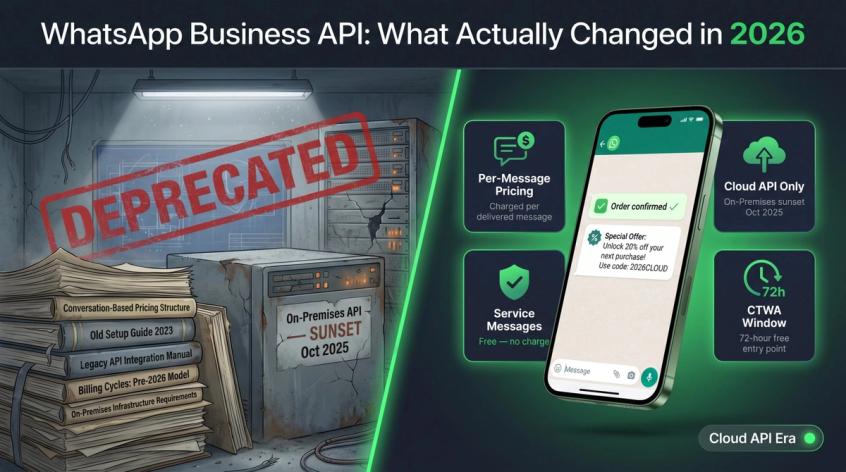
A lot of WhatsApp API guides published in 2023 and 2024 are actively misleading right now. The pricing model changed. The older API infrastructure was sunset. New identity rules are rolling out. And there are geographic restrictions that many brands are completely unaware of.
How Does Per-Message Pricing Work Now?
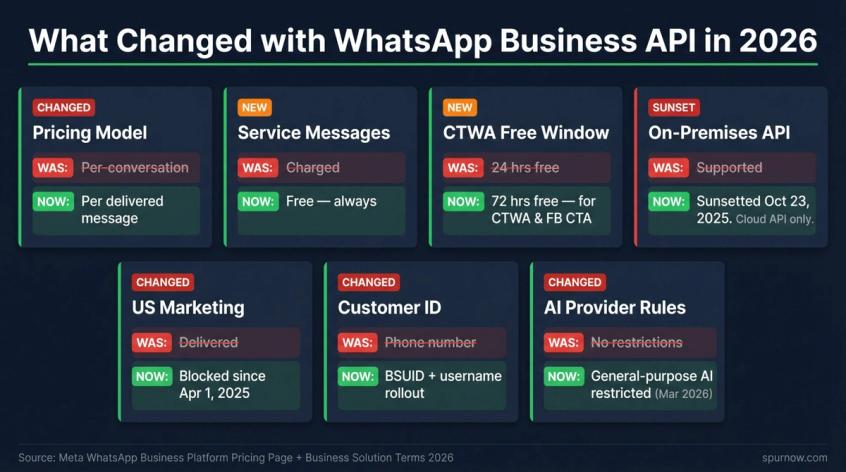
The most important change: WhatsApp pricing is no longer conversation-based. According to Meta's pricing page, businesses are now charged per delivered message, not per conversation. Rates depend on the recipient's country and the message category (more on categories below).
This matters because many third-party tools, dashboards, and older guides still describe WhatsApp pricing as conversation-based. If you're building a cost model using the old framework, your projections are wrong. Meta's current pricing documentation is the source of truth.
Are WhatsApp Service Messages Really Free?
This is one of the most valuable things to understand about WhatsApp pricing in 2026. Meta's pricing page explicitly states that businesses are not charged for service messages. A service message is a reply you send to a customer inside the 24-hour customer service window that opens when they message you first.
This changes the strategy significantly. Businesses that encourage inbound engagement (customers asking questions, checking order status, starting support conversations) can handle a large portion of their WhatsApp communication at no message charge.
When Are Utility Messages Free on WhatsApp?
There's a related but less-discussed exemption. Meta's pricing page notes that utility messages sent in response to users may also not be charged. Utility messages are transactional messages tied to a specific user action, such as order confirmations, shipping updates, or payment reminders. The exact conditions matter, and not every transactional message qualifies, but this is worth understanding when you're designing your flows.
How Does the 72-Hour Free Window for CTWA Ads Work?
When a customer messages your business through a Click-to-WhatsApp (CTWA) ad or a Facebook Page call-to-action button, a 72-hour free entry point opens. Meta says that all messages sent within that three-day window are not charged.
This is one of the strongest economic arguments for CTWA ads. You're not just buying a click. You're opening a no-charge messaging window where you can qualify, educate, convert, and support the customer entirely inside WhatsApp.
WhatsApp On-Premises API Sunset: What You Need to Know
If any guide you're reading still describes how to set up an On-Premises WhatsApp API server, it's obsolete. Meta's Cloud API migration documentation confirms the older On-Premises API was sunset on October 23, 2025. Cloud API is the default modern implementation path. Any new WhatsApp Business integration should be built on Cloud API or through a provider that uses it.
Why Are WhatsApp Marketing Messages Blocked for US Numbers?
This one catches a lot of brands by surprise. Meta's marketing messages documentation states that starting April 1, 2025, marketing messages sent to WhatsApp users with US phone numbers are not delivered.
If any portion of your audience has US phone numbers, you need a different strategy for those contacts: support conversations, utility messages, authentication, inbound Click-to-WhatsApp, and compliant customer-triggered flows instead of standard outbound marketing templates.
What Are WhatsApp Usernames and BSUIDs?
In 2026, WhatsApp is rolling out usernames and a new business-scoped user ID (BSUID) to replace the phone number as the universal customer identifier. When users adopt usernames and hide their phone numbers, webhook payloads won't always include a phone number.
This affects CRMs, helpdesks, order-lookup systems, and attribution. If your WhatsApp stack assumes the phone number is always the customer identifier, it'll break for users who adopt usernames. The practical fix: store the BSUID alongside phone numbers in your CRM now, before the rollout becomes widespread. This is one reason integrating WhatsApp with your CRM correctly from day one matters more than ever.
What Are the New WhatsApp AI Rules in 2026?
Meta's WhatsApp Business Solution Terms, last modified March 6, 2026, include restrictions for AI providers where the primary functionality is AI, machine learning, large language models, or general-purpose AI assistance. The same terms allow businesses to retain AI providers as service providers under specific conditions, including restrictions on data use. (WhatsApp Business Solution Terms)
In practical terms, a business deploying an AI support agent for its own customers is very different from a company trying to distribute a general-purpose AI assistant through WhatsApp. The first is fine. The second is restricted.
With those changes clear, let's get into how pricing actually works today, because this is where most teams build the wrong cost model.
How Much Does WhatsApp Business API Cost in 2026?
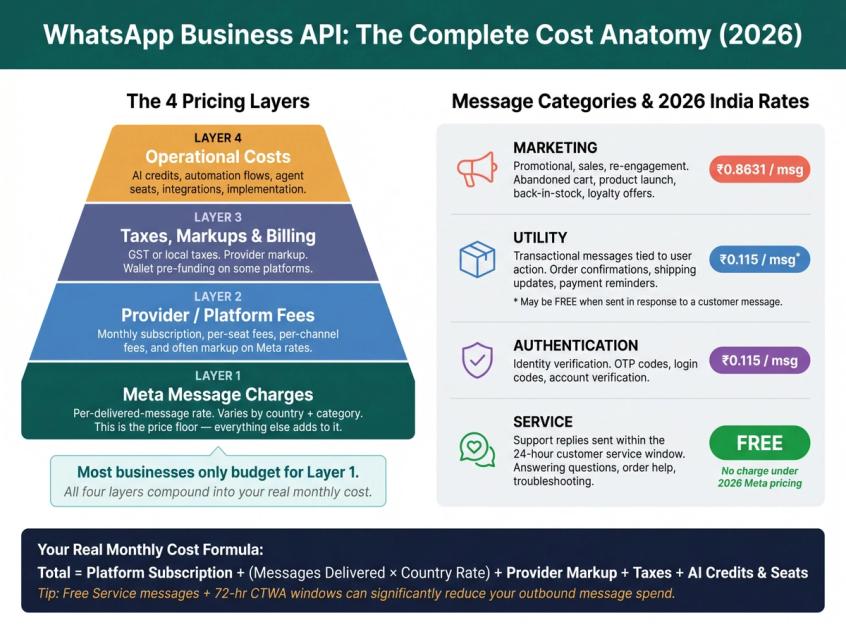
WhatsApp API pricing has four distinct layers. Most people only think about one of them.
The Four Layers of WhatsApp API Pricing
Layer 1: Meta's message charges. This is the per-delivered-message cost based on the recipient's country and the message category. Meta's pricing is the floor; everything else adds to it.
Layer 2: Provider or platform fees. If you use a WhatsApp Business Solution Provider (BSP) or a customer engagement platform, you pay a monthly software subscription, per-seat fees, per-channel fees, and often markup on Meta's rates.
Layer 3: Taxes, markups, and billing differences. Depending on your country, GST or other taxes apply. Providers may add markup to Meta's base rates. Some platforms use a wallet-based billing model where you pre-fund WhatsApp usage.
Layer 4: Operational costs. These include AI credits, extra automation flows, seats for agents, integration fees, campaign management, and implementation costs. Often overlooked in initial budgets.
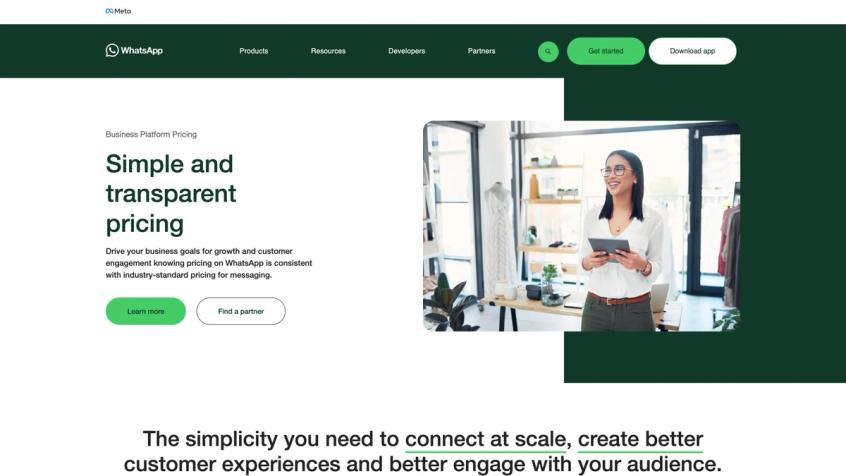
Meta's own Business Platform Pricing page is the authoritative source for the per-message rates that anchor every cost calculation below.
WhatsApp Message Categories and Pricing Explained
Every WhatsApp message falls into one of four categories. The category determines the price and the rules.
| Category | What it means | Common examples | Cost |
|---|---|---|---|
| Marketing | Promotional, sales, discovery, re-engagement | Abandoned cart, product launch, back-in-stock, loyalty offers | Charged per delivered message |
| Utility | Transactional, triggered by user action | Order confirmation, shipping update, payment reminder, appointment reminder | Can be charged; utility sent in response to users may be free |
| Authentication | Identity verification | OTP, login code, account verification | Charged per delivered message |
| Service | Customer support replies inside the 24-hour window | Answering questions, order support, troubleshooting | Free under current Meta pricing |
Meta's pricing page defines each category with examples. An abandoned cart reminder with a discount is marketing. A shipping update triggered by a purchase event is utility. A verification code is authentication. Responding to a customer who messaged you about an issue is a service message.
WhatsApp Business API Pricing in India for 2026
Exact rates change periodically and vary by provider markup. That said, recent India-specific summaries from late 2025 and early 2026 are useful for planning.
India Meta rates for 2026 are approximately ₹0.8631 for marketing, around ₹0.115 for utility and authentication, and free for service. Some provider-facing pricing summaries show slightly higher "onwards from ₹0.88" for marketing, which likely reflects provider markup, rounding, or plan structure.
For a country- and category-by-category view, see Spur's published WhatsApp conversation rate card.
Here's a simple cost example. Say you send 10,000 marketing messages to opted-in Indian customers:
10,000 × ₹0.8631 = ₹8,631 (Meta rate alone)
That's before GST, before provider markup, and before your platform subscription. The realistic monthly cost formula looks like this:
Total monthly WhatsApp cost =
(platform subscription)
+ (delivered messages × country/category rate)
+ (provider markup or wallet fees, if any)
+ taxes
+ AI credits, seats, extra channels, and integrations
Use our WhatsApp pricing calculator to model your actual monthly cost before committing to a plan. Always verify your actual rate inside Meta's pricing calculator, WhatsApp Manager, or your provider's dashboard before running a campaign.
How to Reduce WhatsApp Business API Costs
The most effective cost lever isn't finding a slightly cheaper provider. It's improving message relevance and using the free windows strategically.
Segment your list. Send campaigns only to contacts who are likely to care about that specific message. An unsegmented blast to your full list doesn't just cost more. It hurts your quality rating, which affects future sending limits. Our WhatsApp marketing per-user limits guide explains how quality ratings affect your sending capacity over time.
Use intent triggers. Design flows where customers initiate contact (asking about order status, checking availability, tapping a CTWA ad). Inbound conversations open a free service window, reducing your need to pay for outbound marketing messages.
Respect category rules. Don't try to put promotional content into utility templates. This causes template rejection, and if it slips through, it can trigger policy enforcement.
Clean your database. Remove inactive, invalid, opted-out, and duplicate contacts before every campaign. Sending to undeliverable numbers wastes budget and can flag quality issues.
Track revenue per template. A marketing message that costs ₹0.86 but recovers a ₹2,500 cart isn't expensive. One that costs the same and drives zero conversions is very expensive. Optimize for revenue per message, not just message cost.
Use the 24-hour service window intelligently. Encourage customers to message you. Create CTWA ads that open conversations. Build flows where customers ask questions. Every inbound message opens a window where your support replies are free.
Pricing is only part of the picture. The other part is understanding what you're actually allowed to send, and the rules around templates, opt-ins, and categories.
How to Set Up WhatsApp Business API in 2026 (Step-by-Step)
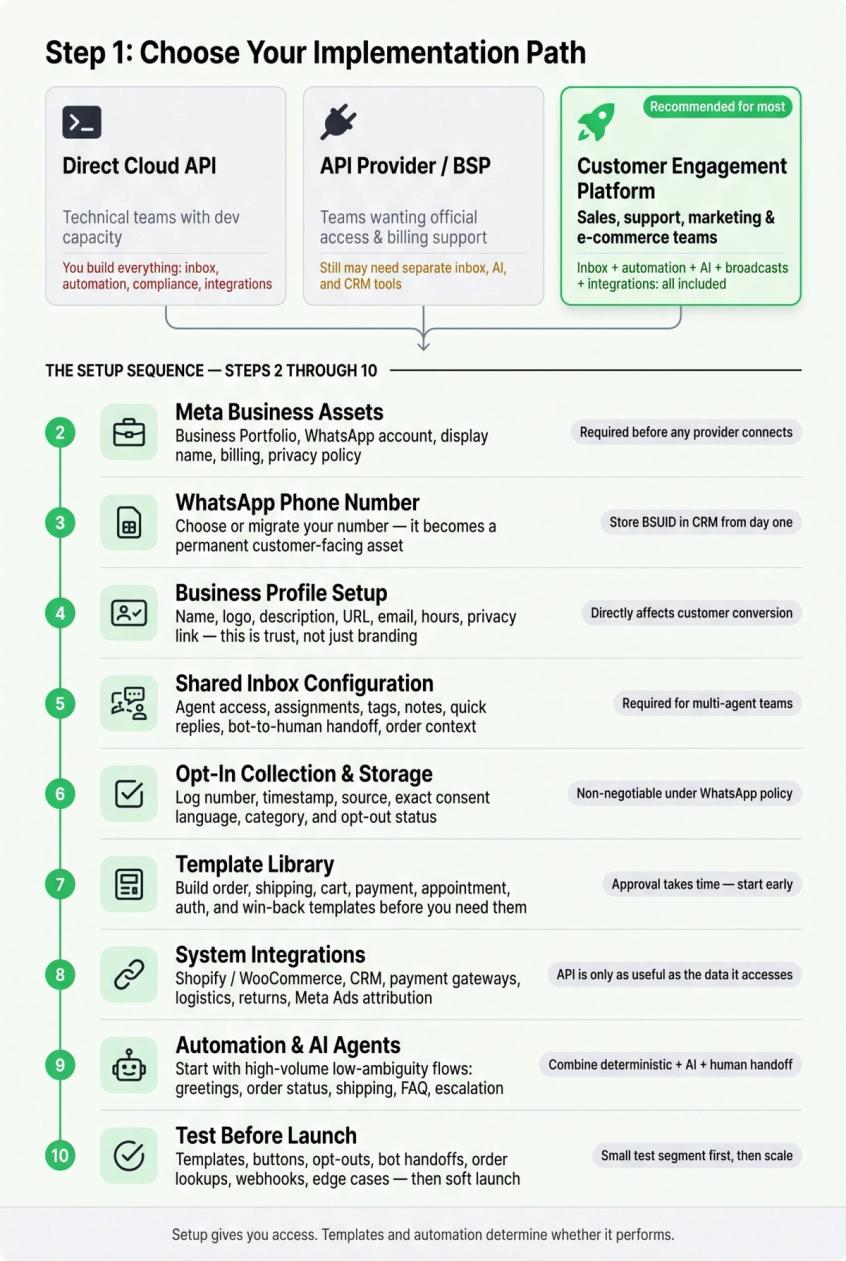
Step 1: How to Choose Your WhatsApp API Implementation Path
You have three realistic options:
| Path | Best for | Pros | Cons |
|---|---|---|---|
| Direct Cloud API | Technical teams with engineering capacity | Maximum control, direct API access | You build your own inbox, automation, templates, analytics, compliance, and integrations. All of it. |
| API provider / BSP | Teams that want official access and billing support | Easier than raw build | May still need separate tools for inbox, AI, automation, and CRM |
| Customer engagement platform | Sales, support, marketing, and e-commerce teams | Fastest path to value; inbox, automation, AI, broadcasts, and integrations included | Monthly software fee; less low-level control |
For most growing D2C brands, service businesses, and e-commerce teams, the fastest path is a platform that already includes shared inbox, templates, broadcasts, automation, AI agents, analytics, and integrations. Building directly on Cloud API can work for technical teams with engineering capacity, but the surrounding software stack you'd need to build is substantial. Spur handles that entire stack out of the box, with a no-code workflow builder for the automation layer.
Step 2: How to Prepare Your Meta Business Assets
Before any provider can connect your WhatsApp number, you need:
- A Meta Business Portfolio (formerly Business Manager)
- A WhatsApp Business Account within that portfolio
- Your business information: legal name, website, support email or phone
- A display name for your WhatsApp account
- Admin access to your Facebook Page and ad account (if running CTWA ads)
- Payment and billing setup
- A privacy policy and support contact on your website
The exact requirements vary slightly by provider and by country, but these are the consistent foundations. Exact details are confirmed by your chosen provider during onboarding.
Step 3: How to Choose or Migrate Your WhatsApp Phone Number
Your WhatsApp API number becomes a business communication asset. It will appear in every customer's contact list. Choose it carefully.
Consider: Will customers recognize this number? Is it currently used for anything else? Can it receive verification codes during setup? Do you need separate numbers for marketing, support, different brands, or different regions?
With the 2026 rollout of usernames and business-scoped user IDs, messaging platform providers and industry advisors recommend storing the new BSUID alongside phone numbers in your CRM from day one. Don't build a system that assumes a phone number will always be the only customer identifier. If you're managing multiple WhatsApp Business accounts, the BSUID transition matters even more for attribution.
Step 4: How to Create Your WhatsApp Business Profile
Your WhatsApp business profile should include your business name, logo, a clear description, website URL, contact email, address (if relevant), support hours, and a link to your privacy policy. This isn't just branding. It's trust. A customer deciding whether to complete a purchase or share their address will look at your profile to determine legitimacy.
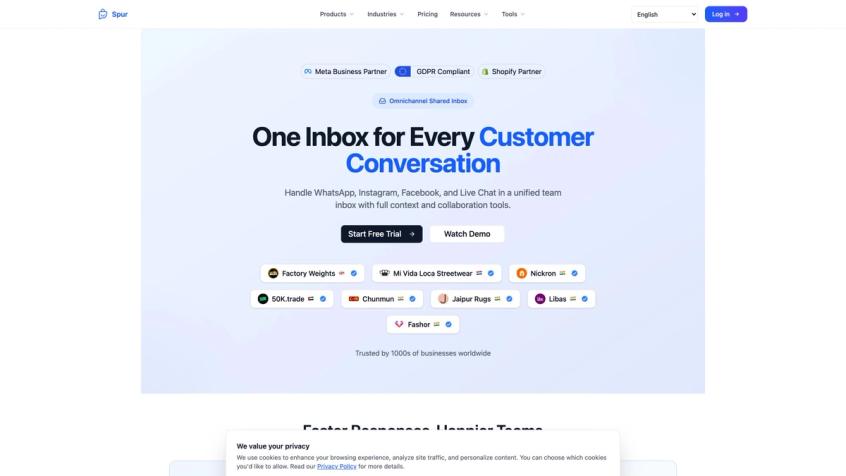
An API connection alone doesn't give you a working support operation. Your inbox needs:
→ Multiple agent access with assignments
→ Internal notes and conversation tags
→ Customer fields and conversation history
→ Quick replies for common responses
→ Ticketing and resolution tracking
→ Bot-to-human handoff
→ Order and CRM context inside the chat
→ Team performance reporting
Spur's shared inbox, for example, is built for multi-agent teams, with ticketing, agent assignment, quick replies, and the context your team needs to resolve conversations without switching tools.
Step 6: How to Collect and Store WhatsApp Opt-Ins
This step is non-negotiable. WhatsApp's Business Messaging Policy is clear: a business may only contact people on WhatsApp if the person has provided their phone number and explicitly opted in to receive messages from that business.
Store at least:
- Phone number and opt-in timestamp
- Source of opt-in (checkout, form, ad, in-store)
- The exact consent language shown to the user
- Message category consented to
- Opt-out status and timestamp
Good opt-in locations: checkout page, account signup form, lead capture forms, website chat widget, CTWA ad flow, QR codes on packaging or in-store, post-purchase page, and event registration. Our guide on WhatsApp lead generation covers the most effective opt-in strategies for each of these surfaces.
Step 7: How to Build Your WhatsApp Template Library
Build your template library before you need it, because approval takes time. Start with:
- Order confirmation (utility)
- Shipping update (utility)
- Abandoned cart recovery (marketing)
- Payment reminder (utility)
- Back-in-stock alert (marketing)
- Appointment reminder (utility)
- Lead follow-up (marketing)
- Win-back campaign (marketing)
- OTP/authentication (authentication)
- Support follow-up (service or utility)
Keep marketing, utility, and authentication templates clearly separate. Don't try to embed promotional content in utility templates to save on pricing. This is a common mistake that causes rejections and policy flags. Our guide on how to craft high-converting WhatsApp templates walks through what makes each category work, and our post on why WhatsApp templates get rejected covers the specific mistakes that trigger Meta's review system.
Step 8: How to Connect WhatsApp to Your Business Systems
For e-commerce and support teams, WhatsApp is only as useful as the data it can access. Key integrations to plan for:
- Shopify or WooCommerce for order data, cart events, and product information
- CRM for contact history and lifecycle data
- Payment gateways (Stripe, Razorpay) for payment confirmation flows
- Logistics platforms (Shiprocket) for shipping status
- Returns platforms (Return Prime) for exchange and return flows
- Marketing analytics and Meta Ads for attribution
Spur supports integrations with Shopify, WooCommerce, Stripe, Razorpay, Shiprocket, Return Prime, and custom e-commerce backends.
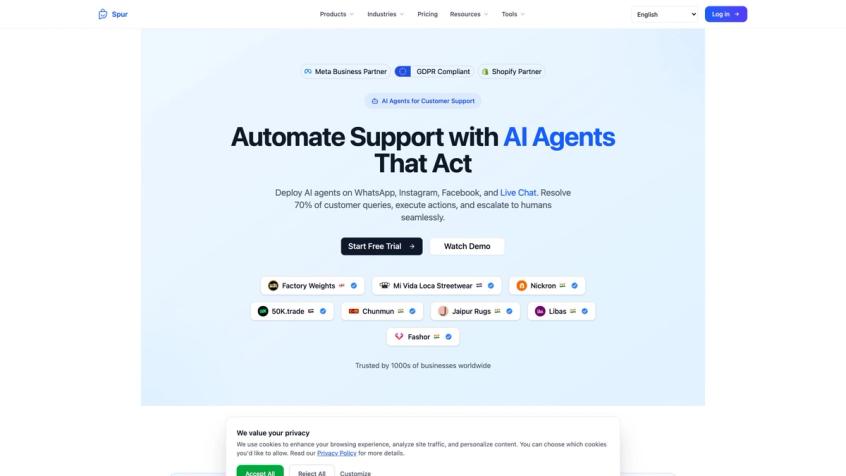
Step 9: How to Add WhatsApp Automation and AI Agents
Don't try to automate everything on day one. Start with the high-volume, low-ambiguity workflows:
- Greeting and main menu
- Order status lookup
- Shipping status lookup
- Return request intake
- FAQ answering
- Escalation to human agent
- CSAT collection
The best WhatsApp systems combine deterministic flows for structured tasks, AI agents for natural language support, and clear human handoff for complaints, high-value inquiries, and anything the AI isn't confident about. Analytics close the loop by identifying where to improve.
Step 10: How to Test WhatsApp API Before Launch
Before going live with any audience, test everything systematically:
- Template rendering with real variables
- All buttons and quick reply options
- Opt-out flows (send "STOP" and verify the behavior)
- Bot-to-human handoff
- Order lookup accuracy
- Payment link generation
- Webhook events firing correctly
- Attribution and tracking
- Edge cases (a customer says something unexpected)
Launch to a small test segment first. Confirm delivery, reply rates, and opt-out behavior before scaling.
Setup gets you access. The templates you use, and how you write them, determine whether your messages actually perform.
What Are WhatsApp Message Templates and How Do You Write Them?
Message templates are pre-approved messages that businesses use to start conversations or continue conversations outside the 24-hour customer service window. They're a core requirement of the WhatsApp Business API, not an optional feature.
If a customer hasn't messaged you in the last 24 hours and you want to reach out, you must use an approved template. If a customer is actively chatting with you and the 24-hour window is open, you can reply freely without a template.
What Makes a Good WhatsApp Template?
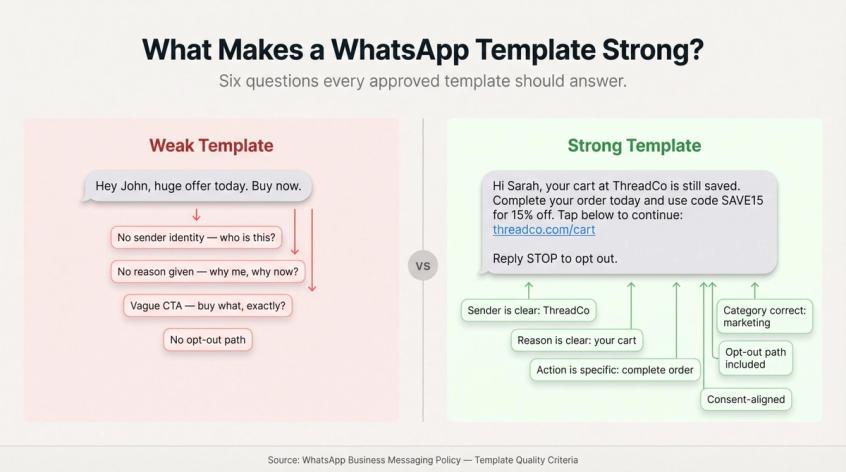
A weak template gives customers no reason to engage:
Hey {{1}}, huge offer today. Buy now.
A better template is specific, expected, and gives the customer context:
Hi {{1}}, your cart at {{2}} is still saved. Complete your order today and use code {{3}} for {{4}} off. Tap below to continue: {{5}}
Reply STOP to opt out.
A strong template answers six things: Who is sending this? Why is this customer receiving it? What action is being requested? Is the message category correct (promotional content shouldn't be in a utility template)? Is there an opt-out path? Does the message match the consent the customer gave?
For deeper guidance on building a template library that converts, see our post on crafting high-converting WhatsApp templates.
WhatsApp Marketing Template Examples
Abandoned cart recovery:
Hi {{1}}, you left {{2}} in your cart at {{3}}.
Your cart is saved for the next {{4}} hours. Complete your order here:
{{5}}
Reply STOP to opt out.
Back in stock:
Hi {{1}}, {{2}} is back in stock at {{3}}.
You asked us to notify you when it returned. Shop now:
{{4}}
Reply STOP to opt out.
Segmented offer:
Hi {{1}}, because you purchased {{2}}, we thought you'd like {{3}}.
Use code {{4}} before {{5}}:
{{6}}
Reply STOP to opt out.
WhatsApp Utility Template Examples
Order confirmation:
Hi {{1}}, your order {{2}} from {{3}} is confirmed.
Order total: {{4}}
Estimated dispatch: {{5}}
We'll message you when it ships.
Shipping update:
Hi {{1}}, your order {{2}} has shipped.
Tracking: {{3}}
Estimated delivery: {{4}}
Appointment reminder:
Hi {{1}}, reminder: your appointment with {{2}} is on {{3}} at {{4}}.
Reply 1 to confirm or 2 to reschedule.
WhatsApp Authentication Template Example
For OTP and verification flows, our authentication templates guide covers the format requirements, approval process, and timing best practices.
Your {{1}} verification code is {{2}}.
Do not share this code with anyone.
Common WhatsApp Template Mistakes to Avoid
WhatsApp's Business Messaging Policy warns that negative feedback, low quality, and policy violations can lead to limits, reduced access, or removal from WhatsApp Business products. The common template mistakes:
- Putting discount codes or promotional content inside utility templates
- Using vague or misleading variables that strip context
- Sending to people who never opted in
- Using clickbait subject language
- Sending too frequently to the same contacts
- Targeting US users with marketing templates (blocked since April 2025)
- Treating WhatsApp like email spam
See our breakdown of why WhatsApp templates get rejected if you've hit a wall during the approval process.
Templates handle the outbound side. Opt-ins and compliance handle the legal side, and this is where a lot of businesses get into serious trouble.
WhatsApp Opt-In, Opt-Out, and Compliance Rules Explained
Consent isn't just a legal requirement for WhatsApp. It's the foundation of how the whole system works. If you send messages to people who didn't expect to hear from you, they'll block your number, report you, and damage your quality rating. Quality problems lead to messaging limit reductions, which make the entire API less useful.
WhatsApp's Business Messaging Policy states that businesses may only contact people on WhatsApp if the person has provided their mobile number and opted in to receive messages from that business. The opt-in must clearly state they're agreeing to receive messages from your business over WhatsApp.
WhatsApp Opt-In Language Examples That Work
For general messaging:
I agree to receive WhatsApp messages from [Brand Name] about my order, support requests, and relevant offers. I can opt out at any time.
For marketing specifically:
I agree to receive promotional WhatsApp messages from [Brand Name], including offers, product updates, and cart reminders. I can opt out at any time by replying STOP.
How to Handle WhatsApp Opt-Outs Correctly
Support these opt-out words as triggers: STOP, UNSUBSCRIBE, CANCEL, OPT OUT, NO. When someone opts out, immediately confirm the opt-out, stop all promotional sends to that contact, record the timestamp and source, and suppress them from future campaigns. Transactional messages tied to their purchase or account may still be permissible depending on your use case and jurisdiction.
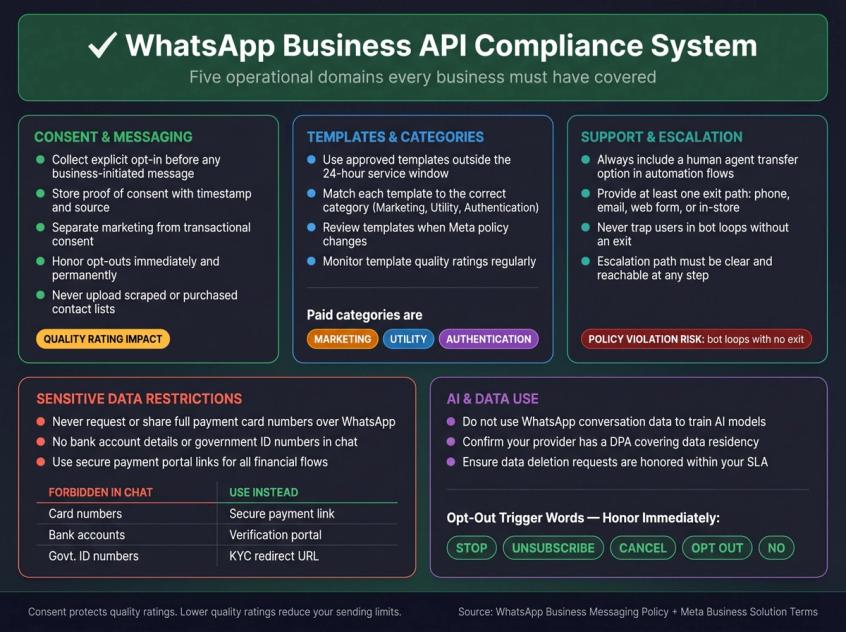
The WhatsApp Business API Compliance Checklist
This isn't legal advice, but these are the operational items you should have covered:
Consent and messaging:
- Collect explicit opt-in before any business-initiated messages
- Store proof of consent with timestamp and source
- Separate marketing consent from transactional support where appropriate
- Respect opt-outs immediately and permanently
- Don't upload scraped, purchased, or guessed contact lists
Templates and categories:
- Use approved templates outside the 24-hour service window
- Pick the correct category (marketing, utility, authentication) for each template
- Review templates when Meta policy changes
- Monitor your template quality ratings regularly
Customer support and escalation:
WhatsApp's policy requires that businesses using automation during the 24-hour window provide clear escalation paths: human agent transfer, phone number, email, web support form, or in-store visit. Your automation flows should always include a "Talk to a person" option. Never design a system that traps customers in bot loops with no exit. For guidance on building a proper customer service escalation process, we've covered the essential steps on the blog.
Sensitive data restrictions:
WhatsApp's Business Messaging Policy restricts businesses from requesting or sharing full payment card numbers, bank account details, government ID numbers, and other sensitive identifiers over WhatsApp. Use secure links to payment portals and verification flows for anything sensitive.
AI and data use:
Meta's WhatsApp Business Solution Terms restrict using WhatsApp Business Solution Data to train or improve AI models, except for narrow exclusive-use fine-tuning scenarios. If you're using an AI agent, verify: whether customer conversation data is used for model training, where data is stored, whether your provider has a DPA, and how data deletion requests are handled.
For teams who need documented answers to these questions, Spur's GDPR page and Data Processing Agreement address data residency, sub-processor obligations, and deletion timelines. If you're asking "is WhatsApp API GDPR compliant?", the short answer is yes, with the right setup.
Consent protects you legally. The bigger strategic question is how to build the WhatsApp automation system that makes all of this work at scale.
How to Build a WhatsApp Automation System That Works
The best WhatsApp systems don't just send messages. They act as a connected layer between your customer, your business data, and your team. Here's the architecture that makes that possible.
The Five Layers of WhatsApp Automation Architecture
① Entry points. Customers need easy ways to start WhatsApp conversations with your business. Strong entry points include your website WhatsApp button, QR codes on packaging or in-store, Instagram bio links, CTWA ads from Facebook and Instagram, post-purchase pages, and checkout opt-in flows. The more natural and contextually relevant your entry points, the higher the conversation quality.
② Identity and consent. When a conversation starts, you need to know who the customer is, what they consented to, and how to link them to your existing systems. Store their phone number, the new BSUID (as it becomes available), their customer ID from your CRM or e-commerce platform, their opt-in source, and their opt-out status. Given the 2026 rollout of WhatsApp usernames, prepare systems to handle both phone numbers and business-scoped identifiers from day one.
③ The conversation engine. This is where messages are understood and routed. A strong conversation engine includes keyword and button routing for structured menus, natural language understanding for free-form questions, AI agent responses for common queries, deterministic workflows for specific tasks, human handoff rules, and fallback handling when the system isn't confident.
④ The action layer. The most valuable WhatsApp bots don't just answer questions. They take action. Track an order. Start a return. Book a meeting. Qualify a sales lead. Create a CRM deal. Send a payment link. Apply a discount code. Notify a sales rep. Update customer tags. This is where Spur's no-code workflow builder (with webhooks, HTTP requests, and custom AI actions) becomes significantly more valuable than basic FAQ bots.
⑤ Analytics and optimization. Track everything: sent, delivered, read, replied, failed, blocked, opted out. Track template approval rates and campaign costs. Measure revenue per campaign, support deflection rate, AI resolution rate, human handoff rate, first response time, resolution time, and customer satisfaction. WhatsApp is a measurable customer journey, not just a messaging channel. Spur's analytics surfaces these metrics in one dashboard so you can optimize without switching tools.
How to Run Click-to-WhatsApp Ads That Convert
Click-to-WhatsApp ads are Facebook and Instagram ads that open a WhatsApp conversation with your business when clicked. Meta says these ads work across Feed, Stories, and Marketplace placements, and can be tracked with Meta Pixel, Conversions API, and Offline Conversions.
The best CTWA ads don't just say "Chat now." They promise a specific outcome:
- "Get your size recommendation on WhatsApp" (fashion brand)
- "Message us to check availability in your city" (real estate)
- "Get the price list instantly on WhatsApp" (B2B)
- "Talk to an advisor and book a site visit" (finance, real estate)
A good CTWA flow works like this: the user clicks the ad, WhatsApp opens with a prefilled message, your bot welcomes them and confirms their intent, asks two to four qualifying questions, uses AI to answer common FAQs, routes high-intent leads to a salesperson, puts lower-intent leads into a nurture sequence, syncs data to your CRM, and sends conversion signals back to Meta where applicable. The 72-hour free entry point means the entire post-click conversation costs you nothing in message fees.
What Are WhatsApp Flows and When Should You Use Them?
WhatsApp Flows let you create form-like interactive experiences inside WhatsApp. Instead of a back-and-forth conversation for something like insurance quote intake or event registration, you present a structured form the user completes without leaving the app.
Good Flows use cases include lead qualification forms, product recommendation quizzes, appointment booking, return request forms, demo booking, delivery rescheduling, feedback surveys, and preference centers. Flows are especially useful when a normal conversation would be too messy, but redirecting to a web form would cause too much drop-off. Spur's WhatsApp Flows integration lets you build these structured journeys without code.
How to Send WhatsApp Broadcasts Without Hurting Quality Rating
WhatsApp broadcasts can drive extraordinary results when done right. We've seen brands achieve 88x ROI on a single broadcast campaign and recover significant abandoned cart revenue through well-segmented WhatsApp campaigns.
The key is relevance. Broadcast to:
- Recent purchasers with relevant upsell
- Cart abandoners (high intent, high conversion)
- Back-in-stock waitlist customers (they asked for this)
- Loyalty program members with exclusive drops
- Webinar registrants with reminders
- Customers due for replenishment
Don't broadcast to:
- Unsegmented full lists
- People who opted out
- Contacts you acquired through methods they didn't consent to
- US phone numbers with marketing templates
Meta warns that low quality sends, high block rates, and policy violations can result in messaging limit reductions or removal from WhatsApp Business products. An aggressive irrelevant broadcast can cost you far more than the campaign revenue by damaging your long-term sending capacity. Our guide on how to get more replies on WhatsApp broadcasts covers the segmentation and timing tactics that protect your quality rating while maximizing revenue per message.
That architecture is what makes WhatsApp more than a messaging channel. Seeing it in action across different industries is where the real picture comes together.
WhatsApp Business API Use Cases by Industry
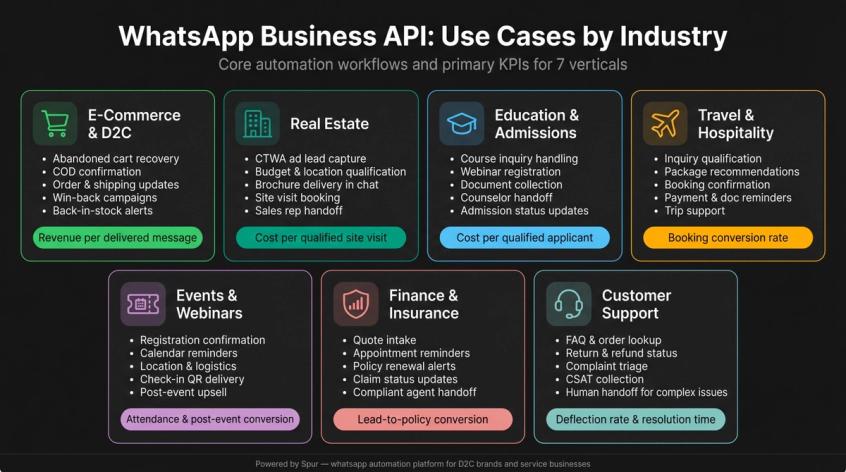
This is where WhatsApp API creates the most immediate, measurable ROI for most businesses — but the specific winning plays are radically different depending on the industry. The following section maps the core automation workflows, essential integrations, and primary success metrics for seven major verticals.
How to Use WhatsApp API for E-Commerce and D2C Brands
This is where WhatsApp API creates the most immediate, measurable ROI for most businesses. The core revenue workflows are abandoned cart recovery, COD confirmation, prepaid payment reminders, order confirmation, shipping updates, delivery confirmation, return and exchange flows, win-back campaigns for lapsed customers, VIP early access drops, back-in-stock alerts, and post-purchase review requests.
The essential integrations are Stripe, Razorpay, Shiprocket, and Return Prime, with deep support for Shopify and WooCommerce stores.
Key metric: revenue per delivered WhatsApp message.
See how leading D2C brands approach this in our deep-dive on WhatsApp for e-commerce and our guide to cart abandonment solutions on WhatsApp.
How to Use WhatsApp API for Real Estate Lead Qualification
WhatsApp is the primary communication channel for qualified real estate leads in many markets, especially India. The winning playbook combines CTWA ads that open conversations from property listings, a qualification flow that captures budget, location preference, and timeline, project brochure delivery inside the chat, site visit booking, sales rep handoff for high-intent leads, and post-visit nurture for follow-up.
Key metric: cost per qualified site visit.
Explore the full real estate WhatsApp playbook on our industry page.
How to Use WhatsApp API for Education and Admissions
For education businesses, WhatsApp handles course inquiries, fee explanations, webinar and event registration, application reminders, document collection, counselor handoffs, and admission status updates.
Key metric: cost per qualified applicant.
See how Spur serves education businesses specifically.
How to Use WhatsApp API for Travel and Hospitality
Travel works well when WhatsApp handles inquiry qualification, package recommendations, booking confirmation, itinerary updates, payment reminders, document reminders, rescheduling, and support during the trip.
Key metric: booking conversion rate from WhatsApp inquiries.
Our detailed WhatsApp automation guide for travel agencies covers the specific flows that convert inquiries into bookings.
How to Use WhatsApp API for Events and Webinars
Event businesses use WhatsApp for registration confirmation, calendar reminders, location details and logistics, last-minute updates, check-in QR codes, post-event feedback, and upsell to future events.
Key metric: attendance rate and post-event conversion rate.
See how Spur handles events and webinar use cases with automated reminder sequences and post-event follow-up flows.
How to Use WhatsApp API for Finance and Insurance
Finance and insurance use cases include quote intake, appointment reminders, policy renewal reminders, document status updates, claim status updates, and agent handoff. Be especially careful here: WhatsApp's Business Messaging Policy includes specific restrictions around requesting sensitive financial identifiers and has restrictions for some categories of financial products and services. Review current policy carefully before building WhatsApp flows for regulated financial products. See our finance and insurance industry page for compliant use case examples.
How to Use WhatsApp API for Customer Support Automation
Customer support uses WhatsApp AI to handle FAQ answers, order lookups, return status, refund status, complaint triage, and CSAT collection, with human handoff for anything complex.
Key metric: resolution time and support deflection rate without hurting customer satisfaction.
Our overview of customer support automation shows how to structure AI-first support without losing the human touch.
Every industry has its own winning plays. The common thread across all of them is choosing the right platform and building the right stack around it.
How Spur Uses WhatsApp Business API (And Why We Built the Platform)
We built Spur because we saw the same problem at every brand we worked with: WhatsApp API access alone doesn't give you a working system. You need a shared inbox, automation flows, AI agents, broadcast tools, e-commerce integrations, and compliance controls. And you need all of that connected, not stitched together from five separate tools.
What's Included in the Spur WhatsApp Platform
Spur's all-in-one platform includes:
- WhatsApp broadcasts with CSV or CRM import and our DeliveryBoost feature for improved inbox delivery rates
- No-code chatbot builder for creating flows without engineering help
- Shared inbox for multi-agent teams with ticketing, agent assignment, tags, quick replies, and conversation context
- Drip campaigns for automated follow-up sequences
- Click-to-WhatsApp lead capture with automated qualification flows
- E-commerce flows including abandoned checkout recovery, order updates, shipping notifications, upsell and cross-sell sequences
- Shopify, WooCommerce, Stripe, Razorpay, Shiprocket, and Return Prime integrations (each with its own integration page)
- AI agents trained on your website data and knowledge base for customer support across WhatsApp, Instagram, Facebook Messenger, and live chat
- Human handoff to keep agents in the loop for complex or high-value conversations
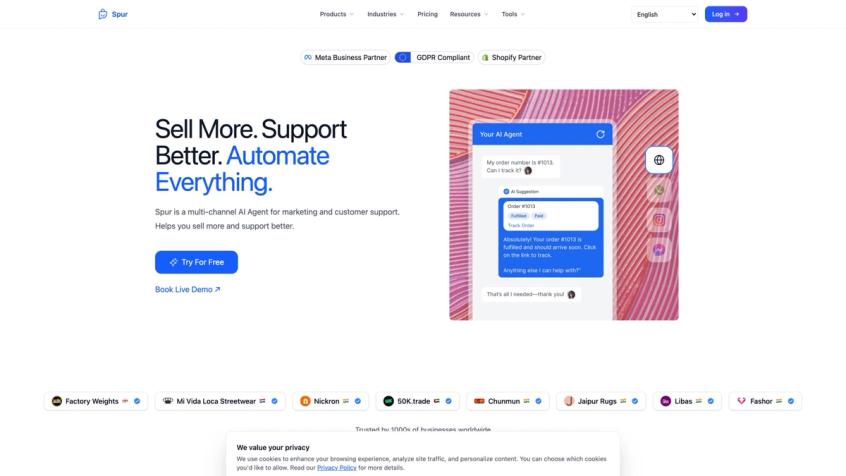
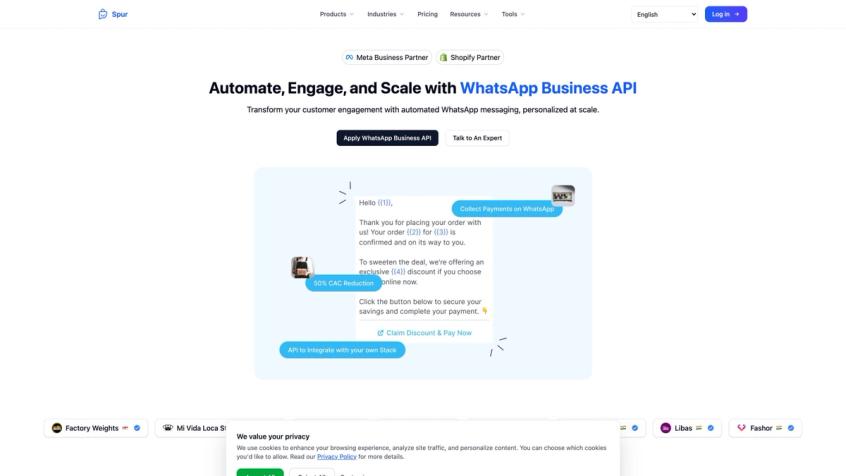
Here's what our WhatsApp Business API product page looks like in practice — the same workflow surface our customers use to apply for the API, talk to our team, and get connected to a Cloud API number.
Spur Pricing Plans for WhatsApp Business API
Spur's pricing is structured across four annual plans:
| Plan | Price (annual) | What you get |
|---|---|---|
| AI Acquire | $12/month | 1 AI agent, 100 AI credits, 1 seat, 3 automation flows, Instagram automation, Click-to-DM |
| AI Start | $31/month | Shopify integration, WhatsApp automation and CTWA ads, 25 flows, 2,000 AI credits, 2 seats |
| AI Accelerate | $127/month | 2 AI agents with 12,000 credits, 5 seats, 50 flows, webhooks, HTTP actions, Custom AI Actions, priority WhatsApp support |
| AI Max | $399/month | 3 AI agents with 40,000 credits, 10 seats, unlimited flows, dedicated account manager, bulk WhatsApp pricing |
All plans include unlimited contacts, and WhatsApp conversation charges are collected through a Spur wallet, meaning you don't pay Meta directly. You can also try Spur free for 7 days before committing.
For enterprise teams needing higher volume, API access, and compliance controls, the AI Max plan with a dedicated account manager is the appropriate starting point.
Is Spur GDPR Compliant for WhatsApp Business API?
For enterprise and security-conscious teams, compliance often drives the provider selection decision. Spur's GDPR page states that our servers and databases are hosted in Frankfurt, Germany, and that during WhatsApp number setup, we set the data_localization_region to Europe so that WhatsApp Cloud API stores message content in the EU.
Spur's Data Processing Agreement, effective April 13, 2026, covers technical and organizational measures, sub-processor obligations (AWS Frankfurt, Google, Cloudflare), breach notification language, and data deletion timelines. As with any vendor, your legal and security teams should review the DPA, sub-processor list, data retention policy, AI data-use terms, and entity details before signing.
When Is Spur the Best WhatsApp Business API Provider?
Spur is particularly well-suited if you want:
- WhatsApp API without building the surrounding software stack yourself
- AI support agents trained on your own website data or knowledge base (not just a generic FAQ bot)
- A shared inbox and human handoff system that keeps your agents in context
- WhatsApp broadcasts and drip campaigns in the same platform as your support inbox
- Abandoned cart recovery and Shopify/WooCommerce workflows
- Instagram automation and WhatsApp in one stack (fewer tools)
- Click-to-WhatsApp and Click-to-Instagram lead qualification flows
- Visual no-code automation rather than developer-heavy bot building
- GDPR-aligned data handling with EU data residency
We've seen our customers achieve significant ROI from WhatsApp campaigns, including an 88x ROI on broadcast campaigns for fashion brands and consistent improvements in abandoned cart recovery rates. Those results depend on clean lists, good segmentation, and the right automation behind them, which is what the platform is built to support.
If you want to see how Spur handles your specific use case, you can browse the full product overview or check our current pricing.
Knowing what Spur offers helps. To choose the right provider for your needs, you also need a decision framework, not just a feature list.
How to Choose a WhatsApp Business API Provider in 2026
When evaluating providers, most teams focus on message rates. That's usually the wrong starting point. The cheapest per-message provider might be expensive overall if you have to buy separate tools for inbox, AI, automation, broadcasts, templates, e-commerce, and reporting.
Here's what to actually evaluate:
WhatsApp API Access and Reliability
- Official WhatsApp Business Platform access (not a reseller of a reseller)
- Cloud API support (On-Premises is gone)
- Clear onboarding process and phone number migration support
- Webhook reliability and message status tracking
- Transparent incident handling
WhatsApp Provider Pricing Transparency
- Country-level and category-level rate visibility
- Clear platform fee structure (no hidden markup)
- Wallet or billing model that matches your cash flow
- Usage export and campaign cost reporting
- Shared inbox with agent assignment, notes, and tags
- Quick replies and SLA or ticketing support
- Team permissions and agent analytics
- Human handoff from bot or AI
WhatsApp Automation and Workflow Capabilities
- Visual workflow builder (no-code)
- Template triggers and drip campaigns
- Segmentation and custom fields
- Webhook actions and HTTP requests for external system calls
- Fallback handling and opt-out automation
What to Look for in a WhatsApp AI Agent
- Knowledge base training on your own data
- Website training
- Answer confidence controls
- Action execution (order tracking, appointment booking, CRM updates)
- Human handoff when AI isn't confident
- Conversation logs for audit
- No unwanted model training on your customer data
- Multi-channel deployment (WhatsApp, Instagram, Facebook, live chat)
See how Spur's AI agents handle each of these criteria, particularly the knowledge base training and action execution capabilities that most basic chatbot tools lack.
E-Commerce and CRM Integrations to Look For
- Shopify and WooCommerce support
- Order status lookups from within the chat
- Abandoned checkout triggers
- Payment event handling
- Logistics status updates
- Revenue attribution
WhatsApp Marketing and Broadcast Capabilities
- Broadcast builder with CSV and CRM import
- Campaign analytics (delivered, read, replied, converted)
- CTWA ad support and conversion tracking
- Suppression lists and opt-out management
- Deliverability guidance
Security, GDPR, and Legal Requirements
- A signed Data Processing Agreement, like Spur's DPA, publicly available
- Sub-processor transparency
- Data residency statement
- EU data storage (if you need GDPR compliance). Spur's GDPR stance covers Frankfurt-based servers
- AI data-use terms that don't include model training on your customer data
- Access controls and audit logs
Once you've selected your provider, execution is where most teams stumble. This 90-day rollout plan addresses that.
The 90-Day WhatsApp Business API Rollout Plan
Days 0-7: WhatsApp API Strategy and Compliance Planning
Decide your primary use case, target audience, message categories, opt-in sources, provider and platform, team ownership across support/marketing/sales, success metrics, compliance requirements, data retention expectations, and AI guardrails before you touch any code.
Create: consent language, opt-out rules, your first 10 template drafts, an escalation policy for your bot, a campaign calendar for the first 30 days, and a cost model that includes platform fees, message charges, and operational costs.
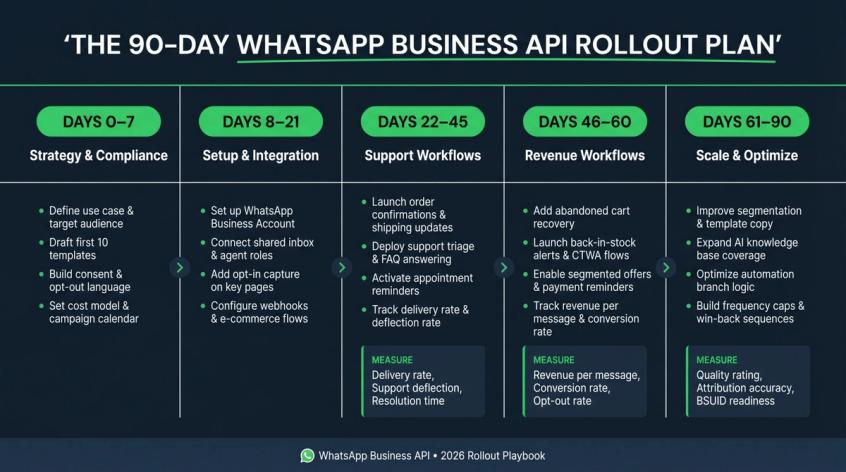
Days 8-21: WhatsApp API Setup and Integration
Set up your WhatsApp Business Account, phone number, and business profile. Connect your shared inbox and define agent roles. Submit your initial templates for approval. Add opt-in capture on your checkout, signup, and key landing pages. Build e-commerce integrations and configure webhook events. Set up your AI knowledge base and test order lookup. Establish your reporting dashboard.
Testing checklist: message delivery, reply handling, handoff, opt-out, template variables, payment links, webhook events, attribution, and edge cases.
Days 22-45: How to Launch Support and Utility Workflows
Start with the lowest-risk, highest-value workflows: order confirmation, shipping updates, support triage, order tracking, FAQ answering, return initiation, appointment reminders, and post-purchase support.
Measure: delivery rate, reply rate, support deflection rate, human handoff rate, resolution time, opt-out rate, and customer satisfaction.
Days 46-60: How to Launch WhatsApp Revenue Workflows
Add: abandoned cart recovery, back-in-stock alerts, CTWA ad flows, lead qualification, payment reminders, product recommendations, and segmented offers.
Measure: revenue per message, campaign cost, conversion rate, average order value, opt-out rate, and quality rating. For inspiration on what well-performing WhatsApp drip campaigns look like, we've compiled real-world examples across several verticals.
Days 61-90: How to Scale and Optimize WhatsApp Performance
Improve: segmentation, template copy, AI knowledge base coverage, automation branch logic, agent macros, attribution, frequency caps, win-back sequences, CTWA qualification, and BSUID readiness.
By day 90, WhatsApp should be a measurable revenue and support channel, not just a messaging experiment. Rollout discipline matters. So does avoiding the common mistakes that send teams back to square one.
9 WhatsApp Business API Mistakes to Avoid
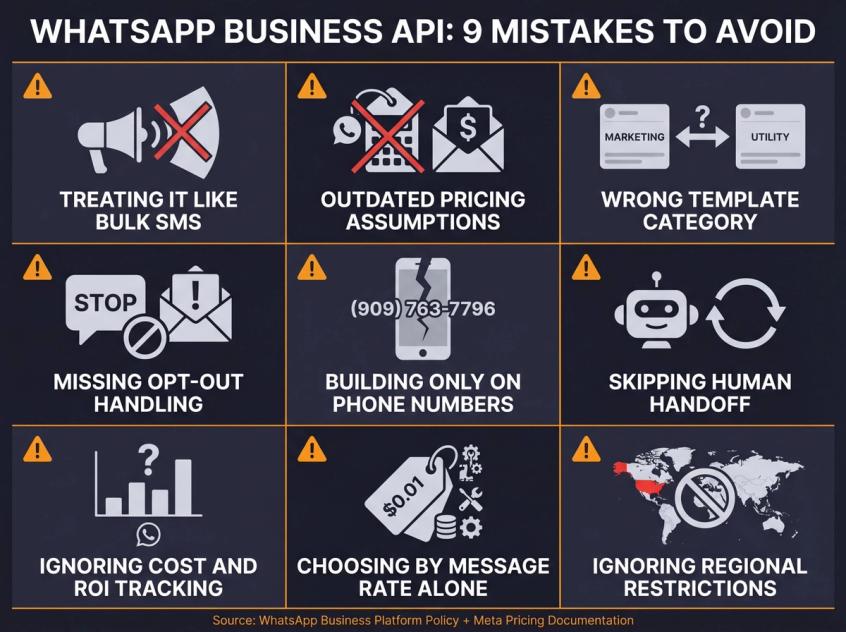
1. Treating WhatsApp Like Bulk SMS
WhatsApp is a personal communication channel. Users have much higher expectations than they do for email or SMS. Irrelevant messages get reported, not just ignored. Reports and blocks reduce your quality rating, which limits how many customers you can message. Treat every message like a personal conversation, not a broadcast to a list.
2. Using Outdated WhatsApp Pricing Assumptions
Many guides still describe WhatsApp pricing as conversation-based. Meta's pricing page is clear: you're charged per delivered message, not per conversation. If your cost model still uses conversation-based math, rebuild it. Our WhatsApp pricing calculator lets you model the new per-message math against your real volume.
3. Misclassifying Marketing Messages as Utility Templates
An abandoned cart message with a discount is marketing. A shipping update triggered by a fulfillment event is utility. These aren't interchangeable. Using the wrong category causes template rejection. If it gets through anyway, it can trigger policy enforcement. The pricing difference can also be significant, because marketing rates are higher than utility rates in most markets.
4. Forgetting to Handle WhatsApp Opt-Outs
Every serious WhatsApp program needs automatic opt-out handling. When someone sends "STOP," your system should immediately stop promotional sends, confirm the opt-out, store the timestamp, and suppress them from future campaigns. Not having this causes two problems: policy violations and angry customers.
5. Building Your WhatsApp Stack Only Around Phone Numbers
With usernames and business-scoped user IDs rolling out in 2026, businesses should store the new BSUID alongside phone numbers in their CRM. If your entire customer identity model depends on a phone number that might not be visible in future webhook payloads, you'll have broken attribution and lookup failures.
6. Skipping Human Handoff in WhatsApp Bots
WhatsApp's policy expects businesses using automation to provide clear escalation paths: a way for customers to reach a human agent, call a phone number, email, or use a web form. A bot that loops customers endlessly without exit is a policy violation and a support failure. Always include a "Talk to a person" option. Our chatbot-to-human handoff guide covers the technical and UX patterns that make handoff seamless.
7. Not Tracking WhatsApp Cost and Revenue Attribution
If you can't measure campaign cost, delivered messages, revenue recovered, and support ticket deflection, you don't know whether WhatsApp is working. Set up revenue attribution from day one. Knowing that a campaign generated ₹180,000 in recovered carts on a ₹8,631 message spend makes the ROI obvious. Not knowing means you can't justify the budget or improve the program. Browse our case studies to see how brands structure WhatsApp attribution in practice.
8. Choosing a Provider Based on Message Rate Alone
The cheapest per-message provider might require you to buy separate tools for inbox, AI, automation, templates, reporting, e-commerce, and support operations. Total cost of ownership is the right comparison, not message rates alone.
9. Ignoring WhatsApp Regional Restrictions
Meta's marketing messages documentation is clear that marketing messages to US WhatsApp users aren't delivered since April 2025. Regional restrictions extend beyond the US though. Our WhatsApp marketing India guide covers the country-specific rules that affect the largest market for WhatsApp business usage.
Avoiding mistakes is important. Building a positive ROI case is essential.
How to Calculate WhatsApp Business API ROI
A useful ROI model looks like this:
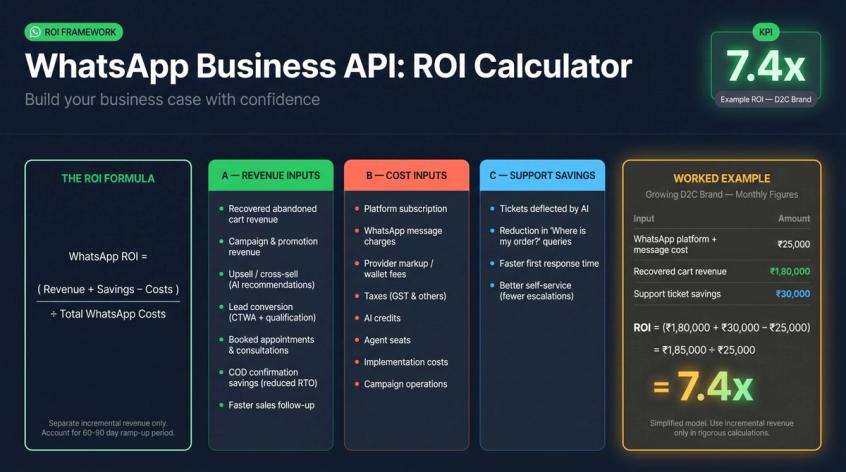
WhatsApp ROI =
(incremental revenue + support cost savings - total WhatsApp costs)
÷ total WhatsApp costs
WhatsApp Revenue Inputs to Track
- Recovered abandoned cart revenue
- Campaign and promotion revenue
- Upsell and cross-sell revenue from AI recommendations
- Lead conversion revenue (CTWA and qualification flows)
- Booked appointments and consultations
- COD confirmation savings (reduced RTO)
- Faster sales follow-up
WhatsApp Cost Inputs to Track
- Platform subscription (monthly fee)
- WhatsApp message charges (per delivered message × volume)
- Provider markup or wallet fees
- Taxes (GST and others)
- AI credits
- Agent seats
- Implementation costs
- Campaign operations
WhatsApp Support Savings to Calculate
- Tickets deflected by AI (multiply by your average cost per ticket)
- Reduction in "Where is my order?" queries
- Faster first response time
- Better self-service (fewer escalations)
WhatsApp ROI Calculation Example
Assume a growing D2C brand with these monthly figures:
- WhatsApp platform and message cost: ₹25,000/month
- Recovered cart revenue: ₹180,000/month
- Support ticket savings: ₹30,000/month
ROI = (₹180,000 + ₹30,000 - ₹25,000) ÷ ₹25,000
ROI = ₹185,000 ÷ ₹25,000
ROI = 7.4x
This is a simplified model. A rigorous calculation should separate incremental revenue (revenue that wouldn't have happened without WhatsApp) from revenue that would have occurred through other channels. It should also account for the gradual ramp-up period in the first 60-90 days before campaigns reach peak performance. See our e-commerce WhatsApp playbook for benchmarks on what recovery rates and deflection rates to use in your own model.
How to Choose the Right WhatsApp Business Stack for 2026
If you're evaluating WhatsApp Business API in 2026, don't start with the API. Start with the business system you want to build.
Ask:
- Which customer conversations belong on WhatsApp?
- Which messages are support, utility, authentication, or marketing?
- Where will opt-ins come from?
- What should be automated vs. handled by humans?
- Which systems must WhatsApp connect to?
- How will you measure revenue, support savings, and quality?
- What are the compliance requirements for your industry and markets?
- What will this cost at scale?
Then choose your stack.
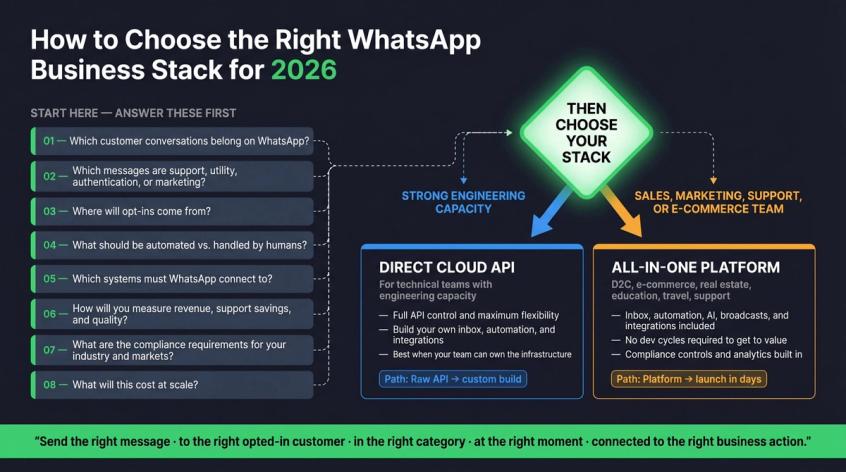
For technical teams with strong engineering capacity, building directly on Cloud API can make sense. For most D2C, e-commerce, real estate, education, travel, and support-heavy businesses, an all-in-one platform handles the inbox, automation, AI, broadcasts, integrations, and compliance controls in one place.
The winning WhatsApp strategy in 2026 isn't "send more messages."
It's: send the right message, to the right opted-in customer, in the right category, at the right moment, connected to the right business action.
That's how WhatsApp becomes more than a chat app. It becomes a revenue, support, and customer engagement system that compounds with every conversation.
If you want to build that system without building it from scratch, Spur is the platform we built for exactly this. You can explore the full Spur platform, see current pricing, or start a free 7-day trial and connect your WhatsApp number today.
WhatsApp Business API FAQs
Is WhatsApp Business API free to use?
No. The WhatsApp Business App is free, but the API has per-message charges. Meta's pricing page confirms businesses are charged per delivered message, with rates depending on the recipient's country and message category. Service messages (replies inside the 24-hour customer service window) are free. You'll also typically pay a monthly subscription to whatever platform or provider you use. See Spur's pricing page for a breakdown of platform costs alongside Meta's message rates.
Is WhatsApp Business API the same as WhatsApp Cloud API?
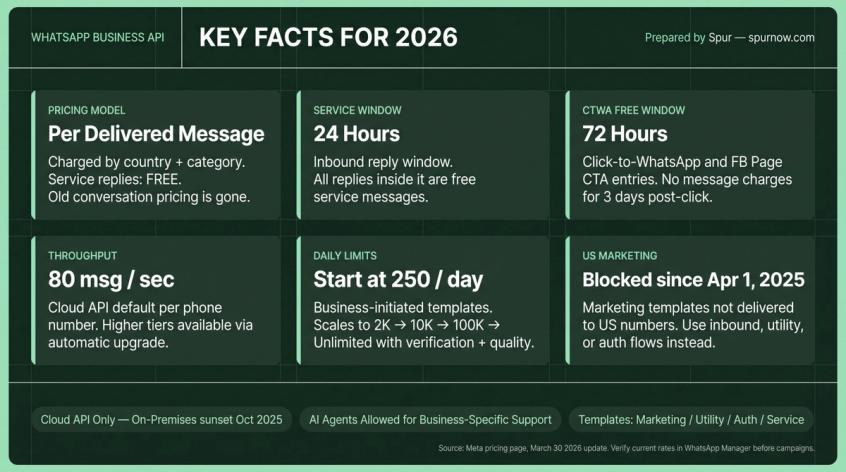
Not exactly. "WhatsApp Business API" is the common term for the broader WhatsApp Business Platform. "Cloud API" is Meta's hosted implementation of that platform. Since the older On-Premises API was sunset in October 2025, Cloud API is now the default modern path for any new implementation.
Can I send WhatsApp broadcasts to my customers?
Yes, but only to contacts who have opted in, and business-initiated messages outside the 24-hour service window must use an approved template. WhatsApp's Business Messaging Policy requires explicit opt-in and compliance with opt-out requests. Spur's broadcasts product handles template submission, list management, and delivery analytics in one place.
Can I send promotional messages on WhatsApp Business API?
Yes, if the contact opted in, the message complies with WhatsApp policy, and you use an approved marketing template where required. Per Meta's pricing page, pricing for marketing messages varies by country and is charged per delivered message.
Are abandoned cart messages classified as marketing or utility?
In most cases, they're marketing. Meta's pricing page explicitly lists abandoned cart reminders as a marketing example. Don't try to submit them as utility templates. Our WhatsApp for e-commerce guide covers how to build compliant abandoned cart flows that convert.
What is the WhatsApp 24-hour customer service window?
It's the 24-hour period after a customer messages your business. During this window, you can reply without an approved template, and those replies are classified as free service messages. After the window closes, you need an approved template to message the customer again. WhatsApp's policy confirms this window structure.
What is the 72-hour free entry point on WhatsApp?
When a customer messages you from a Click-to-WhatsApp ad or a Facebook Page call-to-action button, Meta says all messages sent within the following 72 hours are not charged. This makes CTWA ads particularly cost-effective for post-click qualification and conversion.
What are WhatsApp message templates?
Templates are pre-approved messages used to initiate conversations or message users outside the 24-hour customer service window. They're categorized as marketing, utility, or authentication. You submit them to Meta for approval before use, and approval typically takes minutes to a few hours. Our guide on how to craft high-converting WhatsApp templates covers what makes templates get approved and what gets them rejected.
Why was my WhatsApp template rejected?
Common reasons: wrong category (promotional content submitted as utility), unclear or context-free variables, policy violations (prohibited product categories), vague or misleading language, or formatting issues. Review the rejection reason in WhatsApp Manager and revise accordingly. Our post on why WhatsApp templates get rejected maps every common rejection type to a specific fix.
Can I use an AI chatbot on WhatsApp in 2026?
Yes, for business-specific support, sales, and workflow automation when implemented with appropriate controls. Meta's 2026 WhatsApp Business Solution Terms restrict certain scenarios where the primary functionality is general-purpose AI or LLM distribution, but businesses deploying AI agents for their own customer support are operating within the permitted use case. Review the current terms and your provider's contract carefully. Spur's AI agents are designed specifically for this permitted use case (business-specific customer support and workflow automation).
Can I collect payments through WhatsApp?
You can send payment links and guide customers to secure payment flows, but WhatsApp's Business Messaging Policy restricts requesting or sharing full payment card numbers, bank account numbers, government IDs, and other sensitive identifiers directly in chat. Use secure payment portals and verified links for anything sensitive.
Can I send marketing messages to US WhatsApp users?
No, not under current policy. Meta's marketing messages documentation states that marketing messages to WhatsApp users with US phone numbers have not been delivered since April 1, 2025. For US contacts, use support workflows, utility messages, authentication, inbound conversations, and CTWA flows instead.
What is a business-scoped user ID (BSUID) on WhatsApp?
It's a WhatsApp identifier tied to the relationship between a specific user and a specific business. With usernames rolling out in 2026, some users may hide their phone numbers from businesses. Businesses should update their CRMs and attribution systems to store the BSUID alongside phone numbers. This is one reason integrating WhatsApp with your CRM properly matters more in 2026 than it did in previous years.
How fast can WhatsApp Cloud API send messages?
Meta's Cloud API throughput documentation says Cloud API supports up to 80 messages per second per registered business phone number by default, with higher throughput available through automatic upgrade.
How many WhatsApp customers can I message per day?
That depends on your messaging limit tier. New business portfolios generally start around 250 unique customers per rolling 24-hour period for business-initiated template messages, with tiers up to 2,000, 10,000, 100,000, and unlimited based on quality, usage, and business verification. Check your actual limit inside WhatsApp Manager.
Do I need a WhatsApp API provider like Spur?
You don't strictly need one if you have engineering resources to build directly on Cloud API. Building directly means you're also building your own inbox, automation system, template manager, broadcast tool, AI agent layer, e-commerce integrations, analytics dashboard, and billing reconciliation though. Most businesses find that a platform like Spur is faster, cheaper in total cost, and more capable than building that stack in-house. The 7-day free trial is a good way to see whether it fits before committing.
This guide was prepared on April 26, 2026. WhatsApp pricing, limits, policy enforcement, supported countries, message categories, AI rules, and provider pricing can change. Pricing and policy statements are based primarily on official Meta/WhatsApp sources available as of this date, including Meta's pricing documentation updated March 30, 2026 and WhatsApp Business Solution Terms last modified March 6, 2026. India pricing examples use recent provider summaries from late 2025 and 2026 and should be verified in Meta, WhatsApp Manager, or your provider's dashboard before budgeting or campaign launch.