Best No-Code Chatbot Builders in 2026

Discuss with AI
Get instant insights and ask questions about this topic with AI assistants.
💡 Pro tip: All options include context about this blog post. Feel free to modify the prompt to ask more specific questions!
TL;DR: Most businesses don't need "a chatbot." They need one platform that handles customer questions, captures leads from Instagram and WhatsApp, and keeps their support team from drowning. For that, Spur is the strongest no-code option: AI agents trained on your knowledge base, live chat, WhatsApp, Instagram, and ecommerce automation in one place. Try it free for 7 days.
If you're searching for a no code chatbot builder, you're probably not actually trying to build a chatbot. You're trying to stop answering the same questions 50 times a day, recover abandoned carts on WhatsApp, qualify Instagram leads before they go cold, or handle support across multiple channels without hiring more people.
The tool you pick depends entirely on which of those jobs you need done first. And the choice gets more confusing because "no-code chatbot builder" is one phrase covering four completely different product types.
This guide breaks down 12 tools with real 2026 pricing, honest use cases, hidden costs, and a clear framework for picking the one that fits your actual workflow. Pricing was verified on 30 April 2026. Chatbot pricing (especially AI credits, WhatsApp charges, and annual/monthly discounts) changes often, so always verify inside the vendor checkout before buying.
| Tool | Best for | Starting price (2026) | Strongest reason to choose it | Main watchout |
|---|---|---|---|---|
| Spur | AI support + WhatsApp, Instagram, Facebook, and live chat automation | From $12/mo annual; AI Start at $31/mo annual | Combines AI agents, shared inbox, live chat, WhatsApp/Instagram automation, ecommerce flows, and custom actions | Not the cheapest if you only need a simple website FAQ bot |
| Manychat | Instagram, Facebook, WhatsApp, and creator/social DM automation | Free plan; Pro from $15/mo (pricing model changing in 2026; verify before buying) | Strong social DM automation and comment-to-DM workflows | Pricing model is shifting; check current plan rules at signup |
| Chatbase | Fast AI knowledge-base chatbot for websites | Free plan; paid annual from $32/mo | Simple way to train an AI chatbot on documents or website content | Not built for WhatsApp/Instagram marketing automation |
| Botpress | Powerful visual AI agent building for technical operators | Pay-as-you-go free tier; Plus from $79/mo annual + AI spend | Flexible builder with knowledge bases, actions, handoff, and deeper customization | More complex than most "no devs" teams expect |
| Tidio | Ecommerce live chat and AI support | Starter from $24.17/mo annual; Lyro AI add-on from $32.50/mo annual | Good mix of live chat, flows, and AI support for small ecommerce teams | Watch billable conversations, Lyro quotas, and flow visitor limits |
| Landbot | Conversational landing pages, forms, and WhatsApp flows | Web starter from €40/mo or €32/mo annual; WhatsApp starter from €80/mo | Excellent visual flow builder for structured lead capture | AI and WhatsApp usage can increase cost quickly |
| Uchat | Broad omnichannel automation for agencies and power users | Free plan; Business from $15/mo | Many channels, visual builder, agency/reseller flexibility | Setup can feel more complex than support-first tools |
| LiveChatAI | Website AI support bot with live chat | Basic from $39/mo or $32/mo annual | Quick AI support widget with message credits and data-source training | Weaker fit for marketing automation across WhatsApp/Instagram |
| BotPenguin | Budget omnichannel chatbot starter | Free plan; paid plans around $29/mo and up | Website, WhatsApp, Instagram, Facebook, Telegram, and AI features at low entry price | Verify pricing and limits carefully before purchase |
| Kommo | CRM-first sales teams that want bots inside pipelines | Base from $15/user/mo semi-annually; Advanced from $25/user/mo | Messaging CRM with pipelines, broadcasts, and automation | AI agent is an add-on; chatbot builder is part of a CRM, not a standalone product |
| BoldDesk | Helpdesk-first support teams | AI-first bundles from $99/mo annual for 5 agents | Ticketing, live chat, omnichannel support, knowledge base, AI add-ons | Better for support operations than marketing automation |
| Intercom Fin | Mature support teams paying per resolved outcome | $0.99 per Fin outcome plus usage charges | Strong AI support agent layered into a mature support suite | Can become expensive if many conversations resolve through AI |
If your business runs on WhatsApp, Instagram, live chat, and ecommerce and you want AI support plus marketing automation in one place, Spur's 7-day free trial is the natural starting point. But to pick the right tool with confidence, you need to understand what's actually hiding under the phrase "no-code chatbot builder." It's not one thing. It's four.
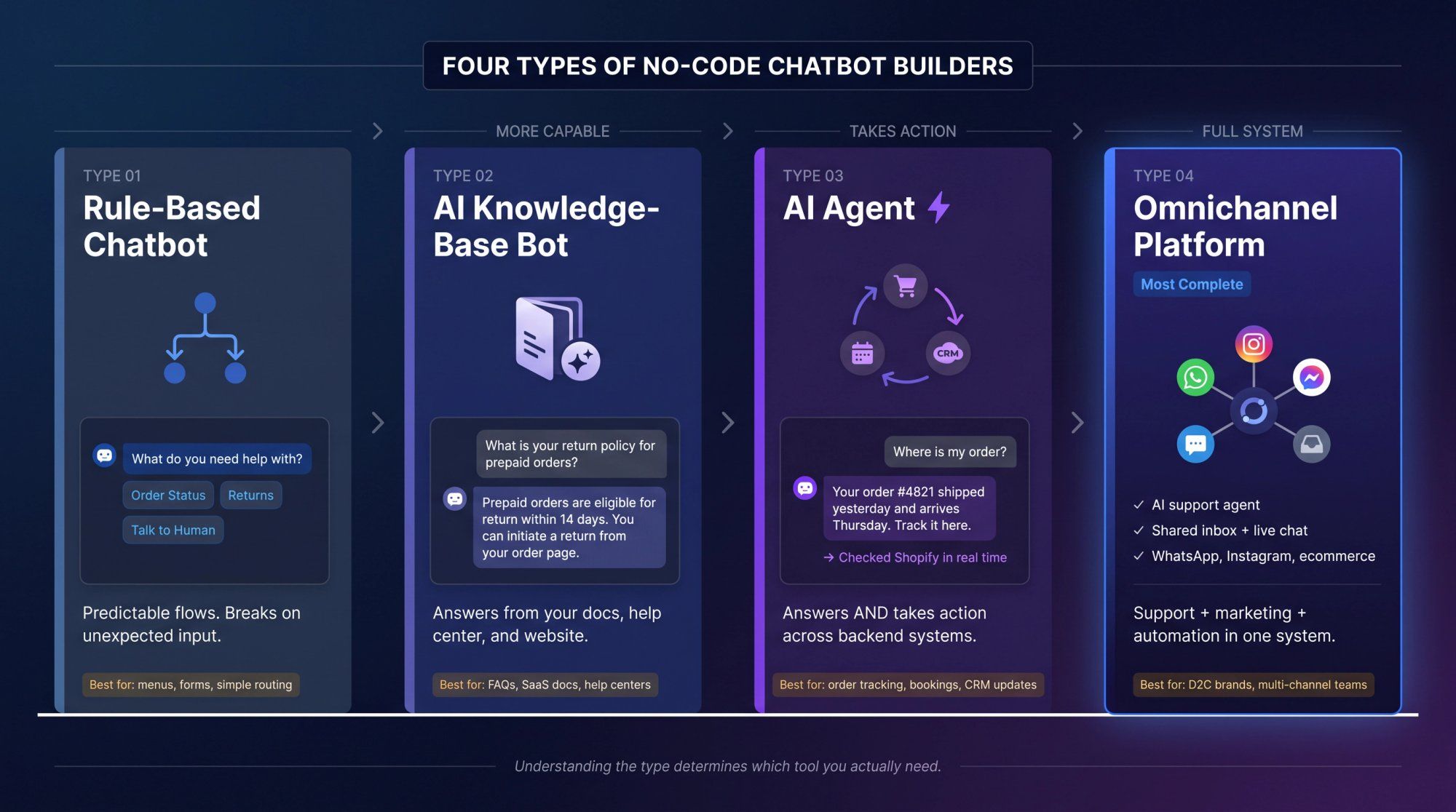
This is the original version. The bot asks a question, shows buttons, follows branches, and routes the user to a destination.
Think of it like a phone tree: "what do you need help with? Order status, returns, pricing, or talk to a human." Rule-based bots are predictable and useful for simple lead forms, qualification flows, and menu-based support. They break the moment users type something unexpected. For a look at the most common chatbot use cases and which type handles each one best, that breakdown helps clarify which architecture to start with.
This bot answers questions from your website, help center, docs, PDFs, or uploaded content.
Ask it "what is your return policy for prepaid orders?" and it searches your knowledge base and replies in natural language. Tools like Chatbase and LiveChatAI are common choices for this use case. Understanding how to train a chatbot on your own website data is the make-or-break step that separates useful AI knowledge-base chatbots from FAQ walls.
An AI agent doesn't just answer. It can take action.
Ask it "where is my order?" and the agent checks your Shopify store or backend, pulls the real order status, and replies. Ask it "can I reschedule my appointment?" and the agent checks availability, updates the booking, and confirms. This is where chatbots become genuinely valuable because they move from "FAQ bot" to "work actually done."
We built Spur's AI agents specifically around this idea: train on your website, docs, PDFs, and internal content, then connect actions like order status checks or CRM updates, with escalation to humans when needed. The setup is designed for non-technical teams.
This is bigger than a chatbot. It includes AI support, a shared inbox, live chat, WhatsApp automation, Instagram automation, Facebook Messenger, broadcasts, drip campaigns, ecommerce flows, human handoff, customer fields and segments, and analytics, all in one place.
This is the category where Spur, Manychat, Uchat, and some helpdesk platforms compete, but with very different priorities. Spur is built for D2C brands and service businesses that need both support automation and customer engagement in one system. Manychat is built for social-first creator and brand DM workflows. They're not interchangeable.
Now that you know which type you actually need, here's the framework for choosing the right tool to build it.
Don't start with the tool. Start with the job.
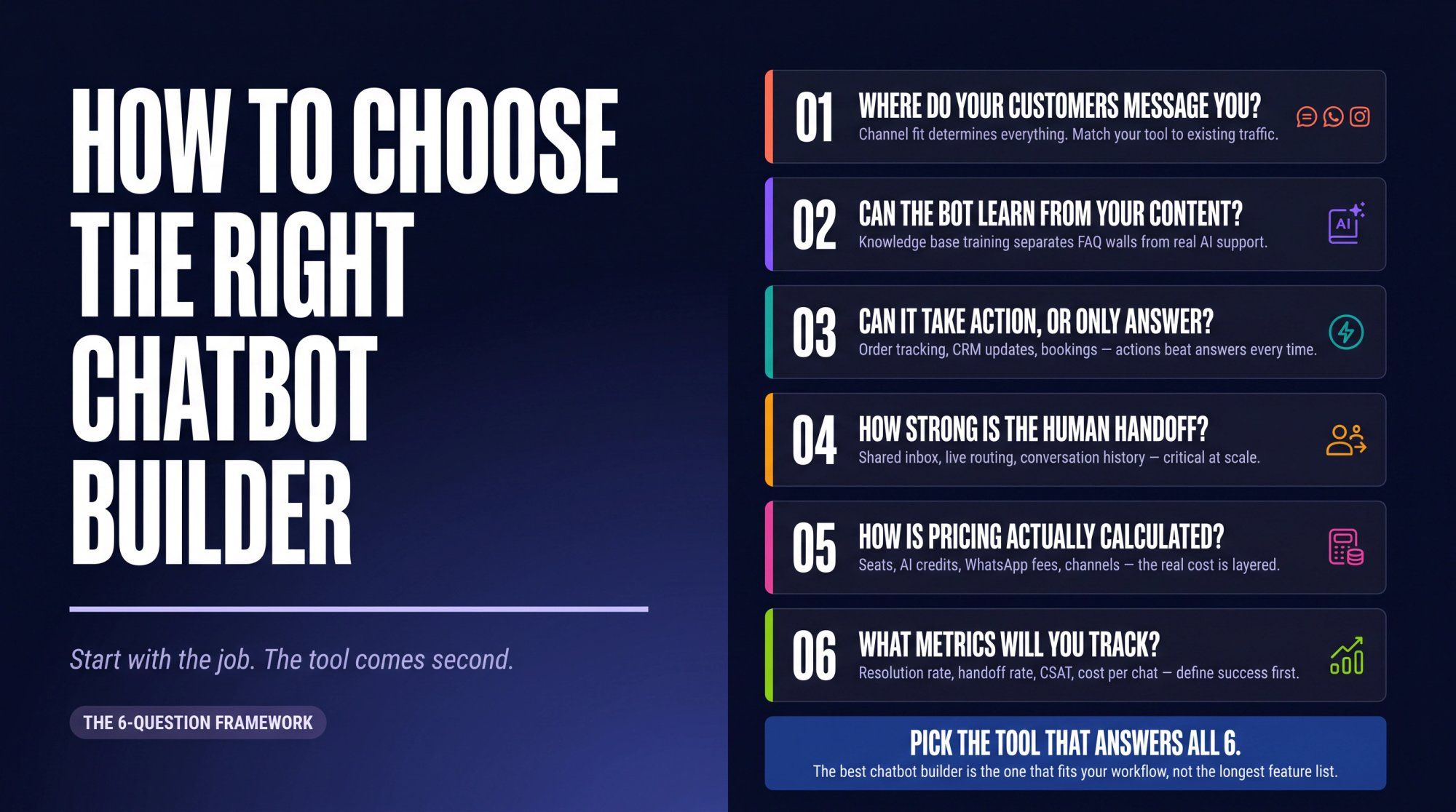
A website-only AI chatbot isn't enough if most leads come from Instagram DMs. A WhatsApp automation tool isn't enough if most support happens on live chat. A helpdesk AI agent isn't enough if you also need cart recovery and marketing broadcasts.
Pick based on the channel where revenue or support volume already exists.
Good channel match examples:
→ D2C brand with Shopify + WhatsApp + Instagram automation: Spur
→ Creator selling through comments and DMs: Manychat
→ SaaS company with help docs and website support: Chatbase, LiveChatAI, or Intercom Fin
→ Sales team living inside a CRM: Kommo
→ Support-heavy team with tickets and SLAs: BoldDesk or Intercom
→ Technical team building custom AI workflows: Botpress
A good chatbot builder should let you train the AI on website pages, help center articles, product pages, PDFs, policies, shipping and return rules, internal docs, and order or status systems. Basic flow builders can automate branches, but they can't answer nuanced customer questions unless you manually script every possible response.
Spur's AI agent lets teams train chatbot agents on your own content using URLs, PDFs, help center content, Notion docs, and other internal content, then connect actions and human handoff on top of that trained foundation.
The biggest difference between a chatbot that feels genuinely useful and one that feels like a wall is whether it can complete tasks. Look for: order tracking, refund status checks, appointment booking, lead scoring and lead capture, CRM updates, cart recovery, discount code generation, escalation routing, webhook/HTTP actions, and custom AI actions.
Spur's Accelerate plan includes webhooks, HTTP request actions, and custom AI actions specifically because we know you want the bot to touch real backend systems rather than just answer FAQs.
AI won't solve everything. Refund exceptions, angry customers, sensitive account issues, payment failures, and complex sales objections still need humans. A serious chatbot builder needs: a shared inbox, live agent assignment, full conversation history, internal notes, tags, ticketing or status tracking, clear AI-to-human escalation, and reporting on why escalations happen.
Spur includes shared inbox across plans, and the AI agent is designed to escalate to humans when the conversation goes beyond what automated answers can handle.
This is where buyers get surprised. Chatbot pricing can depend on seats, contacts, active contacts, messages, AI credits, AI conversations, resolved outcomes, chat volume, flow visitors, WhatsApp charges, SMS charges, extra channels, branding removal, custom actions, integrations, and support tier.
Manychat, for example, published an April 2026 update explaining a shift toward active-contact based pricing, with new plan names like Free, Essential, Pro, Business, and Advanced. Their own pricing page still shows the older Free and Pro from $15/month model, so buyers should verify the exact plan structure during signup. And WhatsApp itself adds complexity: Meta's WhatsApp Business Platform pricing charges for delivered messages at rates based on message category and market. The platform plan price and WhatsApp costs are two separate line items.
Don't buy a chatbot because the demo looks smooth. Measure: first response time, resolution rate, containment rate, handoff rate, lead capture rate, qualified lead rate, cart recovery revenue, cost per resolved conversation, CSAT after AI conversations, hallucination/error rate, top unanswered questions, and human time saved.
Research on 2026 customer experience found that 74% of consumers now expect 24/7 service availability and 88% expect faster responses than a year earlier. That doesn't mean "replace support with AI." It means customers expect instant handling for basic issues and smooth human escalation for everything else. Plan your metrics to match that expectation.
Best for: D2C brands and ecommerce teams, service businesses, real estate, education, travel, and any team that wants AI support plus customer engagement automation across multiple channels.
Spur isn't just a website chatbot. We built it as a multi-channel AI messaging platform that handles both support and marketing in one system. You can use it for website live chat, WhatsApp automation, Instagram DM automation, Facebook Messenger, AI support agents, a shared inbox, broadcasts and drip campaigns, Click-to-WhatsApp Ads, Click-to-Instagram DM Ads, ecommerce flows, abandoned cart recovery, order updates, and custom AI actions.
The core idea: AI handles the repetitive 60-80% of conversations, humans handle the rest, and everything flows through a single shared inbox regardless of which channel the customer used.
| Plan | Price (annual) | What's included |
|---|---|---|
| AI Acquire | $12/mo | Instagram automation, Click-to-DM, shared inbox, 1 AI agent, 100 AI credits, 1 seat, 3 flows |
| AI Start | $31/mo | WhatsApp automation, Shopify integration, Click-to-WhatsApp Ads, 25 flows, 1 AI agent with 2,000 credits, 2 seats |
| AI Accelerate | $127/mo | 2 AI agents, 12,000 credits, 5 seats, 50 flows, webhooks, HTTP requests, custom AI actions |
| AI Max | $399/mo | 3 AI agents, 40,000 credits, 10 seats, unlimited flows, dedicated account manager, bulk WhatsApp pricing |
Spur also offers add-ons for extra AI agents, extra live chat channels, extra Instagram/Facebook channels, extra WhatsApp channels, removing branding, additional seats, and extra AI credits at $12 per 1,000. All plans include unlimited contacts, with no per-contact pricing surprises.
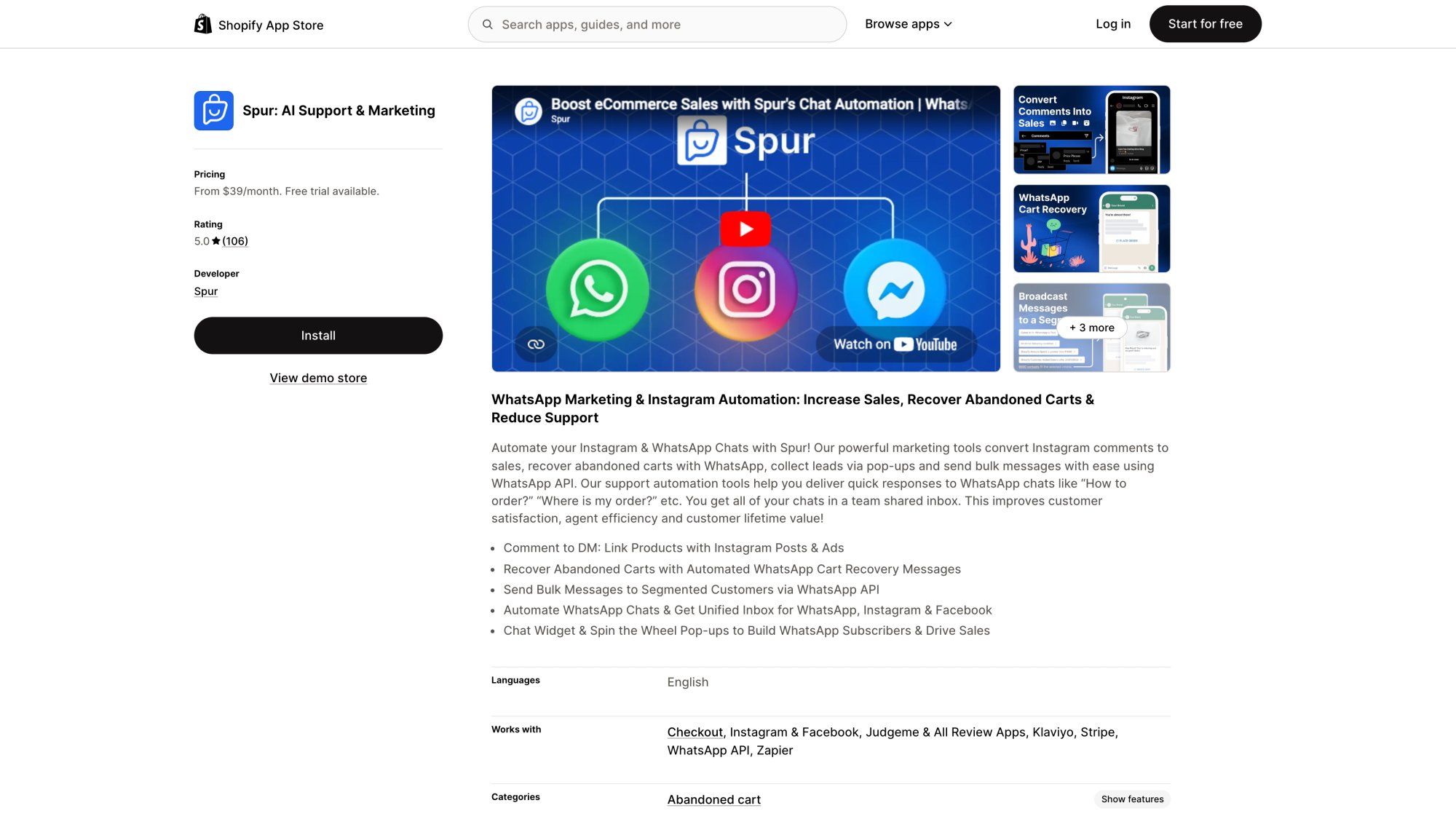
There's a 7-day free trial on the website, and Spur is available on the Shopify App Store with a 4.9/5 rating across 78 reviews.
Spur is also available on the Shopify App Store with a strong rating and over 100 verified merchant reviews — a useful proof point before committing to a trial.
Spur's real advantage isn't any single feature. It's the ability to handle a customer journey that doesn't stay inside one channel.
A customer asks on live chat: "where is my order?" Then messages on WhatsApp: "can I return this?" Then comments on Instagram: "price?" A generic website chatbot handles only one part of that. Spur handles all three: AI support pulling real order data, WhatsApp automation for the return flow, and Instagram DM handling. All of it feeds into the same inbox, with the same conversation history visible to your team.
We also train AI agents on your actual business content: your website, help center, PDFs, policies, and product pages. So the bot isn't guessing at answers. It's working from the same knowledge base your support team uses. Our published case studies show results like Eves & Gray achieving 88.75x ROI from WhatsApp broadcast campaigns, and Muffynn achieving 73x ROI on a targeted broadcast. Those results come from combining AI automation with the right engagement workflows, not from chatbot flows alone.
Spur is also an official Meta Business Partner, with servers in Frankfurt, Germany for EU data compliance if that's a requirement.
Spur is a better fit than a basic chatbot when you need:
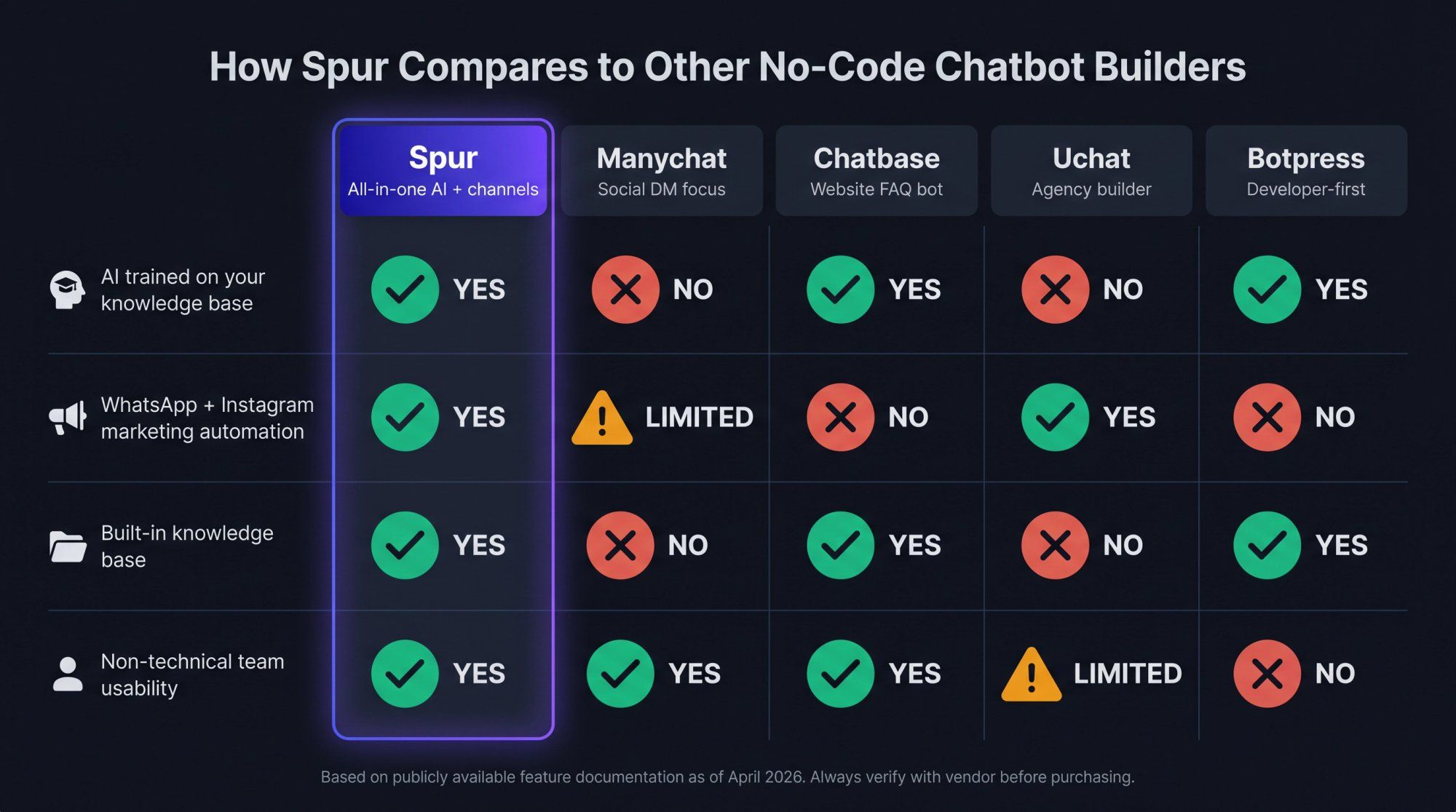
• AI trained on your own knowledge base (unlike Manychat, which doesn't support knowledge base training)
• Marketing automation alongside support automation on WhatsApp and Instagram (unlike Chatbase, which doesn't offer this)
• A built-in knowledge base rather than external integration (unlike Uchat)
• A platform simple enough for your marketing or ops team to own (unlike Botpress, which requires technical operators to get full value)
What makes it practical for non-technical teams: the visual flow builder, pre-built industry templates for D2C, real estate, education, and travel, and the ability to connect Shopify, WooCommerce, Razorpay, Stripe, and other ecommerce tools without a developer.
Spur may be more than you need if you only want a tiny FAQ bot on a single website with no WhatsApp, Instagram, Facebook, or live chat channels in your business. If you already have a heavy enterprise helpdesk and only need an AI add-on, or if you want a developer-first agent framework rather than a business-user platform, other options in this guide may fit better.
Pick Spur if you want a no-code AI chatbot builder that also behaves like a customer engagement platform. It's especially strong for teams that want this combined stack: AI support agent + live chat + WhatsApp + Instagram + shared inbox + ecommerce automation.
See Spur's full pricing or start your 7-day free trial.
Best for: Creators, small businesses, agencies, and brands whose funnel starts with Instagram or Facebook engagement.
Manychat is one of the most popular no-code tools for social messaging. It's especially strong when your workflow starts with engagement: "comment 'guide' and I'll DM you," Instagram story reply automation, Facebook Messenger automation, and WhatsApp follow-ups.
One important note on pricing: Manychat's pricing page currently shows a free plan up to 1,000 contacts and Pro starting at $15/month. But Manychat also published an April 2026 update explaining a shift toward active-contact based pricing, with new plan names. Buyers should check what model applies at signup, because the discrepancy between the pricing page and the announcement blog post means the exact plan you see may differ depending on your region and signup date.
Manychat is strong for:
• Instagram DM automation and comment-to-DM campaigns
• Creator lead magnets and story reply flows
• Facebook Messenger automation
• Social-first marketing workflows
It's less ideal if your primary goal is a deep AI support agent trained on your knowledge base and connected to backend actions across live chat, WhatsApp, and ecommerce.
Pick Manychat if your business is social-first and your main goal is converting Instagram or Facebook engagement into DMs, leads, and purchases. Pick Spur instead if you want social automation plus AI support, live chat, WhatsApp, shared inbox, and ecommerce actions in one place. See how Spur compares to Manychat for a full feature breakdown.
Best for: Teams that want to quickly add an AI chatbot to a website and train it on company content.
Chatbase is one of the cleanest options if your main need is: "I have docs, FAQs, or website pages. I want an AI bot that answers from them."
Chatbase's pricing page lists:
→ Free plan with 50 message credits/month
→ Hobby at $32/month annual
→ Standard at $120/month annual
→ Pro at $400/month annual
Higher tiers add more credits, larger agent storage, help desk features, auto-retraining, API access, and advanced analytics.
Chatbase is good for website AI FAQ bots, SaaS help docs, internal knowledge assistants, and fast setup for teams that don't need complex channel automation. It's not the best fit if you need WhatsApp broadcasts, Instagram comment-to-DM, abandoned cart recovery, social DM automation, or a full shared inbox across multiple messaging channels.
Pick Chatbase if your main job is simple AI answers from a knowledge base. Pick Spur if your chatbot needs to live across live chat, WhatsApp, Instagram, Facebook, and customer engagement workflows.
Best for: Teams that want a visual AI agent builder but are comfortable with more configuration and logic.
Botpress is more powerful than most simple no-code tools. It's built for teams that want to design AI agents, connect knowledge, define workflows, and customize behavior more deeply.
| Plan | Price |
|---|---|
| Pay-as-you-go | Free tier |
| Plus | $79/mo annual + AI spend |
| Team | $445/mo annual + AI spend |
| Managed | From $1,245/mo annual + AI spend |
Botpress is good for custom AI agents, structured logic, knowledge bases, and teams with technical product ownership. "Visual" doesn't always mean "easy for a non-technical business team" though. It can be overkill if all you actually need is live chat AI support, WhatsApp automation, and simple ecommerce support.
Pick Botpress if you want more control and have someone who can own the build seriously. Pick Spur if you want a simpler business-user platform focused on support, WhatsApp, Instagram, and live chat outcomes.
Best for: Small ecommerce teams that want live chat, chatbot flows, and AI support on their website.
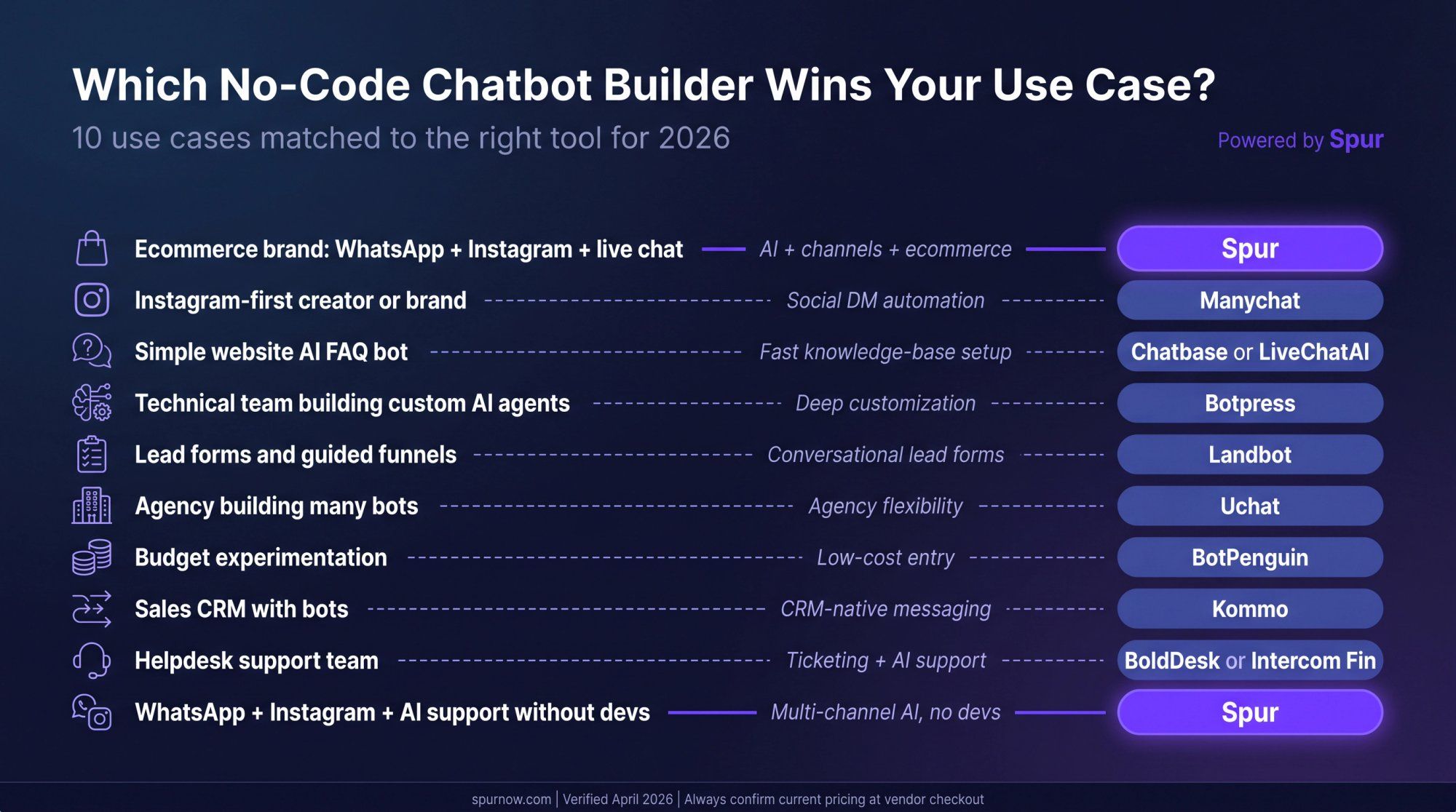
Tidio combines live chat, helpdesk-style features, flow automation, and the Lyro AI agent. Tidio's pricing: Starter from $24.17/month annual, Growth from $49.17/month annual, Plus from $749/month, and a separate Lyro AI add-on from $32.50/month annual. Lyro can answer based on support content, hand off to humans, and the pricing page claims it can solve up to 67% of customer questions.
Tidio is good for ecommerce website live chat, simple support automation, AI answers from support content, and small teams that want a polished widget. It's not the best choice if your main growth channels are WhatsApp and Instagram automation. Also pay close attention to billable conversations, the Lyro AI conversation quota, and flow visitor limits.
Pick Tidio if you want website-first customer support with live chat and AI. Pick Spur if you want live chat plus WhatsApp, Instagram, Facebook, ecommerce automation, and marketing workflows.
Best for: Teams that want beautiful no-code chatbot flows for lead capture, qualification, surveys, and WhatsApp or web forms.
Landbot is at its best when your chatbot isn't really a chatbot. It's an interactive form with a conversational interface. Lead qualification, quote requests, booking flows, surveys, onboarding, WhatsApp-based qualification. If structure and visual flow are your priority, Landbot delivers.
Landbot pricing: Web Starter at €40/month or €32/month annual (500 chats/month, 100 AI chats, 2 seats), and WhatsApp Starter at €80/month. Check AI and extra chat pricing carefully since usage can add up quickly.
Landbot is less ideal when your goal is a full AI support and customer engagement system with shared inbox, ecommerce actions, broadcasts, Instagram automation, and support workflows.
Pick Landbot if your chatbot is mainly a lead form or guided funnel. Pick Spur if you want lead capture plus ongoing support, WhatsApp/Instagram automation, live chat, and ecommerce engagement. See how Spur compares to Landbot for a side-by-side breakdown.
Best for: Agencies, automation consultants, and teams that want many channels and flexible bot building.
Uchat offers a no-code visual builder with multi-channel automation. Uchat pricing: free plan with 1 bot and 200 bot users, Business at $15/month with 1 bot and 1,000 bot users, and Partner at $199/month.
Uchat can do a lot and gives agencies real flexibility. The tradeoff is complexity: teams that want a more packaged support and marketing workflow may prefer something more opinionated. Also worth noting: Uchat doesn't have a built-in knowledge base for AI training the way Spur does.
Pick Uchat if you want a flexible builder and are comfortable configuring more. Pick Spur if you want a simpler platform with built-in AI knowledge base, shared inbox, WhatsApp, Instagram, and ecommerce workflows.
Best for: Websites that need an AI support bot trained on content, with live chat fallback.
LiveChatAI positions itself around AI agents that resolve support questions and can be trained on business content. Pricing: Basic at $39/month or $32/month annual, Pro at $89/month, Advanced at $189/month, and Expert at $389/month, with different message credit, chatbot, character, and seat limits. Higher plans can use your own OpenAI API key for unlimited messaging depending on setup.
Good for:
→ Website AI chat with quick setup
→ Knowledge-base powered support
→ Live chat handoff built in
→ Clean UI without complex configuration
Not the best fit if your primary goal is WhatsApp broadcasts, Instagram DM automation, cart recovery, or multi-channel customer engagement.
Pick LiveChatAI for a fast website support bot. Pick Spur if you need website live chat plus WhatsApp, Instagram, Facebook, and customer engagement automations.
Best for: Small businesses looking for a low-cost chatbot across website, WhatsApp, Instagram, Facebook, Telegram, and other channels.
BotPenguin's pricing page lists a free "Baby" plan with 1,000 messages and 1 chatbot. Paid sections show a "Little" plan around $29/month (3,000 messages, 5 chatbots, 5 agents) and a "King" plan around $99/month (12,000 messages, unlimited chatbots and AI agents).
Important: The FAQ on the same page references a lowest paid plan at $15, so verify the final checkout pricing and billing toggle carefully before buying.
Good for low-cost experimentation, many channel options, and basic automation. The pricing and limits need careful reading: watch for message limits, AI message limits, human agent limits, and plan FAQ mismatches.
Pick BotPenguin if budget is the main constraint and you're willing to inspect limits closely. Pick Spur if you want a more focused AI support and customer engagement platform for live chat, WhatsApp, Instagram, and ecommerce flows.
Best for: Sales teams that want messaging, CRM pipelines, broadcasts, and no-code bots inside one system.
Kommo is a sales CRM with messaging and automation built in, not a standalone chatbot platform. That distinction matters. Kommo pricing: Base at $15/user/month billed semi-annually, Advanced at $25/user/month (includes pipeline automation, broadcasting, no-code bots, and AI-related features), and Pro at $45/user/month. A Kommo support article from February 2026 notes that new rates took effect on 3 March 2026 for new subscriptions, with pricing varying by region.
Good for sales teams that want pipeline management, lead assignment, broadcasts, and messaging tied to deals. If you don't want a CRM, Kommo may feel heavy because the chatbot builder is part of a sales operating system, not a standalone product.
Pick Kommo if your chatbot should live inside your sales CRM. Pick Spur if your main need is multi-channel AI support and customer engagement across live chat, WhatsApp, Instagram, Facebook, and ecommerce. See how Spur compares to Kommo for a feature-by-feature comparison.
Best for: Support teams that want ticketing, live chat, knowledge base, omnichannel support, and AI assistance.
BoldDesk is more helpdesk than chatbot builder, but it belongs in this list because many teams searching for no-code chatbots actually need structured support operations. BoldDesk pricing: AI-first support bundles starting at $99/month annual for 5 agents, with higher tiers for 10, 25, 50, 75, and 100 agents, plus an AI agent add-on at $20 per 1,000 AI credits and AI Copilot at $20/agent/month.
Good for helpdesk operations, ticketing, live chat, and AI assistance for support agents. Not the best choice if your main need is Instagram comment-to-DM, WhatsApp marketing campaigns, abandoned cart recovery, or social DM funnels.
Pick BoldDesk if you are support-first and need a helpdesk system. Pick Spur if you want AI support plus WhatsApp/Instagram/live chat marketing and engagement automation.
Best for: Companies that already use Intercom's support platform and want AI resolution layered on top.
Intercom's Fin is one of the strongest AI support agents in the market, but it's not the cheapest path for small teams.
Intercom Fin is billed at $0.99 per outcome, with additional possible usage charges for WhatsApp, SMS, email campaigns, phone, and other products. Pay-per-outcome can be fair if it replaces expensive human work. But if many conversations resolve through AI, the bill scales quickly.
Fin is good for mature support teams, SaaS help centers, AI resolution workflows, and enterprise-grade support operations.
Pick Intercom Fin if you want a premium support AI agent and already operate like a mature support team. Pick Spur if you want a more affordable, multi-channel AI support and engagement platform across live chat, WhatsApp, Instagram, and Facebook.
Knowing which tool fits which job is step one. Step two is understanding the full cost picture, because the subscription price is usually only part of what you'll actually pay.
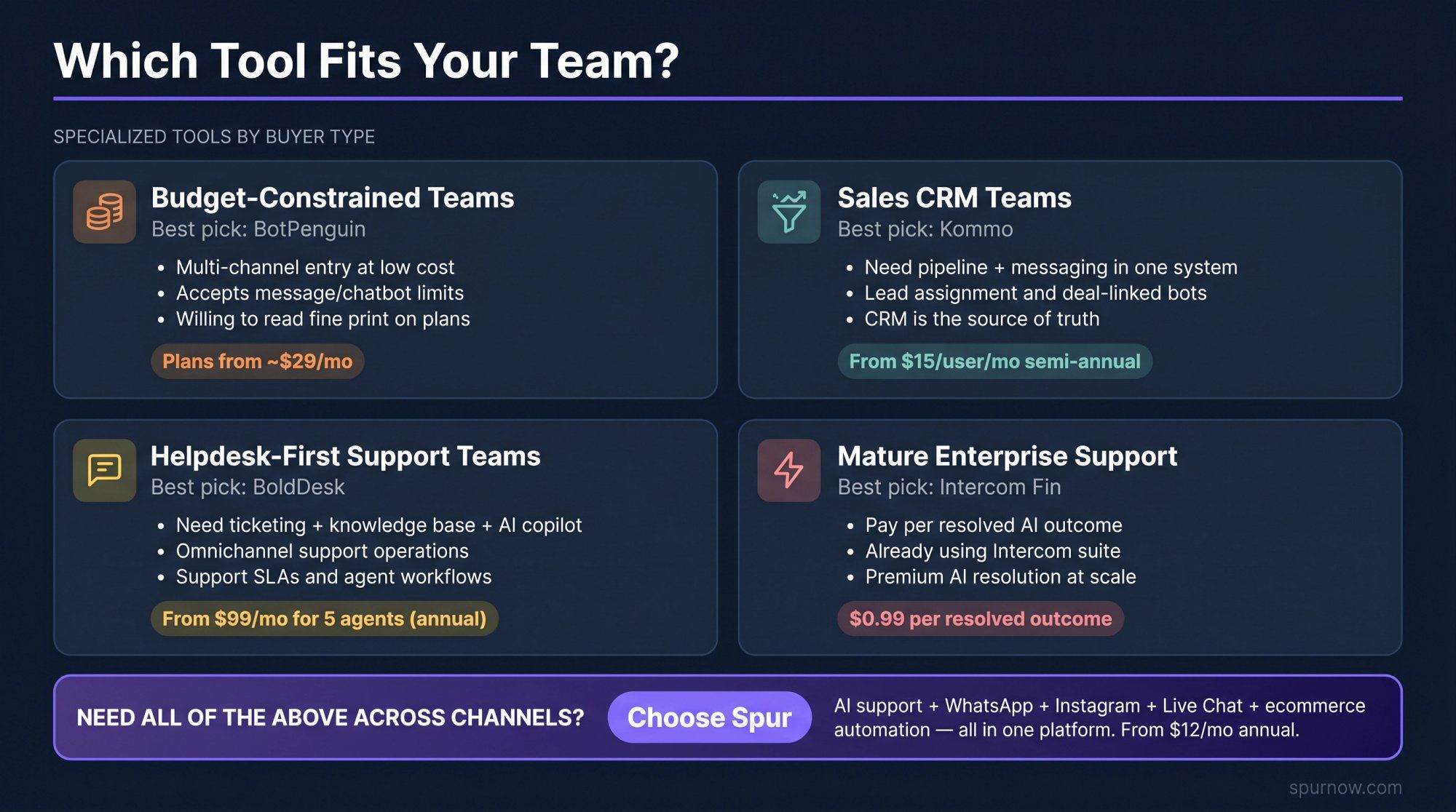
| Use case | Best pick | Why |
|---|---|---|
| Ecommerce brand using WhatsApp + Instagram + live chat | Spur | Combines AI support, engagement automation, shared inbox, ecommerce flows, and custom actions |
| Instagram-first creator or brand | Manychat | Strongest social DM and comment-to-DM automation |
| Simple website AI FAQ bot | Chatbase or LiveChatAI | Fast setup for knowledge-base answers |
| Technical team building custom AI agents | Botpress | Deeper workflow and AI agent customization |
| Lead forms and guided funnels | Landbot | Polished conversational forms and structured flows |
| Agency building many bots | Uchat | Broad omnichannel builder and agency flexibility |
| Budget experimentation | BotPenguin | Low-cost entry and broad channel coverage |
| Sales CRM with bots | Kommo | Pipelines, messaging, broadcasts, and automation |
| Helpdesk support team | BoldDesk or Intercom Fin | Support operations, tickets, knowledge base, AI assistance |
| WhatsApp + Instagram + AI support without devs | Spur | Built around multi-channel customer conversations, not just website chat |
The table shows which tool wins each scenario. But before you commit, the real cost is more nuanced than the subscription line item suggests.
The listed subscription price is only one part of what you'll actually pay. Use this formula:
Real chatbot cost = platform plan + AI usage + seats + channel fees + add-ons + maintenance time
This is the base monthly or annual subscription:
• Spur AI Start: $31/mo annual
• Manychat Pro: official page still shows from $15/mo, but 2026 pricing model changes may apply
• Chatbase Hobby: $32/mo annual
• Botpress Plus: $79/mo annual + AI spend
• Tidio Starter: $24.17/mo annual
• Landbot Web Starter: €40/mo or €32/mo annual
AI usage may be called message credits, AI credits, AI conversations, outcomes, or resolutions depending on the platform.
Chatbase, for example, sells message credits with auto-recharge at $40 per 1,000 message credits. Intercom Fin charges by outcome at $0.99 per resolved conversation. Spur sells additional AI credits at $12 per 1,000, which is lower than Chatbase's auto-recharge rate.
Some tools are cheap until you add users. Check whether your plan includes support agents, inbox users, admins, sales reps, and live chat agents. Spur's AI Start includes 2 seats; Accelerate includes 5; Max includes 10, with extra users available as add-ons.
WhatsApp isn't "free" just because the chatbot platform supports it. Meta's WhatsApp Business Platform pricing charges for delivered messages at rates based on market and category. This matters most for broadcasts, abandoned cart campaigns, order updates, marketing messages, and high-volume support.
For reference: Spur publishes a rate card by country and category and collects WhatsApp charges through a Spur wallet, so you don't pay Meta directly. Rates vary by country and message type. For an Indian brand sending 2,000 marketing broadcasts monthly, the WhatsApp cost alone would be around $20-21 on top of the platform subscription.
Some platforms charge separately for additional WhatsApp numbers, live chat widgets, Instagram accounts, Facebook pages, agents, or branded versus unbranded widgets. Spur lists add-ons for extra live chat channels, Instagram/Facebook channels, WhatsApp channels, removing branding, users, AI agents, and AI credits.
No-code doesn't mean no work. Someone still needs to clean the knowledge base, write good fallback instructions, review bad answers, update policies, monitor unresolved questions, tune automations, check analytics, and improve handoff rules. The best teams treat chatbot launch as a system to operate, not a one-time setup. Our chatbot best practices guide covers the ongoing maintenance framework that keeps AI answers accurate over time.
This is the fastest sensible way to get live without developers.
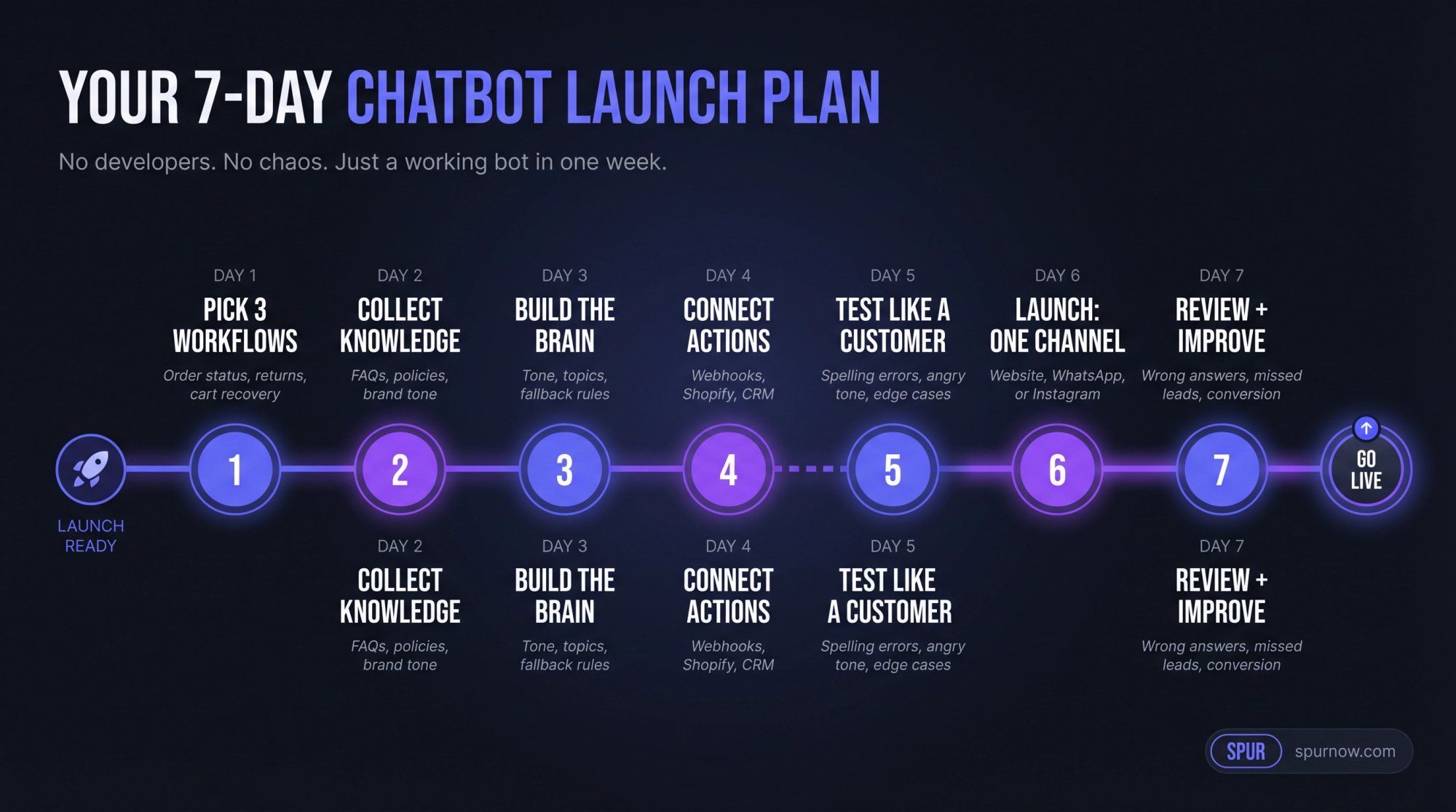
Don't automate everything at once. Start with the highest-volume, lowest-risk chatbot use cases: order status, return policy, shipping timelines, product recommendation, pricing questions, appointment booking, lead qualification, abandoned cart follow-up, or "talk to human."
Avoid on day one:
• Complicated refunds
• Legal or medical advice
• Angry escalation handling
• Edge-case account issues
• Anything where a wrong answer creates serious damage
Prepare your FAQ page, shipping policy, return policy, refund policy, product pages, pricing page, help center, brand tone examples, escalation rules, and any "never say this" instructions.
A chatbot trained on messy or outdated content gives messy answers. Garbage in, garbage out. Invest in clean, current content before anything else.
Configure your visual flow builder settings: business name, tone, allowed topics, disallowed topics, fallback behavior, handoff rules, source priority, answer length, when to ask clarifying questions, and when to stop and escalate.
A good fallback example: "I'm not fully sure about that, so I'll connect you with a team member." That's better than a hallucinated answer.
This is where the chatbot becomes genuinely useful rather than just helpful. Connect actions like: order status check, support ticket creation, CRM lead update, customer tagging, phone and email collection, meeting booking, coupon sending, abandoned cart triggering, and routing to sales or support.
For Spur users, this is where webhooks, HTTP request actions, custom AI actions, Shopify ecommerce integrations, and shared inbox routing become valuable. The Accelerate plan supports all of these without needing developer involvement.
Don't only test the happy path. Your customers definitely won't.
Test for:
• Spelling mistakes and angry tone
• Refund demands without order numbers
• Multiple questions in one message
• "Ignore previous instructions" attempts
• Competitor questions and pricing negotiations
• Unsupported languages and private data requests
• Vague questions like "where is it?"
Start with one channel: website live chat for support-first teams who need to automate customer support, WhatsApp for D2C/ecommerce teams, or Instagram DM for creator/social-first teams. Measure before expanding to other channels.
Look at:
• Top questions asked and wrong answers flagged
• Unresolved chats and human handoffs
• Missed lead captures and abandoned conversations
• Conversion rate and support time saved
Then update the knowledge base and flows. The chatbot best practices framework gives you a systematic review checklist to run every week.
The first version won't be perfect. That's fine. The danger isn't imperfection. It's launching and never improving it.
Use this simple 100-point scorecard before signing up for any tool. For context on how different tools perform across these criteria, our guide to no-code automation tools covers the selection framework in more detail.
| Category | Weight | What to check |
|---|---|---|
| Channel fit | 20 | Does it support your actual customer channels? |
| AI answer quality | 20 | Can it use your website, docs, policies, and product data accurately? |
| Actionability | 15 | Can it check orders, update CRM, book meetings, trigger flows? |
| Human handoff | 15 | Does it include inbox, routing, notes, assignments, and conversation history? |
| Pricing predictability | 10 | Can you estimate monthly cost before scaling? |
| Analytics | 10 | Does it show resolution rate, handoff rate, missed questions, conversions? |
| Admin and security | 10 | Roles, permissions, logs, compliance, and data controls |
Remember: A tool with a 90/100 score for one business might score 45/100 for yours. The best chatbot builder is the one that matches your channel, workflow, and team maturity.
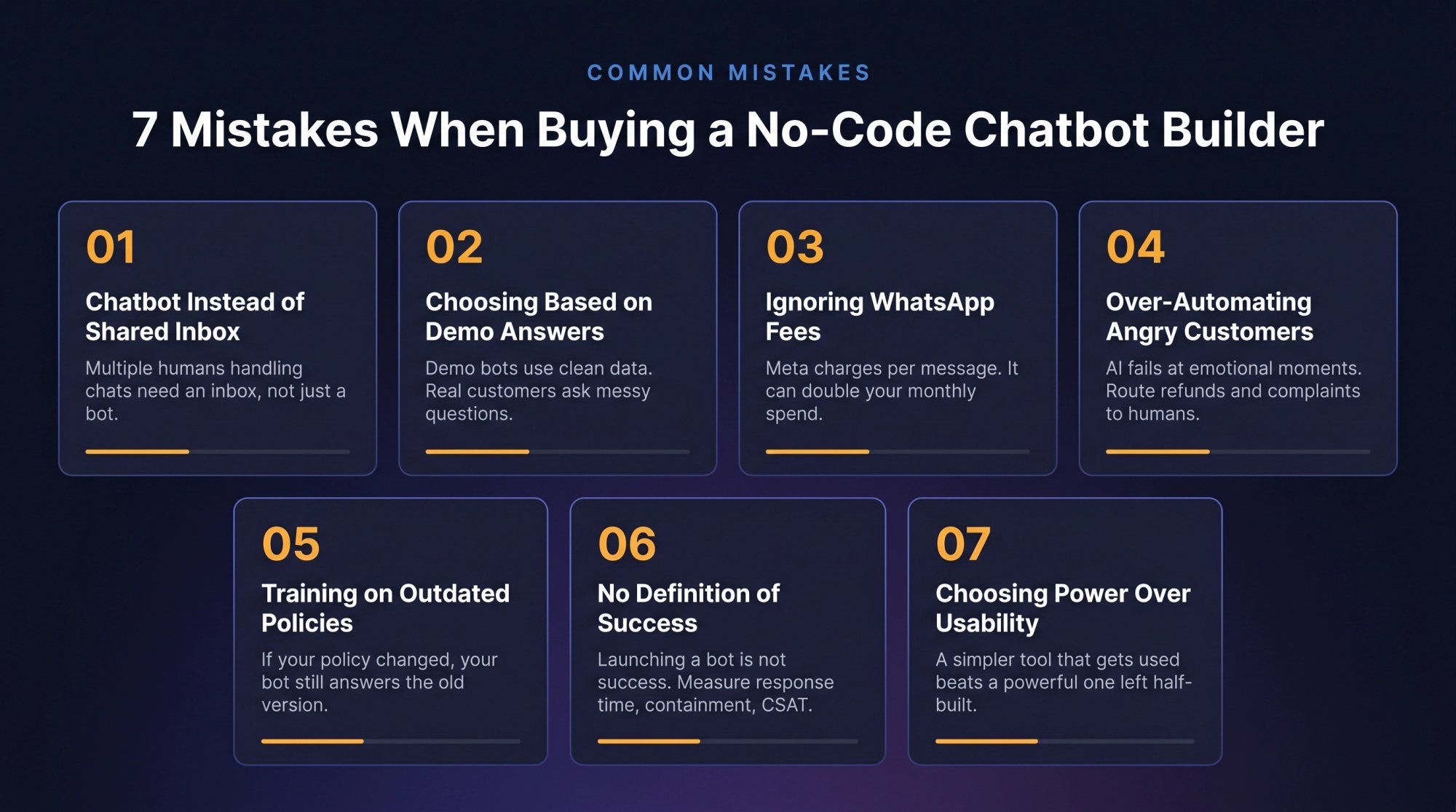
If multiple humans need to handle conversations, you need a shared inbox, not just a bot. Without proper handoff, the bot becomes a wall between your customer and your team. Angry customers hit that wall harder than anyone.
Demo bots are trained on clean, curated data. Your real customers will ask messy questions with typos, emotion, and missing context. Test with your actual tickets, DM screenshots, WhatsApp chats, and support logs before deciding.
WhatsApp automation platforms often charge a platform fee, but WhatsApp itself has message-based charges through Meta's business platform pricing. If you plan to send broadcasts or cart recovery messages, model the WhatsApp cost before launching. It can easily double your effective monthly spend.
AI is good at repetitive, predictable tasks. It's not always good at emotionally sensitive moments. Send angry, high-risk, refund-heavy, or account-specific cases to human agents quickly. A bot that frustrates an already-frustrated customer costs more than the support time it was supposed to save.
If your return policy changed last month but your bot learned the old version, customers get wrong answers. Assign one owner for knowledge-base hygiene and make updating it part of regular operations, not an afterthought.
"We launched a bot" is not success. Better metrics:
→ Reduced first response time
→ 30% fewer repetitive tickets
→ Higher lead capture rate
→ More recovered carts
→ Lower cost per resolved chat
→ Faster sales qualification
→ Improved CSAT for simple questions
Without clear metrics, you can't tell if the chatbot is working.
Power is useless if your team never actually uses the tool. For many businesses, a simpler platform that gets launched and iterated beats a powerful one that sits half-built. Explore no-code automation tools and pick the one your team will actually own and improve.
Spur is the strongest fit if your business wants AI agents trained on your knowledge base, website live chat, WhatsApp automation, Instagram DM automation, Facebook Messenger, a shared inbox, human handoff, ecommerce workflows, abandoned cart recovery, broadcasts and drip campaigns, and custom actions.
This is the best fit for D2C brands and service businesses that don't want separate tools for website chat, WhatsApp, Instagram, support inbox, and marketing automation. Start with the 7-day free trial and see pricing here.
Manychat is the right call for social-first automation, especially comment-to-DM and creator-style funnels. Verify the current pricing model because Manychat announced active-contact based pricing changes in April 2026.
If your only goal is "answer questions from my docs on my website," keep it simple. Both are strong for website AI support.
Botpress works best when someone on your team can think through workflows, logic, integrations, and testing at a technical level.
Tidio is a good fit for small ecommerce teams that want live chat, flows, and AI support on the website with clean, polished UX.
Landbot shines when the chatbot is really a guided form: lead capture, qualification, quote requests, surveys, or onboarding.
Kommo is best when pipeline management is the center of the workflow and the chatbot should live inside the sales CRM.
For ticketing, SLAs, helpdesk workflows, and mature support operations, BoldDesk and Intercom Fin are the more natural fits.
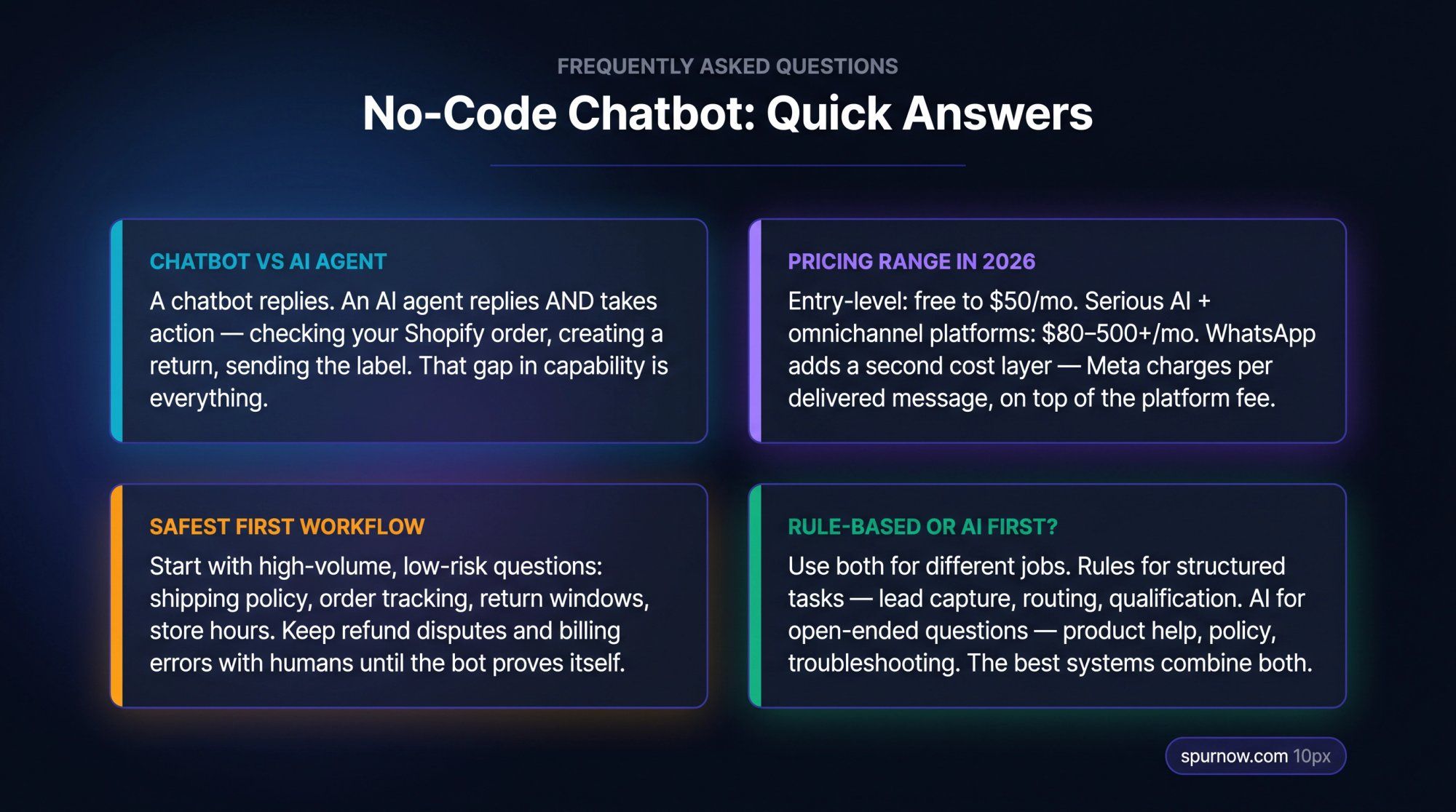
There isn't a single best. The right tool depends on where your customers talk to you. Spur is the strongest fit for AI support combined with WhatsApp, Instagram, live chat, and ecommerce automation. Manychat is better for social DM automation. Chatbase is better for simple website FAQ bots. Botpress gives the most technical flexibility. For most D2C brands and service businesses handling multiple channels, Spur covers the most ground in one place.
Yes. Most modern chatbot builders let you build with visual flows, templates, knowledge-base uploads, and no-code integrations. But "no devs required" doesn't mean "no owner required." Someone still needs to own the content, workflows, testing, and ongoing improvement. The builder removes the technical barrier. It doesn't remove the operational commitment.
A chatbot replies. An AI agent replies and takes action. A chatbot says "your return window is 14 days." An AI agent says "your order is eligible for return. I've created the return request and sent the label to your email." The second one is significantly more valuable because it completes work rather than just providing information. For a full breakdown, see the difference between human agents and AI chatbots and how to deploy each effectively.
Entry-level plans range from free to around $15-50/month for basic capabilities. More serious AI support, omnichannel, or business automation platforms typically run $80-500+/month before usage charges. Enterprise support tools can cost significantly more, especially when priced by seat, AI outcome, or message volume. Always calculate the full cost: platform plan + AI usage + seats + WhatsApp fees + add-ons.
Check for:
• AI credits and how they're consumed
• Message credit limits and active contact counts
• Seats per plan and WhatsApp per-message fees from Meta
• SMS fees and extra channel costs
• Branding removal fees and integration costs
• Usage overage pricing and support tier differences
• How long setup and maintenance will actually take
Yes, significantly. Website chat is typically priced by plan, seat, conversation, or AI usage. WhatsApp has two cost layers: the platform fee from your chatbot provider, and Meta's own WhatsApp Business Platform pricing, which charges per delivered message based on your market and message category. A broadcast campaign to 5,000 contacts can cost $50-150 in WhatsApp fees alone, on top of the platform subscription.
Start with both for different jobs. Use rule-based flows for structured tasks: collecting phone numbers, asking budget, choosing product categories, routing to sales or support, and qualifying leads. Use AI for open-ended questions: product questions, policy questions, troubleshooting, order-related support, and "which option is best for me?" For guidance on the right chatbot use cases for each approach, the breakdown by workflow type is useful. The strongest systems combine both: rules for structure, AI for nuance.
Start with low-risk, high-volume questions: shipping policy, return policy, order tracking, product availability, store hours, pricing questions, lead capture, and appointment booking. Avoid automating sensitive edge cases on day one. Refund disputes, billing errors, account security issues, and legal or medical questions should stay with humans until you've proven the bot handles normal conversations reliably.
A basic website FAQ bot can be live in a day if your content is ready. A more complete system with AI training, WhatsApp integration, ecommerce actions, and shared inbox routing typically takes 5-10 days to set up properly and 2-4 weeks to tune after launch. The 7-day plan in this guide is a realistic pace for a first deployment. Our chatbot best practices guide covers the post-launch tuning framework.
For ecommerce chatbot deployments handling Shopify orders, WhatsApp broadcasts, Instagram automation, and live chat support, Spur is the most complete option. It connects to Shopify and WooCommerce directly, handles abandoned cart recovery over WhatsApp, lets AI agents pull order status and update records, and routes complex issues to a shared inbox. For website-only ecommerce support without WhatsApp or Instagram, Tidio is a strong alternative.
Spur offers a 7-day free trial on all plans. After the trial, paid plans start at $12/month (annual) for the AI Acquire plan, which includes Instagram automation, click-to-DM, shared inbox, 1 AI agent, 100 AI credits, 1 seat, and 3 flows. There's no long-term free tier, but the trial gives you enough time to connect your channels and test real conversations.
A few things that set Spur apart:
• AI agents trained on your own knowledge base (unlike Manychat)
• Marketing automation on Instagram alongside support automation (unlike Chatbase)
• A built-in knowledge base without needing external configuration (unlike Uchat)
• A user-friendly platform that non-technical teams can fully own without developer support (unlike Botpress)
All plans include unlimited contacts, which removes a common per-contact pricing surprise.
The best no-code chatbot builder isn't the one with the longest feature list.
It's the one that matches where your customers already talk to you.
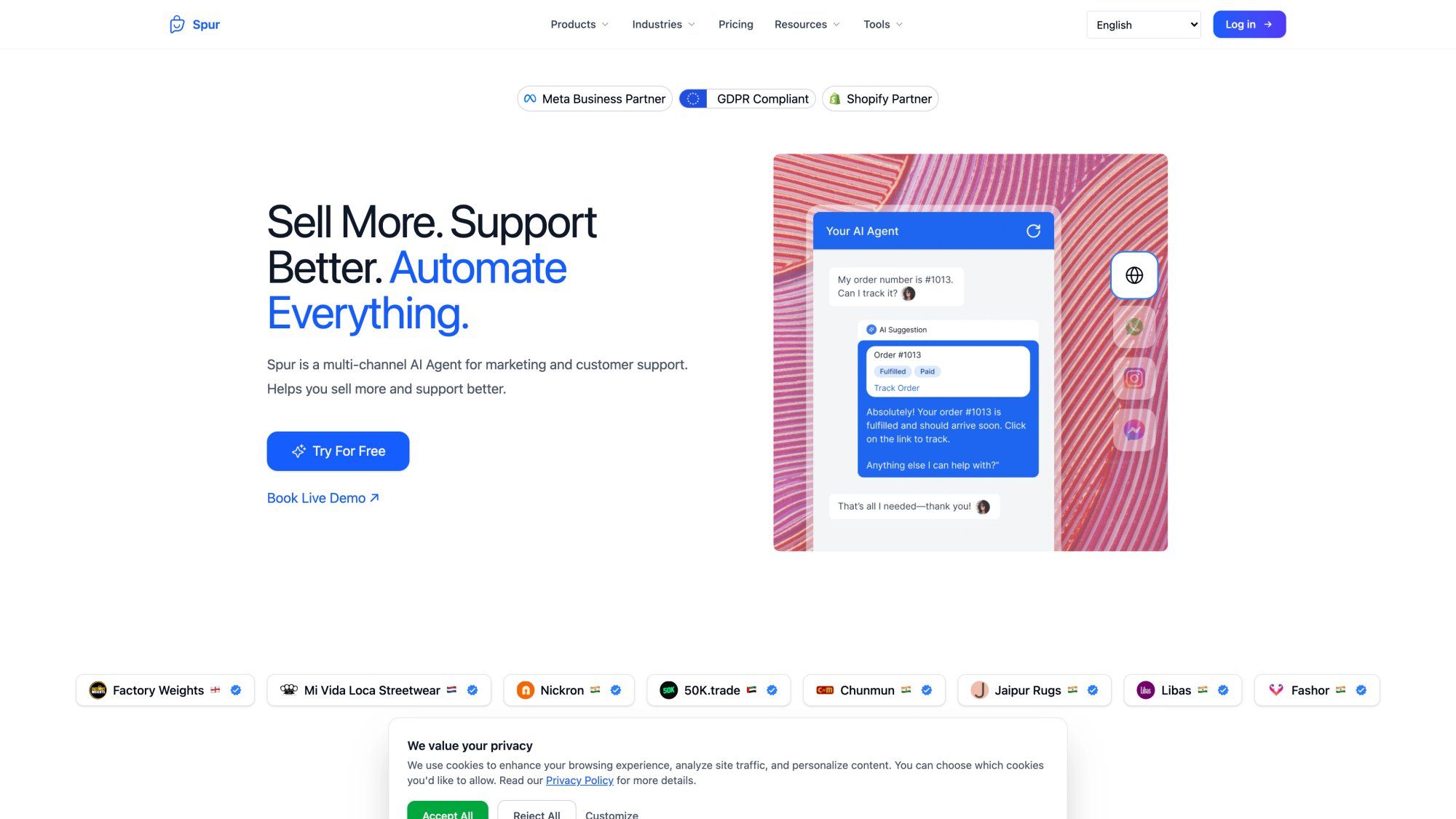
Spur's homepage captures what this platform is built for: multi-channel AI support and marketing automation in one place, with Meta Business Partner, GDPR Compliant, and Shopify Partner trust badges.
For a website-only AI FAQ bot, Chatbase and LiveChatAI are clean and fast. For social DM automation, Manychat is strong. For custom AI agent building, Botpress gives more control. For sales CRM workflows, Kommo makes sense. For support-heavy teams, BoldDesk and Intercom Fin are serious options.
But if you want one practical no-code platform for AI support + live chat + WhatsApp + Instagram + Facebook + shared inbox + ecommerce and customer engagement automation, Spur is the most natural fit.
Start your 7-day free trial or explore Spur's pricing to see which plan fits your team.