Key takeaways
Click to WhatsApp ads benchmarks from Meta's own A/B tests: 12% to 79% lower cost per result, message rates by country, and how to build your own baseline.
Ask an AI about this article
There are no independent public click to WhatsApp ads benchmarks for CTR or cost per conversation, so the most reliable numbers are Meta's own published tests: brands that switched from optimising for conversations or messages to optimising for leads or purchases cut their cost per result by 12% to 79%. Spur records the ad behind every WhatsApp chat that starts from one, so it can send those lead and purchase results back to Meta.
Meta does not publish industry benchmarks for these ads, and the vendor figures in circulation disagree widely.
This guide collects every click to WhatsApp (CTWA) ads benchmark we could verify on a primary source, explains why the rest do not hold up, and shows how to build a baseline from your own account that you can actually trust.
Every figure here was checked against Meta's pricing documentation, Meta's Business Help Centre and the WhatsApp Business success stories library between 29 September and 1 October 2026. Most of Meta's results come from A/B tests in Ads Manager, and where Meta marks a result as self-reported, we say so.
Click to WhatsApp ads benchmarks at a glance
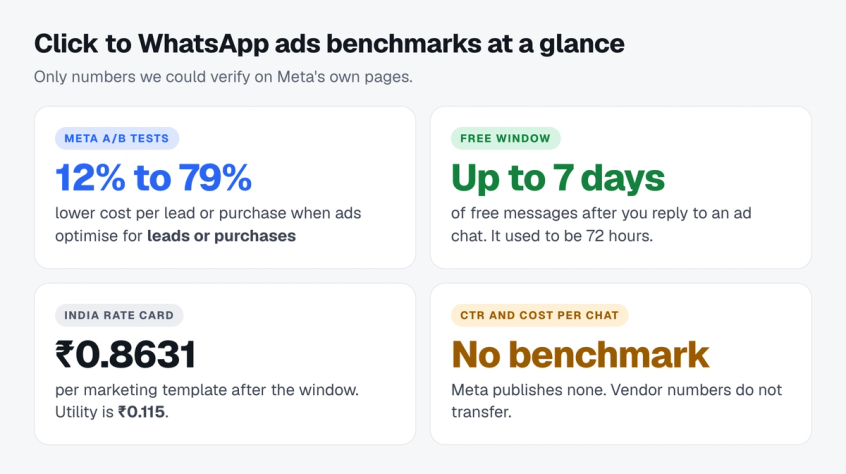
If you only have a minute, these are the numbers that survived verification.
- Optimisation goal is the biggest lever. In Meta's published A/B tests, moving from conversation or message optimisation to lead or purchase optimisation cut cost per lead or cost per purchase by 12% to 79%.
- Cheaper chats are not the goal. In our own House Hunt case study, cost per chat went up while cost per qualified lead fell by a third.
- The free window just got longer. Meta's pricing documentation, updated 28 September 2026, says the free entry point window opened by an ad "may remain open for up to 7 days", up from 72 hours.
- Messages after the window are cheap in India. A marketing message to an Indian number costs 0.8631 INR on Meta's rate card, and a utility message 0.115 INR.
- Nobody publishes a trustworthy CTR benchmark. Treat any single "average CTR" for click to WhatsApp ads as marketing, not data.
New to the format itself? Start with our full click to WhatsApp ads conversion guide, then come back for the numbers.
Why click to WhatsApp ads need their own benchmarks
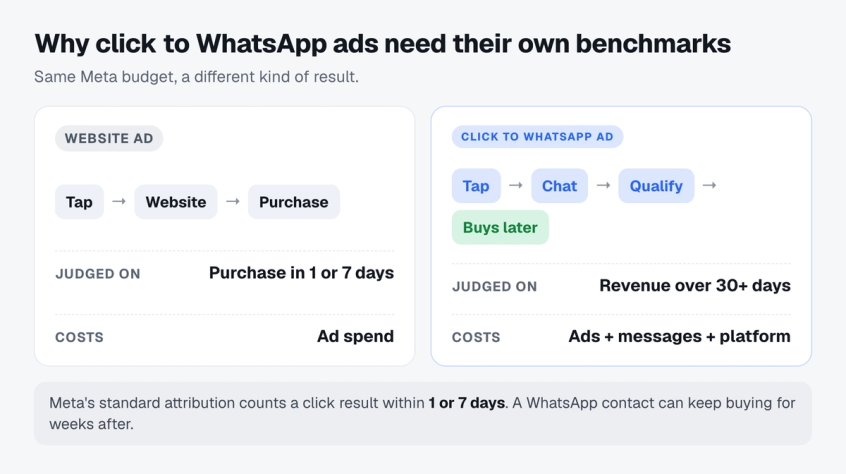
Click to WhatsApp ads come out of the same Meta budget as website ads, but they should not share a benchmark with them. Three things are different.
The result happens earlier. A tap on a click to WhatsApp ad opens a chat, not a checkout. Meta lets you optimise these ads for conversations, leads or purchases, according to its guide to ads that click to WhatsApp, and a conversation is a much earlier step than a purchase. Conversion rates on that step will look high next to a website campaign optimised for sales.
The sale can land after the attribution window. Meta's standard attribution settings count events within 1 or 7 days of a link click. A WhatsApp contact can keep buying weeks later through broadcasts, reminders and repeat orders, so judge these ads on revenue over 30 days or more, not only on ROAS inside Meta's attribution window.
There are extra costs after the click. Templates you send that contact after the free window are billed per delivered message, a cost a website ad does not carry. The full cost stack is covered further down.
Why published click to WhatsApp ads benchmarks disagree
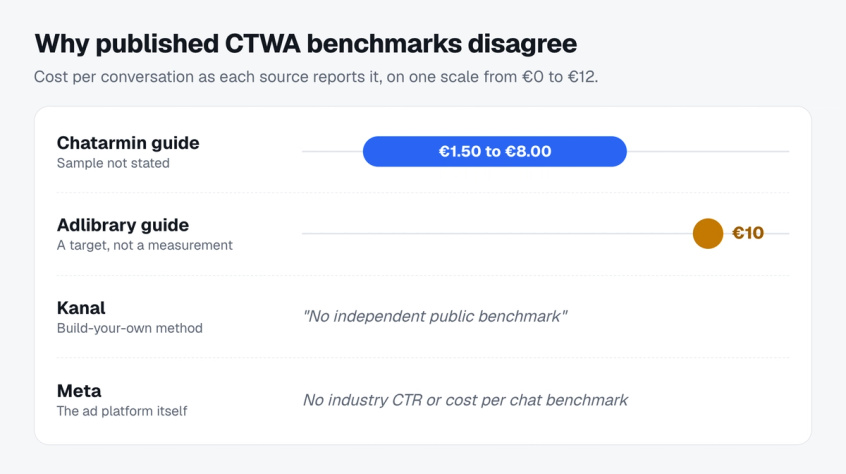
Most published click to WhatsApp ads benchmarks come from software vendors, and each one measures a different sample in a different market.
Chatarmin's KPI guide gives a cost per conversation benchmark of €1.50 to €8.00 depending on industry, without saying what sample it comes from. Adlibrary's setup guide works backwards to a €10 cost per conversation target. Kanal's benchmarks page says there is no independent public benchmark by industry, region or placement, and teaches readers to build their own.
None of these are wrong for the brands they came from. They just do not transfer. A cost per conversation in Germany tells an Indian D2C brand almost nothing, because ad auctions, creative and buying intent differ by country and category.
There is also a definition problem. Vendors rarely say whether they count every chat, only chats that got a reply, or Meta's "messaging conversations started", which has its own rules (covered below). Two brands with identical results can report very different numbers.
Meta itself publishes no industry benchmark for these ads. The closest it offers is an experiment across 734,000 businesses on its click to message ads page: ads with more than one message destination selected got a 9.5% lower median cost per message than ads sending people to WhatsApp only, over three weeks in the second half of 2024.
What Meta also publishes is something more useful: before and after tests from named businesses, with the exact change they made.
The five metrics that decide a click to WhatsApp campaign
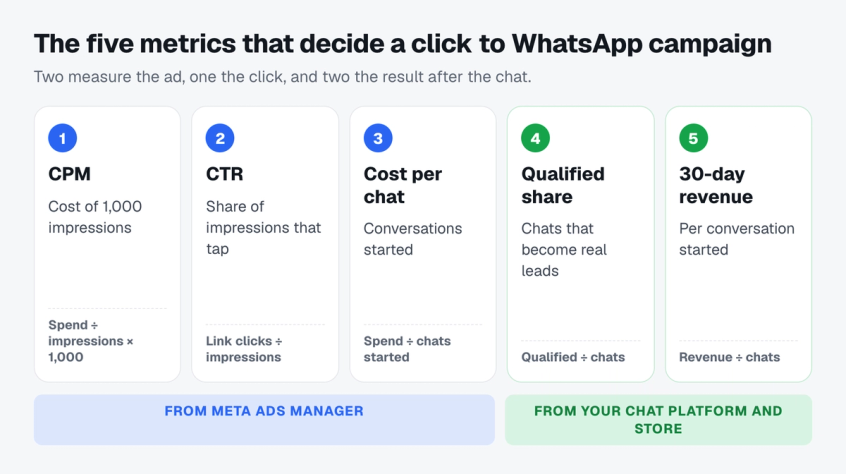
A benchmark is only as good as the metric under it. Five numbers decide whether a click to WhatsApp campaign is healthy. The first three come from Ads Manager, the last two from your chat platform and your store.
- CPM. The average cost of 1,000 impressions: amount spent divided by impressions, times 1,000 (Meta Help Centre). Compare it only with other click to WhatsApp campaigns in the same country.
- CTR (link click-through rate). Link clicks divided by impressions (Meta Help Centre). It tells you whether the ad earns the tap.
- Cost per messaging conversation started. Total amount spent divided by messaging conversations started, as defined on Meta's metrics page for ads that click to Messenger, which uses the same metric. This is the cleanest top-of-funnel number for these ads.
- Qualified share of conversations. Qualified leads divided by conversations started. It tells you whether the chat after the click works, and Ads Manager cannot see it.
- 30-day revenue per conversation. Revenue from the people who started a conversation, over the next 30 days, divided by conversations started. It is the closest number to a profit and loss line; apply your margin to get profit.
Frequency, hook rate and video view rate are creative diagnostics. Look at them when one of these five breaks.
What Meta counts as a messaging conversation started
Meta counts people who message you for the first time, or after at least seven days of inactivity, attributed to your ads. For WhatsApp, it only includes conversations started from clicks on your ad, and ads delivered to or from Europe or Japan are excluded (Meta Help Centre).
That seven-day rule matters for retargeting. A returning customer who messaged you five days ago will not count as a new conversation started, even if they clicked your ad again, so retargeting ad sets can look worse than they are.
Skip "new messaging contacts" for these ads. Meta's page says it does not include new messaging contacts on WhatsApp (Meta Help Centre).
What Meta's own tests show
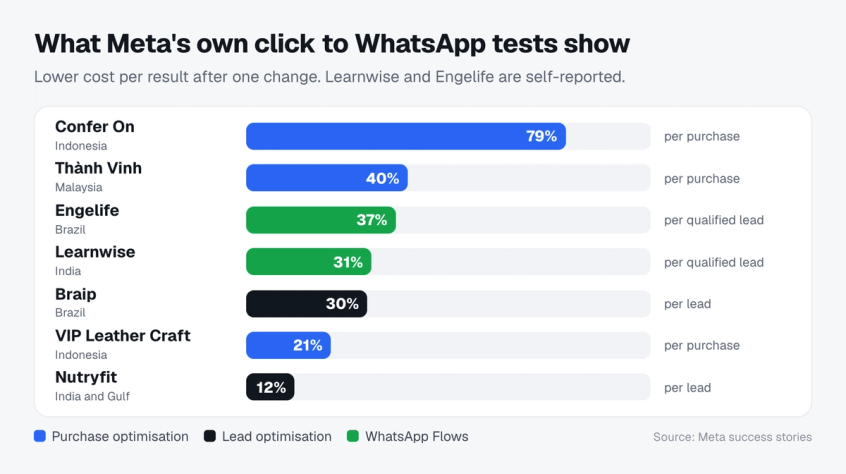
Meta's WhatsApp Business success stories include dozens of click to WhatsApp campaigns. The most useful ones compare one change against the brand's usual approach, so the result isolates that change.
| Business | Market | What changed | Result on Meta's page |
|---|---|---|---|
| Confer On | Indonesia | Purchase optimisation vs conversation optimisation | 3.9X more purchases, 79% lower cost per purchase |
| Thành Vinh Holdings | Malaysia | Purchase optimisation vs message optimisation | 1.8X more sales, 40% lower cost per purchase |
| VIP Leather Craft | Indonesia | Purchase optimisation vs conversation optimisation | 28% more sales, 21% lower cost per purchase |
| Art di Cacao | Mexico | Purchase optimisation vs usual approach | 56% more purchases, 18% more orders |
| Braip | Brazil | Lead optimisation vs message optimisation | 45% more qualified leads, 30% lower cost per lead |
| Nutryfit | India and the Gulf | Lead optimisation vs conversation optimisation | 12% lower cost per lead |
| Learnwise | India | WhatsApp Flows on the ad for qualification | 4X more qualified leads, 31% lower cost per qualified lead |
| Engelife | Brazil | WhatsApp Flows vs manual qualification | 26 point higher qualification rate, 37% lower cost per qualified lead |
| Arabian Automobiles | UAE | WhatsApp ads combined with website ads | 2X more leads, 56% lower cost per lead |
Purchase optimisation beats conversation optimisation
Four ecommerce brands in the table, including Confer On and VIP Leather Craft, tested the same thing: telling Meta to find buyers instead of people likely to start a chat. Every one of them got more sales or purchases, and the three that reported cost saw cost per purchase fall by 21% to 79%.
The reason is simple. When you optimise for conversations, Meta finds people who like to message businesses. When you optimise for purchases, Meta needs to see purchases, which means purchase events have to reach Meta, for example by marking orders as paid in Meta Business Suite or by having your chat platform send them.
Lead optimisation lowers cost per lead
For lead generation, the pattern repeats. Braip in Brazil switched from message optimisation, and Nutryfit, advertising to Malayalam speakers in India and the Gulf, switched from conversation optimisation. Both moved to lead optimisation. Braip saw 30% lower cost per lead, and Nutryfit, in a Meta A/B test run from 1 to 18 April 2025, saw 12% lower cost per lead.
Braip's summary line on the same page says 44%, while its results block says 30%. We use the lower, itemised figure.
Qualifying inside the chat lowers cost per qualified lead
Learnwise and Engelife added WhatsApp Flows, Meta's in-chat forms, so leads answered qualifying questions straight after the click. It is the same idea behind how chatbots qualify leads in any inbox. Cost per qualified lead fell 31% and 37%, and Engelife's lead qualification rate rose 26 points.
How to read these numbers
Treat these as proof that a lever works, not as a forecast. Six of these results come from A/B tests in Ads Manager. Meta marks the Learnwise, Engelife and Arabian Automobiles figures as self-reported and not identifiably repeatable, and a library of success stories only shows the tests that went well.
What they do establish is direction. Across markets and categories, every published test that moved from conversation or message optimisation to a business outcome, and reported cost, improved cost per result. None of the tests we reviewed showed the opposite.
Want Meta to find buyers instead of chatters? Spur sends lead and purchase events from your WhatsApp chats back to Meta, with no code.
A real before and after from a Spur customer
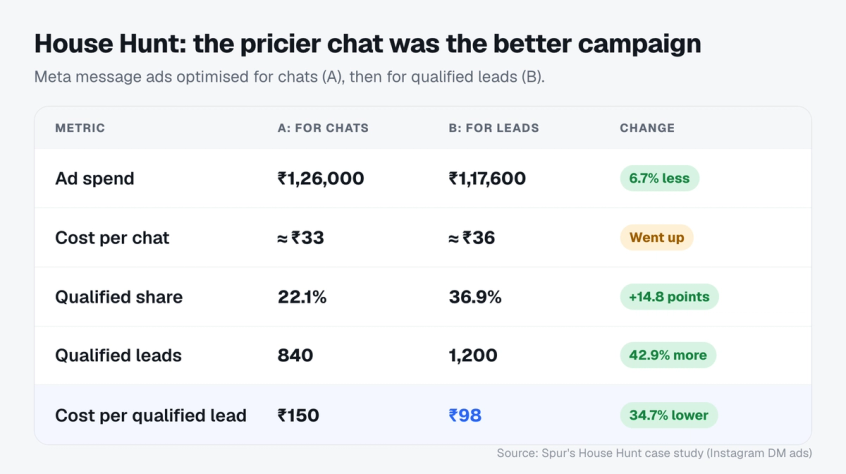
House Hunt, a real estate business, ran Meta message ads optimised for conversations. The ads sent people into Instagram DMs rather than WhatsApp, and Meta's optimisation options differ by app, so read it as a lesson about which metric to judge, not as a WhatsApp result.
Before the change, House Hunt spent ₹1,26,000 for 3,800 message starts, of which 840 were qualified leads. That is ₹150 per qualified lead.
House Hunt then qualified people inside the chat with Spur, asking the budget, location and intent questions an AI chatbot for real estate lead qualification would ask, sent a LeadSubmitted event to Meta through the Conversions API for each qualified lead, and launched a new ad set optimised for leads. Over the next 14 days, in the same geography and audience tier, it spent ₹1,17,600 for 3,250 message starts and 1,200 qualified leads. That is ₹98 per qualified lead.
Here is the part most click to WhatsApp ads benchmarks miss. Cost per message start went up, from about ₹33 to about ₹36. Judged on cost per chat, the new campaign looks worse. Judged on cost per qualified lead, it is about 35% better, because the qualified share of chats rose from 22.1% to 36.9%.
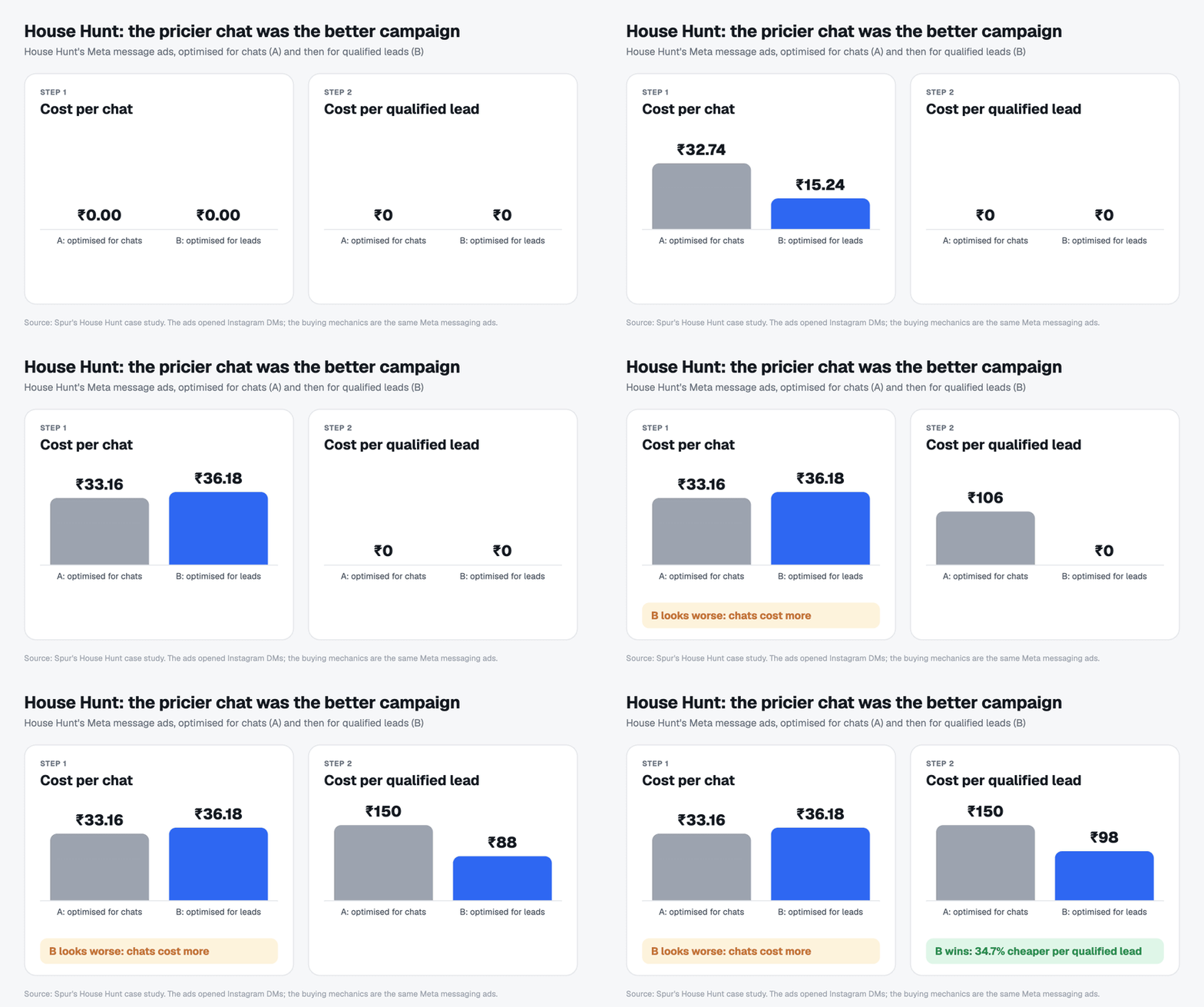
If your dashboard only shows cost per conversation, you can talk yourself out of the campaign that is actually working.
Running message ads on Instagram too? See how the same signal works with the Instagram Conversions API.
The real cost of a click to WhatsApp conversation
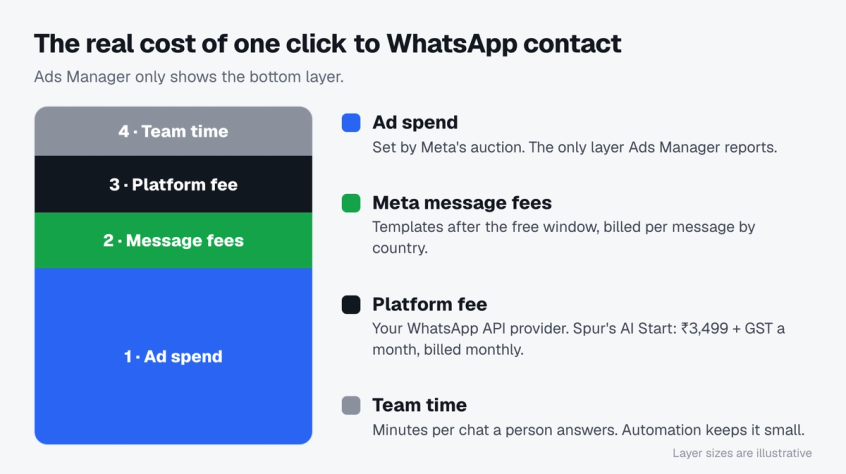
Ads Manager only shows the first of four costs. A click to WhatsApp contact costs the sum of all four:
- Ad spend. What Meta charges for impressions, set by the ad auction. This is the only layer Ads Manager reports.
- Meta's message fees. Templates and replies Meta bills outside the free window, per delivered message at the customer's country rate. Details below.
- Your platform fee. The WhatsApp Business API provider you use. On Spur, WhatsApp automation and click to WhatsApp ads come with the AI Start plan at ₹3,499 (plus 18% GST), $39, €35 or £29 a month on monthly billing, or 20% less on annual billing. Meta's message fees are separate.
- Team time. Every chat a person answers costs minutes. An AI agent or an automated flow that qualifies the lead first is what keeps this layer small.
Divide the total by the number of people who bought, and you get the number to compare across campaigns. A benchmark that counts only ad spend makes click to WhatsApp ads look cheaper than they are.
The messages you send after the click have their own rules, and Meta's documentation changed an important one on 28 September 2026.
The free entry point window now lasts up to 7 days
According to Meta's WhatsApp pricing documentation, when a customer messages you from an ad that clicks to WhatsApp on the Android or iOS app, a 24-hour customer service window opens. If you reply inside that window, your reply is free and a free entry point window opens from the moment you replied.
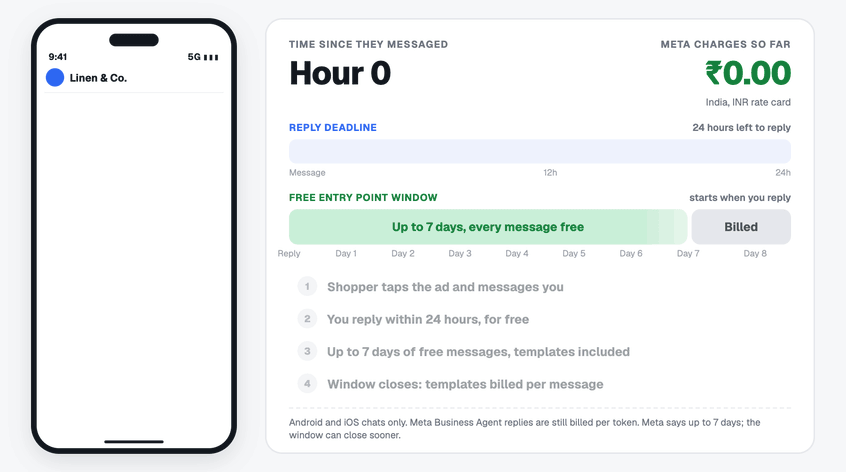
Meta's page now says free entry point windows "may remain open for up to 7 days". The WhatsApp changelog for 28 September 2026 records the change from 72 hours. Inside the window, you can send any message type at no charge, including marketing templates.
Four details decide whether you actually get it:
- Reply within 24 hours. No reply inside the customer service window means no free entry point window.
- Mobile only. Meta's page excludes chats started on desktop and web.
- "Up to" is not a guarantee. Meta does not say when a window is shorter than 7 days, so do not plan a sequence that depends on day 7.
- Meta Business Agent is still billed. Meta's page on upcoming pricing updates says delivery stays free in the window, but Business Agent replies are still charged per token.
Most other click to WhatsApp guides still say 72 hours. Our own guide to the October WhatsApp charges explains what else changes on 1 October 2026.
Message rates once the window closes
After the window, Meta charges per delivered template message, at the rate for the customer's country. From 1 October 2026, utility templates sent inside an open 24-hour customer service window are charged too, unless a free entry point window is open. These are Meta's rate card figures per message, effective 1 October 2026.
| Customer's market | Marketing (USD) | Utility (USD) | Marketing (INR card) | Utility (INR card) |
|---|---|---|---|---|
| India | 0.0118 | 0.0014 | 0.8631 | 0.115 |
| North America | 0.0250 | 0.0034 | 1.8313 | 0.2491 |
| Brazil | 0.0625 | 0.0068 | 4.5808 | 0.4984 |
| Indonesia | 0.0411 | 0.0250 | 3.0111 | 1.8316 |
| Mexico | 0.0397 | 0.0085 | 2.9064 | 0.6226 |
| United Kingdom | 0.0635 | 0.0220 | 4.6496 | 1.6122 |
Mexico marketing is up from 0.0305 USD on the July 2026 card, and the other rows are unchanged. From 1 October 2026, service replies are billed at the utility rate after 1,000 free service messages per phone number per month. Your provider's fees and local taxes sit on top of these list rates, and our WhatsApp Business pricing comparison shows how those fees are usually structured.
For most brands, message fees are small next to ad spend. They start to matter when the window closes on a long follow-up sequence, or when a team replies too slowly and never opens the free window at all.
Try it with your own volumes. Pick your customers' country and the number of templates you plan to send once the window closes.
Budgeting the whole program, not just the ads? Here is a full breakdown of WhatsApp Business API pricing.
What changes by industry, region, placement and format
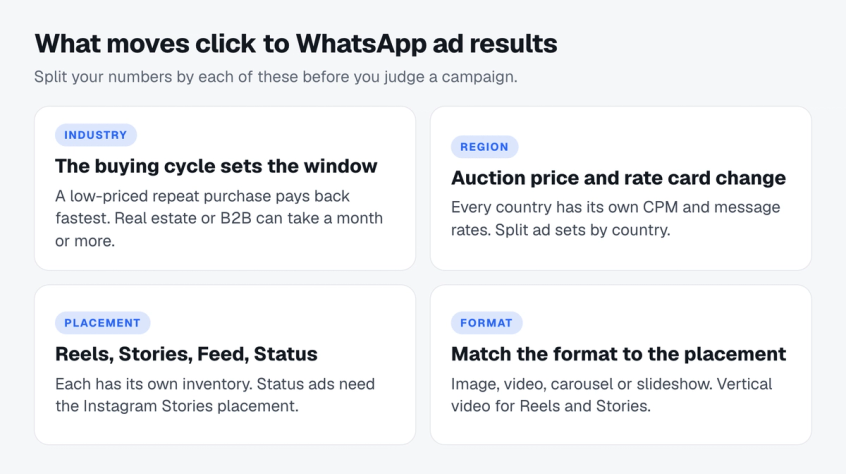
A blended number hides the four things that move these ads the most. Read your results split by each one before you call a campaign good or bad.
Industry: the buying cycle sets the window
Industry mostly changes how long the purchase takes and how much it is worth. A low-priced repeat purchase can pay back quickly, while real estate, education or a B2B offer may take a month or more, so set the revenue window per category before comparing campaigns.
Meta's own stories split the same way. Ecommerce brands such as Confer On optimised for purchases, while lead-driven businesses such as Engelife in real estate and Learnwise in education qualified leads inside the chat. If you sell in India, our guide to WhatsApp marketing in India shows how D2C brands use the same channel after the click.
Region: the auction and the rate card both change
Ad prices differ by country, because CPM depends on how many advertisers compete for the same audience and how much they bid. Message fees change too, as the rate table in the cost section shows, and some messaging metrics and campaigns are unavailable for businesses and ads delivered to and from Europe and Japan, according to Meta's metrics page for ads that click to Messenger.
Split ad sets by country so one expensive market does not hide a cheap one, and compare each country only with its own history.
Placement: Reels, Stories, Feed and Status
For the widest reach, Meta's guide to these ads recommends Advantage+ placements, or several placements across Facebook and Instagram including Reels, Stories and Feed. Each placement has its own inventory and prices, so break results down by placement in Ads Manager before moving budget.
Ads in WhatsApp Status can also open a chat with your business, but Meta is introducing them gradually and they may not be available in your country yet. Meta's setup guide adds that you must include the Instagram Stories placement to use the WhatsApp Status placement.
There is no public figure for how much Reels changes the cost of these ads. Run a Reels ad set next to a Feed and Stories ad set, and compare cost per conversation and 30-day revenue per conversation before cutting either.
Creative format: match the format to the placement
Meta's developer guide to ads that click to WhatsApp lists four formats: an image, a video, a carousel or a slideshow. Which one wins depends on where it runs.
| Format | Where it fits | What to test |
|---|---|---|
| Single image | Feed and Stories | One clear offer and a visible WhatsApp cue |
| Carousel | Feed, Stories and Reels | One product per card, each with its own reason to message |
| Vertical video | Reels and Stories | A spoken hook and a chat appearing on screen in the first seconds |
| Slideshow | Feed and Stories | Motion from photos when you have no video yet |
Test formats with an A/B test or a separate test ad set, and let cost per conversation and 30-day revenue pick the winner placement by placement.
How to build your own click to WhatsApp ads benchmarks
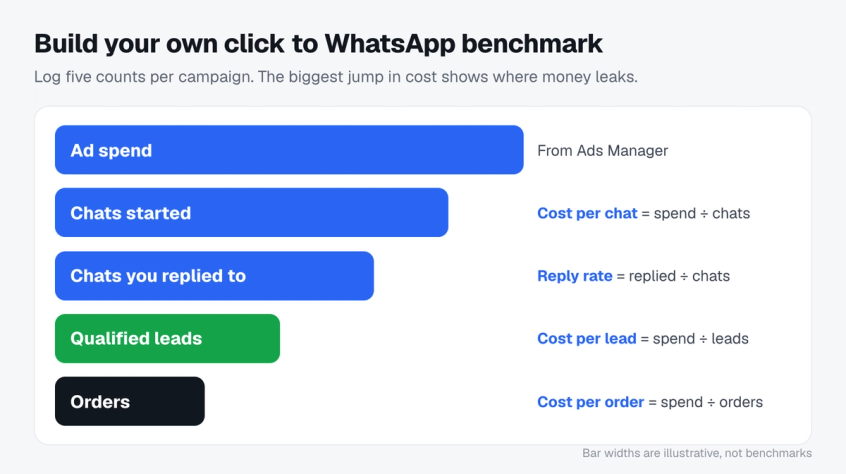
Your own account is the only benchmark that fits your market, price point and creative, because you know exactly how each number was measured. Alongside the counts in Step 2 below, track these seven numbers per campaign and per ad set:
| Metric | How to work it out | Where the data lives |
|---|---|---|
| CPM | Spend ÷ impressions × 1,000 | Meta Ads Manager |
| CTR | Link clicks ÷ impressions | Meta Ads Manager |
| Cost per conversation | Spend ÷ conversations started | Meta Ads Manager |
| Qualified share | Qualified leads ÷ conversations started | Your chat platform |
| Cost per qualified lead | Spend ÷ qualified leads | Ads Manager and your chat platform |
| 30-day conversion rate | Orders within 30 days ÷ conversations started | Your store and your chat platform |
| 30-day revenue per conversation | Revenue within 30 days ÷ conversations started | Your store and your chat platform |
Once you have a few months of campaigns, rank them on each metric and use your own quartiles as the benchmark. A new campaign in your worst quartile needs a fix, and one in your best quartile shows you what to scale. If you sell on Shopify, this is the benchmark to trust over any published one, and our guide to adding WhatsApp to Shopify covers connecting the two.
Then build it step by step.
Step 1: Pick the one result that pays you
Decide what a win is before you look at any number: a purchase, a qualified lead, or a booked visit. Everything else in this list is a step towards that result, not a replacement for it.
Step 2: Record the full funnel, not just chats
For every campaign, log five numbers: spend, chats started, chats that got a reply from you, qualified leads, and orders or bookings. Then work out the cost at each stage by dividing spend by each count. If you run Instagram message ads too, here is how to measure Instagram DM ROI.
The stage where cost jumps the most is where your money leaks. Look hardest at the gap between chats started and qualified leads, because that gap depends on your replies and qualifying questions, which the ad cannot fix.
Use the calculator below to compare two campaigns side by side. It opens with House Hunt's real numbers, so you can see a campaign win on cost per qualified lead while losing on cost per chat.
Step 3: Send the result back to Meta
Meta's Conversions API for Business Messaging lets you report events such as LeadSubmitted, QualifiedLead and Purchase against the click ID (ctwa_clid) that arrives with an ad-started chat. Sending these events gives Meta a clean, complete record of who became a lead or a buyer, which is what lead and purchase optimisation learn from.
Step 4: Test the optimisation goal with an A/B test
Duplicate your best campaign and change only the performance goal, from conversations to leads or purchases. Use the A/B test tool in Ads Manager so both versions split the same audience, which is how the Confer On, VIP Leather Craft, Braip and Nutryfit results above were measured.
Step 5: Run each test for one to two weeks
Meta's click to message ads page suggests starting by running an ad for at least 7 days, and Confer On's A/B test followed Meta's best practice of running both campaigns for at least 14 days. Two weeks also covers both weekday and weekend buying patterns.
Step 6: Compare like with like
Your baseline is the last 30 days of the same market, product and objective. Do not compare a festive sale to a quiet month, or a retargeting ad set to a cold audience, and never compare your numbers to another country's.
Your chat flow decides most of this funnel. Try Spur to reply instantly, qualify leads in the chat and send the result back to Meta.
How to read your numbers at your stage
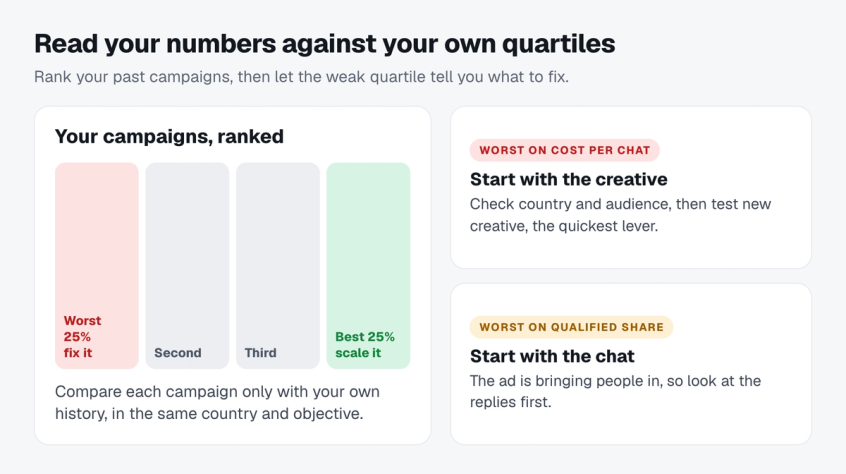
The same number means different things in different accounts. Run it through three filters before you act on it.
Account and ad set maturity. Meta says an ad set usually leaves the learning phase after about 50 results in the week after its last significant edit. A new account, or an ad set optimised for purchases that only gets a handful a week, can look worse while it is still learning, so compare it with its own history, not with an established advertiser's.
Country mix. A blended CPM hides the truth. If one ad set targets several countries, split it before you compare.
The chat after the click. Conversion from chat to order depends on what happens in the conversation, not only on the ad. A short welcome flow that answers the ad's promise gives the new contact a reason to stay, which is why we keep pointing to WhatsApp marketing automation that starts the moment someone messages.
Then use your quartiles. In your worst quartile on cost per conversation (the highest cost), check country and audience, then start with the creative, the quickest lever to test. In your worst quartile on qualified share, start with the chat, because the ad is already bringing people in.
Five ways to lift your click to WhatsApp ad CTR
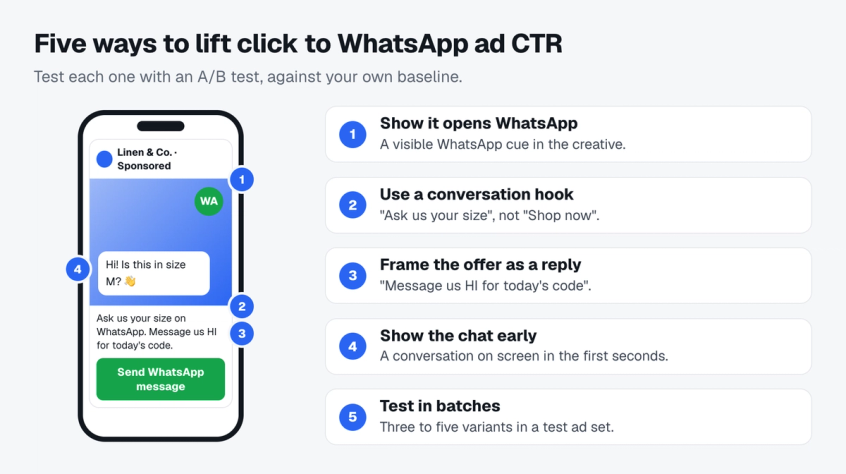
When CTR drops, more budget will not fix a weak ad. These are the levers to test first, ideally with Ads Manager's A/B test tool or in a separate test ad set.
- Show that the tap opens WhatsApp. A visible WhatsApp cue in the creative tells people the ad leads to a chat, not a website.
- Use a conversation hook. "Ask us your size" tells people what happens after the tap in a way that "Shop now" does not.
- Frame the offer as a reply. "Message us HI for today's code" turns the offer into the first message. Meta's ads that click to WhatsApp also support ice breakers, short questions people can tap to start the chat.
- Show the chat early in video. A phone screen with the conversation appearing in the first seconds explains the ad before anyone reads the caption.
- Test creatives in batches. Launch three to five variants together in a test ad set, give them enough spend to compare, and keep the winner. Meta counts adding a new ad to an ad set as a significant edit that restarts learning, so avoid dripping in one new ad at a time.
These are practices to test against your own baseline, not guaranteed lifts. Keep the one that beats your quartile and drop the rest.
How Spur tracks click to WhatsApp ads
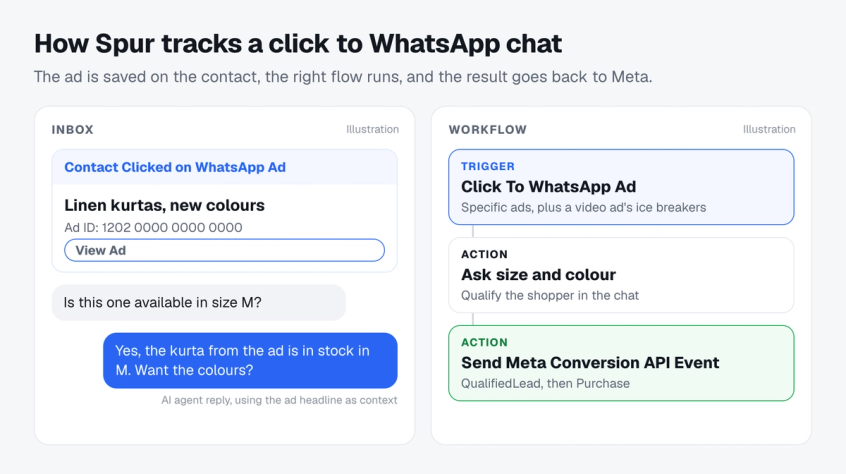
Spur handles the chat side of these steps without code: the first reply, the qualifying questions and the events in Step 3. Here is what it does with a chat that starts from an ad.
- Captures the ad. Every chat that starts from an ad saves the click ID and the ad headline on the contact, and the inbox shows a "Contact Clicked on WhatsApp Ad" card with the ad ID and a link to the ad.
- Starts the right flow. The "Click To WhatsApp Ad" workflow trigger runs for all ads or for specific ads you pick from your ad account, and when you pick specific ads it also saves a video ad's ice breakers as trigger keywords, so each ad can open with a reply that matches its promise.
- Tells the AI agent which ad it was. Spur's AI agent gets the ad headline as context, so a customer typing "is this in stock?" gets an answer about the product in the ad.
- Sends results back to Meta. The "Send Meta Conversion API Event" action reports 14 events, including LeadSubmitted, QualifiedLead and Purchase, against the click ID.
- Shows the campaign view. Click to WhatsApp campaign analytics show spend, clicks, messaging connections and conversations started from your Meta account.
House Hunt used the same kind of setup on Instagram, and its cost per qualified lead fell from ₹150 to ₹98. If you want to capture more WhatsApp leads from the same budget, the chat after the click is where to start.
Deciding between a form and a chat? Compare Instagram lead ads and DM ads before you pick an objective.
Final thoughts
Honest click to WhatsApp ads benchmarks come from two places: Meta's published tests, and your own account. Meta's tests agree on one thing. Optimising for the business result instead of the conversation lowered cost per result in every test we reviewed that reported cost, by 12% to 79%.
So stop chasing a cheaper chat. Reply within 24 hours so the free window opens, qualify inside the chat, send the result back to Meta, and benchmark against last month's you. Spur handles the reply, the qualification and the Conversions API events, so your ads learn from buyers instead of browsers.
Glossary of click to WhatsApp ad terms
- Click to WhatsApp ad (CTWA). A Facebook or Instagram ad that opens a WhatsApp chat with your business when tapped, instead of a website.
- CPM, CTR and messaging conversation started. Defined in the five metrics section above, using Meta's own definitions.
- Customer service window. The 24 hours after a customer's latest message, in which you can send free-form messages as well as templates. Each new customer message restarts it.
- Free entry point window. The window, now up to 7 days, that opens when you reply within 24 hours to a chat started from an ad in WhatsApp on Android or iOS (not desktop or web), during which every message type is free.
- Ice breakers. Short questions shown in the chat that people can tap to start the conversation.
- ctwa_clid. The click ID that arrives with a chat started from an ad, used to report conversions back to Meta.
- Conversions API for Business Messaging. Meta's API for sending events such as leads and purchases from your chats back to Meta, so it can optimise for them.
- Marketing and utility templates. Approved message types billed per delivered message outside the free window: marketing for promotions, utility for updates tied to an order or account.
Frequently asked questions
There is no reliable public figure. Meta publishes no CTR benchmark for these ads, and vendor numbers rarely state their sample or method. Use your own last 30 days in the same market as the baseline, and judge ads on cost per qualified lead or purchase instead.
No independent average exists. One vendor guide gives €1.50 to €8.00 depending on industry, without stating its sample, and cost varies too much by country and category to transfer. In House Hunt's Instagram message ads, a message start cost about ₹33 to ₹36.
Up to 7 days, according to Meta's pricing documentation updated on 28 September 2026. It opens only if you reply within the 24-hour customer service window, on chats started in WhatsApp on Android or iOS, not desktop or web. Before this change it was 72 hours.
There is no reliable public figure. Measure it as orders from people who started a conversation within 30 days, divided by conversations started, and use a longer window for high-ticket or B2B offers.
Use lead or purchase optimisation once you can send those events to Meta. In Meta's published A/B tests, that switch lowered cost per result by 12% to 79% compared with conversation or message optimisation.
No. Lead ads count form submissions and click to WhatsApp ads count conversations started, so their costs per lead measure different events. Compare them on the cost of a contact who goes on to buy.
Four costs add up: the ad budget you set, Meta's per-message fees once the free window closes, your WhatsApp provider's plan, and your team's time. Messages inside the free window cost nothing, except Meta Business Agent replies. For a customer in India, a marketing template costs 0.8631 INR on Meta's rate card.
Usually the chat, not the ad. Slow first replies, no qualifying questions and conversation optimisation all produce cheap chats from people who were never going to buy. Fix the reply, then optimise for the result. If deliveries drop on follow-ups, check the WhatsApp marketing per-user limits too.
Sources
Checked against the original source. Dates are when we last verified each one.
- Pricing on the WhatsApp Business Platform Meta for Developers. Retrieved 1 October 2026
- WhatsApp changelog Meta for Developers. Retrieved 1 October 2026
- Upcoming pricing updates for Meta Business Agent, service and utility messages Meta for Developers. Retrieved 1 October 2026
- Conversions API for Business Messaging: Onboarding Guide Meta for Developers. Retrieved 1 October 2026
- Messaging conversations started Meta Business Help Centre. Retrieved 1 October 2026
- Click-to-message ads: Boost engagement and build relationships Meta for Business. Retrieved 1 October 2026
- Success Stories WhatsApp Business. Retrieved 1 October 2026
- How House Hunt Reduced CPL by 35% with IG Message Ads & Spur Spur. Retrieved 29 September 2026
Was this article useful?