WhatsApp Business Pricing: App vs Meta Verified vs API

Discuss with AI
Get instant insights and ask questions about this topic with AI assistants.
💡 Pro tip: All options include context about this blog post. Feel free to modify the prompt to ask more specific questions!
WhatsApp Business pricing works in three completely different ways, because there are three separate products behind the name. The WhatsApp Business app is free. Meta Verified is a monthly subscription, offered at around $14.99 a month for the entry tier in some markets. The WhatsApp Business API carries no licence fee from Meta at all, and instead bills you for each template message delivered, plus whatever your software provider charges on top.
These are not three tiers of one product. Choosing the wrong one costs you either a subscription that buys nothing you needed, or a ceiling you slam into three months later.
Spur runs WhatsApp, Instagram, Facebook and website chat for 600+ D2C brands, and the question we get most is not what a single message costs. It is which of these three a business should be on at all. This guide answers both, with the numbers.
Prices and rules here were checked against Meta's WhatsApp Business Platform pricing documentation, updated 10 September 2026, and WhatsApp's own Meta Verified help centre, on 16 September 2026.
WhatsApp Business pricing at a glance
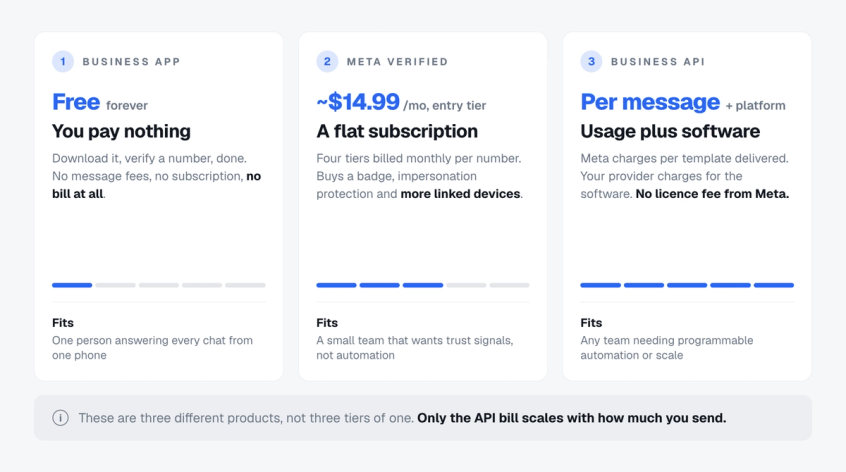
Here is the whole decision in one table. Spur sits in the third column, because an API provider is what turns the API into something a team can actually use.
| WhatsApp Business app | Meta Verified | WhatsApp Business API | |
|---|---|---|---|
| What you pay Meta | Nothing | A monthly subscription per number, around $14.99 for the entry tier where offered | Nothing for access, then a fee per template message delivered |
| What you pay software for | Nothing | Nothing | A provider plan. Spur starts at $12 a month |
| Does the bill grow with volume | No | No | Yes, this is the part to model |
| People who can answer | 1 phone plus 4 linked devices | 1 phone plus 4 to 10 linked devices by tier | Multi-agent shared inbox, seat limits set by your provider |
| Verified badge | No | Yes | Available separately |
| Broadcasts to your customer list | Broadcast lists only, capped at 256 saved contacts each | Business Broadcasts on Plus and above, a separate paid product, in supported markets only | Built for large campaigns, subject to Meta's messaging limits and opt-in rules |
| Programmable automation, AI agents, CRM sync | No, greeting and away messages only | No, greeting and away messages only | Yes |
| Best for | A solo seller | A small team buying trust, not tooling | Anyone sending at scale or automating |
The row that decides most of this is the third one. Only the API bill moves with how much you send, which is why it is the only option that needs forecasting before you commit.
Not sure which column you belong in? The WhatsApp Business API is the only one of the three with programmable automation, and that single fact settles it for most brands.
The WhatsApp Business app is free, and here is where free stops
The app costs nothing. There is no subscription, no per message fee and no card on file. You download it, verify a phone number, and you are trading.
For that you get a business profile with your address and catalogue, away messages, greeting messages, quick replies and labels to sort chats. For a single seller this is genuinely enough, and paying for anything else is a waste.
Free stops in three specific places, and it is worth knowing which one you will hit first.
The device ceiling
The app runs on one phone plus four linked devices. That is five screens, and every one of them is looking at the same single queue with no way to assign a chat to a person or see who already replied. Teams past about three people start stepping on each other. Our guide to managing multiple WhatsApp Business accounts covers the workarounds and where they break.
No real broadcasting
Broadcast lists on the app only reach people who have saved your number to their contacts, and each list caps at 256 recipients. In practice that is a fraction of your customers. If you want to send a sale to 20,000 people, broadcast lists cannot do it. See how to send bulk WhatsApp messages for what actually works at that size.
Three different things get called broadcasting on WhatsApp, and conflating them is how businesses end up budgeting wrong.
| What it is | Who it reaches | What it costs | |
|---|---|---|---|
| Broadcast lists | The free feature in the Business app | Only people who saved your number, 256 per list | Free |
| Business Broadcasts | A separate paid tool in the app, listed by WhatsApp under the Plus, Premium and Max tiers, rolling out to eligible businesses | Your opted-in customers, without the saved contact rule | Charged per delivered message, availability and price vary by market |
| API template campaigns | Marketing templates sent through the Business API | Any opted-in list, at campaign scale | Meta's marketing rate per delivered message, plus your provider's plan |
No programmable automation and nothing to integrate with
The app does include basic automations, namely greeting messages and away messages. What it does not have is programmable automation. You cannot trigger a message from a Shopify order, fire an OTP, recover an abandoned cart, branch a chatbot flow or let an AI agent answer overnight, because there is no API to connect the app to anything you already run.
The free app is the right answer far more often than vendors admit. Pay for something only when you can name the ceiling you are hitting.
Meta Verified pricing: four tiers, and one that buys you nothing extra
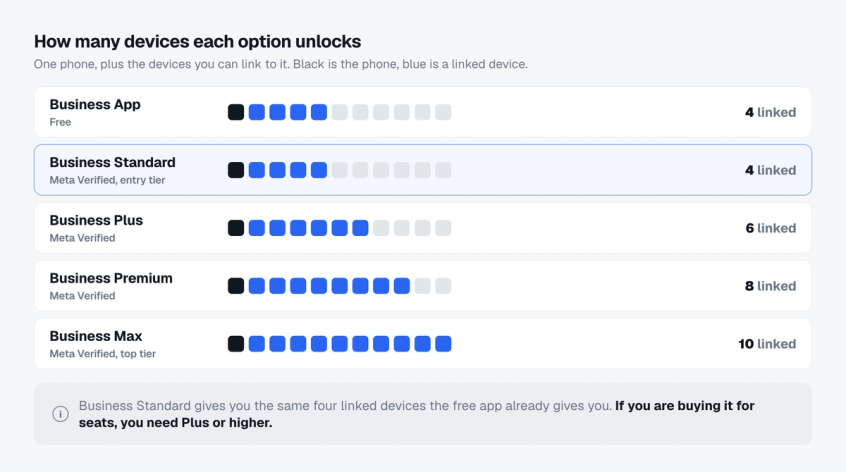
Meta Verified is a subscription that sits on top of the app. It buys credibility and a handful of practical limits, and it is sold in four tiers.
| Tier | Linked devices | Verified channels | Protected business accounts | Business broadcasts |
|---|---|---|---|---|
| Business Standard | 4 | 1 | Not included | Not listed |
| Business Plus | 6 | 3 | Not included | Listed |
| Business Premium | 8 | 5 | 10 | Listed |
| Business Max | 10 | 10 | 50 | Listed |
Every tier includes the verified badge, impersonation protection, Meta Verified support and a business web page. The tiers differ on volume, not on kind. The device, channel and protected account counts above are WhatsApp's own published figures.
Treat the broadcast column as a guide rather than a guarantee. WhatsApp lists business broadcasts under the Plus, Premium and Max packages and not under Standard, but it also says Business Broadcasts is a paid feature available in limited countries, and that plans and benefits may be restricted by business and location. What you are actually offered is what your own subscription screen shows.
Business Standard gives you the devices you already had
This is the detail almost every pricing comparison misses. The free app already supports four linked devices. Business Standard also supports four. If you are subscribing in order to get more people onto the number, Standard changes nothing, and you need Plus or higher before a single extra seat appears.
What Meta Verified actually costs you
Meta does not publish one global price list for this. WhatsApp's help centre lists the benefits per tier and then points you at the price shown in your own app, because the amount varies by market, by currency and by the offers running at the time. Reported entry pricing sits around $14.99 a month, with the top tier running into the hundreds.
Two caveats matter more than the number. Meta decides which tiers you are even offered, based on how much your business interacts with customers on WhatsApp, so the menu you see may be shorter than the one above. And what a subscription covers is not fixed: WhatsApp lets you add business assets such as Facebook and Instagram accounts to your WhatsApp subscription when you pay, so check which assets are included in the offer you are shown before you budget for separate ones.
Meta Verified is not the same as the blue tick you may be thinking of
Businesses that already held a verified badge keep it, and badge eligibility on the API works differently again. If verification is the reason you are here, read WhatsApp blue tick verification before you subscribe to anything.
Buying Meta Verified for automation is the most common expensive mistake on this page. It adds trust and devices. It adds no tooling at all.
WhatsApp Business API pricing: no subscription, a bill per message
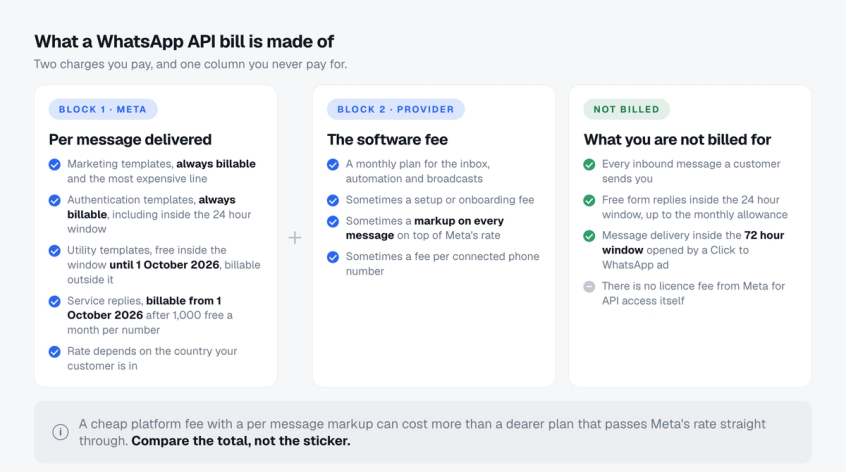
The API is where the pricing model changes shape. Meta charges nothing for access. What you pay for is delivery: Meta bills you for the billable outbound messages your business sends, with the rate set by message category and the recipient's country. Messages customers send you are never charged.
Since 1 July 2025 the model has been per message rather than per conversation. That distinction matters: an open customer service window no longer makes everything inside it free. A marketing template sent to a customer who messaged you an hour ago is still charged at the full marketing rate. Our full WhatsApp Business API pricing guide has the per country rate tables if you need the exact figures.
What is billable and what is free
Marketing templates are always billable and are the most expensive category by a wide margin. Authentication templates are always billable too, including when they land inside an open customer service window. Utility templates are the exception: Meta has not charged for them when they are delivered in response to a user inside an open 24 hour window, and that exemption ends on 1 October 2026. Every message a customer sends you is free, in every market.
That authentication detail is worth reading twice. A customer messaging you first does not make your OTP free. If you are modelling OTP costs, assume every authentication template is billable.
Two windows still reduce the bill. The 24 hour customer service window opens when a customer messages you, and non template messages inside it are free. The 72 hour free entry point window opens when someone reaches you through a Click to WhatsApp ad or a Page call to action button, and Meta does not charge for message delivery inside it, template messages included. Meta Business Agent replies are the exception, billed per token since 1 August 2026 even inside that window.
One change is coming on 1 October 2026
Free form replies inside the 24 hour window stop being free. Meta's pricing documentation sets a free tier of 1,000 delivered service messages a month per business phone number, shared between one to one and group sends, with billing from the 1,001st. The allowance resets monthly and does not roll over. In window utility templates lose their free status on the same date, with no allowance at all.
One operational detail is easy to miss. If your WhatsApp Business account has no payment method, Meta will deliver service messages inside the free tier and stop delivering them once it is used. We broke the whole change down in the new WhatsApp charges from October 1, including how to model your own number before the invoice lands.
Your provider is the second half of the bill
Meta's rate is only one block. The software that gives you a shared inbox, automation, templates and reporting is the other, and providers price it very differently. Some charge a monthly plan and pass Meta's rate through untouched. Others add a markup to every single message, or a fee for each connected number, or a setup charge running into four figures.
A cheap looking plan with a per message markup routinely costs more than a dearer plan with no markup, once you are sending real volume. Compare the total, not the sticker.
Sending marketing at scale? WhatsApp max price lets you cap what you pay per delivery, and it changes this math again.
What each option costs a real business per month
Abstract rates are hard to act on. Here is the same question answered for three businesses, using Meta's list rates and a provider plan with no message markup.
| Solo seller | Small team | D2C brand at scale | |
|---|---|---|---|
| Situation | One person, 200 chats a month, no campaigns | Four people, 2,000 chats, occasional sale announcements | 25,000 marketing sends, 40,000 order updates, 30,000 support replies |
| Business app | $0 and it fits | $0 but four people share one queue | Not possible |
| Meta Verified | Unnecessary | From about $14.99 a month, still no campaigns | Does not solve the problem |
| API, software | Overkill | $12 to $31 a month on Spur | $127 to $399 a month on Spur |
| API, message fees | Near zero, inbound is free | A few dollars | The dominant cost, driven by marketing volume and country mix |
| Sensible answer | Business app | API on an entry plan | API, and optimise the message mix |
Notice what happens in the third column. Software becomes a rounding error and message fees become the entire conversation. That is why cost control at scale is about message mix, not about which plan you are on.
To put your own numbers against this, our WhatsApp pricing calculator takes your volumes and country and returns a total.
The costs that are not on anyone's pricing page
1. What your Meta Verified subscription actually covers
Do not assume one subscription covers every surface, and do not assume it covers none. WhatsApp lets you add business assets such as Facebook and Instagram accounts to your WhatsApp subscription at the point of payment, and what is included varies by the offer you are shown. Check the assets listed on your own subscription screen before budgeting, because the tier and price you are offered depend on your market and your activity.
2. Per message markups compound silently
A markup of half a cent sounds like nothing until you send 100,000 messages, at which point it is $500 a month you never agreed to line by line. Ask any provider directly whether they pass Meta's rate through unchanged.
3. The October service message charge lands on support teams hardest
A brand answering 40,000 customer messages a month moves that volume from a zero line item to a real one. Service messages also get no volume discount, so the cost scales perfectly linearly with how much your team types.
4. Fees per phone number
If you run separate numbers for sales and support, or one per region, some providers bill each one. Our guide to using WhatsApp Business with multiple numbers covers when that is actually worth it.
5. The cost of choosing the app and moving later
Migrating a number from the app to the API used to mean losing your chat history and starting again. That is no longer true, which brings us to the option most comparisons still leave out.
You can run the app and the API on the same number
WhatsApp coexistence lets one number sit on the Business app and the API at the same time. You keep the number, you keep the chat history, and your team keeps using the app for the conversations it is already good at.
On top of that you get what the API unlocks: a multi agent shared inbox with as many seats as your provider's plan allows, programmable automation, campaign scale broadcasts to your opted in list, and an AI agent answering while nobody is at the desk. It is the honest answer for most growing brands, because the decision stops being either or.
The trade is narrow. Some app side features, including calls, groups and disappearing messages, are not available through the API side of the connection.
How to choose, in four questions
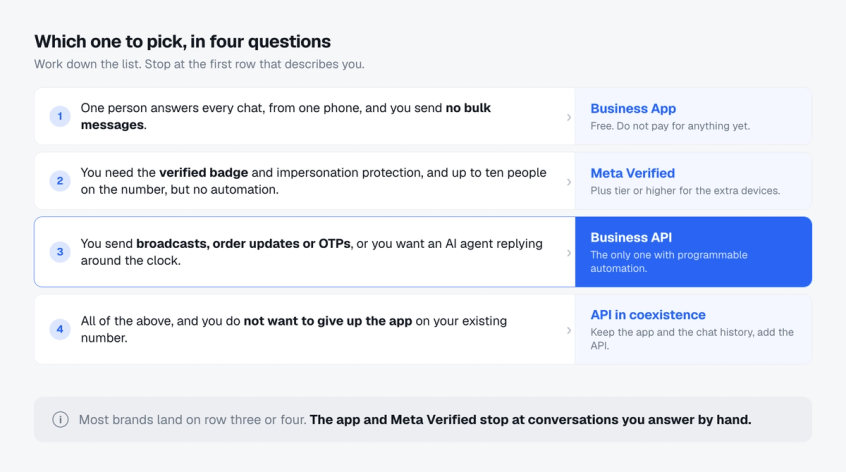
Work down these four. Stop at the first one that describes you.
1. Is more than one person answering?
If not, stay on the free app. If yes, count the people. Five or fewer screens with no routing is survivable. More than that, and you need a shared inbox with assignment and routing, which means the API and a provider whose plan covers the seats you need.
2. Do you need to start conversations, or only answer them?
On the app, replying carries no per message charge. On the API, free form replies inside the 24 hour window are free today, and from 1 October 2026 Meta charges for them after the first 1,000 per business phone number each month. Either way, reaching customers at scale with a sale announcement, an order update or an OTP only exists on the API.
3. Is the badge the actual goal?
If credibility is the problem and your volume is small, Meta Verified is the cheap fix. Just buy the tier that matches the devices you need rather than defaulting to Standard.
4. What does your message mix look like in twelve months?
Marketing heavy sending is the expensive path and deserves modelling now. Utility heavy sending stays cheap for a long time. If you cannot answer this, run a month on an entry plan and measure it instead of guessing.
Most brands that ask us this question end up on the API, and are surprised the software is the small half of the bill.
How Spur prices WhatsApp
Spur is a WhatsApp Business Solution Provider, so the two block structure above is exactly what you get, with the second block kept deliberately boring.
We pass Meta's rates through with no markup. You pay Meta what Meta charges, and you pay Spur for the software. Plans run from $12 a month for a single AI agent and one channel each on WhatsApp, Instagram, Facebook and live chat, to $399 a month for three agents, unlimited flows and ten seats. Every plan includes unlimited broadcasts, teams, tickets and tags, and there is a seven day trial with full access. The current plans and pricing are on our pricing page.
Because message fees dominate at scale, the product is built to shrink them rather than resell them. AI agents answer inside the free 24 hour window instead of triggering a template. DeliveryBoost raises how many broadcast messages actually land, so you pay for fewer wasted sends. And the WhatsApp Business API setup runs in coexistence, so you keep the number and history you already have.
WhatsApp Business pricing FAQ
Is WhatsApp Business free?
Yes. The WhatsApp Business app is free to download and use, with no subscription and no per message fee. You only start paying if you subscribe to Meta Verified or move to the WhatsApp Business API.
How much does a WhatsApp Business account cost?
Nothing for the app. Meta Verified is offered at around $14.99 a month for the entry tier in some markets, and varies by country and account. The API has no access fee and costs whatever your message volume and provider plan come to. A low volume business answering more chats than it starts can sit under $50 a month all in, but the total is driven by message category, recipient country, volume and provider fees, so model your own mix rather than assuming a figure.
Does WhatsApp Business cost money per message?
Only on the API, and only for billable outbound messages your business sends. Every message a customer sends you is free. Marketing and authentication templates are always billable, even inside an open customer service window. Free form replies inside the 24 hour window are free today, and from 1 October 2026 each number gets 1,000 of those free per month before billing starts.
What is the difference between the WhatsApp Business app and the API?
The app is a phone application for answering chats by hand. The API is a connection other software talks to, which is what makes programmable automation, multi agent inboxes and campaign scale broadcasting possible. The app carries no per message charge. The API uses Meta's per message pricing for billable outbound messages, and your provider charges for the software on top.
How much does Meta Verified cost for WhatsApp?
Meta does not publish a single global price. The entry tier is widely reported at around $14.99 a month, and the top tier runs into the hundreds. The price you are actually offered depends on your market and on how active your business is on WhatsApp, and it is shown in the app.
Is Meta Verified worth it?
It is worth it if you want the verified badge and impersonation protection and your volume is small. It is not worth it if you want automation or broadcasting, because it provides neither. Check the device count per tier before subscribing, since the entry tier matches the free app.
Is the WhatsApp Business API free?
Access to the API is free. Meta charges no licence fee. You pay per template message delivered, and you pay your provider for the software that makes the API usable. Those two charges together are the real cost.
How much does WhatsApp charge per message?
It depends entirely on the template category and the recipient's country. Marketing is the most expensive, utility and authentication are far cheaper, and rates vary from fractions of a cent to over twenty cents. The per country tables are in our WhatsApp Business API pricing guide.
Do I have to pay to reply to customers on WhatsApp?
Not today, if you reply inside the 24 hour window a customer opened. From 1 October 2026 that changes, with 1,000 free service messages a month per number and per message billing after that.
Can I use the WhatsApp Business app and the API at the same time?
Yes. Coexistence lets one number run both, so you keep your chat history and your team's habits while gaining automation and seats. Some app features such as calls and groups are not available on the API side.
Which WhatsApp Business pricing option is cheapest?
The free app, always, if it fits your workload. Past that the honest comparison is between a Meta Verified subscription you pay every month regardless of usage, and an API bill that starts near zero and grows with what you send. For most businesses answering more chats than they start, the API is cheaper than it looks.
Does WhatsApp Business charge for incoming messages?
No. Inbound messages from customers are free on every option, in every country, with no limit.
Picking your WhatsApp Business pricing model
WhatsApp Business pricing only looks complicated because three different products share a name. The app is free and fits a solo operator. Meta Verified is a flat monthly fee that buys trust and a few more devices. The API costs nothing to access and bills you for what you send, which makes it the only option that scales and the only one worth forecasting.
Work the four questions, pick the first row that describes you, and revisit it when your volume changes. If you land on the API, start a free trial of Spur and see the whole bill, Meta's rate and ours, before you commit to anything.