Key takeaways
- Cloud telephony is a business phone system run on a provider's servers and used over the internet, with numbers, IVR menus, call routing, recording and reports managed from a dashboard.
- In India, cloud telephony is priced as a plan fee plus numbers, minutes, add-ons and GST. MyOperator's published plans, for example, start at ₹5,000 a month for 10 users, billed yearly.
- VoIP is the technology that carries voice over the internet. Cloud telephony is the complete hosted phone system built on it.
- WhatsApp calling is cloud telephony inside WhatsApp: customers call from your chat for free, and businesses can call only customers who allowed it, for 7 days or always.
- In Spur, WhatsApp calls ring for the whole team in the browser and cost ₹0.25 a minute for calls customers make and ₹0.50 a minute for calls you make to India.
Ask an AI about this article
Cloud telephony is a business phone system that runs on a provider's servers over the internet instead of on a phone box in your office. Your team takes calls on a laptop, a desk phone or a mobile app. A newer form is WhatsApp calling, where customers call you from their WhatsApp chat and your team answers in Spur.
Everything else is switched on from a dashboard: numbers, IVR menus, call routing, recording and reports. This guide covers how cloud telephony works, what it costs in India, how it compares with VoIP, and when WhatsApp calling is the better line for your customers.
What is cloud telephony?
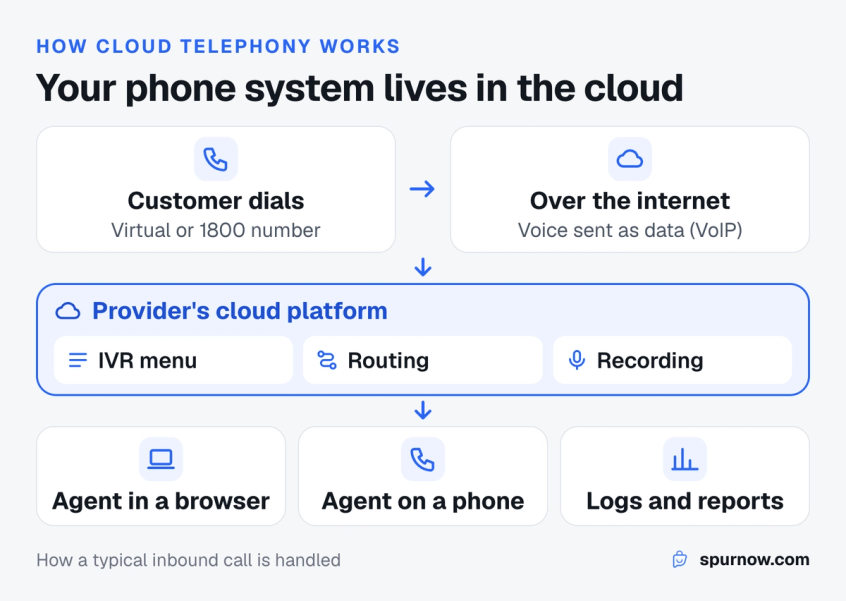
Cloud telephony means your phone system lives in the cloud. The provider owns the switching equipment, connects it to the phone network, and rents you numbers, minutes and features as a service. You manage everything in a web dashboard and pay a monthly fee instead of buying hardware.
It replaces the old office setup, where a business bought a PBX (private branch exchange) box, ran phone lines into the building and paid a technician to change anything. With cloud telephony, adding an agent, a new number or an after-hours message takes a few clicks.
People also call it a cloud phone system, cloud calling, a virtual phone system or hosted PBX. In India the term usually covers virtual numbers, toll-free numbers, IVR, missed call services and click-to-call, all bought from one provider.
Common examples:
- A support line where callers press 1 for orders and 2 for returns, and the call rings whoever is free in that team.
- A sales team that calls leads from the CRM with one click, with every call recorded and logged.
- A "give us a missed call" number printed on a product box that sends the caller a reply.
- A store whose customers call it from WhatsApp instead of dialling a phone number.
Most of these calls start as messages. See how teams run them from one WhatsApp shared inbox.
How does cloud telephony work?
Cloud telephony works by turning a phone call into internet traffic and handing it to software that decides where it goes. Here is the path a typical inbound call takes:
- The customer dials your number. It can be a mobile-style virtual number, a landline-style number or an 1800 toll-free number. The provider owns it and points it at their cloud.
- The call reaches the provider's platform. The voice is carried as data packets over the internet (this part is VoIP, voice over internet protocol).
- Your rules run. The IVR plays a greeting, the caller picks an option, and routing rules choose an agent by team, skill, working hours or who handled them last.
- An agent answers. It rings in a browser tab, an app on their phone, or a desk phone plugged into the internet. Nobody needs to be in the office.
- Everything is logged. The platform stores the recording, call length, who answered and missed calls, and can send them to your CRM.
Outbound works the same way in reverse: the agent clicks a number, the platform places the call and shows your business number as the caller ID.
Features to look for in a cloud phone system
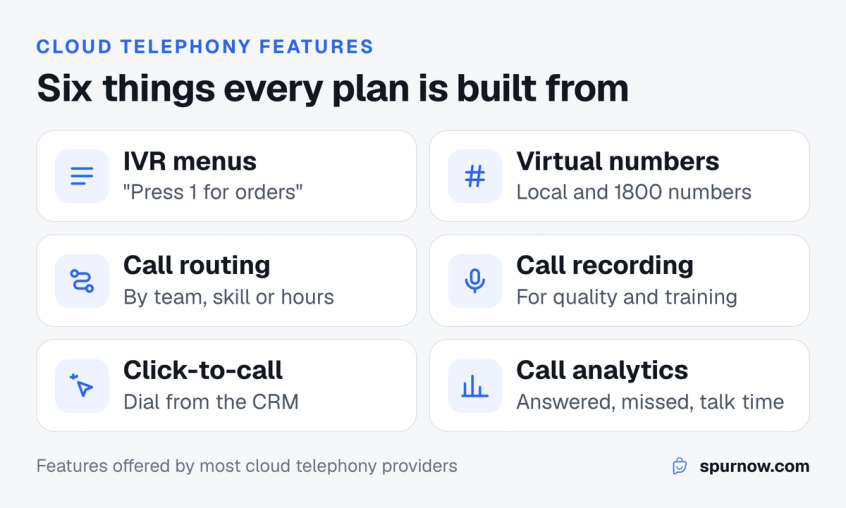
Most providers sell the same core set. What changes between them is the quality, the limits and the price of each piece.
- IVR (interactive voice response): the "press 1 for…" menu that sends callers to the right team before anyone picks up.
- Virtual and toll-free numbers: local numbers in several cities, or an 1800 number that is free for the caller.
- Call routing: round robin, by skill, by language, sticky agent (the same customer reaches the same agent), and overflow when a team is busy.
- Call recording: for disputes, quality checks and call center training.
- Click-to-call and dialers: call from the CRM or a web page without typing a number.
- Missed call service: callers ring once and get an automatic callback or message.
- Analytics: calls answered and missed, wait time and talk time per agent.
- Integrations: CRM, helpdesk and ecommerce tools, so the agent sees who is calling, the way a WhatsApp integrated CRM does for chats.
The feature that matters most is the one most guides skip: where the conversation goes after the call. If the customer then sends a photo, a payment link or a delivery address, it helps when the call and the chat sit in the same place, which is the idea behind an omnichannel customer engagement platform. That is the gap WhatsApp calling fills, covered below.
VoIP vs a hosted phone system vs a traditional PBX
VoIP is the technology that carries voice over the internet. Cloud telephony is a complete phone system built on VoIP and run by a provider. A traditional PBX is the hardware version that sits in your office.
| Cloud telephony | VoIP (on its own) | Traditional PBX | |
|---|---|---|---|
| What it is | A hosted phone system sold as a service | The method of sending voice as data | A phone switch you buy and keep on site |
| Setup | Sign up, buy numbers, add agents | Needs an app, a provider and setup | Hardware, phone lines and a technician |
| Upfront cost | Low: a monthly plan | Low to medium | High: equipment and installation |
| Agents can work from | Anywhere with internet | Anywhere with internet | The office |
| IVR, routing, recording | Included in most plans | Depends on what you build or buy | Often paid add-ons |
| Who maintains it | The provider | You or your provider | You |
In short, every cloud telephony system uses VoIP, but VoIP alone is not a phone system. When someone in India asks for "cloud telephony", they usually want the complete service: numbers, IVR, routing, recording and reports.
How much does cloud telephony cost in India?
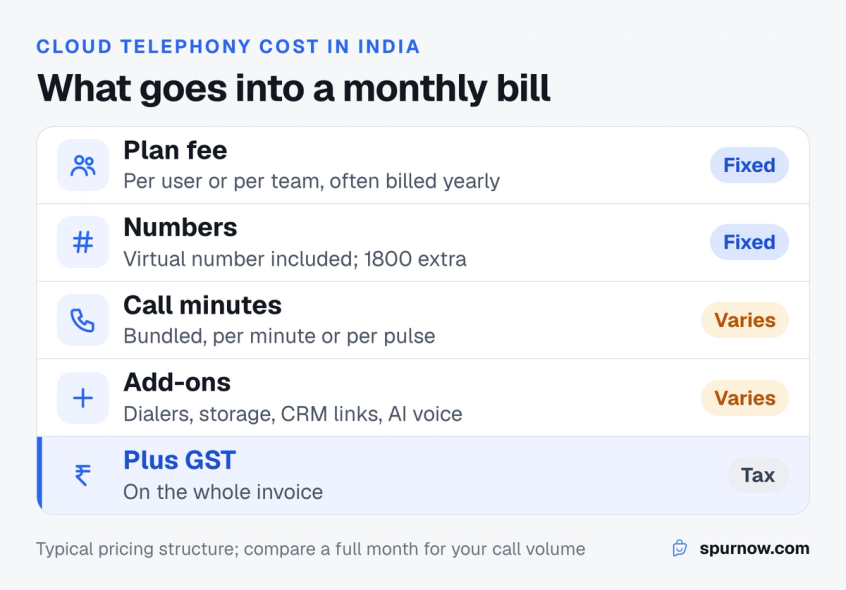
Cloud telephony in India is priced as a monthly plan, plus numbers, plus minutes, plus add-ons, plus GST. Published prices vary a lot by provider and by how many agents you have, so compare a full month for your own call volume rather than the headline plan.
The pieces you will be quoted for:
- Plan fee: per user or per team, often billed yearly. For example, MyOperator's published plans start at ₹5,000 a month for 10 users, billed yearly, with GST on top (checked 25 October 2026).
- Numbers: a virtual number is usually part of the plan. A toll-free 1800 number costs extra; MyOperator lists it from ₹500 a month.
- Minutes: some plans include calling, others charge per minute or per pulse, with incoming and outgoing priced differently.
- Add-ons: auto-dialers, extra recording storage, CRM connectors, AI voice agents and higher call capacity.
- Setup and onboarding: some providers charge for this, others do not.
Ask every provider for the same thing: a month's cost for your number of agents, your expected inbound and outbound minutes, and the features you will actually use.
Comparing message costs too? Here is how WhatsApp Business API pricing works per message.
How to choose a provider
India has a crowded cloud telephony market, and most providers sell the same core features. We compare the main names in our list of cloud telephony providers in India. Whichever you shortlist, check them on what affects your team every day:
- Number types: do you need local numbers, an 1800 number, or both?
- Concurrent calls: how many calls can ring at the same time before callers hear busy?
- Agent app: can agents take calls in a browser and on a mobile app?
- Recording and storage: how long recordings are kept, and whether you can download them.
- Integrations: does it connect to the CRM, helpdesk or store you already use?
- Pricing model: per user, per minute, per pulse, or a bundle, and whether incoming calls are charged.
- Messaging: can the same team continue the conversation on WhatsApp after the call?
- Support and uptime: who you call when calls stop working.
The seventh point is where most phone-first systems are weakest. A call often ends with "send me the details on WhatsApp", and then the conversation moves to a different tool, a different number and sometimes a personal phone.
WhatsApp calling: a business phone line inside WhatsApp
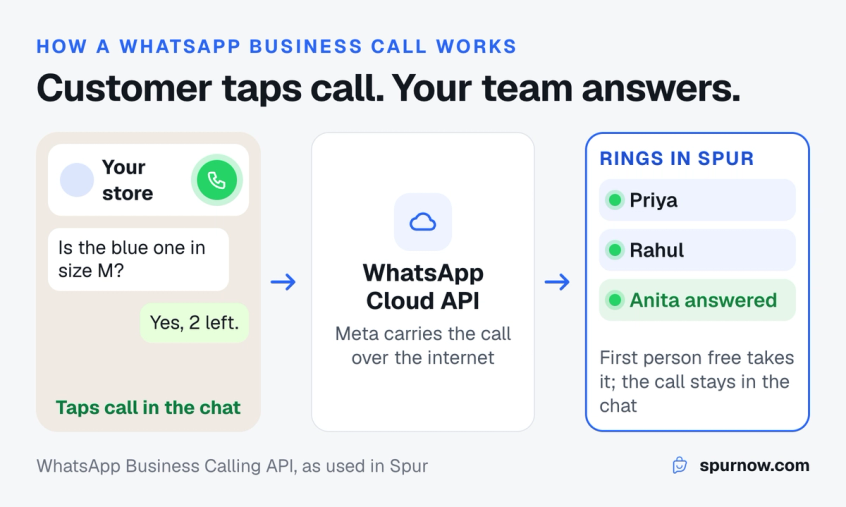
WhatsApp calling is cloud telephony that runs inside WhatsApp. Meta launched the WhatsApp Business Calling API on 15 July 2025, so businesses on the WhatsApp Business Platform can take and make voice calls in the same thread as their messages. There is no phone number to dial and no separate phone line: the customer taps the call icon in your chat, and the call reaches your team through the WhatsApp Cloud API.
It fits the definition of cloud telephony exactly. The calling infrastructure is Meta's, the call travels over the internet, and the software you connect (such as Spur) decides who it rings, records it if you choose, and logs it. Developers can read how the WhatsApp Business Calling API works under the hood.
What makes it different from a normal phone line:
- Customers already have the app. In India and many other markets, most of your customers already use WhatsApp every day.
- The call sits in the chat. Order details, photos, payment links and the call itself are in one conversation, so nobody asks "what was your order number again?"
- Customers see who is calling. The call shows your WhatsApp Business profile, not an unknown number.
- Calls customers make to you are free for them. WhatsApp calls use the customer's data, not call minutes.
Watch the 1-minute film to see a WhatsApp call ring for a whole team in Spur:
A customer calls from WhatsApp and the whole team can answer in Spur (1 minute).
When a customer calls you
Once you switch calling on for your number, customers can call you with no permission step. They tap the call icon at the top of your chat, or use a call link you put on your website, emails or socials. The call rings in Spur for everyone on your team who can see that chat, on any page, and the first person free answers it, the same way a shared inbox hands out chats.
If nobody picks up, you can set calling hours so customers call only when someone is around, and voicemail so a caller you miss can leave a message that arrives in the chat as audio.
How to call a customer on WhatsApp
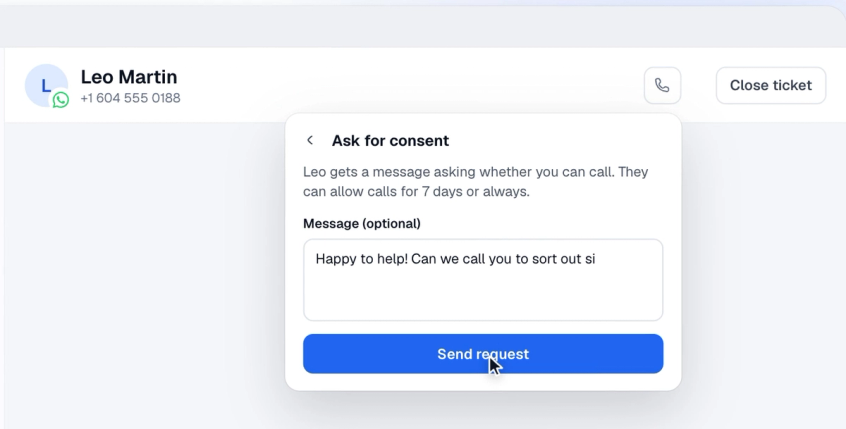
WhatsApp only lets a business call customers who have said yes. That rule protects customers from cold calls, and it is the biggest difference from a phone line, where you can dial anyone.
- Open the customer's chat and click the call icon at the top.
- If they have not allowed calls yet, click Ask for consent. If they messaged you in the last 24 hours, the request goes as a normal message. If not, you need an approved Utility or Marketing template with Ask for permission to call ticked.
- The customer chooses to allow calls for 7 days, or always. Their answer shows up in the chat.
- Click the call icon again to call them from Spur.
Rules WhatsApp sets for business calls
Meta's call permission rules are strict, and they shape how you use calling:
- You can send 1 call permission request per customer every 24 hours and 2 every 7 days. A connected call resets this.
- If a customer misses 2 of your calls in a row, WhatsApp asks them whether they still want your calls. After 4, their permission is removed.
- If too many customer calls go unanswered, WhatsApp warns you and then hides your call button.
- Business numbers from the US, Canada, Egypt, Vietnam and Nigeria can receive calls but cannot place them.
Calling customers who have not messaged in 24 hours needs a template. Here is why WhatsApp templates get rejected and how to avoid it.
Phone line or WhatsApp calling: which do you need?
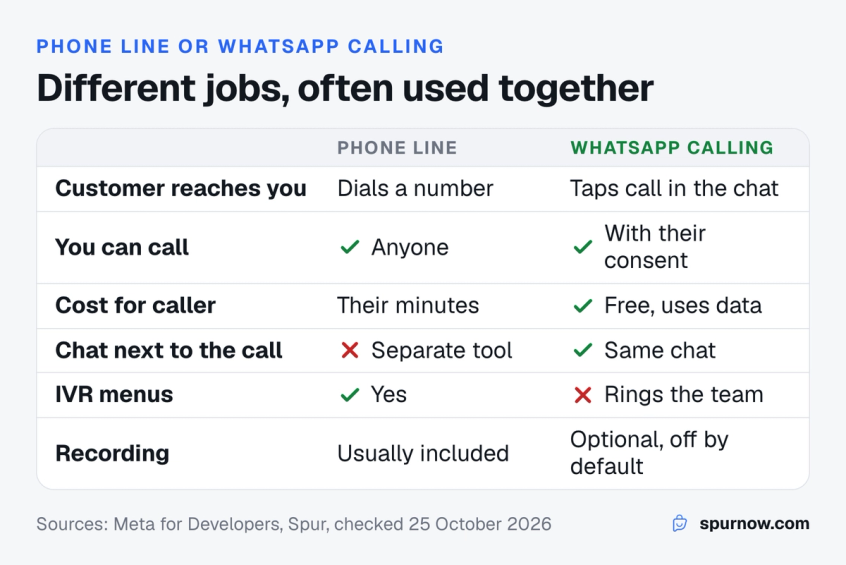
A cloud telephony line and WhatsApp calling solve different problems, and many businesses run both. Use this table to decide where each call should go.
| Cloud telephony line | WhatsApp calling in Spur | |
|---|---|---|
| How customers reach you | Dial a phone number | Tap call in your WhatsApp chat or a call link |
| Calling customers | Anyone with a phone number | Only customers who allowed calls |
| Cost for the caller | Their call minutes, unless toll-free | Free; uses their data |
| What you need | Numbers, a plan, minutes | A WhatsApp Business API number |
| Chat history next to the call | No, it is a separate tool | Yes, the call sits in the WhatsApp chat |
| IVR menus | Yes | No; calls ring the team who can see the chat |
| Recording | Usually included | Optional, off until you switch it on |
| Best for | Cold outreach, IVR-heavy support, callers without WhatsApp | Customers who already chat with you on WhatsApp |
Choose a cloud telephony line if you need an IVR, an 1800 number on your packaging, or outbound calls to people who have never messaged you. Choose WhatsApp calling if your customers already message you on WhatsApp and a quick call would close the question or the sale. Use both if you get a lot of calls from people who are not yet customers and a lot of chats from people who are.
How much does WhatsApp calling cost?
On WhatsApp, the customer never pays to call you, and ringing or unanswered calls are free. With Spur, connected calls are paid from your Spur WhatsApp wallet, per minute, the same on every plan, and you do not need to pay Meta separately. Calls are counted in 6-second steps.
- Calls customers make to you: ₹0.25 a minute (0.005 a minute in USD, GBP or EUR), from any country.
- Calls you make: priced by the country of the number you call, for example ₹0.50 a minute to India.
- Permission requests sent as a template: charged like any other template message, under the WhatsApp charges that changed on 1 October.
These rates come from Spur's public WhatsApp calling charges page, effective 1 October 2026. Use the estimator to work out a month for your team.
Why teams use Spur for WhatsApp calls
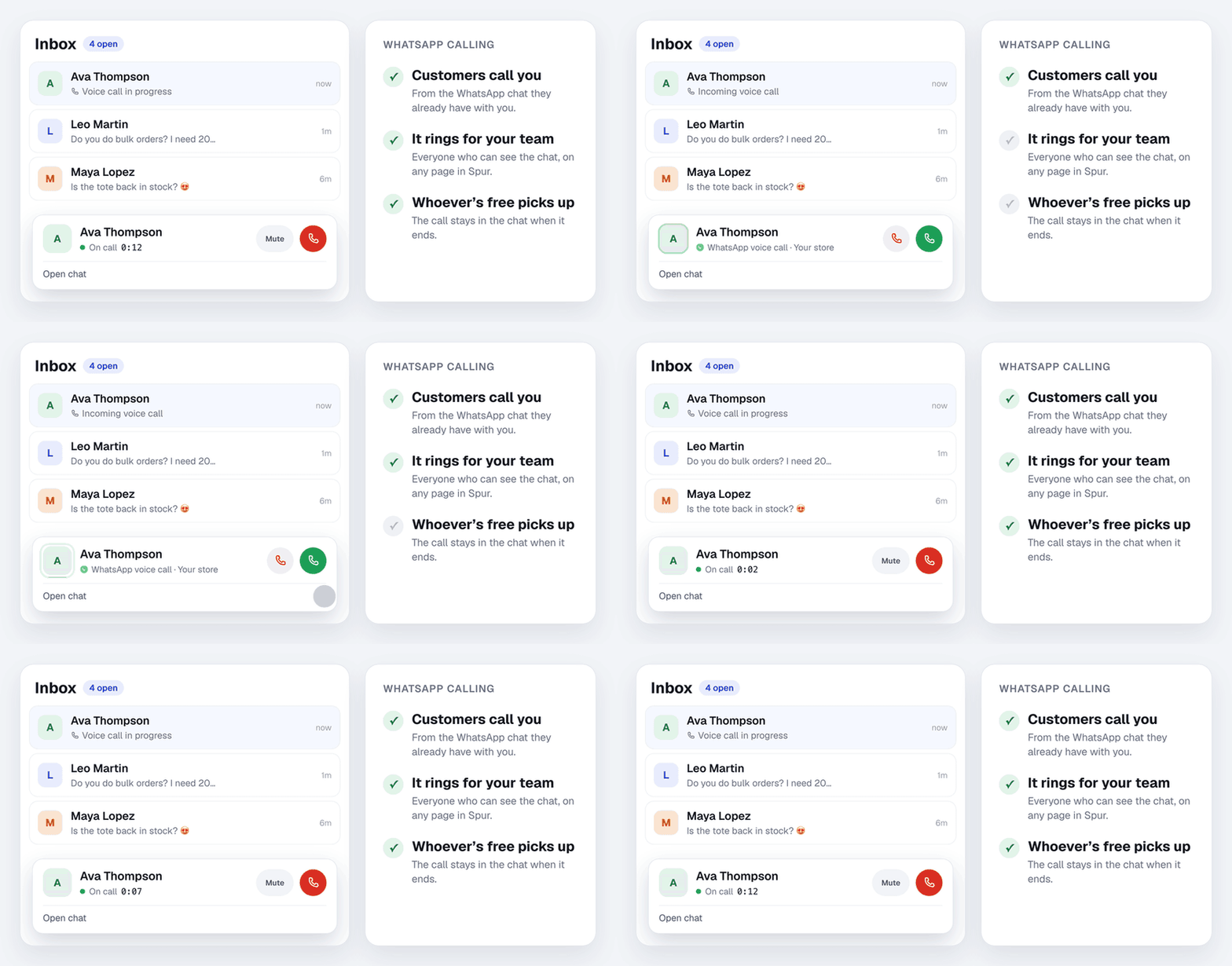
Spur turns WhatsApp calling into a team phone line without a phone system. What you get on every plan:
- One number for chats and calls. Customers call the same WhatsApp number they already message, and the call shows up in that chat.
- The whole team can answer. A call rings in Spur for everyone who can see the chat, on any page, and the first person free picks up. No personal numbers, no call forwarding.
- Call customers in one click. Ask for consent from the chat, and once they allow it, call them from the same place.
- Nothing gets lost. Every call is logged with who answered and how long it lasted, missed calls included, with optional recordings and transcripts.
- Calls when you are open. Calling hours, voicemail that arrives in the chat as audio, and a call link for your website and socials.
- Know who picks up. Call analytics show calls received, answered, missed and placed, and talk time per teammate.
- Your AI agent keeps working. Spur's AI agent answers chats on WhatsApp, Instagram and your website, while calls go to people on your team.
See it on your own number: start a 14-day free trial of Spur, no credit card needed.
How to set up WhatsApp calling in Spur
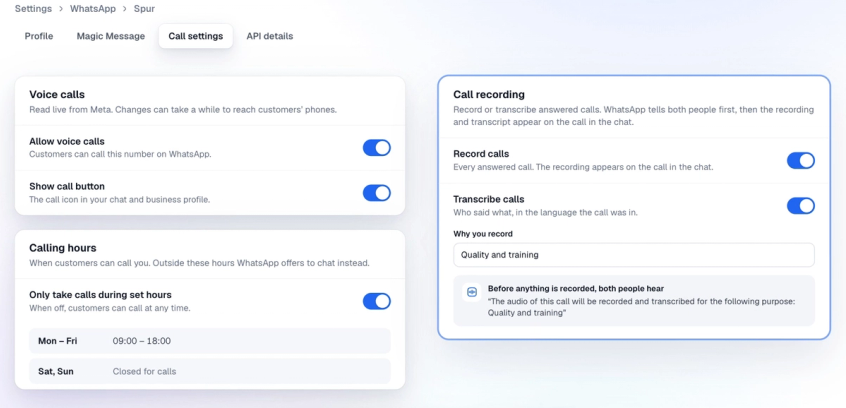
Setting up WhatsApp calling in Spur takes a few minutes and no new phone line.
- In Spur, go to Settings, then WhatsApp, and click Manage next to your number.
- Open the Call settings tab and switch on Allow voice calls. Changes can take a while to reach customers' phones.
- Set up the rest to suit your team: Show call button, Who sees the call button (by country), Ask callers for permission to call back, Calling hours, Voicemail, and Record calls or Transcribe calls.
- Copy your call link from the same tab and add it to your website, emails and social profiles.
Who can use WhatsApp calling
Calling works on every Spur plan, on WhatsApp numbers that meet Meta's rules:
- The number is connected to Spur through the WhatsApp Cloud API or OneXtel.
- It has a messaging limit of at least 2,000 a day. You can see your limit in Settings, then WhatsApp.
- It is not also used in the WhatsApp Business app.
If your number is still on the WhatsApp Business app, this WhatsApp Business API guide explains the move, and WhatsApp Business pricing compares the app with the API.
What every WhatsApp call leaves behind in Spur
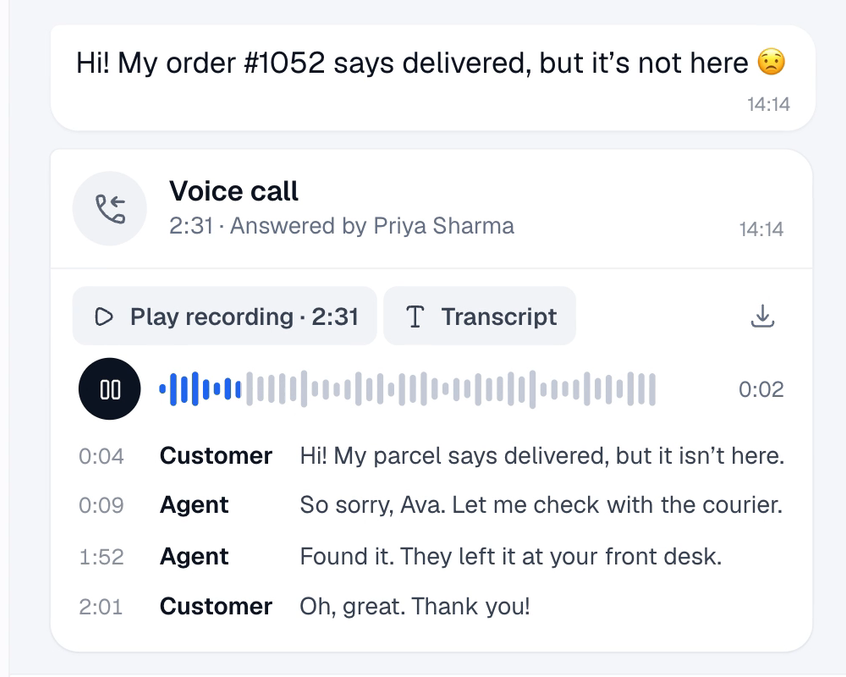
Each call shows in the chat with who answered or placed it and how long it lasted, and missed calls show up too. If you switch on recording or transcription for the number, the recording and a transcript in the language the call was in appear on the call. WhatsApp tells both people before anything is recorded.
See who answers your calls
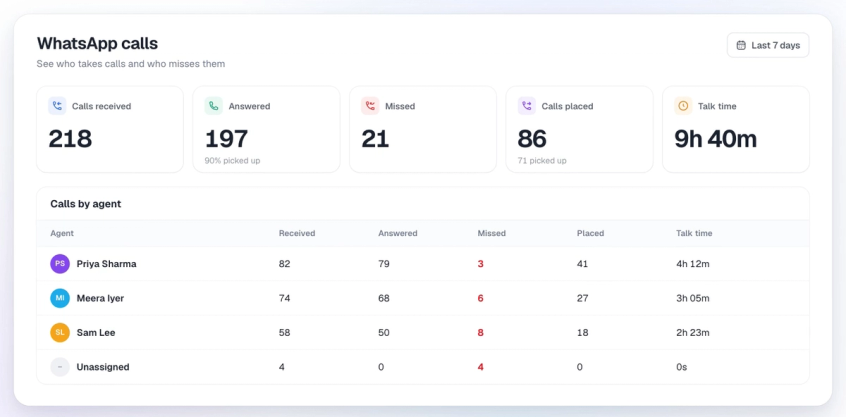
In Analytics, then Calls, you see calls received, answered, missed and placed, and talk time for each teammate, so you know who is picking up and when calls go unanswered.
Calls are one part of support. These customer service performance indicators help you track the rest.
Bottom line
Cloud telephony moved the business phone system to the internet: numbers, IVR, routing and recording, rented as a service and used from any device. For many businesses in India it is still the right tool for toll-free lines, IVR menus and outbound calling.
WhatsApp calling is cloud telephony for the customers who already talk to you on WhatsApp. They call from the chat, your team answers in the browser, and the call stays next to the order, the photos and the payment link, alongside the customer support you already automate on WhatsApp. If most of your customer conversations already happen on WhatsApp, try WhatsApp calling in Spur before you buy another phone line.
Frequently asked questions
Cloud telephony is a business phone system that a provider runs on its servers and you use over the internet. You get numbers, IVR menus, call routing and recording from a web dashboard, without buying phone hardware, and agents can take calls from anywhere.
It depends on the provider, the number of agents and your minutes. Expect a monthly plan fee, number rental, per-minute or bundled calling, add-ons and GST. As one published example, MyOperator's plans start at ₹5,000 a month for 10 users, billed yearly (checked October 2026).
VoIP is the technology that sends voice over the internet. Cloud telephony is a complete hosted phone system built on VoIP, with numbers, IVR, routing, recording and reports managed by a provider.
Yes. WhatsApp Business calling runs on Meta's cloud infrastructure, travels over the internet, and is managed through software such as Spur that routes, records and logs the calls. The difference is that customers call from WhatsApp instead of dialling a phone number.
Yes, but only customers who have allowed it. The business sends a call permission request, and the customer chooses to allow calls for 7 days or always. Customers can call the business without any permission step once calling is switched on.
It is free for the customer, and ringing or unanswered calls are not charged. Connected calls cost the business per minute. With Spur, calls customers make cost ₹0.25 a minute, and calls you make are priced by the country you call, for example ₹0.50 a minute to India.
Yes, if you switch on recording or transcription for the number. Both are off by default. When they are on, WhatsApp plays a short announcement to both people before the call is recorded, and the recording and transcript appear on the call in Spur.
No. Business calling in Spur needs a number connected through the WhatsApp Cloud API or OneXtel, with a messaging limit of at least 2,000 a day. Numbers that are also used in the WhatsApp Business app cannot use it.
Sources
Checked against the original source. Dates are when we last verified each one.
- Announcing Launch of the WhatsApp Business Calling API WhatsApp Business. Retrieved 25 October 2026
- Calling API overview Meta for Developers. Retrieved 25 October 2026
- Calling API pricing Meta for Developers. Retrieved 25 October 2026
- User call permissions Meta for Developers. Retrieved 25 October 2026
- WhatsApp calling charges Spur. Retrieved 25 October 2026
- Let customers call you on WhatsApp Spur What's New. Retrieved 25 October 2026
- Plans and pricing MyOperator. Retrieved 25 October 2026
Was this article useful?