Key takeaways
- WhatsApp Direct Send lets a business send utility and authentication messages through the Cloud API without creating or approving a template first. Meta matches or generates the template itself.
- Utility messaging has been generally available since 31 July 2026. Authentication is still in beta, and marketing messages are not allowed.
- Since 8 October 2026, business portfolios with a messaging limit of 100,000 or unlimited are generally eligible. A banner in WhatsApp Manager confirms it.
- Outside a free entry point window, each delivered Direct Send message is charged at the utility or authentication rate for the customer's country, the same as a template in that category, with no extra Direct Send fee.
- Persistently sending promotions through Direct Send leads to a warning, a rate limit (error 131064), 7-day and 30-day blocks (error 139200) and finally permanent removal.
Ask an AI about this article
WhatsApp Direct Send is a Meta feature of the WhatsApp Cloud API that lets a business send utility and authentication messages without creating or approving a template first. You write the message, mark it as utility or authentication, and Meta takes care of the template. Spur supports WhatsApp Direct Send for agent replies sent after the 24-hour customer service window closes, on Cloud API and Onextel numbers that Meta has enabled.
Utility messaging through Direct Send has been generally available since 31 July 2026. Authentication messaging is still in beta, and marketing messages are not allowed. This guide covers how it works, how it compares with templates, who is eligible, what it costs, its limits, the penalties for misuse and the error codes to handle. All of it was checked against Meta's developer documentation on 16 October 2026.
What is WhatsApp Direct Send?
WhatsApp Direct Send is a way to send business-initiated utility and authentication messages on WhatsApp without the template step. Normally, any message you send outside a customer's 24-hour window has to be a template that has been through Meta's template approval process. With Direct Send you skip that step: Meta sends your message with a template it has already generated for you, or with a fallback template while it creates a new one in the background.
Meta describes Direct Send as a way to remove template management from utility and authentication messaging. It does not remove Meta's category rules. The message still has to be a genuine utility or authentication message, and Meta still checks it after you send.
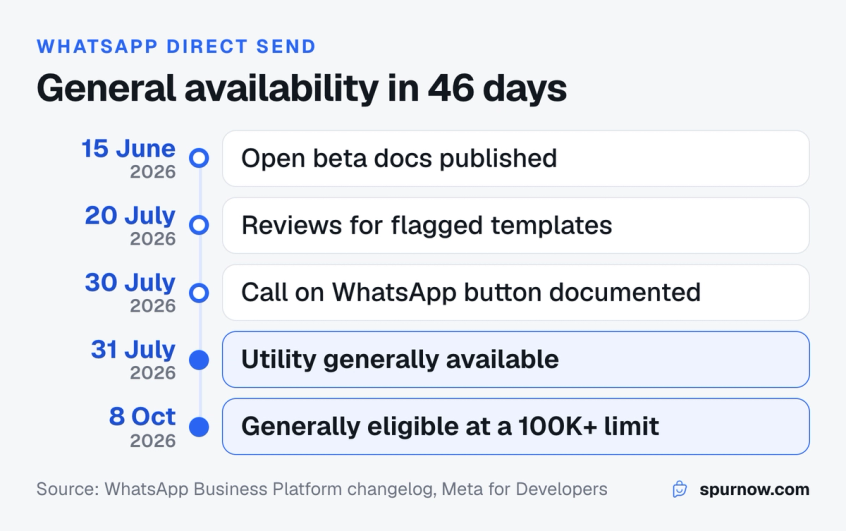
The feature has moved quickly:
- 15 June 2026: Meta published the Direct Send documentation for an open beta.
- 20 July 2026: businesses could request a review when a Direct Send template was flagged as marketing.
- 30 July 2026: Meta documented the Call on WhatsApp (voice call) button for Direct Send messages.
- 31 July 2026: utility messaging became generally available. Authentication stayed in beta.
- 8 October 2026: Meta said business portfolios with a messaging limit of 100,000 or unlimited are generally eligible.
New to the platform behind it? Our WhatsApp Business API guide explains the Cloud API, numbers and providers from the start.
How does WhatsApp Direct Send work?
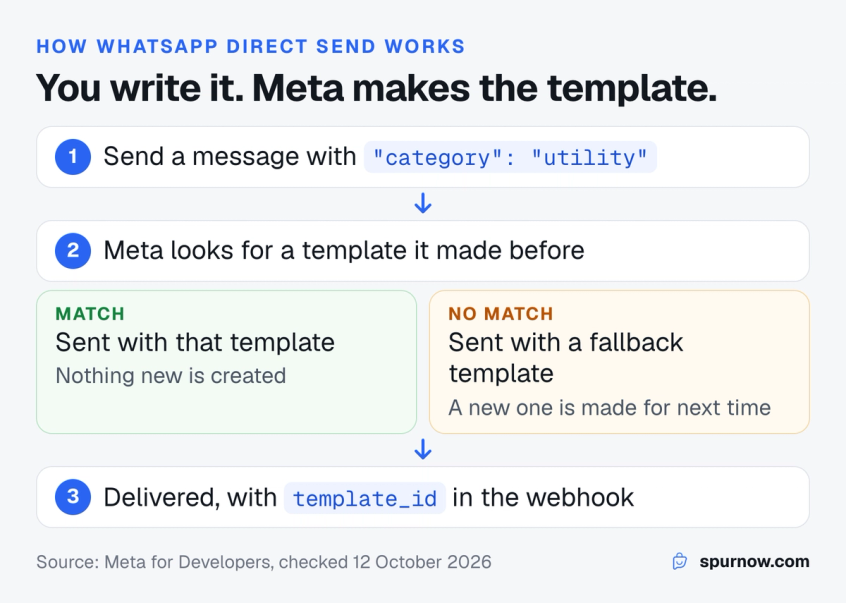
WhatsApp Direct Send works by adding one field, category, to a request you already know. You call the same /<PHONE_NUMBER_ID>/messages endpoint you use for any Cloud API message, and set the category to utility or authentication.
If you leave out category, or set it to service, the request is an ordinary service message. That only works inside an open 24-hour window, and outside it the send fails with error 131047.
How Meta picks or creates the template
Every Direct Send message still travels as a template. What changes is who makes it. Meta's documentation describes four steps:
- When your account is onboarded to Direct Send, Meta adds a small set of fallback templates to it, called onboarding templates.
- For each message, Meta checks whether the content matches a template it has already generated for you. If it does, that template is used.
- If nothing matches, the message is still sent, using one of the onboarding templates.
- In the background, Meta creates a new template from the message. It removes personal data from the content and detects the language first, so later messages like it match the new template.
Every status update for the message (sent, delivered, read) carries one extra field, template_id, which tells you which template carried it. You can pass that ID to the Template Analytics API to see how that kind of message performs.
Naming your own templates with template_name
Because Meta picks the template, you cannot always tell in advance which template a message will use, and that makes reporting harder. If you need clean reporting, add a direct_send_config object with a template_name. Meta then creates or reuses a template with exactly that name, and every message sent with it is counted under it.
- The name can use only lowercase letters, numbers and underscores, up to 512 characters.
- It must be unique within your account. If a template you made yourself already has the name, you get error 132021 through the error webhook.
- Named templates never fall back to onboarding templates. If creation fails, Meta retries up to 3 times and then sends error 131000.
- Named templates work for utility messages only, not authentication.
Templates rejected in the past? These reasons WhatsApp templates get rejected come from the same category rules Meta now applies to Direct Send messages after they go out.
Direct Send vs templates, service messages and Magic Message
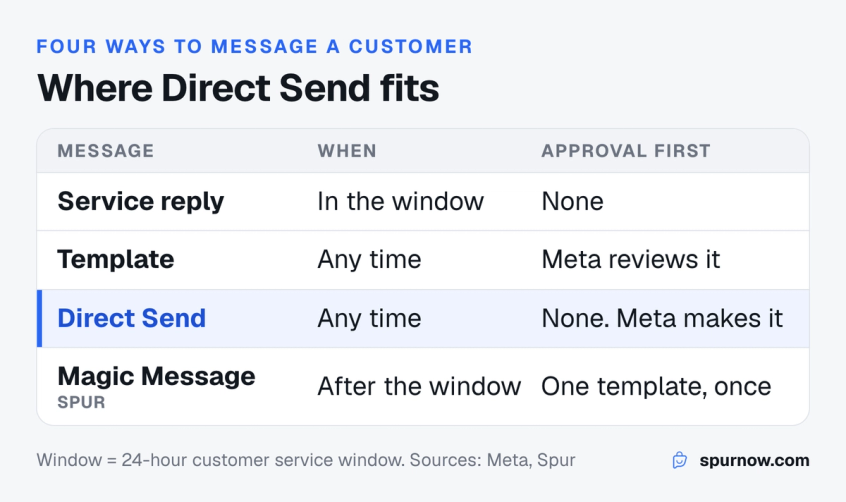
WhatsApp Direct Send sits between a free-form reply and a template. Like a reply, you write the message as you need it. Like a template, you can send it after the 24-hour window has closed. The table below compares the four ways a business can message a customer on WhatsApp.
| Compare | Service message | Template message | Direct Send | Magic Message (Spur) |
|---|---|---|---|---|
| When you can send it | Only inside the 24-hour window | Any time | Any time | After the 24-hour window closes |
| Approval before sending | None | Meta reviews each template | None. Meta generates the template | One utility template, approved once |
| Categories | Service | Marketing, utility, authentication | Utility, authentication (beta) | Utility |
| What the customer sees | Your text | The approved template | Your message as you wrote it | Your reply drawn into an image |
| What Meta charges | Service rate, after 1,000 free a month per number | The rate of its category | Utility or authentication rate | Utility rate |
| Who can use it | Any API number | Any API number | Accounts Meta has enabled | Spur workspaces |
A service message is a free-form reply inside the 24-hour customer service window, which opens or resets each time the customer messages you. Since 1 October 2026 those replies are charged after the first 1,000 each month, as our guide to WhatsApp service message pricing explains.
A template message is pre-written, submitted for review and approved before use. Outside Direct Send, it is the standard way to reach someone whose window has closed, and the only way to start a marketing conversation. For promotions, it pays to craft a high-converting WhatsApp template rather than squeeze an offer into a utility message.
A Direct Send message is business-initiated like a template, but written at send time like a reply. It is limited to utility and authentication.
A Magic Message is Spur's answer to the closed window: the agent's reply is printed onto an image and sent inside an approved utility template, and the window reopens when the customer replies. It is now the fallback for Direct Send, covered in the Spur section below.
Curious how the image approach started? Here is how Magic Message templates were built for replies after the window.
Which messages can you send with Direct Send?
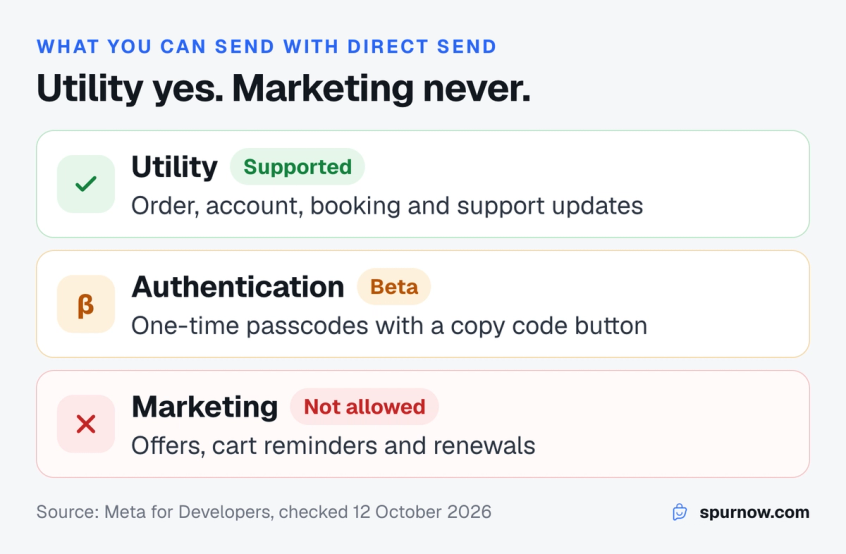
You can send WhatsApp utility messages with Direct Send, and authentication messages if Meta has given you beta access. A WhatsApp utility message is a non-promotional update about something the customer did or asked for, such as an order, a booking or a support request. Our guide to WhatsApp Direct Send use cases walks through eight of them with example messages. Marketing messages are not allowed. If you set category to marketing, the API rejects the request with error 100.
What counts as utility is set by Meta's template category guidelines, the same rules that apply to templates you submit yourself. A utility message has to meet both of these conditions:
- It is non-promotional, with no promotional or persuasive intent.
- It is specific to the user or requested by them, such as an update on their order, account, booking or support request, or it is essential to them, such as a safety alert.
Meta's guidelines also say that mixed content counts as marketing. An order update with a discount code at the end is a marketing message, and so is a message whose purpose is unclear. Abandoned cart reminders and renewal offers are marketing too, even when the customer asked for them.
Authentication messages carry a one-time passcode. In Direct Send they support text and a copy code button, the copy code button works in English only, and they must be sent to a phone number rather than a business-scoped user ID. Access is restricted, so you request it through Meta's interest form or your partner. You can read more about how authentication templates and OTPs work on WhatsApp.
Meta can move a template to a different category after it is approved. These WhatsApp template category change alerts show how to catch it.
Direct Send limits and supported formats
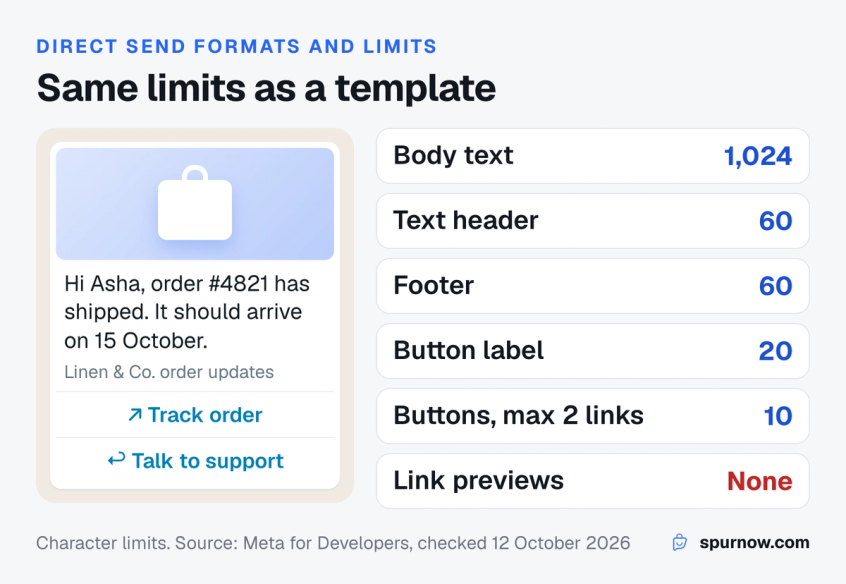
WhatsApp Direct Send supports text messages and a set of interactive messages, with the same length limits as business-initiated templates. Anything Meta does not list is not supported yet.
| Limit | Value |
|---|---|
| Body text | 1,024 characters |
| Text header | 60 characters |
| Footer | 60 characters |
| Button text | 20 characters |
| Reply buttons only | Up to 3 (see the note below) |
| Link and reply buttons together | Up to 10, with at most 2 link (CTA) buttons |
| Voice call button | 1, sent on its own |
| Languages | Every language the Cloud API supports |
| Throughput | Standard Cloud API throughput, with business portfolio pacing since 15 October 2026 |
Supported for utility: text messages, link (CTA URL) button messages, reply button messages, mixed link and reply button messages, image, video and document headers, custom time to live, and the Call on WhatsApp button.
Meta's pages differ on reply buttons: the limits page lists up to 10 quick reply buttons, while the message types page says a reply button message carries up to three. Plan for three unless you use the mixed format.
Not supported: buttons that call a regular phone number, any other button type, and address, audio, contact, location, sticker and reaction messages. Links in the text do not show a preview either, because preview_url is not supported.
Four details catch developers out:
- Reply button taps come back in the template format. Because Direct Send delivers your message as a template, a tap arrives as "type": "button" with the label in button.text, not as interactive.button_reply. Code that only reads button_reply.title will miss it.
- The voice call button travels alone. It cannot share a message with link or reply buttons, footers are not allowed, and calling must be enabled on the number or the send fails with error 138000.
- Time to live is for Direct Send only. Add ttl_seconds to drop a message that cannot be delivered in time. For utility it can be 30 seconds to 12 hours, and without it Meta keeps trying for its 30-day default. For authentication it is 30 seconds to 15 minutes, with a 10-minute default.
- Messages can be held or dropped. Since 15 October 2026, Direct Send messages are subject to business portfolio pacing. Meta can hold a message and deliver it later, or drop it. A dropped message is reported only as a failed status with error 135000, so watch your status webhooks.
Sending media headers? Our WhatsApp image size guide lists the dimensions and file limits for template images.
How much does WhatsApp Direct Send cost?
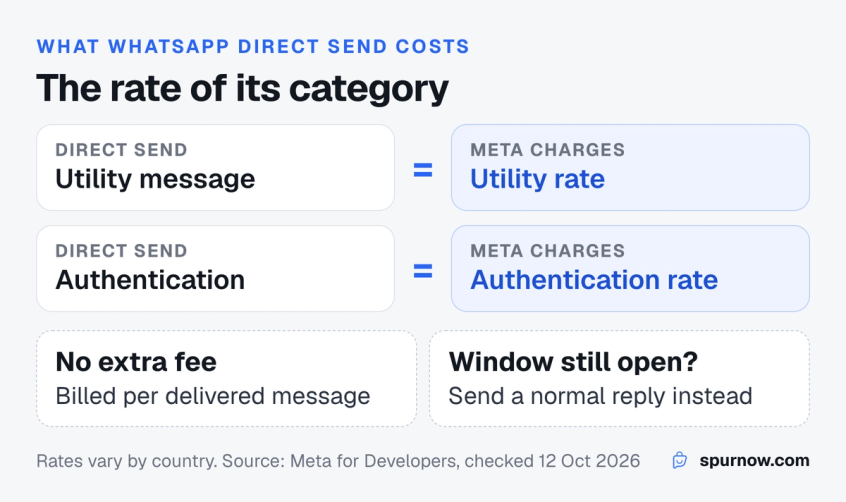
WhatsApp Direct Send costs the same as a template in the same category, so a Direct Send utility message costs the same as any WhatsApp utility message in the customer's country. Meta charges each delivered utility message at the utility rate for that country, and each authentication message at the authentication rate. Meta's documentation lists no separate fee for Direct Send itself, so what you save is template setup and review time, not money.
The one exception Meta lists for utility messages is the free entry point window after a Click to WhatsApp ad, during which it charges nothing for them.
Two points keep the maths straight:
- Meta bills per delivered message. Meta's Direct Send FAQ still describes billing in the older "utility conversation" terms, but Meta's pricing page says it has charged per delivered message since 1 July 2025.
- Inside the window, send a normal reply. A service message needs no category, and each number's first 1,000 service messages a month are free. Direct Send is for the moment that window has closed.
Rates differ by country and change on Meta's pricing calendar. Our WhatsApp Business API pricing guide breaks down the categories, and the WhatsApp pricing calculator estimates a monthly bill.
Who is eligible for Direct Send?
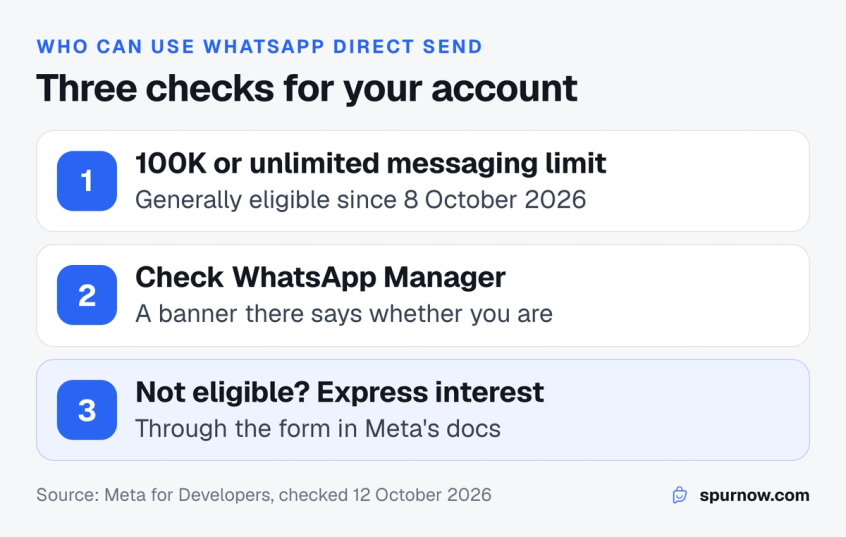
Business portfolios with a messaging limit of 100,000 or unlimited are generally eligible for WhatsApp Direct Send utility messaging, according to Meta's update of 8 October 2026. Meta calls Direct Send a premium solution for businesses that meet its prerequisites, and it is rolling out in phases.
To check your own account:
- Look at your messaging limit. Meta's eligibility statement is tied to the business portfolio's limit, so a portfolio below 100,000 may not have access yet.
- Check WhatsApp Manager. Meta says a banner there tells you whether your account is eligible. Meta's link to it opens the Message templates page.
- If it is not, express interest. Meta links an interest form from its Direct Send documentation. Authentication access is requested the same way.
If you send a message with a category while your account is not eligible, the API answers straight away with error 100 and this detail: "The 'category' value requires Direct Send, which isn't enabled for this account. Use an approved message template instead." Meta documents no API call that reports whether an account is enabled, so a real send is the only test from code.
What happens if you send marketing through Direct Send?
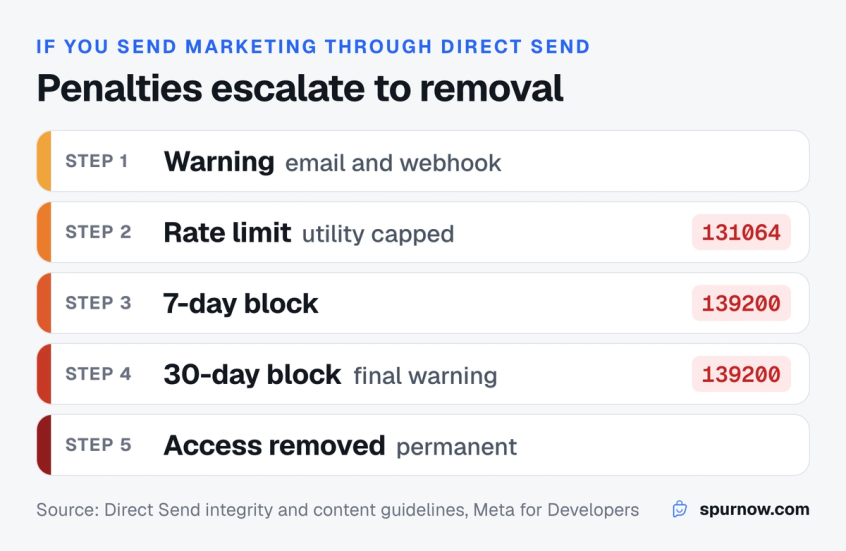
If you send marketing content through Direct Send, Meta flags the generated template, and repeated misuse escalates from a warning to a permanent loss of Direct Send. Meta actively monitors how Direct Send messages are categorised, using the same integrity rules as templates you create yourself.
| Level | What happens | How long |
|---|---|---|
| Warning | Meta tells you about the misuse. You can ask Meta to review the flagged templates | Ongoing |
| Rate limit | Utility sends are capped. Past the cap, Meta rejects them with error 131064 | Until Meta's enforcement period ends |
| Restriction | No Direct Send utility or authentication messages. Sends fail with error 139200 | 7 days |
| Extended restriction | Continued misuse. Meta calls this the final warning | 30 days |
| Permanent revocation | Direct Send access is removed | Permanent |
The first signal is usually a template notification. Meta sends you an email and a template_correct_category_detection webhook with correct_category set to MARKETING. If you think Meta got it wrong, you can request a review in Business Support Home under Direct Send template updates, or from the flagged template in WhatsApp Manager.
- You have 60 days from the notification to request a review.
- Each flagged template can be reviewed once. Most reviews take a few days.
- Requesting a review does not pause your Direct Send access.
- A successful review restores the template's category, but it does not lift an account restriction. Restrictions lift on Meta's schedule as fewer of your messages are flagged.
Separately, a generated template can be paused for low quality, like any template. A message that matches a paused template fails with error 132015. Meta's advice is the same as for any utility template: send only to people who expect the message.
Direct Send error codes
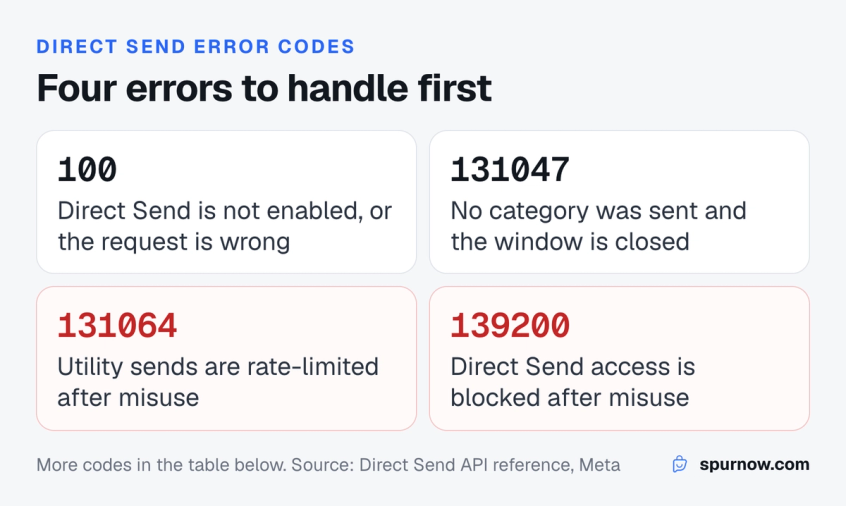
The table lists the WhatsApp Cloud API error codes you are most likely to hit with Direct Send, what each one means and what to do next. Most come back as soon as you send. Four arrive later: 132021 and 131000 through the error webhook, and 132015 and 135000 as a failed message status.
| Code | What it means | What to do |
|---|---|---|
| 100 | Direct Send is not enabled for this account | Check WhatsApp Manager, send an approved template meanwhile |
| 100 | The category is not utility, authentication or service | Send promotions as a marketing template |
| 100 | Time to live is out of range, or set on a message that is not Direct Send | Use 30 seconds to 12 hours for utility, 30 seconds to 15 minutes for authentication |
| 100 | template_name has the wrong format | Use lowercase letters, numbers and underscores, up to 512 characters |
| 131047 | Sent as a service message with no open 24-hour window | Add a category, or send a template |
| 131064 | Utility messages capped after category misuse | Wait for the limit to lift and review flagged templates |
| 139200 | Direct Send access blocked after category misuse | Send approved templates until the restriction ends |
| 132015 | The message matched a template paused for low quality | Change the content and check who receives it |
| 132021 | template_name is taken by a template you created | Pick a different name |
| 131000 | A named template could not be created after 3 retries | Retry the send later |
| 2388330 | Tried to delete a Direct Send template | These templates cannot be deleted |
| 2388318 | Tried to edit a Direct Send template | Change the messages you send instead |
| 135000 | Meta dropped the message under business portfolio pacing (only shown as a failed status) | Watch status webhooks and spread large sends out over time |
| 138000 | Voice call button sent without calling enabled | Enable calling on the phone number first |
What does WhatsApp error 131064 mean?
Error 131064 means your WhatsApp Business account has hit a messaging limit that Meta applied after template category misuse. Meta added the code on 17 April 2026, and it applies to template messages as well as Direct Send. The limit lifts on its own when the enforcement period ends.
What does WhatsApp error 139200 mean?
Error 139200 means Direct Send access is blocked for the account because of Meta's enforcement for category misuse, such as a 7-day or 30-day restriction. Meta describes this restriction as removing Direct Send access, so send utility and authentication messages as approved templates while it lasts.
Seeing different numbers? Our guide on how to fix WhatsApp messages not delivered covers the delivery errors outside Direct Send.
Where Direct Send templates show up and how they are cleaned up
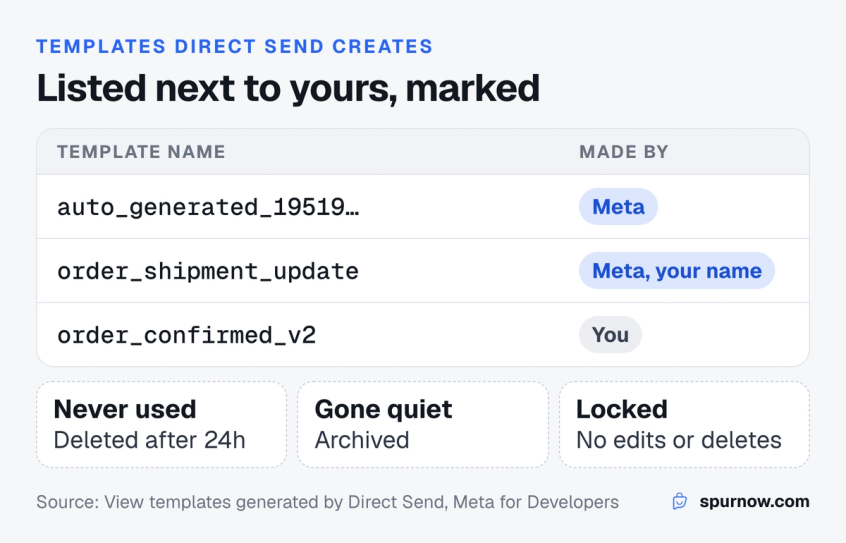
Templates generated by WhatsApp Direct Send appear in WhatsApp Manager and in the Message Templates API next to your own. In WhatsApp Manager each row is marked as auto-generated by Meta, and a filter separates them from the ones you made. In the API they carry source: AUTO_GENERATED, and you can list them with GET /<WABA_ID>/message_templates?source=AUTO_GENERATED.
- Names: Meta's docs show content-based names starting with
auto_generated, and named templates use the exacttemplate_nameyou sent. To find them reliably, filter onsource=AUTO_GENERATEDrather than the name. - No edits or deletes: you cannot change or remove a Direct Send template, in WhatsApp Manager or through the API. To change what Meta classifies, change the messages you send.
- Clean-up: a generated template that was never used to send is deleted after 24 hours. Templates that were used but have gone quiet are archived periodically.
- Insights: hover over a generated template in WhatsApp Manager and select View insights, or pass its
template_idto the Template Analytics API.
How Spur uses Direct Send
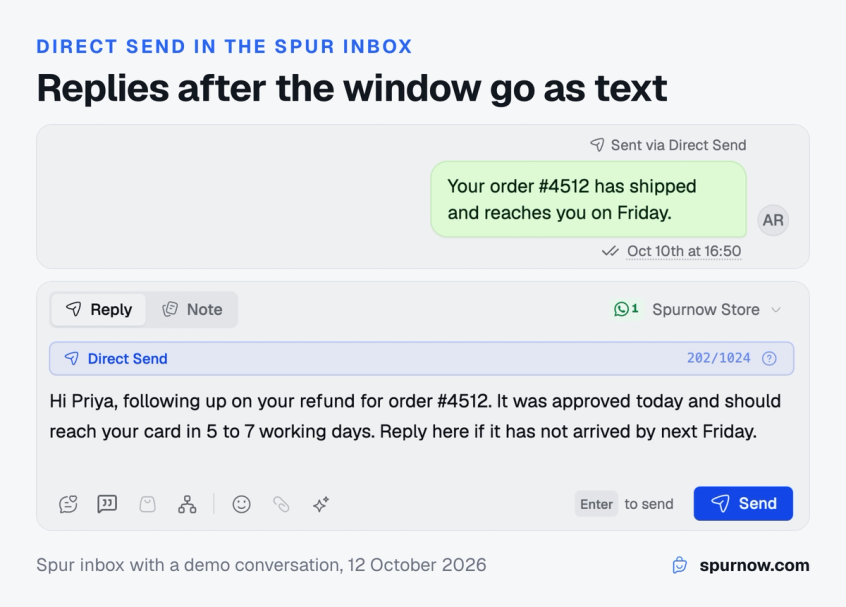
Spur uses WhatsApp Direct Send for the reply an agent types in the inbox after a customer's 24-hour window has closed. The customer receives that reply as a normal WhatsApp text message instead of a Magic Message image.
- Who it covers: an agent's own reply from the Spur inbox, on the web or the mobile app. Broadcasts, workflows, AI agent replies, the API and group chats do not use Direct Send.
- Which numbers: WhatsApp Cloud API numbers and Onextel numbers.
- What the agent sees: a Direct Send badge with a live count against the 1,024-character limit, and a "Sent via Direct Send" label on the message. A longer reply goes as a Magic Message instead. Delivery can take up to about 5 minutes.
- When Meta has not enabled it: Spur sends the same reply as a Magic Message, if the number has an approved Magic Message template, and shows that Meta has not enabled Direct Send for the account, with a link to Meta's request form filled in with the account ID. Without an approved Magic Message, the reply is not sent and the agent is told why.
- When Meta pauses it: after a block, the composer says Direct Send is paused until a date and replies go as Magic Messages. Under a rate limit, Meta may refuse Magic Messages too until it lifts.
- Cost: Meta bills each Direct Send reply at the utility rate, the same rate as a Magic Message, so switching adds no cost.
The auto-generated templates are kept out of your Templates list, so your own templates stay easy to find. Only typed agent replies go through Direct Send, which keeps automated promotions out of it, but agents should still keep offers out of replies sent after the window.
For a support team, an answer that is ready after the customer's window has closed still reaches them as plain text, with no template to write. If you are setting up support on WhatsApp for the first time, this customer support automation guide covers what to automate and what to keep human, or see the inbox on the WhatsApp Business API page.
Bottom line
WhatsApp Direct Send removes the template step from utility and authentication messages: you write the message, add a category, and Meta handles the template. It does not change what counts as utility or what it costs, and it adds its own penalties, up to permanent loss of Direct Send, for slipping promotions in.
If your account is eligible, use WhatsApp Direct Send for order updates, support follow-ups and replies after the 24-hour window, and keep offers in marketing templates. Spur already sends agent replies after the window through Direct Send on Cloud API and Onextel numbers, with Magic Message as the fallback.
Frequently asked questions
No. Meta charges each delivered Direct Send message at the utility or authentication rate for the customer's country, the same as a template in that category, and lists no extra fee for Direct Send itself. The exception is a free entry point window after a Click to WhatsApp ad, where Meta charges nothing for utility messages.
No. You do not create or submit a template. Meta matches your message to a template it generated earlier or creates a new one in the background, and it still checks the category afterwards and can flag messages that read as marketing.
No. The API rejects the marketing category with error 100, and utility messages with promotional content get flagged. Persistent misuse leads to rate limits, blocks and, in the end, permanent removal of Direct Send. Use an approved marketing template for promotions.
Check WhatsApp Manager, where Meta says a banner shows whether the account is eligible. From the API, a message sent with a category returns error 100 if Direct Send is not enabled. Portfolios with a 100,000 or unlimited messaging limit are generally eligible.
No. Sending a WhatsApp message without saving a number is click to chat, which uses a wa.me link and works in the normal WhatsApp app. You can make one with our free WhatsApp link generator. Direct Send is a WhatsApp Cloud API feature for businesses.
Yes, but only with beta access. Authentication messages through Direct Send support text and an English copy code button, must go to a phone number, and can carry a time to live of 30 seconds to 15 minutes.
No. Meta documents Direct Send only for the WhatsApp Cloud API, sent through its messages endpoint. Its documentation describes no Direct Send option for the WhatsApp Business app.
No. Editing returns error 2388318 and deleting returns error 2388330. Meta deletes generated templates that were never used after 24 hours and archives inactive ones on its own.
Sources
Checked against the original source. Dates are when we last verified each one.
- Direct Send messages Meta for Developers. Retrieved 12 October 2026
- Direct Send: Supported features and limits Meta for Developers. Retrieved 12 October 2026
- Direct Send: Send utility and authentication messages Meta for Developers. Retrieved 12 October 2026
- Direct Send: Supported message types Meta for Developers. Retrieved 12 October 2026
- Direct Send: Business-named templates Meta for Developers. Retrieved 12 October 2026
- Direct Send: Configure message time-to-live (TTL) Meta for Developers. Retrieved 12 October 2026
- Direct Send: Integrity and content guidelines Meta for Developers. Retrieved 12 October 2026
- Direct Send: View templates generated by Direct Send Meta for Developers. Retrieved 12 October 2026
- Direct Send API reference Meta for Developers. Retrieved 12 October 2026
- Direct Send FAQ Meta for Developers. Retrieved 12 October 2026
- WhatsApp Business Platform changelog Meta for Developers. Retrieved 12 October 2026
- Pricing on the WhatsApp Business Platform Meta for Developers. Retrieved 12 October 2026
- Template categorization Meta for Developers. Retrieved 12 October 2026
- Scale your WhatsApp Business account capabilities Meta Business Help Centre. Retrieved 12 October 2026
Was this article useful?