Key takeaways
- The WhatsApp Business Calling API, launched by Meta on 15 July 2025, adds voice calls to the WhatsApp Business Platform, with the call and the chat in one thread. Video and screen sharing are planned.
- Customers can call a business free from its WhatsApp chat with no permission step. A business can call a customer only after they allow it, for 7 days or always.
- Meta allows 1 call permission request per customer every 24 hours and 2 every 7 days, and removes permission after 4 unanswered calls in a row.
- Meta does not charge for calls customers make. Calls a business makes are charged per 6-second pulse by the country called, and permission requests are charged as messages.
- The API needs a Cloud API number with a messaging limit of at least 2,000. Spur switches it on without code and rings calls for the whole team in the browser.
Ask an AI about this article
The WhatsApp Business Calling API is Meta's API for voice calls between a business and its customers on WhatsApp. Customers call you free from your WhatsApp chat, and you can call customers who have given you permission. With Spur you get the WhatsApp Business Calling API without writing code: calls ring for your whole team in the browser and sit in the same chat as your messages.
Meta launched the WhatsApp Business Calling API on 15 July 2025. This guide covers how it works, what it costs, the permission rules and limits, and the fastest way to switch it on.
What is the WhatsApp Business Calling API?
The WhatsApp Business Calling API adds voice calls to the WhatsApp Business Platform (Cloud API). Calls use VoIP, so they travel over the internet, and both the call and the chat live in one WhatsApp thread.
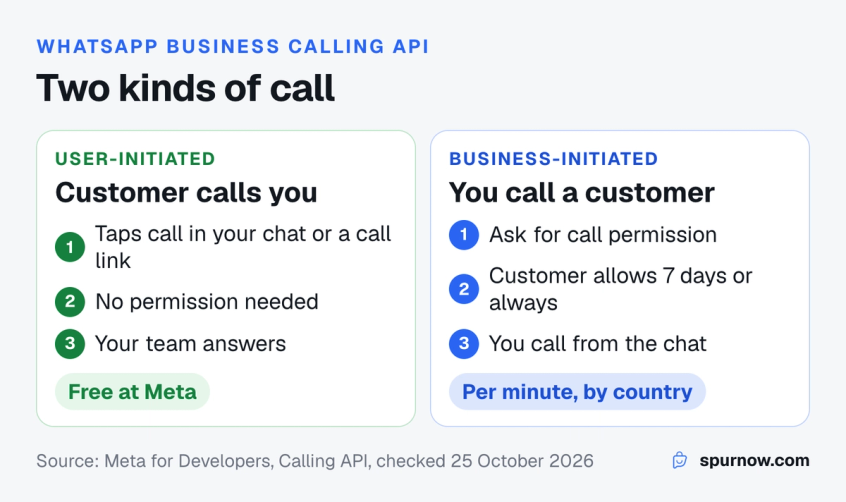
It supports two kinds of call:
- User-initiated calls: a customer taps the call icon in your WhatsApp chat, a call button you sent, or a call link. These are always free for the business at Meta.
- Business-initiated calls: your team calls a customer on WhatsApp. This needs the customer's permission first, and it is charged per minute.
Meta lists video calls and screen sharing as planned features, so today the Calling API is voice only.
New to the platform? Start with this WhatsApp Business API guide to see how numbers, templates and webhooks fit together.
How WhatsApp Business calling works under the hood
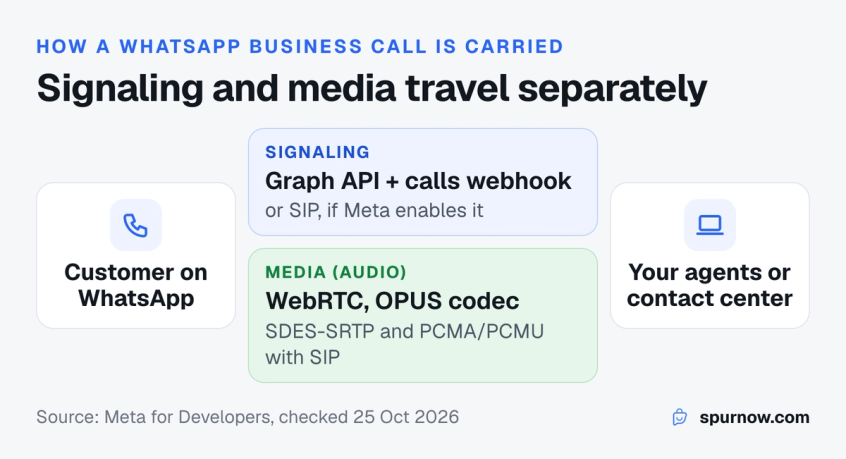
A WhatsApp business call has two parts: signaling (who is calling, ringing, answered, ended) and media (the audio itself).
- Signaling: by default it runs through Graph API calls and the
callswebhook. You can ask Meta to enable SIP instead, which helps if you already run a contact center that speaks SIP. - Media: WebRTC (ICE, DTLS and SRTP) with the OPUS audio codec. With SIP you can also use SDES-SRTP and the PCMA and PCMU codecs.
If you build it yourself, your system has to accept the call event from the webhook, answer with an SDP offer or answer, run a WebRTC media connection, and connect the audio to an agent. That is a real-time voice engineering project, not a messaging integration. Platforms like Spur do this part for you and ring the call in a browser tab.
What you need before you start
Meta lists the same prerequisites in its Calling API overview:
- A Cloud API number. The number must be on the WhatsApp Business Platform, not only the WhatsApp Business app.
- A messaging limit of at least 2,000. Your business needs a daily limit of 2,000 unique customers or more.
- Calling switched on for the number. Calling is off until you enable it in the number's call settings.
- Webhooks. Your app subscribes to the
callswebhook field, unless you use SIP.
Two more rules matter in practice. Business numbers from the US, Canada, Egypt, Vietnam and Nigeria can receive calls but cannot place them. And in Spur, numbers that are also used in the WhatsApp Business app (coexistence) cannot use calling.
Call permissions: how a business can call a customer
A business can only call customers who have said yes. Meta's user call permission rules are the part of the WhatsApp Calling API that most shapes how you use it:
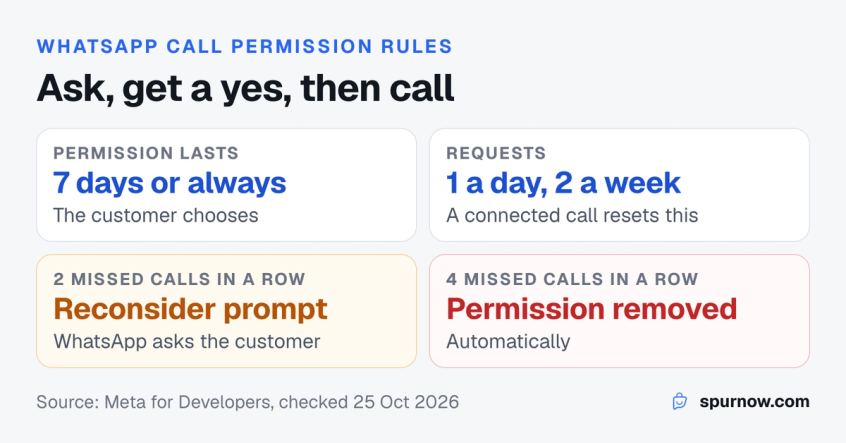
- Two kinds of permission. The customer can allow calls for 7 days (168 hours) or always. Permanent permission has been available since 3 November 2025, and the customer can change it at any time.
- How you ask. Send a call permission request. Inside the 24-hour customer service window it can be a normal message; outside it, it must be an approved Utility or Marketing template with a call permission request.
- Request limits. 1 request per customer every 24 hours and 2 every 7 days. Any connected call resets this.
- Missed calls. After 2 unanswered calls in a row, WhatsApp asks the customer whether they still want your calls. After 4, the permission is removed automatically.
Customers calling you need no permission at all. Once calling is on, anyone who can see your call button can call.
Try the checker to see whether you can call a customer right now:
Permission requests sent outside 24 hours are templates. Read why WhatsApp templates get rejected before you submit one.
Call settings you control
The WhatsApp Business Calling API gives you settings that change what customers see on your profile and chat:
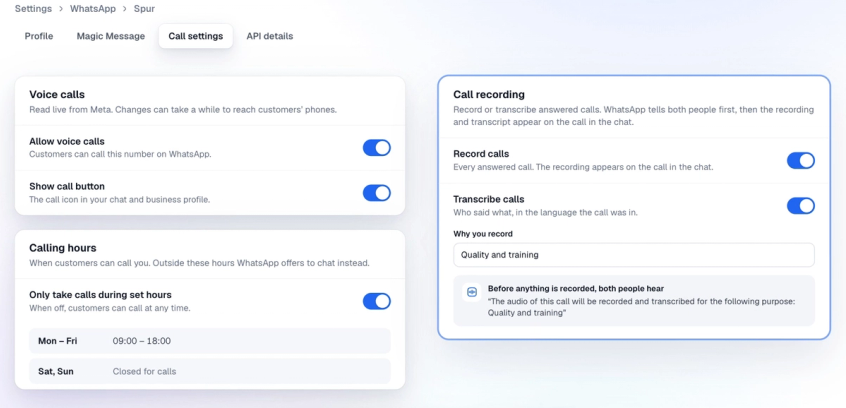
- Inbound call control: allow or block customer calls, and show or hide the call icon.
- Calling hours: set when customers can call. Outside those hours, WhatsApp offers to chat instead, or to request a call back.
- Callback requests: customers who call while you are closed, or whose call you miss, can ask you to call them back.
- Call links and buttons: a link like
wa.me/call/<number>starts a call from a website, email or social profile, and Meta lets you send call buttons in messages. - Voicemail: a caller you miss can leave a voice message that arrives in the chat.
- Recording and transcription: optional; WhatsApp plays an announcement to both people before recording.
In Spur these live on one Call settings tab per WhatsApp number, together with Who sees the call button (by country) and Ask callers for permission to call back.
WhatsApp Business Calling API pricing
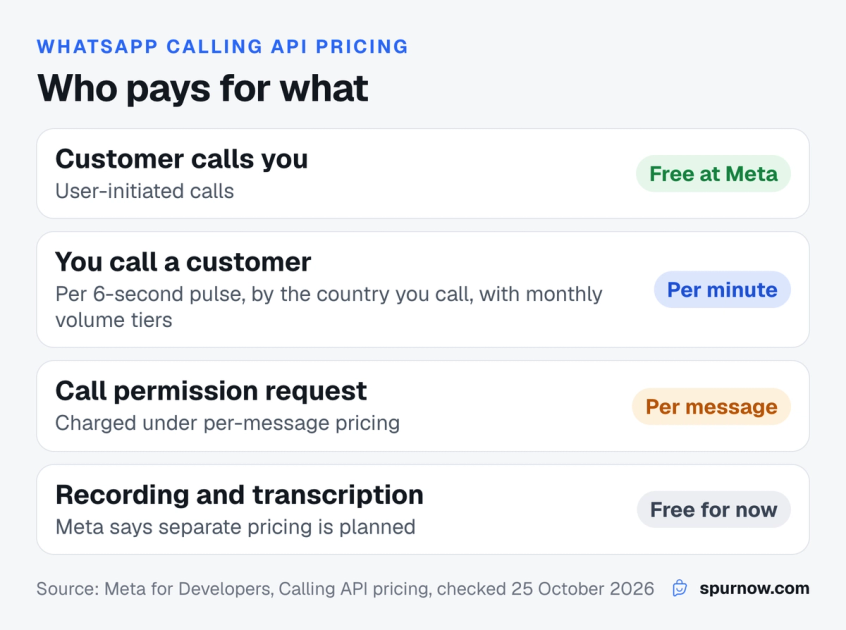
Meta's Calling API pricing has three rules:
- User-initiated calls are free. Meta does not charge for calls customers make to you.
- Business-initiated calls are charged per minute, counted in 6-second pulses, priced by the country code of the number you call, with volume tiers based on minutes in the calendar month. A valid payment method is needed to place calls.
- Call permission requests are charged as messages, like any other message under per-message pricing.
Call recording and transcription are free at Meta for now; Meta says separate pricing is planned and will be announced in advance. Calls also open or refresh the 24-hour customer service window: when a customer calls you, answered or not, and when a customer accepts your call.
With Spur, connected calls are paid from your Spur WhatsApp wallet, per minute, the same on every plan, and you do not pay Meta separately. Calls customers make to you cost ₹0.25 a minute (0.005 a minute in USD, GBP or EUR), and calls you make are priced by the country you call, for example ₹0.50 a minute to India. Ringing and unanswered calls are free. All rates are on the WhatsApp calling charges page.
Messages and calls are billed separately. Here is how WhatsApp Business API pricing works for messages.
Build it yourself or use a platform?
You can reach the WhatsApp Business Calling API three ways. The right one depends on whether you have voice engineers and an existing contact center.
| Spur | Build on Cloud API | SIP to your contact center | |
|---|---|---|---|
| Code needed | None | WebRTC, webhooks, agent app | SIP trunk setup |
| Time to first call | Minutes, once your number is eligible | An engineering project | Depends on your contact center |
| Where calls ring | Browser, for the whole team | Wherever you build it | Your existing agent desktops |
| Chat next to the call | Yes, same WhatsApp chat | You build it | Usually separate |
| Recording and transcript | Switch on per number | You build storage and playback | Depends on your system |
| Best for | Teams that sell and support on WhatsApp | Product teams adding calls to their own app | Large call centers already on SIP |
If your customers already message you on WhatsApp and your team answers them in a WhatsApp shared inbox, a platform is the shortest path: the calls land where the chats already are.
How to turn on WhatsApp calling in Spur
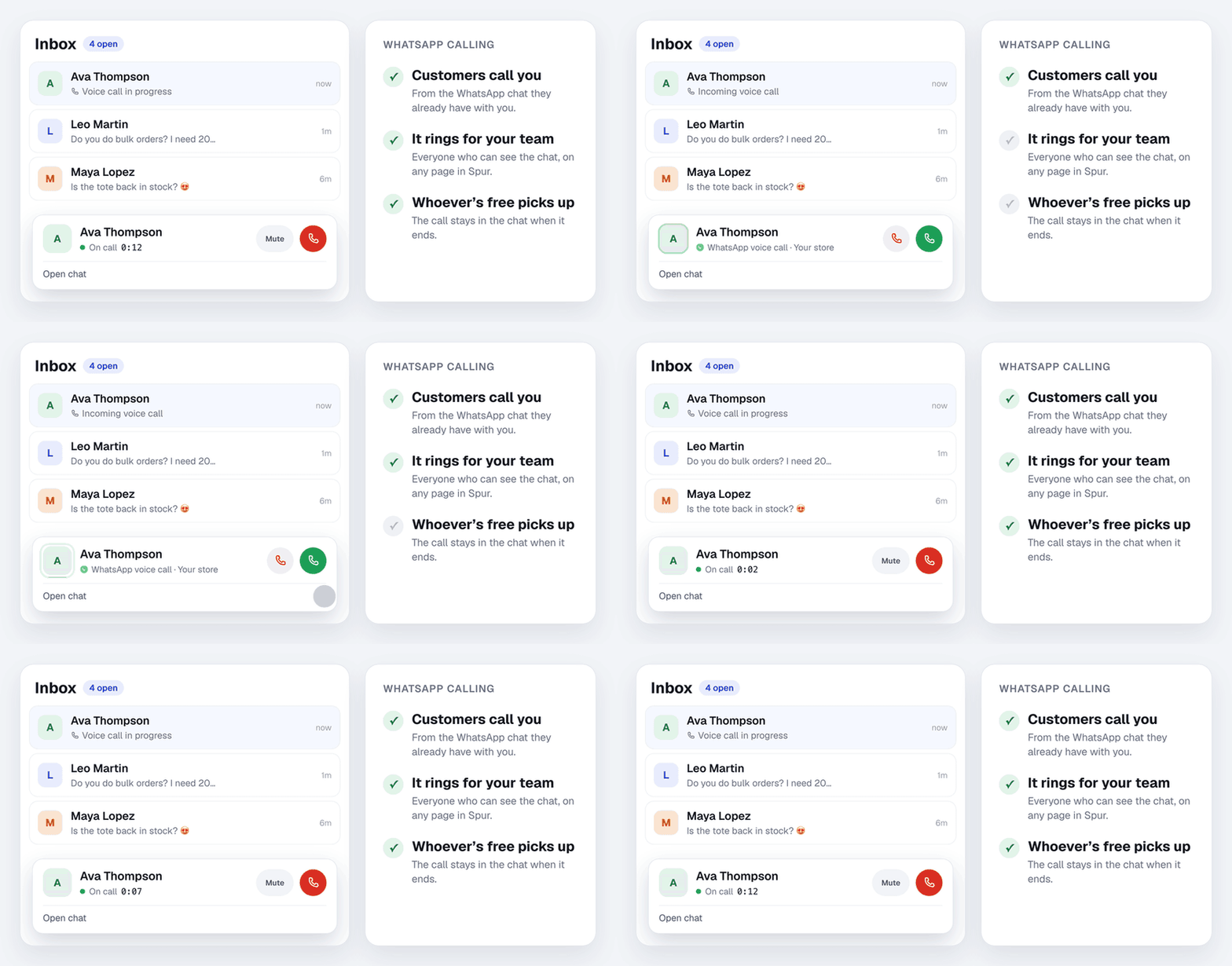
You do not need a developer to use the WhatsApp Calling API in Spur.
- In Spur, go to Settings, then WhatsApp, and click Manage next to your number.
- Open the Call settings tab and switch on Allow voice calls. Changes can take a while to reach customers' phones.
- Choose Show call button, Who sees the call button, Calling hours, Voicemail, and Record calls or Transcribe calls.
- Copy the call link from the same tab and add it to your website, emails and social profiles.
- To call a customer, open their chat, click the call icon, and if needed click Ask for consent.
A customer calls from WhatsApp and the whole team can answer in Spur (1 minute).
Ready to take calls on WhatsApp? Start your 14-day free trial of Spur and switch on calling in a few minutes if your number is eligible.
Use cases for WhatsApp business calls
WhatsApp calling works best when a chat is already happening and a short call would settle it.
- Sizing and product questions: "Which size fits?" is faster on a call, and the customer can send a photo in the same chat.
- Order problems: a customer whose parcel shows delivered but has not arrived can call, and the agent sees the order chat while they talk. Pair it with clear WhatsApp order confirmation templates so fewer customers need to call.
- High-value sales: a customer asking for a price for 50 units can be called back once they allow it.
- Service bookings: a clinic, salon or travel agent can confirm details on a call and send the booking in the chat.
- Support escalation: when a chat goes back and forth too long, offer a call. Your customer service escalation process can include it as a step.
It is not built for cold outreach. You cannot call people who have not allowed it, and missed calls count against you.
Calls are one channel in WhatsApp for ecommerce. See how stores combine chats, broadcasts and support.
Bottom line
The WhatsApp Business Calling API lets customers call you for free from your WhatsApp chat and lets you call customers who allowed it, with the call and the conversation in one thread. Building it yourself means WebRTC or SIP engineering; using a platform means switching it on.
If your team already sells and supports on WhatsApp, turn on WhatsApp calling in Spur: calls ring for everyone in the browser, every call is logged in the chat, and you pay per minute from your wallet on any plan. For a wider view of business phone systems, read our guide to cloud telephony.
Frequently asked questions
Yes. Since 15 July 2025, the WhatsApp Business Platform includes the Calling API for voice calls between businesses and customers. It works on Cloud API numbers with a messaging limit of at least 2,000.
Calls customers make to you are free at Meta. Calls you make to customers are charged per minute by the country you call, and permission requests are charged as messages. In Spur, calls customers make cost ₹0.25 a minute and calls to India cost ₹0.50 a minute from your wallet.
No. A business can only call customers who have allowed calls, for 7 days or always. You can send 1 permission request every 24 hours and 2 every 7 days per customer.
Not yet. Meta lists video calling and screen sharing as planned features. Today the API supports voice calls.
The Calling API needs a number on the WhatsApp Business Platform (Cloud API). In Spur, numbers that are also used in the WhatsApp Business app cannot use calling.
Yes. Call recording and transcription are optional features of the Calling API. WhatsApp plays an announcement to both people before recording, and in Spur the recording and transcript appear on the call in the chat.
Yes. Signaling runs over Graph API and webhooks by default, and Meta can enable SIP for your number so the calls connect to an existing SIP-based contact center.
You cannot auto-dial customers on WhatsApp, because every business-initiated call needs the customer's permission. What you can automate is everything around the call: calling hours, voicemail, call-back requests, and sending permission requests as approved templates.
Sources
Checked against the original source. Dates are when we last verified each one.
- Announcing Launch of the WhatsApp Business Calling API WhatsApp Business. Retrieved 25 October 2026
- Cloud API Calling overview Meta for Developers. Retrieved 25 October 2026
- Obtain user call permissions Meta for Developers. Retrieved 25 October 2026
- Calling API pricing Meta for Developers. Retrieved 25 October 2026
- WhatsApp calling charges Spur. Retrieved 25 October 2026
- Let customers call you on WhatsApp Spur What's New. Retrieved 25 October 2026
Was this article useful?