WhatsApp Image Size Guide: Every Format, Ratio and Limit

Discuss with AI
Get instant insights and ask questions about this topic with AI assistants.
💡 Pro tip: All options include context about this blog post. Feel free to modify the prompt to ask more specific questions!
The right WhatsApp image size depends on where the image appears. Profile photo: 1080 × 1080, shown as a circle. Status: 1080 × 1920 at 9:16. Chat photos are compressed unless you send them in HD or as a document. Business API template headers: JPG or PNG under 5 MB, best at a 12:7 ratio such as 1200 × 700. Stickers: exactly 512 × 512 WebP.
WhatsApp runs three rulebooks: the consumer app, the WhatsApp Business app, and the WhatsApp Business Platform (the API that tools like Spur send through). This guide covers all three. Every number was checked against the WhatsApp Help Center and Meta's developer docs on 18 September 2026, and figures that come from user testing rather than an official page are marked as such.
WhatsApp image sizes at a glance
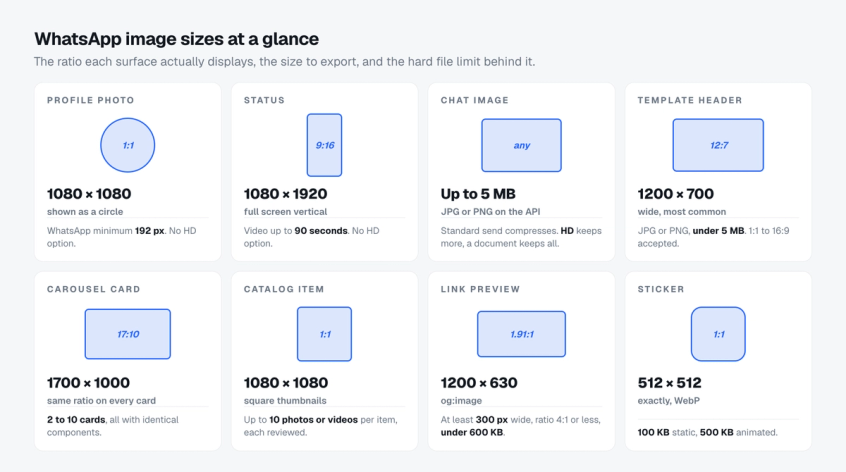
Bookmark this table. Each row is expanded in its own section below.
| Where the image appears | Ratio | Export size | Format and hard limit | Watch out for |
|---|---|---|---|---|
| Profile photo | 1:1 | 1080 × 1080 px | JPG or PNG. WhatsApp's minimum is 192 px | Shown as a circle. No HD option |
| Business cover photo | Wide landscape | High resolution, for example 1920 × 1080 px | JPG or PNG | No published size. Cropped in the app editor |
| Status image | 9:16 | 1080 × 1920 px | JPG or PNG | Top and bottom covered by the interface. No HD option |
| Status video | 9:16 | 1080 × 1920 px | MP4 or 3GP, 90 seconds max | MOV, MKV, AVI and FLV also accepted for upload |
| Chat photo, app | Any | Send the original | Compressed on send. HD reduces compression. Documents up to 2 GB are untouched | Standard quality lands near 1,600 px on the long edge in user tests |
| Chat image, Business API | Any | Under 5 MB | JPEG or PNG only, 8-bit, RGB or RGBA | WebP, GIF, CMYK and 16-bit files are refused |
| Template header image | 1:1 to 16:9 accepted, 12:7 recommended | 1200 × 700 px | JPG or PNG under 5 MB | Cropped to the bubble. Text near the edge is lost |
| Template header video | 12:7, 1:1 or 5:7 | 1200 × 700 px | MP4 under 16 MB, H.264 + AAC | GIF headers are MP4 files under 3.5 MB |
| Carousel card | 17:10 | 1700 × 1000 px | JPG, PNG or MP4, same limits as headers | 2 to 10 cards, all cropped to the same wide shape |
| Catalog item | 1:1 | 1080 × 1080 px | Up to 10 photos or videos per item, videos up to 50 MB | Every image is reviewed before it shows |
| Link preview, og:image | 4:1 or less | 1200 × 630 px | At least 300 px wide, under 600 KB | Over 600 KB, the image is dropped silently |
| Sticker | 1:1 | Exactly 512 × 512 px | WebP. 100 KB static, 500 KB animated | Nothing is resized for you |
Sending images through software rather than a phone? The rules change. The WhatsApp Business API guide explains what the platform is and why its media limits are stricter.
Chat photos: why WhatsApp compresses images and how to stop it
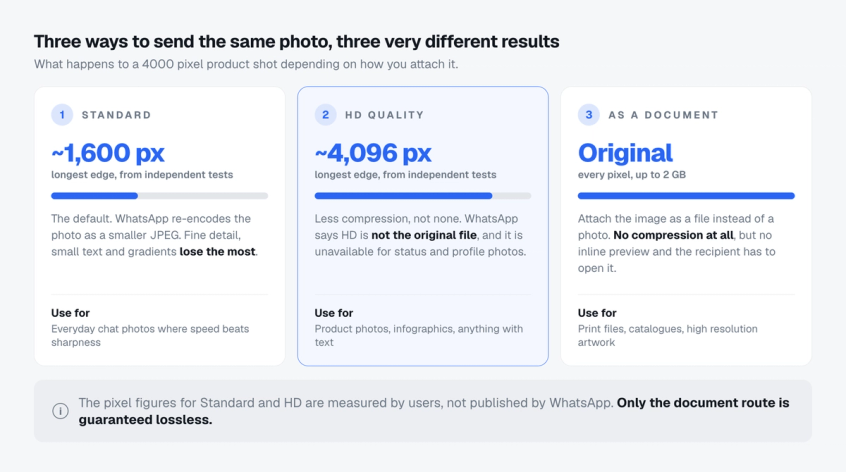
WhatsApp re-encodes every photo you attach from the gallery. The Help Center says media "might be lower than the original version because media files are usually compressed when shared". You have three ways to send the same photo, and they give very different results.
| How you send it | What arrives | Use it for |
|---|---|---|
| Standard quality (default) | Smaller JPEG, about 1,600 px on the long edge in independent tests. Small text and fine detail suffer most | Everyday chat photos |
| HD quality | Less compression, about 4,096 px on the long edge in tests. WhatsApp states HD is still not the original file | Product shots, infographics, anything with text |
| As a document | The original file, untouched, up to 2 GB. Shown as a file card, no inline preview | Print files, catalogues, 4K video, artwork proofs |
How to turn on HD
- Attach the photo, then tap the HD control at the top of the editor and choose HD quality.
- To make it the default: Settings, then Storage and data, then Media upload quality, and select HD quality.
- HD is not offered for status updates or profile pictures, so design those two surfaces for standard compression.
How to send the original file
- Tap the attachment icon and choose Document, not Gallery.
- Pick the image or video file. Anything up to 2 GB goes through with no compression.
- The recipient sees a file card and taps to open it. Tell them what it is in the caption.
What the Business API accepts
On the WhatsApp Business Platform there is no compression setting, only hard limits. These are Meta's published numbers.
| Spec | Value |
|---|---|
| Image | JPEG or PNG, under 5 MB, 8-bit, RGB or RGBA |
| Refused | WebP (except stickers), GIF, CMYK colour, 16-bit PNG |
| Video | MP4 or 3GP, under 16 MB, H.264 video with AAC audio, one audio stream at most |
| Audio | AAC, AMR, MP3, M4A, or OGG with the Opus codec (mono), under 16 MB |
| Document | PDF, Word, Excel, PowerPoint or plain text, under 100 MB |
The clause that catches designers is "8-bit, RGB or RGBA". A 16-bit PNG or a CMYK JPEG from a print workflow is refused at upload. Export in sRGB at 8-bit and the problem disappears. If an API image still fails, WhatsApp messages not delivered covers the other causes.
Three habits that keep images sharp
- Export at twice the display size so compression has detail to spare.
- PNG for flat graphics and text, JPG for photographs.
- Never screenshot an image to resend it. That bakes one compression pass into the next. Forwarding does not recompress.
Customer photos count too. Media on WhatsApp's servers expires quickly, so Spur keeps every inbound image for 30 days where your team can still open it.
WhatsApp profile picture size, and the Business cover photo
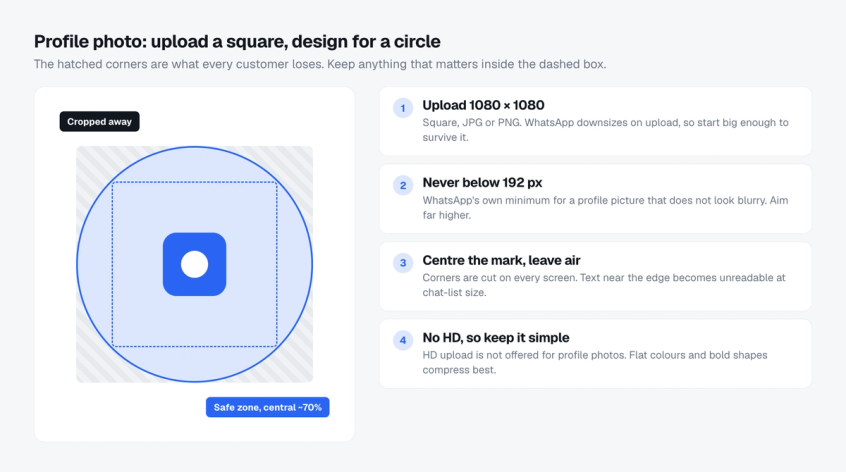
Upload a 1080 × 1080 square and design for a circle. Every profile photo is displayed round, in the chat list, the conversation header and group info, so the four corners of your square are never seen.
| Spec | Value |
|---|---|
| Export size | 1080 × 1080 px, 1:1, JPG or PNG |
| WhatsApp minimum | 192 px height and width, per the Help Center. Aim far higher |
| Displayed as | A circle. A square inscribed in it covers about 70 percent of the width |
| Safe zone | Keep the logo and any wordmark inside the central 70 percent |
| HD option | Not available for profile pictures |
| Stored size | Not published. Community tests suggest a heavy downscale, so start large |
- Flat colours and bold shapes survive the downscale. Thin type and photographic detail turn to mush at chat-list size.
- Leave the edges as plain background. Anything near the corner is cropped on every screen.
WhatsApp Business cover photo size
The WhatsApp Business app lets you add a cover photo above the profile details. WhatsApp publishes no dimensions for it. It is shown as a wide landscape banner and cropped in the app when you upload.
- Start from a high resolution landscape image, for example 1920 × 1080.
- Keep the subject and any text in the middle third and check the crop preview before saving.
- The cover photo is public by default, like the profile photo.
- Businesses with a Meta Verified subscription go through a review when they change the profile name or picture. Our WhatsApp Business pricing comparison covers what else that subscription changes.
WhatsApp status image size and the safe zone
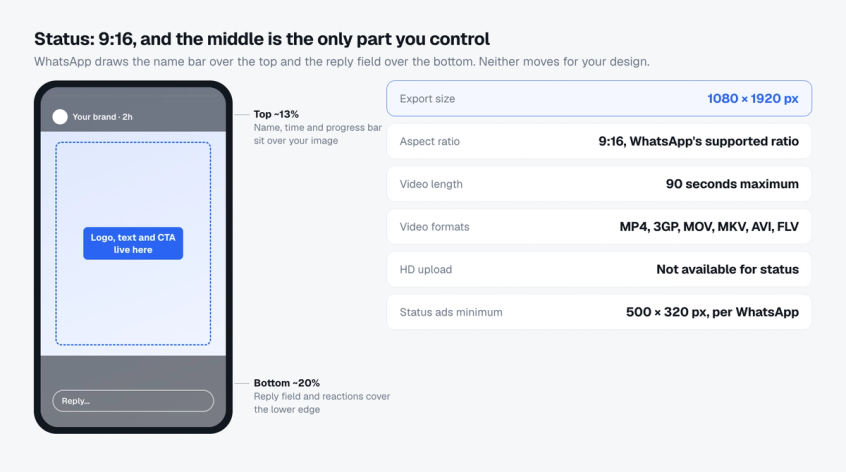
Design status at 1080 × 1920 pixels, 9:16, and keep everything important in the middle. WhatsApp confirms 9:16 as the supported ratio. Wider images are letterboxed and a square floats in the middle with background colour around it.
| Spec | Value |
|---|---|
| Export size | 1080 × 1920 px, 9:16 |
| Video length | 90 seconds maximum. Longer clips must be trimmed in the editor |
| Video formats | MP4 and 3GP listed for status. MOV, MKV, AVI and FLV accepted for upload |
| HD option | Not available for status, so standard compression always applies |
| Covered by the interface | Name, time and progress bar over the top. Reply field and reactions over the bottom |
| Safe zone | Roughly the top 250 px and bottom 400 px are covered on a 1920 px canvas in community measurements. Keep logo, headline and CTA in the middle 65 percent |
| Status ads | Same 9:16. WhatsApp’s minimum is 500 × 320 px, use the highest resolution you have |
- Design for compression: large type, high contrast, flat backgrounds, no fine gradients or tiny product labels.
- Check on a real phone. The covered zones vary slightly by device, which is why the safe zone leaves margin.
- Status ads open a chat with your business, so plan the reply. Click to WhatsApp ads covers the post-click flow.
WhatsApp template image size for the Business API
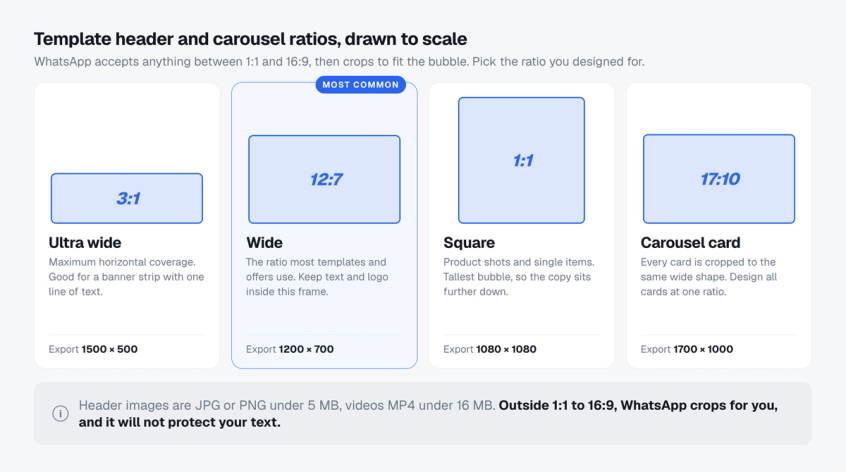
Export template header images at 1200 × 700 pixels (12:7) as a JPG or PNG under 5 MB. Templates are the pre-approved messages a business sends through the API for broadcasts, order updates and reminders, and the header is the image most customers see first.
Meta's documentation gives no pixel dimensions for header images, which is why every provider publishes its own. WhatsApp accepts ratios between 1:1 and 16:9 and then crops the image to fit the bubble on the recipient's device. The crop is not smart. If your headline sits near an edge, it goes.
| Header type | Format and limit | Ratio guidance | Export at |
|---|---|---|---|
| Image | JPG, JPEG or PNG, under 5 MB | 12:7 wide is the frame most offers use and loses the least. 3:1 for a slim banner. 1:1 for one product, though a square pushes the text further down | 1200 × 700, 1500 × 500, or 1080 × 1080 |
| Video | MP4, under 16 MB, H.264 + AAC | 12:7 landscape, 1:1 square or 5:7 portrait all display cleanly | 1200 × 700 |
| GIF | An MP4 file under 3.5 MB, Marketing Messages API | Same as video. Over 3.5 MB it plays as a normal video with a play button instead of looping | 1200 × 700 |
| Document | PDF and Office files, under 100 MB | Not applicable | Not applicable |
| Text | 60 characters | Not applicable | Not applicable |
Spur's help centre lists the full set of allowed template file formats and the template image design guide has a frame for each ratio. Looping GIF headers are covered separately.
Carousel card image size
Design every card at 17:10, exported at 1700 × 1000 pixels, with the same framing on each. A media carousel is a template with two to ten swipeable cards, each with an image or video header, optional body text and up to two buttons.
- Meta requires every card to have the same components. If one card has body text, all must.
- Media on each card is automatically cropped to a wide ratio, so mixed ratios produce uneven cards.
- The carousel template walkthrough shows the builder step by step.
Why image templates fail
- Wrong file type, over the size limit, or a 16-bit PNG fails at upload, before review even starts.
- Rejections after upload come from the text, the category or a policy clause, not the picture. WhatsApp template rejected reasons and fixes has the checklist.
A sharp header is half the job. The copy and timing that make people answer are the other half, covered in how to get more replies on WhatsApp broadcasts.
WhatsApp catalog image size
Export catalog images at 1080 × 1080 pixels, square, with the product centred and space on every side. Catalog thumbnails are square and sit side by side, so consistency matters more here than anywhere else.
| Spec | Value |
|---|---|
| Export size | 1080 × 1080 px, 1:1, JPG or PNG |
| Media per item | Up to 10 photos or videos |
| Video | Up to 50 MB. Thumbnails are generated automatically and cannot be changed |
| Review | Every image is checked against the WhatsApp Business Messaging Policy. Items stay hidden until approved |
| Rejected item | Shows a red exclamation mark. Tap it and choose Request another review |
- Same background, same lighting, same framing across every item, so the grid reads as one shop.
- Shopify stores skip manual uploads. Product images follow the catalog sync, which is why how to add WhatsApp to Shopify starts with the product feed.
WhatsApp link preview image size
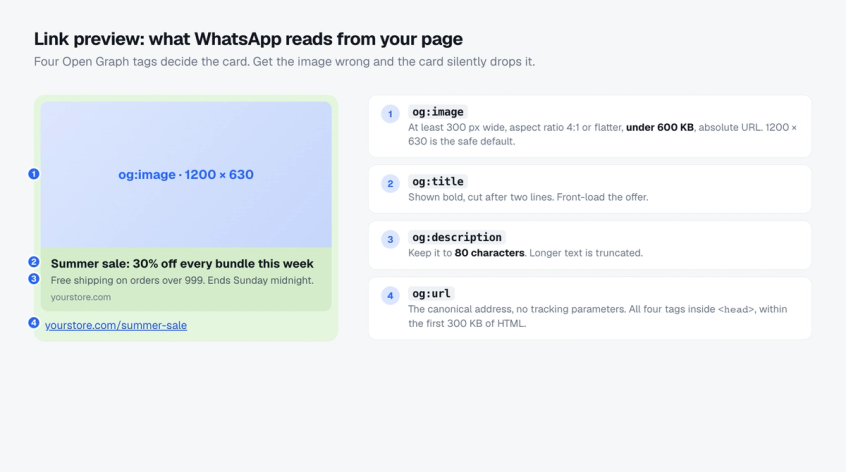
Use a 1200 × 630 og:image under 600 KB. When you paste a link into a chat, WhatsApp fetches the page and builds the preview card from four Open Graph tags in the page head. Meta documents the rules precisely.
| Spec | Value |
|---|---|
| og:image | At least 300 px wide, aspect ratio 4:1 or less, file under 600 KB, absolute URL. 1200 × 630 is the safe default |
| og:title | Shown bold, cut after two lines. Put the offer first |
| og:description | Keep it to 80 characters. Longer text is truncated |
| og:url | The canonical address with no tracking parameters |
| Placement | All four tags inside the head, within the first 300 KB of HTML |
| Guarantee | None. Meta says previews are best effort |
- Over 600 KB, WhatsApp shows the card with no image and no error. A 1200 × 630 JPG or WebP at good quality usually lands well under 300 KB.
- WhatsApp caches the preview per URL. If you change the image, publish it under a new file name or the old card keeps showing.
- Send the link to yourself first. It is the only test that matters.
- The same tags control what customers see when you share a wa.me link. The WhatsApp link guide covers the format, and the free WhatsApp link generator and WhatsApp QR code generator build one with a pre-filled message.
WhatsApp sticker size
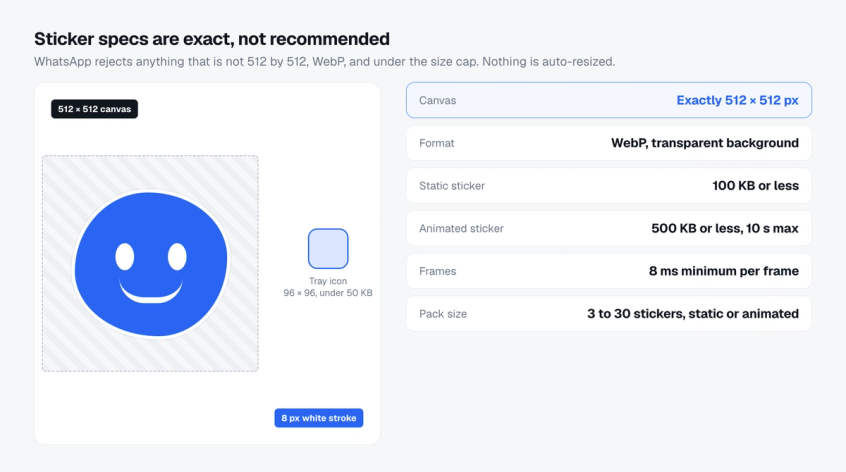
Stickers are the one WhatsApp image with no tolerance. Every value below is a requirement from WhatsApp's published sticker specification, not a recommendation, and nothing is resized for you.
| Spec | Value |
|---|---|
| Canvas | Exactly 512 × 512 px |
| Format | WebP with a transparent background |
| Static sticker | 100 KB or less |
| Animated sticker | 500 KB or less, 10 seconds maximum, frames at least 8 ms each, first frame shows the full image |
| Stroke | An 8 px white (#FFFFFF) stroke around the artwork so it reads on dark and light chats |
| Tray icon | 96 × 96 px, under 50 KB |
| Pack size | 3 to 30 stickers, all static or all animated, never mixed |
| Business API | Sent as image/webp with the same 100 KB and 500 KB caps |
Voice notes, video notes and view once media
Three message types have their own rules and are easy to miss in a size guide.
| Type | Limit | Good for |
|---|---|---|
| Voice note | Recorded in the app as OGG with the Opus codec. WhatsApp publishes no length limit for live recordings. Uploaded audio files go as media or as a document up to 2 GB | Personal follow-ups, quick explanations a customer can play while walking |
| Video note | 60 seconds, recorded in the chat, shown as a circle and auto-played muted. Only the sender can forward it | Personal intros, a 30 second product demo, a thank-you after purchase |
| View once | A photo, video or voice message that disappears after it is opened and cannot be saved or forwarded from the chat | Temporary codes, confidential documents, a time-limited offer image |
Voice and video notes are recorded live, so there is nothing to export. View once is a toggle on a normal photo or video, so the image sizes above still apply. Treat it as a privacy feature, not a security one: WhatsApp reduces screenshots, it does not prevent a second phone pointed at the screen.
Video, audio and document limits on WhatsApp
The video limit is where most guides are out of date. Many still quote 16 MB for videos in the app. WhatsApp's Help Center now states 64 MB as the maximum on all platforms, with a default of 100 MB at 720p on a fast connection and 64 MB at 480p on a slow one. The 16 MB figure survives only on the Business API.
| Media | WhatsApp and WhatsApp Business app | WhatsApp Business API |
|---|---|---|
| Image | Compressed on send. HD reduces compression. No HD for status or profile | JPEG or PNG under 5 MB, 8-bit RGB or RGBA |
| Video | 64 MB, rising to 100 MB at 720p on faster connections. 3GP, AVI, FLV, MKV, MOV, MP4 | 16 MB, MP4 or 3GP, H.264 video with AAC audio |
| Safest video export | MP4 container, H.264 video, AAC audio. Meta recommends the H.264 Main profile without B-frames for the widest device support | |
| 4K video | Only as a document, up to 2 GB. Sent as media it is re-encoded down to 720p at most | Not possible. Host it and send the link |
| Status video | 90 seconds, 9:16 | Not applicable |
| Video note | 60 seconds, circular | Not applicable |
| Audio | Sent as media, or as a document up to 2 GB | 16 MB. AAC, AMR, MP3, M4A, or OGG Opus in mono |
| Document | 2 GB, any file type | 100 MB. PDF, Word, Excel, PowerPoint, plain text |
| Sticker | 512 × 512 WebP, 100 KB static, 500 KB animated | Same |
| Items per send | Up to 100 photos or videos at once | One per message |
Pre-send checklist for WhatsApp images
Run through this before an image goes into a broadcast, a template submission or a status post.
| Check | Pass when |
|---|---|
| Ratio matches the surface | 1:1 profile and catalog, 9:16 status, 12:7 template header, 17:10 carousel, 1.91:1 og:image |
| File type is allowed | JPG or PNG for images, WebP only for stickers, MP4 for video and GIF headers |
| File is under the limit | 5 MB image, 16 MB video, 3.5 MB GIF header, 600 KB og:image, 100 KB sticker |
| Colour and depth | 8-bit sRGB, never CMYK or 16-bit, for anything sent through the API |
| Text sits in the safe zone | Central 70 percent for profile photos, middle 65 percent for status, inside the 12:7 frame for headers |
| Compression is planned for | HD selected for chat photos, or the file sent as a document, and status designed with large type |
| Video codec | MP4 with H.264 and AAC |
| Carousel cards match | Same ratio, same components, same framing on every card |
| Previewed on a real phone | Sent to yourself on both Android and iPhone before the campaign goes live |
How Spur handles WhatsApp images
Spur sends WhatsApp messages through the Business API, so the API limits above are the ones that apply.
- Template and broadcast headers: upload a JPG or PNG under 5 MB and Spur passes it to Meta through the required resumable upload.
- Carousels: up to ten cards with the same component rules Meta enforces.
- GIF headers: loop inline when kept under 3.5 MB.
- Inbound media: stored for 30 days rather than expiring with WhatsApp's own media links.
Plans start at $12 a month and every plan includes unlimited broadcasts. See the current plans and pricing, or try Spur free for seven days.
WhatsApp image size FAQ
What is the best image size for WhatsApp?
There is no single size because each surface has its own shape. Use 1080 × 1080 for profile photos and catalog items, 1080 × 1920 for status, 1200 × 700 for Business API template headers, 1700 × 1000 for carousel cards, 1200 × 630 for link preview images and exactly 512 × 512 for stickers. For chat photos, send the original in HD or as a document.
What is the WhatsApp profile picture size?
Upload a square at 1080 × 1080 pixels. WhatsApp's minimum is 192 by 192, but the image is downscaled on upload and shown as a circle, so start large and keep the logo inside the central 70 percent. HD upload is not available for profile pictures.
What is the WhatsApp status image size?
1080 × 1920 pixels, a 9:16 ratio, which fills the phone screen without cropping. Keep text and logos in the middle, because WhatsApp draws the name bar over the top and the reply field over the bottom. Status videos are limited to 90 seconds and there is no HD option for status.
Why are my WhatsApp images blurry, and how do I send full quality?
WhatsApp compresses photos on send so they load quickly. Choose HD in the media editor, or set HD as the default under Settings, Storage and data, Media upload quality. For the original file with no compression at all, including 4K video, attach it as a document instead of a photo. Documents can be up to 2 GB.
What image size should a WhatsApp Business API template use?
Export the header at 1200 × 700 pixels (12:7) as a JPG or PNG under 5 MB. WhatsApp accepts anything between 1:1 and 16:9 but crops to fit the bubble, and 12:7 loses the least. Carousel cards should be 17:10, for example 1700 × 1000, with the same framing on every card.
What is the WhatsApp sticker size?
Exactly 512 × 512 pixels in WebP. Static stickers must be 100 KB or less and animated stickers 500 KB or less, with animations no longer than 10 seconds. WhatsApp recommends an 8 px white stroke and a transparent background. Packs hold 3 to 30 stickers plus a 96 × 96 tray icon under 50 KB.
What is the WhatsApp link preview image size?
Use a 1200 × 630 image. Meta requires at least 300 px of width, an aspect ratio of 4:1 or less and a file under 600 KB, referenced by an absolute URL in the og:image tag inside the page head. Over 600 KB, WhatsApp shows the preview without any image.
What is the WhatsApp video size limit, and which format is safest?
In the app WhatsApp states 64 MB as the maximum for videos, with a default of 100 MB at 720p on faster connections. Status videos are capped at 90 seconds and video notes at 60 seconds. On the Business API the limit is 16 MB. The safest export everywhere is MP4 with H.264 video and AAC audio. Larger or 4K files go from the app as a document, up to 2 GB.
WhatsApp image size, in one line per surface
- Profile photo and catalog: 1080 × 1080, designed for the circle or the square grid.
- Status: 1080 × 1920, everything important in the middle 65 percent.
- Chat photos: HD or a document when sharpness matters.
- Template headers: 1200 × 700, JPG or PNG under 5 MB. Carousel cards: 1700 × 1000.
- Link previews: 1200 × 630 under 600 KB. Stickers: exactly 512 × 512 WebP.
Save these as export presets once and the blurry photos, cropped headlines and missing preview images stop for good. If you send through the Business API, start a free trial of Spur and upload your first template header sized to the frame it will actually be shown in.