Key takeaways
Handle high-volume Instagram DMs without getting banned. Discover automation rules, dispatcher models, and tools that scale support and sales.
Ask an AI about this article
Drowning in Instagram DMs? You can turn inbox chaos into your competitive edge. Here's the proven system:
- Intelligent triage
- Strategic automation (that won't get you banned)
- Tools like Spur that unify Instagram, WhatsApp, and live chat into one AI-powered workflow
We'll show you the exact playbook to reply faster, close more sales, and stop your team from burning out.
Why Instagram DMs Feel Overwhelming (And What to Do)
Your Instagram inbox isn't broken. It's just operating beyond capacity.
Think of your DM inbox as a queue at a coffee shop. There's an arrival rate (how many people walk in per hour) and a service rate (how many customers your baristas can serve per hour). When arrival rate exceeds service rate, the line grows forever (until something breaks).
That's exactly what's happening in your Instagram DMs.
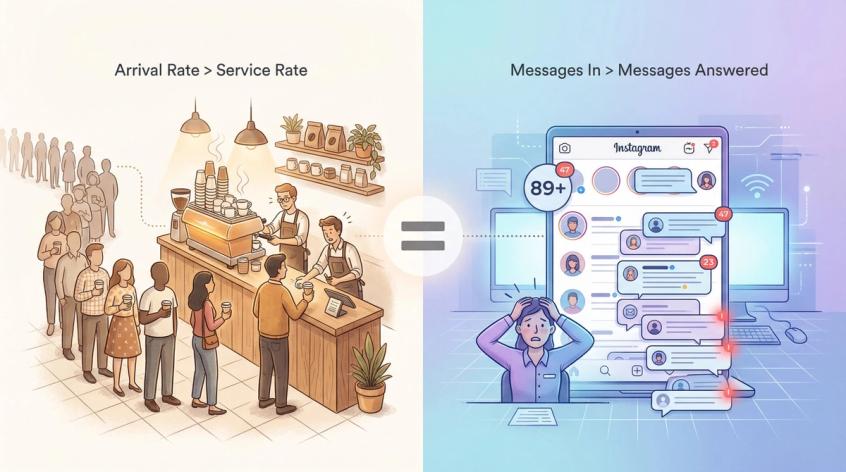
Instagram facilitates over 400 million messages to businesses daily, so brands are experiencing unprecedented volume. And your customers? They're not patient. About one-third of consumers expect a reply to tags and DMs within one hour, according to Emplifi's 2025 Social Pulse Survey (data collected Nov 14-26, 2024). Wait longer than 24 hours and you'll likely lose that customer entirely.
The pressure is intense. When messages pile up faster than your team can answer them, you face:
- Missed revenue (unanswered "ready to buy" messages)
- Angry customers (delayed support creates escalations)
- Burnt-out team members (copy-pasting the same answers 200 times daily)
- Platform restrictions (poorly automated responses trigger Instagram's spam filters)
Working harder isn't the solution. Queue control is.
The fix requires four strategic moves:
- Reduce/shape arrivals (deflect plus guide people toward self-service)
- Increase service rate (templates plus automation plus better tooling)
- Prioritize correctly (intelligent triage systems)
- Stay compliant (follow Meta's messaging rules to avoid restrictions)
Before we get into the system, you should know what "high volume" actually means for your business. Learning how to reply to Instagram DMs faster is foundational to managing scale.
6 Key Metrics to Track Instagram DM Performance
You can't fix what you don't measure. Capture seven days of baseline data across these six metrics:
1. New Inbound DMs/Day
Your total message volume. Count every new conversation started (not every message within a thread).
2. Inbound DMs/Hour at Peak
Volume spikes matter more than averages. Track when messages flood in (usually right after posting viral content, during sales, after running click-to-DM ads, or during live sessions).
3. First Response Time (FRT)
The gap between when someone messages you and when they get their first response (human or bot). Studies show 38% of people expect a reply within 30 minutes, and 68% expect one within 4 hours. Your FRT reveals whether you're meeting those expectations.
4. Average Handle Time (AHT)
Minutes required to fully resolve one DM conversation, including time spent looking up orders, checking inventory, or escalating issues.
5. Resolution Rate
Percentage of conversations solved without redirecting people to "please email support." Lower rates signal your DM channel lacks the tools or authority to help customers properly.
6. Conversion Rate (for sales) or Deflection Rate (for support)
For sales teams: What percentage of DM conversations convert to purchases? For support teams: What percentage of inquiries are solved via self-service (FAQ, automation) vs. requiring human intervention?
These numbers tell you whether you need:
- Native Instagram features only (if you're under 30-50 DMs/day with mostly simple questions)
- Team workflows plus shared inbox (if you're managing 50-200 DMs/day with multiple agents)
- Automation plus integrations plus AI agents (if you're handling 200+ DMs/day with complex sales or support workflows)
Understanding how to measure social media engagement helps you track these metrics systematically.
Now we'll fix the immediate chaos.
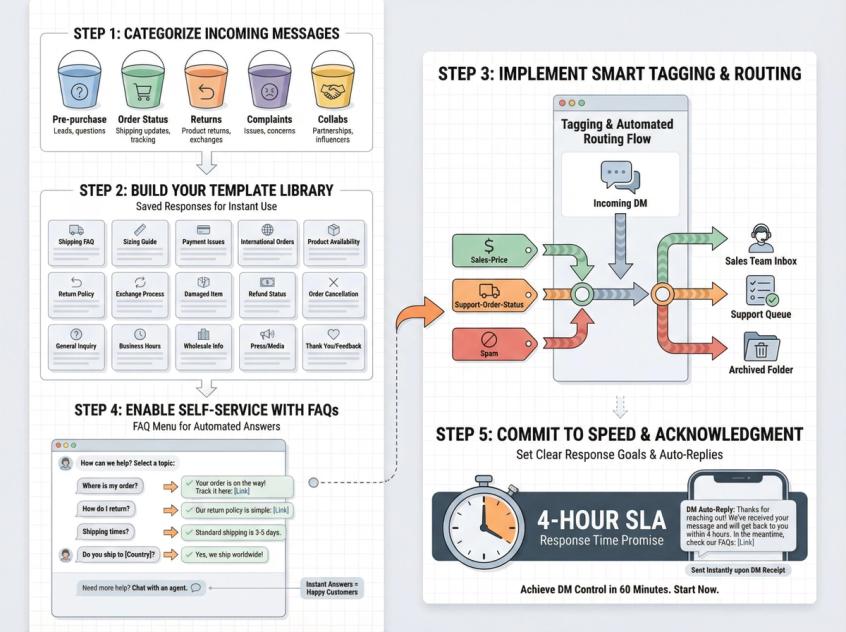
Quick Instagram DM Setup (Fix Overload in 60 Minutes)
If you do nothing else today, set up this five-step system:
Step 1: Define Your 5 DM Buckets
Don't create 20 categories. Keep it simple with five maximum:
- Pre-purchase questions (pricing, availability, sizing, features)
- Order status (shipping updates, delivery delays)
- Returns/exchange (refund requests, size swaps)
- Complaints/damaged (product issues, service problems)
- Collabs/other (influencer inquiries, partnerships, miscellaneous)
Every incoming message gets tagged into one bucket within 30 seconds.
Step 2: Write 15 Saved Replies
Identify the questions you answer 50 times per day and create template responses. We'll provide copy-paste templates later, but start with your most frequent inquiries:
- Shipping timeframes
- Return policy
- Payment options (COD availability, accepted cards)
- Size/fit guidance
- Order tracking instructions
Step 3: Add Labels Plus Routing Rules
Instagram supports labels for chats (use them religiously). Swipe left on a conversation, tap "More," select "Labels," and apply appropriate tags.
Create this starter label set:
sales-pricesales-sizingsales-stock-checksupport-order-statussupport-return-exchangesupport-damagedsupport-refundspamcollab-creator
Rule: Label before you reply. This creates consistency and makes conversations trackable.
Step 4: Set Up FAQ Questions Inside Instagram
Instagram lets you configure frequently asked questions on chats that appear when users open a message thread with you. People can tap a question and receive an automated answer immediately (zero human effort required).
This is your best native deflection tool.
Recommended FAQs for D2C brands:
- Delivery timelines
- Return policy
- Exchange/sizing process
- COD availability
- Order tracking steps
- Warranty/replacement policy
Recommended FAQs for service businesses:
- Pricing ranges
- Available appointment slots
- Location plus parking details
- What to bring/preparation instructions
- Refund/reschedule policy
Step 5: Promise a Response Time Plus Auto-Acknowledgement
Set realistic expectations. If you typically reply within 4 hours during business days, communicate that. Use Instagram's Meta Business Suite to configure automatic instant replies outside business hours:
"Thanks for reaching out! We're currently offline but will respond within 4 hours during business hours (9am-6pm ET, Mon-Fri). For faster help, check our FAQ menu above."
A simple acknowledgement buys goodwill and reduces anxiety while you work through your queue.
This 60-minute foundation creates structure. Now we'll build the deeper system.
How to Organize Instagram DMs (3-Lane Inbox Strategy)
High volume isn't just "too many messages." It's too many unstructured messages. "Hi", "price?", "available?", and "order??" tell you nothing about intent or urgency.
Your goal: Make conversations start with structure.
Turn Your Inbox Into 3 Lanes
Instagram's Professional Inbox offers Primary, General, and Requests tabs. Use them like freeway lanes:
- Primary = Revenue plus urgent support (hot leads, VIP customers, critical issues)
- General = Low priority plus "later" tasks (partnerships, non-urgent questions)
- Requests = Unknown senders requiring acceptance before appearing in main inbox
Operating rule: If you can't answer a message in under 2 minutes, move it from Primary to General with an appropriate label and assignment.
The Requests tab deserves special attention. New customer inquiries often start here since they're messaging you for the first time. Check it frequently and use Instagram's filters like "Top Requests" to surface messages from verified or highly followed accounts (you don't want to miss opportunities from potential brand partners or high-value customers).
Master Instagram's Native Organization Tools
Star/Flag Conversations: Tap the star icon to bookmark chats requiring follow-up. At day's end, review all starred conversations to make sure nothing important fell through the cracks.
Search by Keyword: Instagram now lets you search Direct Messages by keyword. This is invaluable when someone references an order number, product name, or previous conversation. Instead of scrolling endlessly, search "refund" or "order #12345" to instantly retrieve context.
Pin Critical Threads: Instagram has been rolling out pinning conversations and scheduling DMs (reported Feb 19, 2025).
Use pinning for:
- Hot leads you must close today
- Angry customer escalations requiring manager attention
- VIP customers deserving white-glove service
Use scheduled messages for:
- Order status updates at specific times
- Payment link delivery aligned with customer timezone
- Appointment reminders sent 24 hours in advance
Consider AI Auto Replies (If Available)
Instagram's Help Center describes AI auto replies as part of "Creator AI" that can automatically respond to messages and save time. Rollout appears account-dependent.
If you have access, deploy it cautiously:
- Use only for low-risk questions (business hours, basic policy, product info)
- Always provide clear pathways to human handoff
- Monitor conversations weekly to catch AI errors or frustrations
Understanding automated direct messages best practices helps you deploy AI responsibly.
Use Story Highlights as Pre-Emptive Deflection
Create Story Highlights for common information: "FAQ," "Size Chart," "Track Order," "Policies." When people ask basic questions, reply:
"We have a complete guide in our Story Highlights (check the 'Track Order' highlight on our profile). If you need more help after that, let me know!"
This educates your entire audience while reducing repetitive inquiries.
Instagram DM Triage System (Dispatcher Model for Teams)
Your fastest responders shouldn't be deciding what to do next while typing. They should be executing a pre-determined workflow.
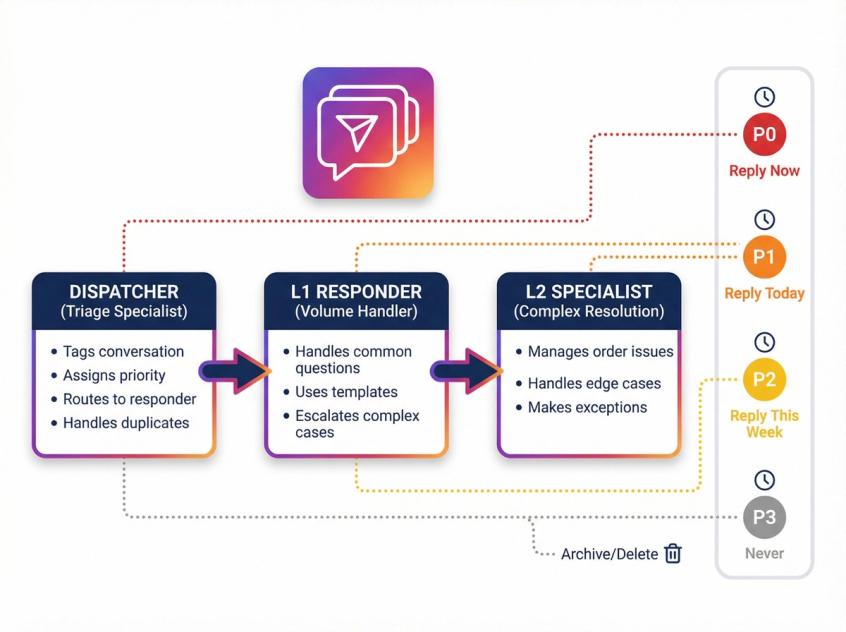
Adopt a dispatcher model with three distinct roles:
Role 1: Dispatcher (Triage Specialist)
- Tags each new conversation within 30 seconds
- Assigns priority level (P0-P3)
- Routes to appropriate responder
- Handles deduplication (same customer messaging multiple times)
Role 2: L1 Responder (Volume Handler)
- Handles common questions using templates and quick replies
- Focuses on speed and consistency
- Escalates anything outside standard operating procedures
Role 3: L2 Specialist (Complex Resolution)
- Manages order issues, refunds, complaints
- Handles edge cases and escalations
- Has authority to make exceptions
This structure can 2-4x your throughput without hiring more people. One person triaging and routing enables three L1 responders to work in parallel without stepping on each other.
Using customer service best practices helps your triage system operate efficiently.
The 30-Second Triage Rule
Every new DM receives:
- A label (which bucket does this belong in?)
- A priority (how urgently must we respond?)
- An owner (which person or automation handles this?)
- An SLA clock (when is response due?)
No label = no reply. This discipline prevents chaos.
Simple Priority Rules That Actually Work
P0 (Reply Now):
- Payment-ready leads ("I want to buy, send payment link")
- Delivery failures ("Package says delivered but I don't have it")
- Public blow-up risk ("If you don't fix this, I'm posting about it")
P1 (Reply Today):
- Order status questions
- Return/exchange requests
- High-intent pre-purchase questions
P2 (Reply This Week):
- Partnership inquiries
- Collaboration requests
- "Just browsing" questions
P3 (Never):
- Spam
- Bots
- Irrelevant cold outreach
Priority determines response sequence. Your team always works top-down.
When handling complaints and escalations, reference our guide on dealing with customer complaints and setting up a formal customer service escalation process.
Instagram DM Automation Rules (How to Avoid Getting Banned)
Most "Instagram DM automation" advice ignores the hard constraint: If you use third-party automation or the official Messaging API, you're operating inside Meta's messaging windows and platform rules.
Violate these rules and you risk account restrictions. Follow them and you unlock massive scale.
The 24-Hour Window (The Money Window)
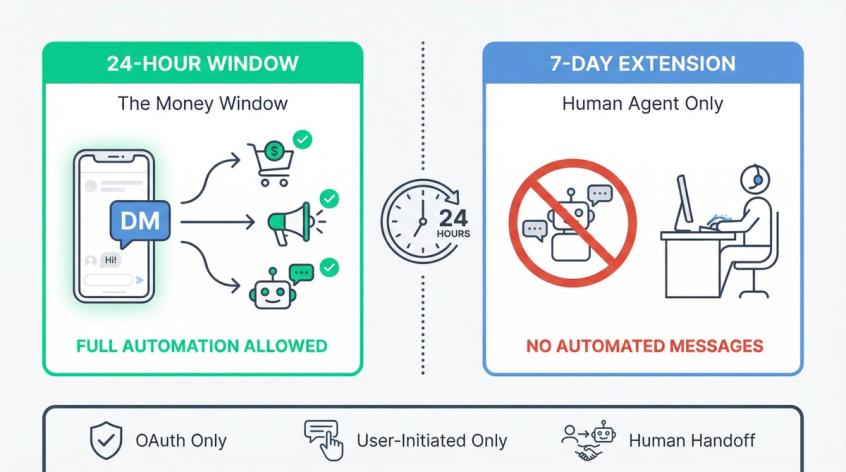
Meta's messaging policy states businesses have up to 24 hours to respond to a user, and messages sent within that window may include promotional content.
Translation: When someone DMs you, comments on your post, replies to your story, or clicks a click-to-DM ad, you have 24 hours of open communication. During this window, you can sell, qualify leads, and run automated flows.
This is your opportunity to strike while interest is hot.
The 7-Day Human Agent Extension (Manual Only)
Meta's developer documentation describes a human_agent tag allowing human agents to respond within 7 days of a user's message.
Here's the catch: ManyChat's compliance guide (updated Jan 21, 2026) clarifies that the 7-day window is for manual human messages only, and automated messages are not allowed during the 7-day window.
Translation: If you want to follow up days later through automation tools, you need a human agent workflow or compliant mechanisms (not automated blasts).
Instagram API Limitations You Must Design Around
Respond.io's Instagram channel overview (Nov 11, 2025) highlights critical operational constraints:
- You cannot send messages after 7 days since the last contact reply
- Messages sent 24 hours after contact's last message get tagged with
human_agent - You cannot send broadcasts on Instagram via API
- Message requests aren't supported (no webhook event exists for them)
Translation: Design for real-time conversations, not email-style drip campaigns. Instagram DMs are for engagement, not batch-and-blast marketing.
Rate Limits Are Real (And Your Tool Should Queue)
Instagram automation operates behind API rate limits. CM.com documents hourly rate limit models for Instagram Messaging API usage.
Spur's 2026 rules guide frames a common operational guideline: approximately 200 automated messages per hour per account (with emphasis on queuing and backpressure management).
Translation: During spikes (viral reel generates 500 comments triggering "comment to DM"), you need queuing systems. Tools promising "unlimited instant automation" are either lying or violating platform rules.
For comprehensive guidance, read our complete Instagram DM automation rules guide and learn about Instagram DM automation strategies that stay compliant.
The "Don't Get Banned" Checklist
✓ Never use tools requesting your Instagram password (OAuth only)
✓ Only DM people who initiated engagement (comment, DM, story reply, ad click)
✓ Keep automated content tightly relevant to user's context (don't send skincare ads to someone asking about order status)
✓ Offer human handoff for anything sensitive or complex
✓ Avoid copy-paste spam patterns (identical messages to many people trigger filters)
These aren't suggestions. They're survival requirements. Understanding chatbot to human handoff processes helps you build smooth escalation paths.
10 Instagram DM Automation Flows That Work
You don't automate everything. You automate repeated intent patterns.
Below are the highest-leverage flows for high volume. Each includes trigger conditions, data collection requirements, and handoff criteria.
Flow 1: DM Menu (The Universal Router)
Trigger: Any new DM ("hi", "hello", emoji, generic greeting)
Goal: Force structure immediately
Bot Message:
"What can I help with?
1️⃣ Track my order
2️⃣ Returns/exchange
3️⃣ Product questions
4️⃣ Talk to a human"
Handoff: If user picks "talk to a human" or types free text after 2 conversational turns
Flow 2: Order Tracking (D2C Essential)
Collect: Order ID, phone number, or email used at checkout
Action: Fetch status from Shopify/WooCommerce/your commerce platform, then reply with current status plus estimated delivery
Never ask for card details. Ever.
Handoff: If order shows "delayed >X days," "delivered but not received," or customer requests address change
If you're Shopify-based, this is your #1 time-saver. Spur offers first-class Shopify integration enabling instant order lookup directly in Instagram DMs (no switching tabs, no manual searching).
Learn more about how to connect Shopify to Instagram for seamless integration.
Flow 3: Returns/Exchange
Collect: Order ID plus reason for return plus preferred outcome (refund vs. exchange)
Respond: Your return policy plus next steps plus apply label support-return-exchange
Handoff: Damaged items, wrong item shipped, or customer threatens escalation
Flow 4: Pricing Plus Availability (Sales)
Collect: Product link, SKU, size, or color preference
Respond: Current price, size chart link, "Want help choosing the right size?" branching option
Handoff: High-ticket items or customization requests requiring human expertise
Flow 5: Lead Qualification (Services/High-Ticket)
Collect in sequence:
- What are you looking for? (pick list with your service categories)
- Budget range (pick list: <$500, $500-$2K, $2K-$5K, $5K+)
- Timeline (pick list: This week, This month, Next 3 months, Just researching)
- Contact info (phone/email - only if they qualify)
Handoff: If budget and timeline match your sweet spot, assign to sales team immediately
Understanding how chatbots qualify leads helps you build effective qualification flows. For broader context, explore lead generation chatbot best practices.
Flow 6: Appointment Booking
Collect: City/location plus preferred day and time slot
Action: Show 3 available slots or request callback if no immediate matches
Handoff: Special requests, reschedules, cancellations
Flow 7: "Where Are You Located?"
Respond: Physical address, hours, Google Maps link (or "We're online-only - we ship nationwide!")
Handoff: None needed
Flow 8: Collab/Influencer Inquiries
Collect: Media kit link plus rate card plus niche/category
Respond: "We review collaboration requests weekly. If there's a fit, our team will reach out. Thanks for your interest!" plus apply label collab
Handoff: Assign to partnerships team for once-daily batch review
Flow 9: Complaints Escalation
Goal: Defuse quickly plus capture critical information
Response:
"I'm sorry you're experiencing this. Let me get this to our team right away. Can you share your order ID and a quick description of what happened?"
Action: Apply label support-escalation plus assign to L2 specialist
Handoff: Immediately
Flow 10: Spam Filter
Trigger: Message contains crypto keywords, "manager needed," random links, obvious bot patterns
Action: Apply label spam plus archive conversation
Handoff: None
For implementation guidance, review our chatbot best practices and explore chatbot use cases across industries.
How Spur Handles High Volume Instagram DMs (Complete Solution)
Here's the reality about managing 200+ Instagram DMs daily: The Instagram mobile app wasn't built for it.
Instagram's native app is fundamentally single-user. Only one person logged into the account can manage messages. When you're juggling hundreds of conversations across multiple team members, you need infrastructure built for scale.
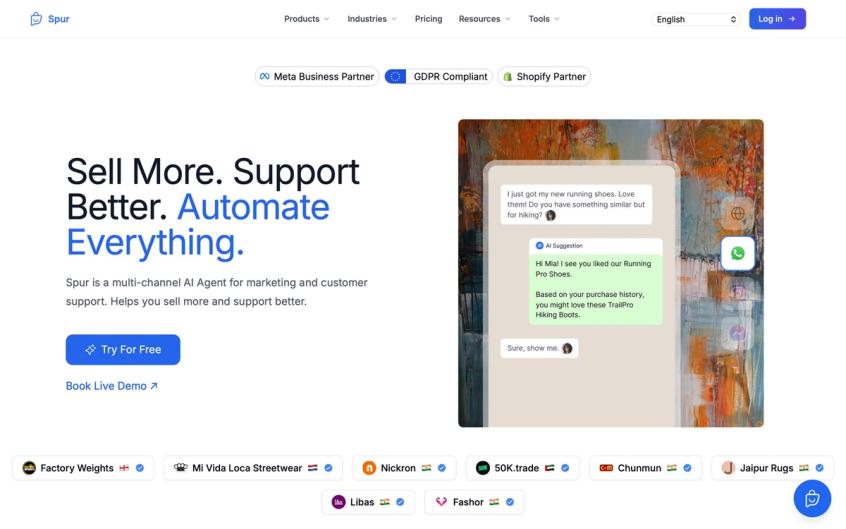
That's where Spur comes in.
The Multi-Agent Collaboration Problem (Solved)
When multiple people need to handle Instagram DMs simultaneously, you face two painful problems:
- Collision: Two agents respond to the same customer (confusing, unprofessional)
- Orphaned threads: Nobody owns the follow-up (leads die in the scroll)
Spur's shared inbox gets rid of both issues. Each DM thread can be:
- Assigned to specific team members (manual or automatic round-robin)
- Tagged with custom labels matching your workflow
- Annotated with internal notes invisible to customers ("This user is waiting for Item X restock next week")
- Searched across complete history (even months-old conversations)
Your team sees who's handling what at a glance. Views include:
- Unassigned (needs immediate triage)
- Your Inbox (conversations you own)
- Team (all conversations across all agents)
- AI Agents (conversations being handled by automation) [13]
No more stepping on each other. No more lost follow-ups.
Omnichannel Advantage: Instagram Plus WhatsApp Plus Live Chat Unified
High Instagram DM volume often means high volume everywhere. Customers message you on WhatsApp, comment on Instagram, chat on your website, and message via Facebook (jumping between five apps creates chaos).
Spur aggregates Instagram DMs, Instagram comments, WhatsApp chats, Facebook Messenger, and live chat into one dashboard. Your team sees the complete conversation history regardless of channel.
This matters because:
- Context preservation: If someone messages on Instagram today and WhatsApp tomorrow, you see both threads together
- Consistent experience: Customers get the same quality service regardless of platform
- Team efficiency: No app-switching means faster responses
This is the power of a true customer communication platform. Learn more about omnichannel marketing automation strategies.
AI Agent Trained on Your Knowledge Base
Here's where Spur differentiates from competitors like ManyChat or Chatbase.
Most chatbots offer simple keyword triggers or basic FAQ matching. Spur's AI Agent goes deeper:
- Trains on your actual knowledge base (help center, product info, policies)
- Handles natural language questions (not just exact keyword matches)
- Takes actions beyond answering (order lookup, appointment booking, ticket creation)
- Hands off seamlessly when complexity exceeds AI capability
This is what we call "Actionable AI" (not just answering questions, but actually solving problems).
Imagine a customer asks at 2am: "What's your return policy for international orders?"
The AI doesn't just send a generic response. It:
- Understands the query includes geography ("international")
- Pulls the relevant policy section
- Answers in your brand voice
- Offers to create a return if they have an order ID
All while your human team sleeps. When they wake up, only the truly complex conversations require attention.
E-Commerce Integration: Instant Order Lookup
Connecting Instagram DMs to your Shopify, WooCommerce, or Stripe account transforms customer support.
When someone messages "Where's my order?", your agent sees:
- Order #12345 (placed yesterday)
- Status: In transit
- Expected delivery: Friday
They respond in 10 seconds:
"Hi! I looked up your order (it shipped yesterday and should arrive Friday). You'll get a tracking link via DM soon!"
Without integration, that same interaction requires:
- Asking for order number
- Switching to Shopify admin
- Searching manually
- Returning to Instagram
- Typing response
At scale, those extra steps burn hours daily. Spur gets rid of the friction.
Click-to-DM Ads That Actually Convert
Running Instagram Click-to-DM ads without a qualification system wastes money. You pay for clicks but drown in low-intent "hi" messages.
Spur's Click-to-DM setup lets you:
- Welcome with structured menus (immediate qualification)
- Collect lead data (budget, timeline, contact info)
- Send conversion signals back to Meta (so your ads optimize for quality, not just volume) [14]
The result: Lower cost per lead, higher cost per qualified lead, better ROAS.
Understand the difference between Instagram lead ads vs DM ads to choose the right approach for your goals.
Comment-to-DM Automation for Viral Moments
When a post goes viral or you run a giveaway, comments explode. Every commenter represents potential engagement (but no human team, however dedicated, can DM hundreds of people within seconds).
Spur's Comment-to-DM automation handles this:
Someone comments on your giveaway post → Instant automatic DM with entry instructions and a discount code → Conversation moves from public comment to private 1:1 relationship
Real example: Fashion brand Libas used this during an Instagram Live sale. Every viewer who commented received an immediate DM with product links and discount codes. Result: 64 orders from just over 100 commenters (a 60%+ conversion rate).
That's impossible without automation. But it requires compliant automation that respects Meta's rules.
Learn how to use auto-reply to Instagram comments and auto reply DM Instagram features safely.
Why Spur vs. Competitors?
vs. ManyChat:
- ManyChat's AI add-ons can't train on your knowledge base; Spur can
- Spur includes omnichannel (WhatsApp, live chat, Facebook) natively
Explore our detailed ManyChat alternative comparison.
vs. Chatbase:
- Chatbase lacks marketing automation on WhatsApp, Facebook, Instagram; Spur has it
- Spur offers shared inbox for team collaboration
Read about Chatbase alternatives and why teams are switching.
vs. Uchat:
- Uchat doesn't have a built-in knowledge base; Spur does
- Spur is more user-friendly for non-technical teams
See our Uchat alternative analysis.
vs. Botpress:
- Botpress is built for developers; Spur is built for marketers and support teams
- Visual automation builder vs. code-heavy configuration
Compare Botpress alternative options.
As of 2025, only 13% of social media customer DMs are handled by bots (meaning 87% still require human intervention). Spur helps you flip that ratio intelligently: automate the repetitive 60-80%, free your team to focus on high-value conversations.
Understanding customer service automation and customer support automation principles helps you design the right balance.
How Many Support Agents Do You Need for Instagram DMs?
Use this formula to determine required headcount:
Agents Needed = CEIL( (Daily DMs × AHT in Minutes) / (Shift Minutes × Utilization) )
Where:
- Daily DMs = Total inbound messages per day
- AHT = Average Handle Time (minutes to resolve one conversation)
- Shift Minutes = Length of work shift (typically 480 minutes for 8-hour shift)
- Utilization = Realistic productive time (0.6-0.75 is common; accounts for breaks, meetings, tool lag)
Worked Example
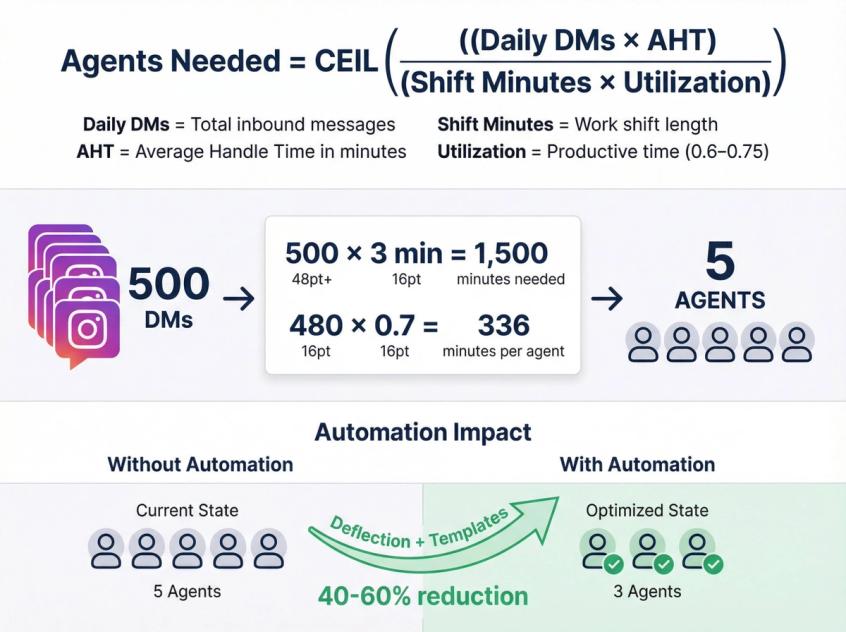
Scenario:
- 500 DMs per day
- AHT = 3 minutes per conversation
- Shift = 8 hours = 480 minutes
- Utilization = 0.7 (70%)
Calculation:
Required agent-minutes per day = 500 × 3 = 1,500 minutes
Capacity per agent per day = 480 × 0.7 = 336 minutes
Agents needed = CEIL(1,500 / 336) = CEIL(4.46) = 5 agents
How Automation Changes the Math
Automation affects both sides of the equation:
- Deflection reduces arrivals: If your FAQ automation and AI agents deflect 40% of inquiries, your 500 daily DMs become 300 that need human attention → 3 agents instead of 5
- Templates reduce AHT: If quick replies and saved responses drop your average handle time from 3 minutes to 2 minutes per conversation → 4 agents instead of 5
Combined effect: A solid automation setup with Spur can reduce headcount needs by 40-60% while improving response times.
When to Scale Headcount vs. Optimize
If you're already using automation and shared inbox workflows but still can't keep up:
- Seasonal businesses: Consider temporary staffing during peak seasons (retail around holidays, tax services in spring)
- Rapid growth: If weekly volume increases 20%+ month-over-month, hire ahead of the curve
- Outsourcing option: Specialized social support agencies can handle overflow while you maintain quality standards (make sure they understand your brand voice and have access to your knowledge base)
Shared Inbox Workflow for Instagram DM Teams
Once multiple people reply to Instagram DMs, you encounter two new problems:
- Collision: Two agents respond to the same customer (embarrassing, wastes effort)
- Abandoned follow-ups: Nobody owns the next step (leads die in limbo)
Shared inboxes exist to solve these problems.
What Your Inbox Must Support
Whether you use Meta Business Suite (free), Spur, or another platform, your system needs:
✓ Assignment (manual plus automatic round-robin)
✓ Internal notes (private comments teammates can see, customers cannot)
✓ Tags/labels plus custom fields (categorization beyond Instagram's native labels)
✓ Search (across all conversations, all channels, all time)
✓ "Pause automation when human joins" (prevent bot from interrupting mid-conversation)
✓ Views by status:
- Unassigned (needs triage)
- Mine (my active conversations)
- Team (all conversations)
- AI-handled (automated resolution)
- Archived/resolved
Spur's shared inbox demonstrates this model effectively: views for your inbox, unassigned, AI agents, and teams, plus assignment rules, internal notes, quick replies, and automation toggles. [13]
Minimum Viable Shared Inbox SOP
Set up these operating rules:
Rule 1: Every conversation has an owner
No "someone will get to it" ambiguity. Conversations are either assigned to a person or queued in "Unassigned" for immediate triage.
Rule 2: Owner must close the loop
Each owner must either:
- Mark conversation as resolved, OR
- Schedule the next step (follow-up time set), OR
- Escalate to L2 with detailed internal note
Rule 3: Dispatcher reviews unassigned every 15 minutes during peak
During high-volume periods (post-launch, during sales, after viral content), someone owns the "Unassigned" queue and routes new conversations aggressively.
Rule 4: L2 clears escalations twice daily minimum
Morning and afternoon sweeps make sure escalated issues don't languish.
AI Sentiment and Priority Detection
Newer platforms (including Spur) use AI to analyze incoming messages and:
- Detect sentiment (angry vs. neutral vs. happy)
- Flag urgency (complaint language, threats, VIP customers)
- Classify intent (sales vs. support vs. spam)
This behind-the-scenes triage helps your team allocate attention correctly (angry high-value customers get fast-tracked while "just browsing" inquiries queue normally).
Team Performance Analytics
Track these metrics weekly:
- Average response time by agent (identify coaching opportunities)
- Resolution rate by agent (who's solving vs. escalating?)
- Volume handled per shift (capacity planning)
- Customer satisfaction scores (if you collect post-resolution feedback)
Use data to spot patterns: Maybe Monday mornings see a spike (schedule more coverage), or perhaps many DMs concern a specific product issue (address it proactively in your marketing).
Training and Burnout Prevention
High-volume DM support is taxing. Prevent burnout through:
- Role rotation: If possible, rotate team members between DM handling and other tasks weekly
- Cross-training: Everyone should know the complete playbook (prevents bottlenecks when someone's out)
- Mock scenarios: Run "stress tests" ("What if we get 200 angry DMs about a defective product tomorrow?")
- SOPs for common situations: Written procedures mean even new agents can handle edge cases
How to Handle Instagram DM Spikes (Launches and Viral Posts)
Spikes are predictable. They occur when:
- You post content that explicitly asks for DMs ("DM us 'SALE' for a promo code")
- You run click-to-DM advertising campaigns
- You go live and comments explode
- Content goes viral unexpectedly
Your plan shouldn't be "panic and work overtime."
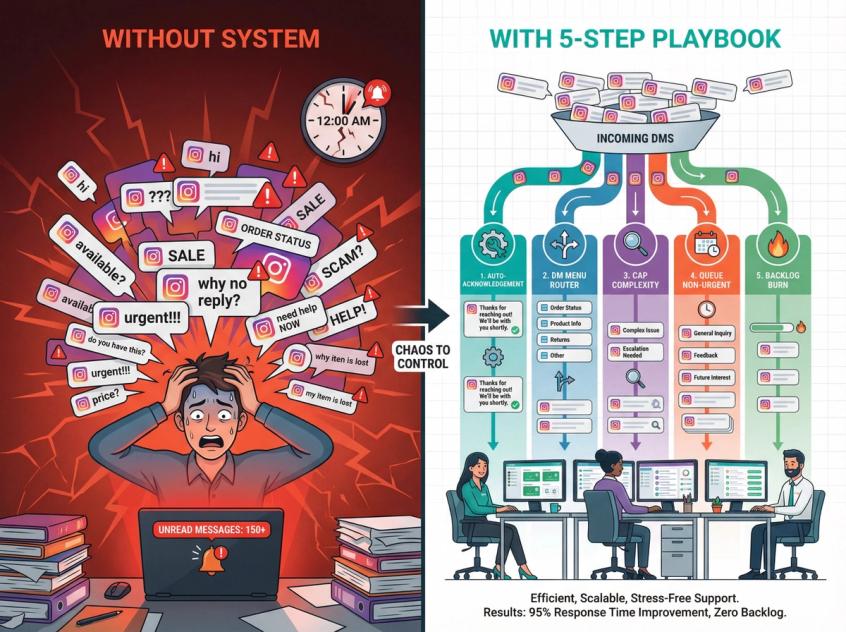
The Spike Playbook (5 Steps)
Step 1: Activate High-Volume Acknowledgement
Turn on an automated first response:
"We're experiencing high message volume right now. Typical reply time is within 4 hours. Choose an option below for faster help:
1️⃣ Track my order
2️⃣ Returns/exchange
3️⃣ Product info
4️⃣ Talk to a human"
This sets expectations while funneling people toward self-service or structured routing.
Step 2: Route Everyone Into the DM Menu (Flow 1)
Force structure immediately. No open-ended questions in the first two messages (only buttons and pick lists).
Step 3: Cap Complexity
During spikes, your automation should be extra defensive:
- Reduce conversation depth (answer quickly, hand off sooner)
- Avoid nested decision trees that frustrate users
- Focus on speed over perfection
Step 4: Queue or Delay Non-Urgent
If someone asks about a partnership or collaboration during a launch spike, it's fine to acknowledge and queue:
"Thanks for reaching out! We're focused on launch support today. Our partnerships team will review your inquiry within 48 hours."
Being honest about delays is better than silence.
Step 5: Run a Backlog Burn After the Spike
Once volume normalizes:
- Dispatcher labels all remaining conversations
- L1 responders clear all FAQ-answerable threads in bulk
- L2 specialists handle the escalations queue
Don't let a temporary spike create a permanent backlog.
Click-to-DM Ads: Qualify Fast or Waste Humans
Click-to-DM ads manufacture volume (often with low-intent "hi" messages). Your first automated message must qualify aggressively.
Spur's Click-to-DM ads setup demonstrates a strong pattern:
- Welcome message with quick reply buttons (required for trigger)
- Branch the flow based on user selection
- Collect qualification data (budget, timeline, needs)
- Send conversion events back to Meta for optimization
Important limitations to design around:
- No variables in the initial opt-in message
- At least one quick reply button required in first message
- Cannot broadcast after ad interaction closes
Instagram DM Templates You Can Copy-Paste Today
Use these as Instagram Quick Replies or saved responses. Customize to match your brand voice.
Template 1: High-Volume Acknowledgement
Hey! We're getting a lot of messages right now. Quickest way to help you:
1️⃣ Track order
2️⃣ Returns/exchange
3️⃣ Product question
4️⃣ Talk to a human
When to use: During launches, sales, after viral content, or as a general first-touch automation
Template 2: Order Status Request
Happy to check on that for you! Can you share your order ID (or the phone/email you used at checkout)?
When to use: Any order tracking inquiry
Template 3: Returns/Exchange
Got it. To help you with that, please share:
• Your order ID
• What you'd like to do (return or exchange)
• Reason for return/exchange
I'll walk you through next steps!
When to use: Return, refund, or exchange requests
Template 4: Sizing Help
Tell me your:
• Height + weight
• Usual size (S/M/L)
• Which product you're looking at
I'll recommend the best size for you!
When to use: Size/fit questions for apparel or shoes
Template 5: Payment-Ready Lead
Perfect! If you share your city + pincode, I can confirm delivery timeline and help you place the order. We also offer [payment options].
When to use: When customer indicates intent to purchase
Template 6: Escalation Acknowledgement
I'm really sorry about this. I'm escalating it to our team right away. Can you share your order ID and a quick description of what went wrong? We'll get this resolved ASAP.
When to use: Complaints, product defects, service failures
Template 7: Privacy Guardrail
Quick note: Please don't share card details or OTP in DMs. For order lookup, order ID / phone / email is enough. We'll never ask for payment info via Instagram.
When to use: When customer starts sharing sensitive information
Best Instagram DM Tools (Which One Should You Choose?)
At high volume, you're choosing between platforms with different strengths.
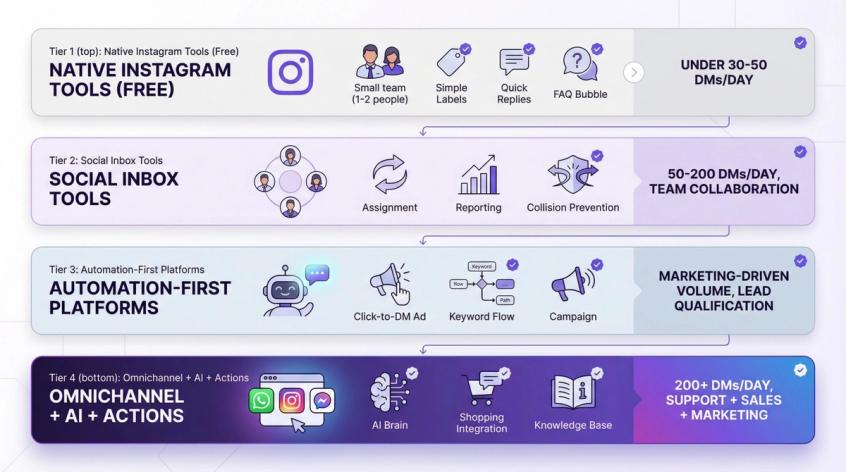
Option A: Native Instagram Tools (Free)
Best when: Under 30-50 DMs/day, mostly simple questions, small team
What you get:
- Labels
- FAQ menu
- Saved replies
- Primary/General/Requests organization
Limitation: Single-user app, no team collaboration, no automation beyond basic FAQs
Option B: Social Inbox Tools (Team Collaboration)
Best when: Multiple agents need to work simultaneously, you handle 50-200 DMs/day
Example platforms:
- Sprout Social (strong social care workflows)
- Zendesk (helpdesk-native, heavier enterprise focus)
- Trengo (omnichannel inbox)
Strength: Assignment, collision prevention, reporting
Limitation: Often light on automation; built more for human handling
Option C: Automation-First Platforms (Marketing-Driven Volume)
Best when: Volume driven by marketing campaigns (reels, comments, click-to-DM ads), need structured lead qualification
Example:
- ManyChat (strong Instagram automation ecosystem, solid compliance documentation)
Strength: Comment-to-DM triggers, keyword flows, campaign integrations
Limitation: Knowledge base training limitations, omnichannel requires separate tools
Option D: Omnichannel Plus AI Agent Plus Actions (Support Plus Sales Plus Marketing)
Best when: You need to automate support AND sales across Instagram, WhatsApp, and web chat with intelligent handoff and e-commerce integrations
Example platforms:
- Respond.io (good channel coverage; note constraints like no broadcasts and message-request limits)
- Spur (shared inbox plus AI agent plus automations plus integrations plus official Meta partnership)
Strength: Unified dashboard, knowledge base AI, actionable automation (order lookup, booking), visual flow builder
Best for: D2C brands, service businesses, agencies managing multiple clients
For deeper automation context, explore business process automation examples and no-code automation tools.
The 7 Questions That Matter When Choosing
Evaluate every platform against these criteria:
- Does it use official OAuth plus official API access (never ask for your Instagram password)?
- Does it enforce 24-hour / 7-day messaging rules correctly?
- Can it handle structured routing (buttons, quick replies, menus)?
- Can it assign conversations and prevent collisions (shared inbox fundamentals)?
- Can it integrate with your commerce/CRM stack (order lookup, ticketing, Shopify, etc.)?
- Can it track real metrics (First Response Time, resolution rate, conversion rate, deflection rate)?
- Does it degrade gracefully during spikes (queuing, rate limits, backpressure management)?
If the answer to any question is "no" or "unclear," that platform will become a bottleneck as you scale.
30-Day Instagram DM Transformation Plan
Don't try to set up everything at once. Phase your transformation over four weeks.
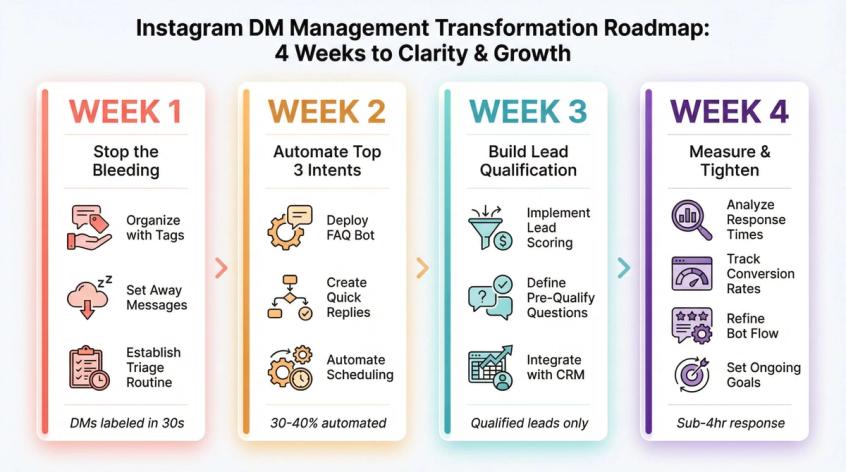
Week 1: Stop the Bleeding
Goal: Create basic structure and discipline
Actions:
- Set up labels system (5 core buckets)
- Create FAQ menu inside Instagram
- Write 15 saved replies for most common questions
- Define SLAs per label type (P0 = 1 hour, P1 = same day, P2 = this week)
- Set up dispatcher triage workflow
Success metric: Every new DM gets labeled within 30 seconds
Week 2: Automate the Top 3 Intents
Goal: Remove repetitive manual work
Actions:
- Build DM Menu automation (Flow 1)
- Build Order Tracking automation (Flow 2)
- Build Returns/Exchange automation (Flow 3)
- Test automation with sample conversations
- Monitor for errors and refine
Success metric: 30-40% of DMs handled without human intervention
Week 3: Build Lead Qualification Plus Handoff
Goal: Capture and route high-value opportunities
Actions:
- Set up click-to-DM ad flow (if running ads)
- Define "qualified lead" criteria (budget, timeline, urgency)
- Create lead qualification flow (Flow 5)
- Train responders on escalation triggers
- Document handoff procedures
Success metric: Sales team receives qualified leads only (not raw "hi" messages)
Week 4: Measure Plus Tighten
Goal: Continuous improvement through data
Actions:
- Review top 20 unanswered questions → update FAQ plus templates
- Measure FRT, resolution rate, conversion rate weekly
- Add e-commerce integration (order lookup, ticketing)
- Set up team performance tracking
- Run spike scenario test
Success metric: Consistent sub-4-hour response times, declining escalation rates
Keep It Personal at Scale
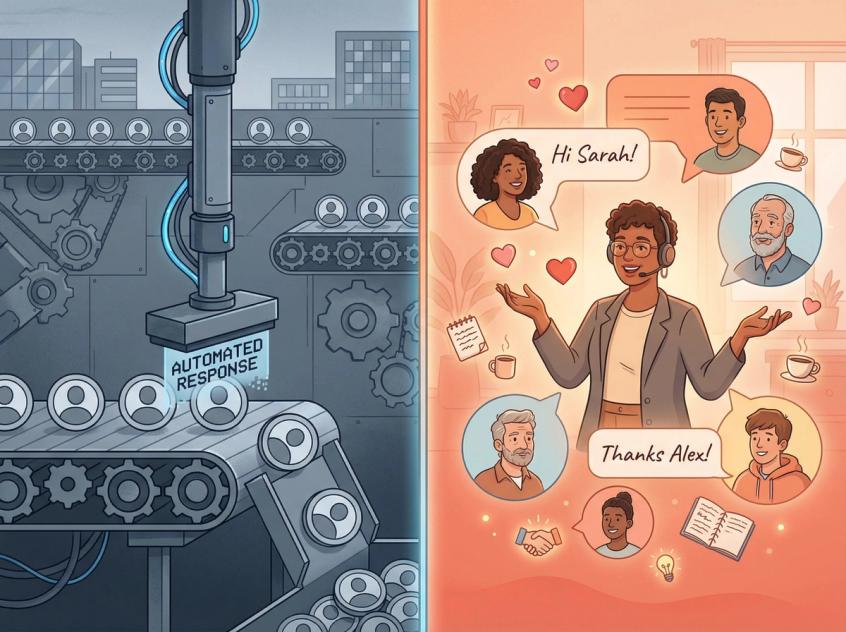
High volume tempts you to treat conversations as numbers on a spreadsheet. Don't.
Each DM is a person reaching out. The beauty of Instagram as a channel is its personal, casual nature. Your challenge: delivering personal touch at scale.
Personalize Wherever Possible
Even when using templates or bots, add human elements:
- Use names: "Hi Alex, thanks for reaching out!" (many automation tools support dynamic name insertion)
- Acknowledge specifics: If they mention loving a product, respond genuinely: "So glad you're loving our XYZ - thank you!"
- Voice notes for VIPs: On critical or high-value conversations, consider short personalized voice notes
Users can tell the difference between canned responses and human vibes. Show you're listening.
Don't Spam or Stalk
Resist the temptation to automate outbound messages to all followers. It violates Instagram rules and annoys users.
Focus on those who contacted you or clearly opted in. If you need to message 50 people (like sending promised coupon codes), slightly vary your responses and send individually (not as a mass group message). Instagram's algorithms flag accounts that copy-paste identically too often.
Respect Privacy and Data
Customers might share personal info (emails, phone numbers, order details) in DMs. Handle it carefully:
- Don't add people to marketing lists without explicit consent
- Don't ask for passwords or overly sensitive data in Instagram DMs
- Use secure payment links rather than asking for card numbers
- Comply with GDPR/privacy laws in your region
Demonstrating responsible data handling builds trust at scale.
Transparency and Tone
If using automation, consider disclosure:
- Bots can introduce themselves: "Hi, I'm your automated assistant here to help!"
- Or remain seamless but hand off immediately when users express dissatisfaction
If someone asks "Are you a bot?", answer honestly and assure them a human will help.
If delays occur, quick apologies work: "Sorry for the wait (we experienced unusually high DM volume today)."
Most people are reasonable when you communicate.
Stay Professional and Empathetic
In large message volumes, you'll encounter all types: confused, angry, overly chatty. Create guidelines for your team (and bots) to always remain calm, courteous, and helpful, even with impatient or rude users.
Use empathetic language:
- "I understand how frustrating that is - let me check this for you"
- "I'm sorry you're experiencing this issue"
Maintain professionalism appropriate to your industry. A fashion brand can be very casual with emojis; a law office might stay more formal.
High volume will stress your team. Encourage breaks to avoid curt replies when overwhelmed. Better to reply slightly later with warmth than shoot off cold responses just to clear the queue.
Provide Smooth Handoffs
If an issue requires phone or email resolution, transition gracefully:
"This might be easier to sort out via email since we'll need detailed documentation. Is it okay if we continue there? My colleague will email you within the hour."
Internally, track these handoffs so they don't vanish. Nothing's worse than a user DMing again: "Hey, no one contacted me like you said."
Turn DM Chaos Into Your Competitive Advantage
High volumes of Instagram DMs might feel chaotic at first, but with the right approach, you transform that chaos into opportunity.
Every unanswered DM is a lost sale or disappointed customer. Every well-handled DM is a chance to create a raving fan or close a deal.
By organizing your inbox, focusing on speed, using automation wisely, and maintaining the human touch, you build a reputation for responsiveness that sets you apart.
Customers choose who to buy from based on who engages best. If a follower messages five brands about a product, they'll likely go with whoever replies first with the most helpful answer. By mastering high-volume DMs, you become that brand.
Brands that actively engage and support customers on social media see significant boosts. One study found companies responding to customers on social experienced a 25% increase in customer advocacy on average.
Remember: Success happens one conversation at a time. Treat each DM as if it's the only one, even when it's one of hundreds. The person on the other end doesn't care how busy you are (they care about how you make them feel in that interaction).
High volume is a great problem to have. It means your marketing and content are resonating. With the tactics from this guide (native Instagram features, intelligent triage, strategic automation, platforms like Spur), you can handle the load and harness it to drive growth.
When that next viral moment or busy season hits and your Instagram inbox explodes, you'll be ready. You have a system. Your team knows the playbook. Your automation handles the repetitive 60-80%. Your humans focus on high-value conversations.
Ready to transform your Instagram DM chaos into your competitive edge? Start your free trial with Spur and see how AI-powered automation plus omnichannel messaging plus team collaboration turns overwhelmed inboxes into revenue-generating machines.
Frequently Asked Questions
There's no universal threshold, but these are practical ranges:
- Low volume: Under 30 DMs/day (native Instagram tools suffice)
- Medium volume: 30-200 DMs/day (needs team workflows plus shared inbox)
- High volume: 200+ DMs/day (requires automation plus AI agents plus integrations)
Volume impact also depends on complexity. 100 simple FAQ questions might need less infrastructure than 50 complex support escalations.
Yes, if you follow Meta's rules:
- Use official API access via approved platforms (those in Meta Partner Directory)
- Only message people who initiated engagement (comment, DM, story reply, ad click)
- Respect the 24-hour messaging window [7]
- Always offer human handoff options
- Never use tools that ask for your Instagram password [12]
Spur is an official Meta Partner, which means our automation complies with platform policies and gets regular updates when rules change.
When someone messages you first (or engages through comments, story replies, or clicks a Click-to-DM ad), you have 24 hours to respond with any message (including promotional content).
After 24 hours, you can still reply manually (human agents have a 7-day window), but automated promotional messages aren't allowed.
This is why speed matters (strike while interest is hot).
Under 30-50 DMs/day, the Instagram app works fine with labels, saved replies, and FAQ menus.
Beyond that, you need:
- Shared inbox (so multiple team members can collaborate without collisions)
- Automation (to handle repetitive questions automatically)
- Integrations (to look up orders, book appointments, create tickets without leaving the conversation)
Platforms like Spur provide all three in one place.
Use a shared inbox with assignment features. When Agent A opens a conversation, it gets assigned to them (manually or automatically). Other agents see it's assigned and don't duplicate effort.
Spur's shared inbox shows assignment status at a glance with views like "Unassigned," "Mine," and "Team."
Meta Business Suite (free) also offers basic multi-agent access, though without advanced features like round-robin assignment or internal notes.
Deflection through self-service:
- Set up Instagram's FAQ menu
- Create Story Highlights with common info (return policy, size charts, tracking steps)
- Deploy an AI agent trained on your knowledge base (answers at 2am when no humans are working)
- Improve your marketing content (if people ask the same question 50 times, address it in your posts/captions)
These reduce volume by answering questions before humans get involved.
Both.
Use automation for:
- High-frequency, low-complexity questions (order status, hours, pricing)
- Initial triage and routing (DM menu)
- Lead qualification (collecting budget, timeline, contact info)
Use humans for:
- Complex issues (damaged products, refund disputes)
- High-value sales conversations
- Anything requiring empathy or nuanced judgment
- When automation fails or user requests "talk to a human"
The ideal ratio: automation handles 60-80% of volume, humans focus on the high-value 20-40%.
Spur provides:
- Shared inbox across Instagram, WhatsApp, Facebook, and live chat
- AI agents trained on your knowledge base (not just keyword matching)
- E-commerce integrations (Shopify order lookup directly in DMs)
- Visual automation builder (no coding required)
- Click-to-DM ad optimization with conversion tracking
- Comment-to-DM automation for viral moments
- Team collaboration features (assignment, internal notes, views)
It's specifically designed for D2C brands, service businesses, and agencies managing high message volumes across multiple channels.
Follow these rules to avoid restrictions:
- 24-hour window: You can send promotional messages within 24 hours of user engagement
- No unsolicited messages: Only DM people who messaged you first, commented, or clicked an ad
- Rate limits: Respect Instagram's ~200 automated messages/hour guideline
- Human handoff: Always provide a way for users to reach a human agent
- Official API only: Never use tools that ask for your Instagram password
- No broadcasts: Instagram API doesn't support mass unsolicited broadcasts
Spur enforces these automatically, so you can't accidentally violate rules.
Track these metrics weekly:
- First Response Time (FRT): How quickly do you reply?
- Resolution Rate: What percentage of issues get solved vs. escalated?
- Deflection Rate: How many questions does automation answer without human help?
- Conversion Rate: For sales teams, how many DM conversations become purchases?
- Team Utilization: Are agents overloaded or efficiently distributed?
Compare month-over-month to spot trends. Declining FRT = good. Increasing resolution rate = good. Rising deflection rate (via automation) = excellent.
Sources
The pages this article links out to, in the order they appear.
- Policy overview developers.facebook.com
Was this article useful?